phone FORD BRONCO SPORT 2023 User Guide
[x] Cancel search | Manufacturer: FORD, Model Year: 2023, Model line: BRONCO SPORT, Model: FORD BRONCO SPORT 2023Pages: 516, PDF Size: 14.27 MB
Page 83 of 516
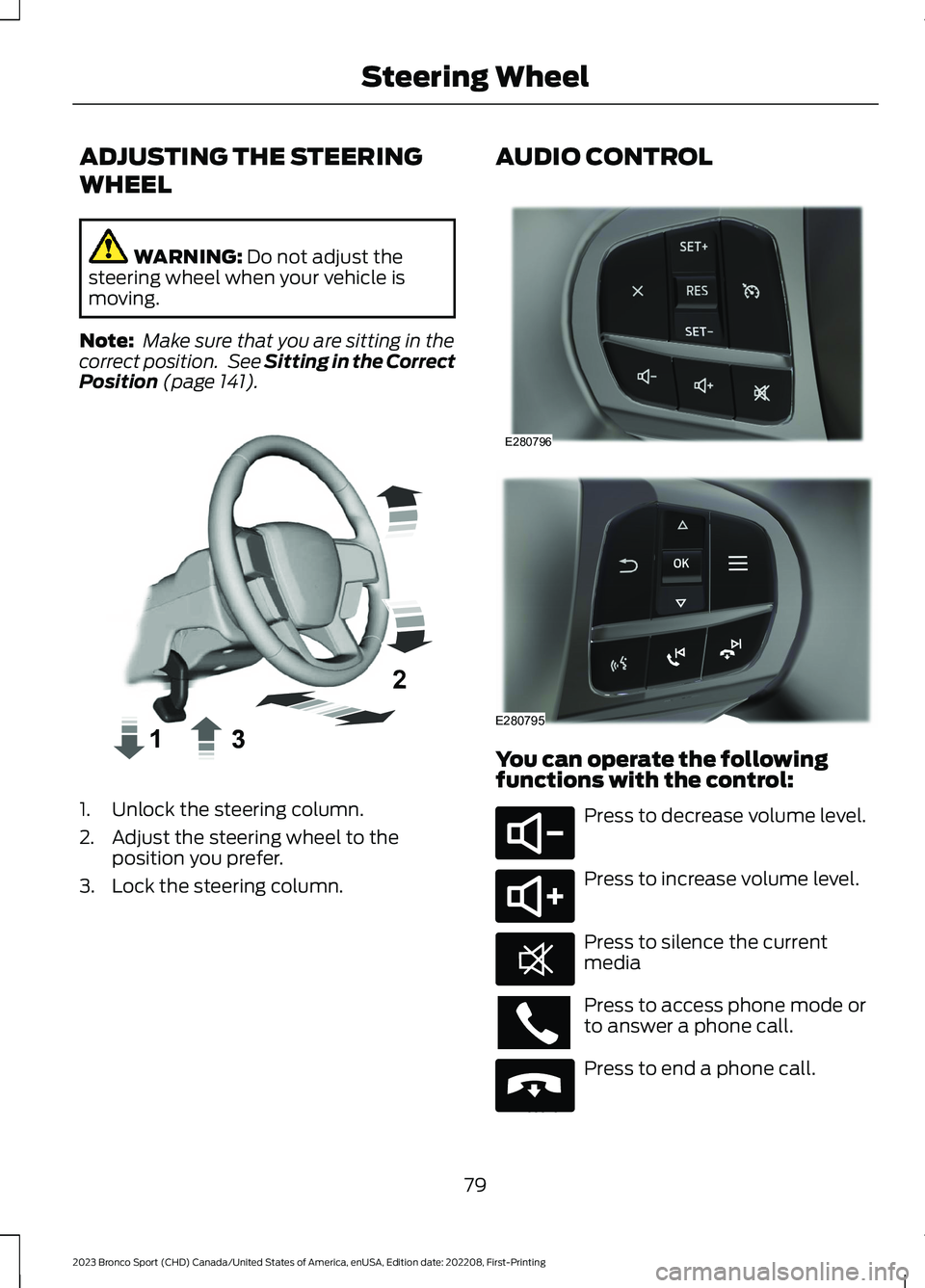
ADJUSTING THE STEERING
WHEEL
WARNING: Do not adjust thesteering wheel when your vehicle ismoving.
Note: Make sure that you are sitting in thecorrect position. See Sitting in the CorrectPosition (page 141).
1.Unlock the steering column.
2.Adjust the steering wheel to theposition you prefer.
3.Lock the steering column.
AUDIO CONTROL
You can operate the followingfunctions with the control:
Press to decrease volume level.
Press to increase volume level.
Press to silence the currentmedia
Press to access phone mode orto answer a phone call.
Press to end a phone call.
79
2023 Bronco Sport (CHD) Canada/United States of America, enUSA, Edition date: 202208, First-PrintingSteering WheelE359744 E280796 E280795 E280802 E280803 E268549 E265040
Page 110 of 516
Audio
Audio
Menu options covered in the SYNC chapter. See General Information (page 365).
Phone
Phone
Menu options covered in the SYNC chapter. See General Information (page 365).
Settings
Settings
Contains vehicle status information.Select Your Setting.Information
Select Your SettingLanguageDisplay
Measure unit
Temperature unit
Tire Pressure
Select Your SettingDriver Assistance
Select Your SettingOil LevelVehicle Maintenance
Oil Life
Brake Fluid Life
Tire Pressure
MyKey InfoMyKey
Create MyKey
Note:Additional vehicle settings areavailable through your touchscreen. SeeSettings (page 393).
6 Inch Display Menu
This icon shows the features onor off status. A check in the boxindicates the feature is on, andunchecked indicates the feature is off.
106
2023 Bronco Sport (CHD) Canada/United States of America, enUSA, Edition date: 202208, First-PrintingInformation DisplaysE204495
Page 111 of 516
Note:Some options could appear slightlydifferent or not at all if the items areoptional.
Note:Some MyKey menu options onlyappear if MyKey is enabled and at least oneMyKey is programmed.
Select Screens
Select Screens
Menu options covered in Personalized Settings. See Personalized Settings (page108).
Audio
Audio
Menu options covered in the SYNC chapter. See General Information (page 365).
Navigation
Navigation
Menu options covered in the SYNC chapter. See General Information (page 365).
Phone
Phone
Menu options covered in the SYNC chapter. See General Information (page 365).
Settings
Settings
Percent Oil Life Indication XXX%Hold Ok to ResetOil Life
Hold Ok to ResetTire Monitor
Note:Additional vehicle settings areavailable through your touchscreen. SeeSettings (page 393).
107
2023 Bronco Sport (CHD) Canada/United States of America, enUSA, Edition date: 202208, First-PrintingInformation Displays
Page 169 of 516
GENERAL INFORMATION
WARNING: Extended idling at highengine speeds can produce very hightemperatures in the engine and exhaustsystem, creating the risk of fire or otherdamage.
WARNING: Do not park, idle ordrive your vehicle on dry grass or otherdry ground cover. The emission systemheats up the engine compartment andexhaust system, creating the risk of fire.
WARNING: Do not start the enginein a closed garage or in other enclosedareas. Exhaust fumes are toxic. Alwaysopen the garage door before you startthe engine. Failure to follow thisinstruction could result in personal injuryor death.
WARNING: Exhaust leaks mayresult in entry of harmful and potentiallylethal fumes into the passengercompartment. If you smell exhaustfumes inside your vehicle, have yourvehicle inspected immediately. Do notdrive if you smell exhaust fumes.
If you disconnect the battery, your vehiclemay exhibit some unusual drivingcharacteristics for approximately 6 mi(10 km) after you reconnect it. This isbecause the engine management systemmust realign itself with the engine. You candisregard any unusual drivingcharacteristics during this period.
The powertrain control system meets allCanadian interference-causing equipmentstandard requirements regulating theimpulse electrical field or radio noise.
When you start the engine, avoid pressingthe accelerator pedal before and duringoperation. Only use the accelerator pedalwhen you have difficulty starting theengine.
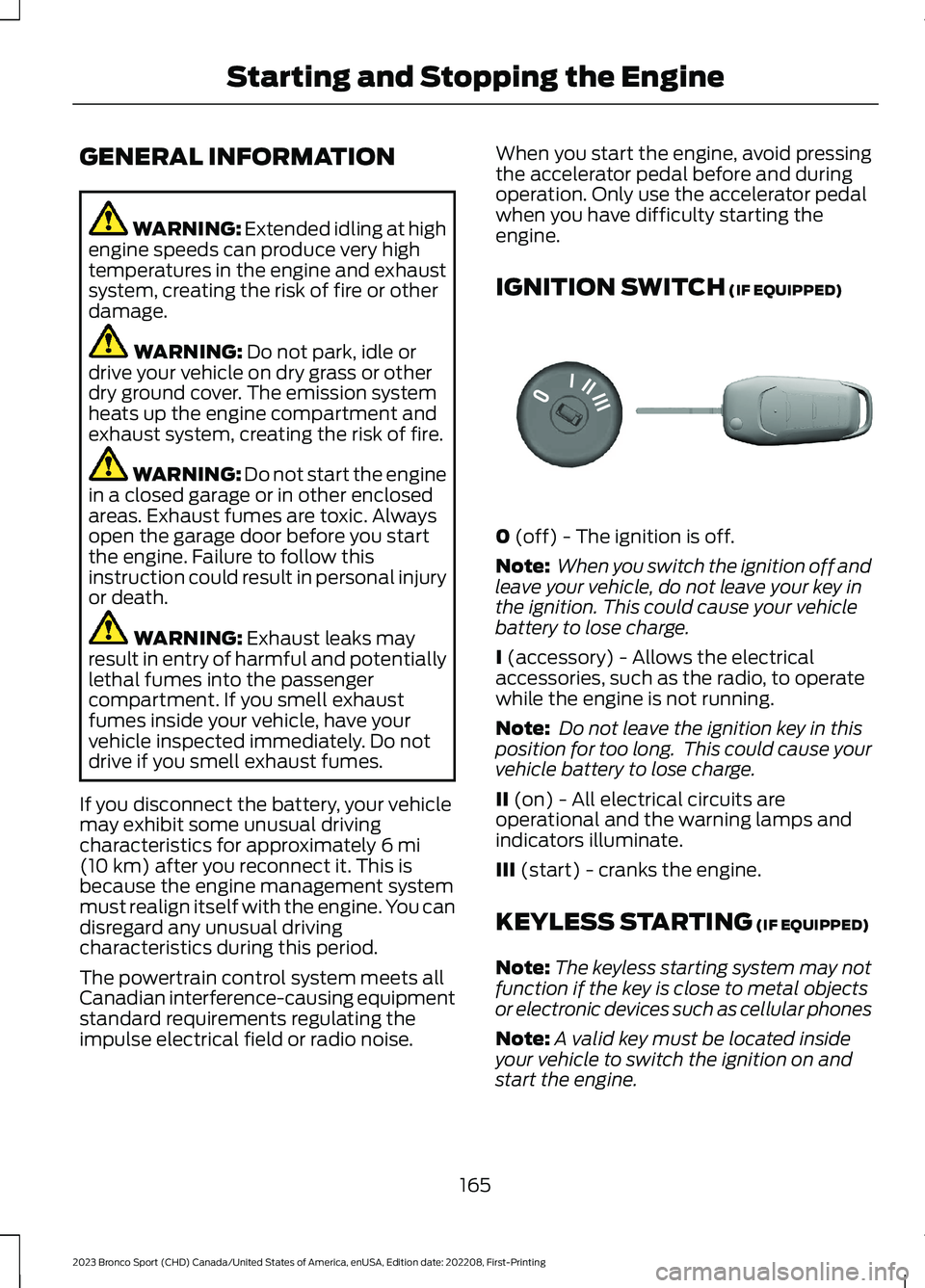
IGNITION SWITCH (IF EQUIPPED)
0 (off) - The ignition is off.
Note: When you switch the ignition off andleave your vehicle, do not leave your key inthe ignition. This could cause your vehiclebattery to lose charge.
I (accessory) - Allows the electricalaccessories, such as the radio, to operatewhile the engine is not running.
Note: Do not leave the ignition key in thisposition for too long. This could cause yourvehicle battery to lose charge.
II (on) - All electrical circuits areoperational and the warning lamps andindicators illuminate.
III (start) - cranks the engine.
KEYLESS STARTING (IF EQUIPPED)
Note:The keyless starting system may notfunction if the key is close to metal objectsor electronic devices such as cellular phones
Note:A valid key must be located insideyour vehicle to switch the ignition on andstart the engine.
165
2023 Bronco Sport (CHD) Canada/United States of America, enUSA, Edition date: 202208, First-PrintingStarting and Stopping the EngineE304650
Page 177 of 516
SAFETY PRECAUTIONS
WARNING: Do not overfill the fueltank. The pressure in an overfilled tankmay cause leakage and lead to fuel sprayand fire.
WARNING: The fuel system maybe under pressure. If you hear a hissingsound near the fuel filler inlet, do notrefuel until the sound stops. Otherwise,fuel may spray out, which could causeserious personal injury.
WARNING: Fuels can cause seriousinjury or death if misused or mishandled.
WARNING: Fuel may containbenzene, which is a cancer-causingagent.
WARNING: When refueling alwaysshut the engine off and never allowsparks or open flames near the fuel tankfiller valve. Never smoke or use a cellphone while refueling. Fuel vapor isextremely hazardous under certainconditions. Avoid inhaling excess fumes.
Follow these guidelines when refueling:
•Extinguish all smoking materials andany open flames before refueling yourvehicle.
•Always switch the engine off beforerefueling.
•Automotive fuels can be harmful orfatal if swallowed. Fuel is highly toxicand if swallowed can cause death orpermanent injury. If fuel is swallowedimmediately call a physician, even if nosymptoms are immediately apparent.The toxic effects of fuel may not beapparent for hours.
•Avoid inhaling fuel vapors. Inhaling fuelvapor can lead to eye and respiratorytract irritation. In severe cases,excessive or prolonged breathing offuel vapor can cause serious illness andpermanent injury.
•Avoid getting fuel in your eyes. If yousplash fuel in your eyes, immediatelyremove contact lenses (if worn), flushwith water for 15 minutes and seekmedical attention. Failure to seekproper medical attention could lead topermanent injury.
•Fuels can be harmful if absorbedthrough the skin. If you splash fuel onyour skin, clothing or both, promptlyremove contaminated clothing andthoroughly wash your skin with soapand water. Repeated or prolonged skincontact causes skin irritation.
•Be particularly careful if you are takingAntabuse or other forms of Disulfiramfor the treatment of alcoholism.Breathing fuel vapors could cause anadverse reaction, serious personalinjury or sickness. Immediately call aphysician if you experience any adversereactions.
FUEL QUALITY
Choosing the Right Fuel
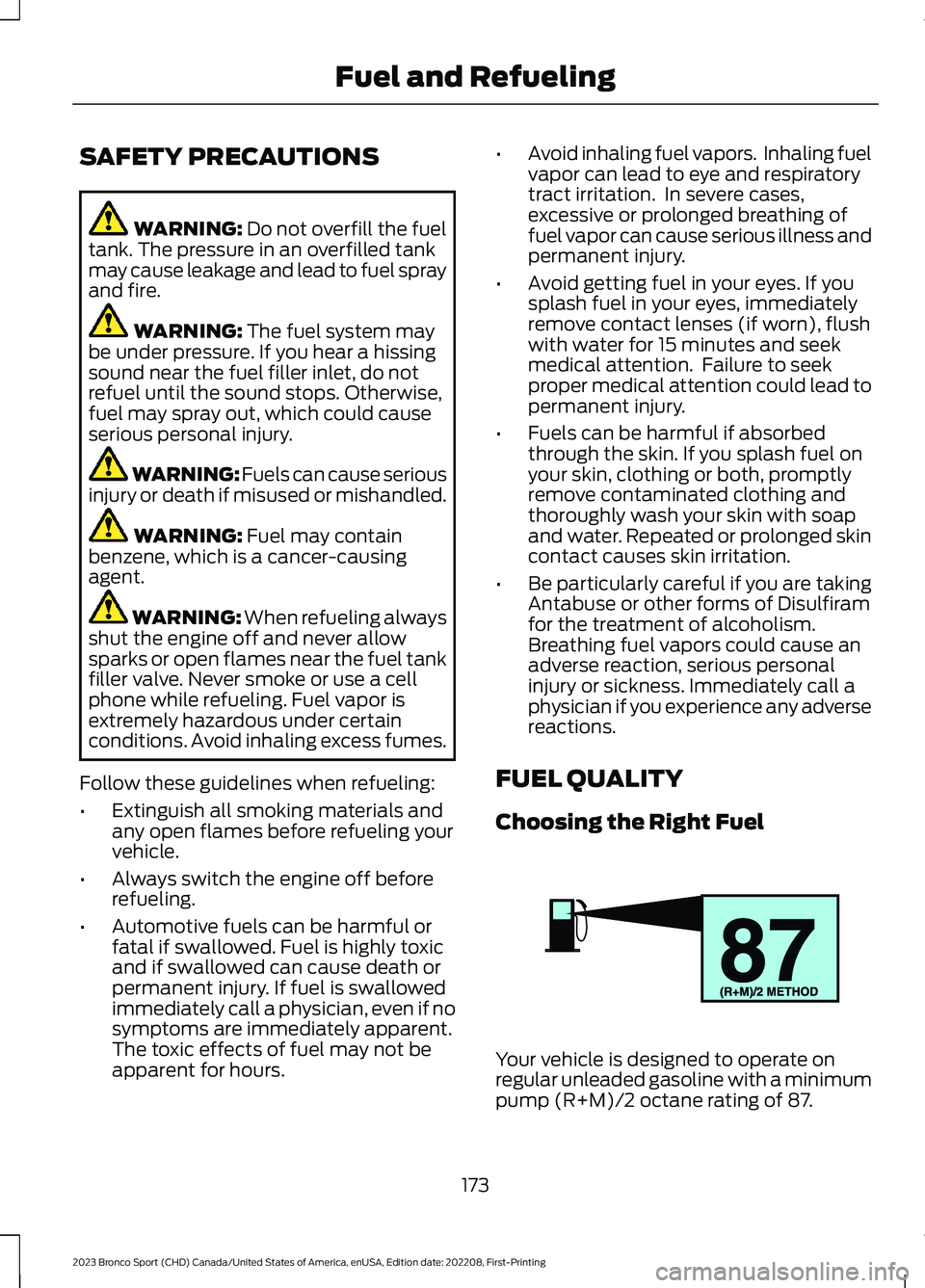
Your vehicle is designed to operate onregular unleaded gasoline with a minimumpump (R+M)/2 octane rating of 87.
173
2023 Bronco Sport (CHD) Canada/United States of America, enUSA, Edition date: 202208, First-PrintingFuel and RefuelingE161513
Page 180 of 516
REFUELING
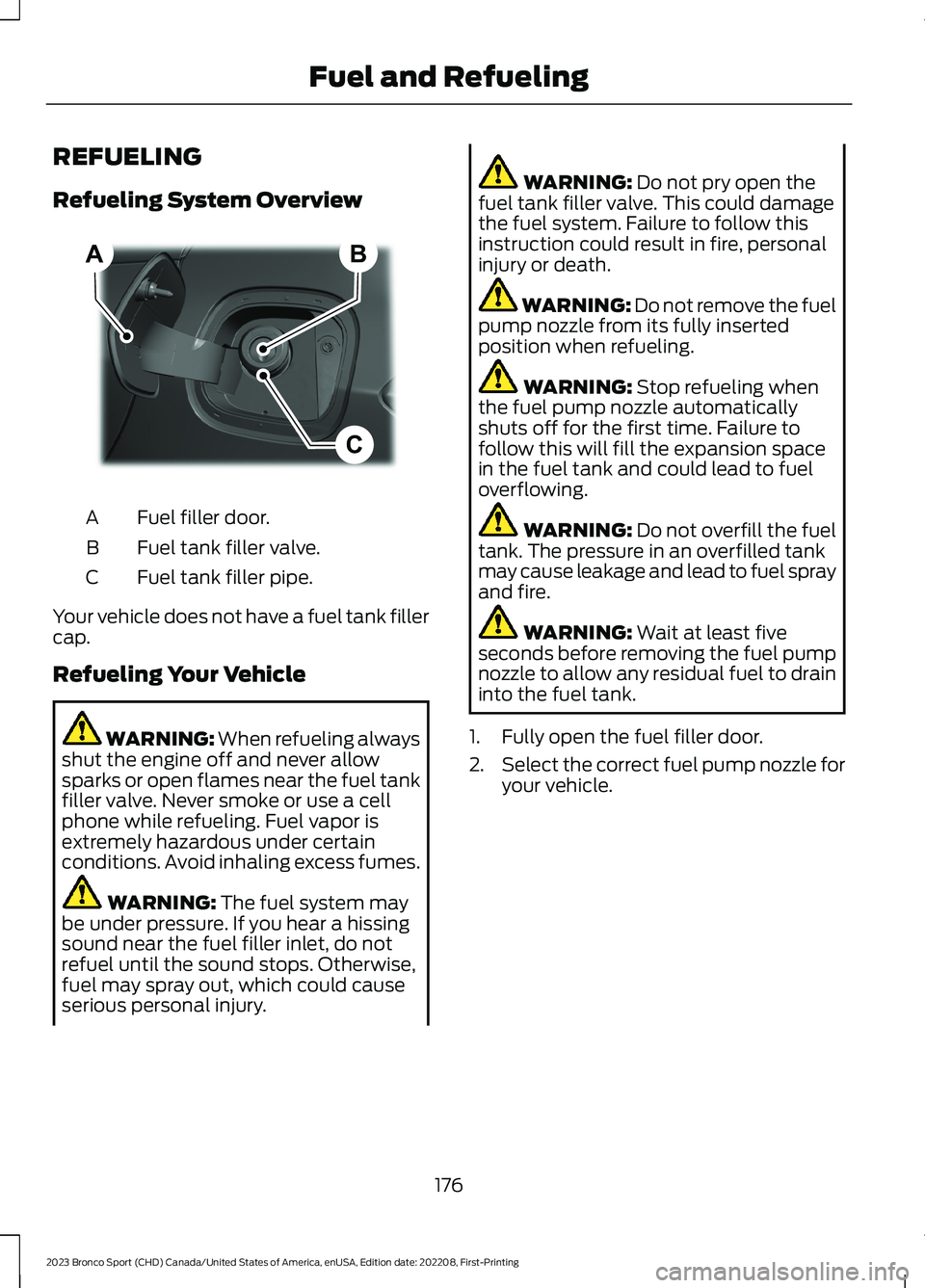
Refueling System Overview
Fuel filler door.A
Fuel tank filler valve.B
Fuel tank filler pipe.C
Your vehicle does not have a fuel tank fillercap.
Refueling Your Vehicle
WARNING: When refueling alwaysshut the engine off and never allowsparks or open flames near the fuel tankfiller valve. Never smoke or use a cellphone while refueling. Fuel vapor isextremely hazardous under certainconditions. Avoid inhaling excess fumes.
WARNING: The fuel system maybe under pressure. If you hear a hissingsound near the fuel filler inlet, do notrefuel until the sound stops. Otherwise,fuel may spray out, which could causeserious personal injury.
WARNING: Do not pry open thefuel tank filler valve. This could damagethe fuel system. Failure to follow thisinstruction could result in fire, personalinjury or death.
WARNING: Do not remove the fuelpump nozzle from its fully insertedposition when refueling.
WARNING: Stop refueling whenthe fuel pump nozzle automaticallyshuts off for the first time. Failure tofollow this will fill the expansion spacein the fuel tank and could lead to fueloverflowing.
WARNING: Do not overfill the fueltank. The pressure in an overfilled tankmay cause leakage and lead to fuel sprayand fire.
WARNING: Wait at least fiveseconds before removing the fuel pumpnozzle to allow any residual fuel to draininto the fuel tank.
1.Fully open the fuel filler door.
2.Select the correct fuel pump nozzle foryour vehicle.
176
2023 Bronco Sport (CHD) Canada/United States of America, enUSA, Edition date: 202208, First-PrintingFuel and RefuelingBCA E267248
Page 264 of 516
OFF-ROAD DRIVING
WHAT IS OFF-ROAD DRIVING
Off-road driving is driving your vehicle onunsurfaced roads or trails, made from dirt,rocks, sand and mud.
Your vehicle has been designed andequipped to explore those places wherethe road cannot take you, whether youchoose a forest trail or the open desert.
OFF-ROAD DRIVINGPRECAUTIONS
WARNING: If you continue to driveyour vehicle when the engine isoverheating, the engine could stopwithout warning. Failure to follow thisinstruction could result in the loss ofcontrol of your vehicle.
Before going off-road, consult with yourlocal governmental agencies to determinedesignated off-road trails and recreationareas. Also, be sure to understand anyoff-road vehicle registration requirementsfor the area in which you plan on driving.
Tread Lightly is an educational programdesigned to increase public awareness ofland-use regulations and responsibilitiesin our nation’s wilderness areas. The U.S.Forest Service and Bureau of LandManagement is encouraging you to helppreserve our national forest and otherpublic and private lands by treading lightly.
Before taking your vehicle off-road,perform a basic vehicle inspection to makesure the vehicle is in top working condition.
Before you venture off road, have a clearmental picture of the underside of yourvehicle. Learn the location of any lowhanging items and any skid plates that maybe on the vehicle. You can avoid snaggingthem on rocks and other obstacles if youknow where they are.
Memorizing some basic dimensions helpsyou confidently deal with off-roadobstacles. Get to know your vehicle’sheight and width, its lowest point, itswading depth and angles. Familiarizeyourself with your vehicle’s on-boardtechnology features.
We recommend driving at least twovehicles when driving off-road. The buddysystem helps make sure that help is closeat hand should a vehicle become stuck ordamaged.
We recommend taking supplies such as afirst aid kit, supply of water, tow strap andcell or satellite phone with you any timeyou plan an off-road excursion.
Note:Remove the front license plate beforeoff-road driving to achieve optimalperformance.
BASIC OFF-ROAD DRIVINGTECHNIQUES
Grip the steering wheel with your thumbson the outside of the rim. This reduces therisk of injury due to abrupt steering wheelmotions that occur when negotiating roughterrain.
Control your throttle, brake and steeringinputs in a smooth manner. Sudden inputsto the controls can cause a loss of tractionfor the vehicle, especially when on slopedterrain or crossing obstacles such as rocksor logs.
260
2023 Bronco Sport (CHD) Canada/United States of America, enUSA, Edition date: 202208, First-PrintingDriving Hints
Page 360 of 516
VEHICLE WI-FI HOTSPOT –
TROUBLESHOOTING
VEHICLE WI-FI HOTSPOT –FREQUENTLY ASKED QUESTIONS
Why can I not see the Wi-Fi hotspotname when I search for Wi-Finetworks on my cell phone or otherdevice?
•Make sure Wi-Fi hotspot visibility is on.
•The system does not provide a Wi-Fihotspot at this time.
356
2023 Bronco Sport (CHD) Canada/United States of America, enUSA, Edition date: 202208, First-PrintingVehicle Wi-Fi Hotspot (If Equipped)
Page 369 of 516
GENERAL INFORMATION
WARNING: Driving while distractedcan result in loss of vehicle control, crashand injury. We strongly recommend thatyou use extreme caution when using anydevice that may take your focus off theroad. Your primary responsibility is thesafe operation of your vehicle. Werecommend against the use of anyhand-held device while driving andencourage the use of voice-operatedsystems when possible. Make sure youare aware of all applicable local lawsthat may affect the use of electronicdevices while driving.
About SYNC
The system allows you to interact with theentertainment, information andcommunication systems on your vehicleusing voice commands and a touchscreen.The system provides easy interaction withaudio, phone, navigation, mobile apps andsettings.
Note:You can switch the system on anduse it for up to an hour without switchingthe ignition on.
Note:You can use the system after youswitch the ignition off for up to 10 minutesor until you open a door.
Note:For your safety, some features arespeed-dependent. Their use is limited towhen your vehicle speed is less than 3 mph(5 km/h).
Using the Touchscreen
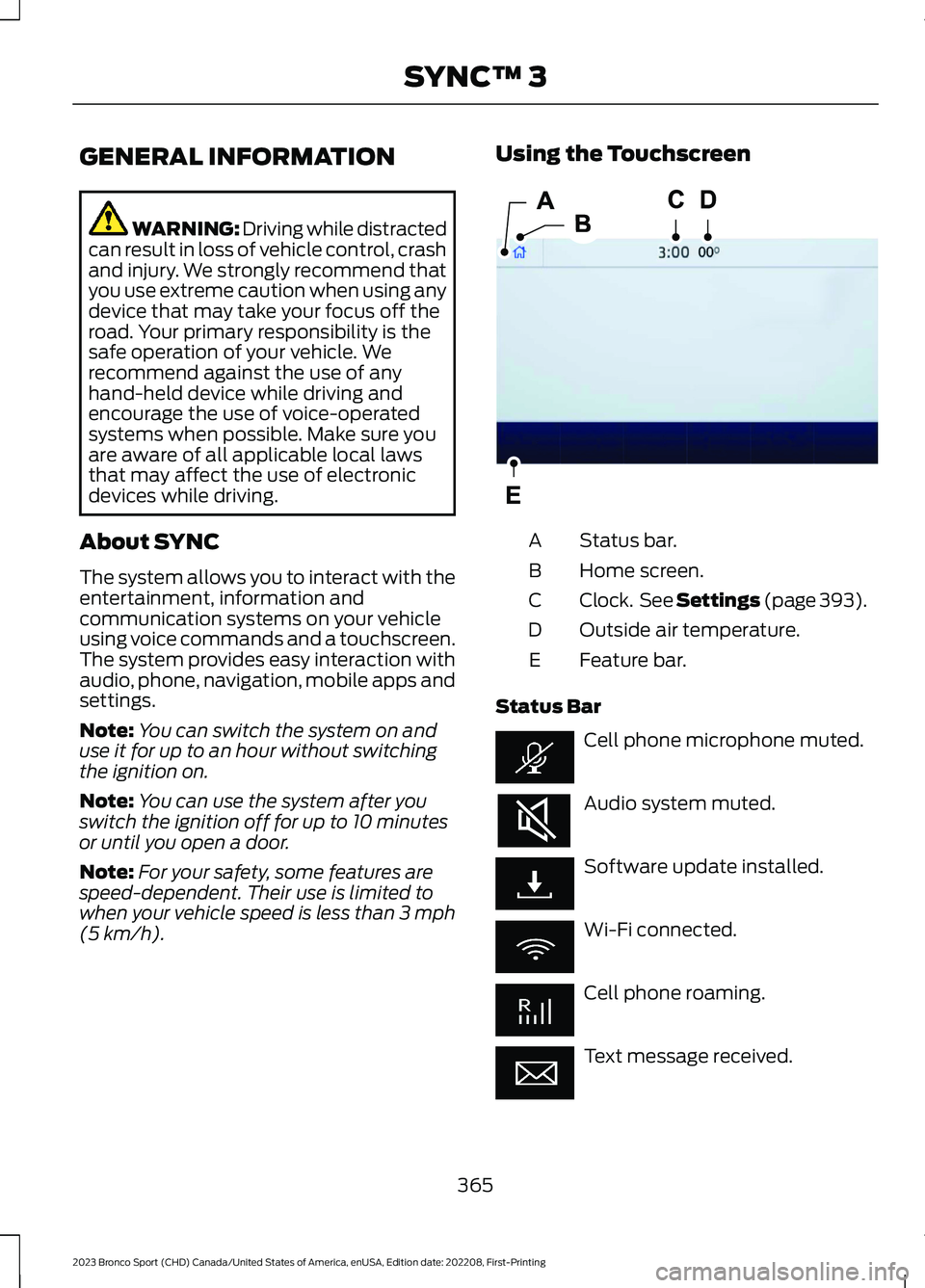
Status bar.A
Home screen.B
Clock. See Settings (page 393).C
Outside air temperature.D
Feature bar.E
Status Bar
Cell phone microphone muted.
Audio system muted.
Software update installed.
Wi-Fi connected.
Cell phone roaming.
Text message received.
365
2023 Bronco Sport (CHD) Canada/United States of America, enUSA, Edition date: 202208, First-PrintingSYNC™ 3E293823
Page 370 of 516
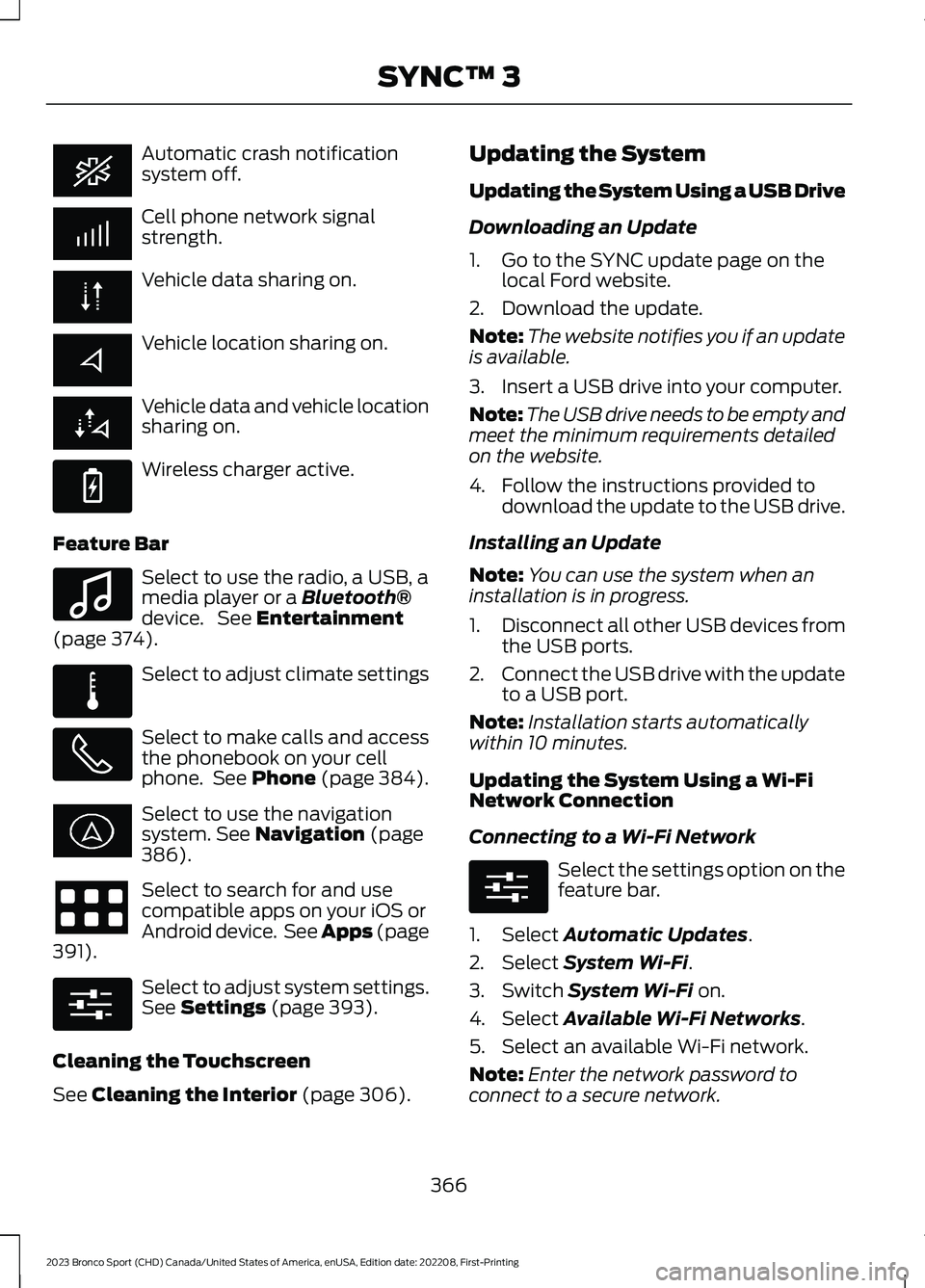
Automatic crash notificationsystem off.
Cell phone network signalstrength.
Vehicle data sharing on.
Vehicle location sharing on.
Vehicle data and vehicle locationsharing on.
Wireless charger active.
Feature Bar
Select to use the radio, a USB, amedia player or a Bluetooth®device. See Entertainment(page 374).
Select to adjust climate settings
Select to make calls and accessthe phonebook on your cellphone. See Phone (page 384).
Select to use the navigationsystem. See Navigation (page386).
Select to search for and usecompatible apps on your iOS orAndroid device. See Apps (page391).
Select to adjust system settings.See Settings (page 393).
Cleaning the Touchscreen
See Cleaning the Interior (page 306).
Updating the System
Updating the System Using a USB Drive
Downloading an Update
1.Go to the SYNC update page on thelocal Ford website.
2.Download the update.
Note:The website notifies you if an updateis available.
3.Insert a USB drive into your computer.
Note:The USB drive needs to be empty andmeet the minimum requirements detailedon the website.
4.Follow the instructions provided todownload the update to the USB drive.
Installing an Update
Note:You can use the system when aninstallation is in progress.
1.Disconnect all other USB devices fromthe USB ports.
2.Connect the USB drive with the updateto a USB port.
Note:Installation starts automaticallywithin 10 minutes.
Updating the System Using a Wi-FiNetwork Connection
Connecting to a Wi-Fi Network
Select the settings option on thefeature bar.
1.Select Automatic Updates.
2.Select System Wi-Fi.
3.Switch System Wi-Fi on.
4.Select Available Wi-Fi Networks.
5.Select an available Wi-Fi network.
Note:Enter the network password toconnect to a secure network.
366
2023 Bronco Sport (CHD) Canada/United States of America, enUSA, Edition date: 202208, First-PrintingSYNC™ 3 E263583 E100027 E283811 E280315 E280315