light FORD BRONCO SPORT 2023 Manual Online
[x] Cancel search | Manufacturer: FORD, Model Year: 2023, Model line: BRONCO SPORT, Model: FORD BRONCO SPORT 2023Pages: 516, PDF Size: 14.27 MB
Page 333 of 516
Check the tire pressureperiodically (at least monthly)using an accurate tire gauge. SeeWhen Inflating Your Tires in thischapter.
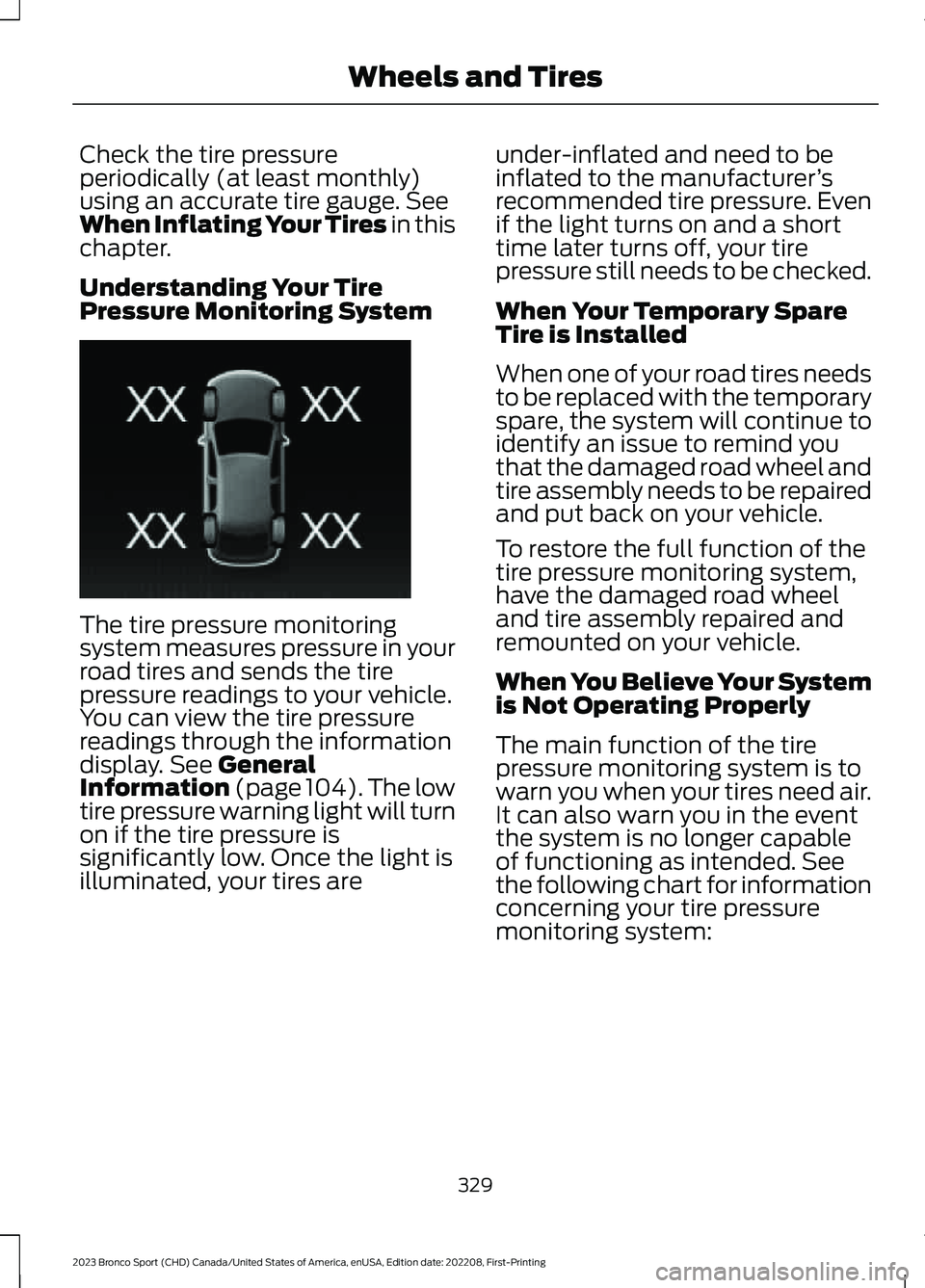
Understanding Your TirePressure Monitoring System
The tire pressure monitoringsystem measures pressure in yourroad tires and sends the tirepressure readings to your vehicle.You can view the tire pressurereadings through the informationdisplay. See GeneralInformation (page 104).The lowtire pressure warning light will turnon if the tire pressure issignificantly low. Once the light isilluminated, your tires are
under-inflated and need to beinflated to the manufacturer’srecommended tire pressure. Evenif the light turns on and a shorttime later turns off, your tirepressure still needs to be checked.
When Your Temporary SpareTire is Installed
When one of your road tires needsto be replaced with the temporaryspare, the system will continue toidentify an issue to remind youthat the damaged road wheel andtire assembly needs to be repairedand put back on your vehicle.
To restore the full function of thetire pressure monitoring system,have the damaged road wheeland tire assembly repaired and
remounted on your vehicle.
When You Believe Your Systemis Not Operating Properly
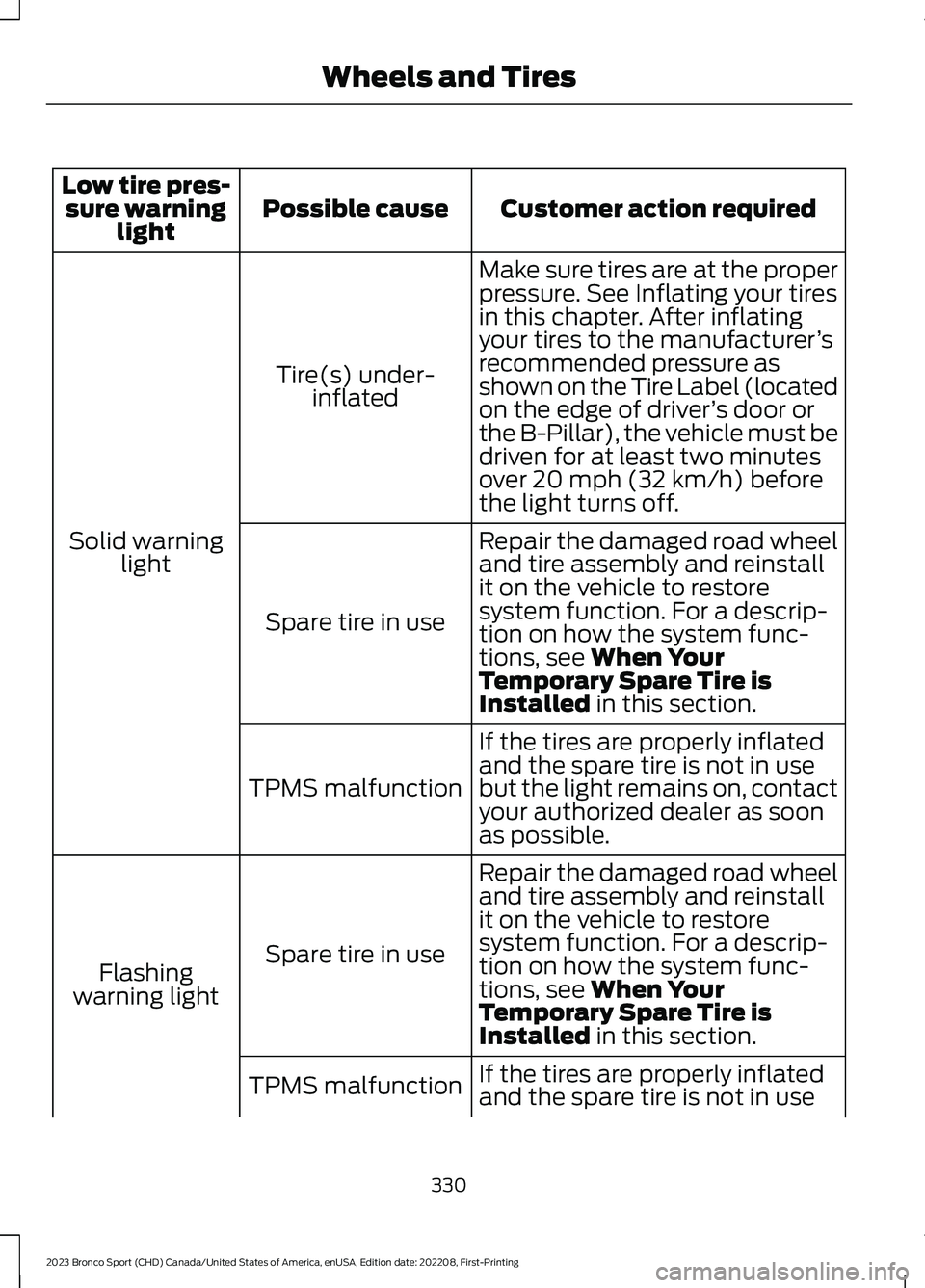
The main function of the tirepressure monitoring system is towarn you when your tires need air.It can also warn you in the eventthe system is no longer capableof functioning as intended. Seethe following chart for informationconcerning your tire pressuremonitoring system:
329
2023 Bronco Sport (CHD) Canada/United States of America, enUSA, Edition date: 202208, First-PrintingWheels and TiresE250820
Page 334 of 516
Customer action requiredPossible causeLow tire pres-sure warninglight
Make sure tires are at the properpressure. See Inflating your tiresin this chapter. After inflatingyour tires to the manufacturer’srecommended pressure asshown on the Tire Label (locatedon the edge of driver’s door orthe B-Pillar), the vehicle must bedriven for at least two minutesover 20 mph (32 km/h) beforethe light turns off.
Tire(s) under-inflated
Solid warninglightRepair the damaged road wheeland tire assembly and reinstallit on the vehicle to restoresystem function. For a descrip-tion on how the system func-tions, see When YourTemporary Spare Tire isInstalled in this section.
Spare tire in use
If the tires are properly inflatedand the spare tire is not in usebut the light remains on, contactyour authorized dealer as soonas possible.
TPMS malfunction
Repair the damaged road wheeland tire assembly and reinstallit on the vehicle to restoresystem function. For a descrip-tion on how the system func-tions, see When YourTemporary Spare Tire isInstalled in this section.
Spare tire in useFlashingwarning light
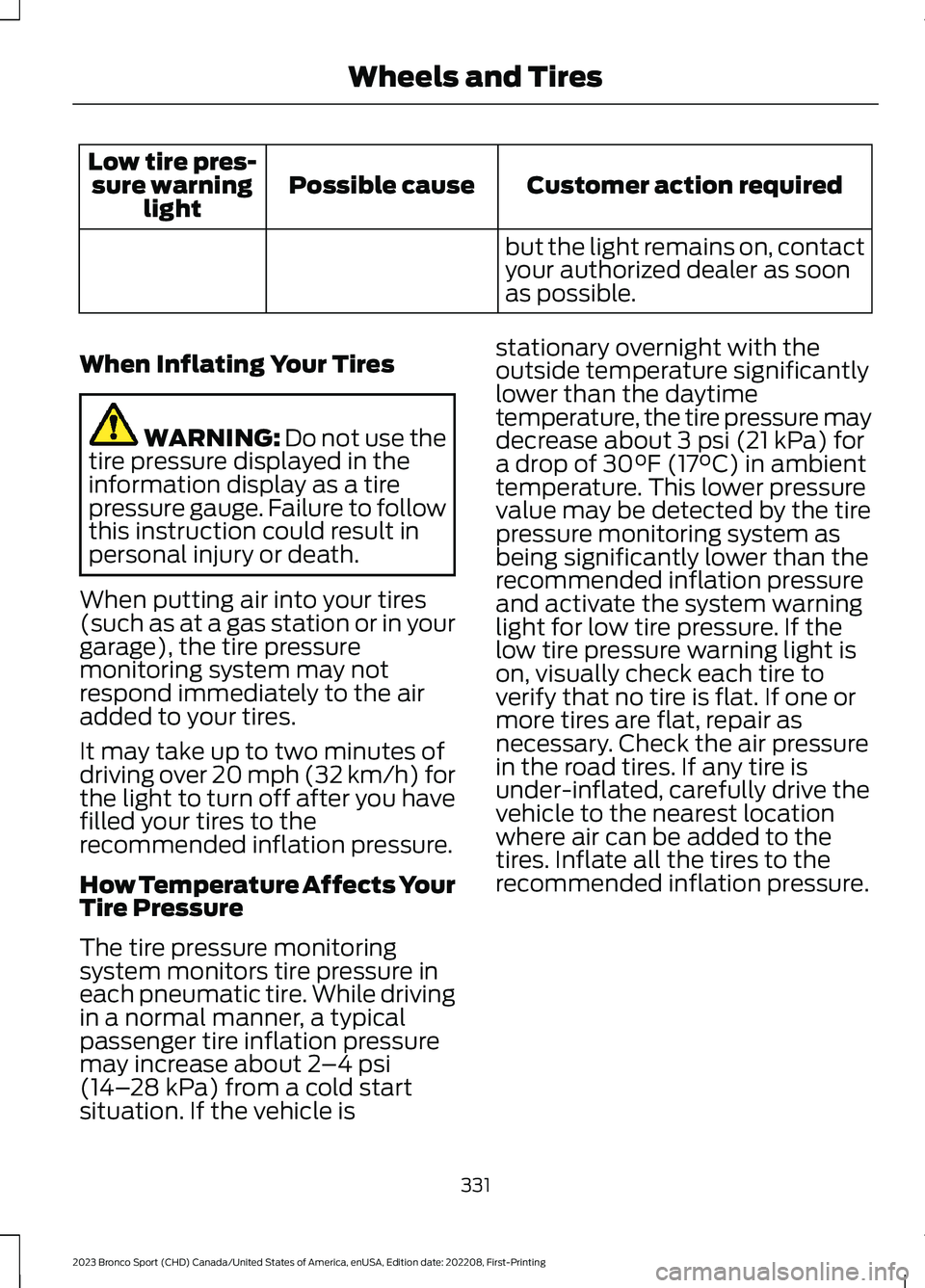
If the tires are properly inflated
and the spare tire is not in useTPMS malfunction
330
2023 Bronco Sport (CHD) Canada/United States of America, enUSA, Edition date: 202208, First-PrintingWheels and Tires
Page 335 of 516
Customer action requiredPossible causeLow tire pres-sure warninglight
but the light remains on, contactyour authorized dealer as soonas possible.
When Inflating Your Tires
WARNING: Do not use thetire pressure displayed in theinformation display as a tirepressure gauge. Failure to followthis instruction could result inpersonal injury or death.
When putting air into your tires(such as at a gas station or in yourgarage), the tire pressuremonitoring system may notrespond immediately to the airadded to your tires.
It may take up to two minutes ofdriving over 20 mph (32 km/h) forthe light to turn off after you havefilled your tires to therecommended inflation pressure.
How Temperature Affects YourTire Pressure
The tire pressure monitoringsystem monitors tire pressure ineach pneumatic tire. While drivingin a normal manner, a typicalpassenger tire inflation pressuremay increase about 2–4 psi(14–28 kPa) from a cold startsituation. If the vehicle is
stationary overnight with theoutside temperature significantlylower than the daytimetemperature, the tire pressure maydecrease about 3 psi (21 kPa) fora drop of 30°F (17°C) in ambienttemperature. This lower pressurevalue may be detected by the tirepressure monitoring system asbeing significantly lower than therecommended inflation pressureand activate the system warninglight for low tire pressure. If thelow tire pressure warning light ison, visually check each tire toverify that no tire is flat. If one ormore tires are flat, repair asnecessary. Check the air pressurein the road tires. If any tire isunder-inflated, carefully drive thevehicle to the nearest locationwhere air can be added to thetires. Inflate all the tires to therecommended inflation pressure.
331
2023 Bronco Sport (CHD) Canada/United States of America, enUSA, Edition date: 202208, First-PrintingWheels and Tires
Page 336 of 516
CHANGING A ROAD WHEEL
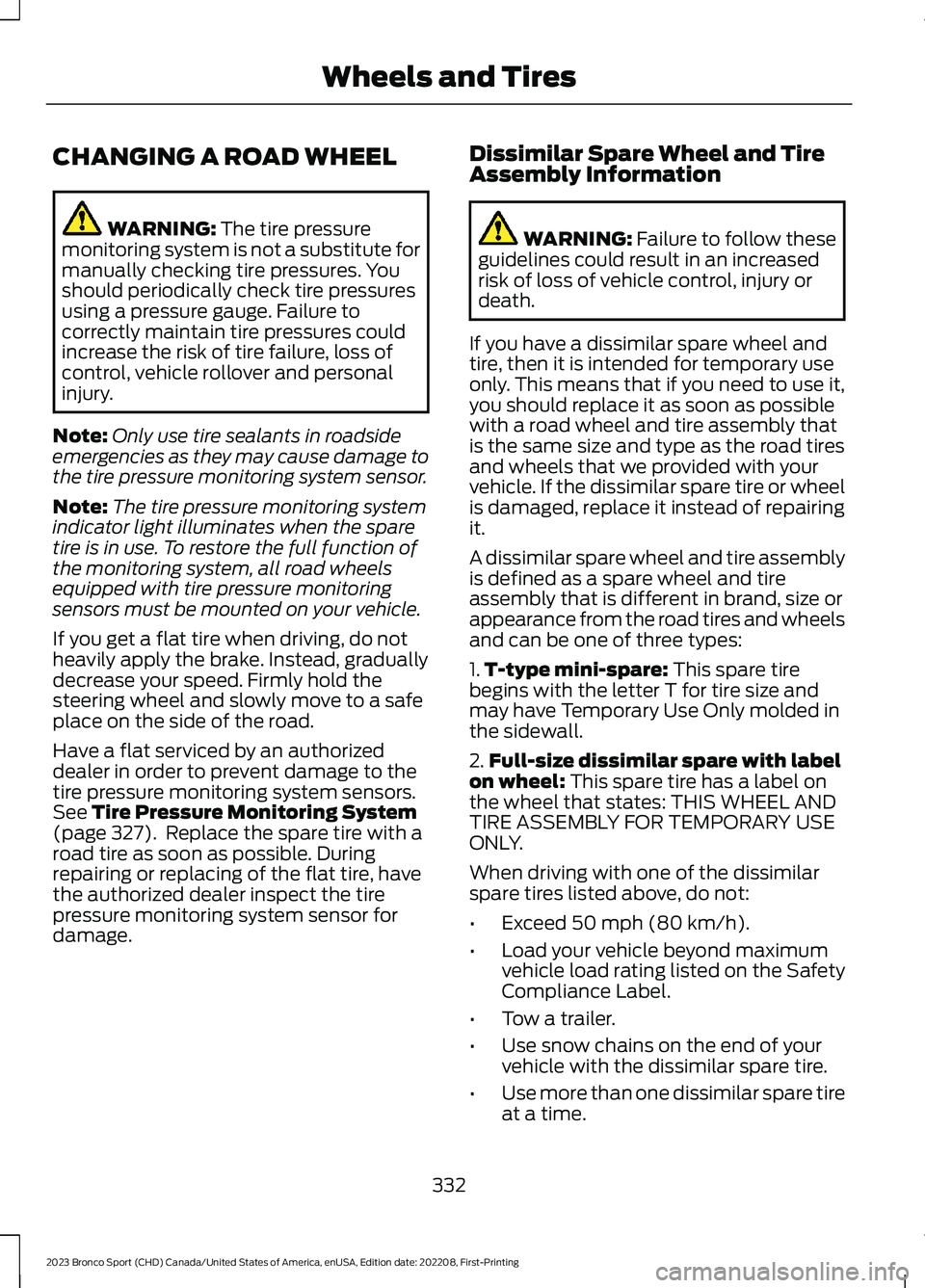
WARNING: The tire pressuremonitoring system is not a substitute formanually checking tire pressures. Youshould periodically check tire pressuresusing a pressure gauge. Failure tocorrectly maintain tire pressures couldincrease the risk of tire failure, loss ofcontrol, vehicle rollover and personalinjury.
Note:Only use tire sealants in roadsideemergencies as they may cause damage tothe tire pressure monitoring system sensor.
Note:The tire pressure monitoring systemindicator light illuminates when the sparetire is in use. To restore the full function ofthe monitoring system, all road wheelsequipped with tire pressure monitoringsensors must be mounted on your vehicle.
If you get a flat tire when driving, do notheavily apply the brake. Instead, graduallydecrease your speed. Firmly hold thesteering wheel and slowly move to a safeplace on the side of the road.
Have a flat serviced by an authorizeddealer in order to prevent damage to thetire pressure monitoring system sensors.See Tire Pressure Monitoring System(page 327). Replace the spare tire with aroad tire as soon as possible. Duringrepairing or replacing of the flat tire, havethe authorized dealer inspect the tirepressure monitoring system sensor fordamage.
Dissimilar Spare Wheel and TireAssembly Information
WARNING: Failure to follow theseguidelines could result in an increasedrisk of loss of vehicle control, injury ordeath.
If you have a dissimilar spare wheel andtire, then it is intended for temporary useonly. This means that if you need to use it,you should replace it as soon as possiblewith a road wheel and tire assembly thatis the same size and type as the road tiresand wheels that we provided with yourvehicle. If the dissimilar spare tire or wheelis damaged, replace it instead of repairingit.
A dissimilar spare wheel and tire assemblyis defined as a spare wheel and tireassembly that is different in brand, size orappearance from the road tires and wheelsand can be one of three types:
1.T-type mini-spare: This spare tirebegins with the letter T for tire size andmay have Temporary Use Only molded inthe sidewall.
2.Full-size dissimilar spare with labelon wheel: This spare tire has a label onthe wheel that states: THIS WHEEL ANDTIRE ASSEMBLY FOR TEMPORARY USEONLY.
When driving with one of the dissimilarspare tires listed above, do not:
•Exceed 50 mph (80 km/h).
•Load your vehicle beyond maximumvehicle load rating listed on the SafetyCompliance Label.
•Tow a trailer.
•Use snow chains on the end of yourvehicle with the dissimilar spare tire.
•Use more than one dissimilar spare tireat a time.
332
2023 Bronco Sport (CHD) Canada/United States of America, enUSA, Edition date: 202208, First-PrintingWheels and Tires
Page 345 of 516
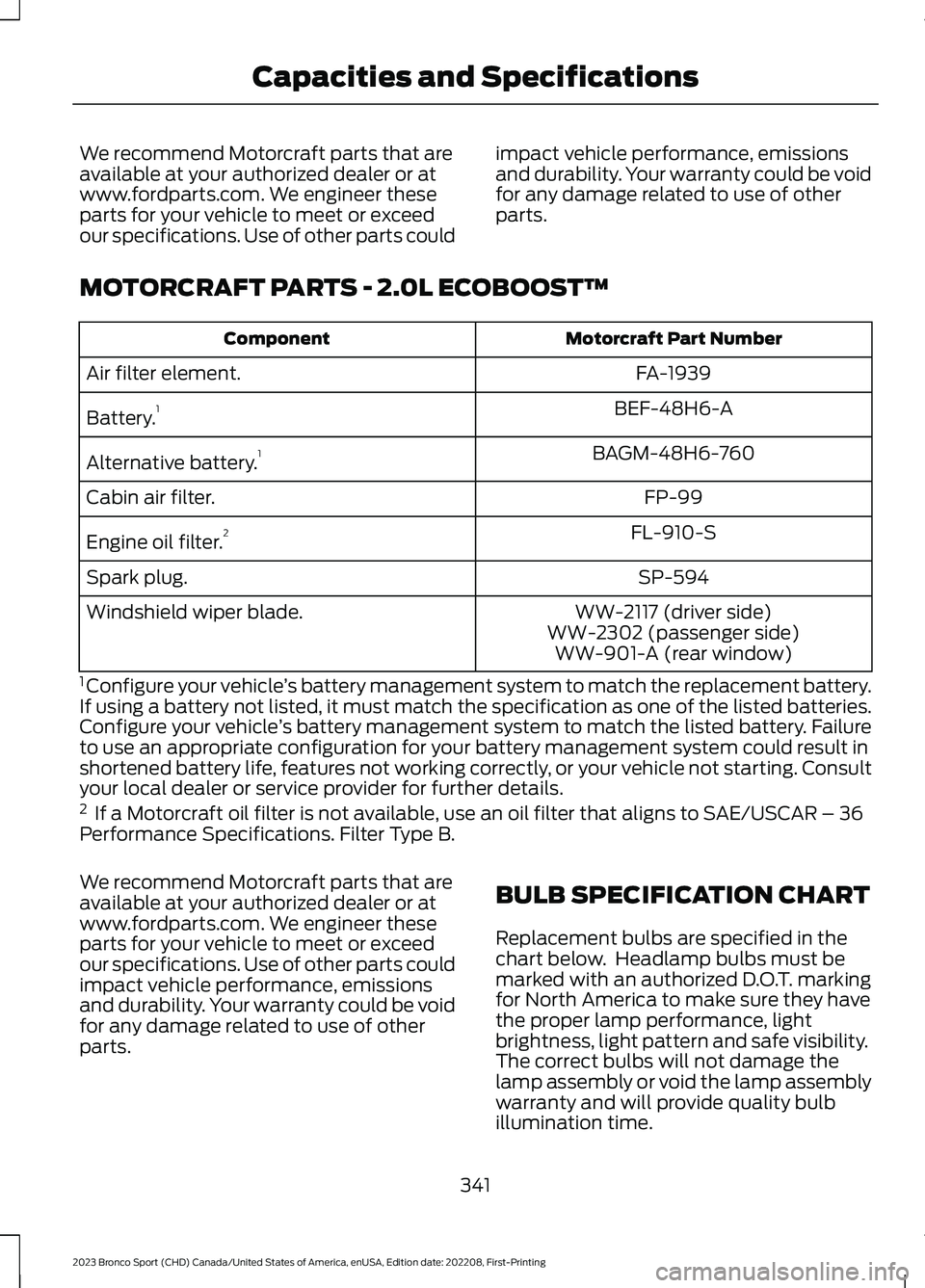
We recommend Motorcraft parts that areavailable at your authorized dealer or atwww.fordparts.com. We engineer theseparts for your vehicle to meet or exceedour specifications. Use of other parts could
impact vehicle performance, emissionsand durability. Your warranty could be voidfor any damage related to use of otherparts.
MOTORCRAFT PARTS - 2.0L ECOBOOST™
Motorcraft Part NumberComponent
FA-1939Air filter element.
BEF-48H6-ABattery.1
BAGM-48H6-760Alternative battery.1
FP-99Cabin air filter.
FL-910-SEngine oil filter.2
SP-594Spark plug.
WW-2117 (driver side)Windshield wiper blade.WW-2302 (passenger side)WW-901-A (rear window)
1 Configure your vehicle’s battery management system to match the replacement battery.If using a battery not listed, it must match the specification as one of the listed batteries.Configure your vehicle’s battery management system to match the listed battery. Failureto use an appropriate configuration for your battery management system could result inshortened battery life, features not working correctly, or your vehicle not starting. Consultyour local dealer or service provider for further details.2 If a Motorcraft oil filter is not available, use an oil filter that aligns to SAE/USCAR – 36Performance Specifications. Filter Type B.
We recommend Motorcraft parts that areavailable at your authorized dealer or atwww.fordparts.com. We engineer theseparts for your vehicle to meet or exceedour specifications. Use of other parts couldimpact vehicle performance, emissionsand durability. Your warranty could be voidfor any damage related to use of otherparts.
BULB SPECIFICATION CHART
Replacement bulbs are specified in thechart below. Headlamp bulbs must bemarked with an authorized D.O.T. markingfor North America to make sure they havethe proper lamp performance, lightbrightness, light pattern and safe visibility.The correct bulbs will not damage thelamp assembly or void the lamp assemblywarranty and will provide quality bulbillumination time.
341
2023 Bronco Sport (CHD) Canada/United States of America, enUSA, Edition date: 202208, First-PrintingCapacities and Specifications
Page 363 of 516
In satellite radio mode, press and releaseto select the next or previous satellite radiostation. If you select a specific category,such as jazz, rock or news, press to find thenext or previous station in the category youselect.
DIGITAL RADIO (IF EQUIPPED)
Note:HD Radio broadcasts are notavailable in all markets.
HD Radio technology is the digitalevolution of analog AM/FM radio. Yoursystem has a special receiver that allowsit to receive digital broadcasts, whereavailable, in addition to the analogbroadcasts, it already receives. Digitalbroadcasts provide a better sound qualitythan analog broadcasts with free,crystal-clear audio and no static ordistortion. For more information, and aguide to available stations andprogramming, please visitwww.hdradio.com.
When HD Radio is on and you tune to astation broadcasting HD Radio technology,you may notice the HD Radio logo on yourscreen. When this logo is available, youmay also see Title and Artist fieldson-screen.
The multicast indicator appears in FMmode, only, if the current station isbroadcasting multiple digital broadcasts.The highlighted numbers signify availabledigital channels where new or differentcontent is available. HD1 signifies the mainprogramming status and is available inanalog and digital broadcasts. Othermulticast stations, HD2 through HD7, areonly available digitally.
When HD Radio broadcasts are active, youcan access the following functions:
•Memory presets allow you to save anactive channel as a memory preset.Touch and hold a memory preset slotuntil the sound returns. There is a briefmute while the radio saves the station.Sound returns when finished. Whenswitching to an HD2 or HD3 memorypreset, the sound mutes before thedigital audio plays, because the systemhas to reacquire the digital signal.
Note:As with any saved radio station, youcannot access the saved station if yourvehicle is outside the station’s receptionarea.
359
2023 Bronco Sport (CHD) Canada/United States of America, enUSA, Edition date: 202208, First-PrintingAudio System
Page 364 of 516
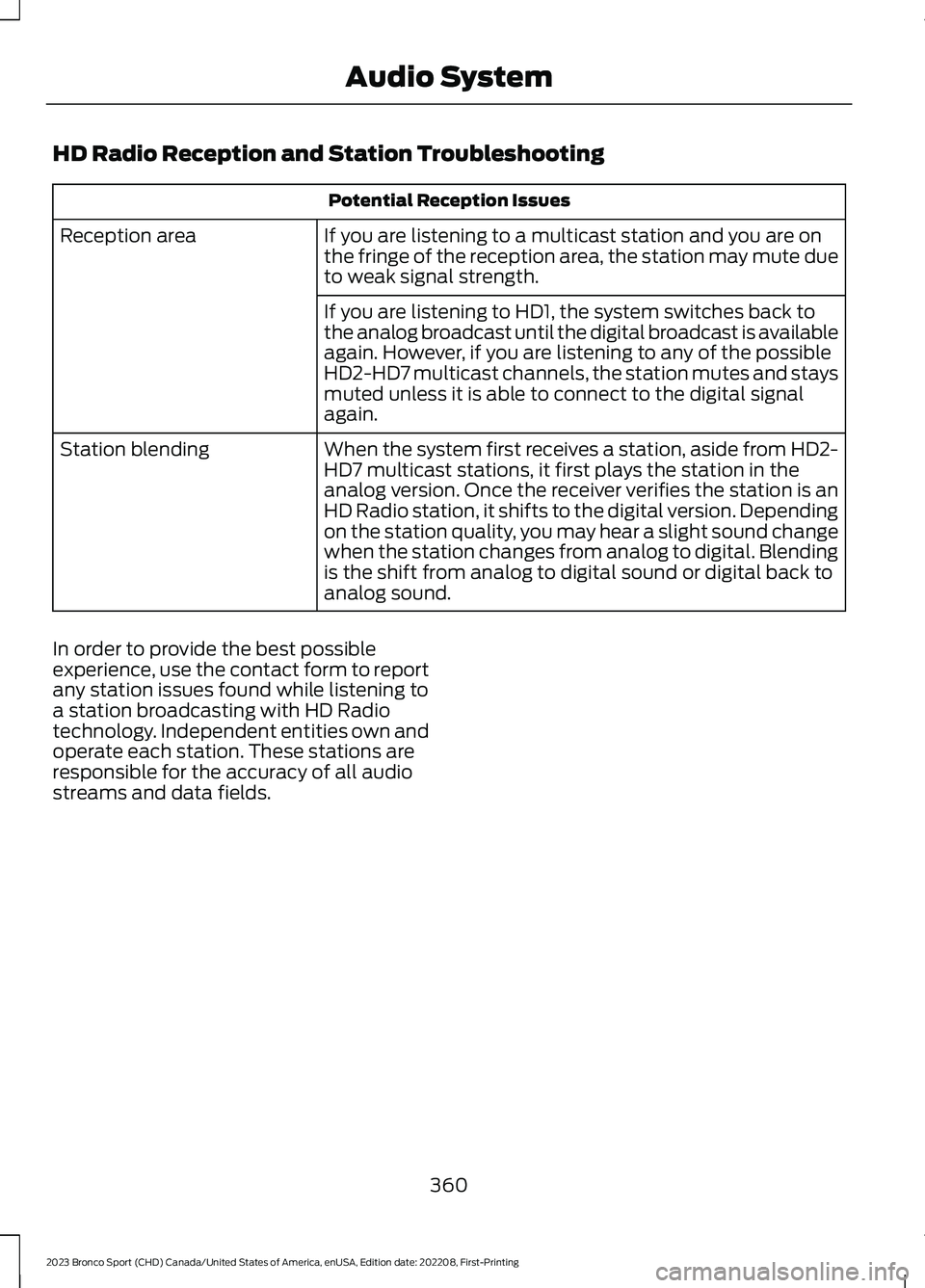
HD Radio Reception and Station Troubleshooting
Potential Reception Issues
If you are listening to a multicast station and you are onthe fringe of the reception area, the station may mute dueto weak signal strength.
Reception area
If you are listening to HD1, the system switches back tothe analog broadcast until the digital broadcast is availableagain. However, if you are listening to any of the possibleHD2-HD7 multicast channels, the station mutes and staysmuted unless it is able to connect to the digital signalagain.
When the system first receives a station, aside from HD2-HD7 multicast stations, it first plays the station in theanalog version. Once the receiver verifies the station is anHD Radio station, it shifts to the digital version. Dependingon the station quality, you may hear a slight sound changewhen the station changes from analog to digital. Blendingis the shift from analog to digital sound or digital back toanalog sound.
Station blending
In order to provide the best possibleexperience, use the contact form to reportany station issues found while listening toa station broadcasting with HD Radiotechnology. Independent entities own andoperate each station. These stations areresponsible for the accuracy of all audiostreams and data fields.
360
2023 Bronco Sport (CHD) Canada/United States of America, enUSA, Edition date: 202208, First-PrintingAudio System
Page 383 of 516
HD Radio technology is the digitalevolution of analog AM/FM radio. Yoursystem has a special receiver that allowsit to receive digital broadcasts, whereavailable, in addition to the analogbroadcasts it already receives. Digitalbroadcasts provide a better sound qualitythan analog broadcasts with free,crystal-clear audio and no static ordistortion. For more information, and aguide to available stations andprogramming, please visit:
Website
www.hdradio.com
When HD Radio is on and you tune to astation broadcasting HD Radio technology,you may notice the following indicators onyour screen:
The HD logo is grey when acquiring a digitalstation, and then changes to orange whendigital audio is playing. When this logo isavailable, you may also see Title and Artistfields on-screen.
The multicast indicator only appears in FMmode if the current station is broadcastingmultiple digital broadcasts. The highlightednumbers signify available digital channelswhere new or different content is available.HD1 signifies the main programming statusand is available in analog and digitalbroadcasts. Other multicast stations, HD2through HD7, are only available digitally.
Note: There is also an additional featurefor stations that have more than 1 HDmulticast, for example, HD1 or HD2. The HDlogo and Radio text appears as a button.Pressing this button allows you to cyclethrough all of the HD stations on thatspecific frequency. For example, if you areon 101.1 and it has HD1, HD2, HD3, pressingthe button repeatedly causes the radio tocycle through the HD stations in a cyclicincreasing order.
When HD Radio broadcasts are active, you can access the following functions:
Action and DescriptionMessage
Allows you to save an active channel as a memory preset.Touch and hold a memory preset slot until the sound returns.There is a brief mute while the radio saves the station. Soundreturns when the channel saves. When switching to an HD2or HD3 memory preset, the sound mutes before the digitalaudio plays, because the system has to reacquire the digitalsignal.
Presets
Note:As with any station you save, you cannot access the saved station if your vehicle isoutside the station’s reception area.
379
2023 Bronco Sport (CHD) Canada/United States of America, enUSA, Edition date: 202208, First-PrintingSYNC™ 3E142616
Page 384 of 516
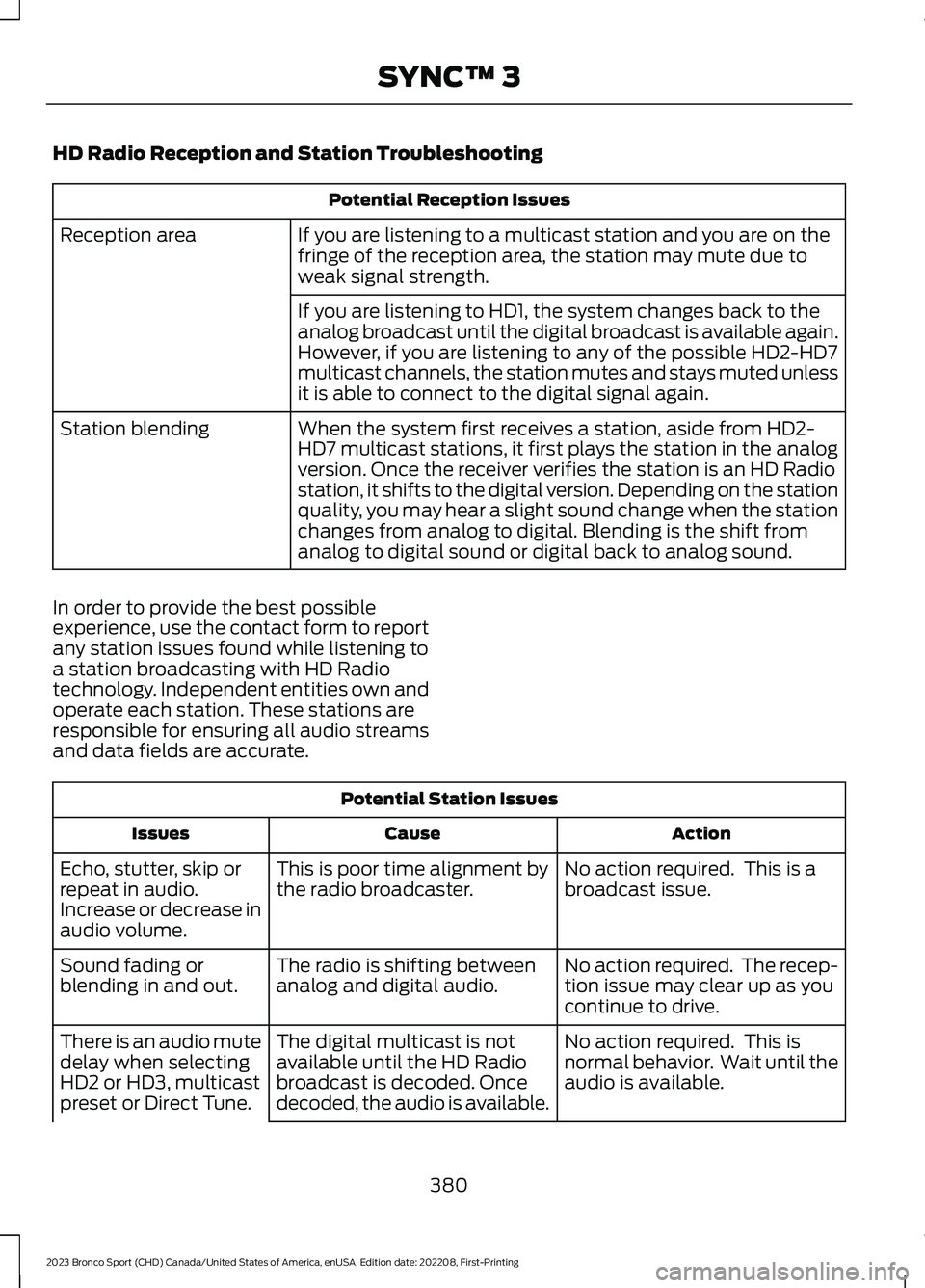
HD Radio Reception and Station Troubleshooting
Potential Reception Issues
If you are listening to a multicast station and you are on thefringe of the reception area, the station may mute due toweak signal strength.
Reception area
If you are listening to HD1, the system changes back to theanalog broadcast until the digital broadcast is available again.However, if you are listening to any of the possible HD2-HD7multicast channels, the station mutes and stays muted unlessit is able to connect to the digital signal again.
When the system first receives a station, aside from HD2-HD7 multicast stations, it first plays the station in the analogversion. Once the receiver verifies the station is an HD Radiostation, it shifts to the digital version. Depending on the stationquality, you may hear a slight sound change when the stationchanges from analog to digital. Blending is the shift fromanalog to digital sound or digital back to analog sound.
Station blending
In order to provide the best possibleexperience, use the contact form to reportany station issues found while listening toa station broadcasting with HD Radiotechnology. Independent entities own andoperate each station. These stations areresponsible for ensuring all audio streamsand data fields are accurate.
Potential Station Issues
ActionCauseIssues
No action required. This is abroadcast issue.This is poor time alignment bythe radio broadcaster.Echo, stutter, skip orrepeat in audio.Increase or decrease inaudio volume.
No action required. The recep-tion issue may clear up as youcontinue to drive.
The radio is shifting betweenanalog and digital audio.Sound fading orblending in and out.
No action required. This isnormal behavior. Wait until theaudio is available.
The digital multicast is notavailable until the HD Radiobroadcast is decoded. Oncedecoded, the audio is available.
There is an audio mutedelay when selectingHD2 or HD3, multicastpreset or Direct Tune.
380
2023 Bronco Sport (CHD) Canada/United States of America, enUSA, Edition date: 202208, First-PrintingSYNC™ 3
Page 386 of 516
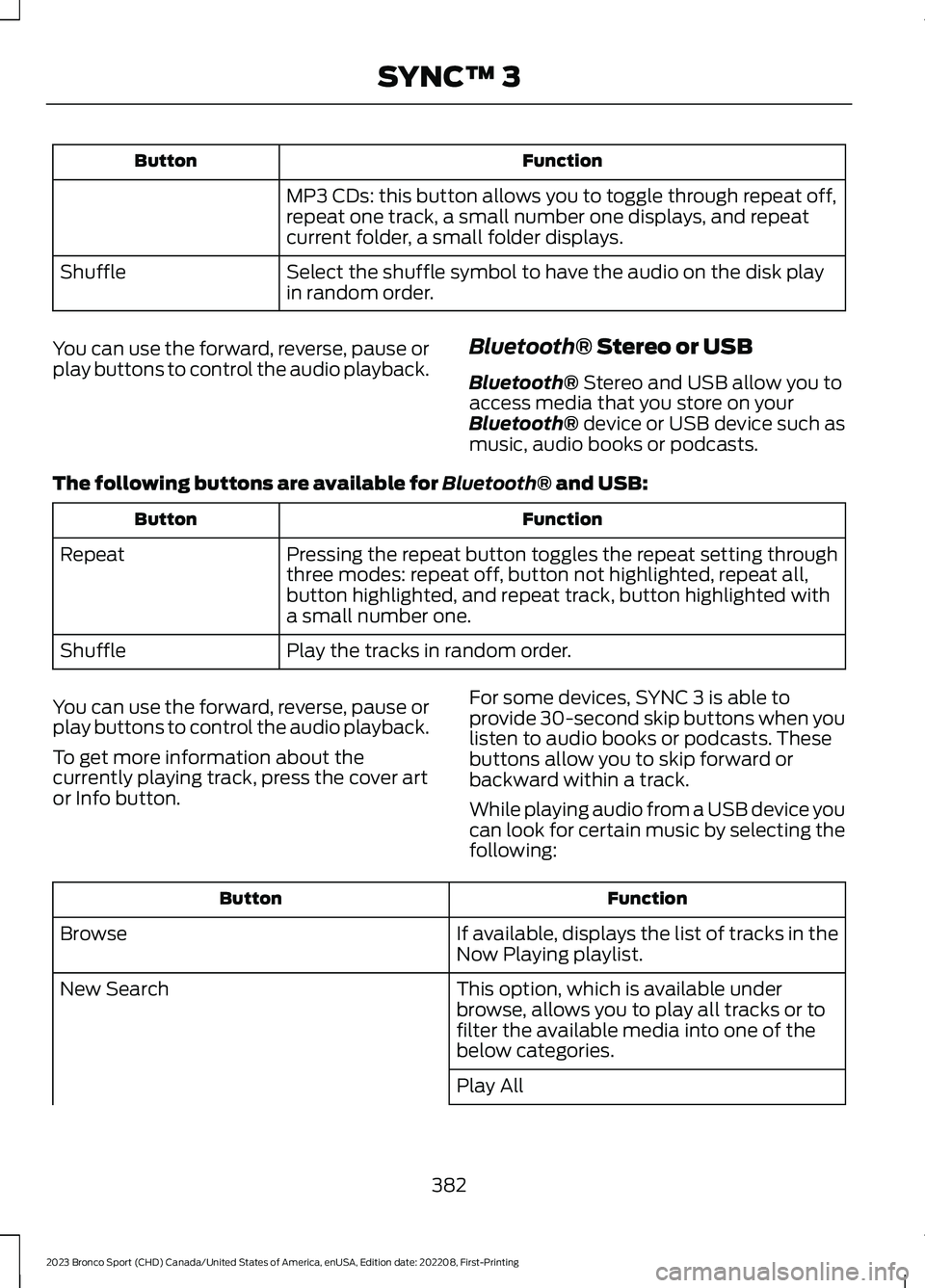
FunctionButton
MP3 CDs: this button allows you to toggle through repeat off,repeat one track, a small number one displays, and repeatcurrent folder, a small folder displays.
Select the shuffle symbol to have the audio on the disk playin random order.Shuffle
You can use the forward, reverse, pause orplay buttons to control the audio playback.Bluetooth® Stereo or USB
Bluetooth® Stereo and USB allow you toaccess media that you store on yourBluetooth® device or USB device such asmusic, audio books or podcasts.
The following buttons are available for Bluetooth® and USB:
FunctionButton
Pressing the repeat button toggles the repeat setting throughthree modes: repeat off, button not highlighted, repeat all,button highlighted, and repeat track, button highlighted witha small number one.
Repeat
Play the tracks in random order.Shuffle
You can use the forward, reverse, pause orplay buttons to control the audio playback.
To get more information about thecurrently playing track, press the cover artor Info button.
For some devices, SYNC 3 is able toprovide 30-second skip buttons when youlisten to audio books or podcasts. Thesebuttons allow you to skip forward orbackward within a track.
While playing audio from a USB device youcan look for certain music by selecting thefollowing:
FunctionButton
If available, displays the list of tracks in theNow Playing playlist.Browse
This option, which is available underbrowse, allows you to play all tracks or tofilter the available media into one of thebelow categories.
New Search
Play All
382
2023 Bronco Sport (CHD) Canada/United States of America, enUSA, Edition date: 202208, First-PrintingSYNC™ 3