horn FORD BRONCO SPORT 2023 Owners Manual
[x] Cancel search | Manufacturer: FORD, Model Year: 2023, Model line: BRONCO SPORT, Model: FORD BRONCO SPORT 2023Pages: 516, PDF Size: 14.27 MB
Page 6 of 516
Clearing All MyKeys......................................67
Checking MyKey System Status.............68
Using MyKey With Remote StartSystems........................................................68
MyKey – Troubleshooting..........................68
Doors and Locks
Locking and Unlocking................................70
Keyless Entry...................................................72
Liftgate
Opening the Liftgate....................................75
Closing the Liftgate.......................................75
Opening and Closing the LiftgateWindow.........................................................76
Security
Passive Anti-Theft System.........................77
Anti-Theft Alarm............................................77
Steering Wheel
Adjusting the Steering Wheel...................79
Audio Control..................................................79
Voice Control..................................................80
Cruise Control - Vehicles With: AdaptiveCruise Control............................................80
Cruise Control - Vehicles With: CruiseControl..........................................................80
Information Display Control.....................80
Horn...................................................................80
Switching the Heated Steering WheelOn and Off....................................................81
Wipers and Washers
Windshield Wipers........................................82
Autowipers......................................................82
Windshield Washers....................................83
Rear Window Wiper and Washers.........84
Lighting
General Information.....................................85
Lighting Control.............................................85
Autolamps.......................................................86
Instrument Lighting Dimmer....................86
Headlamp Exit Delay...................................86
Daytime Running Lamps - Vehicles With:Configurable Daytime Running Lamps...........................................................................87
Daytime Running Lamps - Vehicles With:Daytime Running Lamps (DRL)..........87
Front Fog Lamps...........................................87
Cornering Lamps..........................................88
Direction Indicators......................................88
Interior Lamps................................................89
Ambient Lighting..........................................89
Rear Floodlamps..........................................90
Automatic High Beam Control
What Is Automatic High Beam Control...........................................................................91
Switching Automatic High Beam ControlOn and Off....................................................91
Automatic High Beam Control Indicators..........................................................................92
Overriding Automatic High Beam Control..........................................................................92
Windows and Mirrors
Power Windows.............................................93
Global Opening and Closing.....................94
Exterior Mirrors...............................................94
Interior Mirror..................................................95
Sun Visors........................................................95
Moonroof.........................................................96
Instrument Cluster
Gauges - Vehicles With: 4.2 InchInstrument Cluster Display Screen...........................................................................97
Gauges - Vehicles With: 6.5 InchInstrument Cluster Display Screen..........................................................................98
2
2023 Bronco Sport (CHD) Canada/United States of America, enUSA, Edition date: 202208, First-PrintingTable of Contents
Page 20 of 516
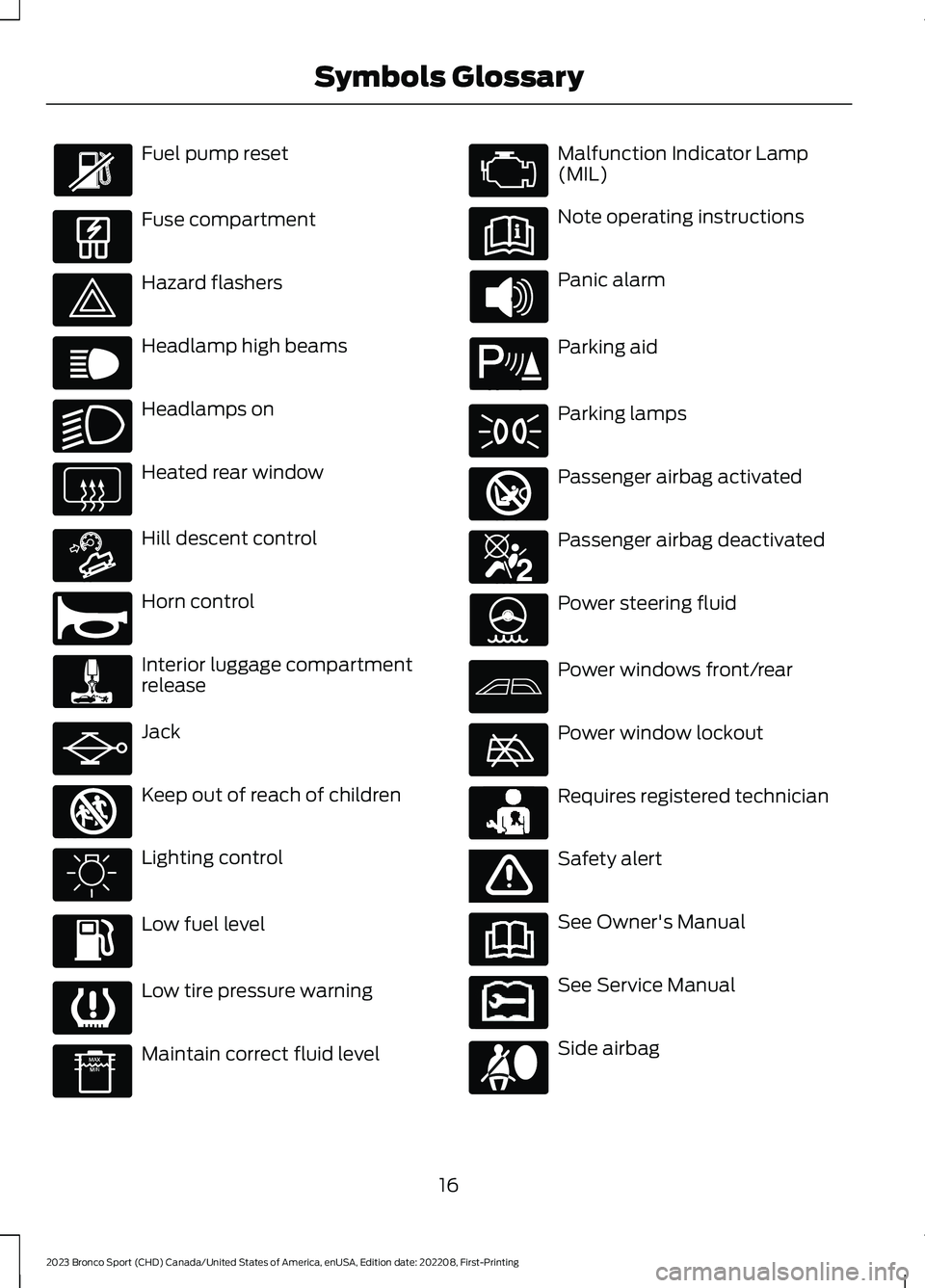
Fuel pump reset
Fuse compartment
Hazard flashers
Headlamp high beams
Headlamps on
Heated rear window
Hill descent control
Horn control
Interior luggage compartmentrelease
Jack
Keep out of reach of children
Lighting control
Low fuel level
Low tire pressure warning
Maintain correct fluid level
Malfunction Indicator Lamp(MIL)
Note operating instructions
Panic alarm
Parking aid
Parking lamps
Passenger airbag activated
Passenger airbag deactivated
Power steering fluid
Power windows front/rear
Power window lockout
Requires registered technician
Safety alert
See Owner's Manual
See Service Manual
Side airbag
16
2023 Bronco Sport (CHD) Canada/United States of America, enUSA, Edition date: 202208, First-PrintingSymbols Glossary E139214 E75790 E67019 E270968 E163171 E270945 E139231 E161353 E139232 E139229 E67028 E72343 E139213 E71341 E270849 E270850 E139216 E139225 E231159 E65963 E72021 E231158
Page 68 of 516
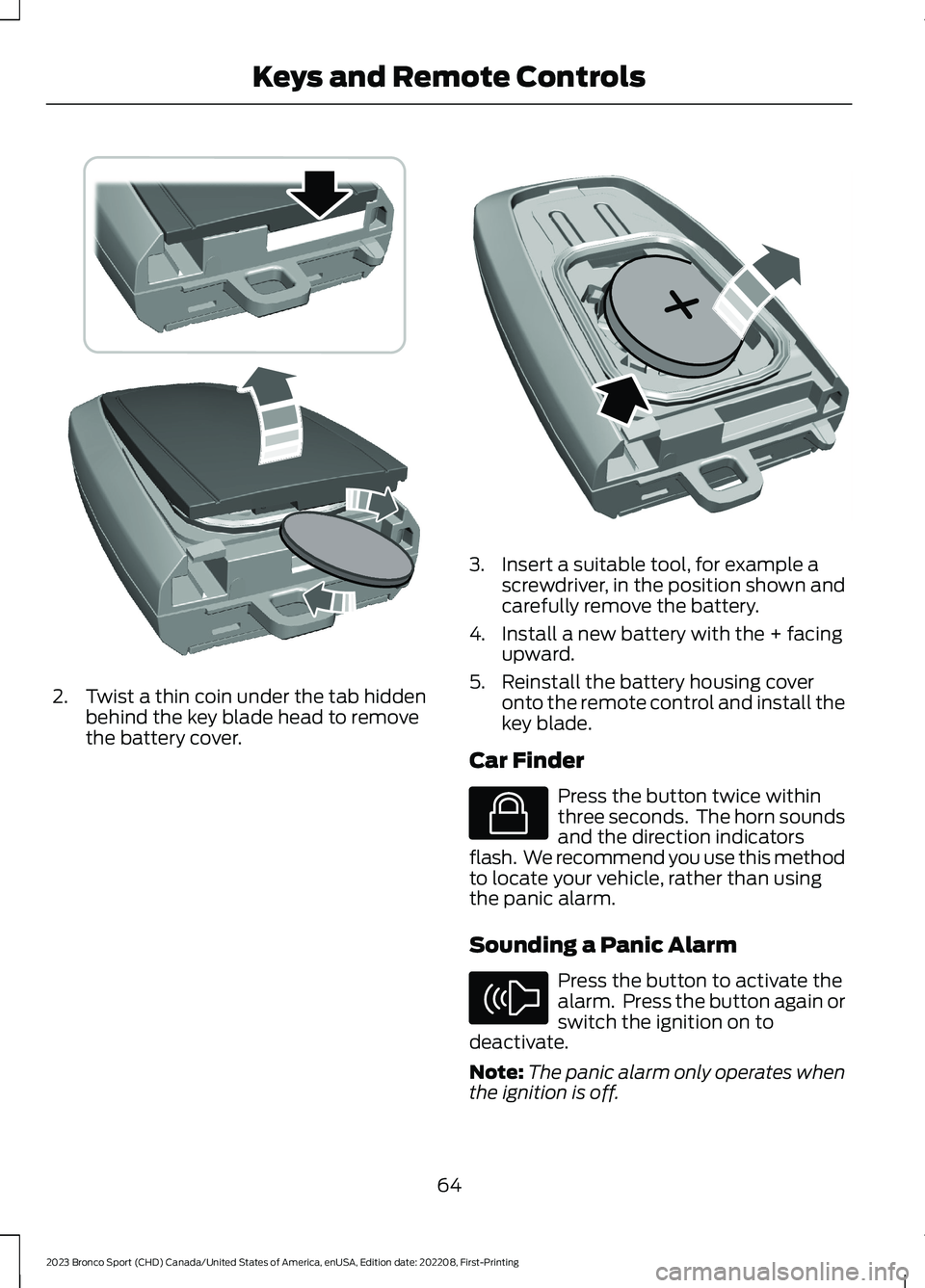
2.Twist a thin coin under the tab hiddenbehind the key blade head to removethe battery cover.
3.Insert a suitable tool, for example ascrewdriver, in the position shown andcarefully remove the battery.
4.Install a new battery with the + facingupward.
5.Reinstall the battery housing coveronto the remote control and install thekey blade.
Car Finder
Press the button twice withinthree seconds. The horn soundsand the direction indicatorsflash. We recommend you use this methodto locate your vehicle, rather than usingthe panic alarm.
Sounding a Panic Alarm
Press the button to activate thealarm. Press the button again orswitch the ignition on todeactivate.
Note:The panic alarm only operates whenthe ignition is off.
64
2023 Bronco Sport (CHD) Canada/United States of America, enUSA, Edition date: 202208, First-PrintingKeys and Remote ControlsE303824 E218402 E138623 E138624
Page 74 of 516
LOCKING AND UNLOCKING
You can use the power door lock controlor the remote control to lock and unlockyour vehicle.
Note:Do not use the door latch assemblyto attach any accessory, such as handles orsteps, as this can cause damage to yourvehicle.
Note:Always take your keys and lock alldoors when leaving your vehicle.
Power Door Locks
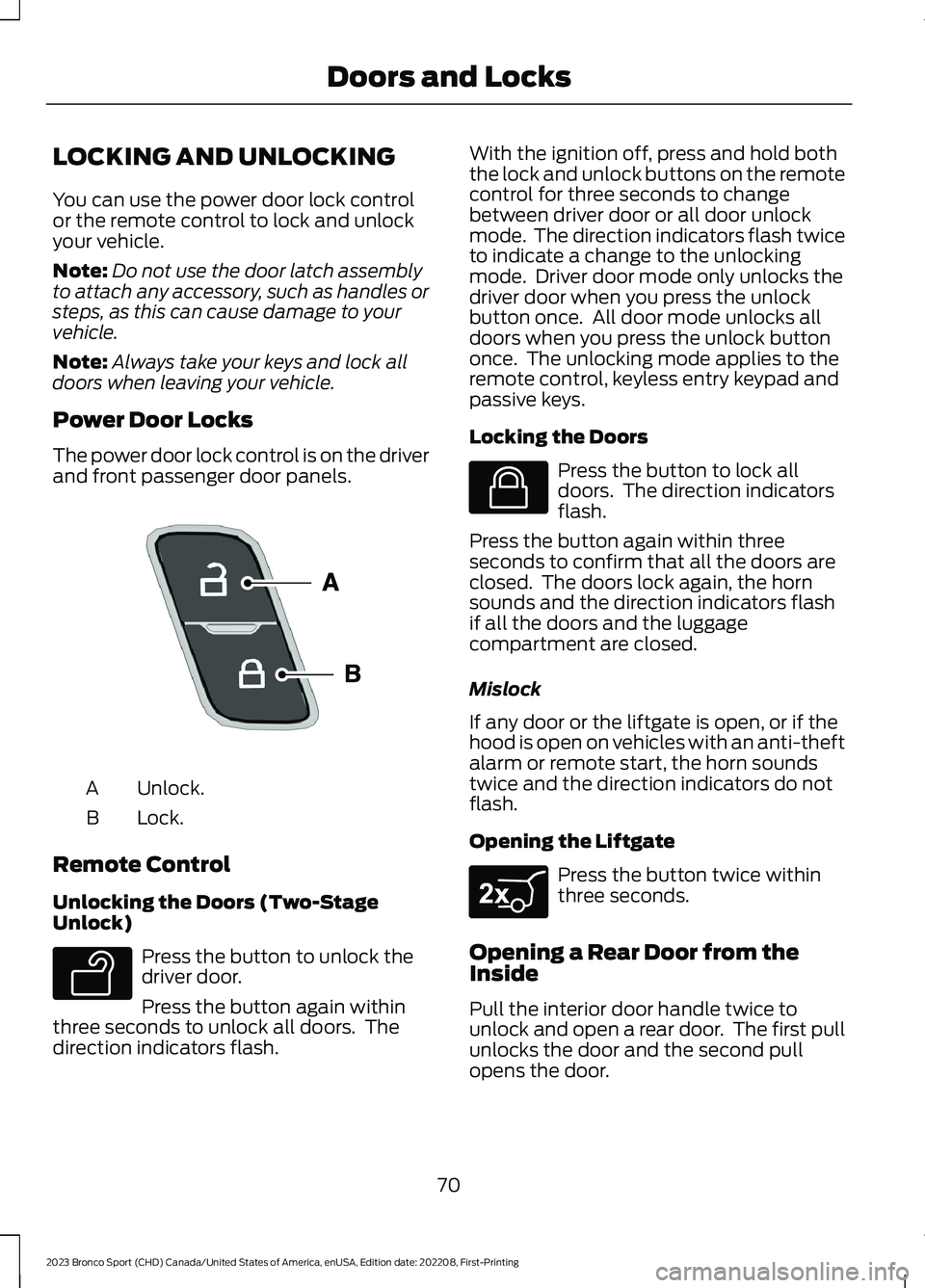
The power door lock control is on the driverand front passenger door panels.
Unlock.A
Lock.B
Remote Control
Unlocking the Doors (Two-StageUnlock)
Press the button to unlock thedriver door.
Press the button again withinthree seconds to unlock all doors. Thedirection indicators flash.
With the ignition off, press and hold boththe lock and unlock buttons on the remotecontrol for three seconds to changebetween driver door or all door unlockmode. The direction indicators flash twiceto indicate a change to the unlockingmode. Driver door mode only unlocks thedriver door when you press the unlockbutton once. All door mode unlocks alldoors when you press the unlock buttononce. The unlocking mode applies to theremote control, keyless entry keypad andpassive keys.
Locking the Doors
Press the button to lock alldoors. The direction indicatorsflash.
Press the button again within threeseconds to confirm that all the doors areclosed. The doors lock again, the hornsounds and the direction indicators flashif all the doors and the luggagecompartment are closed.
Mislock
If any door or the liftgate is open, or if thehood is open on vehicles with an anti-theftalarm or remote start, the horn soundstwice and the direction indicators do notflash.
Opening the Liftgate
Press the button twice withinthree seconds.
Opening a Rear Door from theInside
Pull the interior door handle twice tounlock and open a rear door. The first pullunlocks the door and the second pullopens the door.
70
2023 Bronco Sport (CHD) Canada/United States of America, enUSA, Edition date: 202208, First-PrintingDoors and LocksE196954 E138629 E138623 E267940
Page 75 of 516
Activating Passive Key
General Information
You can unlock and lock your vehiclewithout taking the keys out of your pocketor purse when the passive key is within 3 ft(1 m) of your vehicle. Passive key uses asensor on the back of the door handle forunlocking and a separate sensor on theface of each door handle for locking.
The system does not function if:
•The vehicle battery has no charge.
•The passive key battery has no charge.
•The passive key frequencies arejammed.
Note:The system may not operate if thepassive key is close to metal objects orelectronic devices, for example keys or a cellphone.
Note:If the system does not operate, usethe key blade to lock and unlock yourvehicle. See Remote Control (page 60).
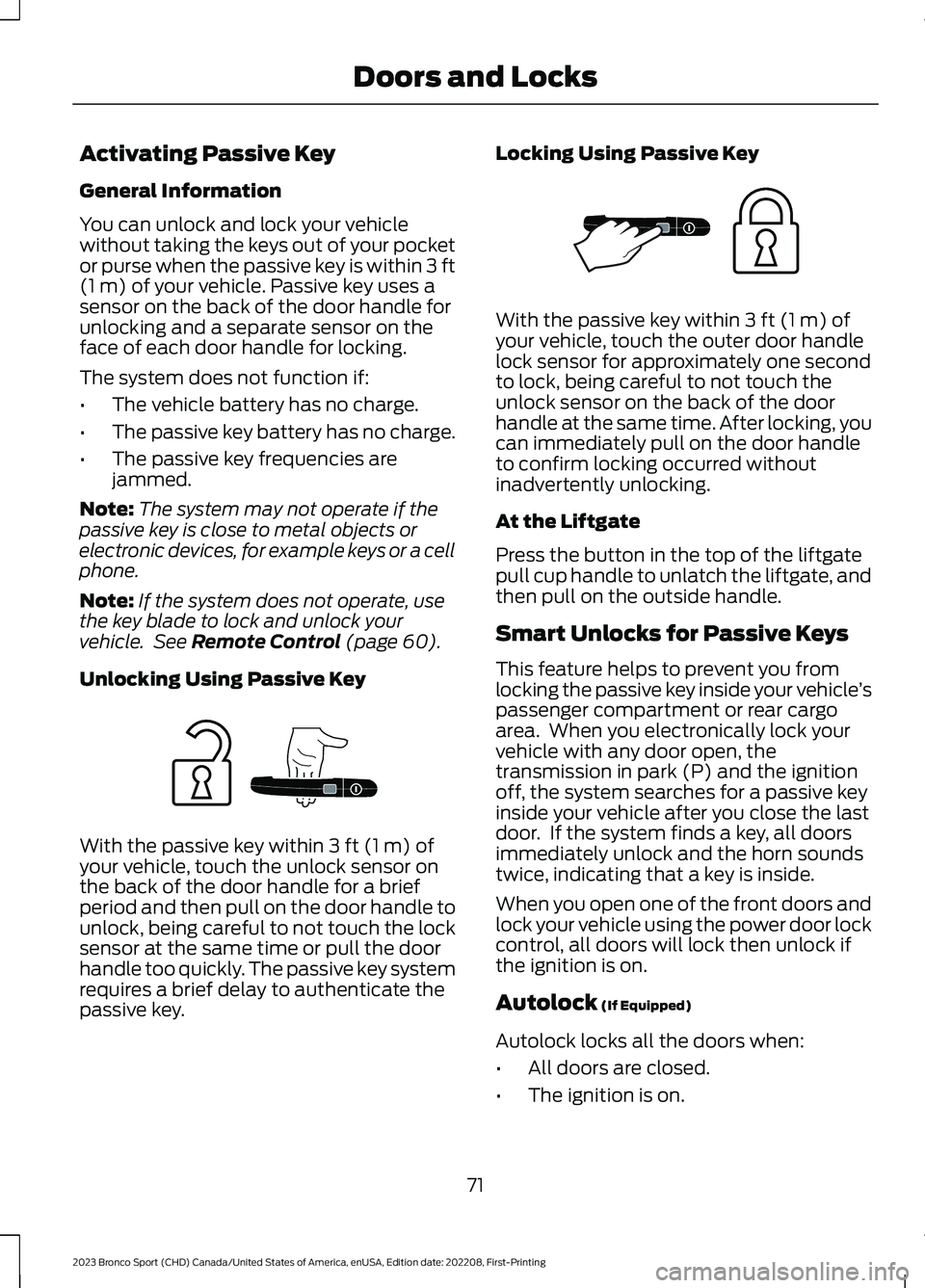
Unlocking Using Passive Key
With the passive key within 3 ft (1 m) ofyour vehicle, touch the unlock sensor onthe back of the door handle for a briefperiod and then pull on the door handle tounlock, being careful to not touch the locksensor at the same time or pull the doorhandle too quickly. The passive key systemrequires a brief delay to authenticate thepassive key.
Locking Using Passive Key
With the passive key within 3 ft (1 m) ofyour vehicle, touch the outer door handlelock sensor for approximately one secondto lock, being careful to not touch theunlock sensor on the back of the doorhandle at the same time. After locking, youcan immediately pull on the door handleto confirm locking occurred withoutinadvertently unlocking.
At the Liftgate
Press the button in the top of the liftgatepull cup handle to unlatch the liftgate, andthen pull on the outside handle.
Smart Unlocks for Passive Keys
This feature helps to prevent you fromlocking the passive key inside your vehicle’spassenger compartment or rear cargoarea. When you electronically lock yourvehicle with any door open, thetransmission in park (P) and the ignitionoff, the system searches for a passive keyinside your vehicle after you close the lastdoor. If the system finds a key, all doorsimmediately unlock and the horn soundstwice, indicating that a key is inside.
When you open one of the front doors andlock your vehicle using the power door lockcontrol, all doors will lock then unlock ifthe ignition is on.
Autolock (If Equipped)
Autolock locks all the doors when:
•All doors are closed.
•The ignition is on.
71
2023 Bronco Sport (CHD) Canada/United States of America, enUSA, Edition date: 202208, First-PrintingDoors and LocksE248555 E248556
Page 81 of 516
PASSIVE ANTI-THEFT
SYSTEM
Note: The system is not compatible withnon-Ford aftermarket remote start systems.Use of these systems could result in vehiclestarting problems and a loss of securityprotection.
Note:Metallic objects, electronic devicesor a second coded key on the same keychain could cause vehicle starting problemsif they are too close to the key when startingthe engine. Prevent these objects fromtouching the coded key while starting theengine. Switch the ignition off, move allobjects on the key chain away from thecoded key and restart the engine if aproblem occurs.
Note:Do not leave a duplicate coded keyin the vehicle. Always take your keys andlock all doors when leaving the vehicle.
SecuriLock®
The system is an engine immobilizationsystem. It helps to prevent anyone fromstarting the engine without using a codedkey programmed to your vehicle. Using thewrong key could prevent the engine fromstarting. A message may appear in theinformation display.
If you are unable to start the engine with acorrectly coded key, there is a problem withthe system and a message could appearin the information display.
Automatic Arming
The vehicle arms immediately after youswitch the ignition off.
Automatic Disarming
Switching the ignition on with a coded keydisarms the vehicle.
Replacement Keys
Note:Your vehicle comes with twointegrated keyhead transmitters or twointelligent access keys.
The integrated keyhead transmitterfunctions as a programmed ignition keythat operates all the locks and starts thevehicle, as well as a remote control.
The intelligent access key functions as aprogrammed key that operates the driverdoor lock and activates the intelligentaccess with push button start system, aswell as a remote control.
If your programmed transmitters orstandard SecuriLock coded keys(integrated keyhead transmitters only) arelost or stolen and you do not have an extracoded key, you will need to have yourvehicle towed to an authorized dealer. Youneed to erase the key codes from yourvehicle and program new coded keys.
Store an extra programmed key away fromthe vehicle in a safe place to help preventany inconveniences. See your authorizeddealer to purchase additional spare orreplacement keys.
Programming a Spare IntelligentAccess Key (If Equipped)
See your authorized dealer to haveadditional keys programmed to yourvehicle.
ANTI-THEFT ALARM
The system will warn you of anunauthorized entry to your vehicle. It willbe triggered if any door, the luggagecompartment or the hood is openedwithout using the key, remote control orkeyless entry keypad.
The direction indicators will flash and thehorn will sound if unauthorized entry isattempted while the alarm is armed.
77
2023 Bronco Sport (CHD) Canada/United States of America, enUSA, Edition date: 202208, First-PrintingSecurity
Page 82 of 516
Take all remote controls to an authorizeddealer if there is any potential alarmproblem with your vehicle.
Arming the Alarm
The alarm is ready to arm when there isnot a key in the ignition. Electronically lockthe vehicle to arm the alarm.
The message indicator flasheswhen theft protection is active.
Disarming the Alarm
Disarm the alarm by any of the followingactions:
•Unlock the doors or luggagecompartment with the remote controlor keyless entry keypad.
•Switch the ignition on or start thevehicle.
•Use a key in the driver’s door to unlockthe vehicle, then switch the ignition onwithin 12 seconds.
Note:Pressing the panic button on theremote control will stop the horn and signalindicators, but will not disarm the system.
78
2023 Bronco Sport (CHD) Canada/United States of America, enUSA, Edition date: 202208, First-PrintingSecurity
Page 84 of 516
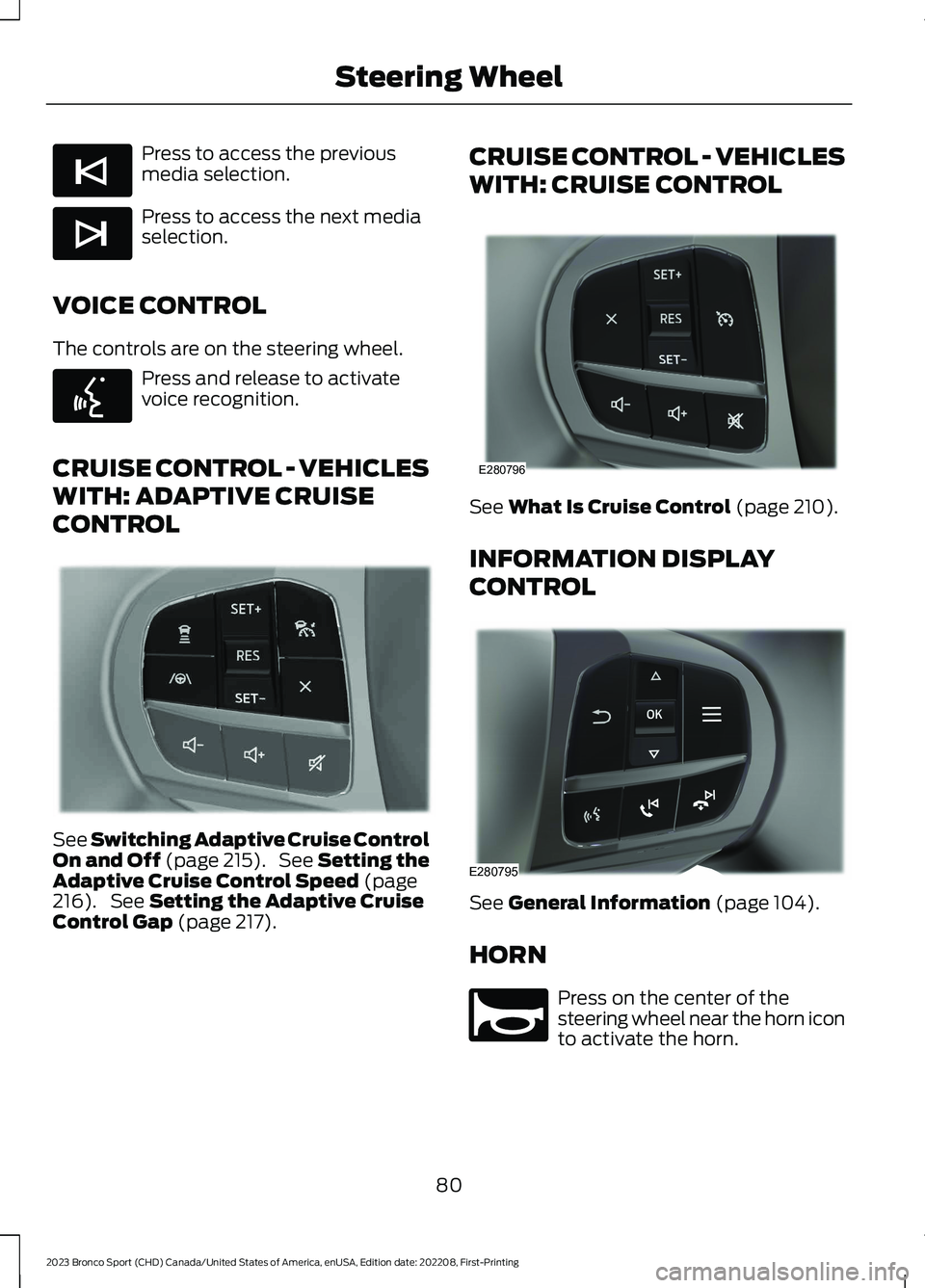
Press to access the previousmedia selection.
Press to access the next mediaselection.
VOICE CONTROL
The controls are on the steering wheel.
Press and release to activatevoice recognition.
CRUISE CONTROL - VEHICLES
WITH: ADAPTIVE CRUISE
CONTROL
See Switching Adaptive Cruise ControlOn and Off (page 215). See Setting theAdaptive Cruise Control Speed (page216). See Setting the Adaptive CruiseControl Gap (page 217).
CRUISE CONTROL - VEHICLES
WITH: CRUISE CONTROL
See What Is Cruise Control (page 210).
INFORMATION DISPLAY
CONTROL
See General Information (page 104).
HORN
Press on the center of thesteering wheel near the horn iconto activate the horn.
80
2023 Bronco Sport (CHD) Canada/United States of America, enUSA, Edition date: 202208, First-PrintingSteering WheelE265045 E265044 E142599 E349487 E280796 E280795 E270945
Page 107 of 516
Stability Control
It flashes when the system isactive. If it remains illuminatedor does not illuminate when youswitch the ignition on, this indicates asystem error. During a system error thesystem switches off. Have the systemchecked by an authorized dealerimmediately. See Using StabilityControl (page 200).
Stability Control Off
Illuminates when you switch thesystem off. It goes out when youswitch the system back on orwhen you switch the ignition off. SeeUsing Stability Control (page 200).
Trail Control
Illuminates when you switch trailcontrol on.
4WD Lock
Illuminates when four-wheeldrive is locked.
AUDIBLE WARNINGS AND
INDICATORS
Key in Ignition Warning Chime (If
Equipped)
Sounds when you open the driver's doorand you have left the key in the ignition.
Keyless Warning Alert (If Equipped)
Sounds the horn twice when you exit yourvehicle with the intelligent access key, afterthe last door is closed and your keylessvehicle is in RUN, indicating your vehicle isstill on.
Headlamps On Warning Chime
Sounds when you remove the key from theignition and open the driver's door and youhave left the headlamps or parking lampson.
Parking Brake On Warning Chime
Sounds when you have left the parkingbrake on and drive your vehicle. If thewarning chime remains on after you havereleased the parking brake, have thesystem checked by an authorized dealerimmediately.
103
2023 Bronco Sport (CHD) Canada/United States of America, enUSA, Edition date: 202208, First-PrintingInstrument ClusterE323869 E323870 E318506 E325580
Page 129 of 516

WHAT IS REMOTE START
The system allows you to remotely startyour vehicle and to adjust the interiortemperature according to the settings thatyou chose.
REMOTE START
PRECAUTIONS
WARNING: Do not start the enginein a closed garage or in other enclosedareas. Exhaust fumes are toxic. Alwaysopen the garage door before you startthe engine. Failure to follow thisinstruction could result in personal injuryor death.
REMOTE START LIMITATIONS
Remote start does not work under thefollowing conditions:
•The alarm horn is sounding.
•The hood is open.
•The transmission is not in park (P).
•The ignition is on.
•The battery voltage is below theminimum operating voltage.
•Remote start is not enabled.
Note:Do not use remote start if the fuellevel is low.
ENABLING REMOTE START
1.Press Settings on the touchscreen.
2.Press Vehicle.
3.Press Remote Start Setup.
4.Switch System on.
Note:To use remote start, make sure thatthe modem is enabled. See Connecting theVehicle to a Mobile Network (page 352).
REMOTELY STARTING AND
STOPPING THE VEHICLE
Remotely Starting the Vehicle
Press the button on the remotecontrol.
Within three seconds, press thebutton on the remote control.
Within three seconds, press thebutton again.
Note:You can also use FordPass to startthe vehicle.
Note:The vehicle doors lock when yousuccessfully remote start your vehicle.
Note:The turn signal lamps flash twice.
Note:The parking lamps turn on when thevehicle is running.
Note:The horn sounds if the system failsto start.
Note:All other vehicle systems remain offwhen you have remotely started the vehicle.
Note:The vehicle remains secured whenyou have remotely started the vehicle. Avalid key must be inside your vehicle toswitch the ignition on and drive your vehicle.
Remotely Stopping the Vehicle
Within three seconds, press thebutton on the remote control.
Within three seconds, press thebutton again.
125
2023 Bronco Sport (CHD) Canada/United States of America, enUSA, Edition date: 202208, First-PrintingRemote Start (If Equipped)E138623 E138625 E138625