low beam FORD BRONCO SPORT 2023 Owners Manual
[x] Cancel search | Manufacturer: FORD, Model Year: 2023, Model line: BRONCO SPORT, Model: FORD BRONCO SPORT 2023Pages: 516, PDF Size: 14.27 MB
Page 20 of 516
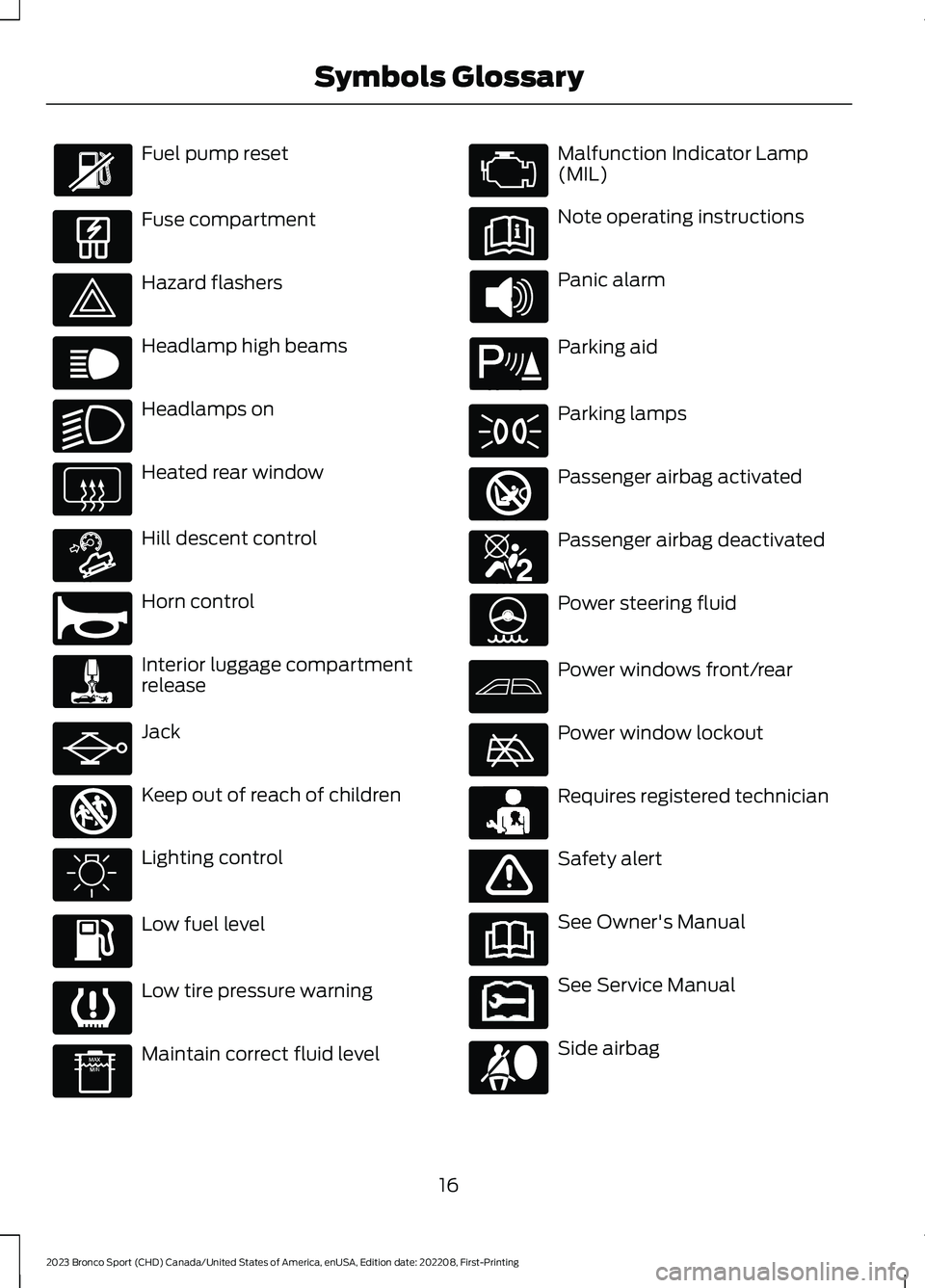
Fuel pump reset
Fuse compartment
Hazard flashers
Headlamp high beams
Headlamps on
Heated rear window
Hill descent control
Horn control
Interior luggage compartmentrelease
Jack
Keep out of reach of children
Lighting control
Low fuel level
Low tire pressure warning
Maintain correct fluid level
Malfunction Indicator Lamp(MIL)
Note operating instructions
Panic alarm
Parking aid
Parking lamps
Passenger airbag activated
Passenger airbag deactivated
Power steering fluid
Power windows front/rear
Power window lockout
Requires registered technician
Safety alert
See Owner's Manual
See Service Manual
Side airbag
16
2023 Bronco Sport (CHD) Canada/United States of America, enUSA, Edition date: 202208, First-PrintingSymbols Glossary E139214 E75790 E67019 E270968 E163171 E270945 E139231 E161353 E139232 E139229 E67028 E72343 E139213 E71341 E270849 E270850 E139216 E139225 E231159 E65963 E72021 E231158
Page 90 of 516
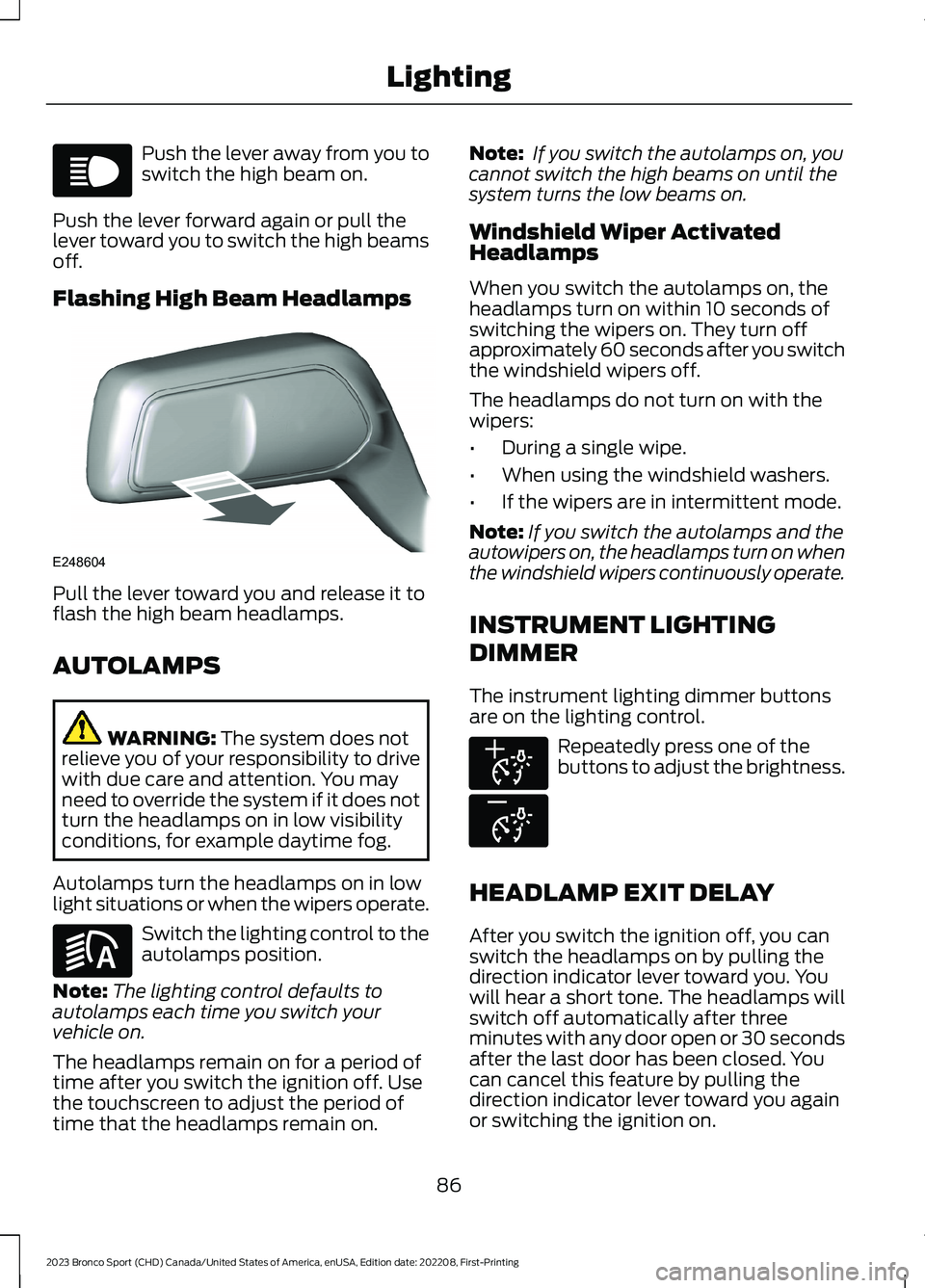
Push the lever away from you toswitch the high beam on.
Push the lever forward again or pull thelever toward you to switch the high beamsoff.
Flashing High Beam Headlamps
Pull the lever toward you and release it toflash the high beam headlamps.
AUTOLAMPS
WARNING: The system does notrelieve you of your responsibility to drivewith due care and attention. You mayneed to override the system if it does notturn the headlamps on in low visibilityconditions, for example daytime fog.
Autolamps turn the headlamps on in lowlight situations or when the wipers operate.
Switch the lighting control to theautolamps position.
Note:The lighting control defaults toautolamps each time you switch yourvehicle on.
The headlamps remain on for a period oftime after you switch the ignition off. Usethe touchscreen to adjust the period oftime that the headlamps remain on.
Note: If you switch the autolamps on, youcannot switch the high beams on until thesystem turns the low beams on.
Windshield Wiper ActivatedHeadlamps
When you switch the autolamps on, theheadlamps turn on within 10 seconds ofswitching the wipers on. They turn offapproximately 60 seconds after you switchthe windshield wipers off.
The headlamps do not turn on with thewipers:
•During a single wipe.
•When using the windshield washers.
•If the wipers are in intermittent mode.
Note:If you switch the autolamps and theautowipers on, the headlamps turn on whenthe windshield wipers continuously operate.
INSTRUMENT LIGHTING
DIMMER
The instrument lighting dimmer buttonsare on the lighting control.
Repeatedly press one of thebuttons to adjust the brightness.
HEADLAMP EXIT DELAY
After you switch the ignition off, you canswitch the headlamps on by pulling thedirection indicator lever toward you. Youwill hear a short tone. The headlamps willswitch off automatically after threeminutes with any door open or 30 secondsafter the last door has been closed. Youcan cancel this feature by pulling thedirection indicator lever toward you againor switching the ignition on.
86
2023 Bronco Sport (CHD) Canada/United States of America, enUSA, Edition date: 202208, First-PrintingLightingE67019 E248604 E281240 E291299 E296433
Page 91 of 516
DAYTIME RUNNING LAMPS -
VEHICLES WITH:
CONFIGURABLE DAYTIME
RUNNING LAMPS
WARNING: The daytime runninglamps system does not activate the rearlamps and may not provide adequatelighting during low visibility drivingconditions. Make sure you switch theheadlamps on, as appropriate, during alllow visibility conditions. Failure to do somay result in a crash.
Switch the daytime running lamps on oroff using the touchscreen:
1.Select Settings. See Settings (page393).
2.Select Vehicle.
3.Select Lighting.
The daytime running lamps turn on when:
1.The lamps are on in the informationdisplay.
2.You switch the ignition on.
3.The transmission is not in park (P) forvehicles with automatic transmissionsor you release the parking brake forvehicles with manual transmissions.
4.The lighting control is in the autolampsposition.
5.The headlamps are off.
The other lighting control switch positionsdo not turn on the daytime running lamps.
If the daytime running lamps are off in theinformation display, the lamps stay off inall switch positions.
DAYTIME RUNNING LAMPS -
VEHICLES WITH: DAYTIME
RUNNING LAMPS (DRL)
WARNING: The daytime runninglamps system does not activate the rearlamps and may not provide adequatelighting during low visibility drivingconditions. Make sure you switch theheadlamps on, as appropriate, during alllow visibility conditions. Failure to do somay result in a crash.
The system turns the lamps on in daylightconditions.
To switch the system on, switch thelighting control to any position exceptheadlamps.
FRONT FOG LAMPS
Using the Front Fog Lamps
To switch the lamps on or off:
1.Set the lighting control to the parkinglamps, headlamps or autolampsposition.
Note:When the lighting control is in theautolamps position, you cannot switch thefog lamps on unless the low beamheadlamps are on.
2.
Press the button on thelighting control to switch the front foglamps on or off.
Note:Only switch the front fog lamps onduring reduced visibility.
Note:The brightness of the daytime runninglamps may decrease when the front foglamps are on.
87
2023 Bronco Sport (CHD) Canada/United States of America, enUSA, Edition date: 202208, First-PrintingLighting
Page 92 of 516
Note:The lights on the front fog lamps turnoff when you switch the high beams on.
Front Fog Lamp Indicator
It illuminates when you switchthe front fog lamps on.
CORNERING LAMPS (IF EQUIPPED)
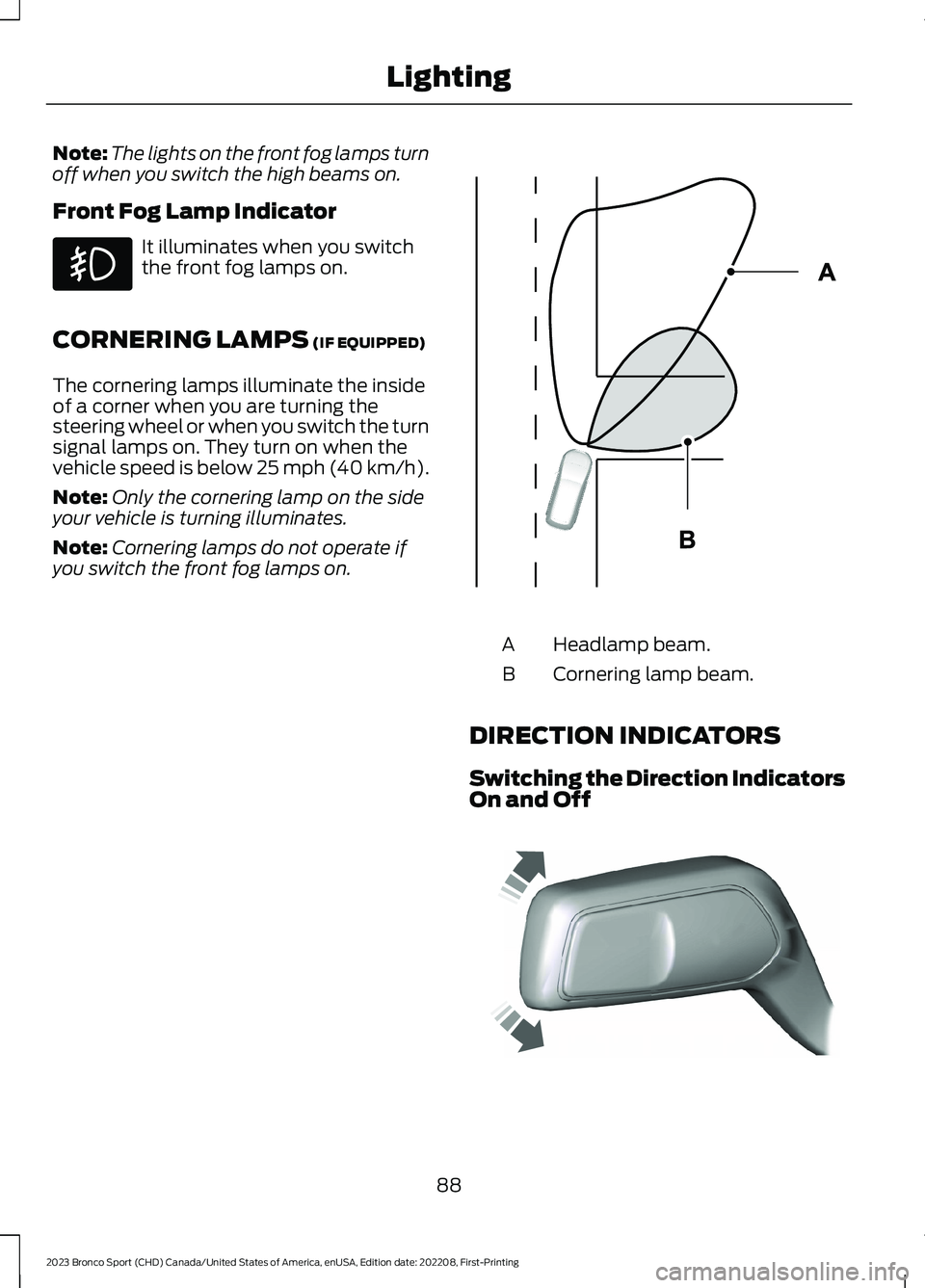
The cornering lamps illuminate the insideof a corner when you are turning thesteering wheel or when you switch the turnsignal lamps on. They turn on when thevehicle speed is below 25 mph (40 km/h).
Note:Only the cornering lamp on the sideyour vehicle is turning illuminates.
Note:Cornering lamps do not operate ifyou switch the front fog lamps on.
Headlamp beam.A
Cornering lamp beam.B
DIRECTION INDICATORS
Switching the Direction IndicatorsOn and Off
88
2023 Bronco Sport (CHD) Canada/United States of America, enUSA, Edition date: 202208, First-PrintingLighting E327599 E242676
Page 95 of 516
WHAT IS AUTOMATIC HIGH
BEAM CONTROL
The system turns on high beams if it is darkenough and no other traffic is present. If itdetects an approaching vehicle’sheadlamps or tail lamps, or street lightingahead, the system turns the high beamsoff. Low beams remain on.
A camera sensor, centrally mountedbehind the windshield of your vehicle,continuously monitors conditions to turnthe high beams on and off.
SWITCHING AUTOMATIC HIGH
BEAM CONTROL ON AND OFF
WARNING: Do not use the systemin poor visibility, for example fog, heavyrain, spray or snow.
Use the touchscreen to select thefollowing:
1.Select Settings.
2.Select Vehicle.
3.Select Lighting.
Activating the Automatic HighBeam Control
Switch the lighting control to theautolamps position. SeeAutolamps (page 86).
Note:The lighting control defaults toautolamps each time you switch yourvehicle on.
When active, the high beams turn on if allthe following conditions occur:
•The ambient light level is low enough.
•There is no traffic in front of yourvehicle.
•The vehicle speed is greater thanapproximately 25 mph (40 km/h).
When active, the high beams turn off if atleast one of the following conditions occur:
•The ambient light level is high enoughthat you do not require high beams.
•The system detects an approachingvehicle's headlamps or tail lamps.
•The system detects severe rain, snowor fog.
•A blocked vehicle camera.
•The vehicle speed falls belowapproximately 19 mph (30 km/h).
Note:The deactivation speed is lower oncurves.
Note:Certain curvy road situations maydelay high beam reactivation.
Note:If you have a blocked sensor, thesystem may not operate properly. Keep thewindshield free from obstruction or damage.
Note:The system may not operate properlyin cold or inclement conditions. You canswitch on the high beams by overriding thesystem.
Note:If the system detects a blockage, forexample bird droppings, bug splatter, snowor ice, the system goes into low beam modeuntil you clear the blockage. If you have ablocked camera, a message may appear inthe information display.
Note:Using much larger tires or equippingvehicle accessories such as snowplows canmodify your vehicle's ride height anddegrade automatic high beam controlperformance.
91
2023 Bronco Sport (CHD) Canada/United States of America, enUSA, Edition date: 202208, First-PrintingAutomatic High Beam ControlE281240
Page 96 of 516
AUTOMATIC HIGH BEAM
CONTROL INDICATORS
The indicator illuminates toconfirm when the system isready to assist.
OVERRIDING AUTOMATIC
HIGH BEAM CONTROL
WARNING: The system does notrelieve you of your responsibility to drivewith due care and attention. You mayneed to override the system if it does notturn the high beams on or off.
WARNING: You may need tooverride the system when approachingother road users.
WARNING: You may need tooverride the system during inclementweather.
Push the lever away from you to switchbetween high beam and low beam.
92
2023 Bronco Sport (CHD) Canada/United States of America, enUSA, Edition date: 202208, First-PrintingAutomatic High Beam ControlE146105 E248603
Page 104 of 516
Adaptive Cruise Control
The speed control systemindicator light changes color toindicate what mode the systemis in. See How Does Adaptive CruiseControl With Stop and Go Work (page212).
On (white light): Illuminates when youswitch on the adaptive cruise controlsystem. Turns off when the speed controlsystem is turned off.
Engaged (green light): Illuminates whenyou engage the adaptive cruise controlsystem. Turns off when you disengage thespeed control system.
Anti-Lock Braking System
If it illuminates when you aredriving, this indicates a systemerror. You continue to have thenormal braking (without ABS) unless thebrake system warning lamp alsoilluminates. Have the system checked byan authorized dealer.
Automatic High Beam Control
Illuminates when this feature ison. See Switching AutomaticHigh Beam Control On and Off(page 91).
Auto Hold Active
Illuminates when the systemholds your vehicle stationary.
Auto Hold Unavailable
Illuminates when the system ison, but unavailable to hold yourvehicle stationary.
Auto-Start-Stop
Illuminates when the engineshuts down or in conjunctionwith a message.
Battery
If it illuminates while driving, itindicates a system error. Switchoff all unnecessary electricalequipment and have the system checkedby an authorized dealer immediately.
Blind Spot Monitor
Illuminates when you switch thisfeature off or in conjunction witha message. See Blind SpotInformation System (page 229).
Brake System Warning Lamp
WARNING: Driving your vehiclewith the warning lamp on is dangerous.A significant decrease in brakingperformance may occur. It may take youlonger to stop your vehicle. Have yourvehicle checked as soon as possible.Driving extended distances with theparking brake engaged can cause brakefailure and the risk of personal injury.
Note:Indicators vary depending on region.
This lamp is a dual function lamp andilluminates when:
•You apply the parking brake with theignition on.
•Your vehicle has a brake fault or lowbrake fluid level, regardless of parkingbrake position.
100
2023 Bronco Sport (CHD) Canada/United States of America, enUSA, Edition date: 202208, First-PrintingInstrument ClusterE323440 E67020 E146105 E323448 E323449 E121377 E67021 E323450
Page 106 of 516
Hood Ajar
Illuminates when the ignition ison and the hood is notcompletely closed.
Lamps On
Illuminates when you switch thelow beam headlamps or theparking lamps on.
Liftgate Ajar
Illuminates when the liftgate isnot completely closed.
Low Beam Warning
Illuminates when the low beamheadlamp bulb is not functioningproperly.
Low Fuel Level
Illuminates when the fuel levelis low or the fuel tank is nearlyempty. Refuel as soon aspossible.
Low Tire Pressure Warning
Illuminates when your tirepressure is low. If the lampremains on with the enginerunning or when driving, check your tirepressure as soon as possible.
It also illuminates momentarily when youswitch the ignition on to confirm the lampis functional. If it does not illuminate whenyou switch the ignition on, or begins toflash at any time, have the system checkedby an authorized dealer.
Low Washer Fluid
Illuminates when the windshieldwasher fluid is low.
Malfunction Indicator Lamp
It illuminates when you switchthe ignition on prior to enginestart to check the bulb.
Normally, it illuminates until the engine iscranked and automatically turns off if nosystem errors are present.
If it illuminates when the engine is runningthis indicates a system error. The On BoardDiagnostics system has detected an errorin the vehicle emission control system.
If it flashes, engine misfire may beoccurring. Continuing to drive your vehiclemay cause reduced power or the engineto stop. Failure to respond to the warninglamp may cause component damage notcovered by the vehicle warranty. Have yourvehicle checked as soon as possible.
Powertrain Fault
Illuminates when the systemdetects a powertrain or a4WD/AWD fault. Contact anauthorized dealer as soon as possible.
Rear Differential Lock
Illuminates when you lock therear differential.
102
2023 Bronco Sport (CHD) Canada/United States of America, enUSA, Edition date: 202208, First-PrintingInstrument ClusterE325774 E71341 E323454 E325579 E325771 E139232 E132353 E67028 E323455 E325779
Page 301 of 516
If you replace the battery make sure itmatches the electrical requirements ofyour vehicle.
If you disconnect or replace the batteryand your vehicle has an automatictransmission, it must relearn its adaptivestrategy. Because of this, the transmissionmay shift firmly when first driven. This isnormal operation while the transmissionfully updates its operation to optimumshift feel.
Battery Sensor Reset
When you install a new battery, reset thebattery sensor by doing the following:
1.Switch the ignition on, and leave theengine off.
Note:Complete Steps 2 and 3 within 10seconds.
2.Flash the high beam headlamps fivetimes, ending with the high beams off.
3.Press and release the brake pedal threetimes.
The battery warning lamp flashes threetimes to confirm that the reset issuccessful.
Battery Management System (If
Equipped)
The system monitors battery conditionsand takes actions to extend battery life. Ifexcessive battery drain is detected, thesystem temporarily disables someelectrical systems to protect the battery.
Systems included are:
•Heated rear window.
•Heated seats.
•Climate control.
•Heated steering wheel.
•Audio unit.
•Navigation system.
A message may appear in the informationdisplay to alert you that battery protectionactions are active. This message is only fornotification that an action is taking place,and not intended to indicate an electricalproblem or that the battery requiresreplacement.
After battery replacement, or in somecases after charging the battery with anexternal charger, the battery managementsystem requires eight hours of vehicle sleeptime to relearn the battery state of charge.During this time, your vehicle must remainfully locked with the ignition switched off.
Note:Prior to relearning the battery stateof charge, the battery management systemmay temporarily disable some electricalsystems.
Electrical Accessory Installation
To make sure the battery managementsystem works correctly, do not connect anelectrical device ground connectiondirectly to the battery negative post. Thiscan cause inaccurate measurements ofthe battery condition and potentialincorrect system operation.
Note:If you add electrical accessories orcomponents to the vehicle, it may adverselyaffect battery performance and durability.This may also affect the performance ofother electrical systems in the vehicle.
Remove and Reinstall the Battery
Install a battery approved for use by ourspecifications. See Capacities andSpecifications (page 339).
To disconnect or remove the battery, dothe following:
1.Apply the parking brake and switch theignition off.
2.Switch all electrical equipment off, forexample lights and radio.
297
2023 Bronco Sport (CHD) Canada/United States of America, enUSA, Edition date: 202208, First-PrintingMaintenance
Page 302 of 516
3.Wait a minimum of two minutes beforedisconnecting the battery.
Note:The engine management system hasa power hold function and remains poweredfor a period of time after you switch theignition off. This is to allow the system tostore diagnostic and adaptive tables.Disconnecting the battery without waitingcan cause damage not covered by thevehicle warranty.
4.Disconnect the negative battery cableterminal.
5.Disconnect the positive battery cableterminal.
6.Remove the battery securing clamp.
7.Remove the battery.
8.To install, reverse the removalprocedure.
Note:Before reconnecting the battery,make sure the ignition remains switched off.
Note:Make sure to fully tighten the batterycables.
If you disconnect or replace the vehiclebattery, you must reset the followingfeatures:
•Window bounce-back. See PowerWindows (page 93).
•Clock Settings.
•Pre-set radio stations.
Battery Disposal
Make sure that you dispose ofold batteries in anenvironmentally friendly way.Seek advice from your local authorityabout recycling old batteries.
ADJUSTING THE HEADLAMPS
Vertical Aim Adjustment
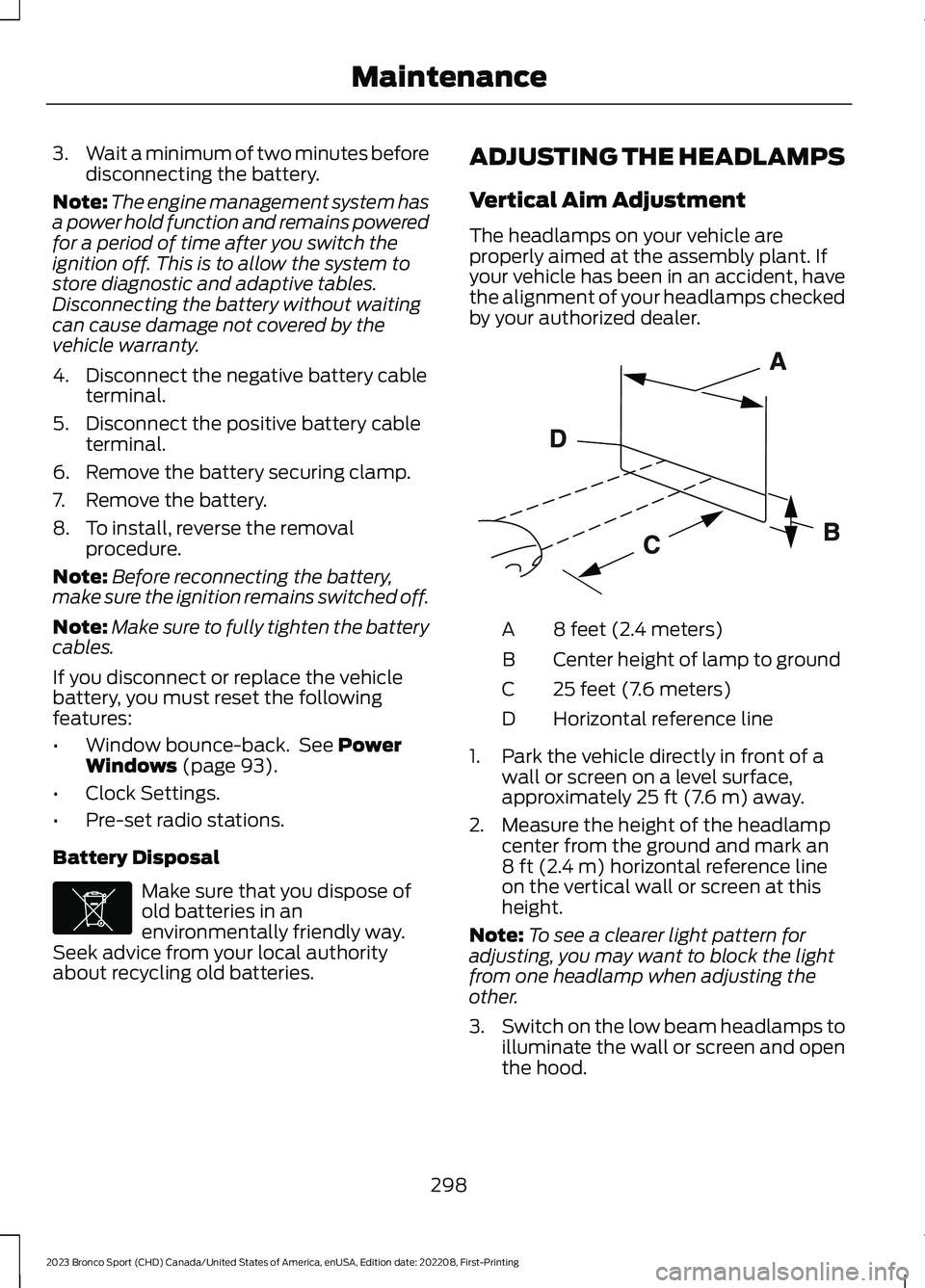
The headlamps on your vehicle areproperly aimed at the assembly plant. Ifyour vehicle has been in an accident, havethe alignment of your headlamps checkedby your authorized dealer.
8 feet (2.4 meters)A
Center height of lamp to groundB
25 feet (7.6 meters)C
Horizontal reference lineD
1.Park the vehicle directly in front of awall or screen on a level surface,approximately 25 ft (7.6 m) away.
2.Measure the height of the headlampcenter from the ground and mark an8 ft (2.4 m) horizontal reference lineon the vertical wall or screen at thisheight.
Note:To see a clearer light pattern foradjusting, you may want to block the lightfrom one headlamp when adjusting theother.
3.Switch on the low beam headlamps toilluminate the wall or screen and openthe hood.
298
2023 Bronco Sport (CHD) Canada/United States of America, enUSA, Edition date: 202208, First-PrintingMaintenanceE107998 E142592