transmission FORD BRONCO SPORT 2023 Owners Manual
[x] Cancel search | Manufacturer: FORD, Model Year: 2023, Model line: BRONCO SPORT, Model: FORD BRONCO SPORT 2023Pages: 516, PDF Size: 14.27 MB
Page 9 of 516
Wireless Accessory Charger Precautions.........................................................................162
Locating the Wireless Accessory Charger.........................................................................162
Charging a Wireless Device.....................162
Storage
Cup Holders...................................................163
Glove Compartment..................................163
Under Seat Storage....................................163
Glasses Holder.............................................164
Map Pocket....................................................164
Starting and Stopping theEngine
General Information...................................165
Ignition Switch..............................................165
Keyless Starting...........................................165
Starting a Gasoline Engine......................166
Engine Block Heater...................................168
Auto-Start-Stop
What Is Auto-Start-Stop..........................170
Auto-Start-Stop Precautions.................170
Switching Auto-Start-Stop On and Off.........................................................................170
Stopping the Engine...................................170
Restarting the Engine.................................170
Auto-Start-Stop Indicators......................172
Fuel and Refueling
Safety Precautions......................................173
Fuel Quality....................................................173
Fuel Filler Funnel Location.......................174
Running Out of Fuel....................................174
Refueling.........................................................176
Fuel Consumption.......................................178
Engine Emission Control
Catalytic Converter.....................................179
Transmission
Automatic Transmission...........................182
Four-Wheel Drive
Principle of Operation...............................189
Using Four-Wheel Drive............................189
Brakes
General Information...................................193
Hints on Driving With Anti-Lock Brakes.........................................................................193
Electric Parking Brake................................194
Hill Start Assist.............................................195
Auto Hold.......................................................196
Traction Control
Principle of Operation...............................198
Using Traction Control..............................198
Stability Control
Principle of Operation...............................199
Using Stability Control.............................200
Trail Control
What Is Trail Control...................................201
Switching Trail Control On and Off......201
Setting the Trail Control Speed.............201
Canceling the Set Speed.........................202
Trail Control Indicators.............................202
Trail Control – Troubleshooting............202
Parking Aids
Principle of Operation...............................203
Rear Parking Aid.........................................204
Rear View Camera.....................................205
180 Degree Camera..................................208
Cruise Control
What Is Cruise Control...............................210
5
2023 Bronco Sport (CHD) Canada/United States of America, enUSA, Edition date: 202208, First-PrintingTable of Contents
Page 11 of 516
Roadside Emergencies
Roadside Assistance.................................269
Hazard Flashers...........................................270
Jump Starting the Vehicle.......................270
Post-Crash Alert System..........................272
Transporting the Vehicle..........................272
Towing Points - 1.5L EcoBoost™...........272
Towing Points - 2.0L EcoBoost™.........273
Crash and BreakdownInformation
Post Impact Braking...................................275
Automatic Crash Shutoff.........................275
Fuses
Fuse Precautions........................................276
Under Hood Fuse Box...............................276
Body Control Module Fuse Box..............281
Identifying Fuse Types..............................284
Fuses – Troubleshooting.........................284
Maintenance
General Information..................................285
Opening and Closing the Hood.............285
Under Hood Overview - 1.5L EcoBoost™........................................................................286
Under Hood Overview - 2.0L EcoBoost™........................................................................287
Engine Oil Dipstick - 1.5L EcoBoost™........................................................................288
Engine Oil Dipstick - 2.0L EcoBoost™........................................................................288
Engine Oil Check.........................................288
Oil Change Indicator Reset.....................289
Changing the Engine Air Filter...............289
Engine Coolant Check..............................290
Automatic Transmission Fluid Check........................................................................294
Brake Fluid Check.......................................295
Power Steering Fluid Check....................295
Changing the 12V Battery........................296
Adjusting the Headlamps.......................298
Washer Fluid Check...................................299
Fuel Filter.......................................................299
Checking the Wiper Blades....................300
Changing the Front Wiper Blades.......300
Changing the Rear Wiper Blades.........300
Changing a Bulb..........................................301
Vehicle Care
General Information..................................303
Cleaning Products......................................303
Cleaning the Exterior................................304
Waxing............................................................305
Cleaning the Engine..................................305
Cleaning the Windows and Wiper Blades.......................................................................306
Cleaning the Interior..................................306
Cleaning the Instrument Panel andInstrument Cluster Lens......................307
Repairing Minor Paint Damage.............307
Cleaning the Wheels.................................308
Vehicle Storage...........................................308
Wheels and Tires
General Information....................................311
Tire Care..........................................................313
Using Snow Chains....................................326
Tire Pressure Monitoring System..........327
Changing a Road Wheel...........................332
Technical Specifications..........................338
Capacities and Specifications
Engine Specifications - 1.5L EcoBoost™........................................................................339
Engine Specifications - 2.0L EcoBoost™........................................................................339
Motorcraft Parts - 1.5L EcoBoost™.....340
Motorcraft Parts - 2.0L EcoBoost™......341
7
2023 Bronco Sport (CHD) Canada/United States of America, enUSA, Edition date: 202208, First-PrintingTable of Contents
Page 50 of 516
Note:If a rear seat is unoccupied, or anoccupant never fastens the seatbelt buckleto begin with, the warning will not display.
Note:Front seating positions appear in thiswarning display. Warnings for unfastenedfront seatbelt buckles appear in the initialwarning lamp.
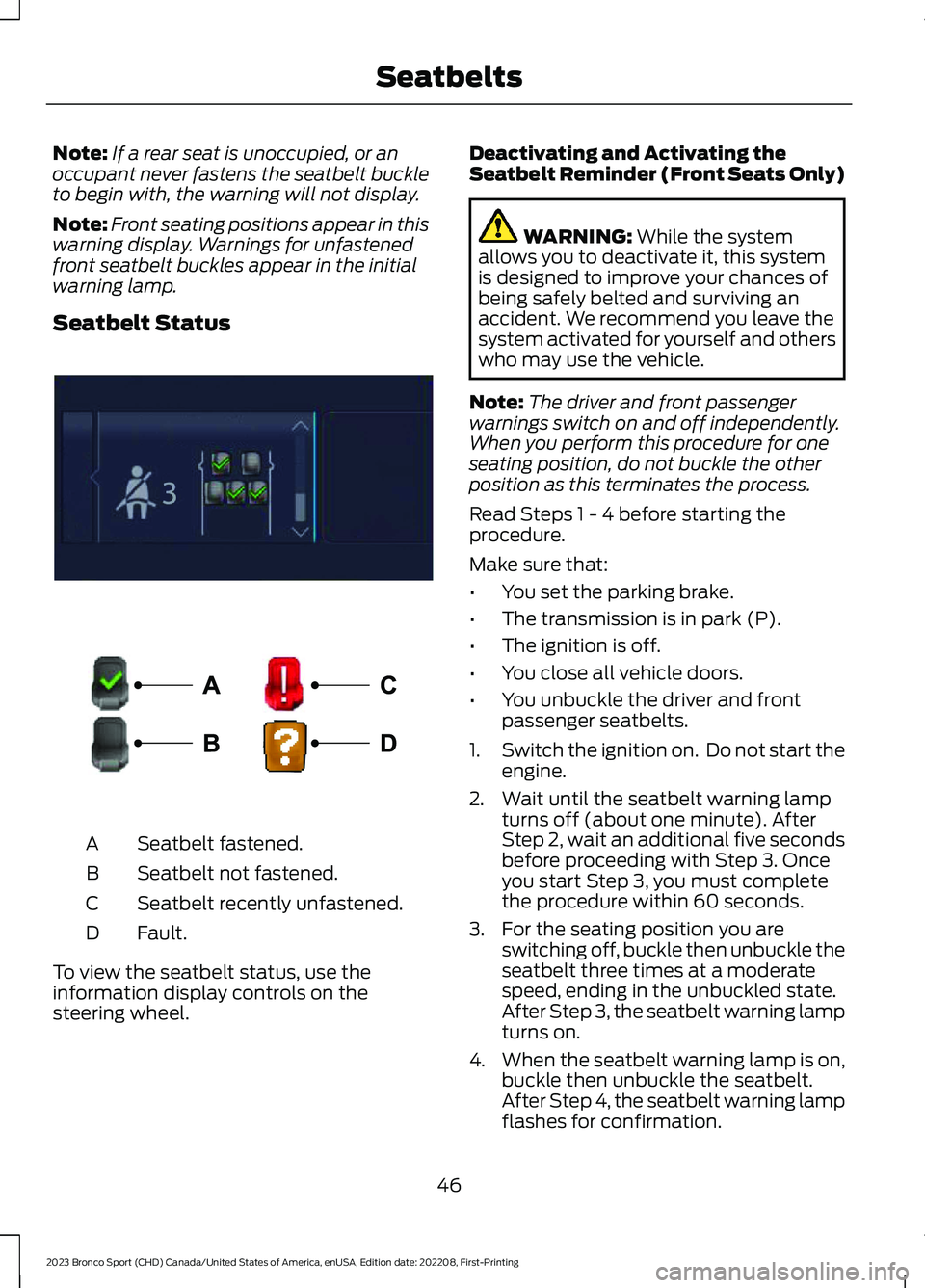
Seatbelt Status
Seatbelt fastened.A
Seatbelt not fastened.B
Seatbelt recently unfastened.C
Fault.D
To view the seatbelt status, use theinformation display controls on thesteering wheel.
Deactivating and Activating theSeatbelt Reminder (Front Seats Only)
WARNING: While the systemallows you to deactivate it, this systemis designed to improve your chances ofbeing safely belted and surviving anaccident. We recommend you leave thesystem activated for yourself and otherswho may use the vehicle.
Note:The driver and front passengerwarnings switch on and off independently.When you perform this procedure for oneseating position, do not buckle the otherposition as this terminates the process.
Read Steps 1 - 4 before starting theprocedure.
Make sure that:
•You set the parking brake.
•The transmission is in park (P).
•The ignition is off.
•You close all vehicle doors.
•You unbuckle the driver and frontpassenger seatbelts.
1.Switch the ignition on. Do not start theengine.
2.Wait until the seatbelt warning lampturns off (about one minute). AfterStep 2, wait an additional five secondsbefore proceeding with Step 3. Onceyou start Step 3, you must completethe procedure within 60 seconds.
3.For the seating position you areswitching off, buckle then unbuckle theseatbelt three times at a moderatespeed, ending in the unbuckled state.After Step 3, the seatbelt warning lampturns on.
4.When the seatbelt warning lamp is on,buckle then unbuckle the seatbelt.After Step 4, the seatbelt warning lampflashes for confirmation.
46
2023 Bronco Sport (CHD) Canada/United States of America, enUSA, Edition date: 202208, First-PrintingSeatbeltsE281361 E274703
Page 75 of 516
Activating Passive Key
General Information
You can unlock and lock your vehiclewithout taking the keys out of your pocketor purse when the passive key is within 3 ft(1 m) of your vehicle. Passive key uses asensor on the back of the door handle forunlocking and a separate sensor on theface of each door handle for locking.
The system does not function if:
•The vehicle battery has no charge.
•The passive key battery has no charge.
•The passive key frequencies arejammed.
Note:The system may not operate if thepassive key is close to metal objects orelectronic devices, for example keys or a cellphone.
Note:If the system does not operate, usethe key blade to lock and unlock yourvehicle. See Remote Control (page 60).
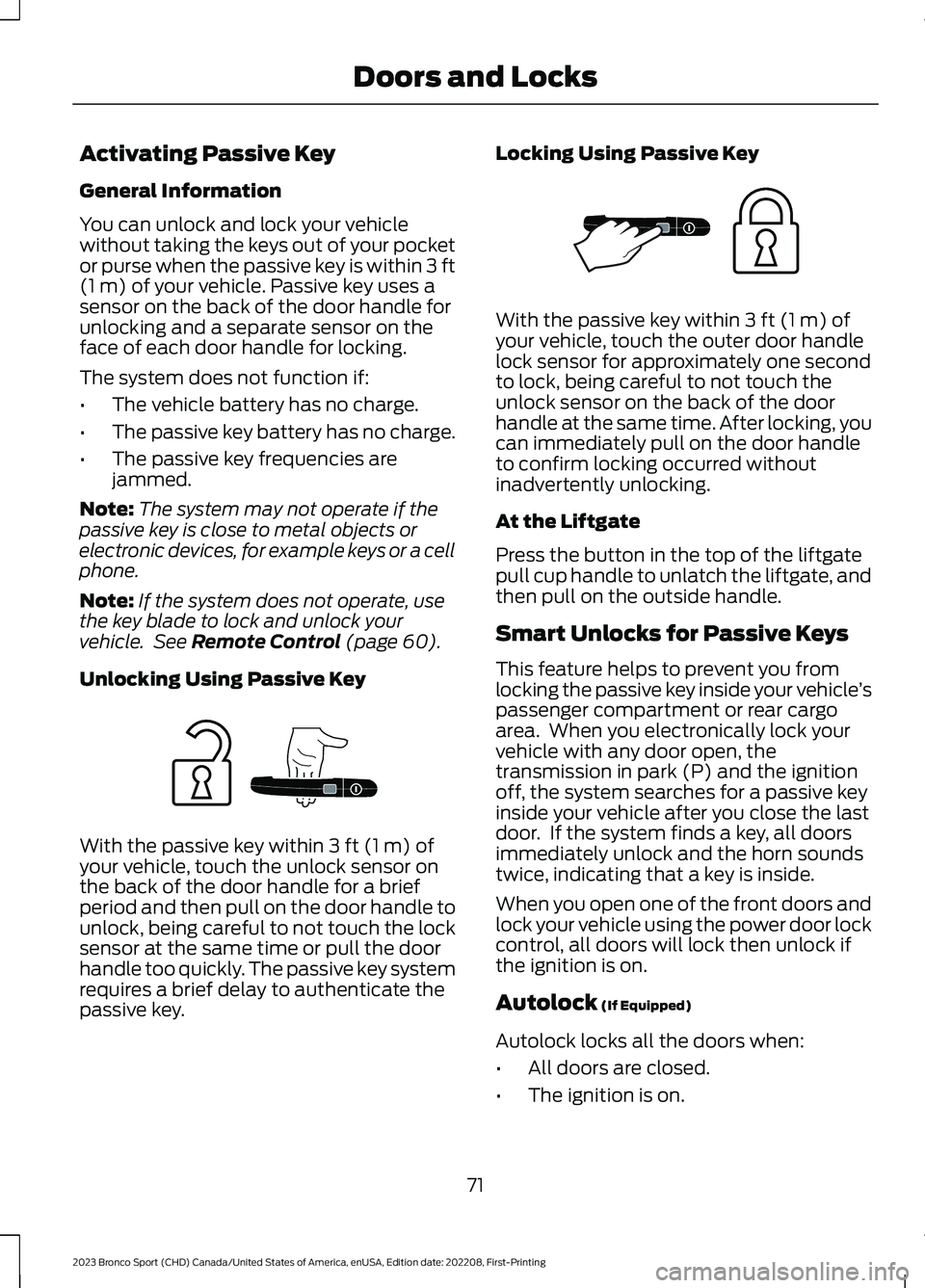
Unlocking Using Passive Key
With the passive key within 3 ft (1 m) ofyour vehicle, touch the unlock sensor onthe back of the door handle for a briefperiod and then pull on the door handle tounlock, being careful to not touch the locksensor at the same time or pull the doorhandle too quickly. The passive key systemrequires a brief delay to authenticate thepassive key.
Locking Using Passive Key
With the passive key within 3 ft (1 m) ofyour vehicle, touch the outer door handlelock sensor for approximately one secondto lock, being careful to not touch theunlock sensor on the back of the doorhandle at the same time. After locking, youcan immediately pull on the door handleto confirm locking occurred withoutinadvertently unlocking.
At the Liftgate
Press the button in the top of the liftgatepull cup handle to unlatch the liftgate, andthen pull on the outside handle.
Smart Unlocks for Passive Keys
This feature helps to prevent you fromlocking the passive key inside your vehicle’spassenger compartment or rear cargoarea. When you electronically lock yourvehicle with any door open, thetransmission in park (P) and the ignitionoff, the system searches for a passive keyinside your vehicle after you close the lastdoor. If the system finds a key, all doorsimmediately unlock and the horn soundstwice, indicating that a key is inside.
When you open one of the front doors andlock your vehicle using the power door lockcontrol, all doors will lock then unlock ifthe ignition is on.
Autolock (If Equipped)
Autolock locks all the doors when:
•All doors are closed.
•The ignition is on.
71
2023 Bronco Sport (CHD) Canada/United States of America, enUSA, Edition date: 202208, First-PrintingDoors and LocksE248555 E248556
Page 91 of 516
DAYTIME RUNNING LAMPS -
VEHICLES WITH:
CONFIGURABLE DAYTIME
RUNNING LAMPS
WARNING: The daytime runninglamps system does not activate the rearlamps and may not provide adequatelighting during low visibility drivingconditions. Make sure you switch theheadlamps on, as appropriate, during alllow visibility conditions. Failure to do somay result in a crash.
Switch the daytime running lamps on oroff using the touchscreen:
1.Select Settings. See Settings (page393).
2.Select Vehicle.
3.Select Lighting.
The daytime running lamps turn on when:
1.The lamps are on in the informationdisplay.
2.You switch the ignition on.
3.The transmission is not in park (P) forvehicles with automatic transmissionsor you release the parking brake forvehicles with manual transmissions.
4.The lighting control is in the autolampsposition.
5.The headlamps are off.
The other lighting control switch positionsdo not turn on the daytime running lamps.
If the daytime running lamps are off in theinformation display, the lamps stay off inall switch positions.
DAYTIME RUNNING LAMPS -
VEHICLES WITH: DAYTIME
RUNNING LAMPS (DRL)
WARNING: The daytime runninglamps system does not activate the rearlamps and may not provide adequatelighting during low visibility drivingconditions. Make sure you switch theheadlamps on, as appropriate, during alllow visibility conditions. Failure to do somay result in a crash.
The system turns the lamps on in daylightconditions.
To switch the system on, switch thelighting control to any position exceptheadlamps.
FRONT FOG LAMPS
Using the Front Fog Lamps
To switch the lamps on or off:
1.Set the lighting control to the parkinglamps, headlamps or autolampsposition.
Note:When the lighting control is in theautolamps position, you cannot switch thefog lamps on unless the low beamheadlamps are on.
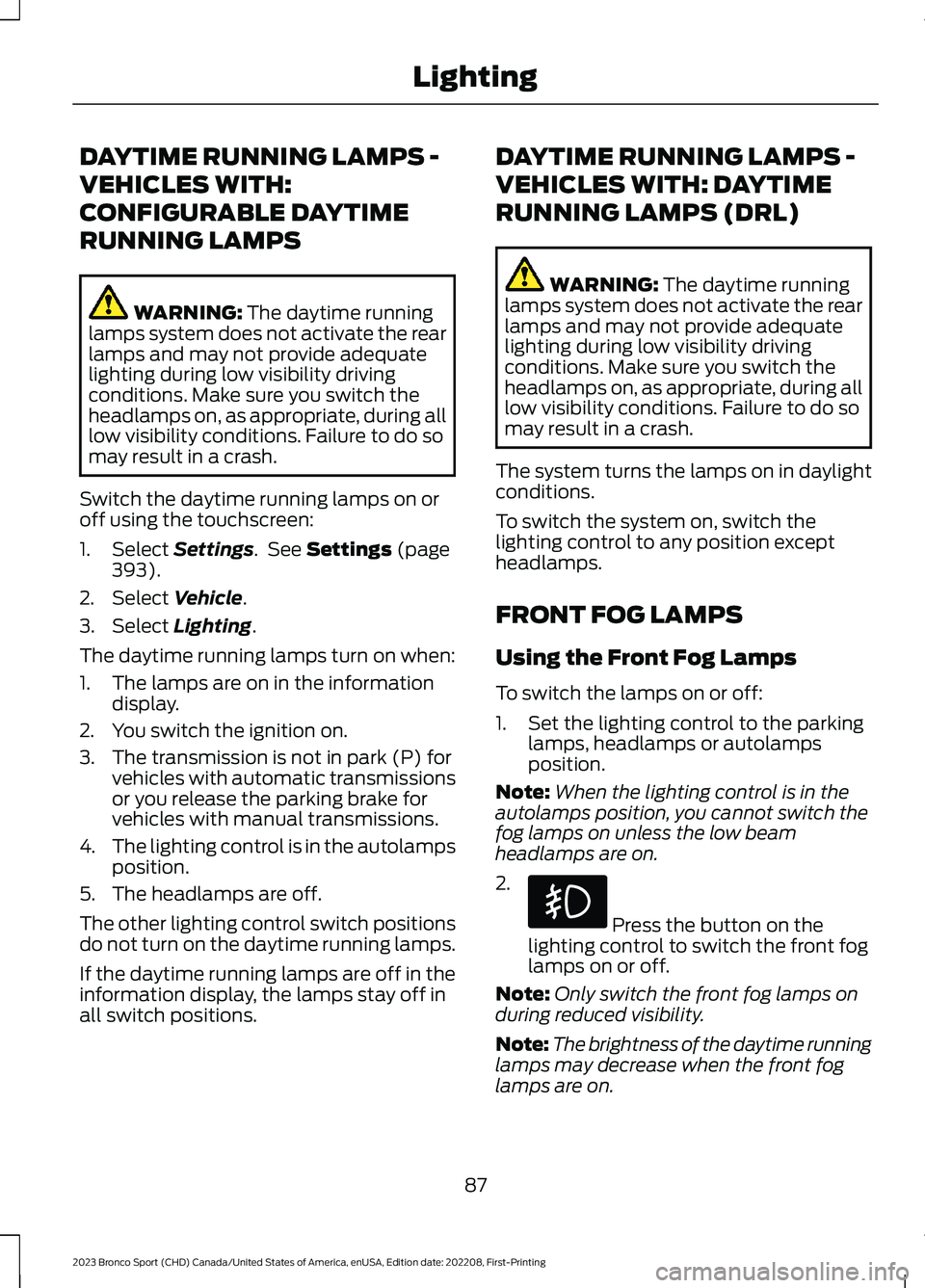
2.
Press the button on thelighting control to switch the front foglamps on or off.
Note:Only switch the front fog lamps onduring reduced visibility.
Note:The brightness of the daytime runninglamps may decrease when the front foglamps are on.
87
2023 Bronco Sport (CHD) Canada/United States of America, enUSA, Edition date: 202208, First-PrintingLighting
Page 126 of 516

Trailer
DetailsMessage
A correct trailer connection is sensed duringa given ignition cycle.Trailer Connected
A trailer connection becomes either inten-tionally or unintentionally disconnected andhas been sensed during a given ignitioncycle.
Trailer Disconnected
The trailer sway control has detected trailersway.Trailer Sway Reduce Speed
There are certain faults in your vehiclewiring and trailer wiring/brake system. SeeTowing a Trailer (page 254).
Trailer Wiring Fault
There is a fault with your trailer turn lamp.Check your lamp.Trailer Left Turn Lamps Fault Check Lamps
There is a fault with your trailer turn lamp.Check your lamp.Trailer Right Turn Lamps Fault CheckLamps
There is a fault with your trailer battery.See Towing a Trailer (page 254).Trailer Battery Not Charging See Manual
There is a fault with your vehicle trailerlighting module. See Towing a Trailer(page 254).
Trailer Lighting Module Fault See Manual
Transmission
DetailsMessage
Displays when you switch the engine off and the transmission isnot in park (P). Shift into park (P).Shift to Park
Transmission is too cold. Wait for it to warm up before you drive.TransmissionWarming UpPlease Wait
Displays when the brake pedal needs to be depressed.Press Brake Pedal
The transmission is overheating and needs to cool. Stop in a safeplace as soon as it’s possible.Transmission OverTemperature StopSafely
122
2023 Bronco Sport (CHD) Canada/United States of America, enUSA, Edition date: 202208, First-PrintingInformation Displays
Page 127 of 516
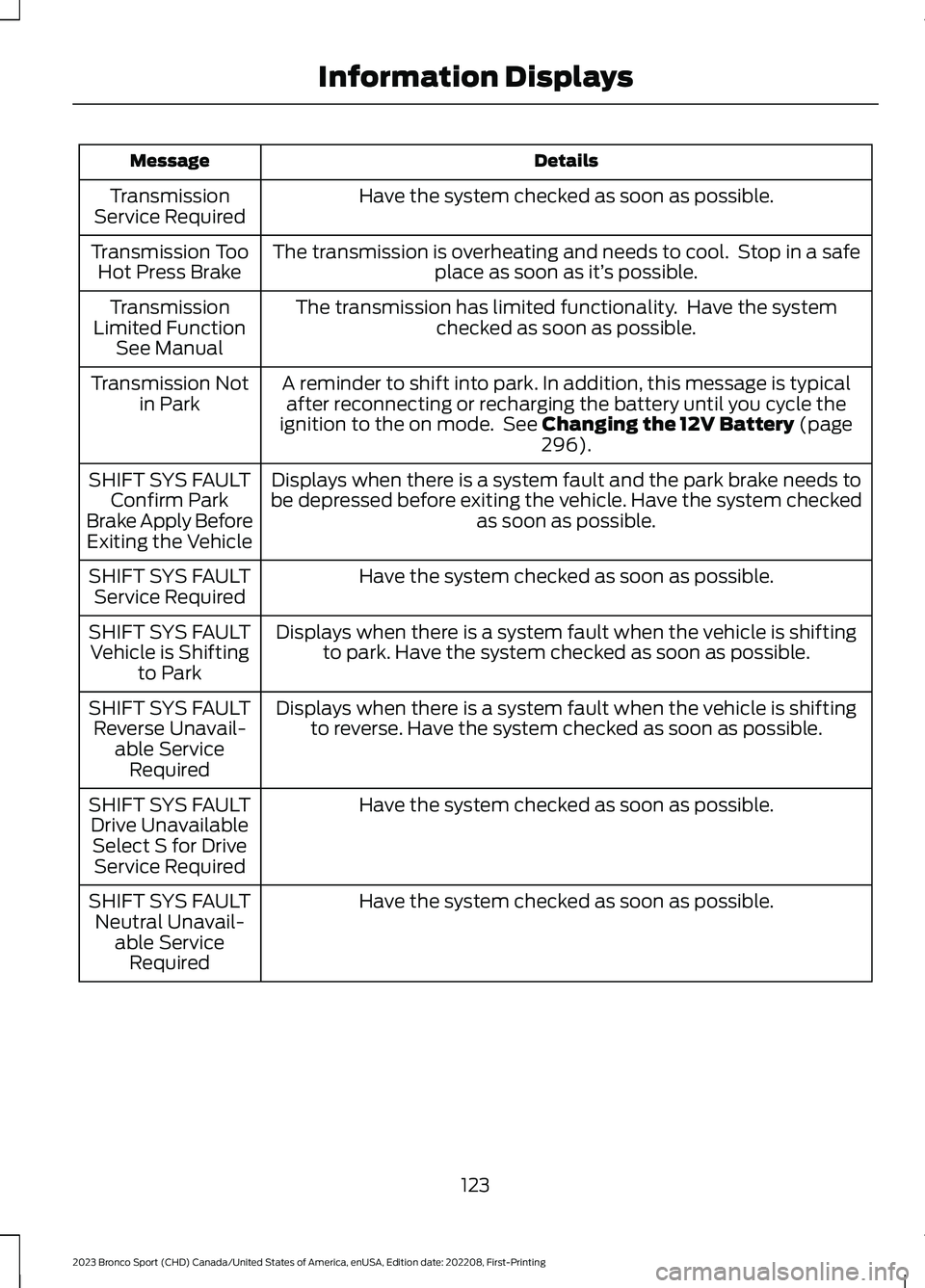
DetailsMessage
Have the system checked as soon as possible.TransmissionService Required
The transmission is overheating and needs to cool. Stop in a safeplace as soon as it’s possible.Transmission TooHot Press Brake
The transmission has limited functionality. Have the systemchecked as soon as possible.TransmissionLimited FunctionSee Manual
A reminder to shift into park. In addition, this message is typicalafter reconnecting or recharging the battery until you cycle theignition to the on mode. See Changing the 12V Battery (page296).
Transmission Notin Park
Displays when there is a system fault and the park brake needs tobe depressed before exiting the vehicle. Have the system checkedas soon as possible.
SHIFT SYS FAULTConfirm ParkBrake Apply BeforeExiting the Vehicle
Have the system checked as soon as possible.SHIFT SYS FAULTService Required
Displays when there is a system fault when the vehicle is shiftingto park. Have the system checked as soon as possible.SHIFT SYS FAULTVehicle is Shiftingto Park
Displays when there is a system fault when the vehicle is shiftingto reverse. Have the system checked as soon as possible.SHIFT SYS FAULTReverse Unavail-able ServiceRequired
Have the system checked as soon as possible.SHIFT SYS FAULTDrive UnavailableSelect S for DriveService Required
Have the system checked as soon as possible.SHIFT SYS FAULTNeutral Unavail-able ServiceRequired
123
2023 Bronco Sport (CHD) Canada/United States of America, enUSA, Edition date: 202208, First-PrintingInformation Displays
Page 128 of 516
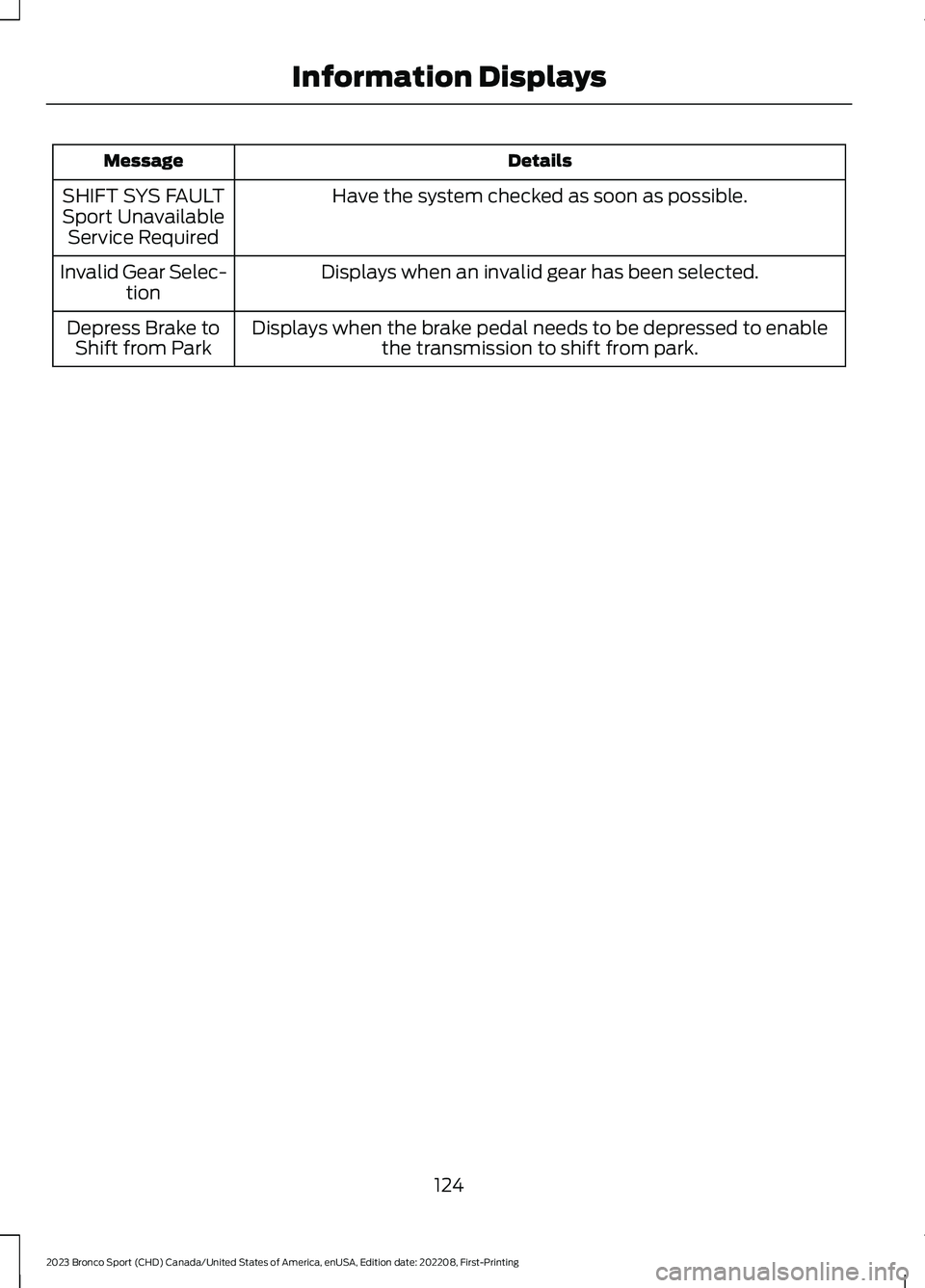
DetailsMessage
Have the system checked as soon as possible.SHIFT SYS FAULTSport UnavailableService Required
Displays when an invalid gear has been selected.Invalid Gear Selec-tion
Displays when the brake pedal needs to be depressed to enablethe transmission to shift from park.Depress Brake toShift from Park
124
2023 Bronco Sport (CHD) Canada/United States of America, enUSA, Edition date: 202208, First-PrintingInformation Displays
Page 129 of 516

WHAT IS REMOTE START
The system allows you to remotely startyour vehicle and to adjust the interiortemperature according to the settings thatyou chose.
REMOTE START
PRECAUTIONS
WARNING: Do not start the enginein a closed garage or in other enclosedareas. Exhaust fumes are toxic. Alwaysopen the garage door before you startthe engine. Failure to follow thisinstruction could result in personal injuryor death.
REMOTE START LIMITATIONS
Remote start does not work under thefollowing conditions:
•The alarm horn is sounding.
•The hood is open.
•The transmission is not in park (P).
•The ignition is on.
•The battery voltage is below theminimum operating voltage.
•Remote start is not enabled.
Note:Do not use remote start if the fuellevel is low.
ENABLING REMOTE START
1.Press Settings on the touchscreen.
2.Press Vehicle.
3.Press Remote Start Setup.
4.Switch System on.
Note:To use remote start, make sure thatthe modem is enabled. See Connecting theVehicle to a Mobile Network (page 352).
REMOTELY STARTING AND
STOPPING THE VEHICLE
Remotely Starting the Vehicle
Press the button on the remotecontrol.
Within three seconds, press thebutton on the remote control.
Within three seconds, press thebutton again.
Note:You can also use FordPass to startthe vehicle.
Note:The vehicle doors lock when yousuccessfully remote start your vehicle.
Note:The turn signal lamps flash twice.
Note:The parking lamps turn on when thevehicle is running.
Note:The horn sounds if the system failsto start.
Note:All other vehicle systems remain offwhen you have remotely started the vehicle.
Note:The vehicle remains secured whenyou have remotely started the vehicle. Avalid key must be inside your vehicle toswitch the ignition on and drive your vehicle.
Remotely Stopping the Vehicle
Within three seconds, press thebutton on the remote control.
Within three seconds, press thebutton again.
125
2023 Bronco Sport (CHD) Canada/United States of America, enUSA, Edition date: 202208, First-PrintingRemote Start (If Equipped)E138623 E138625 E138625
Page 155 of 516
HOW DOES THE MEMORY
FUNCTION WORK
The memory function recalls the positionof these features:
•Driver seat.
•Power mirrors.
MEMORY FUNCTION
PRECAUTIONS
WARNING: Before activating thememory seat, make sure that the areaimmediately surrounding the seat is clearof obstructions and that all occupantsare clear of moving parts.
WARNING: Do not use the memoryfunction when your vehicle is moving.
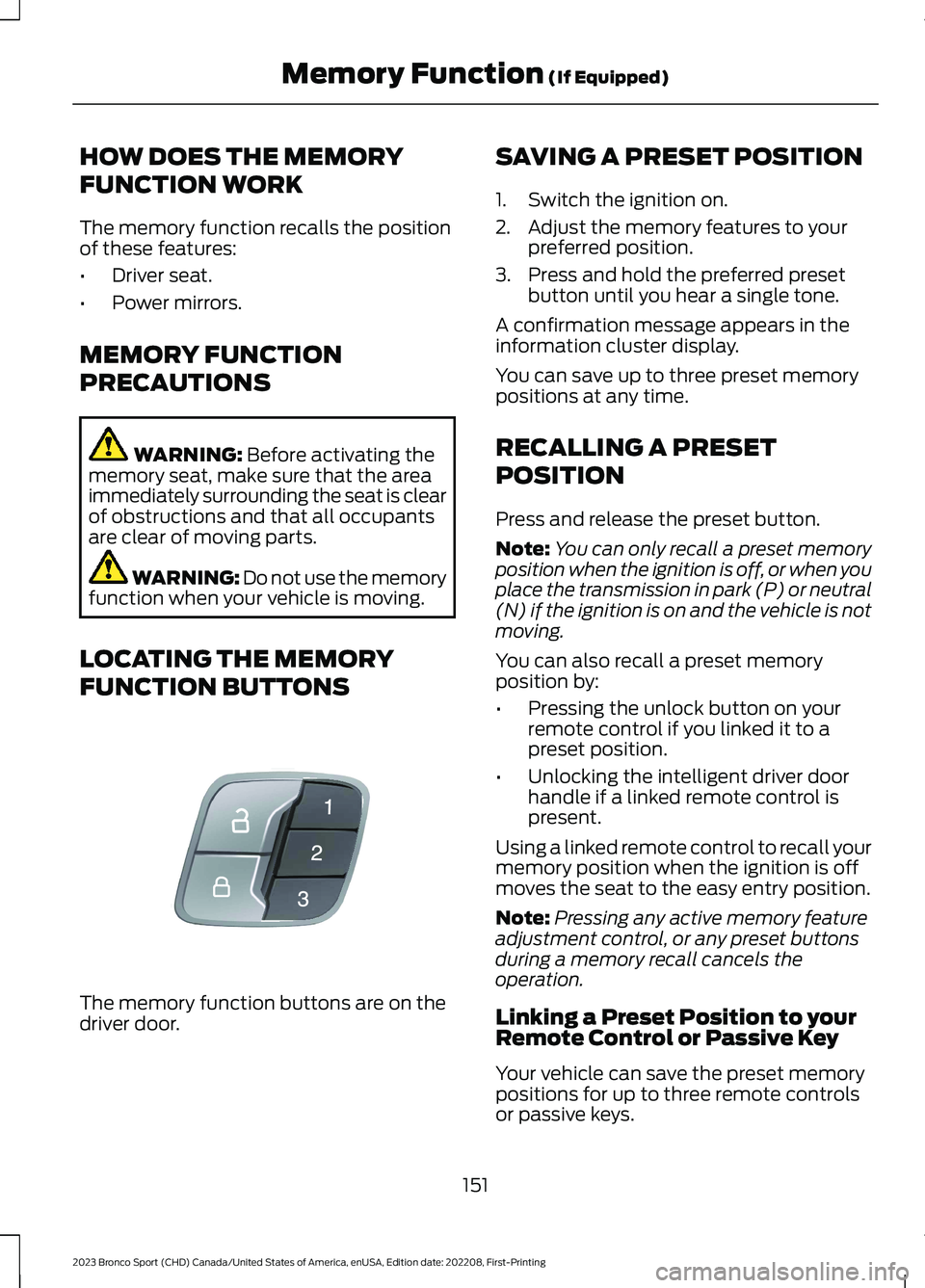
LOCATING THE MEMORY
FUNCTION BUTTONS
The memory function buttons are on thedriver door.
SAVING A PRESET POSITION
1.Switch the ignition on.
2.Adjust the memory features to yourpreferred position.
3.Press and hold the preferred presetbutton until you hear a single tone.
A confirmation message appears in theinformation cluster display.
You can save up to three preset memorypositions at any time.
RECALLING A PRESET
POSITION
Press and release the preset button.
Note:You can only recall a preset memoryposition when the ignition is off, or when youplace the transmission in park (P) or neutral(N) if the ignition is on and the vehicle is notmoving.
You can also recall a preset memoryposition by:
•Pressing the unlock button on yourremote control if you linked it to apreset position.
•Unlocking the intelligent driver doorhandle if a linked remote control ispresent.
Using a linked remote control to recall yourmemory position when the ignition is offmoves the seat to the easy entry position.
Note:Pressing any active memory featureadjustment control, or any preset buttonsduring a memory recall cancels theoperation.
Linking a Preset Position to yourRemote Control or Passive Key
Your vehicle can save the preset memorypositions for up to three remote controlsor passive keys.
151
2023 Bronco Sport (CHD) Canada/United States of America, enUSA, Edition date: 202208, First-PrintingMemory Function (If Equipped)E142554