wheel FORD C MAX 2011 2.G User Guide
[x] Cancel search | Manufacturer: FORD, Model Year: 2011, Model line: C MAX, Model: FORD C MAX 2011 2.GPages: 296, PDF Size: 7.87 MB
Page 35 of 296
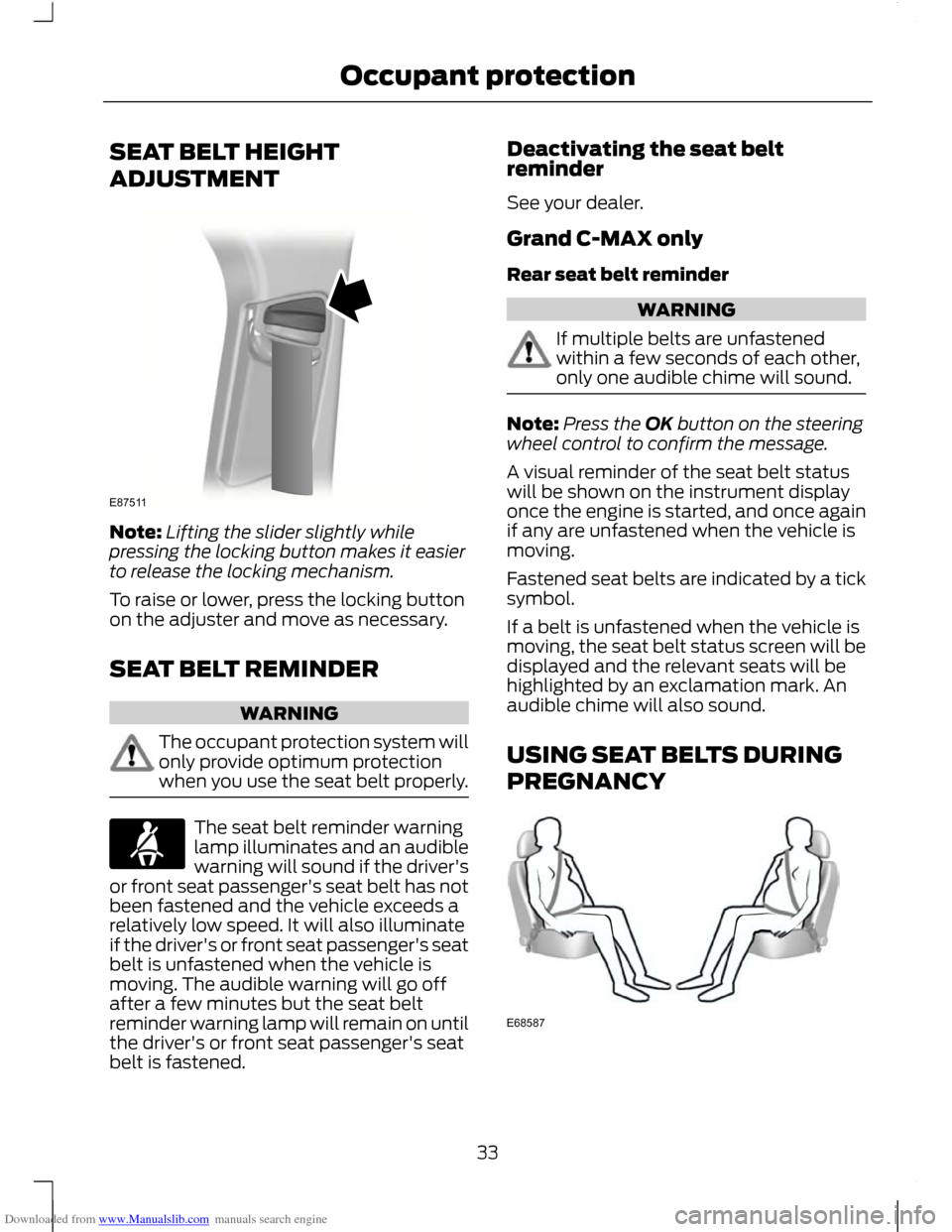
Downloaded from www.Manualslib.com manuals search engine SEAT BELT HEIGHT
ADJUSTMENT
Note:
Lifting the slider slightly while
pressing the locking button makes it easier
to release the locking mechanism.
To raise or lower, press the locking button
on the adjuster and move as necessary.
SEAT BELT REMINDER WARNING
The occupant protection system will
only provide optimum protection
when you use the seat belt properly.
The seat belt reminder warning
lamp illuminates and an audible
warning will sound if the driver's
or front seat passenger's seat belt has not
been fastened and the vehicle exceeds a
relatively low speed. It will also illuminate
if the driver's or front seat passenger's seat
belt is unfastened when the vehicle is
moving. The audible warning will go off
after a few minutes but the seat belt
reminder warning lamp will remain on until
the driver's or front seat passenger's seat
belt is fastened. Deactivating the seat belt
reminder
See your dealer.
Grand C-MAX only
Rear seat belt reminder
WARNING
If multiple belts are unfastened
within a few seconds of each other,
only one audible chime will sound.
Note:
Press the OK button on the steering
wheel control to confirm the message.
A visual reminder of the seat belt status
will be shown on the instrument display
once the engine is started, and once again
if any are unfastened when the vehicle is
moving.
Fastened seat belts are indicated by a tick
symbol.
If a belt is unfastened when the vehicle is
moving, the seat belt status screen will be
displayed and the relevant seats will be
highlighted by an exclamation mark. An
audible chime will also sound.
USING SEAT BELTS DURING
PREGNANCY 33
Occupant protectionE87511 E68587
Page 52 of 296
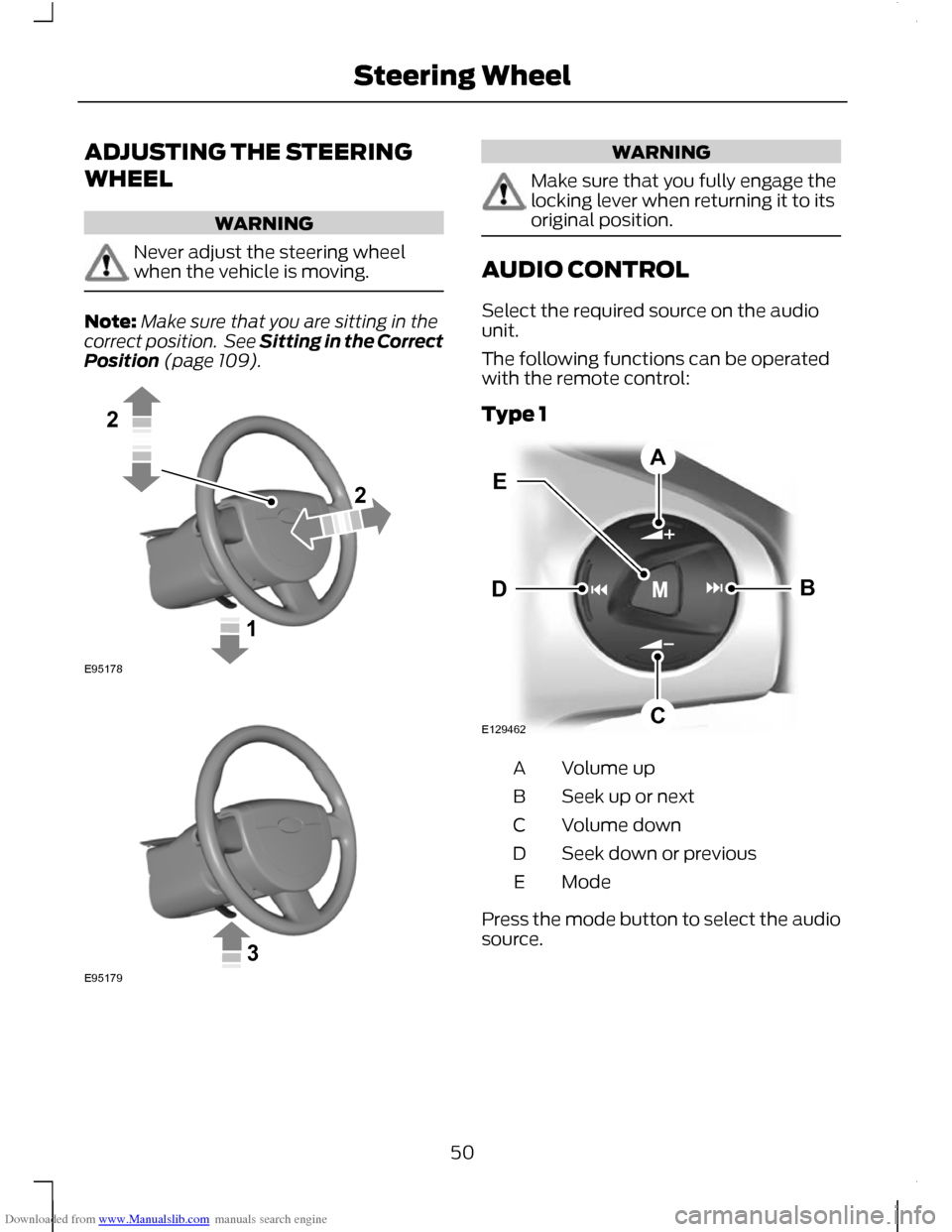
Downloaded from www.Manualslib.com manuals search engine ADJUSTING THE STEERING
WHEEL
WARNING
Never adjust the steering wheel
when the vehicle is moving.
Note:
Make sure that you are sitting in the
correct position. See Sitting in the Correct
Position (page 109). WARNING
Make sure that you fully engage the
locking lever when returning it to its
original position.
AUDIO CONTROL
Select the required source on the audio
unit.
The following functions can be operated
with the remote control:
Type 1
Volume up
A
Seek up or next
B
Volume down
C
Seek down or previous
D
Mode
E
Press the mode button to select the audio
source.
50
Steering Wheel122E95178 3E95179 E129462BDCAE
Page 53 of 296
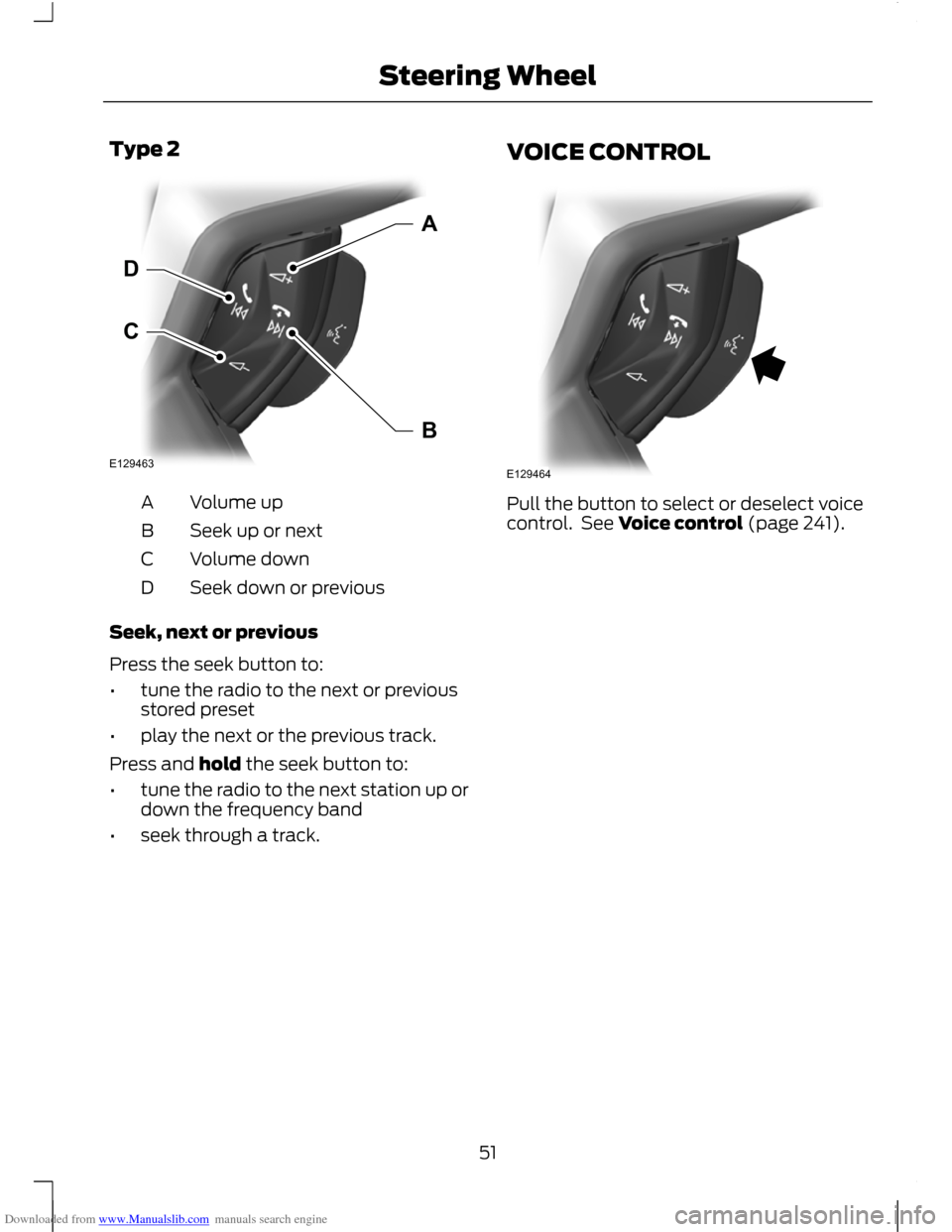
Downloaded from www.Manualslib.com manuals search engine Type 2
Volume up
A
Seek up or next
B
Volume down
C
Seek down or previous
D
Seek, next or previous
Press the seek button to:
• tune the radio to the next or previous
stored preset
• play the next or the previous track.
Press and hold the seek button to:
• tune the radio to the next station up or
down the frequency band
• seek through a track. VOICE CONTROL
Pull the button to select or deselect voice
control. See Voice control (page 241).
51
Steering WheelE129463CDAB E129464
Page 55 of 296
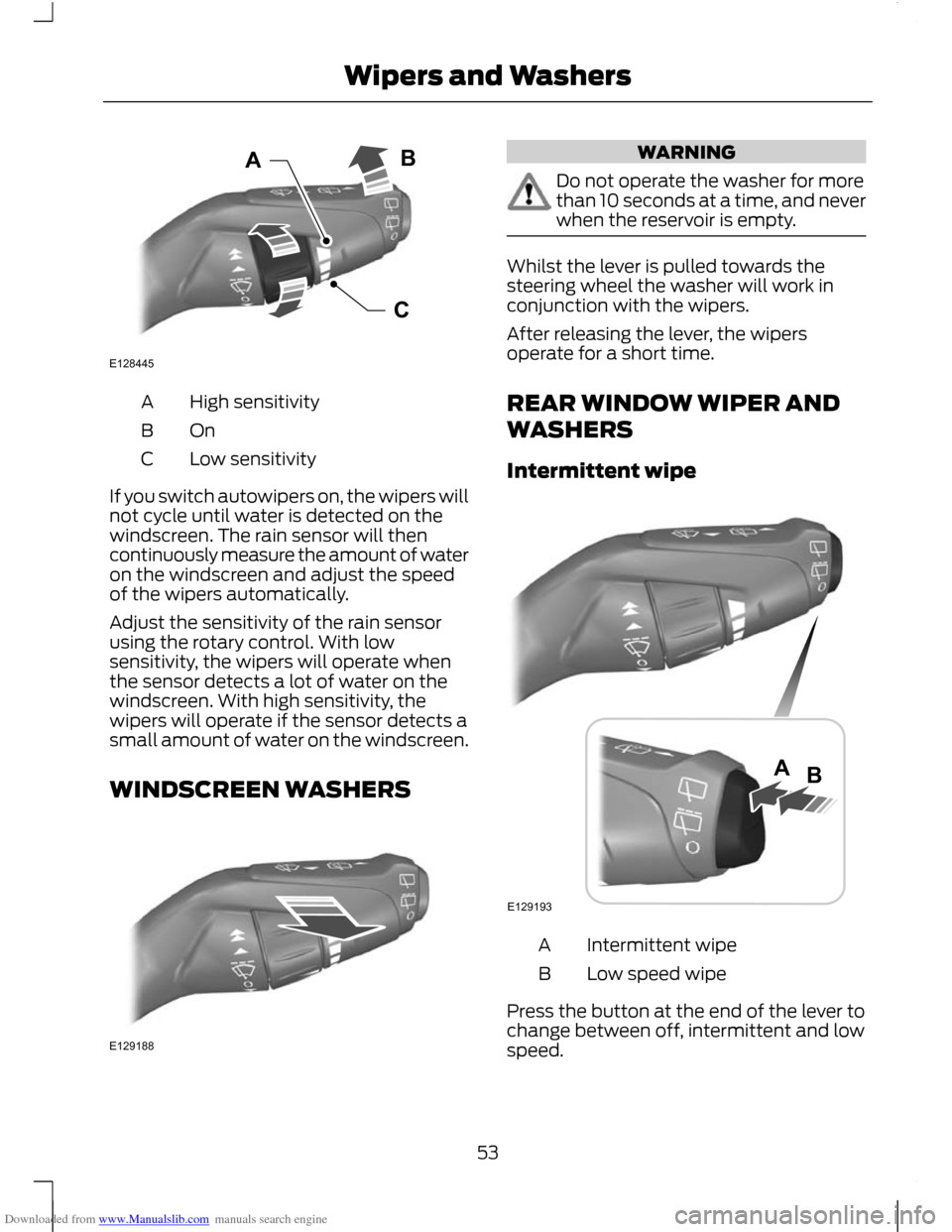
Downloaded from www.Manualslib.com manuals search engine High sensitivity
A
OnB
Low sensitivity
C
If you switch autowipers on, the wipers will
not cycle until water is detected on the
windscreen. The rain sensor will then
continuously measure the amount of water
on the windscreen and adjust the speed
of the wipers automatically.
Adjust the sensitivity of the rain sensor
using the rotary control. With low
sensitivity, the wipers will operate when
the sensor detects a lot of water on the
windscreen. With high sensitivity, the
wipers will operate if the sensor detects a
small amount of water on the windscreen.
WINDSCREEN WASHERS WARNING
Do not operate the washer for more
than 10 seconds at a time, and never
when the reservoir is empty.
Whilst the lever is pulled towards the
steering wheel the washer will work in
conjunction with the wipers.
After releasing the lever, the wipers
operate for a short time.
REAR WINDOW WIPER AND
WASHERS
Intermittent wipe
Intermittent wipe
A
Low speed wipe
B
Press the button at the end of the lever to
change between off, intermittent and low
speed.
53
Wipers and WashersCABE128445 E129188 E129193AB
Page 56 of 296
Downloaded from www.Manualslib.com manuals search engine Reverse gear wipe
The rear wiper will be activated
automatically when selecting reverse gear
if the rear wiper is not already switched on
and the front wiper is operating.
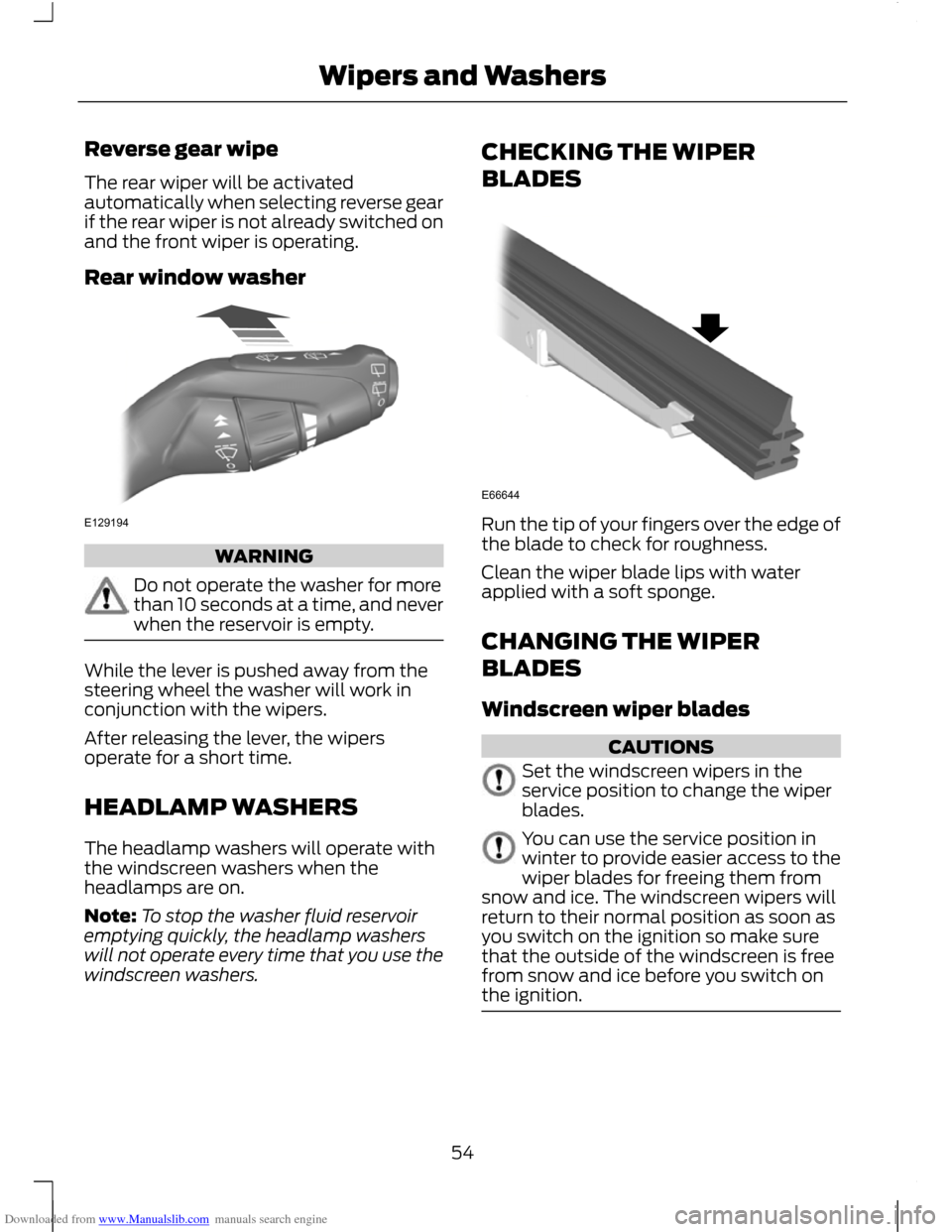
Rear window washer
WARNING
Do not operate the washer for more
than 10 seconds at a time, and never
when the reservoir is empty.
While the lever is pushed away from the
steering wheel the washer will work in
conjunction with the wipers.
After releasing the lever, the wipers
operate for a short time.
HEADLAMP WASHERS
The headlamp washers will operate with
the windscreen washers when the
headlamps are on.
Note:
To stop the washer fluid reservoir
emptying quickly, the headlamp washers
will not operate every time that you use the
windscreen washers. CHECKING THE WIPER
BLADES
Run the tip of your fingers over the edge of
the blade to check for roughness.
Clean the wiper blade lips with water
applied with a soft sponge.
CHANGING THE WIPER
BLADES
Windscreen wiper blades
CAUTIONS
Set the windscreen wipers in the
service position to change the wiper
blades.
You can use the service position in
winter to provide easier access to the
wiper blades for freeing them from
snow and ice. The windscreen wipers will
return to their normal position as soon as
you switch on the ignition so make sure
that the outside of the windscreen is free
from snow and ice before you switch on
the ignition. 54
Wipers and WashersE129194 E66644
Page 59 of 296
Downloaded from www.Manualslib.com manuals search engine LIGHTING CONTROL
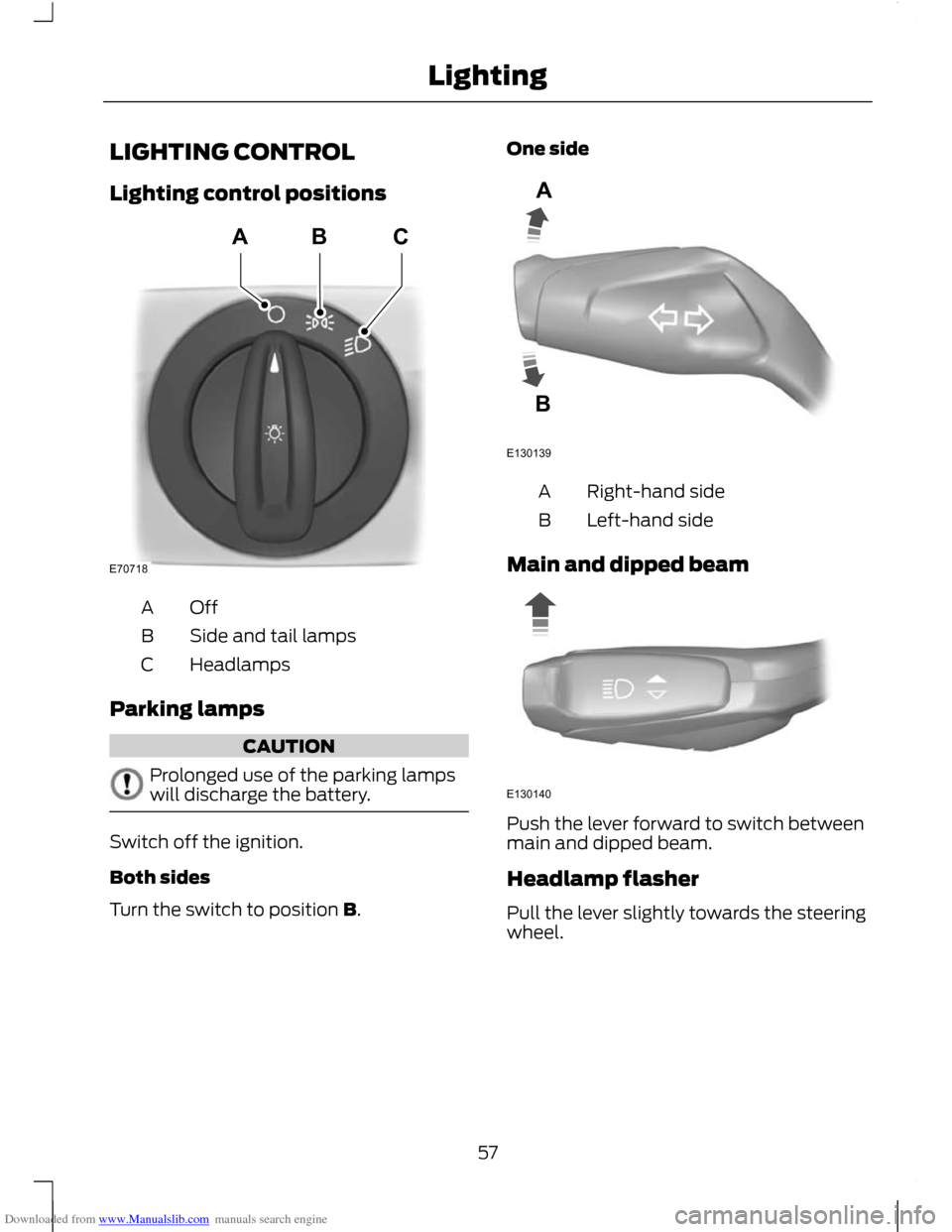
Lighting control positions
OffA
Side and tail lamps
B
Headlamps
C
Parking lamps CAUTION
Prolonged use of the parking lamps
will discharge the battery.
Switch off the ignition.
Both sides
Turn the switch to position B. One side
Right-hand side
A
Left-hand side
B
Main and dipped beam Push the lever forward to switch between
main and dipped beam.
Headlamp flasher
Pull the lever slightly towards the steering
wheel.
57
LightingE70718ABC E130139AB E130140
Page 60 of 296
Downloaded from www.Manualslib.com manuals search engine Home safe lighting
Switch the ignition off and pull the
direction indicator lever towards the
steering wheel to switch the headlamps
on. You will hear a short tone. The
headlamps will go off automatically after
three minutes with any door open, or 30
seconds after the last door has been
closed.
The home safe lights can be cancelled by
either pulling the direction indicator lever
towards the steering wheel again or by
turning the ignition switch ON.
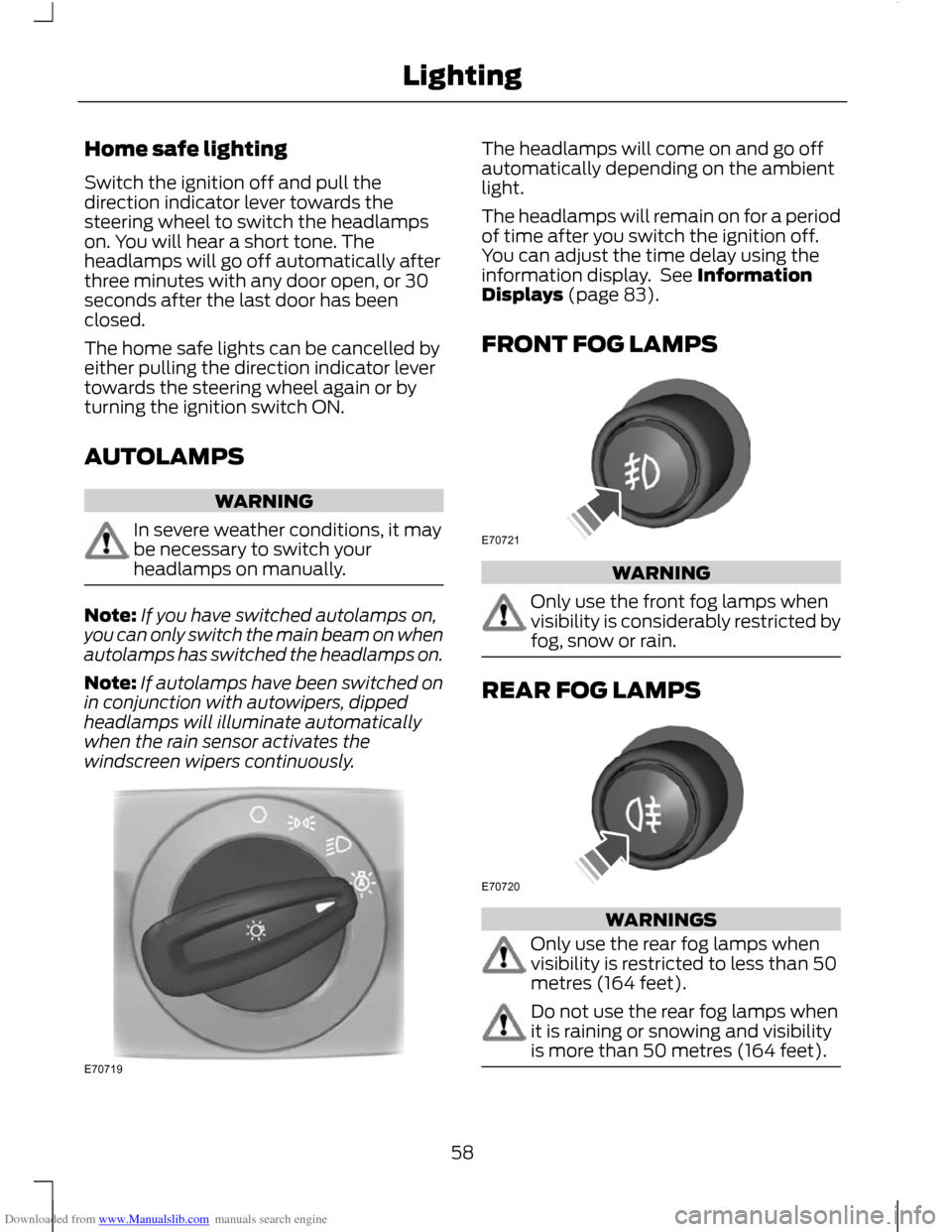
AUTOLAMPS
WARNING
In severe weather conditions, it may
be necessary to switch your
headlamps on manually.
Note:
If you have switched autolamps on,
you can only switch the main beam on when
autolamps has switched the headlamps on.
Note: If autolamps have been switched on
in conjunction with autowipers, dipped
headlamps will illuminate automatically
when the rain sensor activates the
windscreen wipers continuously. The headlamps will come on and go off
automatically depending on the ambient
light.
The headlamps will remain on for a period
of time after you switch the ignition off.
You can adjust the time delay using the
information display. See Information
Displays (page 83).
FRONT FOG LAMPS
WARNING
Only use the front fog lamps when
visibility is considerably restricted by
fog, snow or rain.
REAR FOG LAMPS
WARNINGS
Only use the rear fog lamps when
visibility is restricted to less than 50
metres (164 feet).
Do not use the rear fog lamps when
it is raining or snowing and visibility
is more than 50 metres (164 feet).
58
LightingE70719 E70721 E70720
Page 77 of 296
Downloaded from www.Manualslib.com manuals search engine Note:
On vehicles with automatic
transmission, the system is active only in S,
D and N.
The system is only active when you exceed
10 km/h (6 mph). The system is
temporarily deactivated when you select
reverse gear.
System detection and alerts
The system will trigger the alert for vehicles
that enter the blind spot zone from the rear
or merge from the side. Vehicles that you
pass, or vehicles that enter the blind spot
zone from the front, will only trigger the
alert after the vehicle has remained in the
blind spot zone for a short period of time.
Note: Vehicles that pass through the blind
zone quickly (typically less than 2 seconds)
will not trigger the alert.
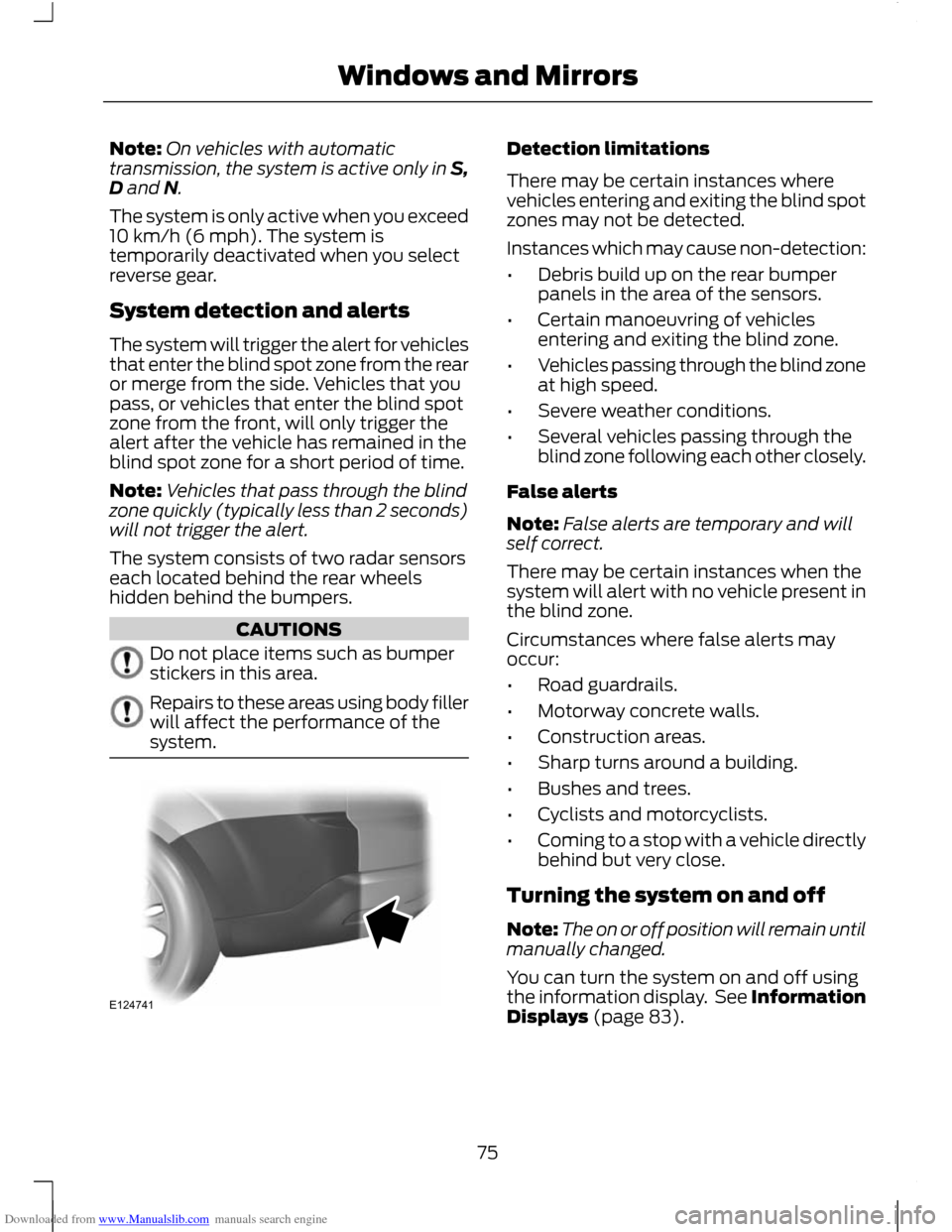
The system consists of two radar sensors
each located behind the rear wheels
hidden behind the bumpers. CAUTIONS
Do not place items such as bumper
stickers in this area.
Repairs to these areas using body filler
will affect the performance of the
system. Detection limitations
There may be certain instances where
vehicles entering and exiting the blind spot
zones may not be detected.
Instances which may cause non-detection:
•
Debris build up on the rear bumper
panels in the area of the sensors.
• Certain manoeuvring of vehicles
entering and exiting the blind zone.
• Vehicles passing through the blind zone
at high speed.
• Severe weather conditions.
• Several vehicles passing through the
blind zone following each other closely.
False alerts
Note: False alerts are temporary and will
self correct.
There may be certain instances when the
system will alert with no vehicle present in
the blind zone.
Circumstances where false alerts may
occur:
• Road guardrails.
• Motorway concrete walls.
• Construction areas.
• Sharp turns around a building.
• Bushes and trees.
• Cyclists and motorcyclists.
• Coming to a stop with a vehicle directly
behind but very close.
Turning the system on and off
Note: The on or off position will remain until
manually changed.
You can turn the system on and off using
the information display. See Information
Displays (page 83).
75
Windows and MirrorsE124741
Page 83 of 296
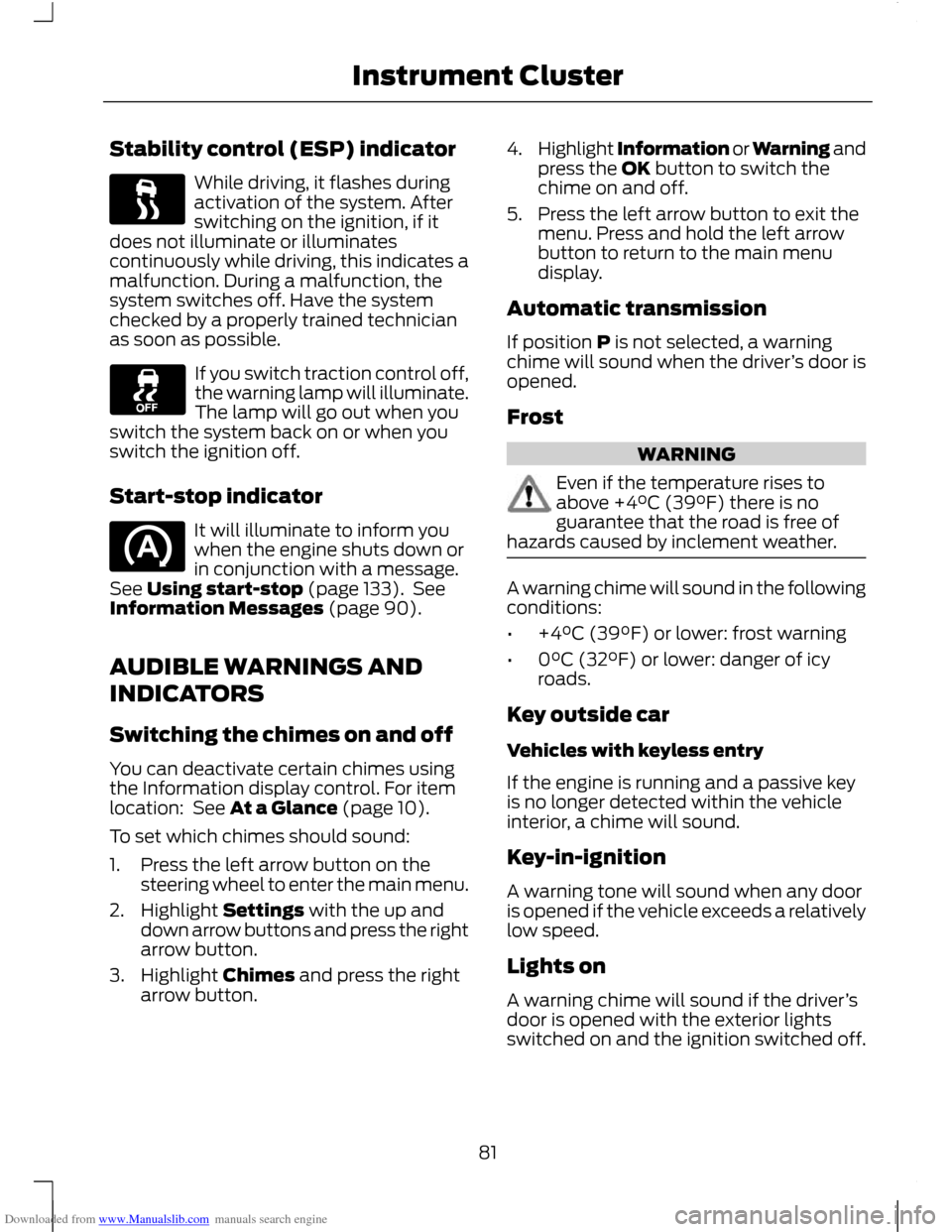
Downloaded from www.Manualslib.com manuals search engine Stability control (ESP) indicator
While driving, it flashes during
activation of the system. After
switching on the ignition, if it
does not illuminate or illuminates
continuously while driving, this indicates a
malfunction. During a malfunction, the
system switches off. Have the system
checked by a properly trained technician
as soon as possible. If you switch traction control off,
the warning lamp will illuminate.
The lamp will go out when you
switch the system back on or when you
switch the ignition off.
Start-stop indicator It will illuminate to inform you
when the engine shuts down or
in conjunction with a message.
See Using start-stop (page 133). See
Information Messages (page 90).
AUDIBLE WARNINGS AND
INDICATORS
Switching the chimes on and off
You can deactivate certain chimes using
the Information display control. For item
location: See At a Glance (page 10).
To set which chimes should sound:
1. Press the left arrow button on the steering wheel to enter the main menu.
2. Highlight Settings with the up and down arrow buttons and press the right
arrow button.
3. Highlight Chimes and press the right arrow button. 4.
Highlight Information or Warning and
press the OK button to switch the
chime on and off.
5. Press the left arrow button to exit the menu. Press and hold the left arrow
button to return to the main menu
display.
Automatic transmission
If position P is not selected, a warning
chime will sound when the driver ’s door is
opened.
Frost WARNING
Even if the temperature rises to
above +4°C (39°F) there is no
guarantee that the road is free of
hazards caused by inclement weather. A warning chime will sound in the following
conditions:
•
+4°C (39°F) or lower: frost warning
• 0°C (32°F) or lower: danger of icy
roads.
Key outside car
Vehicles with keyless entry
If the engine is running and a passive key
is no longer detected within the vehicle
interior, a chime will sound.
Key-in-ignition
A warning tone will sound when any door
is opened if the vehicle exceeds a relatively
low speed.
Lights on
A warning chime will sound if the driver ’s
door is opened with the exterior lights
switched on and the ignition switched off.
81
Instrument Cluster
Page 95 of 296
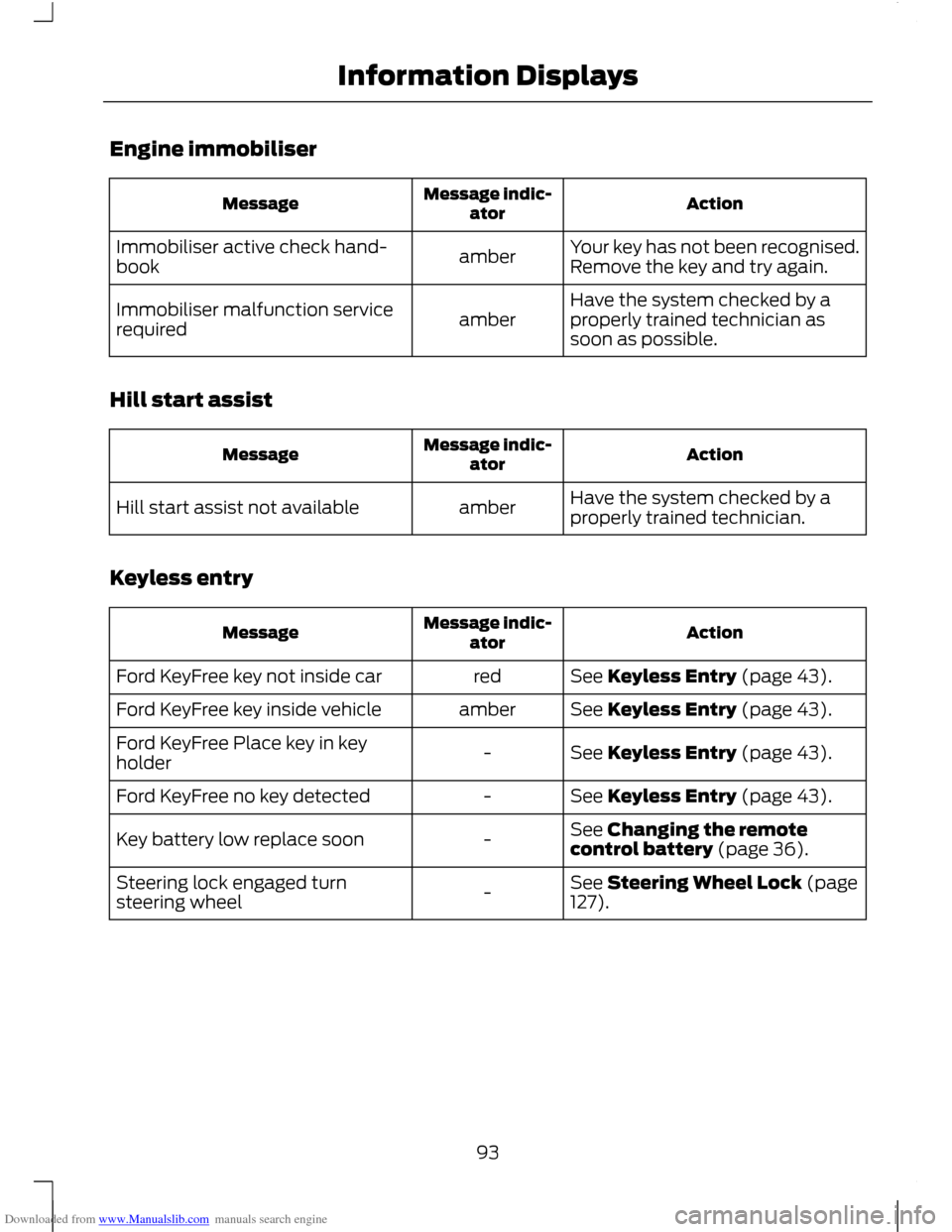
Downloaded from www.Manualslib.com manuals search engine Engine immobiliser
Action
Message indic-
ator
Message
Your key has not been recognised.
Remove the key and try again.
amber
Immobiliser active check hand-
book
Have the system checked by a
properly trained technician as
soon as possible.
amber
Immobiliser malfunction service
required
Hill start assist Action
Message indic-
ator
Message
Have the system checked by a
properly trained technician.
amber
Hill start assist not available
Keyless entry Action
Message indic-
ator
Message
See Keyless Entry (page 43).
red
Ford KeyFree key not inside car
See Keyless Entry (page 43).
amber
Ford KeyFree key inside vehicle
See Keyless Entry (page 43).
-
Ford KeyFree Place key in key
holder
See Keyless Entry (page 43).
-
Ford KeyFree no key detected
See Changing the remote
control battery (page 36).
-
Key battery low replace soon
See Steering Wheel Lock (page
127).
-
Steering lock engaged turn
steering wheel
93
Information Displays