Voice FORD C MAX 2011 2.G Owner's Manual
[x] Cancel search | Manufacturer: FORD, Model Year: 2011, Model line: C MAX, Model: FORD C MAX 2011 2.GPages: 296, PDF Size: 7.87 MB
Page 255 of 296
Downloaded from www.Manualslib.com manuals search engine System answer
User says
Steps
"PHONE"
"PHONE"
1
"NAME PLEASE"
"DELETE NAME"
2
"DELETE
"
3
"CONFIRM YES OR NO"
"
"YES"
4
"COMMAND CANCELLED"
"NO"
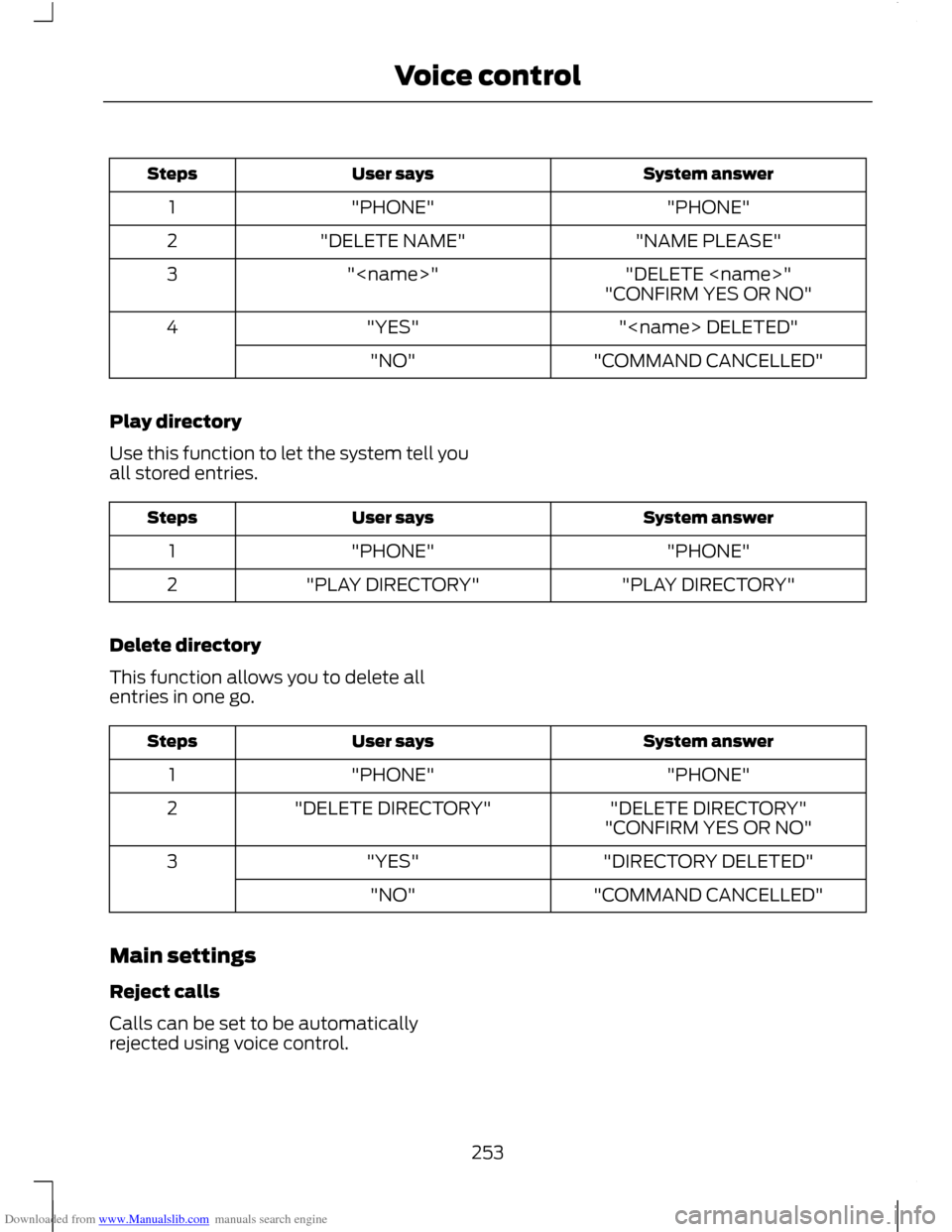
Play directory
Use this function to let the system tell you
all stored entries. System answer
User says
Steps
"PHONE"
"PHONE"
1
"PLAY DIRECTORY"
"PLAY DIRECTORY"
2
Delete directory
This function allows you to delete all
entries in one go. System answer
User says
Steps
"PHONE"
"PHONE"
1
"DELETE DIRECTORY"
"DELETE DIRECTORY"
2
"CONFIRM YES OR NO"
"DIRECTORY DELETED"
"YES"
3
"COMMAND CANCELLED"
"NO"
Main settings
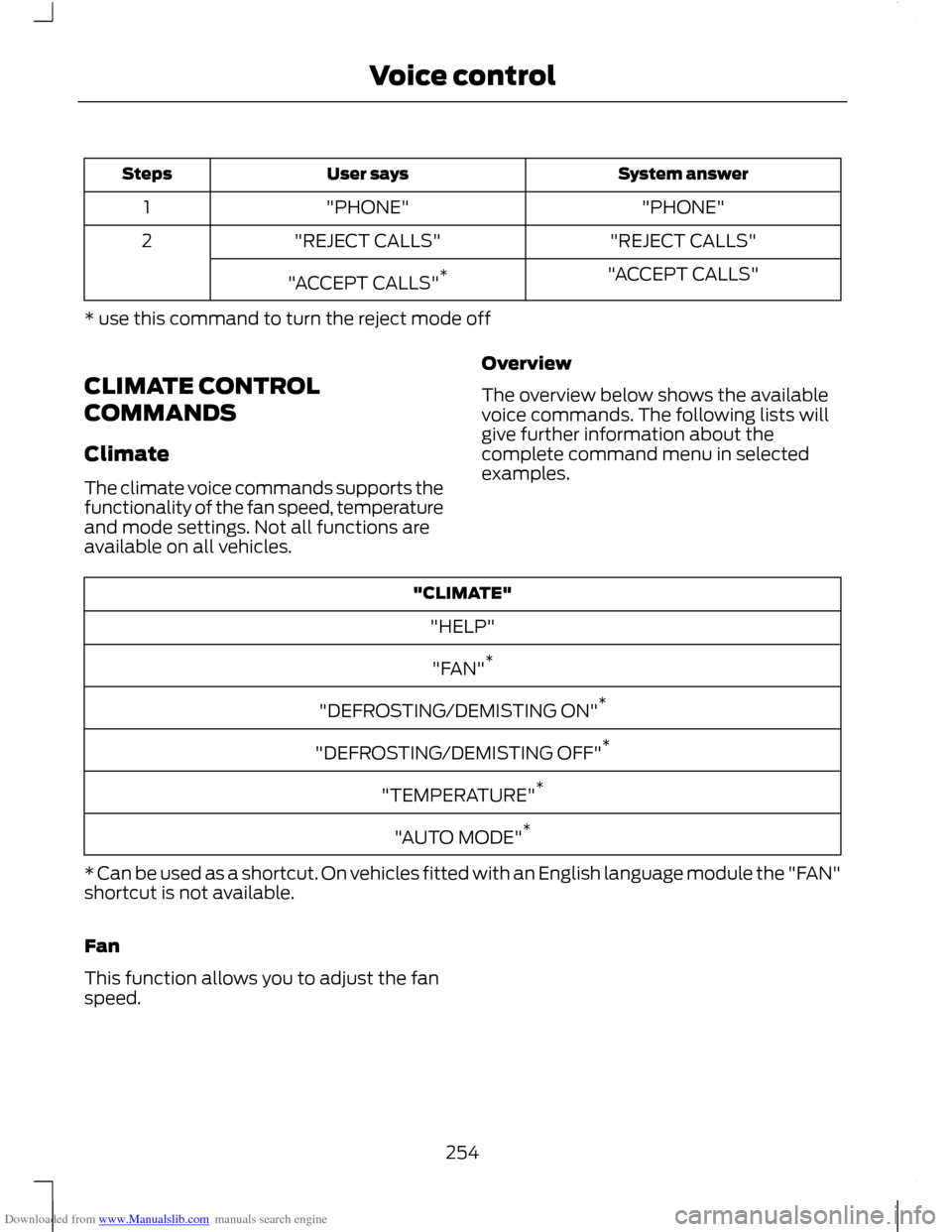
Reject calls
Calls can be set to be automatically
rejected using voice control.
253
Voice control
Page 256 of 296
Downloaded from www.Manualslib.com manuals search engine System answer
User says
Steps
"PHONE"
"PHONE"
1
"REJECT CALLS"
"REJECT CALLS"
2
"ACCEPT CALLS"
"ACCEPT CALLS" *
* use this command to turn the reject mode off
CLIMATE CONTROL
COMMANDS
Climate
The climate voice commands supports the
functionality of the fan speed, temperature
and mode settings. Not all functions are
available on all vehicles. Overview
The overview below shows the available
voice commands. The following lists will
give further information about the
complete command menu in selected
examples."CLIMATE"
"HELP"
"FAN" *
"DEFROSTING/DEMISTING ON" *
"DEFROSTING/DEMISTING OFF" *
"TEMPERATURE" *
"AUTO MODE" *
* Can be used as a shortcut. On vehicles fitted with an English language module the "FAN"
shortcut is not available.
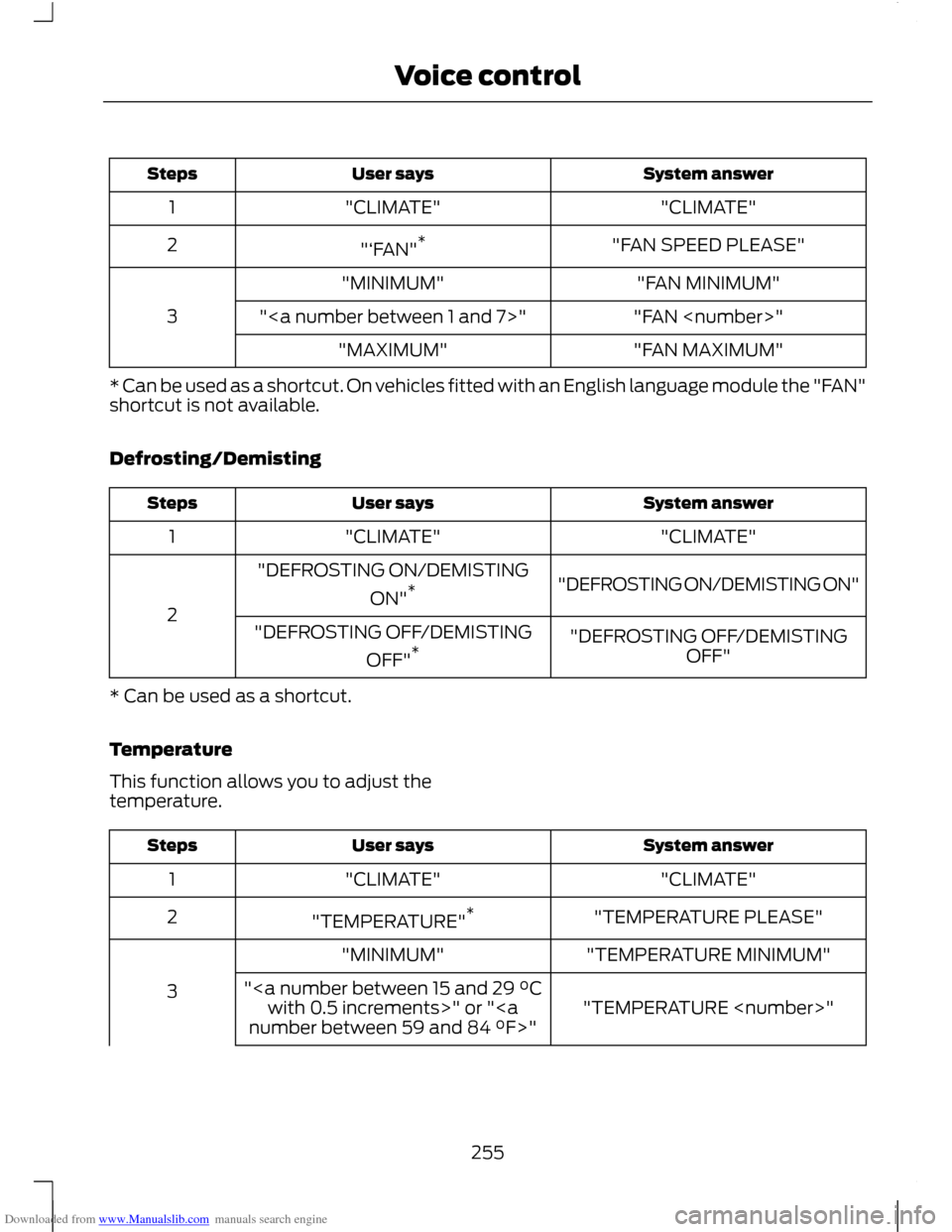
Fan
This function allows you to adjust the fan
speed.
254
Voice control
Page 257 of 296
Downloaded from www.Manualslib.com manuals search engine System answer
User says
Steps
"CLIMATE"
"CLIMATE"
1
"FAN SPEED PLEASE"
"‘FAN" *
2
"FAN MINIMUM"
"MINIMUM"
3 "FAN
""
"FAN MAXIMUM"
"MAXIMUM"
* Can be used as a shortcut. On vehicles fitted with an English language module the "FAN"
shortcut is not available.
Defrosting/Demisting System answer
User says
Steps
"CLIMATE"
"CLIMATE"
1
"DEFROSTING ON/DEMISTING ON"
"DEFROSTING ON/DEMISTING
ON"*
2 "DEFROSTING OFF/DEMISTINGOFF"
"DEFROSTING OFF/DEMISTING
OFF"*
* Can be used as a shortcut.
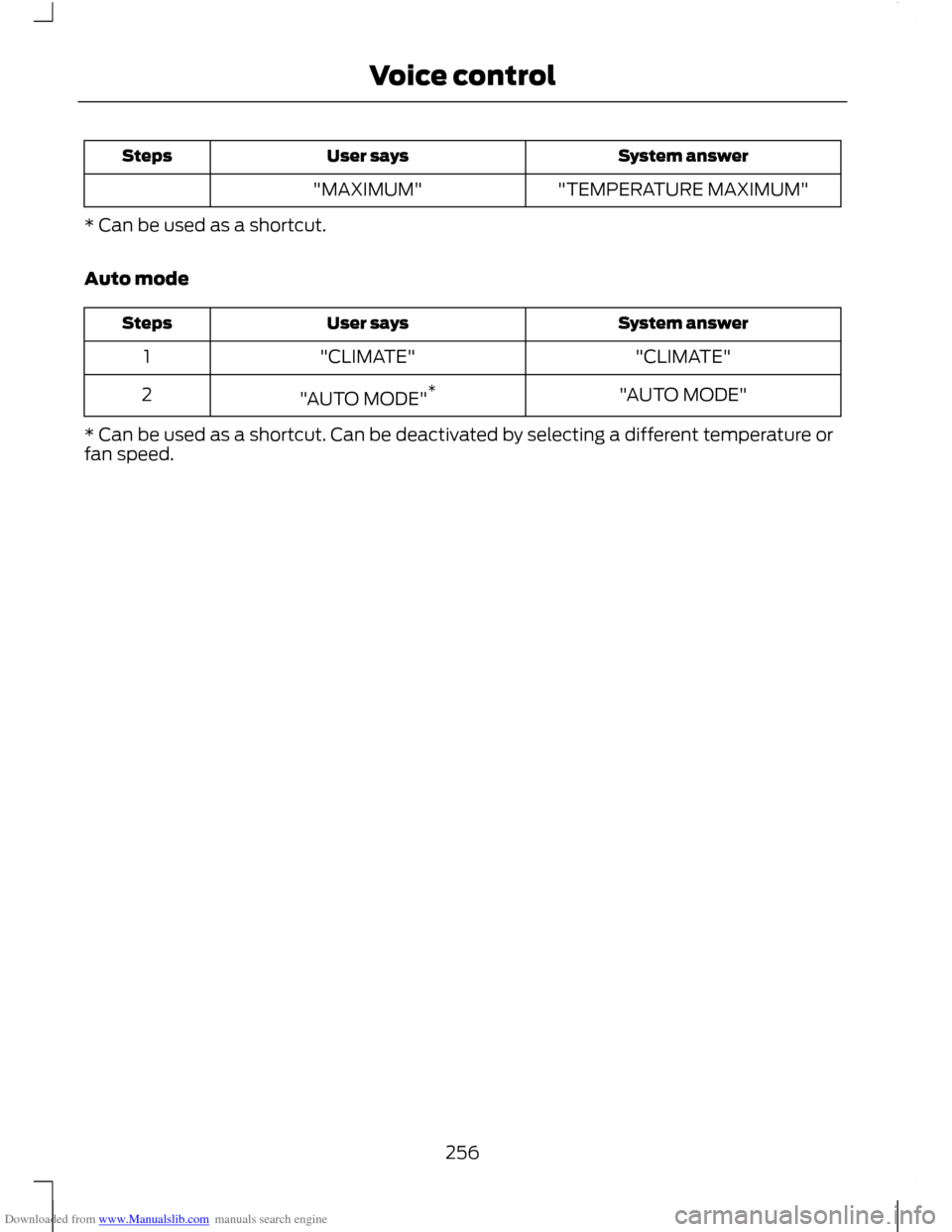
Temperature
This function allows you to adjust the
temperature. System answer
User says
Steps
"CLIMATE"
"CLIMATE"
1
"TEMPERATURE PLEASE"
"TEMPERATURE" *
2
"TEMPERATURE MINIMUM"
"MINIMUM"
3 "TEMPERATURE
"
with 0.5 increments>" or "
255
Voice control
Page 258 of 296
Downloaded from www.Manualslib.com manuals search engine System answer
User says
Steps
"TEMPERATURE MAXIMUM"
"MAXIMUM"
* Can be used as a shortcut.
Auto mode System answer
User says
Steps
"CLIMATE"
"CLIMATE"
1
"AUTO MODE"
"AUTO MODE" *
2
* Can be used as a shortcut. Can be deactivated by selecting a different temperature or
fan speed.
256
Voice control
Page 260 of 296
Downloaded from www.Manualslib.com manuals search engine To enable voice control for custom
playlists and folders, follow the procedure
below:
•
Create folders named with the
structure "Ford<*>" where <*> is a
number 1-10. For example "Ford3"
without an extension.
• Create playlists named with the
structure "Ford<*>.m3u" where <*>
is a number 1-10. For example
"Ford5.m3u" without any space
between "Ford" and the number.
Thereafter, custom folders and playlists
will be selectable with voice control. See
Audio unit commands (page 242).
iPod
To enable voice control for custom
playlists, create playlists named with the
structure "Ford<*>" where <*> is a
number 1-10. For example "Ford7" without
any space between "Ford" and the
number.
Thereafter, playlists will be selectable with
voice control. See Audio unit commands
(page 242).
CONNECTING AN EXTERNAL
DEVICE WARNING
Make sure the external device is
securely mounted within the vehicle,
and that trailing connections do not
obstruct any of the driving controls. External devices may be connected using
the auxiliary input socket and the USB port.
See Auxiliary input (AUX IN) socket
(page 125). See USB port (page 125). Connection
Plug in the device, and if necessary secure
it to prevent movement within the vehicle.
Connecting an iPod
For optimum convenience and audio
quality, we recommend that you purchase
a dedicated single connection lead
available from your dealer.
Alternatively, it is possible to connect your
iPod using the standard iPod USB cable
and a separate 3.5mm audio jack lead. If
using this method preset the iPod volume
to maximum and turn off any equalizer
settings before making the connections:
•
Connect the headphone output of the
iPod to the AUX IN socket.
• Connect the USB cable from the iPod
to the vehicle USB socket.
CONNECTING AN EXTERNAL
DEVICE - VEHICLES WITH:
BLUETOOTH
Connecting a Bluetooth audio
device CAUTION
As various standards exist,
manufacturers are able to implement
a variety of profiles in their Bluetooth
devices. Because of this, an incompatibility
can occur between the Bluetooth device
and the system, which in some cases may
limit system functionality. To avoid this
situation, only recommended devices
should be used.
Please visit the website
www.ford-mobile-connectivity.com
for full details. 258
Connectivity
Page 267 of 296
Downloaded from www.Manualslib.com manuals search engine 2.
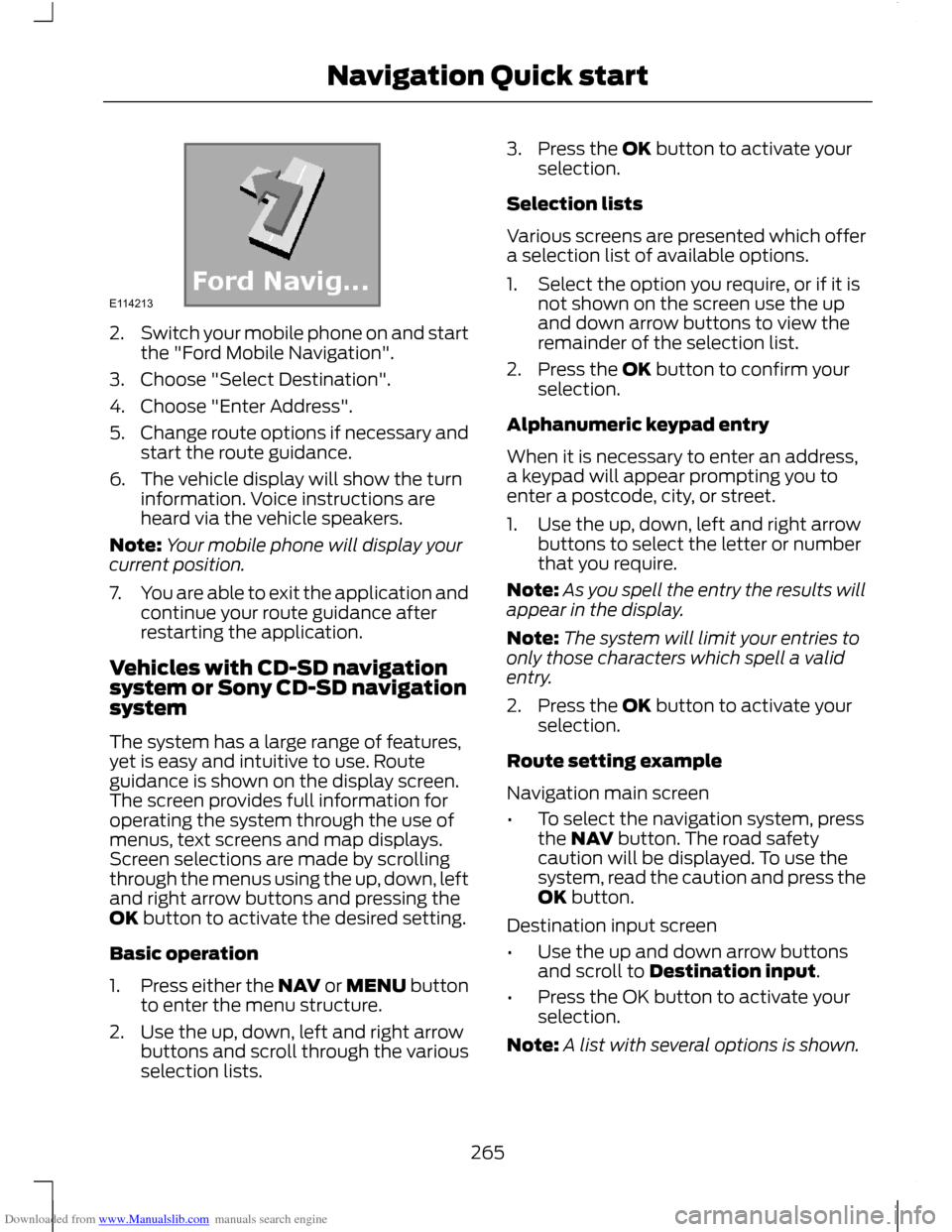
Switch your mobile phone on and start
the "Ford Mobile Navigation".
3. Choose "Select Destination".
4. Choose "Enter Address".
5. Change route options if necessary and
start the route guidance.
6. The vehicle display will show the turn information. Voice instructions are
heard via the vehicle speakers.
Note: Your mobile phone will display your
current position.
7. You are able to exit the application and
continue your route guidance after
restarting the application.
Vehicles with CD-SD navigation
system or Sony CD-SD navigation
system
The system has a large range of features,
yet is easy and intuitive to use. Route
guidance is shown on the display screen.
The screen provides full information for
operating the system through the use of
menus, text screens and map displays.
Screen selections are made by scrolling
through the menus using the up, down, left
and right arrow buttons and pressing the
OK button to activate the desired setting.
Basic operation
1. Press either the NAV or MENU button
to enter the menu structure.
2. Use the up, down, left and right arrow buttons and scroll through the various
selection lists. 3. Press the OK button to activate your
selection.
Selection lists
Various screens are presented which offer
a selection list of available options.
1. Select the option you require, or if it is not shown on the screen use the up
and down arrow buttons to view the
remainder of the selection list.
2. Press the OK button to confirm your selection.
Alphanumeric keypad entry
When it is necessary to enter an address,
a keypad will appear prompting you to
enter a postcode, city, or street.
1. Use the up, down, left and right arrow buttons to select the letter or number
that you require.
Note: As you spell the entry the results will
appear in the display.
Note: The system will limit your entries to
only those characters which spell a valid
entry.
2. Press the OK button to activate your selection.
Route setting example
Navigation main screen
• To select the navigation system, press
the NAV button. The road safety
caution will be displayed. To use the
system, read the caution and press the
OK button.
Destination input screen
• Use the up and down arrow buttons
and scroll to Destination input.
• Press the OK button to activate your
selection.
Note: A list with several options is shown.
265
Navigation Quick startE114213
Page 268 of 296
Downloaded from www.Manualslib.com manuals search engine •
Starting from the top, select the
country followed by either the
postcode if available or city and street
name.
• Use the alphanumeric keypad and
selection lists to select your address
details.
• Once sufficient information has been
entered, scroll to Start guidance and
press the OK button to activate your
selection.
Note: If you only need to navigate to a city
centre for example, full address details are
not required.
• The route is now calculated and the
screen returns to the main navigation
screen with instructions on how to
proceed.
• Follow the screen information and
voice prompts to reach your
destination.
266
Navigation Quick start
Page 275 of 296
Downloaded from www.Manualslib.com manuals search engine Special functions
This feature allows you to select GPS and
system information or a demonstration of
the system functionality.
Map display
This feature allows you to change the way
the map screen is displayed (for example
clean 2D and clean 3D view) and to
customise display information for your
journey (for example time to arrival and
lane guidance).
Assistance options
This feature allows you to customise
display information for your journey (for
example signs, lanes and speed limits).
Personal data
This feature allows you to edit and delete
personal data (for example your home
address).
Reset all settings
This feature allows you to reset the
navigation settings.
Menu structure - Information and
entertainment display - All
vehicles
Audio settings
Adaptive volume
This feature allows you to adjust the
volume level to compensate for engine and
road speed noise. You can turn this on and
off.
Sound
This feature allows you to adjust the sound
settings (for example bass and treble.
Nav audio mixing
This feature allows you to adjust the
volume mix between the navigation voice
output and audio source.
DSP settings
This feature allows you to customise
speaker output relevant to seat positions.
DSP equaliser
This feature allows you to select the music
category that most suits your listening
preference. The audio output will change
to enhance the particular style of music
chosen.
News
This feature allows you to receive news
bulletins from stations on the FM
waveband or radio data system (RDS) and
enhanced other network (EON) linked
stations, in the same way as traffic
information is provided. You can turn this
on and off.
Alternative frequencies
This feature will search for and switch to
the strongest station signal when moving
from one transmission area to another.
RDS regional
This feature controls the behaviour of AF
switching between regionally related
networks of a parent broadcaster.
DAB service link
This feature allows you to select stations
that are broadcast on the DAB channels.
Bluetooth
This feature allows you to switch
Bluetooth on or off.
273
System settings
Page 278 of 296
Downloaded from www.Manualslib.com manuals search engine Seasonal roads
When switched on the system will look for
seasonal roads on your route and
automatically update your route distance
and timings.
Note:
This feature can be useful in avoiding
delays or hold ups on journeys.
Toll sticker
When switched on the system will
automatically select toll roads and update
your route distance and timings.
ROUTE DISPLAYS
Map display
Press the MAP button for a map view.
This view will show your current location
with your vehicle in the centre shown as
an arrow surrounded by a circle. The arrow
will face in the direction of travel.
The information on the top line gives the
name of the current road, or the next road
to take if a turn is approaching.
You can change the way the map is
displayed by altering the zoom and
orientation settings. Press the relevant
function buttons to change the map scale
and using the left and right arrow buttons
zoom in or out. The current map scale is
shown on the display.
Map scale settings may be set between
50 metres to 500 kilometres or 0.05 miles
to 500 miles, with an auto setting to the
far left. The auto setting continuously
changes the map scale according to the
road type being driven. Junction zoom
This feature will automatically increase
the zoom on the map display at times
when you are required to make a turn, or
perform more complex manoeuvres.
Shortly after the zoom scale will return to
the previous level.
Select AUTO to activate junction zoom.
Navigation display
After commencing a navigation route, the
default screen is the main navigation
screen:
Once an active route is underway, guidance
will be given by on-screen information and
voice prompts. Whichever audio source
you wish to leave the unit in, basic turn by
turn and distance information will remain
on the screen in the form of a graphic inset.
You do not need to leave the unit on the
main navigation screen when you are
navigating a route. Slightly more detailed
information on your route may be available
via the main navigation screen if required.
WARNING
Do not rely on the screen prompts
when navigating. Always listen to the
navigation voice and take care not
be distracted from the road ahead. 276
Navigation system
Page 294 of 296
Downloaded from www.Manualslib.com manuals search engine Using the speed limiter..............................160
Intentionally exceeding the set speed
limit..................................................................... 160
Setting the speed limit..................................... 160
Switching the system on and off.................160
System warnings................................................ 160
Using the telephone...................................238 Changing the active phone........................... 240
Debonding a bonded phone......................... 240
Making a call........................................................ 239
Muting the microphone.................................. 240
Receiving an incoming call............................ 240
Receiving a second incoming call...............240
Using TMC.......................................................277 Ending traffic announcements...................... 277
Traffic announcement...................................... 277
Using TMC messages....................................... 277
Using voice control.......................................241 Name tag.............................................................. 242
System operation............................................... 241
Using Winter Tyres......................................208
V
Vehicle battery...............................................197
Vehicle Care....................................................195
Vehicle Identification Number.................215
Vehicle Identification Plate.......................214
Vehicle identification...................................214
Vehicle recovery............................................183
Ventilation See: Climate Control........................................ 100
Vents See: Air Vents...................................................... 100
VIN See: Vehicle Identification Number.............215
Voice control...................................................241 Principle of Operation....................................... 241
Voice Control.....................................................51 W
Warning Lamps and Indicators.................79
ABS warning lamp............................................... 79
Airbag warning lamp........................................... 79
Blind spot monitor indicator............................ 79
Brake system lamp.............................................. 79
Cruise control indicator...................................... 79
Direction indicators.............................................. 79
Engine warning lamp.......................................... 79
Front fog lamp indicator................................... 80
Frost warning lamp............................................. 80
Glow plug indicator............................................. 80
Headlamp indicator............................................ 80
Ignition warning lamp........................................ 80
Low fuel level warning lamp........................... 80
Low tyre pressure warning lamp................... 80
Main beam indicator.......................................... 80
Message indicator............................................... 80
Oil pressure warning lamp............................... 80
Rear fog lamp indicator..................................... 80
Seat belt reminder.............................................. 80
Stability control (ESP) indicator..................... 81
Start-stop indicator..............................................81
Warning Triangle...........................................173
Washer Fluid Check.....................................192
Washers See: Wipers and Washers................................. 52
Washing See: Cleaning the Exterior............................... 195
Waveband button........................................227
Wheels and Tyres.........................................199 General Information.......................................... 199
Technical Specifications................................ 209
Windows and Mirrors.....................................71
Windscreen Washers....................................53
Windscreen Wipers.......................................52 Automatic wiper system................................... 52
Intermittent wipe.................................................. 52
Winter Tyres See: Using Winter Tyres.................................. 208
Wipers and Washers.....................................52 Technical Specifications................................... 56
292
Index