Voice FORD C MAX 2011 2.G User Guide
[x] Cancel search | Manufacturer: FORD, Model Year: 2011, Model line: C MAX, Model: FORD C MAX 2011 2.GPages: 296, PDF Size: 7.87 MB
Page 245 of 296
Downloaded from www.Manualslib.com manuals search engine System answer
User says
Steps
"CD PLAYER"
"CD PLAYER"
1
"TRACK NUMBER PLEASE"
"TRACK" *
2
"TRACK
"" **
3
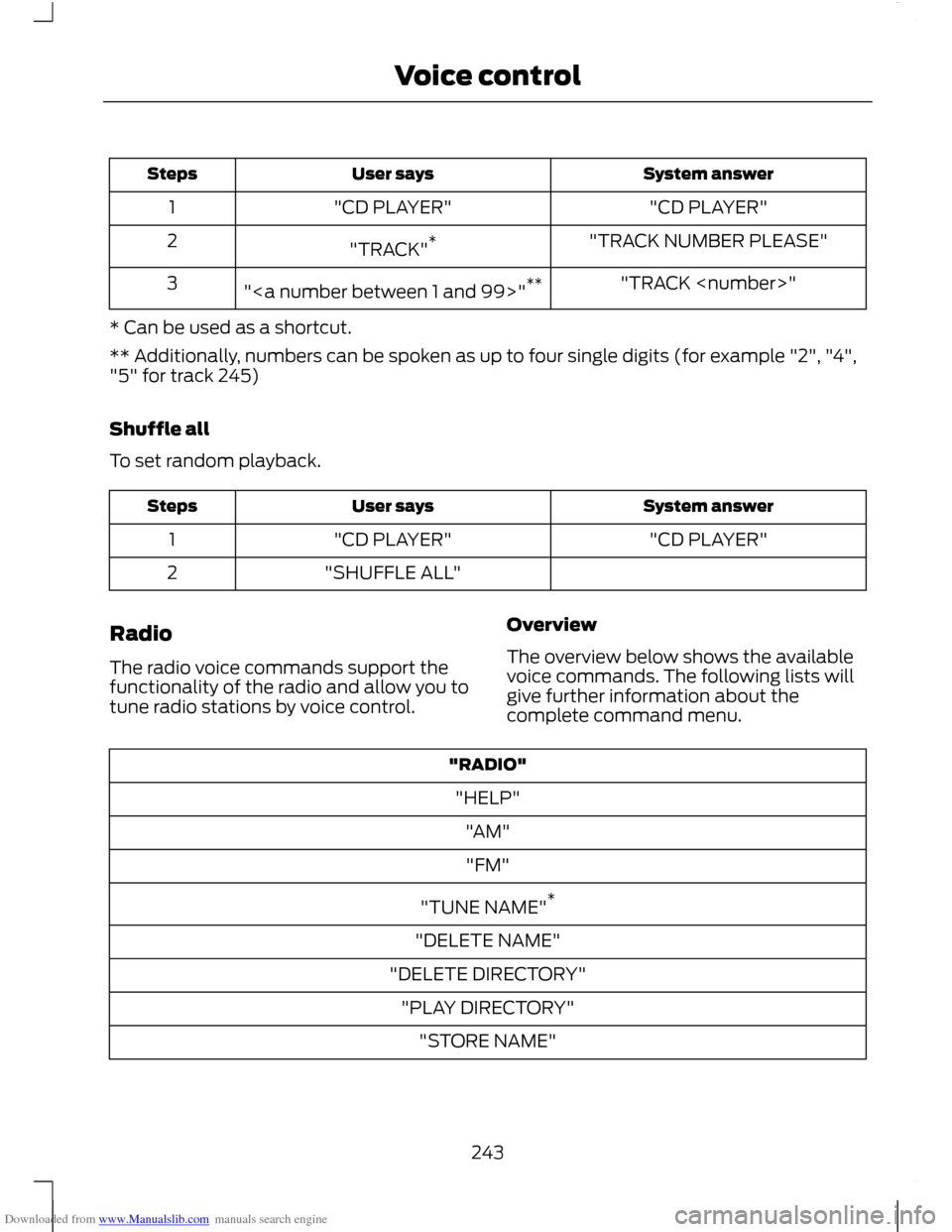
* Can be used as a shortcut.
** Additionally, numbers can be spoken as up to four single digits (for example "2", "4",
"5" for track 245)
Shuffle all
To set random playback. System answer
User says
Steps
"CD PLAYER"
"CD PLAYER"
1
"SHUFFLE ALL"
2
Radio
The radio voice commands support the
functionality of the radio and allow you to
tune radio stations by voice control. Overview
The overview below shows the available
voice commands. The following lists will
give further information about the
complete command menu."RADIO"
"HELP" "AM""FM"
"TUNE NAME" *
"DELETE NAME"
"DELETE DIRECTORY" "PLAY DIRECTORY" "STORE NAME"
243
Voice control
Page 246 of 296
Downloaded from www.Manualslib.com manuals search engine "RADIO"
"PLAY"
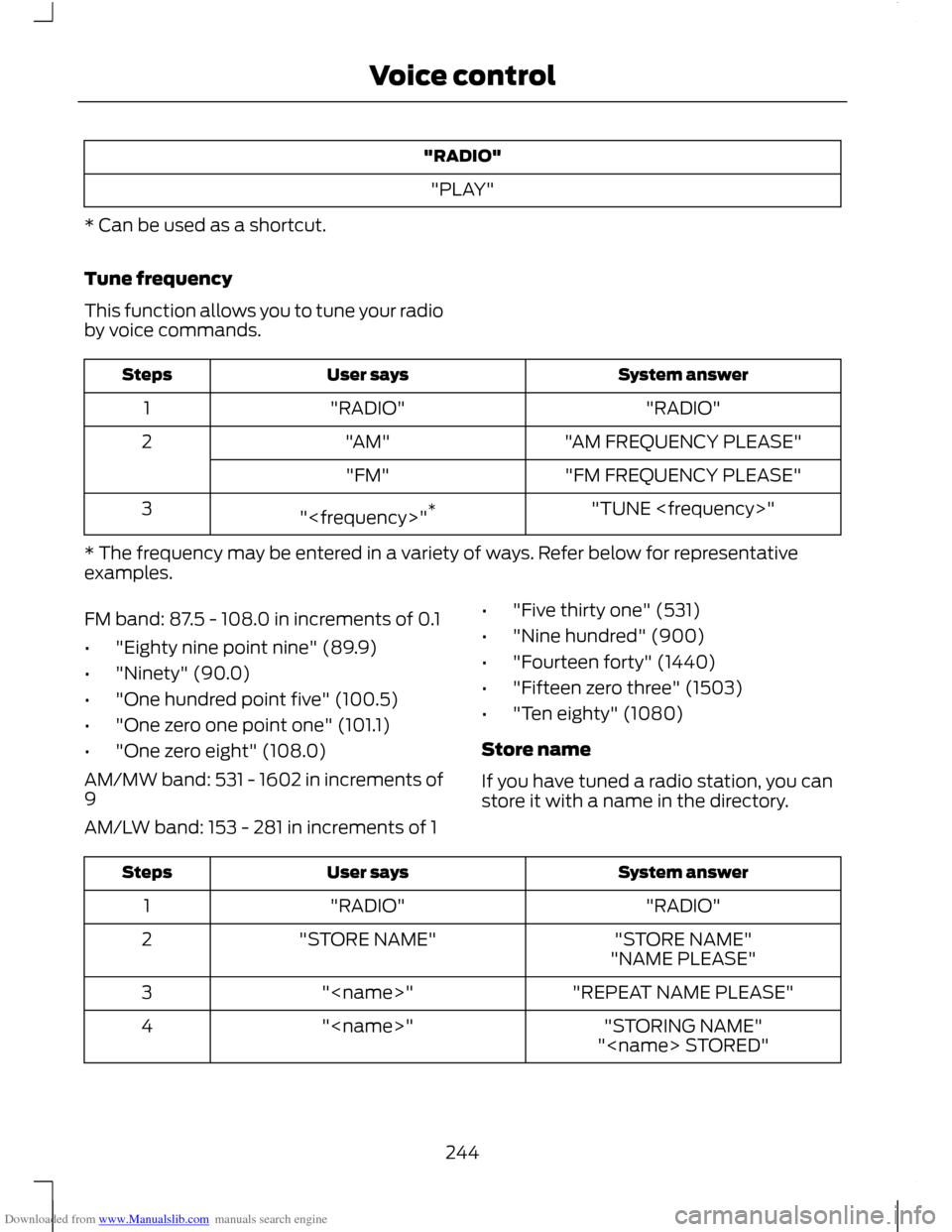
* Can be used as a shortcut.
Tune frequency
This function allows you to tune your radio
by voice commands. System answer
User says
Steps
"RADIO"
"RADIO"
1
"AM FREQUENCY PLEASE"
"AM"
2
"FM FREQUENCY PLEASE"
"FM"
"TUNE
"
3
* The frequency may be entered in a variety of ways. Refer below for representative
examples.
FM band: 87.5 - 108.0 in increments of 0.1
• "Eighty nine point nine" (89.9)
• "Ninety" (90.0)
• "One hundred point five" (100.5)
• "One zero one point one" (101.1)
• "One zero eight" (108.0)
AM/MW band: 531 - 1602 in increments of
9
AM/LW band: 153 - 281 in increments of 1 •
"Five thirty one" (531)
• "Nine hundred" (900)
• "Fourteen forty" (1440)
• "Fifteen zero three" (1503)
• "Ten eighty" (1080)
Store name
If you have tuned a radio station, you can
store it with a name in the directory. System answer
User says
Steps
"RADIO"
"RADIO"
1
"STORE NAME"
"STORE NAME"
2
"NAME PLEASE"
"REPEAT NAME PLEASE"
"
3
"STORING NAME"
"
4
"
244
Voice control
Page 247 of 296
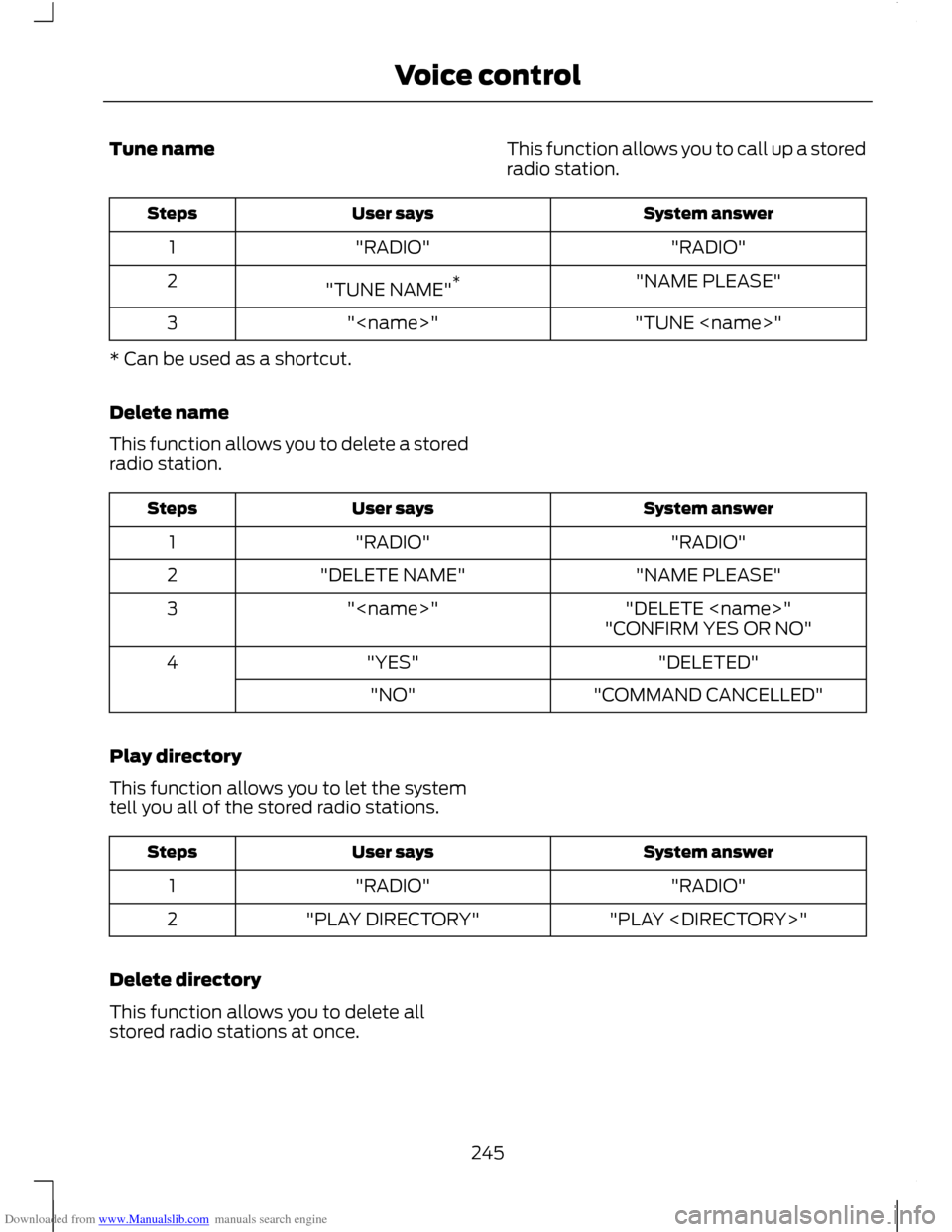
Downloaded from www.Manualslib.com manuals search engine Tune name
This function allows you to call up a stored
radio station. System answer
User says
Steps
"RADIO"
"RADIO"
1
"NAME PLEASE"
"TUNE NAME" *
2
"TUNE
"
3
* Can be used as a shortcut.
Delete name
This function allows you to delete a stored
radio station. System answer
User says
Steps
"RADIO"
"RADIO"
1
"NAME PLEASE"
"DELETE NAME"
2
"DELETE
"
3
"CONFIRM YES OR NO"
"DELETED"
"YES"
4
"COMMAND CANCELLED"
"NO"
Play directory
This function allows you to let the system
tell you all of the stored radio stations. System answer
User says
Steps
"RADIO"
"RADIO"
1
"PLAY
"PLAY DIRECTORY"
2
Delete directory
This function allows you to delete all
stored radio stations at once.
245
Voice control
Page 248 of 296
Downloaded from www.Manualslib.com manuals search engine System answer
User says
Steps
"RADIO"
"RADIO"
1
"DELETE DIRECTORY"
"DELETE DIRECTORY"
2
"CONFIRM YES OR NO"
"RADIO DIRECTORY DELETED"
"YES"
3
"COMMAND CANCELLED"
"NO"
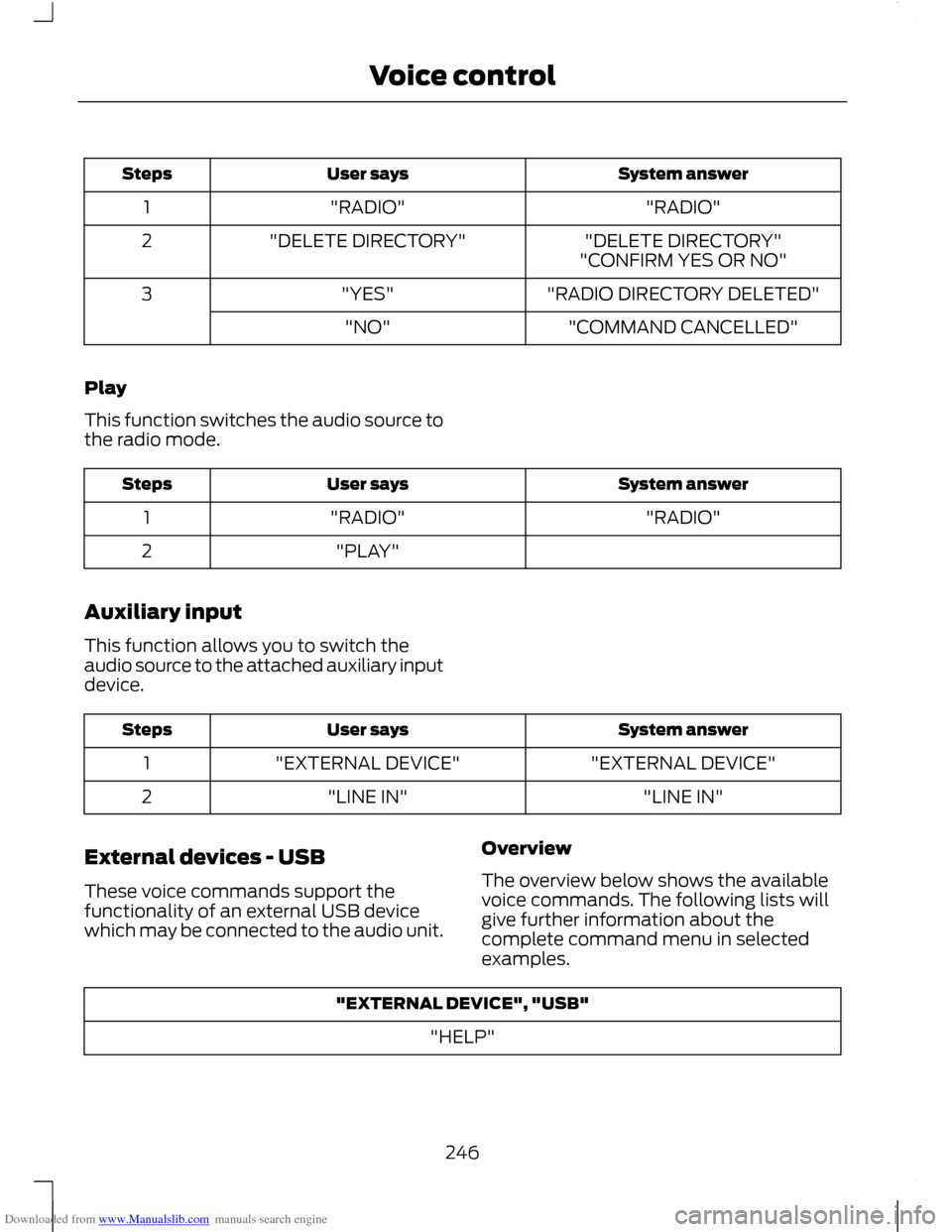
Play
This function switches the audio source to
the radio mode. System answer
User says
Steps
"RADIO"
"RADIO"
1
"PLAY"
2
Auxiliary input
This function allows you to switch the
audio source to the attached auxiliary input
device. System answer
User says
Steps
"EXTERNAL DEVICE"
"EXTERNAL DEVICE"
1
"LINE IN"
"LINE IN"
2
External devices - USB
These voice commands support the
functionality of an external USB device
which may be connected to the audio unit. Overview
The overview below shows the available
voice commands. The following lists will
give further information about the
complete command menu in selected
examples."EXTERNAL DEVICE", "USB"
"HELP"
246
Voice control
Page 249 of 296
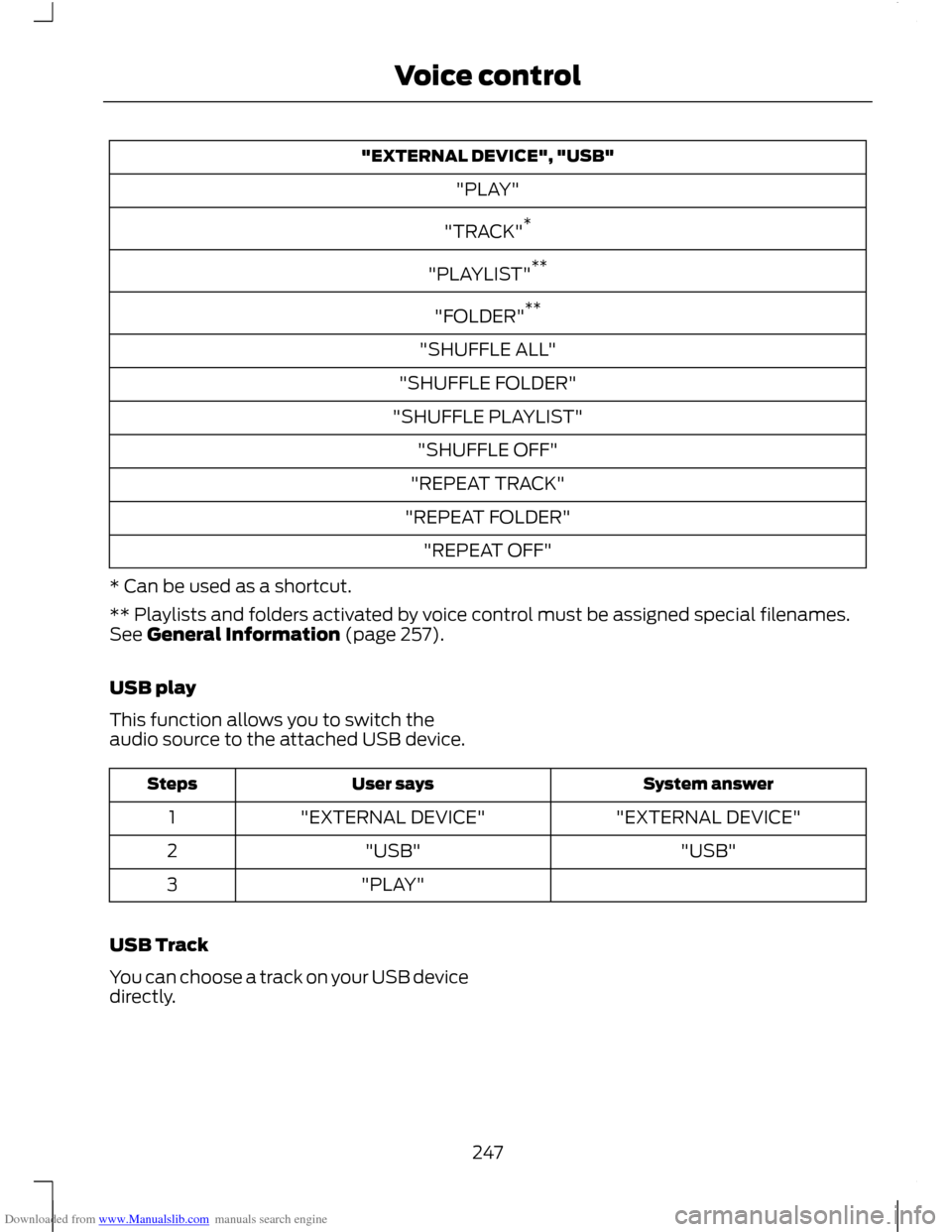
Downloaded from www.Manualslib.com manuals search engine "EXTERNAL DEVICE", "USB"
"PLAY"
"TRACK" *
"PLAYLIST" **
"FOLDER" **
"SHUFFLE ALL"
"SHUFFLE FOLDER"
"SHUFFLE PLAYLIST" "SHUFFLE OFF"
"REPEAT TRACK"
"REPEAT FOLDER" "REPEAT OFF"
* Can be used as a shortcut.
** Playlists and folders activated by voice control must be assigned special filenames.
See General Information (page 257).
USB play
This function allows you to switch the
audio source to the attached USB device. System answer
User says
Steps
"EXTERNAL DEVICE"
"EXTERNAL DEVICE"
1
"USB"
"USB"
2
"PLAY"
3
USB Track
You can choose a track on your USB device
directly.
247
Voice control
Page 250 of 296
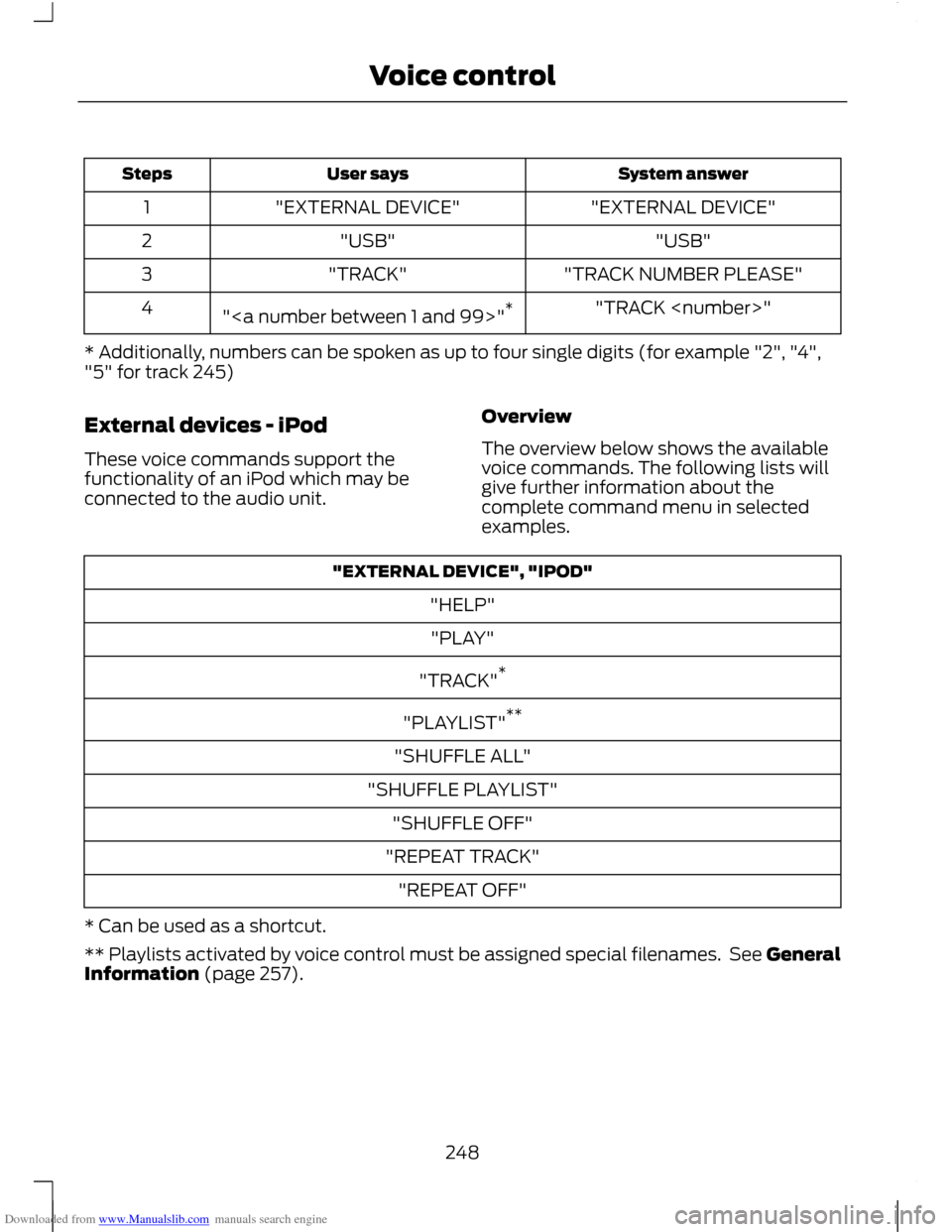
Downloaded from www.Manualslib.com manuals search engine System answer
User says
Steps
"EXTERNAL DEVICE"
"EXTERNAL DEVICE"
1
"USB"
"USB"
2
"TRACK NUMBER PLEASE"
"TRACK"
3
"TRACK
"" *
4
* Additionally, numbers can be spoken as up to four single digits (for example "2", "4",
"5" for track 245)
External devices - iPod
These voice commands support the
functionality of an iPod which may be
connected to the audio unit. Overview
The overview below shows the available
voice commands. The following lists will
give further information about the
complete command menu in selected
examples."EXTERNAL DEVICE", "IPOD"
"HELP""PLAY"
"TRACK" *
"PLAYLIST" **
"SHUFFLE ALL"
"SHUFFLE PLAYLIST" "SHUFFLE OFF"
"REPEAT TRACK" "REPEAT OFF"
* Can be used as a shortcut.
** Playlists activated by voice control must be assigned special filenames. See General
Information (page 257).
248
Voice control
Page 251 of 296
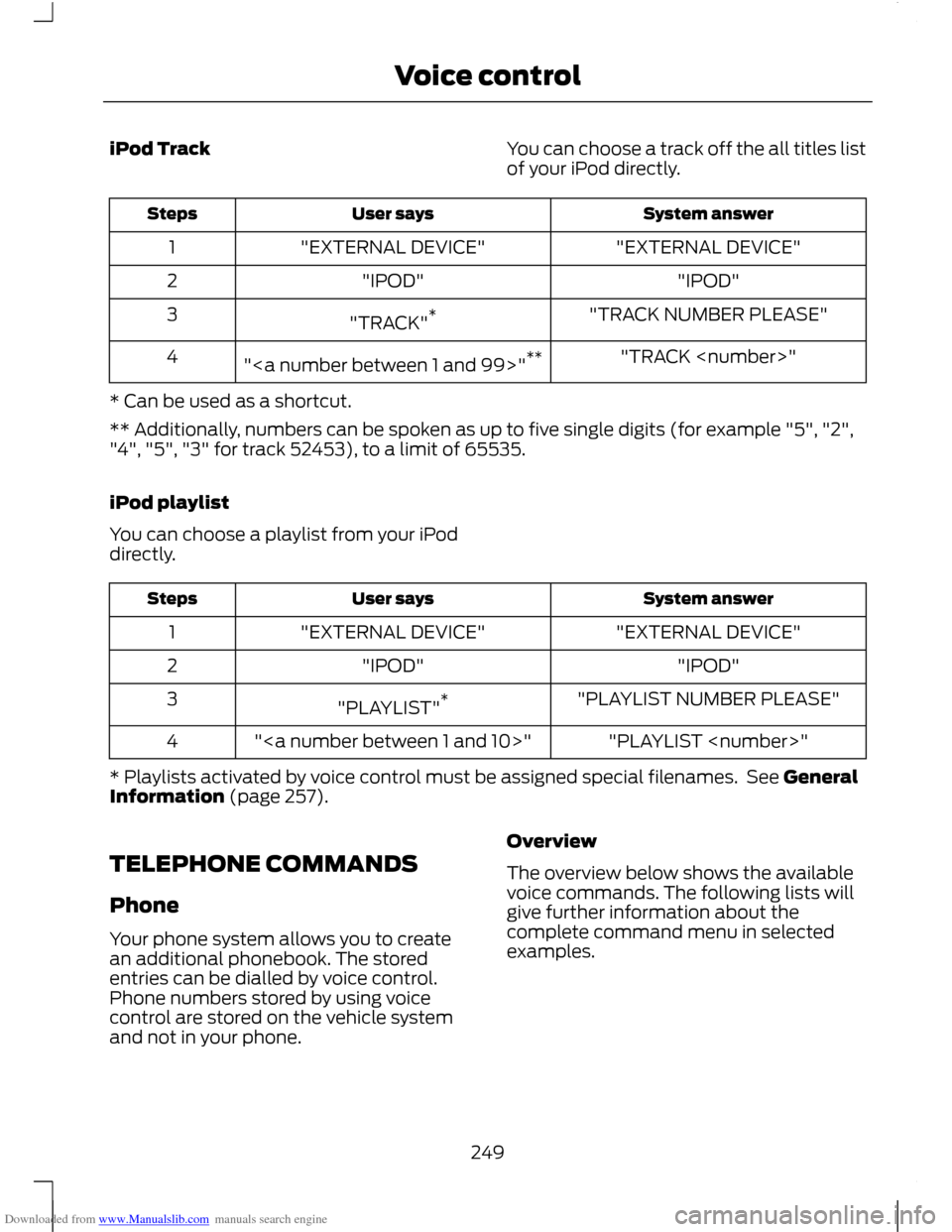
Downloaded from www.Manualslib.com manuals search engine iPod Track
You can choose a track off the all titles list
of your iPod directly. System answer
User says
Steps
"EXTERNAL DEVICE"
"EXTERNAL DEVICE"
1
"IPOD"
"IPOD"
2
"TRACK NUMBER PLEASE"
"TRACK" *
3
"TRACK
"" **
4
* Can be used as a shortcut.
** Additionally, numbers can be spoken as up to five single digits (for example "5", "2",
"4", "5", "3" for track 52453), to a limit of 65535.
iPod playlist
You can choose a playlist from your iPod
directly. System answer
User says
Steps
"EXTERNAL DEVICE"
"EXTERNAL DEVICE"
1
"IPOD"
"IPOD"
2
"PLAYLIST NUMBER PLEASE"
"PLAYLIST" *
3
"PLAYLIST
""
4
* Playlists activated by voice control must be assigned special filenames. See General
Information (page 257).
TELEPHONE COMMANDS
Phone
Your phone system allows you to create
an additional phonebook. The stored
entries can be dialled by voice control.
Phone numbers stored by using voice
control are stored on the vehicle system
and not in your phone. Overview
The overview below shows the available
voice commands. The following lists will
give further information about the
complete command menu in selected
examples.
249
Voice control
Page 252 of 296
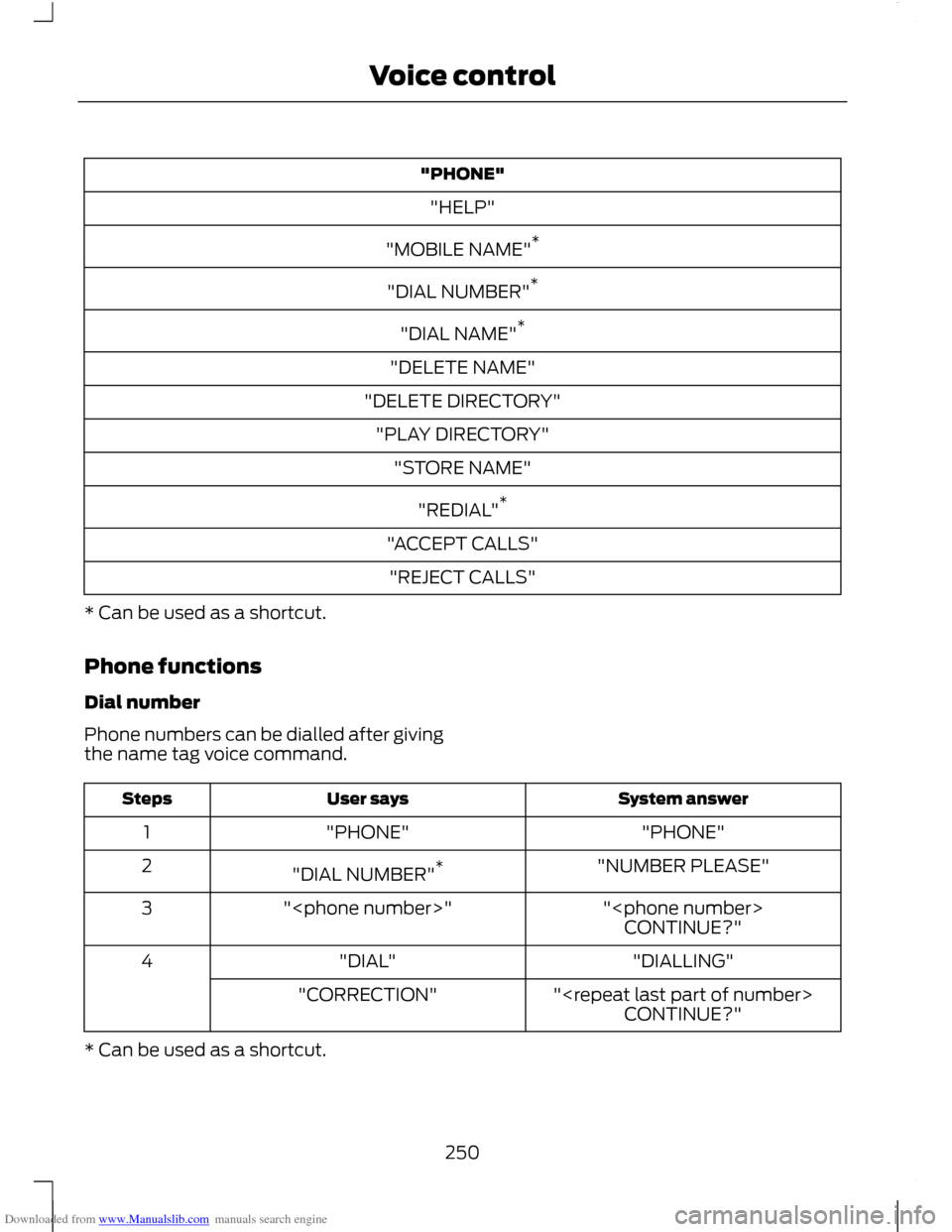
Downloaded from www.Manualslib.com manuals search engine "PHONE"
"HELP"
"MOBILE NAME" *
"DIAL NUMBER" *
"DIAL NAME" *
"DELETE NAME"
"DELETE DIRECTORY" "PLAY DIRECTORY" "STORE NAME"
"REDIAL" *
"ACCEPT CALLS" "REJECT CALLS"
* Can be used as a shortcut.
Phone functions
Dial number
Phone numbers can be dialled after giving
the name tag voice command. System answer
User says
Steps
"PHONE"
"PHONE"
1
"NUMBER PLEASE"
"DIAL NUMBER" *
2
"
"
3
CONTINUE?"
"DIALLING"
"DIAL"
4
"
"CORRECTION"
CONTINUE?"
* Can be used as a shortcut.
250
Voice control
Page 253 of 296
Downloaded from www.Manualslib.com manuals search engine Dial name
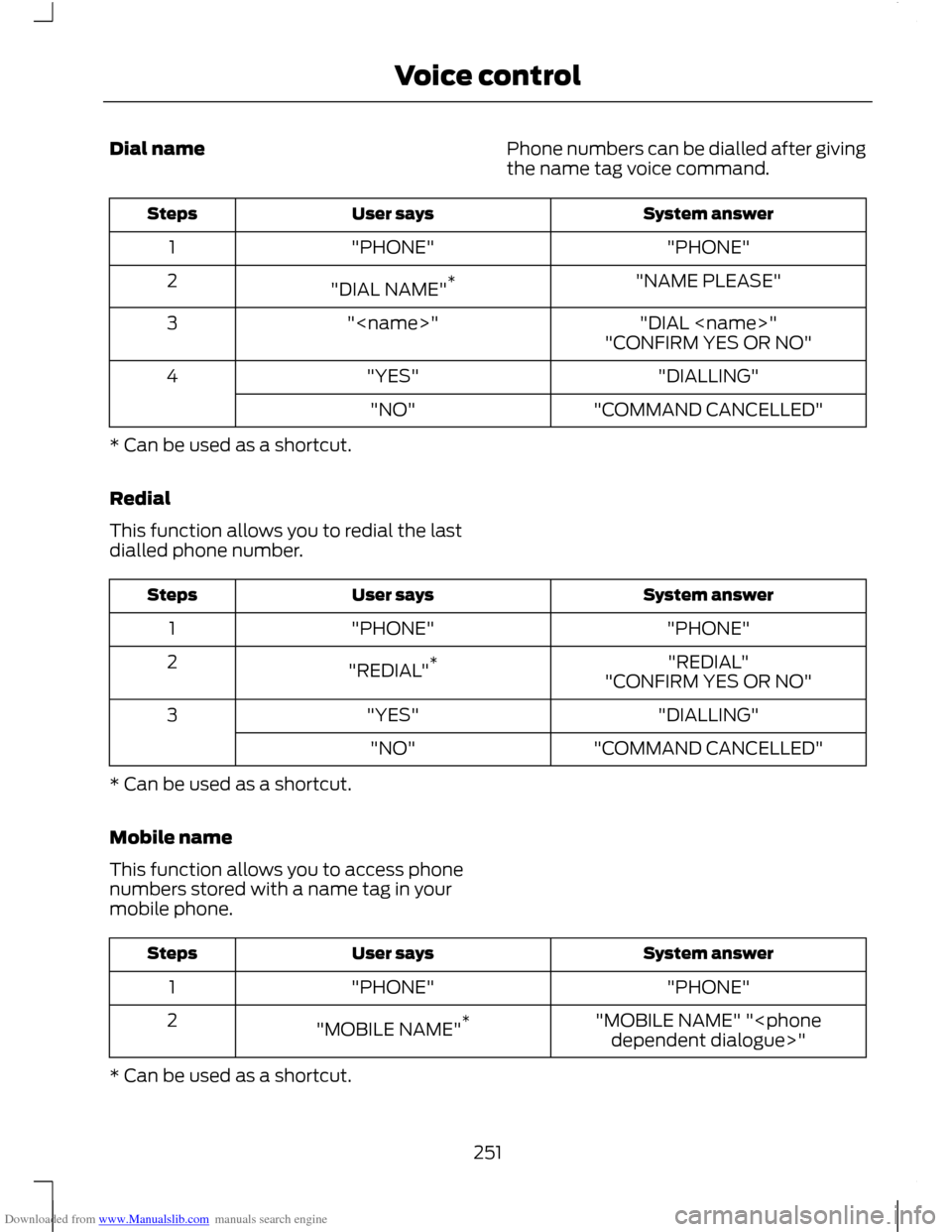
Phone numbers can be dialled after giving
the name tag voice command. System answer
User says
Steps
"PHONE"
"PHONE"
1
"NAME PLEASE"
"DIAL NAME" *
2
"DIAL
"
3
"CONFIRM YES OR NO"
"DIALLING"
"YES"
4
"COMMAND CANCELLED"
"NO"
* Can be used as a shortcut.
Redial
This function allows you to redial the last
dialled phone number. System answer
User says
Steps
"PHONE"
"PHONE"
1
"REDIAL"
"REDIAL" *
2
"CONFIRM YES OR NO"
"DIALLING"
"YES"
3
"COMMAND CANCELLED"
"NO"
* Can be used as a shortcut.
Mobile name
This function allows you to access phone
numbers stored with a name tag in your
mobile phone. System answer
User says
Steps
"PHONE"
"PHONE"
1
"MOBILE NAME" "
"MOBILE NAME"
*
2
* Can be used as a shortcut.
251
Voice control
Page 254 of 296
Downloaded from www.Manualslib.com manuals search engine DTMF (Tone dialling)
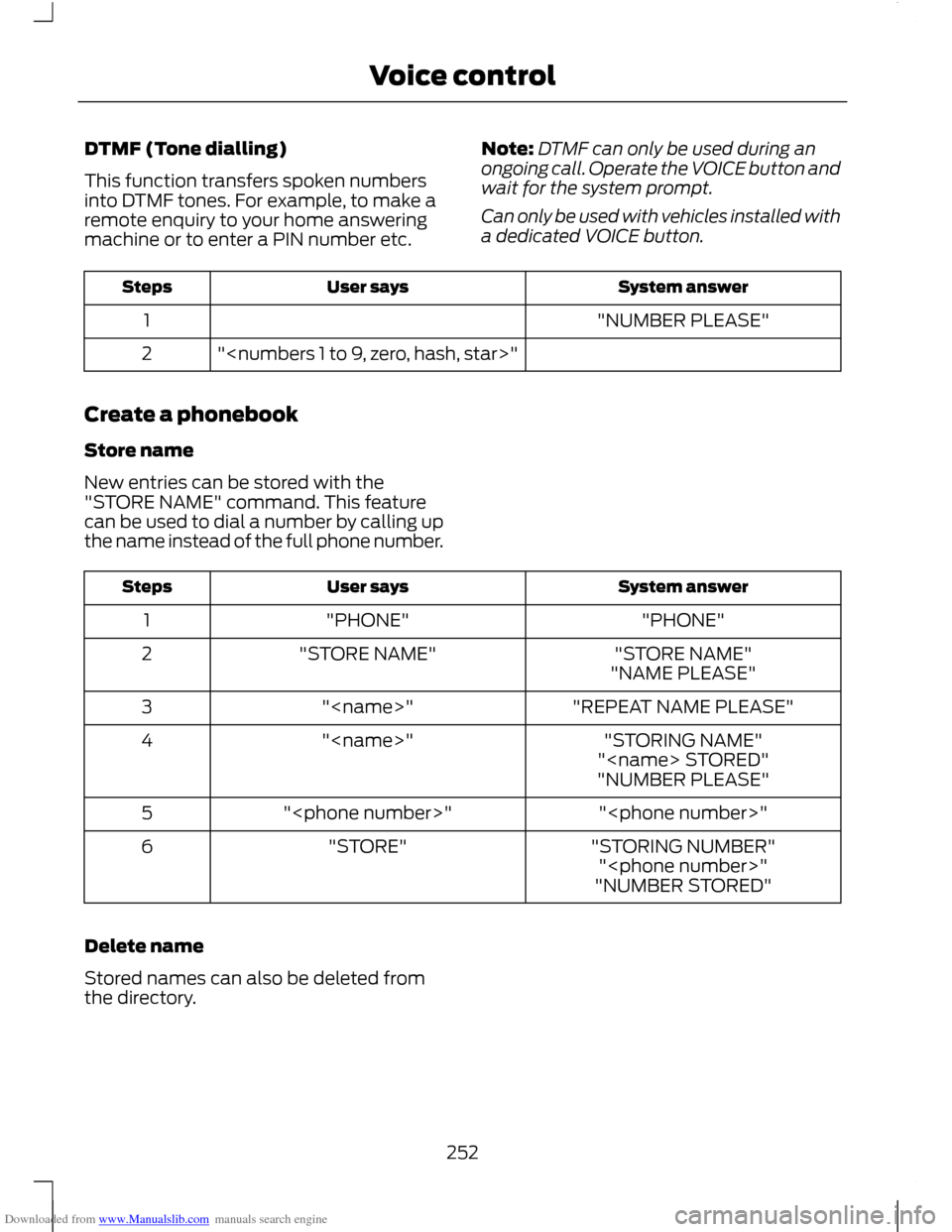
This function transfers spoken numbers
into DTMF tones. For example, to make a
remote enquiry to your home answering
machine or to enter a PIN number etc.
Note:
DTMF can only be used during an
ongoing call. Operate the VOICE button and
wait for the system prompt.
Can only be used with vehicles installed with
a dedicated VOICE button. System answer
User says
Steps
"NUMBER PLEASE"
1
"
2
Create a phonebook
Store name
New entries can be stored with the
"STORE NAME" command. This feature
can be used to dial a number by calling up
the name instead of the full phone number. System answer
User says
Steps
"PHONE"
"PHONE"
1
"STORE NAME"
"STORE NAME"
2
"NAME PLEASE"
"REPEAT NAME PLEASE"
"
3
"STORING NAME"
"
4
"
"NUMBER PLEASE"
"
"
5
"STORING NUMBER"
"STORE"
6
"
"NUMBER STORED"
Delete name
Stored names can also be deleted from
the directory.
252
Voice control