steering wheel FORD C MAX 2011 2.G Owner's Manual
[x] Cancel search | Manufacturer: FORD, Model Year: 2011, Model line: C MAX, Model: FORD C MAX 2011 2.GPages: 296, PDF Size: 7.87 MB
Page 129 of 296
Downloaded from www.Manualslib.com manuals search engine GENERAL INFORMATION
General points on starting
If the battery has been disconnected the
vehicle may exhibit some unusual driving
characteristics for approx. 8 kilometres (5
miles) after reconnecting the battery.
This is because the engine management
system must realign itself with the engine.
Any unusual driving characteristics during
this period may be disregarded.
Starting the engine by towing or
pushing
WARNING
To prevent damage you must not
push or tow start your vehicle. Use
booster cables and a booster battery.
See Jump-Starting the Vehicle (page
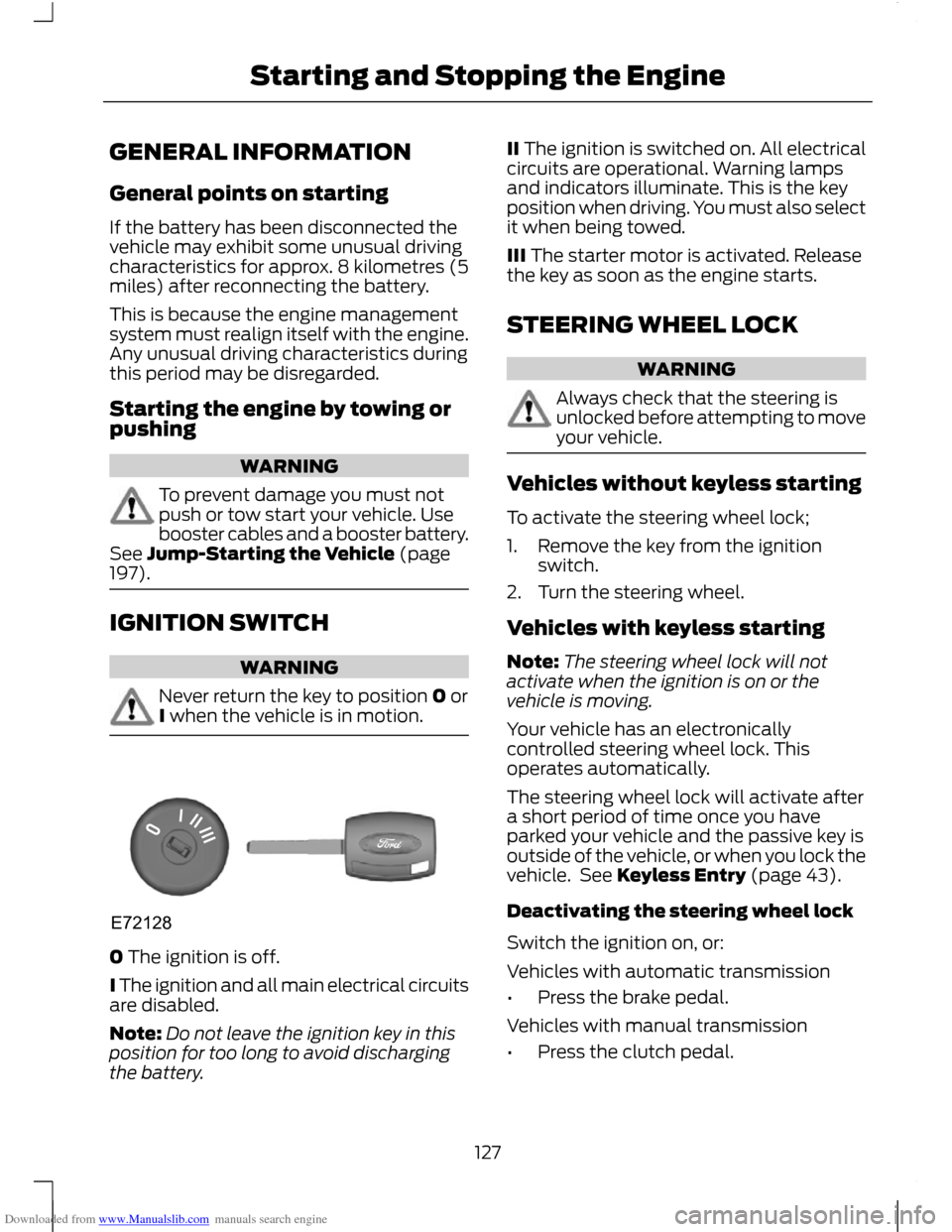
197). IGNITION SWITCH
WARNING
Never return the key to position 0 or
I when the vehicle is in motion.
0 The ignition is off.
I The ignition and all main electrical circuits
are disabled.
Note:
Do not leave the ignition key in this
position for too long to avoid discharging
the battery. II The ignition is switched on. All electrical
circuits are operational. Warning lamps
and indicators illuminate. This is the key
position when driving. You must also select
it when being towed.
III The starter motor is activated. Release
the key as soon as the engine starts.
STEERING WHEEL LOCK
WARNING
Always check that the steering is
unlocked before attempting to move
your vehicle.
Vehicles without keyless starting
To activate the steering wheel lock;
1. Remove the key from the ignition
switch.
2. Turn the steering wheel.
Vehicles with keyless starting
Note: The steering wheel lock will not
activate when the ignition is on or the
vehicle is moving.
Your vehicle has an electronically
controlled steering wheel lock. This
operates automatically.
The steering wheel lock will activate after
a short period of time once you have
parked your vehicle and the passive key is
outside of the vehicle, or when you lock the
vehicle. See Keyless Entry (page 43).
Deactivating the steering wheel lock
Switch the ignition on, or:
Vehicles with automatic transmission
• Press the brake pedal.
Vehicles with manual transmission
• Press the clutch pedal.
127
Starting and Stopping the EngineE72128
Page 131 of 296
Downloaded from www.Manualslib.com manuals search engine Note:
Continue cranking the engine until it
starts.
Note: You can only operate the starter for
a maximum of 30 seconds at a time. Switch the ignition on and wait
until the glow plug indicator goes
off.
Vehicles with manual transmission
Note: Do not touch the accelerator pedal.
1. Fully depress the clutch pedal.
2. Start the engine.
Vehicles with automatic transmission
1. Select park or neutral.
2. Fully depress the brake pedal.
3. Start the engine.
KEYLESS STARTING WARNINGS
The keyless starting system may not
function if the key is close to metal
objects or electronic devices such as
mobile phones. Always check that the steering wheel
lock is deactivated before
attempting to move your vehicle.
See Steering Wheel Lock (page 127). Note:
The ignition may automatically
switch off after a period of time if your
vehicle has been left unattended with the
ignition on. This is to prevent the vehicle
battery from discharging.
Note: A valid passive key must be located
inside the vehicle to switch the ignition on
and start the engine.
Note: To start your engine you must also
fully depress the brake or clutch pedal,
depending on the transmission fitted. Ignition on
Press the start button once. All electrical
circuits are operational, warning lamps and
indicators illuminate.
Starting with automatic
transmission
Note:
Releasing the brake pedal during
engine start may stop the engine cranking
and return to ignition on.
1. Make sure the transmission is in P or N.
2. Fully depress the brake pedal.
3. Press the start button.
Starting with manual transmission
Note: Releasing the clutch pedal during
engine start will stop the engine cranking
and return to ignition on.
1. Fully depress the clutch pedal.
2. Press the start button.
Starting a diesel engine
Note: Engine cranking may not commence
until the engine glow plug cycle has been
completed. This may take several seconds
in extremely cold conditions.
Note: Continue to press the clutch or brake
pedal until engine cranking begins.
129
Starting and Stopping the Engine E85766
Page 146 of 296
Downloaded from www.Manualslib.com manuals search engine PRINCIPLE OF OPERATION
Note:
Depending on applicable laws and
regulations in the country for which your
vehicle was originally built, the brake lamps
may flash if you brake heavily.
Note: Occasional brake noise is normal and
often does not indicate a concern. In normal
operation, the system may emit occasional
or intermittent squeal or groan noises when
the brakes are applied. Such noises are
usually caused by environmental conditions
such as cold, heat, moisture, road dust, salt
or mud.
Disc brakes
Wet brake discs result in reduced braking
efficiency. Dab the brake pedal when
driving from a car wash to remove the film
of water.
ABS WARNING
The ABS does not relieve you of your
responsibility to drive with due care
and attention.
The ABS helps you to maintain full steering
and directional stability when you brake
heavily in an emergency, by preventing the
road wheels from locking.
HINTS ON DRIVING WITH
ANTI-LOCK BRAKES
When the ABS is operating, the brake pedal
will pulse. This is normal. Maintain pressure
on the brake pedal.
The ABS will not eliminate the dangers
inherent when:
•
you drive too close to the vehicle in
front of you.
• the vehicle is aquaplaning. •
you take corners too fast.
• the road surface is poor.
PARKING BRAKE WARNING
Vehicles with an automatic
transmission should always be left
with the selector lever in position P
(Park). •
Press the foot brake pedal firmly.
• Pull the parking brake lever up smartly
to its fullest extent.
• Do not press the release button while
pulling the lever up.
• If your vehicle is parked on a hill and
facing uphill, select first gear or P
(Park) and turn the steering wheel
away from the kerb.
• If your vehicle is parked on a hill and
facing downhill, select reverse gear or
P (Park) and turn the steering wheel
towards the kerb.
To release the parking brake, press the
brake pedal firmly, pull the lever up slightly,
depress the release button and push the
lever down.
144
Brakes
Page 154 of 296
Downloaded from www.Manualslib.com manuals search engine PRINCIPLE OF OPERATION
WARNINGS
The system does not relieve you of
your responsibility to drive with due
care and attention.
At all times you are responsible for
controlling the vehicle, supervising
the system and intervening if
required. You must observe that the selected
space remains clear of obstructions
at all times in the manoeuver.
Vehicles with overhanging loads,
street furniture and other items may
not be detected by the system. You
must make sure that the selected space
is suitable for parking. Do not use the system if a trailer is
attached to the vehicle.
Do not use the system if a bike rack
is attached to the back of the vehicle.
Do not use the system if an
overhanging item is attached to the
roof.
If the manoeuvre is interrupted
before completion, the system will
be disabled. The steering wheel
position will not indicate the true position
of the steering and you will have to take
control of the vehicle. Make sure that loose clothing, your
hands or your arms do not get caught
in the rotating steering wheel. The system will detect a suitable parallel
parking space and steer the vehicle into
the space. The system controls the
steering while the driver controls the
accelerator, transmission and brakes. The
manoeuvre can be stopped at any time by
holding the steering wheel or pressing the
active park assist switch. See At a Glance
(page 10).
The system will visually and audibly
instruct the driver throughout the
procedure to safely park the vehicle.
USING ACTIVE PARK ASSIST
CAUTIONS
The sensors may not detect objects
in heavy rain or other conditions that
cause disruptive reflections.
The sensors may not detect objects
with surfaces that absorb ultrasonic
waves.
The sensors may not detect the kerb.
Note:
If the traction control system is
disabled active park assist will not be
available. See General Information (page
83).
The system will not align the vehicle
correctly if:
• a spare tyre, or a tyre worn significantly
more than the other tyres is used
• the factory installed tyre size is not
used on the vehicle
• the tyres skid
• you allow the vehicle to roll
• the weather conditions are poor (heavy
rain, snow, fog, etc).
152
Active Park Assist
Page 156 of 296
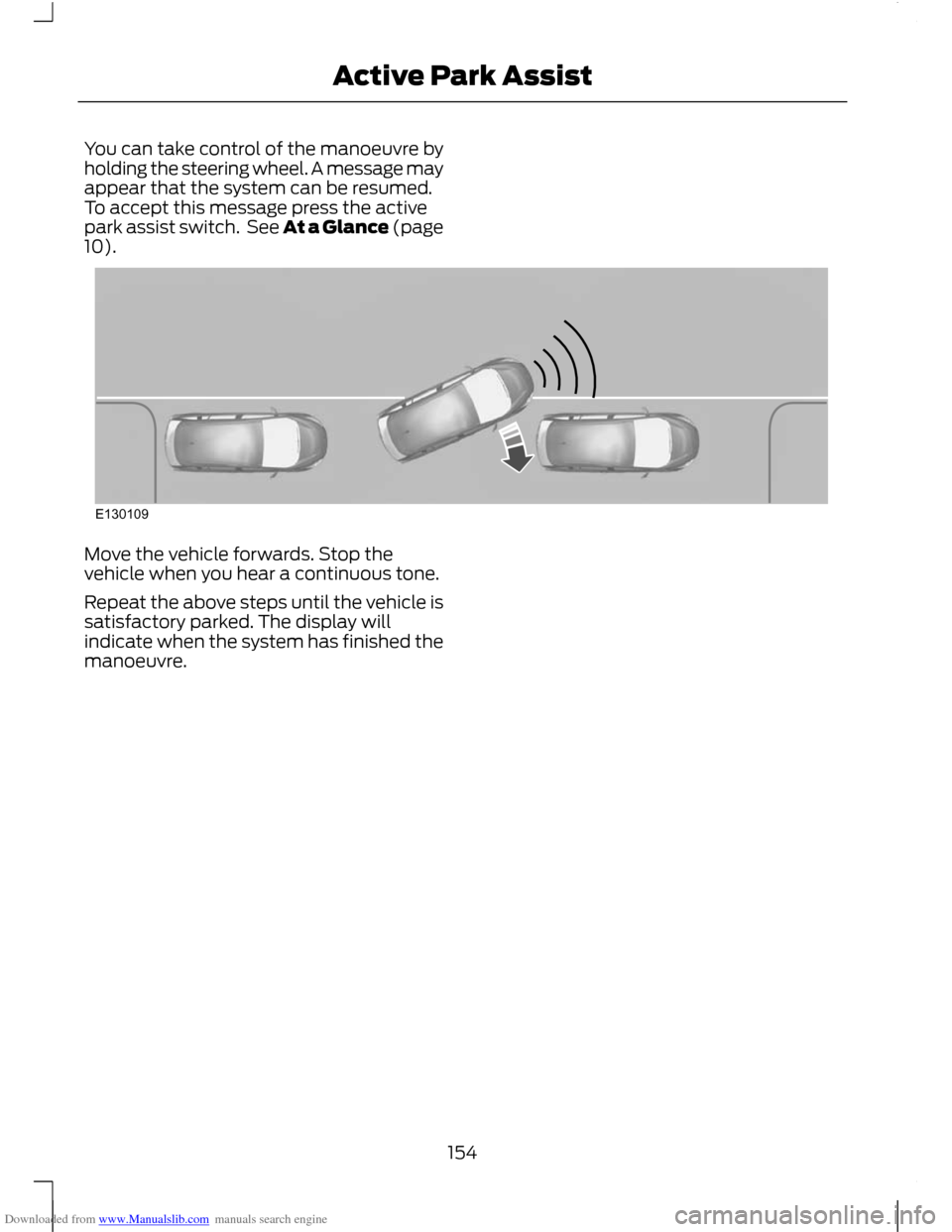
Downloaded from www.Manualslib.com manuals search engine You can take control of the manoeuvre by
holding the steering wheel. A message may
appear that the system can be resumed.
To accept this message press the active
park assist switch. See At a Glance (page
10).
Move the vehicle forwards. Stop the
vehicle when you hear a continuous tone.
Repeat the above steps until the vehicle is
satisfactory parked. The display will
indicate when the system has finished the
manoeuvre.
154
Active Park AssistE130109
Page 158 of 296
Downloaded from www.Manualslib.com manuals search engine Using the display
CAUTIONS
Obstacles above the camera position
will not be shown. Inspect the area
behind your vehicle if necessary.
Marks are for general guidance only,
and are calculated for vehicles in
maximum load conditions on an even
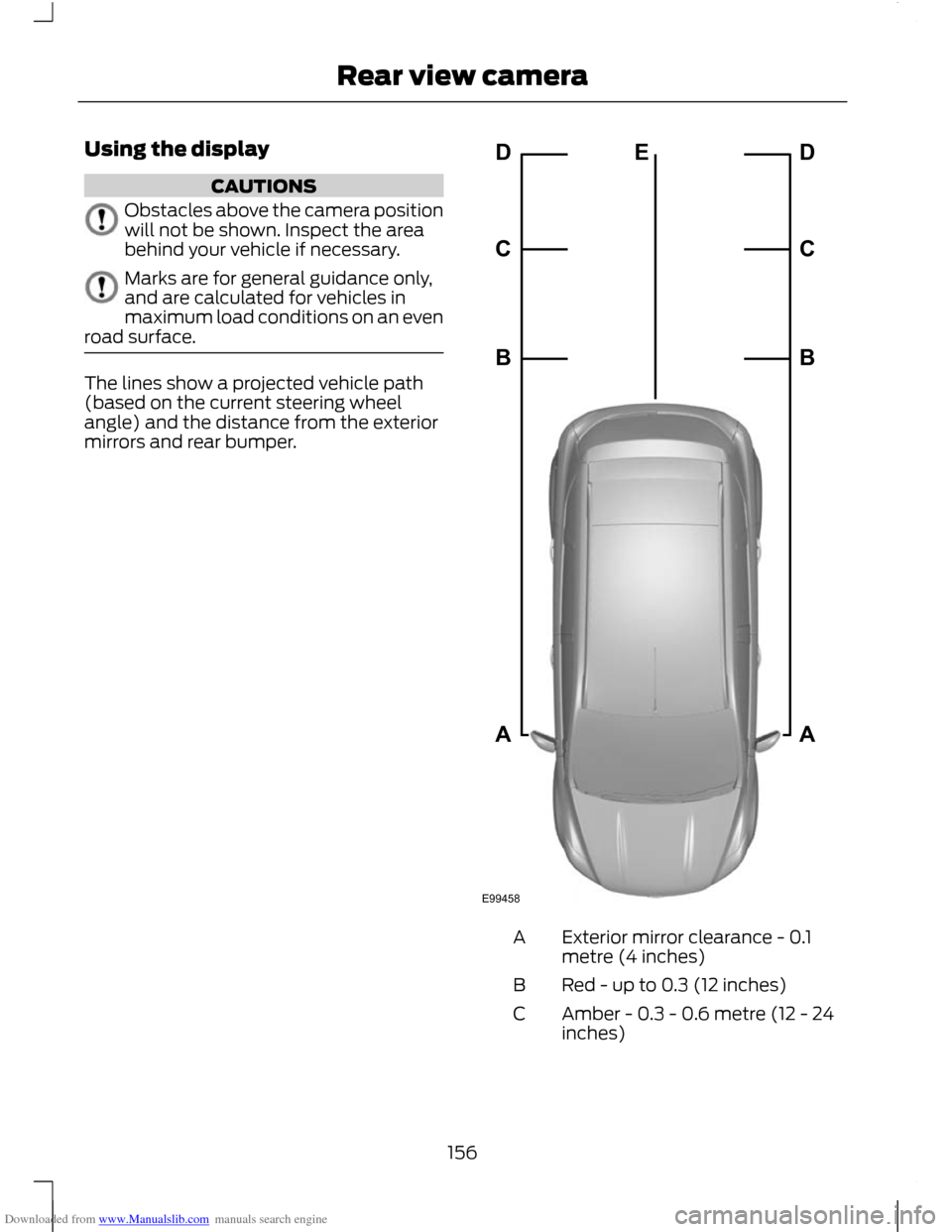
road surface. The lines show a projected vehicle path
(based on the current steering wheel
angle) and the distance from the exterior
mirrors and rear bumper.
Exterior mirror clearance - 0.1
metre (4 inches)
A
Red - up to 0.3 (12 inches)
B
Amber - 0.3 - 0.6 metre (12 - 24
inches)
C
156
Rear view cameraE99458ABCDEABCD
Page 160 of 296
Downloaded from www.Manualslib.com manuals search engine PRINCIPLE OF OPERATION
WARNING
The system does not relieve you of
your responsibility to drive with due
care and attention.
Cruise control allows you to control your
speed using the switches on the steering
wheel. You can use cruise control when
you exceed approximately 30 km/h (20
mph).
USING CRUISE CONTROL
WARNING
Do not use cruise control in heavy
traffic, on twisty roads or when the
road surface is slippery.
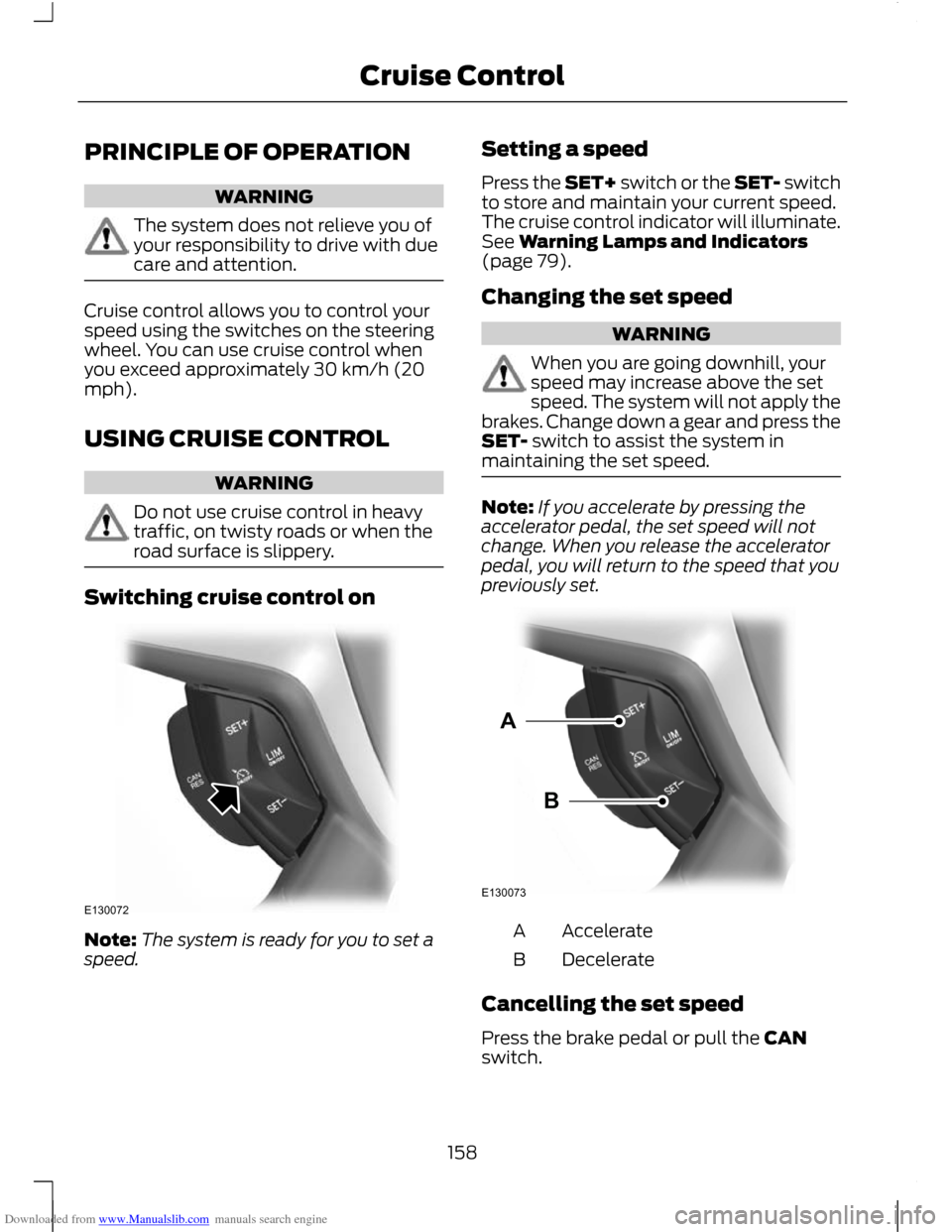
Switching cruise control on
Note:
The system is ready for you to set a
speed. Setting a speed
Press the SET+ switch or the SET- switch
to store and maintain your current speed.
The cruise control indicator will illuminate.
See Warning Lamps and Indicators
(page 79).
Changing the set speed WARNING
When you are going downhill, your
speed may increase above the set
speed. The system will not apply the
brakes. Change down a gear and press the
SET- switch to assist the system in
maintaining the set speed. Note:
If you accelerate by pressing the
accelerator pedal, the set speed will not
change. When you release the accelerator
pedal, you will return to the speed that you
previously set. Accelerate
A
Decelerate
B
Cancelling the set speed
Press the brake pedal or pull the CAN
switch.
158
Cruise ControlE130072 E130073AB
Page 162 of 296
Downloaded from www.Manualslib.com manuals search engine PRINCIPLE OF OPERATION
WARNING
When you are going downhill, your
speed may increase above the set
speed. The system will not apply the
brakes but a warning will be given. The system allows you to set a speed, to
which the vehicle then becomes limited.
The set speed will become the effective
maximum speed of the vehicle, but with
the option to temporarily exceed this limit
if required.
USING THE SPEED LIMITER
Note:
The set speed limit can be
intentionally exceeded for a short period if
required, for example when overtaking.
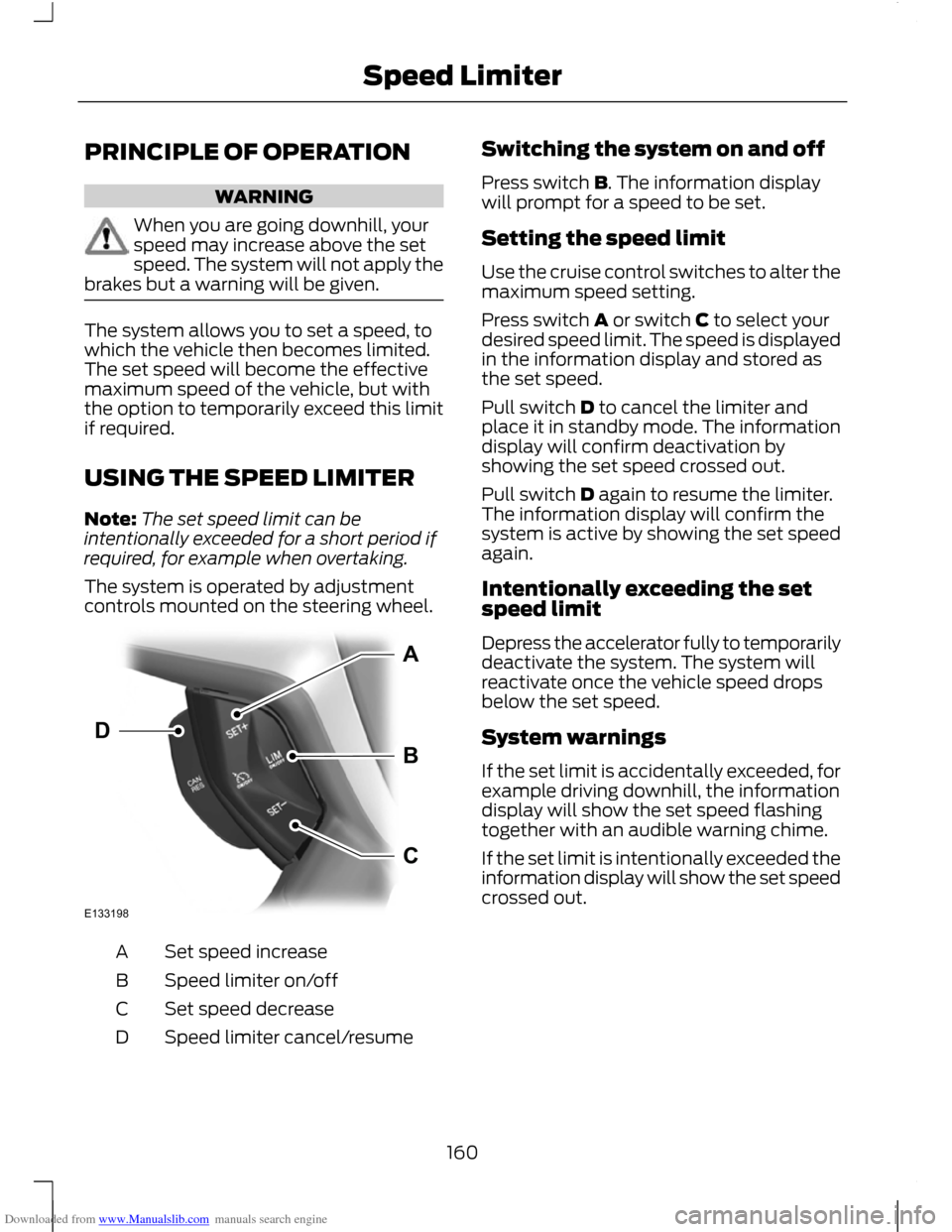
The system is operated by adjustment
controls mounted on the steering wheel. Set speed increase
A
Speed limiter on/off
B
Set speed decrease
C
Speed limiter cancel/resume
D Switching the system on and off
Press switch B. The information display
will prompt for a speed to be set.
Setting the speed limit
Use the cruise control switches to alter the
maximum speed setting.
Press switch A or switch C to select your
desired speed limit. The speed is displayed
in the information display and stored as
the set speed.
Pull switch D to cancel the limiter and
place it in standby mode. The information
display will confirm deactivation by
showing the set speed crossed out.
Pull switch D again to resume the limiter.
The information display will confirm the
system is active by showing the set speed
again.
Intentionally exceeding the set
speed limit
Depress the accelerator fully to temporarily
deactivate the system. The system will
reactivate once the vehicle speed drops
below the set speed.
System warnings
If the set limit is accidentally exceeded, for
example driving downhill, the information
display will show the set speed flashing
together with an audible warning chime.
If the set limit is intentionally exceeded the
information display will show the set speed
crossed out.
160
Speed LimiterE133198ABCD
Page 181 of 296
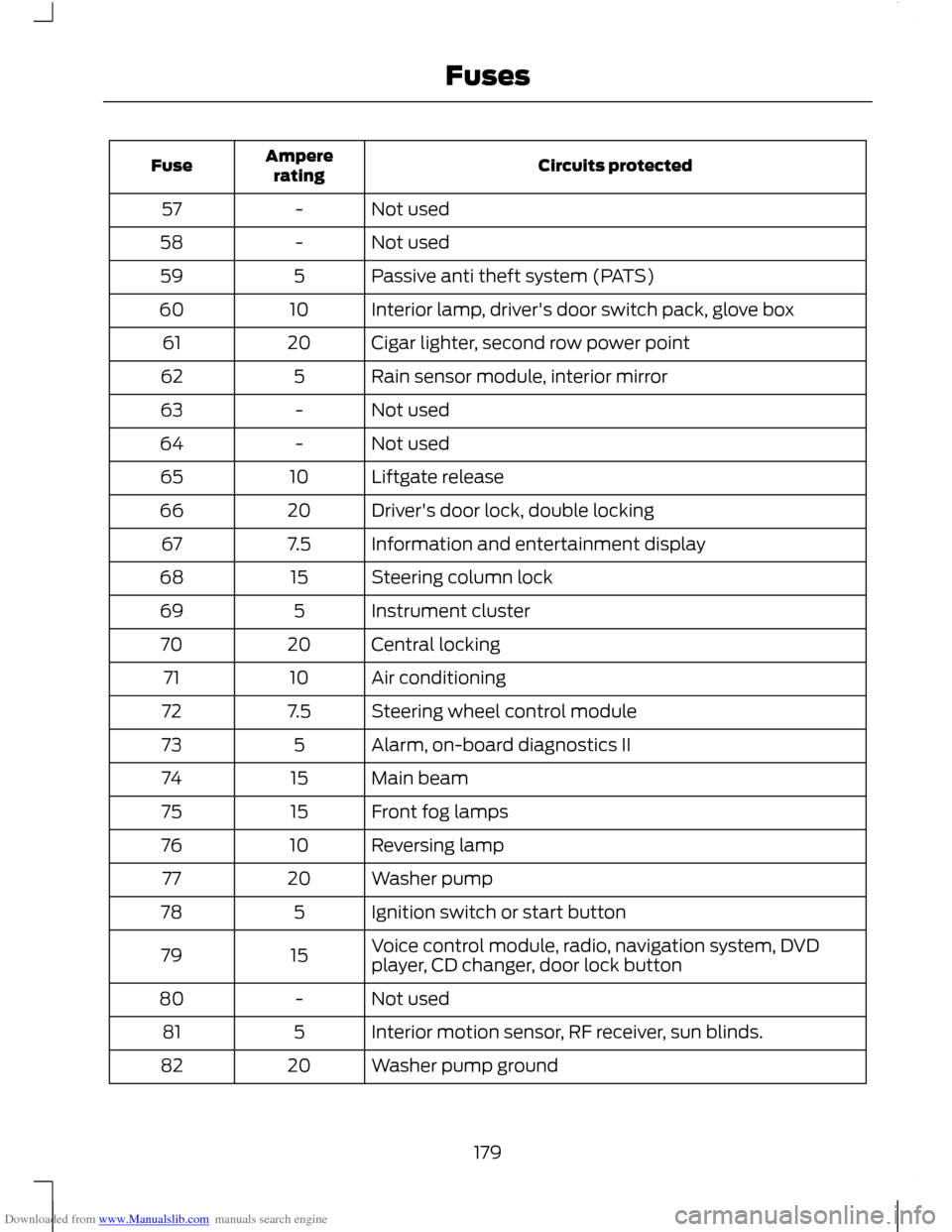
Downloaded from www.Manualslib.com manuals search engine Circuits protected
Ampere
rating
Fuse
Not used
-
57
Not used
-
58
Passive anti theft system (PATS)
5
59
Interior lamp, driver's door switch pack, glove box
10
60
Cigar lighter, second row power point
20
61
Rain sensor module, interior mirror
5
62
Not used
-
63
Not used
-
64
Liftgate release
10
65
Driver's door lock, double locking
20
66
Information and entertainment display
7.5
67
Steering column lock
15
68
Instrument cluster
5
69
Central locking
20
70
Air conditioning
10
71
Steering wheel control module
7.5
72
Alarm, on-board diagnostics II
5
73
Main beam
15
74
Front fog lamps
15
75
Reversing lamp
10
76
Washer pump
20
77
Ignition switch or start button
5
78
Voice control module, radio, navigation system, DVD
player, CD changer, door lock button
15
79
Not used
-
80
Interior motion sensor, RF receiver, sun blinds.
5
81
Washer pump ground
20
82
179
Fuses
Page 185 of 296
Downloaded from www.Manualslib.com manuals search engine TOWING POINTS
Towing eye location
The screw-in towing eye is located in the
spare wheel well.
The towing eye must always be carried in
the vehicle.
Installing the towing eye
CAUTION
The screw-in towing eye has a
left-hand thread. Turn it
anti-clockwise to install it. Make sure
that the towing eye is fully tightened. Note:
On vehicles with a tow bar, the
towing eye cannot be installed at the rear
of the vehicle. Use the tow bar to tow a
vehicle.
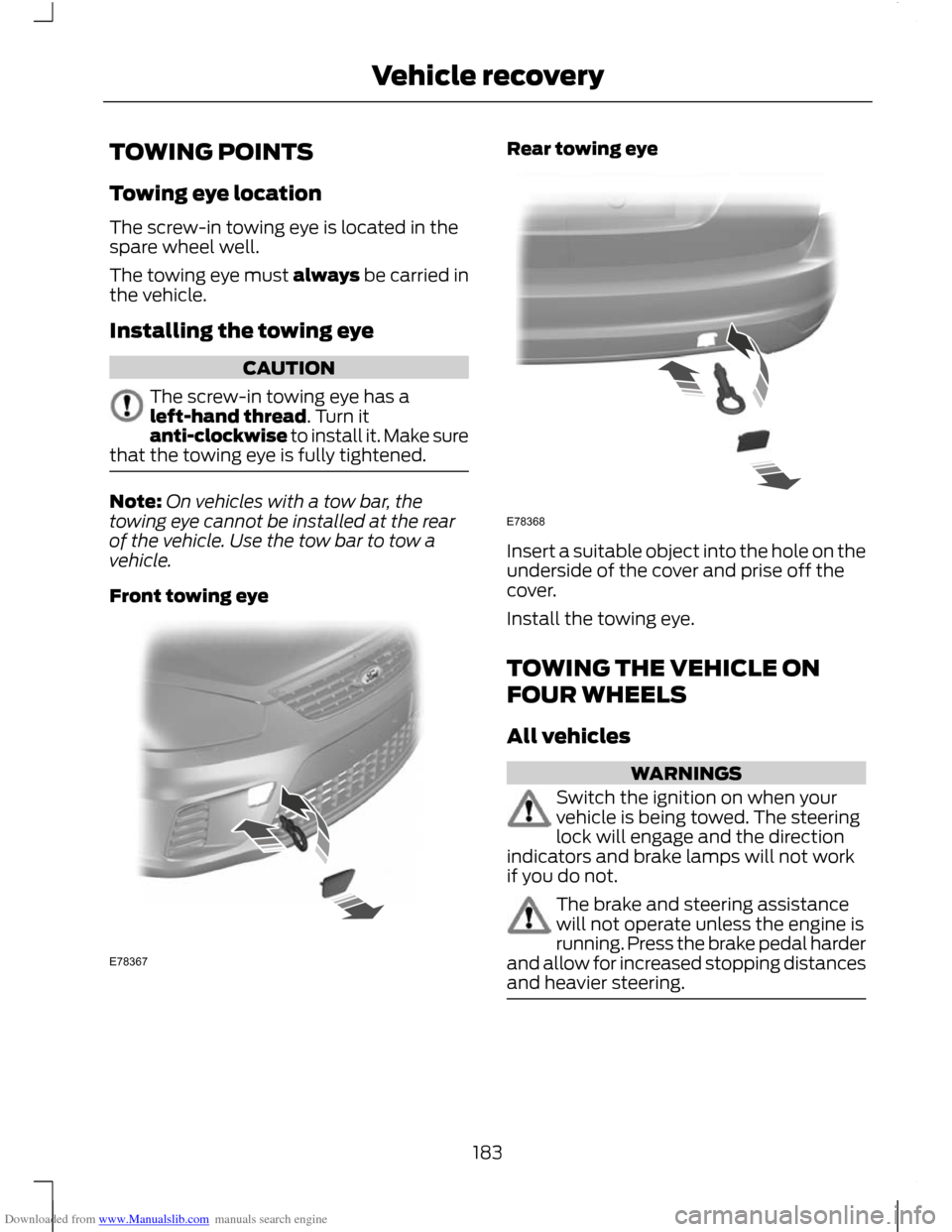
Front towing eye Rear towing eye
Insert a suitable object into the hole on the
underside of the cover and prise off the
cover.
Install the towing eye.
TOWING THE VEHICLE ON
FOUR WHEELS
All vehicles
WARNINGS
Switch the ignition on when your
vehicle is being towed. The steering
lock will engage and the direction
indicators and brake lamps will not work
if you do not. The brake and steering assistance
will not operate unless the engine is
running. Press the brake pedal harder
and allow for increased stopping distances
and heavier steering. 183
Vehicle recoveryE78367 E78368