fuel FORD C MAX 2013 User Guide
[x] Cancel search | Manufacturer: FORD, Model Year: 2013, Model line: C MAX, Model: FORD C MAX 2013Pages: 552, PDF Size: 8.55 MB
Page 112 of 552
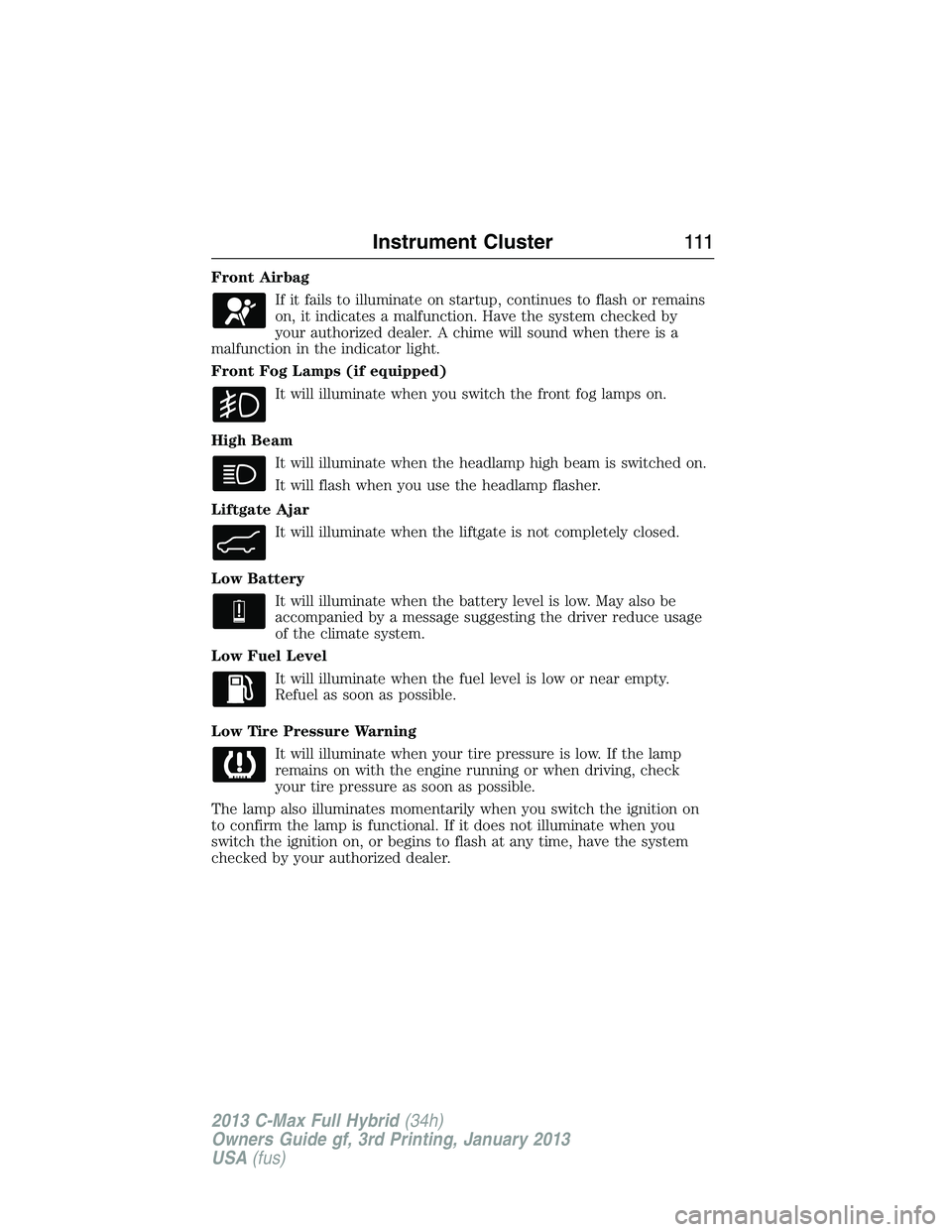
Front Airbag
If it fails to illuminate on startup, continues to flash or remains
on, it indicates a malfunction. Have the system checked by
your authorized dealer. A chime will sound when there is a
malfunction in the indicator light.
Front Fog Lamps (if equipped)
It will illuminate when you switch the front fog lamps on.
High Beam
It will illuminate when the headlamp high beam is switched on.
It will flash when you use the headlamp flasher.
Liftgate Ajar
It will illuminate when the liftgate is not completely closed.
Low Battery
It will illuminate when the battery level is low. May also be
accompanied by a message suggesting the driver reduce usage
of the climate system.
Low Fuel Level
It will illuminate when the fuel level is low or near empty.
Refuel as soon as possible.
Low Tire Pressure Warning
It will illuminate when your tire pressure is low. If the lamp
remains on with the engine running or when driving, check
your tire pressure as soon as possible.
The lamp also illuminates momentarily when you switch the ignition on
to confirm the lamp is functional. If it does not illuminate when you
switch the ignition on, or begins to flash at any time, have the system
checked by your authorized dealer.
Instrument Cluster111
2013 C-Max Full Hybrid(34h)
Owners Guide gf, 3rd Printing, January 2013
USA(fus)
Page 113 of 552
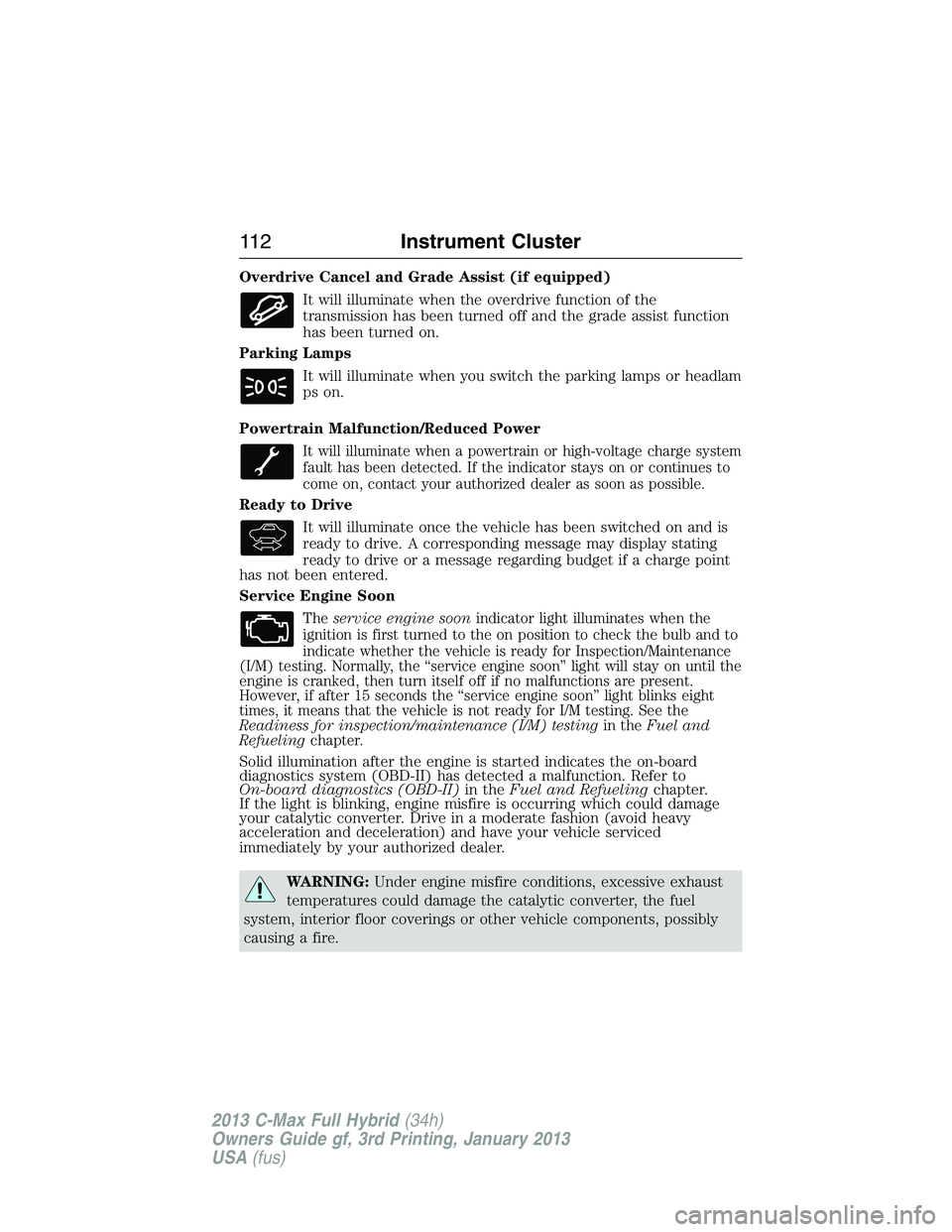
Overdrive Cancel and Grade Assist (if equipped)
It will illuminate when the overdrive function of the
transmission has been turned off and the grade assist function
has been turned on.
Parking Lamps
It will illuminate when you switch the parking lamps or headlam
ps on.
Powertrain Malfunction/Reduced Power
It will illuminate when a powertrain or high-voltage charge system
fault has been detected. If the indicator stays on or continues to
come on, contact your authorized dealer as soon as possible.
Ready to Drive
It will illuminate once the vehicle has been switched on and is
ready to drive. A corresponding message may display stating
ready to drive or a message regarding budget if a charge point
has not been entered.
Service Engine Soon
Theservice engine soonindicator light illuminates when the
ignition is first turned to the on position to check the bulb and to
indicate whether the vehicle is ready for Inspection/Maintenance
(I/M) testing. Normally, the “service engine soon” light will stay on until the
engine is cranked, then turn itself off if no malfunctions are present.
However, if after 15 seconds the “service engine soon” light blinks eight
times, it means that the vehicle is not ready for I/M testing. See the
Readiness for inspection/maintenance (I/M) testingin theFuel and
Refuelingchapter.
Solid illumination after the engine is started indicates the on-board
diagnostics system (OBD-II) has detected a malfunction. Refer to
On-board diagnostics (OBD-II)in theFuel and Refuelingchapter.
If the light is blinking, engine misfire is occurring which could damage
your catalytic converter. Drive in a moderate fashion (avoid heavy
acceleration and deceleration) and have your vehicle serviced
immediately by your authorized dealer.
WARNING:Under engine misfire conditions, excessive exhaust
temperatures could damage the catalytic converter, the fuel
system, interior floor coverings or other vehicle components, possibly
causing a fire.
11 2Instrument Cluster
2013 C-Max Full Hybrid(34h)
Owners Guide gf, 3rd Printing, January 2013
USA(fus)
Page 116 of 552
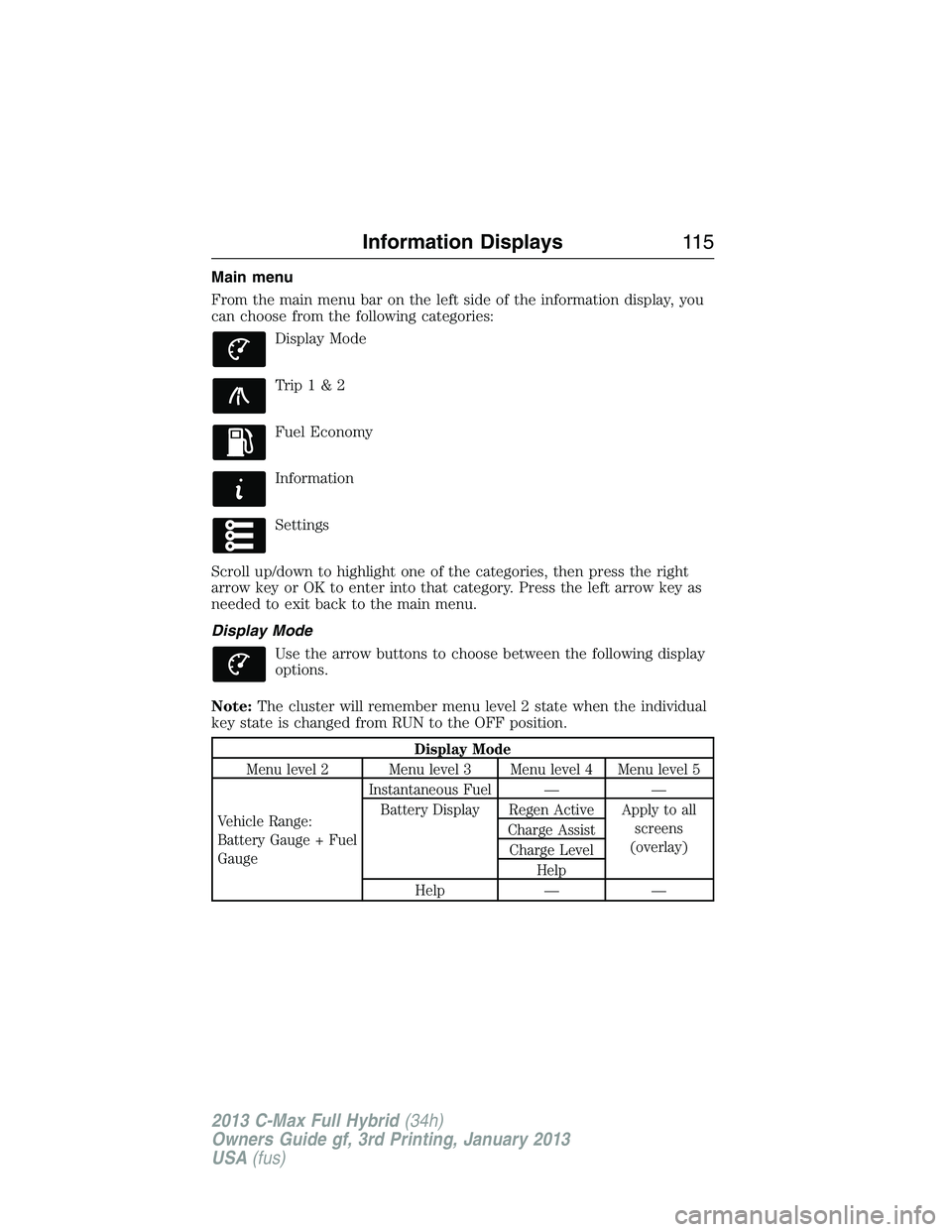
Main menu
From the main menu bar on the left side of the information display, you
can choose from the following categories:
Display Mode
Trip1&2
Fuel Economy
Information
Settings
Scroll up/down to highlight one of the categories, then press the right
arrow key or OK to enter into that category. Press the left arrow key as
needed to exit back to the main menu.
Display Mode
Use the arrow buttons to choose between the following display
options.
Note:The cluster will remember menu level 2 state when the individual
key state is changed from RUN to the OFF position.
Display Mode
Menu level 2 Menu level 3 Menu level 4 Menu level 5
Vehicle Range:
Battery Gauge + Fuel
GaugeInstantaneous Fuel — —
Battery Display Regen Active Apply to all
screens
(overlay) Charge Assist
Charge Level
Help
Help — —
Information Displays11 5
2013 C-Max Full Hybrid(34h)
Owners Guide gf, 3rd Printing, January 2013
USA(fus)
Page 117 of 552
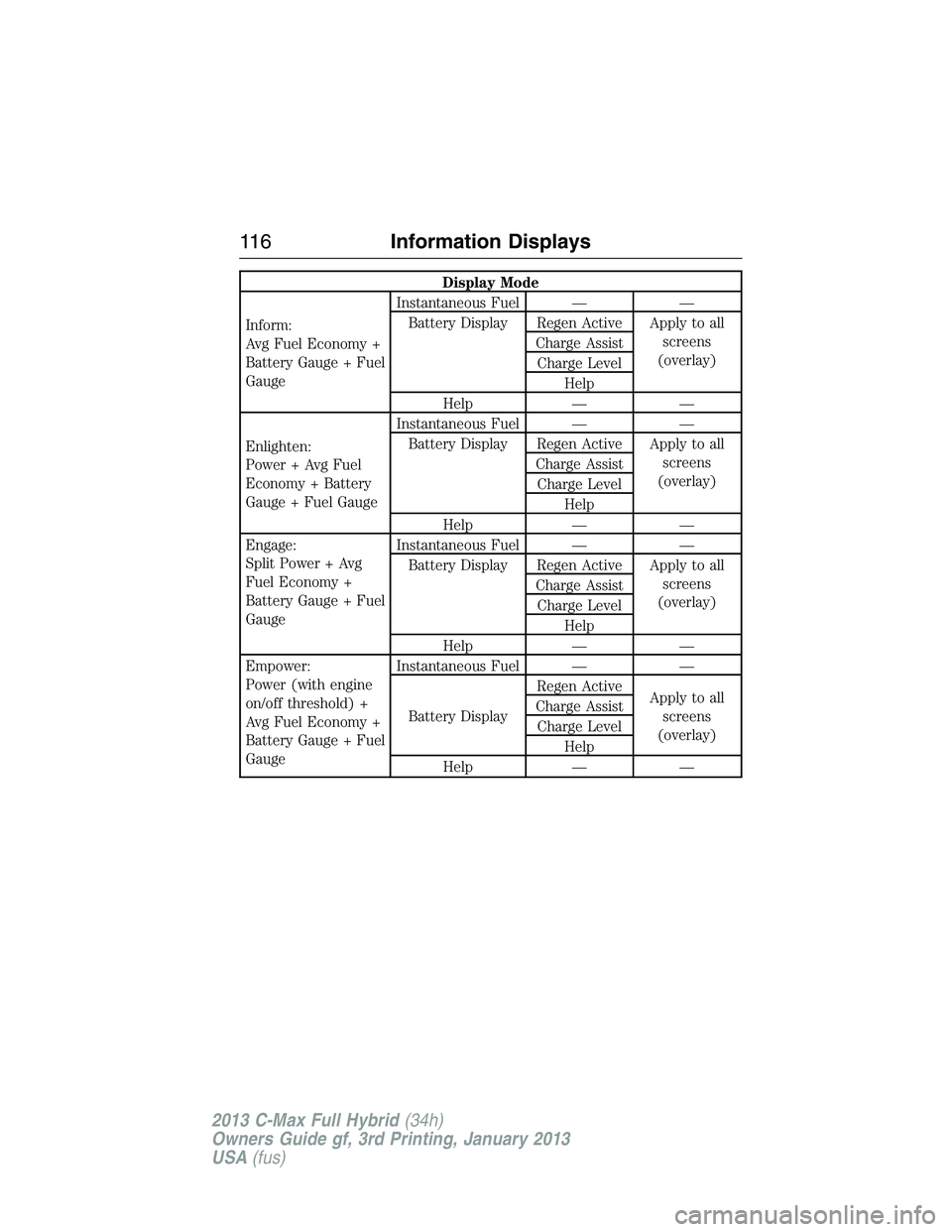
Display Mode
Inform:
Avg Fuel Economy +
Battery Gauge + Fuel
GaugeInstantaneous Fuel — —
Battery Display Regen Active Apply to all
screens
(overlay) Charge Assist
Charge Level
Help
Help — —
Enlighten:
Power + Avg Fuel
Economy + Battery
Gauge + Fuel GaugeInstantaneous Fuel — —
Battery Display Regen Active Apply to all
screens
(overlay) Charge Assist
Charge Level
Help
Help — —
Engage:
Split Power + Avg
Fuel Economy +
Battery Gauge + Fuel
GaugeInstantaneous Fuel — —
Battery Display Regen Active Apply to all
screens
(overlay) Charge Assist
Charge Level
Help
Help — —
Empower:
Power (with engine
on/off threshold) +
Avg Fuel Economy +
Battery Gauge + Fuel
GaugeInstantaneous Fuel — —
Battery DisplayRegen Active
Apply to all
screens
(overlay) Charge Assist
Charge Level
Help
Help — —
11 6Information Displays
2013 C-Max Full Hybrid(34h)
Owners Guide gf, 3rd Printing, January 2013
USA(fus)
Page 118 of 552
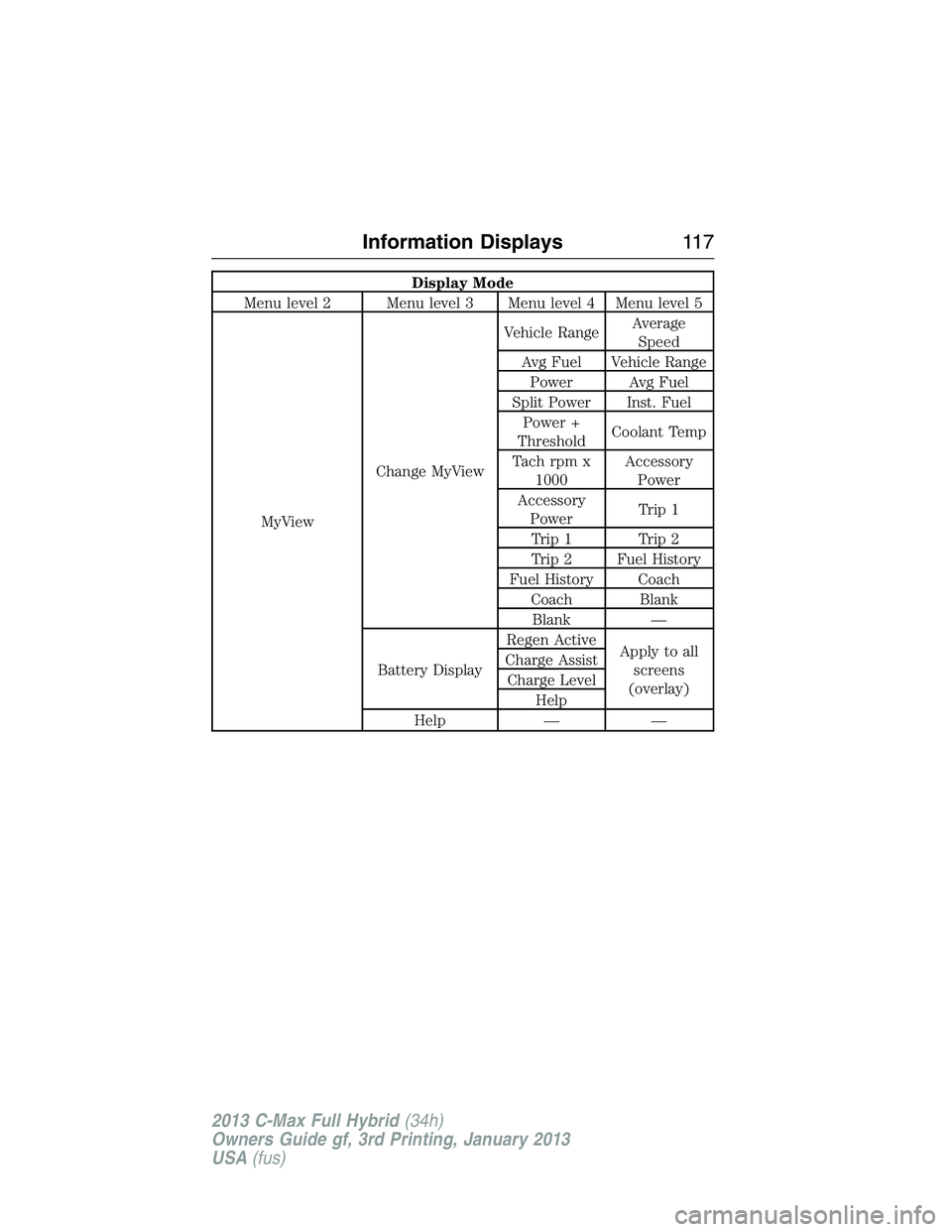
Display Mode
Menu level 2 Menu level 3 Menu level 4 Menu level 5
MyViewChange MyViewVehicle RangeAverage
Speed
Avg Fuel Vehicle Range
Power Avg Fuel
Split Power Inst. Fuel
Power +
ThresholdCoolant Temp
Tach rpm x
1000Accessory
Power
Accessory
PowerTrip 1
Trip 1 Trip 2
Trip 2 Fuel History
Fuel History Coach
Coach Blank
Blank —
Battery DisplayRegen Active
Apply to all
screens
(overlay) Charge Assist
Charge Level
Help
Help — —
Information Displays11 7
2013 C-Max Full Hybrid(34h)
Owners Guide gf, 3rd Printing, January 2013
USA(fus)
Page 119 of 552
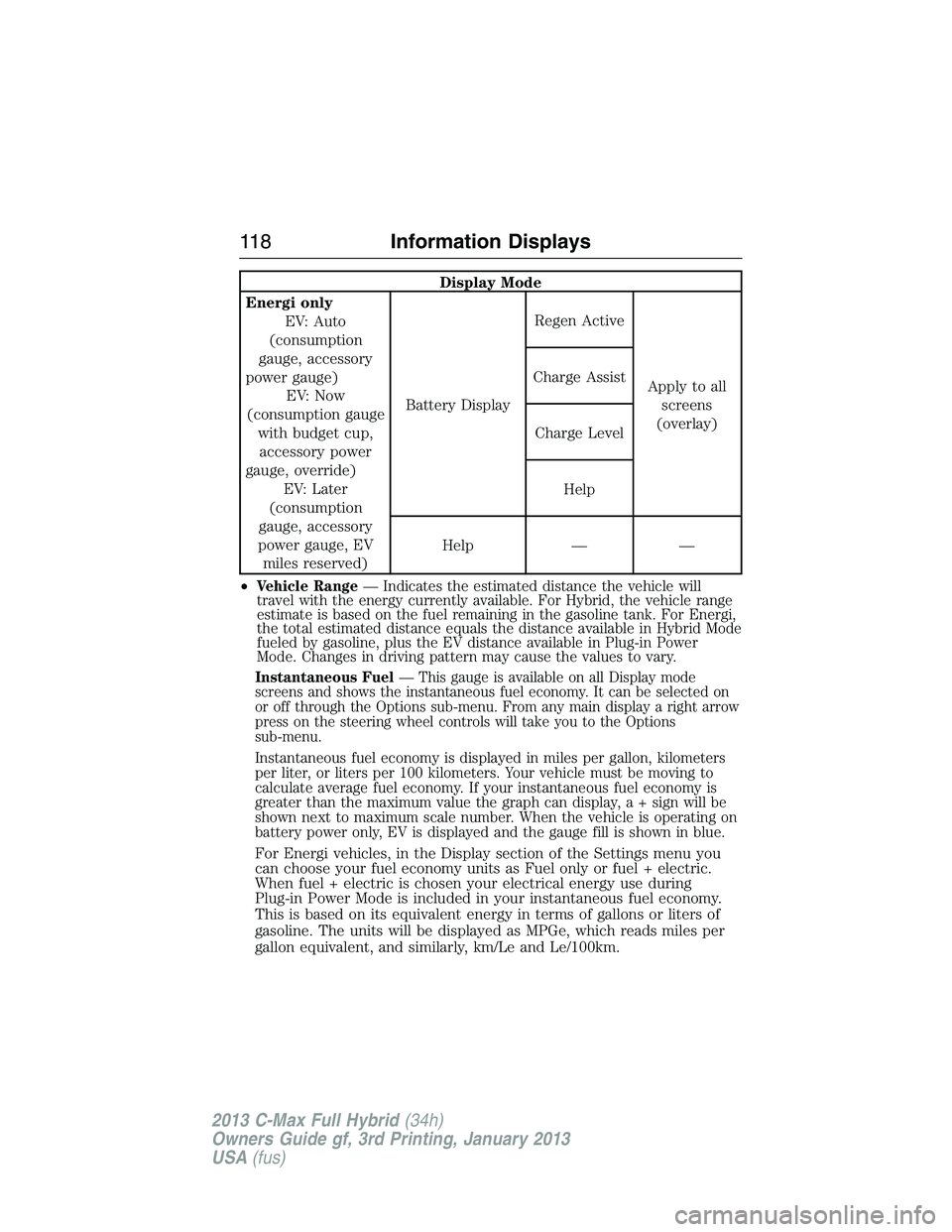
Display Mode
Energi only
EV: Auto
(consumption
gauge, accessory
power gauge)
EV: Now
(consumption gauge
with budget cup,
accessory power
gauge, override)
EV: Later
(consumption
gauge, accessory
power gauge, EV
miles reserved)Battery DisplayRegen Active
Apply to all
screens
(overlay) Charge Assist
Charge Level
Help
Help — —
•
Vehicle Range— Indicates the estimated distance the vehicle will
travel with the energy currently available. For Hybrid, the vehicle range
estimate is based on the fuel remaining in the gasoline tank. For Energi,
the total estimated distance equals the distance available in Hybrid Mode
fueled by gasoline, plus the EV distance available in Plug-in Power
Mode. Changes in driving pattern may cause the values to vary.
Instantaneous Fuel— This gauge is available on all Display mode
screens and shows the instantaneous fuel economy. It can be selected on
or off through the Options sub-menu. From any main display a right arrow
press on the steering wheel controls will take you to the Options
sub-menu.
Instantaneous fuel economy is displayed in miles per gallon, kilometers
per liter, or liters per 100 kilometers. Your vehicle must be moving to
calculate average fuel economy. If your instantaneous fuel economy is
greater than the maximum value the graph can display,a+signwillbe
shown next to maximum scale number. When the vehicle is operating on
battery power only, EV is displayed and the gauge fill is shown in blue.
For Energi vehicles, in the Display section of the Settings menu you
can choose your fuel economy units as Fuel only or fuel + electric.
When fuel + electric is chosen your electrical energy use during
Plug-in Power Mode is included in your instantaneous fuel economy.
This is based on its equivalent energy in terms of gallons or liters of
gasoline. The units will be displayed as MPGe, which reads miles per
gallon equivalent, and similarly, km/Le and Le/100km.
11 8Information Displays
2013 C-Max Full Hybrid(34h)
Owners Guide gf, 3rd Printing, January 2013
USA(fus)
Page 120 of 552
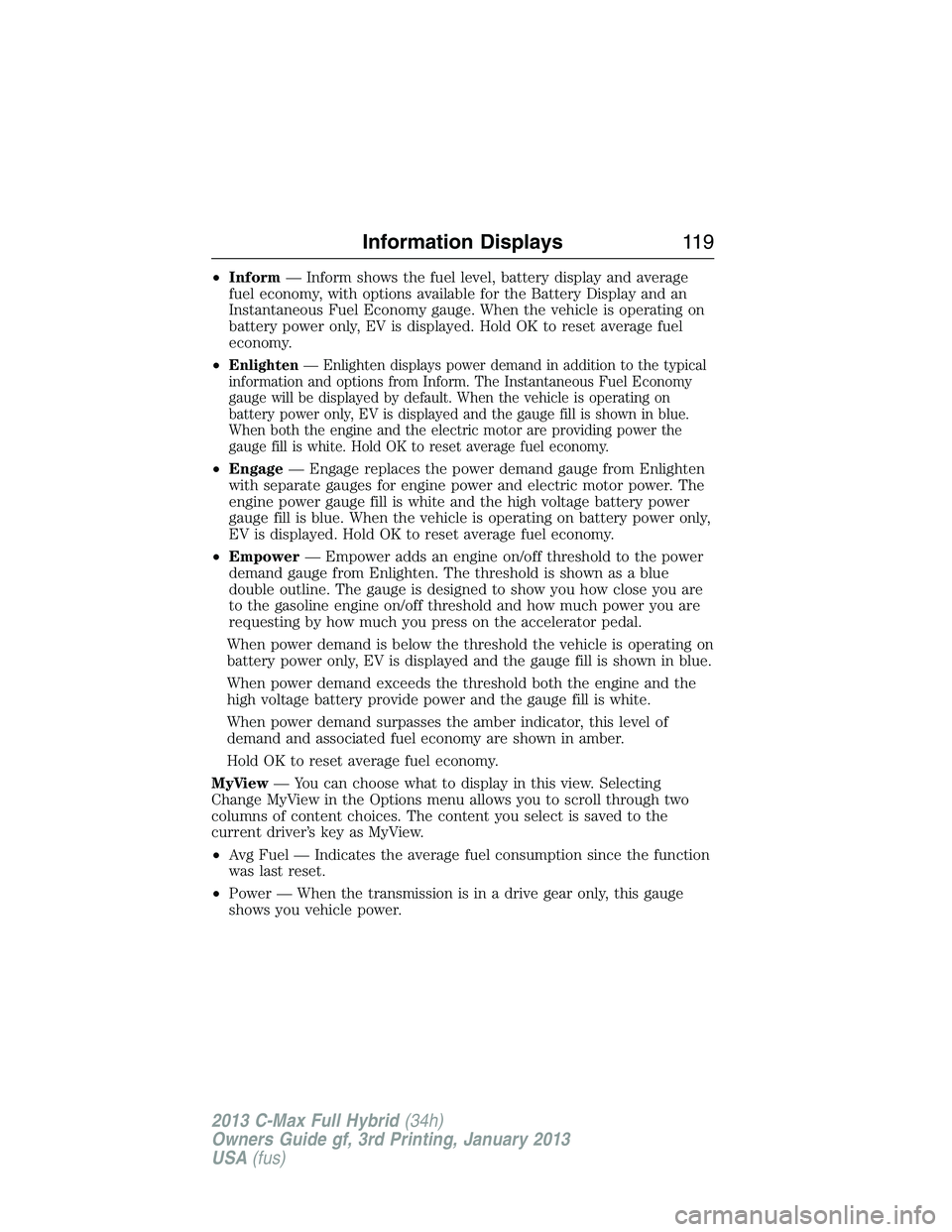
•Inform— Inform shows the fuel level, battery display and average
fuel economy, with options available for the Battery Display and an
Instantaneous Fuel Economy gauge. When the vehicle is operating on
battery power only, EV is displayed. Hold OK to reset average fuel
economy.
•
Enlighten— Enlighten displays power demand in addition to the typical
information and options from Inform. The Instantaneous Fuel Economy
gauge will be displayed by default. When the vehicle is operating on
battery power only, EV is displayed and the gauge fill is shown in blue.
When both the engine and the electric motor are providing power the
gauge fill is white. Hold OK to reset average fuel economy.
•Engage— Engage replaces the power demand gauge from Enlighten
with separate gauges for engine power and electric motor power. The
engine power gauge fill is white and the high voltage battery power
gauge fill is blue. When the vehicle is operating on battery power only,
EV is displayed. Hold OK to reset average fuel economy.
•Empower— Empower adds an engine on/off threshold to the power
demand gauge from Enlighten. The threshold is shown as a blue
double outline. The gauge is designed to show you how close you are
to the gasoline engine on/off threshold and how much power you are
requesting by how much you press on the accelerator pedal.
When power demand is below the threshold the vehicle is operating on
battery power only, EV is displayed and the gauge fill is shown in blue.
When power demand exceeds the threshold both the engine and the
high voltage battery provide power and the gauge fill is white.
When power demand surpasses the amber indicator, this level of
demand and associated fuel economy are shown in amber.
Hold OK to reset average fuel economy.
MyView— You can choose what to display in this view. Selecting
Change MyView in the Options menu allows you to scroll through two
columns of content choices. The content you select is saved to the
current driver’s key as MyView.
•Avg Fuel — Indicates the average fuel consumption since the function
was last reset.
•Power — When the transmission is in a drive gear only, this gauge
shows you vehicle power.
Information Displays11 9
2013 C-Max Full Hybrid(34h)
Owners Guide gf, 3rd Printing, January 2013
USA(fus)
Page 122 of 552
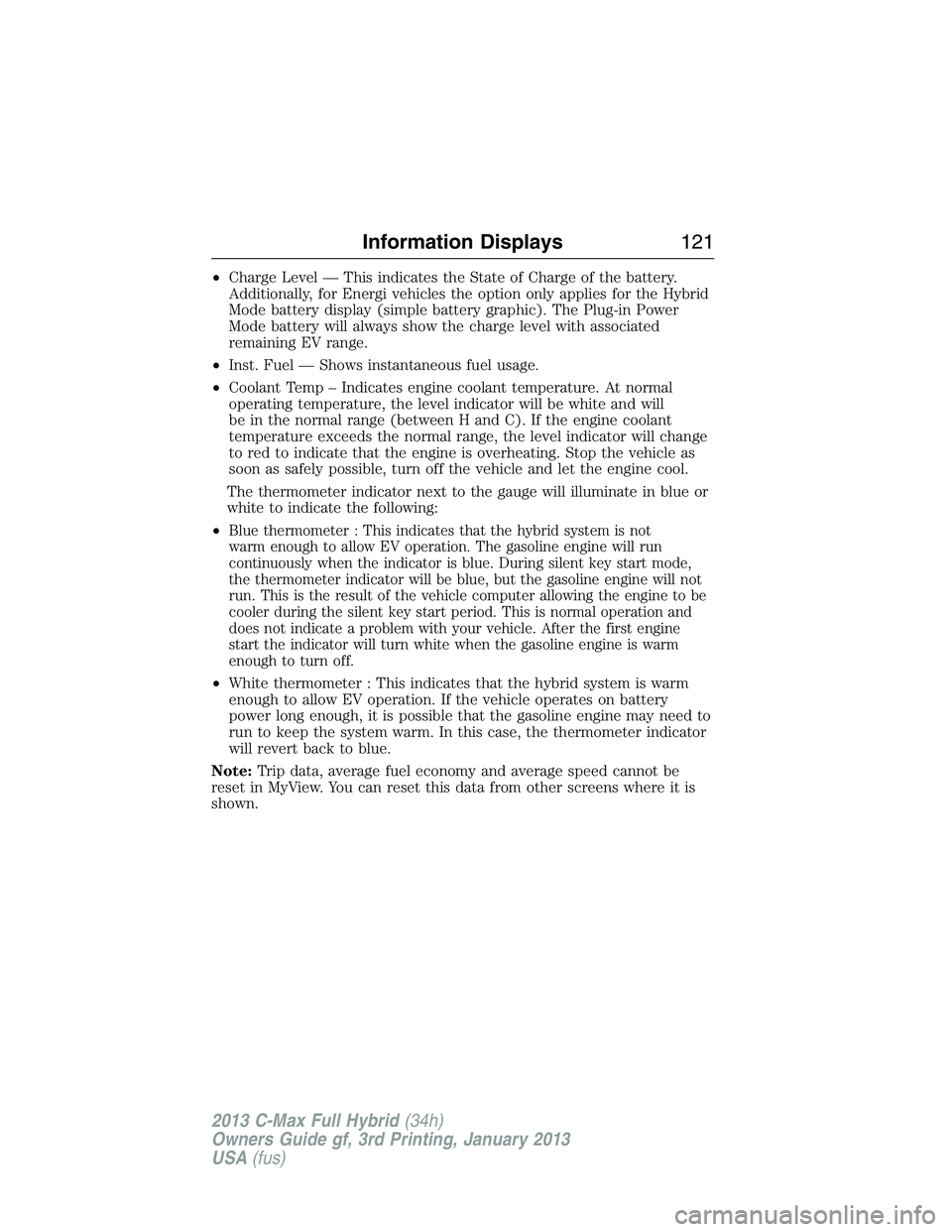
•Charge Level — This indicates the State of Charge of the battery.
Additionally, for Energi vehicles the option only applies for the Hybrid
Mode battery display (simple battery graphic). The Plug-in Power
Mode battery will always show the charge level with associated
remaining EV range.
•Inst. Fuel — Shows instantaneous fuel usage.
•Coolant Temp – Indicates engine coolant temperature. At normal
operating temperature, the level indicator will be white and will
be in the normal range (between H and C). If the engine coolant
temperature exceeds the normal range, the level indicator will change
to red to indicate that the engine is overheating. Stop the vehicle as
soon as safely possible, turn off the vehicle and let the engine cool.
The thermometer indicator next to the gauge will illuminate in blue or
white to indicate the following:
•
Blue thermometer : This indicates that the hybrid system is not
warm enough to allow EV operation. The gasoline engine will run
continuously when the indicator is blue. During silent key start mode,
the thermometer indicator will be blue, but the gasoline engine will not
run. This is the result of the vehicle computer allowing the engine to be
cooler during the silent key start period. This is normal operation and
does not indicate a problem with your vehicle. After the first engine
start the indicator will turn white when the gasoline engine is warm
enough to turn off.
•White thermometer : This indicates that the hybrid system is warm
enough to allow EV operation. If the vehicle operates on battery
power long enough, it is possible that the gasoline engine may need to
run to keep the system warm. In this case, the thermometer indicator
will revert back to blue.
Note:Trip data, average fuel economy and average speed cannot be
reset in MyView. You can reset this data from other screens where it is
shown.
Information Displays121
2013 C-Max Full Hybrid(34h)
Owners Guide gf, 3rd Printing, January 2013
USA(fus)
Page 123 of 552
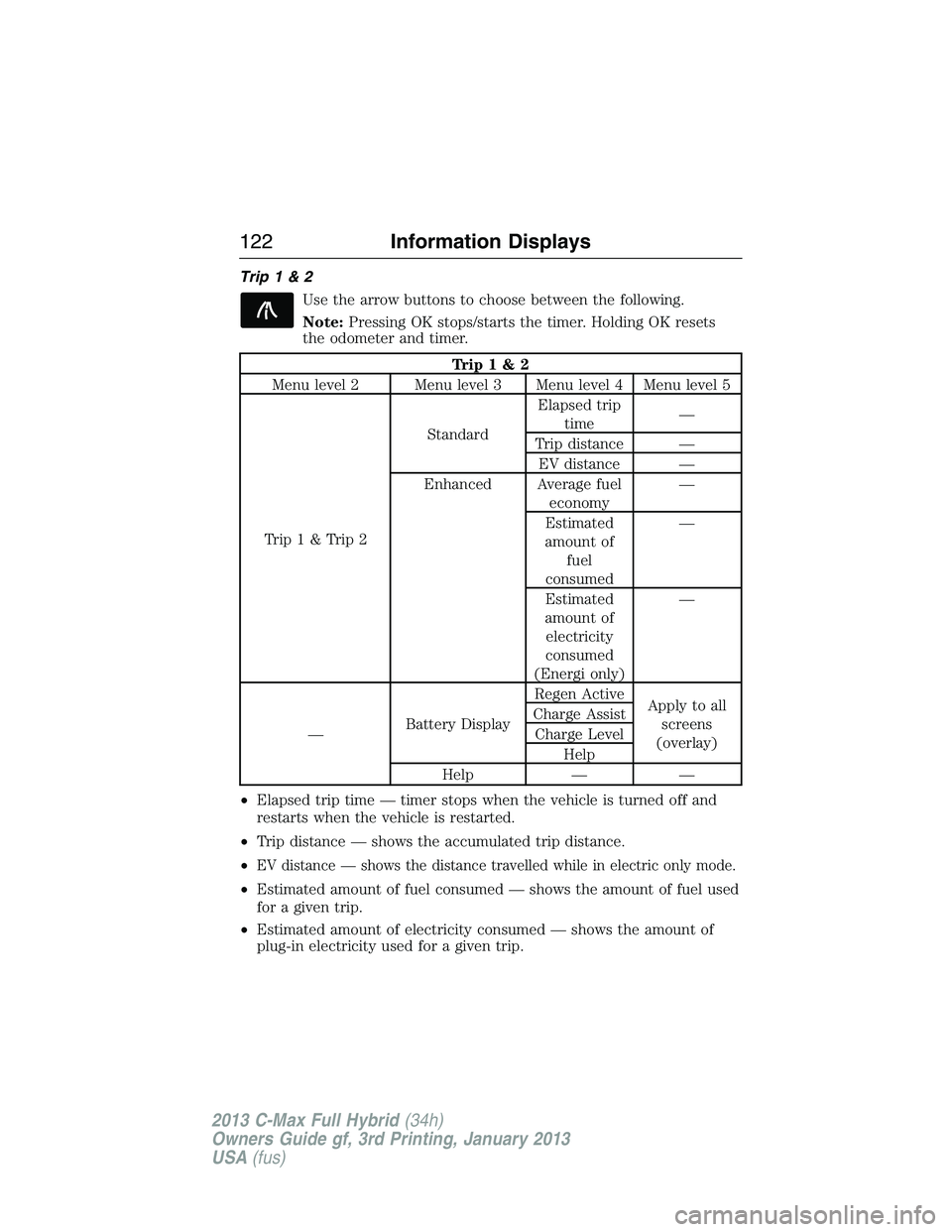
Trip1&2
Use the arrow buttons to choose between the following.
Note:Pressing OK stops/starts the timer. Holding OK resets
the odometer and timer.
Trip1&2
Menu level 2 Menu level 3 Menu level 4 Menu level 5
Trip1&Trip2StandardElapsed trip
time—
Trip distance —
EV distance —
Enhanced Average fuel
economy—
Estimated
amount of
fuel
consumed—
Estimated
amount of
electricity
consumed
(Energi only)—
—Battery DisplayRegen Active
Apply to all
screens
(overlay) Charge Assist
Charge Level
Help
Help — —
•Elapsed trip time — timer stops when the vehicle is turned off and
restarts when the vehicle is restarted.
•Trip distance — shows the accumulated trip distance.
•
EV distance — shows the distance travelled while in electric only mode.
•Estimated amount of fuel consumed — shows the amount of fuel used
for a given trip.
•Estimated amount of electricity consumed — shows the amount of
plug-in electricity used for a given trip.
122Information Displays
2013 C-Max Full Hybrid(34h)
Owners Guide gf, 3rd Printing, January 2013
USA(fus)
Page 124 of 552
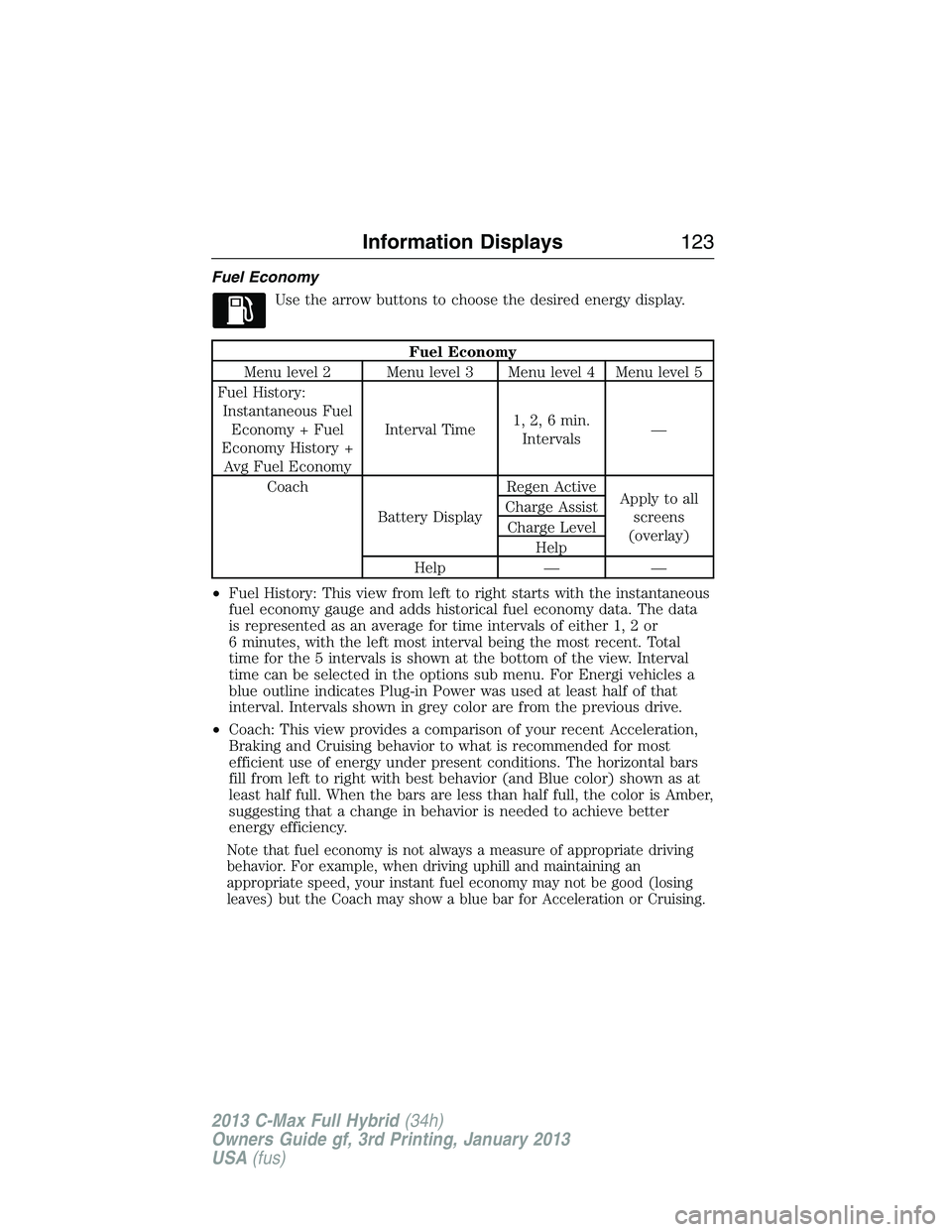
Fuel Economy
Use the arrow buttons to choose the desired energy display.
Fuel Economy
Menu level 2 Menu level 3 Menu level 4 Menu level 5
Fuel History:
Instantaneous Fuel
Economy + Fuel
Economy History +
Avg Fuel EconomyInterval Time1, 2, 6 min.
Intervals—
Coach
Battery DisplayRegen Active
Apply to all
screens
(overlay) Charge Assist
Charge Level
Help
Help — —
•Fuel History: This view from left to right starts with the instantaneous
fuel economy gauge and adds historical fuel economy data. The data
is represented as an average for time intervals of either 1, 2 or
6 minutes, with the left most interval being the most recent. Total
time for the 5 intervals is shown at the bottom of the view. Interval
time can be selected in the options sub menu. For Energi vehicles a
blue outline indicates Plug-in Power was used at least half of that
interval. Intervals shown in grey color are from the previous drive.
•Coach: This view provides a comparison of your recent Acceleration,
Braking and Cruising behavior to what is recommended for most
efficient use of energy under present conditions. The horizontal bars
fill from left to right with best behavior (and Blue color) shown as at
least half full. When the bars are less than half full, the color is Amber,
suggesting that a change in behavior is needed to achieve better
energy efficiency.
Note that fuel economy is not always a measure of appropriate driving
behavior. For example, when driving uphill and maintaining an
appropriate speed, your instant fuel economy may not be good (losing
leaves) but the Coach may show a blue bar for Acceleration or Cruising.
Information Displays123
2013 C-Max Full Hybrid(34h)
Owners Guide gf, 3rd Printing, January 2013
USA(fus)