Auto park FORD C MAX 2013 Owner's Manual
[x] Cancel search | Manufacturer: FORD, Model Year: 2013, Model line: C MAX, Model: FORD C MAX 2013Pages: 552, PDF Size: 8.55 MB
Page 369 of 552
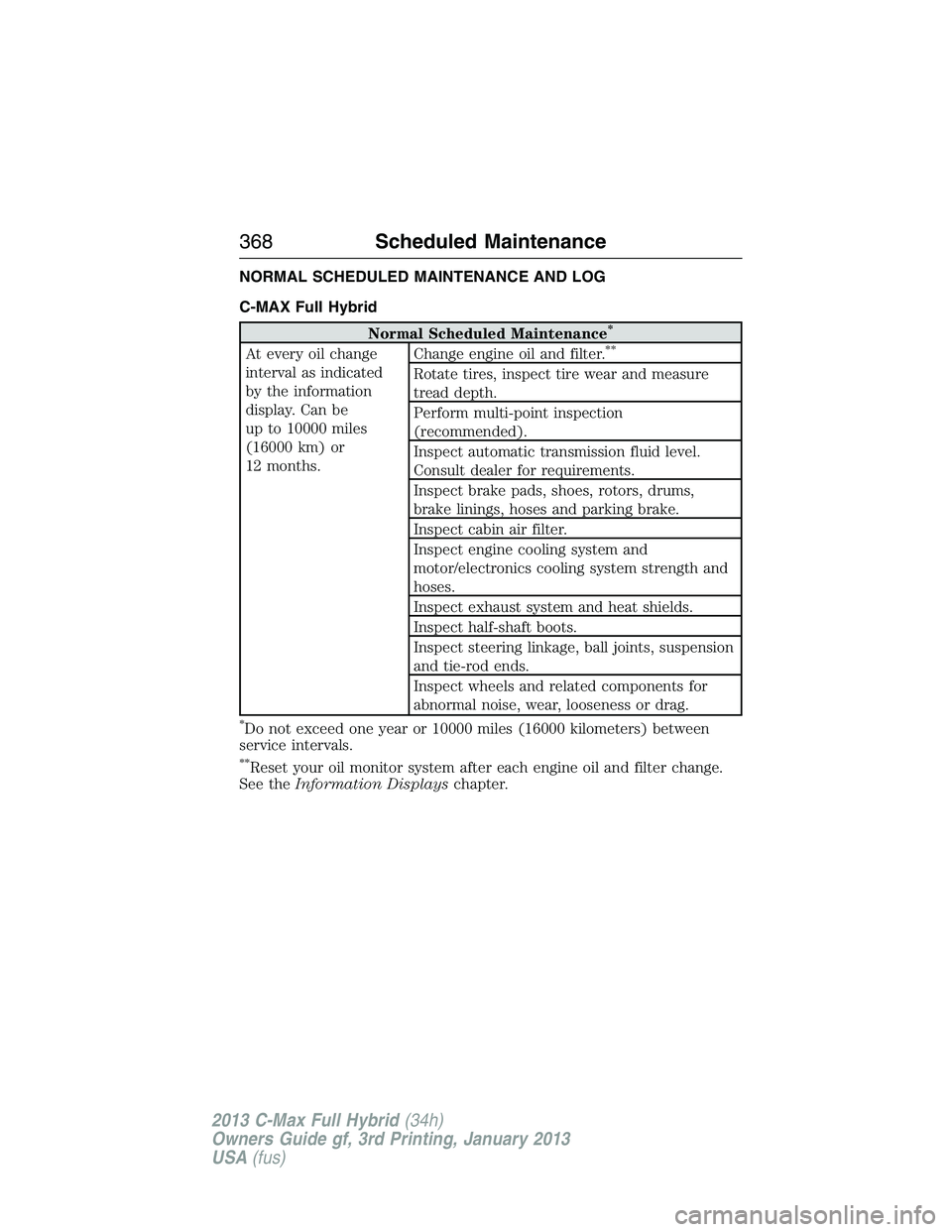
NORMAL SCHEDULED MAINTENANCE AND LOG
C-MAX Full Hybrid
Normal Scheduled Maintenance*
At every oil change
interval as indicated
by the information
display. Can be
up to 10000 miles
(16000 km) or
12 months.Change engine oil and filter.**
Rotate tires, inspect tire wear and measure
tread depth.
Perform multi-point inspection
(recommended).
Inspect automatic transmission fluid level.
Consult dealer for requirements.
Inspect brake pads, shoes, rotors, drums,
brake linings, hoses and parking brake.
Inspect cabin air filter.
Inspect engine cooling system and
motor/electronics cooling system strength and
hoses.
Inspect exhaust system and heat shields.
Inspect half-shaft boots.
Inspect steering linkage, ball joints, suspension
and tie-rod ends.
Inspect wheels and related components for
abnormal noise, wear, looseness or drag.
*Do not exceed one year or 10000 miles (16000 kilometers) between
service intervals.
**Reset your oil monitor system after each engine oil and filter change.
See theInformation Displayschapter.
368Scheduled Maintenance
2013 C-Max Full Hybrid(34h)
Owners Guide gf, 3rd Printing, January 2013
USA(fus)
Page 370 of 552
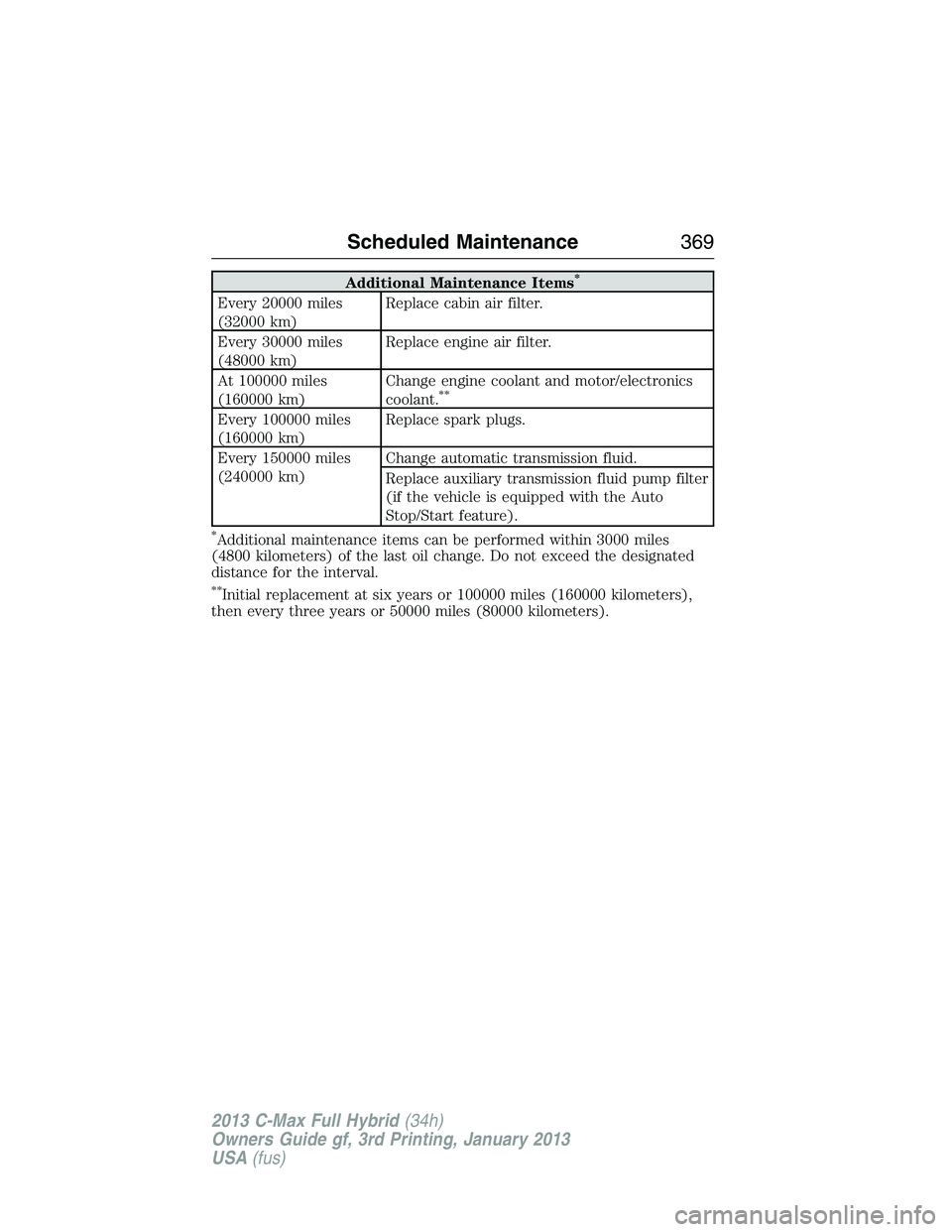
Additional Maintenance Items*
Every 20000 miles
(32000 km)Replace cabin air filter.
Every 30000 miles
(48000 km)Replace engine air filter.
At 100000 miles
(160000 km)Change engine coolant and motor/electronics
coolant.
**
Every 100000 miles
(160000 km)Replace spark plugs.
Every 150000 miles
(240000 km)Change automatic transmission fluid.
Replace auxiliary transmission fluid pump filter
(if the vehicle is equipped with the Auto
Stop/Start feature).
*Additional maintenance items can be performed within 3000 miles
(4800 kilometers) of the last oil change. Do not exceed the designated
distance for the interval.
**Initial replacement at six years or 100000 miles (160000 kilometers),
then every three years or 50000 miles (80000 kilometers).
Scheduled Maintenance369
2013 C-Max Full Hybrid(34h)
Owners Guide gf, 3rd Printing, January 2013
USA(fus)
Page 371 of 552
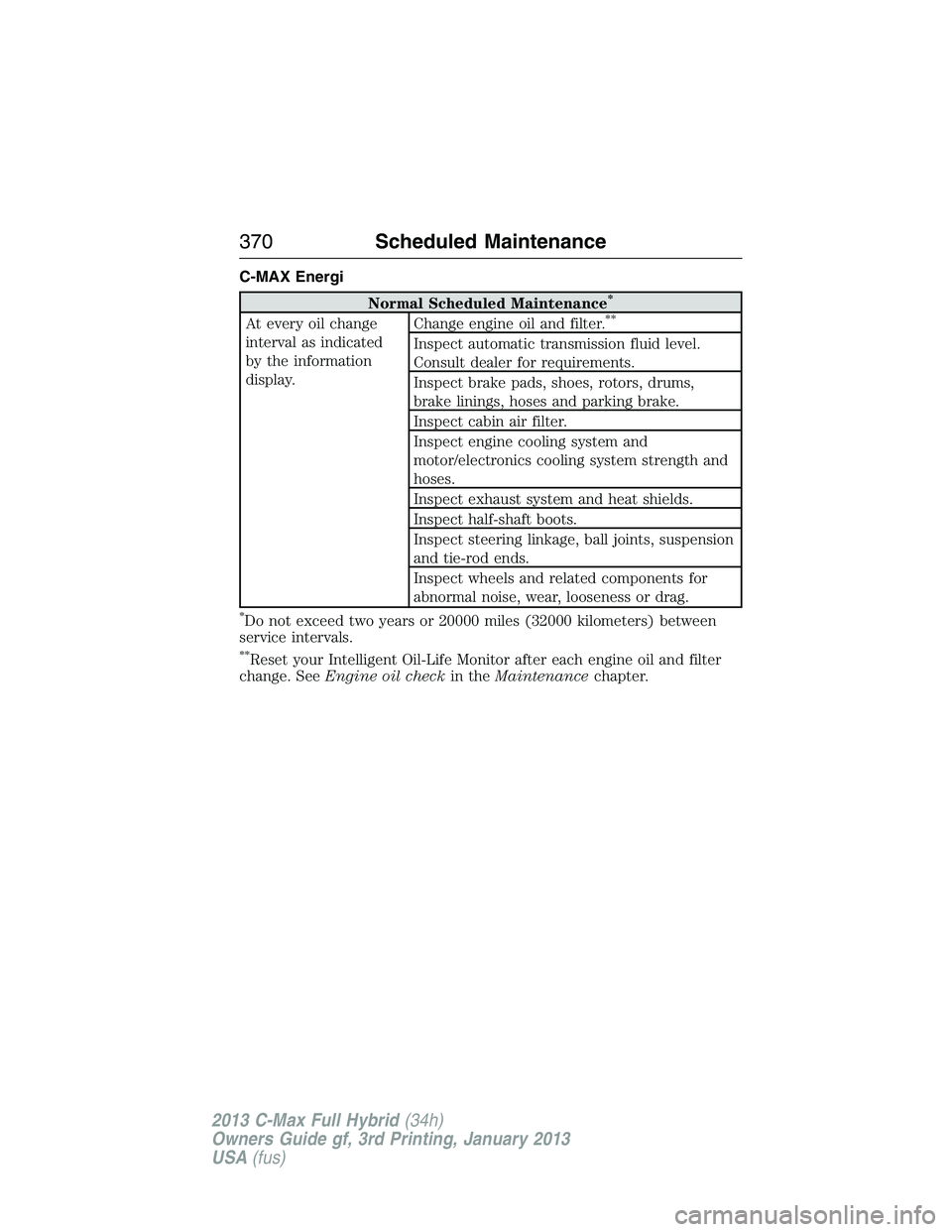
C-MAX Energi
Normal Scheduled Maintenance*
At every oil change
interval as indicated
by the information
display.Change engine oil and filter.**
Inspect automatic transmission fluid level.
Consult dealer for requirements.
Inspect brake pads, shoes, rotors, drums,
brake linings, hoses and parking brake.
Inspect cabin air filter.
Inspect engine cooling system and
motor/electronics cooling system strength and
hoses.
Inspect exhaust system and heat shields.
Inspect half-shaft boots.
Inspect steering linkage, ball joints, suspension
and tie-rod ends.
Inspect wheels and related components for
abnormal noise, wear, looseness or drag.
*Do not exceed two years or 20000 miles (32000 kilometers) between
service intervals.
**Reset your Intelligent Oil-Life Monitor after each engine oil and filter
change. SeeEngine oil checkin theMaintenancechapter.
370Scheduled Maintenance
2013 C-Max Full Hybrid(34h)
Owners Guide gf, 3rd Printing, January 2013
USA(fus)
Page 372 of 552
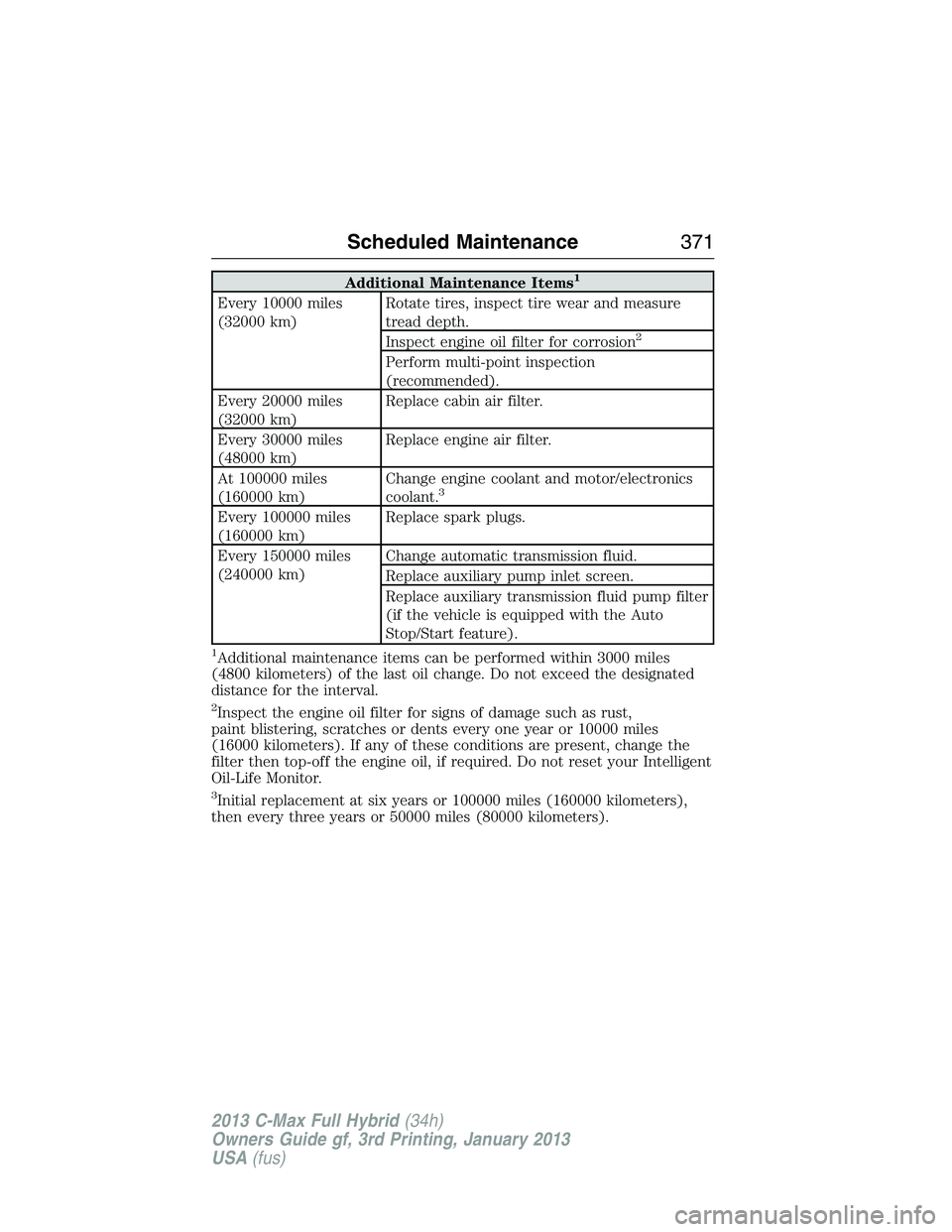
Additional Maintenance Items1
Every 10000 miles
(32000 km)Rotate tires, inspect tire wear and measure
tread depth.
Inspect engine oil filter for corrosion
2
Perform multi-point inspection
(recommended).
Every 20000 miles
(32000 km)Replace cabin air filter.
Every 30000 miles
(48000 km)Replace engine air filter.
At 100000 miles
(160000 km)Change engine coolant and motor/electronics
coolant.
3
Every 100000 miles
(160000 km)Replace spark plugs.
Every 150000 miles
(240000 km)Change automatic transmission fluid.
Replace auxiliary pump inlet screen.
Replace auxiliary transmission fluid pump filter
(if the vehicle is equipped with the Auto
Stop/Start feature).
1Additional maintenance items can be performed within 3000 miles
(4800 kilometers) of the last oil change. Do not exceed the designated
distance for the interval.
2Inspect the engine oil filter for signs of damage such as rust,
paint blistering, scratches or dents every one year or 10000 miles
(16000 kilometers). If any of these conditions are present, change the
filter then top-off the engine oil, if required. Do not reset your Intelligent
Oil-Life Monitor.
3Initial replacement at six years or 100000 miles (160000 kilometers),
then every three years or 50000 miles (80000 kilometers).
Scheduled Maintenance371
2013 C-Max Full Hybrid(34h)
Owners Guide gf, 3rd Printing, January 2013
USA(fus)
Page 376 of 552
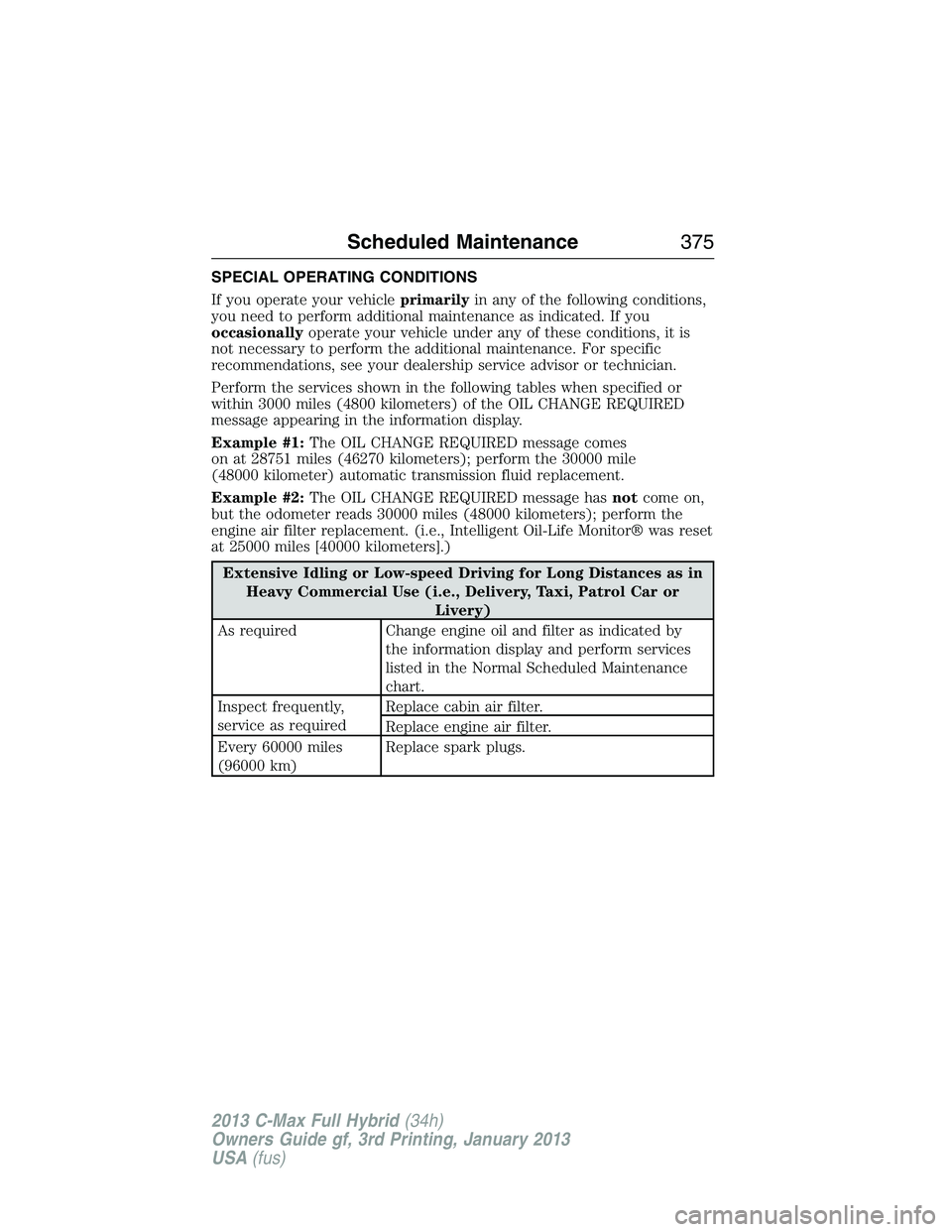
SPECIAL OPERATING CONDITIONS
If you operate your vehicleprimarilyin any of the following conditions,
you need to perform additional maintenance as indicated. If you
occasionallyoperate your vehicle under any of these conditions, it is
not necessary to perform the additional maintenance. For specific
recommendations, see your dealership service advisor or technician.
Perform the services shown in the following tables when specified or
within 3000 miles (4800 kilometers) of the OIL CHANGE REQUIRED
message appearing in the information display.
Example #1:The OIL CHANGE REQUIRED message comes
on at 28751 miles (46270 kilometers); perform the 30000 mile
(48000 kilometer) automatic transmission fluid replacement.
Example #2:The OIL CHANGE REQUIRED message hasnotcome on,
but the odometer reads 30000 miles (48000 kilometers); perform the
engine air filter replacement. (i.e., Intelligent Oil-Life Monitor® was reset
at 25000 miles [40000 kilometers].)
Extensive Idling or Low-speed Driving for Long Distances as in
Heavy Commercial Use (i.e., Delivery, Taxi, Patrol Car or
Livery)
As required Change engine oil and filter as indicated by
the information display and perform services
listed in the Normal Scheduled Maintenance
chart.
Inspect frequently,
service as requiredReplace cabin air filter.
Replace engine air filter.
Every 60000 miles
(96000 km)Replace spark plugs.
Scheduled Maintenance375
2013 C-Max Full Hybrid(34h)
Owners Guide gf, 3rd Printing, January 2013
USA(fus)
Page 500 of 552
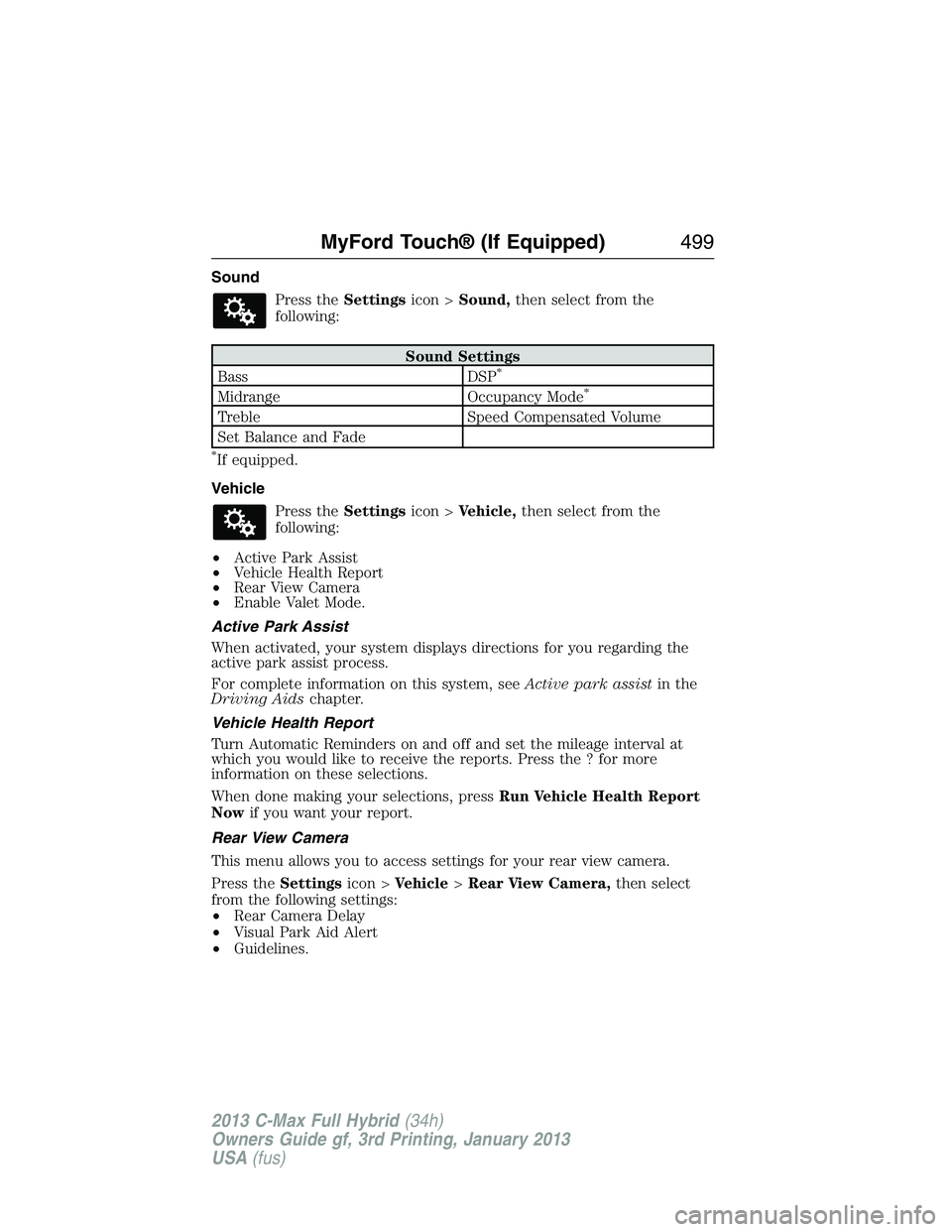
Sound
Press theSettingsicon >Sound,then select from the
following:
Sound Settings
Bass DSP*
Midrange Occupancy Mode*
Treble Speed Compensated Volume
Set Balance and Fade
*If equipped.
Vehicle
Press theSettingsicon >Vehicle,then select from the
following:
•Active Park Assist
•Vehicle Health Report
•Rear View Camera
•Enable Valet Mode.
Active Park Assist
When activated, your system displays directions for you regarding the
active park assist process.
For complete information on this system, seeActive park assistin the
Driving Aidschapter.
Vehicle Health Report
Turn Automatic Reminders on and off and set the mileage interval at
which you would like to receive the reports. Press the ? for more
information on these selections.
When done making your selections, pressRun Vehicle Health Report
Nowif you want your report.
Rear View Camera
This menu allows you to access settings for your rear view camera.
Press theSettingsicon >Vehicle>Rear View Camera,then select
from the following settings:
•Rear Camera Delay
•Visual Park Aid Alert
•Guidelines.
MyFord Touch® (If Equipped)499
2013 C-Max Full Hybrid(34h)
Owners Guide gf, 3rd Printing, January 2013
USA(fus)
Page 504 of 552
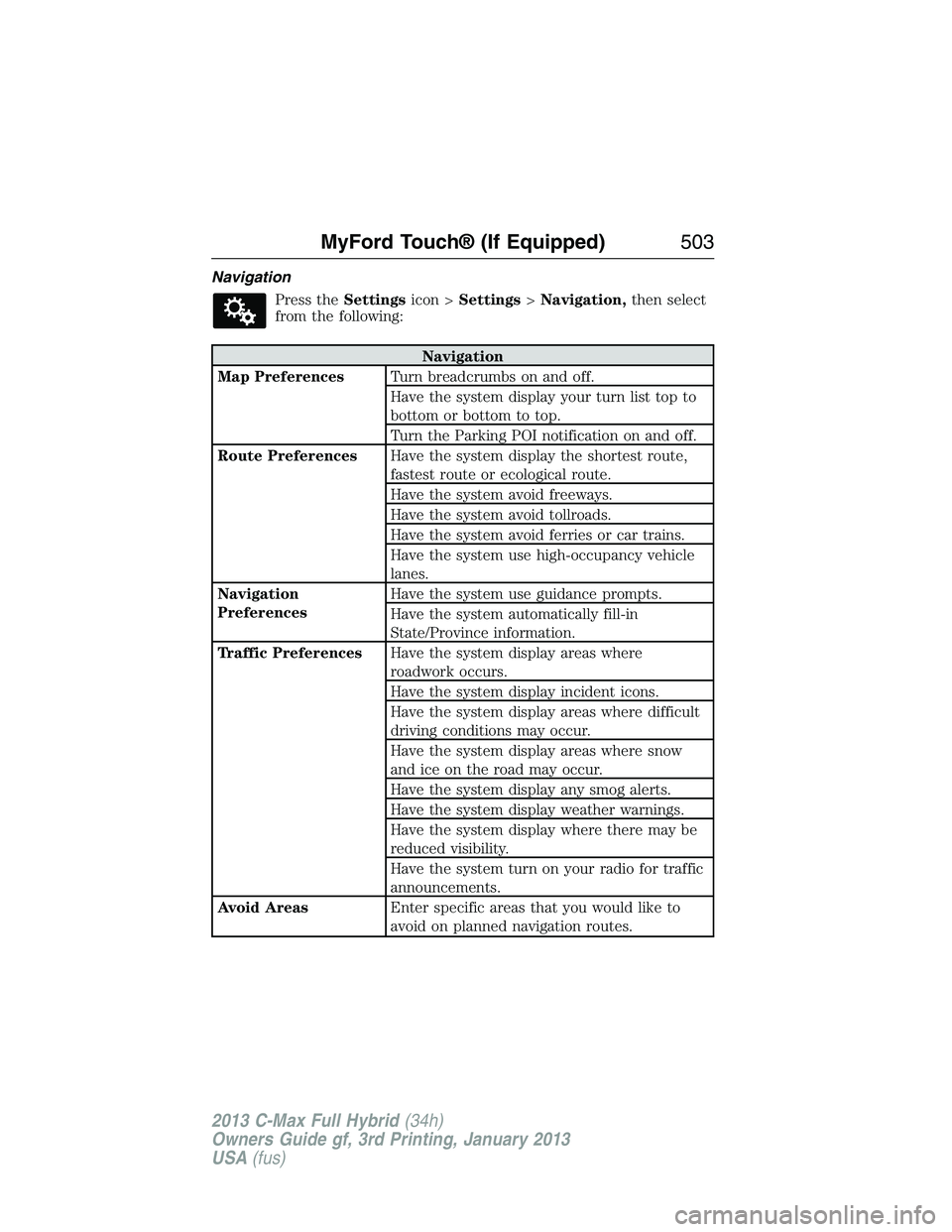
Navigation
Press theSettingsicon >Settings>Navigation,then select
from the following:
Navigation
Map PreferencesTurn breadcrumbs on and off.
Have the system display your turn list top to
bottom or bottom to top.
Turn the Parking POI notification on and off.
Route PreferencesHave the system display the shortest route,
fastest route or ecological route.
Have the system avoid freeways.
Have the system avoid tollroads.
Have the system avoid ferries or car trains.
Have the system use high-occupancy vehicle
lanes.
Navigation
PreferencesHave the system use guidance prompts.
Have the system automatically fill-in
State/Province information.
Traffic PreferencesHave the system display areas where
roadwork occurs.
Have the system display incident icons.
Have the system display areas where difficult
driving conditions may occur.
Have the system display areas where snow
and ice on the road may occur.
Have the system display any smog alerts.
Have the system display weather warnings.
Have the system display where there may be
reduced visibility.
Have the system turn on your radio for traffic
announcements.
Avoid AreasEnter specific areas that you would like to
avoid on planned navigation routes.
MyFord Touch® (If Equipped)503
2013 C-Max Full Hybrid(34h)
Owners Guide gf, 3rd Printing, January 2013
USA(fus)
Page 514 of 552
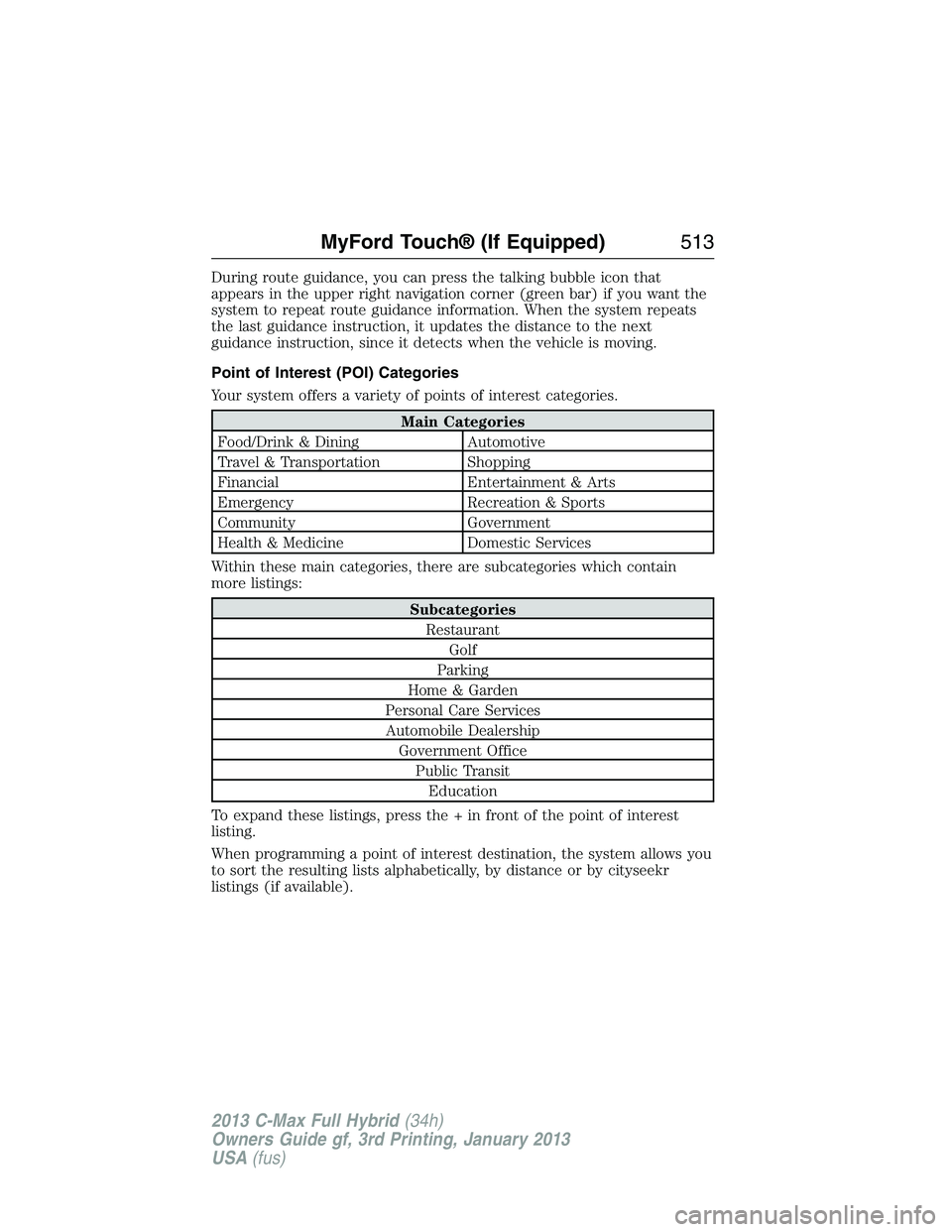
During route guidance, you can press the talking bubble icon that
appears in the upper right navigation corner (green bar) if you want the
system to repeat route guidance information. When the system repeats
the last guidance instruction, it updates the distance to the next
guidance instruction, since it detects when the vehicle is moving.
Point of Interest (POI) Categories
Your system offers a variety of points of interest categories.
Main Categories
Food/Drink & Dining Automotive
Travel & Transportation Shopping
Financial Entertainment & Arts
Emergency Recreation & Sports
Community Government
Health & Medicine Domestic Services
Within these main categories, there are subcategories which contain
more listings:
Subcategories
Restaurant
Golf
Parking
Home & Garden
Personal Care Services
Automobile Dealership
Government Office
Public Transit
Education
To expand these listings, press the + in front of the point of interest
listing.
When programming a point of interest destination, the system allows you
to sort the resulting lists alphabetically, by distance or by cityseekr
listings (if available).
MyFord Touch® (If Equipped)513
2013 C-Max Full Hybrid(34h)
Owners Guide gf, 3rd Printing, January 2013
USA(fus)
Page 518 of 552
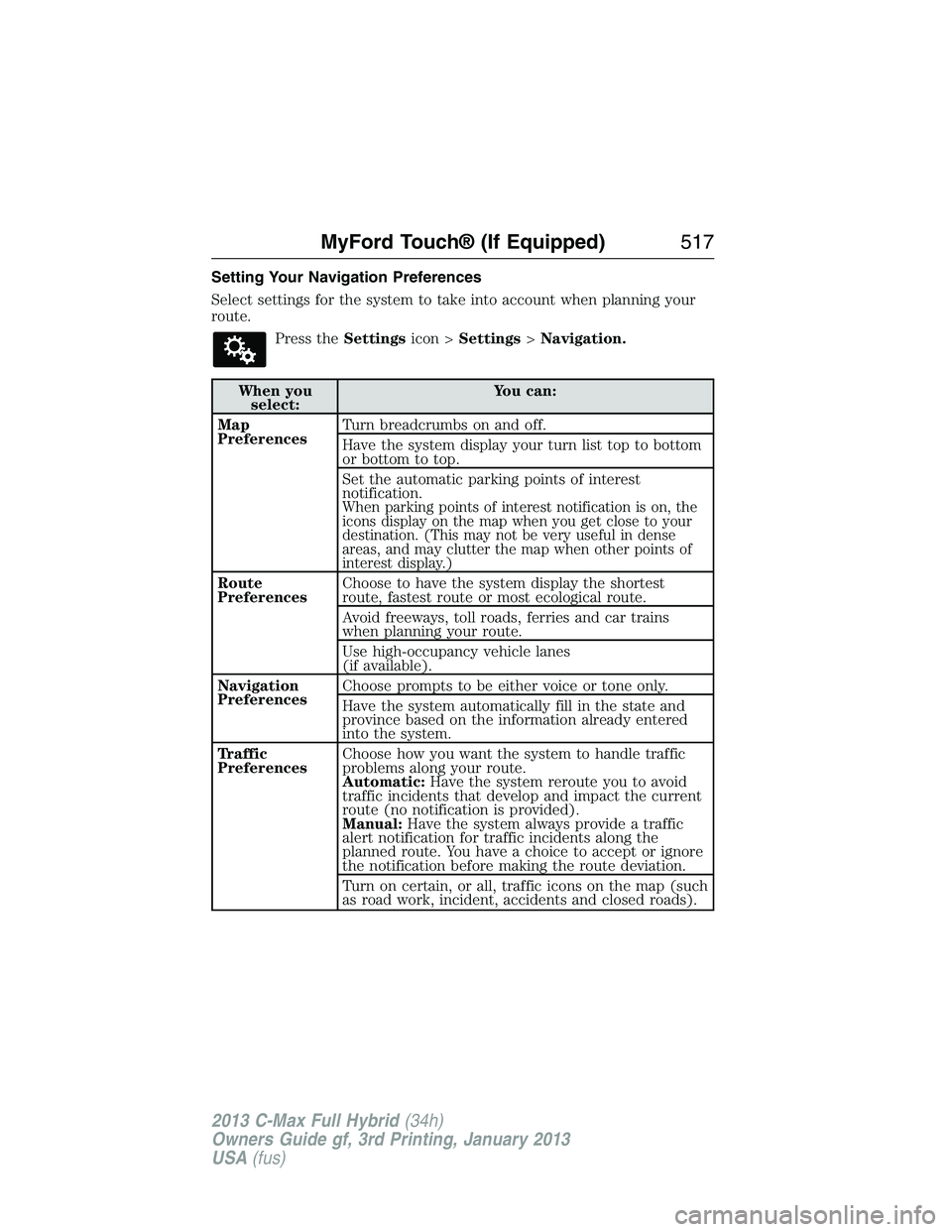
Setting Your Navigation Preferences
Select settings for the system to take into account when planning your
route.
Press theSettingsicon >Settings>Navigation.
When you
select:You can:
Map
PreferencesTurn breadcrumbs on and off.
Have the system display your turn list top to bottom
or bottom to top.
Set the automatic parking points of interest
notification.
When parking points of interest notification is on, the
icons display on the map when you get close to your
destination. (This may not be very useful in dense
areas, and may clutter the map when other points of
interest display.)
Route
PreferencesChoose to have the system display the shortest
route, fastest route or most ecological route.
Avoid freeways, toll roads, ferries and car trains
when planning your route.
Use high-occupancy vehicle lanes
(if available).
Navigation
PreferencesChoose prompts to be either voice or tone only.
Have the system automatically fill in the state and
province based on the information already entered
into the system.
Traffic
PreferencesChoose how you want the system to handle traffic
problems along your route.
Automatic:Have the system reroute you to avoid
traffic incidents that develop and impact the current
route (no notification is provided).
Manual:Have the system always provide a traffic
alert notification for traffic incidents along the
planned route. You have a choice to accept or ignore
the notification before making the route deviation.
Turn on certain, or all, traffic icons on the map (such
as road work, incident, accidents and closed roads).
MyFord Touch® (If Equipped)517
2013 C-Max Full Hybrid(34h)
Owners Guide gf, 3rd Printing, January 2013
USA(fus)
Page 545 of 552
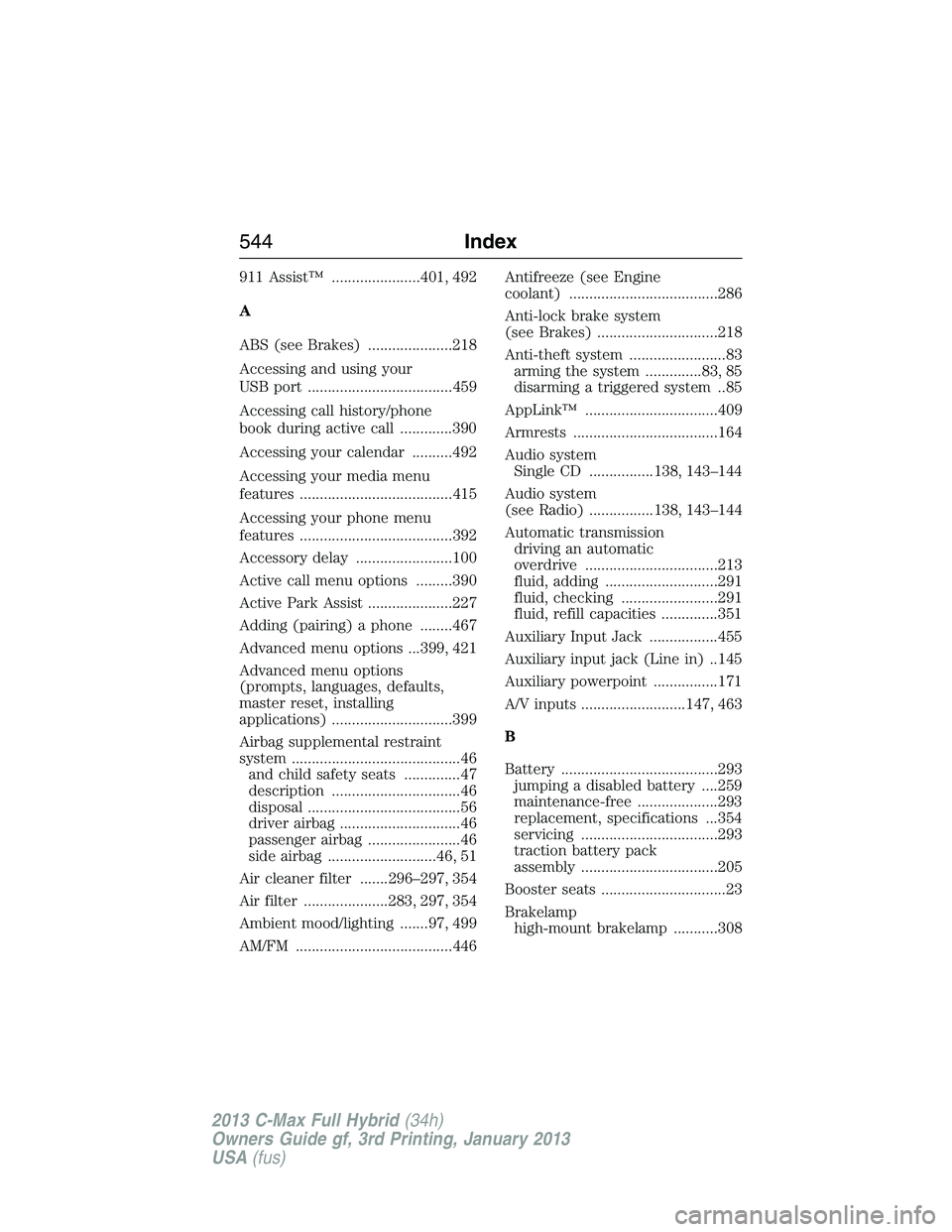
911 Assist™ ......................401, 492
A
ABS (see Brakes) .....................218
Accessing and using your
USB port ....................................459
Accessing call history/phone
book during active call .............390
Accessing your calendar ..........492
Accessing your media menu
features ......................................415
Accessing your phone menu
features ......................................392
Accessory delay ........................100
Active call menu options .........390
Active Park Assist .....................227
Adding (pairing) a phone ........467
Advanced menu options ...399, 421
Advanced menu options
(prompts, languages, defaults,
master reset, installing
applications) ..............................399
Airbag supplemental restraint
system ..........................................46
and child safety seats ..............47
description ................................46
disposal ......................................56
driver airbag ..............................46
passenger airbag .......................46
side airbag ...........................46, 51
Air cleaner filter .......296–297, 354
Air filter .....................283, 297, 354
Ambient mood/lighting .......97, 499
AM/FM .......................................446Antifreeze (see Engine
coolant) .....................................286
Anti-lock brake system
(see Brakes) ..............................218
Anti-theft system ........................83
arming the system ..............83, 85
disarming a triggered system ..85
AppLink™ .................................409
Armrests ....................................164
Audio system
Single CD ................138, 143–144
Audio system
(see Radio) ................138, 143–144
Automatic transmission
driving an automatic
overdrive .................................213
fluid, adding ............................291
fluid, checking ........................291
fluid, refill capacities ..............351
Auxiliary Input Jack .................455
Auxiliary input jack (Line in) ..145
Auxiliary powerpoint ................171
A/V inputs ..........................147, 463
B
Battery .......................................293
jumping a disabled battery ....259
maintenance-free ....................293
replacement, specifications ...354
servicing ..................................293
traction battery pack
assembly ..................................205
Booster seats ...............................23
Brakelamp
high-mount brakelamp ...........308
544Index
2013 C-Max Full Hybrid(34h)
Owners Guide gf, 3rd Printing, January 2013
USA(fus)