air condition FORD C MAX 2013 Owner's Manual
[x] Cancel search | Manufacturer: FORD, Model Year: 2013, Model line: C MAX, Model: FORD C MAX 2013Pages: 552, PDF Size: 8.55 MB
Page 376 of 552
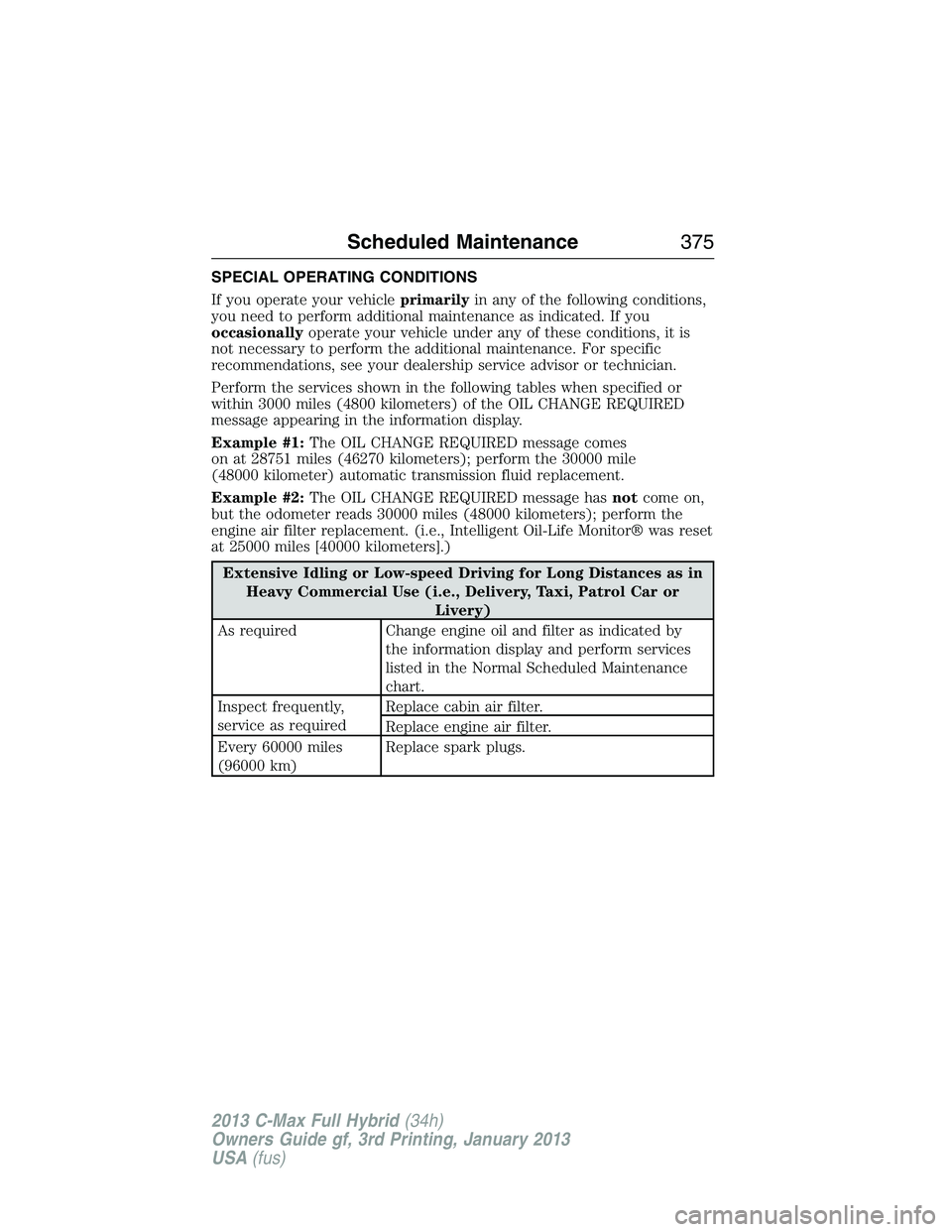
SPECIAL OPERATING CONDITIONS
If you operate your vehicleprimarilyin any of the following conditions,
you need to perform additional maintenance as indicated. If you
occasionallyoperate your vehicle under any of these conditions, it is
not necessary to perform the additional maintenance. For specific
recommendations, see your dealership service advisor or technician.
Perform the services shown in the following tables when specified or
within 3000 miles (4800 kilometers) of the OIL CHANGE REQUIRED
message appearing in the information display.
Example #1:The OIL CHANGE REQUIRED message comes
on at 28751 miles (46270 kilometers); perform the 30000 mile
(48000 kilometer) automatic transmission fluid replacement.
Example #2:The OIL CHANGE REQUIRED message hasnotcome on,
but the odometer reads 30000 miles (48000 kilometers); perform the
engine air filter replacement. (i.e., Intelligent Oil-Life Monitor® was reset
at 25000 miles [40000 kilometers].)
Extensive Idling or Low-speed Driving for Long Distances as in
Heavy Commercial Use (i.e., Delivery, Taxi, Patrol Car or
Livery)
As required Change engine oil and filter as indicated by
the information display and perform services
listed in the Normal Scheduled Maintenance
chart.
Inspect frequently,
service as requiredReplace cabin air filter.
Replace engine air filter.
Every 60000 miles
(96000 km)Replace spark plugs.
Scheduled Maintenance375
2013 C-Max Full Hybrid(34h)
Owners Guide gf, 3rd Printing, January 2013
USA(fus)
Page 377 of 552
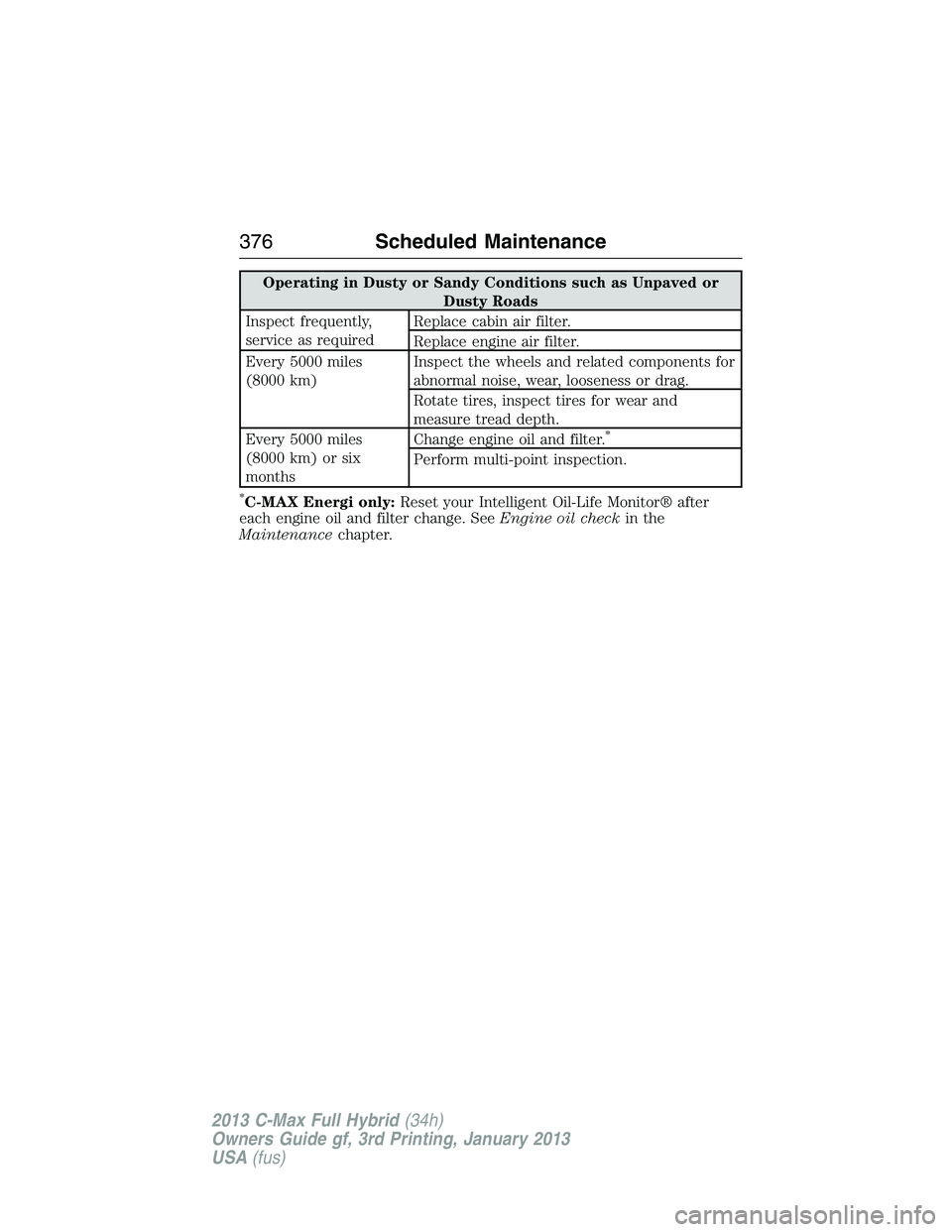
Operating in Dusty or Sandy Conditions such as Unpaved or
Dusty Roads
Inspect frequently,
service as requiredReplace cabin air filter.
Replace engine air filter.
Every 5000 miles
(8000 km)Inspect the wheels and related components for
abnormal noise, wear, looseness or drag.
Rotate tires, inspect tires for wear and
measure tread depth.
Every 5000 miles
(8000 km) or six
monthsChange engine oil and filter.
*
Perform multi-point inspection.
*C-MAX Energi only:Reset your Intelligent Oil-Life Monitor® after
each engine oil and filter change. SeeEngine oil checkin the
Maintenancechapter.
376Scheduled Maintenance
2013 C-Max Full Hybrid(34h)
Owners Guide gf, 3rd Printing, January 2013
USA(fus)
Page 380 of 552
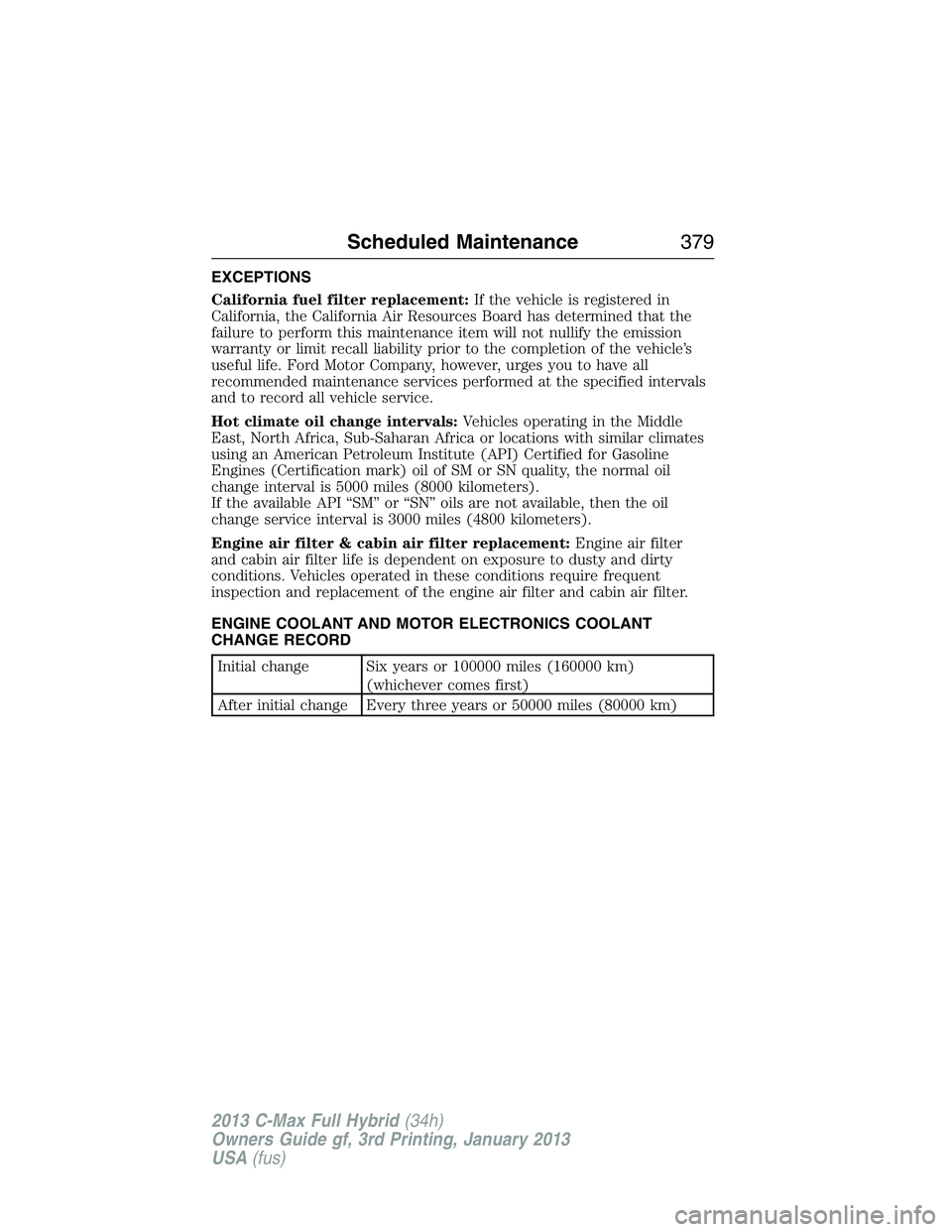
EXCEPTIONS
California fuel filter replacement:If the vehicle is registered in
California, the California Air Resources Board has determined that the
failure to perform this maintenance item will not nullify the emission
warranty or limit recall liability prior to the completion of the vehicle’s
useful life. Ford Motor Company, however, urges you to have all
recommended maintenance services performed at the specified intervals
and to record all vehicle service.
Hot climate oil change intervals:Vehicles operating in the Middle
East, North Africa, Sub-Saharan Africa or locations with similar climates
using an American Petroleum Institute (API) Certified for Gasoline
Engines (Certification mark) oil of SM or SN quality, the normal oil
change interval is 5000 miles (8000 kilometers).
If the available API “SM” or “SN” oils are not available, then the oil
change service interval is 3000 miles (4800 kilometers).
Engine air filter & cabin air filter replacement:Engine air filter
and cabin air filter life is dependent on exposure to dusty and dirty
conditions. Vehicles operated in these conditions require frequent
inspection and replacement of the engine air filter and cabin air filter.
ENGINE COOLANT AND MOTOR ELECTRONICS COOLANT
CHANGE RECORD
Initial change Six years or 100000 miles (160000 km)
(whichever comes first)
After initial change Every three years or 50000 miles (80000 km)
Scheduled Maintenance379
2013 C-Max Full Hybrid(34h)
Owners Guide gf, 3rd Printing, January 2013
USA(fus)
Page 384 of 552
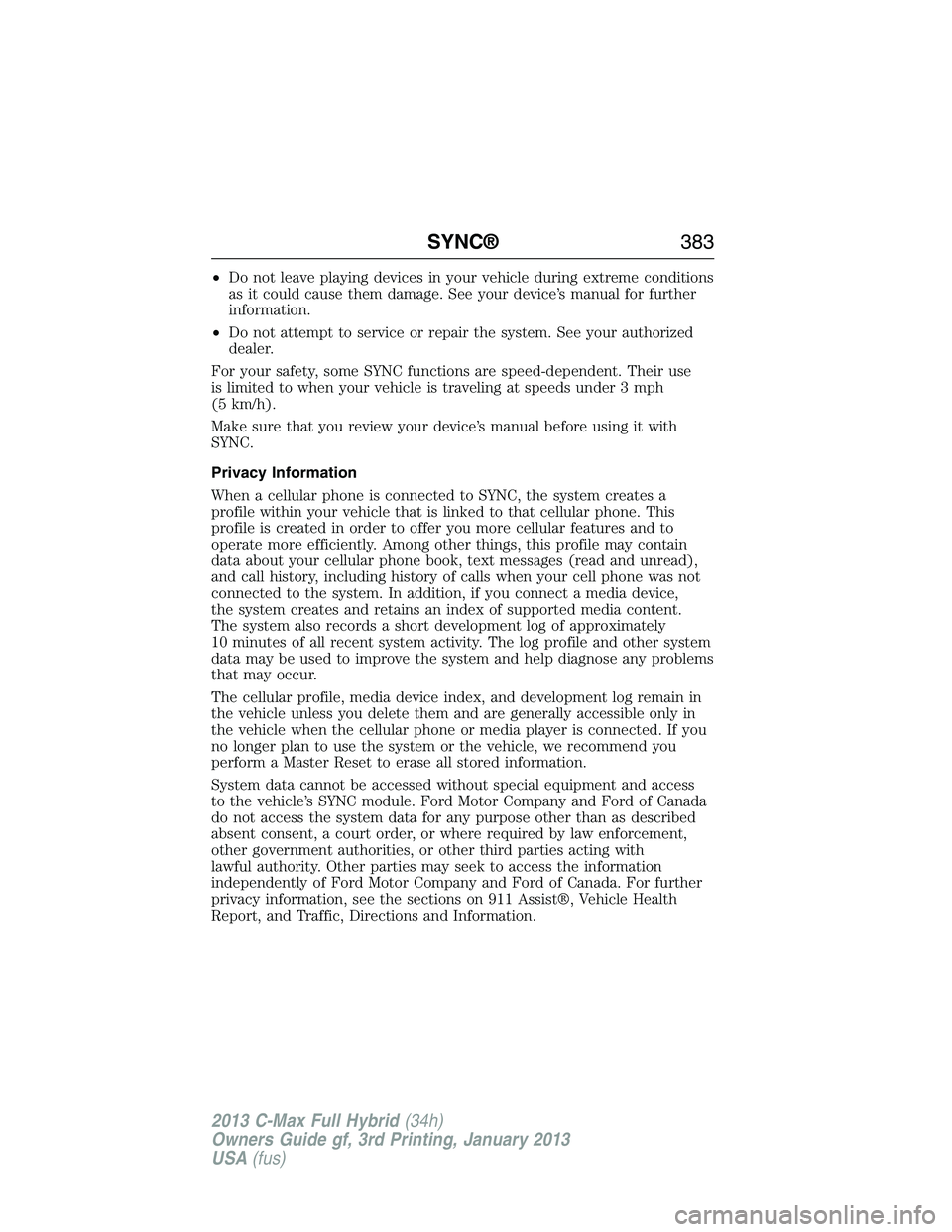
•Do not leave playing devices in your vehicle during extreme conditions
as it could cause them damage. See your device’s manual for further
information.
•Do not attempt to service or repair the system. See your authorized
dealer.
For your safety, some SYNC functions are speed-dependent. Their use
is limited to when your vehicle is traveling at speeds under 3 mph
(5 km/h).
Make sure that you review your device’s manual before using it with
SYNC.
Privacy Information
When a cellular phone is connected to SYNC, the system creates a
profile within your vehicle that is linked to that cellular phone. This
profile is created in order to offer you more cellular features and to
operate more efficiently. Among other things, this profile may contain
data about your cellular phone book, text messages (read and unread),
and call history, including history of calls when your cell phone was not
connected to the system. In addition, if you connect a media device,
the system creates and retains an index of supported media content.
The system also records a short development log of approximately
10 minutes of all recent system activity. The log profile and other system
data may be used to improve the system and help diagnose any problems
that may occur.
The cellular profile, media device index, and development log remain in
the vehicle unless you delete them and are generally accessible only in
the vehicle when the cellular phone or media player is connected. If you
no longer plan to use the system or the vehicle, we recommend you
perform a Master Reset to erase all stored information.
System data cannot be accessed without special equipment and access
to the vehicle’s SYNC module. Ford Motor Company and Ford of Canada
do not access the system data for any purpose other than as described
absent consent, a court order, or where required by law enforcement,
other government authorities, or other third parties acting with
lawful authority. Other parties may seek to access the information
independently of Ford Motor Company and Ford of Canada. For further
privacy information, see the sections on 911 Assist®, Vehicle Health
Report, and Traffic, Directions and Information.
SYNC®383
2013 C-Max Full Hybrid(34h)
Owners Guide gf, 3rd Printing, January 2013
USA(fus)
Page 407 of 552
SYNC Services: Traffic, Directions & Information (TDI)
Note:SYNC Services requires activation prior to use. Visit
www.SYNCMyRide.com to register and check your eligibility for
complimentary services. Standard phone and message rates may apply.
Subscription may be required. You must also have the active SYNC
Services Bluetooth-enabled cellular phone paired and connected to the
system in order to connect to, and use, SYNC Services. SeeUsing SYNC
with your phonefor pairing instructions.
Note:This feature does not function properly if you have enabled caller
ID blocking on your mobile phone. Make sure your mobile phone is not
blocking caller ID before using SYNC Services.
Note:The driver is ultimately responsible for the safe operation of the
vehicle, and therefore, must evaluate whether it is safe to follow the
suggested directions. Any navigation features are provided only as
an aid. Make your driving decisions based on your observations of local
conditions and existing traffic regulations. Do not follow the route
suggestions if doing so would result in an unsafe or illegal maneuver, if
you would be placed in an unsafe situation, or if you would be directed
into an area that you consider unsafe. Maps used by this system may be
inaccurate because of errors, changes in roads, traffic conditions or
driving conditions.
Note:When you connect, the service uses GPS technology and advanced
vehicle sensors to collect the vehicle’s current location, travel direction
and speed to help provide you with the directions, traffic reports, or
business searches you request. Further, to provide the services you
request and for continuous improvement, the service may collect and
record call details and voice communications. For more information, see
SYNC Services Terms and Conditions at www.SYNCMyRide.com. If you
do not want Ford or its service providers to collect the vehicle travel
information or other information identified in the Terms and Conditions,
do not activate or use the service.
SYNC Services uses advanced vehicle sensors, integrated GPS technology
and comprehensive map and traffic data, to give you personalized traffic
reports, precise turn-by-turn directions, business search, news, sports,
weather and more. For a complete list of services, or to learn more,
please visit www.SYNCMyRide.com.
406SYNC®
2013 C-Max Full Hybrid(34h)
Owners Guide gf, 3rd Printing, January 2013
USA(fus)
Page 434 of 552
Safety Information
WARNING:Driving while distracted can result in loss of vehicle
control, accident and injury. Ford strongly recommends that
drivers use extreme caution when using any device that may take their
focus off the road. Your primary responsibility is the safe operation of
the vehicle. We recommend against the use of any handheld device
while driving, encourage the use of voice-operated systems when
possible and that you become aware of applicable state and local laws
that may affect use of electronic devices while driving.
When using SYNC:
•Do not operate playing devices if the power cords or cables are
broken, split or damaged. Place cords and cables out of the way,
so they do not interfere with the operation of pedals, seats,
compartments or safe driving abilities.
•Do not leave playing devices in your vehicle during extreme conditions
as it could cause them damage. See your device’s manual for further
information.
•Do not attempt to service or repair the system. See your authorized
dealer.
For your safety, some SYNC functions are speed-dependent. Their use is
limited to when your vehicle is traveling at speeds under 3 mph (5 km/h).
Make sure that you review your device’s manual before using it with SYNC.
Speed-restricted Features
Some features of this system may be too difficult to use while your
vehicle is moving so they are restricted from use unless your vehicle is
stationary.
•Screens that are too crowded with information, such as Point of
Interest reviews and ratings, SIRIUS® Travel Link™ sports scores,
movie times and ski conditions.
•Any action that requires you to use a keyboard is restricted, such as
entering a navigation destination or editing information.
•All lists are limited so the user can view fewer entries (such as phone
contacts or recent phone call entries).
MyFord Touch® (If Equipped)433
2013 C-Max Full Hybrid(34h)
Owners Guide gf, 3rd Printing, January 2013
USA(fus)
Page 482 of 552
Power
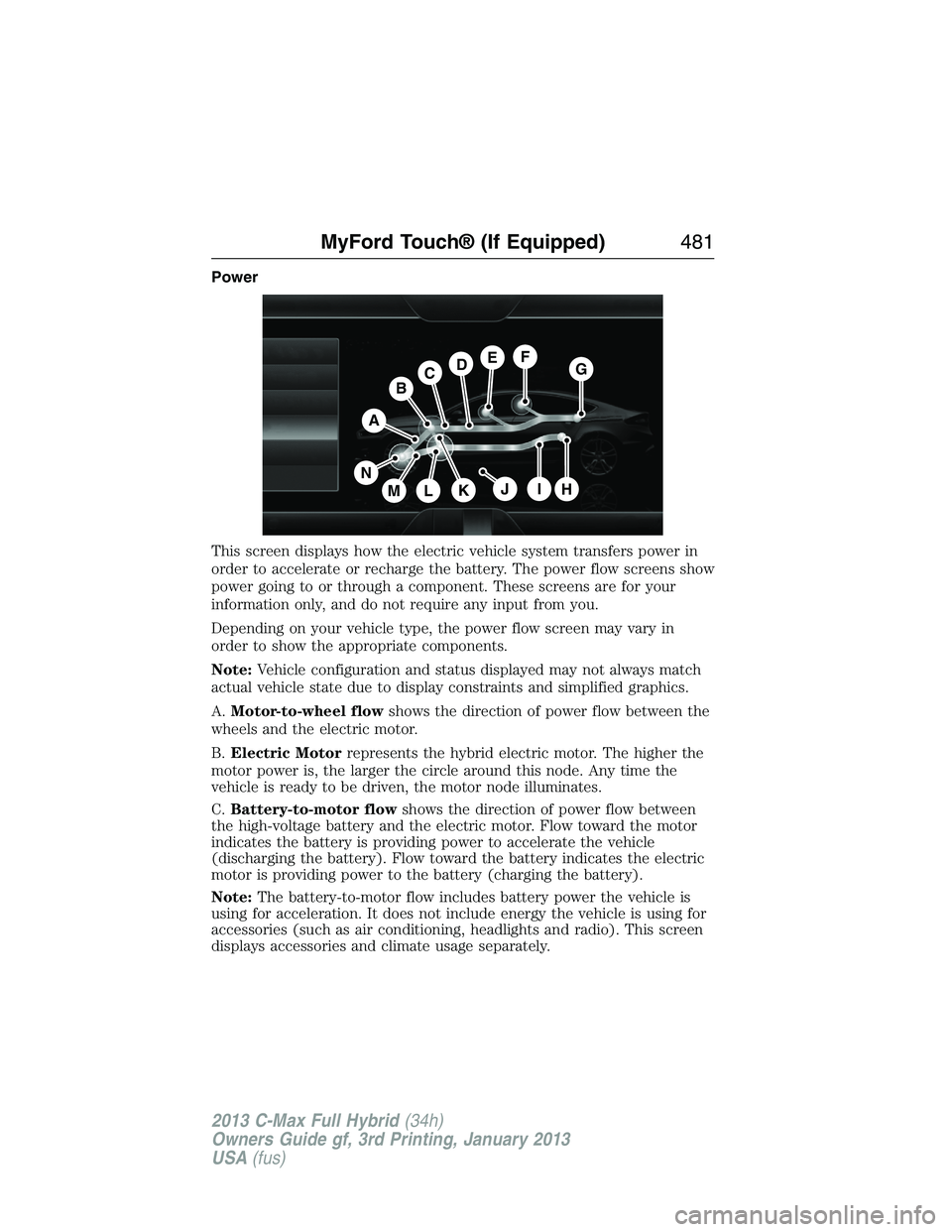
This screen displays how the electric vehicle system transfers power in
order to accelerate or recharge the battery. The power flow screens show
power going to or through a component. These screens are for your
information only, and do not require any input from you.
Depending on your vehicle type, the power flow screen may vary in
order to show the appropriate components.
Note:Vehicle configuration and status displayed may not always match
actual vehicle state due to display constraints and simplified graphics.
A.Motor-to-wheel flowshows the direction of power flow between the
wheels and the electric motor.
B.Electric Motorrepresents the hybrid electric motor. The higher the
motor power is, the larger the circle around this node. Any time the
vehicle is ready to be driven, the motor node illuminates.
C.Battery-to-motor flowshows the direction of power flow between
the high-voltage battery and the electric motor. Flow toward the motor
indicates the battery is providing power to accelerate the vehicle
(discharging the battery). Flow toward the battery indicates the electric
motor is providing power to the battery (charging the battery).
Note:The battery-to-motor flow includes battery power the vehicle is
using for acceleration. It does not include energy the vehicle is using for
accessories (such as air conditioning, headlights and radio). This screen
displays accessories and climate usage separately.
A
H
DGEF
BC
IKMLJ
N
MyFord Touch® (If Equipped)481
2013 C-Max Full Hybrid(34h)
Owners Guide gf, 3rd Printing, January 2013
USA(fus)
Page 487 of 552
Note:The driver is ultimately responsible for the safe operation of the
vehicle, and therefore, must evaluate whether it is safe to follow the
suggested directions. Any navigation features are provided only as an aid.
Make your driving decisions based on your observations of local conditions
and existing traffic regulations. Do not follow the route suggestions if doing
so would result in an unsafe or illegal maneuver, if you would be placed in
an unsafe situation, or if you would be directed into an area that you
consider unsafe. Maps used by this system may be inaccurate because
of errors, changes in roads, traffic conditions or driving conditions.
Note:When you connect, the service uses GPS technology and advanced
vehicle sensors to collect your vehicle’s current location, travel direction
and speed to help provide you with the directions, traffic reports, or
business searches you request. Further, to provide the services you
request, for continuous improvement, the service may collect and record
call details and voice communications. For more information, see SYNC
Services Terms and Conditions at www.SYNCMyRide.com. If you do not
want Ford or its service providers to collect your vehicle travel information
or other information identified in the Terms and Conditions, do not
subscribe or use the service.
SYNC Services uses advanced vehicle sensors, integrated GPS technology
and comprehensive map and traffic data, to give you personalized traffic
reports, precise turn-by-turn directions, business search, news, sports,
weather and more. For a complete list of services, or to learn more,
please visit www.SYNCMyRide.com.
Connecting to SYNC Services Using Voice Commands
Press the voice button on the steering wheel controls.
1. When prompted, say “Services”. This initiates an outgoing
call to SYNC Services using your paired and connected
Bluetooth-enabled cellular phone.
2. Once you connect to the service, follow the voice prompts to request
the desired service, such as “Traffic” or “Directions”. You can also
say, “What are my choices?” to receive a list of available services
from which to choose.
3. Say, “Services” to return to the Services main menu or for help, say,
“Help”.
486MyFord Touch® (If Equipped)
2013 C-Max Full Hybrid(34h)
Owners Guide gf, 3rd Printing, January 2013
USA(fus)
Page 510 of 552
G.A/C:Touch to turn the air conditioning on or off.
•Use with recirculated air to improve cooling performance and
efficiency.
•Engages automatically in MAX A/C, defrost and floor/defrost.
H.AUTO:Touch to engage automatic operation, then set the
temperature using the temperature control. The system automatically
controls:
•Fan speed
•Airflow distribution
•A/Conoroff
•Outside or recirculated air.
I.Manual controls:Select any of the following airflow distribution
modes:
•Floor and Defrost:Distributes air through the windshield defroster
vents, demister vents, floor vents and rear seat floor vents, and
provides outside air to reduce window fogging.
•Panel:Distributes air through the instrument panel vents.
•Panel and Floor:Distributes air through the instrument panel vents,
demister vents, floor vents and rear seat floor vents.
•Floor:Distributes air through the demister vents, floor vents and
rear seat floor vents.
•MAX Defrost:Distributes outside air through the windshield air
vents and automatically switches the air conditioning on. The fan is
set to the highest speed and the temperature to HI. When the
air distribution is set in this position, you are unable to select
recirculated air or manually adjust the fan speed and temperature
control.
•Defrost:Touch to clear the windshield of fog and thin ice. Touch
again to return to the previous airflow selection. When on, defrost
provides outside air to reduce window fogging and distributes air
through the windshield defroster vents and demister vents.
J.Driver settings:Touch + or – to adjust the temperature.
MyFord Touch® (If Equipped)509
2013 C-Max Full Hybrid(34h)
Owners Guide gf, 3rd Printing, January 2013
USA(fus)
Page 533 of 552
TeleNav Software End User License Agreement
Please read these terms and conditions carefully before you use the
TeleNav Software. Your use of the TeleNav Software indicates that
you accept these terms and conditions. If you do not accept these
terms and conditions, do not break the seal of the package, launch,
or otherwise use the TeleNav Software.
TeleNav may revise this Agreement and the privacy policy at any time,
with or without notice to you. You agree to visit http://www.telenav.com
from time to time to review the then current version of this Agreement
and of the privacy policy.
1.Safe and Lawful Use
You acknowledge that devoting attention to the TeleNav Software may
pose a risk of injury or death to you and others in situations that
otherwise require your undivided attention, and you therefore agree to
comply with the following when using the TeleNav Software: (a) observe
all traffic laws and otherwise drive safely; (b) use your own personal
judgment while driving. If you feel that a route suggested by the TeleNav
Software instructs you to perform an unsafe or illegal maneuver, places
you in an unsafe situation, or directs you into an area that you consider
to be unsafe, do not follow such instructions; (c) do not input
destinations, or otherwise manipulate the TeleNav Software, unless your
vehicle is stationary and parked; (d) do not use the TeleNav Software for
any illegal, unauthorized, unintended, unsafe, hazardous, or unlawful
purposes, or in any manner inconsistent with this Agreement; (e)
arrange all GPS and wireless devices and cables necessary for use of the
TeleNav Software in a secure manner in your vehicle so that they will
not interfere with your driving and will not prevent the operation of any
safety device (such as an airbag).
You agree to indemnify and hold TeleNav harmless against all claims
resulting from any dangerous or otherwise inappropriate use of the
TeleNav Software in any moving vehicle, including as a result of your
failure to comply with the directions above.
2.Account Information
You agree: (a) when registering the TeleNav Software, to provide
TeleNav with true, accurate, current, and complete information about
yourself, and (b) to inform TeleNav promptly of any changes to such
information, and to keep it true, accurate, current and complete.
532Appendices
2013 C-Max Full Hybrid(34h)
Owners Guide gf, 3rd Printing, January 2013
USA(fus)