instrument panel FORD C MAX 2013 Owner's Manual
[x] Cancel search | Manufacturer: FORD, Model Year: 2013, Model line: C MAX, Model: FORD C MAX 2013Pages: 552, PDF Size: 8.55 MB
Page 345 of 552
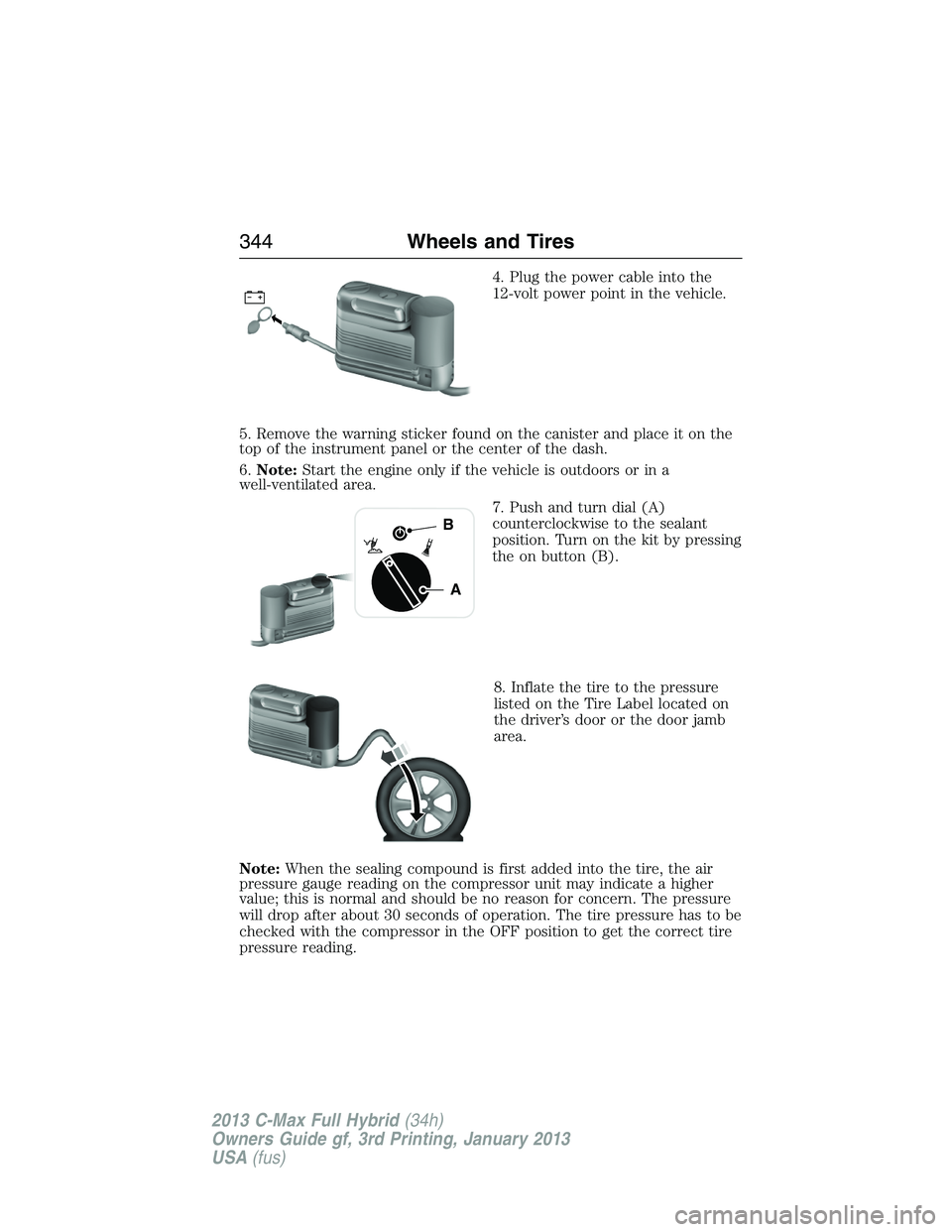
4. Plug the power cable into the
12-volt power point in the vehicle.
5. Remove the warning sticker found on the canister and place it on the
top of the instrument panel or the center of the dash.
6.Note:Start the engine only if the vehicle is outdoors or in a
well-ventilated area.
7. Push and turn dial (A)
counterclockwise to the sealant
position. Turn on the kit by pressing
the on button (B).
8. Inflate the tire to the pressure
listed on the Tire Label located on
the driver’s door or the door jamb
area.
Note:When the sealing compound is first added into the tire, the air
pressure gauge reading on the compressor unit may indicate a higher
value; this is normal and should be no reason for concern. The pressure
will drop after about 30 seconds of operation. The tire pressure has to be
checked with the compressor in the OFF position to get the correct tire
pressure reading.
A
B
344Wheels and Tires
2013 C-Max Full Hybrid(34h)
Owners Guide gf, 3rd Printing, January 2013
USA(fus)
Page 356 of 552
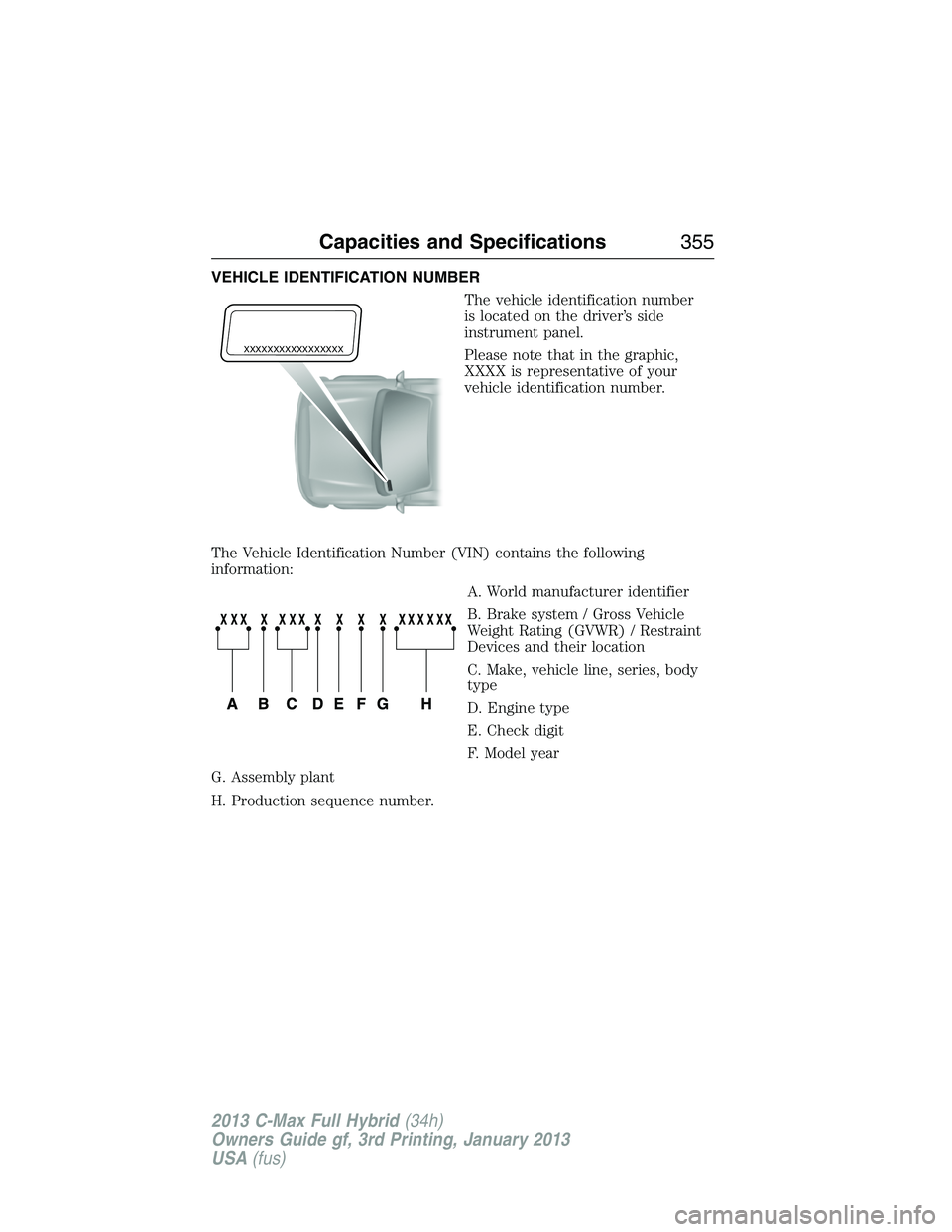
VEHICLE IDENTIFICATION NUMBER
The vehicle identification number
is located on the driver’s side
instrument panel.
Please note that in the graphic,
XXXX is representative of your
vehicle identification number.
The Vehicle Identification Number (VIN) contains the following
information:
A. World manufacturer identifier
B. Brake system / Gross Vehicle
Weight Rating (GVWR) / Restraint
Devices and their location
C. Make, vehicle line, series, body
type
D. Engine type
E. Check digit
F. Model year
G. Assembly plant
H. Production sequence number.
XXXXXXXXXXXXXXXXX
Capacities and Specifications355
2013 C-Max Full Hybrid(34h)
Owners Guide gf, 3rd Printing, January 2013
USA(fus)
Page 460 of 552
SD Card Slot and USB Port
SD Card Slot
Note:Your SD card slot is spring-loaded. To remove the SD card, press
the card in and the system ejects it. Do not attempt to pull the card to
remove it as this could cause damage.
Note:The navigation system also uses this card slot. SeeNavigation
systemlater in this chapter for more information.
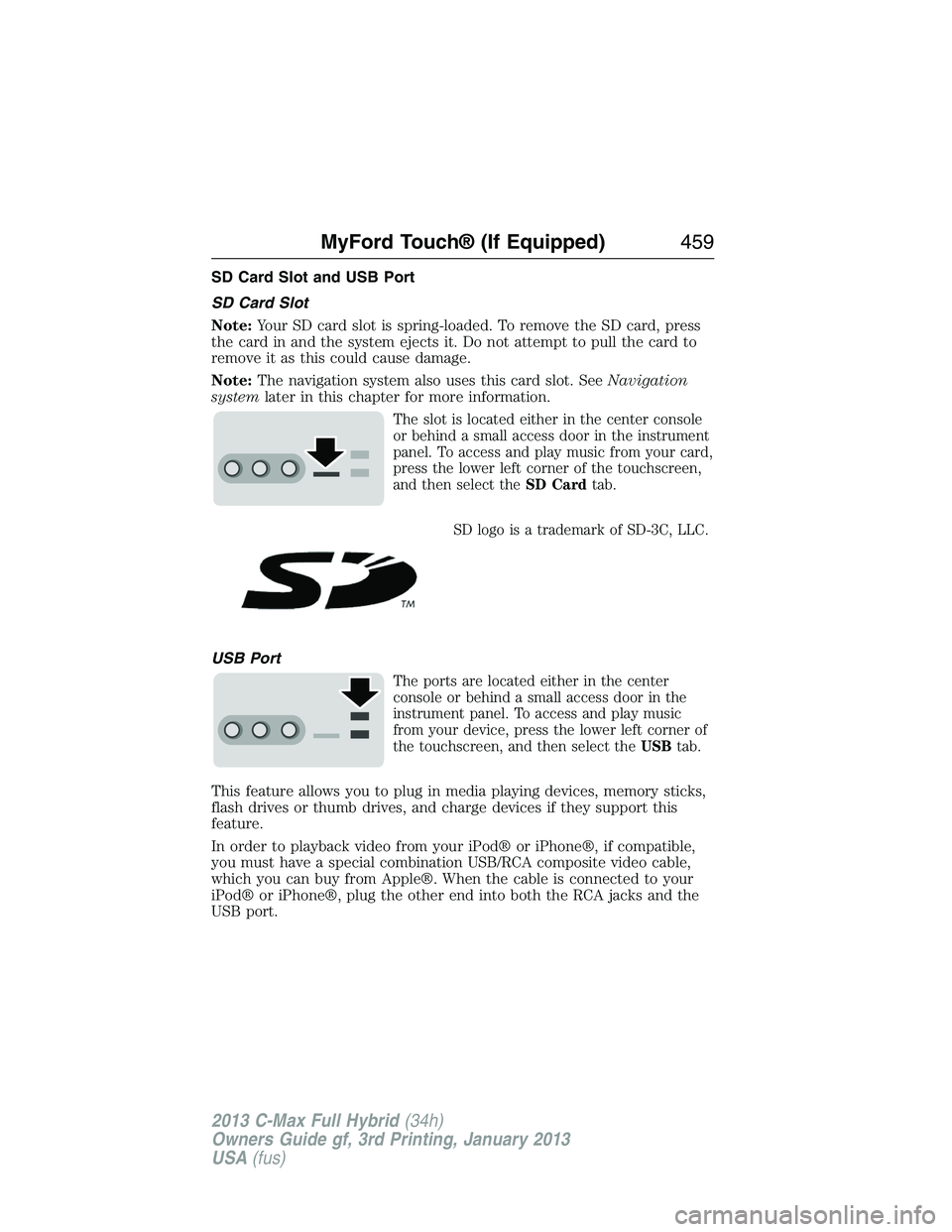
The slot is located either in the center console
or behind a small access door in the instrument
panel. To access and play music from your card,
press the lower left corner of the touchscreen,
and then select theSD Cardtab.
SD logo is a trademark of SD-3C, LLC.
USB Port
The ports are located either in the center
console or behind a small access door in the
instrument panel. To access and play music
from your device, press the lower left corner of
the touchscreen, and then select theUSBtab.
This feature allows you to plug in media playing devices, memory sticks,
flash drives or thumb drives, and charge devices if they support this
feature.
In order to playback video from your iPod® or iPhone®, if compatible,
you must have a special combination USB/RCA composite video cable,
which you can buy from Apple®. When the cable is connected to your
iPod® or iPhone®, plug the other end into both the RCA jacks and the
USB port.
MyFord Touch® (If Equipped)459
2013 C-Max Full Hybrid(34h)
Owners Guide gf, 3rd Printing, January 2013
USA(fus)
Page 465 of 552
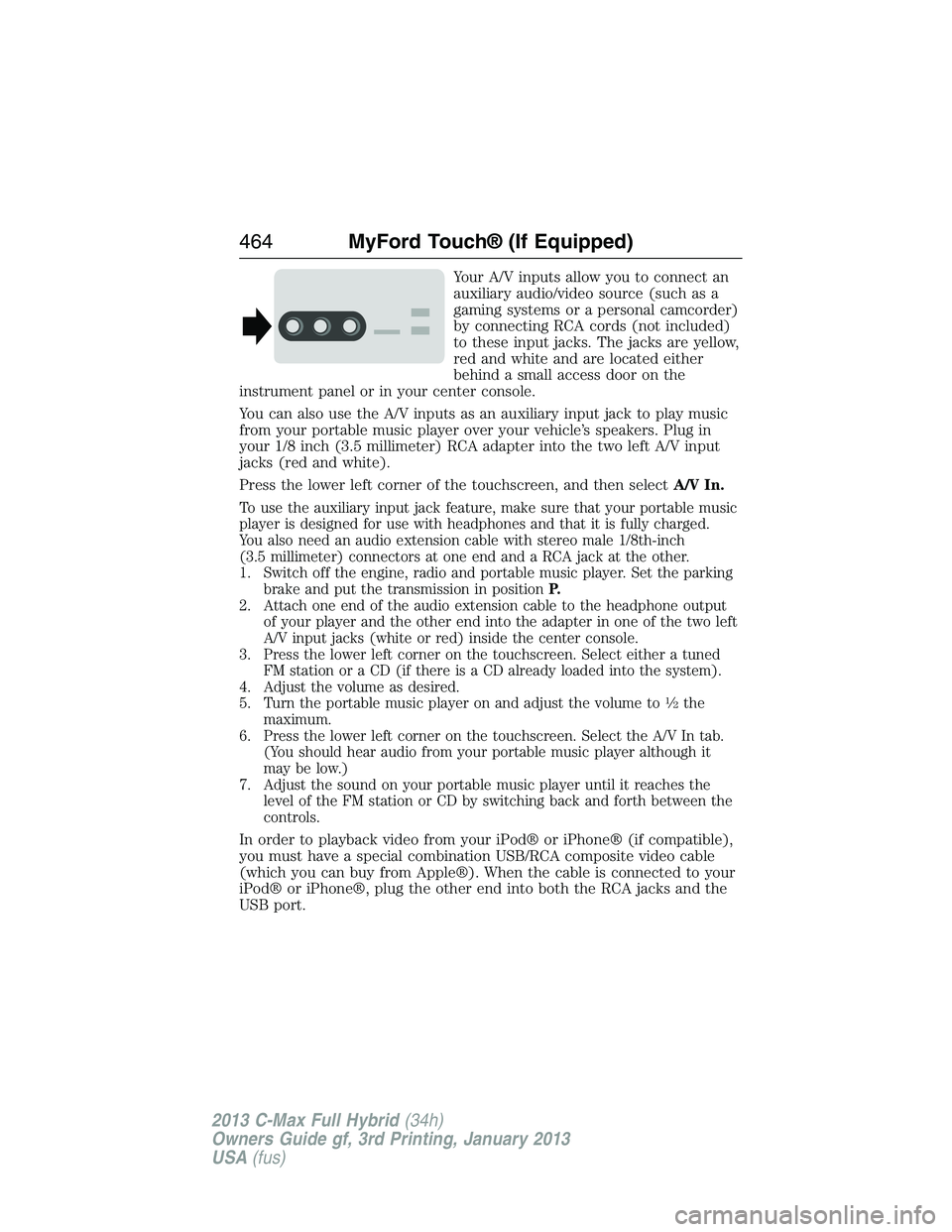
Your A/V inputs allow you to connect an
auxiliary audio/video source (such as a
gaming systems or a personal camcorder)
by connecting RCA cords (not included)
to these input jacks. The jacks are yellow,
red and white and are located either
behind a small access door on the
instrument panel or in your center console.
You can also use the A/V inputs as an auxiliary input jack to play music
from your portable music player over your vehicle’s speakers. Plug in
your 1/8 inch (3.5 millimeter) RCA adapter into the two left A/V input
jacks (red and white).
Press the lower left corner of the touchscreen, and then selectA/V In.
To use the auxiliary input jack feature, make sure that your portable music
player is designed for use with headphones and that it is fully charged.
You also need an audio extension cable with stereo male 1/8th-inch
(3.5 millimeter) connectors at one end and a RCA jack at the other.
1. Switch off the engine, radio and portable music player. Set the parking
brake and put the transmission in positionP.
2. Attach one end of the audio extension cable to the headphone output
of your player and the other end into the adapter in one of the two left
A/V input jacks (white or red) inside the center console.
3. Press the lower left corner on the touchscreen. Select either a tuned
FM station or a CD (if there is a CD already loaded into the system).
4. Adjust the volume as desired.
5. Turn the portable music player on and adjust the volume to
12the
maximum.
6. Press the lower left corner on the touchscreen. Select the A/V In tab.
(You should hear audio from your portable music player although it
may be low.)
7. Adjust the sound on your portable music player until it reaches the
level of the FM station or CD by switching back and forth between the
controls.
In order to playback video from your iPod® or iPhone® (if compatible),
you must have a special combination USB/RCA composite video cable
(which you can buy from Apple®). When the cable is connected to your
iPod® or iPhone®, plug the other end into both the RCA jacks and the
USB port.
464MyFord Touch® (If Equipped)
2013 C-Max Full Hybrid(34h)
Owners Guide gf, 3rd Printing, January 2013
USA(fus)
Page 509 of 552
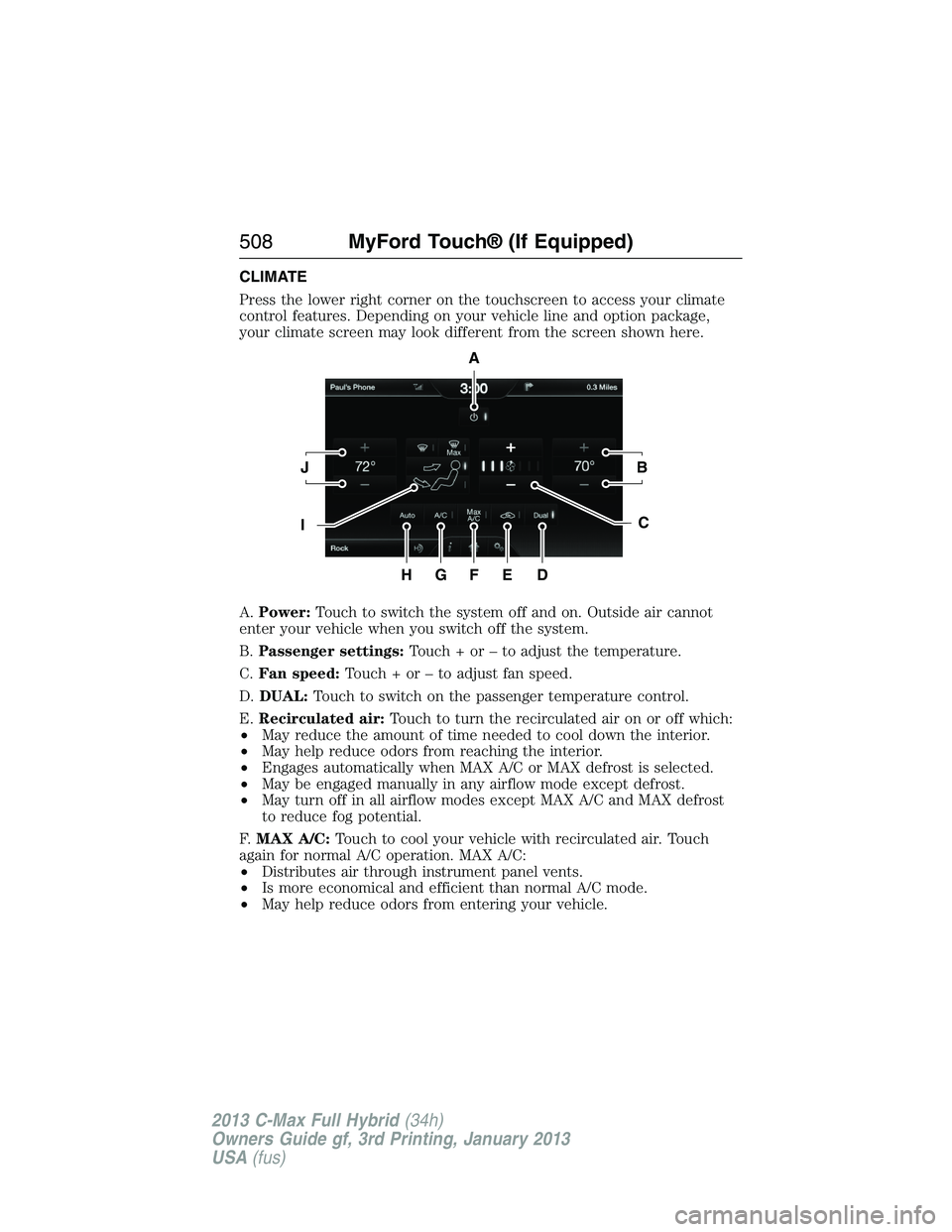
CLIMATE
Press the lower right corner on the touchscreen to access your climate
control features. Depending on your vehicle line and option package,
your climate screen may look different from the screen shown here.
A.Power:Touch to switch the system off and on. Outside air cannot
enter your vehicle when you switch off the system.
B.Passenger settings:Touch + or – to adjust the temperature.
C.Fan speed:Touch + or – to adjust fan speed.
D.DUAL:Touch to switch on the passenger temperature control.
E.Recirculated air:Touch to turn the recirculated air on or off which:
•May reduce the amount of time needed to cool down the interior.
•May help reduce odors from reaching the interior.
•Engages automatically when MAX A/C or MAX defrost is selected.
•May be engaged manually in any airflow mode except defrost.
•May turn off in all airflow modes except MAX A/C and MAX defrost
to reduce fog potential.
F.MAX A/C:Touch to cool your vehicle with recirculated air. Touch
again for normal A/C operation. MAX A/C:
•Distributes air through instrument panel vents.
•Is more economical and efficient than normal A/C mode.
•May help reduce odors from entering your vehicle.
A
JB
IC
HGFED
508MyFord Touch® (If Equipped)
2013 C-Max Full Hybrid(34h)
Owners Guide gf, 3rd Printing, January 2013
USA(fus)
Page 510 of 552
G.A/C:Touch to turn the air conditioning on or off.
•Use with recirculated air to improve cooling performance and
efficiency.
•Engages automatically in MAX A/C, defrost and floor/defrost.
H.AUTO:Touch to engage automatic operation, then set the
temperature using the temperature control. The system automatically
controls:
•Fan speed
•Airflow distribution
•A/Conoroff
•Outside or recirculated air.
I.Manual controls:Select any of the following airflow distribution
modes:
•Floor and Defrost:Distributes air through the windshield defroster
vents, demister vents, floor vents and rear seat floor vents, and
provides outside air to reduce window fogging.
•Panel:Distributes air through the instrument panel vents.
•Panel and Floor:Distributes air through the instrument panel vents,
demister vents, floor vents and rear seat floor vents.
•Floor:Distributes air through the demister vents, floor vents and
rear seat floor vents.
•MAX Defrost:Distributes outside air through the windshield air
vents and automatically switches the air conditioning on. The fan is
set to the highest speed and the temperature to HI. When the
air distribution is set in this position, you are unable to select
recirculated air or manually adjust the fan speed and temperature
control.
•Defrost:Touch to clear the windshield of fog and thin ice. Touch
again to return to the previous airflow selection. When on, defrost
provides outside air to reduce window fogging and distributes air
through the windshield defroster vents and demister vents.
J.Driver settings:Touch + or – to adjust the temperature.
MyFord Touch® (If Equipped)509
2013 C-Max Full Hybrid(34h)
Owners Guide gf, 3rd Printing, January 2013
USA(fus)
Page 546 of 552
Brakes ........................................218
anti-lock ...................................218
anti-lock brake system (ABS)
warning light ...........................218
brake warning light ................218
fluid, checking and adding ....292
fluid, refill capacities ..............351
fluid, specifications .................351
lubricant specifications ..........351
parking ....................................220
shift interlock ..........................215
C
Capacities for refilling fluids ....351
Cargo area shade ......................240
CD ..............................138, 143–144
CD player ..........................136, 457
CD voice commands .................458
Cell phone use ............................16
Changing the air filter ..............297
Child safety restraints ..........28, 30
Child safety seats
attaching with tether straps ....30
automatic locking mode
(retractor) .................................36
LATCH .......................................28
Child safety seats - booster
seats .............................................23
Cleaning the touchscreen ........432
Cleaning your vehicle ...............310
engine compartment ..............312
instrument panel ....................314
interior .....................................313
plastic parts ............................311
washing ....................................310
waxing .....................................311
wheels ......................................316wiper blades ............................313
Climate voice commands .........510
Clock ..................................138, 497
Console ......................................173
overhead ..................................173
Coolant ......................................286
checking and adding ..............286
recovery reservoir ..................283
refill capacities ........................351
specifications ..........................351
Customer Assistance ................256
Ford Extended Service
Plan ..........................................359
Getting roadside assistance ...256
Getting the service
you need .................................263
Ordering additional owner’s
literature .................................269
Utilizing the
Mediation/Arbitration
Program ...................................267
D
Defrost .......................................151
rear window ............................155
Dipstick
automatic transmission
fluid ..........................................291
engine oil .........................283–284
Display settings .........................498
Doors
central unlocking ......................72
Driving under special
conditions ..................................216
through water .........................251
Dual automatic temperature
control (DATC) .........................151
Index545
2013 C-Max Full Hybrid(34h)
Owners Guide gf, 3rd Printing, January 2013
USA(fus)
Page 548 of 552
High-voltage battery
charging ...................................205
service disconnect ..................211
High-voltage shut off ................258
Hill start assist ..........................217
Homelink wireless control
system ........................................166
Hood ..........................................282
How to use voice commands ...438
I
Ignition ...............................175, 350
Illuminated visor mirror ...........103
Information displays .................114
Inspection/maintenance (I/M)
testing ........................................204
Instrument panel
cleaning ...................................314
cluster ......................................109
Intelligent Access Key ................59
J
Joining two calls
(multiparty/conference call) ....390
Jump-starting your vehicle ......259
K
Keyless entry system
autolock .....................................76
Keys .......................................58, 83
positions of the ignition .........175L
Lamps
bulb replacement
specifications chart ................309
fog lamps ...................................95
headlamps, flash to pass ..........92
interior lamps ...........................95
replacing bulbs .......302–303, 308
LATCH anchors ...........................28
Liftgate ............................74, 78–79
Lights, warning and indicator ..109
Listening to music ....................444
Load limits .................................241
Locks
autolock .....................................76
childproof ..................................32
doors ..........................................72
Lubricant specifications ...........351
Lug nuts ....................................349
M
Making and receiving calls .......467
MAP DVD - Loading and
Unloading ..................................467
Map icons ..................................520
Map mode ..................................518
Map preferences .......................517
Map updates ..............................521
Media Bluetooth menu options
(adding, connecting, deleting,
turning on/off) ..........................420
Message center .........................114
warning messages ...................127
Index547
2013 C-Max Full Hybrid(34h)
Owners Guide gf, 3rd Printing, January 2013
USA(fus)