battery FORD C MAX 2015 Owners Manual
[x] Cancel search | Manufacturer: FORD, Model Year: 2015, Model line: C MAX, Model: FORD C MAX 2015Pages: 469, PDF Size: 6.16 MB
Page 413 of 469
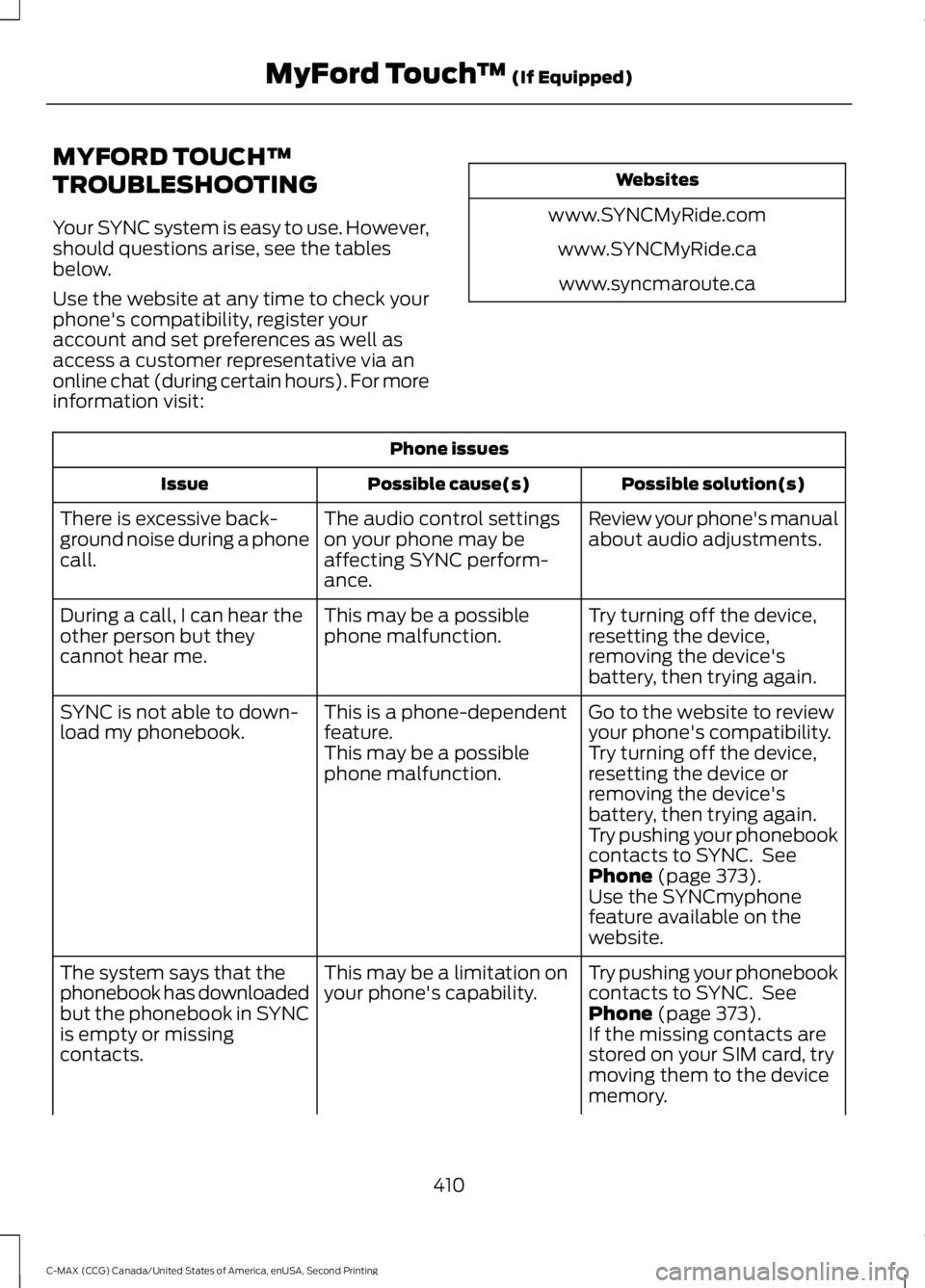
MYFORD TOUCH™
TROUBLESHOOTING
Your SYNC system is easy to use. However,
should questions arise, see the tables
below.
Use the website at any time to check your
phone's compatibility, register your
account and set preferences as well as
access a customer representative via an
online chat (during certain hours). For more
information visit:
Websites
www.SYNCMyRide.com www.SYNCMyRide.cawww.syncmaroute.ca Phone issues
Possible solution(s)
Possible cause(s)
Issue
Review your phone's manual
about audio adjustments.
The audio control settings
on your phone may be
affecting SYNC perform-
ance.
There is excessive back-
ground noise during a phone
call.
Try turning off the device,
resetting the device,
removing the device's
battery, then trying again.
This may be a possible
phone malfunction.
During a call, I can hear the
other person but they
cannot hear me.
Go to the website to review
your phone's compatibility.
This is a phone-dependent
feature.
SYNC is not able to down-
load my phonebook.
Try turning off the device,
resetting the device or
removing the device's
battery, then trying again.
This may be a possible
phone malfunction.
Try pushing your phonebook
contacts to SYNC. See
Phone (page 373).
Use the SYNCmyphone
feature available on the
website.
Try pushing your phonebook
contacts to SYNC. See
Phone
(page 373).
This may be a limitation on
your phone's capability.
The system says that the
phonebook has downloaded
but the phonebook in SYNC
is empty or missing
contacts. If the missing contacts are
stored on your SIM card, try
moving them to the device
memory.
410
C-MAX (CCG) Canada/United States of America, enUSA, Second Printing MyFord Touch
™
(If Equipped)
Page 414 of 469
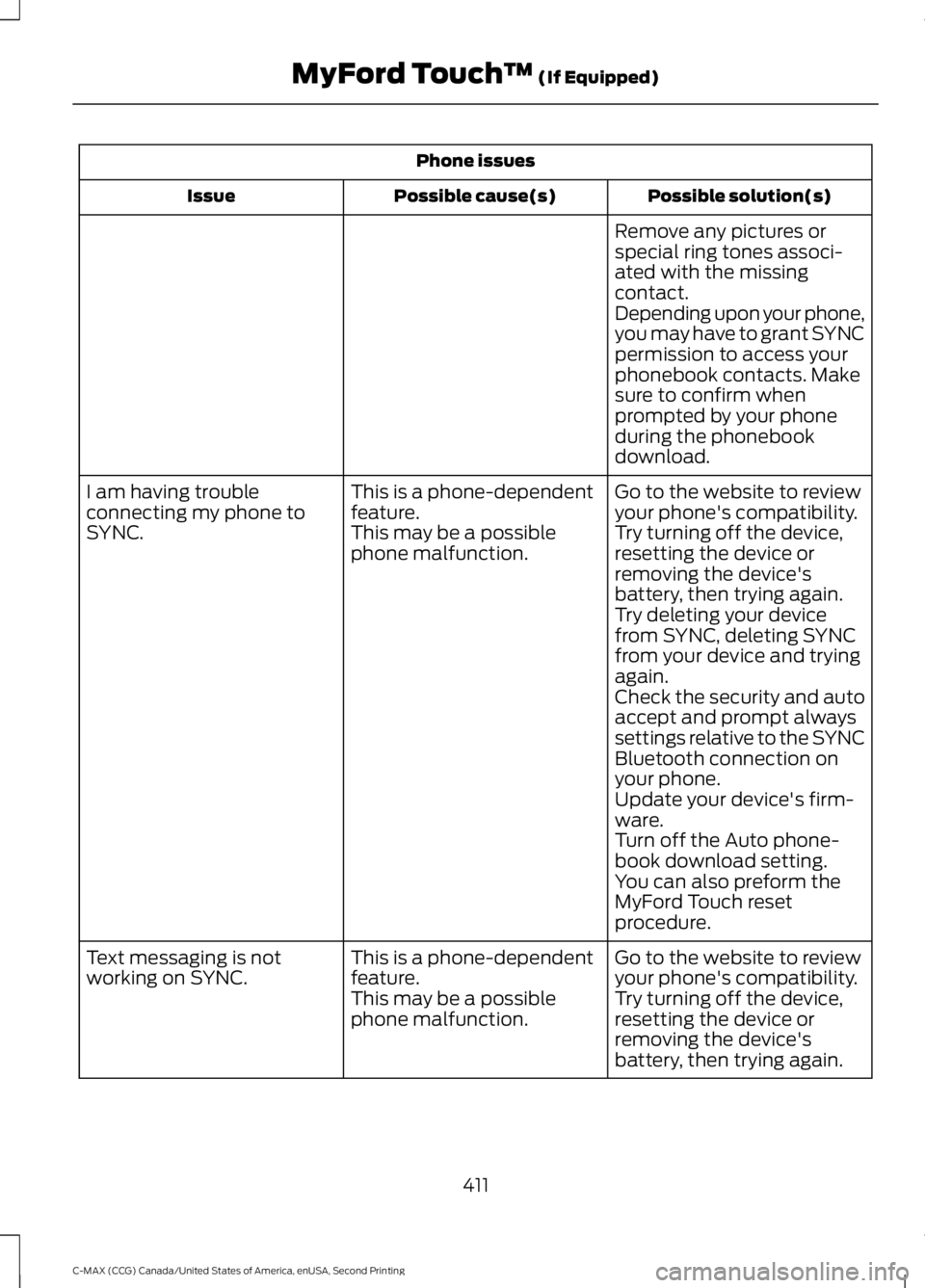
Phone issues
Possible solution(s)
Possible cause(s)
Issue
Remove any pictures or
special ring tones associ-
ated with the missing
contact.
Depending upon your phone,
you may have to grant SYNC
permission to access your
phonebook contacts. Make
sure to confirm when
prompted by your phone
during the phonebook
download.
Go to the website to review
your phone's compatibility.
This is a phone-dependent
feature.
I am having trouble
connecting my phone to
SYNC.
Try turning off the device,
resetting the device or
removing the device's
battery, then trying again.
This may be a possible
phone malfunction.
Try deleting your device
from SYNC, deleting SYNC
from your device and trying
again.
Check the security and auto
accept and prompt always
settings relative to the SYNC
Bluetooth connection on
your phone.
Update your device's firm-
ware.
Turn off the Auto phone-
book download setting.
You can also preform the
MyFord Touch reset
procedure.
Go to the website to review
your phone's compatibility.
This is a phone-dependent
feature.
Text messaging is not
working on SYNC.
Try turning off the device,
resetting the device or
removing the device's
battery, then trying again.
This may be a possible
phone malfunction.
411
C-MAX (CCG) Canada/United States of America, enUSA, Second Printing MyFord Touch
™ (If Equipped)
Page 415 of 469
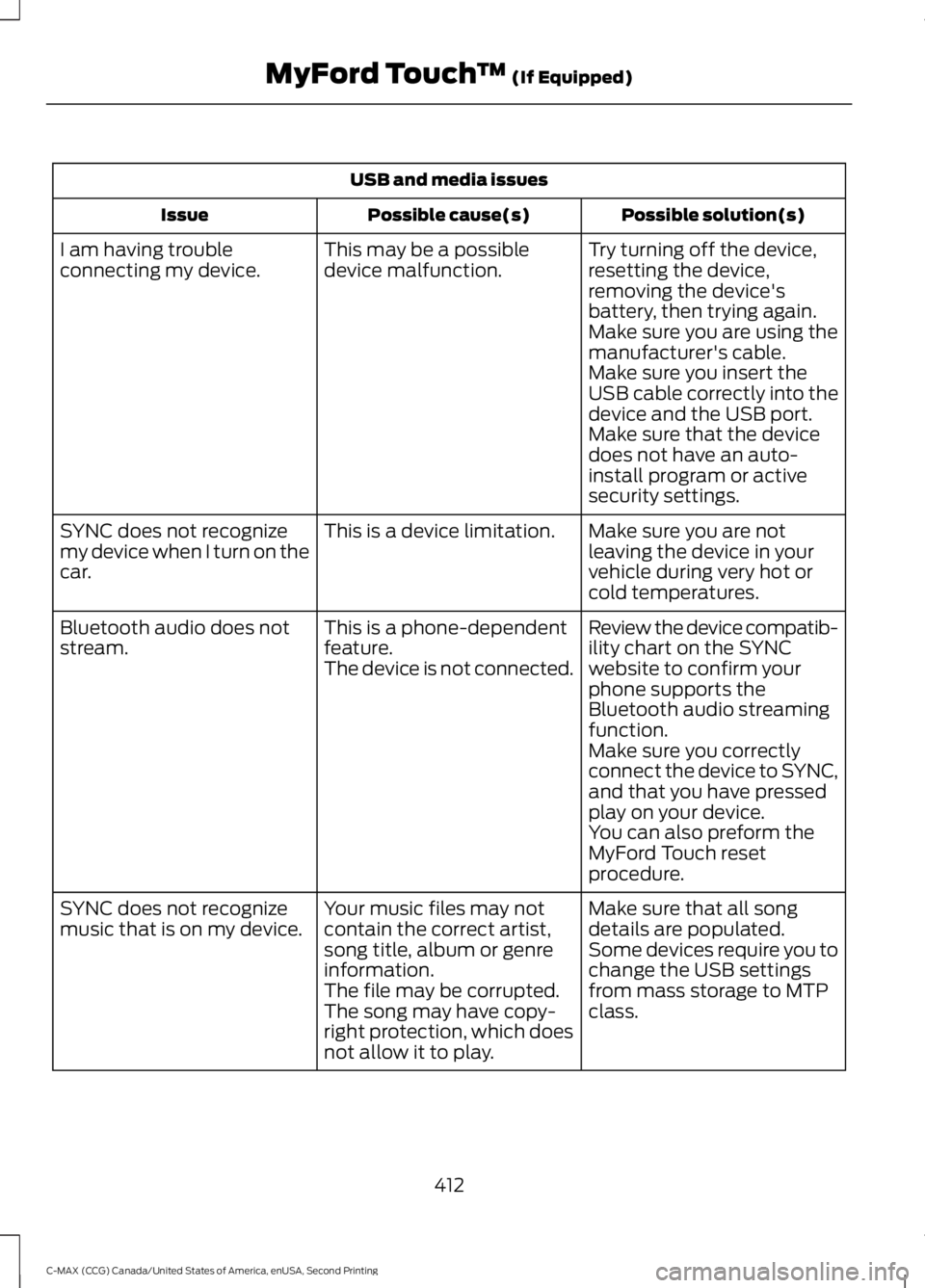
USB and media issues
Possible solution(s)
Possible cause(s)
Issue
Try turning off the device,
resetting the device,
removing the device's
battery, then trying again.
This may be a possible
device malfunction.
I am having trouble
connecting my device.
Make sure you are using the
manufacturer's cable.
Make sure you insert the
USB cable correctly into the
device and the USB port.
Make sure that the device
does not have an auto-
install program or active
security settings.
Make sure you are not
leaving the device in your
vehicle during very hot or
cold temperatures.
This is a device limitation.
SYNC does not recognize
my device when I turn on the
car.
Review the device compatib-
ility chart on the SYNC
website to confirm your
phone supports the
Bluetooth audio streaming
function.
This is a phone-dependent
feature.
The device is not connected.
Bluetooth audio does not
stream.
Make sure you correctly
connect the device to SYNC,
and that you have pressed
play on your device.
You can also preform the
MyFord Touch reset
procedure.
Make sure that all song
details are populated.
Your music files may not
contain the correct artist,
song title, album or genre
information.
SYNC does not recognize
music that is on my device.
Some devices require you to
change the USB settings
from mass storage to MTP
class.
The file may be corrupted.
The song may have copy-
right protection, which does
not allow it to play.
412
C-MAX (CCG) Canada/United States of America, enUSA, Second Printing MyFord Touch
™ (If Equipped)
Page 420 of 469
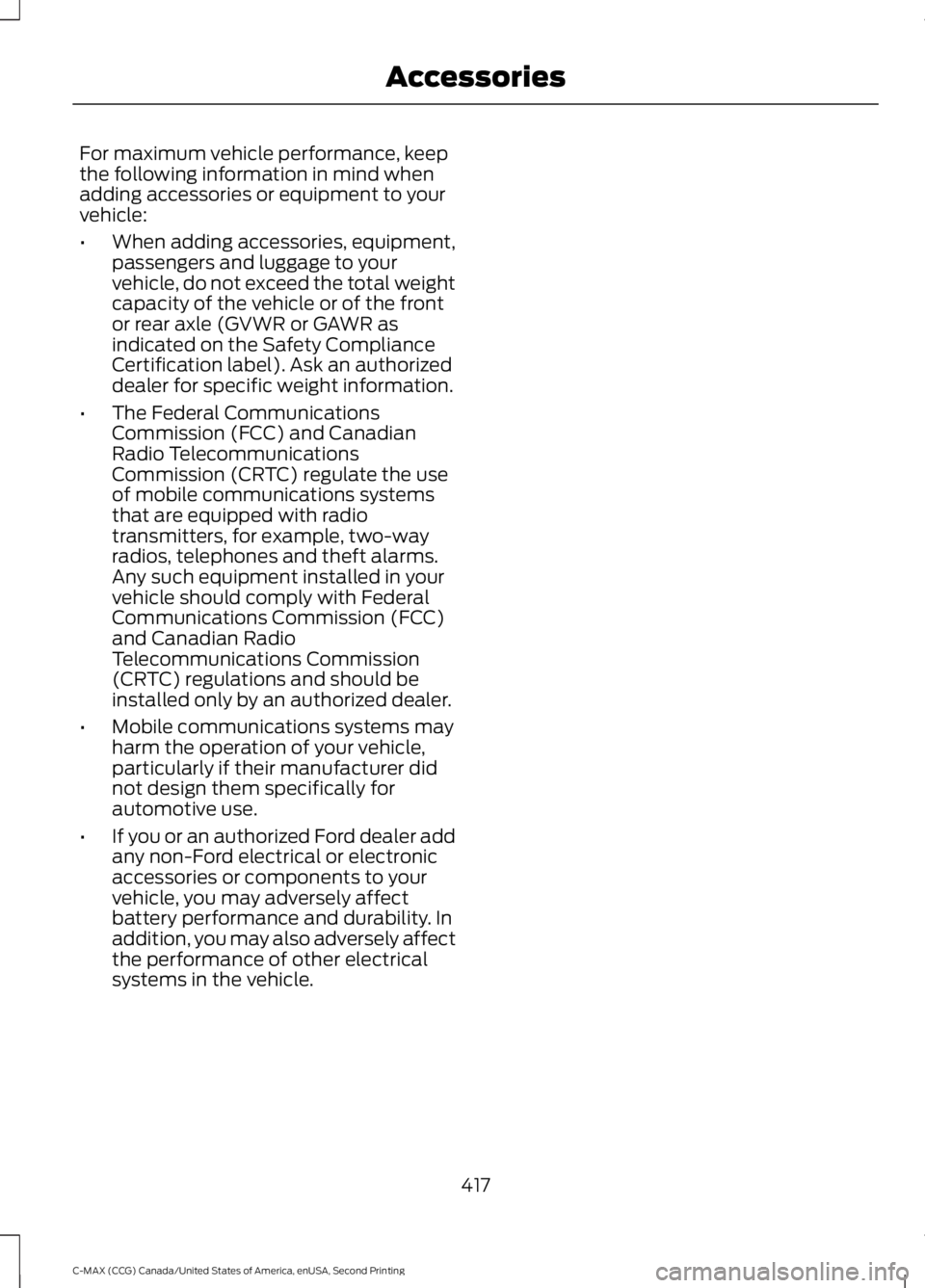
For maximum vehicle performance, keep
the following information in mind when
adding accessories or equipment to your
vehicle:
•
When adding accessories, equipment,
passengers and luggage to your
vehicle, do not exceed the total weight
capacity of the vehicle or of the front
or rear axle (GVWR or GAWR as
indicated on the Safety Compliance
Certification label). Ask an authorized
dealer for specific weight information.
• The Federal Communications
Commission (FCC) and Canadian
Radio Telecommunications
Commission (CRTC) regulate the use
of mobile communications systems
that are equipped with radio
transmitters, for example, two-way
radios, telephones and theft alarms.
Any such equipment installed in your
vehicle should comply with Federal
Communications Commission (FCC)
and Canadian Radio
Telecommunications Commission
(CRTC) regulations and should be
installed only by an authorized dealer.
• Mobile communications systems may
harm the operation of your vehicle,
particularly if their manufacturer did
not design them specifically for
automotive use.
• If you or an authorized Ford dealer add
any non-Ford electrical or electronic
accessories or components to your
vehicle, you may adversely affect
battery performance and durability. In
addition, you may also adversely affect
the performance of other electrical
systems in the vehicle.
417
C-MAX (CCG) Canada/United States of America, enUSA, Second Printing Accessories
Page 421 of 469
PROTECT YOURSELF FROM THE RISING
COST OF VEHICLE REPAIRS WITH A FORD
EXTENDED SERVICE PLAN.
SERVICE PLANS (U.S. Only)
More than 32 million Ford owners have
discovered the powerful protection of Ford
Extended Service Plan. It is the extended
service plan backed by Ford Motor
Company, and provides peace of mind
protection beyond the New Vehicle Limited
Warranty coverage.
Ford ESP Can Quickly Pay for Itself
One service bill – the cost of parts and
labor – can easily exceed the price of your
Ford Extended Service Plan. With Ford ESP
you minimize your risk for unexpected
repair bills and rising repair costs.
Up to 1,000+ Covered Vehicle
Components
There are four core Extended Service Plans
with different levels of coverage. Ask your
authorized dealer for details.
1. PremiumCARE - Our most
comprehensive coverage. With over
1,000 covered components, this plan
is so complete that we generally only
discuss what’ s not covered.
2. ExtraCARE - Covers 113 components, and includes many high-tech items.
3. BaseCARE - Covers 84 components.
4. PowertrainCARE - Covers 29 critical components.
Ford Extended Service Plan is honored by
all authorized Ford dealers in the U.S.,
Canada and Mexico. It is the extended
service plan authorized and backed by Ford
Motor Company. That means you get:
•
Reliable, quality service at any Ford or
Lincoln dealership
• Repairs performed by factory trained
technicians, using genuine parts
Rental Car Reimbursement
1st day Rental Benefit
You take advantage of replacement
transportation if your vehicle is at your
authorized dealer for same day covered
repairs.
Extended Rental Benefits
If your vehicle is kept overnight for covered
repairs, you are eligible for rental car
coverage, including bumper to bumper
warranty repairs, and Field Service Actions.
Roadside Assistance
Exclusive 24/7 roadside assistance,
including:
• Towing, flat-tire change and battery
jump starts
• Out of fuel and lock-out assistance.
• Travel expense reimbursement for
lodging, meals and rental car.
• Destination assistance for taxi, shuttle,
rental car coverage and emergency
transportation.
Transferable Coverage
If you sell your vehicle before your Ford
Extended Service Plan coverage expires,
you can transfer any remaining coverage
to the new owner. Whenever you sell your
vehicle, prospective buyers may have a
higher degree of confidence that vehicle
was properly maintained with Ford ESP,
thereby improving resale value.
418
C-MAX (CCG) Canada/United States of America, enUSA, Second Printing Extended Service Plan (ESP)
Page 424 of 469
When ENGINE OIL CHANGE DUE or OIL
CHANGE REQUIRED appears in the
information display, it is time for an oil
change. Make sure you perform the oil
change within two weeks or 500 miles
(800 kilometers) of the
ENGINE OIL
CHANGE DUE or OIL CHANGE
REQUIRED message appearing. Make
sure you reset the oil monitoring system
after each oil change.
If your information display resets
prematurely, becomes inoperative or the
vehicle battery becomes discharged or
disconnected, the oil monitoring system
resets to 100% oil life. You should change
your engine oil one year or 10000 miles
(16000 kilometers) from the previous oil
change. Never exceed one year or 10000
miles (16000 kilometers) between oil
change intervals.
C-MAX Energi Plug-in Hybrid
Your vehicle is equipped with the
Intelligent Oil-Life Monitor system, which
displays a message in the information
display at the proper oil change interval.
This interval may be up to two years or
20000 miles (32000 kilometers).
When ENGINE OIL CHANGE DUE or OIL
CHANGE REQUIRED
appears in the
information display, it is time for an oil
change. Make sure you perform the oil
change within two weeks or 500 miles
(800 kilometers) of the
ENGINE OIL
CHANGE DUE or OIL CHANGE
REQUIRED message appearing. Make
sure you reset the Intelligent Oil-Life
Monitor after each oil change.
If your information display resets
prematurely or becomes inoperative, you
should perform the oil change interval at
six months or 5000 miles (8000
kilometers) from your last oil change.
Never exceed two years or 20000 miles
(32000 kilometers) between oil change
intervals. All Vehicles
Your vehicle is very sophisticated and built
with multiple, complex, performance
systems. Every manufacturer develops
these systems using different
specifications and performance features.
That is why it is important to rely upon your
dealership to properly diagnose and repair
your vehicle.
Ford Motor Company has recommended
maintenance intervals for various parts
and component systems based upon
engineering testing. Ford Motor Company
relies upon this testing to determine the
most appropriate mileage for replacement
of oils and fluids to protect your vehicle at
the lowest overall cost to you and
recommends against maintenance
schedules that deviate from the scheduled
maintenance information.
We strongly recommend the use of only
genuine Ford, Motorcraft or
Ford-authorized re-manufactured
replacement parts engineered for your
vehicle.
Additives and Chemicals
This owner's manual and the Ford
Workshop Manual list the recommended
additives and chemicals for your vehicle.
We do not recommend using chemicals or
additives not approved by us as part of
your vehicle
’s normal maintenance. Please
consult your warranty information.
421
C-MAX (CCG) Canada/United States of America, enUSA, Second Printing Scheduled Maintenance
Page 425 of 469
Oils, Fluids and Flushing
In many cases, fluid discoloration is a
normal operating characteristic and, by
itself, does not necessarily indicate a
concern or that the fluid needs to be
changed. However, a qualified expert, such
as the factory-trained technicians at your
dealership, should inspect discolored fluids
that also show signs of overheating or
foreign material contamination
immediately.
Make sure to change your vehicle
’s oils and
fluids at the specified intervals or in
conjunction with a repair. Flushing is a
viable way to change fluid for many vehicle
sub-systems during scheduled
maintenance. It is critical that systems are
flushed only with new fluid that is the same
as that required to fill and operate the
system or using a Ford-approved flushing
chemical.
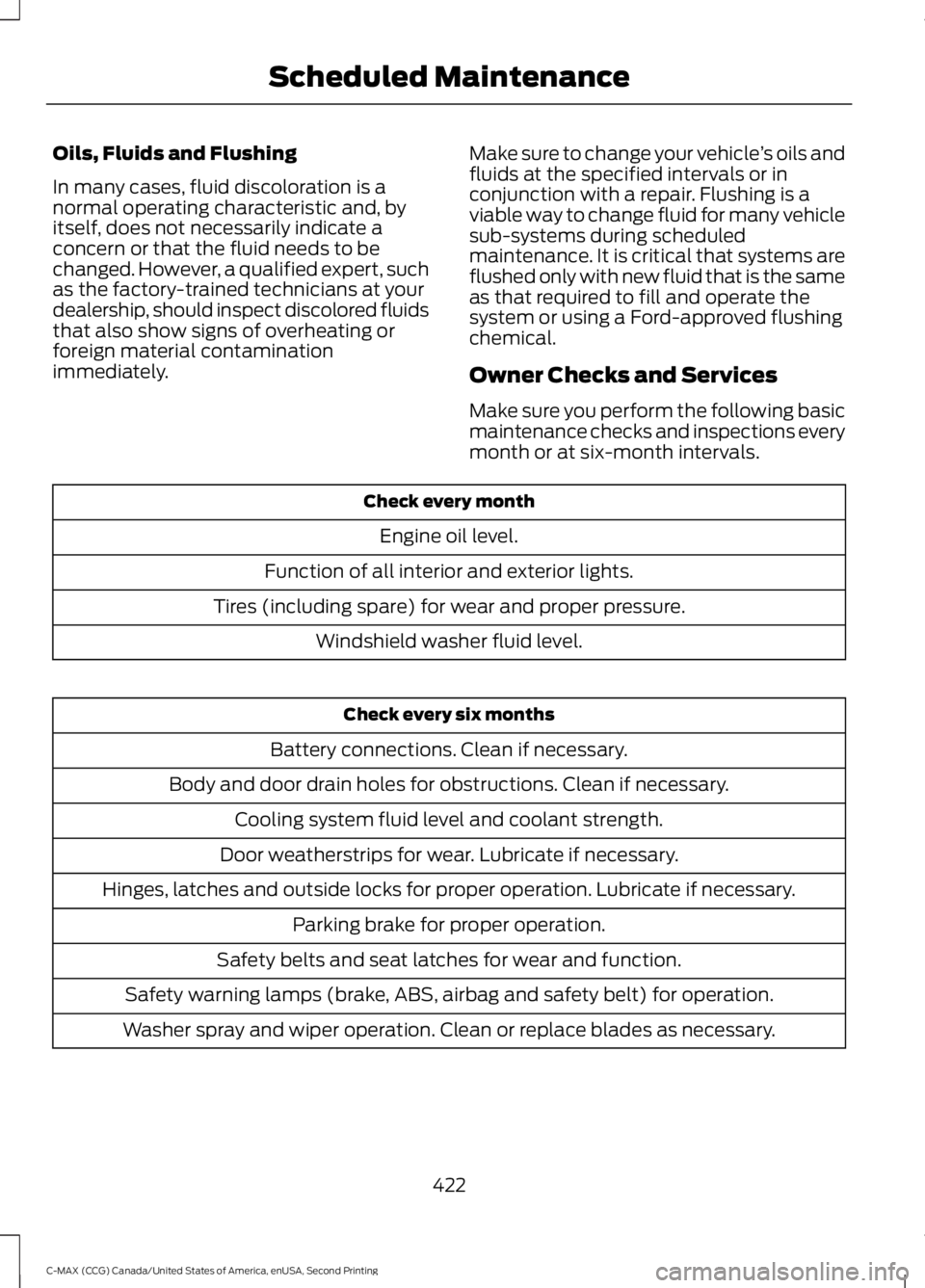
Owner Checks and Services
Make sure you perform the following basic
maintenance checks and inspections every
month or at six-month intervals. Check every month
Engine oil level.
Function of all interior and exterior lights.
Tires (including spare) for wear and proper pressure. Windshield washer fluid level. Check every six months
Battery connections. Clean if necessary.
Body and door drain holes for obstructions. Clean if necessary. Cooling system fluid level and coolant strength.
Door weatherstrips for wear. Lubricate if necessary.
Hinges, latches and outside locks for proper operation. Lubricate if necessary. Parking brake for proper operation.
Safety belts and seat latches for wear and function.
Safety warning lamps (brake, ABS, airbag and safety belt) for operation.
Washer spray and wiper operation. Clean or replace blades as necessary.
422
C-MAX (CCG) Canada/United States of America, enUSA, Second Printing Scheduled Maintenance
Page 426 of 469
Check Every 12 Months (C-MAX Energi
Plug-in Hybrid Only)
Inspect the engine oil filter for signs of
damage such as rust, paint blistering,
scratches or dents. If any of these
conditions are present, replace the filter.
See Normal Scheduled Maintenance
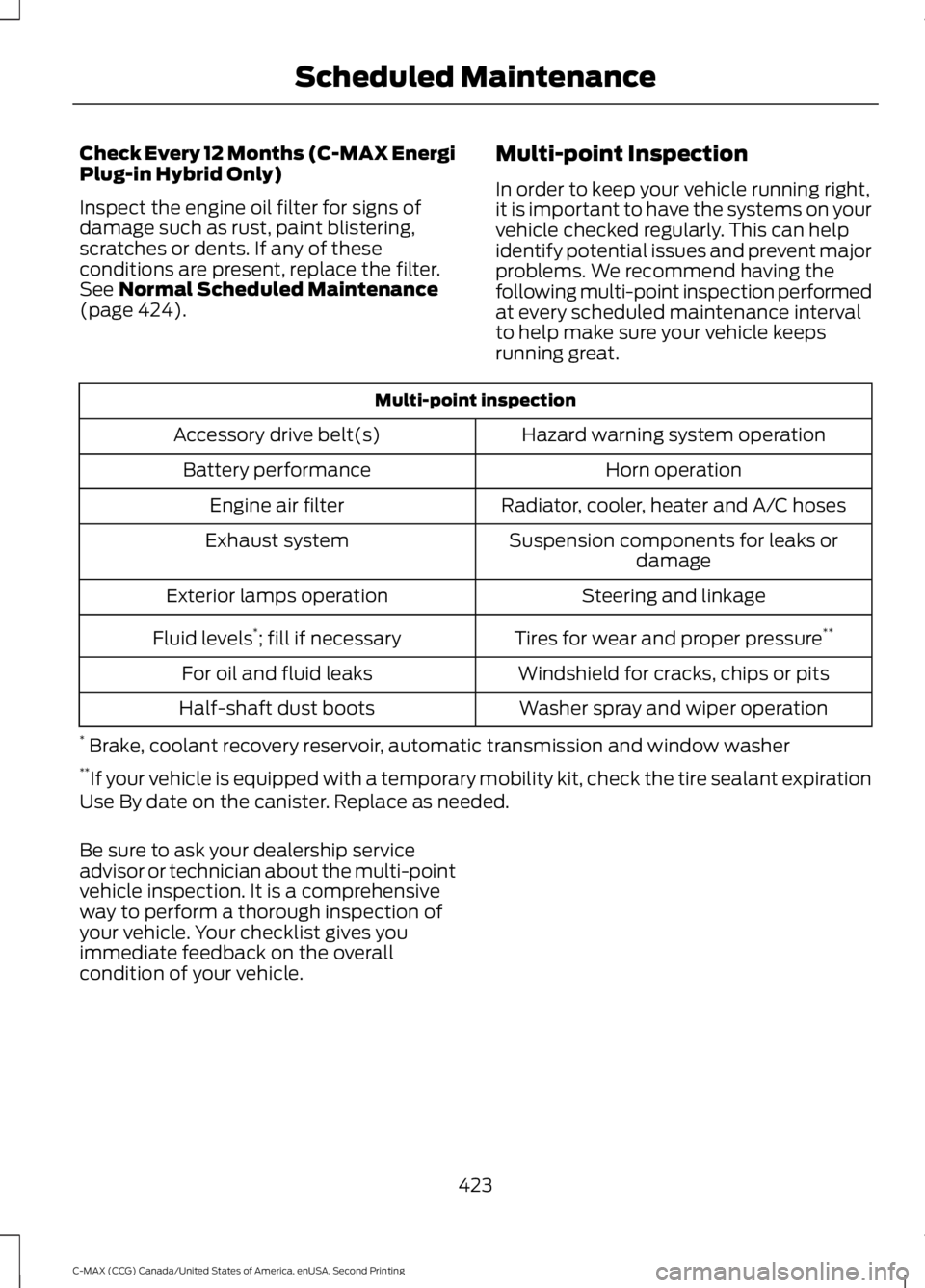
(page 424). Multi-point Inspection
In order to keep your vehicle running right,
it is important to have the systems on your
vehicle checked regularly. This can help
identify potential issues and prevent major
problems. We recommend having the
following multi-point inspection performed
at every scheduled maintenance interval
to help make sure your vehicle keeps
running great. Multi-point inspection
Hazard warning system operation
Accessory drive belt(s)
Horn operation
Battery performance
Radiator, cooler, heater and A/C hoses
Engine air filter
Suspension components for leaks ordamage
Exhaust system
Steering and linkage
Exterior lamps operation
Tires for wear and proper pressure**
Fluid levels *
; fill if necessary
Windshield for cracks, chips or pits
For oil and fluid leaks
Washer spray and wiper operation
Half-shaft dust boots
* Brake, coolant recovery reservoir, automatic transmission and window washer
** If your vehicle is equipped with a temporary mobility kit, check the tire sealant expiration
Use By date on the canister. Replace as needed.
Be sure to ask your dealership service
advisor or technician about the multi-point
vehicle inspection. It is a comprehensive
way to perform a thorough inspection of
your vehicle. Your checklist gives you
immediate feedback on the overall
condition of your vehicle.
423
C-MAX (CCG) Canada/United States of America, enUSA, Second Printing Scheduled Maintenance
Page 461 of 469
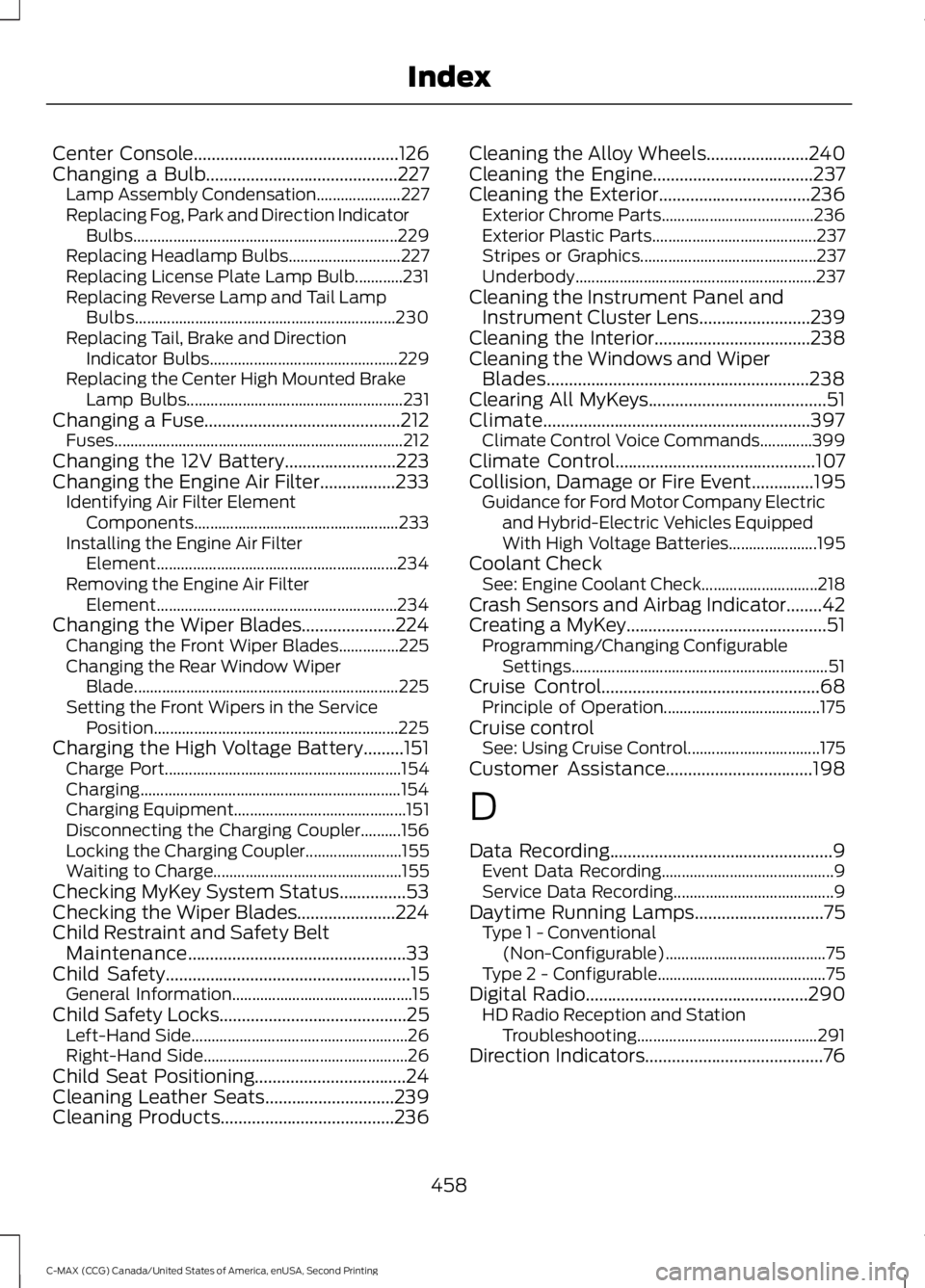
Center Console..............................................126
Changing a Bulb...........................................227 Lamp Assembly Condensation..................... 227
Replacing Fog, Park and Direction Indicator Bulbs.................................................................. 229
Replacing Headlamp Bulbs............................ 227
Replacing License Plate Lamp Bulb............231
Replacing Reverse Lamp and Tail Lamp Bulbs................................................................. 230
Replacing Tail, Brake and Direction Indicator Bulbs............................................... 229
Replacing the Center High Mounted Brake Lamp Bulbs...................................................... 231
Changing a Fuse
............................................212
Fuses........................................................................\
212
Changing the 12V Battery.........................223
Changing the Engine Air Filter.................233 Identifying Air Filter Element
Components................................................... 233
Installing the Engine Air Filter Element............................................................ 234
Removing the Engine Air Filter Element............................................................ 234
Changing the Wiper Blades.....................224 Changing the Front Wiper Blades...............225
Changing the Rear Window Wiper
Blade
.................................................................. 225
Setting the Front Wipers in the Service Position............................................................. 225
Charging the High Voltage Battery.........151 Charge Port........................................................... 154
Charging................................................................. 154
Charging Equipment........................................... 151
Disconnecting the Charging Coupler..........156
Locking the Charging Coupler........................ 155
Waiting to Charge............................................... 155
Checking MyKey System Status...............53
Checking the Wiper Blades......................224
Child Restraint and Safety Belt Maintenance.................................................33
Child Safety
.......................................................15
General Information............................................. 15
Child Safety Locks
..........................................25
Left-Hand Side...................................................... 26
Right-Hand Side................................................... 26
Child Seat Positioning..................................24
Cleaning Leather Seats.............................239
Cleaning Products
.......................................236 Cleaning the Alloy Wheels
.......................240
Cleaning the Engine....................................237
Cleaning the Exterior..................................236 Exterior Chrome Parts...................................... 236
Exterior Plastic Parts......................................... 237
Stripes or Graphics............................................ 237
Underbody............................................................ 237
Cleaning the Instrument Panel and Instrument Cluster Lens.........................239
Cleaning the Interior...................................238
Cleaning the Windows and Wiper Blades...........................................................238
Clearing All MyKeys
........................................51
Climate............................................................397
Climate Control Voice Commands.............399
Climate Control
.............................................107
Collision, Damage or Fire Event..............195
Guidance for Ford Motor Company Electric
and Hybrid-Electric Vehicles Equipped
With High Voltage Batteries...................... 195
Coolant Check See: Engine Coolant Check............................. 218
Crash Sensors and Airbag Indicator........42
Creating a MyKey.............................................51 Programming/Changing Configurable
Settings................................................................ 51
Cruise Control.................................................68 Principle of Operation....................................... 175
Cruise control See: Using Cruise Control................................. 175
Customer Assistance
.................................198
D
Data Recording
..................................................9
Event Data Recording........................................... 9
Service Data Recording........................................ 9
Daytime Running Lamps
.............................75
Type 1 - Conventional
(Non-Configurable)........................................ 75
Type 2 - Configurable.......................................... 75
Digital Radio
..................................................290
HD Radio Reception and Station
Troubleshooting............................................. 291
Direction Indicators
........................................76
458
C-MAX (CCG) Canada/United States of America, enUSA, Second Printing Index
Page 463 of 469
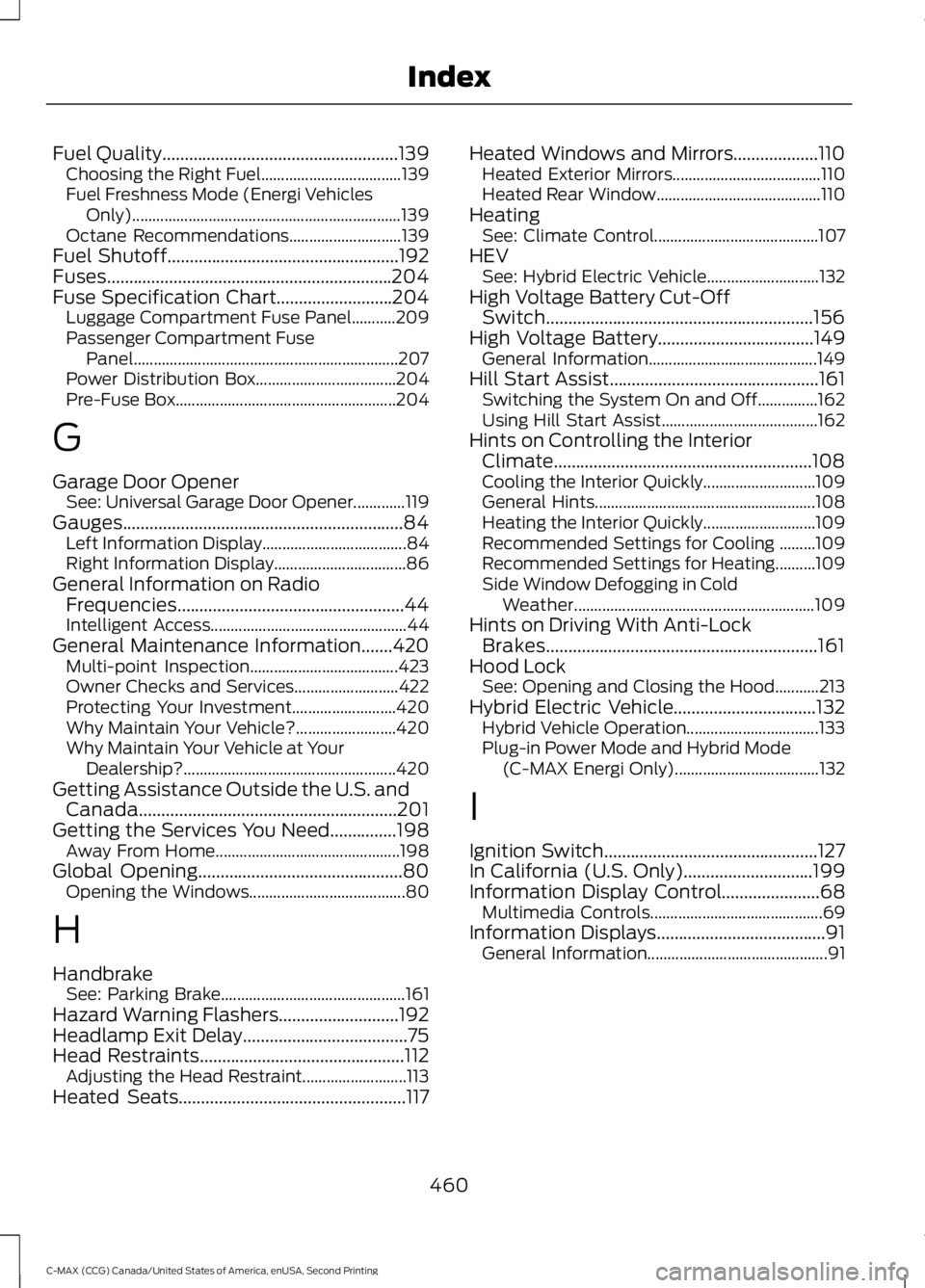
Fuel Quality.....................................................139
Choosing the Right Fuel................................... 139
Fuel Freshness Mode (Energi Vehicles Only)................................................................... 139
Octane Recommendations............................ 139
Fuel Shutoff....................................................192
Fuses................................................................204
Fuse Specification Chart..........................204 Luggage Compartment Fuse Panel...........209
Passenger Compartment Fuse
Panel.................................................................. 207
Power Distribution Box................................... 204
Pre-Fuse Box....................................................... 204
G
Garage Door Opener See: Universal Garage Door Opener.............119
Gauges...............................................................84 Left Information Display.................................... 84
Right Information Display................................. 86
General Information on Radio Frequencies...................................................44
Intelligent Access................................................. 44
General Maintenance Information.......420 Multi-point Inspection..................................... 423
Owner Checks and Services.......................... 422
Protecting Your Investment.......................... 420
Why Maintain Your Vehicle?......................... 420
Why Maintain Your Vehicle at Your Dealership?..................................................... 420
Getting Assistance Outside the U.S. and Canada..........................................................201
Getting the Services You Need
...............198
Away From Home.............................................. 198
Global Opening
..............................................80
Opening the Windows....................................... 80
H
Handbrake See: Parking Brake.............................................. 161
Hazard Warning Flashers...........................192
Headlamp Exit Delay.....................................75
Head Restraints
..............................................112
Adjusting the Head Restraint.......................... 113
Heated Seats
...................................................117 Heated Windows and Mirrors...................110
Heated Exterior Mirrors..................................... 110
Heated Rear Window......................................... 110
Heating See: Climate Control......................................... 107
HEV See: Hybrid Electric Vehicle............................ 132
High Voltage Battery Cut-Off Switch............................................................156
High Voltage Battery...................................149 General Information.......................................... 149
Hill Start Assist...............................................161 Switching the System On and Off...............162
Using Hill Start Assist....................................... 162
Hints on Controlling the Interior Climate ..........................................................
108
Cooling the Interior Quickly............................ 109
General Hints....................................................... 108
Heating the Interior Quickly............................ 109
Recommended Settings for Cooling .........109
Recommended Settings for Heating..........109
Side Window Defogging in Cold Weather............................................................ 109
Hints on Driving With Anti-Lock Brakes.............................................................161
Hood Lock See: Opening and Closing the Hood...........213
Hybrid Electric Vehicle................................132 Hybrid Vehicle Operation................................. 133
Plug-in Power Mode and Hybrid Mode (C-MAX Energi Only).................................... 132
I
Ignition Switch................................................127
In California (U.S. Only).............................199
Information Display Control
......................68
Multimedia Controls........................................... 69
Information Displays
......................................91
General Information............................................. 91
460
C-MAX (CCG) Canada/United States of America, enUSA, Second Printing Index