instrument panel FORD C MAX 2015 User Guide
[x] Cancel search | Manufacturer: FORD, Model Year: 2015, Model line: C MAX, Model: FORD C MAX 2015Pages: 469, PDF Size: 6.16 MB
Page 112 of 469
Note:
To reduce humidity build-up inside
your vehicle, do not drive with the system
switched off or with recirculated air always
switched on.
Note: Do not place objects under the front
seats as this may interfere with the airflow
to the rear seats.
Note: Remove any snow, ice or leaves from
the air intake area at the base of the
windshield.
Note: To improve the time to reach comfort
in hot weather, drive with the windows
slightly open for 2-3 minutes after start-up
or until your vehicle airs out.
In mild weather, you can improve your fuel
economy when using the climate control
system by using outside air instead of air
conditioning.
• Turn the temperature control knob(s)
so the interior temperature is set to
60°F (15.5°C).
• Set the air distribution to panel or floor
(or both).
• Press A/C to turn the air conditioning
off.
• Press the recirculated air button so
fresh air enters the vehicle.
• Press the small fan button until the fan
is at its lowest setting.
Automatic Climate Control
Note: Adjusting the settings when your
vehicle interior is extremely hot or cold is
not necessary. The system automatically
adjusts to heat or cool the cabin to your
selected temperature as quickly as possible.
For the system to function efficiently, the
instrument panel and side air vents should
be fully open.
Note: If you select
AUTO during cold
outside temperatures, the system directs
airflow to the windshield and side window
vents. In addition, the fan may run at a
slower speed until the engine warms up. Note:
If you select AUTO during hot outside
temperatures, or when the inside of the
vehicle is hot, the system automatically uses
recirculated air to maximize interior cooling.
When the interior reaches the selected
temperature, the system automatically
switches to using outside air.
Heating the Interior Quickly
1. Press the
AUTO button.
2. Adjust the temperature control to the desired setting.
Recommended Settings for
Heating
1. Press the
AUTO button.
2. Adjust the temperature control to the desired setting. Use 72°F (22°C) as a
starting point, then adjust the setting
as necessary.
Cooling the Interior Quickly
Press the
MAX A/C button.
Recommended Settings for
Cooling
1. Press the
AUTO button.
2. Adjust the temperature control to the desired setting. Use 72°F (22°C) as a
starting point, then adjust the setting
as necessary.
Side Window Defogging in Cold
Weather
1. Press the defrost and panel buttons.
2. Select
A/C.
3. Adjust the temperature control to maintain comfort. Use 72°F (22°C) as
a starting point, then adjust the setting
as necessary.
4. Set the fan to the highest speed.
5. Direct the outer instrument panel air vents toward the side windows.
109
C-MAX (CCG) Canada/United States of America, enUSA, Second Printing Climate Control
Page 113 of 469
6. To increase the airflow to the outer
instrument panel vents, close the air
vents in the middle of the instrument
panel and in the rear of the center
console.
HEATED WINDOWS AND
MIRRORS
Heated Rear Window The heated rear window button
is below the climate control
unit.
Press the button to clear the heated rear
window of thin ice and fog. The heated
rear window automatically turns off after
a short period of time. Start the engine
before you switch the heated rear window
on.
Note: Do not use razor blades or other
sharp objects to clean or remove decals
from the inside of the heated rear window.
The vehicle warranty does not cover
damage caused to the heated rear window
grid lines.
Heated Exterior Mirrors (If Equipped) When you switch the heated
rear window on, the heated
exterior mirrors automatically
turn on.
Note: Do not remove ice from the mirrors
with a scraper or adjust the mirror glass
when it is frozen in place.
Note: Do not clean the mirror housing or
glass with harsh abrasives, fuel or other
petroleum-based cleaning products. CABIN AIR FILTER
Your vehicle is equipped with a cabin air
filter, which gives you and your passengers
the following benefits:
•
It improves your driving comfort by
reducing particle concentration.
• It improves the interior compartment
cleanliness.
• It protects the climate control
components from particle deposits.
Your cabin air filter is located under the
instrument panel in the passenger footwell
area.
Note: Make sure you have a cabin air filter
installed at all times. This prevents foreign
objects from entering the system. Running
the system without a filter in place could
result in degradation or damage to the
system.
Replace the filter at regular intervals. See
Maintenance
(page 213).
For additional cabin air filter information,
or to replace the filter, see an authorized
dealer.
REMOTE START
(If Equipped)
The remote start feature allows you to
pre-condition the interior of your vehicle.
The climate control system works to
achieve comfort according to your previous
settings.
Note: You cannot adjust the system during
remote start operation.
Turn the ignition on to return the system
to its previous settings. You can now make
adjustments normally, but you need to turn
certain vehicle-dependent features back
on, such as:
• Heated seats.
• Cooled seats.
110
C-MAX (CCG) Canada/United States of America, enUSA, Second Printing Climate ControlE72507 E72507
Page 135 of 469
HYBRID ELECTRIC VEHICLE
Plug-in Power Mode and Hybrid
Mode (C-MAX Energi Only)
You must plug in your C-MAX Energi
vehicle regularly for optimal use of the high
voltage battery's extended range
capability. Charging your vehicle adds
electrical energy. This energy is used to
propel the vehicle in plug-in power mode.
You can view your estimated electric range
on the Energy Use screen on the left-hand
information display. You can also configure
MyView to include detailed vehicle range
information. See Gauges (page 84). The
system maximizes the use of electric-only
operation in plug-in power mode. System
conditions may require engine operation;
however, the system uses plug-in power
whenever possible.
When your plug-in power is depleted, the
powertrain system will automatically
switch to hybrid mode. Your battery gauge
will transition to a simple battery graphic
upon entering hybrid mode. Hybrid mode
uses both the gasoline engine and electric
motor to power your vehicle and maximize
fuel economy as with C-MAX Hybrid.
EV Modes (C-MAX Energi Only)
Your vehicle contains selectable
EV modes through the EV button
located on the center of the
instrument panel, below the climate
controls.
These modes are available when the
vehicle can run under high voltage battery
power. With the vehicle in driving mode,
you can change EV modes with each press
of the EV button. The current mode will be
displayed in the left-hand instrument
cluster screen. Auto EV This mode provides an
automatic use of high voltage
battery power during the drive,
staying in electric mode when possible and
running the engine when needed. This
mode will be the only one available if the
plug-in power has been depleted.
EV Now This mode provides an electric
only driving experience. The
left-hand information display
will change to an Energy Use screen that
supplies EV specific tools and functions.
The vehicle may accelerate more slowly
and the top speed may be lower than in
Auto mode. Your engine may be enabled
at any time by using one of the following
methods:
1. Press the OK button on the left 5– way
steering wheel control while viewing
the Energy Use screen. The vehicle will
enable the engine as needed, and will
automatically return to EV Now after
eight seconds or when the engine is no
longer needed.
2. Press the accelerator pedal fully. A pop
up message stating Press OK to
Enable Engine will appear. Press OK
on the left-hand steering wheel button
to activate as needed. The message
will disappear if you release the
accelerator pedal.
3. Press the EV button. This will change the mode to EV Later and permit
engine operation.
The vehicle may automatically enter
Engine Enabled mode if system conditions
require it. A message Engine Enabled for
System Performance
will display if this
occurs. This is normal function, and your
vehicle will return to EV Now when
possible.
132
C-MAX (CCG) Canada/United States of America, enUSA, Second Printing Unique Driving CharacteristicsE144814 E155152 E144814
Page 144 of 469
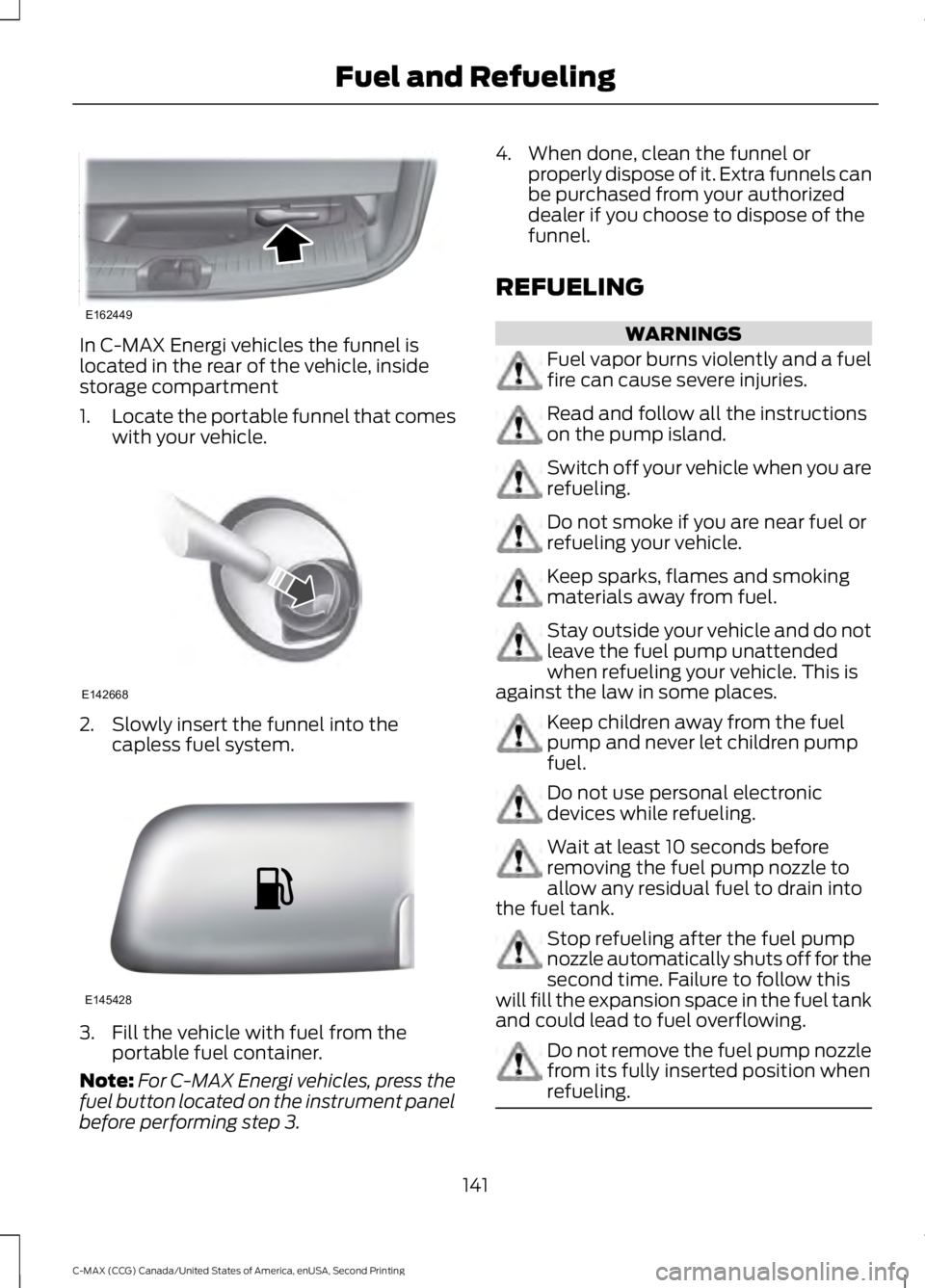
In C-MAX Energi vehicles the funnel is
located in the rear of the vehicle, inside
storage compartment
1.
Locate the portable funnel that comes
with your vehicle. 2. Slowly insert the funnel into the
capless fuel system. 3. Fill the vehicle with fuel from the
portable fuel container.
Note: For C-MAX Energi vehicles, press the
fuel button located on the instrument panel
before performing step 3. 4. When done, clean the funnel or
properly dispose of it. Extra funnels can
be purchased from your authorized
dealer if you choose to dispose of the
funnel.
REFUELING WARNINGS
Fuel vapor burns violently and a fuel
fire can cause severe injuries.
Read and follow all the instructions
on the pump island.
Switch off your vehicle when you are
refueling.
Do not smoke if you are near fuel or
refueling your vehicle.
Keep sparks, flames and smoking
materials away from fuel.
Stay outside your vehicle and do not
leave the fuel pump unattended
when refueling your vehicle. This is
against the law in some places. Keep children away from the fuel
pump and never let children pump
fuel.
Do not use personal electronic
devices while refueling.
Wait at least 10 seconds before
removing the fuel pump nozzle to
allow any residual fuel to drain into
the fuel tank. Stop refueling after the fuel pump
nozzle automatically shuts off for the
second time. Failure to follow this
will fill the expansion space in the fuel tank
and could lead to fuel overflowing. Do not remove the fuel pump nozzle
from its fully inserted position when
refueling.
141
C-MAX (CCG) Canada/United States of America, enUSA, Second Printing Fuel and RefuelingE162449 E142668 E145428
Page 147 of 469
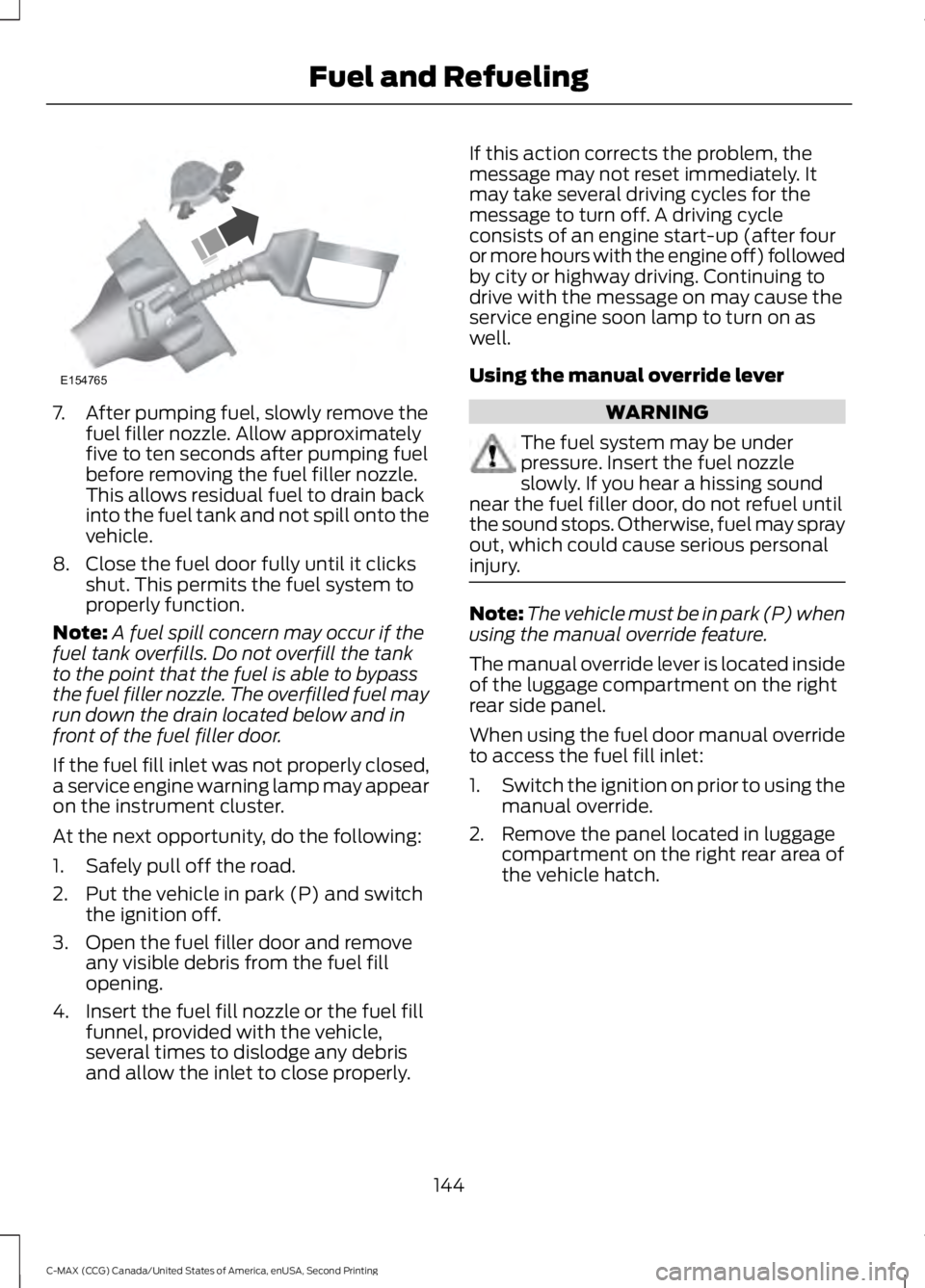
7. After pumping fuel, slowly remove the
fuel filler nozzle. Allow approximately
five to ten seconds after pumping fuel
before removing the fuel filler nozzle.
This allows residual fuel to drain back
into the fuel tank and not spill onto the
vehicle.
8. Close the fuel door fully until it clicks shut. This permits the fuel system to
properly function.
Note: A fuel spill concern may occur if the
fuel tank overfills. Do not overfill the tank
to the point that the fuel is able to bypass
the fuel filler nozzle. The overfilled fuel may
run down the drain located below and in
front of the fuel filler door.
If the fuel fill inlet was not properly closed,
a service engine warning lamp may appear
on the instrument cluster.
At the next opportunity, do the following:
1. Safely pull off the road.
2. Put the vehicle in park (P) and switch the ignition off.
3. Open the fuel filler door and remove any visible debris from the fuel fill
opening.
4. Insert the fuel fill nozzle or the fuel fill funnel, provided with the vehicle,
several times to dislodge any debris
and allow the inlet to close properly. If this action corrects the problem, the
message may not reset immediately. It
may take several driving cycles for the
message to turn off. A driving cycle
consists of an engine start-up (after four
or more hours with the engine off) followed
by city or highway driving. Continuing to
drive with the message on may cause the
service engine soon lamp to turn on as
well.
Using the manual override lever
WARNING
The fuel system may be under
pressure. Insert the fuel nozzle
slowly. If you hear a hissing sound
near the fuel filler door, do not refuel until
the sound stops. Otherwise, fuel may spray
out, which could cause serious personal
injury. Note:
The vehicle must be in park (P) when
using the manual override feature.
The manual override lever is located inside
of the luggage compartment on the right
rear side panel.
When using the fuel door manual override
to access the fuel fill inlet:
1. Switch the ignition on prior to using the
manual override.
2. Remove the panel located in luggage compartment on the right rear area of
the vehicle hatch.
144
C-MAX (CCG) Canada/United States of America, enUSA, Second Printing Fuel and RefuelingE154765
Page 161 of 469
•
Provides additional grade braking with
a combination of engine motoring and
high-voltage battery charging to help
maintain vehicle speed when
descending a grade.
• As your vehicle determines the amount
of engine motoring and high-voltage
battery charging, you may notice the
engine speed increasing and
decreasing to help maintain your
vehicle speed when descending a
grade.
• The grade assist lamp in the instrument
cluster is illuminated. The grade assist lamp will
appear in the instrument cluster
when grade assist is turned on.
Press the transmission control switch
again to return to normal drive (D).
Brake-Shift Interlock WARNINGS
Do not drive your vehicle until you
verify that the brake lamps are
working.
When doing this procedure, you will
be taking your vehicle out of park
which means your vehicle can roll
freely. To avoid unwanted vehicle
movement, always fully set the parking
brake prior to doing this procedure. Use
wheel chocks if appropriate. WARNINGS
If the parking brake is fully released,
but the brake warning lamp remains
illuminated, the brakes may not be
working properly. See your authorized
dealer. Note:
See your authorized dealer as soon
as possible if this procedure is used.
Note: For some markets this feature will be
disabled.
Use the brake shift interlock lever to move
the gearshift lever from the park position
in the event of an electrical malfunction or
if your vehicle has a dead battery.
Apply the parking brake and turn the
ignition off before performing this
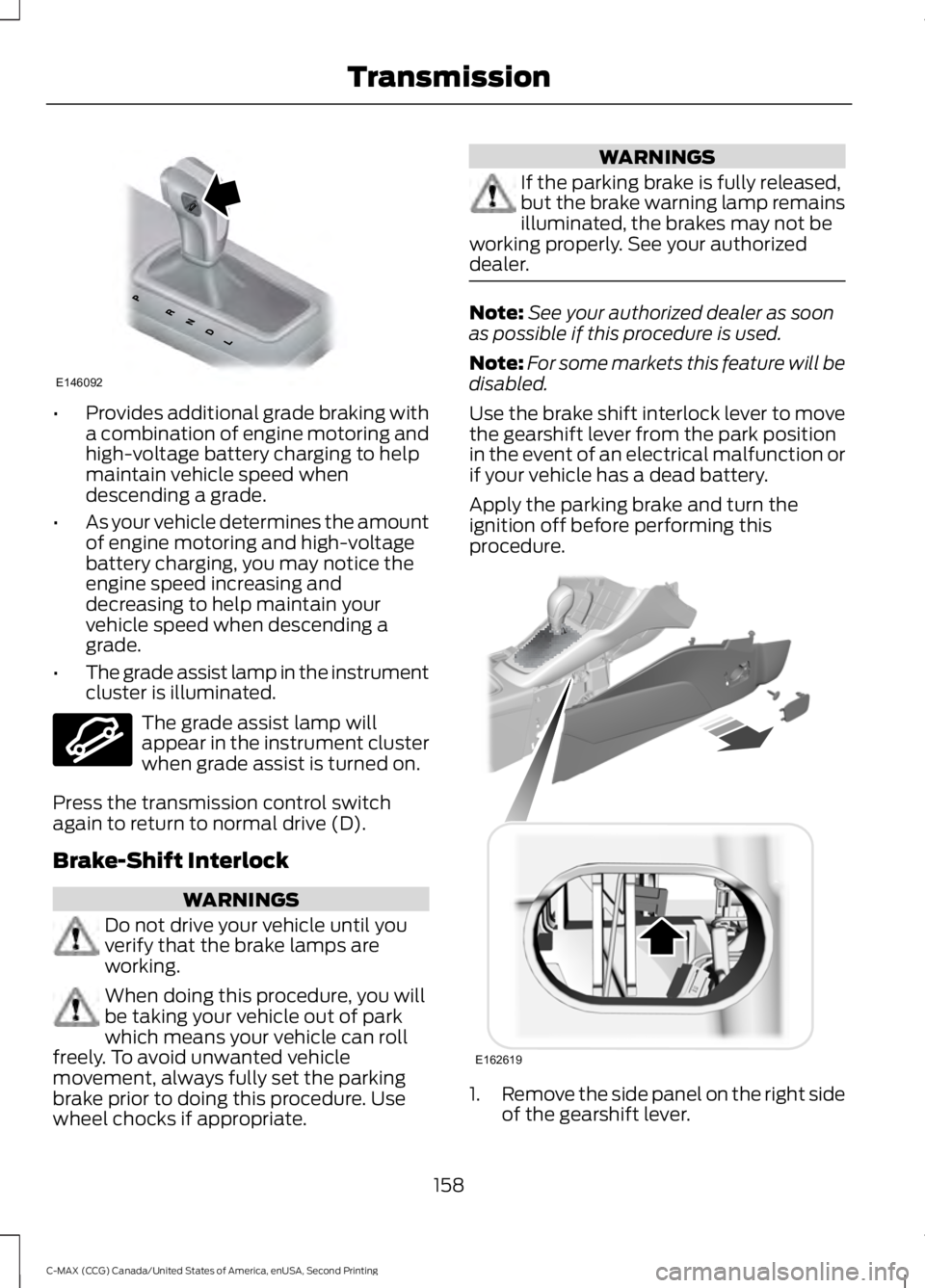
procedure. 1.
Remove the side panel on the right side
of the gearshift lever.
158
C-MAX (CCG) Canada/United States of America, enUSA, Second Printing TransmissionE146092 E144523 E162619
Page 166 of 469
PRINCIPLE OF OPERATION
The traction control system helps avoid
drive wheel spin and loss of traction.
If your vehicle begins to slide, the system
applies the brakes to individual wheels
and, when needed, reduces engine power
at the same time. If the wheels spin when
accelerating on slippery or loose surfaces,
the system reduces engine power in order
to increase traction.
USING TRACTION CONTROL
In certain situations for example, stuck in
snow or mud, turning the traction control
off may be beneficial as this allows the
wheels to spin with full engine power.
Depending on the type of system you have
on your vehicle, you can either turn the
system off using the information display
or by pressing the button.
Switching the System Off Using
the Information Display Controls
(If Equipped)
Your vehicle comes with this feature
already enabled. If required, you can switch
this feature off using the information
display controls. See General
Information (page 91).
Switching the System Off Using a
Switch
(If Equipped)
The button is located in the instrument
panel.
Press the button. You will see a message
in conjunction with an illuminated icon in
the display. Press the button again to
return the system to normal mode.
When you switch the traction control
system off, stability control remains fully
active. System Indicator Lights and
Messages WARNING
If a failure has been detected within
the AdvanceTrac system, the
stability control light will illuminate
steadily. Verify that the AdvanceTrac
system was not manually disabled through
the information display. If the stability
control light still illuminates steadily, have
the system serviced by an authorized
dealer immediately. Operating your vehicle
with AdvanceTrac disabled could lead to
an increased risk of loss of vehicle control,
vehicle rollover, personal injury and death. The stability control light
temporarily illuminates on
engine start-up and flashes
when a driving condition activates the
stability system. The stability control off light
temporarily illuminates on
engine start-up and stays on
when you turn the traction control system
off.
When you turn the traction control system
off or on, a message appears in the
information display showing system status.
163
C-MAX (CCG) Canada/United States of America, enUSA, Second Printing Traction ControlE138639
Page 195 of 469
Canadian roadside coverage and benefits
may differ from the U.S. coverage. If you
require more information, please refer to
the coverage section of your warranty
guide, call us in Canada at
1-800-665-2006, or visit our website at
www.ford.ca.
Sykes Assistance Services Corporation
administers the Roadside Assistance
program. You must receive covered
services in Canada or the continental
United States. Coverage extends to
vehicles that use public, non-seasonal,
annually traveled roadways. Roadside
Assistance coverage does not extend to
vehicles involved in cross-country driving,
logging, autocross and any other form of
off-road use. Well maintained roads and
surfaces help ensure safe travel for the
supplier, and allow their representatives
to perform service as per the standard
operating procedures.
In Remote Locations
If our supplier cannot take your vehicle by
road to the nearest authorized dealership,
transportation by rail or water may be
necessary. The program covers a tow to
the dock or rail terminal and also to the
dealership at the end of the trip.
For rail or water transportation, however,
contact your authorized dealer to confirm
if you are eligible for additional coverage
before you authorize or pay for the service.
Call Ford Roadside Assistance at
1-800-665-2006 for additional
information.
HAZARD WARNING FLASHERS
Note:
If used when the vehicle is not
running, the battery will lose charge. There
may be insufficient power to restart your
vehicle. The hazard warning button is
located on the instrument panel.
Use it when your vehicle is
creating a safety hazard for other
motorists.
• Press the button to turn on the hazard
warning function, and the front and
rear direction indicators will flash.
• Press the button again to turn them
off.
FUEL SHUTOFF WARNING
Failure to inspect and, if necessary,
repair fuel leaks after a collision may
increase the risk of fire and serious
injury. Ford Motor Company recommends
that the fuel system be inspected by an
authorized dealer after any collision. In the event of a moderate to severe
collision, this vehicle has a fuel pump
shut-off feature that stops the flow of fuel
to the engine. Not every impact will cause
a shut-off.
Should your vehicle shut off after a
collision, you may restart your vehicle.
For vehicles equipped with a key system:
1. Switch off the ignition.
2. Switch on the ignition.
3. Check the information display for the
Ready to Drive light as the gasoline
engine may not start, but the electric
motor may be running. If you do not see
the Ready to Drive light, repeat Steps
1 and 2 up to two more times.
For vehicles equipped with a push button
start system:
1. Press the push button start to switch off the ignition.
192
C-MAX (CCG) Canada/United States of America, enUSA, Second Printing Roadside Emergencies
Page 216 of 469
GENERAL INFORMATION
Have your vehicle serviced regularly to help
maintain its roadworthiness and resale
value. There is a large network of
authorized dealers that are there to help
you with their professional servicing
expertise. We believe that their specially
trained technicians are best qualified to
service your vehicle properly and expertly.
They are supported by a wide range of
highly specialized tools developed
specifically for servicing your vehicle.
To help you service your vehicle, we
provide scheduled maintenance
information which makes tracking routine
service easy. See Scheduled
Maintenance (page 420).
If your vehicle requires professional service,
an authorized dealer can provide the
necessary parts and service. Check your
warranty information to find out which
parts and services are covered.
Use only recommended fuels, lubricants,
fluids and service parts conforming to
specifications. Motorcraft® parts are
designed and built to provide the best
performance in your vehicle.
Precautions
• Do not work on a hot engine.
• Make sure that nothing gets caught in
moving parts.
• Do not work on a vehicle with the
engine running in an enclosed space,
unless you are sure you have enough
ventilation.
• Keep all open flames and other burning
material (such as cigarettes) away
from the battery and all fuel related
parts. Working with the Engine Off
1.
Set the parking brake and shift to park
(P).
2. Switch off the engine.
3. Block the wheels.
Working with the Engine On WARNING
To reduce the risk of vehicle damage
and/or personal burn injuries, do not
start your engine with the air cleaner
removed and do not remove it while the
engine is running. 1.
Set the parking brake and shift to park
(P).
2. Block the wheels
OPENING AND CLOSING THE
HOOD
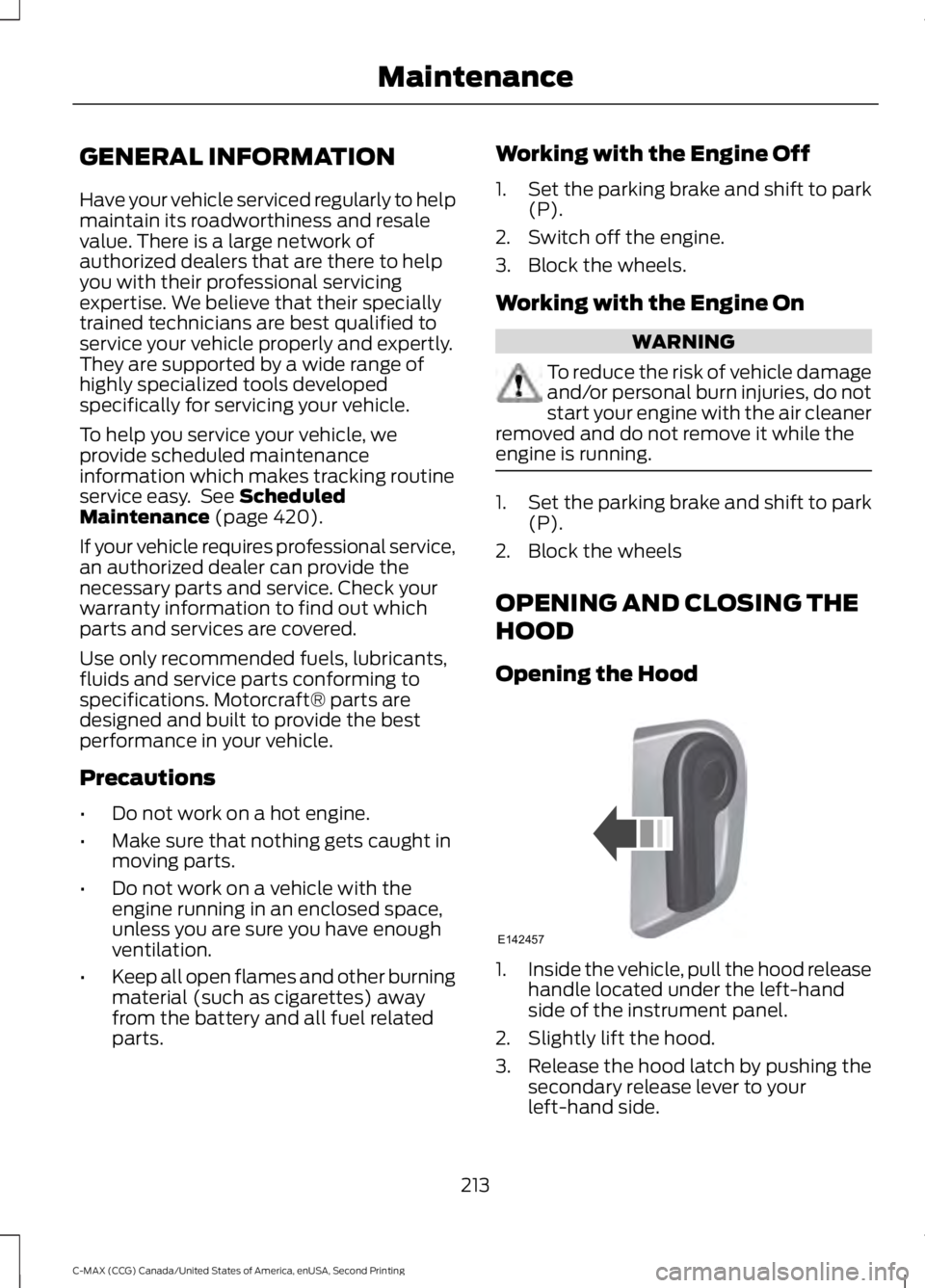
Opening the Hood 1.
Inside the vehicle, pull the hood release
handle located under the left-hand
side of the instrument panel.
2. Slightly lift the hood.
3. Release the hood latch by pushing the secondary release lever to your
left-hand side.
213
C-MAX (CCG) Canada/United States of America, enUSA, Second Printing MaintenanceE142457
Page 235 of 469
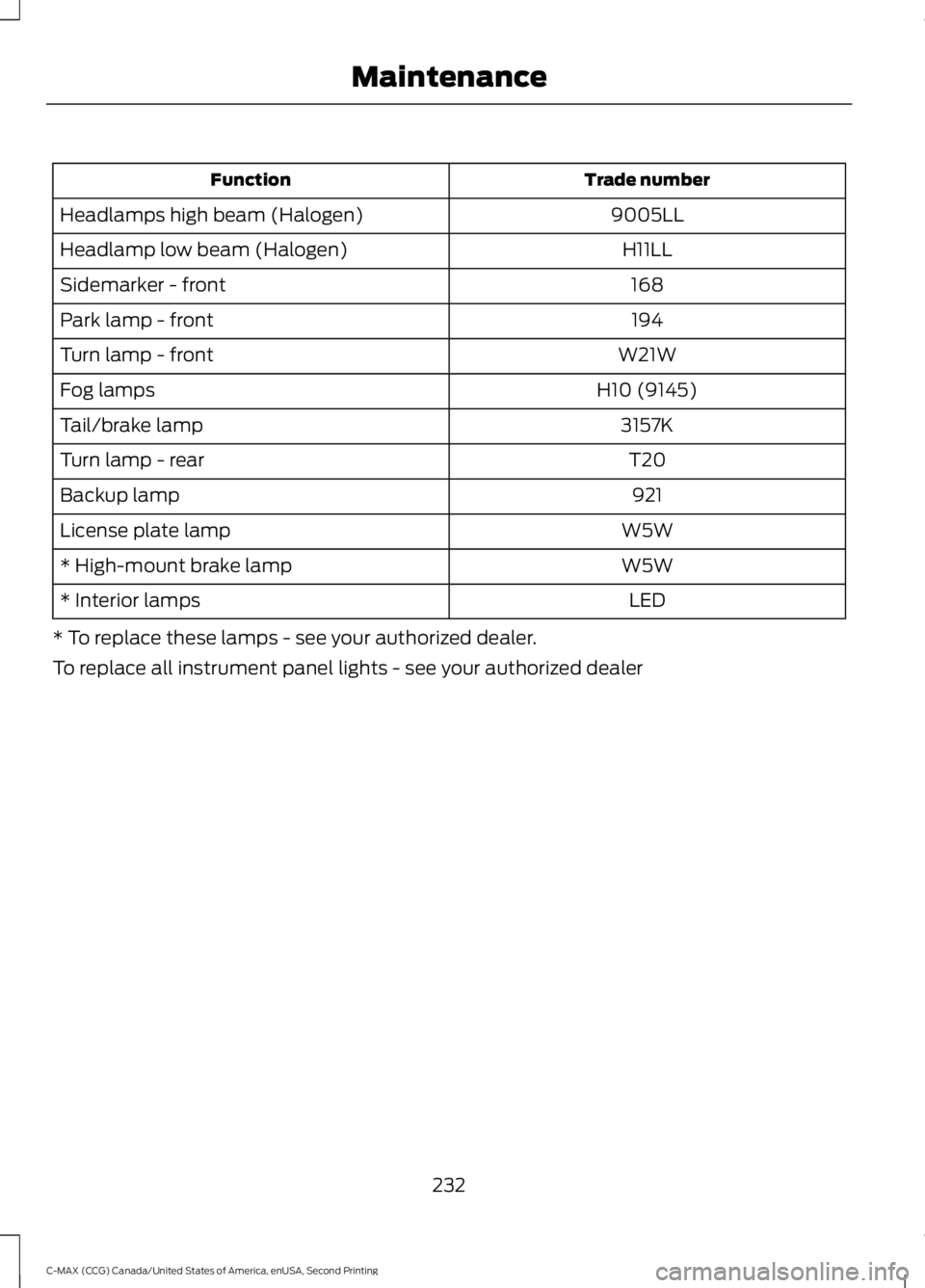
Trade number
Function
9005LL
Headlamps high beam (Halogen)
H11LL
Headlamp low beam (Halogen)
168
Sidemarker - front
194
Park lamp - front
W21W
Turn lamp - front
H10 (9145)
Fog lamps
3157K
Tail/brake lamp
T20
Turn lamp - rear
921
Backup lamp
W5W
License plate lamp
W5W
* High-mount brake lamp
LED
* Interior lamps
* To replace these lamps - see your authorized dealer.
To replace all instrument panel lights - see your authorized dealer
232
C-MAX (CCG) Canada/United States of America, enUSA, Second Printing Maintenance