instrument cluster FORD C MAX 2015 Owner's Manual
[x] Cancel search | Manufacturer: FORD, Model Year: 2015, Model line: C MAX, Model: FORD C MAX 2015Pages: 469, PDF Size: 6.16 MB
Page 190 of 469
•
Maximum speed is 35 mph (56 km/h).
• Maximum distance is 50 miles (80
kilometers).
Recreational Towing
Note: Put your climate control system in
recirculated air mode to prevent exhaust
fumes from entering the vehicle. See
Climate Control (page 107).
Follow these guidelines if you have a need
for recreational (RV) towing. An example
of recreational towing would be towing
your vehicle behind a motorhome. We
designed these guidelines to prevent
damage to your transmission.
You can tow your vehicle with all four
wheels on the ground or with the front
wheels off the ground by using a tow dolly.
If you are using a tow dolly follow the
instructions specified by the equipment
provider.
If you tow your vehicle with all four wheels
on the ground:
• Tow only in the forward direction.
• Release the parking brake.
Vehicles with Push Button Start
1. Start the vehicle by pressing the brake pedal, and then pressing the ENGINE
START/STOP button until the vehicle
starts.
2. Press the brake pedal and shift the transmission into position
N.
3. Turn the vehicle off by pressing the ENGINE START/STOP button once.
(Trip Summary appears in the left
instrument cluster screen when the
vehicle is off.)
Note: You can remove the key fob from the
vehicle while towing. Vehicles with Ignition Key
1. Start the vehicle by pressing the brake
pedal, and then turning the ignition key
until the vehicle starts.
2. Press the brake pedal and shift the transmission into position
N.
3. Turn the vehicle off by turning the ignition key past the accessory position.
The key position is between the
accessory and off positions. See
Ignition Switch
(page 127). (Trip
Summary appears in the left
instrument cluster screen when the
vehicle is off.)
Note: If your vehicle is equipped with an
ignition key, you cannot remove the key from
the ignition cylinder when the transmission
is in position
N and the vehicle is off.
All Vehicles
• Do not exceed 70 mph (113 km/h).
• Place the transmission in position
P,
start the vehicle, and allow the engine
to run for one minute at the beginning
of each day (you may need to press the
accelerator pedal in order to start the
engine). After allowing the vehicle to
run, place the transmission back into
position
N and the ignition in the off
position.
Note: A
SHIFT TO PARK or
TRANSMISSION NOT IN PARK message
may appear in the information display when
the transmission is in position
N and the
ignition is in the off position.
187
C-MAX (CCG) Canada/United States of America, enUSA, Second Printing Towing
Page 198 of 469
2. Start the disabled vehicle. Check the
instrument cluster for the Ready to
Drive light as the gasoline engine may
not start, but the electric motor may
be running.
3. Once you start the disabled vehicle, run
both vehicles for an additional three
minutes before disconnecting the
jumper cables.
Removing the Jumper Cables
Remove the jumper cables in the reverse
order that they were connected.
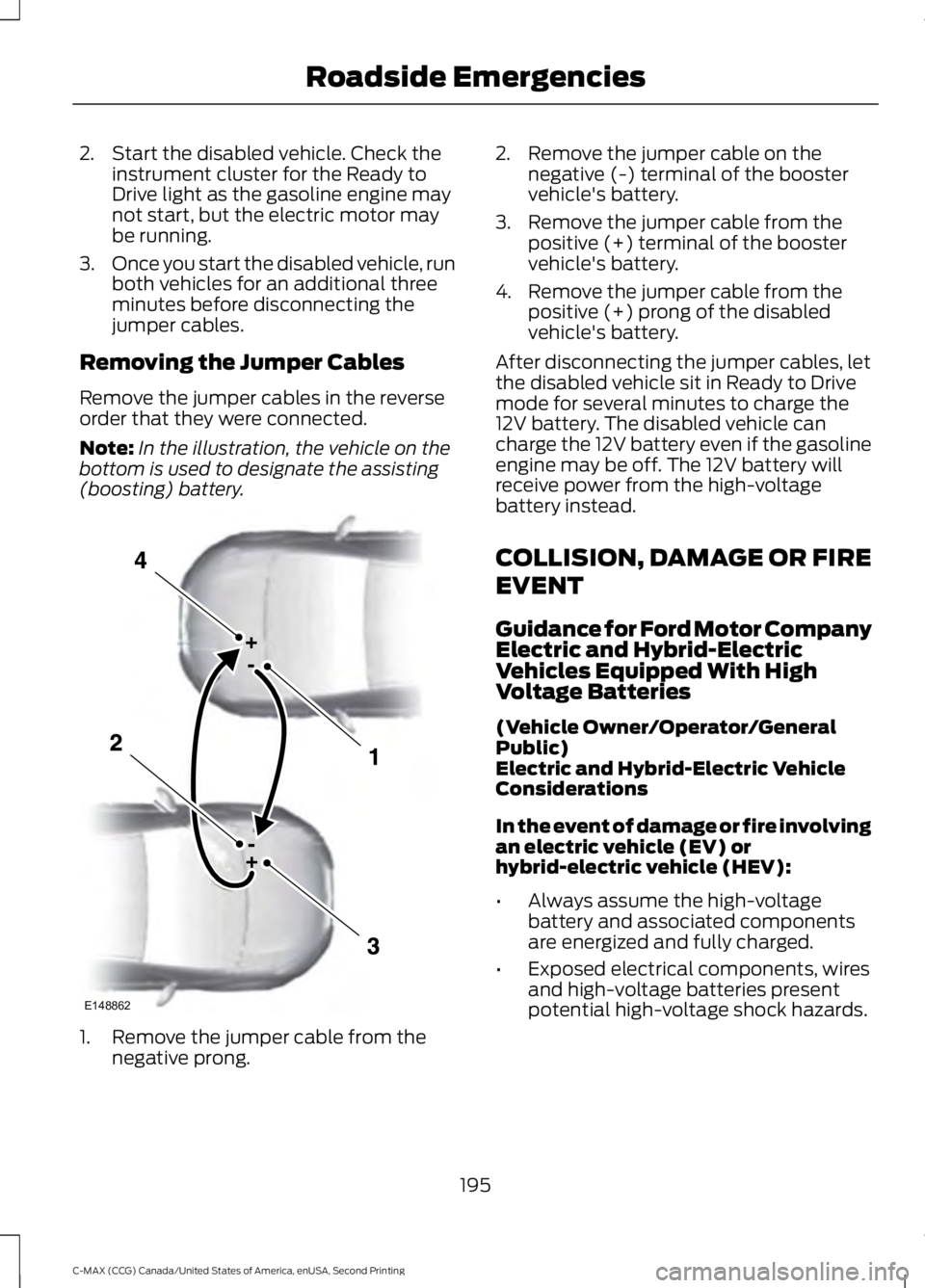
Note: In the illustration, the vehicle on the
bottom is used to designate the assisting
(boosting) battery. 1. Remove the jumper cable from the
negative prong. 2. Remove the jumper cable on the
negative (-) terminal of the booster
vehicle's battery.
3. Remove the jumper cable from the positive (+) terminal of the booster
vehicle's battery.
4. Remove the jumper cable from the positive (+) prong of the disabled
vehicle's battery.
After disconnecting the jumper cables, let
the disabled vehicle sit in Ready to Drive
mode for several minutes to charge the
12V battery. The disabled vehicle can
charge the 12V battery even if the gasoline
engine may be off. The 12V battery will
receive power from the high-voltage
battery instead.
COLLISION, DAMAGE OR FIRE
EVENT
Guidance for Ford Motor Company
Electric and Hybrid-Electric
Vehicles Equipped With High
Voltage Batteries
(Vehicle Owner/Operator/General
Public)
Electric and Hybrid-Electric Vehicle
Considerations
In the event of damage or fire involving
an electric vehicle (EV) or
hybrid-electric vehicle (HEV):
• Always assume the high-voltage
battery and associated components
are energized and fully charged.
• Exposed electrical components, wires
and high-voltage batteries present
potential high-voltage shock hazards.
195
C-MAX (CCG) Canada/United States of America, enUSA, Second Printing Roadside EmergenciesE148862
Page 211 of 469
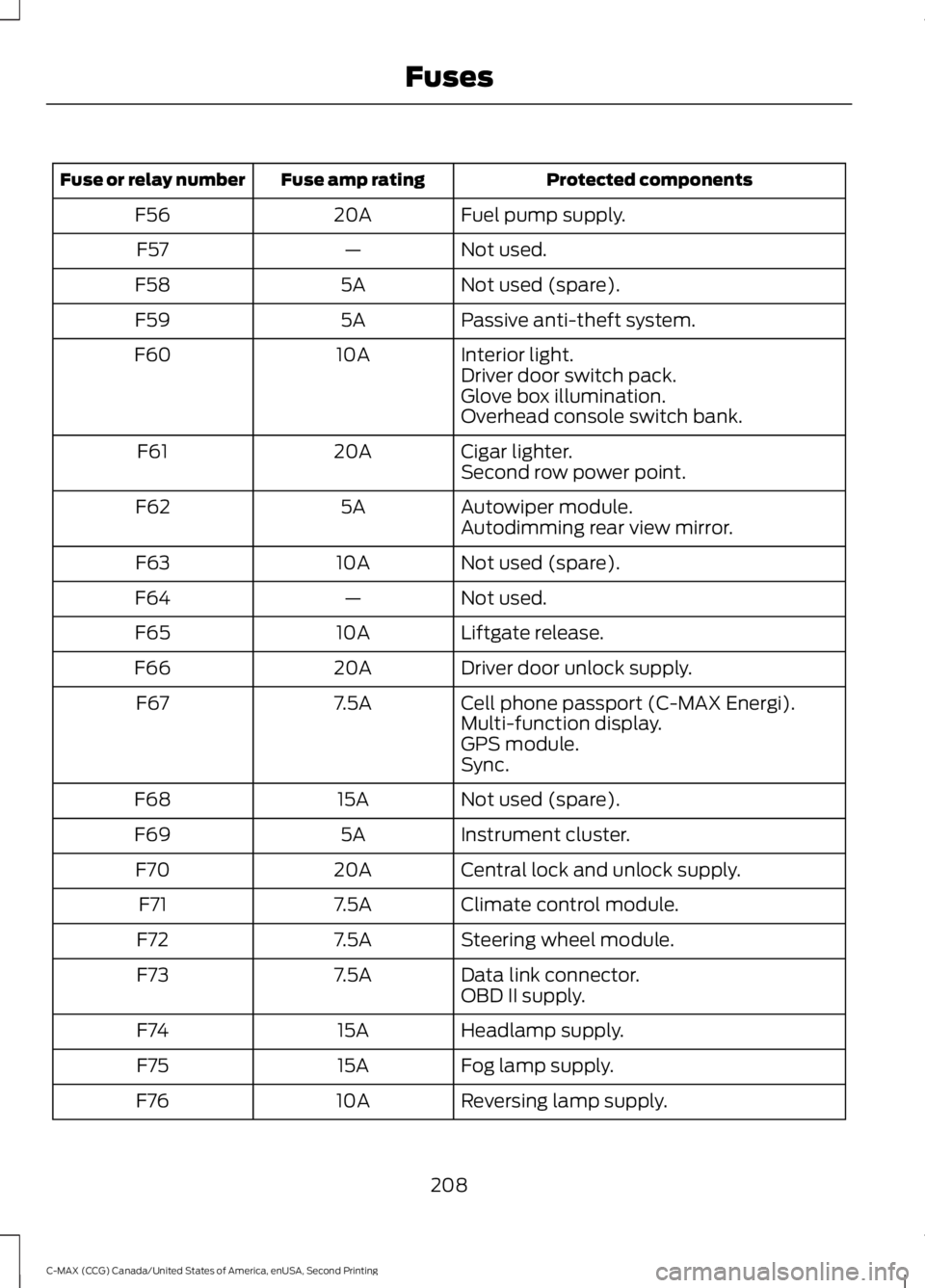
Protected components
Fuse amp rating
Fuse or relay number
Fuel pump supply.
20A
F56
Not used.
—
F57
Not used (spare).
5A
F58
Passive anti-theft system.
5A
F59
Interior light.
10A
F60
Driver door switch pack.
Glove box illumination.
Overhead console switch bank.
Cigar lighter.
20A
F61
Second row power point.
Autowiper module.
5A
F62
Autodimming rear view mirror.
Not used (spare).
10A
F63
Not used.
—
F64
Liftgate release.
10A
F65
Driver door unlock supply.
20A
F66
Cell phone passport (C-MAX Energi).
7.5A
F67
Multi-function display.
GPS module.
Sync.
Not used (spare).
15A
F68
Instrument cluster.
5A
F69
Central lock and unlock supply.
20A
F70
Climate control module.
7.5A
F71
Steering wheel module.
7.5A
F72
Data link connector.
7.5A
F73
OBD II supply.
Headlamp supply.
15A
F74
Fog lamp supply.
15A
F75
Reversing lamp supply.
10A
F76
208
C-MAX (CCG) Canada/United States of America, enUSA, Second Printing Fuses
Page 242 of 469
CLEANING THE INSTRUMENT
PANEL AND INSTRUMENT
CLUSTER LENS
WARNING
Do not use chemical solvents or
strong detergents when cleaning the
steering wheel or instrument panel
to avoid contamination of the airbag
system. Note:
Follow the same procedure as
cleaning leather seats for cleaning leather
instrument panels and leather interior trim
surfaces. See Cleaning Leather Seats
(page 239).
Clean the instrument panel and cluster
lens with a clean, damp and soft cloth,
then use a clean, dry and soft cloth to dry
these areas.
• Avoid cleaners or polishes that increase
the gloss of the upper portion of the
instrument panel. The dull finish in this
area helps protect you from
undesirable windshield reflection.
• Do not use any household cleaning
products or glass cleaners as these
may damage the finish of the
instrument panel, interior trim and
cluster lens.
• Wash or wipe your hands clean if you
have been in contact with certain
products such as insect repellent and
suntan lotion to avoid possible damage
to the interior painted surfaces.
• Do not allow air fresheners and hand
sanitizers to spill onto interior surfaces.
If a spill occurs, wipe off immediately.
Your warranty may not cover these
damages.
If a staining liquid like coffee or juice has
been spilled on the instrument panel or on
interior trim surfaces: 1. Wipe up spilled liquid using a clean,
soft cloth as quickly as possible.
2. Use Motorcraft Premium Leather and Vinyl Cleaner or a commercially
available leather cleaning product for
automotive interiors. Test any cleaner
or stain remover on an inconspicuous
area.
3. Alternatively, wipe the surface with a clean, soft cloth and a mild soap and
water solution. Dry the area with a
clean, soft cloth.
4. If necessary, apply more soap and water solution or cleaning product to
a clean, soft cloth and press it onto the
soiled area. Allow this to set at room
temperature for 30 minutes.
5. Remove the soaked cloth, then with a clean, damp cloth, use a rubbing
motion for 60 seconds on the soiled
area.
6. Dry the area with a clean, soft cloth.
CLEANING LEATHER SEATS
(If
Equipped)
Note: Follow the same procedure as
cleaning leather seats for cleaning leather
instrument panels and leather interior trim
surfaces.
For routine cleaning, wipe the surface with
a soft, damp cloth and a mild soap and
water solution. Dry the area with a clean,
soft cloth.
For cleaning and removing stains such as
dye transfer, use Motorcraft Premium
Leather and Vinyl Cleaner or a
commercially available leather cleaning
product for automotive interiors.
Note: Test any cleaner or stain remover on
an inconspicuous area.
239
C-MAX (CCG) Canada/United States of America, enUSA, Second Printing Vehicle Care
Page 344 of 469
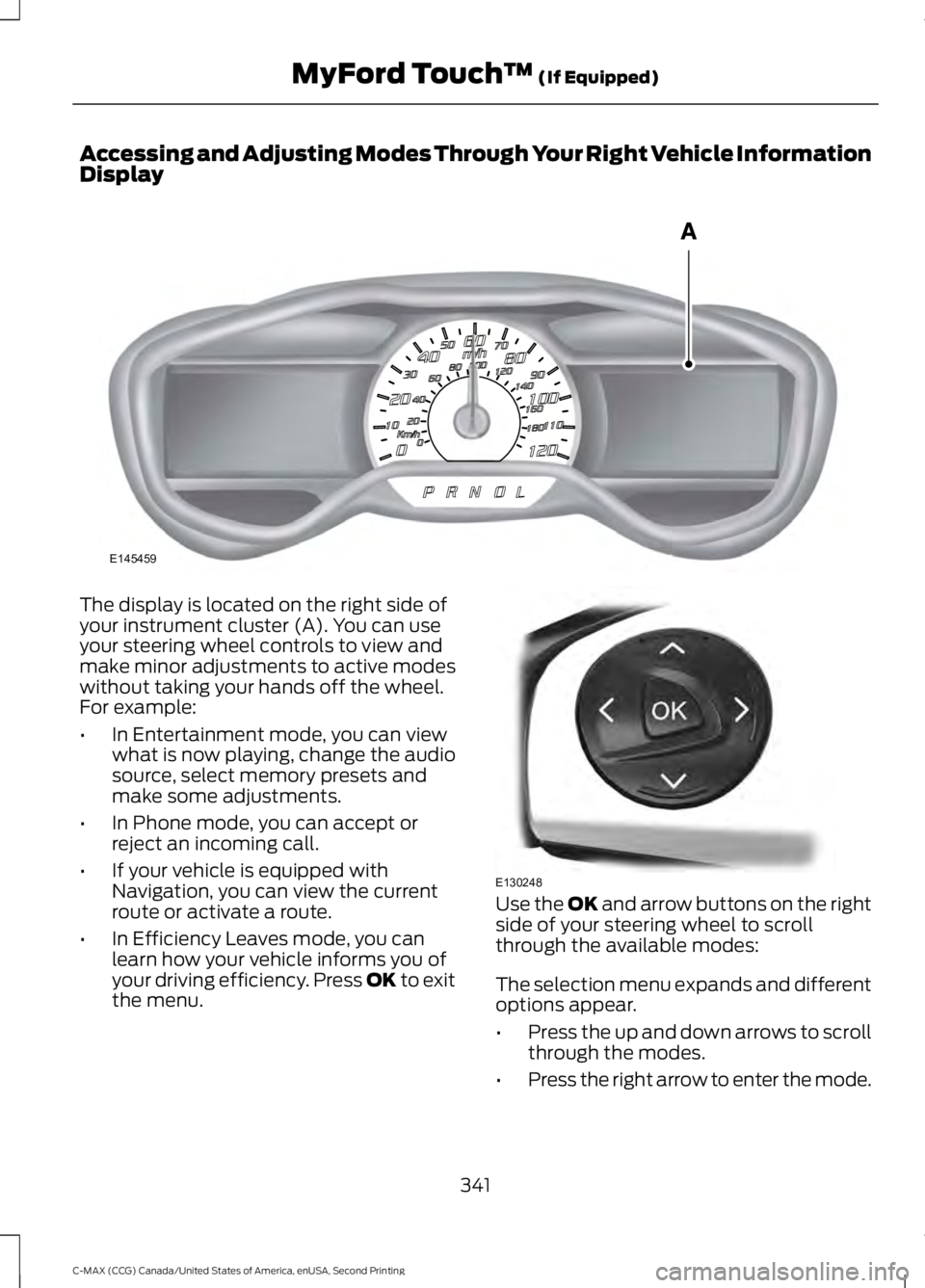
Accessing and Adjusting Modes Through Your Right Vehicle Information
Display
The display is located on the right side of
your instrument cluster (A). You can use
your steering wheel controls to view and
make minor adjustments to active modes
without taking your hands off the wheel.
For example:
•
In Entertainment mode, you can view
what is now playing, change the audio
source, select memory presets and
make some adjustments.
• In Phone mode, you can accept or
reject an incoming call.
• If your vehicle is equipped with
Navigation, you can view the current
route or activate a route.
• In Efficiency Leaves mode, you can
learn how your vehicle informs you of
your driving efficiency. Press OK to exit
the menu. Use the OK and arrow buttons on the right
side of your steering wheel to scroll
through the available modes:
The selection menu expands and different
options appear.
• Press the up and down arrows to scroll
through the modes.
• Press the right arrow to enter the mode.
341
C-MAX (CCG) Canada/United States of America, enUSA, Second Printing MyFord Touch
™
(If Equipped)E145459 E130248
Page 461 of 469
Center Console..............................................126
Changing a Bulb...........................................227 Lamp Assembly Condensation..................... 227
Replacing Fog, Park and Direction Indicator Bulbs.................................................................. 229
Replacing Headlamp Bulbs............................ 227
Replacing License Plate Lamp Bulb............231
Replacing Reverse Lamp and Tail Lamp Bulbs................................................................. 230
Replacing Tail, Brake and Direction Indicator Bulbs............................................... 229
Replacing the Center High Mounted Brake Lamp Bulbs...................................................... 231
Changing a Fuse
............................................212
Fuses........................................................................\
212
Changing the 12V Battery.........................223
Changing the Engine Air Filter.................233 Identifying Air Filter Element
Components................................................... 233
Installing the Engine Air Filter Element............................................................ 234
Removing the Engine Air Filter Element............................................................ 234
Changing the Wiper Blades.....................224 Changing the Front Wiper Blades...............225
Changing the Rear Window Wiper
Blade
.................................................................. 225
Setting the Front Wipers in the Service Position............................................................. 225
Charging the High Voltage Battery.........151 Charge Port........................................................... 154
Charging................................................................. 154
Charging Equipment........................................... 151
Disconnecting the Charging Coupler..........156
Locking the Charging Coupler........................ 155
Waiting to Charge............................................... 155
Checking MyKey System Status...............53
Checking the Wiper Blades......................224
Child Restraint and Safety Belt Maintenance.................................................33
Child Safety
.......................................................15
General Information............................................. 15
Child Safety Locks
..........................................25
Left-Hand Side...................................................... 26
Right-Hand Side................................................... 26
Child Seat Positioning..................................24
Cleaning Leather Seats.............................239
Cleaning Products
.......................................236 Cleaning the Alloy Wheels
.......................240
Cleaning the Engine....................................237
Cleaning the Exterior..................................236 Exterior Chrome Parts...................................... 236
Exterior Plastic Parts......................................... 237
Stripes or Graphics............................................ 237
Underbody............................................................ 237
Cleaning the Instrument Panel and Instrument Cluster Lens.........................239
Cleaning the Interior...................................238
Cleaning the Windows and Wiper Blades...........................................................238
Clearing All MyKeys
........................................51
Climate............................................................397
Climate Control Voice Commands.............399
Climate Control
.............................................107
Collision, Damage or Fire Event..............195
Guidance for Ford Motor Company Electric
and Hybrid-Electric Vehicles Equipped
With High Voltage Batteries...................... 195
Coolant Check See: Engine Coolant Check............................. 218
Crash Sensors and Airbag Indicator........42
Creating a MyKey.............................................51 Programming/Changing Configurable
Settings................................................................ 51
Cruise Control.................................................68 Principle of Operation....................................... 175
Cruise control See: Using Cruise Control................................. 175
Customer Assistance
.................................198
D
Data Recording
..................................................9
Event Data Recording........................................... 9
Service Data Recording........................................ 9
Daytime Running Lamps
.............................75
Type 1 - Conventional
(Non-Configurable)........................................ 75
Type 2 - Configurable.......................................... 75
Digital Radio
..................................................290
HD Radio Reception and Station
Troubleshooting............................................. 291
Direction Indicators
........................................76
458
C-MAX (CCG) Canada/United States of America, enUSA, Second Printing Index
Page 464 of 469
Information....................................................388
911 Assist............................................................... 394
Alerts...................................................................... 394
Calendar............................................................... 394
Sirius Travel Link................................................ 392
SYNC Services (If Equipped, United States Only)................................................................. 389
Vehicle Health Report (If Equipped, United States Only)................................................... 396
Where Am I?........................................................ 397
Information Messages...............................100
AdvanceTrac®.................................................... 100
Alarm...................................................................... 100
Battery and Charging System (High Voltage)............................................................. 101
Doors........................................................................\
101
Fuel........................................................................\
.. 102
Hill Start Assist.................................................... 102
Keys and Intelligent Access............................ 102
Maintenance........................................................ 103
MyKey..................................................................... 104
Park Aid.................................................................. 105
Park Brake............................................................. 105
Power Steering.................................................... 105
Remote Start....................................................... 105
Tire Pressure Monitoring System.................106
Transmission ........................................................ 106
Installing Child Seats.....................................16 Child Seats............................................................... 16
Using Lap and Shoulder Belts.......................... 17
Using Lower Anchors and Tethers for CHildren (LATCH)............................................ 19
Using Tether Straps.............................................. 21
Instrument Cluster
........................................84
Instrument Lighting Dimmer......................74
Vehicles With Front Fog Lamps...................... 74
Vehicles Without Front Fog Lamps...............75
Interior Lamps
.................................................76
Front Interior Lamp.............................................. 76
Front Interior Lamp - With Panorama Roof....................................................................... 77
Rear Interior Lamp................................................ 77
Interior Mirror
...................................................82
Auto-Dimming Mirror.......................................... 82
Introduction.........................................................7 J
Jump Starting the Vehicle.........................193
Connecting the Jumper Cables..................... 193
Jump Starting...................................................... 194
Preparing Your Vehicle...................................... 193
Removing the Jumper Cables........................ 195
K
Keyless Starting
.............................................127
Ignition Modes..................................................... 128
Keys and Remote Controls.........................44
L
Lighting Control
...............................................73
Headlamp Flasher................................................ 73
High Beams............................................................. 73
Lighting...............................................................73
Load Carrying
.................................................178
Load Limit........................................................179
Vehicle Loading - with and without a
Trailer.................................................................. 179
Locking and Unlocking
.................................56
Activating Intelligent Access ........................... 57
Autolock.................................................................. 58
Battery Saver......................................................... 59
Illuminated Entry.................................................. 59
Illuminated Exit..................................................... 59
Mechanical Key..................................................... 57
Opening a Rear Door from Inside................... 57
Power Door Locks................................................ 56
Remote Control.................................................... 56
Smart Unlocks For Integrated Keyhead Transmitter........................................................ 58
Smart Unlocks For Intelligent Access Keys ........................................................................\
........ 58
Locks
...................................................................56
Luggage Covers.............................................178 Removing the Shade......................................... 178
M
Maintenance...................................................213 General Information........................................... 213
461
C-MAX (CCG) Canada/United States of America, enUSA, Second Printing Index