lights FORD C MAX 2015 Owner's Manual
[x] Cancel search | Manufacturer: FORD, Model Year: 2015, Model line: C MAX, Model: FORD C MAX 2015Pages: 469, PDF Size: 6.16 MB
Page 254 of 469
Preparation: Park the vehicle in a safe, level
and secure area, away from moving traffic.
Switch the hazard lights on. Apply the
parking brake and switch the engine off.
Inspect the flat tire for visible damage.
Sealant compound contains latex. Use
appropriate precautions to avoid any
allergic reactions.
Do not remove any foreign object that has
pierced the tire. If a puncture is located in
the tire sidewall, stop and call roadside
assistance.
1. Remove the valve cap from the tire
valve.
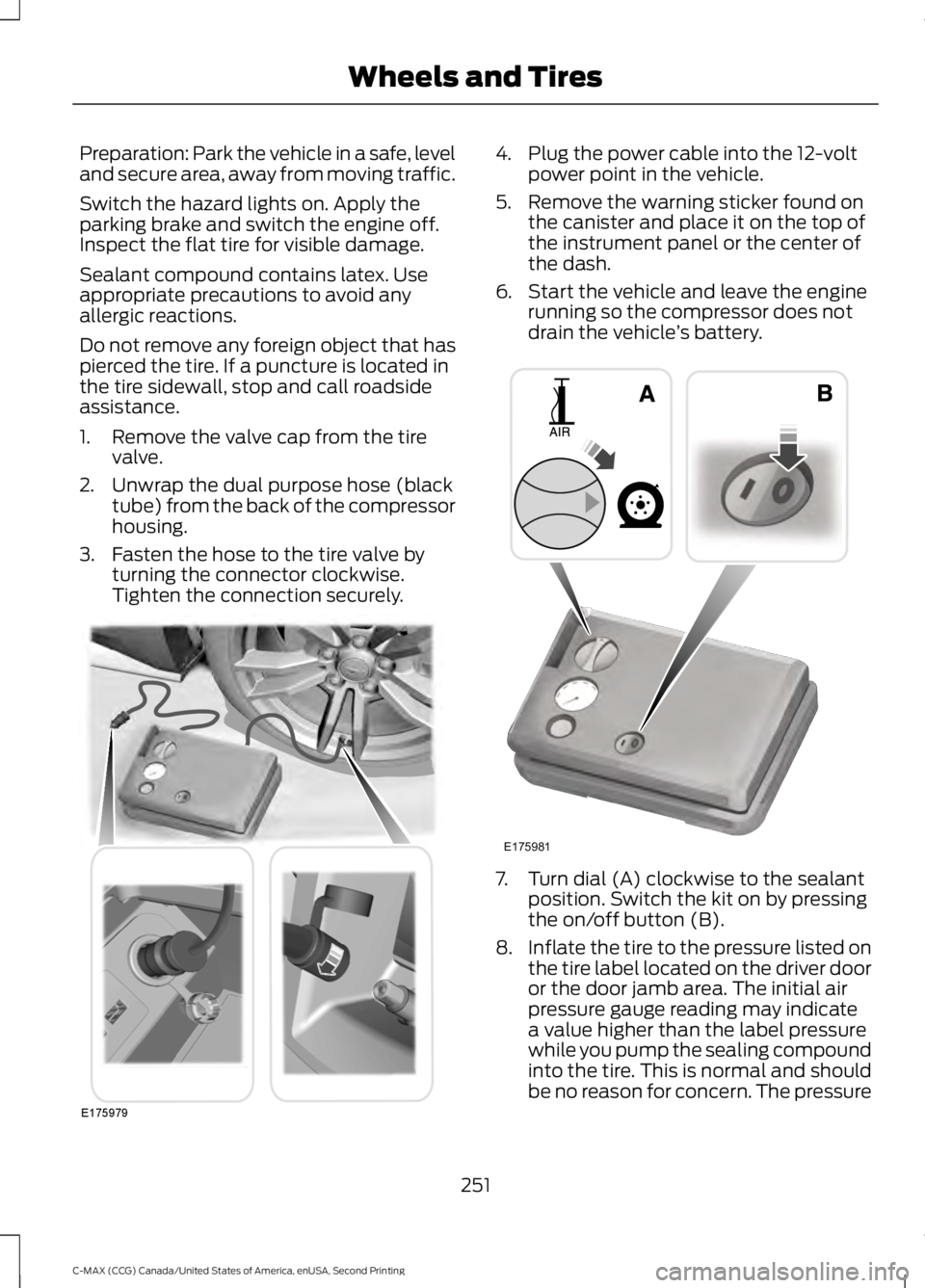
2. Unwrap the dual purpose hose (black tube) from the back of the compressor
housing.
3. Fasten the hose to the tire valve by turning the connector clockwise.
Tighten the connection securely. 4. Plug the power cable into the 12-volt
power point in the vehicle.
5. Remove the warning sticker found on the canister and place it on the top of
the instrument panel or the center of
the dash.
6. Start the vehicle and leave the engine running so the compressor does not
drain the vehicle ’s battery. 7. Turn dial (A) clockwise to the sealant
position. Switch the kit on by pressing
the on/off button (B).
8. Inflate the tire to the pressure listed on
the tire label located on the driver door
or the door jamb area. The initial air
pressure gauge reading may indicate
a value higher than the label pressure
while you pump the sealing compound
into the tire. This is normal and should
be no reason for concern. The pressure
251
C-MAX (CCG) Canada/United States of America, enUSA, Second Printing Wheels and TiresE175979 E175981
Page 384 of 469
The system also alerts you to any conflicts
by highlighting areas of the screen in
yellow. If your battery cannot have a full
charge by the scheduled drive time, the
system highlights your next GO Time and
Charge Complete time and a message
Charge at GO Time: under 100%
appears. This is normal; the vehicle is
informing you of the conflicting situation.
This notification only displays when the
gearshift selector lever is in position P.
Note: Charging occurs as soon as you plug
the vehicle in. The system limits cabin
conditioning to 15 minutes before your GO
Time.
To eliminate the conflict notification
immediately or to prevent a conflict in the
future, try the following:
• Change the present GO Time to occur
later.
• Plug the vehicle into a 240V charging
station instead of the 120V
convenience cord. Higher power
charging yields shorter charge times.
• Plug the vehicle in sooner.
Estimated Charge Time Limits
Battery
This shows you the battery's current
charge displayed as a percentage. A
reading of 100% means the battery has a
full charge. A reading of 0% indicates the
battery has no plug-in energy left.
To fully charge
240V
is the estimated minimum charging
time from the present high-voltage battery
level to full charge (100%). This represents
the shortest amount of time you should
expect the high-voltage battery to
recharge under ideal conditions. Ideal
conditions include a 240V charging station
and a minimum 30A service and
high-voltage battery at a moderate
temperature. Note:
This charging time is only an
estimate. It is normal for your actual charge
duration to be longer.
Note: Some charging stations use lower
voltage (208V), which result in longer
charge times.
120V
is the estimated maximum charging
time from the present high-voltage battery
level to full charge (100%). This represents
the longest amount of time you should
expect the high-voltage battery to
recharge under normal conditions. Normal
conditions include a 120V convenience
cord and 12A service.
Note: This charging time is only an
estimate. It is possible for your actual charge
duration to be longer. This occurs when the
AC line voltage is low and may indicate your
electrical source is not meeting certain
requirements. See
Charging the High
Voltage Battery (page 151).
Value Charge Profile and Mode
Value Charge Profile Name
This is the name of the presently detected
Value Charge Profile. The system detects
a customer defined value charge profile
when the vehicle is within approximately
300 feet (100 meters) of the GPS location
registered for the profile. If the vehicle is
close to more than one charge profile, it
chooses the closest. When the vehicle is
not at a defined profile, it uses the Default
Value
charge profile. The system normally
displays Default Profile while you are
driving because the vehicle is typically
between defined value charge profiles.
Edit
Touch this button to access your Value
Charge profiles settings screen (see Value
Charge Profiles
later in this section).
381
C-MAX (CCG) Canada/United States of America, enUSA, Second Printing MyFord Touch
™
(If Equipped)
Page 388 of 469
Power
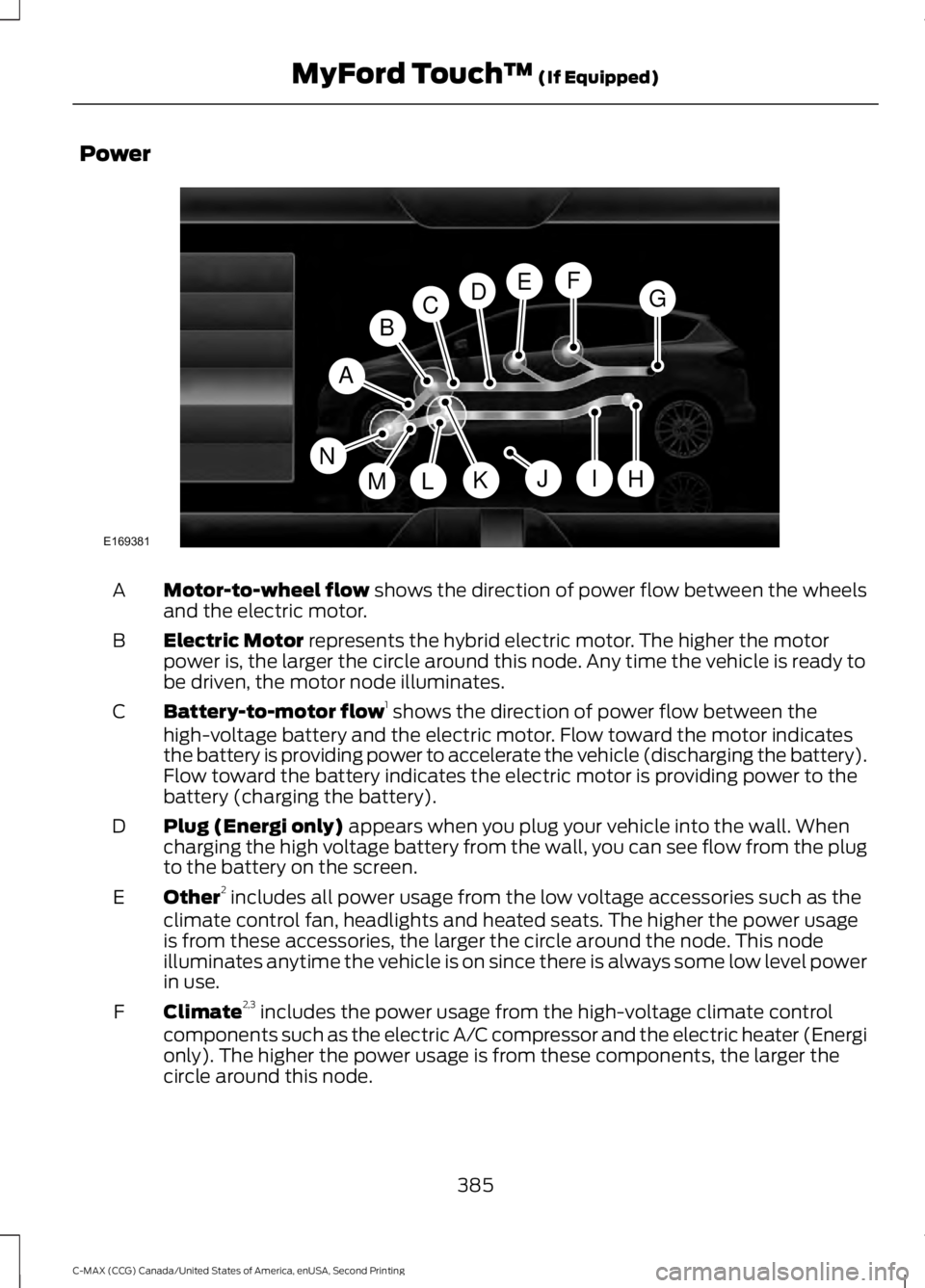
Motor-to-wheel flow shows the direction of power flow between the wheels
and the electric motor.
A
Electric Motor
represents the hybrid electric motor. The higher the motor
power is, the larger the circle around this node. Any time the vehicle is ready to
be driven, the motor node illuminates.
B
Battery-to-motor flow 1
shows the direction of power flow between the
high-voltage battery and the electric motor. Flow toward the motor indicates
the battery is providing power to accelerate the vehicle (discharging the battery).
Flow toward the battery indicates the electric motor is providing power to the
battery (charging the battery).
C
Plug (Energi only)
appears when you plug your vehicle into the wall. When
charging the high voltage battery from the wall, you can see flow from the plug
to the battery on the screen.
D
Other 2
includes all power usage from the low voltage accessories such as the
climate control fan, headlights and heated seats. The higher the power usage
is from these accessories, the larger the circle around the node. This node
illuminates anytime the vehicle is on since there is always some low level power
in use.
E
Climate 2,3
includes the power usage from the high-voltage climate control
components such as the electric A/C compressor and the electric heater (Energi
only). The higher the power usage is from these components, the larger the
circle around this node.
F
385
C-MAX (CCG) Canada/United States of America, enUSA, Second Printing MyFord Touch
™
(If Equipped)A
H
DGEF
BC
IKMLJ
E169381
N
Page 389 of 469
High voltage battery power represents your high-voltage battery. A circle
illuminates around the node when the high-voltage battery is receiving power
from regenerative braking, engine charging or external charging (when you plug
it in). The higher the power going into the high-voltage battery, the larger the
circle around this node.
G
Fuel
represents the fuel tank in the vehicle.
H
Fuel-to-engine flow
shows flow from the fuel tank to the engine when the
engine is on and using fuel (there are some cases where the engine is on, but
not using any fuel). When the engine is on, but not using fuel, the engine node
is active, but the fuel flow path is off. An example of this is when your foot is
off the accelerator pedal and the vehicle is traveling at a high speed.
I
Engine On due to
provides you with the reason(s) the gasoline engine is on.
When the gasoline engine is off, this display does not appear. Engine On due
to
reasons displayed by the system are in a chart following this list.
J
Motor-to-engine flow
shows the direction of power flow between the engine
and the electric motor. The direction indicates if the engine is providing power
to the high-voltage electrical system, or if the high-voltage electrical system is
providing power to control or start the engine.
K
Engine power
represents the gasoline engine. It illuminates only when the
gasoline engine is on. The higher the engine power is, the larger the circle around
this node.
L
Engine-to-wheels flow
shows the direction of the power flow between the
engine and the wheels.
M
Drive power
represents the power going to the wheels. The higher the wheel
power is, the larger the circle around this node. When the engine is off, drive
power is shown in blue. When the engine is on, drive power is shown in grey.
N
1 The battery-to-motor flow includes
battery power the vehicle is using for
acceleration. It does not include energy the
vehicle is using for accessories (such as air
conditioning, headlights and radio). This
screen displays accessories and climate
usage separately. 2
Accessories
indicates electrical power
demands from your vehicle ’s accessory
systems. Accessories use power but do not
contribute to making the vehicle move. The
power flow displays power usage from the
climate control system and other
accessories separately.
3 The climate control system may
determine A/C is necessary even when you
turn it off. In this case, you may see some
climate power when the A/C is off.
386
C-MAX (CCG) Canada/United States of America, enUSA, Second Printing MyFord Touch
™
(If Equipped)
Page 425 of 469
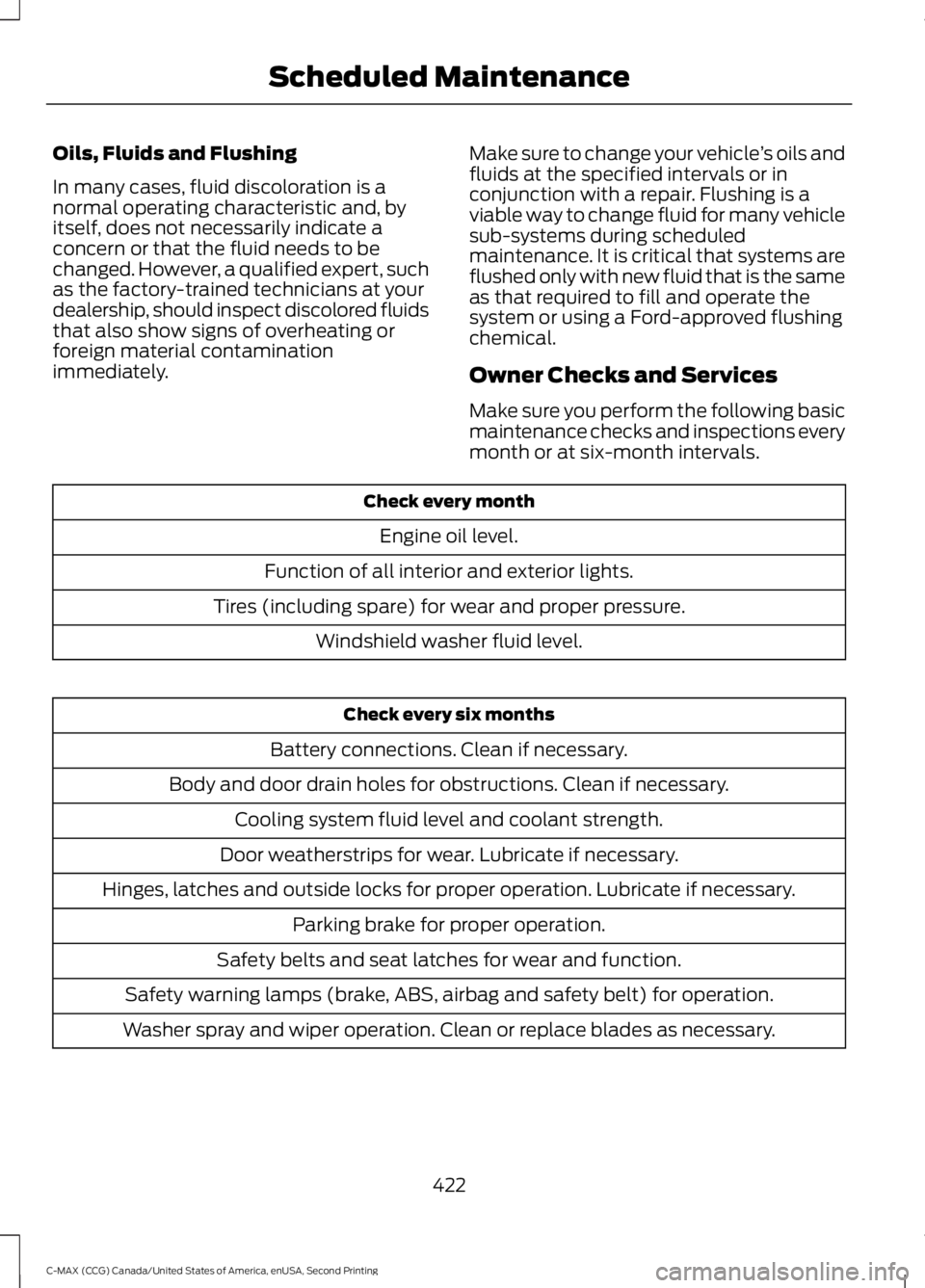
Oils, Fluids and Flushing
In many cases, fluid discoloration is a
normal operating characteristic and, by
itself, does not necessarily indicate a
concern or that the fluid needs to be
changed. However, a qualified expert, such
as the factory-trained technicians at your
dealership, should inspect discolored fluids
that also show signs of overheating or
foreign material contamination
immediately.
Make sure to change your vehicle
’s oils and
fluids at the specified intervals or in
conjunction with a repair. Flushing is a
viable way to change fluid for many vehicle
sub-systems during scheduled
maintenance. It is critical that systems are
flushed only with new fluid that is the same
as that required to fill and operate the
system or using a Ford-approved flushing
chemical.
Owner Checks and Services
Make sure you perform the following basic
maintenance checks and inspections every
month or at six-month intervals. Check every month
Engine oil level.
Function of all interior and exterior lights.
Tires (including spare) for wear and proper pressure. Windshield washer fluid level. Check every six months
Battery connections. Clean if necessary.
Body and door drain holes for obstructions. Clean if necessary. Cooling system fluid level and coolant strength.
Door weatherstrips for wear. Lubricate if necessary.
Hinges, latches and outside locks for proper operation. Lubricate if necessary. Parking brake for proper operation.
Safety belts and seat latches for wear and function.
Safety warning lamps (brake, ABS, airbag and safety belt) for operation.
Washer spray and wiper operation. Clean or replace blades as necessary.
422
C-MAX (CCG) Canada/United States of America, enUSA, Second Printing Scheduled Maintenance
Page 468 of 469
Tires
See: Wheels and Tires..................................... 243
Towing a Trailer.............................................186
Towing the Vehicle on Four Wheels..........................................................186
Emergency Towing............................................ 186
Recreational Towing.......................................... 187
Towing..............................................................186
Traction Control............................................163
Principle of Operation....................................... 163
Transmission Code Designation............278
Transmission...................................................157
Transmission See: Transmission............................................... 157
Transporting the Vehicle...........................186
U
Under Hood Overview - Hybrid Electric Vehicle (HEV)
..............................................214
Under Hood Overview - Plug-In Hybrid Electric Vehicle (PHEV)..........................216
Unique Driving Characteristics................132
Universal Garage Door Opener
................119
HomeLink Wireless Control System.............119
USB Port.........................................................295
Using Cruise Control....................................175 ECO Cruise Control............................................. 176
Switching Cruise Control Off.......................... 176
Switching Cruise Control On........................... 175
Using MyKey With Remote Start Systems..........................................................54
Using Snow Chains.....................................269
Using Stability Control
...............................165
AdvanceTrac® with Roll Stability Control ™
(RSC®).............................................................. 165
Using SYNC™ With Your Media Player
.............................................................319
Accessing Your Play Menu.............................. 323
Connecting Your Digital Media Player to the USB Port........................................................... 319
Media Menu Features....................................... 322
Media Voice Commands................................ 320
System Settings................................................. 325
What's Playing?................................................. 320Using SYNC™ With Your Phone.............301
Accessing Features through the Phone
Menu................................................................. 305
Accessing Your Phone Settings................... 308
Making Calls........................................................ 304
Pairing a Phone for the First Time...............302
Pairing Subsequent Phones.......................... 302
Phone Options during an Active Call.........304
Phone Voice Commands................................ 302
Receiving Calls................................................... 304
System Settings................................................ 309
Text Messaging................................................... 307
Using Traction Control
................................163
Switching the System Off Using a
Switch................................................................ 163
Switching the System Off Using the Information Display Controls.................... 163
System Indicator Lights and Messages.......................................................... 163
Using Voice Recognition
...........................299
Initiating a Voice Session................................ 299
System Interaction and Feedback.............300
Utilizing the Mediation/Arbitration Program (Canada Only)
........................200
V
Vehicle Care
...................................................236
General Information......................................... 236
Vehicle Certification Label........................277
Vehicle Identification Number.................277
Vehicle Storage
............................................240
12V Battery............................................................ 241
Body........................................................................\
. 241
Brakes..................................................................... 242
Cooling System................................................... 241
Engine...................................................................... 241
Fuel System.......................................................... 241
General................................................................... 241
Miscellaneous..................................................... 242
Removing Vehicle From Storage.................. 242
Tires........................................................................\
. 242
Ventilation See: Climate Control......................................... 107
VIN See: Vehicle Identification Number.............277
Voice Control
...................................................68
465
C-MAX (CCG) Canada/United States of America, enUSA, Second Printing Index