air condition FORD C MAX 2015 Owner's Guide
[x] Cancel search | Manufacturer: FORD, Model Year: 2015, Model line: C MAX, Model: FORD C MAX 2015Pages: 469, PDF Size: 6.16 MB
Page 400 of 469
Register for Vehicle Health Report and set
your report preferences at
www.SYNCMyRide.com. After registering,
you can request a Vehicle Health Report
(inside your vehicle). Return to your
account at www.SYNCMyRide.com to view
your report. You can also choose for SYNC
to remind you automatically to run reports
at specific mileage intervals. Cellular phone
airtime usage may apply when reporting.
The system allows you to check your
vehicle
’s overall health in the form of a
diagnostic report card. The Vehicle Health
Report contains valuable information, for
example:
• Vehicle diagnostic information.
• Scheduled maintenance.
• Open recalls and Field Service Actions.
• Items noted during vehicle inspections
by your authorized dealer that still need
servicing.
Making a Report If you want to run a report by
using the touchscreen, touch
Apps > Vehicle Health Report.
To run a report by voice
command, press the voice
button on the steering wheel
and, when prompted, say "Vehicle health
report". Vehicle Health Report Privacy Notice
When you create a Vehicle Health Report,
Ford Motor Company may collect your
cellular phone number (to process your
report request) and diagnostic information
about your vehicle. Certain versions or
updates to Vehicle Health Report may also
collect more vehicle information. Ford may
use your vehicle information it collects for
any purpose. If you do not want to disclose
your cellular phone number or vehicle
information, do not run the feature or set
up your Vehicle Health Report profile at
www.SYNCMyRide.com. See
www.SYNCMyRide.com (Vehicle Health
Report Terms and Conditions, and Privacy
Statement) for more information.
Where Am I? (If Equipped)
For vehicle location and information touch
Help
> Where Am I?.
This allows you to view your vehicle's
current location, if your vehicle is equipped
with navigation. If your vehicle is not
equipped with navigation, you do not see
this button.
CLIMATE Press the lower right corner on
the touchscreen to access your
climate control features.
Depending on your vehicle line and option
package, your climate screen may look
different from the screen shown here.
397
C-MAX (CCG) Canada/United States of America, enUSA, Second Printing MyFord Touch
™
(If Equipped)E142608 E142599 E142612
Page 401 of 469
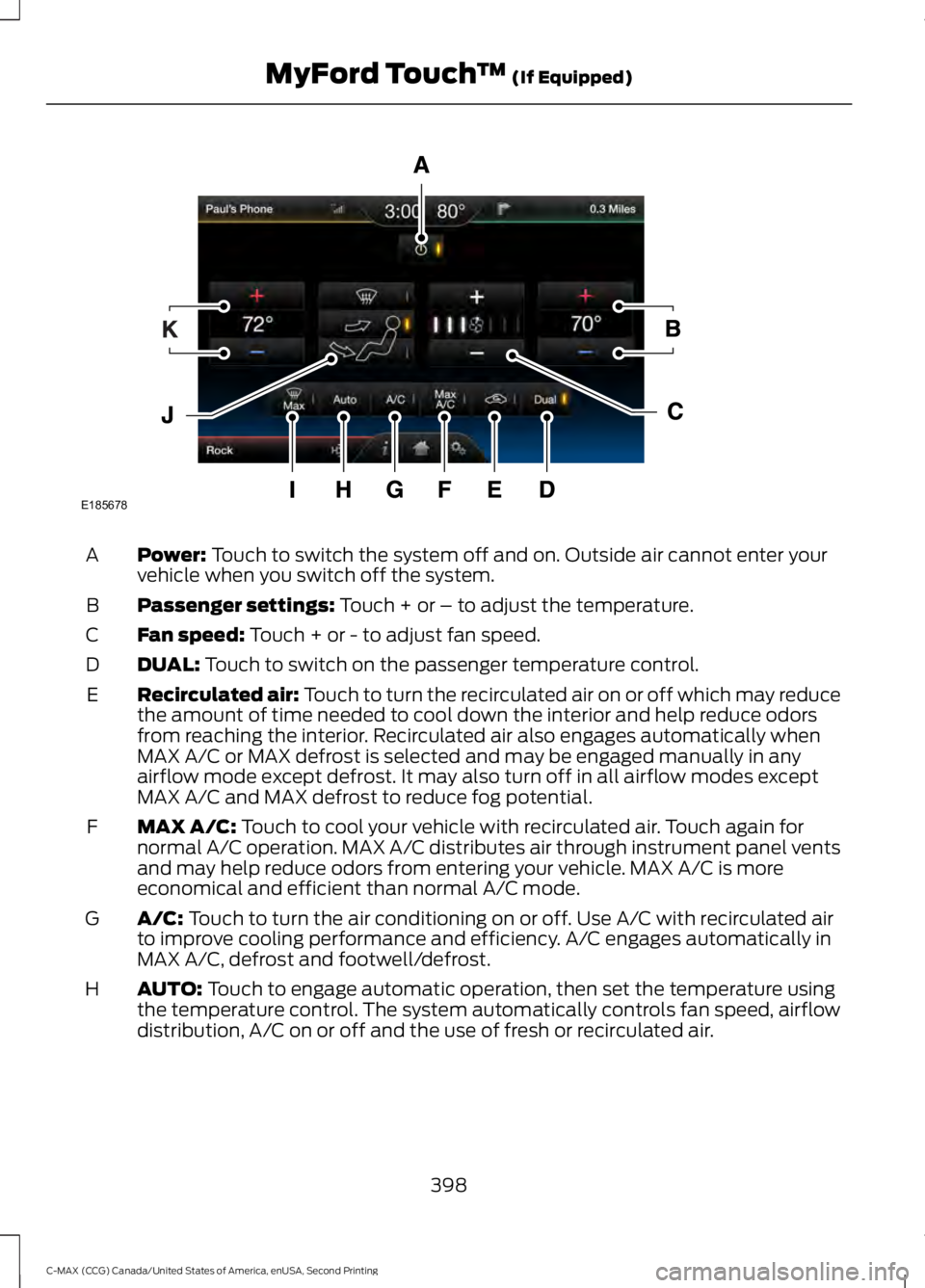
Power: Touch to switch the system off and on. Outside air cannot enter your
vehicle when you switch off the system.
A
Passenger settings:
Touch + or – to adjust the temperature.
B
Fan speed:
Touch + or - to adjust fan speed.
C
DUAL:
Touch to switch on the passenger temperature control.
D
Recirculated air: Touch to turn the recirculated air on or off which may reduce
the amount of time needed to cool down the interior and help reduce odors
from reaching the interior. Recirculated air also engages automatically when
MAX A/C or MAX defrost is selected and may be engaged manually in any
airflow mode except defrost. It may also turn off in all airflow modes except
MAX A/C and MAX defrost to reduce fog potential.
E
MAX A/C:
Touch to cool your vehicle with recirculated air. Touch again for
normal A/C operation. MAX A/C distributes air through instrument panel vents
and may help reduce odors from entering your vehicle. MAX A/C is more
economical and efficient than normal A/C mode.
F
A/C:
Touch to turn the air conditioning on or off. Use A/C with recirculated air
to improve cooling performance and efficiency. A/C engages automatically in
MAX A/C, defrost and footwell/defrost.
G
AUTO:
Touch to engage automatic operation, then set the temperature using
the temperature control. The system automatically controls fan speed, airflow
distribution, A/C on or off and the use of fresh or recirculated air.
H
398
C-MAX (CCG) Canada/United States of America, enUSA, Second Printing MyFord Touch
™
(If Equipped)E185678
Page 402 of 469
MAX Defrost: Distributes outside air through the windshield air vents and
automatically switches the air conditioning on. The fan is set to the highest
speed and the temperature to HI. When the air distribution is set in this position,
you are unable to select recirculated air or manually adjust the fan speed and
temperature control.
I
Manual airflow distribution controls:
Footwell and Defrost: Distributes
air through the windshield defroster vents, demister vents, floor vents and rear
seat floor vents, and provides outside air to reduce window fogging. Panel:
Distributes air through the instrument panel vents. Panel and Floor: Distributes
air through the instrument panel vents, demister vents, floor vents and rear seat
floor vents. Floor:
Distributes air through the demister vents, floor vents and
rear seat floor vents. Defrost: Touch to clear the windshield of fog and thin ice.
Touch again to return to the previous airflow selection. When on, defrost provides
outside air to reduce window fogging and distributes air through the windshield
defroster vents and demister vents.
J
Driver settings:
Touch + or – adjust the temperature.
K
Climate Control Voice Commands Press the voice button on the
steering wheel controls. When
prompted, say any of the
following commands: Climate Control Commands
"Climate automatic" "Climate off""Climate on"
"Climate temperature <15.5-29.5> degrees" "Climate temperature <60-85> degrees" "Help"
There are additional climate control
commands but in order to access them,
you have to say "Climate" first. When the
system is ready to listen, you may say any
of the following commands:
399
C-MAX (CCG) Canada/United States of America, enUSA, Second Printing MyFord Touch
™
(If Equipped)E142599
Page 426 of 469
Check Every 12 Months (C-MAX Energi
Plug-in Hybrid Only)
Inspect the engine oil filter for signs of
damage such as rust, paint blistering,
scratches or dents. If any of these
conditions are present, replace the filter.
See Normal Scheduled Maintenance
(page 424). Multi-point Inspection
In order to keep your vehicle running right,
it is important to have the systems on your
vehicle checked regularly. This can help
identify potential issues and prevent major
problems. We recommend having the
following multi-point inspection performed
at every scheduled maintenance interval
to help make sure your vehicle keeps
running great. Multi-point inspection
Hazard warning system operation
Accessory drive belt(s)
Horn operation
Battery performance
Radiator, cooler, heater and A/C hoses
Engine air filter
Suspension components for leaks ordamage
Exhaust system
Steering and linkage
Exterior lamps operation
Tires for wear and proper pressure**
Fluid levels *
; fill if necessary
Windshield for cracks, chips or pits
For oil and fluid leaks
Washer spray and wiper operation
Half-shaft dust boots
* Brake, coolant recovery reservoir, automatic transmission and window washer
** If your vehicle is equipped with a temporary mobility kit, check the tire sealant expiration
Use By date on the canister. Replace as needed.
Be sure to ask your dealership service
advisor or technician about the multi-point
vehicle inspection. It is a comprehensive
way to perform a thorough inspection of
your vehicle. Your checklist gives you
immediate feedback on the overall
condition of your vehicle.
423
C-MAX (CCG) Canada/United States of America, enUSA, Second Printing Scheduled Maintenance
Page 429 of 469
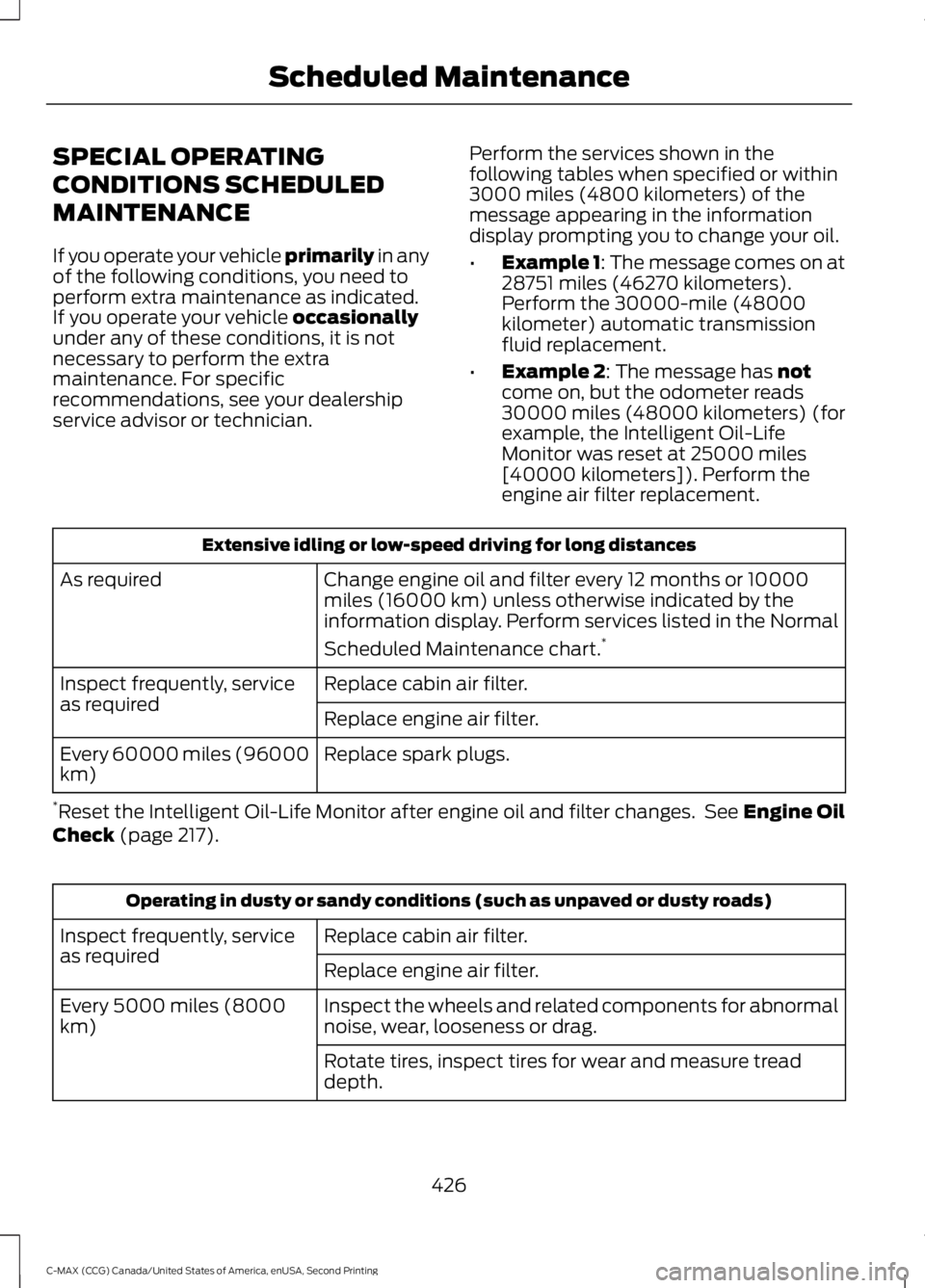
SPECIAL OPERATING
CONDITIONS SCHEDULED
MAINTENANCE
If you operate your vehicle primarily in any
of the following conditions, you need to
perform extra maintenance as indicated.
If you operate your vehicle
occasionally
under any of these conditions, it is not
necessary to perform the extra
maintenance. For specific
recommendations, see your dealership
service advisor or technician. Perform the services shown in the
following tables when specified or within
3000 miles (4800 kilometers) of the
message appearing in the information
display prompting you to change your oil.
•
Example 1: The message comes on at
28751 miles (46270 kilometers).
Perform the 30000-mile (48000
kilometer) automatic transmission
fluid replacement.
• Example 2
: The message has not
come on, but the odometer reads
30000 miles (48000 kilometers) (for
example, the Intelligent Oil-Life
Monitor was reset at 25000 miles
[40000 kilometers]). Perform the
engine air filter replacement. Extensive idling or low-speed driving for long distances
Change engine oil and filter every 12 months or 10000
miles (16000 km) unless otherwise indicated by the
information display. Perform services listed in the Normal
Scheduled Maintenance chart. *
As required
Replace cabin air filter.
Inspect frequently, service
as required
Replace engine air filter.
Replace spark plugs.
Every 60000 miles (96000
km)
* Reset the Intelligent Oil-Life Monitor after engine oil and filter changes. See
Engine Oil
Check (page 217). Operating in dusty or sandy conditions (such as unpaved or dusty roads)
Replace cabin air filter.
Inspect frequently, service
as required
Replace engine air filter.
Inspect the wheels and related components for abnormal
noise, wear, looseness or drag.
Every 5000 miles (8000
km)
Rotate tires, inspect tires for wear and measure tread
depth.
426
C-MAX (CCG) Canada/United States of America, enUSA, Second Printing Scheduled Maintenance
Page 430 of 469
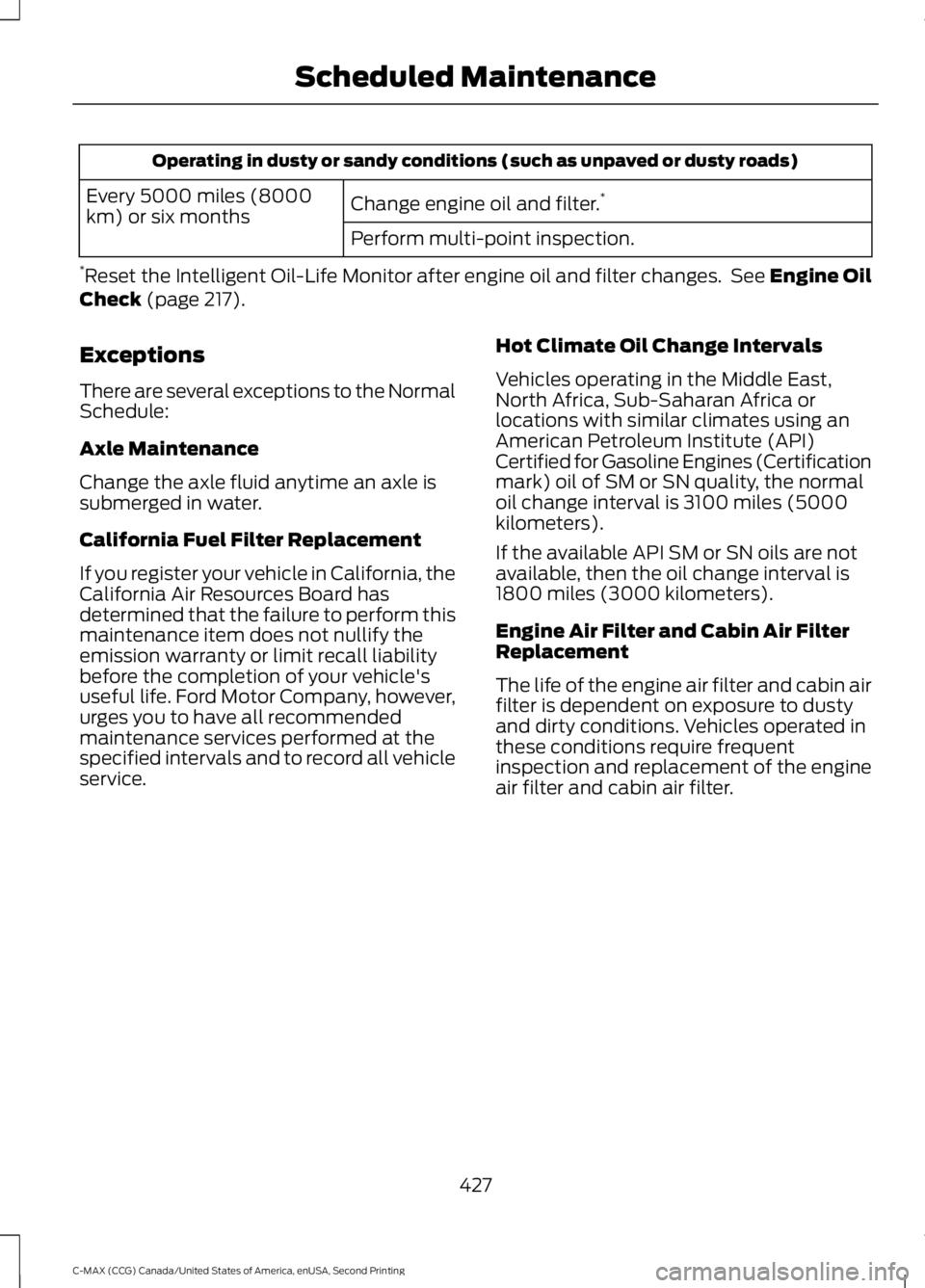
Operating in dusty or sandy conditions (such as unpaved or dusty roads)
Change engine oil and filter. *
Every 5000 miles (8000
km) or six months
Perform multi-point inspection.
* Reset the Intelligent Oil-Life Monitor after engine oil and filter changes. See Engine Oil
Check (page 217).
Exceptions
There are several exceptions to the Normal
Schedule:
Axle Maintenance
Change the axle fluid anytime an axle is
submerged in water.
California Fuel Filter Replacement
If you register your vehicle in California, the
California Air Resources Board has
determined that the failure to perform this
maintenance item does not nullify the
emission warranty or limit recall liability
before the completion of your vehicle's
useful life. Ford Motor Company, however,
urges you to have all recommended
maintenance services performed at the
specified intervals and to record all vehicle
service. Hot Climate Oil Change Intervals
Vehicles operating in the Middle East,
North Africa, Sub-Saharan Africa or
locations with similar climates using an
American Petroleum Institute (API)
Certified for Gasoline Engines (Certification
mark) oil of SM or SN quality, the normal
oil change interval is 3100 miles (5000
kilometers).
If the available API SM or SN oils are not
available, then the oil change interval is
1800 miles (3000 kilometers).
Engine Air Filter and Cabin Air Filter
Replacement
The life of the engine air filter and cabin air
filter is dependent on exposure to dusty
and dirty conditions. Vehicles operated in
these conditions require frequent
inspection and replacement of the engine
air filter and cabin air filter.
427
C-MAX (CCG) Canada/United States of America, enUSA, Second Printing Scheduled Maintenance
Page 444 of 469
Potential Map Inaccuracy: Maps used
by this system may be inaccurate because
of changes in roads, traffic controls or
driving conditions. Always use good
judgment and common sense when
following the suggested routes.
Emergency Services:
Do not rely on any
navigation features included in the system
to route you to emergency services. Ask
local authorities or an emergency services
operator for these locations. Not all
emergency services such as police, fire
stations, hospitals and clinics are likely to
be contained in the map database for such
navigation features.
Telenav Software End User License
Agreement
Please read these terms and conditions
carefully before you use the Telenav
Software. Your use of the Telenav
Software indicates that you accept these
terms and conditions. If you do not accept
these terms and conditions, do not break
the seal of the package, launch, or
otherwise use the Telenav Software.
These terms and conditions represent the
agreement (“ Agreement”) between you
and Telenav, Inc. (“Telenav ”) with respect
to the Telenav Software (including
upgrades, modifications, or additions
thereto) (collectively “Telenav Software”).
All references herein to “you” and “your ”
means you, your employees, agents, and
contractors, and any other entity on whose
behalf you accept these terms and
conditions, all of whom shall also be bound
by this Agreement. Additionally, all of your
account information, as well as other
payment and personal information
provided by you to Telenav (directly or
through the use of the Telenav Software,
is subject to Telenav ’s privacy policy
located at http://www.telenav.com. Telenav may revise this Agreement and
the privacy policy at any time, with or
without notice to you. You agree to visit
http://www.telenav.com from time to time
to review the then current version of this
Agreement and of the privacy policy.
1. Safe and Lawful Use
You acknowledge that devoting attention
to the Telenav Software may pose a risk
of injury or death to you and others in
situations that otherwise require your
undivided attention, and you therefore
agree to comply with the following when
using the Telenav Software: (a) observe
all traffic laws and otherwise drive safely;
(b) use your own personal judgment while
driving. If you feel that a route suggested
by the Telenav Software instructs you to
perform an unsafe or illegal maneuver,
places you in an unsafe situation, or directs
you into an area that you consider to be
unsafe, do not follow such instructions; (c)
do not input destinations, or otherwise
manipulate the Telenav Software, unless
your vehicle is stationary and parked; (d)
do not use the Telenav Software for any
illegal, unauthorized, unintended, unsafe,
hazardous, or unlawful purposes, or in any
manner inconsistent with this Agreement;
(e) arrange all GPS and wireless devices
and cables necessary for use of the
Telenav Software in a secure manner in
your vehicle so that they will not interfere
with your driving and will not prevent the
operation of any safety device (such as an
airbag).
You agree to indemnify and hold Telenav
harmless against all claims resulting from
any dangerous or otherwise inappropriate
use of the Telenav Software in any moving
vehicle, including as a result of your failure
to comply with the directions above.
441
C-MAX (CCG) Canada/United States of America, enUSA, Second Printing Appendices
Page 456 of 469
with or in communication with any
positioning devices or any mobile or
wireless-connected electronic or computer
devices, including without limitation
cellular phones, palmtop and handheld
computers, pagers, and personal digital
assistants or PDAs. You agree to cease
using this Data if you fail to comply with
these terms and conditions.
Limited Warranty
NAV2 warrants that (a) the Data will
perform substantially in accordance with
the accompanying written materials for a
period of ninety (90) days from the date
of receipt, and (b) any support services
provided by NAV2 shall be substantially as
described in applicable written materials
provided to you by NAV2, and NAV2’
s
support engineers will make commercially
reasonable efforts to solve any problem
issues.
rigCustomer Remedies
NAV2 and its suppliers’ entire liability and
your exclusive remedy shall be, at NAV2’ s
sole discretion, either (a) return of the price
paid, if any, or (b) repair or replacement of
the Data that do not meet NAV2’ s Limited
Warranty and that are returned to NAV2
with a copy of your receipt. This Limited
Warranty is void if failure of the Data has
resulted from accident, abuse, or
misapplication. Any replacement Data will
be warranted for the remainder of the
original warranty period or thirty (30) days,
whichever is longer. Neither these remedies
nor any product support services offered
by NAV2 are available without proof of
purchase from an authorized international
source. No Other Warranty:
EXCEPT FOR THE LMITED WARRANTY
SET FORTH ABOVE AND TO THE EXTENT
PERMITTED BY APPLICABLE LAW, NAV2
AND ITS LICENSORS (INCLUDING THEIR
LICENSORS AND SUPPLIERS) DISCLAIM
ANY WARRANTIES, EXPRESS OR IMPLIED,
OF QUALITY, PERFORMANCE,
MERCHANTABILITY, FITNESS FOR A
PARTICULAR PURPOSE, OWNERSHIP OR
NON-INFRINGEMENT. Certain warranty
exclusions may not be permitted under
applicable law, so to that extent the above
exclusion may not apply to you.
Limited Liability:
TO THE EXTENT PERMITTED BY
APPLICABLE LAW, NAV2 AND ITS
LICENSORS (INCLUDING THEIR
LICENSORS AND SUPPLIERS) SHALL NOT
BE LIABLE TO YOU: IN RESPECT OF ANY
CLAIM, DEMAND OR ACTION,
IRRESPECTIVE OF THE NATURE OF THE
CAUSE OF THE CLAIM, DEMAND OR
ACTION ALLEGING ANY LOSS, INJURY OR
DAMAGES, DIRECT OR INDIRECT, WHICH
MAY RESULT FROM THE USE OR
POSSESSION OF THE INFORMATION; OR
FOR ANY LOSS OF PROFIT, REVENUE,
CONTRACTS OR SAVINGS, OR ANY
OTHER DIRECT, INDIRECT, INCIDENTAL,
SPECIAL OR CONSEQUENTIAL DAMAGES
ARISING OUT OF YOUR USE OF OR
INABILITY TO USE THIS INFORMATION,
ANY DEFECT IN THE INFROMATION, OR
THE BREACH OF THESE TERMS OR
CONDITIONS, WHETHER IN AN ACTION
IN CONTRACT OR TORT OR BASED ON A
WARRANTY, EVEN IF NAV2 OR ITS
LICENSORS HAVE BEEN ADVISED OF THE
POSSIBILITY OF SUCH DAMAGES. UNDER
NO CIRCUMSTANCES SHALL NAV2’
s OR
ITS SUPPLIERS ’ LIABILITY HEREUNDER
EXCEED THE PRICE PAID. Certain liability
exclusions may not be permitted under
applicable law, so to that extent the above
exclusion may not apply to you.
453
C-MAX (CCG) Canada/United States of America, enUSA, Second Printing Appendices
Page 460 of 469
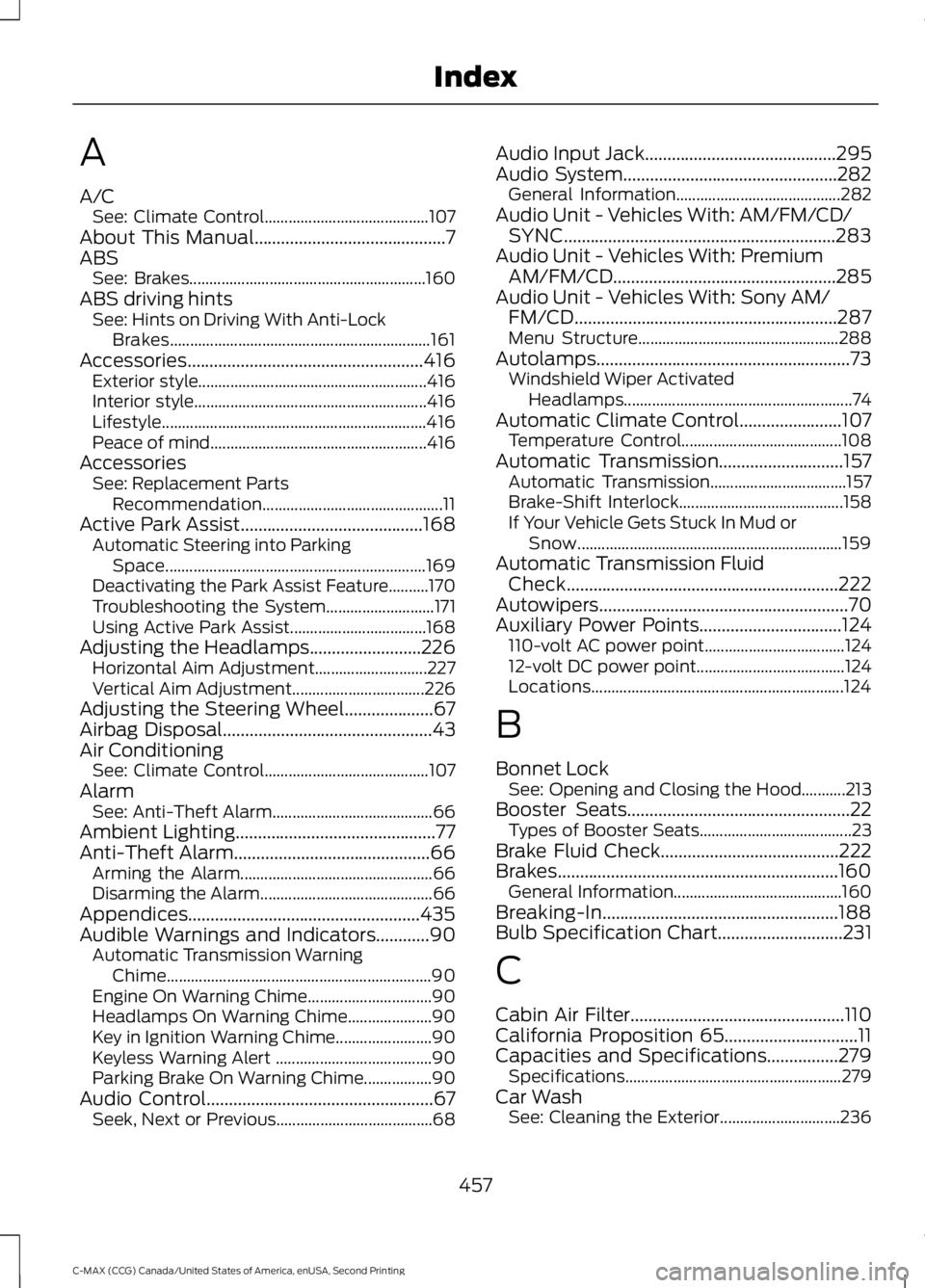
A
A/C
See: Climate Control......................................... 107
About This Manual...........................................7
ABS See: Brakes........................................................... 160
ABS driving hints See: Hints on Driving With Anti-Lock
Brakes................................................................. 161
Accessories.....................................................416 Exterior style......................................................... 416
Interior style.......................................................... 416
Lifestyle.................................................................. 416
Peace of mind...................................................... 416
Accessories See: Replacement Parts
Recommendation............................................. 11
Active Park Assist.........................................168 Automatic Steering into Parking
Space................................................................. 169
Deactivating the Park Assist Feature..........170
Troubleshooting the System........................... 171
Using Active Park Assist.................................. 168
Adjusting the Headlamps.........................226 Horizontal Aim Adjustment............................ 227
Vertical Aim Adjustment................................. 226
Adjusting the Steering Wheel
....................67
Airbag Disposal...............................................43
Air Conditioning See: Climate Control......................................... 107
Alarm See: Anti-Theft Alarm........................................ 66
Ambient Lighting.............................................77
Anti-Theft Alarm............................................66 Arming the Alarm................................................ 66
Disarming the Alarm........................................... 66
Appendices....................................................435
Audible Warnings and Indicators............90 Automatic Transmission Warning
Chime.................................................................. 90
Engine On Warning Chime............................... 90
Headlamps On Warning Chime..................... 90
Key in Ignition Warning Chime........................ 90
Keyless Warning Alert ....................................... 90
Parking Brake On Warning Chime.................90
Audio Control...................................................67 Seek, Next or Previous....................................... 68Audio Input Jack
...........................................295
Audio System................................................282
General Information......................................... 282
Audio Unit - Vehicles With: AM/FM/CD/ SYNC.............................................................283
Audio Unit - Vehicles With: Premium AM/FM/CD..................................................285
Audio Unit - Vehicles With: Sony AM/ FM/CD
...........................................................287
Menu Structure.................................................. 288
Autolamps.........................................................73 Windshield Wiper Activated
Headlamps......................................................... 74
Automatic Climate Control.......................107 Temperature Control........................................ 108
Automatic Transmission............................157 Automatic Transmission.................................. 157
Brake-Shift Interlock......................................... 158
If Your Vehicle Gets Stuck In Mud or Snow.................................................................. 159
Automatic Transmission Fluid Check
.............................................................222
Autowipers........................................................70
Auxiliary Power Points
................................124
110-volt AC power point................................... 124
12-volt DC power point..................................... 124
Locations............................................................... 124
B
Bonnet Lock See: Opening and Closing the Hood...........213
Booster Seats
..................................................22
Types of Booster Seats...................................... 23
Brake Fluid Check........................................222
Brakes...............................................................160 General Information.......................................... 160
Breaking-In.....................................................188
Bulb Specification Chart............................231
C
Cabin Air Filter
................................................110
California Proposition 65..............................11
Capacities and Specifications................279 Specifications...................................................... 279
Car Wash See: Cleaning the Exterior.............................. 236
457
C-MAX (CCG) Canada/United States of America, enUSA, Second Printing Index
Page 466 of 469
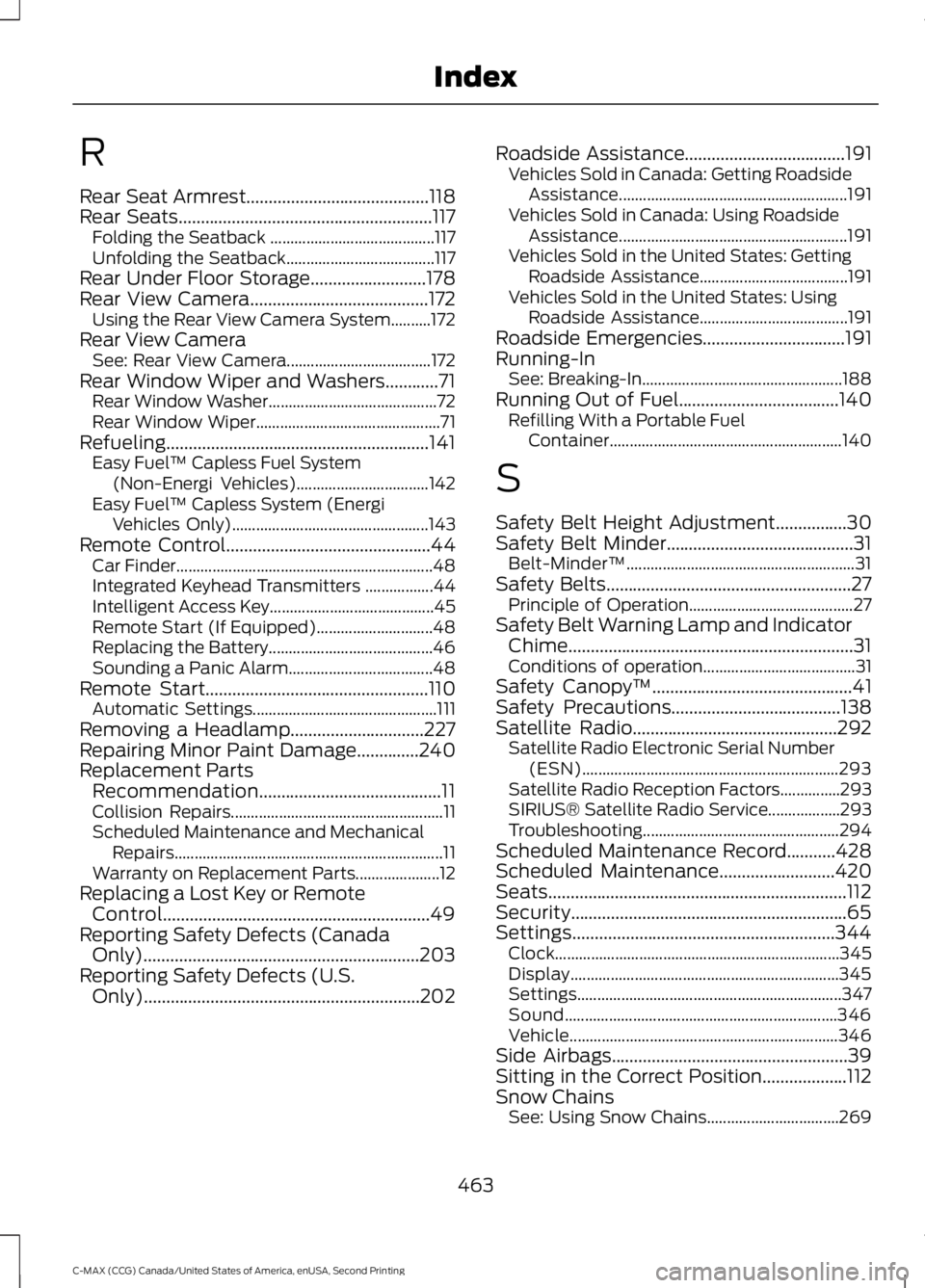
R
Rear Seat Armrest.........................................118
Rear Seats.........................................................117
Folding the Seatback ......................................... 117
Unfolding the Seatback..................................... 117
Rear Under Floor Storage..........................178
Rear View Camera
........................................172
Using the Rear View Camera System..........172
Rear View Camera See: Rear View Camera.................................... 172
Rear Window Wiper and Washers............71 Rear Window Washer.......................................... 72
Rear Window Wiper.............................................. 71
Refueling...........................................................141 Easy Fuel ™ Capless Fuel System
(Non-Energi Vehicles)................................. 142
Easy Fuel ™ Capless System (Energi
Vehicles Only)................................................. 143
Remote Control..............................................44 Car Finder................................................................ 48
Integrated Keyhead Transmitters .................44
Intelligent Access Key......................................... 45
Remote Start (If Equipped)............................. 48
Replacing the Battery......................................... 46
Sounding a Panic Alarm.................................... 48
Remote Start..................................................110 Automatic Settings.............................................. 111
Removing a Headlamp
..............................227
Repairing Minor Paint Damage..............240
Replacement Parts Recommendation.........................................11
Collision Repairs..................................................... 11
Scheduled Maintenance and Mechanical Repairs................................................................... 11
Warranty on Replacement Parts..................... 12
Replacing a Lost Key or Remote Control............................................................49
Reporting Safety Defects (Canada Only)
..............................................................203
Reporting Safety Defects (U.S. Only)..............................................................202 Roadside Assistance....................................191
Vehicles Sold in Canada: Getting Roadside
Assistance......................................................... 191
Vehicles Sold in Canada: Using Roadside Assistance......................................................... 191
Vehicles Sold in the United States: Getting Roadside Assistance..................................... 191
Vehicles Sold in the United States: Using Roadside Assistance..................................... 191
Roadside Emergencies
................................191
Running-In See: Breaking-In.................................................. 188
Running Out of Fuel....................................140 Refilling With a Portable Fuel
Container.......................................................... 140
S
Safety Belt Height Adjustment
................30
Safety Belt Minder..........................................31 Belt-Minder™......................................................... 31
Safety Belts
.......................................................27
Principle of Operation......................................... 27
Safety Belt Warning Lamp and Indicator Chime................................................................31
Conditions of operation...................................... 31
Safety Canopy ™
.............................................41
Safety Precautions......................................138
Satellite Radio..............................................292
Satellite Radio Electronic Serial Number
(ESN)................................................................ 293
Satellite Radio Reception Factors...............293
SIRIUS® Satellite Radio Service.................. 293
Troubleshooting................................................. 294
Scheduled Maintenance Record...........428
Scheduled Maintenance
..........................420
Seats...................................................................112
Security..............................................................65
Settings...........................................................344 Clock....................................................................... 345
Display................................................................... 345
Settings.................................................................. 347
Sound.................................................................... 346
Vehicle................................................................... 346
Side Airbags.....................................................39
Sitting in the Correct Position...................112
Snow Chains See: Using Snow Chains................................. 269
463
C-MAX (CCG) Canada/United States of America, enUSA, Second Printing Index