Park FORD C MAX 2015 Owners Manual
[x] Cancel search | Manufacturer: FORD, Model Year: 2015, Model line: C MAX, Model: FORD C MAX 2015Pages: 469, PDF Size: 6.16 MB
Page 6 of 469
Emission Control System..........................146
High Voltage Battery
General Information....................................149
Charging the High Voltage Battery.........151
High Voltage Battery Cut-Off Switch...........................................................156
Transmission
Automatic Transmission
............................157
Brakes
General Information
....................................160
Hints on Driving With Anti-Lock Brakes............................................................161
Parking Brake
..................................................161
Hill Start Assist
...............................................161
Traction Control
Principle of Operation.................................163
Using Traction Control
................................163
Stability Control
Principle of Operation................................164
Using Stability Control...............................165
Parking Aids
Parking Aid......................................................166
Active Park Assist.........................................168
Rear View Camera........................................172
Cruise Control
Principle of Operation
.................................175
Using Cruise Control....................................175
Driving Aids
Steering
.............................................................177
Load Carrying
Rear Under Floor Storage..........................178 Luggage Covers.............................................178
Load Limit
........................................................179
Towing
Towing a Trailer.............................................186
Transporting the Vehicle...........................186
Towing the Vehicle on Four Wheels......186
Driving Hints
Breaking-In.....................................................188
Economical Driving......................................188
Driving Through Water...............................189
Floor Mats
.......................................................190
Roadside Emergencies
Roadside Assistance....................................191
Hazard Warning Flashers
..........................192
Fuel Shutoff....................................................192
Jump Starting the Vehicle
.........................193
Collision, Damage or Fire Event..............195
Post-Crash Alert System...........................197
Customer Assistance
Getting the Services You Need...............198
In California (U.S. Only).............................199
The Better Business Bureau (BBB) Auto Line Program (U.S. Only).....................200
Utilizing the Mediation/Arbitration Program (Canada Only)......................200
Getting Assistance Outside the U.S. and Canada.........................................................201
Ordering Additional Owner's Literature....................................................202
Reporting Safety Defects (U.S. Only)............................................................202
Reporting Safety Defects (Canada Only)............................................................203
Fuses
Fuse Specification Chart..........................204
Changing a Fuse
............................................212
3
C-MAX (CCG) Canada/United States of America, enUSA, Second Printing Table of Contents
Page 10 of 469
ABOUT THIS MANUAL
Thank you for choosing Ford. We
recommend that you take some time to
get to know your vehicle by reading this
manual. The more that you know about
it, the greater the safety and pleasure you
will get from driving it.
WARNING
Driving while distracted can result in
loss of vehicle control, crash and
injury. We strongly recommend that
you use extreme caution when using any
device that may take your focus off the
road. Your primary responsibility is the safe
operation of your vehicle. We recommend
against the use of any hand-held device
while driving and encourage the use of
voice-operated systems when possible.
Make sure you are aware of all applicable
local laws that may affect the use of
electronic devices while driving. Note:
This manual describes product
features and options available throughout
the range of available models, sometimes
even before they are generally available. It
may describe options not fitted to the
vehicle you have purchased.
Note: Some of the illustrations in this
manual may show features as used in
different models, so may appear different
to you on your vehicle.
Note: Always use and operate your vehicle
in line with all applicable laws and
regulations.
Note: Pass on this manual when selling
your vehicle. It is an integral part of your
vehicle.
This manual may qualify the location of a
component as left-hand side or right-hand
side. The side is determined when facing
forward in the seat. Right-hand side.
A
Left-hand side.
B
SYMBOLS GLOSSARY
These are some of the symbols you may
see on your vehicle. Safety alert
See Owner's Manual
Air conditioning system
Anti-lock braking system
Avoid smoking, flames or sparks
Battery
Battery acid
Brake fluid - non petroleum
based
7
C-MAX (CCG) Canada/United States of America, enUSA, Second Printing IntroductionE154903 E162384
Page 12 of 469
Panic alarm
Parking aid
Parking brake
Power steering fluid
Power windows front/rear
Power window lockout
Service engine soon
Side airbag
Shield the eyes
Stability control
Windshield wash and wipe
DATA RECORDING
Service Data Recording
Service data recorders in your vehicle are
capable of collecting and storing
diagnostic information about your vehicle.
This potentially includes information about
the performance or status of various
systems and modules in the vehicle, such
as engine, throttle, steering or brake systems. In order to properly diagnose and
service your vehicle, Ford Motor Company,
Ford of Canada, and service and repair
facilities may access or share among them
vehicle diagnostic information received
through a direct connection to your vehicle
when diagnosing or servicing your vehicle.
Additionally, when your vehicle is in for
service or repair, Ford Motor Company,
Ford of Canada, and service and repair
facilities may access or share among them
data for vehicle improvement purposes.
For U.S. only (if equipped), if you choose
to use the SYNC Vehicle Health Report,
you consent that certain diagnostic
information may also be accessed
electronically by Ford Motor Company and
Ford authorized service facilities, and that
the diagnostic information may be used
for any purpose. See SYNC™ (page 297).
Event Data Recording
This vehicle is equipped with an event
data recorder. The main purpose of an
event data recorder is to record, in
certain crash or near crash-like
situations, such as an airbag
deployment or hitting a road obstacle;
this data will assist in understanding
how a vehicle
’s systems performed.
The event data recorder is designed to
record data related to vehicle dynamics
and safety systems for a short period
of time, typically 30 seconds or less.
The event data recorder in this vehicle
is designed to record such data as:
• How various systems in your vehicle
were operating;
• Whether or not the driver and
passenger safety belts were
buckled/fastened;
• How far (if at all) the driver was
depressing the accelerator and/or
the brake pedal; and
9
C-MAX (CCG) Canada/United States of America, enUSA, Second Printing Introduction E139213 E167012 E138639
Page 35 of 469
Then...
If...
The Belt-Minder feature will not activate.
You and the front seat passenger buckle
your safety belts before you switch the
ignition on or less than 1-2 minutes elapse after you switch the ignition on...
The Belt-Minder feature activates, the
safety belt warning light illuminates and a warning tone sounds for 6 seconds every
25 seconds, repeating for about 5 minutes or until you and the front seat passenger buckle your safety belts.
You or the front seat passenger do not
buckle your safety belts before your vehicle reaches at least 6 mph (9.7 km/h) and 1-2
minutes elapse after you switch the ignition on...
The Belt-Minder feature activates, the
safety belt warning light illuminates and a warning tone sounds for 6 seconds every
25 seconds, repeating for about 5 minutes or until you and the front seat passenger buckle your safety belts.
The safety belt for the driver or front
passenger is unbuckled for about 1 minute
while the vehicle is traveling at least 6 mph (9.7 km/h) and more than 1-2 minutes
elapse after you switch the ignition on...
Deactivating and Activating the
Belt-Minder Feature WARNING
While the system allows you to
deactivate it, this system is designed
to improve your chances of being
safely belted and surviving an accident.
We recommend you leave the system
activated for yourself and others who may
use the vehicle. Note:
The driver and front passenger
warnings switch on and off independently.
When you perform this procedure for one
seating position, do not buckle the other
position as this will terminate the process.
Read Steps 1 - 4 thoroughly before
proceeding with the programming
procedure. Before following the procedure, make sure
that:
•
The parking brake is set.
• The transmission is in park (P).
• The ignition is off.
• The driver and front passenger safety
belts are unbuckled.
1. Switch the ignition on. Do not start the
vehicle.
2. Wait until the safety belt warning light turns off (about one minute). After
Step 2, wait an additional five seconds
before proceeding with Step 3. Once
you start Step 3, you must complete
the procedure within 60 seconds.
3. For the seating position being disabled,
buckle then unbuckle the safety belt
three times at a moderate speed,
ending in the unbuckled state. After
Step 3, the safety belt warning light
turns on.
32
C-MAX (CCG) Canada/United States of America, enUSA, Second Printing Safety Belts
Page 47 of 469
GENERAL INFORMATION ON
RADIO FREQUENCIES
This device complies with Part 15 of the
FCC Rules and with Industry Canada
license-exempt RSS standard(s).
Operation is subject to the following two
conditions: (1) This device may not cause
harmful interference, and (2) This device
must accept any interference received,
including interference that may cause
undesired operation.
Note:
Changes or modifications not
expressively approved by the party
responsible for compliance could void the
user's authority to operate the equipment.
The term IC before the radio certification
number only signifies that Industry Canada
technical specifications were met.
The typical operating range for your
transmitter is approximately
33 ft (10 m).
Vehicles with the remote start feature will
have a greater range.
One of the following could cause a
decrease in operating range:
• Weather conditions.
• Nearby radio towers.
• Structures around the vehicle.
• Other vehicles parked next to your
vehicle.
The radio frequency used by your remote
control can also be used by other radio
transmitters, for example amateur radios,
medical equipment, wireless headphones,
wireless remote controls, cell phones,
battery chargers and alarm systems. If the
frequencies are jammed, you will not be
able to use your remote control. You can
lock and unlock the doors with the key.
Note: Make sure to lock your vehicle before
leaving it unattended. Note:
If you are in range, the remote control
will operate if you press any button
unintentionally.
Intelligent Access
(If Equipped)
The system uses a radio frequency signal
to communicate with your vehicle and
authorize your vehicle to unlock when one
of the following conditions are met:
• You activate the front exterior door
handle switch.
• You press the luggage compartment
button.
• You press a button on the transmitter.
If excessive radio frequency interference
is present in the area or if the transmitter
battery is low, you may need to
mechanically unlock your door. You can
use the mechanical key blade in your
intelligent access key to open the driver
door in this situation. See
Remote
Control (page 44).
REMOTE CONTROL
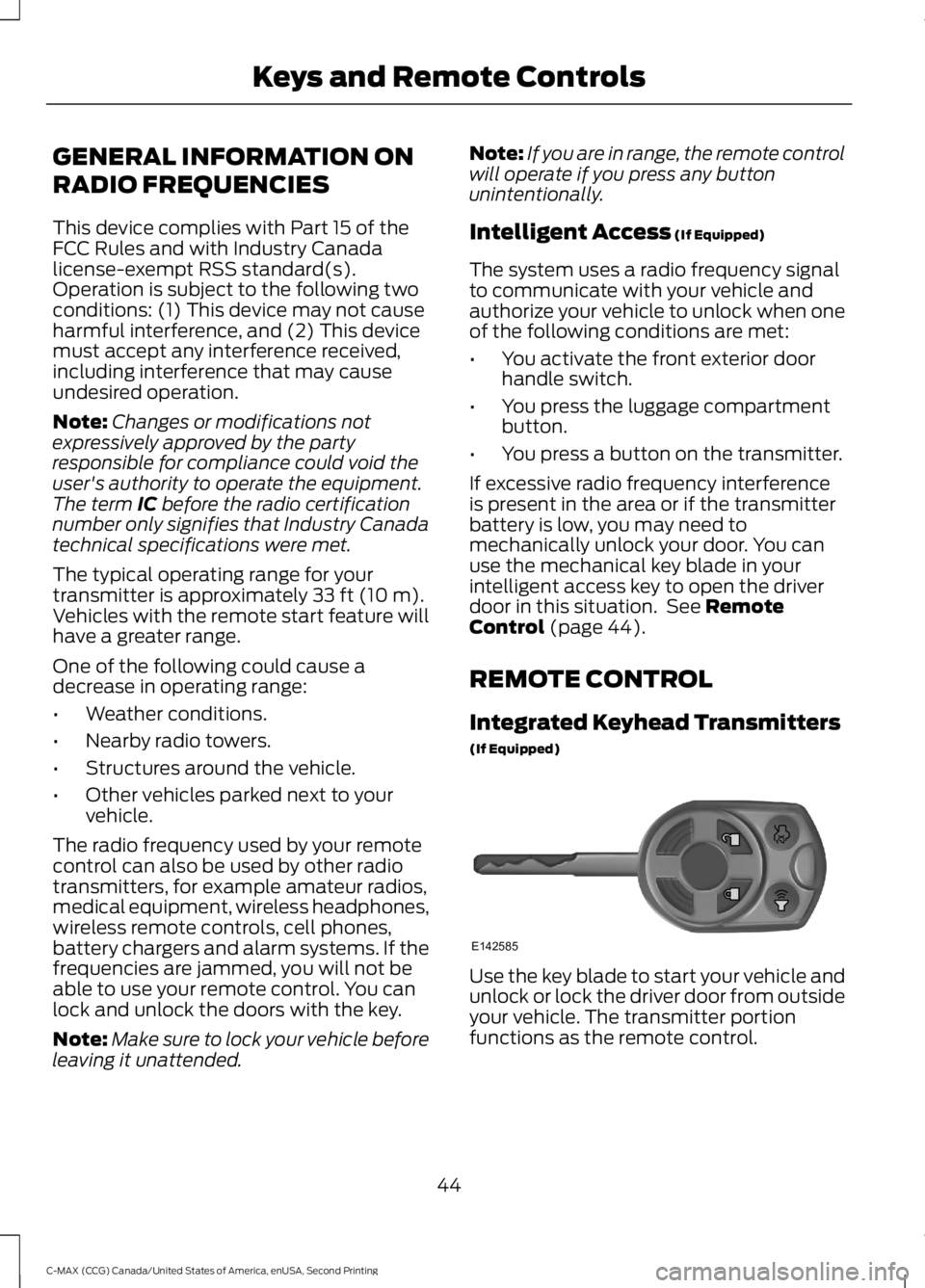
Integrated Keyhead Transmitters
(If Equipped) Use the key blade to start your vehicle and
unlock or lock the driver door from outside
your vehicle. The transmitter portion
functions as the remote control.
44
C-MAX (CCG) Canada/United States of America, enUSA, Second Printing Keys and Remote ControlsE142585
Page 51 of 469
3. Remove the old battery.
4. Insert a new battery with the + facing
downward. Press the battery down to
make sure it is fully in the housing.
5. Snap the battery cover back onto the transmitter and install the backup key.
Car Finder
Press the lock button on the key twice
within three seconds. The horn sounds and
the turn signals flash. We recommend you
use this method to locate your vehicle,
rather than using the panic alarm.
Note: If locking was not successful or if any
door or the liftgate is open, or if the hood is
open on vehicles with a perimeter alarm or
remote start, the horn does sound twice and
the lamp does not flash.
Sounding a Panic Alarm
(If Equipped)
Note: The panic alarm only operates when
the ignition is off. Press the button to activate the
alarm. Press the button again or
switch the ignition on to
deactivate it.
Remote Start (If Equipped) WARNING
To avoid exhaust fumes, do not use
remote start if your vehicle is parked
indoors or areas that are not well
ventilated. Note:
Do not use remote start if your vehicle
is low on fuel. The remote start button is on the
transmitter. This feature allows you to start your
vehicle from outside the vehicle. The
transmitter has an extended operating
range.
Vehicles with automatic climate control
can be configured to operate when the
vehicle is remote started. See Automatic
Climate Control
(page 107).
Many states and provinces have
restrictions for the use of remote start.
Check your local and state or provincial
laws for specific requirements regarding
remote start systems.
The remote start system does not work if
any of the following occur:
• The ignition is on.
• The alarm system triggers.
• You disable the feature.
• The hood is open.
• The transmission is not in
P.
• The vehicle battery voltage is too low.
• The powertrain fault indicator was on
the last time your vehicle was driven.
Remote Starting the Vehicle
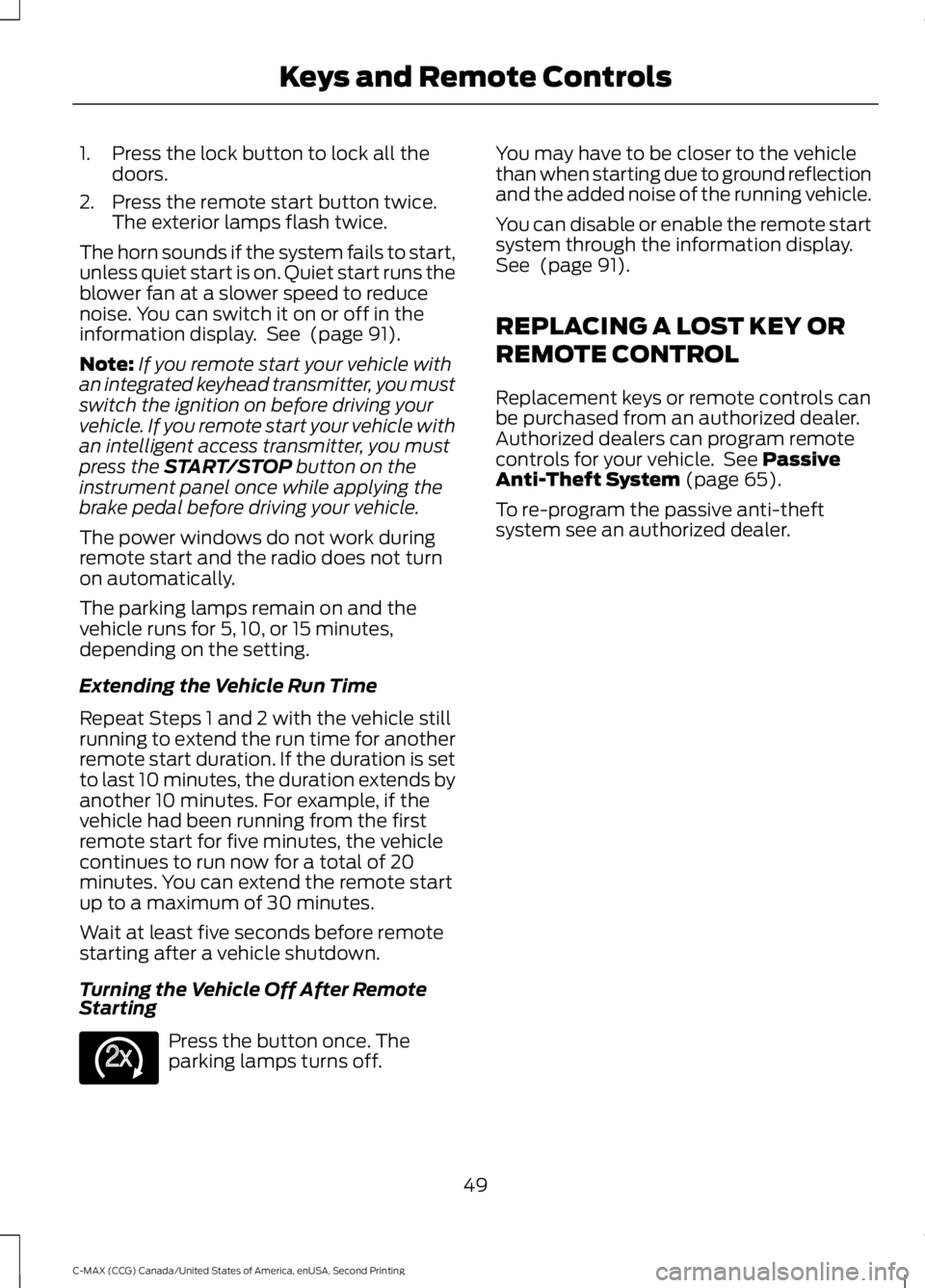
Note: You must press each button within
three seconds of each other. If you do not
follow this sequence, your vehicle does not
remote start, the exterior lamps do not flash
twice, and the horn does not sound. The label on your transmitter details the
starting procedure.
To remote start your vehicle:
48
C-MAX (CCG) Canada/United States of America, enUSA, Second Printing Keys and Remote ControlsE138624 E138625 E138626
Page 52 of 469
1. Press the lock button to lock all the
doors.
2. Press the remote start button twice. The exterior lamps flash twice.
The horn sounds if the system fails to start,
unless quiet start is on. Quiet start runs the
blower fan at a slower speed to reduce
noise. You can switch it on or off in the
information display. See (page 91).
Note: If you remote start your vehicle with
an integrated keyhead transmitter, you must
switch the ignition on before driving your
vehicle. If you remote start your vehicle with
an intelligent access transmitter, you must
press the
START/STOP button on the
instrument panel once while applying the
brake pedal before driving your vehicle.
The power windows do not work during
remote start and the radio does not turn
on automatically.
The parking lamps remain on and the
vehicle runs for 5, 10, or 15 minutes,
depending on the setting.
Extending the Vehicle Run Time
Repeat Steps 1 and 2 with the vehicle still
running to extend the run time for another
remote start duration. If the duration is set
to last 10 minutes, the duration extends by
another 10 minutes. For example, if the
vehicle had been running from the first
remote start for five minutes, the vehicle
continues to run now for a total of 20
minutes. You can extend the remote start
up to a maximum of 30 minutes.
Wait at least five seconds before remote
starting after a vehicle shutdown.
Turning the Vehicle Off After Remote
Starting Press the button once. The
parking lamps turns off. You may have to be closer to the vehicle
than when starting due to ground reflection
and the added noise of the running vehicle.
You can disable or enable the remote start
system through the information display.
See
(page 91).
REPLACING A LOST KEY OR
REMOTE CONTROL
Replacement keys or remote controls can
be purchased from an authorized dealer.
Authorized dealers can program remote
controls for your vehicle. See
Passive
Anti-Theft System (page 65).
To re-program the passive anti-theft
system see an authorized dealer.
49
C-MAX (CCG) Canada/United States of America, enUSA, Second Printing Keys and Remote ControlsE138625
Page 53 of 469
PRINCIPLE OF OPERATION
MyKey allows you to program keys with
restricted driving modes to promote good
driving habits. All but one of the keys
programmed to the vehicle can be
activated with these restricted modes.
Any keys that have not been programmed
are referred to as administrator keys or
admin keys. These can be used to:
•
Create a MyKey.
• Program configurable MyKey settings.
• Clear all MyKey features.
When you have programmed a MyKey, you
can access the following information using
the information display:
• How many admin keys and MyKeys are
programmed to your vehicle.
• The total distance your vehicle has
traveled using a MyKey.
Note: All MyKeys are programmed to the
same settings. You cannot program them
individually.
Note: For vehicles with push-button start,
when both a MyKey and an admin remote
transmitter are present, the admin remote
transmitter will be recognized by the vehicle
while switching the ignition on to start the
vehicle.
Non-configurable Settings
The following settings cannot be changed
by an admin key user: •
Seat belt reminder or Belt Minder. You
cannot disable this feature. The audio
system will mute when the front seat
passengers' safety belts are not
fastened.
• Early low fuel. The low-fuel warning
activates earlier, giving the MyKey user
more time to refuel.
• Driver assist features, if equipped on
your vehicle, are forced on: parking aid,
blind spot information system (BLIS)
with cross traffic alert, lane departure
warning and forward collision warning
system or active city-stop.
Configurable Settings
With an admin key, you can configure
certain MyKey settings when you first
create a MyKey and before you recycle the
key or restart the vehicle. You can also
change the settings afterward with an
admin key.
• A vehicle speed limit can be set.
Warnings will be shown in the display
followed by an audible tone when your
vehicle reaches the set speed. You
cannot override the set speed by fully
depressing the accelerator pedal or by
setting cruise control. WARNING
Do not set MyKey maximum speed
limit to a limit that will prevent the
driver from maintaining a safe speed
considering posted speed limits and
prevailing road conditions. The driver is
always responsible to drive in accordance
with local laws and prevailing conditions.
Failure to do so could result in accident or
injury. 50
C-MAX (CCG) Canada/United States of America, enUSA, Second Printing MyKey
™
Page 61 of 469
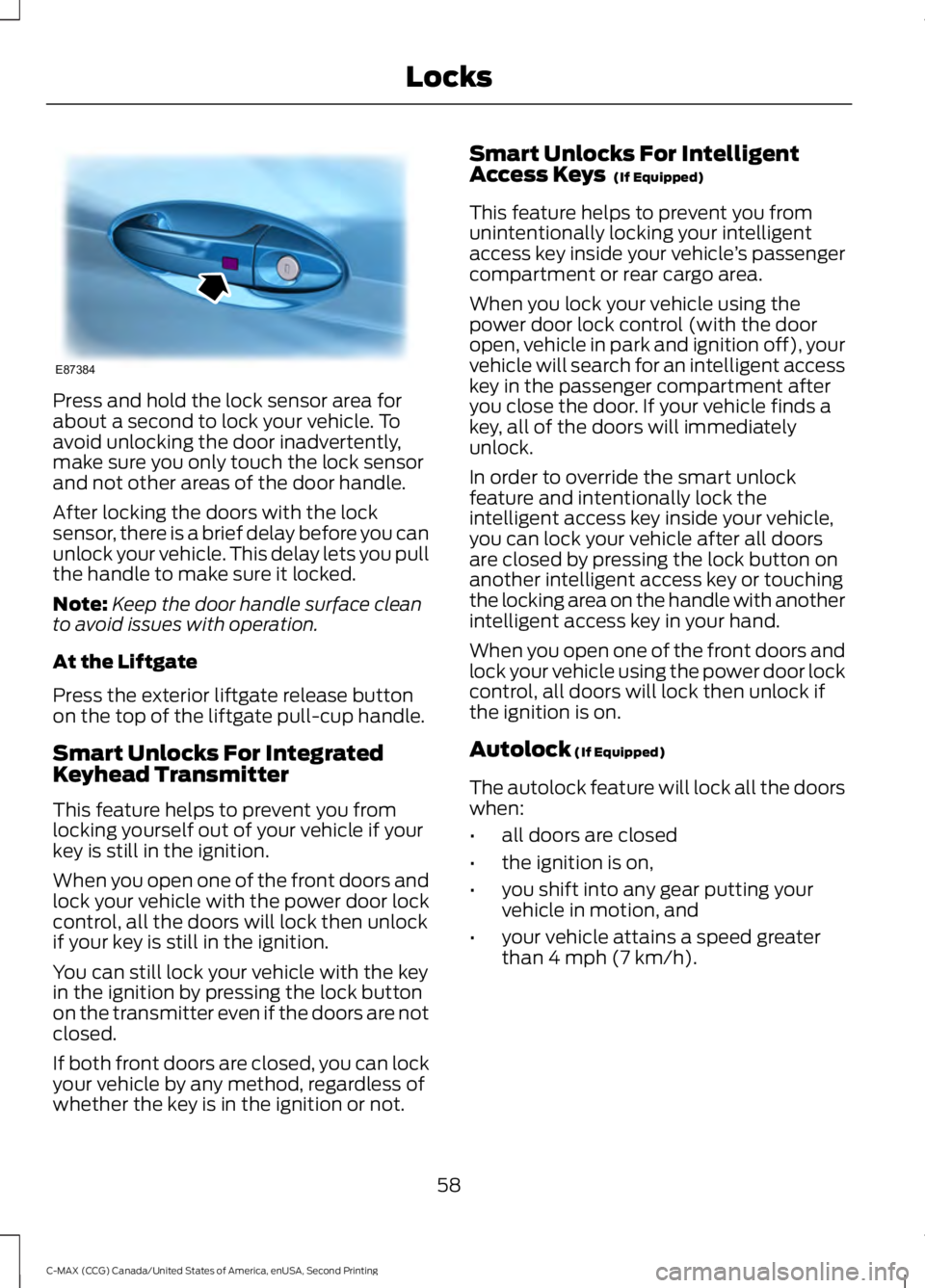
Press and hold the lock sensor area for
about a second to lock your vehicle. To
avoid unlocking the door inadvertently,
make sure you only touch the lock sensor
and not other areas of the door handle.
After locking the doors with the lock
sensor, there is a brief delay before you can
unlock your vehicle. This delay lets you pull
the handle to make sure it locked.
Note:
Keep the door handle surface clean
to avoid issues with operation.
At the Liftgate
Press the exterior liftgate release button
on the top of the liftgate pull-cup handle.
Smart Unlocks For Integrated
Keyhead Transmitter
This feature helps to prevent you from
locking yourself out of your vehicle if your
key is still in the ignition.
When you open one of the front doors and
lock your vehicle with the power door lock
control, all the doors will lock then unlock
if your key is still in the ignition.
You can still lock your vehicle with the key
in the ignition by pressing the lock button
on the transmitter even if the doors are not
closed.
If both front doors are closed, you can lock
your vehicle by any method, regardless of
whether the key is in the ignition or not. Smart Unlocks For Intelligent
Access Keys (If Equipped)
This feature helps to prevent you from
unintentionally locking your intelligent
access key inside your vehicle ’s passenger
compartment or rear cargo area.
When you lock your vehicle using the
power door lock control (with the door
open, vehicle in park and ignition off), your
vehicle will search for an intelligent access
key in the passenger compartment after
you close the door. If your vehicle finds a
key, all of the doors will immediately
unlock.
In order to override the smart unlock
feature and intentionally lock the
intelligent access key inside your vehicle,
you can lock your vehicle after all doors
are closed by pressing the lock button on
another intelligent access key or touching
the locking area on the handle with another
intelligent access key in your hand.
When you open one of the front doors and
lock your vehicle using the power door lock
control, all doors will lock then unlock if
the ignition is on.
Autolock
(If Equipped)
The autolock feature will lock all the doors
when:
• all doors are closed
• the ignition is on,
• you shift into any gear putting your
vehicle in motion, and
• your vehicle attains a speed greater
than 4 mph (7 km/h).
58
C-MAX (CCG) Canada/United States of America, enUSA, Second Printing LocksE87384
Page 64 of 469
POWER LIFTGATE (If Equipped)
WARNINGS
It is extremely dangerous to ride in a
cargo area, inside or outside of a
vehicle. In a crash, people riding in
these areas are more likely to be seriously
injured or killed. Do not allow people to ride
in any area of your vehicle that is not
equipped with seats and safety belts. Make
sure everyone in your vehicle is in a seat
and properly using a safety belt. Failure to
follow this warning could result in serious
personal injury or death. Make sure to close and latch the
liftgate to prevent drawing exhaust
fumes into your vehicle. This will also
prevent passengers and cargo from falling
out. If you must drive with the liftgate open,
keep the vents or windows open so outside
air comes into your vehicle. Failure to
follow this warning could result in serious
personal injury. Keep keys out of reach of children.
Do not allow children to operate or
play near an open or moving power
liftgate. You should supervise the
operation of the power liftgate at all times. Note:
Make sure that you close the liftgate
before operating or moving your vehicle,
especially in an enclosure, like a garage or
a parking structure. This could damage the
liftgate and its components.
Note: Do not hang anything, for example
a bike rack, from the glass or liftgate. This
could damage the liftgate and its
components.
The liftgate only operates with the
transmission in park (P).
Two warning tones sound as the liftgate
begins to power close. Three short chimes
indicate a problem with the open or close
request, caused by: •
The ignition is on and the transmission
is not in park (P).
• The battery voltage is below the
minimum operating voltage.
• The vehicle speed is at or above 3 mph
(5 km/h)
.
If the liftgate starts to close after it has
fully opened, this indicates there may be
excessive weight on the liftgate or a
possible gas strut failure. A repetitive
chime sounds and the liftgate closes under
control. Remove any excessive weight from
the liftgate. If the liftgate continues to
close after opening, have the system
checked by an authorized dealer.
Opening and Closing the Liftgate WARNING
Make sure all persons are clear of the
power liftgate area before using the
power liftgate control.
Note:
Be careful when opening or closing
the liftgate in a garage or other enclosed
area to avoid damaging the liftgate.
Note: Do not leave the liftgate open while
driving. This could damage the liftgate and
its components.
From the Instrument Panel Press the button on the
instrument panel.
With the Remote Control Press the button twice within
three seconds.
61
C-MAX (CCG) Canada/United States of America, enUSA, Second Printing LocksE138633 E138630