instrument panel FORD C MAX ENERGI 2016 User Guide
[x] Cancel search | Manufacturer: FORD, Model Year: 2016, Model line: C MAX ENERGI, Model: FORD C MAX ENERGI 2016Pages: 395, PDF Size: 6.78 MB
Page 114 of 395
5. Direct the outer instrument panel airvents toward the side windows.
6. To increase the airflow to the outerinstrument panel vents, close the airvents in the middle of the instrumentpanel and in the rear of the centerconsole.
HEATED WINDOWS AND
MIRRORS
Note:Make sure the engine is runningbefore operating the heated windows.
Heated Rear Window
The heated rear window buttonis below the climate control unit.
Press the button to clear theheated rear window of thin ice and fog.The heated rear window will automaticallyturn off after a short period of time.
Note: Do not use razor blades or othersharp objects to clean or remove decalsfrom the inside of the heated rear window.The vehicle warranty does not coverdamage caused to the heated rear windowgrid lines.
Heated Exterior Mirrors (If Equipped)
When you switch the heated rear windowon, the heated exterior mirrors willautomatically turn on.
Note:Do not remove ice from the mirrorswith a scraper or adjust the mirror glasswhen it is frozen in place.
Note:Do not clean the mirror housing orglass with harsh abrasives, fuel or otherpetroleum-based cleaning products.
CABIN AIR FILTER
Your vehicle is equipped with a cabin airfilter, which gives you and your passengersthe following benefits:
•It improves your driving comfort byreducing particle concentration.
•It improves the interior compartmentcleanliness.
•It protects the climate controlcomponents from particle deposits.
Your cabin air filter is located under theinstrument panel in the passenger footwellarea.
Note:Make sure you have a cabin air filterinstalled at all times. This prevents foreignobjects from entering the system. Runningthe system without a filter in place couldresult in degradation or damage to thesystem.
Replace the filter at regular intervals. SeeMaintenance (page 218).
For additional cabin air filter information,or to replace the filter, see an authorizeddealer.
REMOTE START (If Equipped)
The remote start feature allows you topre-condition the interior of your vehicle.The climate control system works toachieve comfort according to your previoussettings.
Note:You cannot adjust the system duringremote start operation.
Turn the ignition on to return the systemto its previous settings. You can now makeadjustments normally, but you need to turncertain vehicle-dependent features backon, such as:
•Heated seats.
•Cooled seats.
111
C-MAX (CCG) Canada/United States of America, enUSA, First Printing
Climate ControlE72507
Page 140 of 395
•Keep the tires properly inflated andonly use the recommended size.
•Aggressive driving increases theamount of energy required to moveyour vehicle. In general, you canachieve better fuel economy with mildto moderate acceleration anddeceleration. Moderate braking isparticularly important since it allowsyou to maximize the energy capturedby the regenerative braking system.
Additional Tips:
•Do not carry extra loads.
•Be mindful of adding externalaccessories that may increaseaerodynamic drag.
•Observe posted speed limits.
•Perform all scheduled maintenance.
•There is no need to wait for your engineto warm up. The vehicle is ready todrive immediately after starting.
EV+ Mode
Your vehicle will recognize your frequentdestinations and allow for more EV drivingas you approach them. For example, whennearing your home it should be easier tostay in electric mode. The EV indicator willdisplay EV+ when this mode is active. Youshould see this approximately 1/8 mile(200 meters) from a frequent destination.See Information Displays (page 93).
Note:Frequent destinations are learned byyour vehicle after two to four weeks of use.To add a destination immediately, performthe following process: cycle the ignition onfor 2 seconds, but do not start your vehicle,then off for 2 seconds. Repeat the process10 times. This location is now programmedfor EV+. You can clear these destinationswith a Driving History reset through theSettings menu.
Note:You can switch the EV+ feature onor off through the Driver Assist section ofthe Settings menu.
PLUG-IN HYBRID VEHICLE
OPERATION
Plug-in Power Mode and HybridMode
You must plug in your Energi vehicleregularly for optimal use of the highvoltage battery's extended rangecapability. Charging your vehicle addselectrical energy. This energy is used topropel the vehicle in plug-in power mode.
Estimated electric range is shown in bluenext to gasoline range at the bottom of theright information display. You can alsoconfigure MyView to include detailedvehicle range information. See Gauges(page 85).
The system maximizes the use ofelectric-only operation in plug-in powermode. System conditions may requireengine operation; however, the systemuses plug-in power whenever possible.
When your plug-in power is depleted, thepowertrain system will automaticallyswitch to hybrid mode. Your battery gaugewill transition to a simple battery graphicupon entering hybrid mode. Hybrid modeuses both the gasoline engine and electricmotor to power your vehicle and maximizefuel economy.
EV Modes
Your vehicle contains selectableEV modes through the EV buttonlocated on the center of theinstrument panel, below the climatecontrols.
137
C-MAX (CCG) Canada/United States of America, enUSA, First Printing
Unique Driving CharacteristicsE144814
Page 150 of 395
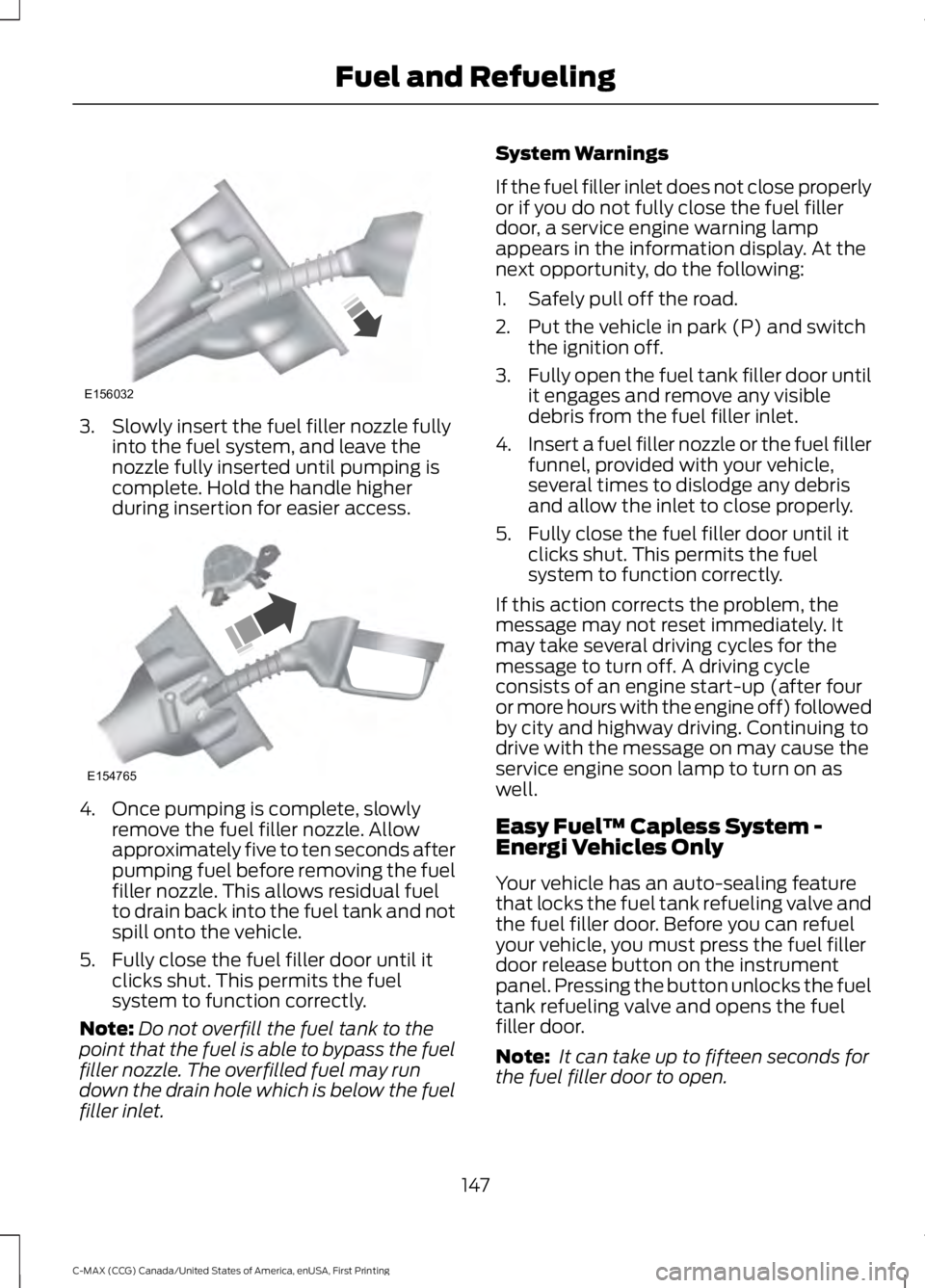
3. Slowly insert the fuel filler nozzle fullyinto the fuel system, and leave thenozzle fully inserted until pumping iscomplete. Hold the handle higherduring insertion for easier access.
4. Once pumping is complete, slowlyremove the fuel filler nozzle. Allowapproximately five to ten seconds afterpumping fuel before removing the fuelfiller nozzle. This allows residual fuelto drain back into the fuel tank and notspill onto the vehicle.
5. Fully close the fuel filler door until itclicks shut. This permits the fuelsystem to function correctly.
Note:Do not overfill the fuel tank to thepoint that the fuel is able to bypass the fuelfiller nozzle. The overfilled fuel may rundown the drain hole which is below the fuelfiller inlet.
System Warnings
If the fuel filler inlet does not close properlyor if you do not fully close the fuel fillerdoor, a service engine warning lampappears in the information display. At thenext opportunity, do the following:
1. Safely pull off the road.
2. Put the vehicle in park (P) and switchthe ignition off.
3.Fully open the fuel tank filler door untilit engages and remove any visibledebris from the fuel filler inlet.
4.Insert a fuel filler nozzle or the fuel fillerfunnel, provided with your vehicle,several times to dislodge any debrisand allow the inlet to close properly.
5. Fully close the fuel filler door until itclicks shut. This permits the fuelsystem to function correctly.
If this action corrects the problem, themessage may not reset immediately. Itmay take several driving cycles for themessage to turn off. A driving cycleconsists of an engine start-up (after fouror more hours with the engine off) followedby city and highway driving. Continuing todrive with the message on may cause theservice engine soon lamp to turn on aswell.
Easy Fuel™ Capless System -Energi Vehicles Only
Your vehicle has an auto-sealing featurethat locks the fuel tank refueling valve andthe fuel filler door. Before you can refuelyour vehicle, you must press the fuel fillerdoor release button on the instrumentpanel. Pressing the button unlocks the fueltank refueling valve and opens the fuelfiller door.
Note: It can take up to fifteen seconds forthe fuel filler door to open.
147
C-MAX (CCG) Canada/United States of America, enUSA, First Printing
Fuel and RefuelingE156032 E154765
Page 170 of 395
PRINCIPLE OF OPERATION
The traction control system helps avoiddrive wheel spin and loss of traction.
If your vehicle begins to slide, the systemapplies the brakes to individual wheelsand, when needed, reduces engine powerat the same time. If the wheels spin whenaccelerating on slippery or loose surfaces,the system reduces engine power in orderto increase traction.
USING TRACTION CONTROL
WARNING
The stability and traction controllight illuminates steadily if thesystem detects a failure. Make sureyou did not manually disable the tractioncontrol system using the informationdisplay controls or the switch. If thestability control and traction control lightis still illuminating steadily, have thesystem serviced by an authorized dealerimmediately. Operating your vehicle withthe traction control disabled could lead toan increased risk of loss of vehicle control,vehicle rollover, personal injury and death.
The system automatically turns on eachtime you switch the ignition on.
If your vehicle is stuck in mud or snow,switching traction control off may bebeneficial as this allows the wheels to spin.
Note:When you switch traction control off,stability control remains fully active.
Switching the System Off
When you switch the system off or on, amessage appears in the informationdisplay showing system status.
You can switch the system off by eitherusing the information display controls orthe switch.
Using the Information DisplayControls
You can switch this feature off or on in theinformation display. See GeneralInformation (page 93).
Using a Switch (If Equipped)
Use the traction control switch on theinstrument panel to switch the system offor on.
The switch illuminates when tractioncontrol is off.
System Indicator Lights andMessages
The stability and traction controllight:
•Temporarily illuminates on enginestart-up.
•Flashes when a driving conditionactivates either of the systems.
•Illuminates if a problem occurs in eitherof the systems.
The stability and traction controloff light temporarily illuminateson engine start-up and stays onwhen you switch the traction controlsystem off.
167
C-MAX (CCG) Canada/United States of America, enUSA, First Printing
Traction ControlE138639
Page 199 of 395

This program is separate from the NewVehicle Limited Warranty, but the coverageis concurrent with the powertrain coverageperiod of your vehicle.
Canadian customers who require roadsideassistance, call 1-800-665-2006.
Vehicles Sold in Canada: UsingRoadside Assistance
Complete the roadside assistanceidentification card and place it in yourwallet for quick reference.
In Canada, this card is found in theWarranty Guide in the glove compartmentof your vehicle.
Vehicles Sold in Canada: RoadsideAssistance Program Coverage
The service is available 24 hours a day,seven days a week.
Canadian roadside coverage and benefitsmay differ from the U.S. coverage.
For complete program coverage detailsyou may contact your dealer, you can callus in Canada at 1-800-665-2006, or visitour website at www.ford.ca.
HAZARD WARNING FLASHERS
Note:If used when the vehicle is notrunning, the battery will lose charge. Theremay be insufficient power to restart yourvehicle.
The hazard warning button islocated on the instrument panel.Use it when your vehicle iscreating a safety hazard for othermotorists.
•Press the button to turn on the hazardwarning function, and the front andrear direction indicators will flash.
•Press the button again to turn themoff.
FUEL SHUTOFF
WARNING
Failure to inspect and, if necessary,repair fuel leaks after a collision mayincrease the risk of fire and seriousinjury. Ford Motor Company recommendsthat the fuel system be inspected by anauthorized dealer after any collision.
In the event of a moderate to severecollision, this vehicle has a fuel pumpshut-off feature that stops the flow of fuelto the engine. Not every impact will causea shut-off.
Should your vehicle shut off after acollision, you may restart your vehicle.
For vehicles equipped with a key system:
1. Switch off the ignition.
2. Switch on the ignition.
3. Check the information display for theReady to Drive light as the gasolineengine may not start, but the electricmotor may be running. If you do not seethe Ready to Drive light, repeat Steps1 and 2 up to two more times.
For vehicles equipped with a push buttonstart system:
1. Press the push button start to switchoff the ignition.
2. Press the brake pedal and press thepush button start to switch on theignition.
3. Check the information display for theReady to Drive light as the gasolineengine may not start, but the electricmotor may be running. If you do not seethe Ready to Drive light, repeat Steps1 and 2 up to two more times.
196
C-MAX (CCG) Canada/United States of America, enUSA, First Printing
Roadside Emergencies
Page 221 of 395
GENERAL INFORMATION
Have your vehicle serviced regularly to helpmaintain its roadworthiness and resalevalue. There is a large network ofauthorized dealers that are there to helpyou with their professional servicingexpertise. We believe that their speciallytrained technicians are best qualified toservice your vehicle properly and expertly.They are supported by a wide range ofhighly specialized tools developedspecifically for servicing your vehicle.
If your vehicle requires professional service,an authorized dealer can provide thenecessary parts and service. Check yourwarranty information to find out whichparts and services are covered.
Use only recommended fuels, lubricants,fluids and service parts conforming tospecifications. Motorcraft® parts aredesigned and built to provide the bestperformance in your vehicle.
Precautions
•Do not work on a hot engine.
•Make sure that nothing gets caught inmoving parts.
•Do not work on a vehicle with theengine running in an enclosed space,unless you are sure you have enoughventilation.
•Keep all open flames and other burningmaterial (such as cigarettes) awayfrom the battery and all fuel relatedparts.
Working with the Engine Off
1.Set the parking brake and shift to park(P).
2. Switch off the engine.
3. Block the wheels.
Working with the Engine On
WARNING
To reduce the risk of vehicle damageand/or personal burn injuries, do notstart your engine with the air cleanerremoved and do not remove it while theengine is running.
1.Set the parking brake and shift to park(P).
2. Block the wheels.
OPENING AND CLOSING THE
HOOD
Opening the Hood
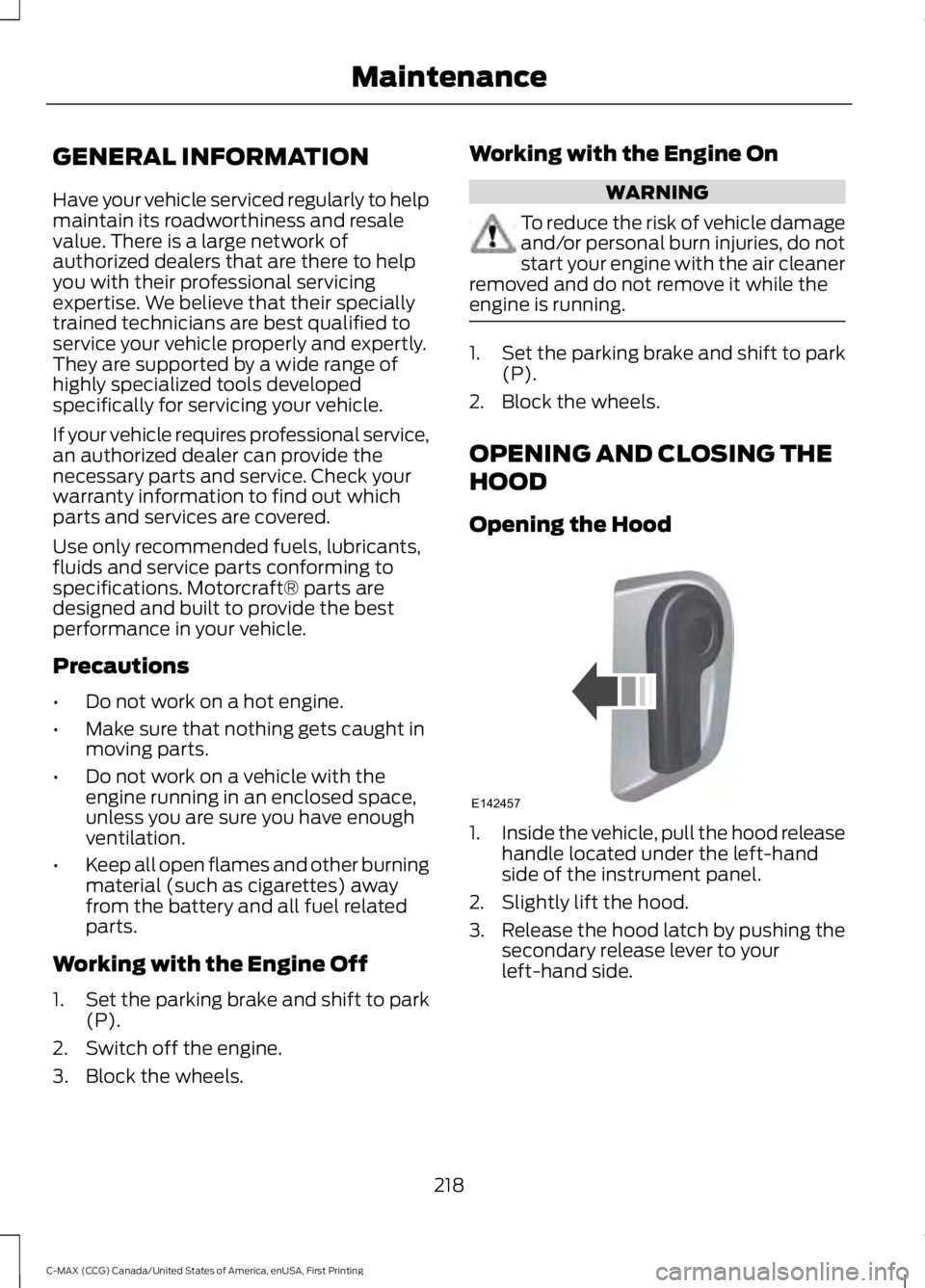
1.Inside the vehicle, pull the hood releasehandle located under the left-handside of the instrument panel.
2. Slightly lift the hood.
3. Release the hood latch by pushing thesecondary release lever to yourleft-hand side.
218
C-MAX (CCG) Canada/United States of America, enUSA, First Printing
MaintenanceE142457
Page 240 of 395
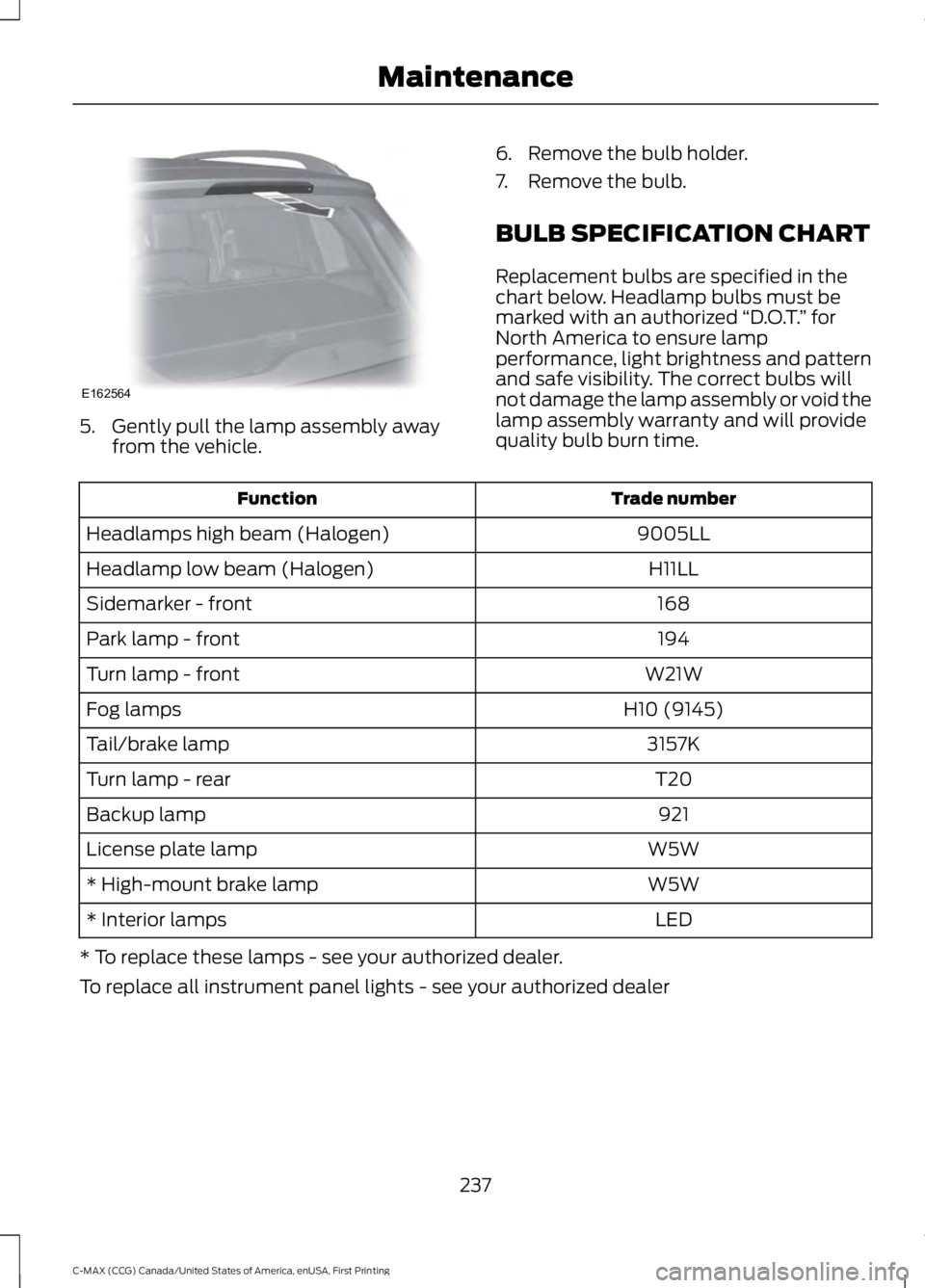
5. Gently pull the lamp assembly awayfrom the vehicle.
6. Remove the bulb holder.
7. Remove the bulb.
BULB SPECIFICATION CHART
Replacement bulbs are specified in thechart below. Headlamp bulbs must bemarked with an authorized “D.O.T.” forNorth America to ensure lampperformance, light brightness and patternand safe visibility. The correct bulbs willnot damage the lamp assembly or void thelamp assembly warranty and will providequality bulb burn time.
Trade numberFunction
9005LLHeadlamps high beam (Halogen)
H11LLHeadlamp low beam (Halogen)
168Sidemarker - front
194Park lamp - front
W21WTurn lamp - front
H10 (9145)Fog lamps
3157KTail/brake lamp
T20Turn lamp - rear
921Backup lamp
W5WLicense plate lamp
W5W* High-mount brake lamp
LED* Interior lamps
* To replace these lamps - see your authorized dealer.
To replace all instrument panel lights - see your authorized dealer
237
C-MAX (CCG) Canada/United States of America, enUSA, First Printing
MaintenanceE162564
Page 246 of 395
•Do not allow wax to come in contactwith any non-body (low-gloss black)colored trim. The wax will discolor orstain the parts over time.
•Roof racks.
•Bumpers.
•Grained door handles.
•Side moldings.
•Mirror housings.
•Windshield cowl area.
•Do not apply wax to glass areas.
•After waxing, your car's paint shouldfeel smooth, and be free of streaks andsmudges.
CLEANING THE ENGINE
Engines are more efficient when they areclean because grease and dirt buildup keepthe engine warmer than normal.
When washing:
•Take care when using a power washerto clean the engine. The high-pressurefluid could penetrate the sealed partsand cause damage.
•Do not spray a hot engine with coldwater to avoid cracking the engineblock or other engine components.
•Spray Motorcraft Engine Shampoo andDegreaser on all parts that requirecleaning and pressure rinse clean. InCanada, use Motorcraft EngineShampoo.
•Never wash or rinse the engine while itis hot or running; water in the runningengine may cause internal damage.
•Never wash or rinse any ignition coil,spark plug wire or spark plug well, orthe area in and around these locations.
•Cover the battery, power distributionbox, and air filter assembly to preventwater damage when cleaning theengine.
CLEANING THE WINDOWS AND
WIPER BLADES
Car wash chemicals and environmentalfallout can result in windshield and wiperblade contamination. Dirty windshield andwipers will result in poor windshield wiperoperation. Keep the windshield and wiperblades clean to maintain windshield wiperperformance.
To clean the windshield and wiper blades:
•Clean the windshield with anon-abrasive glass cleaner. Whencleaning the interior of the windshield,avoid getting any glass cleaner on theinstrument panel or door panels. Wipeany glass cleaner off these surfacesimmediately.
•For windshields contaminated withtree sap, chemicals, wax or bugs, cleanthe entire windshield using steel wool(no greater than 0000 grade) in acircular motion and rinse with water.
•Clean the wiper blades with isopropylrubbing alcohol or windshield washerconcentrate.
Note: Do not use razor blades or othersharp objects to clean or remove decalsfrom the inside of the heated rear window.The vehicle warranty does not coverdamage caused to the heated rear windowgrid lines.
243
C-MAX (CCG) Canada/United States of America, enUSA, First Printing
Vehicle Care
Page 247 of 395
CLEANING THE INTERIOR
WARNINGS
Do not use cleaning solvents, bleachor dye on the vehicle’s safety belts,as these actions may weaken thebelt webbing.
On vehicles equipped withseat-mounted airbags, do not usechemical solvents or strongdetergents. Such products couldcontaminate the side airbag system andaffect performance of the side airbag in acollision.
For fabric, carpets, cloth seats, safety beltsand seats equipped with side airbags:
•Remove dust and loose dirt with avacuum cleaner.
•Remove light stains and soil withMotorcraft Professional StrengthCarpet & Upholstery Cleaner.
•If grease or tar is present on thematerial, spot-clean the area first withMotorcraft Spot and Stain Remover. InCanada, use Motorcraft Multi-PurposeCleaner.
•If a ring forms on the fabric after spotcleaning, clean the entire areaimmediately (but do not oversaturate)or the ring will set.
•Do not use household cleaningproducts or glass cleaners, which canstain and discolor the fabric and affectthe flame retardant abilities of the seatmaterials.
CLEANING THE INSTRUMENT
PANEL AND INSTRUMENT
CLUSTER LENS
WARNING
Do not use chemical solvents orstrong detergents when cleaning thesteering wheel or instrument panelto avoid contamination of the airbagsystem.
Note:Follow the same procedure ascleaning leather seats for cleaning leatherinstrument panels and leather interior trimsurfaces. See Cleaning Leather Seats(page 245).
Clean the instrument panel and clusterlens with a clean, damp and soft cloth,then use a clean, dry and soft cloth to drythese areas.
•Avoid cleaners or polishes that increasethe gloss of the upper portion of theinstrument panel. The dull finish in thisarea helps protect you fromundesirable windshield reflection.
•Do not use any household cleaningproducts or glass cleaners as thesemay damage the finish of theinstrument panel, interior trim andcluster lens.
•Wash or wipe your hands clean if youhave been in contact with certainproducts such as insect repellent andsuntan lotion to avoid possible damageto the interior painted surfaces.
•Do not allow air fresheners and handsanitizers to spill onto interior surfaces.If a spill occurs, wipe off immediately.Your warranty may not cover thesedamages.
If a staining liquid like coffee or juice hasbeen spilled on the instrument panel or oninterior trim surfaces:
244
C-MAX (CCG) Canada/United States of America, enUSA, First Printing
Vehicle Care
Page 248 of 395
1. Wipe up spilled liquid using a clean,soft cloth as quickly as possible.
2. Use Motorcraft Premium Leather andVinyl Cleaner or a commerciallyavailable leather cleaning product forautomotive interiors. Test any cleaneror stain remover on an inconspicuousarea.
3. Alternatively, wipe the surface with aclean, soft cloth and a mild soap andwater solution. Dry the area with aclean, soft cloth.
4. If necessary, apply more soap andwater solution or cleaning product toa clean, soft cloth and press it onto thesoiled area. Allow this to set at roomtemperature for 30 minutes.
5. Remove the soaked cloth, then with aclean, damp cloth, use a rubbingmotion for 60 seconds on the soiledarea.
6. Dry the area with a clean, soft cloth.
CLEANING LEATHER SEATS (If
Equipped)
Note:Follow the same procedure ascleaning leather seats for cleaning leatherinstrument panels and leather interior trimsurfaces.
For routine cleaning, wipe the surface witha soft, damp cloth and a mild soap andwater solution. Dry the area with a clean,soft cloth.
For cleaning and removing stains such asdye transfer, use Motorcraft PremiumLeather and Vinyl Cleaner or acommercially available leather cleaningproduct for automotive interiors.
Note:Test any cleaner or stain remover onan inconspicuous area.
You should:
•Remove dust and loose dirt with avacuum cleaner.
•Clean and treat spills and stains assoon as possible.
Do not use the following products as thesemay damage the leather:
•Oil and petroleum or silicone-basedleather conditioners.
•Household cleaners.
•Alcohol solutions.
•Solvents or cleaners intendedspecifically for rubber, vinyl andplastics.
REPAIRING MINOR PAINT
DAMAGE
Authorized dealers have touch-up paint tomatch your vehicle’s color. Your vehiclecolor code is printed on a sticker on thefront, left-hand side door jamb. Take yourcolor code to your authorized dealer tomake sure you get the correct color.
Before repairing minor paint damage, usea cleaner such as Motorcraft Bug and TarRemover to remove particles such as birddroppings, tree sap, insect deposits, tarspots, road salt and industrial fallout.
Always read the instructions before usingcleaning products.
CLEANING THE ALLOY
WHEELS (If Equipped)
Note:Do not apply a cleaning chemical towarm or hot wheel rims and covers.
Note:Some automatic car washes maycause damage to the finish on your wheelrims and covers.
245
C-MAX (CCG) Canada/United States of America, enUSA, First Printing
Vehicle Care