lock FORD C MAX ENERGI 2016 User Guide
[x] Cancel search | Manufacturer: FORD, Model Year: 2016, Model line: C MAX ENERGI, Model: FORD C MAX ENERGI 2016Pages: 395, PDF Size: 6.78 MB
Page 29 of 395
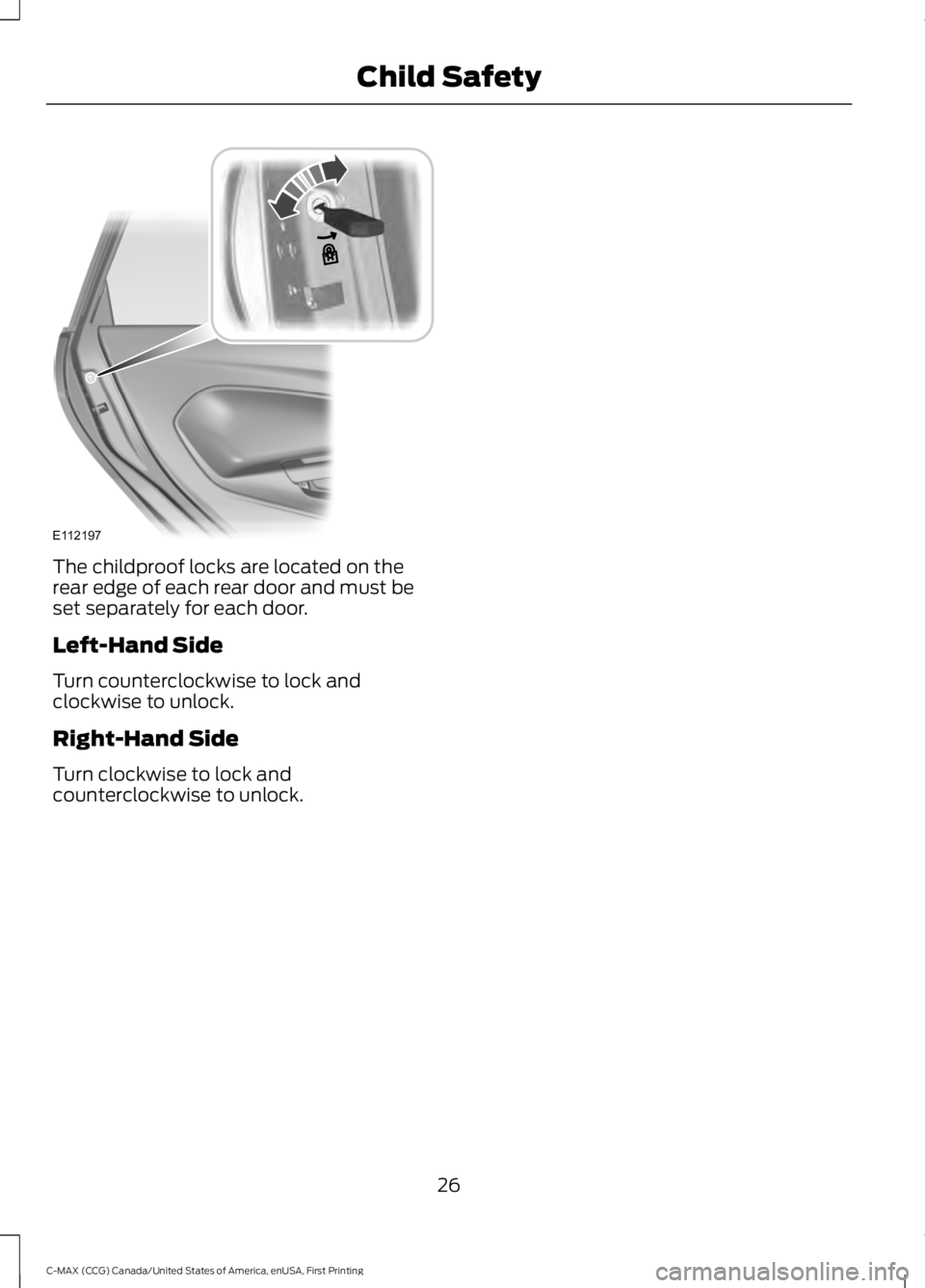
The childproof locks are located on therear edge of each rear door and must beset separately for each door.
Left-Hand Side
Turn counterclockwise to lock andclockwise to unlock.
Right-Hand Side
Turn clockwise to lock andcounterclockwise to unlock.
26
C-MAX (CCG) Canada/United States of America, enUSA, First Printing
Child SafetyE112197
Page 30 of 395
PRINCIPLE OF OPERATION
WARNINGS
Always drive and ride with yourseatback upright and the lap beltsnug and low across the hips.
To reduce the risk of injury, makesure children sit where they can beproperly restrained.
Never let a passenger hold a child onhis or her lap while your vehicle ismoving. The passenger cannotprotect the child from injury in a crash.
All occupants of your vehicle,including the driver, should alwaysproperly wear their safety belts, evenwhen an airbag supplemental restraintsystem is provided.
It is extremely dangerous to ride in acargo area, inside or outside of avehicle. In a crash, people riding inthese areas are more likely to be seriouslyinjured or killed. Do not allow people to ridein any area of your vehicle that is notequipped with seats and safety belts. Besure everyone in your vehicle is in a seatand using a safety belt properly.
In a rollover crash, an unbeltedperson is significantly more likely todie than a person wearing a safetybelt.
Each seating position in your vehiclehas a specific safety belt assemblywhich is made up of one buckle andone tongue that are designed to be usedas a pair. 1) Use the shoulder belt on theoutside shoulder only. Never wear theshoulder belt under the arm. 2) Neverswing the safety belt around your neck overthe inside shoulder. 3) Never use a singlebelt for more than one person.
When possible, all children 12 yearsold and under should be properlyrestrained in a rear seating position.
WARNINGS
Safety belts and seats can becomehot in a vehicle that has been closedup in sunny weather; they could burna small child. Check seat covers andbuckles before you place a child anywherenear them.
Front and rear seat occupants,including pregnant women, shouldwear safety belts for optimumprotection in an accident.
All seating positions in this vehicle havelap and shoulder safety belts. Alloccupants of the vehicle should alwaysproperly wear their safety belts, even whenan airbag supplemental restraint systemis provided.
The safety belt system consists of:
•lap and shoulder safety belts
•shoulder safety belt with automaticlocking mode, (except driver safetybelt)
•height adjuster at the front outboardseating positions
•retractor and anchor pretensioner atthe front outboard seating positions
•belt tension sensor at the frontoutboard passenger seating position
•safety belt warning light and chime
•crash sensors and monitoring systemwith readiness indicator.
27
C-MAX (CCG) Canada/United States of America, enUSA, First Printing
Seatbelts
Page 32 of 395
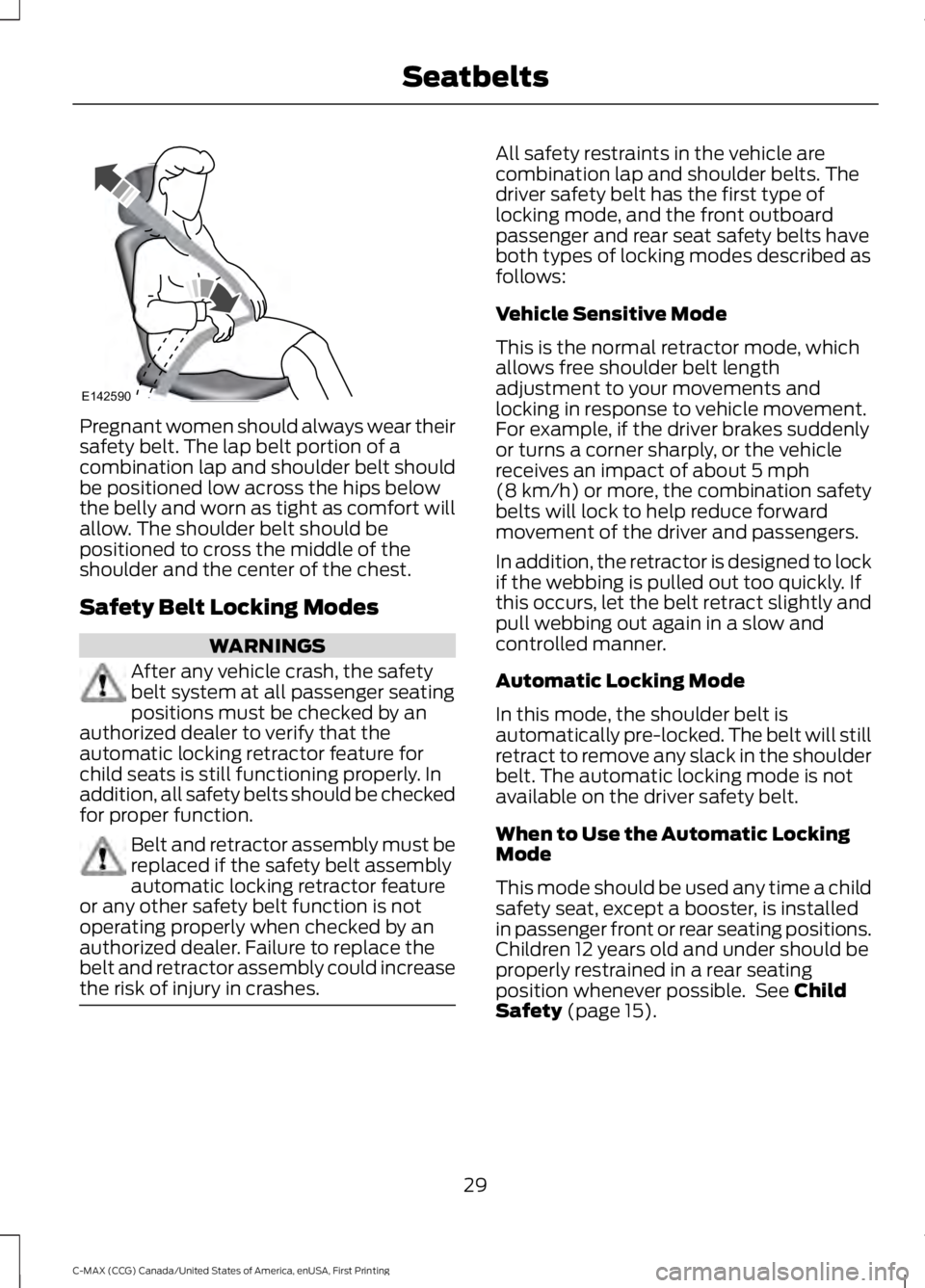
Pregnant women should always wear theirsafety belt. The lap belt portion of acombination lap and shoulder belt shouldbe positioned low across the hips belowthe belly and worn as tight as comfort willallow. The shoulder belt should bepositioned to cross the middle of theshoulder and the center of the chest.
Safety Belt Locking Modes
WARNINGS
After any vehicle crash, the safetybelt system at all passenger seatingpositions must be checked by anauthorized dealer to verify that theautomatic locking retractor feature forchild seats is still functioning properly. Inaddition, all safety belts should be checkedfor proper function.
Belt and retractor assembly must bereplaced if the safety belt assemblyautomatic locking retractor featureor any other safety belt function is notoperating properly when checked by anauthorized dealer. Failure to replace thebelt and retractor assembly could increasethe risk of injury in crashes.
All safety restraints in the vehicle arecombination lap and shoulder belts. Thedriver safety belt has the first type oflocking mode, and the front outboardpassenger and rear seat safety belts haveboth types of locking modes described asfollows:
Vehicle Sensitive Mode
This is the normal retractor mode, whichallows free shoulder belt lengthadjustment to your movements andlocking in response to vehicle movement.For example, if the driver brakes suddenlyor turns a corner sharply, or the vehiclereceives an impact of about 5 mph(8 km/h) or more, the combination safetybelts will lock to help reduce forwardmovement of the driver and passengers.
In addition, the retractor is designed to lockif the webbing is pulled out too quickly. Ifthis occurs, let the belt retract slightly andpull webbing out again in a slow andcontrolled manner.
Automatic Locking Mode
In this mode, the shoulder belt isautomatically pre-locked. The belt will stillretract to remove any slack in the shoulderbelt. The automatic locking mode is notavailable on the driver safety belt.
When to Use the Automatic LockingMode
This mode should be used any time a childsafety seat, except a booster, is installedin passenger front or rear seating positions.Children 12 years old and under should beproperly restrained in a rear seatingposition whenever possible. See ChildSafety (page 15).
29
C-MAX (CCG) Canada/United States of America, enUSA, First Printing
SeatbeltsE142590
Page 33 of 395
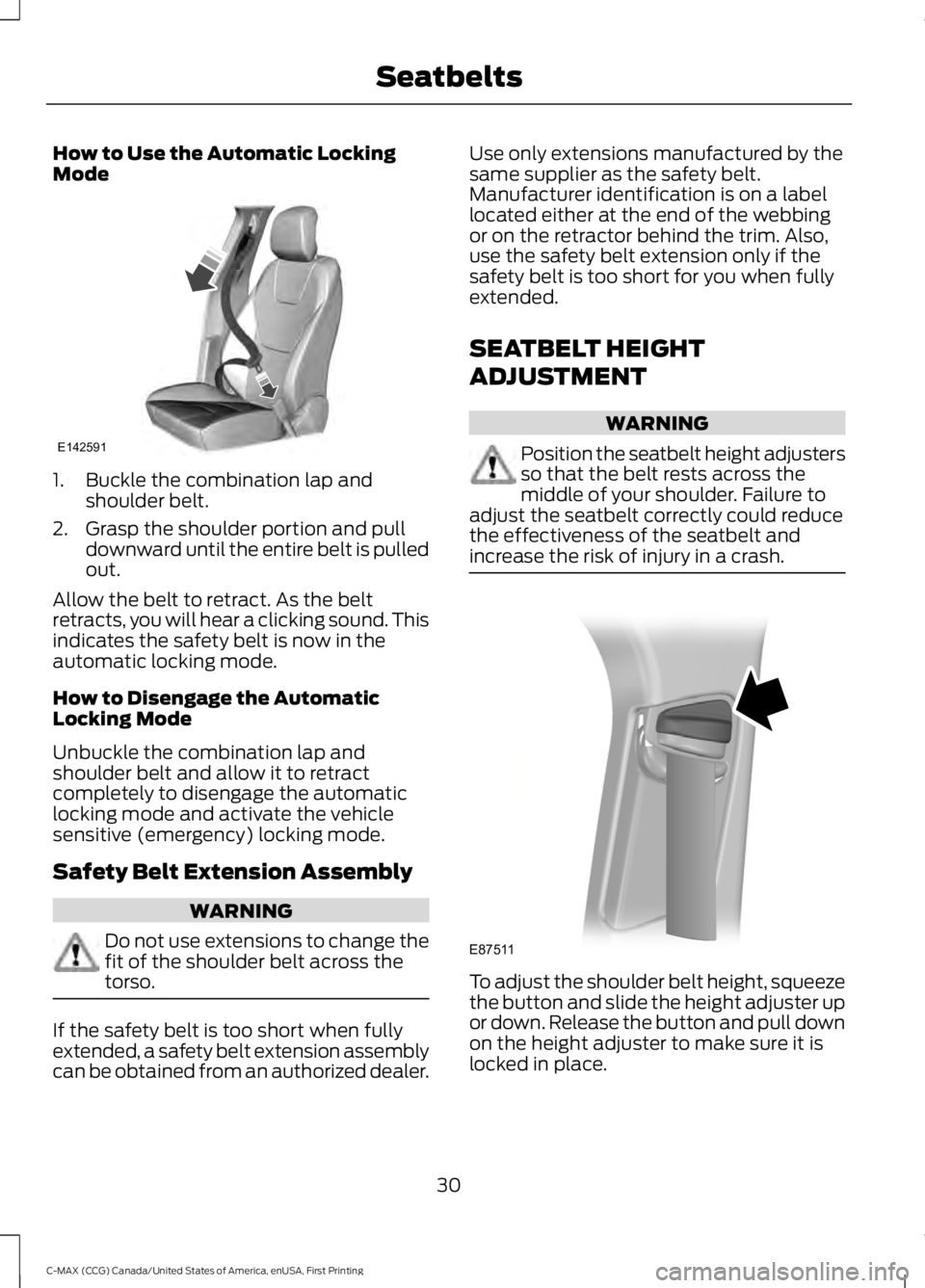
How to Use the Automatic LockingMode
1. Buckle the combination lap andshoulder belt.
2. Grasp the shoulder portion and pulldownward until the entire belt is pulledout.
Allow the belt to retract. As the beltretracts, you will hear a clicking sound. Thisindicates the safety belt is now in theautomatic locking mode.
How to Disengage the AutomaticLocking Mode
Unbuckle the combination lap andshoulder belt and allow it to retractcompletely to disengage the automaticlocking mode and activate the vehiclesensitive (emergency) locking mode.
Safety Belt Extension Assembly
WARNING
Do not use extensions to change thefit of the shoulder belt across thetorso.
If the safety belt is too short when fullyextended, a safety belt extension assemblycan be obtained from an authorized dealer.
Use only extensions manufactured by thesame supplier as the safety belt.Manufacturer identification is on a labellocated either at the end of the webbingor on the retractor behind the trim. Also,use the safety belt extension only if thesafety belt is too short for you when fullyextended.
SEATBELT HEIGHT
ADJUSTMENT
WARNING
Position the seatbelt height adjustersso that the belt rests across themiddle of your shoulder. Failure toadjust the seatbelt correctly could reducethe effectiveness of the seatbelt andincrease the risk of injury in a crash.
To adjust the shoulder belt height, squeezethe button and slide the height adjuster upor down. Release the button and pull downon the height adjuster to make sure it islocked in place.
30
C-MAX (CCG) Canada/United States of America, enUSA, First Printing
SeatbeltsE142591 E87511
Page 47 of 395
GENERAL INFORMATION ON
RADIO FREQUENCIES
This device complies with Part 15 of theFCC Rules and with Industry Canadalicense-exempt RSS standard(s).Operation is subject to the following twoconditions: (1) This device may not causeharmful interference, and (2) This devicemust accept any interference received,including interference that may causeundesired operation.
Note:Changes or modifications notexpressively approved by the partyresponsible for compliance could void theuser's authority to operate the equipment.The term IC before the radio certificationnumber only signifies that Industry Canadatechnical specifications were met.
The typical operating range for yourtransmitter is approximately 33 ft (10 m).Vehicles with the remote start feature willhave a greater range.
One of the following could cause adecrease in operating range:
•Weather conditions.
•Nearby radio towers.
•Structures around the vehicle.
•Other vehicles parked next to yourvehicle.
The radio frequency used by your remotecontrol can also be used by other radiotransmitters, for example amateur radios,medical equipment, wireless headphones,wireless remote controls, cell phones,battery chargers and alarm systems. If thefrequencies are jammed, you will not beable to use your remote control. You canlock and unlock the doors with the key.
Note:Make sure to lock your vehicle beforeleaving it unattended.
Note:If you are in range, the remote controlwill operate if you press any buttonunintentionally.
Intelligent Access (If Equipped)
The system uses a radio frequency signalto communicate with your vehicle andauthorize your vehicle to unlock when oneof the following conditions are met:
•You activate the front exterior doorhandle switch.
•You press the luggage compartmentbutton.
•You press a button on the transmitter.
If excessive radio frequency interferenceis present in the area or if the transmitterbattery is low, you may need tomechanically unlock your door. You canuse the mechanical key blade in yourintelligent access key to open the driverdoor in this situation. See RemoteControl (page 44).
REMOTE CONTROL
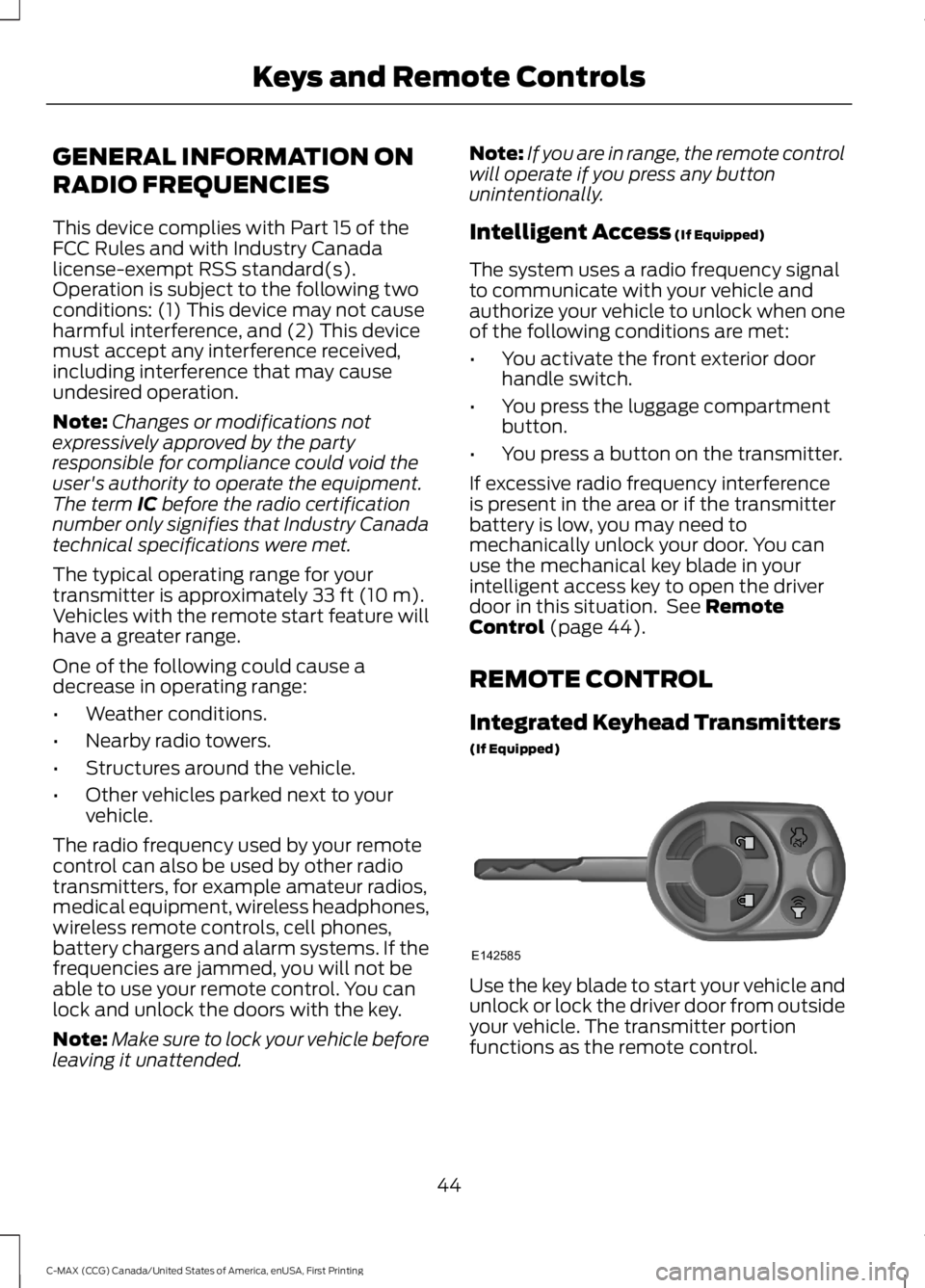
Integrated Keyhead Transmitters
(If Equipped)
Use the key blade to start your vehicle andunlock or lock the driver door from outsideyour vehicle. The transmitter portionfunctions as the remote control.
44
C-MAX (CCG) Canada/United States of America, enUSA, First Printing
Keys and Remote ControlsE142585
Page 48 of 395
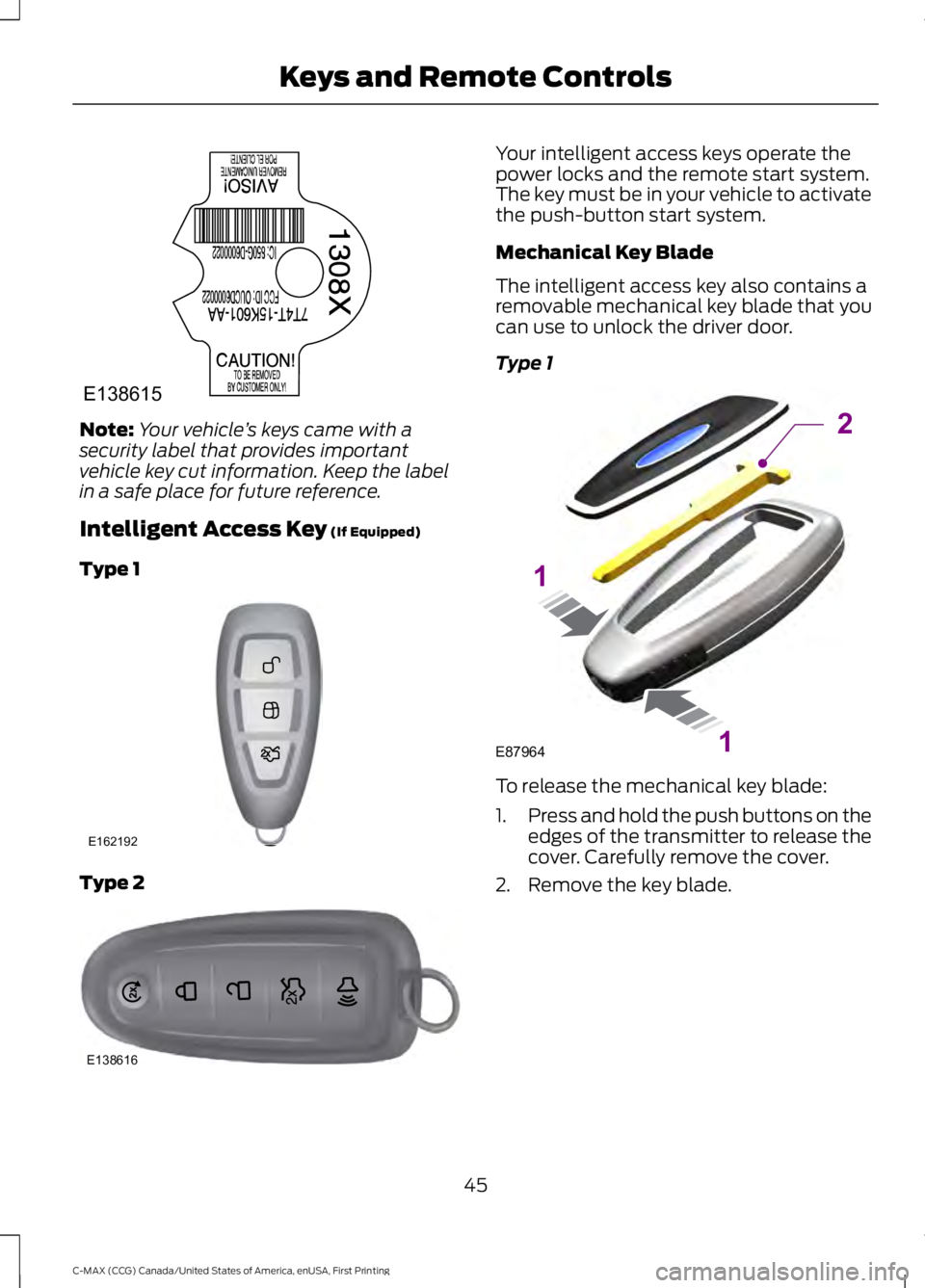
Note:Your vehicle’s keys came with asecurity label that provides importantvehicle key cut information. Keep the labelin a safe place for future reference.
Intelligent Access Key (If Equipped)
Type 1
Type 2
Your intelligent access keys operate thepower locks and the remote start system.The key must be in your vehicle to activatethe push-button start system.
Mechanical Key Blade
The intelligent access key also contains aremovable mechanical key blade that youcan use to unlock the driver door.
Type 1
To release the mechanical key blade:
1.Press and hold the push buttons on theedges of the transmitter to release thecover. Carefully remove the cover.
2. Remove the key blade.
45
C-MAX (CCG) Canada/United States of America, enUSA, First Printing
Keys and Remote ControlsE138615 E162192 E138616 E87964
2
1
1
Page 51 of 395
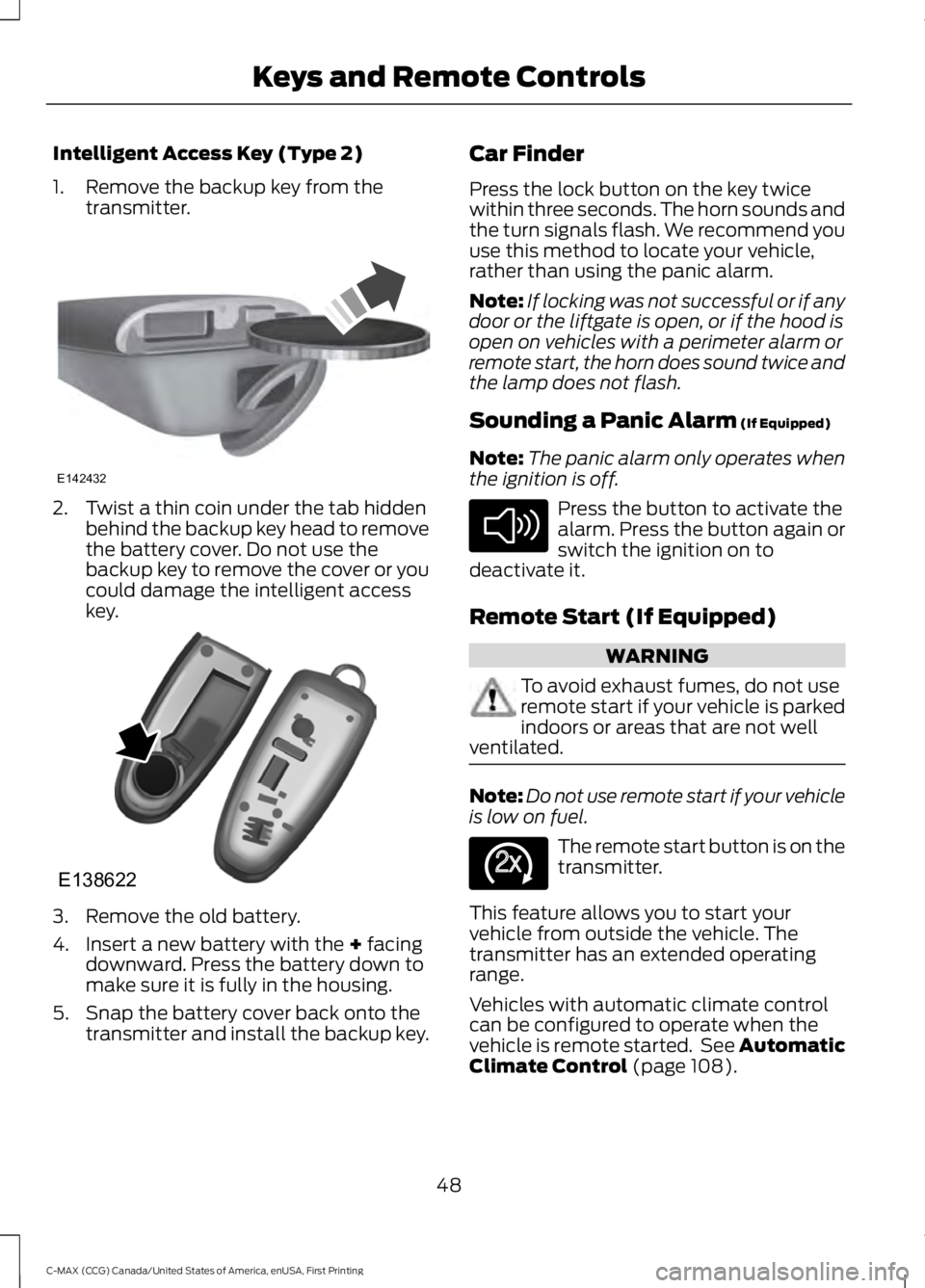
Intelligent Access Key (Type 2)
1. Remove the backup key from thetransmitter.
2. Twist a thin coin under the tab hiddenbehind the backup key head to removethe battery cover. Do not use thebackup key to remove the cover or youcould damage the intelligent accesskey.
3. Remove the old battery.
4. Insert a new battery with the + facingdownward. Press the battery down tomake sure it is fully in the housing.
5. Snap the battery cover back onto thetransmitter and install the backup key.
Car Finder
Press the lock button on the key twicewithin three seconds. The horn sounds andthe turn signals flash. We recommend youuse this method to locate your vehicle,rather than using the panic alarm.
Note:If locking was not successful or if anydoor or the liftgate is open, or if the hood isopen on vehicles with a perimeter alarm orremote start, the horn does sound twice andthe lamp does not flash.
Sounding a Panic Alarm (If Equipped)
Note:The panic alarm only operates whenthe ignition is off.
Press the button to activate thealarm. Press the button again orswitch the ignition on todeactivate it.
Remote Start (If Equipped)
WARNING
To avoid exhaust fumes, do not useremote start if your vehicle is parkedindoors or areas that are not wellventilated.
Note:Do not use remote start if your vehicleis low on fuel.
The remote start button is on thetransmitter.
This feature allows you to start yourvehicle from outside the vehicle. Thetransmitter has an extended operatingrange.
Vehicles with automatic climate controlcan be configured to operate when thevehicle is remote started. See AutomaticClimate Control (page 108).
48
C-MAX (CCG) Canada/United States of America, enUSA, First Printing
Keys and Remote ControlsE142432 E138622 E138624 E138625
Page 52 of 395
Many states and provinces haverestrictions for the use of remote start.Check your local and state or provinciallaws for specific requirements regardingremote start systems.
The remote start system does not work ifany of the following occur:
•The ignition is on.
•The alarm system triggers.
•You disable the feature.
•The hood is open.
•The transmission is not in P.
•The vehicle battery voltage is too low.
•The powertrain fault indicator was onthe last time your vehicle was driven.
Remote Starting the Vehicle
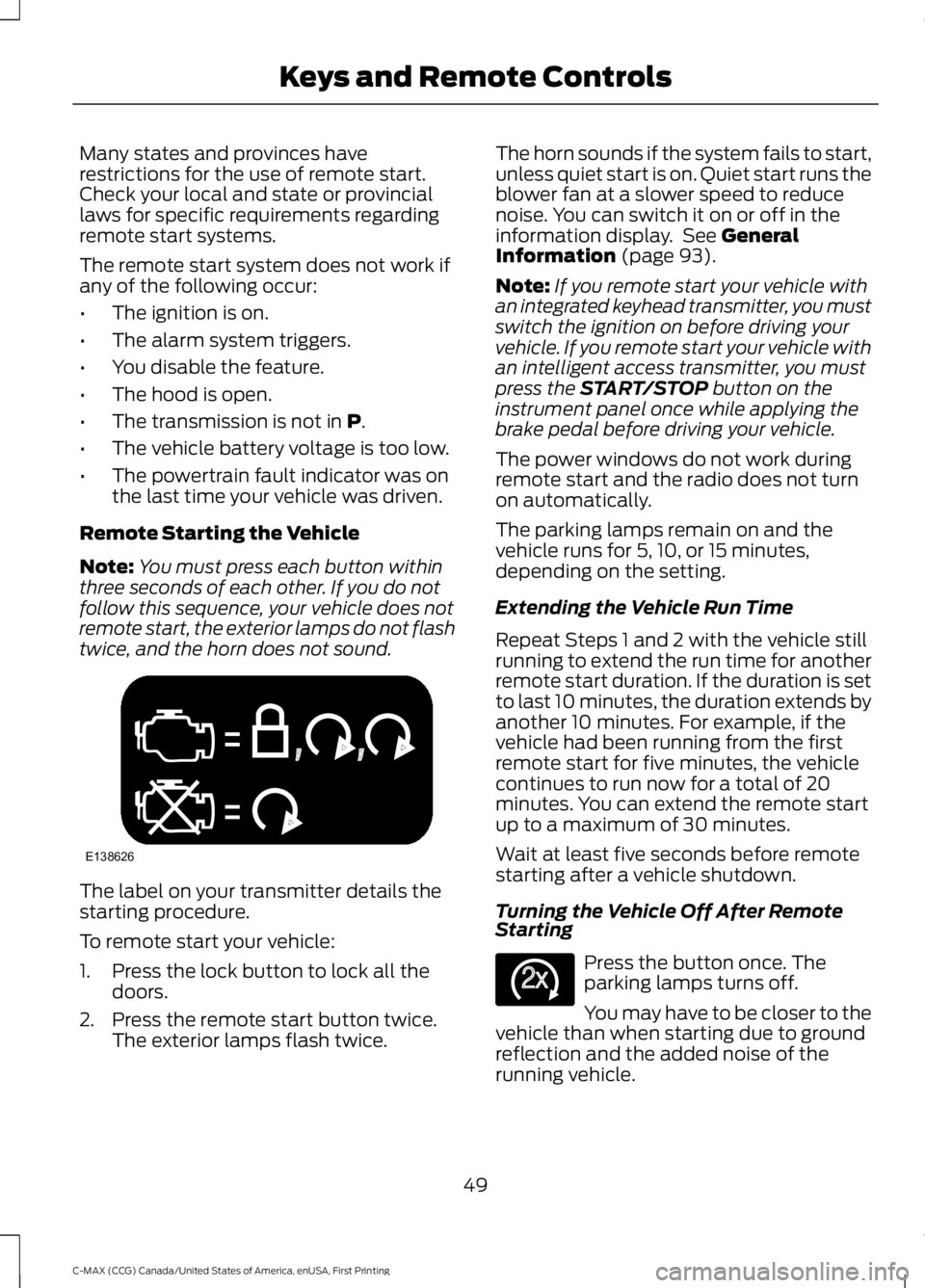
Note:You must press each button withinthree seconds of each other. If you do notfollow this sequence, your vehicle does notremote start, the exterior lamps do not flashtwice, and the horn does not sound.
The label on your transmitter details thestarting procedure.
To remote start your vehicle:
1. Press the lock button to lock all thedoors.
2. Press the remote start button twice.The exterior lamps flash twice.
The horn sounds if the system fails to start,unless quiet start is on. Quiet start runs theblower fan at a slower speed to reducenoise. You can switch it on or off in theinformation display. See GeneralInformation (page 93).
Note:If you remote start your vehicle withan integrated keyhead transmitter, you mustswitch the ignition on before driving yourvehicle. If you remote start your vehicle withan intelligent access transmitter, you mustpress the START/STOP button on theinstrument panel once while applying thebrake pedal before driving your vehicle.
The power windows do not work duringremote start and the radio does not turnon automatically.
The parking lamps remain on and thevehicle runs for 5, 10, or 15 minutes,depending on the setting.
Extending the Vehicle Run Time
Repeat Steps 1 and 2 with the vehicle stillrunning to extend the run time for anotherremote start duration. If the duration is setto last 10 minutes, the duration extends byanother 10 minutes. For example, if thevehicle had been running from the firstremote start for five minutes, the vehiclecontinues to run now for a total of 20minutes. You can extend the remote startup to a maximum of 30 minutes.
Wait at least five seconds before remotestarting after a vehicle shutdown.
Turning the Vehicle Off After RemoteStarting
Press the button once. Theparking lamps turns off.
You may have to be closer to thevehicle than when starting due to groundreflection and the added noise of therunning vehicle.
49
C-MAX (CCG) Canada/United States of America, enUSA, First Printing
Keys and Remote ControlsE138626 E138625
Page 58 of 395
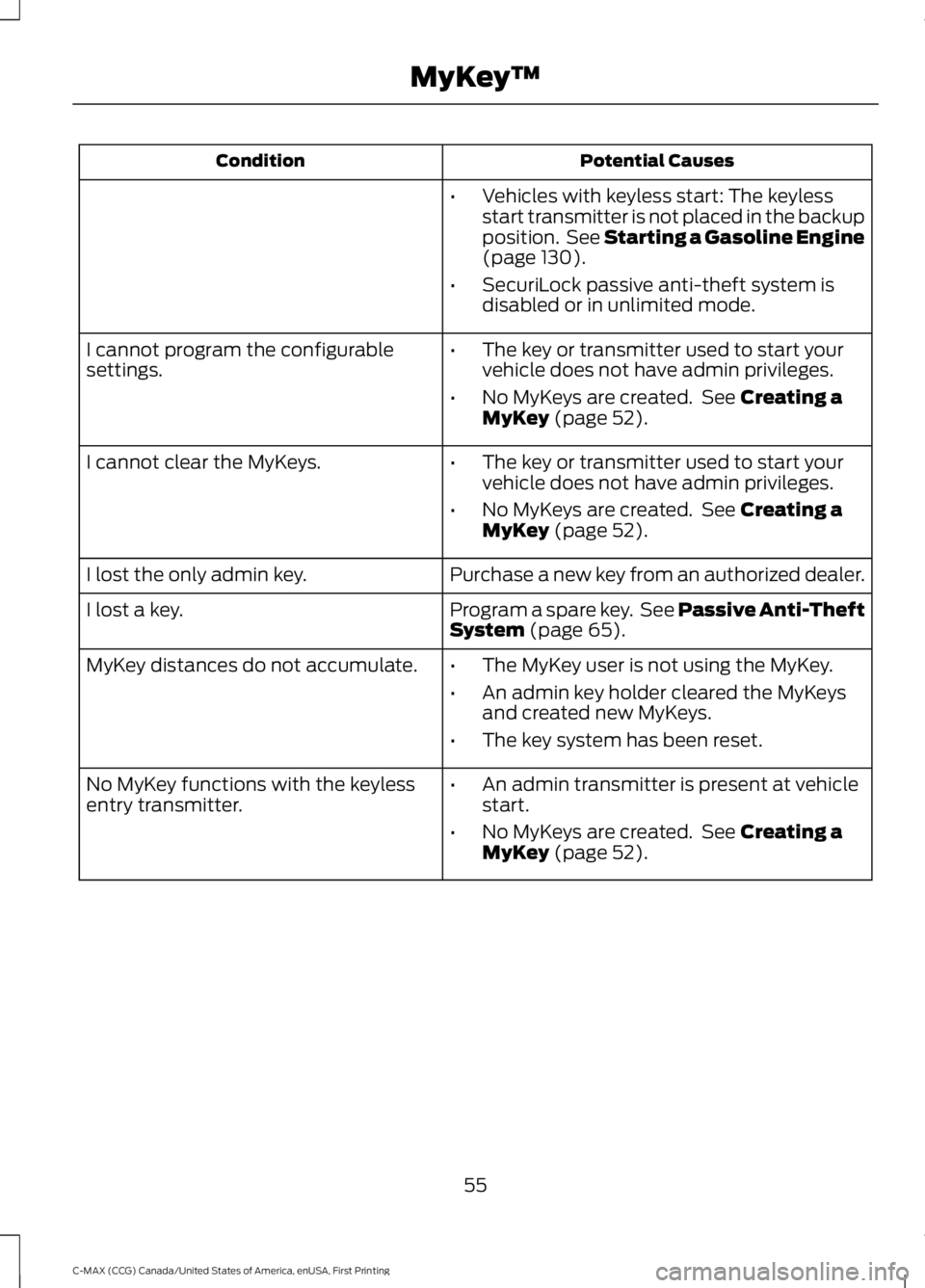
Potential CausesCondition
•Vehicles with keyless start: The keylessstart transmitter is not placed in the backupposition. See Starting a Gasoline Engine(page 130).
•SecuriLock passive anti-theft system isdisabled or in unlimited mode.
•The key or transmitter used to start yourvehicle does not have admin privileges.
•No MyKeys are created. See Creating aMyKey (page 52).
I cannot program the configurablesettings.
•The key or transmitter used to start yourvehicle does not have admin privileges.
•No MyKeys are created. See Creating aMyKey (page 52).
I cannot clear the MyKeys.
Purchase a new key from an authorized dealer.I lost the only admin key.
Program a spare key. See Passive Anti-TheftSystem (page 65).I lost a key.
MyKey distances do not accumulate.•The MyKey user is not using the MyKey.
•An admin key holder cleared the MyKeysand created new MyKeys.
•The key system has been reset.
•An admin transmitter is present at vehiclestart.
•No MyKeys are created. See Creating aMyKey (page 52).
No MyKey functions with the keylessentry transmitter.
55
C-MAX (CCG) Canada/United States of America, enUSA, First Printing
MyKey™
Page 59 of 395
LOCKING AND UNLOCKING
You can use the power door lock controlor the remote control to lock and unlockyour vehicle.
Power Door Locks
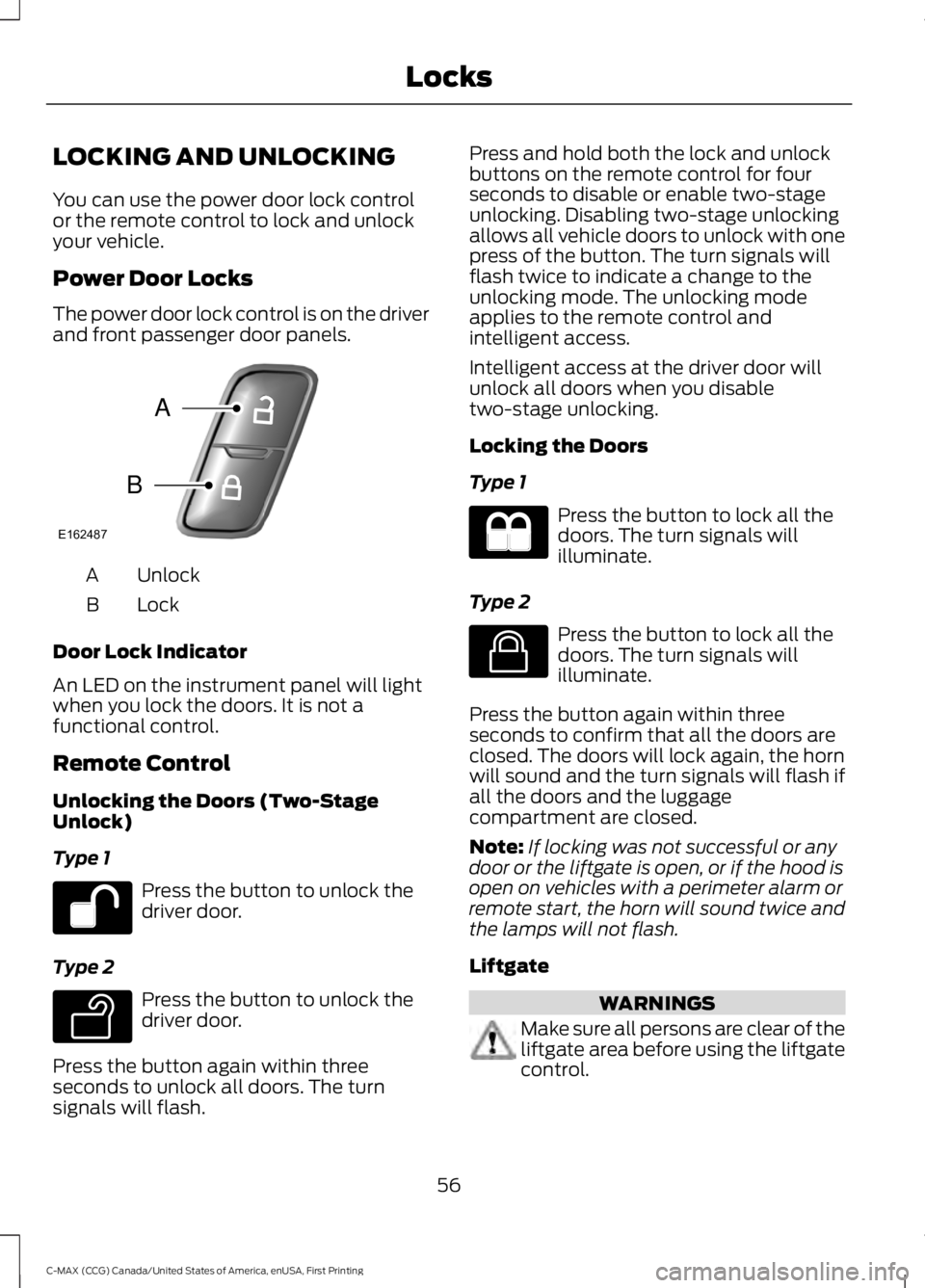
The power door lock control is on the driverand front passenger door panels.
UnlockA
LockB
Door Lock Indicator
An LED on the instrument panel will lightwhen you lock the doors. It is not afunctional control.
Remote Control
Unlocking the Doors (Two-StageUnlock)
Type 1
Press the button to unlock thedriver door.
Type 2
Press the button to unlock thedriver door.
Press the button again within threeseconds to unlock all doors. The turnsignals will flash.
Press and hold both the lock and unlockbuttons on the remote control for fourseconds to disable or enable two-stageunlocking. Disabling two-stage unlockingallows all vehicle doors to unlock with onepress of the button. The turn signals willflash twice to indicate a change to theunlocking mode. The unlocking modeapplies to the remote control andintelligent access.
Intelligent access at the driver door willunlock all doors when you disabletwo-stage unlocking.
Locking the Doors
Type 1
Press the button to lock all thedoors. The turn signals willilluminate.
Type 2
Press the button to lock all thedoors. The turn signals willilluminate.
Press the button again within threeseconds to confirm that all the doors areclosed. The doors will lock again, the hornwill sound and the turn signals will flash ifall the doors and the luggagecompartment are closed.
Note:If locking was not successful or anydoor or the liftgate is open, or if the hood isopen on vehicles with a perimeter alarm orremote start, the horn will sound twice andthe lamps will not flash.
Liftgate
WARNINGS
Make sure all persons are clear of theliftgate area before using the liftgatecontrol.
56
C-MAX (CCG) Canada/United States of America, enUSA, First Printing
LocksE162487
A
B E138629 E138623