ABS FORD C MAX ENERGI 2016 Owners Manual
[x] Cancel search | Manufacturer: FORD, Model Year: 2016, Model line: C MAX ENERGI, Model: FORD C MAX ENERGI 2016Pages: 395, PDF Size: 6.78 MB
Page 117 of 395
WARNINGS
Install the head restraint properly tohelp minimize the risk of neck injuryin the event of a crash.
Note:Adjust the seatback to an uprightdriving position before adjusting the headrestraint. Adjust the head restraint so thatthe top of it is level with the top of your headand as far forward as possible. Make surethat you remain comfortable. If you areextremely tall, adjust the head restraint toits highest position.
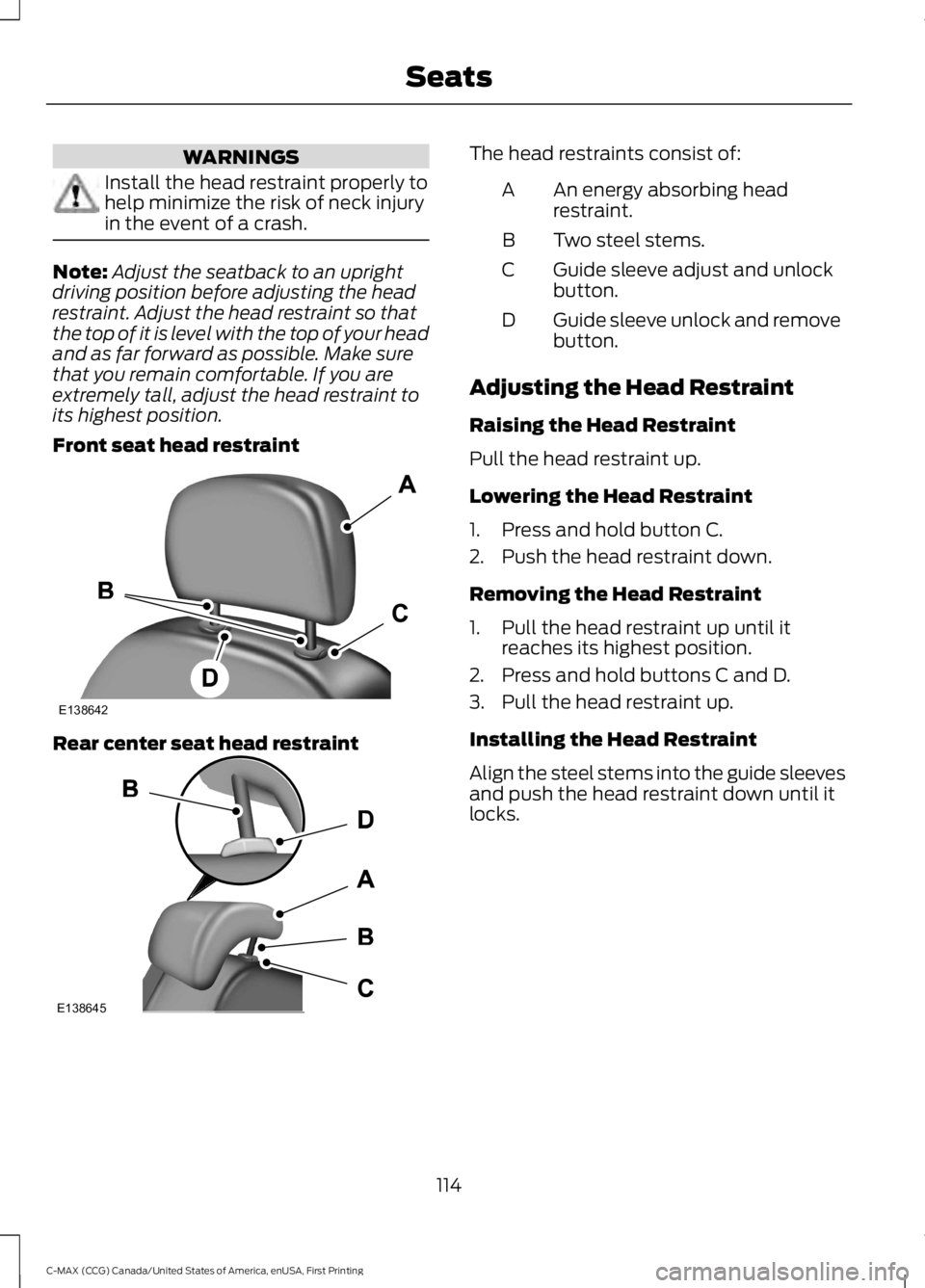
Front seat head restraint
Rear center seat head restraint
The head restraints consist of:
An energy absorbing headrestraint.A
Two steel stems.B
Guide sleeve adjust and unlockbutton.C
Guide sleeve unlock and removebutton.D
Adjusting the Head Restraint
Raising the Head Restraint
Pull the head restraint up.
Lowering the Head Restraint
1. Press and hold button C.
2. Push the head restraint down.
Removing the Head Restraint
1. Pull the head restraint up until itreaches its highest position.
2. Press and hold buttons C and D.
3. Pull the head restraint up.
Installing the Head Restraint
Align the steel stems into the guide sleevesand push the head restraint down until itlocks.
114
C-MAX (CCG) Canada/United States of America, enUSA, First Printing
SeatsE138642 E138645
Page 118 of 395
Rear Seat Outboard Head Restraints
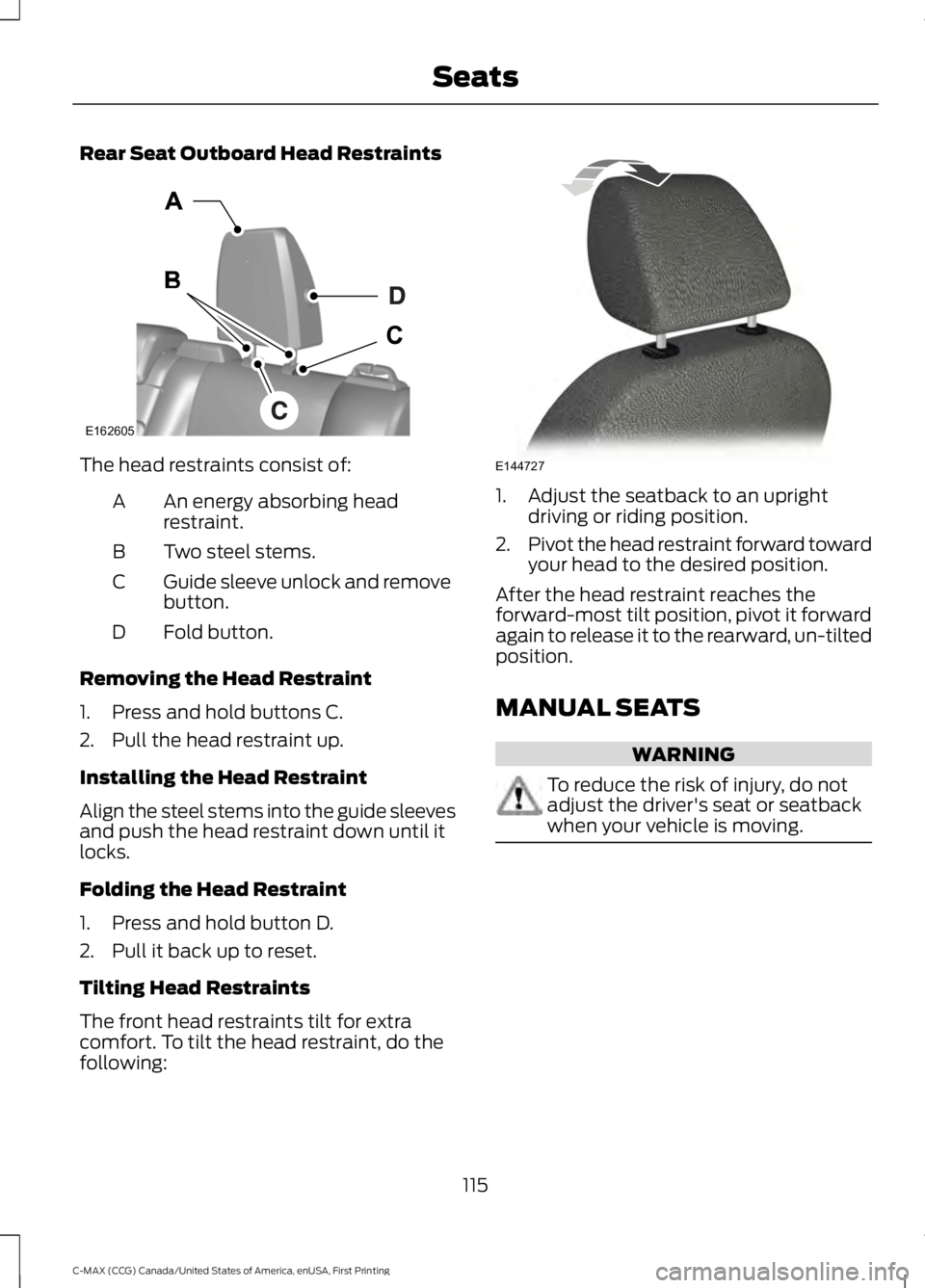
The head restraints consist of:
An energy absorbing headrestraint.A
Two steel stems.B
Guide sleeve unlock and removebutton.C
Fold button.D
Removing the Head Restraint
1. Press and hold buttons C.
2. Pull the head restraint up.
Installing the Head Restraint
Align the steel stems into the guide sleevesand push the head restraint down until itlocks.
Folding the Head Restraint
1. Press and hold button D.
2. Pull it back up to reset.
Tilting Head Restraints
The front head restraints tilt for extracomfort. To tilt the head restraint, do thefollowing:
1. Adjust the seatback to an uprightdriving or riding position.
2.Pivot the head restraint forward towardyour head to the desired position.
After the head restraint reaches theforward-most tilt position, pivot it forwardagain to release it to the rearward, un-tiltedposition.
MANUAL SEATS
WARNING
To reduce the risk of injury, do notadjust the driver's seat or seatbackwhen your vehicle is moving.
115
C-MAX (CCG) Canada/United States of America, enUSA, First Printing
SeatsE162605 E144727
Page 146 of 395
SAFETY PRECAUTIONS
WARNINGS
Do not overfill the fuel tank. Thepressure in an overfilled tank maycause leakage and lead to fuel sprayand fire.
The fuel system may be underpressure. If you hear a hissing soundnear the fuel filler door (Easy Fuelcapless fuel system), do not refuel untilthe sound stops. Otherwise, fuel may sprayout, which could cause serious personalinjury.
Automotive fuels can cause seriousinjury or death if misused ormishandled.
Flow of fuel through a fuel pumpnozzle can produce static electricity.This can cause a fire if you are fillingan ungrounded fuel container.
Fuel ethanol and gasoline maycontain benzene, which is acancer-causing agent.
When refueling always shut theengine off and never allow sparks oropen flames near the filler neck.Never smoke or use a cell phone whilerefueling. Fuel vapor is extremelyhazardous under certain conditions. Avoidinhaling excess fumes.
Observe the following guidelines whenhandling automotive fuel:
•Extinguish all smoking materials andany open flames before refueling yourvehicle.
•Always turn off the vehicle beforerefueling.
•Automotive fuels can be harmful orfatal if swallowed. Fuel such asgasoline is highly toxic and ifswallowed can cause death orpermanent injury. If fuel is swallowed,call a physician immediately, even if nosymptoms are immediately apparent.The toxic effects of fuel may not bevisible for hours.
•Avoid inhaling fuel vapors. Inhaling toomuch fuel vapor of any kind can leadto eye and respiratory tract irritation.In severe cases, excessive or prolongedbreathing of fuel vapor can causeserious illness and permanent injury.
•Avoid getting fuel liquid in your eyes. Iffuel is splashed in the eyes, removecontact lenses (if worn), flush withwater for 15 minutes and seek medicalattention. Failure to seek propermedical attention could lead topermanent injury.
•Fuels can also be harmful if absorbedthrough the skin. If fuel is splashed onthe skin, clothing or both, promptlyremove contaminated clothing andwash skin thoroughly with soap andwater. Repeated or prolonged skincontact with fuel liquid or vapor causesskin irritation.
•Be particularly careful if you are taking“Antabuse” or other forms of disulfiramfor the treatment of alcoholism.Breathing gasoline vapors, or skincontact could cause an adversereaction. In sensitive individuals, seriouspersonal injury or sickness may result.If fuel is splashed on the skin, promptlywash skin thoroughly with soap andwater. Consult a physician immediatelyif you experience an adverse reaction.
143
C-MAX (CCG) Canada/United States of America, enUSA, First Printing
Fuel and Refueling
Page 173 of 395
PRINCIPLE OF OPERATION
WARNINGS
To help avoid personal injury, pleaseread and understand the limitationsof the system as contained in thissection. Sensing is only an aid for some(generally large and fixed) objects whenmoving on a flat surface at parking speeds.Certain objects with surfaces that absorbultrasonic waves, surrounding vehicle'sparking aid systems, traffic controlsystems, fluorescent lamps, inclementweather, air brakes, and external motorsand fans may also affect the function ofthe sensing system; this may includereduced performance or a false activation.
To help avoid personal injury, alwaysuse caution when in reverse (R) andwhen using the sensing system.
This system is not designed toprevent contact with small or movingobjects. The system is designed toprovide a warning to assist the driver indetecting large stationary objects to avoiddamaging your vehicle. The system maynot detect smaller objects, particularlythose close to the ground.
Certain add-on devices such as largetrailer hitches, bike or surfboard racksand any device that may block thenormal detection zone of the system, maycreate false beeps.
Note:Keep the sensors, located on thebumper or fascia, free from snow, ice andlarge accumulations of dirt. If the sensorsare covered, the system’s accuracy can beaffected. Do not clean the sensors withsharp objects.
Note:If your vehicle sustains damage tothe bumper or fascia, leaving it misalignedor bent, the sensing zone may be alteredcausing inaccurate measurement ofobstacles or false alarms.
Note:The sensing system cannot be turnedoff when a MyKey is present. See Principleof Operation (page 51).
Note:If you attach certain add-on devicessuch as a trailer or bike rack, the rear sensingsystem may detect that add-on device andtherefore provide warnings. It is suggestedthat you disable the rear sensing systemwhen you attach an add-on device to yourvehicle to prevent these warnings.
The sensing system warns the driver ofobstacles within a certain range of yourvehicle. The system turns on automaticallywhenever you switch the ignition on.
The system can be switched off throughthe information display menu or from thepop-up message that appears once youshift the transmission into reverse (R). SeeGeneral Information (page 93).
If a fault is present in the system, a warningmessage appears in the informationdisplay. See Information Messages(page 101).
REAR PARKING AID
The rear sensors are only active when thetransmission is in reverse (R). As yourvehicle moves closer to the obstacle, therate of the audible warning increases.When the obstacle is less than 10 in(25 cm) away, the warning soundscontinuously. If the system detects astationary or receding object farther than10 in (25 cm) from the corners of thebumper, the tone sounds for only threeseconds. Once the system detects anobject approaching, the warning soundsagain.
170
C-MAX (CCG) Canada/United States of America, enUSA, First Printing
Parking Aids
Page 175 of 395
ACTIVE PARK ASSIST (If Equipped)
WARNING
This system is designed to be asupplementary park aid. It may notwork in all conditions and is notintended to replace the driver’s attentionand judgment. The driver is responsible foravoiding hazards and maintaining a safedistance and speed, even when the systemis in use.
Note:The driver is always responsible forcontrolling the vehicle, supervising thesystem and intervening if required.
The system detects an available parallelparking space and automatically steersthe vehicle into the space (hands-free)while you control the accelerator, gearshiftand brakes. The system visually andaudibly instructs you to park the vehicle.
The system may not function correctly ifsomething passes between the frontbumper and the parking space (i.e. apedestrian or cyclist) or if the edge of theneighboring parked vehicle is high from theground (i.e. a bus, tow truck or flatbedtruck).
Note:The sensors may not detect objectsin heavy rain or other conditions that causedisruptive reflections.
Note:The sensors may not detect objectswith surfaces that absorb ultrasonic waves.
Note:After a tire change the system will gothrough a relearning procedure. During thistime the system performance maydeteriorate.
The system should not be used if:
•a foreign object (i.e. bike rack or trailer)is attached to the front or rear of thevehicle or at another location close tothe sensors.
•an overhanging object (i.e. surfboard)is attached to the roof.
•the front bumper, rear bumper or sidesensors are damaged (i.e. in a collision)or obstructed by a foreign object (i.e.front bumper cover).
•a mini-spare tire is in use.
Using Active Park Assist
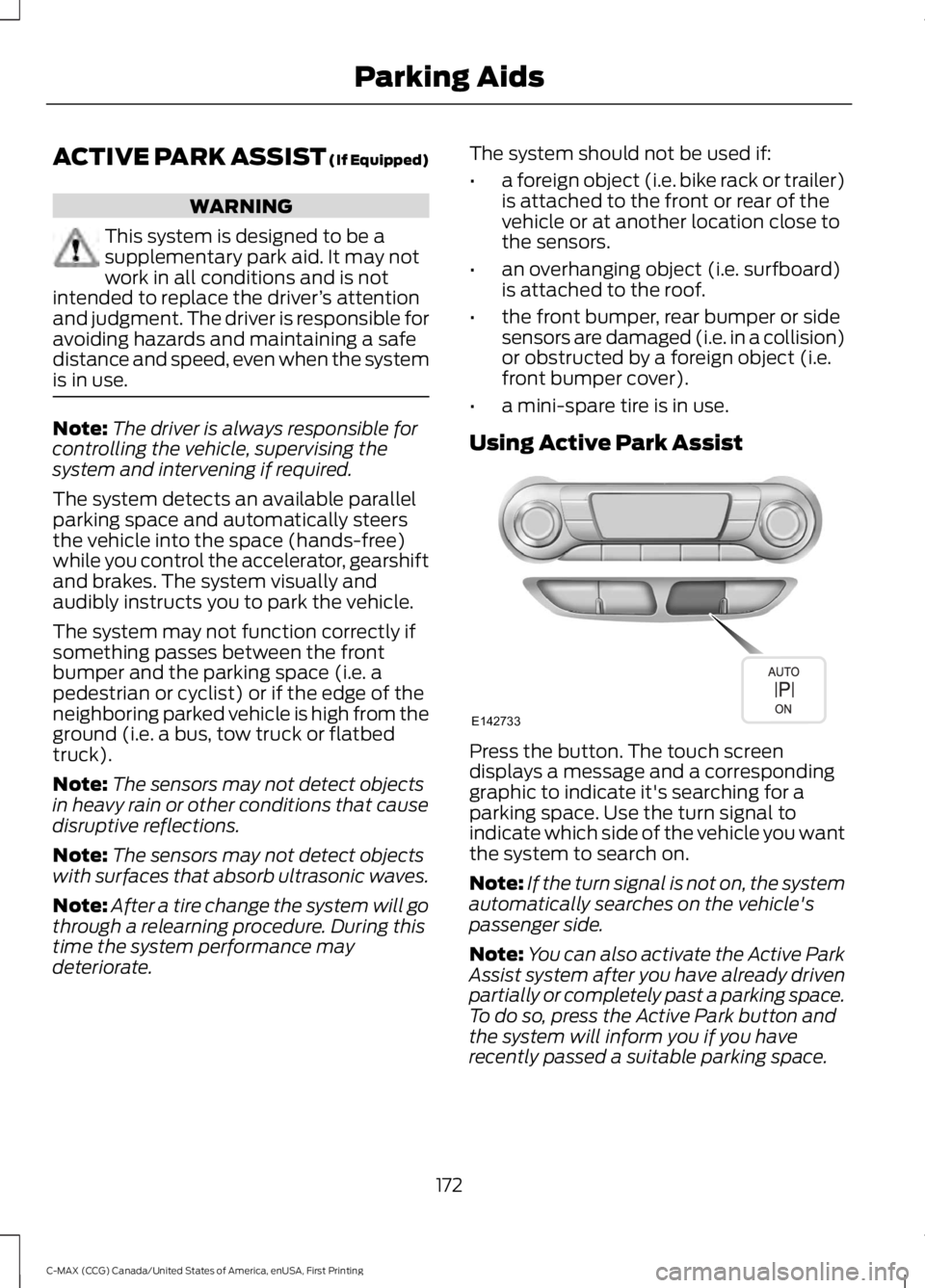
Press the button. The touch screendisplays a message and a correspondinggraphic to indicate it's searching for aparking space. Use the turn signal toindicate which side of the vehicle you wantthe system to search on.
Note:If the turn signal is not on, the systemautomatically searches on the vehicle'spassenger side.
Note:You can also activate the Active ParkAssist system after you have already drivenpartially or completely past a parking space.To do so, press the Active Park button andthe system will inform you if you haverecently passed a suitable parking space.
172
C-MAX (CCG) Canada/United States of America, enUSA, First Printing
Parking AidsE142733
Page 227 of 395
Checking the Inverter SystemController Coolant
When the engine is cold, check theconcentration and level of the invertersystem controller coolant at the intervalslisted in the scheduled maintenanceinformation. See ScheduledMaintenance (page 348).
Note:Make sure that the level is betweenthe MIN and MAX marks on the invertersystem controller coolant reservoir.
Note:Coolant expands when it is hot. Thelevel may extend beyond the MAX mark.
Note:If the level is at the MIN mark, belowthe MIN mark, or empty, add coolantimmediately. See Adding Inverter SystemController Coolant in this chapter.
The coolant concentration should bemaintained within 48% to 50%, whichequates to a freeze point between -30°F(-34°C) and -34°F (-37°C).
Note:For best results, coolantconcentration should be tested with arefractometer such as Robinair® Coolantand Battery Refractometer 75240. We donot recommend the use of hydrometers orcoolant test strips for measuring coolantconcentrations.
Note:Automotive fluids are notinterchangeable. Do not use engine coolantor antifreeze or windshield washer fluidoutside of its specified function and vehiclelocation.
Adding Coolant
Note:Do not use stop leak pellets, coolingsystem sealants, or additives as they cancause damage to the cooling or heatingsystems. This damage would not be coveredunder your vehicle’s warranty.
Note:During normal vehicle operation, thecoolant may change color from orange topink or light red. As long as the coolant isclear and uncontaminated, this color changedoes not indicate the coolant has degradednor does it require the coolant to be drained,the system to be flushed, or the coolant tobe replaced.
Note:It is very important to use coolantmeeting the Ford specification in order toavoid plugging the small coolantpassageways. Use of concentrated coolantand water may cause coolant passagewayplugging and void the warranty. SeeCapacities and Specifications (page 276).
•Do not mix different colors or types ofcoolant in your vehicle. Make sure thecorrect coolant is used. Mixing ofcoolants may harm your coolingsystem. The use of an improper coolantmay harm the engine, inverter systemcontroller, and cooling systemcomponents and may void thewarranty.
•In case of emergency, a large amountof water without engine coolant maybe added to the engine cooling systemin order to reach a vehicle servicelocation. In this instance, the enginecooling system must be drained,chemically cleaned with MotorcraftPremium Cooling System Flush, andrefilled with engine coolant as soon aspossible. Water alone (without enginecoolant) can cause engine damagefrom corrosion, overheating, or freezing.DO NOT use this method for theinverter system controller coolingsystem. The inverter system controllercooling system operates close toambient temperature, and issusceptible to freezing in anysubfreezing environment in theabsence of coolant.
224
C-MAX (CCG) Canada/United States of America, enUSA, First Printing
Maintenance
Page 242 of 395
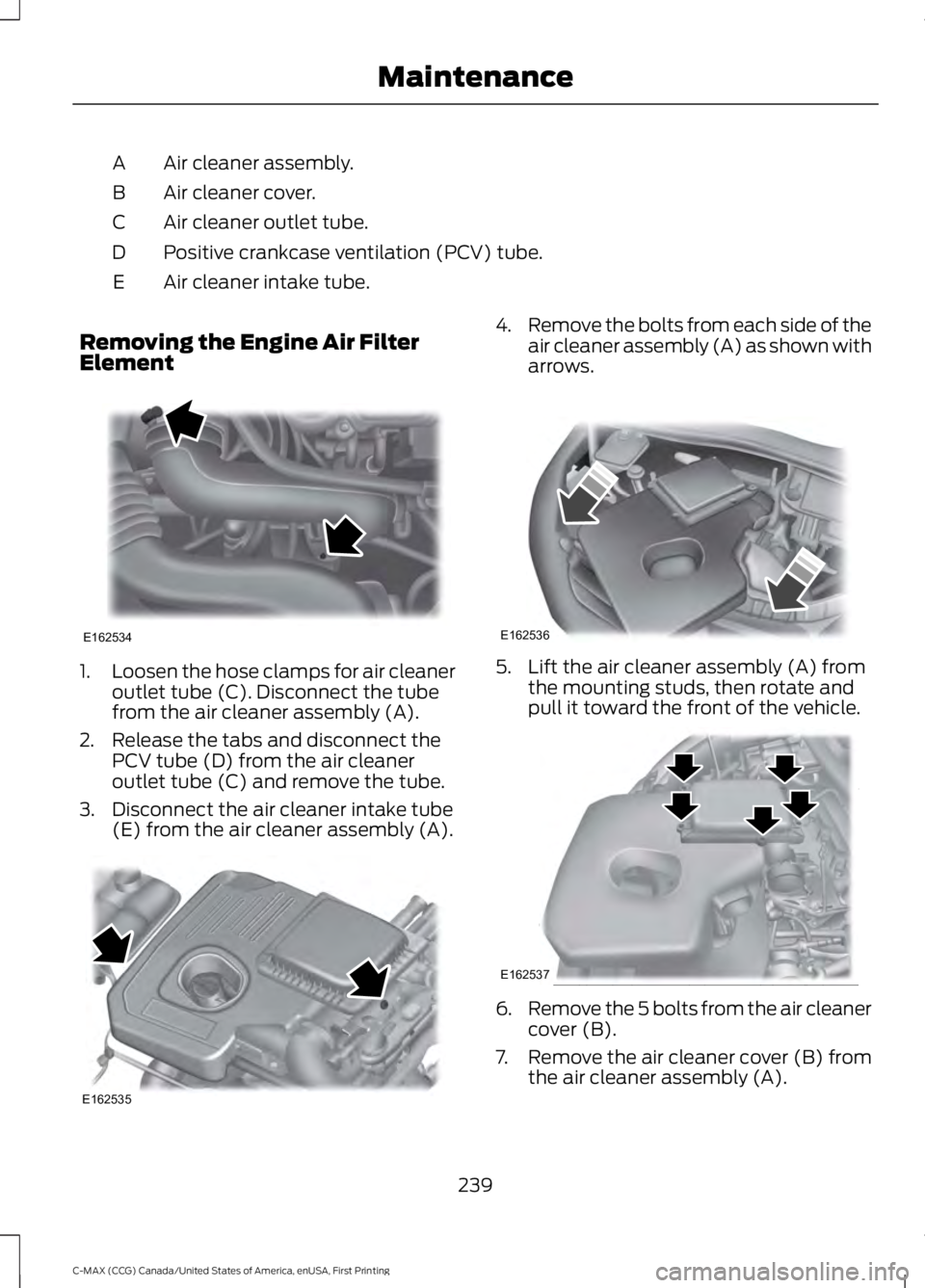
Air cleaner assembly.A
Air cleaner cover.B
Air cleaner outlet tube.C
Positive crankcase ventilation (PCV) tube.D
Air cleaner intake tube.E
Removing the Engine Air FilterElement
1.Loosen the hose clamps for air cleaneroutlet tube (C). Disconnect the tubefrom the air cleaner assembly (A).
2. Release the tabs and disconnect thePCV tube (D) from the air cleaneroutlet tube (C) and remove the tube.
3. Disconnect the air cleaner intake tube(E) from the air cleaner assembly (A).
4.Remove the bolts from each side of theair cleaner assembly (A) as shown witharrows.
5. Lift the air cleaner assembly (A) fromthe mounting studs, then rotate andpull it toward the front of the vehicle.
6.Remove the 5 bolts from the air cleanercover (B).
7.Remove the air cleaner cover (B) fromthe air cleaner assembly (A).
239
C-MAX (CCG) Canada/United States of America, enUSA, First Printing
MaintenanceE162534 E162535 E162536 E162537
Page 302 of 395
System data cannot be accessed withoutspecial equipment and access to thevehicle's SYNC module. Ford MotorCompany and Ford of Canada will notaccess the system data for any purposeother than as described absent consent, acourt order, or where required by lawenforcement, other governmentauthorities, or other third parties actingwith lawful authority. Other parties mayseek to access the informationindependently of Ford Motor Company andFord of Canada. For further privacyinformation, see the sections on 911 Assist,Vehicle Health Report, and Traffic,Directions and Information.
USING VOICE RECOGNITION
This system helps you control manyfeatures using voice commands. Thisallows you to keep your hands on thewheel and focus on what is in front of you.
Helpful Hints
•Make sure the interior of your vehicle isas quiet as possible. Wind noise fromopen windows and road vibrations mayprevent the system from correctlyrecognizing spoken commands.
•After pressing the voice button, waituntil after the tone sounds andListening appears before saying acommand. Any command spokenbefore this does not register with thesystem.
•Speak naturally, without long pausesbetween words.
•At any time, you can interrupt thesystem while it is speaking by pressingthe voice button.
Initiating a Voice Session
Initiate a voice session bypressing the voice button on thesteering wheel controls. SeeUsing Voice Recognition (page 299).
When prompted you can say any of the following:
If you want the system to carry out the followingVoice command
Stream audio from your phone.Bluetooth Audio
Cancel the requested action.Cancel
Access mobile applications.mobile (apps | applica-tions)
Make calls.Phone
Access the device connected to your USB port.USB [1]
Run a vehicle health report.Vehicle Health (Report)
299
C-MAX (CCG) Canada/United States of America, enUSA, First Printing
SYNC™E142599
Page 350 of 395
Avoid the Rising Cost of ProperlyMaintaining Your Vehicle!
Ford Extended Service Plan also offers aPremium Maintenance Plan that covers allscheduled maintenance, and selectedwear items. The coverage is prepaid, soyou never have to worry about affordingyour vehicle’s maintenance. It coversregular checkups, routine inspections,preventive care and replacement of selectitems that require periodic attention fornormal wear:
•Windshield wiper blades.
•Spark plugs.
•The clutch disc.
•Brake pads and linings.
•Shock absorbers.
•Struts.
•Engine Belts.
•Engine coolant hoses, clamps ando-rings.
•Diesel exhaust fluid replenishment.
Interest Free Finance OptionsAvailable
Take advantage of our interest freeinstallment payment plan. Just a 10%down payment will provide you with anaffordable, no interest, no fee paymentprogram allowing you all the security andbenefits Ford ESP has to offer while payingover time. You are pre-approved with nocredit checks, no hassles! To learn more,call our Ford ESP specialists at800-367-3377.
Ford ESPP.O. Box 321067Detroit, MI 48232
EXTENDED SERVICE PLAN(CANADA ONLY)
You can get more protection for yourvehicle by purchasing a Ford ExtendedService Plan. Ford Extended Service Planis the only service contract backed by FordMotor Company of Canada, Limited.Depending on the plan you purchase, FordExtended Service Plan provides benefitssuch as:
•Rental reimbursement.
•Coverage for certain maintenance andwear items.
•Protection against repair costs afteryour New Vehicle Limited WarrantyCoverage expires.
•Roadside Assistance benefits.
There are several Ford Extended ServicePlans available in various time, distanceand deductible combinations. Each planis tailored to fit your own driving needs,including reimbursement for towing andrental. When you purchase Ford ExtendedService Plan, you receive addedpeace-of-mind protection throughoutCanada, the United States and Mexico,provided by a network of participatingauthorized Ford Motor Company dealers.
Note:Repairs performed outside ofCanada, the United States and Mexico arenot eligible for Ford Extended Service Plancoverage.
This information is subject to change. Formore information, visit your local Ford ofCanada dealer or www.ford.ca to find theFord Extended Service Plan that is right foryou.
347
C-MAX (CCG) Canada/United States of America, enUSA, First Printing
Extended Service Plan (ESP)
Page 353 of 395
Oils, Fluids and Flushing
In many cases, fluid discoloration is anormal operating characteristic and, byitself, does not necessarily indicate aconcern or that the fluid needs to bechanged. However, a qualified expert, suchas the factory-trained technicians at yourdealership, should inspect discolored fluidsthat also show signs of overheating orforeign material contaminationimmediately.
Make sure to change your vehicle’s oils andfluids at the specified intervals or inconjunction with a repair. Flushing is aviable way to change fluid for many vehiclesub-systems during scheduledmaintenance. It is critical that systems areflushed only with new fluid that is the sameas that required to fill and operate thesystem or using a Ford-approved flushingchemical.
Owner Checks and Services
Make sure you perform the following basicmaintenance checks and inspections everymonth or at six-month intervals.
Check every month
Engine oil level.
Function of all interior and exterior lights.
Tires (including spare) for wear and proper pressure.
Windshield washer fluid level.
Check every six months
Battery connections. Clean if necessary.
Body and door drain holes for obstructions. Clean if necessary.
Cooling system fluid level and coolant strength.
Door weatherstrips for wear. Lubricate if necessary.
Hinges, latches and outside locks for proper operation. Lubricate if necessary.
Parking brake for proper operation.
Safety belts and seat latches for wear and function.
Safety warning lamps (brake, ABS, airbag and safety belt) for operation.
Washer spray and wiper operation. Clean or replace blades as necessary.
350
C-MAX (CCG) Canada/United States of America, enUSA, First Printing
Scheduled Maintenance