reset FORD C MAX ENERGI 2016 User Guide
[x] Cancel search | Manufacturer: FORD, Model Year: 2016, Model line: C MAX ENERGI, Model: FORD C MAX ENERGI 2016Pages: 395, PDF Size: 6.78 MB
Page 104 of 395
Note:Fuel Economy will be impacted byyour use of brakes, accelerator andaccessories, as well as environmentalconditions such as hills and weather.
Note:Fuel economy is not always ameasure of appropriate driving behavior. Forexample, when driving uphill andmaintaining an appropriate speed, yourinstant fuel economy may not be good(losing leaves) but the Coach may show ablue bar for Acceleration and Cruising.
Common Displays
Both Average fuel economy and aninstantaneous fuel economy gauge areincluded in Engage, Empower, MyView (ifselected) and Fuel Economy (shown inHybrid Mode) on the left informationdisplay. They are also included in FuelHistory on the right information display.
Average Fuel Economy
Average Fuel Economy is continuouslyaveraged since the last reset. You can resetyour average fuel economy by pressing andholding the OK button on thecorresponding steering wheel controls. ForEnergi vehicles both Hybrid and Plug-inPower mode operation will be included inthe calculation.
Note:Average fuel economy cannot bereset in MyView.
Instantaneous Fuel Economy
If your instantaneous fuel economy isgreater than the maximum valuedisplayed, a + sign will be shown next tothe maximum scale number. When yourvehicle is operating on battery power only,EV will display and the gauge fill will showin blue.
INFORMATION MESSAGES
Note:Depending on the vehicle optionsequipped with your vehicle, not all of themessages display or are available. Certainmessages may be abbreviated or shorteneddepending upon which cluster type youhave.
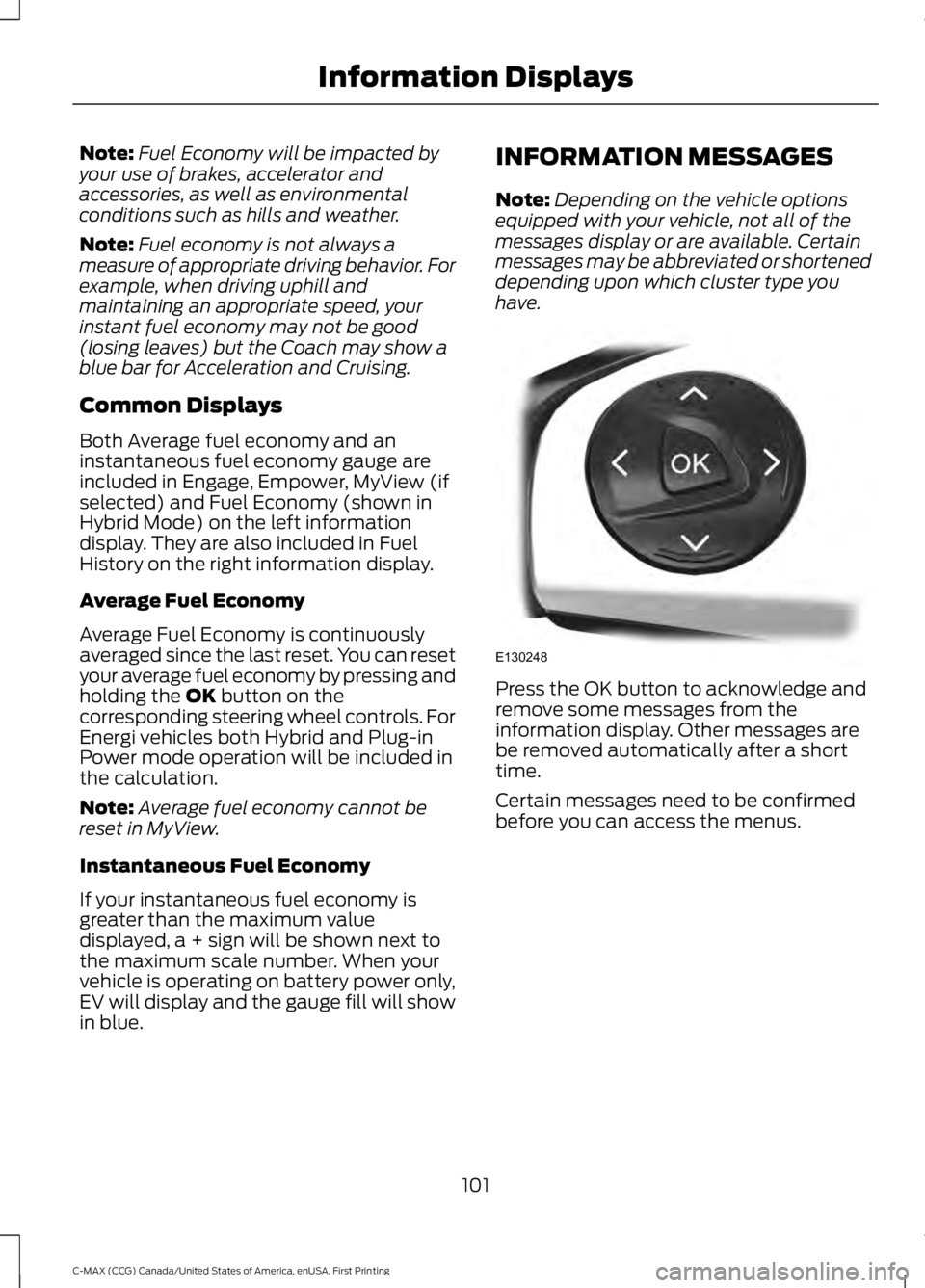
Press the OK button to acknowledge andremove some messages from theinformation display. Other messages arebe removed automatically after a shorttime.
Certain messages need to be confirmedbefore you can access the menus.
101
C-MAX (CCG) Canada/United States of America, enUSA, First Printing
Information DisplaysE130248
Page 118 of 395
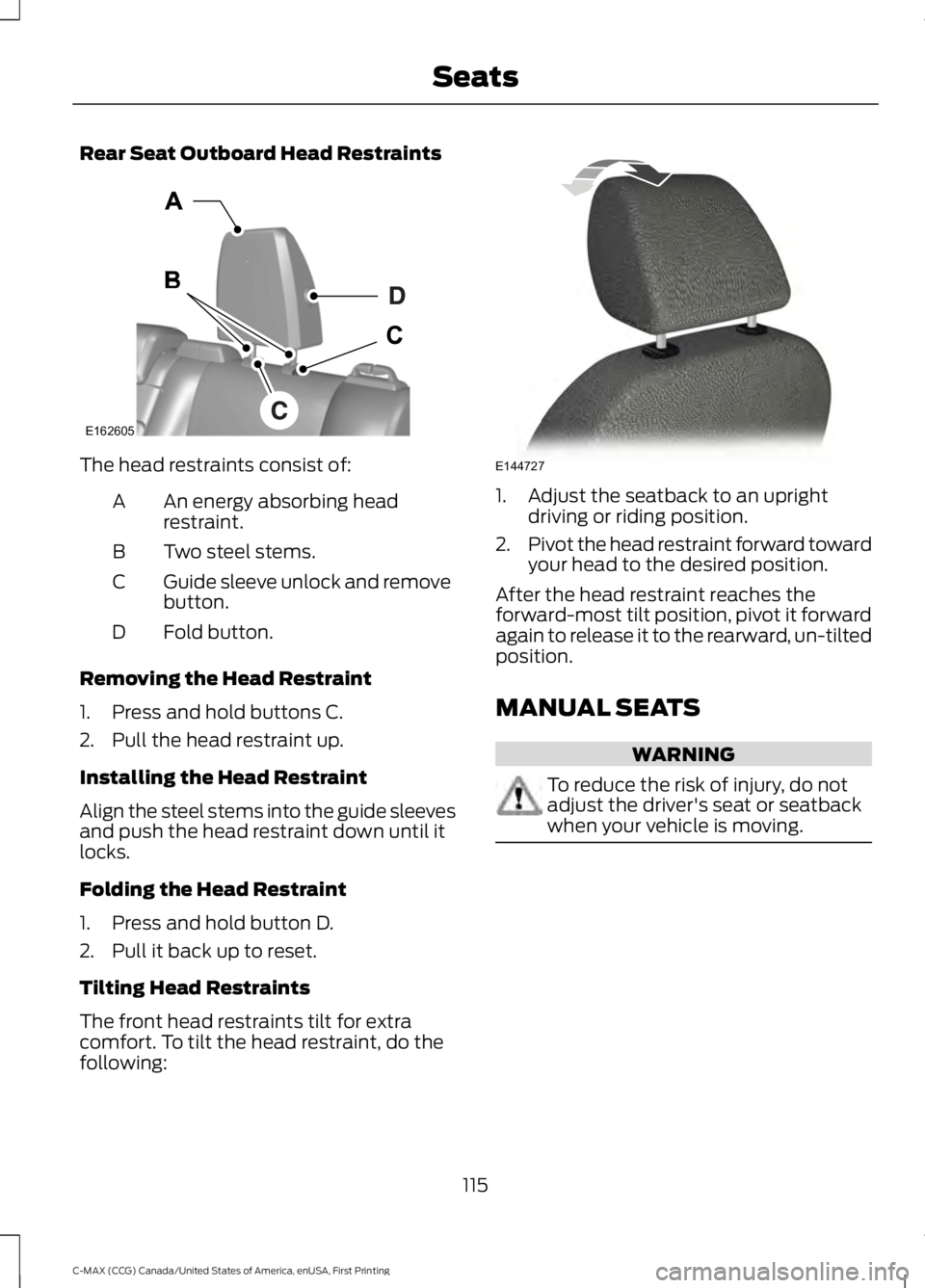
Rear Seat Outboard Head Restraints
The head restraints consist of:
An energy absorbing headrestraint.A
Two steel stems.B
Guide sleeve unlock and removebutton.C
Fold button.D
Removing the Head Restraint
1. Press and hold buttons C.
2. Pull the head restraint up.
Installing the Head Restraint
Align the steel stems into the guide sleevesand push the head restraint down until itlocks.
Folding the Head Restraint
1. Press and hold button D.
2. Pull it back up to reset.
Tilting Head Restraints
The front head restraints tilt for extracomfort. To tilt the head restraint, do thefollowing:
1. Adjust the seatback to an uprightdriving or riding position.
2.Pivot the head restraint forward towardyour head to the desired position.
After the head restraint reaches theforward-most tilt position, pivot it forwardagain to release it to the rearward, un-tiltedposition.
MANUAL SEATS
WARNING
To reduce the risk of injury, do notadjust the driver's seat or seatbackwhen your vehicle is moving.
115
C-MAX (CCG) Canada/United States of America, enUSA, First Printing
SeatsE162605 E144727
Page 130 of 395
When the indicator light on the power pointis:
•On: The power point is working, theignition is on and a device is pluggedin.
•Off: The power point is off, the ignitionis off or no device is plugged in.
•Flashing: The power point is in faultmode.
The power outlet temporarily turns offpower when in fault mode if the deviceexceeds the 150 watt limit. Unplug yourdevice and switch the ignition off. Switchthe ignition back on, but do not plug yourdevice back in. Let the system cool off andswitch the ignition off to reset the faultmode. Switch the ignition back on andmake sure the indicator light remains on.
Do not use the power point for certainelectric devices, including:
•Cathode-ray, tube-type televisions.
•Motor loads, such as vacuum cleaners,electric saws and other electric powertools or compressor-drivenrefrigerators.
•Measuring devices, which processprecise data, such as medicalequipment or measuring equipment.
•Other appliances requiring anextremely stable power supply such asmicrocomputer-controlled electricblankets or touch-sensor lamps.
127
C-MAX (CCG) Canada/United States of America, enUSA, First Printing
Auxiliary Power Points
Page 137 of 395
You can stop the shutdown, or reset thetimer, at any point before the 30-secondcountdown has expired by doing any of thefollowing:
•Interacting with your vehicle, forexample pressing the brake oraccelerator pedal.
•Disabling the shutdown using theinformation display. See InformationDisplays (page 93).
•Pressing the OK or RESET buttonduring the 30-second countdown.
134
C-MAX (CCG) Canada/United States of America, enUSA, First Printing
Starting and Stopping the Engine
Page 140 of 395
•Keep the tires properly inflated andonly use the recommended size.
•Aggressive driving increases theamount of energy required to moveyour vehicle. In general, you canachieve better fuel economy with mildto moderate acceleration anddeceleration. Moderate braking isparticularly important since it allowsyou to maximize the energy capturedby the regenerative braking system.
Additional Tips:
•Do not carry extra loads.
•Be mindful of adding externalaccessories that may increaseaerodynamic drag.
•Observe posted speed limits.
•Perform all scheduled maintenance.
•There is no need to wait for your engineto warm up. The vehicle is ready todrive immediately after starting.
EV+ Mode
Your vehicle will recognize your frequentdestinations and allow for more EV drivingas you approach them. For example, whennearing your home it should be easier tostay in electric mode. The EV indicator willdisplay EV+ when this mode is active. Youshould see this approximately 1/8 mile(200 meters) from a frequent destination.See Information Displays (page 93).
Note:Frequent destinations are learned byyour vehicle after two to four weeks of use.To add a destination immediately, performthe following process: cycle the ignition onfor 2 seconds, but do not start your vehicle,then off for 2 seconds. Repeat the process10 times. This location is now programmedfor EV+. You can clear these destinationswith a Driving History reset through theSettings menu.
Note:You can switch the EV+ feature onor off through the Driver Assist section ofthe Settings menu.
PLUG-IN HYBRID VEHICLE
OPERATION
Plug-in Power Mode and HybridMode
You must plug in your Energi vehicleregularly for optimal use of the highvoltage battery's extended rangecapability. Charging your vehicle addselectrical energy. This energy is used topropel the vehicle in plug-in power mode.
Estimated electric range is shown in bluenext to gasoline range at the bottom of theright information display. You can alsoconfigure MyView to include detailedvehicle range information. See Gauges(page 85).
The system maximizes the use ofelectric-only operation in plug-in powermode. System conditions may requireengine operation; however, the systemuses plug-in power whenever possible.
When your plug-in power is depleted, thepowertrain system will automaticallyswitch to hybrid mode. Your battery gaugewill transition to a simple battery graphicupon entering hybrid mode. Hybrid modeuses both the gasoline engine and electricmotor to power your vehicle and maximizefuel economy.
EV Modes
Your vehicle contains selectableEV modes through the EV buttonlocated on the center of theinstrument panel, below the climatecontrols.
137
C-MAX (CCG) Canada/United States of America, enUSA, First Printing
Unique Driving CharacteristicsE144814
Page 141 of 395
These modes are available when yourvehicle can run under high voltage batterypower. With your vehicle in driving mode,you can change EV modes with each pressof the EV button. The current mode will bedisplayed in the left-hand instrumentcluster screen.
Auto EV
This mode provides anautomatic use of high voltagebattery power during the drive,staying in electric mode when possible andrunning the engine when needed. Thismode will be the only one available if theplug-in power has been depleted.
EV Now
This mode provides an electriconly driving experience. Theleft-hand information displaychanges to a screen displaying youraverage miles or kilometers per chargealong with EV specific tools and functions.
Your vehicle may accelerate more slowlyand the top speed may be lower in EV Nowmode than in Auto EV mode.
You can enable your engine at any time byusing one of the following methods:
1.Press the OK button on the left 5–waysteering wheel control while viewingthe miles or kilometers per chargescreen. Your vehicle will enable theengine as needed, and willautomatically return to EV Now aftereight seconds or when the engine is nolonger needed.
2.Press the accelerator pedal fully. A popup message will appear. Press OK onthe left-hand steering wheel button toactivate as needed. The message willdisappear if you release the acceleratorpedal.
3. Press the EV button. This will changethe mode to EV Later and permitengine operation.
Your vehicle may automatically enterEngine Enabled mode if system conditionsrequire it. A engine enabled message willdisplay if this occurs. This is normalfunction, and your vehicle will return to EVNow when possible.
Your vehicle may enter Enable Enginemode if the climate control is in a defrostmode and the outside temperature is cold.A engine enabled message will display ifthis occurs. If defrost is not needed, selecta different climate control mode to permitEV Now.
When you enable EV Now, a blue EV icondisplays in the left-hand informationdisplay. If your vehicle is in the EngineEnabled mode, the EV icon will be yellow.
EV Now will automatically exit when thePlug in power has been depleted.
EV Later
This mode saves most of thehigh voltage battery plug inpower for future use (forexample, your initial drive is at high speedson open roads, but later your drive will beat low speeds in an urban area whereplug-in power usage is most efficient).Your vehicle will run the engine as neededand keep most of the high voltage batteryplug in power for later use in Auto Mode orEV Now mode.
When you enable EV Later, a white EVLater icon appears on the left-handinformation display.
The EV Later mode will automatically resetto EV Auto mode when you power yourvehicle off. You may press the EV buttontwice during the next drive to return to EVLater mode, if desired.
138
C-MAX (CCG) Canada/United States of America, enUSA, First Printing
Unique Driving CharacteristicsE155152 E144814 E151263
Page 142 of 395
ECO Cruise
Note:ECO Cruise is available as a separatefeature on Energi vehicles only. On nonplug-in vehicles it is included in EcoSelect.
This feature saves vehicle energy byrelaxing acceleration compared tostandard cruise control. For example, yourvehicle may temporarily lose speed whengoing uphill. When set to on, ECO appearsin the information display when cruisecontrol is on.
You can switch it on or off in through theinformation display. See GeneralInformation (page 93).
Settings
ECO CruiseDriver Assist
Low Engine Use
The low engine use mode is equipped onEnergi models only. The Low Engine Usemode maintains proper engine lubricationat sufficient temperature, and will activateautomatically when you drive your vehiclewith limited engine operation. When yourvehicle is in low engine use mode, yourvehicle will automatically run the engineas necessary.
Note:If your vehicle is in low engine usemode when you start your vehicle, amessage will appear in the informationdisplay. See Information Messages (page101).
If you select the EV Now mode while thevehicle is in the low engine use mode, EVNow mode will be suspended for as longas you are in low engine use mode. The lowengine use mode will resume the next timeyou start your vehicle and willautomatically stop when no longer needed.
Note:Cold temperatures will affect theengine warm up time and the low engineuse mode may operate more frequently.
Note:An oil change is not required but givesyou the option of not running a low engineuse cycle. Resetting the oil life monitoringsystem will suspend the low engine usemode.
Fuel Freshness
See Fuel Quality (page 144).
139
C-MAX (CCG) Canada/United States of America, enUSA, First Printing
Unique Driving Characteristics
Page 150 of 395
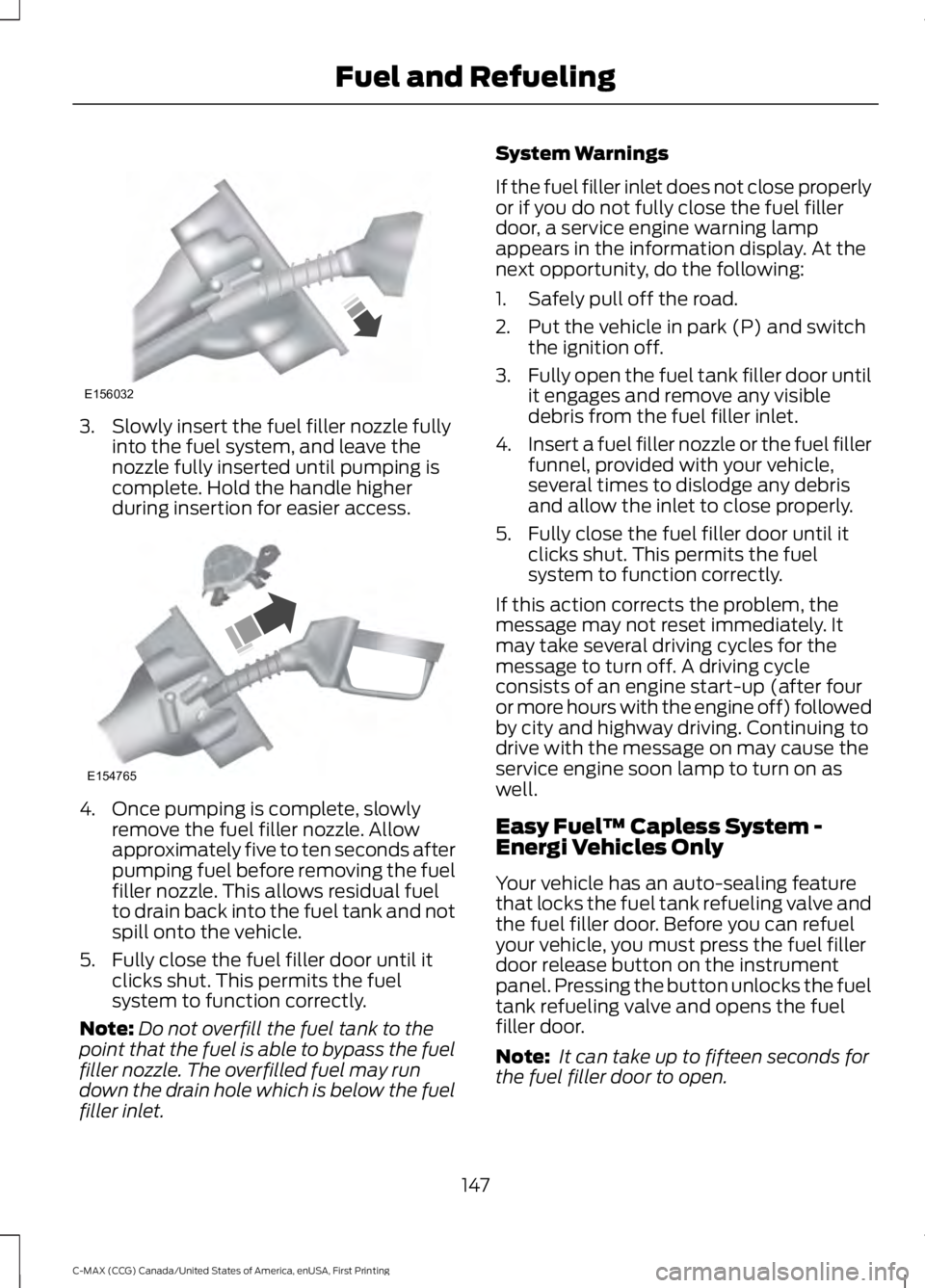
3. Slowly insert the fuel filler nozzle fullyinto the fuel system, and leave thenozzle fully inserted until pumping iscomplete. Hold the handle higherduring insertion for easier access.
4. Once pumping is complete, slowlyremove the fuel filler nozzle. Allowapproximately five to ten seconds afterpumping fuel before removing the fuelfiller nozzle. This allows residual fuelto drain back into the fuel tank and notspill onto the vehicle.
5. Fully close the fuel filler door until itclicks shut. This permits the fuelsystem to function correctly.
Note:Do not overfill the fuel tank to thepoint that the fuel is able to bypass the fuelfiller nozzle. The overfilled fuel may rundown the drain hole which is below the fuelfiller inlet.
System Warnings
If the fuel filler inlet does not close properlyor if you do not fully close the fuel fillerdoor, a service engine warning lampappears in the information display. At thenext opportunity, do the following:
1. Safely pull off the road.
2. Put the vehicle in park (P) and switchthe ignition off.
3.Fully open the fuel tank filler door untilit engages and remove any visibledebris from the fuel filler inlet.
4.Insert a fuel filler nozzle or the fuel fillerfunnel, provided with your vehicle,several times to dislodge any debrisand allow the inlet to close properly.
5. Fully close the fuel filler door until itclicks shut. This permits the fuelsystem to function correctly.
If this action corrects the problem, themessage may not reset immediately. Itmay take several driving cycles for themessage to turn off. A driving cycleconsists of an engine start-up (after fouror more hours with the engine off) followedby city and highway driving. Continuing todrive with the message on may cause theservice engine soon lamp to turn on aswell.
Easy Fuel™ Capless System -Energi Vehicles Only
Your vehicle has an auto-sealing featurethat locks the fuel tank refueling valve andthe fuel filler door. Before you can refuelyour vehicle, you must press the fuel fillerdoor release button on the instrumentpanel. Pressing the button unlocks the fueltank refueling valve and opens the fuelfiller door.
Note: It can take up to fifteen seconds forthe fuel filler door to open.
147
C-MAX (CCG) Canada/United States of America, enUSA, First Printing
Fuel and RefuelingE156032 E154765
Page 152 of 395
System Warnings
If the fuel filler inlet does not close properlyor if you do not fully close the fuel fillerdoor, a service engine warning lampappears in the information display. At thenext opportunity, do the following:
1. Safely pull off the road.
2. When your vehicle has stopped, shiftinto park (P) and switch the ignitionoff.
3.Press the refueling button on the centerconsole.
4.Fully open the fuel tank filler door untilit engages and remove any visibledebris from the fuel filler inlet.
5.Insert a fuel filler nozzle or the fuel fillerfunnel, provided with your vehicle,several times to dislodge any debrisand allow the inlet to close properly.
6. Fully close the fuel filler door until itclicks shut. This permits the fuelsystem to function correctly.
If this action corrects the problem, themessage may not reset immediately. Itmay take several driving cycles for themessage to turn off. A driving cycleconsists of an engine start-up (after fouror more hours with the engine off) followedby city and highway driving. Continuing todrive with the message on may cause theservice engine soon lamp to turn on aswell.
Using the Manual Fuel Filler DoorRelease Lever
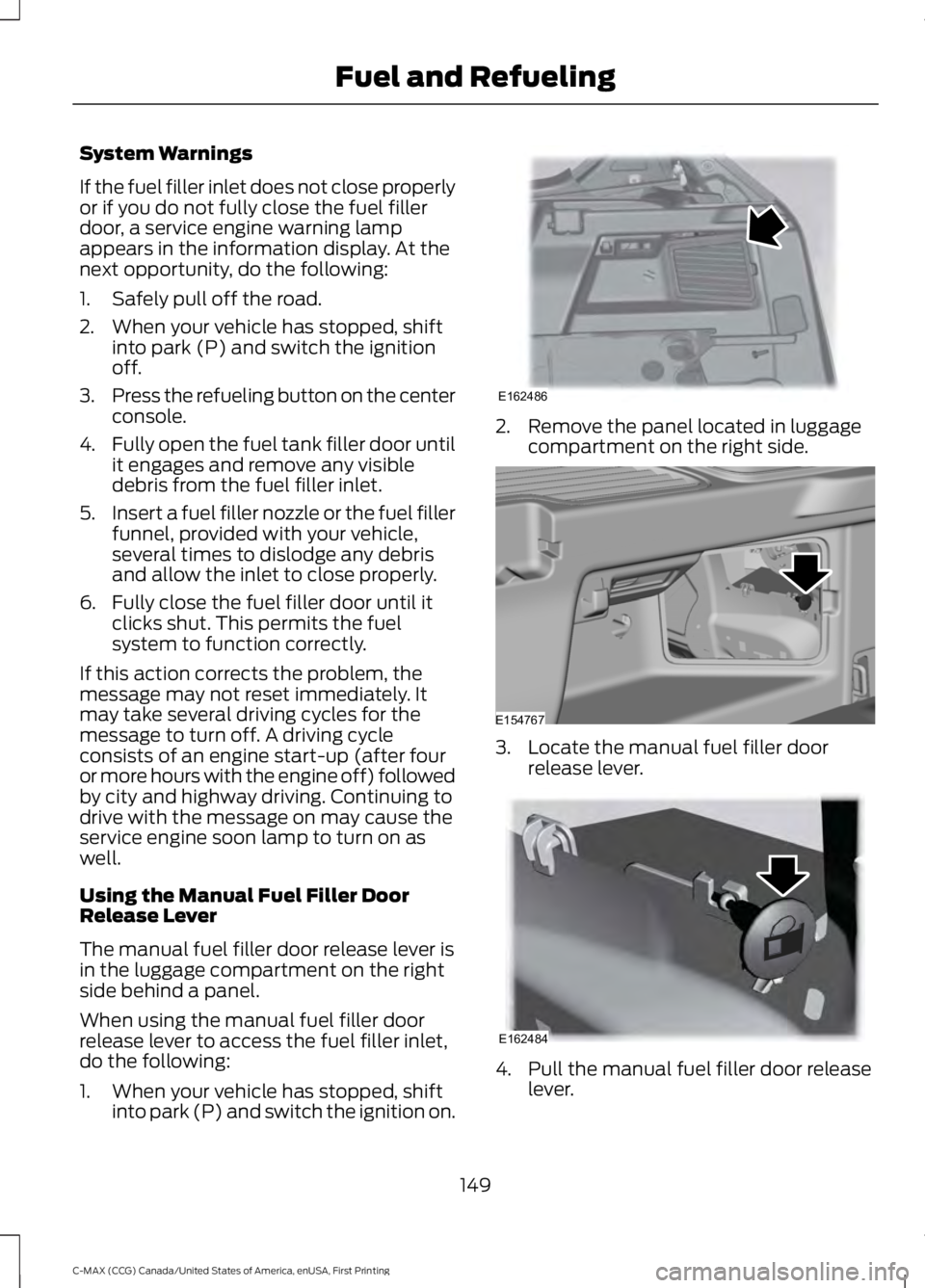
The manual fuel filler door release lever isin the luggage compartment on the rightside behind a panel.
When using the manual fuel filler doorrelease lever to access the fuel filler inlet,do the following:
1. When your vehicle has stopped, shiftinto park (P) and switch the ignition on.
2. Remove the panel located in luggagecompartment on the right side.
3. Locate the manual fuel filler doorrelease lever.
4. Pull the manual fuel filler door releaselever.
149
C-MAX (CCG) Canada/United States of America, enUSA, First Printing
Fuel and RefuelingE162486 E154767 E162484
Page 181 of 395
The fixed and active guidelines fade in andout depending on the steering wheelposition. The active guidelines are notshown when the steering wheel positionis straight.
Always use caution while reversing.Objects in the red zone are closest to yourvehicle and objects in the green zone arefarther away. Objects are getting closer toyour vehicle as they move from the greenzone to the yellow or red zones. Use theside view mirrors and rear view mirror toget better coverage on both sides and rearof your vehicle.
Enhanced Park Aids
Note:The reverse sensing system is noteffective at speeds above 7 mph (12 km/h)and may not detect certain angular ormoving objects.
When the sensing system detects anobject, it displays red, yellow and greenhighlights at the top of the image. The alerthighlights all objects detected.
Selectable settings for this feature are ONand OFF.
Manual Zoom
WARNING
When manual zoom is on, the fullarea behind your vehicle is notshown. Be aware of yoursurroundings when using the manual zoomfeature.
Note:Manual zoom is only available whenthe transmission is in reverse (R).
Note:When manual zoom is enabled, onlythe centerline is shown.
This allows you to get a closer view of anobject behind your vehicle. The zoomedimage keeps the bumper in the image toprovide a reference. The zoom is onlyactive while the transmission is in reverse(R). When the transmission is shifted outof reverse (R), the feature automaticallyturns off and must be reset when it is usedagain.
Selectable settings for this feature are +and -. The default setting for the manualzoom is OFF.
Rear Camera Delay (If Equipped)
When you shift the transmission out ofreverse (R) and into any gear while the rearcamera delay is active, the camera imagedisplays until:
•Your vehicle speed sufficientlyincreases.
•You shift your vehicle into park (P).
Selectable settings for this feature are ONand OFF. The default setting for the rearcamera delay is OFF.
178
C-MAX (CCG) Canada/United States of America, enUSA, First Printing
Parking Aids