warning lights FORD C MAX ENERGI 2016 Owners Manual
[x] Cancel search | Manufacturer: FORD, Model Year: 2016, Model line: C MAX ENERGI, Model: FORD C MAX ENERGI 2016Pages: 395, PDF Size: 6.78 MB
Page 37 of 395
The Personal Safety System provides animproved overall level of frontal crashprotection to front seat occupants and isdesigned to help further reduce the risk ofairbag-related injuries. The system is ableto analyze different occupant conditionsand crash severity before activating theappropriate safety devices to help betterprotect a range of occupants in a varietyof frontal crash situations.
The Vehicle Personal Safety Systemconsists of:
•Driver and passenger dual-stage airbagsupplemental restraints.
•Front seat outboard safety belts withpretensioners, energy managementretractors and safety belt usagesensors.
•Driver seat position sensor.
•Front passenger sensing system.
•Passenger airbag off and on indicatorlamp.
•Front crash severity sensors.
•Restraints control module with impactand safing sensors.
•Restraint system warning light andbackup tone.
•The electrical wiring for the airbags,crash sensors, safety beltpretensioners, front safety belt usagesensors, driver seat position sensor,front passenger sensing system andindicator lights.
How Does the Personal SafetySystem Work?
The Personal Safety System can adapt thedeployment strategy of the safety devicesaccording to crash severity and occupantconditions. A collection of crash andoccupant sensors provides information tothe restraints control module. During acrash, the restraints control module maydeploy the safety belt pretensioners, oneor both stages of the dual-stage airbagsbased on crash severity and occupantconditions.
34
C-MAX (CCG) Canada/United States of America, enUSA, First Printing
Personal Safety System™
Page 86 of 395
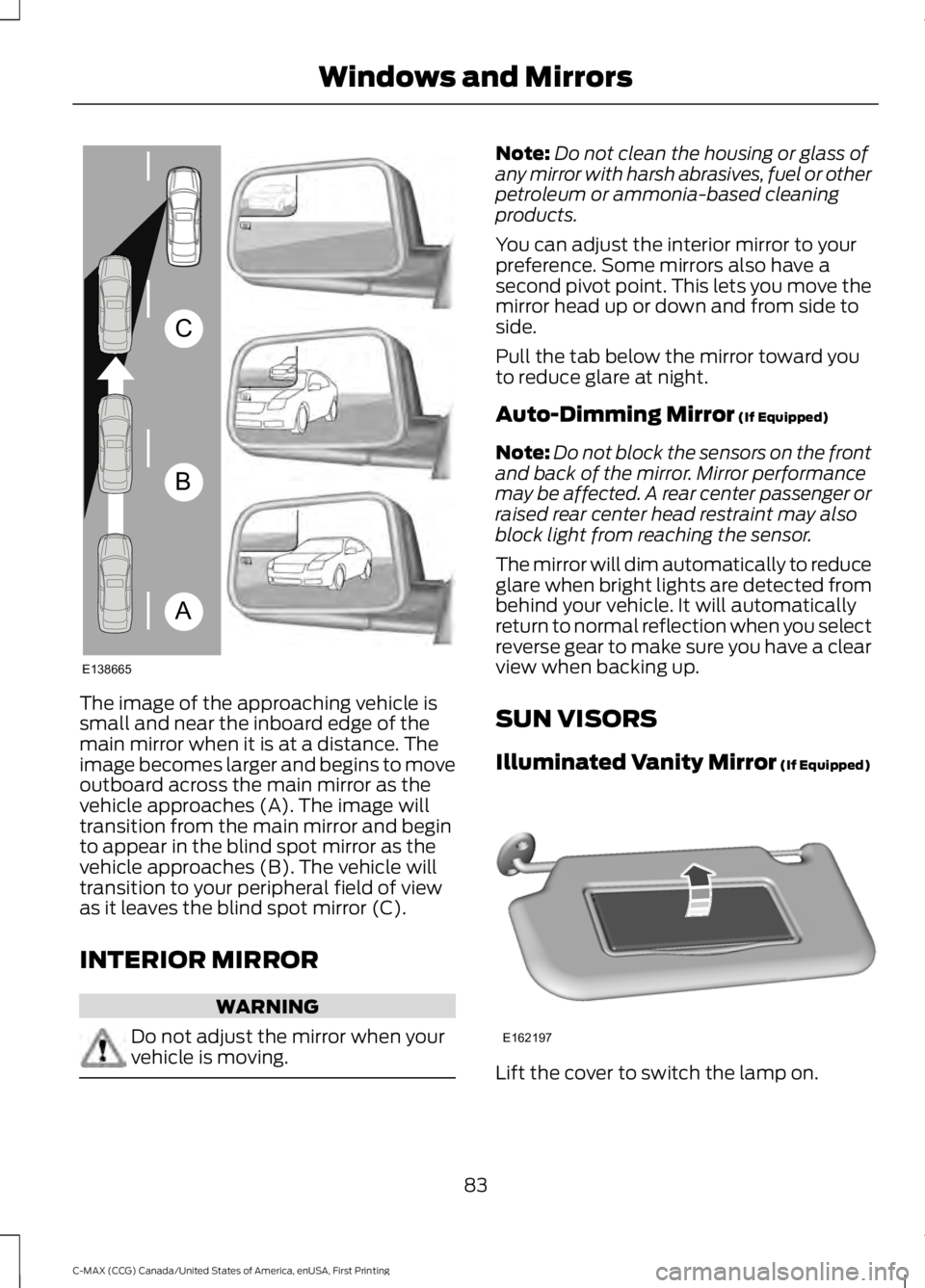
The image of the approaching vehicle issmall and near the inboard edge of themain mirror when it is at a distance. Theimage becomes larger and begins to moveoutboard across the main mirror as thevehicle approaches (A). The image willtransition from the main mirror and beginto appear in the blind spot mirror as thevehicle approaches (B). The vehicle willtransition to your peripheral field of viewas it leaves the blind spot mirror (C).
INTERIOR MIRROR
WARNING
Do not adjust the mirror when yourvehicle is moving.
Note:Do not clean the housing or glass ofany mirror with harsh abrasives, fuel or otherpetroleum or ammonia-based cleaningproducts.
You can adjust the interior mirror to yourpreference. Some mirrors also have asecond pivot point. This lets you move themirror head up or down and from side toside.
Pull the tab below the mirror toward youto reduce glare at night.
Auto-Dimming Mirror (If Equipped)
Note:Do not block the sensors on the frontand back of the mirror. Mirror performancemay be affected. A rear center passenger orraised rear center head restraint may alsoblock light from reaching the sensor.
The mirror will dim automatically to reduceglare when bright lights are detected frombehind your vehicle. It will automaticallyreturn to normal reflection when you selectreverse gear to make sure you have a clearview when backing up.
SUN VISORS
Illuminated Vanity Mirror (If Equipped)
Lift the cover to switch the lamp on.
83
C-MAX (CCG) Canada/United States of America, enUSA, First Printing
Windows and MirrorsA
B
C
E138665 E162197
Page 92 of 395
WARNING LAMPS AND
INDICATORS
The following warning lamps andindicators will alert you to a vehiclecondition that may become serious. Somelamps will light when you start your vehicleto make sure they work. If any lampsremain on after starting your vehicle, referto the respective system warning lamp forfurther information.
Note:Some warning indicators appear inthe information display and function thesame as a warning lamp but do not displaywhen you start your vehicle.
Anti-Lock Braking System
If it lights when you are driving,this indicates a malfunction. Youwill continue to have normalbraking (without anti-lock braking system)unless the brake system warning lamp alsolights. Have the system checked by anauthorized dealer.
Battery
If it lights while driving, thisindicates a malfunction. Switchoff all unnecessary electricalequipment and have the system checkedby an authorized dealer immediately.
Brake System
Lights when you engage theparking brake with the ignitionon.
If it lights when you are driving, check thatyou do not have the parking brakeengaged. If you do not have the parkingbrake engaged, this indicates low brakefluid level or a brake system malfunction.Have the system checked immediately byan authorized dealer.
WARNING
Driving your vehicle with the warninglamp on is dangerous. A significantdecrease in braking performancemay occur. It will take you longer to stopyour vehicle. Have your vehicle checked byyour authorized dealer immediately. Drivingextended distances with the parking brakeengaged can cause brake failure and therisk of personal injury.
Cruise Control (If Equipped)
Lights when you switch on thisfeature.
Direction Indicator
Lights when you switch on theleft or right direction indicator orhazard warning flasher. If theindicators stay on or flash faster, check fora burned out bulb. See Changing a Bulb(page 232).
Door Ajar
Displays when the ignition is onand any door is not completelyclosed.
EcoSelect
Lights when you switch on thisfeature. See Hybrid VehicleOperation (page 135).
Engine and Motor CoolantTemperature
Lights when the engine or motorcoolant temperature is high.Stop the vehicle as soon aspossible, switch off the engine and let cool.
89
C-MAX (CCG) Canada/United States of America, enUSA, First Printing
Instrument Cluster E144522 E71340 E194390
Page 93 of 395
Engine Oil
If it lights with the engine runningor while you are driving, thisindicates a malfunction. Stopyour vehicle as soon as it is safe to do soand switch off the engine. Check the engineoil level. See Engine Oil Check (page 222).
Note:Do not resume your journey if it lightsdespite the level being correct. Have thesystem checked by an authorized dealerimmediately.
EV Now
Lights when you select thisfeature on. See Plug-In HybridVehicle Operation (page 137).
EV Later
Lights when you select thisfeature on. See Plug-In HybridVehicle Operation (page 137).
Fasten Safety Belt
It will light and a tone will soundto remind you to fasten yoursafety belt. See SeatbeltReminder (page 31).
Front Airbag
If it fails to light when you startyour vehicle, continues to flashor remains on, this indicates amalfunction. Have the system checked byan authorized dealer.
Front Fog Lamps (If Equipped)
Lights when you switch the frontfog lamps on.
High Beam
Lights when you switch the highbeam headlamps on. It will flashwhen you use the headlampflasher.
Liftgate Ajar
Lights when the liftgate is notcompletely closed.
Low Battery (If Equipped)
Lights when the battery level islow. You may also see amessage suggesting you reduceyour usage of the climate system.
Low Fuel Level
Lights when the fuel level is lowor the fuel tank is nearly empty.Refuel as soon as possible.
Low Tire Pressure Warning
Lights when your tire pressure islow. If the lamp remains on withthe engine running or whendriving, check your tire pressure as soon aspossible.
It also lights momentarily when you switchon the ignition to confirm the lamp isfunctional. If it does not light when youswitch on the ignition, or begins to flash atany time, have the system checked by anauthorized dealer.
Overdrive Cancel and Grade Assist
(If Equipped)
Lights when the overdrivefunction in the transmissionturns off and the grade assistturns on.
90
C-MAX (CCG) Canada/United States of America, enUSA, First Printing
Instrument Cluster E144814 E151263 E162453 E144691 E162456
Page 94 of 395
Parking Lamps
Lights when you switch theparking lamps on.
Powertrain Fault
Lights when the system detectsa powertrain or high-voltagecharge system fault. If theindicator stays on or continues to come on,contact an authorized dealer as soon aspossible.
Note:If your vehicle detects certain faults,it will not allow you to operate theaccelerator pedal. If this happens, press thebrake pedal and release it. This will activatelimp home vehicle operation. In limp homevehicle operation, your vehicle willaccelerate in a controlled manner up to amaximum speed of 35 mph (56 km/h) ona flat surface. If you apply the brake pedalor move the transmission to neutral (N) youcan override your vehicle’s acceleration.
Ready to Drive
Lights after your switch yourvehicle on and it is ready to drive.A corresponding message maydisplay stating ready to drive.
Service Engine Soon
If the service engine soonindicator light stays on after youswitch on the engine, thisindicates that the On-Board Diagnosticssystem (OBD) has detected a malfunctionof the vehicle emissions control system.Refer to On-Board diagnostics (OBD) inthe Fuel and Refueling chapter for moreinformation about having your vehicleserviced. See Emission Control System(page 150).
If the light is blinking, engine misfire isoccurring which could damage yourcatalytic converter. Drive in a moderatefashion (avoid heavy acceleration anddeceleration) and have your vehicleserviced immediately.
WARNING
Under engine misfire conditions,excessive exhaust temperaturescould damage the catalyticconverter, the fuel system, interior floorcoverings or other vehicle components,possibly causing a fire. Have an authorizeddealer service your vehicle immediately.
The service engine soon indicator lightswhen you first switch on the ignition priorto engine start to check the bulb and toindicate whether the vehicle is ready forInspection and Maintenance testing.
Normally, the service engine soon light willstay on until you switch on the engine, thenturn itself off if no malfunctions arepresent. However, if after 15 seconds theservice engine soon light blinks eight times,it means that the vehicle is not ready forInspection and Maintenance testing. SeeEmission Control System (page 150).
Stability Control
Lights when the system is active.If it remains on or does not lightwhen you switch the ignition on,this indicates a malfunction. During amalfunction, the system will turn off. Havethe system checked by an authorizeddealer immediately. See Using StabilityControl (page 169).
91
C-MAX (CCG) Canada/United States of America, enUSA, First Printing
Instrument Cluster E144692 E138639
Page 95 of 395
Stability Control Off
Lights when you switch thesystem off. It will go out whenyou switch the system back onor when you switch the ignition off. SeeUsing Stability Control (page 169).
Stop Safely
Indicates an electricalcomponent fault or failure thatwill cause the vehicle toshutdown or enter into a limited operatingmode. A message may also display.
Vehicle Plugged in (If Equipped)
Lights after you plug in yourvehicle. A correspondingmessage may display afterattempting to start the vehicle.
AUDIBLE WARNINGS AND
INDICATORS
Key in Ignition Warning Chime
Sounds when you open the driver's doorand you have left the key in the ignition.
Engine On Warning Chime
A warning chime will sound when any dooris opened if the vehicle exceeds a relativelylow speed.
Keyless Warning Alert (If Equipped)
Sounds the horn twice when you exit thevehicle and the keyless vehicle is in RUN,indicating the vehicle is still on.
Headlamps On Warning Chime
Sounds when you remove the key from theignition and open the driver's door and youhave left the headlamps or parking lampson.
Parking Brake On Warning Chime
Sounds when you have left the parkingbrake on and drive your vehicle. If thewarning chime remains on after you havereleased the parking brake, have thesystem checked by your authorized dealerimmediately.
Automatic Transmission WarningChime
Sounds when you have not moved thetransmission selector lever to position P.A message will be shown in the display.
92
C-MAX (CCG) Canada/United States of America, enUSA, First Printing
Instrument Cluster E144693 E144694
Page 169 of 395
When the system is active, your vehicle willremain stationary on the slope for two tothree seconds after you release the brakepedal. This allows you time to move yourfoot from the brake to the acceleratorpedal. The brakes release automaticallywhen the engine has sufficient torque toprevent your vehicle from rolling down thegrade. This is an advantage when pullingaway on a slope, for example from a carpark ramp, traffic lights or when reversinguphill into a parking space.
The system will activate automatically onany slope that will cause significant vehiclerollback. For vehicles with a manualtransmission, you can switch this featureoff using the information display. SeeInformation Displays (page 93). Thesystem will remain on or off depending onhow it was last set.
Note:There is no warning lamp to indicatethe system is either on or off.
Note:If your vehicle is equipped with AutoHold, Hill Start Assist will not be availablewhile Auto Hold is active.
Using Hill Start Assist
1. Bring your vehicle to a completestandstill. Keep the brake pedalpressed and select an uphill gear (forexample, first (1) when facing uphill orreverse (R) when facing downhill).
2. If the sensors detect that your vehicleis on a slope, the system will activateautomatically.
3. When you remove your foot from thebrake pedal, your vehicle will remainon the slope without rolling away forabout two or three seconds. This holdtime will automatically be extended ifyou are in the process of driving off.
4. Drive off in the normal manner. Thebrakes will release automatically.
Switching the System On and Off
You can switch this feature on or off if yourvehicle is equipped with a manualtransmission and an information display.See General Information (page 93). Thesystem remembers the last setting whenyou start your vehicle.
If your vehicle is not equipped with amanual transmission and an informationdisplay, you cannot turn the system on oroff. When you switch the ignition on, thesystem automatically turns on.
166
C-MAX (CCG) Canada/United States of America, enUSA, First Printing
Brakes
Page 170 of 395
PRINCIPLE OF OPERATION
The traction control system helps avoiddrive wheel spin and loss of traction.
If your vehicle begins to slide, the systemapplies the brakes to individual wheelsand, when needed, reduces engine powerat the same time. If the wheels spin whenaccelerating on slippery or loose surfaces,the system reduces engine power in orderto increase traction.
USING TRACTION CONTROL
WARNING
The stability and traction controllight illuminates steadily if thesystem detects a failure. Make sureyou did not manually disable the tractioncontrol system using the informationdisplay controls or the switch. If thestability control and traction control lightis still illuminating steadily, have thesystem serviced by an authorized dealerimmediately. Operating your vehicle withthe traction control disabled could lead toan increased risk of loss of vehicle control,vehicle rollover, personal injury and death.
The system automatically turns on eachtime you switch the ignition on.
If your vehicle is stuck in mud or snow,switching traction control off may bebeneficial as this allows the wheels to spin.
Note:When you switch traction control off,stability control remains fully active.
Switching the System Off
When you switch the system off or on, amessage appears in the informationdisplay showing system status.
You can switch the system off by eitherusing the information display controls orthe switch.
Using the Information DisplayControls
You can switch this feature off or on in theinformation display. See GeneralInformation (page 93).
Using a Switch (If Equipped)
Use the traction control switch on theinstrument panel to switch the system offor on.
The switch illuminates when tractioncontrol is off.
System Indicator Lights andMessages
The stability and traction controllight:
•Temporarily illuminates on enginestart-up.
•Flashes when a driving conditionactivates either of the systems.
•Illuminates if a problem occurs in eitherof the systems.
The stability and traction controloff light temporarily illuminateson engine start-up and stays onwhen you switch the traction controlsystem off.
167
C-MAX (CCG) Canada/United States of America, enUSA, First Printing
Traction ControlE138639
Page 181 of 395
The fixed and active guidelines fade in andout depending on the steering wheelposition. The active guidelines are notshown when the steering wheel positionis straight.
Always use caution while reversing.Objects in the red zone are closest to yourvehicle and objects in the green zone arefarther away. Objects are getting closer toyour vehicle as they move from the greenzone to the yellow or red zones. Use theside view mirrors and rear view mirror toget better coverage on both sides and rearof your vehicle.
Enhanced Park Aids
Note:The reverse sensing system is noteffective at speeds above 7 mph (12 km/h)and may not detect certain angular ormoving objects.
When the sensing system detects anobject, it displays red, yellow and greenhighlights at the top of the image. The alerthighlights all objects detected.
Selectable settings for this feature are ONand OFF.
Manual Zoom
WARNING
When manual zoom is on, the fullarea behind your vehicle is notshown. Be aware of yoursurroundings when using the manual zoomfeature.
Note:Manual zoom is only available whenthe transmission is in reverse (R).
Note:When manual zoom is enabled, onlythe centerline is shown.
This allows you to get a closer view of anobject behind your vehicle. The zoomedimage keeps the bumper in the image toprovide a reference. The zoom is onlyactive while the transmission is in reverse(R). When the transmission is shifted outof reverse (R), the feature automaticallyturns off and must be reset when it is usedagain.
Selectable settings for this feature are +and -. The default setting for the manualzoom is OFF.
Rear Camera Delay (If Equipped)
When you shift the transmission out ofreverse (R) and into any gear while the rearcamera delay is active, the camera imagedisplays until:
•Your vehicle speed sufficientlyincreases.
•You shift your vehicle into park (P).
Selectable settings for this feature are ONand OFF. The default setting for the rearcamera delay is OFF.
178
C-MAX (CCG) Canada/United States of America, enUSA, First Printing
Parking Aids
Page 196 of 395
•Perform all regularly scheduledmaintenance. See ScheduledMaintenance (page 348).
•Use the coach and brake coach displayto get feedback on your economicaldrive style. For more information, SeeInformation Displays (page 93).
Avoid these actions because they reduceyour fuel economy:
•Avoid sudden or hard accelerations anddecelerations. Accelerate and slowdown in a smooth, moderate fashion.
•Avoid revving the engine beforeswitching off your vehicle.
•Avoid long idle periods.
•Do not warm up your vehicle on coldmornings.
•Do not rest your foot on the brakepedal while driving.
•Avoid carrying unnecessary weight.Approximately 1 mile per gallon (0.4kilometers per liter) is lost for every400 lb (180 kg) of weight carried.
•Avoid adding accessories that increaseaerodynamic drag to your vehicle suchas bug deflectors, car top carriers andski or bike racks.
•Avoid driving with the wheels out ofalignment.
Things to keep in mind when you refuelyour vehicle:
•Fuel generates fewer vapors when it iscool and dark outside. Refuel yourvehicle in the early morning or lateevening.
•Use the recommended octane-ratedfuel. Using fuel below therecommended rating will lower yourfuel economy.
DRIVING THROUGH WATER
WARNING
Do not drive through flowing or deepwater as you may lose control of yourvehicle.
Note:Driving through standing water cancause vehicle damage.
Note:Engine damage can occur if waterenters the air filter.
Before driving through standing water,check the depth. Never drive through waterthat is higher than the bottom of the frontrocker area of your vehicle.
When driving through standing water, drivevery slowly and do not stop your vehicle.Your brake performance and traction maybe limited. After driving through water andas soon as it is safe to do so:
•Lightly press the brake pedal to dry thebrakes and to check that they work.
•Check that the horn works.
•Check that the exterior lights work.
•Turn the steering wheel to check thatthe steering power assist works.
193
C-MAX (CCG) Canada/United States of America, enUSA, First Printing
Driving HintsE176360