fuel FORD C MAX ENERGI 2016 Owners Manual
[x] Cancel search | Manufacturer: FORD, Model Year: 2016, Model line: C MAX ENERGI, Model: FORD C MAX ENERGI 2016Pages: 395, PDF Size: 6.78 MB
Page 6 of 395
Fuel and Refueling
Safety Precautions.......................................143
Fuel Quality....................................................144
Fuel Filler Funnel Location........................145
Running Out of Fuel....................................145
Refueling.........................................................146
Fuel Consumption.......................................150
Emission Control System..........................150
High Voltage Battery
General Information....................................153
Charging the High Voltage Battery........155
High Voltage Battery Cut-OffSwitch..........................................................160
Transmission
Automatic Transmission.............................161
Brakes
General Information....................................164
Hints on Driving With Anti-LockBrakes...........................................................165
Parking Brake.................................................165
Hill Start Assist..............................................165
Traction Control
Principle of Operation.................................167
Using Traction Control................................167
Stability Control
Principle of Operation................................168
Using Stability Control...............................169
Parking Aids
Principle of Operation.................................170
Rear Parking Aid............................................170
Front Parking Aid............................................171
Active Park Assist..........................................172
Rear View Camera........................................176
Cruise Control
Principle of Operation.................................179
Using Cruise Control....................................179
Driving Aids
Steering.............................................................181
Load Carrying
Rear Under Floor Storage..........................182
Luggage Covers.............................................182
Load Limit.......................................................183
Towing
Towing a Trailer.............................................190
Transporting the Vehicle...........................190
Towing the Vehicle on Four Wheels......190
Driving Hints
Breaking-In......................................................192
Economical Driving......................................192
Driving Through Water................................193
Floor Mats.......................................................194
Roadside Emergencies
Roadside Assistance...................................195
Hazard Warning Flashers..........................196
Fuel Shutoff...................................................196
Jump Starting the Vehicle.........................197
Collision, Damage or Fire Event..............199
Post-Crash Alert System...........................201
Customer Assistance
Getting the Services You Need...............202
In California (U.S. Only)............................203
The Better Business Bureau (BBB) AutoLine Program (U.S. Only).....................204
Utilizing the Mediation/ArbitrationProgram (Canada Only).......................205
Getting Assistance Outside the U.S. andCanada........................................................205
3
C-MAX (CCG) Canada/United States of America, enUSA, First Printing
Table of Contents
Page 7 of 395
Ordering Additional Owner'sLiterature....................................................206
Reporting Safety Defects (U.S.Only).............................................................207
Reporting Safety Defects (CanadaOnly).............................................................207
Fuses
Fuse Specification Chart..........................209
Changing a Fuse............................................217
Maintenance
General Information....................................218
Opening and Closing the Hood...............218
Under Hood Overview - Hybrid ElectricVehicle (HEV)............................................219
Under Hood Overview - Plug-In HybridElectric Vehicle (PHEV)..........................221
Engine Oil Dipstick.......................................222
Engine Oil Check..........................................222
Engine Coolant Check................................223
Automatic Transmission FluidCheck............................................................227
Brake Fluid Check.........................................227
Power Steering Fluid Check.....................227
Washer Fluid Check.....................................227
Fuel Filter.........................................................227
Changing the 12V Battery.........................228
Checking the Wiper Blades......................229
Changing the Wiper Blades.....................229
Adjusting the Headlamps..........................231
Removing a Headlamp..............................232
Changing a Bulb...........................................232
Bulb Specification Chart...........................237
Changing the Engine Air Filter................238
Vehicle Care
General Information....................................241
Cleaning Products........................................241
Cleaning the Exterior...................................241
Waxing.............................................................242
Cleaning the Engine....................................243
Cleaning the Windows and WiperBlades..........................................................243
Cleaning the Interior...................................244
Cleaning the Instrument Panel andInstrument Cluster Lens.......................244
Cleaning Leather Seats.............................245
Repairing Minor Paint Damage..............245
Cleaning the Alloy Wheels.......................245
Vehicle Storage............................................246
Wheels and Tires
Tire Sealant and Inflator Kit....................249
Tire Care..........................................................255
Using Snow Chains.....................................270
Tire Pressure Monitoring System...........270
Technical Specifications...........................274
Capacities and Specific-ations
Engine Specifications.................................276
Motorcraft Parts............................................277
Vehicle Identification Number................278
Vehicle Certification Label.......................279
Transmission Code Designation............279
Capacities and Specifications...............280
Audio System
General Information...................................283
Audio Unit - Vehicles With: AM/FM/CD/SYNC............................................................284
Audio Unit - Vehicles With: Premium AM/FM/CD.........................................................286
Audio Unit - Vehicles With: Sony AM/FM/CD.................................................................288
Digital Radio...................................................291
Satellite Radio..............................................294
USB Port.........................................................296
Media Hub......................................................296
4
C-MAX (CCG) Canada/United States of America, enUSA, First Printing
Table of Contents
Page 11 of 395
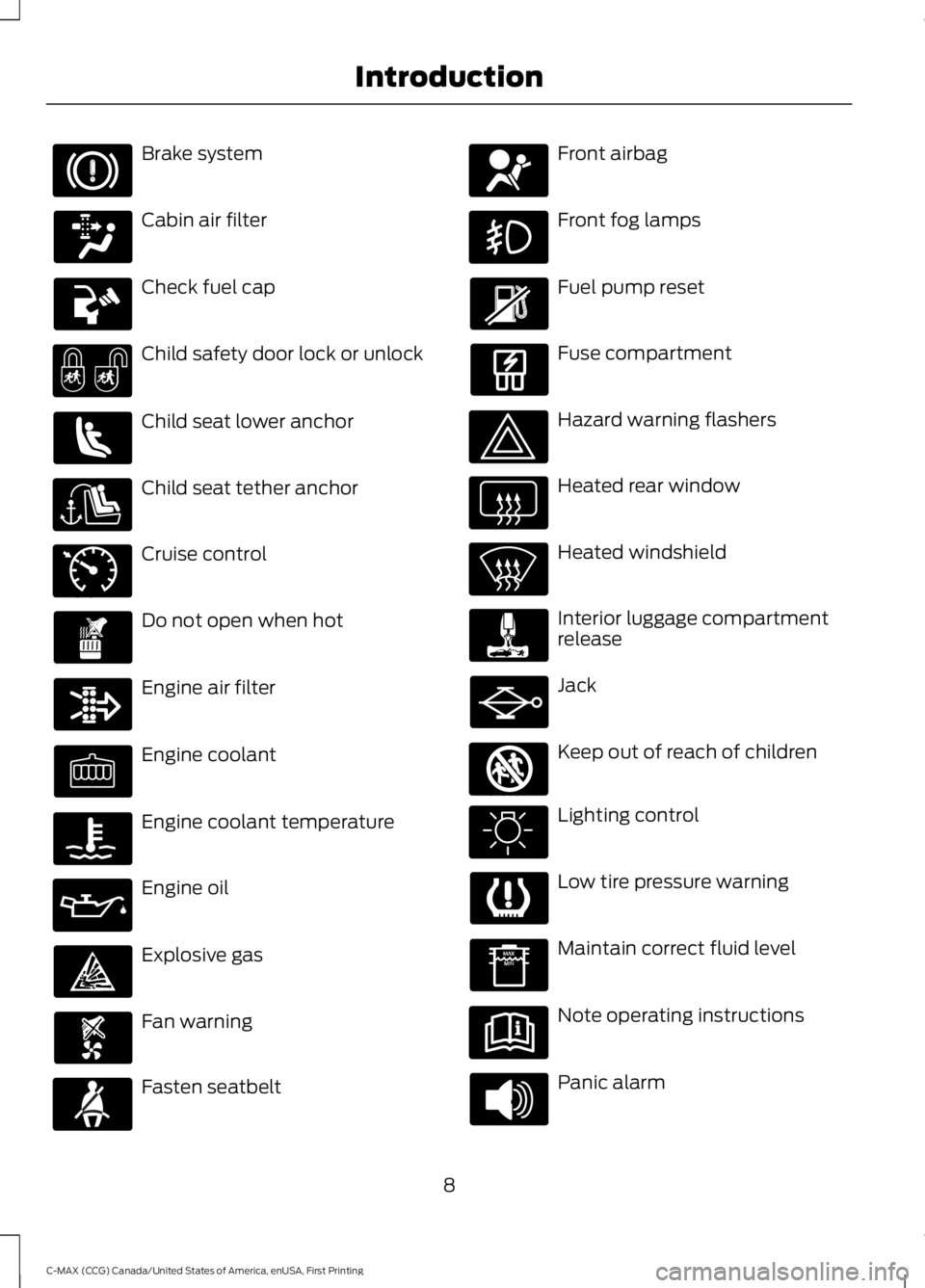
Brake system
Cabin air filter
Check fuel cap
Child safety door lock or unlock
Child seat lower anchor
Child seat tether anchor
Cruise control
Do not open when hot
Engine air filter
Engine coolant
Engine coolant temperature
Engine oil
Explosive gas
Fan warning
Fasten seatbelt
Front airbag
Front fog lamps
Fuel pump reset
Fuse compartment
Hazard warning flashers
Heated rear window
Heated windshield
Interior luggage compartmentrelease
Jack
Keep out of reach of children
Lighting control
Low tire pressure warning
Maintain correct fluid level
Note operating instructions
Panic alarm
8
C-MAX (CCG) Canada/United States of America, enUSA, First Printing
Introduction E71340 E161353
Page 13 of 395
This data can help provide a betterunderstanding of the circumstances inwhich crashes and injuries occur.
Note:Event data recorder data isrecorded by your vehicle only if anon-trivial crash situation occurs; no datais recorded by the event data recorderunder normal driving conditions and nopersonal data or information (e.g., name,gender, age, and crash location) isrecorded (see limitations regarding 911Assist and Traffic, directions andInformation privacy below). However,parties, such as law enforcement, couldcombine the event data recorder datawith the type of personally identifyingdata routinely acquired during a crashinvestigation.
To read data recorded by an event datarecorder, special equipment is required,and access to the vehicle or the eventdata recorder is needed. In addition tothe vehicle manufacturer, otherparties, such as law enforcement, thathave such special equipment, can readthe information if they have access tothe vehicle or the event data recorder.Ford Motor Company and Ford ofCanada do not access event datarecorder information without obtainingconsent, unless pursuant to court orderor where required by law enforcement,other government authorities or otherthird parties acting with lawfulauthority. Other parties may seek toaccess the information independentlyof Ford Motor Company and Ford ofCanada.
Note:Including to the extent that anylaw pertaining to Event Data Recordersapplies to SYNC or its features, pleasenote the following: Once 911 Assist (ifequipped) is enabled (set ON), 911 Assistmay, through any paired and connectedcell phone, disclose to emergencyservices that the vehicle has been in acrash involving the deployment of anairbag or, in certain vehicles, theactivation of the fuel pump shut-off.Certain versions or updates to 911 Assistmay also be capable of being used toelectronically or verbally provide to 911operators the vehicle location (such aslatitude and longitude), and/or otherdetails about the vehicle or crash orpersonal information about theoccupants to assist 911 operators toprovide the most appropriate emergencyservices. If you do not want to disclosethis information, do not activate the 911Assist feature. See SYNC™ (page 297).
Additionally, when you connect toTraffic, Directions and Information (ifequipped, U.S. only), the service usesGPS technology and advanced vehiclesensors to collect the vehicle’s currentlocation, travel direction, and speed(“vehicle travel information”), only tohelp provide you with the directions,traffic reports, or business searchesthat you request. If you do not wantFord or its vendors to receive thisinformation, do not activate theservice. For more information, seeTraffic, Directions and Information,Terms and Conditions. See SYNC™(page 297).
10
C-MAX (CCG) Canada/United States of America, enUSA, First Printing
Introduction
Page 51 of 395
Intelligent Access Key (Type 2)
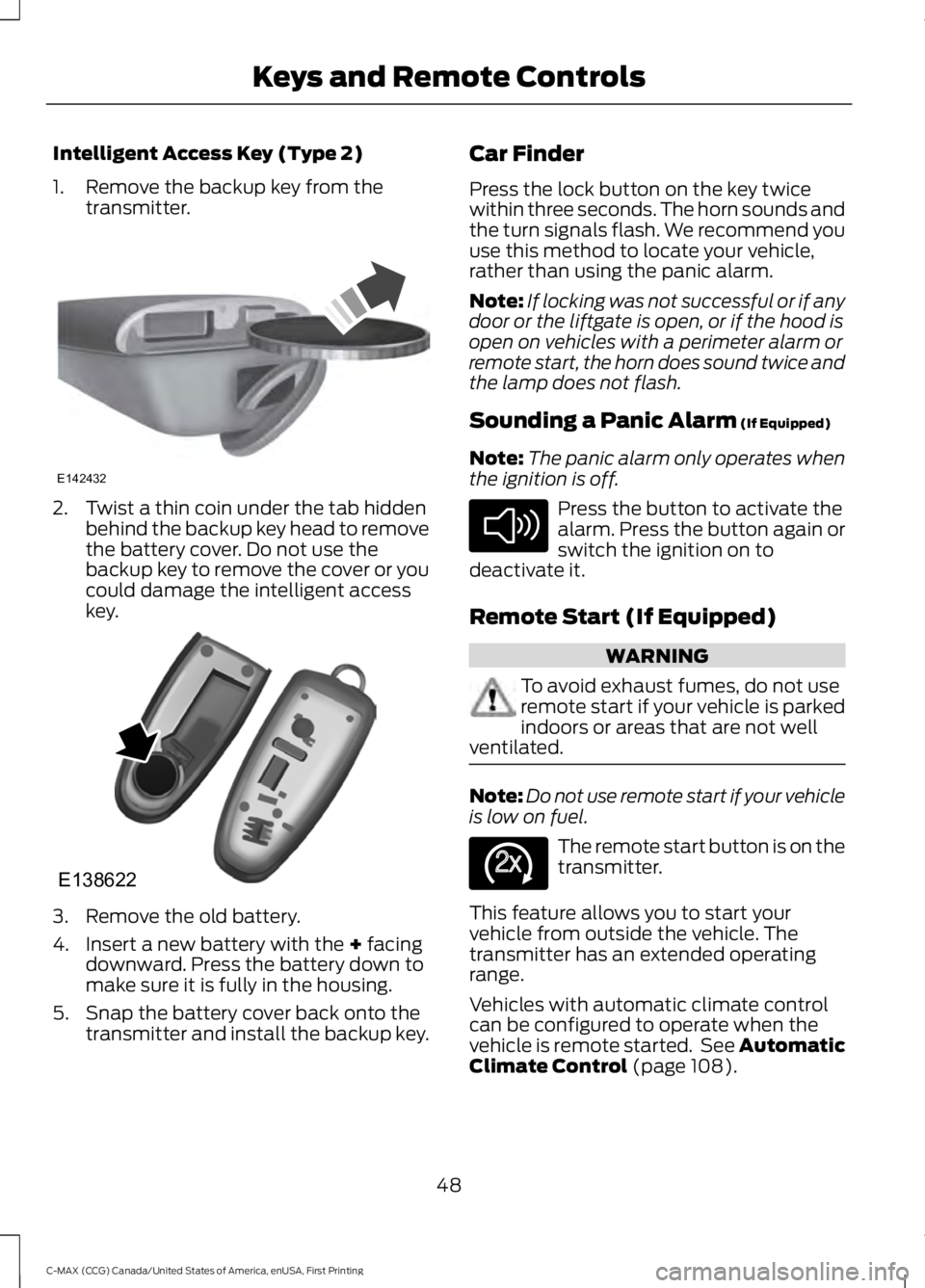
1. Remove the backup key from thetransmitter.
2. Twist a thin coin under the tab hiddenbehind the backup key head to removethe battery cover. Do not use thebackup key to remove the cover or youcould damage the intelligent accesskey.
3. Remove the old battery.
4. Insert a new battery with the + facingdownward. Press the battery down tomake sure it is fully in the housing.
5. Snap the battery cover back onto thetransmitter and install the backup key.
Car Finder
Press the lock button on the key twicewithin three seconds. The horn sounds andthe turn signals flash. We recommend youuse this method to locate your vehicle,rather than using the panic alarm.
Note:If locking was not successful or if anydoor or the liftgate is open, or if the hood isopen on vehicles with a perimeter alarm orremote start, the horn does sound twice andthe lamp does not flash.
Sounding a Panic Alarm (If Equipped)
Note:The panic alarm only operates whenthe ignition is off.
Press the button to activate thealarm. Press the button again orswitch the ignition on todeactivate it.
Remote Start (If Equipped)
WARNING
To avoid exhaust fumes, do not useremote start if your vehicle is parkedindoors or areas that are not wellventilated.
Note:Do not use remote start if your vehicleis low on fuel.
The remote start button is on thetransmitter.
This feature allows you to start yourvehicle from outside the vehicle. Thetransmitter has an extended operatingrange.
Vehicles with automatic climate controlcan be configured to operate when thevehicle is remote started. See AutomaticClimate Control (page 108).
48
C-MAX (CCG) Canada/United States of America, enUSA, First Printing
Keys and Remote ControlsE142432 E138622 E138624 E138625
Page 54 of 395
PRINCIPLE OF OPERATION
MyKey allows you to program keys withrestricted driving modes to promote gooddriving habits. All but one of the keysprogrammed to the vehicle can beactivated with these restricted modes.
Any keys that have not been programmedare referred to as administrator keys oradmin keys. These can be used to:
•Create a MyKey.
•Program configurable MyKey settings.
•Clear all MyKey features.
When you have programmed a MyKey, youcan access the following information usingthe information display:
•How many admin keys and MyKeys areprogrammed to your vehicle.
•The total distance your vehicle hastraveled using a MyKey.
Note:All MyKeys are programmed to thesame settings. You cannot program themindividually.
Note:For vehicles with push-button start,when both a MyKey and an admin remotetransmitter are present, the admin remotetransmitter will be recognized by the vehiclewhile switching the ignition on to start thevehicle.
Non-configurable Settings
The following settings cannot be changedby an admin key user:
•Seat belt reminder or Belt Minder. Youcannot disable this feature. The audiosystem will mute when the front seatpassengers' safety belts are notfastened.
•Early low fuel. The low-fuel warningactivates earlier, giving the MyKey usermore time to refuel.
•Driver assist features, if equipped onyour vehicle, are forced on: parking aid.
Configurable Settings
With an admin key, you can configurecertain MyKey settings when you firstcreate a MyKey and before you recycle thekey or restart the vehicle. You can alsochange the settings afterward with anadmin key.
•A vehicle speed limit can be set.Warnings will be shown in the displayfollowed by an audible tone when yourvehicle reaches the set speed. Youcannot override the set speed by fullydepressing the accelerator pedal or bysetting cruise control.
WARNING
Do not set MyKey maximum speedlimit to a limit that will prevent thedriver from maintaining a safe speedconsidering posted speed limits andprevailing road conditions. The driver isalways responsible to drive in accordancewith local laws and prevailing conditions.Failure to do so could result in accident orinjury.
51
C-MAX (CCG) Canada/United States of America, enUSA, First Printing
MyKey™
Page 86 of 395
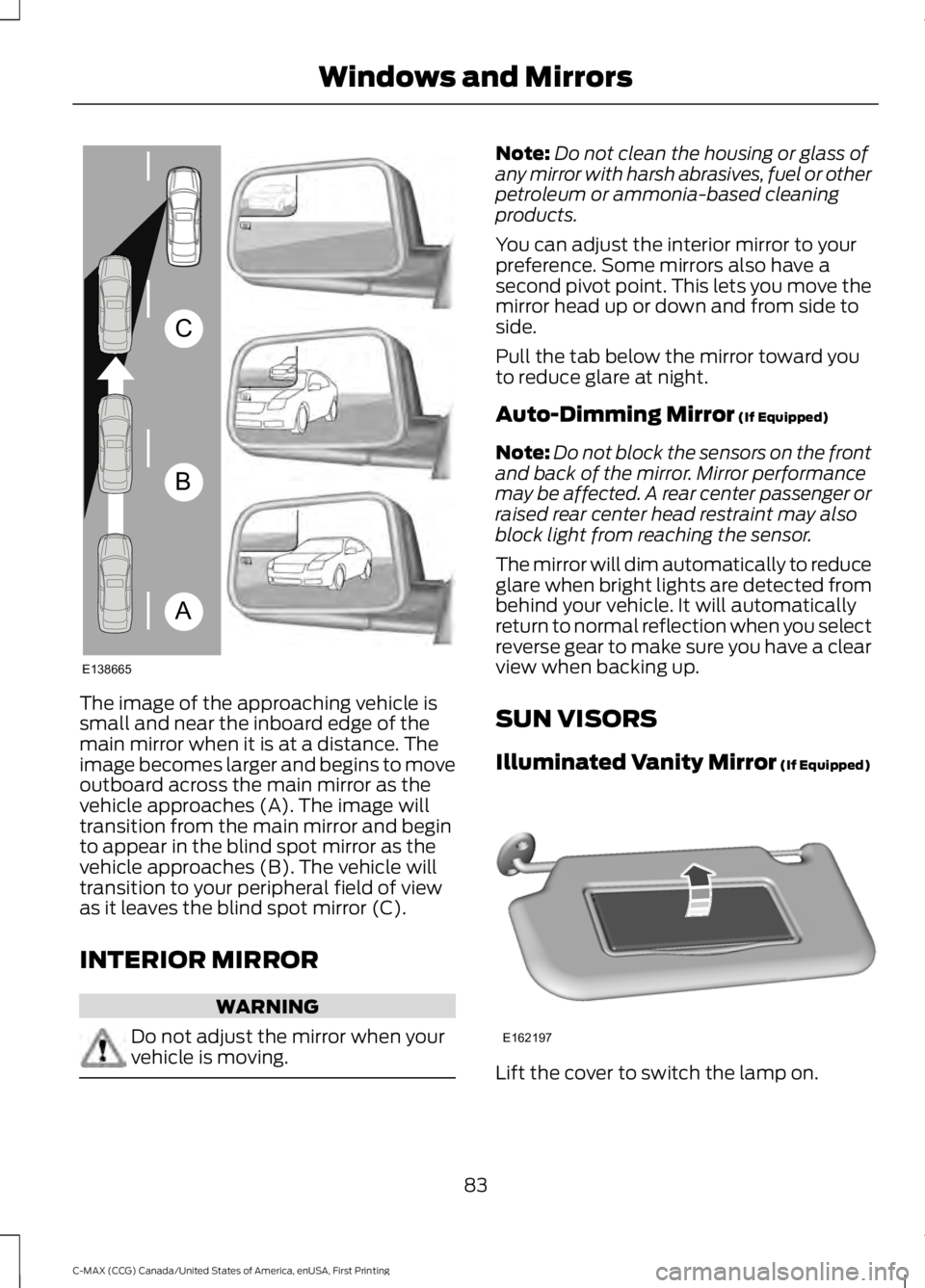
The image of the approaching vehicle issmall and near the inboard edge of themain mirror when it is at a distance. Theimage becomes larger and begins to moveoutboard across the main mirror as thevehicle approaches (A). The image willtransition from the main mirror and beginto appear in the blind spot mirror as thevehicle approaches (B). The vehicle willtransition to your peripheral field of viewas it leaves the blind spot mirror (C).
INTERIOR MIRROR
WARNING
Do not adjust the mirror when yourvehicle is moving.
Note:Do not clean the housing or glass ofany mirror with harsh abrasives, fuel or otherpetroleum or ammonia-based cleaningproducts.
You can adjust the interior mirror to yourpreference. Some mirrors also have asecond pivot point. This lets you move themirror head up or down and from side toside.
Pull the tab below the mirror toward youto reduce glare at night.
Auto-Dimming Mirror (If Equipped)
Note:Do not block the sensors on the frontand back of the mirror. Mirror performancemay be affected. A rear center passenger orraised rear center head restraint may alsoblock light from reaching the sensor.
The mirror will dim automatically to reduceglare when bright lights are detected frombehind your vehicle. It will automaticallyreturn to normal reflection when you selectreverse gear to make sure you have a clearview when backing up.
SUN VISORS
Illuminated Vanity Mirror (If Equipped)
Lift the cover to switch the lamp on.
83
C-MAX (CCG) Canada/United States of America, enUSA, First Printing
Windows and MirrorsA
B
C
E138665 E162197
Page 89 of 395
Charge Assist
The up and down arrows provideinformation about the energy going intoand out of the high voltage battery. The uparrow above the battery indicates batterycharging such as from regenerative braking.The down arrow below the batteryindicates battery discharging to providepower for propulsion or vehicleaccessories.
Regen Active
A circular arrow symbol appears in thecenter of the battery gauge when energyis being recaptured through theregenerative braking system.
This feature can be switched on or off inthe information displays settings menu.See General Information (page 93).
Fuel Gauge:
Note:The fuel gauge may vary slightlywhen your vehicle is moving or on a gradient.
Switch the ignition on. The fuel gauge willindicate approximately how much fuel isleft in the fuel tank. The arrow adjacent tothe fuel pump symbol indicates on whichside of your vehicle the fuel filler door islocated.
The needle should move toward F whenyou refuel your vehicle. If the needle pointsto E after adding fuel, this indicates yourvehicle needs service soon.
After refueling some variability in needleposition is normal:
•It may take a short time for the needleto reach F after leaving the gas station.This is normal and depends upon theslope of pavement at the gas station.
•The fuel amount dispensed into thetank is a little less or more than thegauge indicated. This is normal anddepends upon the slope of pavementat the gas station.
•If the gas station nozzle shuts offbefore the tank is full, try a differentgas pump nozzle.
Low Fuel Reminder
A low fuel reminder triggers when the fuelgauge needle is at 1/16th.
Variations:
Distance-to-emptyFuel gauge positionDriving type (fuel economyconditions)
35–80 mi (56–129 km)1/16thHighway driving
35 mi (56 km)1/16thSevere duty driving (trailertowing, extended idle)
Vehicle Settings and Personalization
Display/Trip
See General Information (page 93).
Information
See General Information (page 93).
Settings
See General Information (page 93).
86
C-MAX (CCG) Canada/United States of America, enUSA, First Printing
Instrument Cluster
Page 90 of 395
Brake Coach Display:
The Brake Coach appears after the vehiclehas come to a stop. It coaches you to brakein a manner which maximizes the amountof energy returned through theregenerative braking system. The percentdisplayed is an indication of theregenerative braking efficiency with 100%representing the maximum amount ofenergy recovery.
This feature can be switched on or off inthe information displays settings menu.See General Information (page 93).
Trip Summary:
The Trip Summary displays upon shuttingoff your vehicle. The information iscumulative over the last trip. A new tripbegins each time you start your vehicle(when the Ready to Drive message comeson).
•Distance - Displays the total distancetraveled, distance traveled on batterypower only (EV distance) and Regendistance. Regen distance is theestimated range gained from energyrecaptured through regenerativebraking.
•Energy Use - Displays the average fueleconomy. In addition for Energi,displays the total electrical energy usedwhile in Plug-in Power Mode in kilowatthours (kWh).
•Brake Score - The percent displayed isan indication of the regenerativebraking efficiency for the trip.
Note:Corresponding trip efficiency leavesappear on the right information display uponshutting off your Hybrid vehicle. On Energivehicles the trip efficiency leaves are shownon the right information display when thevehicle operates in Hybrid Mode for theentire trip. For trips with Plug-in Power Modeoperation an estimate of your EV Range/FullCharge is provided along with a listing offactors and their contributions to thisestimate. See Next Full Charge under RightInformation Display in this chapter.
Right Information Display
Entertainment
See your SYNC information.
Navigation or Compass
See your SYNC information.
Phone
See your SYNC information.
Fuel Economy
See General Information (page 93).
Vehicle Range
Vehicle range indicates the estimateddistance your vehicle will travel with theenergy currently onboard. The range isdisplayed at the bottom of the screen withgasoline range shown in white and electricrange (Energi only) shown in blue.
•Gasoline Range: Is the estimateddistance to empty based on the fuelremaining in the tank.
•Electric Range: Is the estimateddistance you can travel in Plug-InPower Mode with the engine off. Thisrange is based on a calculationdetermined by the amount of energystored in the high voltage battery as aresult of charging while plugged in andthe energy being used while driving.
87
C-MAX (CCG) Canada/United States of America, enUSA, First Printing
Instrument Cluster
Page 91 of 395
The amount of energy being used whiledriving is affected by:
•Mild or aggressive acceleration orbraking.
•Your vehicle speed.
•Your use of accessories such as climatecontrol.
•The ambient temperature and otherweather conditions.
•City or highway driving.
•Road grades.
Note:It is normal for vehicle rangeestimates to vary due to changes in averageenergy usage. This is why you will typicallysee different range estimates each time youfill up your fuel tank or fully charge yourbattery.
Trip Efficiency Leaves
Trip Efficiency Leaves display uponshutting off your Hybrid vehicle. For Energivehicles the trip efficiency leaves aredisplayed only when the vehicle operatesin Hybrid for the entire trip. The number ofleaves represent the average for the lasttrip. A new trip begins each time you startyour vehicle (when the Ready to Drivemessage comes on). Corresponding TripSummary data displays on the leftinformation display.
Next Full Charge
The Next Full Charge display is shownupon shutting off your Energi vehiclewhenever your vehicle operates in Plug-inPower Mode for a portion of your trip.
Miles or kilometers per full charge
This is an estimate of the EV Range youwould see if you plugged in and fullycharged your vehicle right now. Theestimate is based on your energy usagewhile driving. Energy usage is affected byyour driving style and route, climate controluse, outside temperature and other factors.
Energy usage effects (+/-)
A green bar indicates a positive effect onyour EV range per full charge estimate. Anamber bar indicates a negative effect. Thebigger the bar the bigger the effect on yourestimate.
•Driving style/route – This includesenergy used to propel your vehiclebased on your driving style and route.Your driving style includes how fast youdrive and whether your accelerationand braking is mild or aggressive. Yourroute includes factors such as theamount of city or highway driving androad grades.
•Climate control use – This includesenergy used by your vehicle’s highvoltage climate control componentssuch as the electric A/C compressorand the electric heater.
•Outside temp./other – This includesenergy losses due to outsidetemperature and other conditionswhich reduce vehicle system efficiency.Energy used for low voltageaccessories such as cabin fans, heatedseats, headlights, etc. is also included.
88
C-MAX (CCG) Canada/United States of America, enUSA, First Printing
Instrument Cluster