light FORD C MAX ENERGI 2017 Owners Manual
[x] Cancel search | Manufacturer: FORD, Model Year: 2017, Model line: C MAX ENERGI, Model: FORD C MAX ENERGI 2017Pages: 497, PDF Size: 7.64 MB
Page 385 of 497
Button
Start
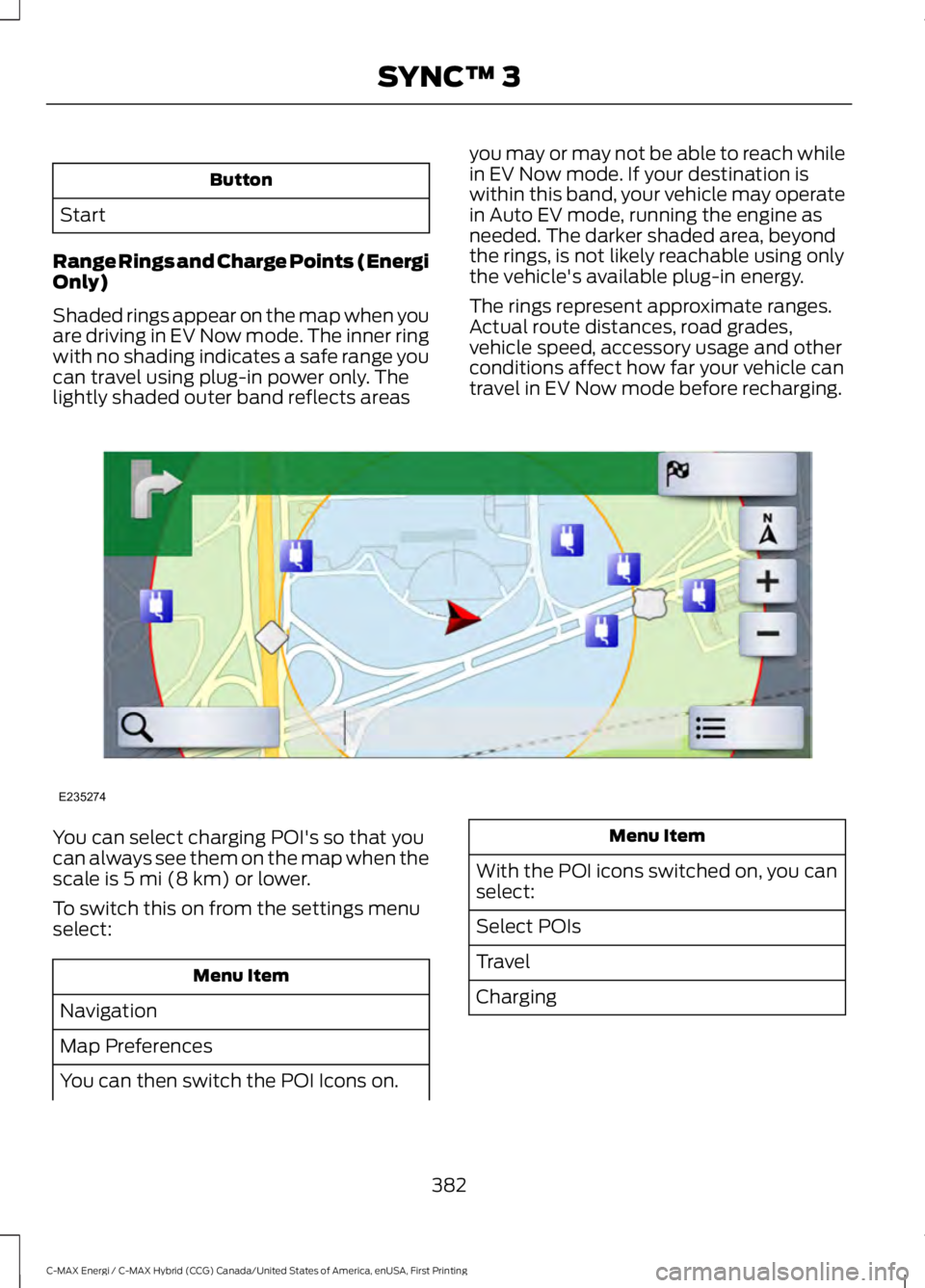
Range Rings and Charge Points (EnergiOnly)
Shaded rings appear on the map when youare driving in EV Now mode. The inner ringwith no shading indicates a safe range youcan travel using plug-in power only. Thelightly shaded outer band reflects areas
you may or may not be able to reach whilein EV Now mode. If your destination iswithin this band, your vehicle may operatein Auto EV mode, running the engine asneeded. The darker shaded area, beyondthe rings, is not likely reachable using onlythe vehicle's available plug-in energy.
The rings represent approximate ranges.Actual route distances, road grades,vehicle speed, accessory usage and otherconditions affect how far your vehicle cantravel in EV Now mode before recharging.
You can select charging POI's so that youcan always see them on the map when thescale is 5 mi (8 km) or lower.
To switch this on from the settings menuselect:
Menu Item
Navigation
Map Preferences
You can then switch the POI Icons on.
Menu Item
With the POI icons switched on, you canselect:
Select POIs
Travel
Charging
382
C-MAX Energi / C-MAX Hybrid (CCG) Canada/United States of America, enUSA, First Printing
SYNC™ 3E235274
Page 392 of 497
SiriusXM Traffic and Travel Link
SiriusXM Traffic and Travel Link is availableon vehicles equipped with navigation andonly in select markets. You must activateand subscribe to receive SiriusXM Trafficand Travel Link information. It helps youlocate the best gas prices, find movielistings, get current traffic alerts, view theweather map, get accurate ski conditionsand see current sports scores. See Apps(page 409).
The system calculates a reasonableefficient route based on available speedlimits, traffic, and road conditions. You mayknow a local short cut that is more efficientat a given time than the route provided bySYNC 3, but you should expect a slightdifference in minutes or miles with theSYNC 3 route.
Navigation Map Updates
Annual navigation map updates areavailable for purchase through yourdealership, by calling 1-866-462-8837 inthe United States and Canada or01-800-557-5539 in Mexico. You can alsovisit:
Website
www.navigation.com/sync
You need to specify the make and modelof your vehicle to determine if there is anupdate available.
HERE is the digital map provider for thenavigation application. If you find map dataerrors, you may report them directly toHERE by going towww.here.com/mapcreator. HEREevaluates all reported map errors andresponds with the result of theirinvestigation by e-mail.
Map coverage includes the USA (includingPuerto Rico and the US Virgin Islands),Canada and Mexico.
ELECTRIC VEHICLE
INFORMATION
The power flow information for your Hybridvehicle is available through the Appssection of the touch screen.
389
C-MAX Energi / C-MAX Hybrid (CCG) Canada/United States of America, enUSA, First Printing
SYNC™ 3
Page 395 of 497
To improve the charging experience, your vehicle has the following conveniencefeatures:
DescriptionFeature
Your vehicle schedules its charging time for when the utility ratesare lowest. Contact your utility company to see what rates areavailable.
Value Charge
Your vehicle starts charging immediately after you connect thecharging plug.Charge Now
Get the most miles out of every charge by conditioning yourplugged in vehicle. Set the cabin temperature when you set yourGO Time in order to use energy from your home, or chargingstation, instead of your vehicle battery.
Cabin Conditioning
Setting GO Times allows you to control charging schedules andcabin conditioning settings so your vehicle is ready to drive whenyou are. By setting a GO Time, your vehicle can use your valuecharge settings to minimize your electricity costs but still prioritizegetting a full charge before your GO Time. A calendar view allowsyou to program two GO Times per day for each day of the week.
My GO Times
Note: Remember, you must plug in your vehicle for My GO Timeto work.
Note:Charging to 100% by your next GOTime will always be the priority. When ValueCharge is selected, charging outside ofoff-peak times may be necessary in orderto be fully charged by your GO Time.
Charge Settings Screen
Each of the four areas highlighted belowshow a different feature of the chargesettings screen.
392
C-MAX Energi / C-MAX Hybrid (CCG) Canada/United States of America, enUSA, First Printing
SYNC™ 3
Page 398 of 497
Action and DescriptionMenu ItemItem
This area of the screen shows your scheduled Go Time andyour cabin conditioning information.My GO TimesA
This is the time and date of your next set drive time. Yourvehicle automatically schedules charging and cabin condi-tioning to finish by this time.
Next GO TimeB
This is the chosen cabin conditioning setting for this GOTime.TemperatureC
This accesses your GO Time Schedule (see GO TimeSchedule later in this section).EditD
This cancels the cabin conditioning for the present GO Time.Once you touch Skip, the GO Time and Temperature greyout, and the LED illuminates on the Skip button. Touch thebutton again to switch on the cabin conditioning. Thisfeature allows you to ignore the present GO Time withouthaving to delete it or having to switch off the entire schedule(see GO Time Schedule later in this section). After thepresent GO Time passes, this feature resets.
SkipE
Conflict Notification
The system alerts you to any conflicts byhighlighting areas of the screen in coloredtext.
If your battery cannot have a full charge by the scheduled drive time, the systemhighlights your next GO Time and Charge Complete time and the followingmessage appears:
Action and DescriptionMenu Item
This is normal; the vehicle is informing you of the conflicting situation.This notification only displays when the gearshift selector lever is inposition P.
Charge timenot sufficientto meetscheduledGO Timesettings
Note: Charging occurs as soon as you plug the vehicle in. The systemlimits cabin conditioning to 15 minutes before your GO Time.
395
C-MAX Energi / C-MAX Hybrid (CCG) Canada/United States of America, enUSA, First Printing
SYNC™ 3
Page 405 of 497
Action and DescriptionMenu ItemItem
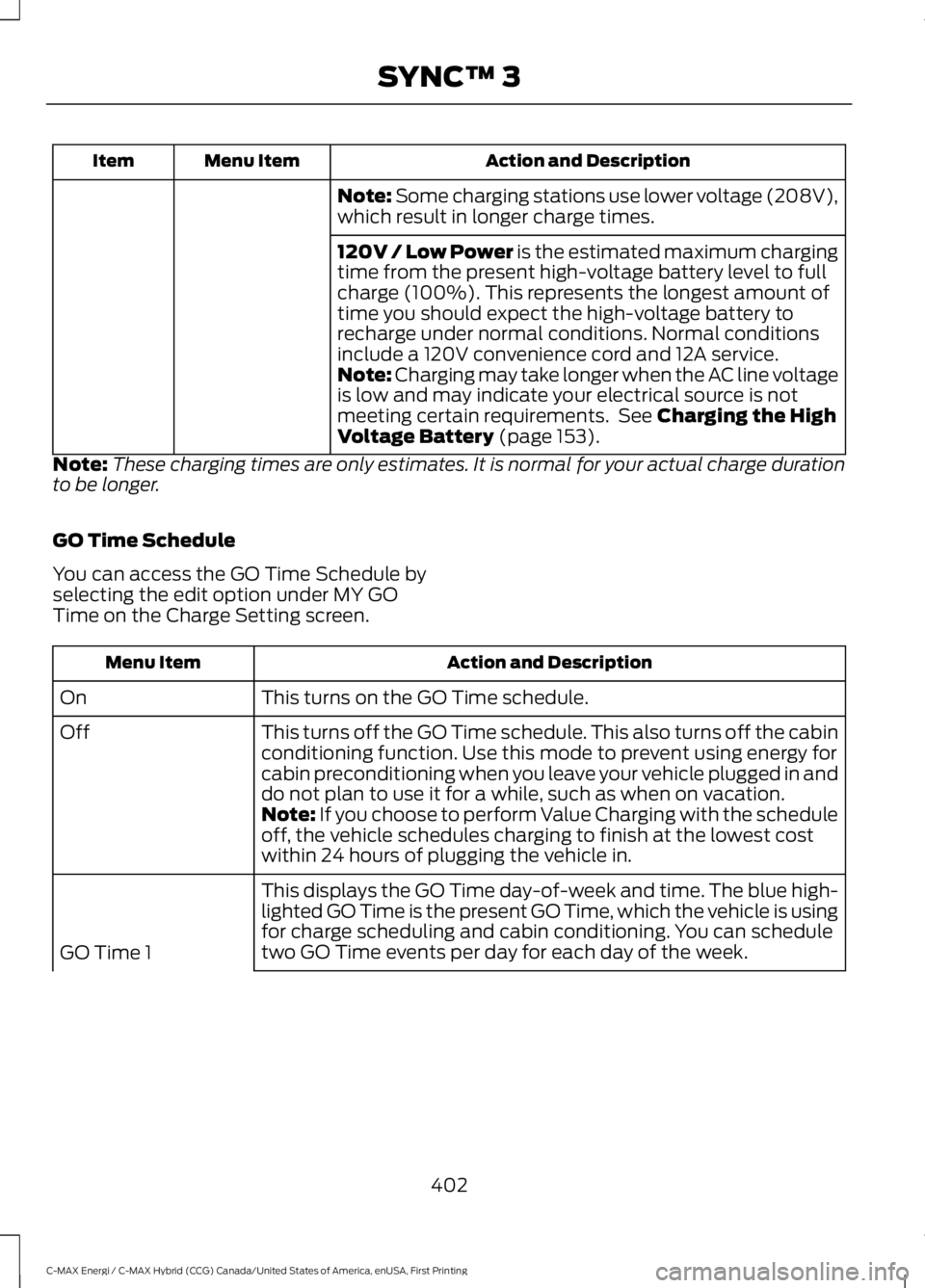
Note: Some charging stations use lower voltage (208V),which result in longer charge times.
120V / Low Power is the estimated maximum chargingtime from the present high-voltage battery level to fullcharge (100%). This represents the longest amount oftime you should expect the high-voltage battery torecharge under normal conditions. Normal conditionsinclude a 120V convenience cord and 12A service.Note: Charging may take longer when the AC line voltageis low and may indicate your electrical source is notmeeting certain requirements. See Charging the HighVoltage Battery (page 153).
Note:These charging times are only estimates. It is normal for your actual charge durationto be longer.
GO Time Schedule
You can access the GO Time Schedule byselecting the edit option under MY GOTime on the Charge Setting screen.
Action and DescriptionMenu Item
This turns on the GO Time schedule.On
This turns off the GO Time schedule. This also turns off the cabinconditioning function. Use this mode to prevent using energy forcabin preconditioning when you leave your vehicle plugged in anddo not plan to use it for a while, such as when on vacation.
Off
Note: If you choose to perform Value Charging with the scheduleoff, the vehicle schedules charging to finish at the lowest costwithin 24 hours of plugging the vehicle in.
This displays the GO Time day-of-week and time. The blue high-lighted GO Time is the present GO Time, which the vehicle is usingfor charge scheduling and cabin conditioning. You can scheduletwo GO Time events per day for each day of the week.GO Time 1
402
C-MAX Energi / C-MAX Hybrid (CCG) Canada/United States of America, enUSA, First Printing
SYNC™ 3
Page 410 of 497
DescriptionItemCallout
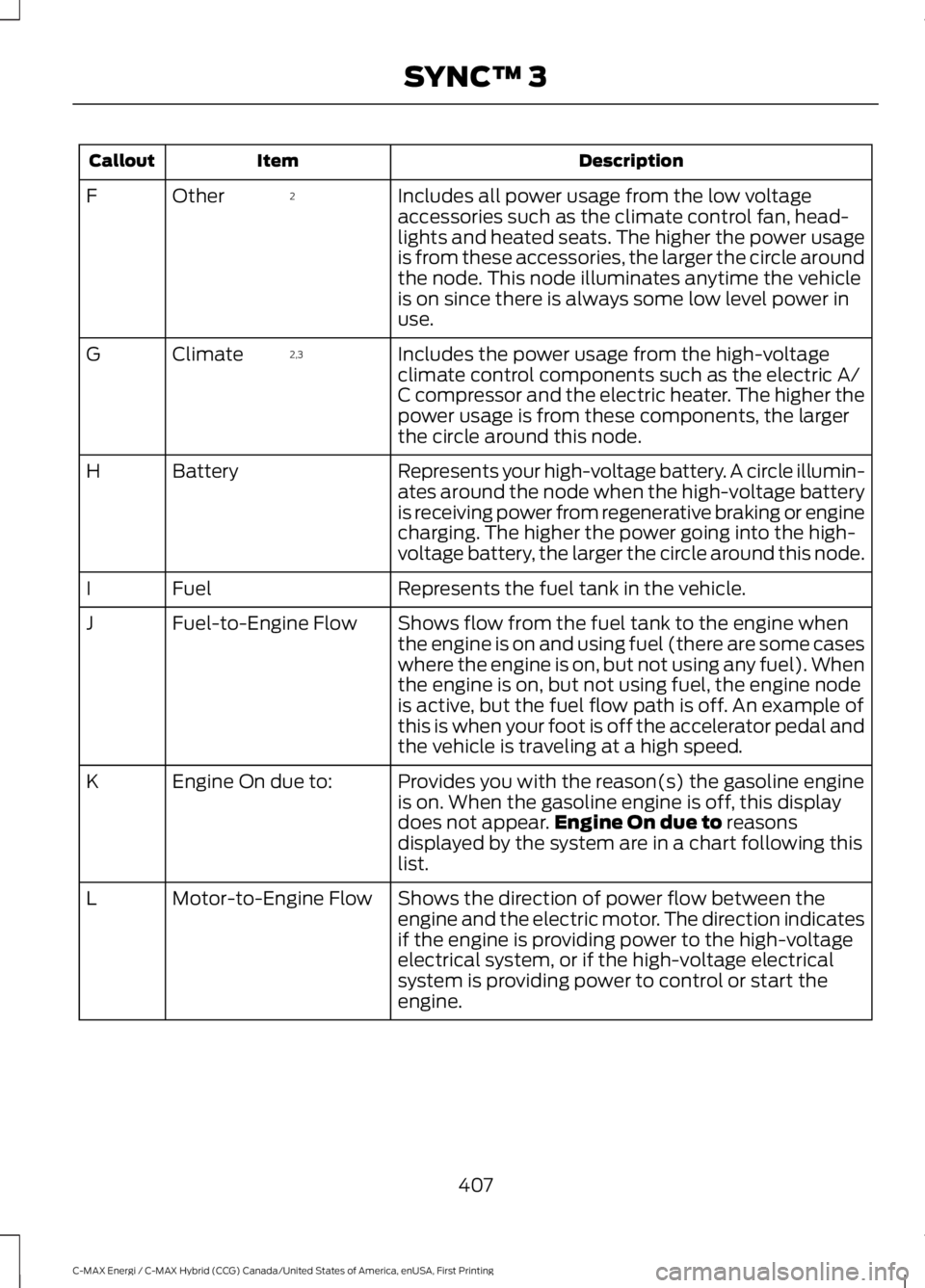
Includes all power usage from the low voltageaccessories such as the climate control fan, head-lights and heated seats. The higher the power usageis from these accessories, the larger the circle aroundthe node. This node illuminates anytime the vehicleis on since there is always some low level power inuse.
2OtherF
Includes the power usage from the high-voltageclimate control components such as the electric A/C compressor and the electric heater. The higher thepower usage is from these components, the largerthe circle around this node.
2,3ClimateG
Represents your high-voltage battery. A circle illumin-ates around the node when the high-voltage batteryis receiving power from regenerative braking or enginecharging. The higher the power going into the high-voltage battery, the larger the circle around this node.
BatteryH
Represents the fuel tank in the vehicle.FuelI
Shows flow from the fuel tank to the engine whenthe engine is on and using fuel (there are some caseswhere the engine is on, but not using any fuel). Whenthe engine is on, but not using fuel, the engine nodeis active, but the fuel flow path is off. An example ofthis is when your foot is off the accelerator pedal andthe vehicle is traveling at a high speed.
Fuel-to-Engine FlowJ
Provides you with the reason(s) the gasoline engineis on. When the gasoline engine is off, this displaydoes not appear.Engine On due to reasonsdisplayed by the system are in a chart following thislist.
Engine On due to:K
Shows the direction of power flow between theengine and the electric motor. The direction indicatesif the engine is providing power to the high-voltageelectrical system, or if the high-voltage electricalsystem is providing power to control or start theengine.
Motor-to-Engine FlowL
407
C-MAX Energi / C-MAX Hybrid (CCG) Canada/United States of America, enUSA, First Printing
SYNC™ 3
Page 411 of 497
DescriptionItemCallout
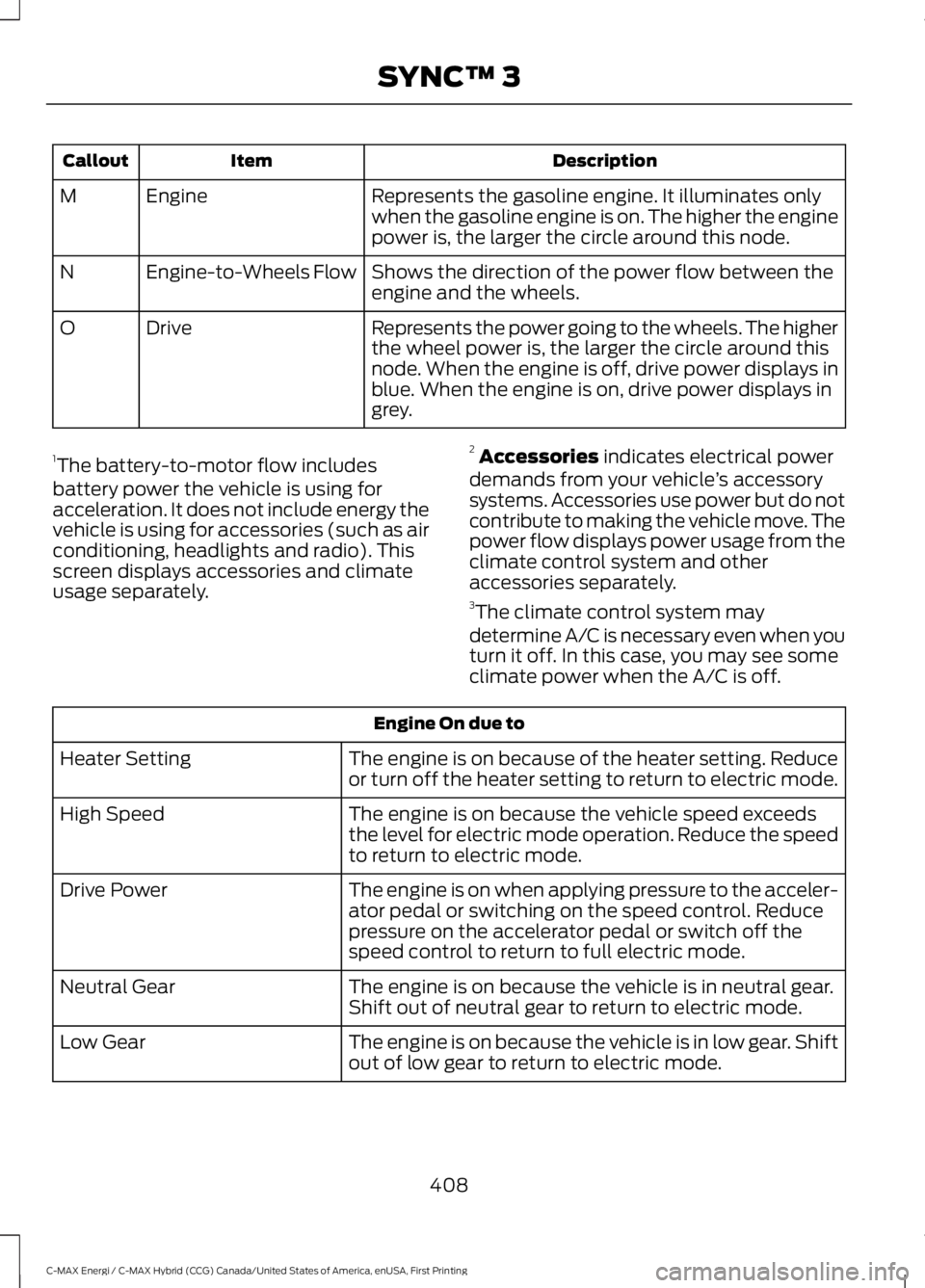
Represents the gasoline engine. It illuminates onlywhen the gasoline engine is on. The higher the enginepower is, the larger the circle around this node.
EngineM
Shows the direction of the power flow between theengine and the wheels.Engine-to-Wheels FlowN
Represents the power going to the wheels. The higherthe wheel power is, the larger the circle around thisnode. When the engine is off, drive power displays inblue. When the engine is on, drive power displays ingrey.
DriveO
1The battery-to-motor flow includesbattery power the vehicle is using foracceleration. It does not include energy thevehicle is using for accessories (such as airconditioning, headlights and radio). Thisscreen displays accessories and climateusage separately.
2Accessories indicates electrical powerdemands from your vehicle’s accessorysystems. Accessories use power but do notcontribute to making the vehicle move. Thepower flow displays power usage from theclimate control system and otheraccessories separately.3The climate control system may
determine A/C is necessary even when youturn it off. In this case, you may see someclimate power when the A/C is off.
Engine On due to
The engine is on because of the heater setting. Reduceor turn off the heater setting to return to electric mode.Heater Setting
The engine is on because the vehicle speed exceedsthe level for electric mode operation. Reduce the speedto return to electric mode.
High Speed
The engine is on when applying pressure to the acceler-ator pedal or switching on the speed control. Reducepressure on the accelerator pedal or switch off thespeed control to return to full electric mode.
Drive Power
The engine is on because the vehicle is in neutral gear.Shift out of neutral gear to return to electric mode.Neutral Gear
The engine is on because the vehicle is in low gear. Shiftout of low gear to return to electric mode.Low Gear
408
C-MAX Energi / C-MAX Hybrid (CCG) Canada/United States of America, enUSA, First Printing
SYNC™ 3
Page 425 of 497
Menu Item
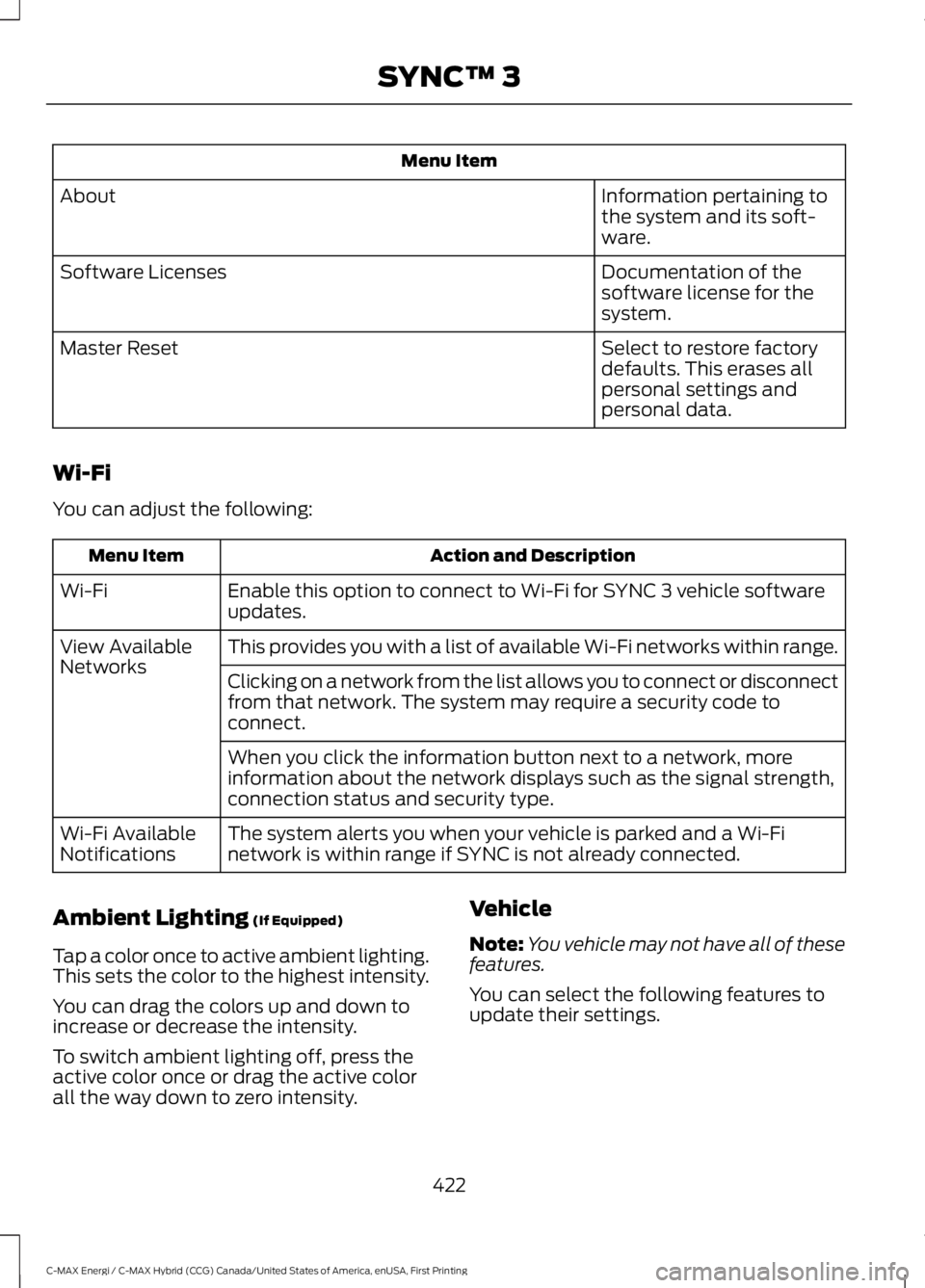
Information pertaining tothe system and its soft-ware.
About
Documentation of thesoftware license for thesystem.
Software Licenses
Select to restore factorydefaults. This erases allpersonal settings andpersonal data.
Master Reset
Wi-Fi
You can adjust the following:
Action and DescriptionMenu Item
Enable this option to connect to Wi-Fi for SYNC 3 vehicle softwareupdates.Wi-Fi
This provides you with a list of available Wi-Fi networks within range.View AvailableNetworksClicking on a network from the list allows you to connect or disconnectfrom that network. The system may require a security code toconnect.
When you click the information button next to a network, moreinformation about the network displays such as the signal strength,connection status and security type.
The system alerts you when your vehicle is parked and a Wi-Finetwork is within range if SYNC is not already connected.Wi-Fi AvailableNotifications
Ambient Lighting (If Equipped)
Tap a color once to active ambient lighting.This sets the color to the highest intensity.
You can drag the colors up and down toincrease or decrease the intensity.
To switch ambient lighting off, press theactive color once or drag the active colorall the way down to zero intensity.
Vehicle
Note:You vehicle may not have all of thesefeatures.
You can select the following features toupdate their settings.
422
C-MAX Energi / C-MAX Hybrid (CCG) Canada/United States of America, enUSA, First Printing
SYNC™ 3
Page 426 of 497
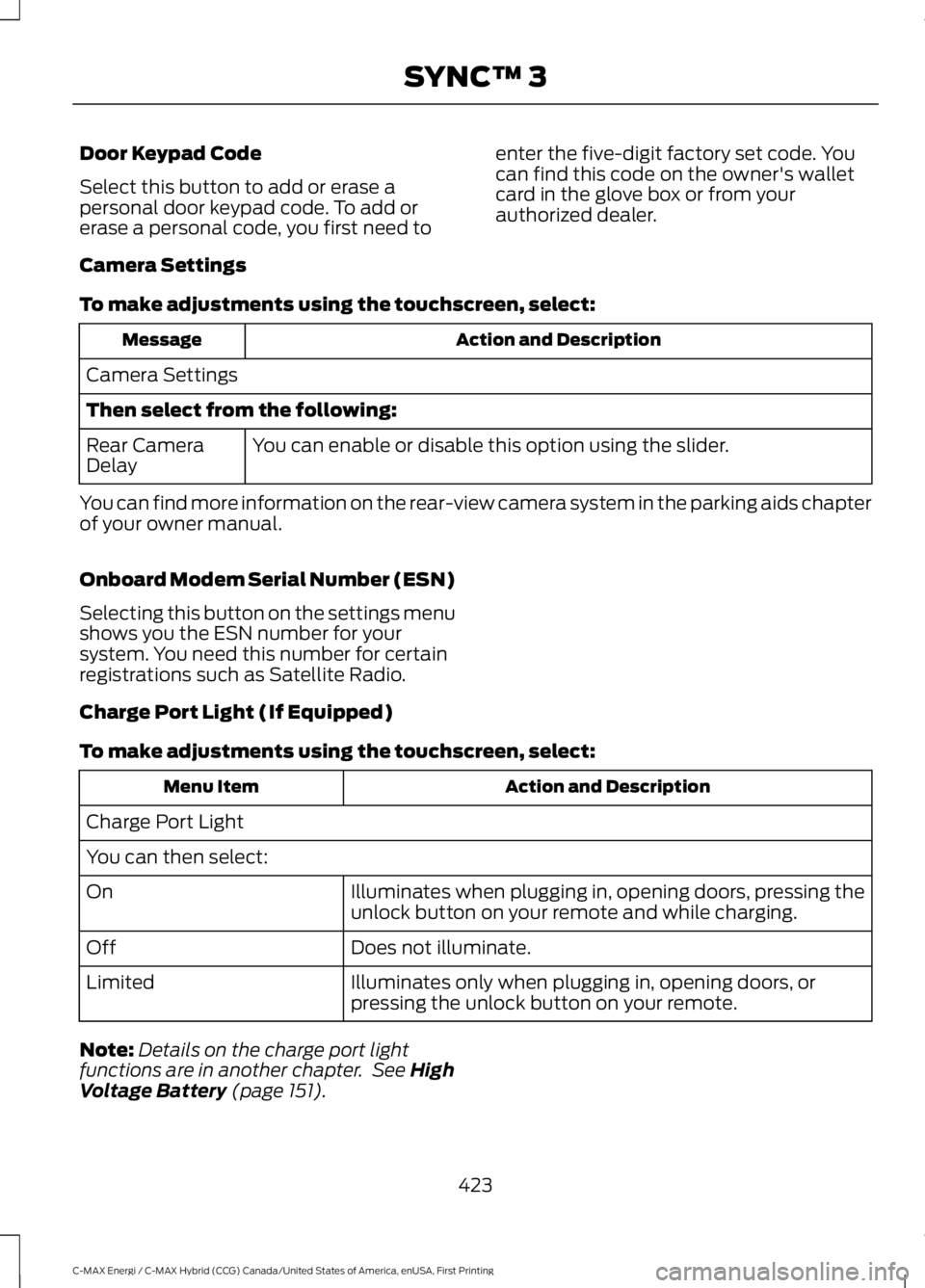
Door Keypad Code
Select this button to add or erase apersonal door keypad code. To add orerase a personal code, you first need to
enter the five-digit factory set code. Youcan find this code on the owner's walletcard in the glove box or from yourauthorized dealer.
Camera Settings
To make adjustments using the touchscreen, select:
Action and DescriptionMessage
Camera Settings
Then select from the following:
You can enable or disable this option using the slider.Rear CameraDelay
You can find more information on the rear-view camera system in the parking aids chapterof your owner manual.
Onboard Modem Serial Number (ESN)
Selecting this button on the settings menushows you the ESN number for yoursystem. You need this number for certainregistrations such as Satellite Radio.
Charge Port Light (If Equipped)
To make adjustments using the touchscreen, select:
Action and DescriptionMenu Item
Charge Port Light
You can then select:
Illuminates when plugging in, opening doors, pressing theunlock button on your remote and while charging.On
Does not illuminate.Off
Illuminates only when plugging in, opening doors, orpressing the unlock button on your remote.Limited
Note:Details on the charge port lightfunctions are in another chapter. See HighVoltage Battery (page 151).
423
C-MAX Energi / C-MAX Hybrid (CCG) Canada/United States of America, enUSA, First Printing
SYNC™ 3
Page 427 of 497
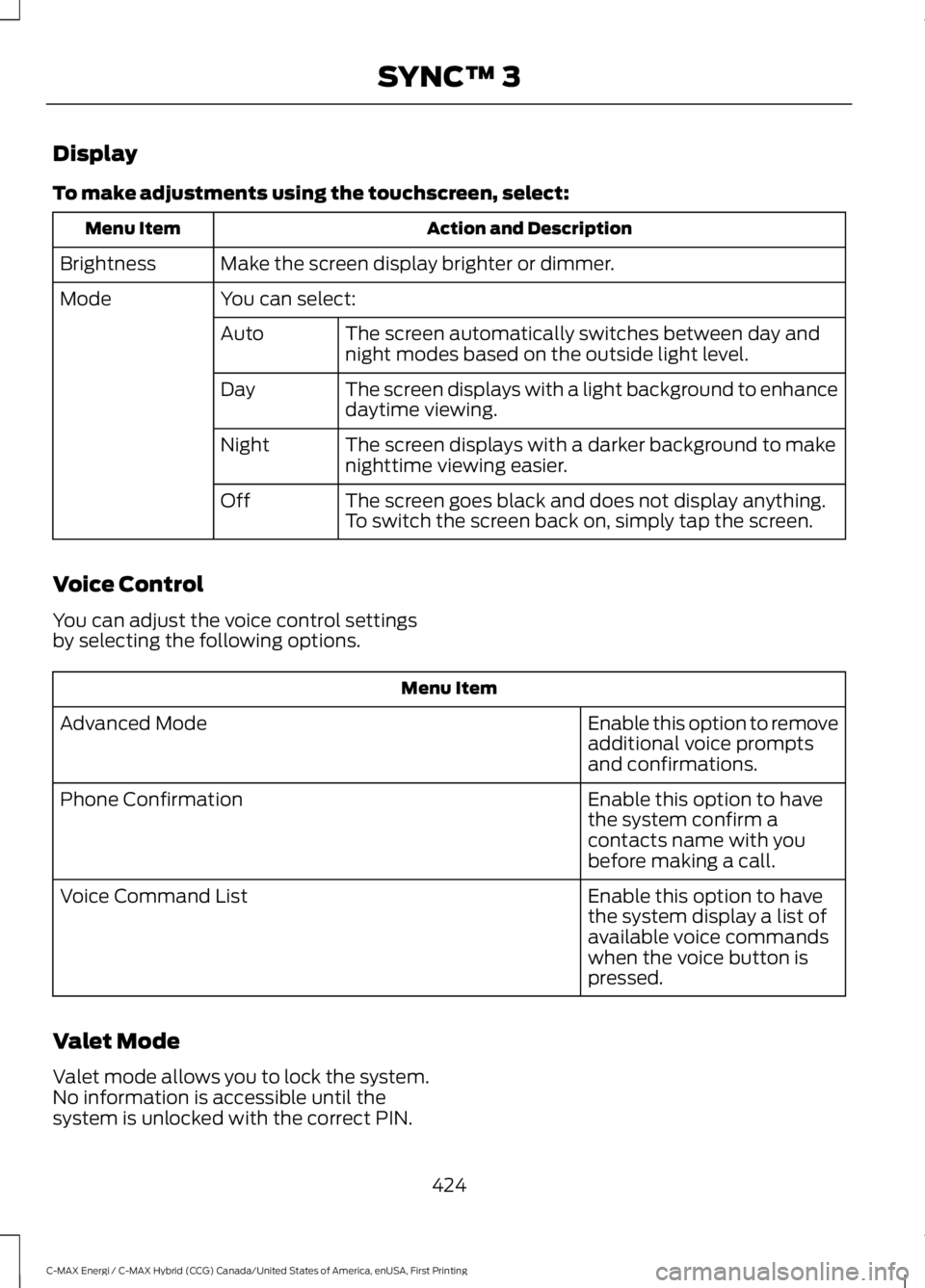
Display
To make adjustments using the touchscreen, select:
Action and DescriptionMenu Item
Make the screen display brighter or dimmer.Brightness
You can select:Mode
The screen automatically switches between day andnight modes based on the outside light level.Auto
The screen displays with a light background to enhancedaytime viewing.Day
The screen displays with a darker background to makenighttime viewing easier.Night
The screen goes black and does not display anything.To switch the screen back on, simply tap the screen.Off
Voice Control
You can adjust the voice control settingsby selecting the following options.
Menu Item
Enable this option to removeadditional voice promptsand confirmations.
Advanced Mode
Enable this option to havethe system confirm acontacts name with youbefore making a call.
Phone Confirmation
Enable this option to havethe system display a list ofavailable voice commandswhen the voice button ispressed.
Voice Command List
Valet Mode
Valet mode allows you to lock the system.No information is accessible until thesystem is unlocked with the correct PIN.
424
C-MAX Energi / C-MAX Hybrid (CCG) Canada/United States of America, enUSA, First Printing
SYNC™ 3