battery location FORD C MAX ENERGI 2017 User Guide
[x] Cancel search | Manufacturer: FORD, Model Year: 2017, Model line: C MAX ENERGI, Model: FORD C MAX ENERGI 2017Pages: 497, PDF Size: 7.64 MB
Page 259 of 497
General Information
WARNING
Failure to follow these guidelinescould result in an increased risk ofloss of vehicle control, injury or death.
Note:Do not use the kit if you have severelydamaged a tire. Only seal punctures locatedwithin the tire tread with the kit.
Do not attempt to repair punctures largerthan ¼ inch (6 millimeters) or damage tothe tire's sidewall. The tire may notcompletely seal.
Loss of air pressure may adversely affecttire performance. For this reason:
Note:Do not drive the vehicle above50 mph (80 km/h).
Note:Do not drive further than 120 mi(200 km). Drive only to the closestauthorized Ford dealer or tire repair shop tohave your tire inspected.
•Drive carefully and avoid abruptsteering maneuvers.
•Periodically monitor tire inflationpressure in the affected tire; if the tireis losing pressure, have the vehicletowed.
•Read the information in the Tips forUse of the Kit section to make sure safeoperation of the kit and your vehicle.
Tips for Use of the Kit
To ensure safe operation of the kit:
•Read all instructions and cautions fully.
•Before operating the kit, make sureyour vehicle is safely off the road andaway from moving traffic. Switch onthe hazard lights.
•Always set the parking brake to makesure the vehicle does not moveunexpectedly.
•Do not remove any foreign objects,such as nails or screws, from the tire.
•When using the kit, leave the enginerunning (only if the vehicle is outdoorsor in a well-ventilated area) so thecompressor does not drain thevehicle's battery.
•Do not allow the compressor tooperate continuously for more than 15minutes. This will help prevent thecompressor from overheating.
•Never leave the kit unattended duringoperation.
•Sealant compound contains latex.Those with latex sensitivities shoulduse appropriate precautions to avoidan allergic reaction.
•Keep the kit away from children.
•Only use the kit when the ambienttemperature is between -22°F (-30°C)and 158°F (70°C).
•Only use the sealing compound beforethe use-by date. The use-by date is ona label on the sealant canister, whichyou can see through the rectangularviewing window on the bottom of thecompressor. Check the use-by dateregularly and replace the canister afterfour years of non-use.
•Do not store the kit unsecured insidethe passenger compartment of thevehicle as it may cause injury during asudden stop or crash. Always store thekit in its original location.
•After sealant use, an authorized Forddealer must replace the tire pressuremonitoring system sensor and valvestem on the wheel.
•Operating the kit could cause anelectrical disturbance in radio, CD andDVD player operation.
256
C-MAX Energi / C-MAX Hybrid (CCG) Canada/United States of America, enUSA, First Printing
Wheels and Tires
Page 326 of 497
Setting 911 Assist On or Off
Press Menu then select
Action and DescriptionMenuItem
SYNC-Applications
Select desired option, on oroff.911 Assist
If you choose not to activate thisfeature you will have the followingoptions:
Action and DescriptionMenuItem
Provides a display and voicereminder at phone connectionat vehicle start.
VoiceReminderON
Provides a display reminderonly without a voice reminderat phone connection.
VoiceReminderOFF
To make sure that 911 Assist worksproperly:
•SYNC must be powered and workingproperly at the time of the incident andthroughout feature activation and use.
•The 911 Assist feature must be set onbefore the incident.
•You must pair and connect aBluetooth-enabled and compatiblecell phone to SYNC.
•A connected Bluetooth-enabled phonemust have the ability to make andmaintain an outgoing call at the timeof the incident.
•A connected Bluetooth-enabled phonemust have adequate network coverage,battery power and signal strength.
•The vehicle must have battery powerand be located in the U.S., Canada orin a territory in which 911 is theemergency number.
In the Event of a Crash
Not all crashes deploy an airbag or activatethe fuel pump shut-off (the triggers for 911Assist). If a connected cell phone sustainsdamage or loses its connection to SYNCduring a crash, SYNC searches for and triesto connect to a previously paired cellphone; SYNC then attempts to call theemergency services.
Before making the call:
•SYNC provides a short window of time(about 10 seconds) to cancel the call.If you fail to cancel the call, SYNCattempts to dial 911.
•SYNC says the following, or a similarmessage: "SYNC will attempt to call911, to cancel the call, press Cancel onyour screen or press and hold thephone button on your steering wheel".
If you do not cancel the call, and SYNCmakes a successful call, a pre-recordedmessage plays for the 911 operator, andthen the occupant(s) in your vehicle is ableto talk with the operator. Be prepared toprovide your name, phone number andlocation immediately, because not all 911systems are capable of receiving thisinformation electronically.
911 Assist May Not Work If
•Your cellular phone or 911 Assisthardware sustains damage in a crash.
•The vehicle's battery or the SYNCsystem has no power.
•The phone(s) thrown from your vehicleare the ones paired and connected tothe system.
323
C-MAX Energi / C-MAX Hybrid (CCG) Canada/United States of America, enUSA, First Printing
SYNC™
Page 355 of 497
![FORD C MAX ENERGI 2017 User Guide If a crash deploys an airbag (excludingknee airbags and rear inflatable safetybelts [if equipped]) or activates the fuelpump shut-off, your SYNC-equippedvehicle may be able to contact emergencyservice](/img/11/58728/w960_58728-354.png "FORD C MAX ENERGI 2017 User Guide If a crash deploys an airbag (excludingknee airbags and rear inflatable safetybelts [if equipped]) or activates the fuelpump shut-off, your SYNC-equippedvehicle may be able to contact emergencyservice")
If a crash deploys an airbag (excludingknee airbags and rear inflatable safetybelts [if equipped]) or activates the fuelpump shut-off, your SYNC-equippedvehicle may be able to contact emergencyservices by dialing 911 through a paired andconnected Bluetooth-enabled phone. Youcan learn more about the 911 Assistfeature, by visiting:
Website
www.owner.ford.comwww.syncmyride.cawww.syncmaroute.ca
For important information about airbagdeployment and the fuel pump shut-offplease see the Supplementary Restrainsand Roadside Emergencies sections ofyour owner manual.
To switch 911 Assist on and off please viewthe settings information. See Settings(page 412).
To make sure that 911 Assist workscorrectly:
•SYNC must be powered and workingproperly at the time of the incident andthroughout feature activation and use.
•The 911 Assist feature must be set onbefore the incident.
•You must pair and connect aBluetooth-enabled and compatiblecell phone to SYNC.
•A connected Bluetooth-enabled phonemust have the ability to make andmaintain an outgoing call at the timeof the incident.
•A connected Bluetooth-enabled phonemust have adequate network coverage,battery power and signal strength.
•The vehicle must have battery powerand be located in the U.S., Canada orin a territory in which 911 is theemergency number.
In the Event of a Crash
Not all crashes will deploy an airbag oractivate the fuel pump shut-off (thetriggers for 911 Assist). If a connected cellphone sustains damage or loses itsconnection to SYNC during a crash, SYNCwill search for and try to connect to apreviously paired cell phone; SYNC willthen attempt to call the emergencyservices.
Before making the call:
•SYNC provides a short window of time(about 10 seconds) to cancel the call.If you fail to cancel the call, SYNCattempts to dial 911.
•SYNC says the following, or a similarmessage: "SYNC will attempt to call911, to cancel the call, press Cancel onyour screen or press and hold thephone button on your steering wheel."
If you do not cancel the call, and SYNCmakes a successful call, a pre-recordedmessage plays for the 911 operator, andthen the occupant(s) in your vehicle is ableto talk with the operator. Be prepared toprovide your name, phone number andlocation immediately, because not all 911systems are capable of receiving thisinformation electronically.
911 Assist May Not Work If
•Your cellular phone or 911 Assisthardware sustains damage in a crash.
•The vehicle's battery or the SYNCsystem has no power.
•The phone(s) thrown from your vehicleare the ones paired and connected tothe system.
352
C-MAX Energi / C-MAX Hybrid (CCG) Canada/United States of America, enUSA, First Printing
SYNC™ 3
Page 361 of 497
Home screen displayTileItem
If your vehicle does not have navigation, this space contains thecompass.
The name of the connected phone appears on the screen. Thestatus of the phone features also appear. This includes signalstrength, battery charge, 911 assist setting state (On or Off),text messaging and roaming.
PhoneB
This map displays your current location or current route in realtime.*NavigationC
When you have navigation active, you also see the next turnand the length of time and distance to your destination.If your vehicle does not have navigation, this space contains theaudio information.
* If equipped.
You can touch any of the feature displaysto access that feature.
Anytime you select the home button, thesystem returns you to this screen.
USING VOICE RECOGNITION
The SYNC 3 system allows you to use voicecommands, to control features like audioand climate controls. By using voicecommands, you can keep your hands onthe wheel and your eyes on the road.
You can access each feature controlled bySYNC 3 through a variety of commands.
To activate the SYNC 3 voicecommands push the voicebutton on the steering wheel andwait for the prompt.
___ is a dynamic listing, meaning that it canbe the name of anything, such as artist, thename of contact or number. The contextand the description of the command tellyou what to say for this dynamic option.
There are some commands that work forevery feature, these commands are:
Action and DescriptionVoice Command
Brings you to the main menu.Main Menu
Returns you to the previous screen.Go back
Ends the voice session.Cancel
Gives you a list of possible voice commands.List of Commands
You can name any feature and the system gives a list ofcommands available for the feature. For example, you couldsay:
___ List of Commands
Phone List of Commands
358
C-MAX Energi / C-MAX Hybrid (CCG) Canada/United States of America, enUSA, First Printing
SYNC™ 3E142599
Page 396 of 497
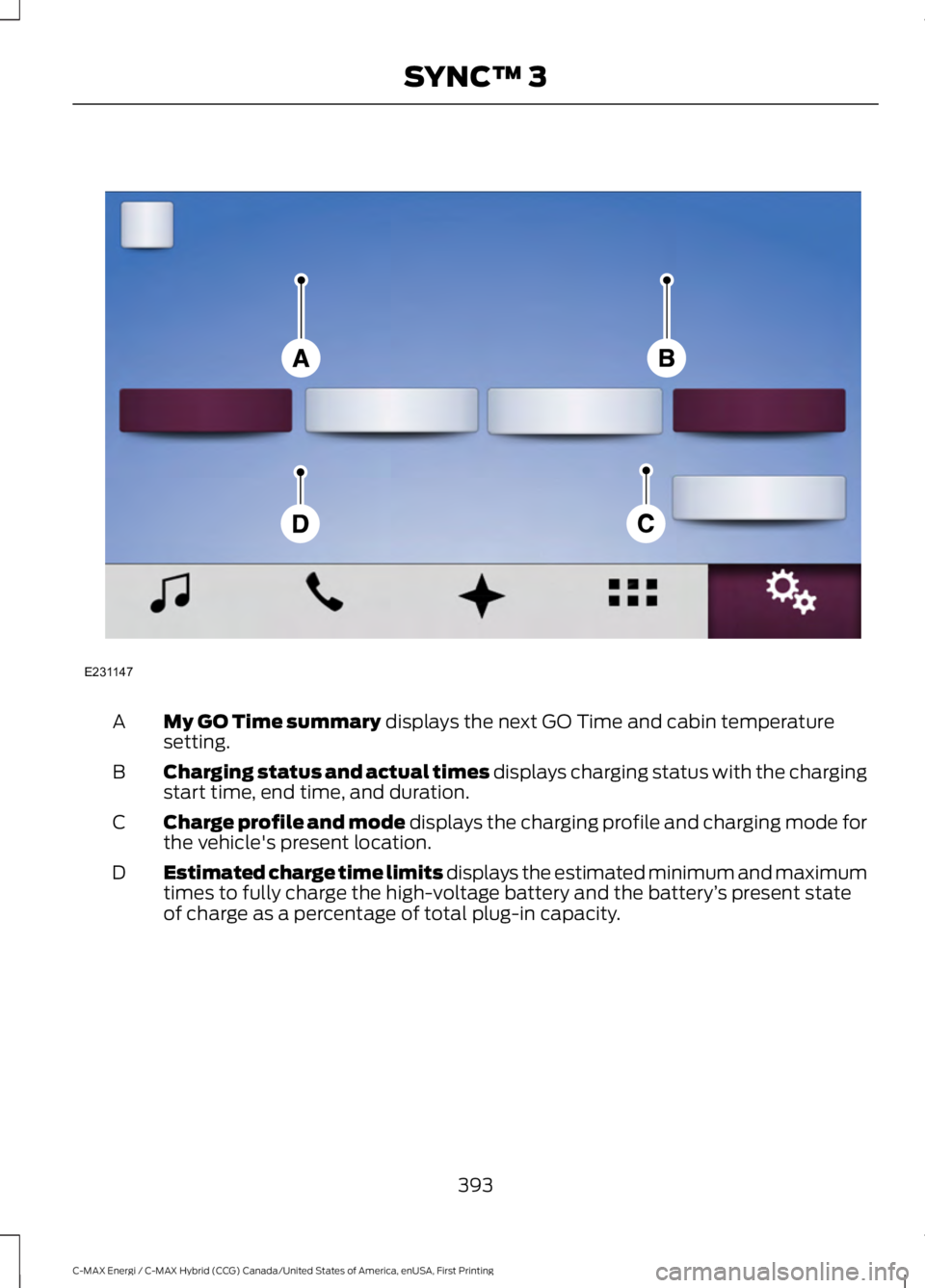
My GO Time summary displays the next GO Time and cabin temperaturesetting.A
Charging status and actual times displays charging status with the chargingstart time, end time, and duration.B
Charge profile and mode displays the charging profile and charging mode forthe vehicle's present location.C
Estimated charge time limits displays the estimated minimum and maximumtimes to fully charge the high-voltage battery and the battery’s present stateof charge as a percentage of total plug-in capacity.
D
393
C-MAX Energi / C-MAX Hybrid (CCG) Canada/United States of America, enUSA, First Printing
SYNC™ 3E231147
Page 400 of 497
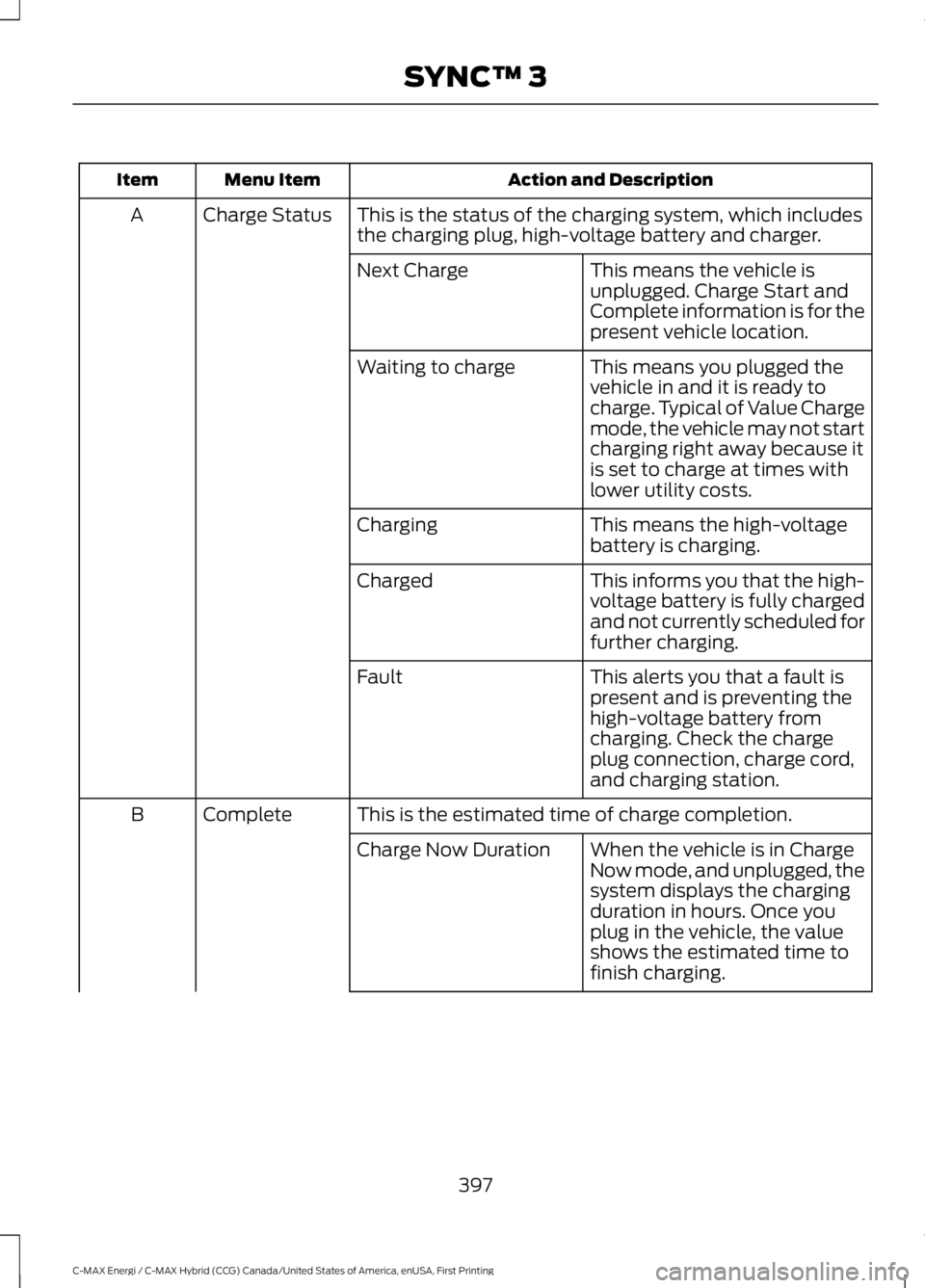
Action and DescriptionMenu ItemItem
This is the status of the charging system, which includesthe charging plug, high-voltage battery and charger.Charge StatusA
This means the vehicle isunplugged. Charge Start andComplete information is for thepresent vehicle location.
Next Charge
This means you plugged thevehicle in and it is ready tocharge. Typical of Value Chargemode, the vehicle may not startcharging right away because itis set to charge at times withlower utility costs.
Waiting to charge
This means the high-voltagebattery is charging.Charging
This informs you that the high-voltage battery is fully chargedand not currently scheduled forfurther charging.
Charged
This alerts you that a fault ispresent and is preventing thehigh-voltage battery fromcharging. Check the chargeplug connection, charge cord,and charging station.
Fault
This is the estimated time of charge completion.CompleteB
When the vehicle is in ChargeNow mode, and unplugged, thesystem displays the chargingduration in hours. Once youplug in the vehicle, the valueshows the estimated time tofinish charging.
Charge Now Duration
397
C-MAX Energi / C-MAX Hybrid (CCG) Canada/United States of America, enUSA, First Printing
SYNC™ 3
Page 488 of 497
A
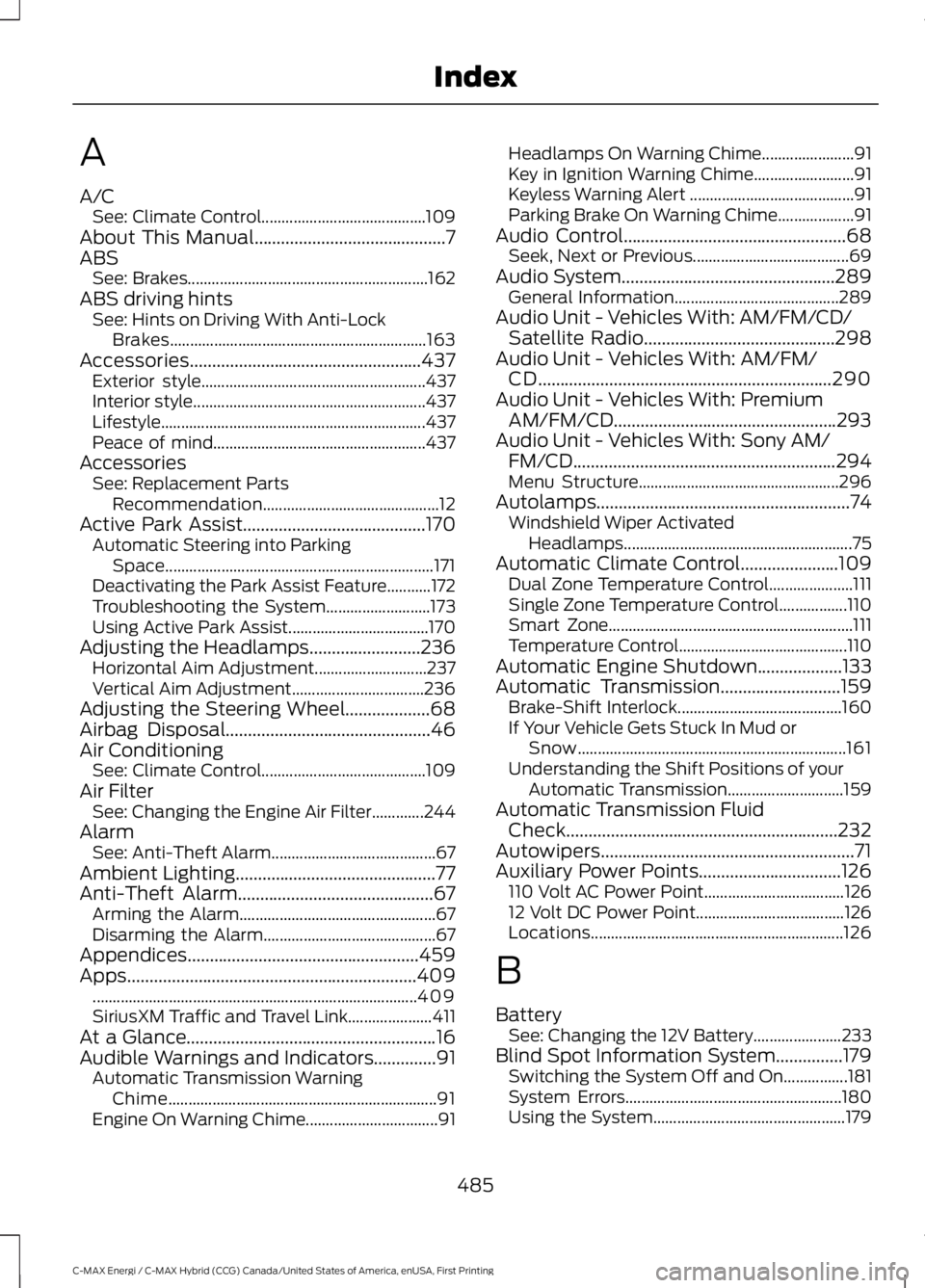
A/CSee: Climate Control.........................................109About This Manual...........................................7ABSSee: Brakes............................................................162ABS driving hintsSee: Hints on Driving With Anti-LockBrakes................................................................163Accessories....................................................437Exterior style........................................................437Interior style..........................................................437Lifestyle..................................................................437Peace of mind.....................................................437AccessoriesSee: Replacement PartsRecommendation............................................12Active Park Assist.........................................170Automatic Steering into ParkingSpace...................................................................171Deactivating the Park Assist Feature...........172Troubleshooting the System..........................173Using Active Park Assist...................................170Adjusting the Headlamps.........................236Horizontal Aim Adjustment............................237Vertical Aim Adjustment.................................236Adjusting the Steering Wheel...................68Airbag Disposal..............................................46Air ConditioningSee: Climate Control.........................................109Air FilterSee: Changing the Engine Air Filter.............244AlarmSee: Anti-Theft Alarm.........................................67Ambient Lighting.............................................77Anti-Theft Alarm............................................67Arming the Alarm.................................................67Disarming the Alarm...........................................67Appendices....................................................459Apps.................................................................409.................................................................................409SiriusXM Traffic and Travel Link.....................411At a Glance........................................................16Audible Warnings and Indicators..............91Automatic Transmission WarningChime...................................................................91Engine On Warning Chime.................................91
Headlamps On Warning Chime.......................91Key in Ignition Warning Chime.........................91Keyless Warning Alert .........................................91Parking Brake On Warning Chime...................91Audio Control..................................................68Seek, Next or Previous.......................................69Audio System................................................289General Information.........................................289Audio Unit - Vehicles With: AM/FM/CD/Satellite Radio...........................................298Audio Unit - Vehicles With: AM/FM/CD..................................................................290Audio Unit - Vehicles With: PremiumAM/FM/CD..................................................293Audio Unit - Vehicles With: Sony AM/FM/CD...........................................................294Menu Structure..................................................296Autolamps.........................................................74Windshield Wiper ActivatedHeadlamps.........................................................75Automatic Climate Control......................109Dual Zone Temperature Control.....................111Single Zone Temperature Control.................110Smart Zone.............................................................111Temperature Control..........................................110Automatic Engine Shutdown...................133Automatic Transmission...........................159Brake-Shift Interlock.........................................160If Your Vehicle Gets Stuck In Mud orSnow...................................................................161Understanding the Shift Positions of yourAutomatic Transmission.............................159Automatic Transmission FluidCheck.............................................................232Autowipers.........................................................71Auxiliary Power Points................................126110 Volt AC Power Point...................................12612 Volt DC Power Point.....................................126Locations...............................................................126
B
BatterySee: Changing the 12V Battery......................233Blind Spot Information System...............179Switching the System Off and On................181System Errors......................................................180Using the System................................................179
485
C-MAX Energi / C-MAX Hybrid (CCG) Canada/United States of America, enUSA, First Printing
Index
Page 491 of 497
Event Data RecordingSee: Data Recording..............................................9Export Unique Options..................................13Exterior Mirrors................................................79Blind Spot Information System.......................81Fold-Away Exterior Mirrors..............................80Heated Exterior Mirrors......................................80Integrated Blind Spot Mirrors..........................80Power Exterior Mirrors........................................79Puddle Lamps.......................................................80Signal Indicator Mirrors.....................................80
F
Fastening the Seatbelts................................31Seatbelt Locking Modes....................................32Using Seatbelts During Pregnancy.................31Flat Tire InflationSee: Tire Sealant and Inflator Kit.................255Floor Mats.......................................................195Fog Lamps - FrontSee: Front Fog Lamps.........................................76Ford Credit..........................................................11US Only......................................................................11Ford Protect...................................................439Ford Protect Extended Service Plan(CANADA ONLY)..........................................440Ford Protect Extended Service Plans (U.S.Only)..................................................................439Front Fog Lamps............................................76Front Parking Aid..........................................169Front Passenger Sensing System............40Fuel and Refueling.......................................142Fuel Consumption.......................................148Calculating Fuel Economy..............................148Filling the Fuel Tank...........................................148Fuel Filler Funnel Location........................144Fuel Filter........................................................233Fuel Quality.....................................................143Choosing the Right Fuel...................................143Fuel Freshness Mode........................................143Fuel Shutoff...................................................198Fuses...................................................................211Fuse Specification Chart.............................211Luggage Compartment Fuse Panel.............217Passenger Compartment Fuse Panel.........214Power Distribution Box......................................211Pre-Fuse Box.........................................................211
G
Garage Door OpenerSee: Universal Garage Door Opener.............121Gauges...............................................................84Left Information Display....................................84Right Information Display.................................86General Information on RadioFrequencies...................................................47Intelligent Access..................................................47General Maintenance Information........441Multi-point Inspection.....................................444Owner Checks and Services..........................443Protecting Your Investment............................441Why Maintain Your Vehicle?..........................441Why Maintain Your Vehicle at YourDealership?......................................................441Getting Assistance Outside the U.S. andCanada.........................................................207Getting the Services You Need..............204Away From Home.............................................204Global Opening...............................................79Opening the Windows........................................79
H
HandbrakeSee: Parking Brake.............................................163Hazard Warning Flashers..........................198Headlamp AdjustingSee: Adjusting the Headlamps.....................236Headlamp Exit Delay.....................................75Headlamp RemovalSee: Removing a Headlamp..........................238Head Restraints..............................................114Adjusting the Head Restraint..........................115Heated Seats.................................................120Heated Windows and Mirrors....................112Heated Exterior Mirrors......................................113Heated Rear Window.........................................112HeatingSee: Climate Control.........................................109High Voltage Battery Cut-OffSwitch............................................................158High Voltage Battery....................................151General Information...........................................151Hill Start Assist..............................................163Switching the System On and Off...............164
488
C-MAX Energi / C-MAX Hybrid (CCG) Canada/United States of America, enUSA, First Printing
Index