wheel FORD C MAX HYBRID 2014 2.G Owner's Manual
[x] Cancel search | Manufacturer: FORD, Model Year: 2014, Model line: C MAX HYBRID, Model: FORD C MAX HYBRID 2014 2.GPages: 447, PDF Size: 8.06 MB
Page 162 of 447
PRINCIPLE OF OPERATION
WARNINGS
Vehicle modifications involving
braking system, aftermarket roof
racks, suspension, steering system,
tire construction and wheel and tire size
may change the handling characteristics
of your vehicle and may adversely affect
the performance of the AdvanceTrac
system. In addition, installing any stereo
loudspeakers may interfere with and
adversely affect the AdvanceTrac system.
Install any aftermarket stereo loudspeaker
as far as possible from the front center
console, the tunnel, and the front seats in
order to minimize the risk of interfering with
the AdvanceTrac sensors. Reducing the
effectiveness of the AdvanceTrac system
could lead to an increased risk of loss of
vehicle control, vehicle rollover, personal
injury and death. Remember that even advanced
technology cannot defy the laws of
physics. It’
s always possible to lose
control of a vehicle due to inappropriate
driver input for the conditions. Aggressive
driving on any road condition can cause
you to lose control of your vehicle
increasing the risk of personal injury or
property damage. Activation of the
AdvanceTrac system is an indication that
at least some of the tires have exceeded
their ability to grip the road; this could
reduce the operator ’s ability to control the
vehicle potentially resulting in a loss of
vehicle control, vehicle rollover, personal
injury and death. If your AdvanceTrac
system activates, SLOW DOWN. The AdvanceTrac with Roll Stability
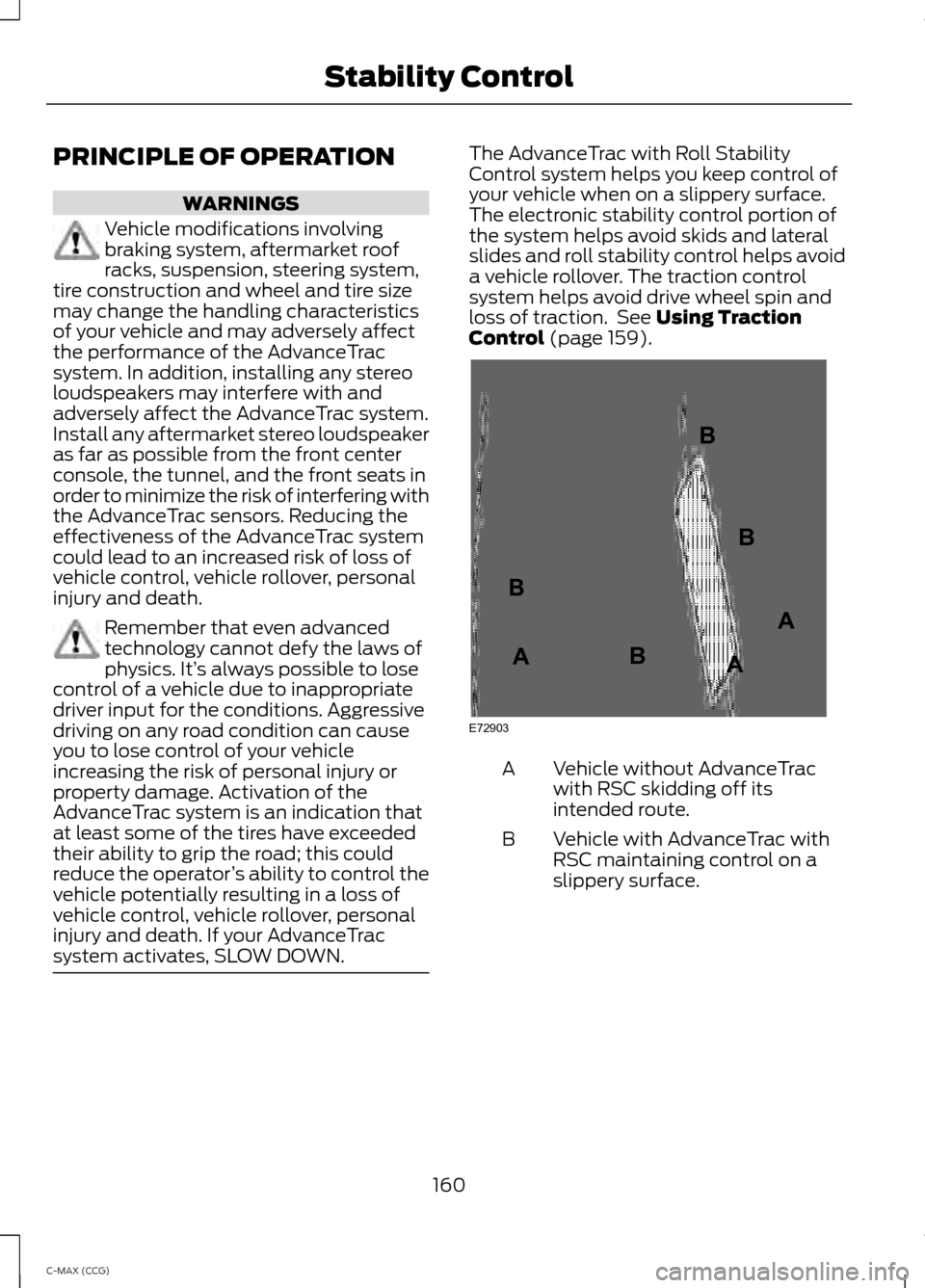
Control system helps you keep control of
your vehicle when on a slippery surface.
The electronic stability control portion of
the system helps avoid skids and lateral
slides and roll stability control helps avoid
a vehicle rollover. The traction control
system helps avoid drive wheel spin and
loss of traction. See Using Traction
Control (page 159). Vehicle without AdvanceTrac
with RSC skidding off its
intended route.
A
Vehicle with AdvanceTrac with
RSC maintaining control on a
slippery surface.
B
160
C-MAX (CCG) Stability ControlE72903A
AA
B
BB
B
Page 167 of 447
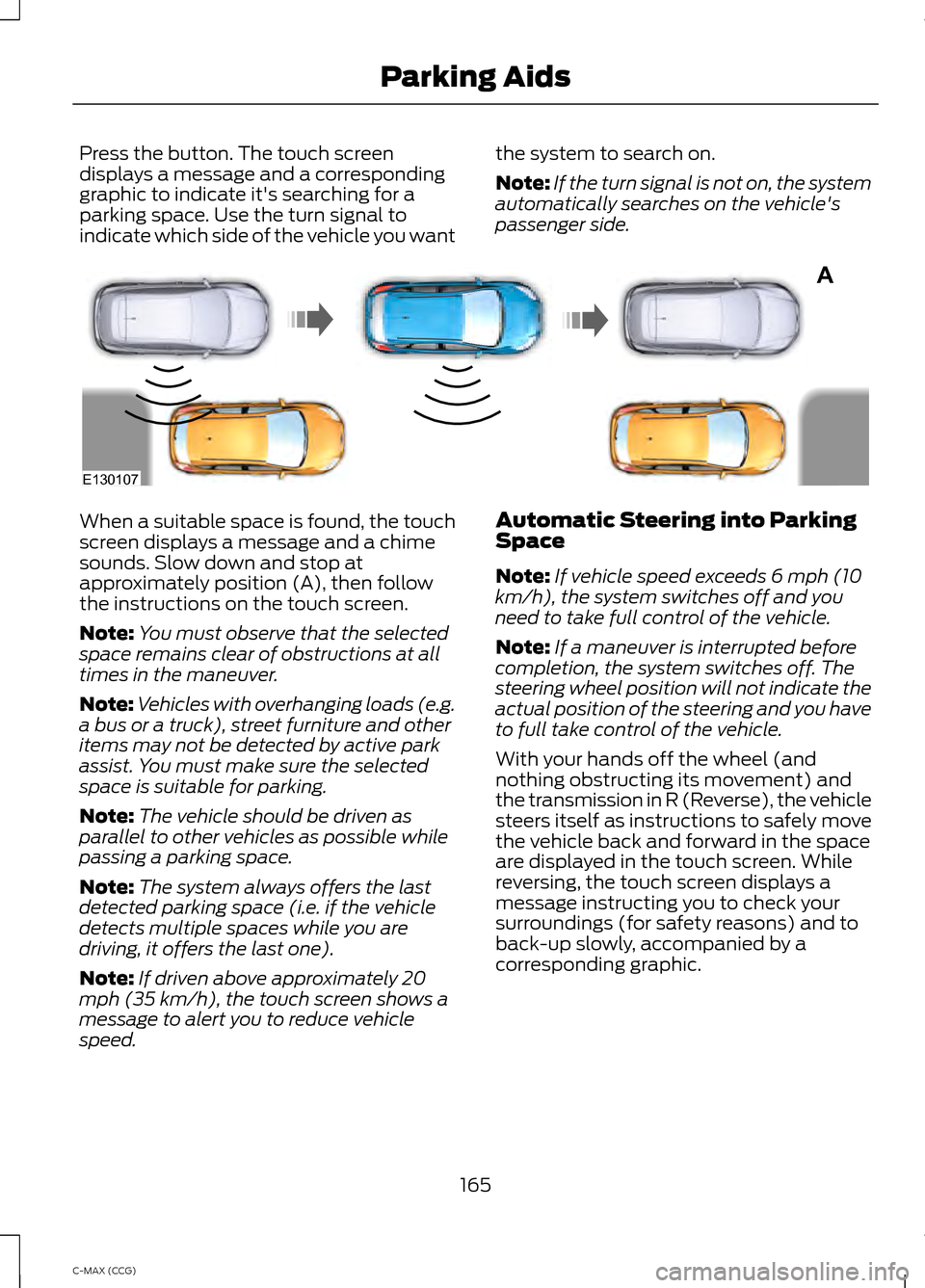
Press the button. The touch screen
displays a message and a corresponding
graphic to indicate it's searching for a
parking space. Use the turn signal to
indicate which side of the vehicle you want
the system to search on.
Note:
If the turn signal is not on, the system
automatically searches on the vehicle's
passenger side. When a suitable space is found, the touch
screen displays a message and a chime
sounds. Slow down and stop at
approximately position (A), then follow
the instructions on the touch screen.
Note:
You must observe that the selected
space remains clear of obstructions at all
times in the maneuver.
Note: Vehicles with overhanging loads (e.g.
a bus or a truck), street furniture and other
items may not be detected by active park
assist. You must make sure the selected
space is suitable for parking.
Note: The vehicle should be driven as
parallel to other vehicles as possible while
passing a parking space.
Note: The system always offers the last
detected parking space (i.e. if the vehicle
detects multiple spaces while you are
driving, it offers the last one).
Note: If driven above approximately 20
mph (35 km/h), the touch screen shows a
message to alert you to reduce vehicle
speed. Automatic Steering into Parking
Space
Note:
If vehicle speed exceeds 6 mph (10
km/h), the system switches off and you
need to take full control of the vehicle.
Note: If a maneuver is interrupted before
completion, the system switches off. The
steering wheel position will not indicate the
actual position of the steering and you have
to full take control of the vehicle.
With your hands off the wheel (and
nothing obstructing its movement) and
the transmission in R (Reverse), the vehicle
steers itself as instructions to safely move
the vehicle back and forward in the space
are displayed in the touch screen. While
reversing, the touch screen displays a
message instructing you to check your
surroundings (for safety reasons) and to
back-up slowly, accompanied by a
corresponding graphic.
165
C-MAX (CCG) Parking AidsA
E130107
Page 168 of 447
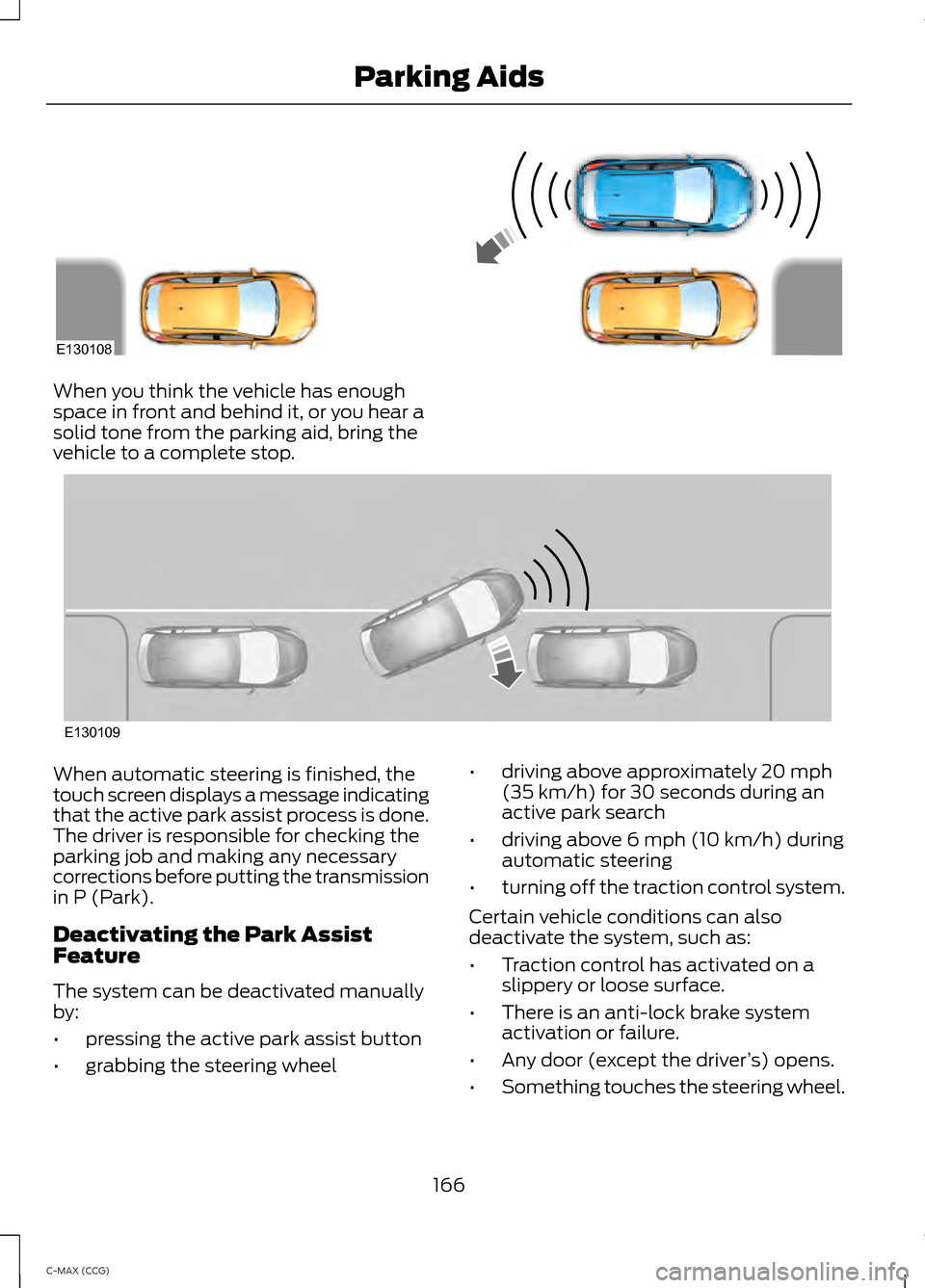
When you think the vehicle has enough
space in front and behind it, or you hear a
solid tone from the parking aid, bring the
vehicle to a complete stop.
When automatic steering is finished, the
touch screen displays a message indicating
that the active park assist process is done.
The driver is responsible for checking the
parking job and making any necessary
corrections before putting the transmission
in P (Park).
Deactivating the Park Assist
Feature
The system can be deactivated manually
by:
•
pressing the active park assist button
• grabbing the steering wheel •
driving above approximately 20 mph
(35 km/h) for 30 seconds during an
active park search
• driving above 6 mph (10 km/h) during
automatic steering
• turning off the traction control system.
Certain vehicle conditions can also
deactivate the system, such as:
• Traction control has activated on a
slippery or loose surface.
• There is an anti-lock brake system
activation or failure.
• Any door (except the driver ’s) opens.
• Something touches the steering wheel.
166
C-MAX (CCG) Parking AidsE130108 E130109
Page 171 of 447
Note:
If the image comes on while the
transmission is not in R (Reverse), have the
system inspected by your authorized dealer.
Note: When towing, the camera only sees
what is being towed behind your vehicle.
This might not provide adequate coverage
as it usually provides in normal operation
and some objects might not be seen. In
some vehicles, the guidelines may disappear
once the trailer tow connector is engaged.
Note: The camera may not operate
correctly under the following conditions:
• Nighttime or dark areas if one or both
reverse lamps are not operating.
• The camera's view is obstructed by
mud, water or debris. Clean the lens
with a soft, lint-free cloth and
non-abrasive cleaner.
• The rear of the vehicle is hit or
damaged, causing the camera to
become misaligned.
To access any of the rear view camera
system settings, make the following
selections in the touch screen when the
transmission is not in R (Reverse):
• Menu > Vehicle > Rear View Camera
After changing a system setting, the touch
screen shows a preview of the selected
features.
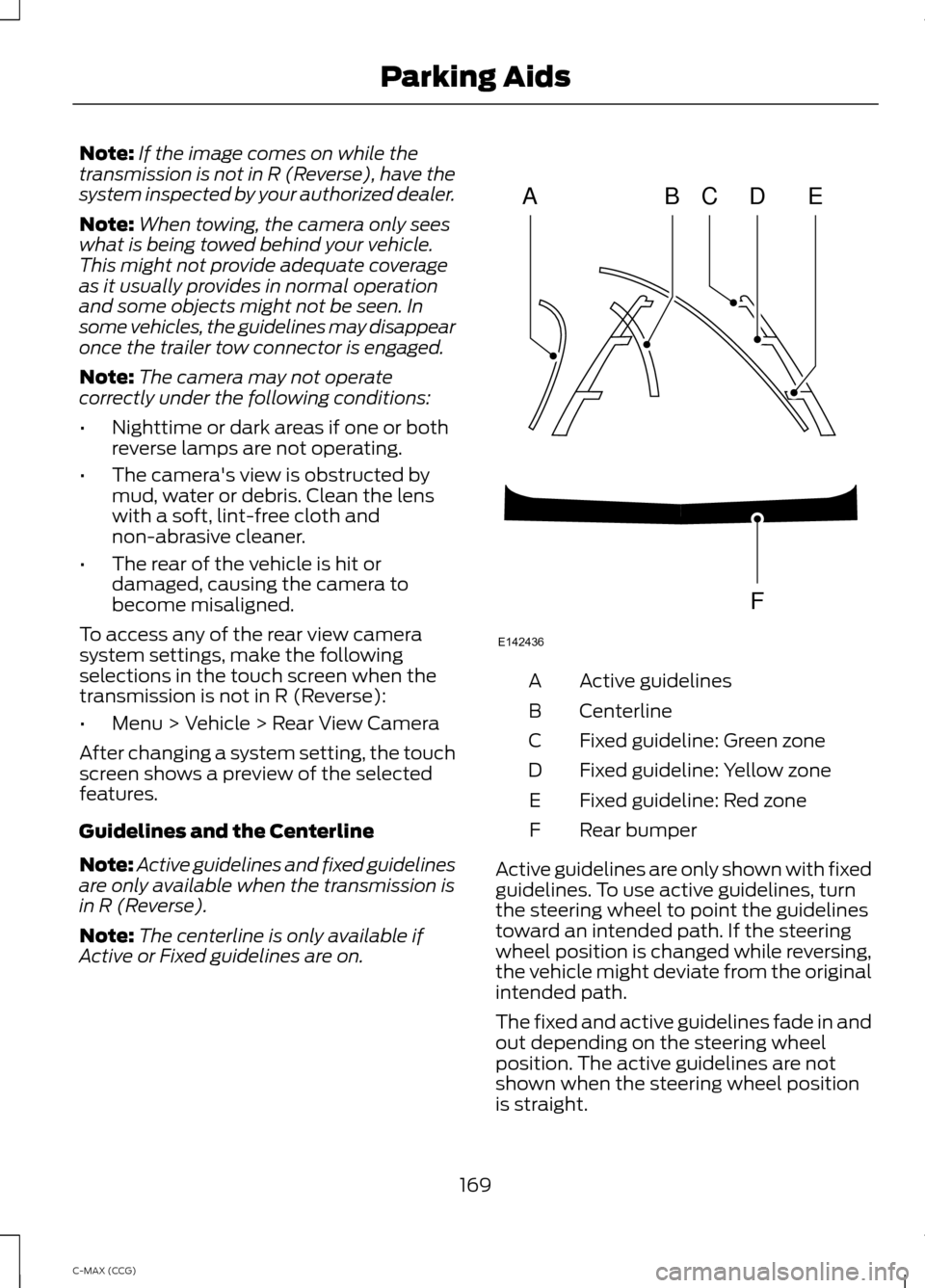
Guidelines and the Centerline
Note: Active guidelines and fixed guidelines
are only available when the transmission is
in R (Reverse).
Note: The centerline is only available if
Active or Fixed guidelines are on. Active guidelines
A
Centerline
B
Fixed guideline: Green zone
C
Fixed guideline: Yellow zone
D
Fixed guideline: Red zone
E
Rear bumper
F
Active guidelines are only shown with fixed
guidelines. To use active guidelines, turn
the steering wheel to point the guidelines
toward an intended path. If the steering
wheel position is changed while reversing,
the vehicle might deviate from the original
intended path.
The fixed and active guidelines fade in and
out depending on the steering wheel
position. The active guidelines are not
shown when the steering wheel position
is straight.
169
C-MAX (CCG) Parking AidsABCD
F
E
E142436
Page 173 of 447
PRINCIPLE OF OPERATION
Cruise control lets you maintain a set
speed without keeping your foot on the
accelerator pedal.
USING CRUISE CONTROL
WARNINGS
Do not use cruise control in heavy
traffic, on winding roads or when the
road surface is slippery. This could
result in loss of vehicle control, serious
injury or death. When you are going downhill, your
vehicle speed may increase above
the set speed. The system will not
apply the brakes. Change down a gear to
assist the system in maintaining the set
speed. Failure to do so could result in loss
of vehicle control, serious injury or death. Note:
Cruise control will disengage if your
vehicle speed decreases more than 10 mph
(16 km/h) below your set speed while
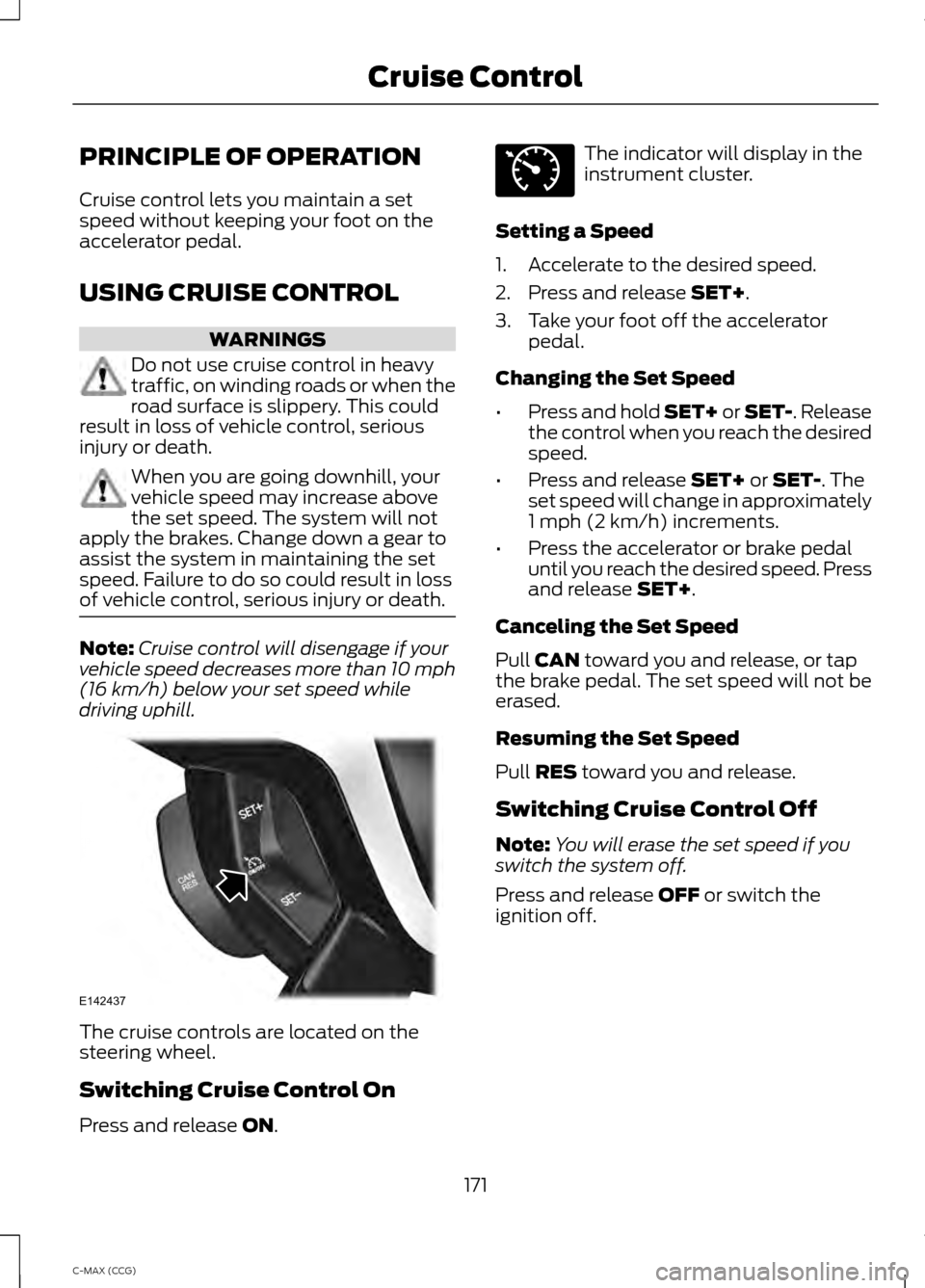
driving uphill. The cruise controls are located on the
steering wheel.
Switching Cruise Control On
Press and release ON. The indicator will display in the
instrument cluster.
Setting a Speed
1. Accelerate to the desired speed.
2. Press and release
SET+.
3. Take your foot off the accelerator pedal.
Changing the Set Speed
• Press and hold SET+ or SET-. Release
the control when you reach the desired
speed.
• Press and release
SET+ or SET-. The
set speed will change in approximately
1 mph (2 km/h) increments.
• Press the accelerator or brake pedal
until you reach the desired speed. Press
and release
SET+.
Canceling the Set Speed
Pull
CAN toward you and release, or tap
the brake pedal. The set speed will not be
erased.
Resuming the Set Speed
Pull
RES toward you and release.
Switching Cruise Control Off
Note: You will erase the set speed if you
switch the system off.
Press and release
OFF or switch the
ignition off.
171
C-MAX (CCG) Cruise ControlE142437 E71340
Page 184 of 447
TOWING A TRAILER
WARNING
Never tow a trailer with your
vehicle. This powertrain is not
designed to tow. TRANSPORTING THE VEHICLE
If you need to have your vehicle towed,
contact a professional towing service or,
if you are a member of a roadside
assistance program, your roadside
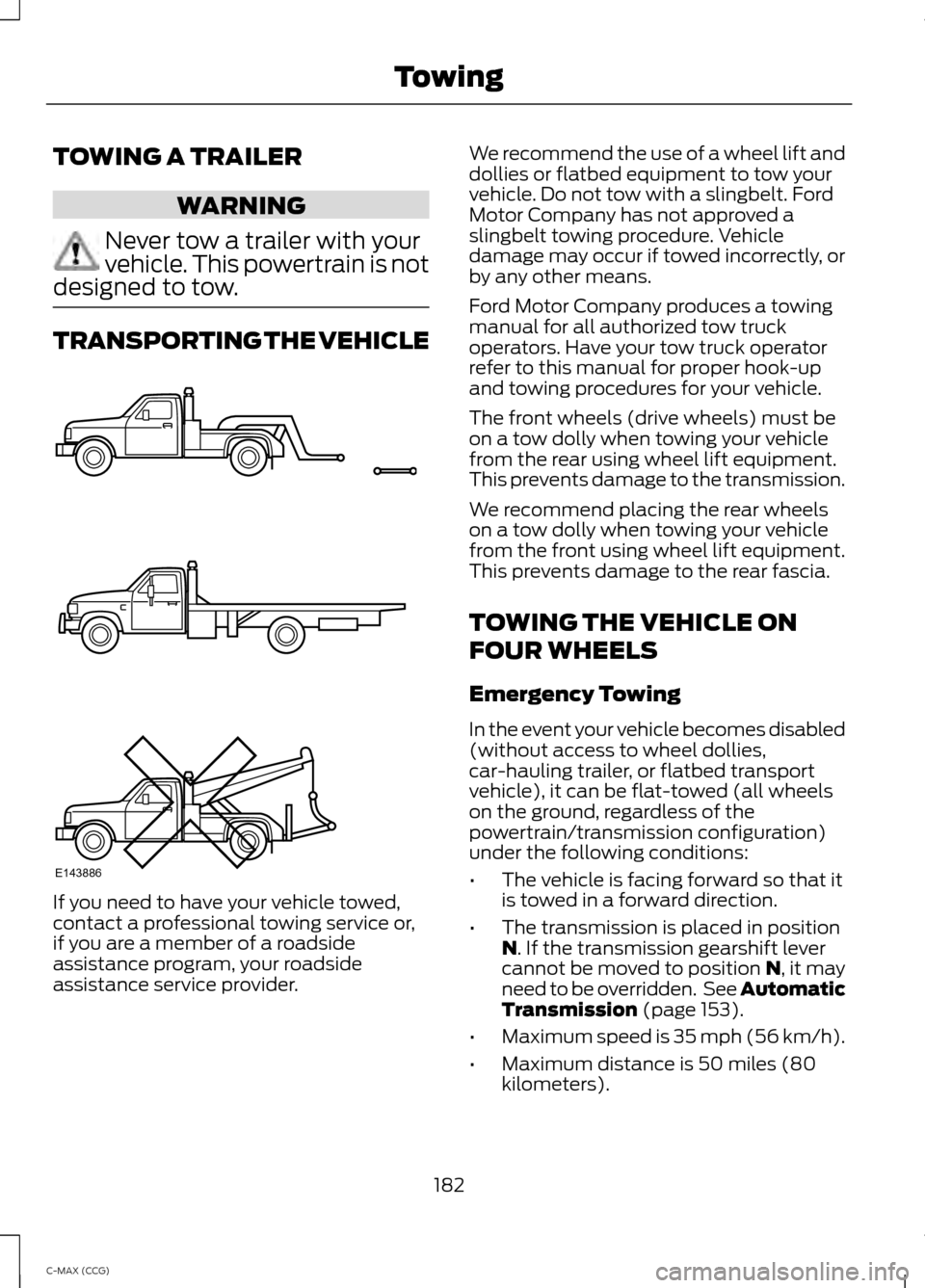
assistance service provider. We recommend the use of a wheel lift and
dollies or flatbed equipment to tow your
vehicle. Do not tow with a slingbelt. Ford
Motor Company has not approved a
slingbelt towing procedure. Vehicle
damage may occur if towed incorrectly, or
by any other means.
Ford Motor Company produces a towing
manual for all authorized tow truck
operators. Have your tow truck operator
refer to this manual for proper hook-up
and towing procedures for your vehicle.
The front wheels (drive wheels) must be
on a tow dolly when towing your vehicle
from the rear using wheel lift equipment.
This prevents damage to the transmission.
We recommend placing the rear wheels
on a tow dolly when towing your vehicle
from the front using wheel lift equipment.
This prevents damage to the rear fascia.
TOWING THE VEHICLE ON
FOUR WHEELS
Emergency Towing
In the event your vehicle becomes disabled
(without access to wheel dollies,
car-hauling trailer, or flatbed transport
vehicle), it can be flat-towed (all wheels
on the ground, regardless of the
powertrain/transmission configuration)
under the following conditions:
•
The vehicle is facing forward so that it
is towed in a forward direction.
• The transmission is placed in position
N. If the transmission gearshift lever
cannot be moved to position N, it may
need to be overridden. See Automatic
Transmission
(page 153).
• Maximum speed is 35 mph (56 km/h).
• Maximum distance is 50 miles (80
kilometers).
182
C-MAX (CCG) TowingE143886
Page 185 of 447
Recreational Towing
Note:
Put your climate control system in
recirculated air mode to prevent exhaust
fumes from entering the vehicle. See
Climate Control (page 105).
Follow these guidelines if you have a need
for recreational (RV) towing. An example
of recreational towing would be towing
your vehicle behind a motorhome. We
designed these guidelines to prevent
damage to your transmission.
You can tow your vehicle with all four
wheels on the ground or with the front
wheels off the ground by using a tow dolly.
If you are using a tow dolly follow the
instructions specified by the equipment
provider.
If you tow your vehicle with all four wheels
on the ground:
• Tow only in the forward direction.
• Release the parking brake.
• Place the transmission in position
N.
• Place the ignition in the off position.
See
Starting and Stopping the
Engine (page 124).
• Do not exceed 70 mph (113 km/h).
• Place the transmission in position
P,
start the vehicle and allow it to run for
one minute at the beginning of each
day (you may need to press the
accelerator pedal in order to start the
vehicle). After allowing the vehicle to
run, place the transmission back into
position
N and the ignition in the
accessory position.
183
C-MAX (CCG) Towing
Page 187 of 447
•
Use the recommended engine oil.
• Perform all regularly scheduled
maintenance.
• Use the coach and brake coach display
to get feedback on your economical
drive style. For more information, See
Information Displays (page 88).
Avoid these actions; they reduce your fuel
economy:
• Avoid sudden accelerations or hard
accelerations. Accelerate and slow
down in a smooth, moderate fashion.
• Avoid revving the engine before turning
off your vehicle.
• Avoid long idle periods.
• Do not warm up your vehicle on cold
mornings.
• Do not rest your foot on the brake
pedal while driving.
• Avoid carrying unnecessary weight.
Approximately 1 mile per gallon (0.4
kilometers per liter) is lost for every
400 pounds (180 kilograms) of weight
carried.
• Avoid adding particular accessories to
your vehicle (bug deflectors, car top
carriers, ski or bike racks).
• Avoid driving with the wheels out of
alignment.
Things to keep in mind when you refuel
your vehicle:
• Fuel generates fewer vapors when it is
cool and dark outside. Fill your vehicle
up in the early morning or late evening.
• Use the recommended octane-rated
fuel. Using fuel below the
recommended rating will lower your
fuel economy. DRIVING THROUGH WATER
Note:
Driving through deep water above
the recommended levels can cause vehicle
damage.
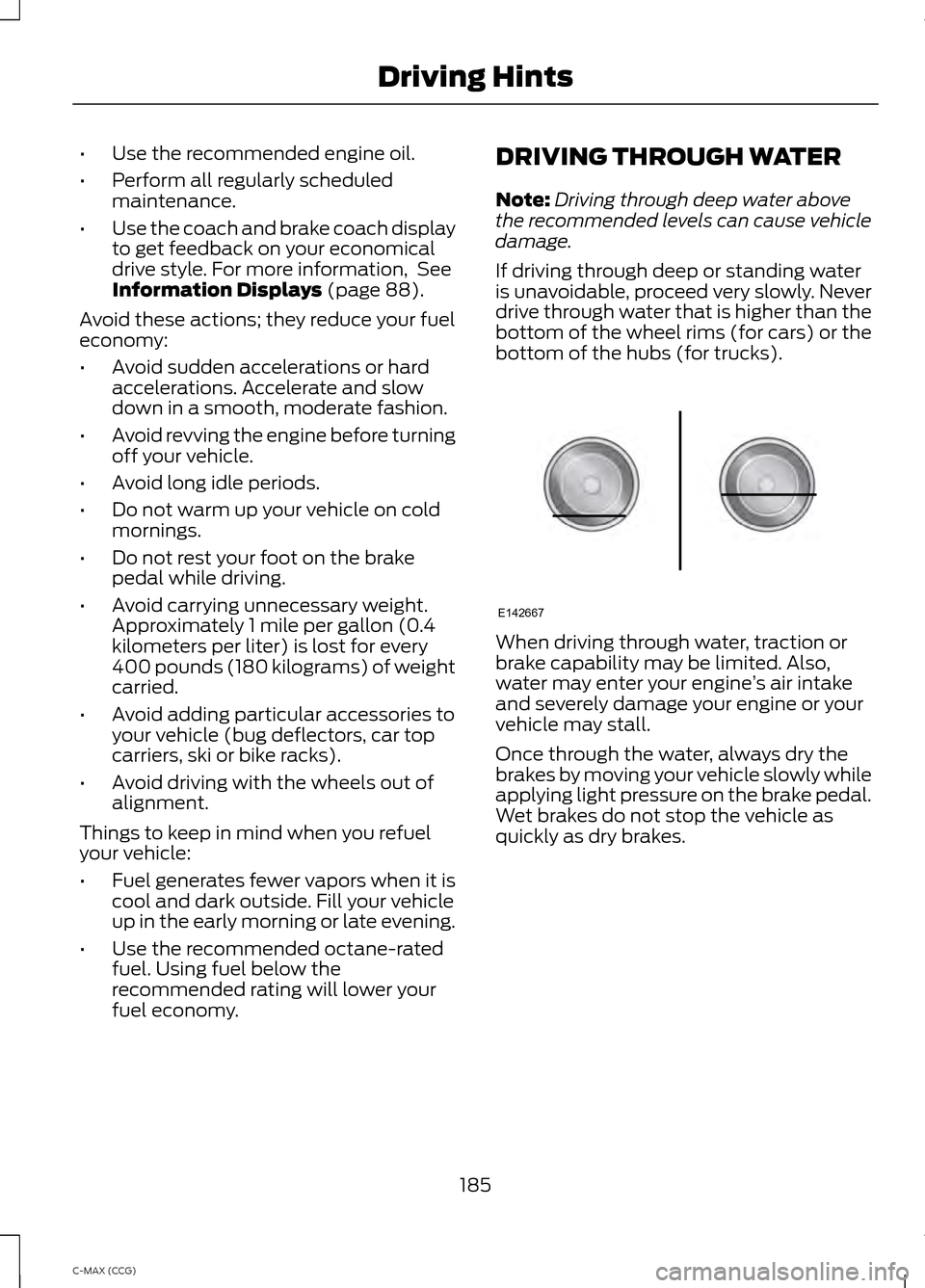
If driving through deep or standing water
is unavoidable, proceed very slowly. Never
drive through water that is higher than the
bottom of the wheel rims (for cars) or the
bottom of the hubs (for trucks). When driving through water, traction or
brake capability may be limited. Also,
water may enter your engine
’s air intake
and severely damage your engine or your
vehicle may stall.
Once through the water, always dry the
brakes by moving your vehicle slowly while
applying light pressure on the brake pedal.
Wet brakes do not stop the vehicle as
quickly as dry brakes.
185
C-MAX (CCG) Driving HintsE142667
Page 206 of 447
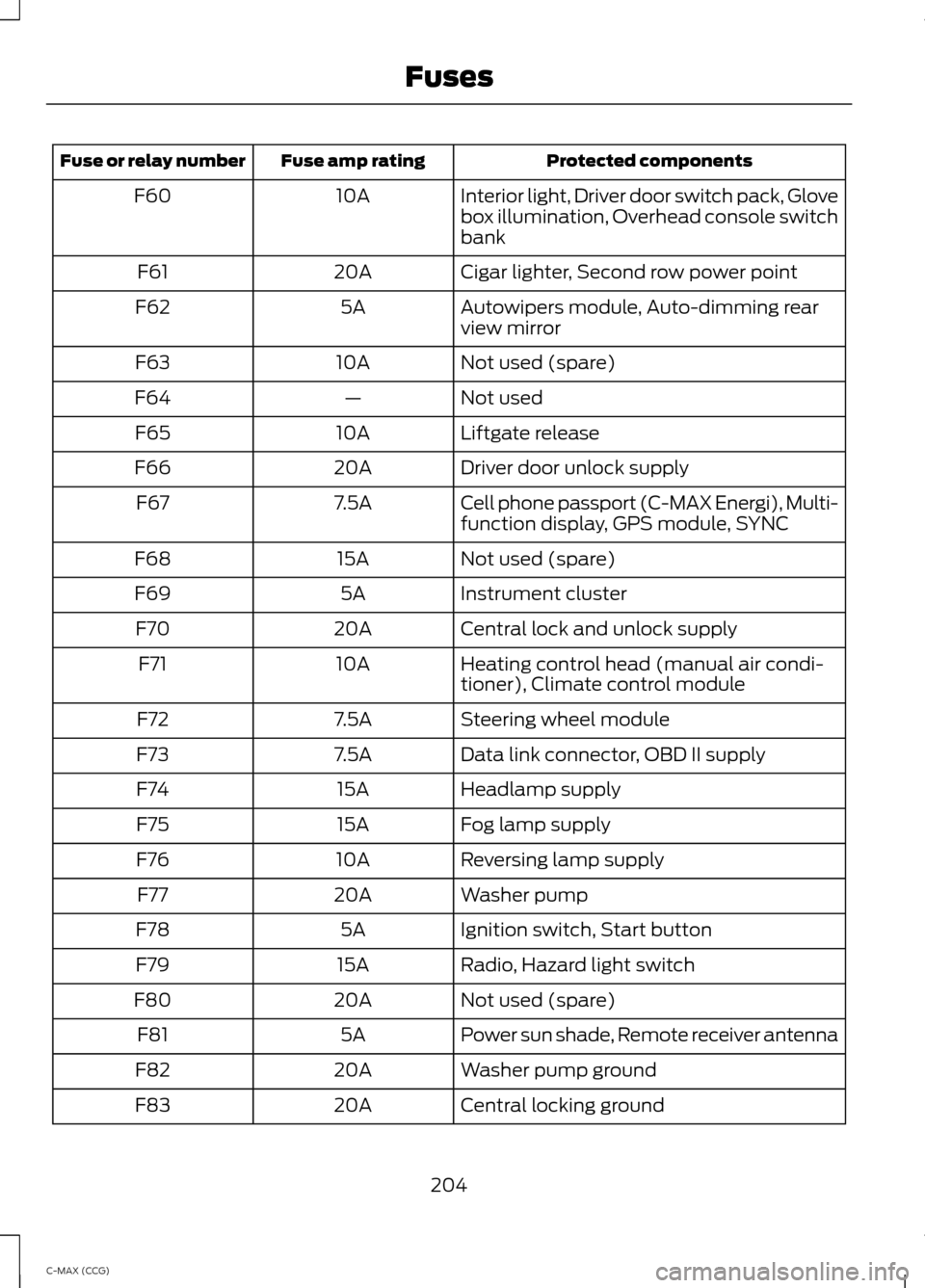
Protected components
Fuse amp rating
Fuse or relay number
Interior light, Driver door switch pack, Glove
box illumination, Overhead console switch
bank
10A
F60
Cigar lighter, Second row power point
20A
F61
Autowipers module, Auto-dimming rear
view mirror
5A
F62
Not used (spare)
10A
F63
Not used
—
F64
Liftgate release
10A
F65
Driver door unlock supply
20A
F66
Cell phone passport (C-MAX Energi), Multi-
function display, GPS module, SYNC
7.5A
F67
Not used (spare)
15A
F68
Instrument cluster
5A
F69
Central lock and unlock supply
20A
F70
Heating control head (manual air condi-
tioner), Climate control module
10A
F71
Steering wheel module
7.5A
F72
Data link connector, OBD II supply
7.5A
F73
Headlamp supply
15A
F74
Fog lamp supply
15A
F75
Reversing lamp supply
10A
F76
Washer pump
20A
F77
Ignition switch, Start button
5A
F78
Radio, Hazard light switch
15A
F79
Not used (spare)
20A
F80
Power sun shade, Remote receiver antenna
5A
F81
Washer pump ground
20A
F82
Central locking ground
20A
F83
204
C-MAX (CCG) Fuses
Page 207 of 447
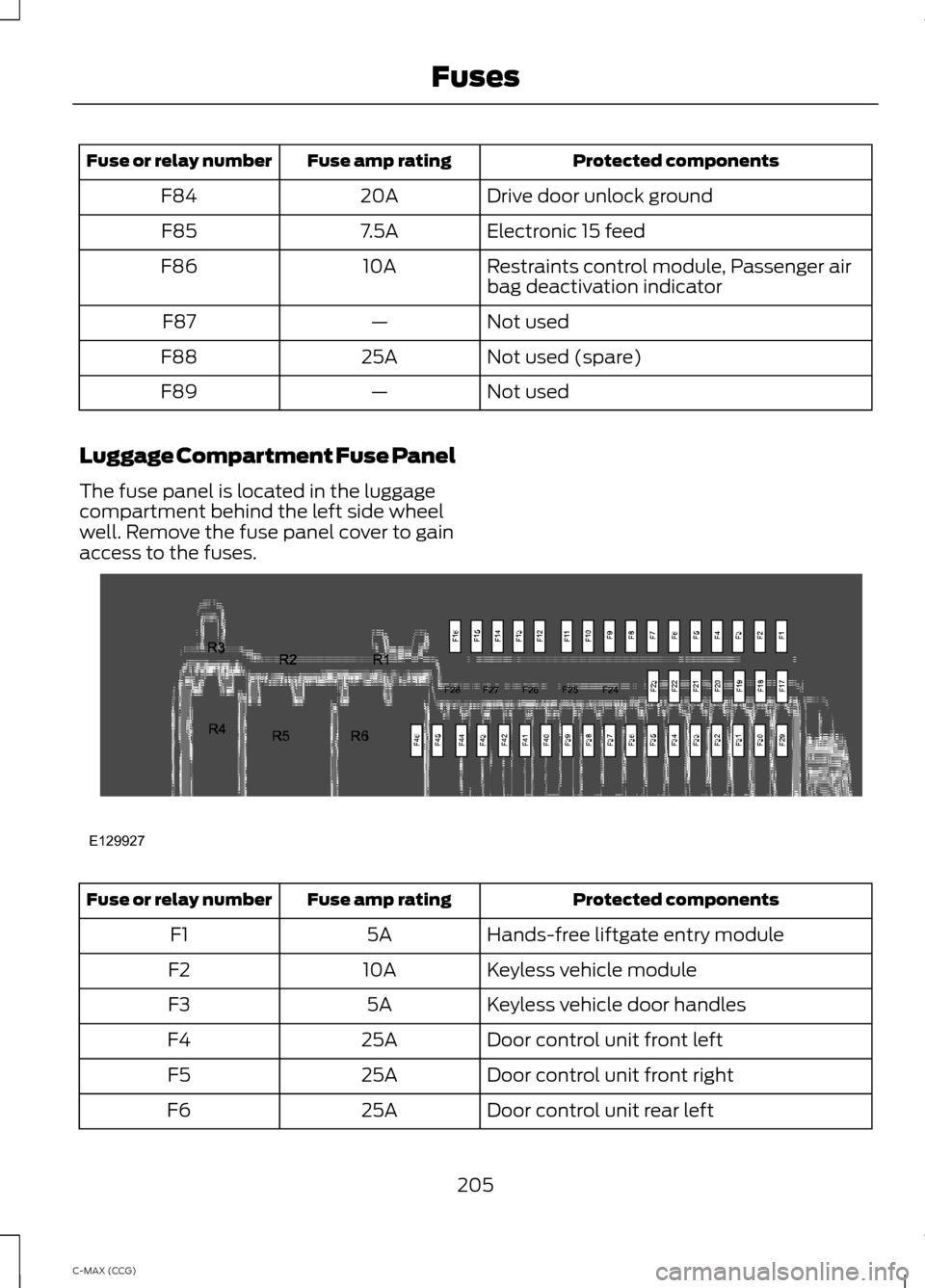
Protected components
Fuse amp rating
Fuse or relay number
Drive door unlock ground
20A
F84
Electronic 15 feed
7.5A
F85
Restraints control module, Passenger air
bag deactivation indicator
10A
F86
Not used
—
F87
Not used (spare)
25A
F88
Not used
—
F89
Luggage Compartment Fuse Panel
The fuse panel is located in the luggage
compartment behind the left side wheel
well. Remove the fuse panel cover to gain
access to the fuses. Protected components
Fuse amp rating
Fuse or relay number
Hands-free liftgate entry module
5A
F1
Keyless vehicle module
10A
F2
Keyless vehicle door handles
5A
F3
Door control unit front left
25A
F4
Door control unit front right
25A
F5
Door control unit rear left
25A
F6
205
C-MAX (CCG) FusesE129927