light FORD C MAX HYBRID 2015 2.G Owners Manual
[x] Cancel search | Manufacturer: FORD, Model Year: 2015, Model line: C MAX HYBRID, Model: FORD C MAX HYBRID 2015 2.GPages: 455, PDF Size: 5.94 MB
Page 379 of 455
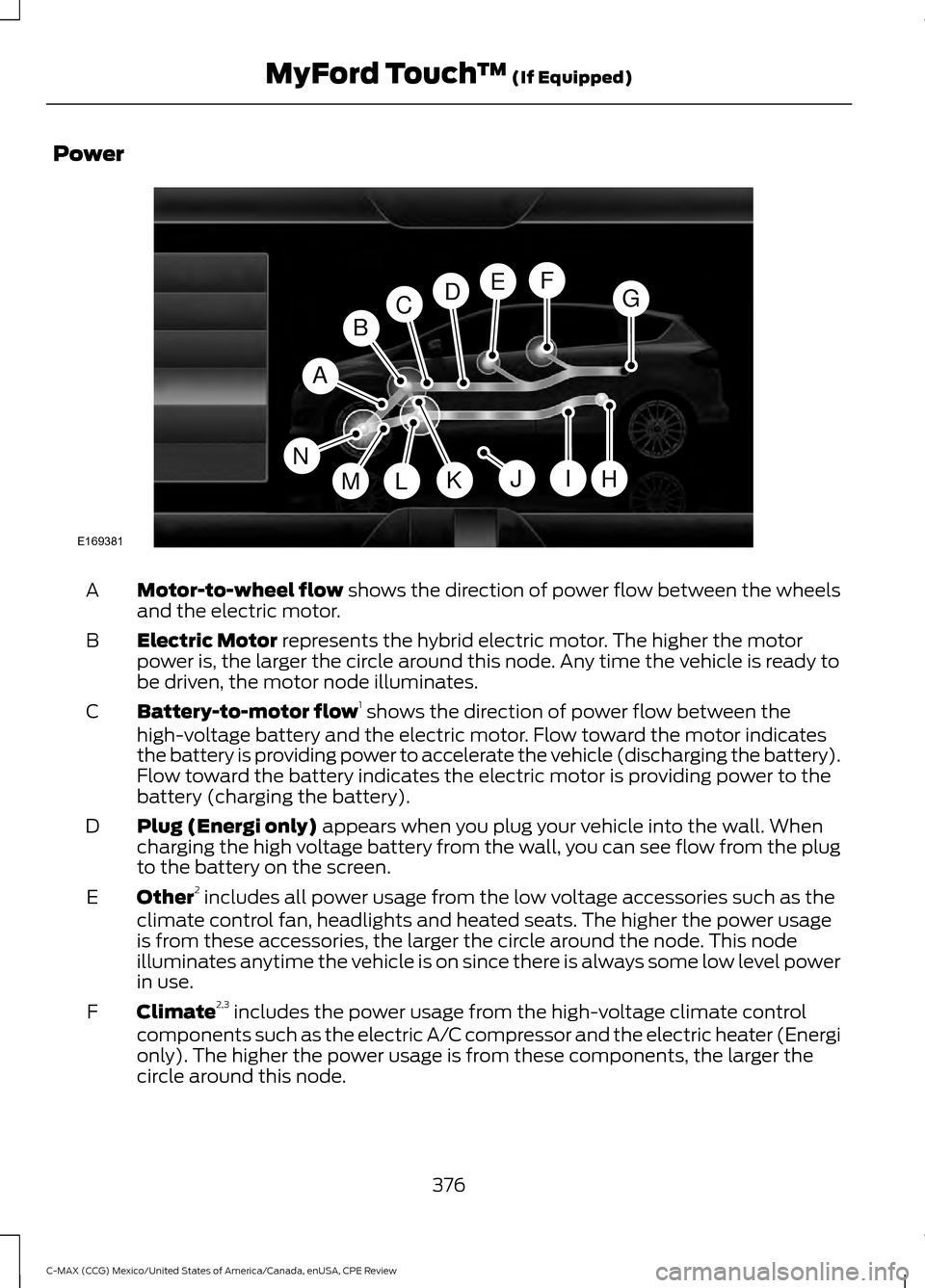
Power
Motor-to-wheel flow shows the direction of power flow between the wheels
and the electric motor.
A
Electric Motor
represents the hybrid electric motor. The higher the motor
power is, the larger the circle around this node. Any time the vehicle is ready to
be driven, the motor node illuminates.
B
Battery-to-motor flow 1
shows the direction of power flow between the
high-voltage battery and the electric motor. Flow toward the motor indicates
the battery is providing power to accelerate the vehicle (discharging the battery).
Flow toward the battery indicates the electric motor is providing power to the
battery (charging the battery).
C
Plug (Energi only)
appears when you plug your vehicle into the wall. When
charging the high voltage battery from the wall, you can see flow from the plug
to the battery on the screen.
D
Other 2
includes all power usage from the low voltage accessories such as the
climate control fan, headlights and heated seats. The higher the power usage
is from these accessories, the larger the circle around the node. This node
illuminates anytime the vehicle is on since there is always some low level power
in use.
E
Climate 2,3
includes the power usage from the high-voltage climate control
components such as the electric A/C compressor and the electric heater (Energi
only). The higher the power usage is from these components, the larger the
circle around this node.
F
376
C-MAX (CCG) Mexico/United States of America/Canada, enUSA, CPE Review MyFord Touch
™
(If Equipped)A
H
DGEF
BC
IKMLJ
E169381
N
Page 380 of 455
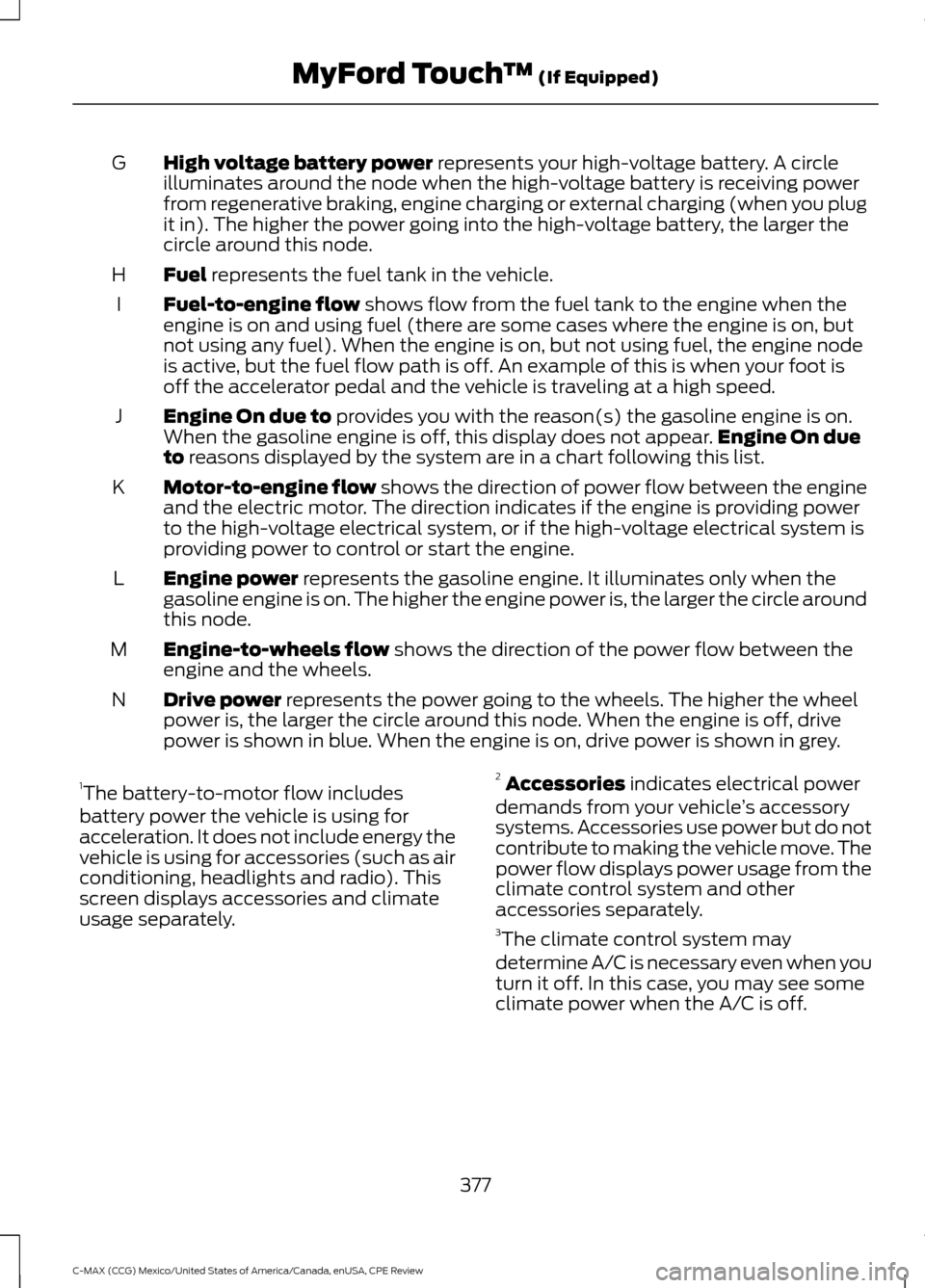
High voltage battery power represents your high-voltage battery. A circle
illuminates around the node when the high-voltage battery is receiving power
from regenerative braking, engine charging or external charging (when you plug
it in). The higher the power going into the high-voltage battery, the larger the
circle around this node.
G
Fuel
represents the fuel tank in the vehicle.
H
Fuel-to-engine flow
shows flow from the fuel tank to the engine when the
engine is on and using fuel (there are some cases where the engine is on, but
not using any fuel). When the engine is on, but not using fuel, the engine node
is active, but the fuel flow path is off. An example of this is when your foot is
off the accelerator pedal and the vehicle is traveling at a high speed.
I
Engine On due to
provides you with the reason(s) the gasoline engine is on.
When the gasoline engine is off, this display does not appear. Engine On due
to
reasons displayed by the system are in a chart following this list.
J
Motor-to-engine flow
shows the direction of power flow between the engine
and the electric motor. The direction indicates if the engine is providing power
to the high-voltage electrical system, or if the high-voltage electrical system is
providing power to control or start the engine.
K
Engine power
represents the gasoline engine. It illuminates only when the
gasoline engine is on. The higher the engine power is, the larger the circle around
this node.
L
Engine-to-wheels flow
shows the direction of the power flow between the
engine and the wheels.
M
Drive power
represents the power going to the wheels. The higher the wheel
power is, the larger the circle around this node. When the engine is off, drive
power is shown in blue. When the engine is on, drive power is shown in grey.
N
1 The battery-to-motor flow includes
battery power the vehicle is using for
acceleration. It does not include energy the
vehicle is using for accessories (such as air
conditioning, headlights and radio). This
screen displays accessories and climate
usage separately. 2
Accessories
indicates electrical power
demands from your vehicle ’s accessory
systems. Accessories use power but do not
contribute to making the vehicle move. The
power flow displays power usage from the
climate control system and other
accessories separately.
3 The climate control system may
determine A/C is necessary even when you
turn it off. In this case, you may see some
climate power when the A/C is off.
377
C-MAX (CCG) Mexico/United States of America/Canada, enUSA, CPE Review MyFord Touch
™
(If Equipped)
Page 395 of 455
NAVIGATION
Note:
The navigation SD card must be in
the SD card slot to operate the navigation
system. If you need a replacement SD card,
see an authorized dealer.
Note: The SD card slot is spring-loaded. To
remove the SD card, just push the card in
and release it. Do not attempt to pull the
card out to remove it; this could cause
damage.
Your navigation system is comprised of
two main features, destination mode and
map mode.
To set a destination, press the green corner
of your touchscreen, then the Dest button
when it appears. See Setting a
destination later in this chapter.
To view the navigation map and your
vehicle's current location, touch the green
bar in the upper right hand corner of the
touchscreen, or, press Dest, then Map. See
Map mode
later in this chapter.
Setting a Destination
Press the green corner of your touchscreen,
then the
Dest button when it appears.
Choose any of the following: Destination
My HomeFavorites
Previous Destinations Point of InterestEmergency
Street Address IntersectionCity Center Destination
Map
Edit Route
Cancel Route
1. Enter the necessary information into the highlighted text fields (in any
order). For address destination entry,
the Go! button appears once you enter
all the necessary information. Pressing
the
Go! button makes the address
location appear on the map. If you
choose Previous Destination, the last
20 destinations you have selected
appear.
2. Select
Set as Dest to make this your
destination. You can also choose to set
this as a waypoint (have the system
route to this point on the way to your
current destination) or save it as a
favorite. The system considers any
Avoid Areas
selections in its route
calculation.
3. Choose from up to three different types
of routes, and then select Start Route.
• Fastest: Uses the fastest moving roads
possible.
• Shortest: Uses the shortest distance
possible.
• Eco Route: Uses the most fuel-efficient
route.
You can cancel the route or have the
system demo the route for you. Select
Route Prefs
to set route preferences like
avoiding freeways, tollroads, ferries and
car trains as well as to use or not use
high-occupancy vehicle lanes.
(High-occupancy vehicle lanes are also
known as carpool or diamond lanes.
People who ride in buses, vanpools or
carpools use these lanes.)
392
C-MAX (CCG) Mexico/United States of America/Canada, enUSA, CPE Review MyFord Touch
™
(If Equipped)
Page 397 of 455

Range Rings and Charge Points (Energi Only)
Shaded rings appear on the map when you
are driving in EV Now mode. The inner ring
with no shading indicates a safe range you
can travel using plug-in power only. The
lightly shaded outer band reflects areas
you may or may not be able to reach while
in EV Now mode. If your destination is
within this band, your vehicle may operate
in Auto EV mode, running the engine as
needed. The darker shaded area, beyond
the rings, is not likely reachable using only
the vehicle's available plug-in energy.
The rings represent approximate ranges.
Actual route distances, road grades,
vehicle speed, accessory usage and other
conditions affect how far your vehicle can
travel in EV Now mode before recharging.
You can turn off the rings in the Settings
menu. Press the Settings icon >
Navigation > Map Preferences.
You can turn the charge point POIs on and
off. Touch the map, use the buttons at the
bottom of the screen and then select the
POI icon. The icons only appear at a map
scale of 5 miles (8 kilometers) and lower. cityseekr
Note:
cityseekr point of interest (POI)
information is limited to approximately 912
cities (881 in the United States, 20 in
Canada and 11 in Mexico). cityseekr, when available, is a service that
provides more information about certain
points of interest such as restaurants,
hotels and attractions.
When you have selected a point of interest,
the location and information appear, such
as address and phone number. If cityseekr
lists the point of interest, more information
is available, such as a brief description,
check-in and checkout times or restaurant
hours.
394
C-MAX (CCG) Mexico/United States of America/Canada, enUSA, CPE Review MyFord Touch
™
(If Equipped)E161378 E142634
Page 400 of 455
2D city maps show detailed outlines of
buildings, visible land use and land
elements and detailed railway
infrastructure for the most essential cities
around the globe. These maps also contain
features, such as town blocks, building
footprints and railways.
3D landmarks appear as clear, visible
objects that are typically recognizable and
have a certain tourist value. The 3D
landmarks appear in 3D map mode only.
Coverage varies, and improves with
updated map releases.
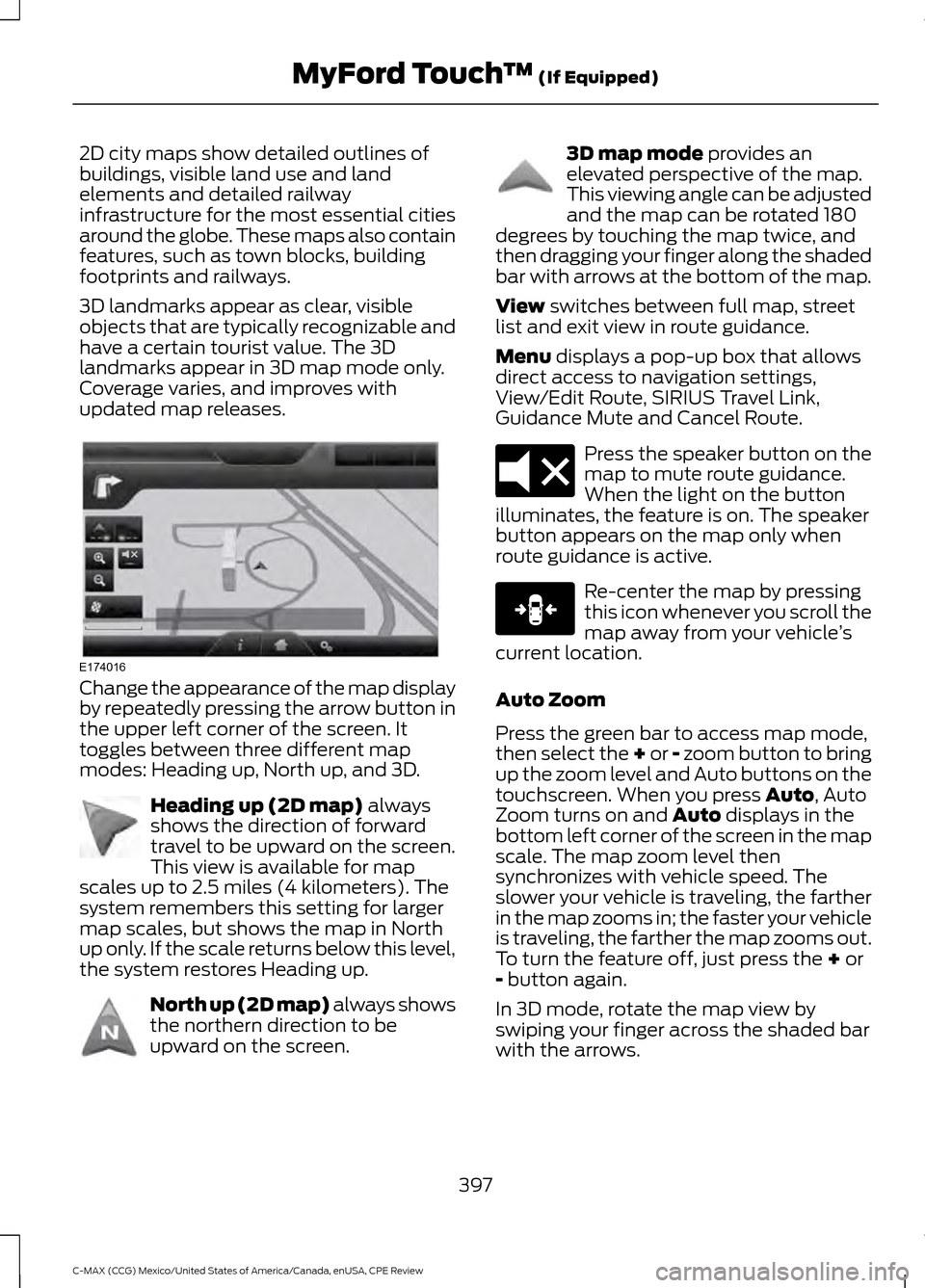
Change the appearance of the map display
by repeatedly pressing the arrow button in
the upper left corner of the screen. It
toggles between three different map
modes: Heading up, North up, and 3D.
Heading up (2D map) always
shows the direction of forward
travel to be upward on the screen.
This view is available for map
scales up to 2.5 miles (4 kilometers). The
system remembers this setting for larger
map scales, but shows the map in North
up only. If the scale returns below this level,
the system restores Heading up. North up (2D map) always shows
the northern direction to be
upward on the screen. 3D map mode
provides an
elevated perspective of the map.
This viewing angle can be adjusted
and the map can be rotated 180
degrees by touching the map twice, and
then dragging your finger along the shaded
bar with arrows at the bottom of the map.
View
switches between full map, street
list and exit view in route guidance.
Menu
displays a pop-up box that allows
direct access to navigation settings,
View/Edit Route, SIRIUS Travel Link,
Guidance Mute and Cancel Route. Press the speaker button on the
map to mute route guidance.
When the light on the button
illuminates, the feature is on. The speaker
button appears on the map only when
route guidance is active. Re-center the map by pressing
this icon whenever you scroll the
map away from your vehicle
’s
current location.
Auto Zoom
Press the green bar to access map mode,
then select the + or - zoom button to bring
up the zoom level and Auto buttons on the
touchscreen. When you press
Auto, Auto
Zoom turns on and Auto displays in the
bottom left corner of the screen in the map
scale. The map zoom level then
synchronizes with vehicle speed. The
slower your vehicle is traveling, the farther
in the map zooms in; the faster your vehicle
is traveling, the farther the map zooms out.
To turn the feature off, just press the
+ or
- button again.
In 3D mode, rotate the map view by
swiping your finger across the shaded bar
with the arrows.
397
C-MAX (CCG) Mexico/United States of America/Canada, enUSA, CPE Review MyFord Touch
™
(If Equipped)E174016 E142642 E142643 E142644 E174017 E146188
Page 410 of 455
For a complete listing of the accessories
that are available for your vehicle, please
contact an authorized dealer or visit our
online store at www.Accessories.Ford.com
(United States only).
Ford Motor Company will repair or replace
any properly authorized dealer-installed
Ford Custom Accessory found to be
defective in factory-supplied materials or
workmanship during the warranty period,
as well as any component damaged by the
defective accessories.
Ford Motor Company will warrant your
vehicle's accessory through the warranty
that provides the greatest benefit:
•
24 months, unlimted mileage.
• The remainder of your new vehicle
limited warranty.
Contact an authorized dealer for details
and a copy of the warranty.
Exterior style
• Hood deflector*.
• Side window deflectors.
• Splash guards.
• Custom graphics*.
Interior style
• Floor mats.
• Accent lighting.
• Cargo area protector.
Lifestyle
• Ash cup or smoker's packages.
• Soft cargo organizers.
• Cargo net*.
• Roof racks and carriers*.
Peace of mind
• Keyless entry keypad.
• Remote start. •
Vehicle security systems.
• Wheel locks.
• Bumper-mounted parking assist
system*.
• Rear bumper protector.
• Car covers.
• Charge cord storage bag*.
*Ford Licensed Accessory. The accessory
manufacturer designs, develops and
therefore warrants Ford Licensed
Accessories, and does not design or test
these accessories to Ford Motor Company
engineering requirements. Contact an
authorized Ford dealer for the
manufacturer's limited warranty details,
and request a copy of the Ford Licensed
Accessories product limited warranty from
the accessory manufacturer.
For maximum vehicle performance, keep
the following information in mind when
adding accessories or equipment to your
vehicle:
• When adding accessories, equipment,
passengers and luggage to your
vehicle, do not exceed the total weight
capacity of the vehicle or of the front
or rear axle (GVWR or GAWR as
indicated on the Safety Compliance
Certification label). Ask an authorized
dealer for specific weight information.
• The Federal Communications
Commission (FCC) and Canadian
Radio Telecommunications
Commission (CRTC) regulate the use
of mobile communications systems
that are equipped with radio
transmitters, for example, two-way
radios, telephones and theft alarms.
Any such equipment installed in your
vehicle should comply with Federal
Communications Commission (FCC)
and Canadian Radio
Telecommunications Commission
(CRTC) regulations and should be
installed only by an authorized dealer.
407
C-MAX (CCG) Mexico/United States of America/Canada, enUSA, CPE Review Accessories
Page 431 of 455
Oils, Fluids and Flushing
In many cases, fluid discoloration is a
normal operating characteristic and, by
itself, does not necessarily indicate a
concern or that the fluid needs to be
changed. However, a qualified expert, such
as the factory-trained technicians at your
dealership, should inspect discolored fluids
that also show signs of overheating or
foreign material contamination
immediately.
Make sure to change your vehicle
’s oils and
fluids at the specified intervals or in
conjunction with a repair. Flushing is a
viable way to change fluid for many vehicle
sub-systems during scheduled
maintenance. It is critical that systems are
flushed only with new fluid that is the same
as that required to fill and operate the
system or using a Ford-approved flushing
chemical.
Owner Checks and Services
Make sure you perform the following basic
maintenance checks and inspections every
month or at six-month intervals. Check every month
Engine oil level.
Function of all interior and exterior lights.
Tires (including spare) for wear and proper pressure. Windshield washer fluid level. Check every six months
Battery connections. Clean if necessary.
Body and door drain holes for obstructions. Clean if necessary. Cooling system fluid level and coolant strength.
Door weatherstrips for wear. Lubricate if necessary.
Hinges, latches and outside locks for proper operation. Lubricate if necessary. Parking brake for proper operation.
Safety belts and seat latches for wear and function.
Safety warning lamps (brake, ABS, airbag and safety belt) for operation.
Washer spray and wiper operation. Clean or replace blades as necessary.
428
C-MAX (CCG) Mexico/United States of America/Canada, enUSA, CPE Review Scheduled Maintenance
Page 446 of 455
A
A/C
See: Climate Control......................................... 104
About This Manual...........................................7
ABS See: Brakes............................................................ 155
ABS driving hints See: Hints on Driving With Anti-Lock
Brakes................................................................ 156
Accessories....................................................407 Exterior style........................................................ 407
Interior style......................................................... 407
Lifestyle................................................................. 407
Peace of mind..................................................... 407
Accessories See: Replacement Parts
Recommendation............................................. 11
Active Park Assist.........................................163 Automatic Steering into Parking
Space................................................................. 164
Deactivating the Park Assist Feature..........165
Troubleshooting the System......................... 166
Using Active Park Assist................................... 163
Adjusting the Headlamps
.........................222
Horizontal Aim Adjustment........................... 223
Vertical Aim Adjustment................................. 222
Adjusting the Steering Wheel...................64
Airbag Disposal
...............................................42
Air Conditioning See: Climate Control......................................... 104
Alarm See: Anti-Theft Alarm........................................ 63
Ambient Lighting............................................74
Anti-Theft Alarm
............................................63
Arming the Alarm................................................. 63
Disarming the Alarm........................................... 63
Appendices...................................................409
Audible Warnings and Indicators.............87 Automatic Transmission Warning
Chime................................................................... 87
Engine On Warning Chime................................ 87
Headlamps On Warning Chime...................... 87
Key in Ignition Warning Chime......................... 87
Keyless Warning Alert ........................................ 87
Parking Brake On Warning Chime.................. 87
Audio Control..................................................64 Seek, Next or Previous....................................... 65Audio Input Jack..........................................286
Audio System
................................................273
General Information.......................................... 273
Audio Unit - Vehicles With: Premium AM/FM/CD..................................................276
Audio Unit - Vehicles With: Sony AM/ FM/CD
...........................................................278
Menu Structure................................................... 279
Audio Unit - Vehicles With: SYNC/AM/ FM/CD...........................................................274
Autolamps........................................................70 Windshield Wiper Activated
Headlamps.......................................................... 71
Automatic Climate Control......................104 Temperature Control........................................ 105
Automatic Transmission
............................152
Automatic Transmission.................................. 152
Brake-Shift Interlock......................................... 153
If Your Vehicle Gets Stuck In Mud or Snow.................................................................. 154
Automatic Transmission Fluid Check.............................................................218
Autowipers........................................................67
Auxiliary Power Points................................120 110-volt AC power point................................... 120
12-volt DC power point..................................... 120
Locations............................................................... 120
B
Bonnet Lock See: Opening and Closing the Hood..........209
Booster Seats...................................................21 Types of Booster Seats...................................... 22
Brake Fluid Check.........................................218
Brakes...............................................................155 General Information.......................................... 155
Breaking-In......................................................183
Bulb Specification Chart...........................228
C
Cabin Air Filter................................................107
California Proposition 65..............................11
Capacities and Specifications
................270
Specifications..................................................... 270
Car Wash See: Cleaning the Exterior............................... 233
443
C-MAX (CCG) Mexico/United States of America/Canada, enUSA, CPE Review Index
Page 450 of 455
Information....................................................379
911 Assist............................................................... 385
Alerts...................................................................... 385
Calendar............................................................... 385
Sirius Travel Link................................................ 383
SYNC Services (If Equipped, United States Only)................................................................. 380
Vehicle Health Report (If Equipped, United States Only).................................................... 387
Where Am I?....................................................... 388
Information Messages..................................97 AdvanceTrac®....................................................... 97
Alarm........................................................................\
. 97
Battery and Charging System (High Voltage).............................................................. 98
Doors........................................................................\
98
Fuel........................................................................\
.... 99
Hill Start Assist..................................................... 99
Keys and Intelligent Access............................. 99
Maintenance........................................................ 100
MyKey...................................................................... 101
Park Aid.................................................................. 102
Park Brake............................................................. 102
Power Steering.................................................... 102
Remote Start........................................................ 102
Tire Pressure Monitoring System.................103
Transmission........................................................ 103
Installing Child Seats.....................................15 Child Seats............................................................... 15
Using Lap and Shoulder Belts.......................... 16
Using Lower Anchors and Tethers for CHildren (LATCH)............................................ 18
Using Tether Straps............................................. 20
Instrument Cluster.........................................81
Instrument Lighting Dimmer.......................71 Vehicles With Front Fog Lamps....................... 71
Vehicles Without Front Fog Lamps...............72
Interior Lamps
..................................................73
Front Interior Lamp.............................................. 73
Front Interior Lamp - With Panorama Roof....................................................................... 74
Rear Interior Lamp................................................ 74
Interior Mirror
....................................................79
Auto-Dimming Mirror.......................................... 79
Introduction.........................................................7 J
Jump Starting the Vehicle.........................188
Connecting the Jumper Cables..................... 188
Jump Starting...................................................... 190
Preparing Your Vehicle..................................... 188
Removing the Jumper Cables....................... 190
K
Keyless Starting.............................................123 Ignition Modes..................................................... 124
Keys and Remote Controls.........................43
L
Lighting Control..............................................70 Headlamp Flasher............................................... 70
High Beams............................................................ 70
Lighting..............................................................70
Load Carrying
..................................................173
Load Limit........................................................174
Vehicle Loading.................................................... 174
Locking and Unlocking
.................................54
Activating Intelligent Access ........................... 55
Autolock.................................................................. 56
Battery Saver.......................................................... 57
Illuminated Entry................................................... 57
Illuminated Exit...................................................... 57
Mechanical Key..................................................... 55
Opening a Rear Door from Inside................... 55
Power Door Locks................................................ 54
Remote Control.................................................... 54
Smart Unlocks For Integrated Keyhead Transmitter........................................................ 56
Smart Unlocks For Intelligent Access Keys ........................................................................\
........ 56
Locks...................................................................54
Luggage Covers..............................................173 Removing the Shade......................................... 173
M
Maintenance.................................................209 General Information......................................... 209
Manual Liftgate..............................................58 Closing the Liftgate............................................. 58
Opening the Liftgate........................................... 58
447
C-MAX (CCG) Mexico/United States of America/Canada, enUSA, CPE Review Index
Page 454 of 455
U
Under Hood Overview - Hybrid Electric
Vehicle (HEV).............................................210
Under Hood Overview - Plug-In Hybrid Electric Vehicle (PHEV)...........................212
Unique Driving Characteristics................128
Universal Garage Door Opener................116 HomeLink Wireless Control System.............116
USB Port
.........................................................286
Using Cruise Control....................................170
ECO Cruise Control.............................................. 171
Switching Cruise Control Off........................... 171
Switching Cruise Control On.......................... 170
Using MyKey With Remote Start Systems..........................................................53
Using Snow Chains
....................................260
Using Stability Control...............................160 AdvanceTrac® with Roll Stability Control ™
(RSC®)............................................................. 160
Using SYNC™ With Your Media Player.............................................................310
Accessing Your Play Menu.............................. 314
Connecting Your Digital Media Player to the USB Port........................................................... 310
Media Menu Features........................................ 313
Media Voice Commands................................... 311
System Settings.................................................. 316
What's Playing?................................................... 311
Using SYNC™ With Your Phone............292 Accessing Features through the Phone
Menu................................................................. 296
Accessing Your Phone Settings................... 299
Making Calls........................................................ 295
Pairing a Phone for the First Time...............293
Pairing Subsequent Phones.......................... 293
Phone Options during an Active Call.........295
Phone Voice Commands................................ 293
Receiving Calls.................................................... 295
System Settings................................................ 300
Text Messaging.................................................. 298
Using Traction Control................................158 Switching the System Off Using a
Switch................................................................ 158
Switching the System Off Using the Information Display Controls.................... 158
System Indicator Lights and Messages.......................................................... 158Using Voice Recognition
...........................290
Initiating a Voice Session............................... 290
System Interaction and Feedback...............291
Utilizing the Mediation/Arbitration Program (Canada Only).........................196
V
Vehicle Care
...................................................233
General Information.......................................... 233
Vehicle Certification Label.......................268
Vehicle Identification Number
...............268
Vehicle Storage.............................................237 Battery................................................................... 238
Body........................................................................\
238
Brakes.................................................................... 239
Cooling system................................................... 238
Engine.................................................................... 238
Fuel system.......................................................... 238
General.................................................................. 238
Miscellaneous..................................................... 239
Removing Vehicle From Storage.................239
Tires........................................................................\
239
Ventilation See: Climate Control......................................... 104
VIN See: Vehicle Identification Number............268
Voice Control
...................................................65
MyFord Touch® Controls.................................. 65
451
C-MAX (CCG) Mexico/United States of America/Canada, enUSA, CPE Review Index