steering FORD C-MAY HYBRID 2018 User Guide
[x] Cancel search | Manufacturer: FORD, Model Year: 2018, Model line: C-MAY HYBRID, Model: FORD C-MAY HYBRID 2018Pages: 475, PDF Size: 8.09 MB
Page 72 of 475
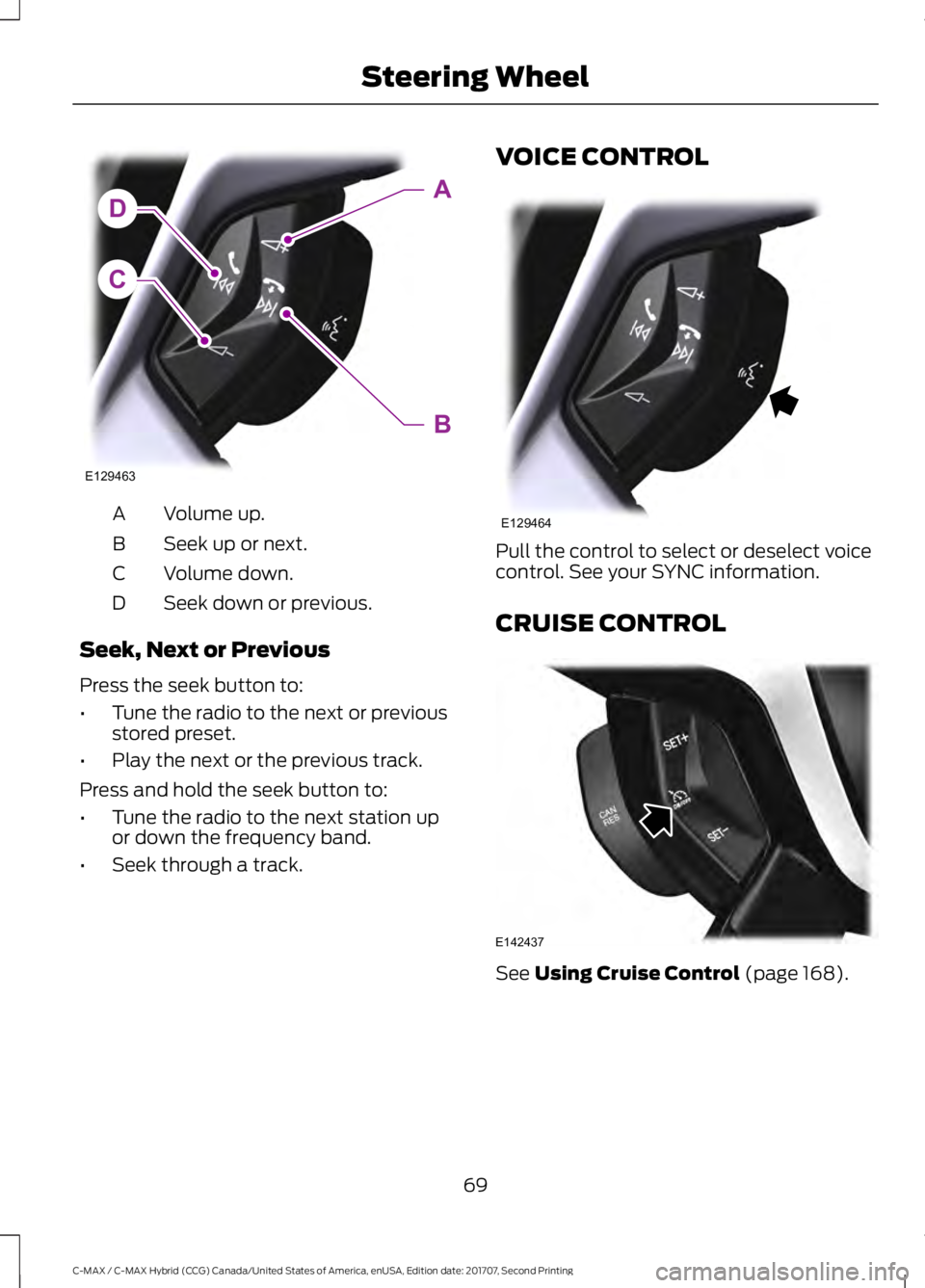
Volume up.
A
Seek up or next.
B
Volume down.
C
Seek down or previous.
D
Seek, Next or Previous
Press the seek button to:
• Tune the radio to the next or previous
stored preset.
• Play the next or the previous track.
Press and hold the seek button to:
• Tune the radio to the next station up
or down the frequency band.
• Seek through a track. VOICE CONTROL
Pull the control to select or deselect voice
control. See your SYNC information.
CRUISE CONTROL
See Using Cruise Control (page 168).
69
C-MAX / C-MAX Hybrid (CCG) Canada/United States of America, enUSA, Edition date: 201707, Second Printing Steering WheelC
DA
B
E129463 E129464 E142437
Page 73 of 475
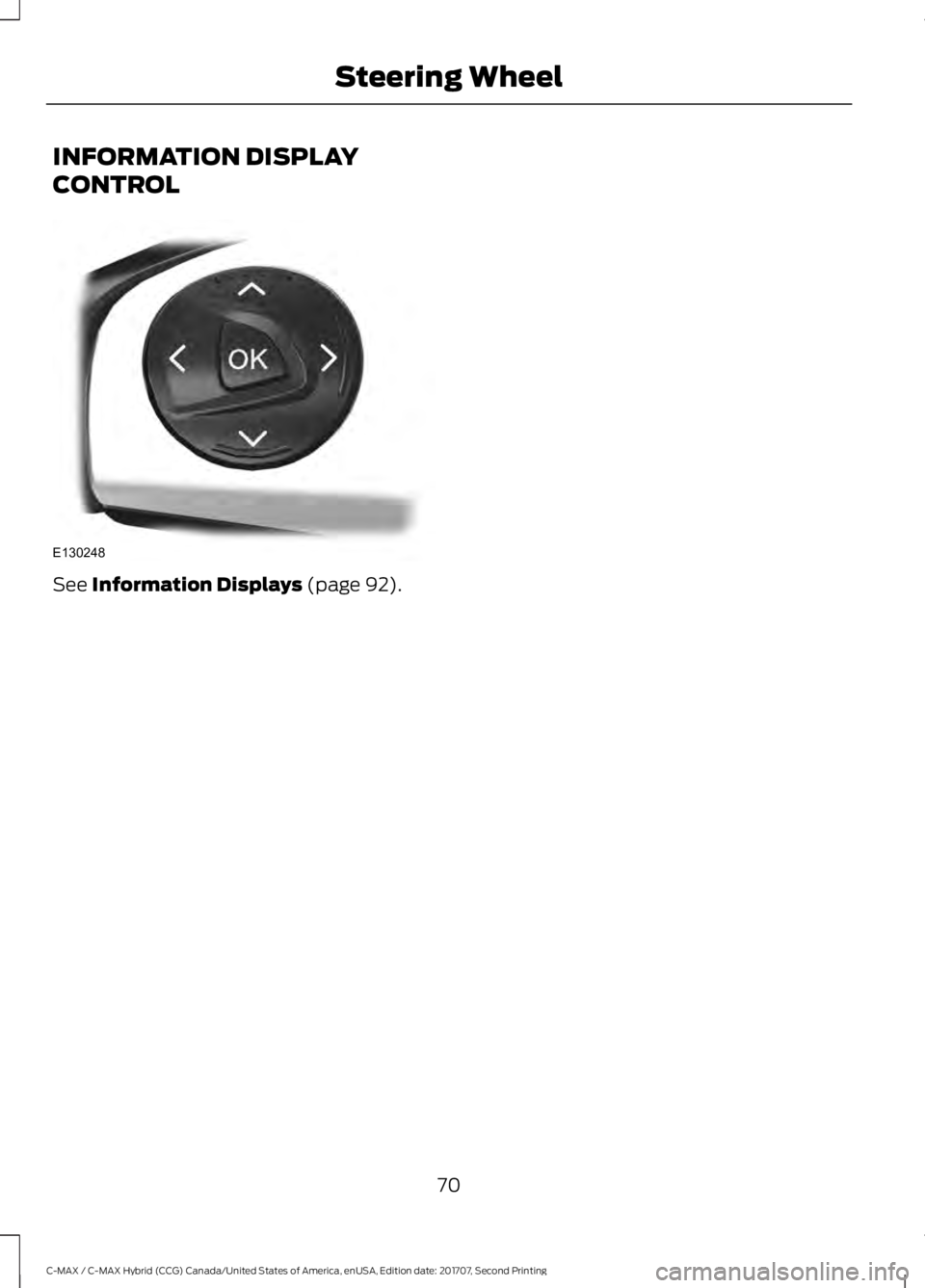
INFORMATION DISPLAY
CONTROL
See Information Displays (page 92).
70
C-MAX / C-MAX Hybrid (CCG) Canada/United States of America, enUSA, Edition date: 201707, Second Printing Steering WheelE130248
Page 95 of 475
GENERAL INFORMATION
WARNING
Driving while distracted can result in
loss of vehicle control, crash and
injury. We strongly recommend that
you use extreme caution when using any
device that may take your focus off the
road. Your primary responsibility is the safe
operation of your vehicle. We recommend
against the use of any hand-held device
while driving and encourage the use of
voice-operated systems when possible.
Make sure you are aware of all applicable
local laws that may affect the use of
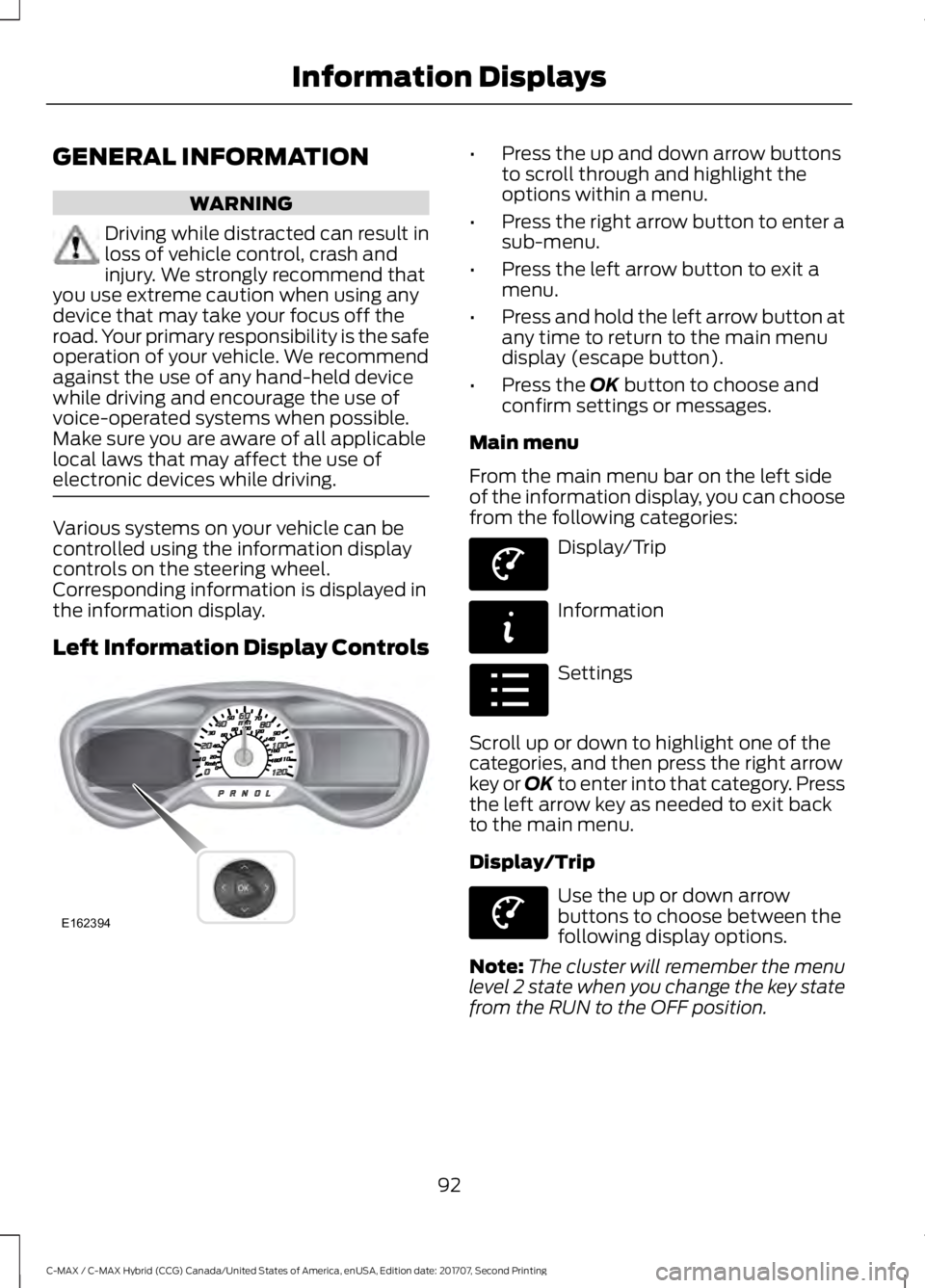
electronic devices while driving. Various systems on your vehicle can be
controlled using the information display
controls on the steering wheel.
Corresponding information is displayed in
the information display.
Left Information Display Controls •
Press the up and down arrow buttons
to scroll through and highlight the
options within a menu.
• Press the right arrow button to enter a
sub-menu.
• Press the left arrow button to exit a
menu.
• Press and hold the left arrow button at
any time to return to the main menu
display (escape button).
• Press the OK button to choose and
confirm settings or messages.
Main menu
From the main menu bar on the left side
of the information display, you can choose
from the following categories: Display/Trip
Information
Settings
Scroll up or down to highlight one of the
categories, and then press the right arrow
key or OK to enter into that category. Press
the left arrow key as needed to exit back
to the main menu.
Display/Trip Use the up or down arrow
buttons to choose between the
following display options.
Note: The cluster will remember the menu
level 2 state when you change the key state
from the RUN to the OFF position.
92
C-MAX / C-MAX Hybrid (CCG) Canada/United States of America, enUSA, Edition date: 201707, Second Printing Information DisplaysE162394 E144639 E144642 E100023 E144639
Page 97 of 475
Engage
Engage provides separate gauges for
engine power and high voltage battery
power in kilowatts (kW). The engine power
gauge fill is white and the high voltage
battery power gauge fill is blue. You can
also see an instantaneous fuel economy
gauge. When your vehicle is operating on
battery power only, you will see EV
displayed and the gauges will appear in
blue.
Empower
Empower provides a power demand gauge
in kilowatts (kW) which includes an engine
on or off threshold.
•
When your vehicle is operating with
battery power only (below the
threshold), you will see EV displayed
and the gauge fill is blue.
• When your vehicle is operating with
both the engine and the high voltage
battery providing power the gauge fill
is white.
• When power demand surpasses the
amber indicator, this level of demand
and associated fuel economy displays
in amber.
• When the engine is on, reducing power
demand to less than the threshold will
allow the engine to turn off.
You can also see an instantaneous fuel
economy gauge.
Note: You can reset your average fuel
economy by pressing and holding the OK
button on the left hand steering wheel
controls.
MyView
You can choose what to display in this
view. Selecting
Change MyView in the
options menu allows you to scroll through
two columns of content choices. •
Press the up or down arrow to view
content.
• Press
OK to save your selected
content.
• You must select content in both
columns before you can save your new
MyView.
Unique content available in MyView:
• Accessory Power — Indicates electrical
power demands from your vehicle ’s
accessory systems. Accessories use
power but do not contribute to
propelling your vehicle. The gauge
separately displays power demand in
kilowatts (kW) for climate and other
accessories. Climate includes the
power being used by high voltage
climate control components such as
the electric A/C compressor. Other
includes all power being used by the
low voltage accessories (cabin fans,
headlights, heated seats, etc.).
• Coolant Temp – Indicates engine
coolant temperature. At normal
operating temperature, the level
indicator will be white and will be in the
normal range (between H and C). If the
engine coolant temperature exceeds
the normal range, the level indicator
will change to red to indicate that the
engine is overheating. Stop your vehicle
as soon as safely possible, turn your
vehicle off and let the engine cool.
• Tach rpm x 1000 — When the gasoline
engine is running, the tachometer
gauge displays the engine speed in
revolutions per minute (RPM). When
your vehicle is operating on battery
power only with the engine off, EV
displays and the tachometer is greyed
out.
Note: The trip data, and average fuel
economy cannot be reset in MyView.
94
C-MAX / C-MAX Hybrid (CCG) Canada/United States of America, enUSA, Edition date: 201707, Second Printing Information Displays
Page 102 of 475
Average Fuel Economy
Average Fuel Economy is continuously
averaged since the last reset. You can reset
your average fuel economy by pressing and
holding the OK button on the
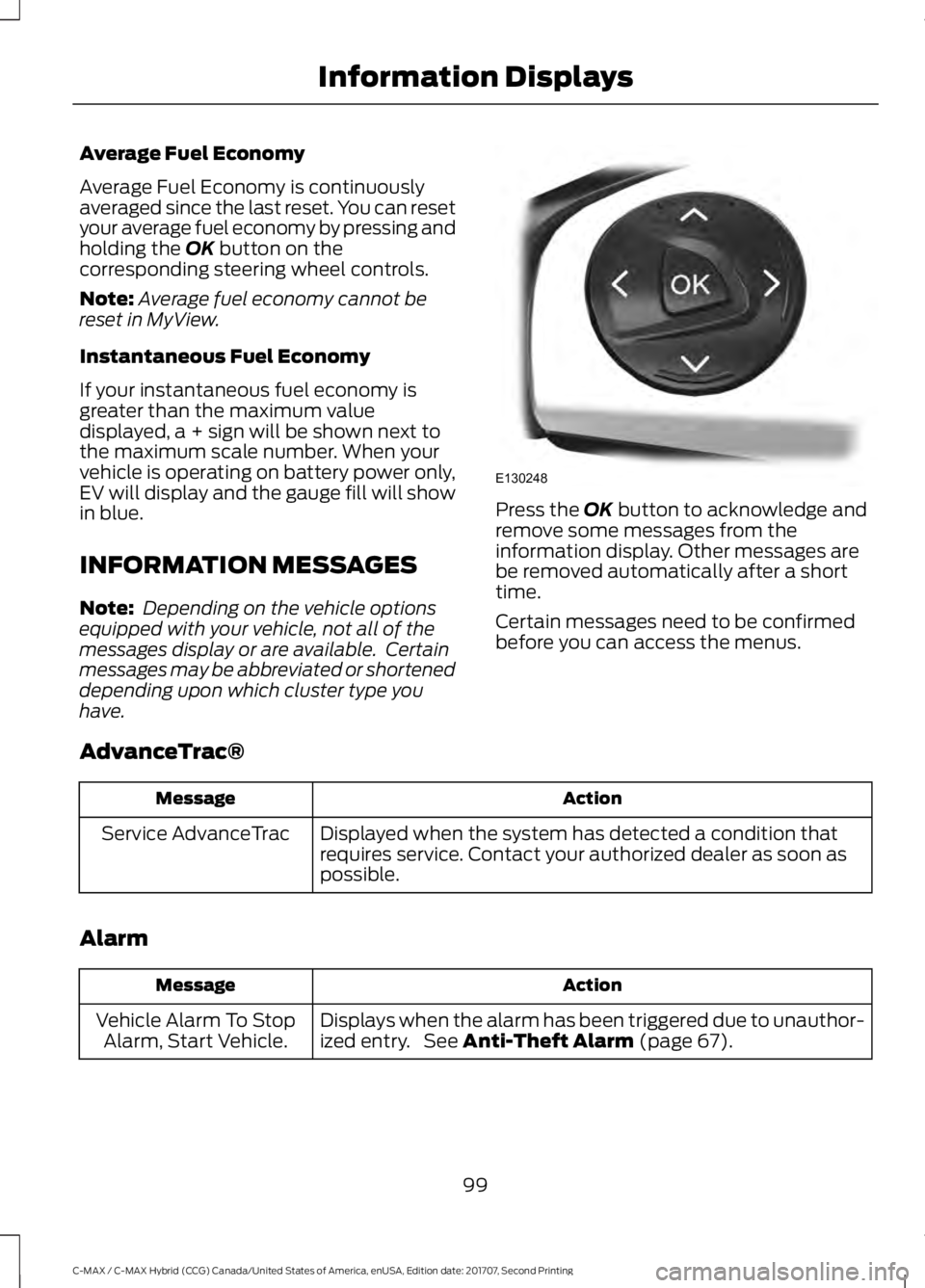
corresponding steering wheel controls.
Note: Average fuel economy cannot be
reset in MyView.
Instantaneous Fuel Economy
If your instantaneous fuel economy is
greater than the maximum value
displayed, a + sign will be shown next to
the maximum scale number. When your
vehicle is operating on battery power only,
EV will display and the gauge fill will show
in blue.
INFORMATION MESSAGES
Note: Depending on the vehicle options
equipped with your vehicle, not all of the
messages display or are available. Certain
messages may be abbreviated or shortened
depending upon which cluster type you
have. Press the
OK button to acknowledge and
remove some messages from the
information display. Other messages are
be removed automatically after a short
time.
Certain messages need to be confirmed
before you can access the menus.
AdvanceTrac® Action
Message
Displayed when the system has detected a condition that
requires service. Contact your authorized dealer as soon as
possible.
Service AdvanceTrac
Alarm Action
Message
Displays when the alarm has been triggered due to unauthor-
ized entry. See
Anti-Theft Alarm (page 67).
Vehicle Alarm To Stop
Alarm, Start Vehicle.
99
C-MAX / C-MAX Hybrid (CCG) Canada/United States of America, enUSA, Edition date: 201707, Second Printing Information DisplaysE130248
Page 107 of 475
Park Brake
Action
Message
Displays when the parking brake is set, the engine is running
and the vehicle is driven more than 3 mph (5 km/h). If the
warning stays on after the parking brake is released, contact
your authorized dealer.
Park Brake Engaged
Power Steering Action
Message
The power steering system has detected a condition that
requires service. See your authorized dealer.
Steering Fault Service
Now
The power steering system is not working. Stop the vehicle
a safe place. Contact your authorized dealer.
Steering Loss Stop
Safely
Remote Start Action
Message
Displayed when the remote start system is active.
Remote Start Active
Tire Pressure Monitoring System Action
Message
Displays when one or more tires on your vehicle have low tire
pressure. See Tire Pressure Monitoring System (page 265).
Tire Pressure Low
Displays when the tire pressure monitoring system is
malfunctioning. If the warning stays on or continues to come
on, contact your authorized dealer.
See Tire Pressure
Monitoring System (page 265).
Tire Pressure Monitor
Fault
Displayed when a tire pressure sensor is malfunctioning, or
your spare tire is in use. See
Tire Pressure Monitoring
System (page 265). If the warning stays on or continues to
come on, contact your authorized dealer as soon as possible.
Tire Pressure Sensor
Fault
104
C-MAX / C-MAX Hybrid (CCG) Canada/United States of America, enUSA, Edition date: 201707, Second Printing Information Displays
Page 112 of 475
Heated Rear Window
Press the button to clear the
heated rear window of thin ice
and fog. The heated rear
window turns off after a short period of
time. Press the button again to switch it
off.
Note: Do not use razor blades or other
sharp objects to clean or remove decals
from the inside of the heated rear window.
The vehicle warranty does not cover
damage caused to the heated rear window
grid lines.
Heated Exterior Mirrors (If Equipped)
When you switch the heated rear window
on, the heated exterior mirrors turn on.
Note: Do not remove ice from the mirrors
with a scraper or adjust the mirror glass
when it is frozen in place.
Note: Do not clean the mirror housing or
glass with harsh abrasives, fuel or other
petroleum-based cleaning products.
CABIN AIR FILTER
The cabin air filter is under the instrument
panel in the passenger footwell area or
under the center console on the passenger
side.
The system filters airborne particles such
as dust, spores and pollen in the air
supplied to and recirculated in the interior
of your vehicle.
Make sure you have a cabin air filter
installed at all times. Running the system
without a filter in place could degrade or
damage the system. Your vehicle cabin air filter gives you and
your passengers the following benefits:
•
It improves your driving comfort by
reducing particle concentration.
• It improves the interior compartment
cleanliness.
• It protects the climate control
components from particle deposits.
Change the air filter element at the proper
intervals.
For additional cabin air filter information,
or to replace the filter, see an authorized
dealer.
REMOTE START
(If Equipped)
The climate control system adjusts the
cabin temperature during remote start.
You cannot adjust the system during
remote start operation. Switch on the
ignition to return the system to its previous
settings. You can now make adjustments.
You need to switch on certain
vehicle-dependent features, such as:
• Heated seats.
• Heated mirrors.
• Heated rear window.
• Heated steering wheel.
You can adjust the settings using the
information display controls. See
Information Displays
(page 92).
Automatic Settings
You can set the climate control to operate
in AUTO mode through the information
display setting: Remote Start > Climate
Control > Heater-A/C > Auto. The climate
control system automatically sets the
interior temperature to 72°F (22°C).
109
C-MAX / C-MAX Hybrid (CCG) Canada/United States of America, enUSA, Edition date: 201707, Second Printing Climate ControlE72507
Page 114 of 475
SITTING IN THE CORRECT
POSITION
WARNINGS
Sitting improperly, out of position or
with the seatback reclined too far
can take weight off the seat cushion
and affect the decision of the passenger
sensing system, resulting in serious injury
or death in the event of a crash. Always sit
upright against your seat back, with your
feet on the floor. Do not recline the seatback as this
can cause the occupant to slide
under the safety belt, resulting in
serious injury in the event of a crash. Do not place objects higher than the
seatback to reduce the risk of serious
injury in the event of a crash or during
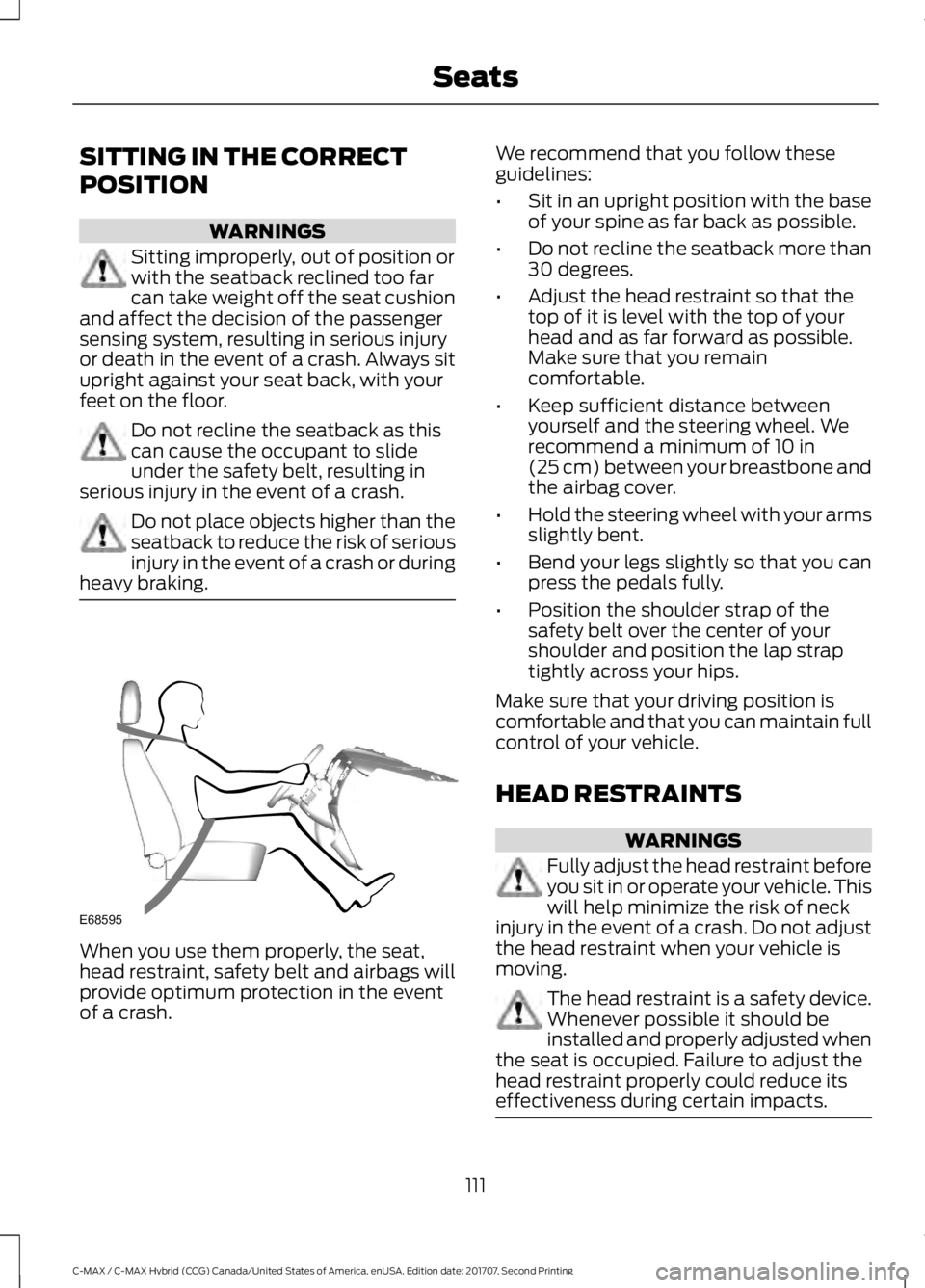
heavy braking. When you use them properly, the seat,
head restraint, safety belt and airbags will
provide optimum protection in the event
of a crash. We recommend that you follow these
guidelines:
•
Sit in an upright position with the base
of your spine as far back as possible.
• Do not recline the seatback more than
30 degrees.
• Adjust the head restraint so that the
top of it is level with the top of your
head and as far forward as possible.
Make sure that you remain
comfortable.
• Keep sufficient distance between
yourself and the steering wheel. We
recommend a minimum of 10 in
(25 cm) between your breastbone and
the airbag cover.
• Hold the steering wheel with your arms
slightly bent.
• Bend your legs slightly so that you can
press the pedals fully.
• Position the shoulder strap of the
safety belt over the center of your
shoulder and position the lap strap
tightly across your hips.
Make sure that your driving position is
comfortable and that you can maintain full
control of your vehicle.
HEAD RESTRAINTS WARNINGS
Fully adjust the head restraint before
you sit in or operate your vehicle. This
will help minimize the risk of neck
injury in the event of a crash. Do not adjust
the head restraint when your vehicle is
moving. The head restraint is a safety device.
Whenever possible it should be
installed and properly adjusted when
the seat is occupied. Failure to adjust the
head restraint properly could reduce its
effectiveness during certain impacts. 111
C-MAX / C-MAX Hybrid (CCG) Canada/United States of America, enUSA, Edition date: 201707, Second Printing SeatsE68595
Page 130 of 475
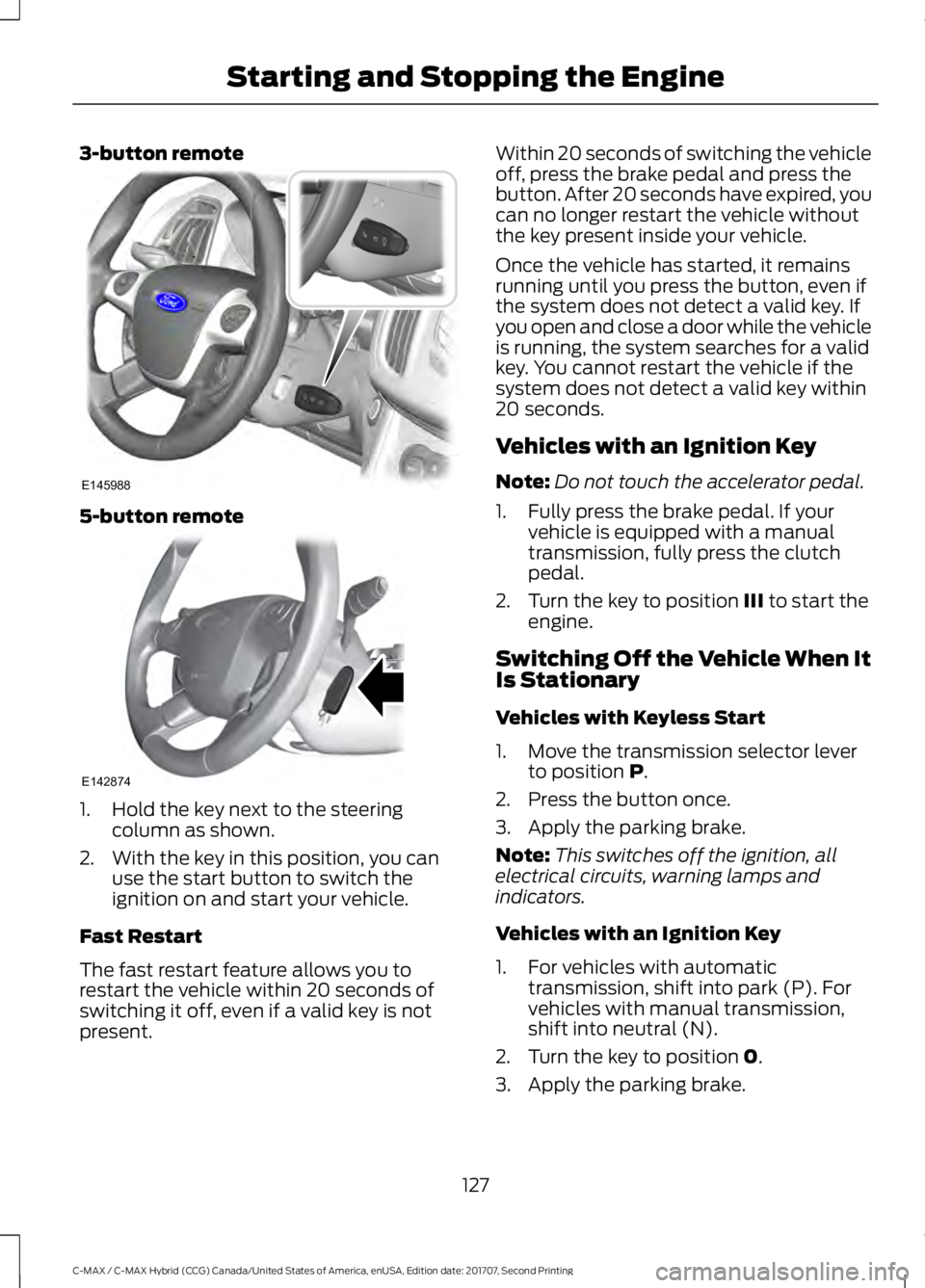
3-button remote
5-button remote
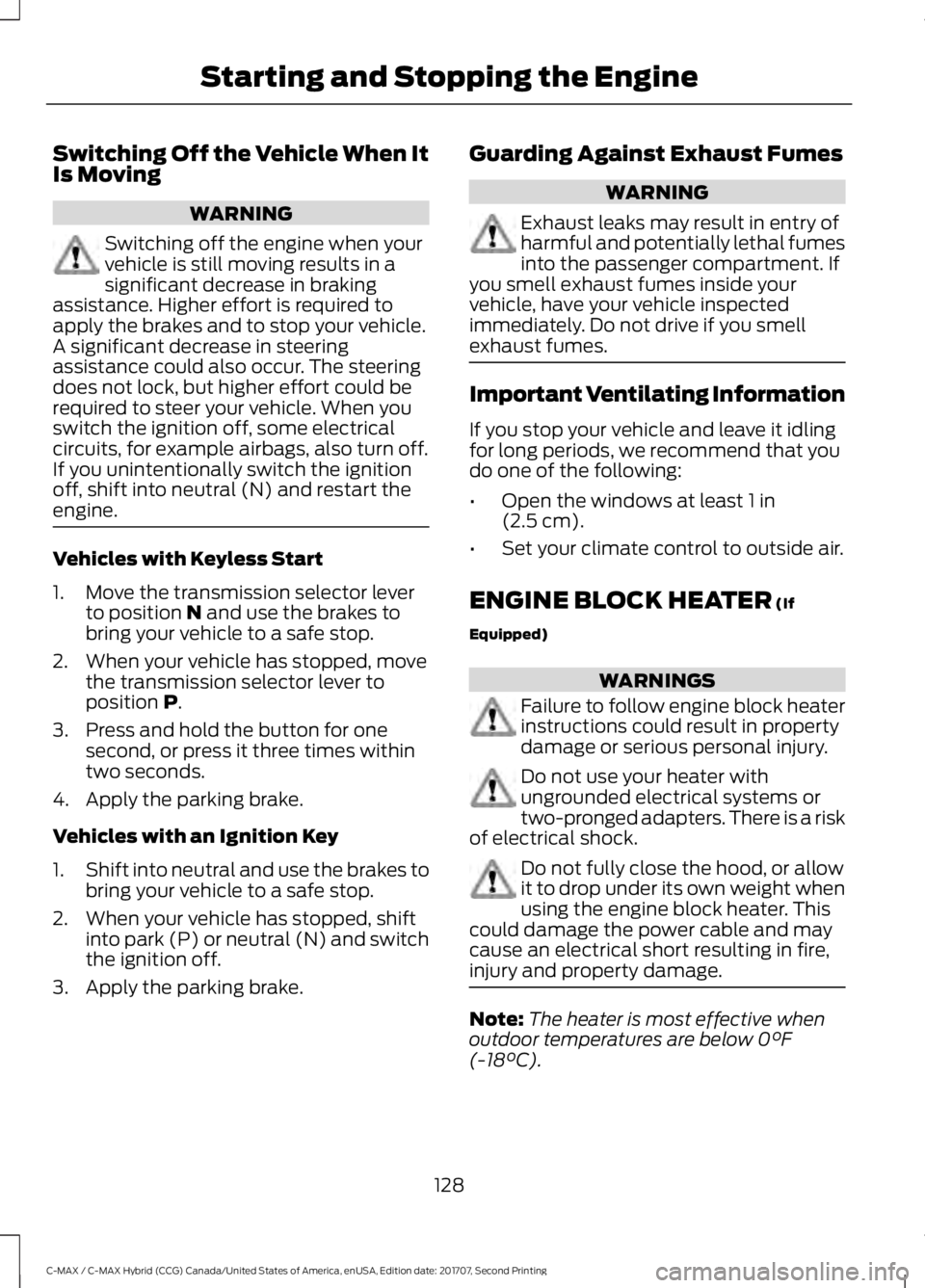
1. Hold the key next to the steering
column as shown.
2. With the key in this position, you can use the start button to switch the
ignition on and start your vehicle.
Fast Restart
The fast restart feature allows you to
restart the vehicle within 20 seconds of
switching it off, even if a valid key is not
present. Within 20 seconds of switching the vehicle
off, press the brake pedal and press the
button. After 20 seconds have expired, you
can no longer restart the vehicle without
the key present inside your vehicle.
Once the vehicle has started, it remains
running until you press the button, even if
the system does not detect a valid key. If
you open and close a door while the vehicle
is running, the system searches for a valid
key. You cannot restart the vehicle if the
system does not detect a valid key within
20 seconds.
Vehicles with an Ignition Key
Note:
Do not touch the accelerator pedal.
1. Fully press the brake pedal. If your vehicle is equipped with a manual
transmission, fully press the clutch
pedal.
2. Turn the key to position III to start the
engine.
Switching Off the Vehicle When It
Is Stationary
Vehicles with Keyless Start
1. Move the transmission selector lever to position
P.
2. Press the button once.
3. Apply the parking brake.
Note: This switches off the ignition, all
electrical circuits, warning lamps and
indicators.
Vehicles with an Ignition Key
1. For vehicles with automatic transmission, shift into park (P). For
vehicles with manual transmission,
shift into neutral (N).
2. Turn the key to position
0.
3. Apply the parking brake.
127
C-MAX / C-MAX Hybrid (CCG) Canada/United States of America, enUSA, Edition date: 201707, Second Printing Starting and Stopping the EngineE145988 E142874
Page 131 of 475
Switching Off the Vehicle When It
Is Moving
WARNING
Switching off the engine when your
vehicle is still moving results in a
significant decrease in braking
assistance. Higher effort is required to
apply the brakes and to stop your vehicle.
A significant decrease in steering
assistance could also occur. The steering
does not lock, but higher effort could be
required to steer your vehicle. When you
switch the ignition off, some electrical
circuits, for example airbags, also turn off.
If you unintentionally switch the ignition
off, shift into neutral (N) and restart the
engine. Vehicles with Keyless Start
1. Move the transmission selector lever
to position N and use the brakes to
bring your vehicle to a safe stop.
2. When your vehicle has stopped, move the transmission selector lever to
position
P.
3. Press and hold the button for one second, or press it three times within
two seconds.
4. Apply the parking brake.
Vehicles with an Ignition Key
1. Shift into neutral and use the brakes to
bring your vehicle to a safe stop.
2. When your vehicle has stopped, shift into park (P) or neutral (N) and switch
the ignition off.
3. Apply the parking brake. Guarding Against Exhaust Fumes WARNING
Exhaust leaks may result in entry of
harmful and potentially lethal fumes
into the passenger compartment. If
you smell exhaust fumes inside your
vehicle, have your vehicle inspected
immediately. Do not drive if you smell
exhaust fumes. Important Ventilating Information
If you stop your vehicle and leave it idling
for long periods, we recommend that you
do one of the following:
•
Open the windows at least
1 in
(2.5 cm).
• Set your climate control to outside air.
ENGINE BLOCK HEATER
(If
Equipped) WARNINGS
Failure to follow engine block heater
instructions could result in property
damage or serious personal injury.
Do not use your heater with
ungrounded electrical systems or
two-pronged adapters. There is a risk
of electrical shock. Do not fully close the hood, or allow
it to drop under its own weight when
using the engine block heater. This
could damage the power cable and may
cause an electrical short resulting in fire,
injury and property damage. Note:
The heater is most effective when
outdoor temperatures are below
0°F
(-18°C).
128
C-MAX / C-MAX Hybrid (CCG) Canada/United States of America, enUSA, Edition date: 201707, Second Printing Starting and Stopping the Engine