lights FORD C-MAY HYBRID 2018 Owner's Manual
[x] Cancel search | Manufacturer: FORD, Model Year: 2018, Model line: C-MAY HYBRID, Model: FORD C-MAY HYBRID 2018Pages: 475, PDF Size: 8.09 MB
Page 381 of 475
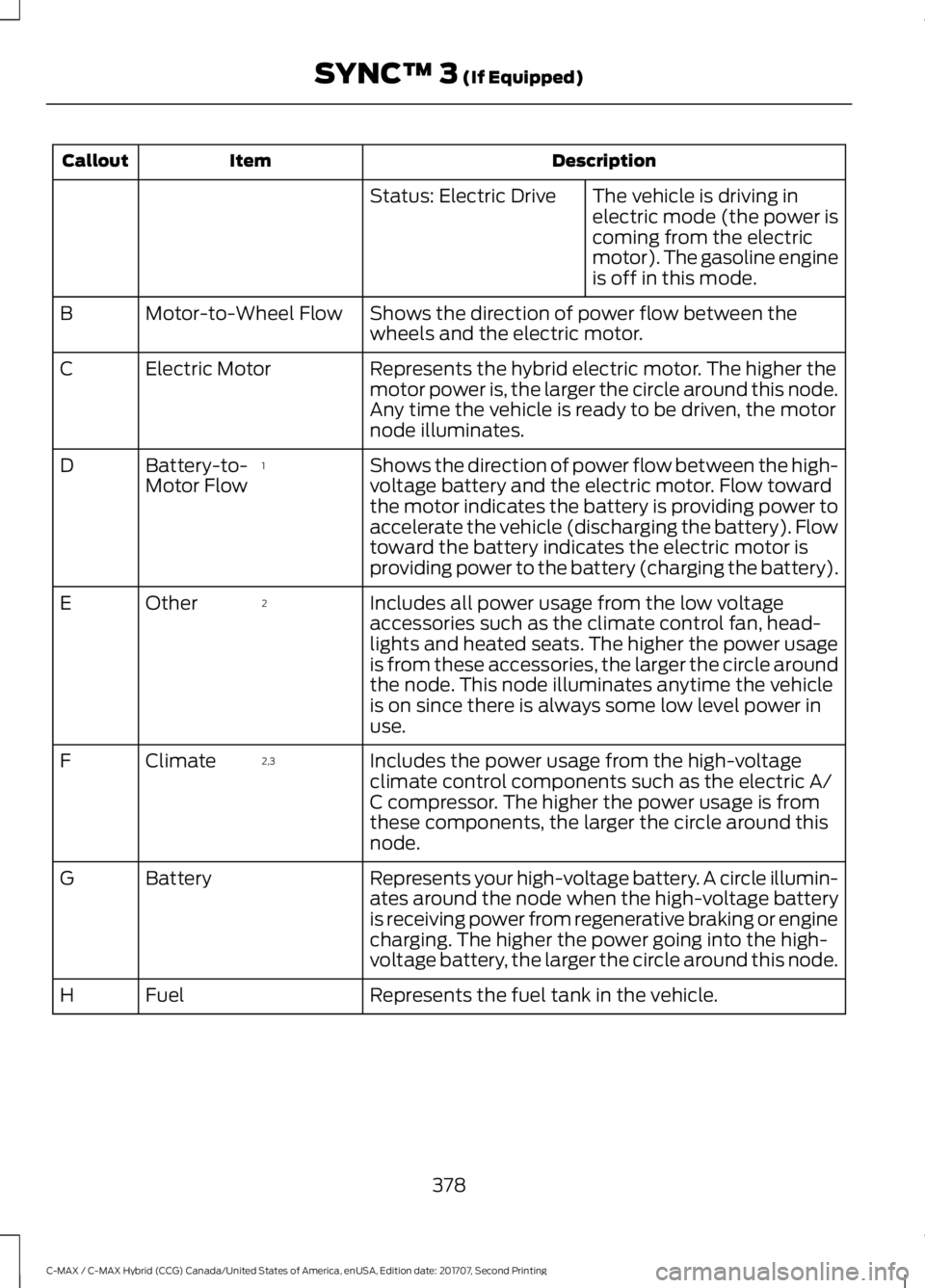
Description
Item
Callout
The vehicle is driving in
electric mode (the power is
coming from the electric
motor). The gasoline engine
is off in this mode.
Status: Electric Drive
Shows the direction of power flow between the
wheels and the electric motor.
Motor-to-Wheel Flow
B
Represents the hybrid electric motor. The higher the
motor power is, the larger the circle around this node.
Any time the vehicle is ready to be driven, the motor
node illuminates.
Electric Motor
C
Shows the direction of power flow between the high-
voltage battery and the electric motor. Flow toward
the motor indicates the battery is providing power to
accelerate the vehicle (discharging the battery). Flow
toward the battery indicates the electric motor is
providing power to the battery (charging the battery).
1
Battery-to-
Motor Flow
D
Includes all power usage from the low voltage
accessories such as the climate control fan, head-
lights and heated seats. The higher the power usage
is from these accessories, the larger the circle around
the node. This node illuminates anytime the vehicle
is on since there is always some low level power in
use.
2
Other
E
Includes the power usage from the high-voltage
climate control components such as the electric A/
C compressor. The higher the power usage is from
these components, the larger the circle around this
node.
2,3
Climate
F
Represents your high-voltage battery. A circle illumin-
ates around the node when the high-voltage battery
is receiving power from regenerative braking or engine
charging. The higher the power going into the high-
voltage battery, the larger the circle around this node.
Battery
G
Represents the fuel tank in the vehicle.
Fuel
H
378
C-MAX / C-MAX Hybrid (CCG) Canada/United States of America, enUSA, Edition date: 201707, Second Printing SYNC™ 3 (If Equipped)
Page 382 of 475
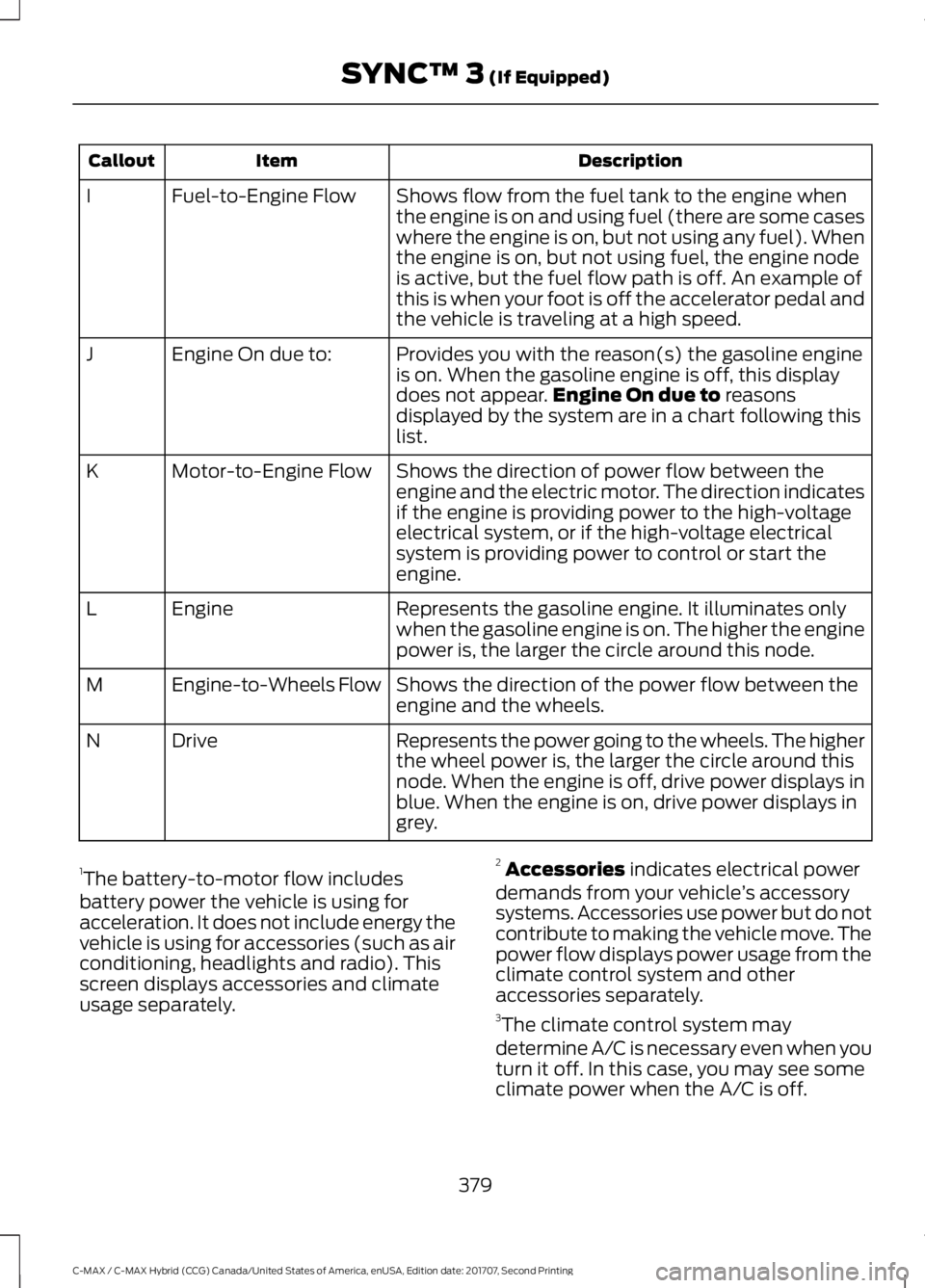
Description
Item
Callout
Shows flow from the fuel tank to the engine when
the engine is on and using fuel (there are some cases
where the engine is on, but not using any fuel). When
the engine is on, but not using fuel, the engine node
is active, but the fuel flow path is off. An example of
this is when your foot is off the accelerator pedal and
the vehicle is traveling at a high speed.
Fuel-to-Engine Flow
I
Provides you with the reason(s) the gasoline engine
is on. When the gasoline engine is off, this display
does not appear.Engine On due to reasons
displayed by the system are in a chart following this
list.
Engine On due to:
J
Shows the direction of power flow between the
engine and the electric motor. The direction indicates
if the engine is providing power to the high-voltage
electrical system, or if the high-voltage electrical
system is providing power to control or start the
engine.
Motor-to-Engine Flow
K
Represents the gasoline engine. It illuminates only
when the gasoline engine is on. The higher the engine
power is, the larger the circle around this node.
Engine
L
Shows the direction of the power flow between the
engine and the wheels.
Engine-to-Wheels Flow
M
Represents the power going to the wheels. The higher
the wheel power is, the larger the circle around this
node. When the engine is off, drive power displays in
blue. When the engine is on, drive power displays in
grey.
Drive
N
1 The battery-to-motor flow includes
battery power the vehicle is using for
acceleration. It does not include energy the
vehicle is using for accessories (such as air
conditioning, headlights and radio). This
screen displays accessories and climate
usage separately. 2
Accessories
indicates electrical power
demands from your vehicle ’s accessory
systems. Accessories use power but do not
contribute to making the vehicle move. The
power flow displays power usage from the
climate control system and other
accessories separately.
3 The climate control system may
determine A/C is necessary even when you
turn it off. In this case, you may see some
climate power when the A/C is off.
379
C-MAX / C-MAX Hybrid (CCG) Canada/United States of America, enUSA, Edition date: 201707, Second Printing SYNC™ 3
(If Equipped)
Page 420 of 475
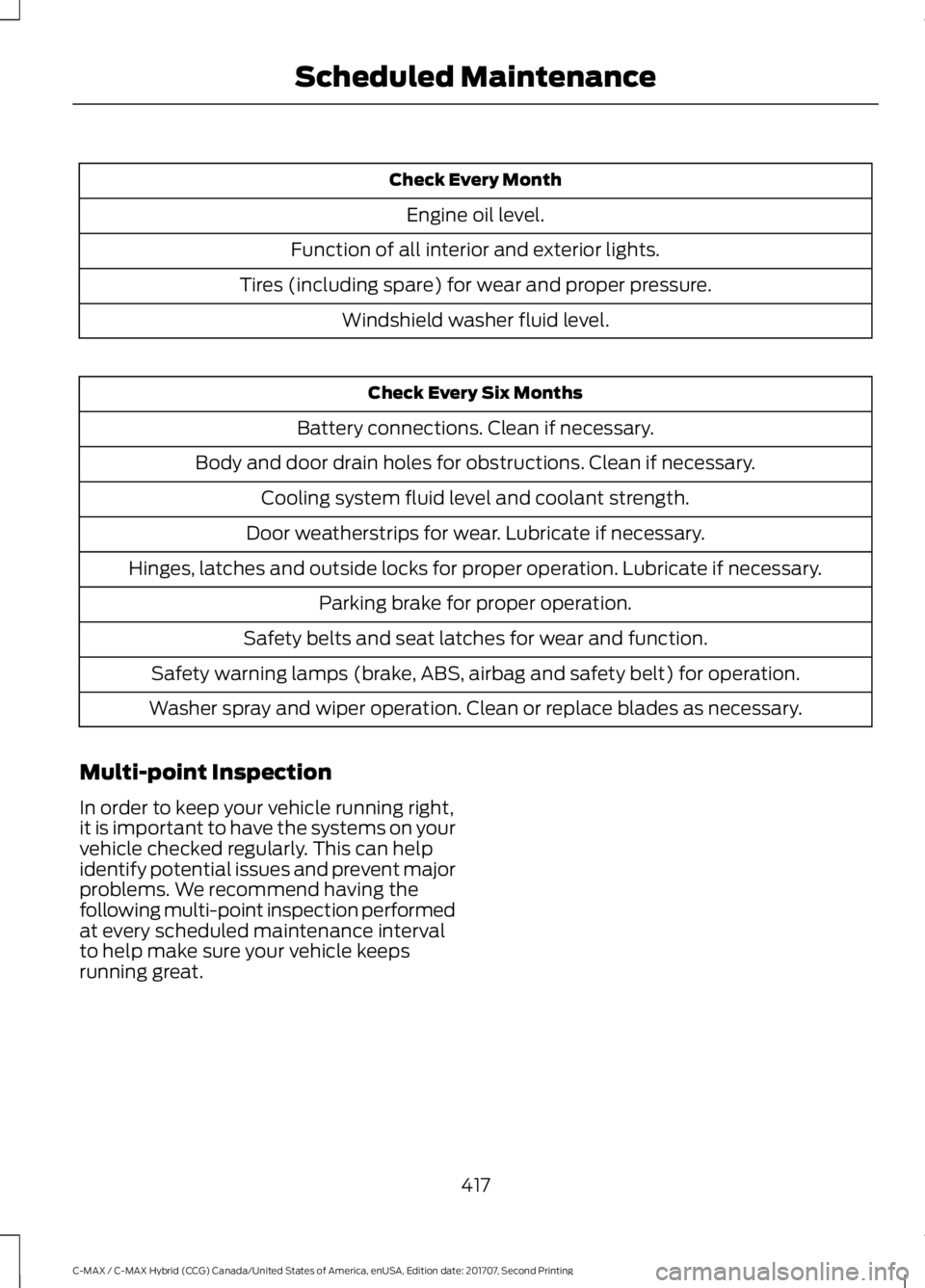
Check Every Month
Engine oil level.
Function of all interior and exterior lights.
Tires (including spare) for wear and proper pressure. Windshield washer fluid level. Check Every Six Months
Battery connections. Clean if necessary.
Body and door drain holes for obstructions. Clean if necessary. Cooling system fluid level and coolant strength.
Door weatherstrips for wear. Lubricate if necessary.
Hinges, latches and outside locks for proper operation. Lubricate if necessary. Parking brake for proper operation.
Safety belts and seat latches for wear and function.
Safety warning lamps (brake, ABS, airbag and safety belt) for operation.
Washer spray and wiper operation. Clean or replace blades as necessary.
Multi-point Inspection
In order to keep your vehicle running right,
it is important to have the systems on your
vehicle checked regularly. This can help
identify potential issues and prevent major
problems. We recommend having the
following multi-point inspection performed
at every scheduled maintenance interval
to help make sure your vehicle keeps
running great.
417
C-MAX / C-MAX Hybrid (CCG) Canada/United States of America, enUSA, Edition date: 201707, Second Printing Scheduled Maintenance
Page 468 of 475
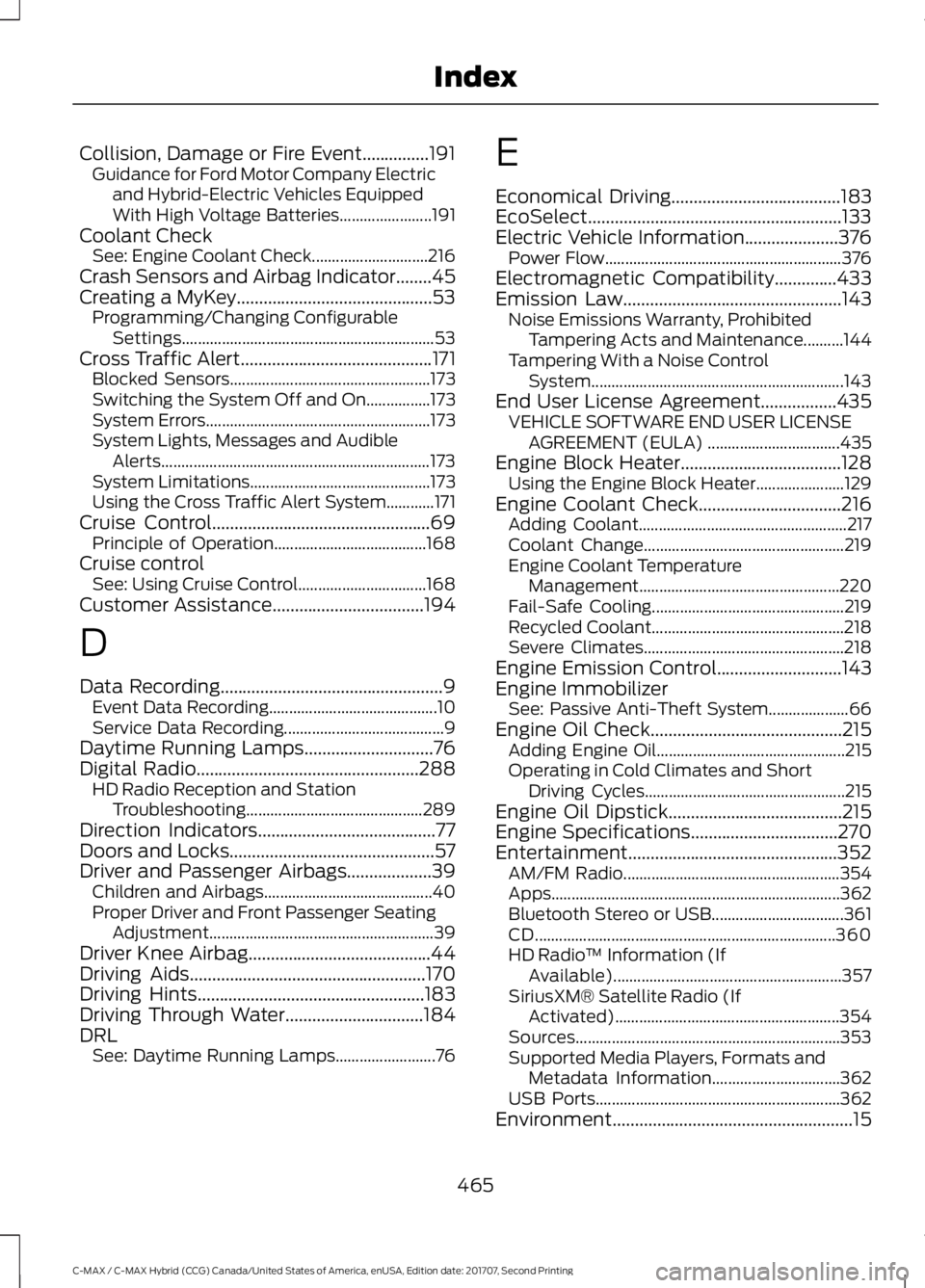
Collision, Damage or Fire Event...............191
Guidance for Ford Motor Company Electric
and Hybrid-Electric Vehicles Equipped
With High Voltage Batteries....................... 191
Coolant Check See: Engine Coolant Check............................. 216
Crash Sensors and Airbag Indicator........45
Creating a MyKey............................................53 Programming/Changing Configurable
Settings............................................................... 53
Cross Traffic Alert
...........................................171
Blocked Sensors.................................................. 173
Switching the System Off and On................173
System Errors........................................................ 173
System Lights, Messages and Audible Alerts................................................................... 173
System Limitations............................................. 173
Using the Cross Traffic Alert System............171
Cruise Control
.................................................69
Principle of Operation...................................... 168
Cruise control See: Using Cruise Control................................ 168
Customer Assistance
..................................194
D
Data Recording
..................................................9
Event Data Recording.......................................... 10
Service Data Recording........................................ 9
Daytime Running Lamps.............................76
Digital Radio
..................................................288
HD Radio Reception and Station
Troubleshooting............................................ 289
Direction Indicators
........................................77
Doors and Locks..............................................57
Driver and Passenger Airbags...................39 Children and Airbags.......................................... 40
Proper Driver and Front Passenger Seating Adjustment........................................................ 39
Driver Knee Airbag
.........................................44
Driving Aids.....................................................170
Driving Hints...................................................183
Driving Through Water...............................184
DRL See: Daytime Running Lamps......................... 76E
Economical Driving
......................................183
EcoSelect.........................................................133
Electric Vehicle Information
.....................376
Power Flow........................................................... 376
Electromagnetic Compatibility
..............433
Emission Law.................................................143 Noise Emissions Warranty, Prohibited
Tampering Acts and Maintenance..........144
Tampering With a Noise Control System............................................................... 143
End User License Agreement
.................435
VEHICLE SOFTWARE END USER LICENSE
AGREEMENT (EULA) ................................. 435
Engine Block Heater
....................................128
Using the Engine Block Heater...................... 129
Engine Coolant Check
................................216
Adding Coolant.................................................... 217
Coolant Change.................................................. 219
Engine Coolant Temperature Management.................................................. 220
Fail-Safe Cooling................................................ 219
Recycled Coolant................................................ 218
Severe Climates.................................................. 218
Engine Emission Control............................143
Engine Immobilizer See: Passive Anti-Theft System.................... 66
Engine Oil Check
...........................................215
Adding Engine Oil............................................... 215
Operating in Cold Climates and Short Driving Cycles.................................................. 215
Engine Oil Dipstick.......................................215
Engine Specifications
.................................270
Entertainment...............................................352 AM/FM Radio...................................................... 354
Apps........................................................................\
362
Bluetooth Stereo or USB................................. 361
CD........................................................................\
... 360
HD Radio ™ Information (If
Available)......................................................... 357
SiriusXM® Satellite Radio (If Activated)........................................................ 354
Sources.................................................................. 353
Supported Media Players, Formats and Metadata Information................................ 362
USB Ports............................................................. 362
Environment
......................................................15
465
C-MAX / C-MAX Hybrid (CCG) Canada/United States of America, enUSA, Edition date: 201707, Second Printing Index
Page 474 of 475
T
Technical Specifications
See: Capacities and Specifications............270
The Better Business Bureau (BBB) Auto Line Program (U.S. Only).......................196
Tire Care..........................................................250 Glossary of Tire Terminology......................... 252
Information About Uniform Tire Quality Grading............................................................. 250
Information Contained on the Tire Sidewall............................................................ 253
Temperature A B C............................................. 251
Traction AA A B C................................................ 251
Treadwear.............................................................. 251
Tire Inflation When Punctured See: Tire Sealant and Inflator Kit.................244
Tire Pressure Monitoring System...........265 Changing Tires With a Tire Pressure
Monitoring System....................................... 266
Understanding Your Tire Pressure Monitoring System ...................................... 266
Tire Repair Kit See: Tire Sealant and Inflator Kit.................244
Tire Sealant and Inflator Kit....................244 First Stage: Inflating the Tire with Sealing
Compound and Air....................................... 246
General Information......................................... 245
Second Stage: Checking Tire Pressure........................................................... 248
Tips for Use of the Kit....................................... 245
What to Do After the Tire has Been Sealed............................................................... 248
What to Do When a Tire Is Punctured........................................................ 246
Tires See: Wheels and Tires..................................... 244
Towing a Trailer..............................................181
Towing the Vehicle on Four Wheels............................................................181
Emergency Towing.............................................. 181
Recreational Towing........................................... 181
Towing...............................................................181
Traction Control............................................156
Principle of Operation....................................... 156
Transmission Code Designation
.............273
Transmission..................................................150
Transporting the Vehicle............................192 U
Under Hood Overview
.................................213
Unique Driving Characteristics.................131
Universal Garage Door Opener
................118
HomeLink Wireless Control System............118
USB Port
.........................................................293
Using Cruise Control...................................168 Switching Cruise Control Off......................... 168
Switching Cruise Control On.......................... 168
Switching to ECO Cruise.................................. 169
Using MyKey With Remote Start Systems..........................................................55
Using Snow Chains
.....................................264
Using Stability Control...............................158
Using SYNC™ With Your Media Player
..............................................................315
Accessing Your USB Song Library................319
Bluetooth Devices and System
Settings.............................................................. 321
Connecting Your Digital Media Player to the USB Port............................................................ 315
Media Menu Features....................................... 318
Media Voice Commands................................. 316
USB 2....................................................................... 321
Voice Commands for Audio Sources..........322
Using SYNC™ With Your Phone
............298
Accessing Features through the Phone
Menu.................................................................. 303
Accessing Your Phone Settings................... 306
Bluetooth Devices............................................. 307
Making Calls........................................................ 302
Pairing a Phone for the First Time..............299
Pairing Subsequent Phones......................... 300
Phone Options during an Active Call.........302
Phone Voice Commands............................... 300
Receiving Calls................................................... 302
System Settings................................................ 308
Text Messaging.................................................. 304
Using Traction Control................................156 Switching the System Off............................... 156
System Indicator Lights and Messages.......................................................... 156
Using a Switch..................................................... 156
Using the Information Display Controls............................................................. 156
Using Voice Recognition
...........................296
Audio Voice Commands................................. 346
471
C-MAX / C-MAX Hybrid (CCG) Canada/United States of America, enUSA, Edition date: 201707, Second Printing Index