ignition FORD E SERIES 2014 4.G Workshop Manual
[x] Cancel search | Manufacturer: FORD, Model Year: 2014, Model line: E SERIES, Model: FORD E SERIES 2014 4.GPages: 438, PDF Size: 5.12 MB
Page 285 of 438
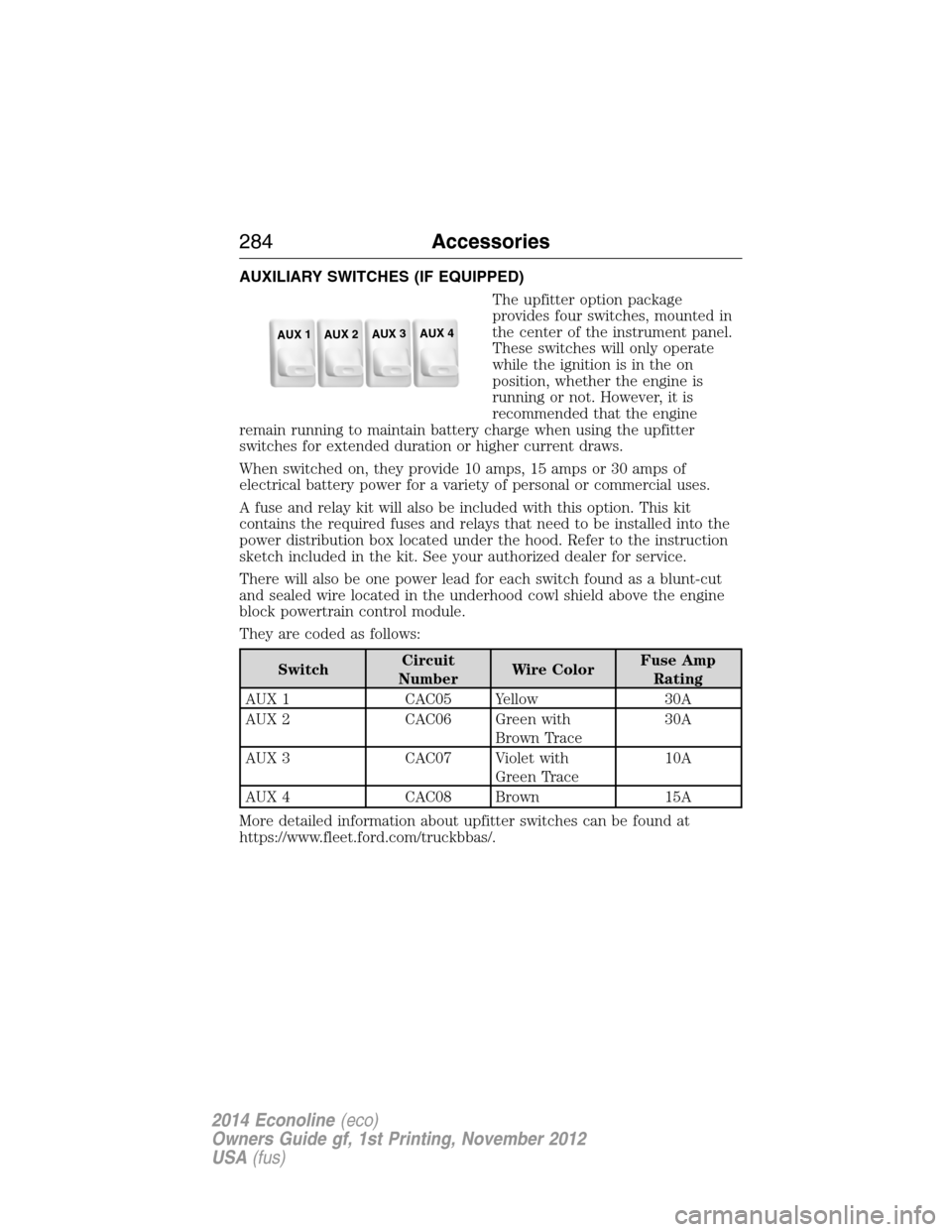
AUXILIARY SWITCHES (IF EQUIPPED)
The upfitter option package
provides four switches, mounted in
the center of the instrument panel.
These switches will only operate
while the ignition is in the on
position, whether the engine is
running or not. However, it is
recommended that the engine
remain running to maintain battery charge when using the upfitter
switches for extended duration or higher current draws.
When switched on, they provide 10 amps, 15 amps or 30 amps of
electrical battery power for a variety of personal or commercial uses.
A fuse and relay kit will also be included with this option. This kit
contains the required fuses and relays that need to be installed into the
power distribution box located under the hood. Refer to the instruction
sketch included in the kit. See your authorized dealer for service.
There will also be one power lead for each switch found as a blunt-cut
and sealed wire located in the underhood cowl shield above the engine
block powertrain control module.
They are coded as follows:
SwitchCircuit
NumberWire ColorFuse Amp
Rating
AUX 1 CAC05 Yellow 30A
AUX 2 CAC06 Green with
Brown Trace30A
AUX 3 CAC07 Violet with
Green Trace10A
AUX 4 CAC08 Brown 15A
More detailed information about upfitter switches can be found at
https://www.fleet.ford.com/truckbbas/.
AUX 1
AUX 2
AUX 3
AUX 4
284Accessories
2014 Econoline(eco)
Owners Guide gf, 1st Printing, November 2012
USA(fus)
Page 296 of 438
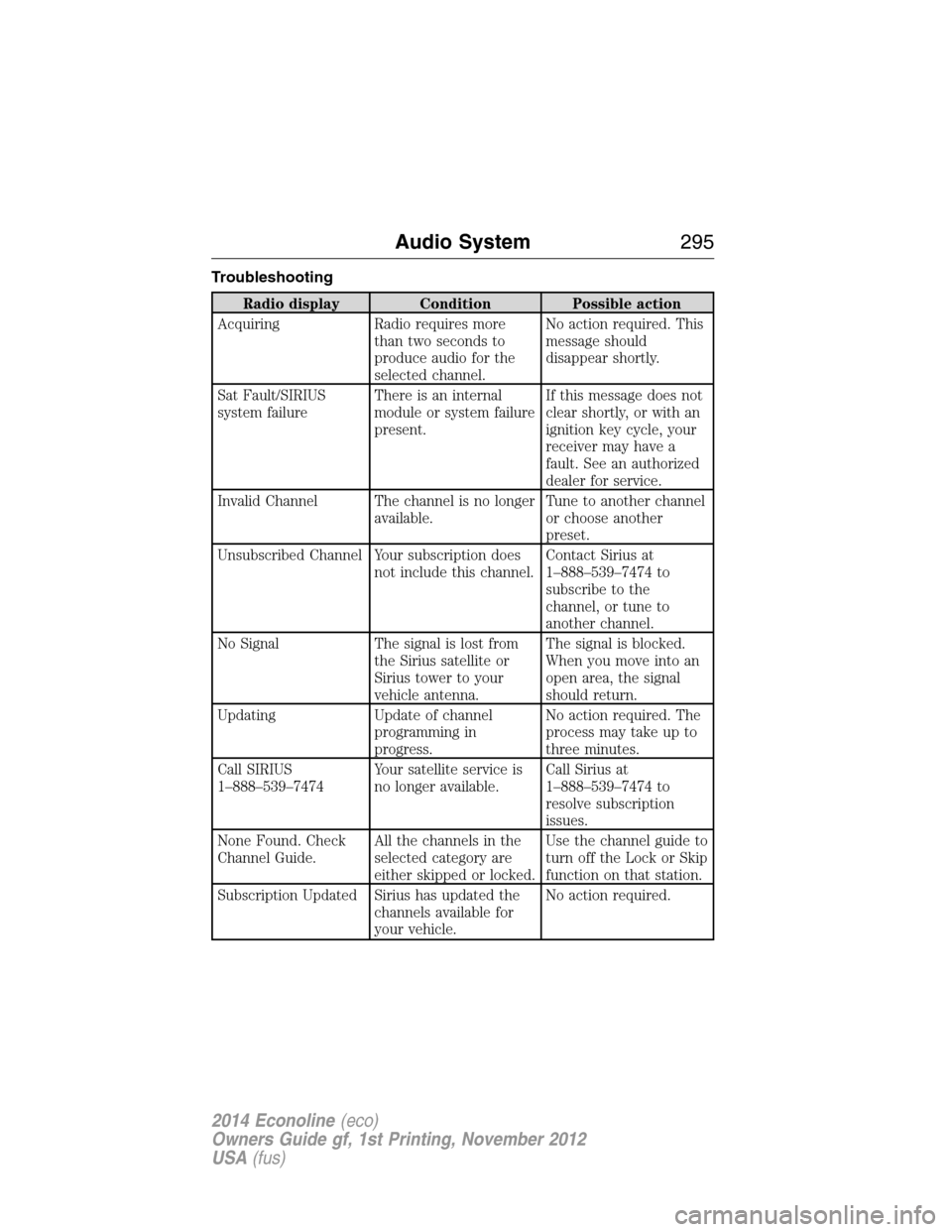
Troubleshooting
Radio display Condition Possible action
Acquiring Radio requires more
than two seconds to
produce audio for the
selected channel.No action required. This
message should
disappear shortly.
Sat Fault/SIRIUS
system failureThere is an internal
module or system failure
present.If this message does not
clear shortly, or with an
ignition key cycle, your
receiver may have a
fault. See an authorized
dealer for service.
Invalid Channel The channel is no longer
available.Tune to another channel
or choose another
preset.
Unsubscribed Channel Your subscription does
not include this channel.Contact Sirius at
1–888–539–7474 to
subscribe to the
channel, or tune to
another channel.
No Signal The signal is lost from
the Sirius satellite or
Sirius tower to your
vehicle antenna.The signal is blocked.
When you move into an
open area, the signal
should return.
Updating Update of channel
programming in
progress.No action required. The
process may take up to
three minutes.
Call SIRIUS
1–888–539–7474Your satellite service is
no longer available.Call Sirius at
1–888–539–7474 to
resolve subscription
issues.
None Found. Check
Channel Guide.All the channels in the
selected category are
either skipped or locked.Use the channel guide to
turn off the Lock or Skip
function on that station.
Subscription Updated Sirius has updated the
channels available for
your vehicle.No action required.
Audio System295
2014 Econoline(eco)
Owners Guide gf, 1st Printing, November 2012
USA(fus)
Page 304 of 438
Helpful Hints
•Make sure the interior of the vehicle is as quiet as possible. Wind
noise from open windows and road vibrations may prevent the system
from correctly recognizing spoken commands.
•After pressing the voice icon, wait until after the tone sounds and
Listening appears before saying a command. Any command spoken
prior to this does not register with the system.
•Speak naturally, without long pauses between words.
•At any time you can interrupt the system while it is speaking by
pressing the voice icon.
USING SYNC WITH YOUR PHONE
Hands-free calling is one of the main features of SYNC. While the system
supports a variety of features, many are dependent on your cellular
phone’s functionality. At a minimum, most cellular phones with Bluetooth
wireless technology support the following functions:
•Answering an incoming call
•Ending a call
•Using privacy mode
•Dialing a number
•Redialing
•Call waiting notification
•Caller ID.
Other features, such as text messaging using Bluetooth and automatic
phonebook download, are phone-dependent features. To check your
phone’s compatibility, see your phone’s user manual and visit
www.SYNCMyRide.com, www.SYNCMyRide.ca or www.syncmaroute.ca.
Pairing a Phone for the First Time
Note:SYNC can support downloading up to approximately 1000 entries
per Bluetooth-enabled cellular phone.
Note:Make sure the vehicle ignition and radio are turned on and the
transmission is in positionP.
Note:To scroll through the menus, press the up and down arrows on
your audio system.
SYNC®303
2014 Econoline(eco)
Owners Guide gf, 1st Printing, November 2012
USA(fus)
Page 305 of 438
Wirelessly pairing your phone with SYNC allows you to make and receive
hands-free calls.
1. Press the phone button; when the display indicates no phone is
paired, pressOK.
2. WhenFind SYNCappears in the display, pressOK.
3. Put your phone into Bluetooth discovery mode. See your phone’s
user guide if necessary.
4. When prompted on your phone’s display, enter the six-digit PIN
provided by SYNC in the radio display.
5. The display indicates when the pairing is successful.
Depending on your phone’s capability and your market, the system may
prompt you with questions such as setting the current phone as the
primary phone (the phone SYNC automatically tries to connect with first
upon vehicle start-up), downloading your phone book, etc.
Pairing Subsequent Phones
Note:To scroll through the menus, press the up and down arrows on
your audio system.
Note:Make sure the vehicle ignition and radio are turned on and that
the transmission is in positionP.
1. Press the phone button and scroll until System Settings is selected.
2. Press OK and scroll until Bluetooth Devices is selected and press OK.
3. Scroll until Add Bluetooth Device is selected and press OK.
4. When Find SYNC appears in the display, press OK.
5. Put your phone into Bluetooth discovery mode. See your phone’s
user guide if necessary.
6. When prompted on your phone’s display, enter the six-digit PIN
provided by SYNC in the radio display. The display indicates when
the pairing is successful.
7. The system then prompts with questions such as if you would like to
set the current phone as the primary phone (the phone SYNC
automatically tries to connect with first upon vehicle start-up),
download your phone book, etc.
304SYNC®
2014 Econoline(eco)
Owners Guide gf, 1st Printing, November 2012
USA(fus)
Page 313 of 438
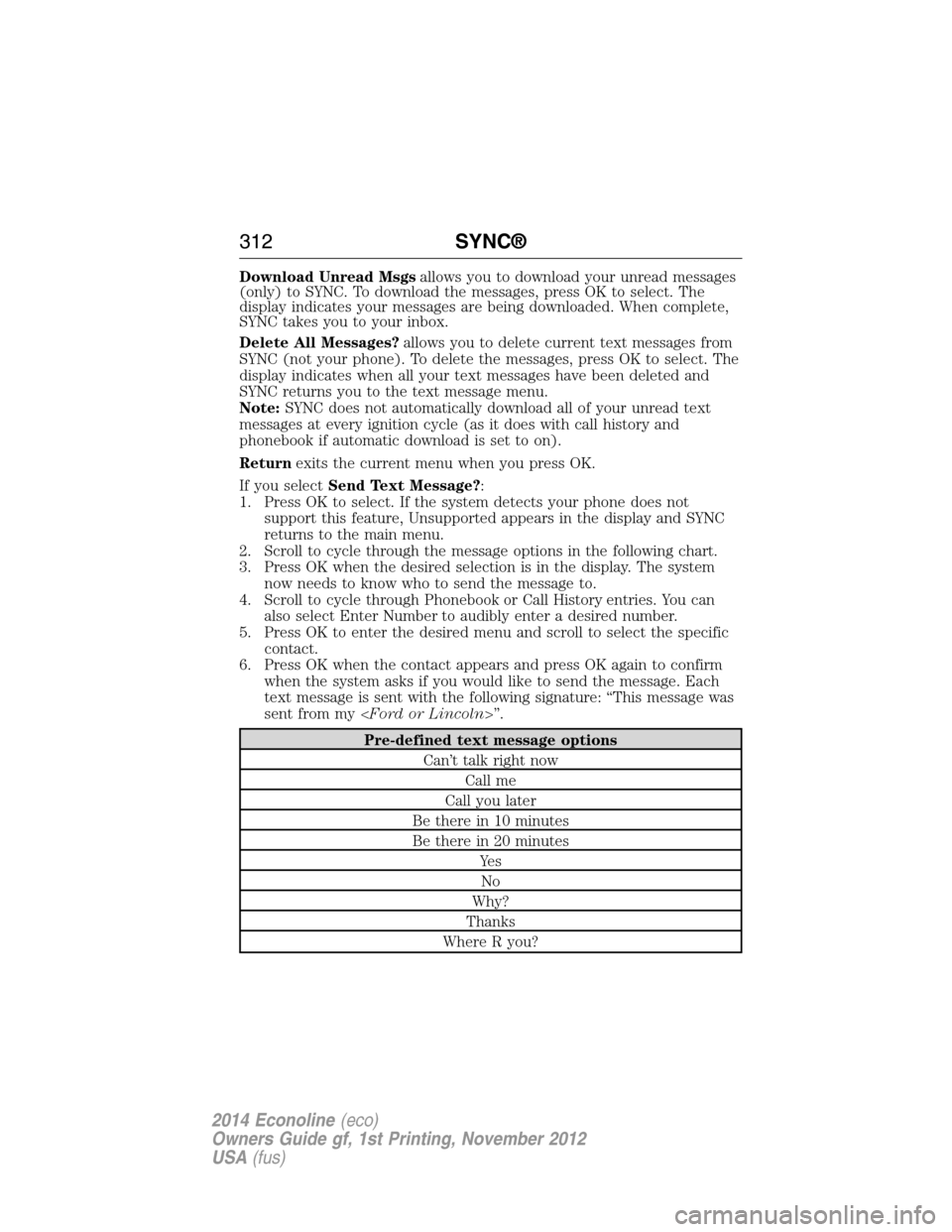
Download Unread Msgsallows you to download your unread messages
(only) to SYNC. To download the messages, press OK to select. The
display indicates your messages are being downloaded. When complete,
SYNC takes you to your inbox.
Delete All Messages?allows you to delete current text messages from
SYNC (not your phone). To delete the messages, press OK to select. The
display indicates when all your text messages have been deleted and
SYNC returns you to the text message menu.
Note:SYNC does not automatically download all of your unread text
messages at every ignition cycle (as it does with call history and
phonebook if automatic download is set to on).
Returnexits the current menu when you press OK.
If you selectSend Text Message?:
1. Press OK to select. If the system detects your phone does not
support this feature, Unsupported appears in the display and SYNC
returns to the main menu.
2. Scroll to cycle through the message options in the following chart.
3. Press OK when the desired selection is in the display. The system
now needs to know who to send the message to.
4. Scroll to cycle through Phonebook or Call History entries. You can
also select Enter Number to audibly enter a desired number.
5. Press OK to enter the desired menu and scroll to select the specific
contact.
6. Press OK when the contact appears and press OK again to confirm
when the system asks if you would like to send the message. Each
text message is sent with the following signature: “This message was
sent from my
Pre-defined text message options
Can’t talk right now
Call me
Call you later
Be there in 10 minutes
Be there in 20 minutes
Ye s
No
Why?
Thanks
Where R you?
312SYNC®
2014 Econoline(eco)
Owners Guide gf, 1st Printing, November 2012
USA(fus)
Page 316 of 438
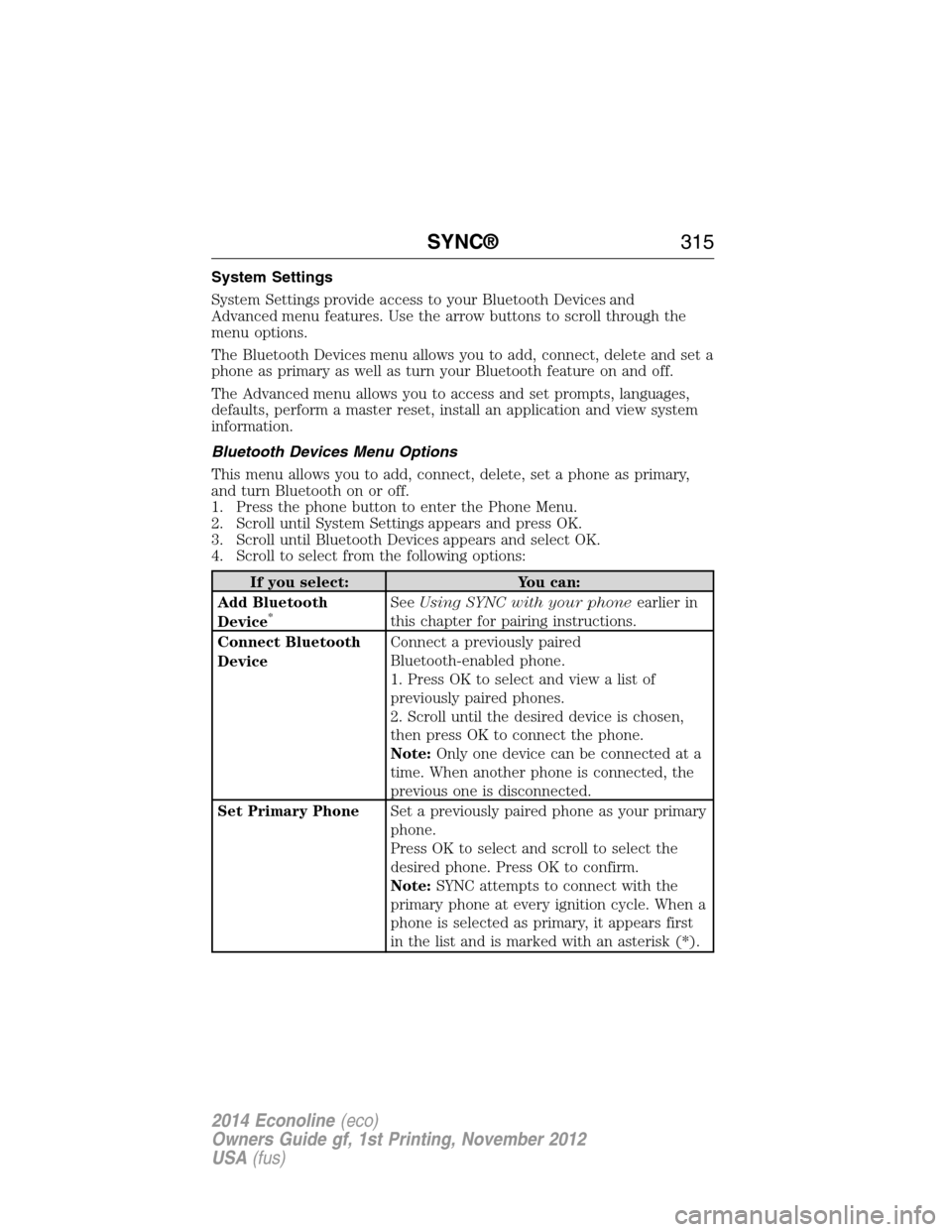
System Settings
System Settings provide access to your Bluetooth Devices and
Advanced menu features. Use the arrow buttons to scroll through the
menu options.
The Bluetooth Devices menu allows you to add, connect, delete and set a
phone as primary as well as turn your Bluetooth feature on and off.
The Advanced menu allows you to access and set prompts, languages,
defaults, perform a master reset, install an application and view system
information.
Bluetooth Devices Menu Options
This menu allows you to add, connect, delete, set a phone as primary,
and turn Bluetooth on or off.
1. Press the phone button to enter the Phone Menu.
2. Scroll until System Settings appears and press OK.
3. Scroll until Bluetooth Devices appears and select OK.
4. Scroll to select from the following options:
If you select: You can:
Add Bluetooth
Device
*SeeUsing SYNC with your phoneearlier in
this chapter for pairing instructions.
Connect Bluetooth
DeviceConnect a previously paired
Bluetooth-enabled phone.
1. Press OK to select and view a list of
previously paired phones.
2. Scroll until the desired device is chosen,
then press OK to connect the phone.
Note:Only one device can be connected at a
time. When another phone is connected, the
previous one is disconnected.
Set Primary PhoneSet a previously paired phone as your primary
phone.
Press OK to select and scroll to select the
desired phone. Press OK to confirm.
Note:SYNC attempts to connect with the
primary phone at every ignition cycle. When a
phone is selected as primary, it appears first
in the list and is marked with an asterisk (*).
SYNC®315
2014 Econoline(eco)
Owners Guide gf, 1st Printing, November 2012
USA(fus)
Page 369 of 438
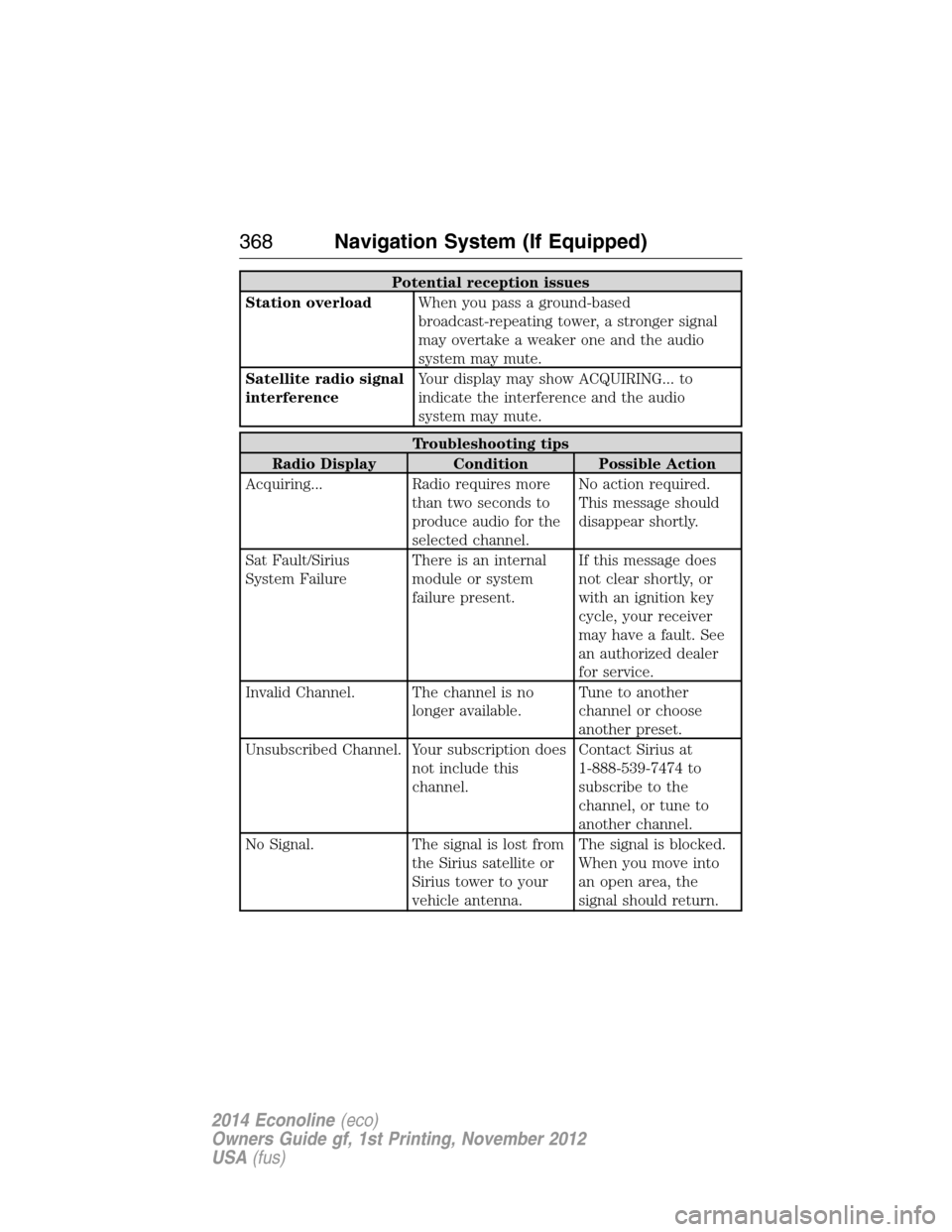
Potential reception issues
Station overloadWhen you pass a ground-based
broadcast-repeating tower, a stronger signal
may overtake a weaker one and the audio
system may mute.
Satellite radio signal
interferenceYour display may show ACQUIRING... to
indicate the interference and the audio
system may mute.
Troubleshooting tips
Radio Display Condition Possible Action
Acquiring... Radio requires more
than two seconds to
produce audio for the
selected channel.No action required.
This message should
disappear shortly.
Sat Fault/Sirius
System FailureThere is an internal
module or system
failure present.If this message does
not clear shortly, or
with an ignition key
cycle, your receiver
may have a fault. See
an authorized dealer
for service.
Invalid Channel. The channel is no
longer available.Tune to another
channel or choose
another preset.
Unsubscribed Channel. Your subscription does
not include this
channel.Contact Sirius at
1-888-539-7474 to
subscribe to the
channel, or tune to
another channel.
No Signal. The signal is lost from
the Sirius satellite or
Sirius tower to your
vehicle antenna.The signal is blocked.
When you move into
an open area, the
signal should return.
368Navigation System (If Equipped)
2014 Econoline(eco)
Owners Guide gf, 1st Printing, November 2012
USA(fus)
Page 382 of 438
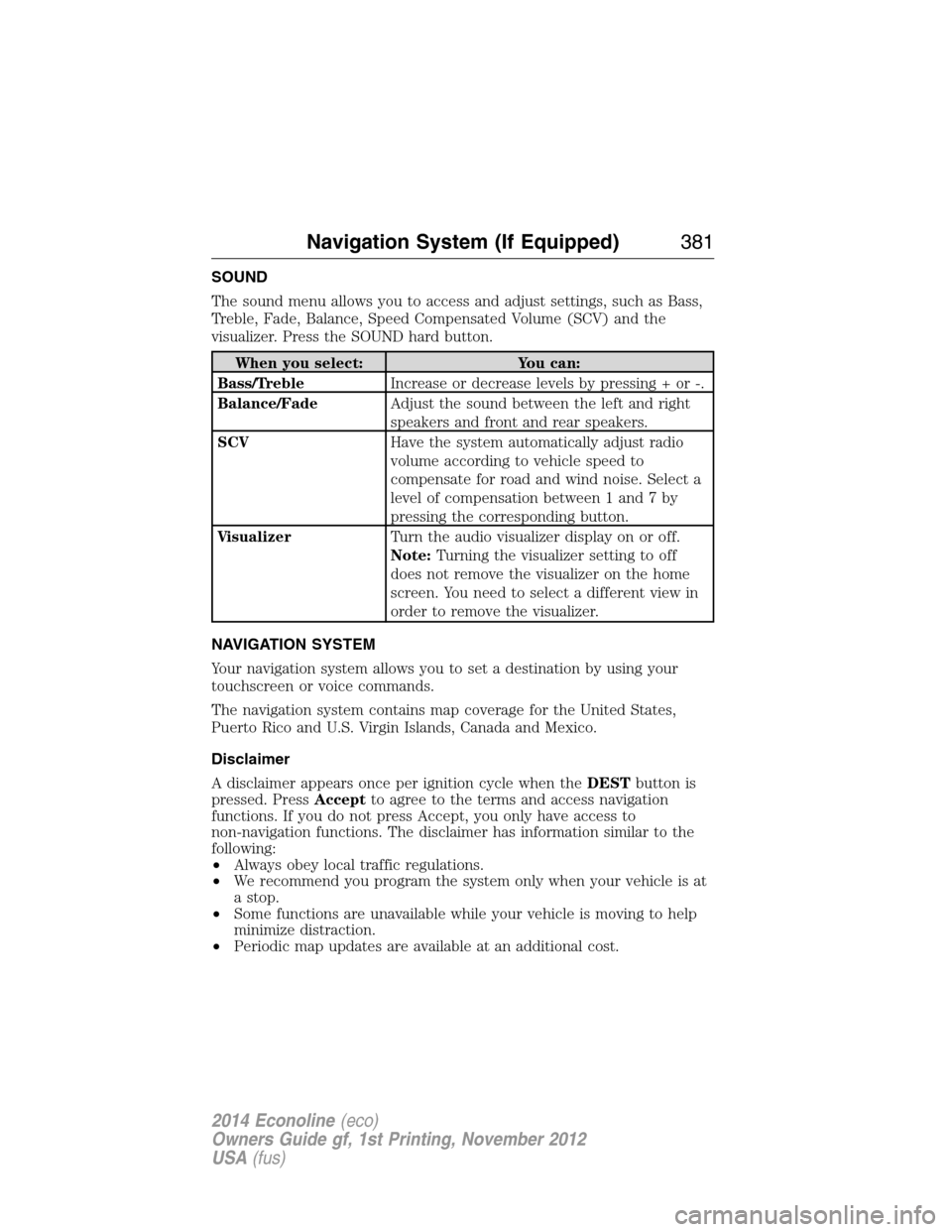
SOUND
The sound menu allows you to access and adjust settings, such as Bass,
Treble, Fade, Balance, Speed Compensated Volume (SCV) and the
visualizer. Press the SOUND hard button.
When you select: You can:
Bass/TrebleIncrease or decrease levels by pressing + or -.
Balance/FadeAdjust the sound between the left and right
speakers and front and rear speakers.
SCVHave the system automatically adjust radio
volume according to vehicle speed to
compensate for road and wind noise. Select a
level of compensation between 1 and 7 by
pressing the corresponding button.
VisualizerTurn the audio visualizer display on or off.
Note:Turning the visualizer setting to off
does not remove the visualizer on the home
screen. You need to select a different view in
order to remove the visualizer.
NAVIGATION SYSTEM
Your navigation system allows you to set a destination by using your
touchscreen or voice commands.
The navigation system contains map coverage for the United States,
Puerto Rico and U.S. Virgin Islands, Canada and Mexico.
Disclaimer
A disclaimer appears once per ignition cycle when theDESTbutton is
pressed. PressAcceptto agree to the terms and access navigation
functions. If you do not press Accept, you only have access to
non-navigation functions. The disclaimer has information similar to the
following:
•Always obey local traffic regulations.
•We recommend you program the system only when your vehicle is at
a stop.
•Some functions are unavailable while your vehicle is moving to help
minimize distraction.
•Periodic map updates are available at an additional cost.
Navigation System (If Equipped)381
2014 Econoline(eco)
Owners Guide gf, 1st Printing, November 2012
USA(fus)
Page 435 of 438
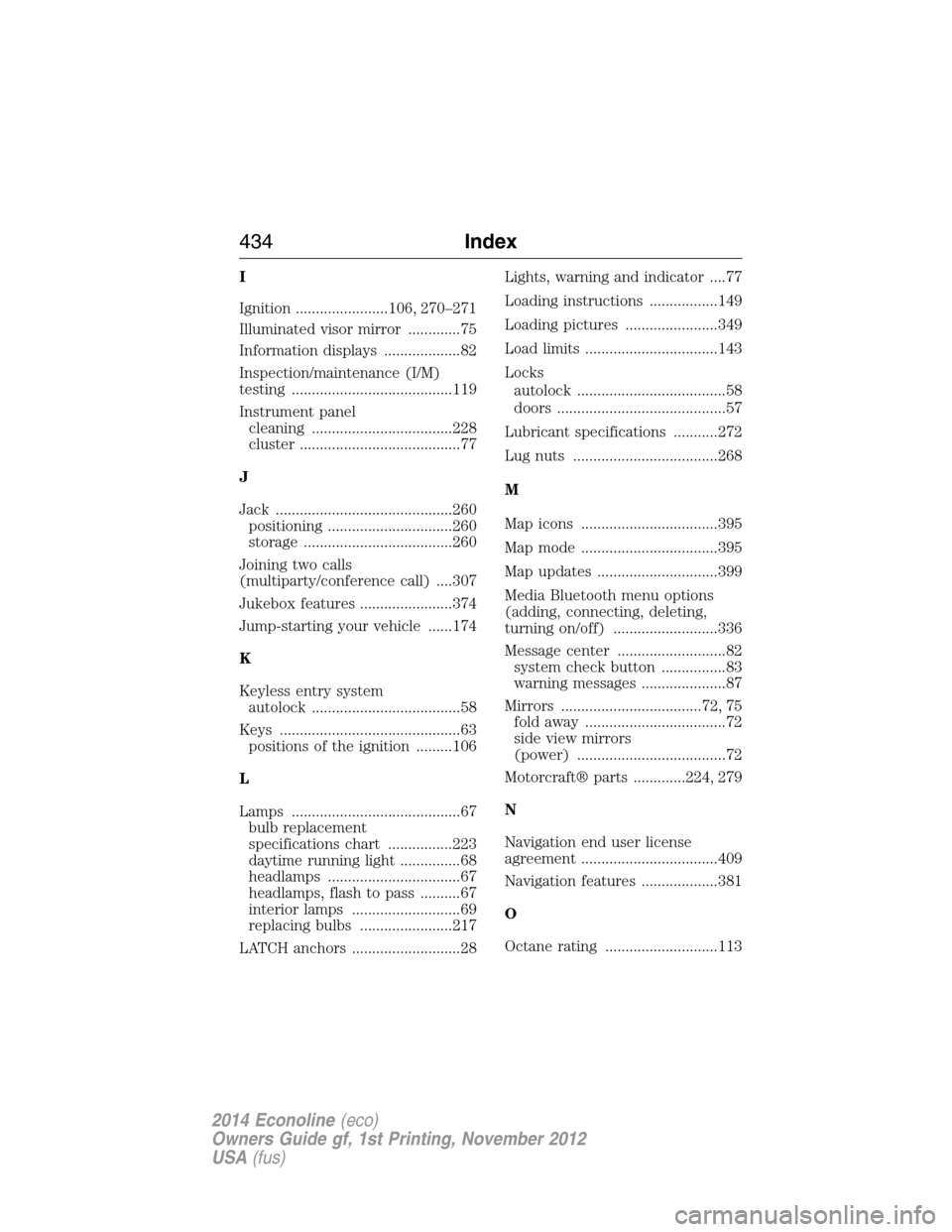
I
Ignition .......................106, 270–271
Illuminated visor mirror .............75
Information displays ...................82
Inspection/maintenance (I/M)
testing ........................................119
Instrument panel
cleaning ...................................228
cluster ........................................77
J
Jack ............................................260
positioning ...............................260
storage .....................................260
Joining two calls
(multiparty/conference call) ....307
Jukebox features .......................374
Jump-starting your vehicle ......174
K
Keyless entry system
autolock .....................................58
Keys .............................................63
positions of the ignition .........106
L
Lamps ..........................................67
bulb replacement
specifications chart ................223
daytime running light ...............68
headlamps .................................67
headlamps, flash to pass ..........67
interior lamps ...........................69
replacing bulbs .......................217
LATCH anchors ...........................28Lights, warning and indicator ....77
Loading instructions .................149
Loading pictures .......................349
Load limits .................................143
Locks
autolock .....................................58
doors ..........................................57
Lubricant specifications ...........272
Lug nuts ....................................268
M
Map icons ..................................395
Map mode ..................................395
Map updates ..............................399
Media Bluetooth menu options
(adding, connecting, deleting,
turning on/off) ..........................336
Message center ...........................82
system check button ................83
warning messages .....................87
Mirrors ...................................72, 75
fold away ...................................72
side view mirrors
(power) .....................................72
Motorcraft® parts .............224, 279
N
Navigation end user license
agreement ..................................409
Navigation features ...................381
O
Octane rating ............................113
434Index
2014 Econoline(eco)
Owners Guide gf, 1st Printing, November 2012
USA(fus)