trailer FORD E SERIES 2014 4.G Owners Manual
[x] Cancel search | Manufacturer: FORD, Model Year: 2014, Model line: E SERIES, Model: FORD E SERIES 2014 4.GPages: 438, PDF Size: 5.12 MB
Page 5 of 438
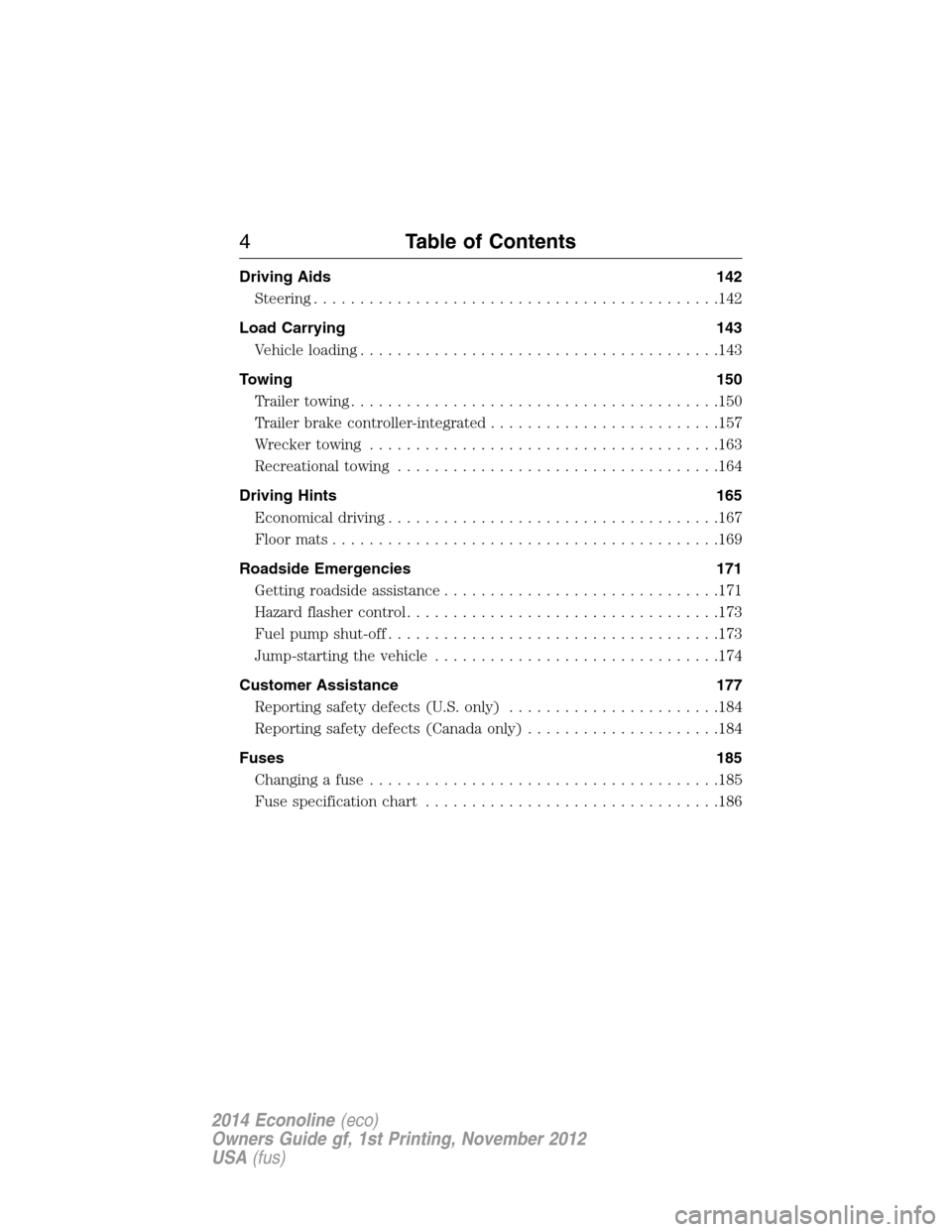
Driving Aids 142
Steering............................................142
Load Carrying 143
Vehicle loading.......................................143
Towing 150
Trailertowing........................................150
Trailer brake controller-integrated.........................157
Wrecker towing......................................163
Recreational towing...................................164
Driving Hints 165
Economical driving....................................167
Floormats..........................................169
Roadside Emergencies 171
Getting roadside assistance..............................171
Hazard flasher control..................................173
Fuel pump shut-off....................................173
Jump-starting the vehicle...............................174
Customer Assistance 177
Reporting safety defects (U.S. only).......................184
Reporting safety defects (Canada only).....................184
Fuses 185
Changing a fuse......................................185
Fuse specification chart................................186
4Table of Contents
2014 Econoline(eco)
Owners Guide gf, 1st Printing, November 2012
USA(fus)
Page 73 of 438
EXTERIOR MIRRORS
Power Exterior Mirrors (If Equipped)
WARNING:Do not adjust the mirror while your vehicle is in
motion.
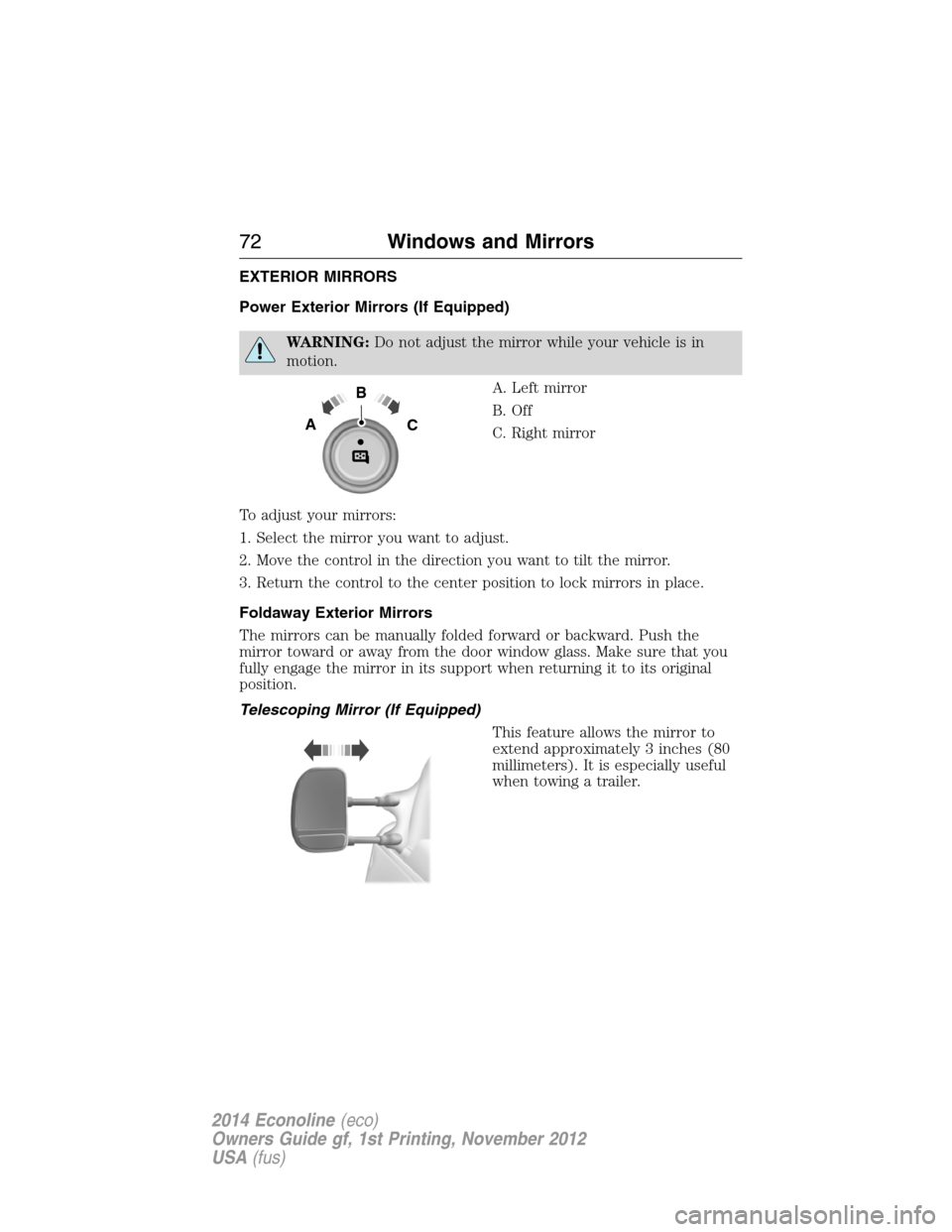
A. Left mirror
B. Off
C. Right mirror
To adjust your mirrors:
1. Select the mirror you want to adjust.
2. Move the control in the direction you want to tilt the mirror.
3. Return the control to the center position to lock mirrors in place.
Foldaway Exterior Mirrors
The mirrors can be manually folded forward or backward. Push the
mirror toward or away from the door window glass. Make sure that you
fully engage the mirror in its support when returning it to its original
position.
Telescoping Mirror (If Equipped)
This feature allows the mirror to
extend approximately 3 inches (80
millimeters). It is especially useful
when towing a trailer.
B
AC
72Windows and Mirrors
2014 Econoline(eco)
Owners Guide gf, 1st Printing, November 2012
USA(fus)
Page 85 of 438
SETUP
TBC MODE (if
equipped)press and hold
the
SELECT/RESET
stemElectric or EOH
LANGUAGE =
ENGLISH /
SPANISH /
FRENCHEnglish / Spanish / French
SYSTEM CHECK
RESET FOR
SYSTEM CHECKpress and hold
the
SELECT/RESET
stemXXX% OIL LIFE
ENGINE HOURS (if enabled)
ENGINE IDLE HOURS
(if enabled)
CHARGING SYSTEM
BRAKE SYSTEM
TBC GAIN = XX.X or NO
TRAILER (if equipped)
TBC GAIN = XX.X or
OUTPUT = ////// (if equipped)
XXX MILES TO E
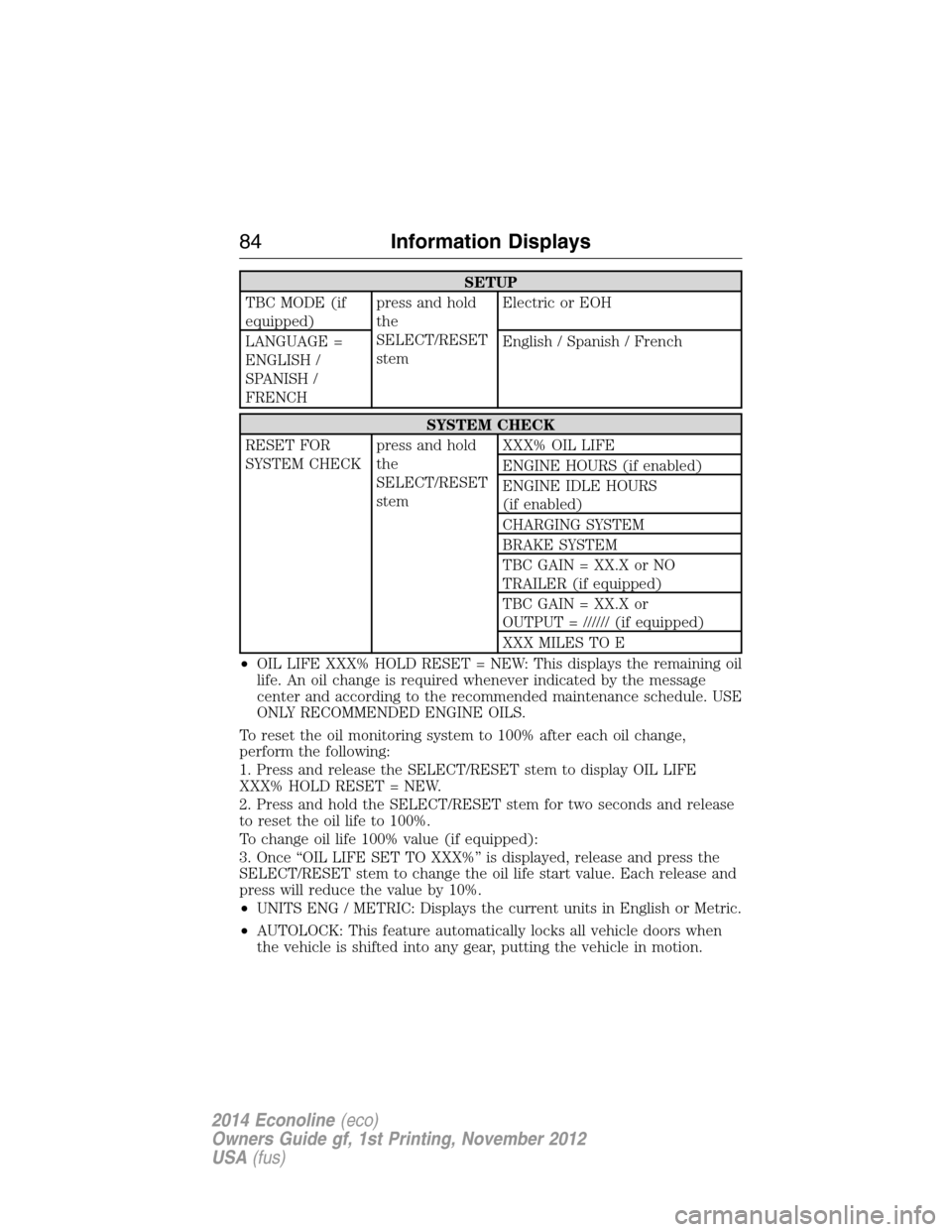
•OIL LIFE XXX% HOLD RESET = NEW: This displays the remaining oil
life. An oil change is required whenever indicated by the message
center and according to the recommended maintenance schedule. USE
ONLY RECOMMENDED ENGINE OILS.
To reset the oil monitoring system to 100% after each oil change,
perform the following:
1. Press and release the SELECT/RESET stem to display OIL LIFE
XXX% HOLD RESET = NEW.
2. Press and hold the SELECT/RESET stem for two seconds and release
to reset the oil life to 100%.
To change oil life 100% value (if equipped):
3. Once “OIL LIFE SET TO XXX%” is displayed, release and press the
SELECT/RESET stem to change the oil life start value. Each release and
press will reduce the value by 10%.
•UNITS ENG / METRIC: Displays the current units in English or Metric.
•AUTOLOCK: This feature automatically locks all vehicle doors when
the vehicle is shifted into any gear, putting the vehicle in motion.
84Information Displays
2014 Econoline(eco)
Owners Guide gf, 1st Printing, November 2012
USA(fus)
Page 87 of 438
Note:If the SELECT/RESET stem is pressed during the calibration or
three minutes has elapsed since the beginning of the calibration without
driving the vehicle, the message center reverts back to normal operation
and the CAL will display until a successful calibration is carried out.
1. Press and release the SELECT/RESET stem to scroll through the
information displays until the message center displays HOLD RESET
FOR SETUP MENU.
2. Press and hold the SELECT/RESET stem to get into the setup menu.
Repeatedly press it again to scroll through the setup menu until the
message center displays HOLD RESET FOR CALIBRATION.
3. Press and hold the SELECT/RESET stem for approximately two
seconds until the message center enters the compass zone adjustment
mode.
4. Press and hold the SELECT/RESET stem until the message center
displays CIRCLE SLOWLY TO CALIBRATE.
5. Slowly drive the vehicle in a circle less than 3 mph (5 km/h ) until the
CIRCLE SLOWLY TO CALIBRATE message changes to CALIBRATION
COMPLETED. This may require up to five circles to complete the
calibration.
•TBC MODE (if equipped): Allows you to choose the trailer brake
mode.
•LANGUAGE = ENGLISH / SPANISH / FRENCH: Allows you to choose
which language the message center will display in.
Waiting four seconds or pressing the SELECT/RESET stem cycles the
message center through each of the language choices.
Press the SELECT/RESET stem to set the language choice when the
language you want appears.
•HOLD RESET FOR SYSTEM CHECK: The message center will begin
to cycle through the vehicle systems and provide a status of the item
if needed. Some systems show a message only if a condition is
present.
86Information Displays
2014 Econoline(eco)
Owners Guide gf, 1st Printing, November 2012
USA(fus)
Page 89 of 438
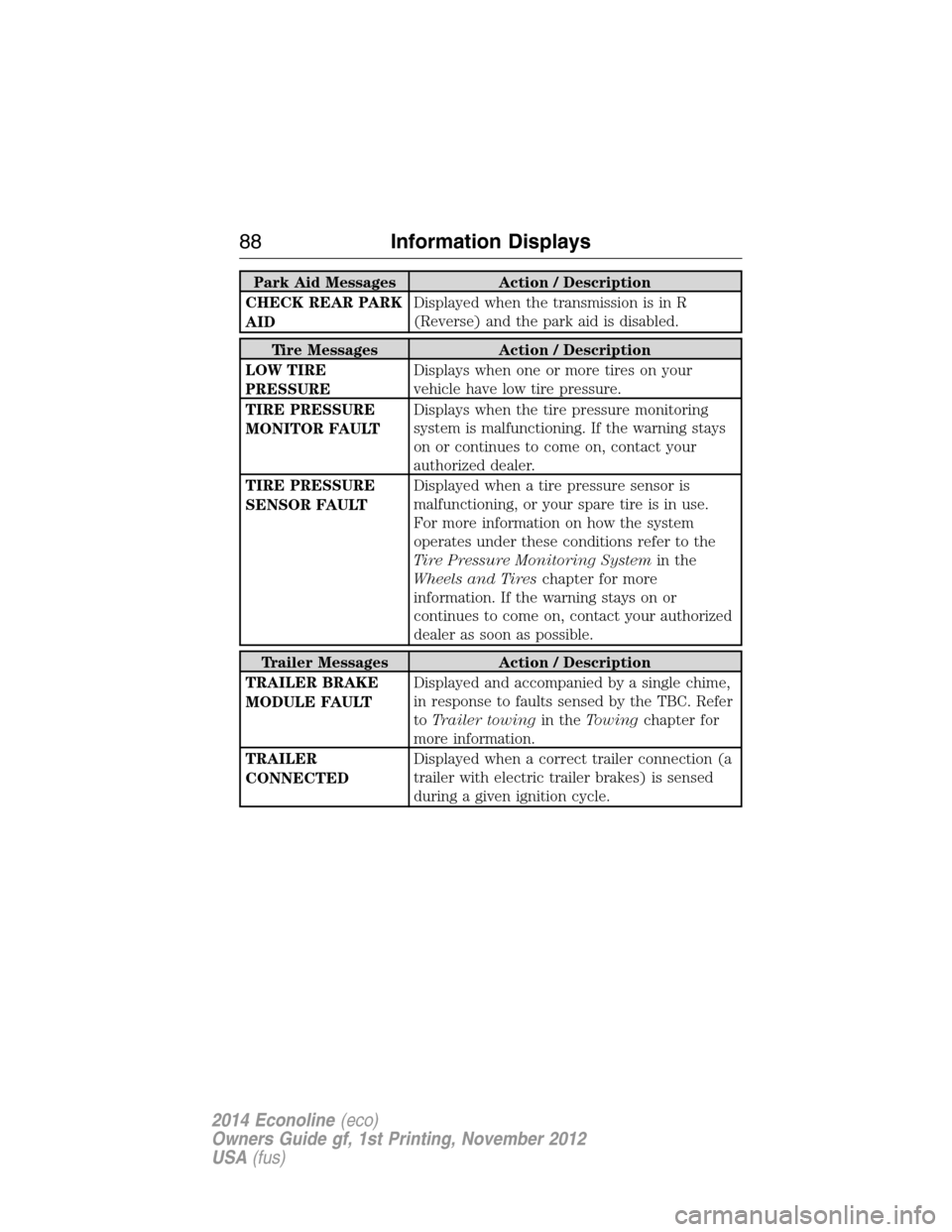
Park Aid Messages Action / Description
CHECK REAR PARK
AIDDisplayed when the transmission is in R
(Reverse) and the park aid is disabled.
Tire Messages Action / Description
LOW TIRE
PRESSUREDisplays when one or more tires on your
vehicle have low tire pressure.
TIRE PRESSURE
MONITOR FAULTDisplays when the tire pressure monitoring
system is malfunctioning. If the warning stays
on or continues to come on, contact your
authorized dealer.
TIRE PRESSURE
SENSOR FAULTDisplayed when a tire pressure sensor is
malfunctioning, or your spare tire is in use.
For more information on how the system
operates under these conditions refer to the
Tire Pressure Monitoring Systemin the
Wheels and Tireschapter for more
information. If the warning stays on or
continues to come on, contact your authorized
dealer as soon as possible.
Trailer Messages Action / Description
TRAILER BRAKE
MODULE FAULTDisplayed and accompanied by a single chime,
in response to faults sensed by the TBC. Refer
toTrailer towingin theTowingchapter for
more information.
TRAILER
CONNECTEDDisplayed when a correct trailer connection (a
trailer with electric trailer brakes) is sensed
during a given ignition cycle.
88Information Displays
2014 Econoline(eco)
Owners Guide gf, 1st Printing, November 2012
USA(fus)
Page 90 of 438
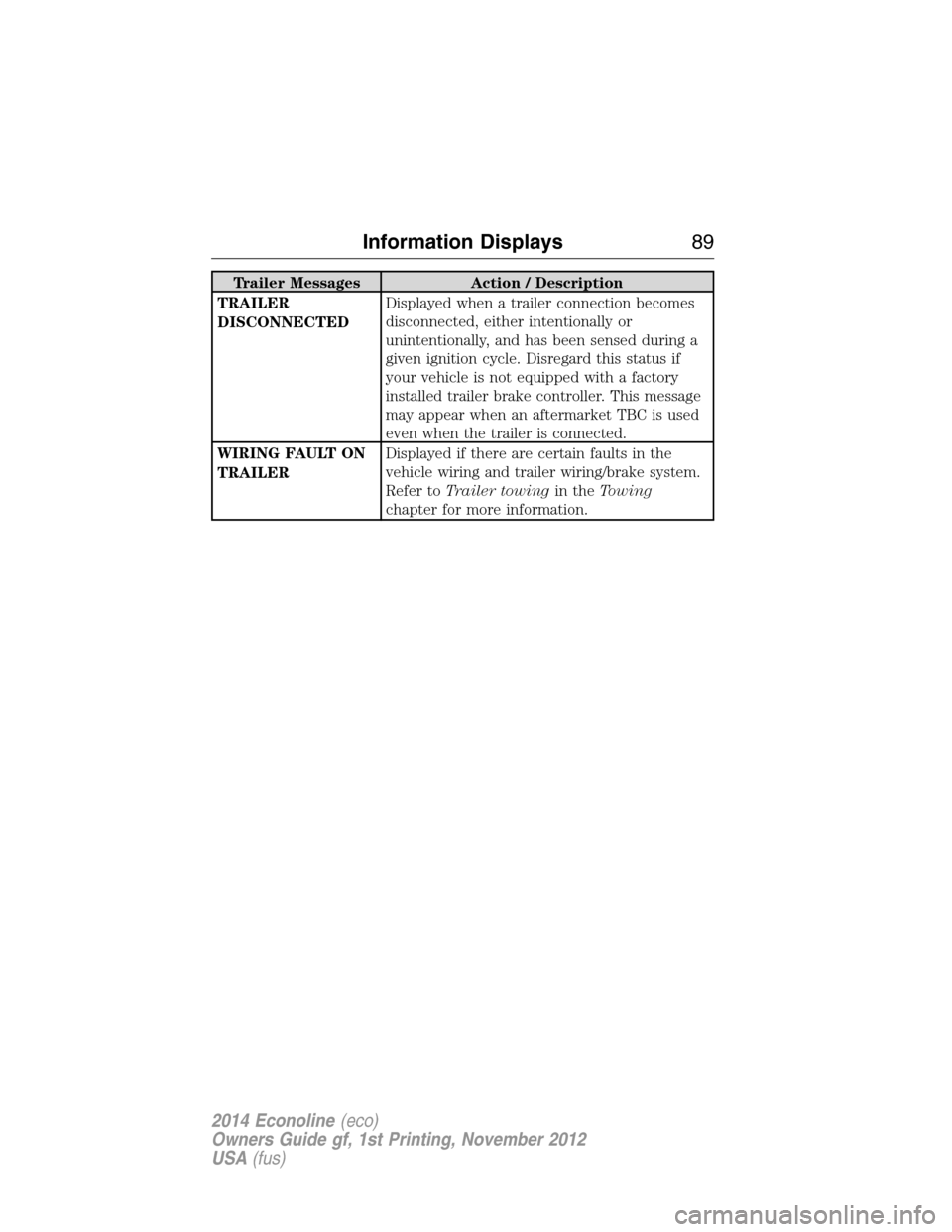
Trailer Messages Action / Description
TRAILER
DISCONNECTEDDisplayed when a trailer connection becomes
disconnected, either intentionally or
unintentionally, and has been sensed during a
given ignition cycle. Disregard this status if
your vehicle is not equipped with a factory
installed trailer brake controller. This message
may appear when an aftermarket TBC is used
even when the trailer is connected.
WIRING FAULT ON
TRAILERDisplayed if there are certain faults in the
vehicle wiring and trailer wiring/brake system.
Refer toTrailer towingin theTowing
chapter for more information.
Information Displays89
2014 Econoline(eco)
Owners Guide gf, 1st Printing, November 2012
USA(fus)
Page 122 of 438
N (Neutral)
With the gearshift lever in N (Neutral), the vehicle can be started and is
free to roll. Hold the brake pedal down while in this position.
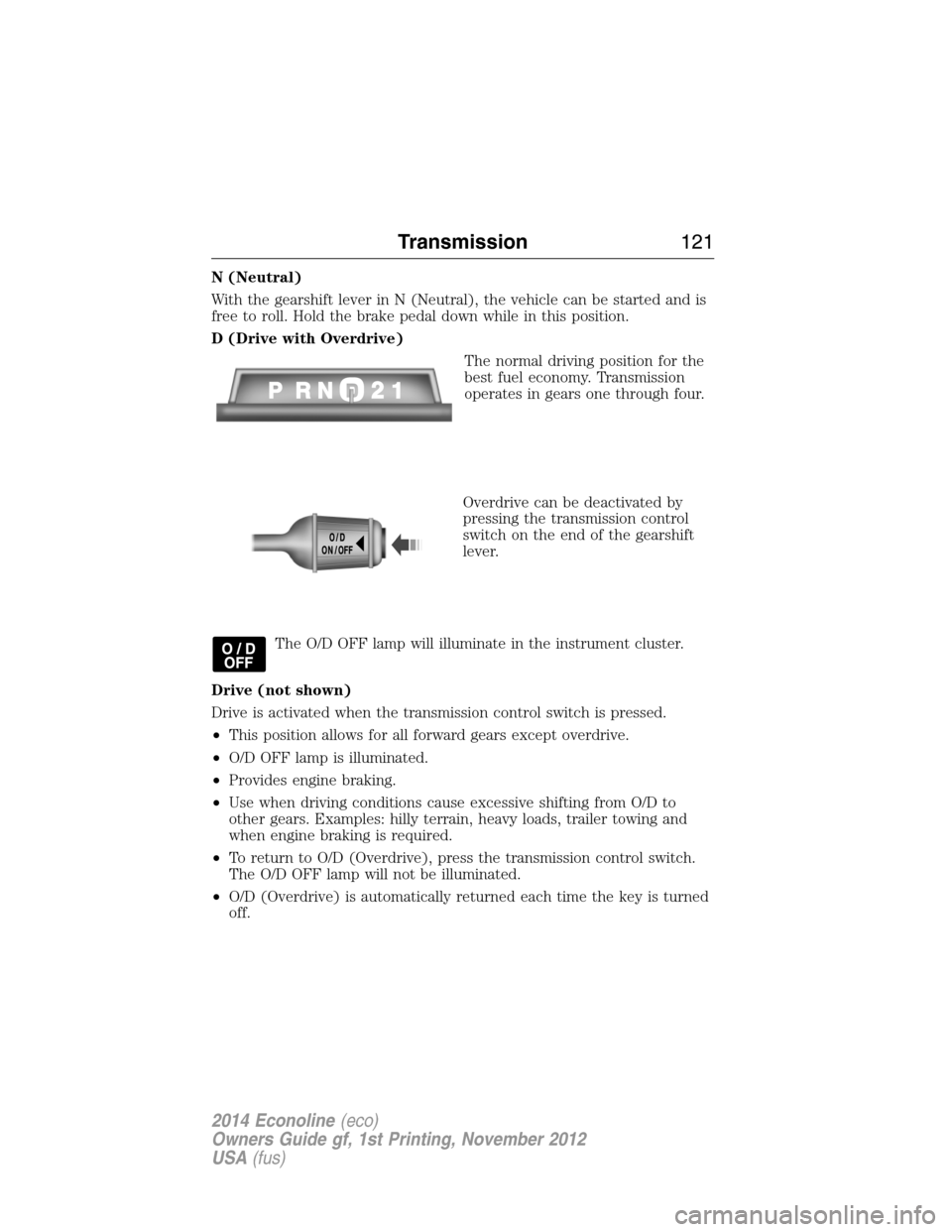
D (Drive with Overdrive)
The normal driving position for the
best fuel economy. Transmission
operates in gears one through four.
Overdrive can be deactivated by
pressing the transmission control
switch on the end of the gearshift
lever.
The O/D OFF lamp will illuminate in the instrument cluster.
Drive (not shown)
Drive is activated when the transmission control switch is pressed.
•This position allows for all forward gears except overdrive.
•O/D OFF lamp is illuminated.
•Provides engine braking.
•Use when driving conditions cause excessive shifting from O/D to
other gears. Examples: hilly terrain, heavy loads, trailer towing and
when engine braking is required.
•To return to O/D (Overdrive), press the transmission control switch.
The O/D OFF lamp will not be illuminated.
•O/D (Overdrive) is automatically returned each time the key is turned
off.
Transmission121
2014 Econoline(eco)
Owners Guide gf, 1st Printing, November 2012
USA(fus)
Page 125 of 438
D (Drive with Overdrive) with Tow/Haul on
The tow/haul feature improves transmission operation when towing a
trailer or a heavy load. All transmission gear ranges are available when
using tow/haul.
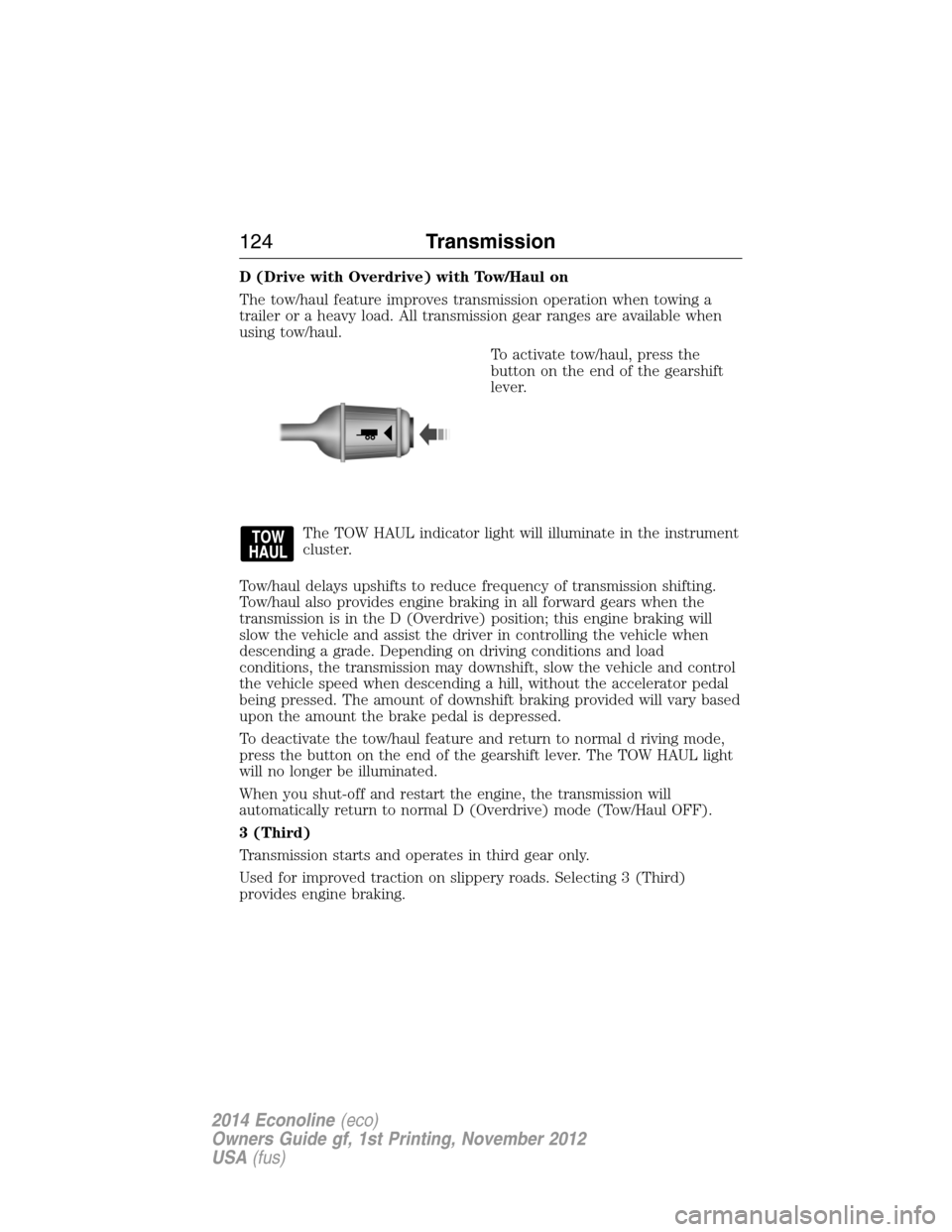
To activate tow/haul, press the
button on the end of the gearshift
lever.
The TOW HAUL indicator light will illuminate in the instrument
cluster.
Tow/haul delays upshifts to reduce frequency of transmission shifting.
Tow/haul also provides engine braking in all forward gears when the
transmission is in the D (Overdrive) position; this engine braking will
slow the vehicle and assist the driver in controlling the vehicle when
descending a grade. Depending on driving conditions and load
conditions, the transmission may downshift, slow the vehicle and control
the vehicle speed when descending a hill, without the accelerator pedal
being pressed. The amount of downshift braking provided will vary based
upon the amount the brake pedal is depressed.
To deactivate the tow/haul feature and return to normal d riving mode,
press the button on the end of the gearshift lever. The TOW HAUL light
will no longer be illuminated.
When you shut-off and restart the engine, the transmission will
automatically return to normal D (Overdrive) mode (Tow/Haul OFF).
3 (Third)
Transmission starts and operates in third gear only.
Used for improved traction on slippery roads. Selecting 3 (Third)
provides engine braking.
124Transmission
2014 Econoline(eco)
Owners Guide gf, 1st Printing, November 2012
USA(fus)
Page 135 of 438
SENSING SYSTEM (IF EQUIPPED)
WARNING:To help avoid personal injury, please read and
understand the limitations of the system as contained in this
section. Sensing is only an aid for some (generally large and fixed)
objects when moving in reverse on a flat surface at parking speeds.
Traffic control systems, inclement weather, air brakes, and external
motors and fans may also affect the function of the sensing system; this
may include reduced performance or a false activation.
WARNING:To help avoid personal injury, always use caution
when in R (Reverse) and when using the sensing system.
WARNING:This system is not designed to prevent contact with
small or moving objects. The system is designed to provide a
warning to assist the driver in detecting large stationary objects to
avoid damaging the vehicle. The system may not detect smaller objects,
particularly those close to the ground.
WARNING:Certain add-on devices such as large trailer hitches,
bike or surfboard racks and any device that may block the normal
detection zone of the system, may create false beeps.
Note:Keep the sensors (located on the bumper/fascia) free from snow,
ice and large accumulations of dirt. If the sensors are covered, the
system’s accuracy can be affected. Do not clean the sensors with sharp
objects.
Note:If your vehicle sustains damage to the bumper/fascia, leaving it
misaligned or bent, the sensing zone may be altered causing inaccurate
measurement of obstacles or false alarms.
The sensing system warns the driver of obstacles within a certain range
of the bumper area. The system turns on automatically whenever the
ignition is switched on and the gearshift lever is placed in R (Reverse).
When receiving a detection warning, the radio volume is reduced to a
predetermined level. After the warning goes away, the radio volume
returns to the previous level.
134Parking Aids
2014 Econoline(eco)
Owners Guide gf, 1st Printing, November 2012
USA(fus)
Page 138 of 438
Using the Rear View Camera System
The rear view camera system displays what is behind your vehicle when
you place the transmission in R (Reverse). The system uses two types of
guides to help you see what is behind your vehicle:
1. Fixed guidelines: Show the actual path the vehicle is moving in while
reversing in a straight line, which can be helpful when backing into a
parking space or aligning the vehicle with another object behind the
vehicle.
2. Centerline: Helps align the center of the vehicle with an object (i.e. a
trailer).
Note:If the image comes on while the transmission is not in R
(Reverse), have the system inspected by your authorized dealer.
Note:When towing, the camera only sees what is being towed behind
the vehicle. This might not provide adequate coverage as it usually
provides in normal operation and some objects might not be seen. In
some vehicles, the guidelines may disappear once the trailer tow
connector is engaged.
Note:The camera may not operate correctly under the following conditions:
•Nighttime or dark areas if one or both reverse lamps are not operating.
•The camera’s view is obstructed by mud, water or debris. Clean the lens
with a soft, lint-free cloth and non-abrasive cleaner.
•The rear of the vehicle is hit or damaged, causing the camera to become
misaligned.
Adjusting the Rear View Camera Settings
Touch screen display:
To access the rear view camera system settings, make the following
selections when the transmission is not in R (Reverse):
1. Menu
2. Vehicle
3. Rear View Camera
After changing a system setting, the touch screen shows a preview of the
feature(s) selected.
Rearview mirror display:
To access the rear view camera system settings see theInformation
Displaychapter.
The guidelines options are FIXED and OFF. If the vehicle is equipped
with a rearview mirror display and a standard instrument cluster, the
fixed guidelines will always remain on. There is no option to turn the
fixed guidelines off.
Parking Aids137
2014 Econoline(eco)
Owners Guide gf, 1st Printing, November 2012
USA(fus)