steering wheel FORD E SERIES 2017 4.G Owner's Manual
[x] Cancel search | Manufacturer: FORD, Model Year: 2017, Model line: E SERIES, Model: FORD E SERIES 2017 4.GPages: 318, PDF Size: 6.21 MB
Page 190 of 318
How Temperature Affects Your Tire
Pressure
The tire pressure monitoring system
monitors tire pressure in each pneumatic
tire. While driving in a normal manner, a
typical passenger tire inflation pressure
may increase about 2 to 4 psi (14 to 28
kPa) from a cold start situation. If the
vehicle is stationary overnight with the
outside temperature significantly lower
than the daytime temperature, the tire
pressure may decrease about 3 psi (21
kPa) for a drop of 30°F (17°C) in ambient
temperature. This lower pressure value
may be detected by the tire pressure
monitoring system as being significantly
lower than the recommended inflation
pressure and activate the system warning
light for low tire pressure. If the low tire
pressure warning light is on, visually check
each tire to verify that no tire is flat. If one
or more tires are flat, repair as necessary.
Check the air pressure in the road tires. If
any tire is under-inflated, carefully drive
the vehicle to the nearest location where
air can be added to the tires. Inflate all the
tires to the recommended inflation
pressure.
CHANGING A ROAD WHEEL
WARNINGS
The use of tire sealant may damage
your tire pressure monitoring system
and should only be used in roadside
emergencies. If you must use a sealant, the
Ford Tire Mobility Kit sealant should be
used. The tire pressure monitoring system
sensor and valve stem on the wheel must
be replaced by an authorized dealer after
use of the sealant. If the tire pressure monitor sensor
becomes damaged, it will no longer
function. See Tire Pressure
Monitoring System (page 184). WARNINGS
To determine the required
pressure(s) for your vehicle, see the
Safety Compliance Certification
Label (affixed to either the door hinge
pillar, door-latch post, or the door edge
that meets the door-latch post, next to the
driver ’s seating position), or Tire Label
located on the B-Pillar or the edge of the
driver ’s door. See
Load Carrying (page
95). Never use wheels or lug nuts
different than the original equipment
as this could damage the wheel or
mounting system. This damage could
allow the wheels to come off while the
vehicle is being driven. Note:
The tire pressure monitoring system
indicator light will illuminate when the spare
tire is in use. To restore the full function of
the monitoring system, all road wheels
equipped with tire pressure monitoring
sensors must be mounted on the vehicle.
If you get a flat tire while driving, do not
apply the brake heavily. Instead, gradually
decrease your speed. Hold the steering
wheel firmly and slowly move to a safe
place on the side of the road.
Have a flat serviced by an authorized
dealer in order to prevent damage to the
tire pressure monitoring system sensors.
See
Tire Pressure Monitoring System
(page 184). Replace the spare tire with a
road tire as soon as possible. During
repairing or replacing of the flat tire, have
the authorized dealer inspect the tire
pressure monitoring system sensor for
damage.
187
E-Series (TE4) Canada/United States of America, enUSA, First Printing Wheels and Tires
Page 193 of 318
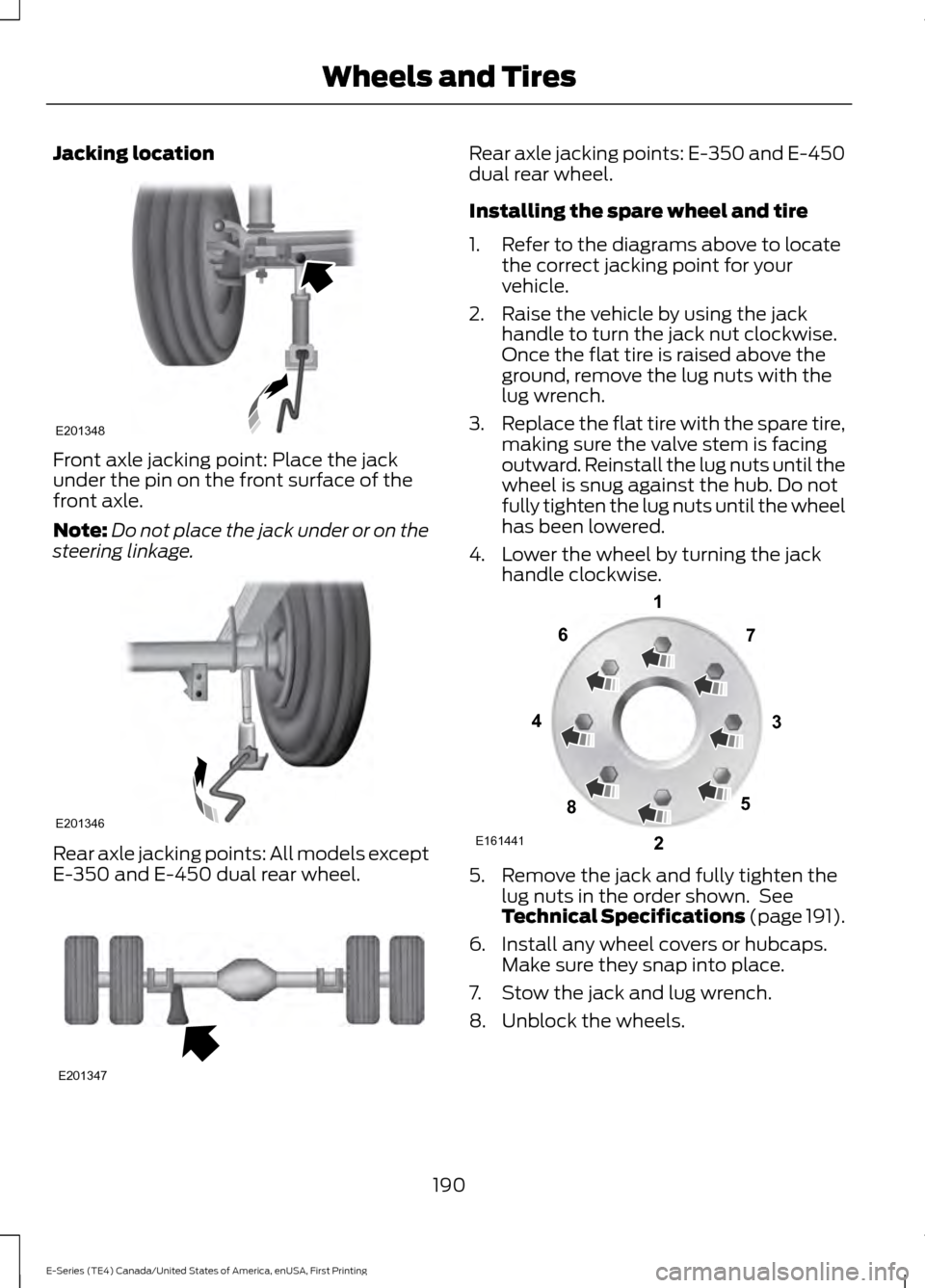
Jacking location
Front axle jacking point: Place the jack
under the pin on the front surface of the
front axle.
Note:
Do not place the jack under or on the
steering linkage. Rear axle jacking points: All models except
E-350 and E-450 dual rear wheel. Rear axle jacking points: E-350 and E-450
dual rear wheel.
Installing the spare wheel and tire
1. Refer to the diagrams above to locate
the correct jacking point for your
vehicle.
2. Raise the vehicle by using the jack handle to turn the jack nut clockwise.
Once the flat tire is raised above the
ground, remove the lug nuts with the
lug wrench.
3. Replace the flat tire with the spare tire,
making sure the valve stem is facing
outward. Reinstall the lug nuts until the
wheel is snug against the hub. Do not
fully tighten the lug nuts until the wheel
has been lowered.
4. Lower the wheel by turning the jack handle clockwise. 5. Remove the jack and fully tighten the
lug nuts in the order shown. See
Technical Specifications (page 191).
6. Install any wheel covers or hubcaps. Make sure they snap into place.
7. Stow the jack and lug wrench.
8. Unblock the wheels.
190
E-Series (TE4) Canada/United States of America, enUSA, First Printing Wheels and TiresE201348 E201346 E201347 E161441
13
4
27
6
5
8
Page 221 of 318
System data cannot be accessed without
special equipment and access to the
vehicle's SYNC module. Ford Motor
Company and Ford of Canada will not
access the system data for any purpose
other than as described absent consent, a
court order, or where required by law
enforcement, other government
authorities, or other third parties acting
with lawful authority. Other parties may
seek to access the information
independently of Ford Motor Company and
Ford of Canada. For further privacy
information, see the sections on 911 Assist,
Vehicle Health Report, and Traffic,
Directions and Information.
USING VOICE RECOGNITION
This system helps you control many
features using voice commands. This
allows you to keep your hands on the
wheel and focus on what is in front of you.
Helpful Hints
•
Make sure the interior of your vehicle is
as quiet as possible. Wind noise from
open windows and road vibrations may
prevent the system from correctly
recognizing spoken commands.
• After pressing the voice button, wait
until after the tone sounds and
Listening appears before saying a
command. Any command spoken
before this does not register with the
system.
• Speak naturally, without long pauses
between words.
• At any time, you can interrupt the
system while it is speaking by pressing
the voice button.
Initiating a Voice Session Initiate a voice session by
pressing the voice button on the
steering wheel controls. See
Voice Control (page 43).
When prompted you can say any of the following: If you want the system to carry out the following
Voice command
Stream audio from your phone.
Bluetooth Audio
Cancel the requested action.
Cancel
Access mobile applications.
mobile (apps | applica-
tions)
Make calls.
Phone
Access the device connected to your USB port.
USB [1]
Run a vehicle health report.
Vehicle Health (Report)
218
E-Series (TE4) Canada/United States of America, enUSA, First Printing SYNC™E142599
Page 222 of 318
If you want the system to carry out the following
Voice command
Adjust the level of voice interaction and feedback.
Voice Settings | Voice
Preferences
Hear a list of voice commands available in the current mode.
Help
You can say any of the voice commands that appear within open and close brackets that
are separated by |. For example, where (cancel | stop | exit) appears you say; cancel or
stop or exit.
You must say any of the voice commands that appear outside of open and close brackets.
For example, where mobile (apps | applications) appears, you must say mobile followed
by either apps or applications.
You do not need to say words that appear within square brackets. For example, for where
(USB [stick] | iPOD | MP3 [player]) appears, you can say USB or USB stick.
Note: SYNC Services and Vehicle health report are only available in the United States of
America.
System Interaction and Feedback
The system provides feedback through
audible tones, prompts, questions and
spoken confirmations depending on the
situation and the chosen level of
interaction (voice settings). You can
customize the voice recognition system to
provide more or less instruction and
feedback. The default setting is to a higher level of
interaction in order to help you learn to use
the system. You can change these settings
at any time.
Adjusting the Interaction Level Initiate a voice session by
pressing the voice button on the
steering wheel controls. See
Voice Control (page 43).
When prompted say the following: If you want the system to carry out the following
Voice command
Voice Settings | Voice Preferences
Followed by either of the following: Provide more detailed interaction and guidance.
Interaction Mode
Standard
Provide less audible interaction and more tone prompts.
Interaction Mode
Advanced
The system defaults to the standard interaction mode.
219
E-Series (TE4) Canada/United States of America, enUSA, First Printing SYNC™E142599
Page 239 of 318
•
A connected Bluetooth-enabled phone
must have adequate network coverage,
battery power and signal strength.
• The vehicle must have battery power
and be located in the U.S., Canada or
in a territory in which 911 is the
emergency number.
In the Event of a Crash
Not all crashes will deploy an airbag or
activate the fuel pump shut-off (the
triggers for 911 Assist). If a connected cell
phone sustains damage or loses its
connection to SYNC during a crash, SYNC
will search for and try to connect to a
previously paired cell phone; SYNC will
then attempt to call the emergency
services.
Before making the call:
• SYNC provides a short window of time
(about 10 seconds) to cancel the call.
If you fail to cancel the call, SYNC
attempts to dial 911.
• SYNC says the following, or a similar
message: "SYNC will attempt to call
911, to cancel the call, press Cancel on
your screen or press and hold the
phone button on your steering wheel."
If you do not cancel the call, and SYNC
makes a successful call, a pre-recorded
message plays for the 911 operator, and
then the occupant(s) in your vehicle is able
to talk with the operator. Be prepared to
provide your name, phone number and
location immediately, because not all 911
systems are capable of receiving this
information electronically. 911 Assist May Not Work If
•
Your cellular phone or 911 Assist
hardware sustains damage in a crash.
• The vehicle's battery or the SYNC
system has no power.
• The phone(s) thrown from your vehicle
are the ones paired and connected to
the system.
911 Assist Privacy Notice
When you turn on 911 Assist, it may
disclose to emergency services that your
vehicle has been in a crash involving the
deployment of an airbag or activation of
the fuel pump shut-off. Certain versions or
updates to 911 Assist may also be capable
of electronically or verbally disclosing to
911 operators your vehicle location or other
details about your vehicle or crash to assist
911 operators to provide the most
appropriate emergency services. If you do
not want to disclose this information, do
not turn the feature on.
Vehicle Health Report (If
Equipped, United States Only) WARNING
Always follow scheduled
maintenance instructions, regularly
inspect your vehicle, and seek repair
for any damage or problem you suspect.
Vehicle Health Report supplements, but
cannot replace, normal maintenance and
vehicle inspection. Vehicle Health Report
only monitors certain systems
electronically monitored by your vehicle
and will not monitor or report the status
of any other system, (such as brake lining
wear). Failure to perform scheduled
maintenance and regularly inspect your
vehicle may result in vehicle damage and
serious injury. Note:
This feature is only available in the
United States.
236
E-Series (TE4) Canada/United States of America, enUSA, First Printing SYNC™
Page 245 of 318
Disconnecting from SYNC Services
To disconnect from SYNC services, say:
Action and Description
Voice command
From the SYNC Services main menu, or press and hold the
phone button on the steering wheel.
Goodbye
SYNC Services quick tips SYNC Services quick tips
You can personalize your Services feature to provide quicker
access to your most used or favorite information. You can
save address points, for example work or home. You can also
save favorite information like sports teams or a news
category. You can learn more about personalization by logging
onto www.SYNCMyRide.com.
Personalizing
Press the voice button at any time while connected to SYNC
Services to interrupt a voice prompt or an audio clip and say
your voice command.
Push to interrupt
Your subscription is associated with your Bluetooth-enabled
cellular phone number, not your VIN (Vehicle Identification
Number). You can pair and connect your phone to any vehicle
equipped with SYNC Services and continue enjoying your
personalized services.
Portable
You can even access your account outside your vehicle. Just
use the number on your phone's call history. Traffic and
Directions features do not function properly but information
services and the 411 connect and text message features are
available.
SYNC™ APPLINK ™
SYNC Mobile Apps
Note: You must pair and connect your
smartphone to SYNC to access AppLink.
Note: iPhone users need to connect the
phone to the USB port in order to start the
application. Note:
The AppLink feature is not available
if your vehicle is equipped with the MyFord
Touch system.
Note: Depending on your display type, you
can access AppLink from the media menu,
the phone menu, or by using voice
commands. Once an app is running through
AppLink, you can control main features of
the app through voice commands and
steering wheel controls.
242
E-Series (TE4) Canada/United States of America, enUSA, First Printing SYNC™
Page 274 of 318
Be sure to ask your dealership service
advisor or technician about the multi-point
vehicle inspection. It is a comprehensive
way to perform a thorough inspection of
your vehicle. Your checklist gives you
immediate feedback on the overall
condition of your vehicle.
NORMAL SCHEDULED MAINTENANCE Every 7500 miles (12000 km) or six months (whichever comes first)
Change engine oil and filter.
Rotate tires *
, inspect tire wear and measure tread depth.
Inspect wheels and related components for abnormal noise, wear, looseness or drag.
Perform multi-point inspection (recommended).
* Vehicles with dual rear wheels should rotate the front wheels when specified; rear wheels
only if unusual wear is noted. Every 15000 miles (24000 km) or 12 months (whichever comes first)
Inspect automatic transmission fluid level. Consult dealer for requirements.
Inspect brake pads, rotors, hoses and parking brake.
Inspect engine cooling system strength and hoses.
Inspect exhaust system and heat shields.
Inspect steering linkage, ball joints, suspension, tie-rod ends, driveshaft and U-joints. Other maintenance items
Replace engine air filter.
Every 30000 miles (48000
km)
Change automatic transmission fluid and filter (5-Speed
Transmission only). Consult dealer for requirements.
Every 60000 miles (96000
km) Replace front wheel bearing grease and grease seal if non-
sealed bearings are used.
Replace spark plugs.
Every 97500 miles (156000
km) Replace rear axle fluid. See Special Operating Condi-
tions Scheduled Maintenance (page 273).
271
E-Series (TE4) Canada/United States of America, enUSA, First Printing Scheduled Maintenance
Page 312 of 318
A
A/C
See: Climate Control........................................... 63
About This Manual...........................................5
ABS See: Brakes............................................................. 88
ABS driving hints See: Hints on Driving With Anti-Lock
Brakes.................................................................. 88
Accessories....................................................263 Exterior Style....................................................... 263
Interior Style........................................................ 263
Lifestyle................................................................. 263
Peace of Mind..................................................... 263
Accessories See: Replacement Parts
Recommendation............................................ 10
Adjusting the Headlamps..........................147 Vertical Aim Adjustment Procedure
(Aerodynamic Headlamps)...................... 149
Vertical and Horizontal Aim Adjustment (Sealed Beam Headlamps)...................... 148
Adjusting the Steering Wheel....................43
Airbag Disposal...............................................34
Air Conditioning See: Climate Control........................................... 63
Air Filter See: Changing the Engine Air Filter..............155
Appendices....................................................286
Audible Warnings and Indicators.............53 Fail-Safe Cooling Warning Chime.................. 53
Headlamps On Warning Chime...................... 53
Key in Ignition Warning Chime......................... 53
Parking Brake On Warning Chime.................. 53
Shift to Park Warning Chime........................... 54
Audio System...............................................206 General Information......................................... 206
Audio Unit - Vehicles With: AM/FM/CD/ SYNC.............................................................208
Audio Unit - Vehicles With: AM/ FM...................................................................207
Automatic Transmission
.............................83
Brake-Shift Interlock........................................... 85
If Your Vehicle Gets Stuck In Mud or Snow.................................................................... 86
Understanding the Shift Positions of a 6– Speed Automatic Transmission..........84 Understanding the Shift Positions of the
5– Speed Automatic Transmission..........83
Automatic Transmission Fluid Check
..............................................................141
Automatic Transmission Fluid Filter...........144
Checking Automatic Transmission
Fluid..................................................................... 141
Auxiliary Power Points
..................................70
110 Volt AC Power Point..................................... 70
12 Volt DC Power Point....................................... 70
Locations................................................................. 70
Auxiliary Switches.......................................264
B
Battery See: Changing the 12V Battery...................... 145
Bonnet Lock See: Opening and Closing the Hood...........134
Booster Seats...................................................19 Types of Booster Seats...................................... 20
Brake Fluid Check
.........................................144
Brakes................................................................88 General Information........................................... 88
Breaking-In......................................................110
Bulb Specification Chart............................153
C
California Proposition 65...............................9
Capacities and Specifications - 6.2L..................................................................197
Specifications...................................................... 198
Capacities and Specifications - 6.8L.................................................................201
Specifications..................................................... 202
Capacities and Specifications
.................192
Car Wash See: Cleaning the Exterior................................ 157
Changing a Bulb
.............................................151
Lamp Assembly Condensation...................... 151
Replacing Brake/Tail/Turn/Reverse Lamp Bulbs (Cut-Away Only)............................... 153
Replacing Front Parking Lamp and Direction Indicator Bulbs................................................ 152
Replacing Headlamp Bulbs (Aerodynamic)................................................ 151
Replacing Side Marker Bulbs......................... 152
309
E-Series (TE4) Canada/United States of America, enUSA, First Printing Index
Page 317 of 318
Notice to Owners of Pickup Trucks and
Utility Type Vehicles......................................... 11
On Board Diagnostics Data Link Connector............................................................. 11
Special Instructions............................................. 10
Using your Vehicle as an Ambulance..............11
Special Operating Conditions Scheduled Maintenance
...............................................273
Engine Idle Hour Meter..................................... 275
Exceptions............................................................ 275
Speed Control See: Cruise Control.............................................. 93
Starter Switch See: Ignition Switch............................................. 72
Starting a Gasoline Engine..........................72 Failure to Start....................................................... 73
Guarding Against Exhaust Fumes.................. 73
Important Ventilating Information.................73
Stopping the Engine When Your Vehicle is Moving.................................................................. 73
Stopping the Engine When Your Vehicle is Stationary........................................................... 73
Starting and Stopping the Engine............72 General Information............................................ 72
Steering.............................................................94
Steering Wheel
...............................................43
Sun Visors.........................................................48
Illuminated Vanity Mirror................................... 48
Supplementary Restraints System
.........28
Principle of Operation........................................ 28
Symbols Glossary.............................................5
SYNC™ Applications and Services........................................................234
911 Assist............................................................... 234
SYNC Services: Traffic, Directions & Information (TDI) (If Equipped, United
States Only).................................................... 238
Vehicle Health Report (If Equipped, United States Only).................................................... 236
SYNC™ AppLink ™
......................................242
SYNC Mobile Apps............................................ 242
SYNC™.............................................................216 General Information.......................................... 216
SYNC™ Troubleshooting
.........................254 T
Technical Specifications
See: Capacities and Specifications.............192
The Better Business Bureau (BBB) Auto Line Program (U.S. Only)........................120
Tire Care
...........................................................165
Glossary of Tire Terminology.......................... 167
Information About Uniform Tire Quality Grading.............................................................. 165
Information Contained on the Tire Sidewall............................................................ 168
Temperature A B C............................................. 166
Traction AA A B C............................................... 166
Treadwear............................................................. 166
Tire Pressure Monitoring System...........184 Changing Tires With a Tire Pressure
Monitoring System........................................ 185
Understanding Your Tire Pressure Monitoring System ....................................... 185
Tires See: Wheels and Tires...................................... 164
Towing a Trailer.............................................100 Load Placement................................................. 100
Towing the Vehicle on Four Wheels..........................................................109
Emergency Towing............................................ 109
Recreational Towing......................................... 109
Towing..............................................................100
Traction Control
.............................................90
Principle of Operation........................................ 90
Trailer Sway Control.....................................101
Transmission Code Designation.............196
Transmission....................................................83
Transmission See: Transmission................................................ 83
Transporting the Vehicle.............................117
U
Under Hood Overview................................135
USB Port
...........................................................215
Using Cruise Control.....................................93 Switching Cruise Control Off........................... 93
Switching Cruise Control On............................ 93
Using Snow Chains......................................183
314
E-Series (TE4) Canada/United States of America, enUSA, First Printing Index