transmission FORD E SERIES 2017 4.G Service Manual
[x] Cancel search | Manufacturer: FORD, Model Year: 2017, Model line: E SERIES, Model: FORD E SERIES 2017 4.GPages: 318, PDF Size: 6.21 MB
Page 206 of 318
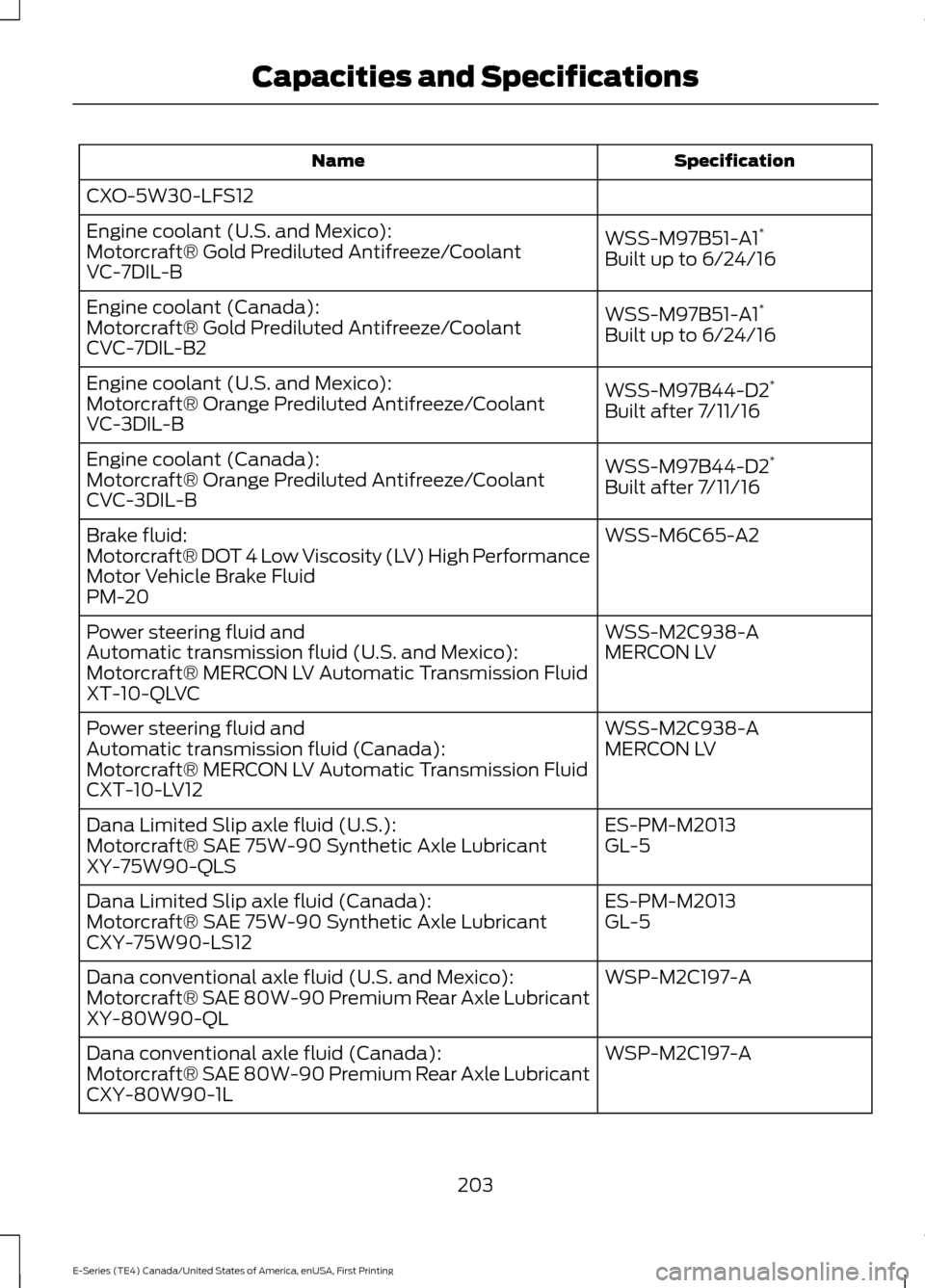
Specification
Name
CXO-5W30-LFS12
WSS-M97B51-A1*
Engine coolant (U.S. and Mexico):
Motorcraft® Gold Prediluted Antifreeze/Coolant
Built up to 6/24/16
VC-7DIL-B
WSS-M97B51-A1*
Engine coolant (Canada):
Motorcraft® Gold Prediluted Antifreeze/Coolant
Built up to 6/24/16
CVC-7DIL-B2
WSS-M97B44-D2*
Engine coolant (U.S. and Mexico):
Motorcraft® Orange Prediluted Antifreeze/Coolant
Built after 7/11/16
VC-3DIL-B
WSS-M97B44-D2*
Engine coolant (Canada):
Motorcraft® Orange Prediluted Antifreeze/Coolant
Built after 7/11/16
CVC-3DIL-B
WSS-M6C65-A2
Brake fluid:
Motorcraft® DOT 4 Low Viscosity (LV) High Performance
Motor Vehicle Brake Fluid
PM-20
WSS-M2C938-A
Power steering fluid and
MERCON LV
Automatic transmission fluid (U.S. and Mexico):
Motorcraft® MERCON LV Automatic Transmission Fluid
XT-10-QLVC
WSS-M2C938-A
Power steering fluid and
MERCON LV
Automatic transmission fluid (Canada):
Motorcraft® MERCON LV Automatic Transmission Fluid
CXT-10-LV12
ES-PM-M2013
Dana Limited Slip axle fluid (U.S.):
GL-5
Motorcraft® SAE 75W-90 Synthetic Axle Lubricant
XY-75W90-QLS
ES-PM-M2013
Dana Limited Slip axle fluid (Canada):
GL-5
Motorcraft® SAE 75W-90 Synthetic Axle Lubricant
CXY-75W90-LS12
WSP-M2C197-A
Dana conventional axle fluid (U.S. and Mexico):
Motorcraft® SAE 80W-90 Premium Rear Axle Lubricant
XY-80W90-QL
WSP-M2C197-A
Dana conventional axle fluid (Canada):
Motorcraft® SAE 80W-90 Premium Rear Axle Lubricant
CXY-80W90-1L
203
E-Series (TE4) Canada/United States of America, enUSA, First Printing Capacities and Specifications
Page 208 of 318
If you use oil and fluids that do not meet
the defined specification and viscosity
grade, this may lead to:
•
Component damage which is not
covered by the vehicle warranty.
• Longer engine cranking periods.
• Increased emission levels.
• Reduced engine performance.
• Reduced fuel economy.
• Degraded brake performance.
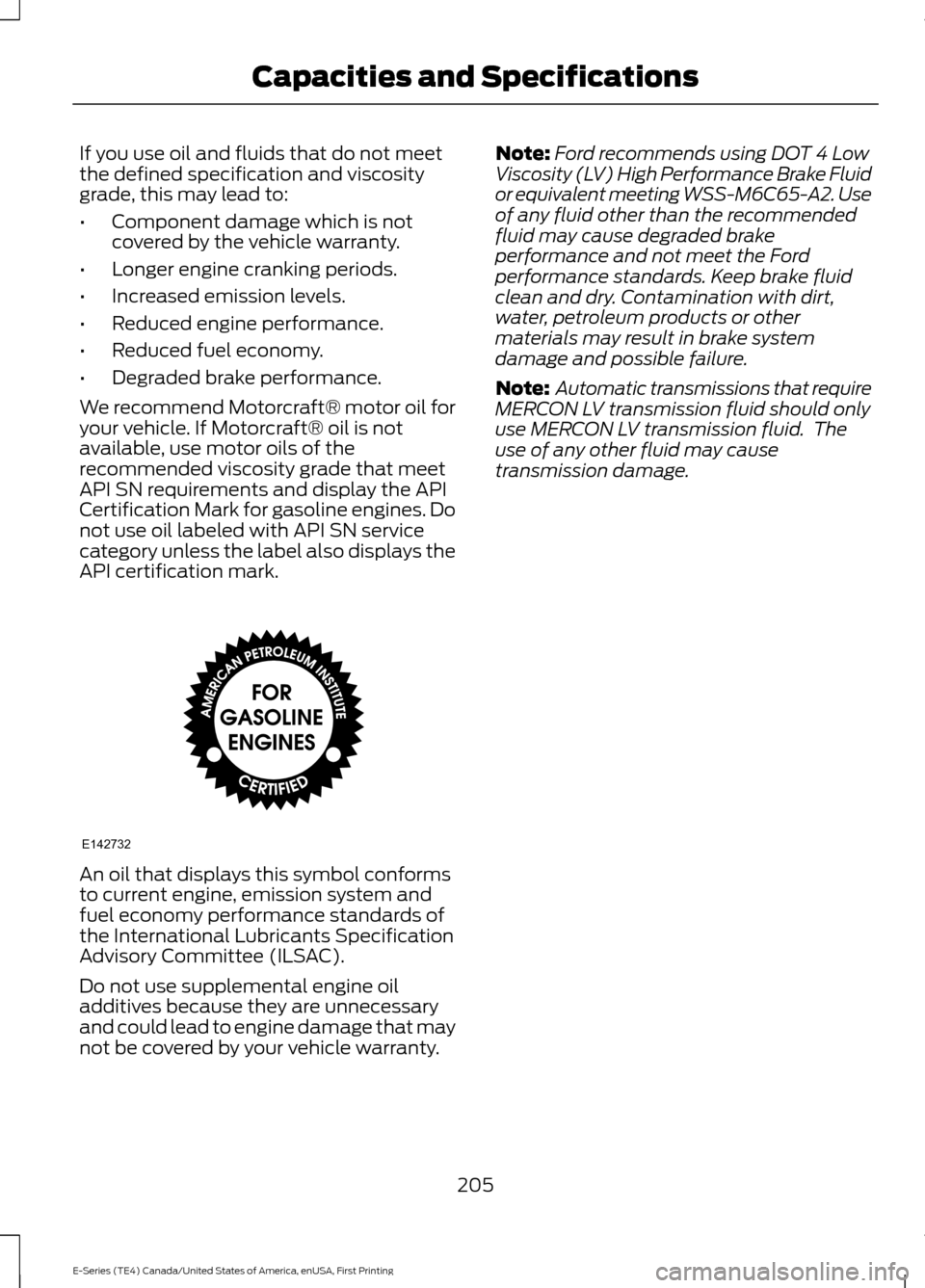
We recommend Motorcraft® motor oil for
your vehicle. If Motorcraft® oil is not
available, use motor oils of the
recommended viscosity grade that meet
API SN requirements and display the API
Certification Mark for gasoline engines. Do
not use oil labeled with API SN service
category unless the label also displays the
API certification mark. An oil that displays this symbol conforms
to current engine, emission system and
fuel economy performance standards of
the International Lubricants Specification
Advisory Committee (ILSAC).
Do not use supplemental engine oil
additives because they are unnecessary
and could lead to engine damage that may
not be covered by your vehicle warranty. Note:
Ford recommends using DOT 4 Low
Viscosity (LV) High Performance Brake Fluid
or equivalent meeting WSS-M6C65-A2. Use
of any fluid other than the recommended
fluid may cause degraded brake
performance and not meet the Ford
performance standards. Keep brake fluid
clean and dry. Contamination with dirt,
water, petroleum products or other
materials may result in brake system
damage and possible failure.
Note: Automatic transmissions that require
MERCON LV transmission fluid should only
use MERCON LV transmission fluid. The
use of any other fluid may cause
transmission damage.
205
E-Series (TE4) Canada/United States of America, enUSA, First Printing Capacities and SpecificationsE142732
Page 224 of 318
USING SYNC™ WITH YOUR
PHONE
Hands-free calling is one of the main
features of SYNC. While the system
supports a variety of features, many are
dependent on your cell phone's
functionality. At a minimum, most cell
phones with Bluetooth wireless technology
support the following functions:
•
Answering an incoming call.
• Ending a call.
• Using privacy mode.
• Dialing a number.
• Redialing.
• Call waiting notification.
• Caller ID. Other features, such as text messaging
using Bluetooth and automatic phonebook
download, are cell phone-dependent
features. To check your cell phone's
compatibility, see your cell phone's manual
and visit www.SYNCMyRide.com,
www.SYNCMyRide.ca or
www.syncmaroute.ca.
Pairing a Cell Phone for the First
Time
Note:
SYNC can support downloading up
to approximately 1000 entries per
Bluetooth-enabled cell phone.
Note: Make sure to switch on the ignition
and the radio. Put the transmission in
position park (P) (automatic transmission)
or neutral with the parking brake applied
(manual transmission).
Note: To scroll through the menus, press
the up and down arrows on your audio
system.
Wirelessly pairing your cell phone with
SYNC allows you to make and receive
hands-free calls.
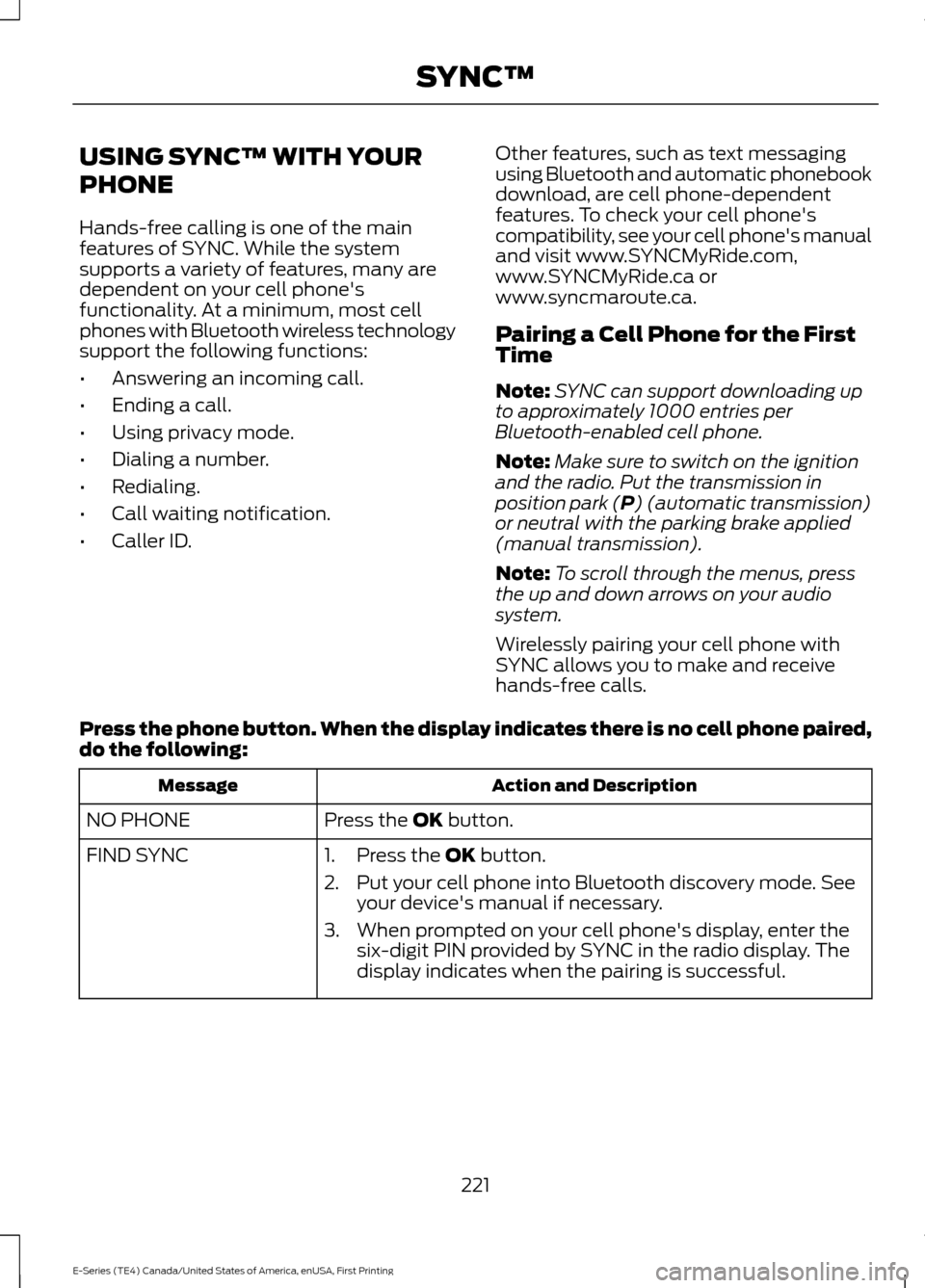
Press the phone button. When the display indicates there is no cell phone paired,
do the following: Action and Description
Message
Press the
OK button.
NO PHONE
FIND SYNC 1. Press the
OK button.
2. Put your cell phone into Bluetooth discovery mode. See your device's manual if necessary.
3. When prompted on your cell phone's display, enter the six-digit PIN provided by SYNC in the radio display. The
display indicates when the pairing is successful.
221
E-Series (TE4) Canada/United States of America, enUSA, First Printing SYNC™
Page 225 of 318
Depending on your cell phone's capability
and your market, the system may prompt
you with questions, such as setting the
current cell phone as the primary cell
phone (the cell phone SYNC automatically
tries to connect with first upon vehicle
start-up) and downloading your
phonebook.
Pairing Subsequent Cell Phones
Note:
To scroll through the menus, press
the up and down arrows on your audio
system.
Note: Make sure to switch on the ignition
and the radio. Put the transmission in
position park (P) (automatic transmission)
or neutral with the parking brake applied
(manual transmission).
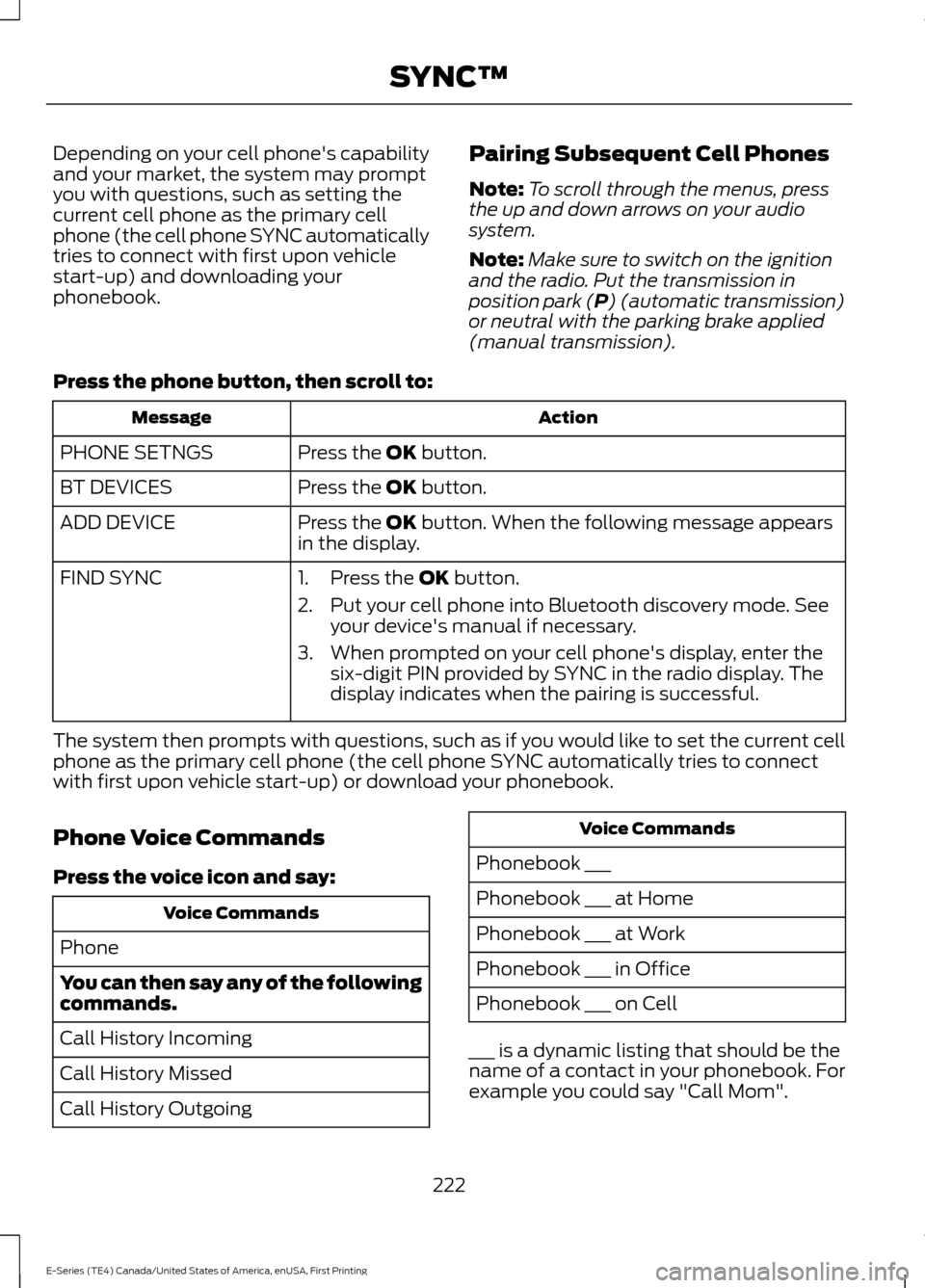
Press the phone button, then scroll to: Action
Message
Press the
OK button.
PHONE SETNGS
Press the
OK button.
BT DEVICES
Press the
OK button. When the following message appears
in the display.
ADD DEVICE
FIND SYNC
1. Press the
OK button.
2. Put your cell phone into Bluetooth discovery mode. See your device's manual if necessary.
3. When prompted on your cell phone's display, enter the six-digit PIN provided by SYNC in the radio display. The
display indicates when the pairing is successful.
The system then prompts with questions, such as if you would like to set the current cell
phone as the primary cell phone (the cell phone SYNC automatically tries to connect
with first upon vehicle start-up) or download your phonebook.
Phone Voice Commands
Press the voice icon and say: Voice Commands
Phone
You can then say any of the following
commands.
Call History Incoming
Call History Missed
Call History Outgoing Voice Commands
Phonebook ___
Phonebook ___ at Home
Phonebook ___ at Work
Phonebook ___ in Office
Phonebook ___ on Cell
___ is a dynamic listing that should be the
name of a contact in your phonebook. For
example you could say "Call Mom".
222
E-Series (TE4) Canada/United States of America, enUSA, First Printing SYNC™
Page 273 of 318
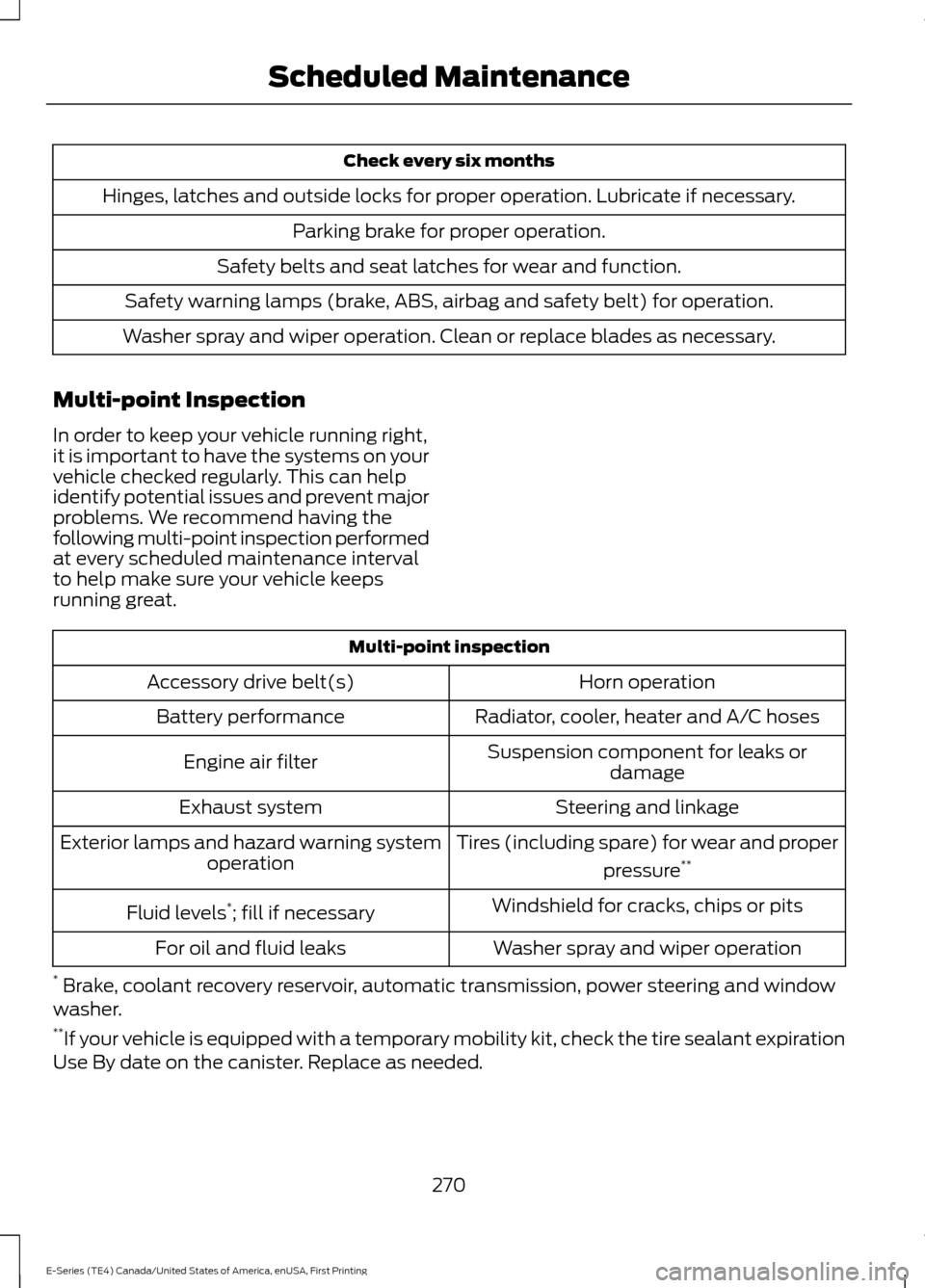
Check every six months
Hinges, latches and outside locks for proper operation. Lubricate if necessary. Parking brake for proper operation.
Safety belts and seat latches for wear and function.
Safety warning lamps (brake, ABS, airbag and safety belt) for operation.
Washer spray and wiper operation. Clean or replace blades as necessary.
Multi-point Inspection
In order to keep your vehicle running right,
it is important to have the systems on your
vehicle checked regularly. This can help
identify potential issues and prevent major
problems. We recommend having the
following multi-point inspection performed
at every scheduled maintenance interval
to help make sure your vehicle keeps
running great. Multi-point inspection
Horn operation
Accessory drive belt(s)
Radiator, cooler, heater and A/C hoses
Battery performance
Suspension component for leaks ordamage
Engine air filter
Steering and linkage
Exhaust system
Tires (including spare) for wear and properpressure**
Exterior lamps and hazard warning system
operation
Windshield for cracks, chips or pits
Fluid levels *
; fill if necessary
Washer spray and wiper operation
For oil and fluid leaks
* Brake, coolant recovery reservoir, automatic transmission, power steering and window
washer.
** If your vehicle is equipped with a temporary mobility kit, check the tire sealant expiration
Use By date on the canister. Replace as needed.
270
E-Series (TE4) Canada/United States of America, enUSA, First Printing Scheduled Maintenance
Page 274 of 318
Be sure to ask your dealership service
advisor or technician about the multi-point
vehicle inspection. It is a comprehensive
way to perform a thorough inspection of
your vehicle. Your checklist gives you
immediate feedback on the overall
condition of your vehicle.
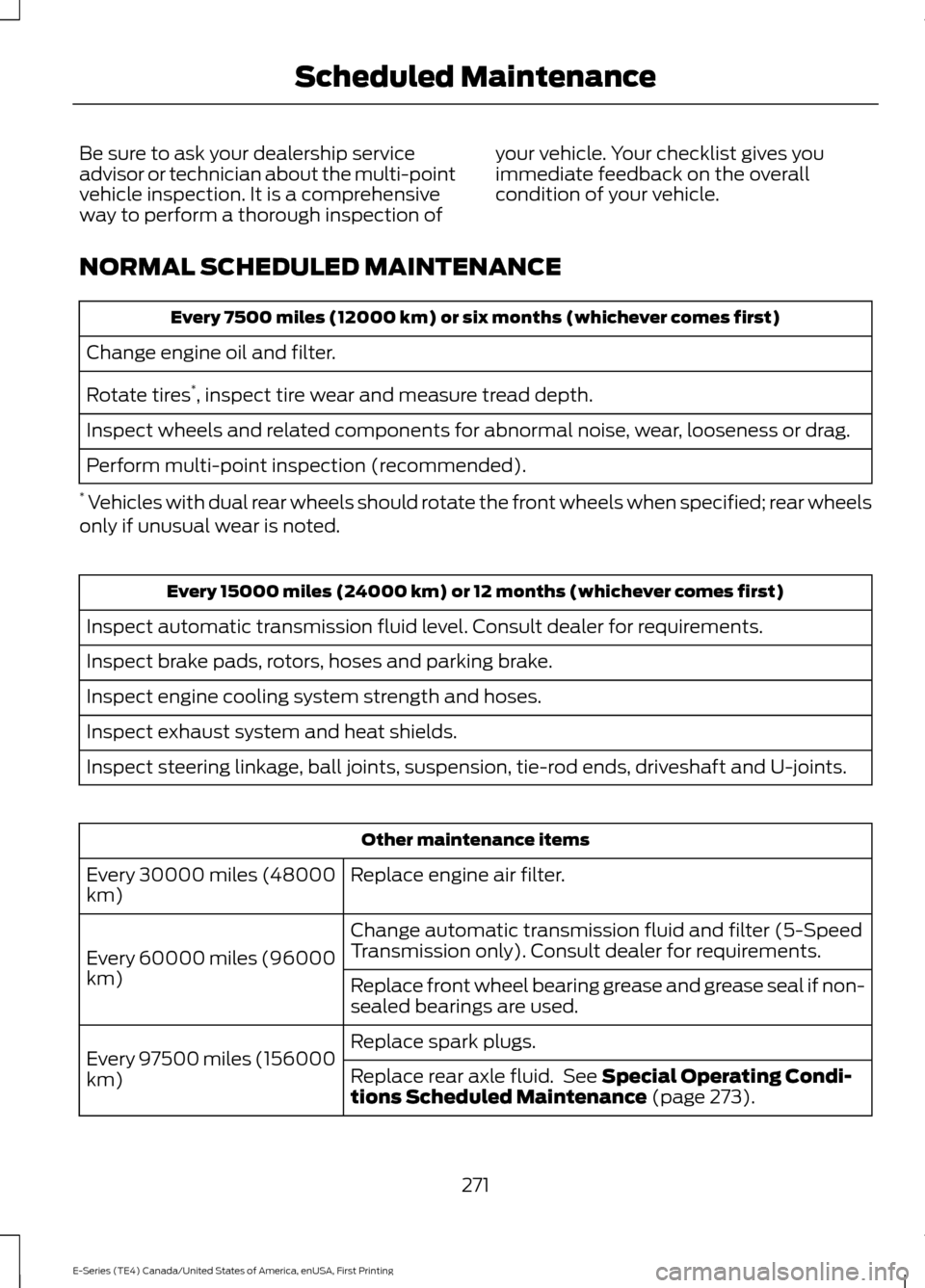
NORMAL SCHEDULED MAINTENANCE Every 7500 miles (12000 km) or six months (whichever comes first)
Change engine oil and filter.
Rotate tires *
, inspect tire wear and measure tread depth.
Inspect wheels and related components for abnormal noise, wear, looseness or drag.
Perform multi-point inspection (recommended).
* Vehicles with dual rear wheels should rotate the front wheels when specified; rear wheels
only if unusual wear is noted. Every 15000 miles (24000 km) or 12 months (whichever comes first)
Inspect automatic transmission fluid level. Consult dealer for requirements.
Inspect brake pads, rotors, hoses and parking brake.
Inspect engine cooling system strength and hoses.
Inspect exhaust system and heat shields.
Inspect steering linkage, ball joints, suspension, tie-rod ends, driveshaft and U-joints. Other maintenance items
Replace engine air filter.
Every 30000 miles (48000
km)
Change automatic transmission fluid and filter (5-Speed
Transmission only). Consult dealer for requirements.
Every 60000 miles (96000
km) Replace front wheel bearing grease and grease seal if non-
sealed bearings are used.
Replace spark plugs.
Every 97500 miles (156000
km) Replace rear axle fluid. See Special Operating Condi-
tions Scheduled Maintenance (page 273).
271
E-Series (TE4) Canada/United States of America, enUSA, First Printing Scheduled Maintenance
Page 275 of 318
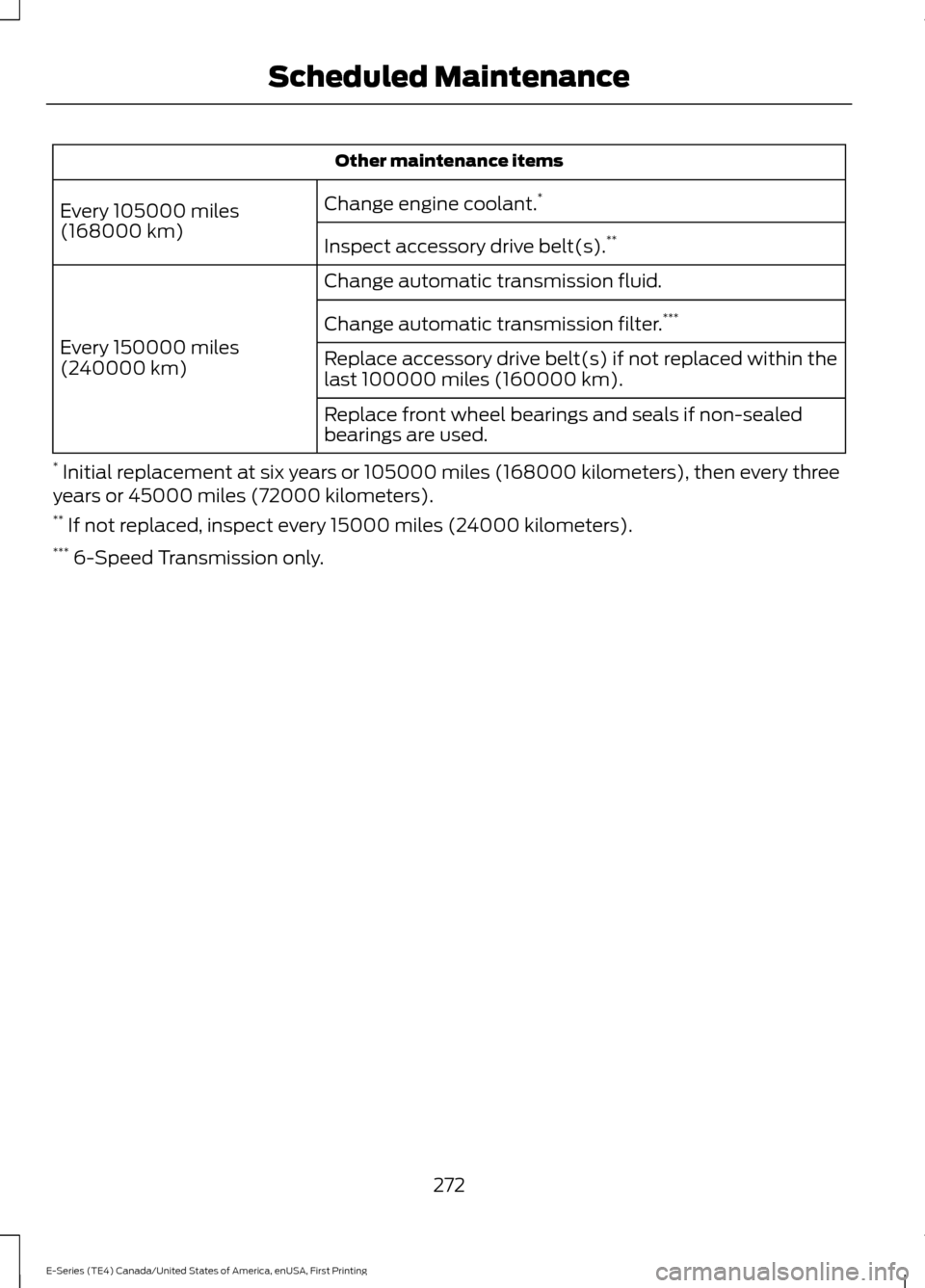
Other maintenance items
Change engine coolant. *
Every 105000 miles
(168000 km) Inspect accessory drive belt(s). **
Change automatic transmission fluid.
Every 150000 miles
(240000 km) Change automatic transmission filter.
***
Replace accessory drive belt(s) if not replaced within the
last 100000 miles (160000 km).
Replace front wheel bearings and seals if non-sealed
bearings are used.
* Initial replacement at six years or 105000 miles (168000 kilometers), then every three
years or 45000 miles (72000 kilometers).
** If not replaced, inspect every 15000 miles (24000 kilometers).
*** 6-Speed Transmission only.
272
E-Series (TE4) Canada/United States of America, enUSA, First Printing Scheduled Maintenance
Page 276 of 318
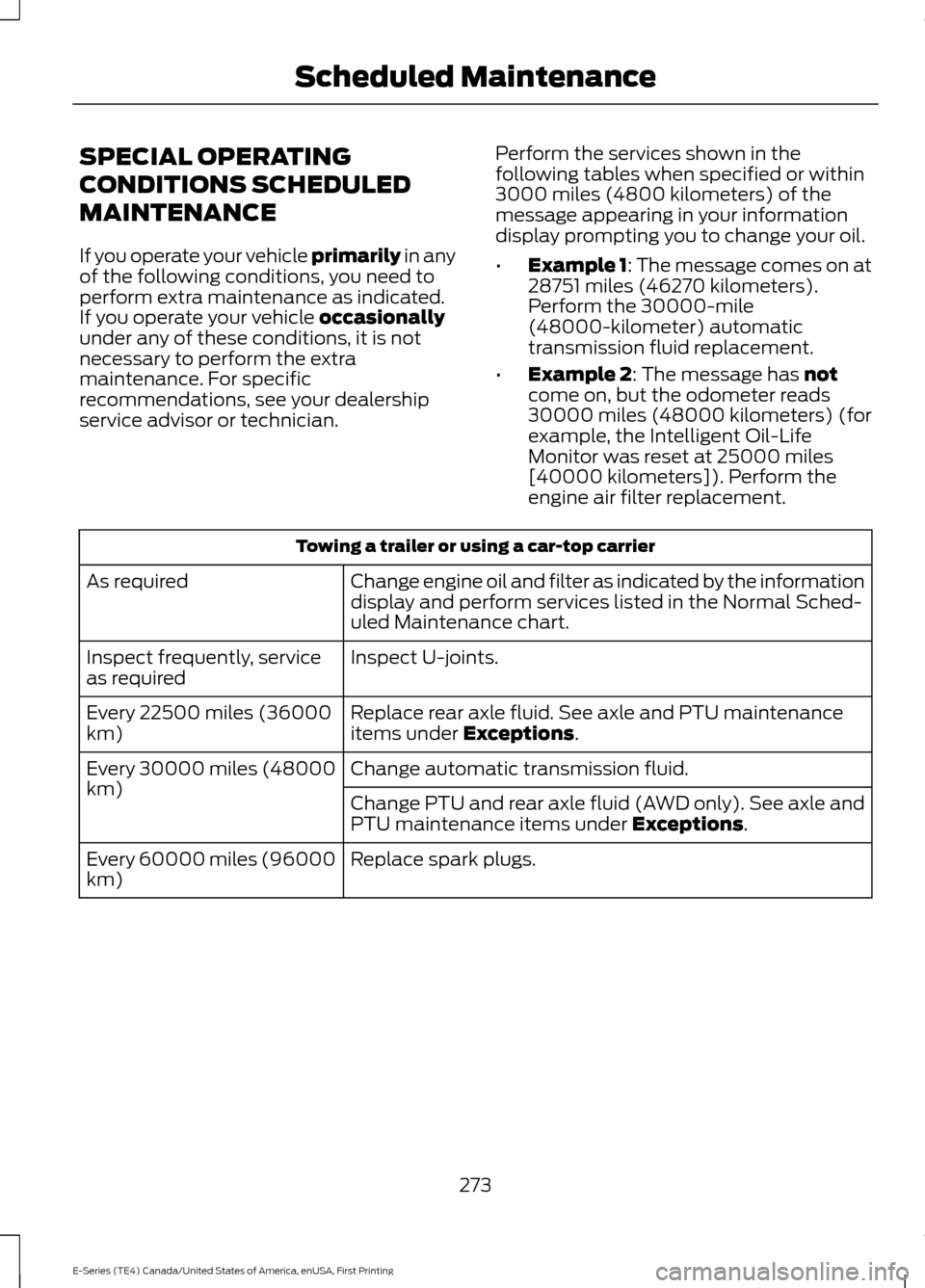
SPECIAL OPERATING
CONDITIONS SCHEDULED
MAINTENANCE
If you operate your vehicle primarily in any
of the following conditions, you need to
perform extra maintenance as indicated.
If you operate your vehicle
occasionally
under any of these conditions, it is not
necessary to perform the extra
maintenance. For specific
recommendations, see your dealership
service advisor or technician. Perform the services shown in the
following tables when specified or within
3000 miles (4800 kilometers) of the
message appearing in your information
display prompting you to change your oil.
•
Example 1: The message comes on at
28751 miles (46270 kilometers).
Perform the 30000-mile
(48000-kilometer) automatic
transmission fluid replacement.
• Example 2
: The message has not
come on, but the odometer reads
30000 miles (48000 kilometers) (for
example, the Intelligent Oil-Life
Monitor was reset at 25000 miles
[40000 kilometers]). Perform the
engine air filter replacement. Towing a trailer or using a car-top carrier
Change engine oil and filter as indicated by the information
display and perform services listed in the Normal Sched-
uled Maintenance chart.
As required
Inspect U-joints.
Inspect frequently, service
as required
Replace rear axle fluid. See axle and PTU maintenance
items under
Exceptions.
Every 22500 miles (36000
km)
Change automatic transmission fluid.
Every 30000 miles (48000
km)
Change PTU and rear axle fluid (AWD only). See axle and
PTU maintenance items under
Exceptions.
Replace spark plugs.
Every 60000 miles (96000
km)
273
E-Series (TE4) Canada/United States of America, enUSA, First Printing Scheduled Maintenance
Page 277 of 318
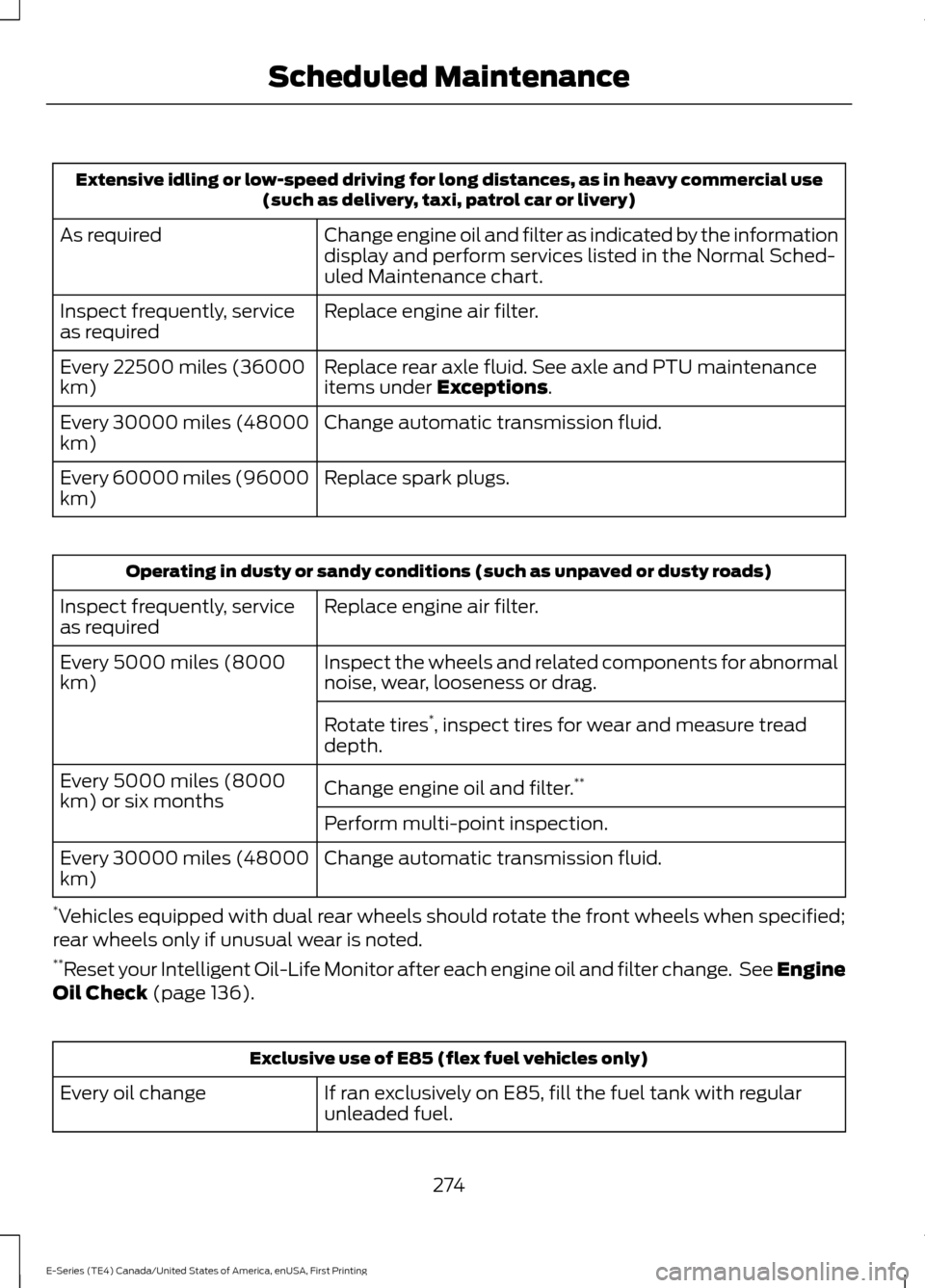
Extensive idling or low-speed driving for long distances, as in heavy commercial use
(such as delivery, taxi, patrol car or livery)
Change engine oil and filter as indicated by the information
display and perform services listed in the Normal Sched-
uled Maintenance chart.
As required
Replace engine air filter.
Inspect frequently, service
as required
Replace rear axle fluid. See axle and PTU maintenance
items under Exceptions.
Every 22500 miles (36000
km)
Change automatic transmission fluid.
Every 30000 miles (48000
km)
Replace spark plugs.
Every 60000 miles (96000
km) Operating in dusty or sandy conditions (such as unpaved or dusty roads)
Replace engine air filter.
Inspect frequently, service
as required
Inspect the wheels and related components for abnormal
noise, wear, looseness or drag.
Every 5000 miles (8000
km)
Rotate tires*
, inspect tires for wear and measure tread
depth.
Change engine oil and filter. **
Every 5000 miles (8000
km) or six months
Perform multi-point inspection.
Change automatic transmission fluid.
Every 30000 miles (48000
km)
* Vehicles equipped with dual rear wheels should rotate the front wheels when specified;
rear wheels only if unusual wear is noted.
** Reset your Intelligent Oil-Life Monitor after each engine oil and filter change. See Engine
Oil Check
(page 136). Exclusive use of E85 (flex fuel vehicles only)
If ran exclusively on E85, fill the fuel tank with regular
unleaded fuel.
Every oil change
274
E-Series (TE4) Canada/United States of America, enUSA, First Printing Scheduled Maintenance
Page 292 of 318
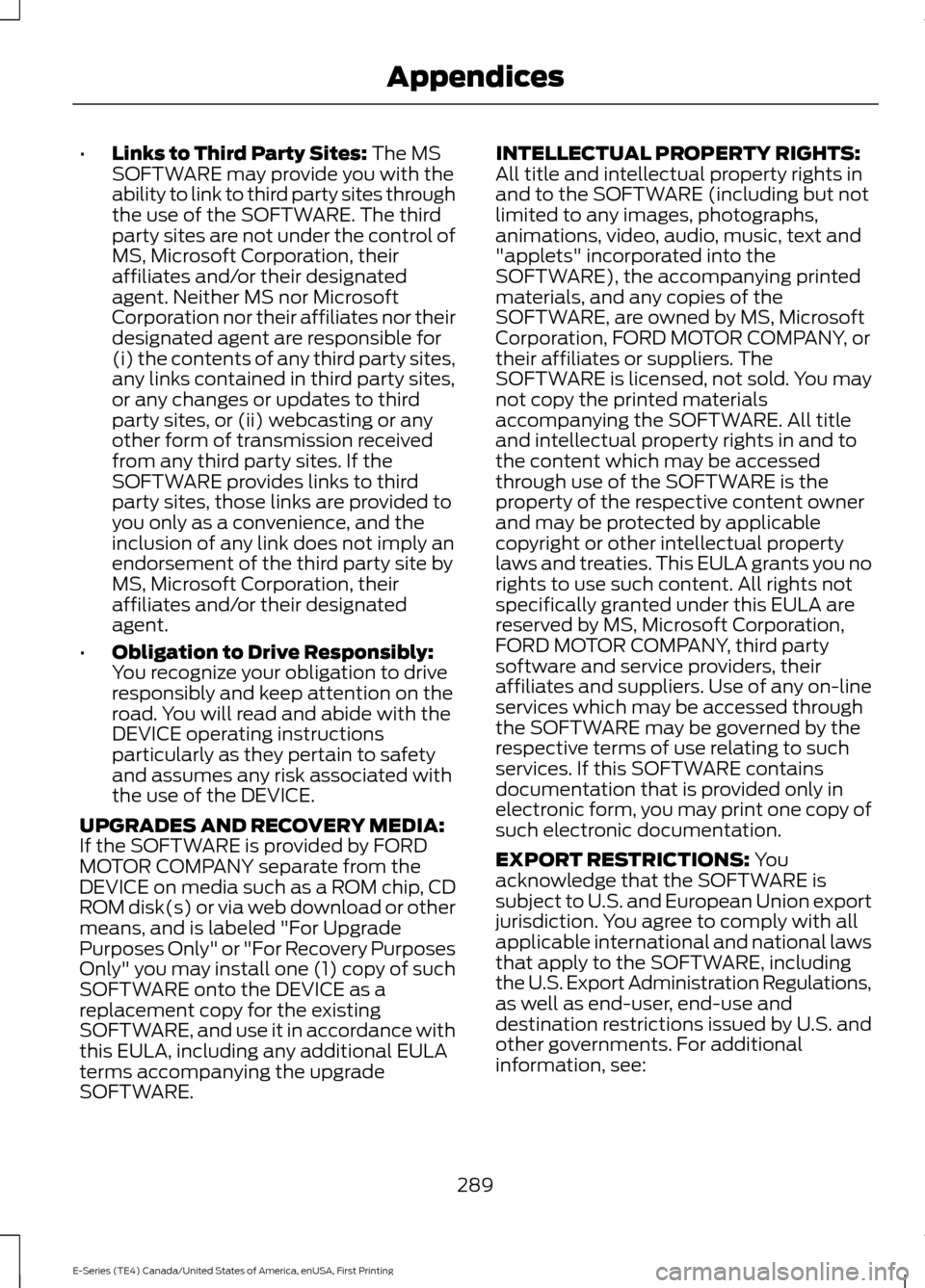
•
Links to Third Party Sites: The MS
SOFTWARE may provide you with the
ability to link to third party sites through
the use of the SOFTWARE. The third
party sites are not under the control of
MS, Microsoft Corporation, their
affiliates and/or their designated
agent. Neither MS nor Microsoft
Corporation nor their affiliates nor their
designated agent are responsible for
(i) the contents of any third party sites,
any links contained in third party sites,
or any changes or updates to third
party sites, or (ii) webcasting or any
other form of transmission received
from any third party sites. If the
SOFTWARE provides links to third
party sites, those links are provided to
you only as a convenience, and the
inclusion of any link does not imply an
endorsement of the third party site by
MS, Microsoft Corporation, their
affiliates and/or their designated
agent.
• Obligation to Drive Responsibly:
You recognize your obligation to drive
responsibly and keep attention on the
road. You will read and abide with the
DEVICE operating instructions
particularly as they pertain to safety
and assumes any risk associated with
the use of the DEVICE.
UPGRADES AND RECOVERY MEDIA:
If the SOFTWARE is provided by FORD
MOTOR COMPANY separate from the
DEVICE on media such as a ROM chip, CD
ROM disk(s) or via web download or other
means, and is labeled "For Upgrade
Purposes Only" or "For Recovery Purposes
Only" you may install one (1) copy of such
SOFTWARE onto the DEVICE as a
replacement copy for the existing
SOFTWARE, and use it in accordance with
this EULA, including any additional EULA
terms accompanying the upgrade
SOFTWARE. INTELLECTUAL PROPERTY RIGHTS:
All title and intellectual property rights in
and to the SOFTWARE (including but not
limited to any images, photographs,
animations, video, audio, music, text and
"applets" incorporated into the
SOFTWARE), the accompanying printed
materials, and any copies of the
SOFTWARE, are owned by MS, Microsoft
Corporation, FORD MOTOR COMPANY, or
their affiliates or suppliers. The
SOFTWARE is licensed, not sold. You may
not copy the printed materials
accompanying the SOFTWARE. All title
and intellectual property rights in and to
the content which may be accessed
through use of the SOFTWARE is the
property of the respective content owner
and may be protected by applicable
copyright or other intellectual property
laws and treaties. This EULA grants you no
rights to use such content. All rights not
specifically granted under this EULA are
reserved by MS, Microsoft Corporation,
FORD MOTOR COMPANY, third party
software and service providers, their
affiliates and suppliers. Use of any on-line
services which may be accessed through
the SOFTWARE may be governed by the
respective terms of use relating to such
services. If this SOFTWARE contains
documentation that is provided only in
electronic form, you may print one copy of
such electronic documentation.
EXPORT RESTRICTIONS:
You
acknowledge that the SOFTWARE is
subject to U.S. and European Union export
jurisdiction. You agree to comply with all
applicable international and national laws
that apply to the SOFTWARE, including
the U.S. Export Administration Regulations,
as well as end-user, end-use and
destination restrictions issued by U.S. and
other governments. For additional
information, see:
289
E-Series (TE4) Canada/United States of America, enUSA, First Printing Appendices