tow FORD E SERIES 2017 4.G Workshop Manual
[x] Cancel search | Manufacturer: FORD, Model Year: 2017, Model line: E SERIES, Model: FORD E SERIES 2017 4.GPages: 318, PDF Size: 6.21 MB
Page 193 of 318
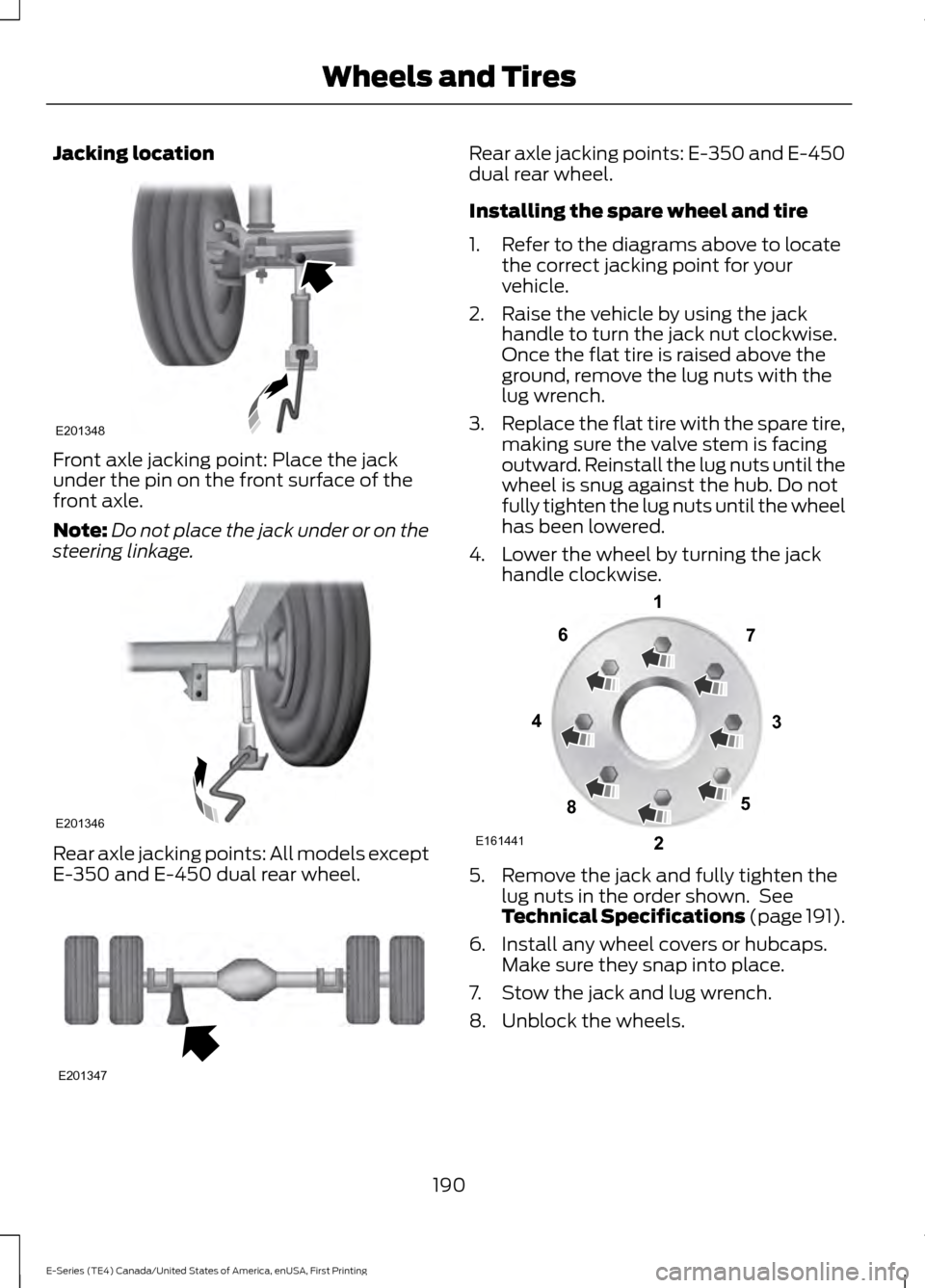
Jacking location
Front axle jacking point: Place the jack
under the pin on the front surface of the
front axle.
Note:
Do not place the jack under or on the
steering linkage. Rear axle jacking points: All models except
E-350 and E-450 dual rear wheel. Rear axle jacking points: E-350 and E-450
dual rear wheel.
Installing the spare wheel and tire
1. Refer to the diagrams above to locate
the correct jacking point for your
vehicle.
2. Raise the vehicle by using the jack handle to turn the jack nut clockwise.
Once the flat tire is raised above the
ground, remove the lug nuts with the
lug wrench.
3. Replace the flat tire with the spare tire,
making sure the valve stem is facing
outward. Reinstall the lug nuts until the
wheel is snug against the hub. Do not
fully tighten the lug nuts until the wheel
has been lowered.
4. Lower the wheel by turning the jack handle clockwise. 5. Remove the jack and fully tighten the
lug nuts in the order shown. See
Technical Specifications (page 191).
6. Install any wheel covers or hubcaps. Make sure they snap into place.
7. Stow the jack and lug wrench.
8. Unblock the wheels.
190
E-Series (TE4) Canada/United States of America, enUSA, First Printing Wheels and TiresE201348 E201346 E201347 E161441
13
4
27
6
5
8
Page 209 of 318
GENERAL INFORMATION
Radio Frequencies and Reception
Factors
AM and FM frequencies are established by
the Federal Communications Commission
(FCC) and the Canadian Radio and
Telecommunications Commission (CRTC).
Those frequencies are:
•
AM: 530, 540-1700, 1710 kHz
• FM: 87.9-107.7, 107.9 MHz Radio Reception Factors
The further you travel from an AM or FM station, the
weaker the signal and the weaker the reception.
Distance and strength
Hills, mountains, tall buildings, bridges, tunnels, freeway
overpasses, parking garages, dense tree foliage and
thunderstorms can interfere with the reception.
Terrain
When you pass a ground-based broadcast repeating
tower, a stronger signal may overtake a weaker one and
result in the audio system muting.
Station overload
CD and CD Player Information
Note: CD units play commercially pressed
4.7 in (12 cm) audio compact discs only. Due
to technical incompatibility, certain
recordable and re-recordable compact discs
may not function correctly when used in
Ford CD players.
Note: Do not insert CDs with homemade
paper (adhesive) labels into the CD player
as the label may peel and cause the CD to
become jammed. You should use a
permanent felt tip marker rather than
adhesive labels on your homemade CDs.
Ballpoint pens may damage CDs. Please
contact an authorized dealer for further
information.
Note: Do not use any irregularly shaped
discs or discs with a scratch protection film
attached.
Always handle discs by their edges only.
Clean the disc with an approved CD
cleaner only. Wipe it from the center of the
disc toward the edge. Do not clean in a
circular motion. Do not expose discs to direct sunlight or
heat sources for extended periods.
MP3 and WMA Track and Folder
Structure
Audio systems capable of recognizing and
playing MP3 and WMA individual tracks
and folder structures work as follows:
•
There are two different modes for MP3
and WMA disc playback: MP3 and
WMA track mode (system default) and
MP3 and WMA folder mode.
• MP3 and WMA track mode ignores any
folder structure on the MP3 and WMA
disc. The player numbers each MP3
and WMA track on the disc (noted by
the MP3 or WMA file extension) from
T001 to a maximum of T255. The
maximum number of playable MP3 and
WMA files may be less depending on
the structure of the CD and exact
model of radio present.
206
E-Series (TE4) Canada/United States of America, enUSA, First Printing Audio System
Page 216 of 318
Note:
This receiver includes the eCos
real-time operating system. eCos is
published under the eCos License.
Satellite Radio Reception Factors Potential satellite radio reception issues
For optimal reception performance, keep the antenna
clear of snow and ice build-up and keep luggage and other
material as far away from the antenna as possible.
Antenna obstructions
Hills, mountains, tall buildings, bridges, tunnels, freeway
overpasses, parking garages, dense tree foliage and
thunderstorms can interfere with your reception.
Terrain
When you pass a ground-based broadcast-repeating
tower, a stronger signal may overtake a weaker one and
the audio system may mute.
Station overload
Your display may show ACQUIRING . . . to indicate the
interference and the audio system may mute.
Satellite radio signal interfer-
ence
SIRIUS® Satellite Radio Service
Note: SIRIUS reserves the unrestricted right
to change, rearrange, add or delete
programming including canceling, moving
or adding particular channels, and its prices,
at any time, with or without notice to you.
Ford Motor Company shall not be
responsible for any such programming
changes. SIRIUS satellite radio is a
subscription-based satellite radio service
that broadcasts a variety of music, sports,
news, weather, traffic and entertainment
programming. Your factory-installed
SIRIUS satellite radio system includes
hardware and a limited subscription term,
which begins on the date of sale or lease
of your vehicle. See an authorized dealer
for availability.
For more information on extended
subscription terms (a service fee is
required), the online media player and a
complete list of SIRIUS satellite radio
channels, and other features, please visit
www.siriusxm.com in the United States,
www.siriusxm.ca in Canada, or call SIRIUS
at 1-888-539-7474.
Satellite Radio Electronic Serial
Number (ESN)
You need your ESN to activate, modify or
track your satellite radio account. When in
satellite radio mode, tune to channel 0.
213
E-Series (TE4) Canada/United States of America, enUSA, First Printing Audio SystemE142593
Page 217 of 318
Troubleshooting
Action
Condition
Message
No action required. This
message should disappear
shortly.
Radio requires more than
two seconds to produce
audio for the selected
channel.
Acquiring…
If this message does not
clear shortly, or with an igni-
tion key cycle, your receiver
may have a fault. See an
authorized dealer for service.
There is an internal module
or system failure present.
Satellite antenna fault
SIRIUS system failure
Tune to another channel or
choose another preset.
The channel is no longer
available.
Invalid Channel
Contact SIRIUS at 1-888-
539-7474 to subscribe to
the channel, or tune to
another channel.
Your subscription does not
include this channel.
Unsubscribed Channel
The signal is blocked. When
you move into an open area,
the signal should return.
The signal is lost from the
SIRIUS satellite or SIRIUS
tower to your vehicle
antenna.
No Signal
No action required. The
process may take up to
three minutes.
Update of channel
programming in progress.
Updating…
Contact SIRIUS at 1-888-
539-7474 to resolve
subscription issues.
Your satellite service is no
longer available.
Questions? Call
1-888-539-7474
Use the channel guide to
turn off the Lock or Skip
function on that station.
All the channels in the
selected category are either
skipped or locked.
None found
Check Channel Guide
No action required.
SIRIUS has updated the
channels available for your
vehicle.
Subscription Updated
214
E-Series (TE4) Canada/United States of America, enUSA, First Printing Audio System
Page 244 of 318
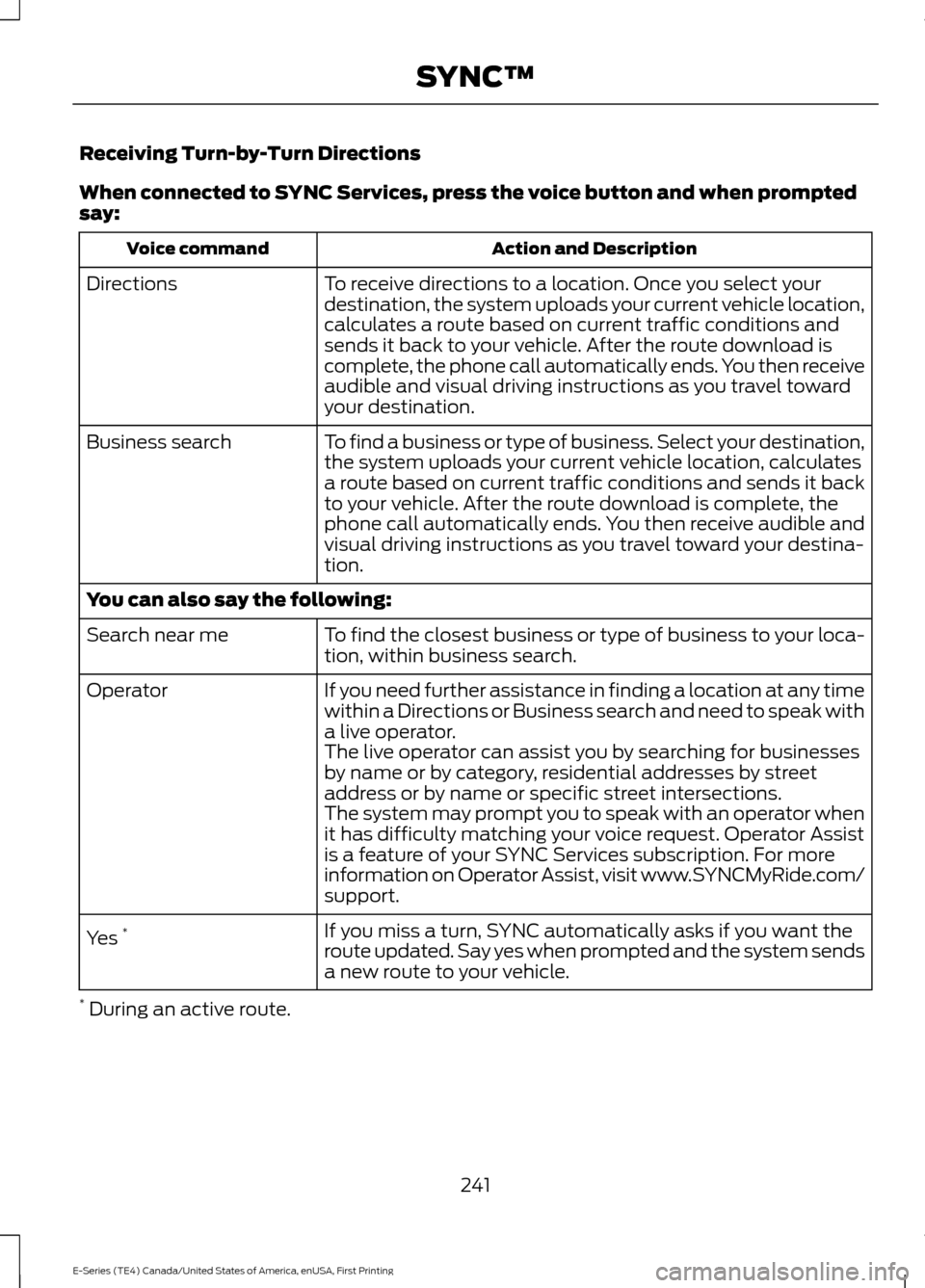
Receiving Turn-by-Turn Directions
When connected to SYNC Services, press the voice button and when prompted
say:
Action and Description
Voice command
To receive directions to a location. Once you select your
destination, the system uploads your current vehicle location,
calculates a route based on current traffic conditions and
sends it back to your vehicle. After the route download is
complete, the phone call automatically ends. You then receive
audible and visual driving instructions as you travel toward
your destination.
Directions
To find a business or type of business. Select your destination,
the system uploads your current vehicle location, calculates
a route based on current traffic conditions and sends it back
to your vehicle. After the route download is complete, the
phone call automatically ends. You then receive audible and
visual driving instructions as you travel toward your destina-
tion.
Business search
You can also say the following:
To find the closest business or type of business to your loca-
tion, within business search.
Search near me
If you need further assistance in finding a location at any time
within a Directions or Business search and need to speak with
a live operator.
Operator
The live operator can assist you by searching for businesses
by name or by category, residential addresses by street
address or by name or specific street intersections.
The system may prompt you to speak with an operator when
it has difficulty matching your voice request. Operator Assist
is a feature of your SYNC Services subscription. For more
information on Operator Assist, visit www.SYNCMyRide.com/
support.
If you miss a turn, SYNC automatically asks if you want the
route updated. Say yes when prompted and the system sends
a new route to your vehicle.
Yes
*
* During an active route.
241
E-Series (TE4) Canada/United States of America, enUSA, First Printing SYNC™
Page 269 of 318
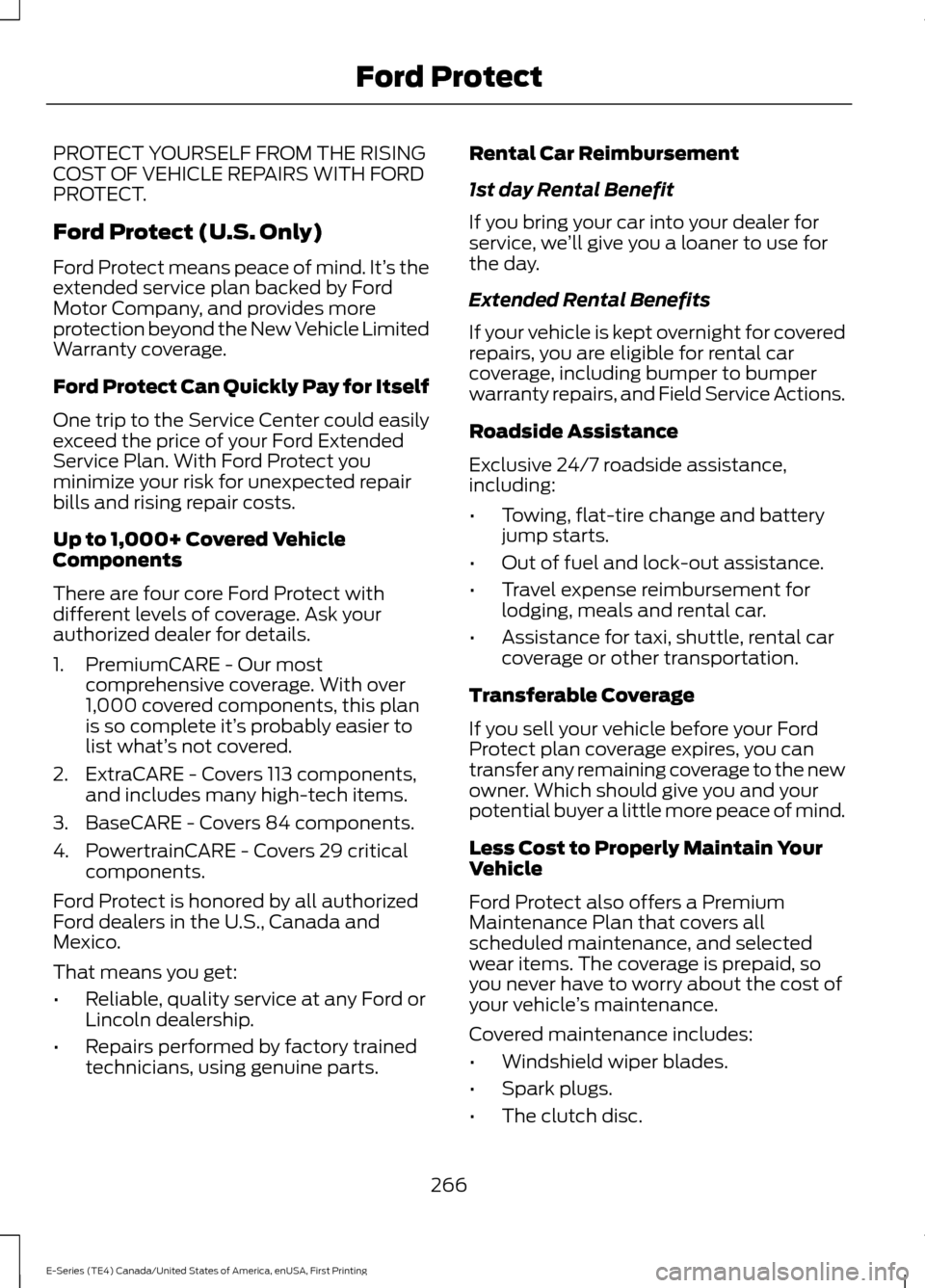
PROTECT YOURSELF FROM THE RISING
COST OF VEHICLE REPAIRS WITH FORD
PROTECT.
Ford Protect (U.S. Only)
Ford Protect means peace of mind. It’
s the
extended service plan backed by Ford
Motor Company, and provides more
protection beyond the New Vehicle Limited
Warranty coverage.
Ford Protect Can Quickly Pay for Itself
One trip to the Service Center could easily
exceed the price of your Ford Extended
Service Plan. With Ford Protect you
minimize your risk for unexpected repair
bills and rising repair costs.
Up to 1,000+ Covered Vehicle
Components
There are four core Ford Protect with
different levels of coverage. Ask your
authorized dealer for details.
1. PremiumCARE - Our most comprehensive coverage. With over
1,000 covered components, this plan
is so complete it’ s probably easier to
list what’ s not covered.
2. ExtraCARE - Covers 113 components, and includes many high-tech items.
3. BaseCARE - Covers 84 components.
4. PowertrainCARE - Covers 29 critical components.
Ford Protect is honored by all authorized
Ford dealers in the U.S., Canada and
Mexico.
That means you get:
• Reliable, quality service at any Ford or
Lincoln dealership.
• Repairs performed by factory trained
technicians, using genuine parts. Rental Car Reimbursement
1st day Rental Benefit
If you bring your car into your dealer for
service, we
’ll give you a loaner to use for
the day.
Extended Rental Benefits
If your vehicle is kept overnight for covered
repairs, you are eligible for rental car
coverage, including bumper to bumper
warranty repairs, and Field Service Actions.
Roadside Assistance
Exclusive 24/7 roadside assistance,
including:
• Towing, flat-tire change and battery
jump starts.
• Out of fuel and lock-out assistance.
• Travel expense reimbursement for
lodging, meals and rental car.
• Assistance for taxi, shuttle, rental car
coverage or other transportation.
Transferable Coverage
If you sell your vehicle before your Ford
Protect plan coverage expires, you can
transfer any remaining coverage to the new
owner. Which should give you and your
potential buyer a little more peace of mind.
Less Cost to Properly Maintain Your
Vehicle
Ford Protect also offers a Premium
Maintenance Plan that covers all
scheduled maintenance, and selected
wear items. The coverage is prepaid, so
you never have to worry about the cost of
your vehicle ’s maintenance.
Covered maintenance includes:
• Windshield wiper blades.
• Spark plugs.
• The clutch disc.
266
E-Series (TE4) Canada/United States of America, enUSA, First Printing Ford Protect
Page 270 of 318
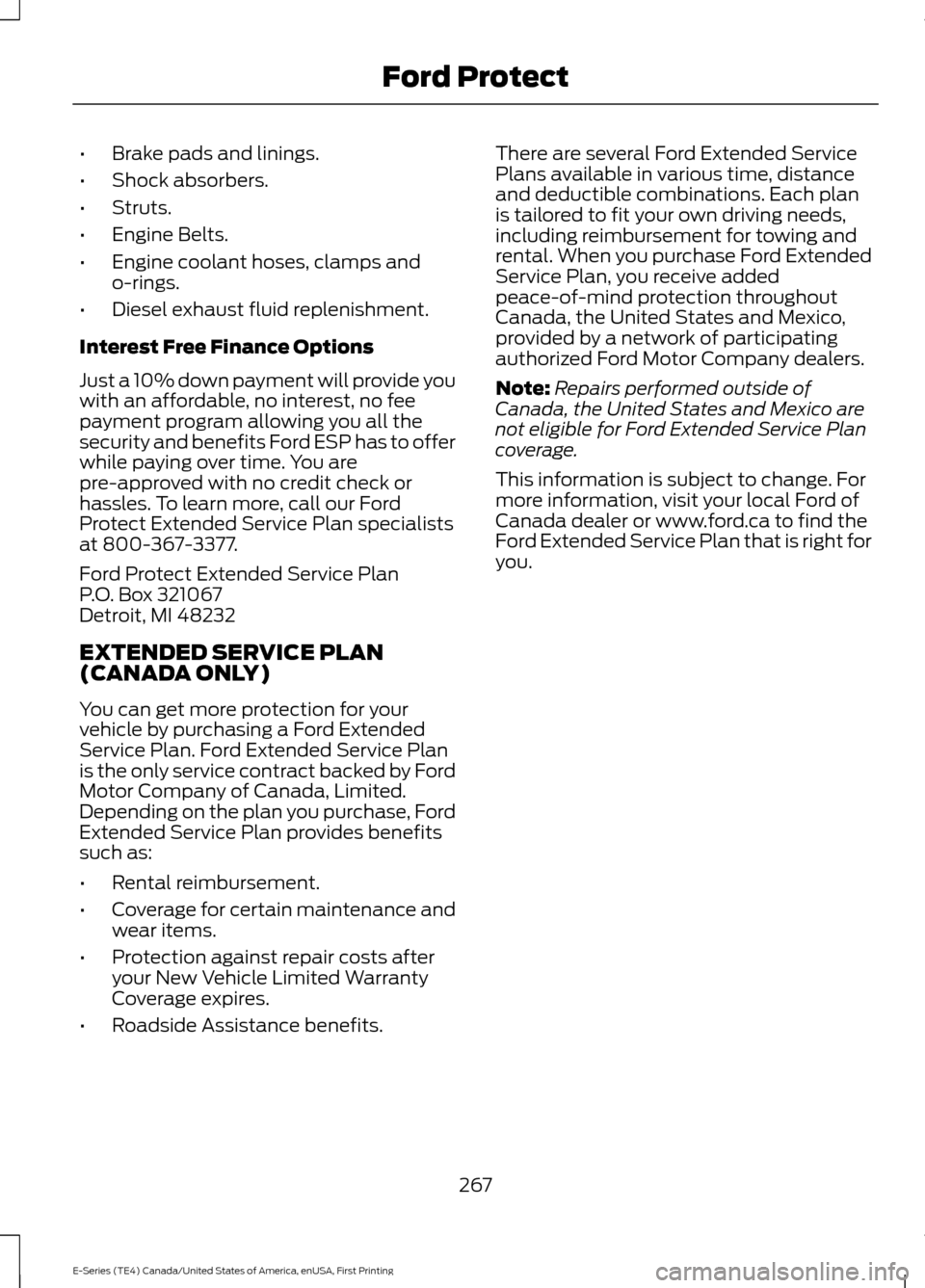
•
Brake pads and linings.
• Shock absorbers.
• Struts.
• Engine Belts.
• Engine coolant hoses, clamps and
o-rings.
• Diesel exhaust fluid replenishment.
Interest Free Finance Options
Just a 10% down payment will provide you
with an affordable, no interest, no fee
payment program allowing you all the
security and benefits Ford ESP has to offer
while paying over time. You are
pre-approved with no credit check or
hassles. To learn more, call our Ford
Protect Extended Service Plan specialists
at 800-367-3377.
Ford Protect Extended Service Plan
P.O. Box 321067
Detroit, MI 48232
EXTENDED SERVICE PLAN
(CANADA ONLY)
You can get more protection for your
vehicle by purchasing a Ford Extended
Service Plan. Ford Extended Service Plan
is the only service contract backed by Ford
Motor Company of Canada, Limited.
Depending on the plan you purchase, Ford
Extended Service Plan provides benefits
such as:
• Rental reimbursement.
• Coverage for certain maintenance and
wear items.
• Protection against repair costs after
your New Vehicle Limited Warranty
Coverage expires.
• Roadside Assistance benefits. There are several Ford Extended Service
Plans available in various time, distance
and deductible combinations. Each plan
is tailored to fit your own driving needs,
including reimbursement for towing and
rental. When you purchase Ford Extended
Service Plan, you receive added
peace-of-mind protection throughout
Canada, the United States and Mexico,
provided by a network of participating
authorized Ford Motor Company dealers.
Note:
Repairs performed outside of
Canada, the United States and Mexico are
not eligible for Ford Extended Service Plan
coverage.
This information is subject to change. For
more information, visit your local Ford of
Canada dealer or www.ford.ca to find the
Ford Extended Service Plan that is right for
you.
267
E-Series (TE4) Canada/United States of America, enUSA, First Printing Ford Protect
Page 276 of 318
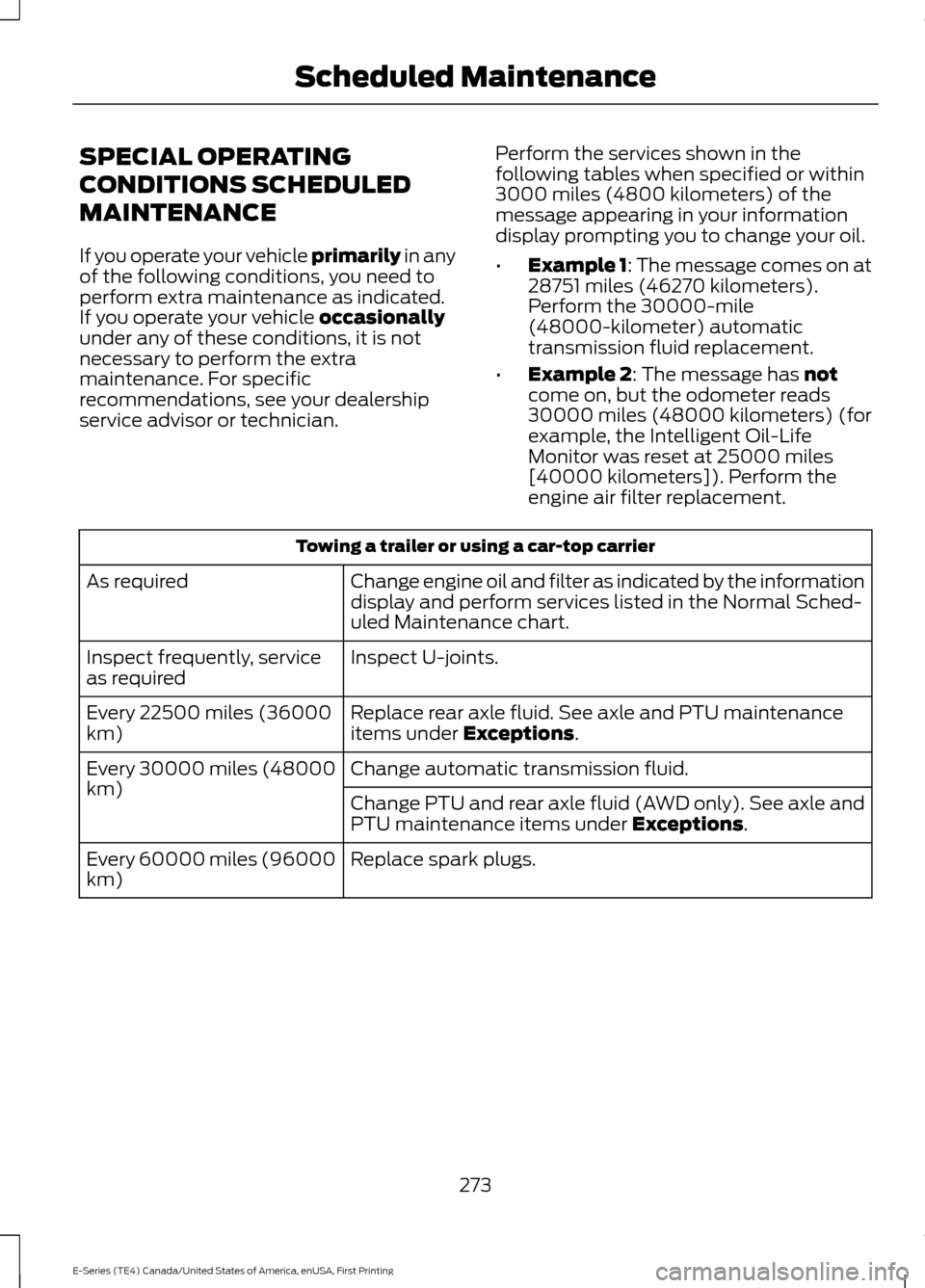
SPECIAL OPERATING
CONDITIONS SCHEDULED
MAINTENANCE
If you operate your vehicle primarily in any
of the following conditions, you need to
perform extra maintenance as indicated.
If you operate your vehicle
occasionally
under any of these conditions, it is not
necessary to perform the extra
maintenance. For specific
recommendations, see your dealership
service advisor or technician. Perform the services shown in the
following tables when specified or within
3000 miles (4800 kilometers) of the
message appearing in your information
display prompting you to change your oil.
•
Example 1: The message comes on at
28751 miles (46270 kilometers).
Perform the 30000-mile
(48000-kilometer) automatic
transmission fluid replacement.
• Example 2
: The message has not
come on, but the odometer reads
30000 miles (48000 kilometers) (for
example, the Intelligent Oil-Life
Monitor was reset at 25000 miles
[40000 kilometers]). Perform the
engine air filter replacement. Towing a trailer or using a car-top carrier
Change engine oil and filter as indicated by the information
display and perform services listed in the Normal Sched-
uled Maintenance chart.
As required
Inspect U-joints.
Inspect frequently, service
as required
Replace rear axle fluid. See axle and PTU maintenance
items under
Exceptions.
Every 22500 miles (36000
km)
Change automatic transmission fluid.
Every 30000 miles (48000
km)
Change PTU and rear axle fluid (AWD only). See axle and
PTU maintenance items under
Exceptions.
Replace spark plugs.
Every 60000 miles (96000
km)
273
E-Series (TE4) Canada/United States of America, enUSA, First Printing Scheduled Maintenance
Page 278 of 318
Engine Idle Hour Meter
Your vehicle may been fitted with an idle
meter to indicate how much time the
vehicle has been sitting in park (P) or
neutral (N). The meter is incorporated with
the vehicle odometer. Depressing the
odometer-reset button once displays the
trip odometer (miles [kilometers]
following by a "T" for trip odometer);
depressing the odometer-reset button a
second time displays the idle meter (hours
following by an "H" for hours). The idle
meter only accumulates time when the
vehicle is in park (P) or neutral (N).
Displayed time is cumulative for the vehicle
and cannot be reset to zero. Police vehicles
often experience long periods of idling,
during which engine oil continues to break
down but distance is not accumulated on
the odometer.
Engine idle hour meter calculation:
Idle hours x 33 = miles (kilometers)
equivalency
Miles (kilometers) driven + miles
(kilometers) equivalency = oil change
interval
Example: When the odometer has
accumulated 3000 miles (4800
kilometers) and the idle meter shows 61
hours, a 5000 mile (8000 kilometer) oil
change interval has been reached: 3000
road miles (4800 road kilometers) + (61
idle hours x 33 miles [53 km]/idle hour) =
5013 miles (8067 kilometers).
Exceptions
There are several exceptions to the Normal
Schedule:
Rear axle maintenance: A rear axle fluid
change or level check is not required unless
a leak is suspected or the assembly has
been submerged in water. During long
periods of trailer towing with outside
temperatures above 70°F (21°C), and at wide-open throttle for long periods above
45 mph (72 km/h), change the rear axle
fluid every 22,500 mi (36,000 km) or three
months, whichever comes first (if rear axle
is filled with non-synthetic fluid). This
interval can be waived and 240,000 mi
(380,000km) service interval can be used
if the rear axle is filled with 75W90
synthetic gear fluid meeting Ford
specification ES-PM-M2013, part number
XY-75W90-QLS, or equivalent. Add friction
modifier XL-3 (EST-M2C118-A) or
equivalent for complete refill of
Traction-Lok rear axles.
California fuel filter replacement: If you
register your vehicle in California, the
California Air Resources Board has
determined that the failure to perform this
maintenance item does not nullify the
emission warranty or limit recall liability
before the completion of your vehicle's
useful life. Ford Motor Company, however,
urges you to have all recommended
maintenance services performed at the
specified intervals and to record all vehicle
service.
Hot climate oil change intervals
:
Vehicles operating in the Middle East,
North Africa, Sub-Saharan Africa or
locations with similar climates using an
American Petroleum Institute (API)
Certified for Gasoline Engines (Certification
mark) oil of SM or SN quality, the normal
oil change interval is 5000 miles (8000
kilometers).
If the available API SM or SN oils are not
available, then the oil change interval is
3000 miles (4800 kilometers).
Engine air filter replacement: The life of
the engine air filter is dependent on
exposure to dusty and dirty conditions.
Vehicles operated in these conditions
require frequent inspection and
replacement of the engine air filter.
275
E-Series (TE4) Canada/United States of America, enUSA, First Printing Scheduled Maintenance
Page 313 of 318

Changing a Fuse............................................132
Fuses........................................................................\
132
Changing a Road Wheel............................187 Dissimilar Spare Wheel and Tire Assembly
Information...................................................... 188
Tire Change Procedure..................................... 189
Changing the 12V Battery
..........................145
Dual Batteries...................................................... 146
Reconnecting the Battery............................... 146
Changing the Engine Air Filter.................155
Changing the Wiper Blades
......................147
Checking the Wiper Blades.......................147
Child Restraint and Seatbelt Maintenance..................................................27
Child Restraint Positioning
..........................21
Child Safety.......................................................14 General Information............................................. 14
Cleaning Leather Seats..............................160
Cleaning Products
........................................156
Cleaning the Alloy Wheels.........................161
Cleaning the Engine....................................158
Cleaning the Exterior...................................157 Exterior Chrome Parts....................................... 157
Exterior Plastic Parts.......................................... 157
Stripes or Graphics............................................. 157
Underbody............................................................ 158
Under Hood.......................................................... 158
Cleaning the Instrument Panel and Instrument Cluster Lens.........................160
Cleaning the Interior....................................159
Cleaning the Windows and Wiper Blades
............................................................159
Climate Control..............................................63
Coolant Check See: Engine Coolant Check............................. 137
Crash Sensors and Airbag Indicator........34
Cruise Control
..................................................43
Principle of Operation........................................ 93
Cruise control See: Using Cruise Control................................. 93
Customer Assistance
...................................118
D
Data Recording
..................................................7
Event Data Recording........................................... 8
Service Data Recording......................................... 7
Daytime Running Lamps
............................46 Digital Radio
...................................................210
HD Radio Reception and Station
Troubleshooting.............................................. 211
Direction Indicators
.......................................46
Doors and Locks.............................................38
Driver and Passenger Airbags...................29 Children and Airbags........................................... 33
Passenger Airbag On and Off Switch ..........29
Proper Driver and Front Passenger Seating Adjustment........................................................ 33
Driving Aids
......................................................94
Driving Hints....................................................110
Driving Through Water..................................111
DRL See: Daytime Running Lamps......................... 46
E
Economical Driving.......................................110
Emission Control System...........................80 On-Board Diagnostics (OBD-II)...................... 81
Readiness for Inspection and Maintenance (I/M) Testing...................................................... 81
End User License Agreement.................286 SYNC End User License Agreement
(EULA).............................................................. 286
Engine Block Heater......................................74 Using the Engine Block Heater........................ 74
Engine Coolant Check.................................137 Adding Coolant.................................................... 137
Coolant Change.................................................. 139
Engine Coolant Temperature Management
.................................................. 140
Fail-Safe Cooling................................................ 139
Recycled Coolant................................................ 139
Severe Climates.................................................. 139
Engine Immobilizer See: Passive Anti-Theft System...................... 41
Engine Oil Check
...........................................136
Adding Engine Oil............................................... 136
Engine Oil Dipstick.......................................136
Engine Specifications - 6.2L.....................192 Drivebelt Routing................................................ 192
Engine Specifications - 6.8L
....................192
Drivebelt Routing................................................ 193
Environment......................................................13
Essential Towing Checks...........................102 Before Towing a Trailer..................................... 107
310
E-Series (TE4) Canada/United States of America, enUSA, First Printing Index