change wheel FORD E SERIES 2018 User Guide
[x] Cancel search | Manufacturer: FORD, Model Year: 2018, Model line: E SERIES, Model: FORD E SERIES 2018Pages: 323, PDF Size: 7.09 MB
Page 190 of 323
2. This device must accept anyinterference received, includinginterference that may cause undesiredoperation.
Note:Changes or modifications notexpressively approved by the partyresponsible for compliance could void theuser's authority to operate the equipment.The term "IC:" before the radio certificationnumber only signifies that Industry Canadatechnical specifications were met.
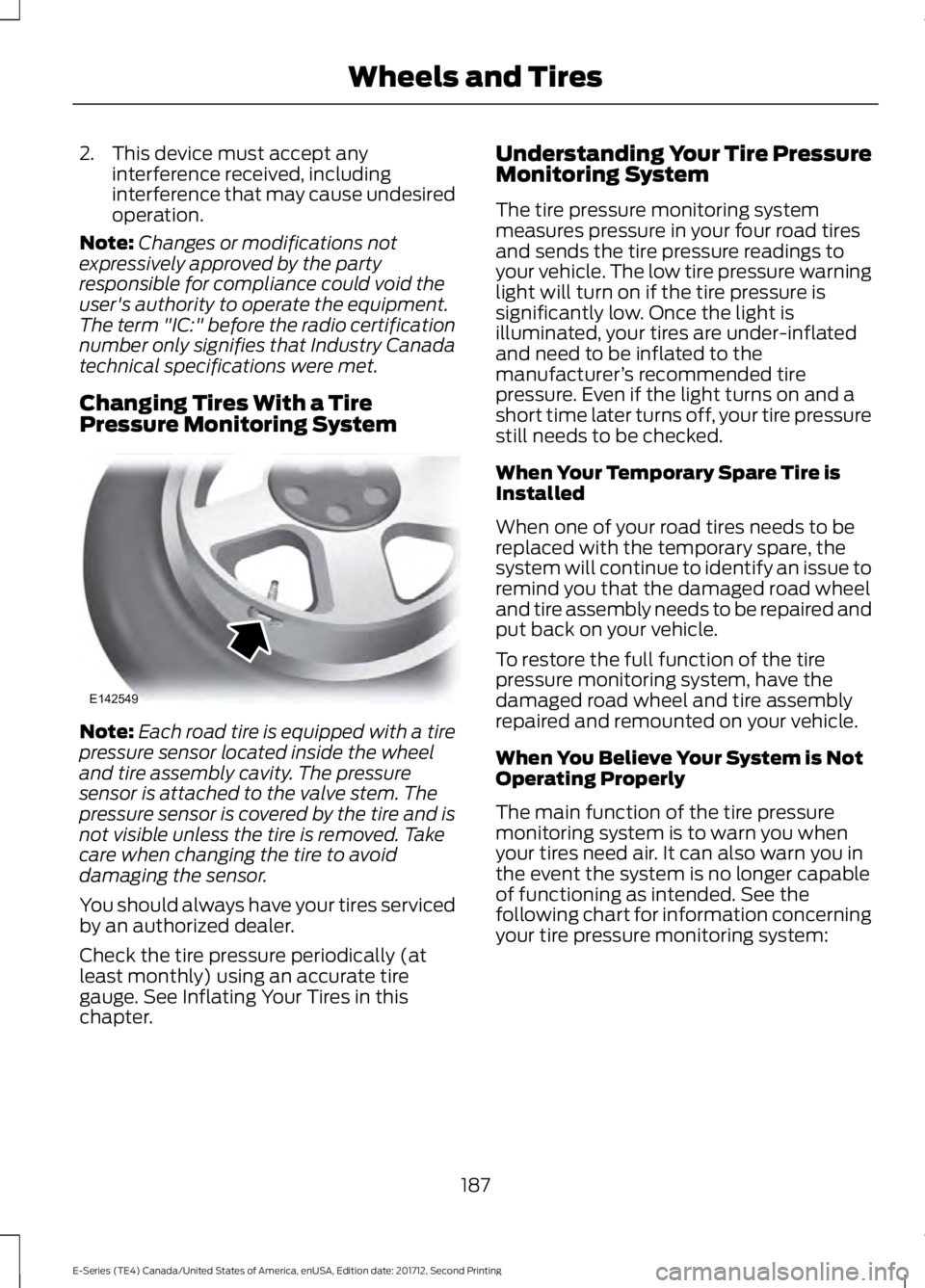
Changing Tires With a TirePressure Monitoring System
Note:Each road tire is equipped with a tirepressure sensor located inside the wheeland tire assembly cavity. The pressuresensor is attached to the valve stem. Thepressure sensor is covered by the tire and isnot visible unless the tire is removed. Takecare when changing the tire to avoiddamaging the sensor.
You should always have your tires servicedby an authorized dealer.
Check the tire pressure periodically (atleast monthly) using an accurate tiregauge. See Inflating Your Tires in thischapter.
Understanding Your Tire PressureMonitoring System
The tire pressure monitoring systemmeasures pressure in your four road tiresand sends the tire pressure readings toyour vehicle. The low tire pressure warninglight will turn on if the tire pressure issignificantly low. Once the light isilluminated, your tires are under-inflatedand need to be inflated to themanufacturer’s recommended tirepressure. Even if the light turns on and ashort time later turns off, your tire pressurestill needs to be checked.
When Your Temporary Spare Tire isInstalled
When one of your road tires needs to bereplaced with the temporary spare, thesystem will continue to identify an issue toremind you that the damaged road wheeland tire assembly needs to be repaired andput back on your vehicle.
To restore the full function of the tirepressure monitoring system, have thedamaged road wheel and tire assemblyrepaired and remounted on your vehicle.
When You Believe Your System is NotOperating Properly
The main function of the tire pressuremonitoring system is to warn you whenyour tires need air. It can also warn you inthe event the system is no longer capableof functioning as intended. See thefollowing chart for information concerningyour tire pressure monitoring system:
187
E-Series (TE4) Canada/United States of America, enUSA, Edition date: 201712, Second Printing
Wheels and TiresE142549
Page 193 of 323
A dissimilar spare wheel and tire assemblyis defined as a spare wheel and tireassembly that is different in brand, size orappearance from the road tires and wheelsand can be one of three types:
1.T-type mini-spare: This spare tirebegins with the letter T for tire size andmay have Temporary Use Only molded inthe sidewall.
2.Full-size dissimilar spare with labelon wheel: This spare tire has a label onthe wheel that states: THIS WHEEL ANDTIRE ASSEMBLY FOR TEMPORARY USEONLY.
When driving with one of the dissimilarspare tires listed above, do not:
•Exceed 50 mph (80 km/h).
•Load the vehicle beyond maximumvehicle load rating listed on the SafetyCompliance Label.
•Tow a trailer.
•Use snow chains on the end of thevehicle with the dissimilar spare tire.
•Use more than one dissimilar spare tireat a time.
•Use commercial car washingequipment.
•Try to repair the dissimilar spare tire.
Use of one of the dissimilar spare tireslisted above at any one wheel location canlead to impairment of the following:
•Handling, stability and brakingperformance.
•Comfort and noise.
•Ground clearance and parking at curbs.
•Winter weather driving capability.
•Wet weather driving capability.
•All-wheel driving capability.
3.Full-size dissimilar spare withoutlabel on wheel
When driving with the full-size dissimilarspare wheel and tire assembly, do not:
•Exceed 70 mph (113 km/h).
•Use more than one dissimilar sparewheel and tire assembly at a time.
•Use commercial car washingequipment.
•Use snow chains on the end of thevehicle with the dissimilar spare wheeland tire assembly.
The usage of a full-size dissimilar sparewheel and tire assembly can lead toimpairment of the following:
•Handling, stability and brakingperformance.
•Comfort and noise.
•Ground clearance and parking at curbs.
•Winter weather driving capability.
•Wet weather driving capability.
•All-wheel driving capability.
When driving with the full-size dissimilarspare wheel and tire assembly additionalcaution should be given to:
•Towing a trailer.
•Driving vehicles equipped with acamper body.
•Driving vehicles with a load on thecargo rack.
Drive cautiously when using a full-sizedissimilar spare wheel and tire assemblyand seek service as soon as possible.
Tire Change Procedure
WARNINGS
When one of the front wheels is offthe ground, the transmission alonewill not prevent the vehicle frommoving or slipping off the jack, even if thetransmission is in park (P).
190
E-Series (TE4) Canada/United States of America, enUSA, Edition date: 201712, Second Printing
Wheels and Tires
Page 194 of 323
WARNINGS
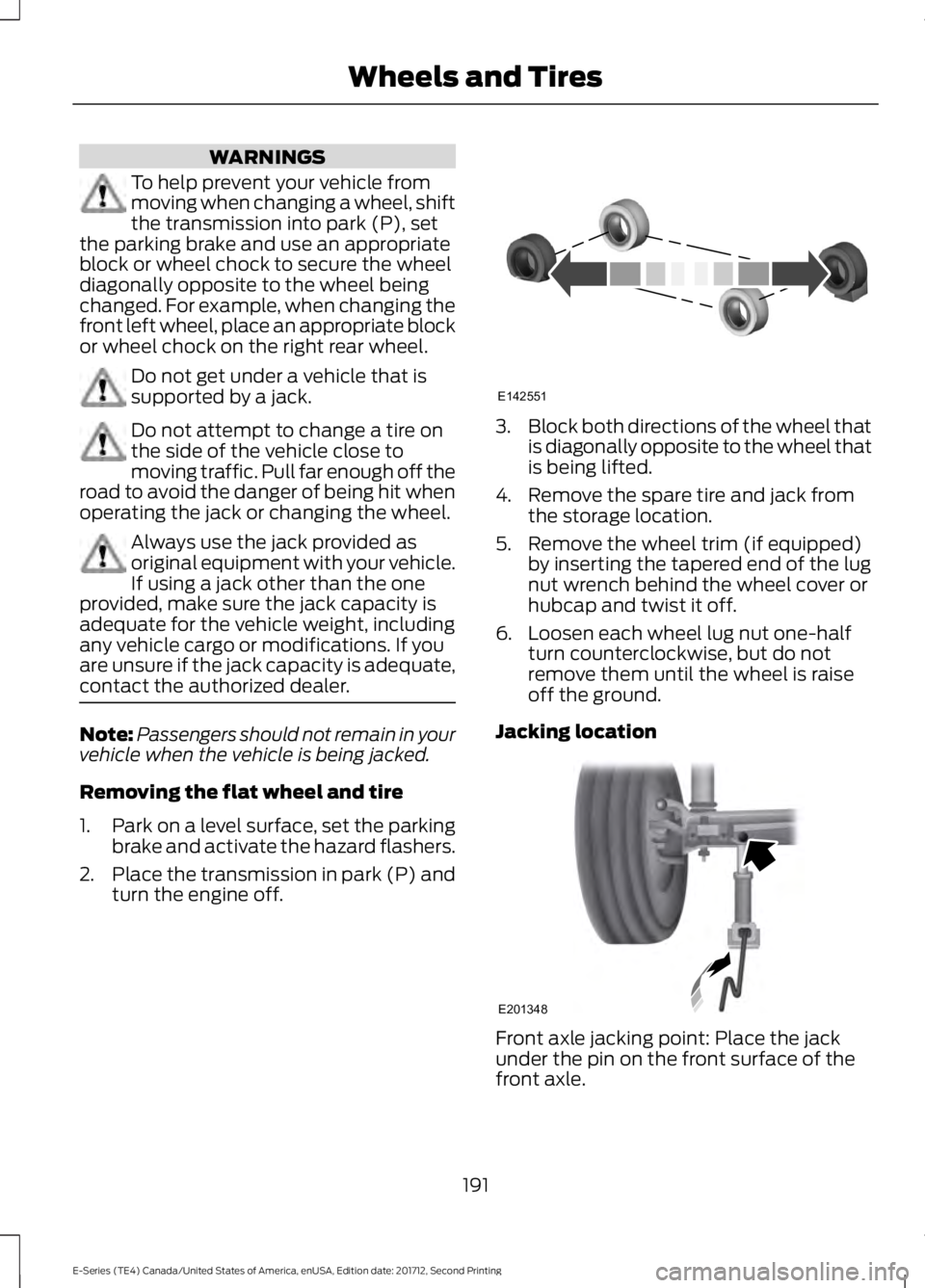
To help prevent your vehicle frommoving when changing a wheel, shiftthe transmission into park (P), setthe parking brake and use an appropriateblock or wheel chock to secure the wheeldiagonally opposite to the wheel beingchanged. For example, when changing thefront left wheel, place an appropriate blockor wheel chock on the right rear wheel.
Do not get under a vehicle that issupported by a jack.
Do not attempt to change a tire onthe side of the vehicle close tomoving traffic. Pull far enough off theroad to avoid the danger of being hit whenoperating the jack or changing the wheel.
Always use the jack provided asoriginal equipment with your vehicle.If using a jack other than the oneprovided, make sure the jack capacity isadequate for the vehicle weight, includingany vehicle cargo or modifications. If youare unsure if the jack capacity is adequate,contact the authorized dealer.
Note:Passengers should not remain in yourvehicle when the vehicle is being jacked.
Removing the flat wheel and tire
1.Park on a level surface, set the parkingbrake and activate the hazard flashers.
2.Place the transmission in park (P) andturn the engine off.
3.Block both directions of the wheel thatis diagonally opposite to the wheel thatis being lifted.
4. Remove the spare tire and jack fromthe storage location.
5. Remove the wheel trim (if equipped)by inserting the tapered end of the lugnut wrench behind the wheel cover orhubcap and twist it off.
6. Loosen each wheel lug nut one-halfturn counterclockwise, but do notremove them until the wheel is raiseoff the ground.
Jacking location
Front axle jacking point: Place the jackunder the pin on the front surface of thefront axle.
191
E-Series (TE4) Canada/United States of America, enUSA, Edition date: 201712, Second Printing
Wheels and TiresE142551 E201348
Page 225 of 323
If you want the system to carry out the followingVoice command
Adjust the level of voice interaction and feedback.Voice Settings | VoicePreferences
Hear a list of voice commands available in the current mode.Help
You can say any of the voice commands that appear within open and close brackets thatare separated by |. For example, where (cancel | stop | exit) appears you say; cancel orstop or exit.
You must say any of the voice commands that appear outside of open and close brackets.For example, where mobile (apps | applications) appears, you must say mobile followedby either apps or applications.
You do not need to say words that appear within square brackets. For example, for where(USB [stick] | iPOD | MP3 [player]) appears, you can say USB or USB stick.
Note:SYNC Services and Vehicle health report are only available in the United States ofAmerica.
System Interaction and Feedback
The system provides feedback throughaudible tones, prompts, questions andspoken confirmations depending on thesituation and the chosen level ofinteraction (voice settings). You cancustomize the voice recognition system toprovide more or less instruction andfeedback.
The default setting is to a higher level ofinteraction in order to help you learn to usethe system. You can change these settingsat any time.
Adjusting the Interaction Level
Initiate a voice session bypressing the voice button on thesteering wheel controls. SeeVoice Control (page 45).
When prompted say the following:
If you want the system to carry out the followingVoice command
Voice Settings | Voice Preferences
Followed by either of the following:
Provide more detailed interaction and guidance.Interaction ModeStandard
Provide less audible interaction and more tone prompts.Interaction ModeAdvanced
The system defaults to the standard interaction mode.
222
E-Series (TE4) Canada/United States of America, enUSA, Edition date: 201712, Second Printing
SYNC™ (If Equipped)E142599
Page 276 of 323
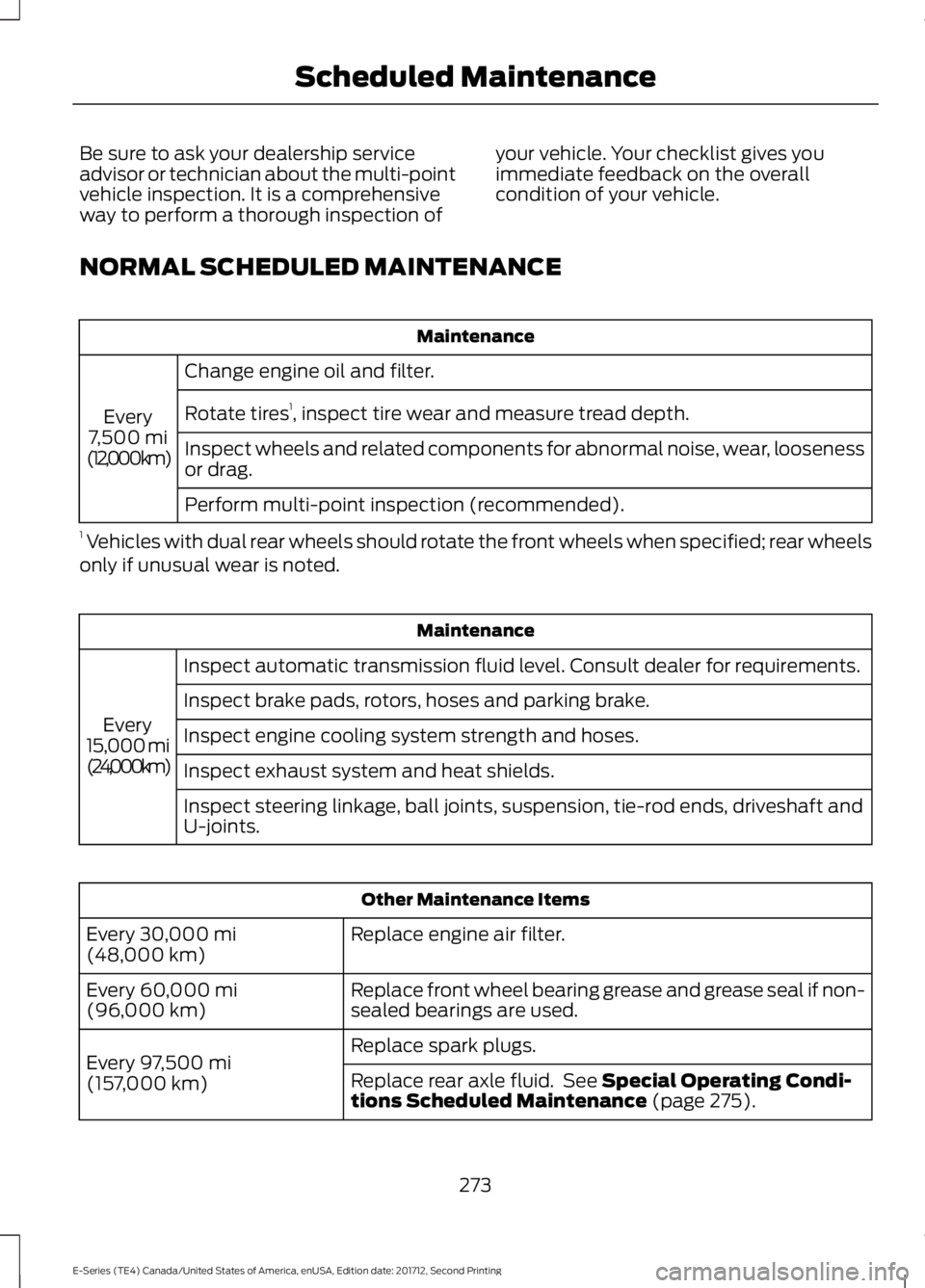
Be sure to ask your dealership serviceadvisor or technician about the multi-pointvehicle inspection. It is a comprehensiveway to perform a thorough inspection of
your vehicle. Your checklist gives youimmediate feedback on the overallcondition of your vehicle.
NORMAL SCHEDULED MAINTENANCE
Maintenance
Change engine oil and filter.
Every7,500 mi(12,000 km)
Rotate tires1, inspect tire wear and measure tread depth.
Inspect wheels and related components for abnormal noise, wear, loosenessor drag.
Perform multi-point inspection (recommended).
1 Vehicles with dual rear wheels should rotate the front wheels when specified; rear wheelsonly if unusual wear is noted.
Maintenance
Inspect automatic transmission fluid level. Consult dealer for requirements.
Every15,000 mi(24,000 km)
Inspect brake pads, rotors, hoses and parking brake.
Inspect engine cooling system strength and hoses.
Inspect exhaust system and heat shields.
Inspect steering linkage, ball joints, suspension, tie-rod ends, driveshaft andU-joints.
Other Maintenance Items
Replace engine air filter.Every 30,000 mi(48,000 km)
Replace front wheel bearing grease and grease seal if non-sealed bearings are used.Every 60,000 mi(96,000 km)
Replace spark plugs.Every 97,500 mi(157,000 km)Replace rear axle fluid. See Special Operating Condi-tions Scheduled Maintenance (page 275).
273
E-Series (TE4) Canada/United States of America, enUSA, Edition date: 201712, Second Printing
Scheduled Maintenance
Page 277 of 323
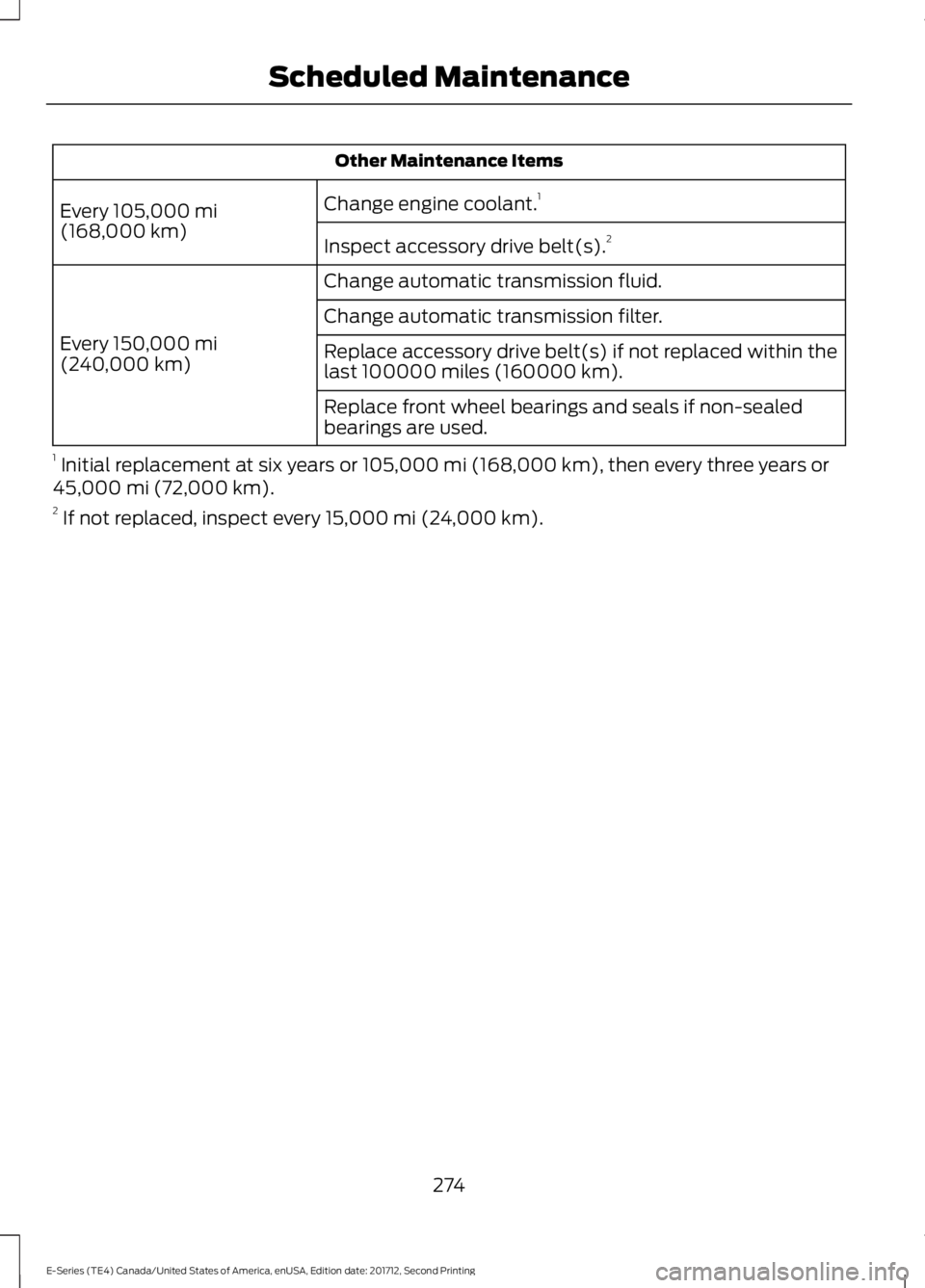
Other Maintenance Items
Change engine coolant.1Every 105,000 mi(168,000 km)Inspect accessory drive belt(s).2
Change automatic transmission fluid.
Every 150,000 mi(240,000 km)
Change automatic transmission filter.
Replace accessory drive belt(s) if not replaced within thelast 100000 miles (160000 km).
Replace front wheel bearings and seals if non-sealedbearings are used.
1 Initial replacement at six years or 105,000 mi (168,000 km), then every three years or45,000 mi (72,000 km).2 If not replaced, inspect every 15,000 mi (24,000 km).
274
E-Series (TE4) Canada/United States of America, enUSA, Edition date: 201712, Second Printing
Scheduled Maintenance
Page 279 of 323
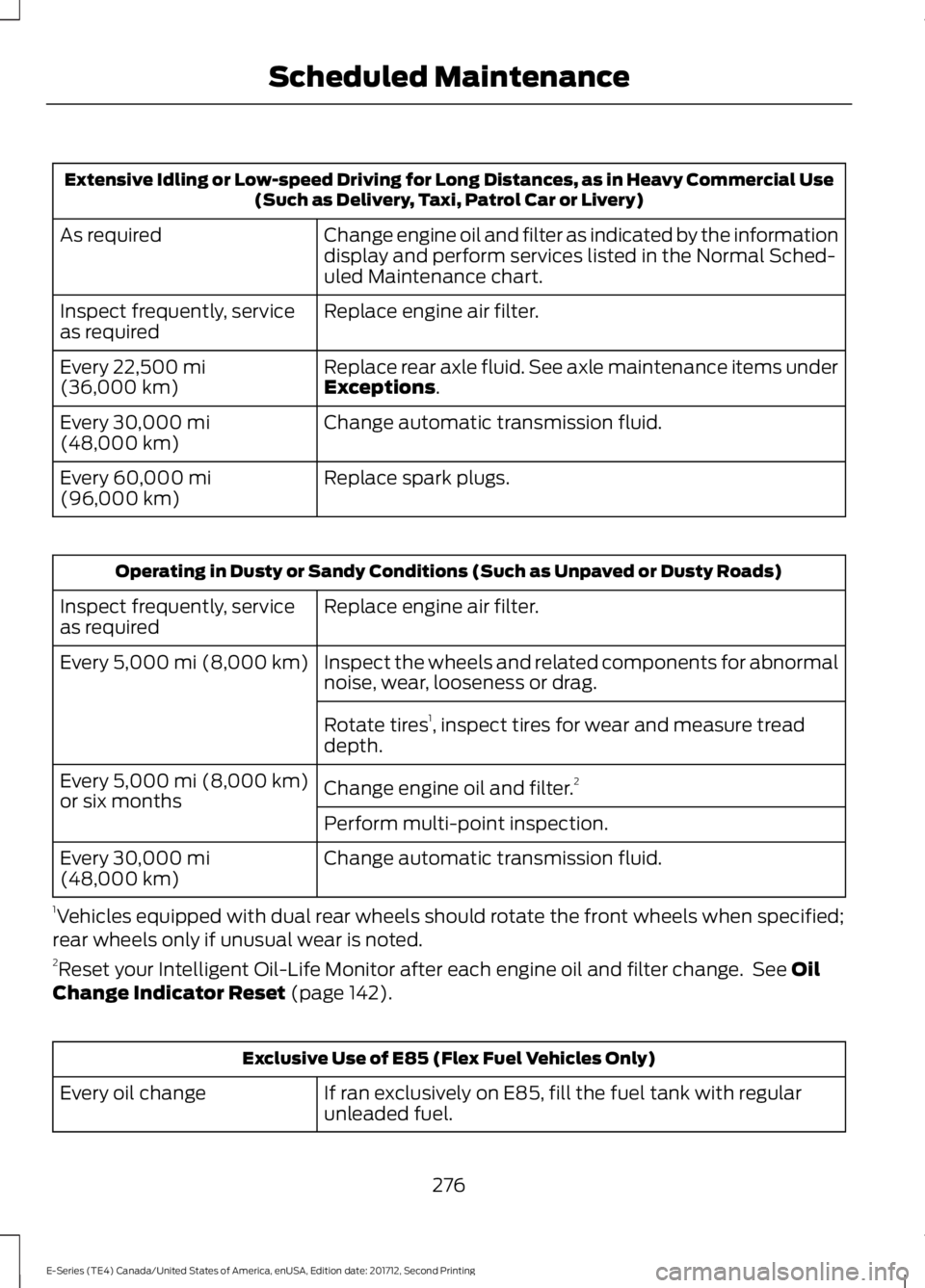
Extensive Idling or Low-speed Driving for Long Distances, as in Heavy Commercial Use(Such as Delivery, Taxi, Patrol Car or Livery)
Change engine oil and filter as indicated by the informationdisplay and perform services listed in the Normal Sched-uled Maintenance chart.
As required
Replace engine air filter.Inspect frequently, serviceas required
Replace rear axle fluid. See axle maintenance items underExceptions.Every 22,500 mi(36,000 km)
Change automatic transmission fluid.Every 30,000 mi(48,000 km)
Replace spark plugs.Every 60,000 mi(96,000 km)
Operating in Dusty or Sandy Conditions (Such as Unpaved or Dusty Roads)
Replace engine air filter.Inspect frequently, serviceas required
Inspect the wheels and related components for abnormalnoise, wear, looseness or drag.Every 5,000 mi (8,000 km)
Rotate tires1, inspect tires for wear and measure treaddepth.
Change engine oil and filter.2Every 5,000 mi (8,000 km)or six monthsPerform multi-point inspection.
Change automatic transmission fluid.Every 30,000 mi(48,000 km)
1Vehicles equipped with dual rear wheels should rotate the front wheels when specified;rear wheels only if unusual wear is noted.2Reset your Intelligent Oil-Life Monitor after each engine oil and filter change. See OilChange Indicator Reset (page 142).
Exclusive Use of E85 (Flex Fuel Vehicles Only)
If ran exclusively on E85, fill the fuel tank with regularunleaded fuel.Every oil change
276
E-Series (TE4) Canada/United States of America, enUSA, Edition date: 201712, Second Printing
Scheduled Maintenance
Page 280 of 323
Exceptions
There are several exceptions to the NormalSchedule:
Axle(s) and transfer case (Four-wheeldrive vehicles) fluid changes or levelchecks are not required unless a leak issuspected or the assembly has beensubmerged in water. Contact an authorizeddealer for service.
California fuel filter replacement: If youregister your vehicle in California, theCalifornia Air Resources Board hasdetermined that the failure to perform thismaintenance item does not nullify theemission warranty or limit recall liabilitybefore the completion of your vehicle'suseful life. Ford Motor Company, however,urges you to have all recommendedmaintenance services performed at thespecified intervals and to record all vehicleservice.
Hot climate oil change intervals:Vehicles operating in the Middle East,North Africa, Sub-Saharan Africa orlocations with similar climates using anAmerican Petroleum Institute (API)Certified for Gasoline Engines (Certificationmark) oil of SM or SN quality, the normaloil change interval is 5,000 mi (8,000 km).
If the available API SM or SN oils are notavailable, then the oil change interval is3,000 mi (4,800 km).
Engine air filter replacement: The life ofthe engine air filter is dependent onexposure to dusty and dirty conditions.Vehicles operated in these conditionsrequire frequent inspection andreplacement of the engine air filter.
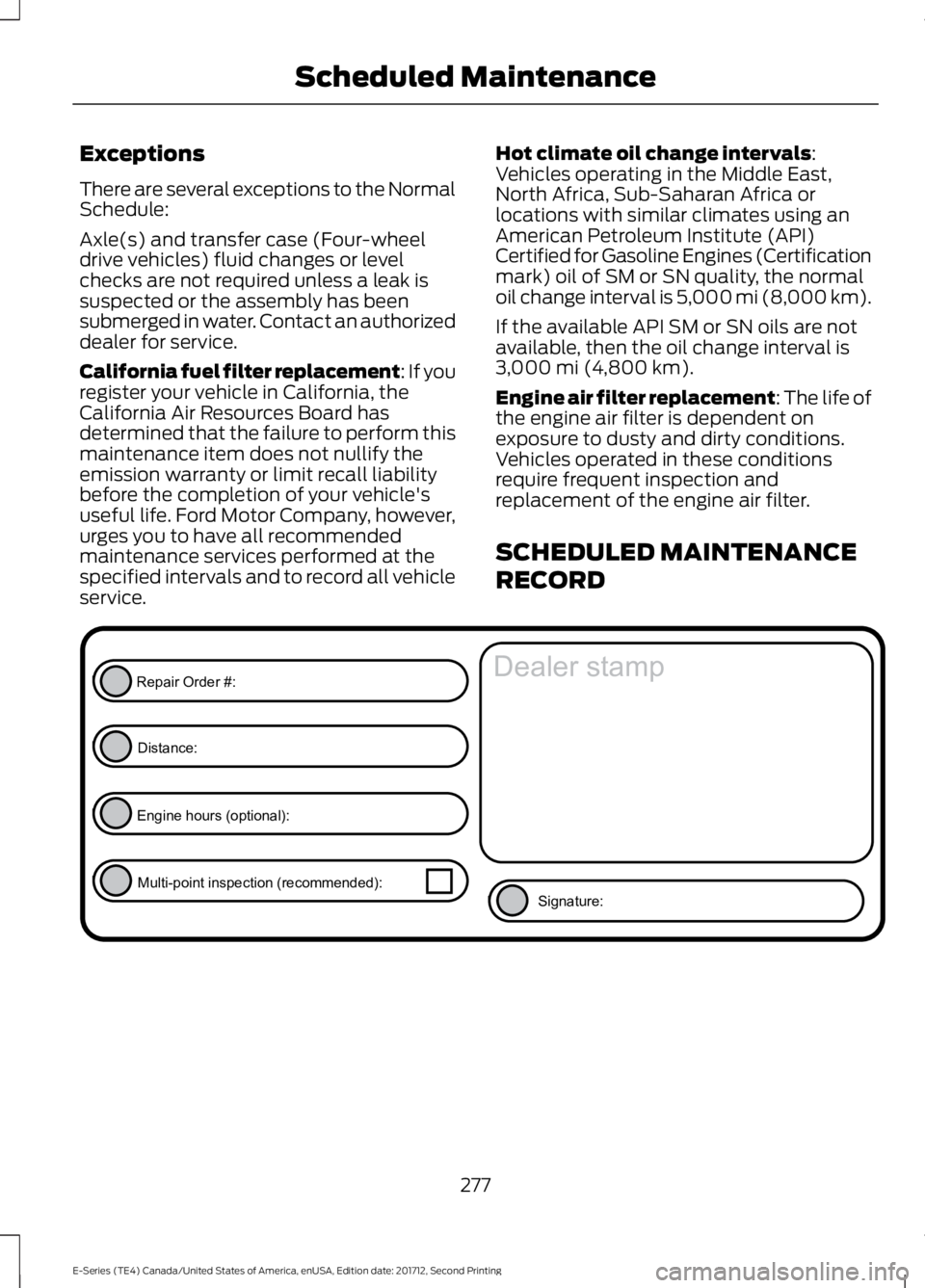
SCHEDULED MAINTENANCE
RECORD
277
E-Series (TE4) Canada/United States of America, enUSA, Edition date: 201712, Second Printing
Scheduled MaintenanceE146852
Repair Order #:Distance:
Engine hours (optional): Multi-point inspection (recommended): Signature:
Dealer stamp
Page 298 of 323
![FORD E SERIES 2018 User Guide •THERE ARE NO WARRANTIES OTHERTHAN THOSE THAT MAY EXPRESSLYBE PROVIDED FOR YOUR NEWVEHICLE.
Adobe
Contains Adobe® [Flash® Player] or[AIR®] technology by Adobe SystemsIncorporated. This [Licensee](/img/11/58730/w960_58730-297.png "FORD E SERIES 2018 User Guide •THERE ARE NO WARRANTIES OTHERTHAN THOSE THAT MAY EXPRESSLYBE PROVIDED FOR YOUR NEWVEHICLE.
Adobe
Contains Adobe® [Flash® Player] or[AIR®] technology by Adobe SystemsIncorporated. This [Licensee")
•THERE ARE NO WARRANTIES OTHERTHAN THOSE THAT MAY EXPRESSLYBE PROVIDED FOR YOUR NEWVEHICLE.
Adobe
Contains Adobe® [Flash® Player] or[AIR®] technology by Adobe SystemsIncorporated. This [Licensee Product]contains [Adobe® Flash® Player][Adobe® AIR®] software under licensefrom Adobe Systems Incorporated,Copyright ©1995-2009 AdobeMacromedia Software LLC. All rightsreserved. Adobe, Flash and AIR aretrademarks of Adobe SystemsIncorporated.
End User Notice
Microsoft® Windows® Mobile forAutomotive Important SafetyInformation
This system Ford SYNC contains softwarethat is licensed to Manufacturer FORDMOTOR COMPANY by an affiliate ofMicrosoft Corporation pursuant to a licenseagreement. Any removal, reproduction,reverse engineering or other unauthorizeduse of the software from this system inviolation of the license agreement is strictlyprohibited and may subject you to legalaction.
Read and follow instructions: Beforeusing your Windows Automotive- basedsystem, read and follow all instructionsand safety information provided in this enduser manual ("User's Guide"). Notfollowing precautions found in this User'sGuide can lead to an accident or otherserious consequences.
Keep User's Guide in vehicle: When keptin the vehicle, the User's Guide will be aready reference for you and other usersunfamiliar with the WindowsAutomotive-based system. Please makecertain that before using the system forthe first time, all persons have access tothe User's Guide and read its instructionsand safety information carefully.
WARNING
Operating certain parts of thissystem while driving can distractyour attention away from the road,and possibly cause an accident or otherserious consequences. Do not changesystem settings or enter data non-verbally(using your hands) while driving. Stop thevehicle in a safe and legal manner beforeattempting these operations. This isimportant since while setting up orchanging some functions you might berequired to distract your attention awayfrom the road and remove your hands fromthe wheel.
General Operation
Voice Command Control: Functionswithin the Windows Automotive-basedsystem may be accomplished using onlyvoice commands. Using voice commandswhile driving allows you to operate thesystem without removing your hands fromthe wheel.
Prolonged Views of Screen: Do notaccess any function requiring a prolongedview of the screen while you are driving.Pull over in a safe and legal manner beforeattempting to access a function of thesystem requiring prolonged attention. Evenoccasional short scans to the screen maybe hazardous if your attention has beendiverted away from your driving task at acritical time.
295
E-Series (TE4) Canada/United States of America, enUSA, Edition date: 201712, Second Printing
Appendices
Page 317 of 323
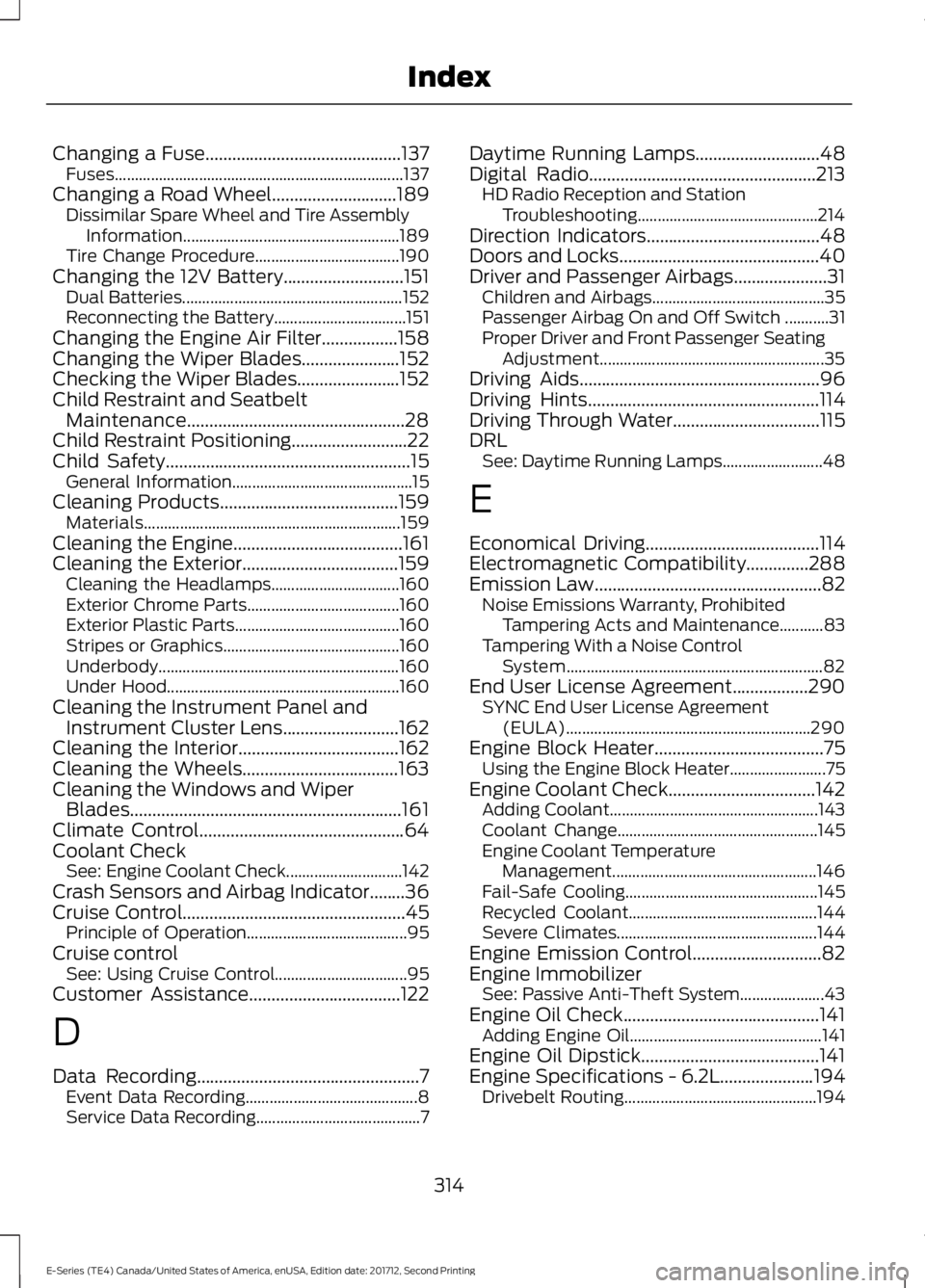
Changing a Fuse............................................137Fuses........................................................................137Changing a Road Wheel............................189Dissimilar Spare Wheel and Tire AssemblyInformation......................................................189Tire Change Procedure....................................190Changing the 12V Battery...........................151Dual Batteries.......................................................152Reconnecting the Battery.................................151Changing the Engine Air Filter.................158Changing the Wiper Blades......................152Checking the Wiper Blades.......................152Child Restraint and SeatbeltMaintenance.................................................28Child Restraint Positioning..........................22Child Safety.......................................................15General Information.............................................15Cleaning Products........................................159Materials................................................................159Cleaning the Engine......................................161Cleaning the Exterior...................................159Cleaning the Headlamps................................160Exterior Chrome Parts......................................160Exterior Plastic Parts.........................................160Stripes or Graphics............................................160Underbody............................................................160Under Hood..........................................................160Cleaning the Instrument Panel andInstrument Cluster Lens..........................162Cleaning the Interior....................................162Cleaning the Wheels...................................163Cleaning the Windows and WiperBlades.............................................................161Climate Control..............................................64Coolant CheckSee: Engine Coolant Check.............................142Crash Sensors and Airbag Indicator........36Cruise Control..................................................45Principle of Operation........................................95Cruise controlSee: Using Cruise Control.................................95Customer Assistance..................................122
D
Data Recording..................................................7Event Data Recording...........................................8Service Data Recording.........................................7
Daytime Running Lamps............................48Digital Radio...................................................213HD Radio Reception and StationTroubleshooting.............................................214Direction Indicators.......................................48Doors and Locks.............................................40Driver and Passenger Airbags.....................31Children and Airbags...........................................35Passenger Airbag On and Off Switch ...........31Proper Driver and Front Passenger SeatingAdjustment........................................................35Driving Aids......................................................96Driving Hints....................................................114Driving Through Water.................................115DRLSee: Daytime Running Lamps.........................48
E
Economical Driving.......................................114Electromagnetic Compatibility..............288Emission Law...................................................82Noise Emissions Warranty, ProhibitedTampering Acts and Maintenance...........83Tampering With a Noise ControlSystem................................................................82End User License Agreement.................290SYNC End User License Agreement(EULA).............................................................290Engine Block Heater......................................75Using the Engine Block Heater........................75Engine Coolant Check.................................142Adding Coolant....................................................143Coolant Change..................................................145Engine Coolant TemperatureManagement...................................................146Fail-Safe Cooling................................................145Recycled Coolant...............................................144Severe Climates..................................................144Engine Emission Control.............................82Engine ImmobilizerSee: Passive Anti-Theft System.....................43Engine Oil Check............................................141Adding Engine Oil................................................141Engine Oil Dipstick........................................141Engine Specifications - 6.2L.....................194Drivebelt Routing................................................194
314
E-Series (TE4) Canada/United States of America, enUSA, Edition date: 201712, Second Printing
Index