tow FORD E SERIES 2018 User Guide
[x] Cancel search | Manufacturer: FORD, Model Year: 2018, Model line: E SERIES, Model: FORD E SERIES 2018Pages: 323, PDF Size: 7.09 MB
Page 46 of 323
PASSIVE ANTI-THEFT
SYSTEM (If Equipped)
Note:The system is not compatible withnon-Ford aftermarket remote start systems.Use of these systems may result in vehiclestarting problems and a loss of securityprotection.
Note:Metallic objects, electronic devicesor a second coded key on the same keychain may cause vehicle starting problemsif they are too close to the key when startingthe engine. Prevent these objects fromtouching the coded key while starting theengine. Switch the ignition off, move allobjects on the key chain away from thecoded key and restart the engine if aproblem occurs.
Note:Do not leave a duplicate coded keyin the vehicle. Always take your keys andlock all doors when leaving the vehicle.
SecuriLock®
The system is an engine immobilizationsystem. It is designed to help prevent theengine from being started unless acorrectly coded key for your vehicle is used.Using an incorrectly coded key mayprevent the engine from starting. Amessage may appear in the informationdisplay.
If you are unable to start the engine with acorrectly coded key, a malfunction hashappened and a message may appear inthe information display.
Automatic Arming
The engine immobilization system armsimmediately after you switch the ignitionoff.
Automatic Disarming
Switching the ignition on with a correctlycoded key disarms the engineimmobilization system.
Replacement Keys
The integrated keyhead transmitterfunctions as a programmed ignition keythat operates all the locks and starts yourvehicle, as well as a remote control.
If your keys are lost or stolen and you donot have a spare correctly coded key, youwill need to have your vehicle towed to anauthorized dealer. You need to erase thecoded keys from your vehicle and programnew coded keys.
Store an extra correctly coded key awayfrom the vehicle in a safe place to helpprevent any inconveniences. See anauthorized dealer to purchase additionalspare or replacement keys.
Note:Your vehicle comes with twointegrated keyhead transmitters.
Programming a Spare IntegratedKeyhead Transmitter
You can program your own integratedkeyhead transmitter or standardSecuriLock coded keys to your vehicle. Thisprocedure will program both the engineimmobilizer keycode and the remote entryportion of the remote control to yourvehicle
Only use integrated keyhead transmittersor standard SecuriLock keys.
You must have two previouslyprogrammed correctly coded keys and thenew unprogrammed key readily accessible.See an authorized dealer to have the sparekey programmed if two previouslyprogrammed correctly coded keys are notavailable.
Read and understand the entire procedurebefore you begin.
43
E-Series (TE4) Canada/United States of America, enUSA, Edition date: 201712, Second Printing
Security
Page 49 of 323
WINDSHIELD WIPERS
Note:Fully defrost the windshield beforeyou switch the windshield wipers on.
Note:Make sure you switch the windshieldwipers off before entering a car wash.
Note: If streaks or smears appear on thewindshield, clean the windshield and thewiper blades. If that does not resolve theissue, install new wiper blades.
Note: Do not operate the wipers on a drywindshield. This may scratch the glass,damage the wiper blades or cause the wipermotor to burn out. Always use thewindshield washers before wiping a drywindshield.
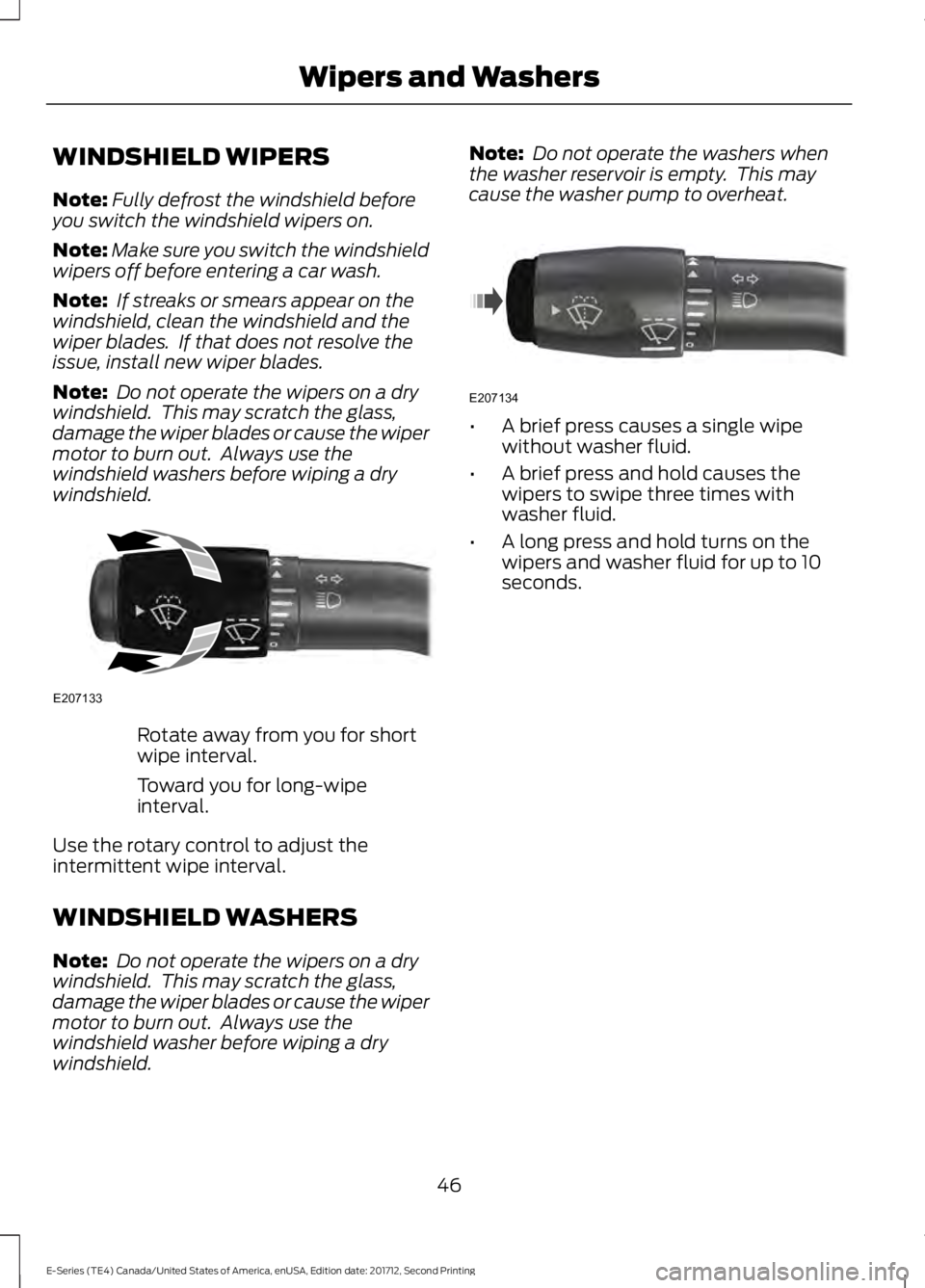
Rotate away from you for shortwipe interval.
Toward you for long-wipeinterval.
Use the rotary control to adjust theintermittent wipe interval.
WINDSHIELD WASHERS
Note: Do not operate the wipers on a drywindshield. This may scratch the glass,damage the wiper blades or cause the wipermotor to burn out. Always use thewindshield washer before wiping a drywindshield.
Note: Do not operate the washers whenthe washer reservoir is empty. This maycause the washer pump to overheat.
•A brief press causes a single wipewithout washer fluid.
•A brief press and hold causes thewipers to swipe three times withwasher fluid.
•A long press and hold turns on thewipers and washer fluid for up to 10seconds.
46
E-Series (TE4) Canada/United States of America, enUSA, Edition date: 201712, Second Printing
Wipers and WashersE207133 E207134
Page 50 of 323
GENERAL INFORMATION
Condensation in the Exterior FrontLamps and Rear Lamps
Exterior front lamps and rear lamps havevents to accommodate normal changesin air pressure.
Condensation can be a natural by-productof this design. When moist air enters thelamp assembly through the vents, there isa possibility that condensation can occurwhen the temperature is cold. Whennormal condensation occurs, a fine mistcan form on the interior of the lens. Thefine mist eventually clears and exitsthrough the vents during normal operation.
Clearing time may take as long as 48 hoursunder dry weather conditions.
Examples of acceptable condensation are:
•The presence of a fine mist (no streaks,drip marks or large droplets).
•A fine mist covers less than 50% of thelens.
Examples of unacceptable condensationare:
•A water puddle inside the lamp.
•Streaks, drip marks or large dropletspresent on the interior of the lens.
If you see any unacceptable condensation,have your vehicle checked by an authorizeddealer.
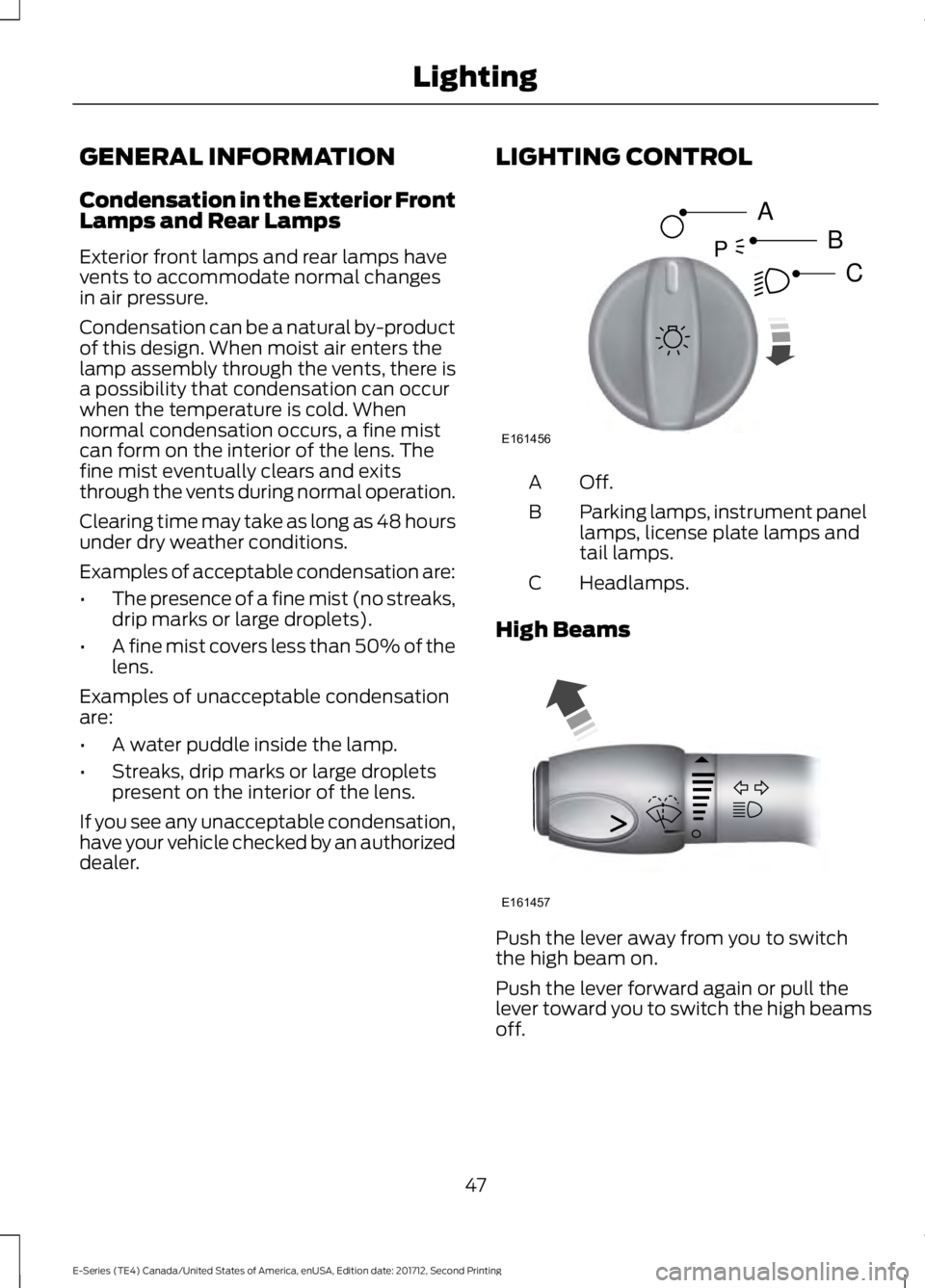
LIGHTING CONTROL
Off.A
Parking lamps, instrument panellamps, license plate lamps andtail lamps.
B
Headlamps.C
High Beams
Push the lever away from you to switchthe high beam on.
Push the lever forward again or pull thelever toward you to switch the high beamsoff.
47
E-Series (TE4) Canada/United States of America, enUSA, Edition date: 201712, Second Printing
LightingE161456
A
B
CP E161457
Page 51 of 323
Headlamp Flasher
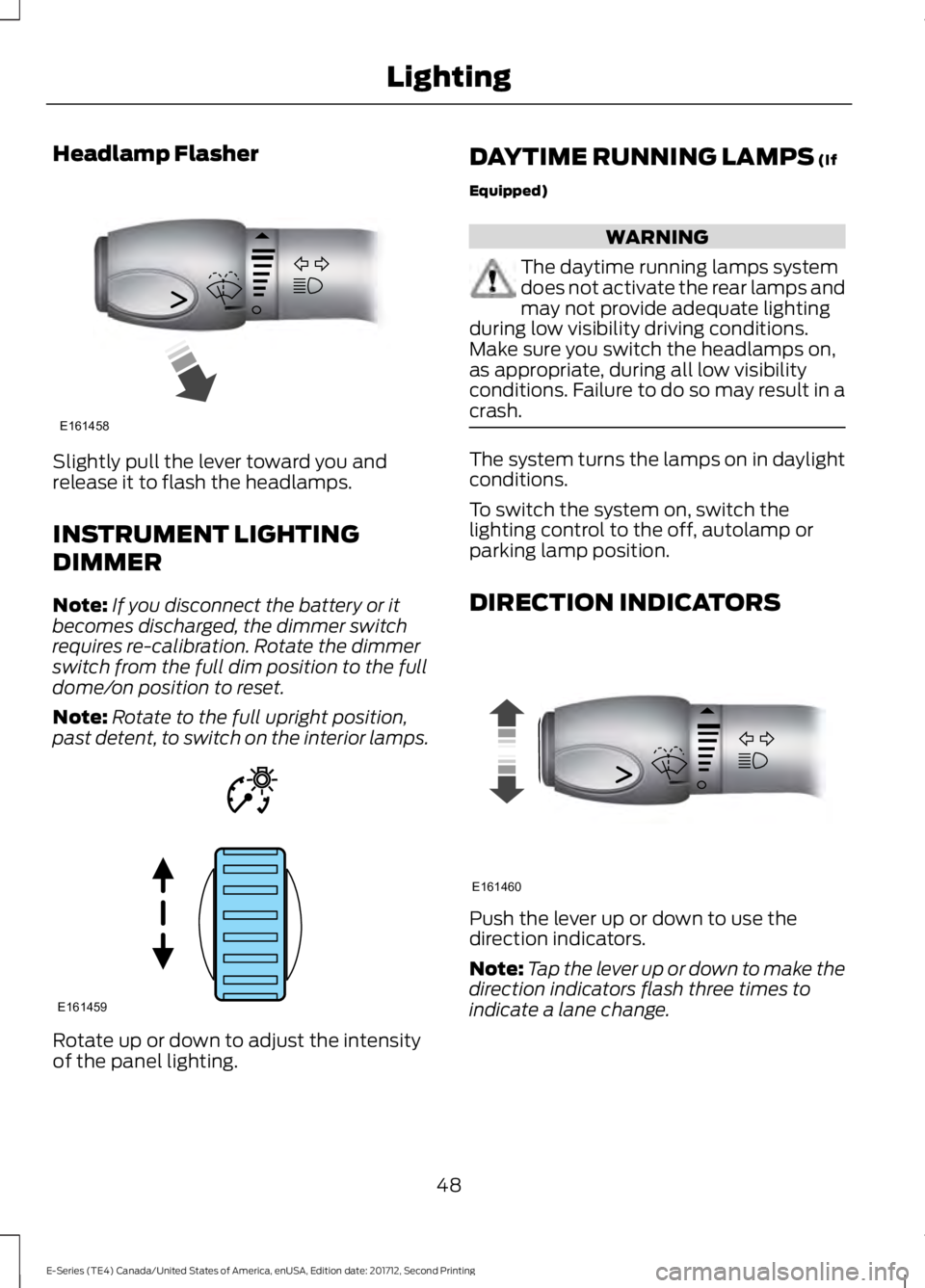
Slightly pull the lever toward you andrelease it to flash the headlamps.
INSTRUMENT LIGHTING
DIMMER
Note:If you disconnect the battery or itbecomes discharged, the dimmer switchrequires re-calibration. Rotate the dimmerswitch from the full dim position to the fulldome/on position to reset.
Note:Rotate to the full upright position,past detent, to switch on the interior lamps.
Rotate up or down to adjust the intensityof the panel lighting.
DAYTIME RUNNING LAMPS (If
Equipped)
WARNING
The daytime running lamps systemdoes not activate the rear lamps andmay not provide adequate lightingduring low visibility driving conditions.Make sure you switch the headlamps on,as appropriate, during all low visibilityconditions. Failure to do so may result in acrash.
The system turns the lamps on in daylightconditions.
To switch the system on, switch thelighting control to the off, autolamp orparking lamp position.
DIRECTION INDICATORS
Push the lever up or down to use thedirection indicators.
Note:Tap the lever up or down to make thedirection indicators flash three times toindicate a lane change.
48
E-Series (TE4) Canada/United States of America, enUSA, Edition date: 201712, Second Printing
LightingE161458 E161459 E161460
Page 52 of 323
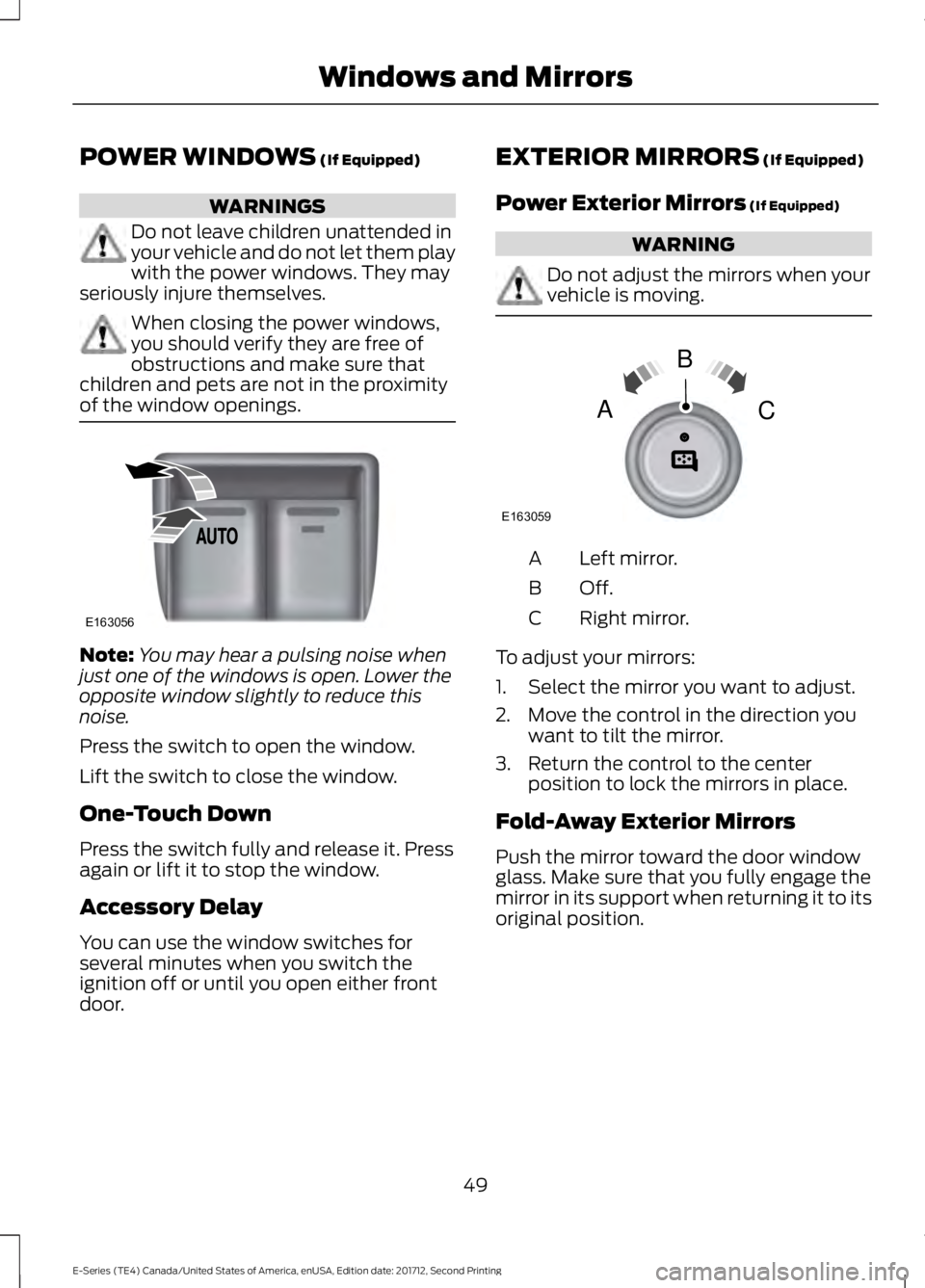
POWER WINDOWS (If Equipped)
WARNINGS
Do not leave children unattended inyour vehicle and do not let them playwith the power windows. They mayseriously injure themselves.
When closing the power windows,you should verify they are free ofobstructions and make sure thatchildren and pets are not in the proximityof the window openings.
Note:You may hear a pulsing noise whenjust one of the windows is open. Lower theopposite window slightly to reduce thisnoise.
Press the switch to open the window.
Lift the switch to close the window.
One-Touch Down
Press the switch fully and release it. Pressagain or lift it to stop the window.
Accessory Delay
You can use the window switches forseveral minutes when you switch theignition off or until you open either frontdoor.
EXTERIOR MIRRORS (If Equipped)
Power Exterior Mirrors (If Equipped)
WARNING
Do not adjust the mirrors when yourvehicle is moving.
Left mirror.A
Off.B
Right mirror.C
To adjust your mirrors:
1. Select the mirror you want to adjust.
2. Move the control in the direction youwant to tilt the mirror.
3. Return the control to the centerposition to lock the mirrors in place.
Fold-Away Exterior Mirrors
Push the mirror toward the door windowglass. Make sure that you fully engage themirror in its support when returning it to itsoriginal position.
49
E-Series (TE4) Canada/United States of America, enUSA, Edition date: 201712, Second Printing
Windows and MirrorsE163056 E163059
B
AC
Page 53 of 323
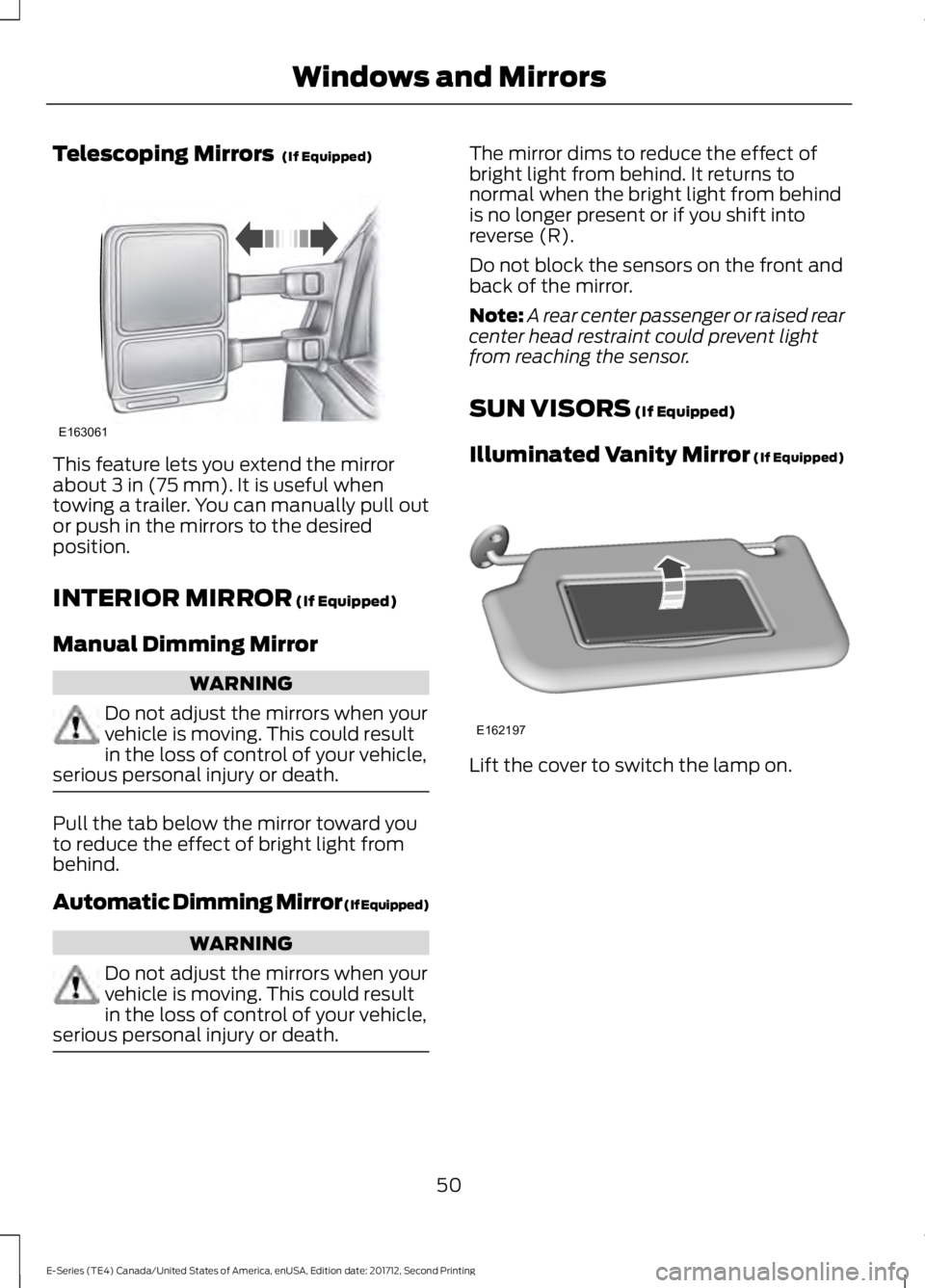
Telescoping Mirrors (If Equipped)
This feature lets you extend the mirrorabout 3 in (75 mm). It is useful whentowing a trailer. You can manually pull outor push in the mirrors to the desiredposition.
INTERIOR MIRROR (If Equipped)
Manual Dimming Mirror
WARNING
Do not adjust the mirrors when yourvehicle is moving. This could resultin the loss of control of your vehicle,serious personal injury or death.
Pull the tab below the mirror toward youto reduce the effect of bright light frombehind.
Automatic Dimming Mirror (If Equipped)
WARNING
Do not adjust the mirrors when yourvehicle is moving. This could resultin the loss of control of your vehicle,serious personal injury or death.
The mirror dims to reduce the effect ofbright light from behind. It returns tonormal when the bright light from behindis no longer present or if you shift intoreverse (R).
Do not block the sensors on the front andback of the mirror.
Note:A rear center passenger or raised rearcenter head restraint could prevent lightfrom reaching the sensor.
SUN VISORS (If Equipped)
Illuminated Vanity Mirror (If Equipped)
Lift the cover to switch the lamp on.
50
E-Series (TE4) Canada/United States of America, enUSA, Edition date: 201712, Second Printing
Windows and MirrorsE163061 E162197
Page 54 of 323
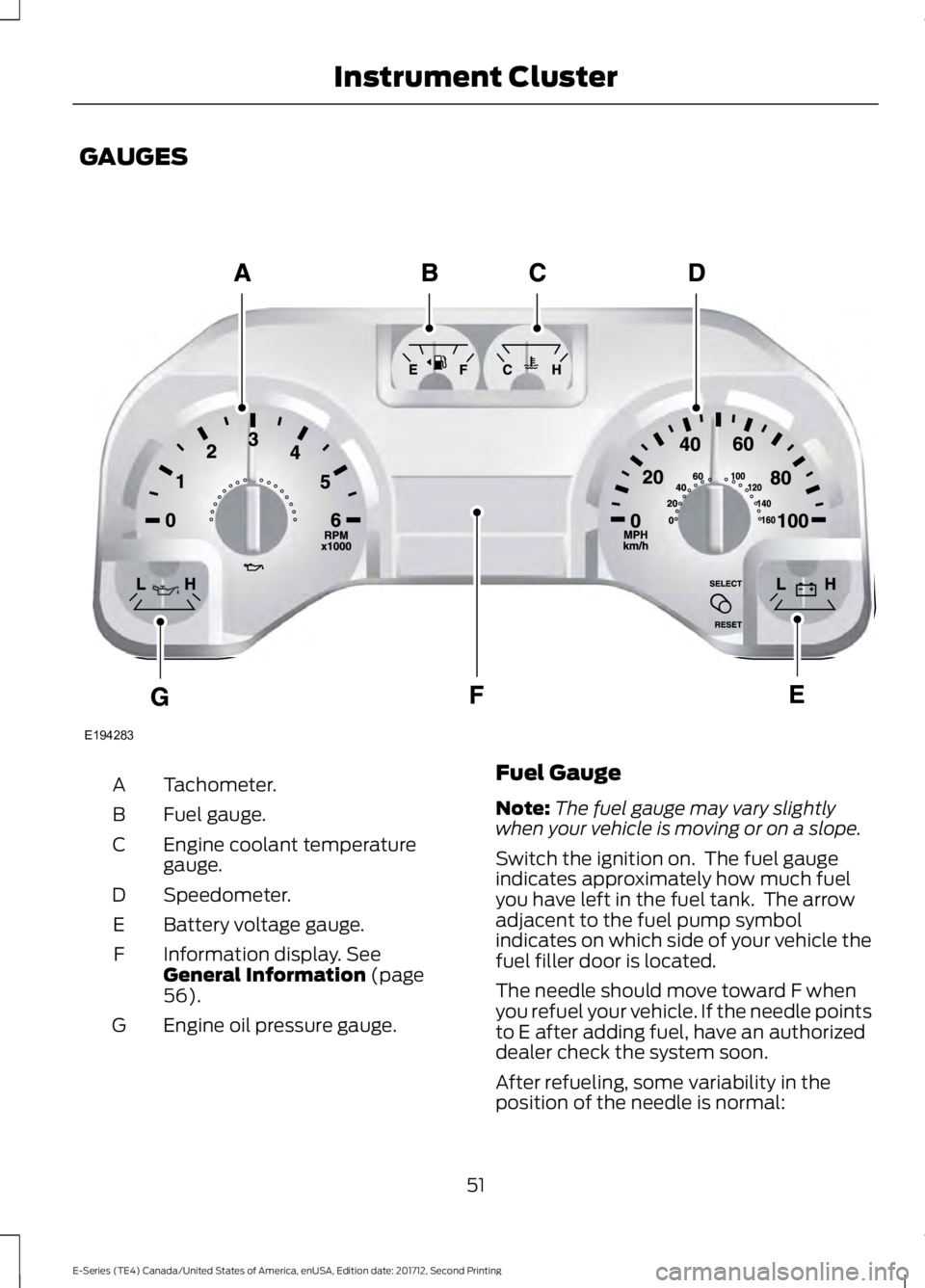
GAUGES
Tachometer.A
Fuel gauge.B
Engine coolant temperaturegauge.C
Speedometer.D
Battery voltage gauge.E
Information display. SeeGeneral Information (page56).
F
Engine oil pressure gauge.G
Fuel Gauge
Note:The fuel gauge may vary slightlywhen your vehicle is moving or on a slope.
Switch the ignition on. The fuel gaugeindicates approximately how much fuelyou have left in the fuel tank. The arrowadjacent to the fuel pump symbolindicates on which side of your vehicle thefuel filler door is located.
The needle should move toward F whenyou refuel your vehicle. If the needle pointsto E after adding fuel, have an authorizeddealer check the system soon.
After refueling, some variability in theposition of the needle is normal:
51
E-Series (TE4) Canada/United States of America, enUSA, Edition date: 201712, Second Printing
Instrument ClusterE194283
Page 58 of 323
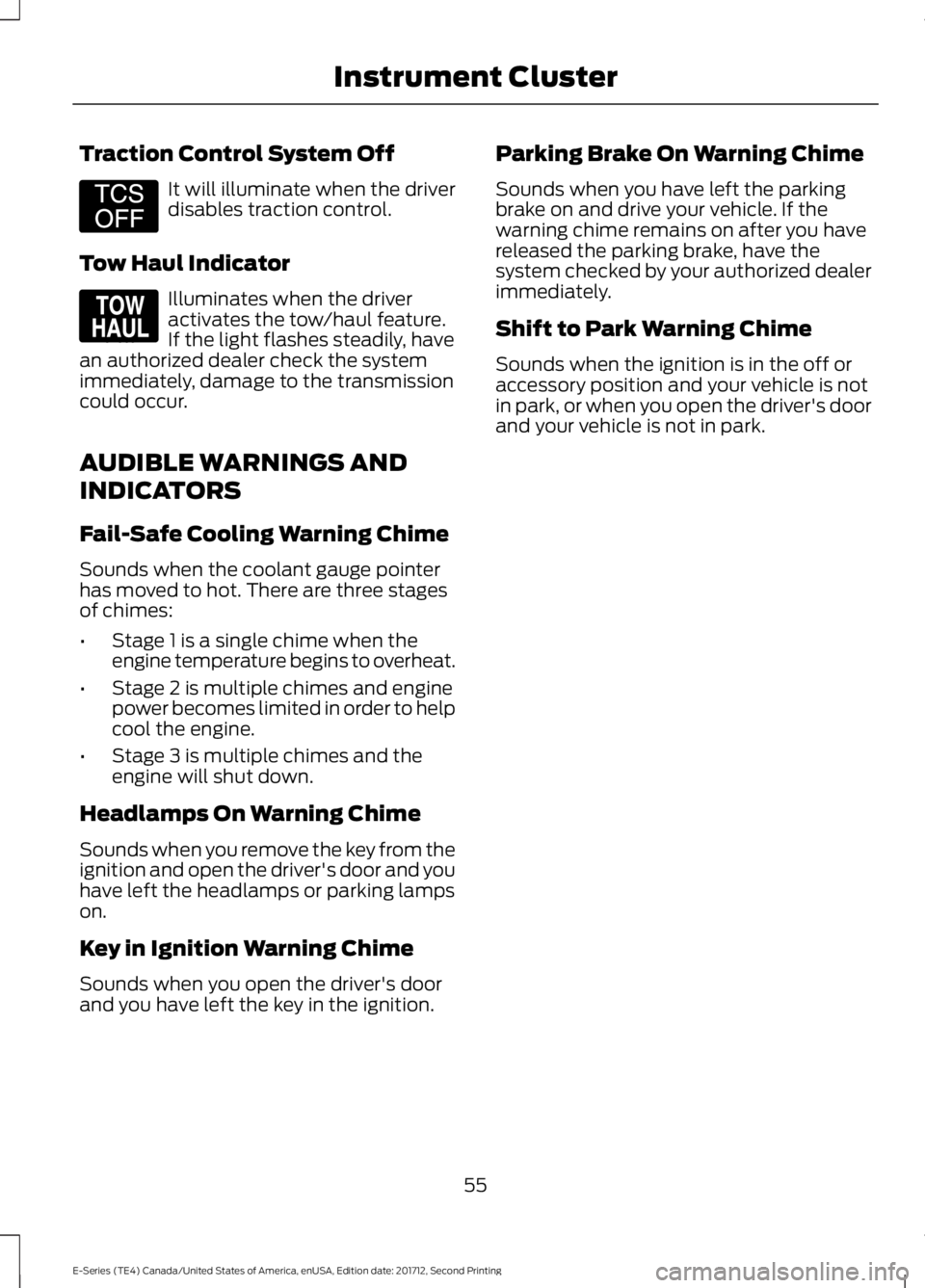
Traction Control System Off
It will illuminate when the driverdisables traction control.
Tow Haul Indicator
Illuminates when the driveractivates the tow/haul feature.If the light flashes steadily, havean authorized dealer check the systemimmediately, damage to the transmissioncould occur.
AUDIBLE WARNINGS AND
INDICATORS
Fail-Safe Cooling Warning Chime
Sounds when the coolant gauge pointerhas moved to hot. There are three stagesof chimes:
•Stage 1 is a single chime when theengine temperature begins to overheat.
•Stage 2 is multiple chimes and enginepower becomes limited in order to helpcool the engine.
•Stage 3 is multiple chimes and theengine will shut down.
Headlamps On Warning Chime
Sounds when you remove the key from theignition and open the driver's door and youhave left the headlamps or parking lampson.
Key in Ignition Warning Chime
Sounds when you open the driver's doorand you have left the key in the ignition.
Parking Brake On Warning Chime
Sounds when you have left the parkingbrake on and drive your vehicle. If thewarning chime remains on after you havereleased the parking brake, have thesystem checked by your authorized dealerimmediately.
Shift to Park Warning Chime
Sounds when the ignition is in the off oraccessory position and your vehicle is notin park, or when you open the driver's doorand your vehicle is not in park.
55
E-Series (TE4) Canada/United States of America, enUSA, Edition date: 201712, Second Printing
Instrument ClusterE194301 E161509
Page 66 of 323
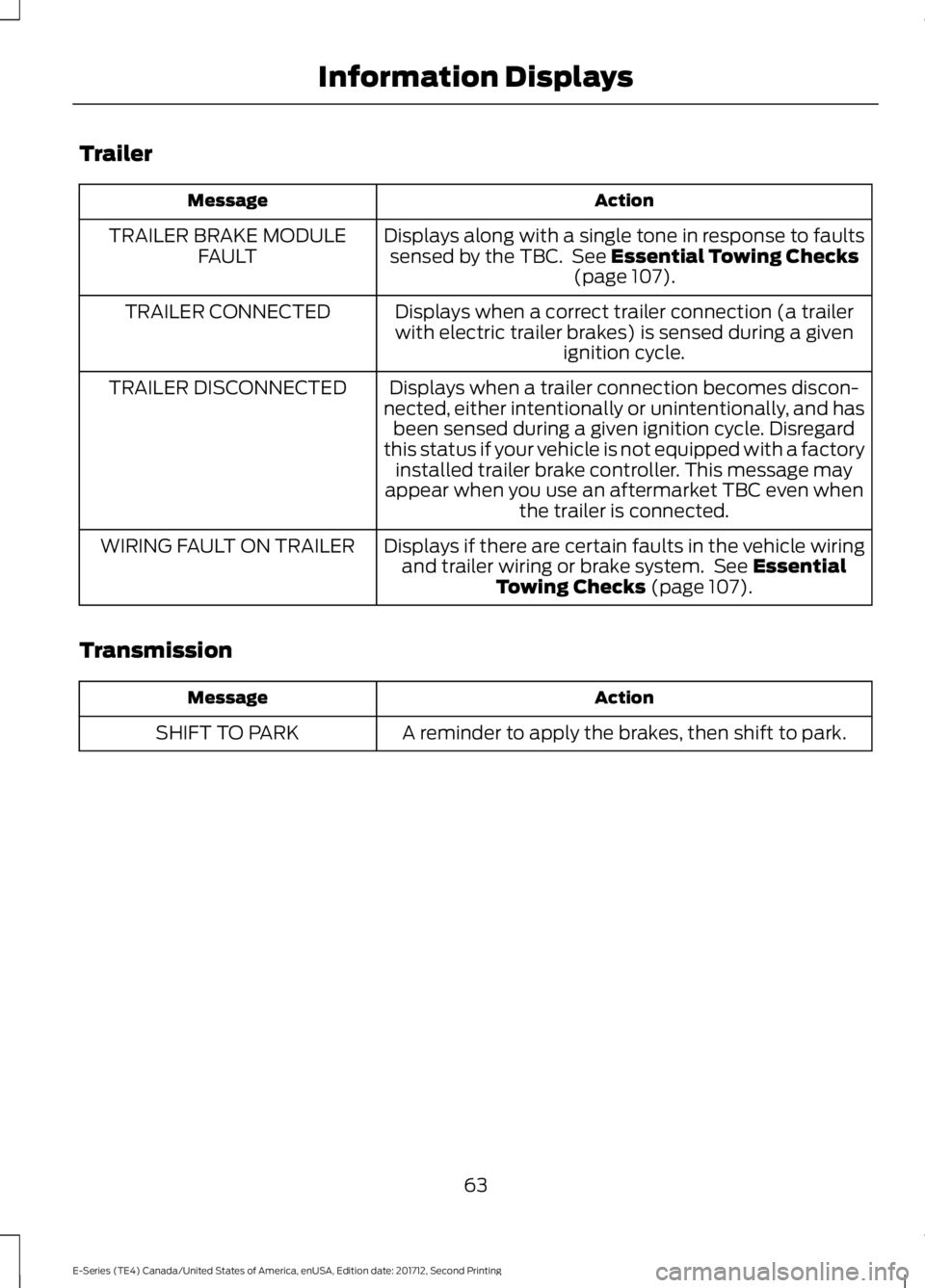
Trailer
ActionMessage
Displays along with a single tone in response to faultssensed by the TBC. See Essential Towing Checks(page 107).
TRAILER BRAKE MODULEFAULT
Displays when a correct trailer connection (a trailerwith electric trailer brakes) is sensed during a givenignition cycle.
TRAILER CONNECTED
Displays when a trailer connection becomes discon-nected, either intentionally or unintentionally, and hasbeen sensed during a given ignition cycle. Disregardthis status if your vehicle is not equipped with a factoryinstalled trailer brake controller. This message mayappear when you use an aftermarket TBC even whenthe trailer is connected.
TRAILER DISCONNECTED
Displays if there are certain faults in the vehicle wiringand trailer wiring or brake system. See EssentialTowing Checks (page 107).
WIRING FAULT ON TRAILER
Transmission
ActionMessage
A reminder to apply the brakes, then shift to park.SHIFT TO PARK
63
E-Series (TE4) Canada/United States of America, enUSA, Edition date: 201712, Second Printing
Information Displays
Page 69 of 323
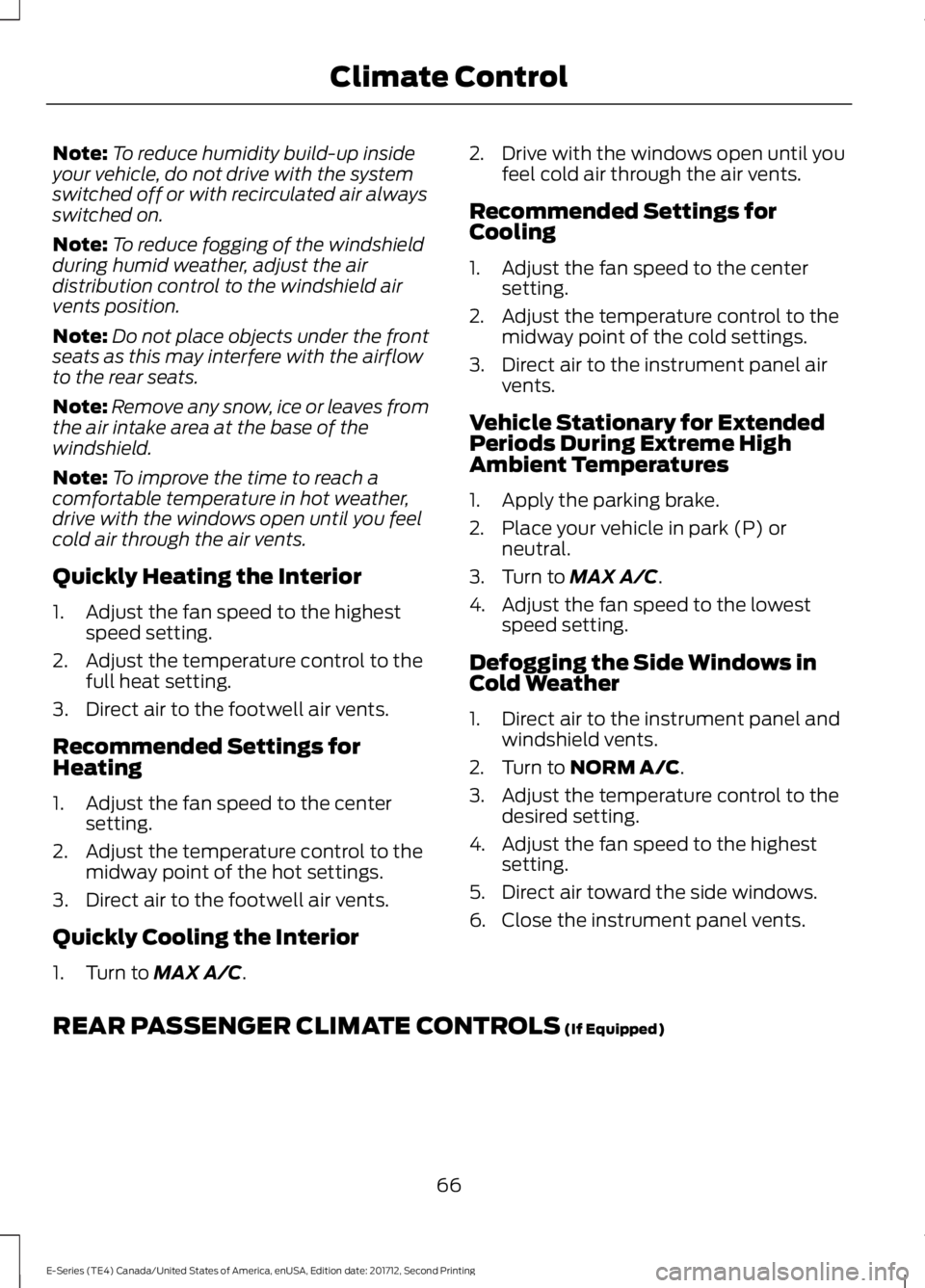
Note:To reduce humidity build-up insideyour vehicle, do not drive with the systemswitched off or with recirculated air alwaysswitched on.
Note:To reduce fogging of the windshieldduring humid weather, adjust the airdistribution control to the windshield airvents position.
Note:Do not place objects under the frontseats as this may interfere with the airflowto the rear seats.
Note:Remove any snow, ice or leaves fromthe air intake area at the base of thewindshield.
Note:To improve the time to reach acomfortable temperature in hot weather,drive with the windows open until you feelcold air through the air vents.
Quickly Heating the Interior
1. Adjust the fan speed to the highestspeed setting.
2. Adjust the temperature control to thefull heat setting.
3. Direct air to the footwell air vents.
Recommended Settings forHeating
1. Adjust the fan speed to the centersetting.
2. Adjust the temperature control to themidway point of the hot settings.
3. Direct air to the footwell air vents.
Quickly Cooling the Interior
1. Turn to MAX A/C.
2. Drive with the windows open until youfeel cold air through the air vents.
Recommended Settings forCooling
1. Adjust the fan speed to the centersetting.
2. Adjust the temperature control to themidway point of the cold settings.
3. Direct air to the instrument panel airvents.
Vehicle Stationary for ExtendedPeriods During Extreme HighAmbient Temperatures
1. Apply the parking brake.
2. Place your vehicle in park (P) orneutral.
3. Turn to MAX A/C.
4. Adjust the fan speed to the lowestspeed setting.
Defogging the Side Windows inCold Weather
1. Direct air to the instrument panel andwindshield vents.
2. Turn to NORM A/C.
3. Adjust the temperature control to thedesired setting.
4. Adjust the fan speed to the highestsetting.
5. Direct air toward the side windows.
6. Close the instrument panel vents.
REAR PASSENGER CLIMATE CONTROLS (If Equipped)
66
E-Series (TE4) Canada/United States of America, enUSA, Edition date: 201712, Second Printing
Climate Control