airbag FORD E SERIES 2018 Owner's Manual
[x] Cancel search | Manufacturer: FORD, Model Year: 2018, Model line: E SERIES, Model: FORD E SERIES 2018Pages: 323, PDF Size: 7.09 MB
Page 165 of 323
To clean the windshield and wiper blades:
•Clean the windshield with anon-abrasive glass cleaner. Whencleaning the interior of the windshield,avoid getting any glass cleaner on theinstrument panel or door panels. Wipeany glass cleaner off these surfacesimmediately.
•For windshields contaminated withtree sap, chemicals, wax or bugs, cleanthe entire windshield using steel wool(no greater than 0000 grade) in acircular motion and rinse with water.
•Clean the wiper blades with isopropylrubbing alcohol or windshield washerconcentrate.
Note: Do not use razor blades or othersharp objects to clean or remove decalsfrom the inside of the heated rear window.The vehicle warranty does not coverdamage caused to the heated rear windowgrid lines.
CLEANING THE INTERIOR
WARNINGS
Do not use cleaning solvents, bleachor dye on the vehicle's seatbelts, asthese actions may weaken the beltwebbing.
On vehicles equipped withseat-mounted airbags, do not usechemical solvents or strongdetergents. Such products couldcontaminate the side airbag system andaffect performance of the side airbag in acrash.
For fabric, carpets, cloth seats and seatsequipped with side airbags:
•Remove dust and loose dirt with avacuum cleaner.
•Remove light stains and soil withMotorcraft Professional StrengthCarpet & Upholstery Cleaner.
•If grease or tar is present on thematerial, spot-clean the area first withMotorcraft Spot and Stain Remover. InCanada, use Motorcraft Multi-PurposeCleaner.
•If a ring forms on the fabric after spotcleaning, clean the entire areaimmediately (but do not oversaturate)or the ring will set.
•Do not use household cleaningproducts or glass cleaners, which canstain and discolor the fabric and affectthe flame retardant abilities of the seatmaterials.
CLEANING THE INSTRUMENT
PANEL AND INSTRUMENT
CLUSTER LENS
WARNING
Do not use chemical solvents orstrong detergents when cleaning thesteering wheel or instrument panelto avoid contamination of the airbagsystem.
Note:Follow the same procedure ascleaning leather seats for cleaning leatherinstrument panels and leather interior trimsurfaces.
Clean the instrument panel and clusterlens with a clean, damp and soft cloth,then use a clean, dry and soft cloth to drythese areas.
162
E-Series (TE4) Canada/United States of America, enUSA, Edition date: 201712, Second Printing
Vehicle Care
Page 240 of 323
SYNC™ APPLICATIONS AND
SERVICES (If Equipped)
In order for the following features to work,your cell phone must be compatible withSYNC. To check your phone'scompatibility, visit www.SYNCMyRide.com,www.SYNCMyRide.ca orwww.syncmaroute.ca.
•SYNC Services*: Provides access totraffic, directions and information suchas travel, horoscopes, stock prices andmore.
•911 Assist: Can alert 911 in the event ofan emergency.
•Vehicle Health Report*: Provides adiagnostic and maintenance reportcard of your vehicle.*This is an optional feature and availablein the United States only.
911 Assist (If Equipped)
WARNINGS
Unless the 911 Assist setting is set onbefore a crash, the system will notdial for help which could delayresponse time, potentially increasing therisk of serious injury or death after a crash.
Do not wait for 911 Assist to make anemergency call if you can do ityourself. Dial emergency servicesimmediately to avoid delayed responsetime which could increase the risk ofserious injury or death after a crash. If youdo not hear 911 Assist within five secondsof the crash, the system or phone may bedamaged or non-functional.
WARNINGS
Always place your phone in a securelocation in your vehicle so it does notbecome a projectile or get damagedin a crash. Failure to do so may causeserious injury to someone or damage thephone which could prevent 911 Assist fromworking properly.
Note:The SYNC 911 Assist feature must beset on before the incident.
Note:Before setting this feature on, makesure that you read the 911 Assist PrivacyNotice later in this section for importantinformation.
Note:If any user turns 911 Assist on or off,that setting applies for all paired phones. If911 Assist is turned off, either a voicemessage plays or a display message (oricon) comes on (or both) when your vehicleis started after a previously paired phoneconnects.
Note:Every phone operates differently.While SYNC 911 Assist works with mostcellular phones, some may have troubleusing this feature.
If a crash deploys an airbag (excludingknee airbags and rear inflatable safetybelts [if equipped]) or activates the fuelpump shut-off, your SYNC-equippedvehicle may be able to contact emergencyservices by dialing 911 through a paired andconnected Bluetooth-enabled phone. Youcan learn more about the 911 Assistfeature, visit www.SYNCMyRide.com,www.SYNCMyRide.ca orwww.syncmaroute.ca.
See Supplementary Restraints System(page 30). Important information aboutairbag deployment is in this chapter.
See Roadside Emergencies (page 117).Important information about the fuel pumpshut-off is in this chapter.
237
E-Series (TE4) Canada/United States of America, enUSA, Edition date: 201712, Second Printing
SYNC™ (If Equipped)
Page 241 of 323
Switching 911 Assist On or Off
Press the phone button to enter the phone menu and scroll to:
Action and DescriptionMessage
Press the OK button to confirm and enter the 911 Assist menu.911 Assist
Press the OK button when the desired option appears in theradio display.On
Off
Off selections include:
Action and DescriptionMessage
Provides a display and voice reminder at phone connectionat vehicle start.Off with reminder:
Provides a display reminder only without a voice reminder atphone connection.Off without reminder:
To make sure that 911 Assist workscorrectly:
•SYNC must be powered and workingproperly at the time of the incident andthroughout feature activation and use.
•The 911 Assist feature must be set onbefore the incident.
•You must pair and connect aBluetooth-enabled and compatiblecell phone to SYNC.
•A connected Bluetooth-enabled phonemust have the ability to make andmaintain an outgoing call at the timeof the incident.
•A connected Bluetooth-enabled phonemust have adequate network coverage,battery power and signal strength.
•The vehicle must have battery powerand be located in the U.S., Canada orin a territory in which 911 is theemergency number.
In the Event of a Crash
Not all crashes will deploy an airbag oractivate the fuel pump shut-off (thetriggers for 911 Assist). If a connected cellphone sustains damage or loses itsconnection to SYNC during a crash, SYNCwill search for and try to connect to apreviously paired cell phone; SYNC willthen attempt to call the emergencyservices.
Before making the call:
•SYNC provides a short window of time(about 10 seconds) to cancel the call.If you fail to cancel the call, SYNCattempts to dial 911.
•SYNC says the following, or a similarmessage: "SYNC will attempt to call911, to cancel the call, press Cancel onyour screen or press and hold thephone button on your steering wheel."
238
E-Series (TE4) Canada/United States of America, enUSA, Edition date: 201712, Second Printing
SYNC™ (If Equipped)
Page 242 of 323
If you do not cancel the call, and SYNCmakes a successful call, a pre-recordedmessage plays for the 911 operator, andthen the occupant(s) in your vehicle is ableto talk with the operator. Be prepared toprovide your name, phone number andlocation immediately, because not all 911systems are capable of receiving thisinformation electronically.
911 Assist May Not Work If
•Your cellular phone or 911 Assisthardware sustains damage in a crash.
•The vehicle's battery or the SYNCsystem has no power.
•The phone(s) thrown from your vehicleare the ones paired and connected tothe system.
911 Assist Privacy Notice
When you turn on 911 Assist, it maydisclose to emergency services that yourvehicle has been in a crash involving thedeployment of an airbag or activation ofthe fuel pump shut-off. Certain versions orupdates to 911 Assist may also be capableof electronically or verbally disclosing to911 operators your vehicle location or otherdetails about your vehicle or crash to assist911 operators to provide the mostappropriate emergency services. If you donot want to disclose this information, donot turn the feature on.
Vehicle Health Report (IfEquipped, United States Only)
WARNING
Always follow scheduledmaintenance instructions, regularlyinspect your vehicle, and seek repairfor any damage or problem you suspect.Vehicle Health Report supplements, butcannot replace, normal maintenance andvehicle inspection. Vehicle Health Reportonly monitors certain systemselectronically monitored by your vehicleand will not monitor or report the statusof any other system, (such as brake liningwear). Failure to perform scheduledmaintenance and regularly inspect yourvehicle may result in vehicle damage andserious injury.
Note:This feature is only available in theUnited States.
Note:Your Vehicle Health Report featurerequires activation before use. Visitwww.SYNCMyRide.com to register. Thereis no fee or subscription associated withVehicle Health Report, but you must registerto use this feature.
Note:This feature may not functionproperly if you have enabled caller IDblocking on your cellular phone. Beforerunning a report, review the Vehicle HealthReport Privacy Notice.
Note:In order to allow a break-in period foryour vehicle, you may not be able to createa Vehicle Health Report until your vehicleodometer has reached 200 miles.
Note:Cellular phone and SMS charges mayapply when making a report.
239
E-Series (TE4) Canada/United States of America, enUSA, Edition date: 201712, Second Printing
SYNC™ (If Equipped)
Page 275 of 323
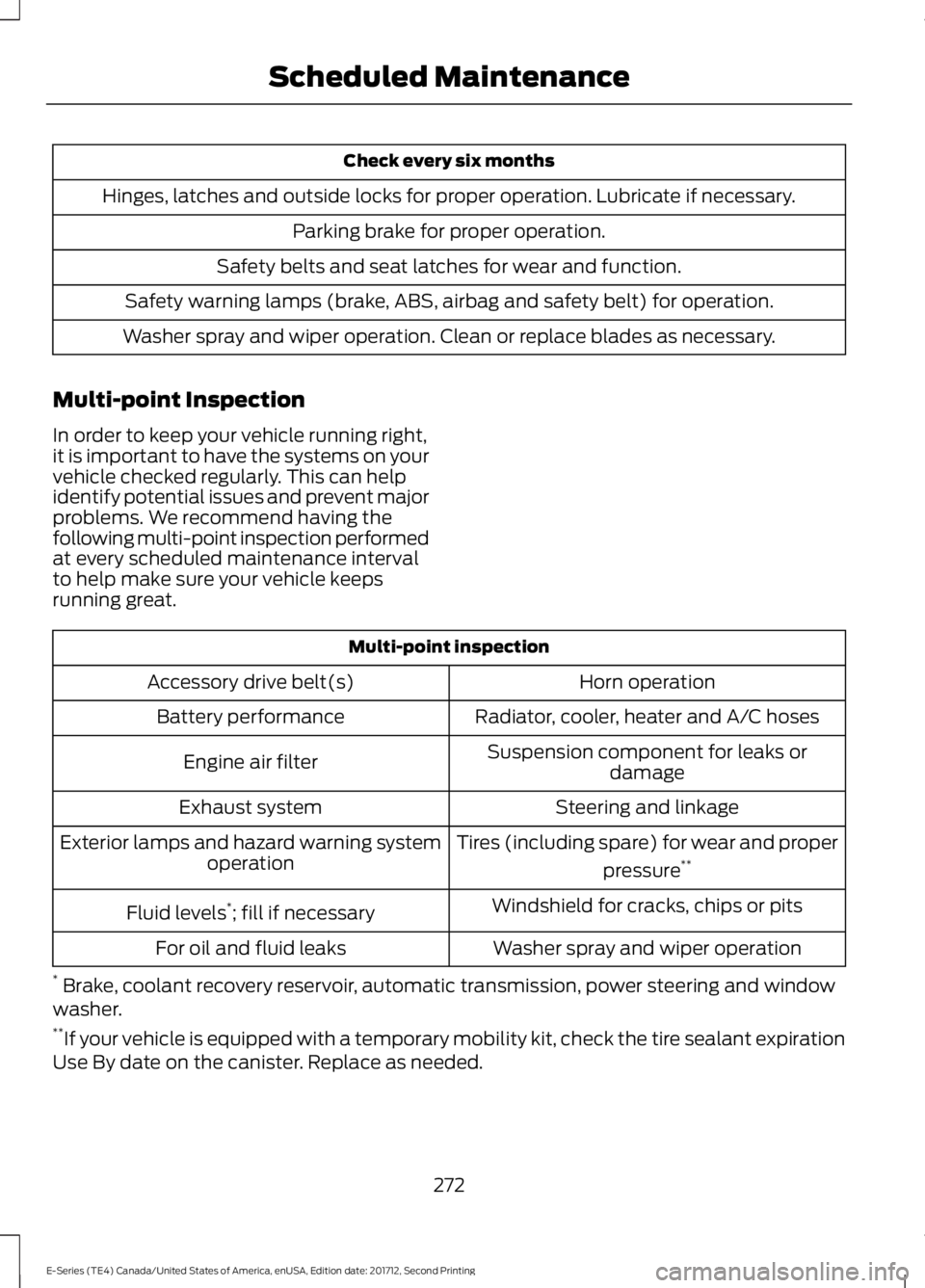
Check every six months
Hinges, latches and outside locks for proper operation. Lubricate if necessary.
Parking brake for proper operation.
Safety belts and seat latches for wear and function.
Safety warning lamps (brake, ABS, airbag and safety belt) for operation.
Washer spray and wiper operation. Clean or replace blades as necessary.
Multi-point Inspection
In order to keep your vehicle running right,it is important to have the systems on yourvehicle checked regularly. This can helpidentify potential issues and prevent majorproblems. We recommend having thefollowing multi-point inspection performedat every scheduled maintenance intervalto help make sure your vehicle keepsrunning great.
Multi-point inspection
Horn operationAccessory drive belt(s)
Radiator, cooler, heater and A/C hosesBattery performance
Suspension component for leaks ordamageEngine air filter
Steering and linkageExhaust system
Tires (including spare) for wear and proper
pressure**Exterior lamps and hazard warning systemoperation
Windshield for cracks, chips or pitsFluid levels*; fill if necessary
Washer spray and wiper operationFor oil and fluid leaks
* Brake, coolant recovery reservoir, automatic transmission, power steering and windowwasher.**If your vehicle is equipped with a temporary mobility kit, check the tire sealant expirationUse By date on the canister. Replace as needed.
272
E-Series (TE4) Canada/United States of America, enUSA, Edition date: 201712, Second Printing
Scheduled Maintenance
Page 291 of 323
ELECTROMAGNETIC
COMPATIBILITY
WARNINGS
Do not place objects or mountequipment on or near the airbagcover, on the side of the seatbacks(of the front seats), or in front seat areasthat may come into contact with adeploying airbag. Failure to follow theseinstructions may increase the risk ofpersonal injury in the event of a crash.
Do not fasten antenna cables tooriginal vehicle wiring, fuel pipes andbrake pipes.
Keep antenna and power cables atleast 4 in (10 cm) from any electronicmodules and airbags.
Note:We test and certify your vehicle tomeet electromagnetic compatibilitylegislation (UNECE Regulation 10 or otherapplicable local requirements). It is yourresponsibility to make sure that anyequipment an authorized dealer installs onyour vehicle complies with applicable locallegislation and other requirements.
Note:Any radio frequency transmitterequipment in your vehicle (such as cellulartelephones and amateur radio transmitters)must keep to the parameters in thefollowing table. We do not provide specialprovisions or conditions for installations oruse.
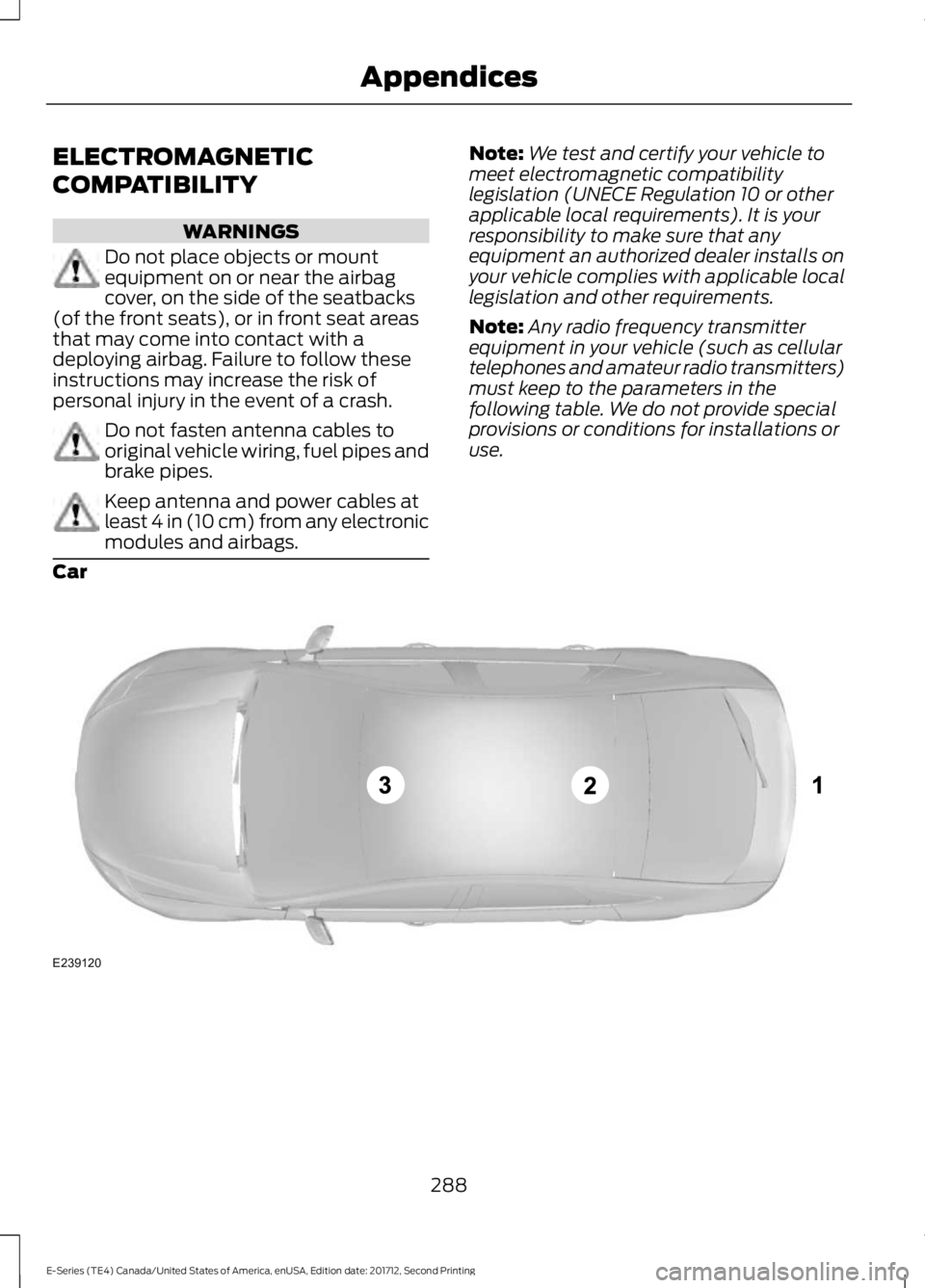
Car
288
E-Series (TE4) Canada/United States of America, enUSA, Edition date: 201712, Second Printing
AppendicesE239120
Page 300 of 323
conditions, all of whom shall also be boundby this Agreement. Additionally, all of youraccount information, as well as otherpayment and personal informationprovided by you to Telenav (directly orthrough the use of the Telenav Software,is subject to Telenav’s privacy policylocated at http://www.telenav.com.
Telenav may revise this Agreement andthe privacy policy at any time, with orwithout notice to you. You agree to visithttp://www.telenav.com from time to timeto review the then current version of thisAgreement and of the privacy policy.
1. Safe and Lawful Use
You acknowledge that devoting attentionto the Telenav Software may pose a riskof injury or death to you and others insituations that otherwise require yourundivided attention, and you thereforeagree to comply with the following whenusing the Telenav Software: (a) observeall traffic laws and otherwise drive safely;(b) use your own personal judgment whiledriving. If you feel that a route suggestedby the Telenav Software instructs you toperform an unsafe or illegal maneuver,places you in an unsafe situation, or directsyou into an area that you consider to beunsafe, do not follow such instructions; (c)do not input destinations, or otherwisemanipulate the Telenav Software, unlessyour vehicle is stationary and parked; (d)do not use the Telenav Software for anyillegal, unauthorized, unintended, unsafe,hazardous, or unlawful purposes, or in anymanner inconsistent with this Agreement;(e) arrange all GPS and wireless devicesand cables necessary for use of theTelenav Software in a secure manner inyour vehicle so that they will not interferewith your driving and will not prevent theoperation of any safety device (such as anairbag).
You agree to indemnify and hold Telenavharmless against all claims resulting fromany dangerous or otherwise inappropriateuse of the Telenav Software in any movingvehicle, including as a result of your failureto comply with the directions above.
2. Account Information
You agree: (a) when registering theTelenav Software, to provide Telenav withtrue, accurate, current, and completeinformation about yourself, and (b) toinform Telenav promptly of any changesto such information, and to keep it true,accurate, current and complete.
3. Software License
Subject to your compliance with the termsof this Agreement, Telenav hereby grantsto you a personal, non-exclusive,non-transferable license (except asexpressly permitted below in connectionwith your permanent transfer of theTelenav Software license), without theright to sublicense, to use the TelenavSoftware (in object code form only) inorder to access and use the TelenavSoftware. This license shall terminate uponany termination or expiration of thisAgreement. You agree that you will use theTelenav Software only for your personalbusiness or leisure purposes, and not toprovide commercial navigation services toother parties.
3.1 License Limitations
You agree not to do any of the following:(a) reverse engineer, decompile,disassemble, translate, modify, alter orotherwise change the Telenav Softwareor any part thereof; (b) attempt to derivethe source code, audio library or structureof the Telenav Software without the priorexpress written consent of Telenav; (c)remove from the Telenav Software, oralter, any of Telenav’s or its suppliers’trademarks, trade names, logos, patent or
297
E-Series (TE4) Canada/United States of America, enUSA, Edition date: 201712, Second Printing
Appendices
Page 316 of 323
A
A/CSee: Climate Control..........................................64About This Manual...........................................5ABSSee: Brakes.............................................................90ABS driving hintsSee: Hints on Driving With Anti-LockBrakes.................................................................90Accessories....................................................265Exterior Style.......................................................265Interior Style........................................................265Peace of Mind.....................................................265AccessoriesSee: Replacement PartsRecommendation............................................10Adjusting the Headlamps..........................153Vertical Aim Adjustment Procedure............153Adjusting the Steering Wheel....................45Airbag Disposal...............................................36Air ConditioningSee: Climate Control..........................................64Air FilterSee: Changing the Engine Air Filter.............158Appendices....................................................288At a Glance........................................................14Audible Warnings and Indicators.............55Fail-Safe Cooling Warning Chime..................55Headlamps On Warning Chime......................55Key in Ignition Warning Chime........................55Parking Brake On Warning Chime..................55Shift to Park Warning Chime...........................55Audio System...............................................209General Information.........................................209Audio Unit - Vehicles With: AM/FM/CD/SYNC..............................................................210Audio Unit - Vehicles With: AM/FM.......212Automatic Transmission.............................86Brake-Shift Interlock...........................................87If Your Vehicle Gets Stuck In Mud orSnow....................................................................88Putting your vehicle in or out of gear:...........86Automatic Transmission FluidCheck.............................................................146Automatic Transmission Fluid Filter...........149Checking Automatic TransmissionFluid.....................................................................147
Auxiliary Power Points...................................71110 Volt AC Power Point......................................7112 Volt DC Power Point........................................71Locations..................................................................71Auxiliary Switches.......................................266
B
BatterySee: Changing the 12V Battery.......................151Bonnet LockSee: Opening and Closing the Hood...........139Booster Seats..................................................20Types of Booster Seats.......................................21Brake Fluid Check.........................................149Brakes................................................................90General Information...........................................90Breaking-In.......................................................114Bulb Specification Chart...........................156
C
California Proposition 65...............................9Capacities and Specifications -6.2L.................................................................199Alternative Engine Oil for Extremely ColdClimates...........................................................203Specifications.....................................................200Capacities and Specifications -6.8L................................................................203Alternative Engine Oil for Extremely ColdClimates...........................................................208Specifications.....................................................205Capacities and Specifications.................194Car WashSee: Cleaning the Exterior...............................159Catalytic Converter........................................83On-Board Diagnostics (OBD-II).....................84Readiness for Inspection and Maintenance(I/M) Testing.....................................................84Changing a Bulb............................................154Lamp Assembly Condensation.....................154Replacing Brake/Tail/Turn/Reverse LampBulbs (Cut-Away Only)...............................156Replacing Front Parking Lamp and DirectionIndicator Bulbs................................................155Replacing Headlamp Bulbs............................155Replacing Side Marker Bulbs.........................156
313
E-Series (TE4) Canada/United States of America, enUSA, Edition date: 201712, Second Printing
Index
Page 317 of 323
Changing a Fuse............................................137Fuses........................................................................137Changing a Road Wheel............................189Dissimilar Spare Wheel and Tire AssemblyInformation......................................................189Tire Change Procedure....................................190Changing the 12V Battery...........................151Dual Batteries.......................................................152Reconnecting the Battery.................................151Changing the Engine Air Filter.................158Changing the Wiper Blades......................152Checking the Wiper Blades.......................152Child Restraint and SeatbeltMaintenance.................................................28Child Restraint Positioning..........................22Child Safety.......................................................15General Information.............................................15Cleaning Products........................................159Materials................................................................159Cleaning the Engine......................................161Cleaning the Exterior...................................159Cleaning the Headlamps................................160Exterior Chrome Parts......................................160Exterior Plastic Parts.........................................160Stripes or Graphics............................................160Underbody............................................................160Under Hood..........................................................160Cleaning the Instrument Panel andInstrument Cluster Lens..........................162Cleaning the Interior....................................162Cleaning the Wheels...................................163Cleaning the Windows and WiperBlades.............................................................161Climate Control..............................................64Coolant CheckSee: Engine Coolant Check.............................142Crash Sensors and Airbag Indicator........36Cruise Control..................................................45Principle of Operation........................................95Cruise controlSee: Using Cruise Control.................................95Customer Assistance..................................122
D
Data Recording..................................................7Event Data Recording...........................................8Service Data Recording.........................................7
Daytime Running Lamps............................48Digital Radio...................................................213HD Radio Reception and StationTroubleshooting.............................................214Direction Indicators.......................................48Doors and Locks.............................................40Driver and Passenger Airbags.....................31Children and Airbags...........................................35Passenger Airbag On and Off Switch ...........31Proper Driver and Front Passenger SeatingAdjustment........................................................35Driving Aids......................................................96Driving Hints....................................................114Driving Through Water.................................115DRLSee: Daytime Running Lamps.........................48
E
Economical Driving.......................................114Electromagnetic Compatibility..............288Emission Law...................................................82Noise Emissions Warranty, ProhibitedTampering Acts and Maintenance...........83Tampering With a Noise ControlSystem................................................................82End User License Agreement.................290SYNC End User License Agreement(EULA).............................................................290Engine Block Heater......................................75Using the Engine Block Heater........................75Engine Coolant Check.................................142Adding Coolant....................................................143Coolant Change..................................................145Engine Coolant TemperatureManagement...................................................146Fail-Safe Cooling................................................145Recycled Coolant...............................................144Severe Climates..................................................144Engine Emission Control.............................82Engine ImmobilizerSee: Passive Anti-Theft System.....................43Engine Oil Check............................................141Adding Engine Oil................................................141Engine Oil Dipstick........................................141Engine Specifications - 6.2L.....................194Drivebelt Routing................................................194
314
E-Series (TE4) Canada/United States of America, enUSA, Edition date: 201712, Second Printing
Index
Page 322 of 323
U
Under Hood Overview................................139USB Port..........................................................218Using Cruise Control.....................................95Switching Cruise Control Off...........................95Switching Cruise Control On............................95Using Snow Chains......................................185Using SYNC™ With Your MediaPlayer............................................................246Accessing Your Play Menu...............................251Connecting Your Digital Media Player to theUSB Port..........................................................246Media Menu Features......................................249Media Voice Commands................................248System Settings.................................................253What's Playing?.................................................248Using SYNC™ With Your Phone............224Accessing Features Through the PhoneMenu..................................................................228Accessing Your Phone Settings....................233Making a Call........................................................227Pairing Subsequent Cell Phones.................225Pairing Your Cell Phone for the First Time..............................................................................224Phone Options during an Active Call..........227Phone Voice Commands................................225Receiving Calls....................................................227System Settings.................................................234Text Messaging....................................................231Using Traction Control.................................92Switching the System Off ................................92System Indicator Lights andMessages............................................................92Using Voice Recognition.............................221Initiating a Voice Session.................................221System Interaction and Feedback..............222Utilizing the Mediation/ArbitrationProgram (Canada Only).........................125
V
Vehicle Care....................................................159General Information..........................................159Vehicle Certification Label........................198Vehicle Identification Number.................197Vehicle Storage.............................................164Battery....................................................................164
Body........................................................................164Brakes.....................................................................165Cooling system....................................................164Engine.....................................................................164Fuel system..........................................................164General...................................................................164Miscellaneous......................................................165Removing Vehicle From Storage..................165Tires.........................................................................165VentilationSee: Climate Control..........................................64VINSee: Vehicle Identification Number.............197Voice Control...................................................45
W
Warning Lamps and Indicators.................52Airbag Warning Lamp.........................................53Anti-Lock Brake System WarningLamp....................................................................53Anti-Theft System...............................................53Battery......................................................................53Brake System Warning Lamp..........................53Check Fuel Cap.....................................................53Cruise Control Indicator.....................................53Direction Indicator................................................53Engine Coolant Temperature WarningLamp....................................................................53Engine Oil................................................................54Fasten Seatbelt Warning Lamp......................54Headlamp High Beam Indicator.....................54Low Fuel Level Warning Lamp........................54Low Tire Pressure Warning Lamp..................54Powertrain Malfunction/Electronic ThrottleControl.................................................................54Service Engine Soon...........................................54Tow Haul Indicator...............................................55Traction Control System...................................54Traction Control System Off............................55Washer Fluid Check.....................................150WashersSee: Cleaning the Exterior...............................159See: Wipers and Washers.................................46Waxing...............................................................161Wheel NutsSee: Changing a Road Wheel........................189
319
E-Series (TE4) Canada/United States of America, enUSA, Edition date: 201712, Second Printing
Index