low oil pressure FORD E SERIES 2018 Owners Manual
[x] Cancel search | Manufacturer: FORD, Model Year: 2018, Model line: E SERIES, Model: FORD E SERIES 2018Pages: 323, PDF Size: 7.09 MB
Page 9 of 323
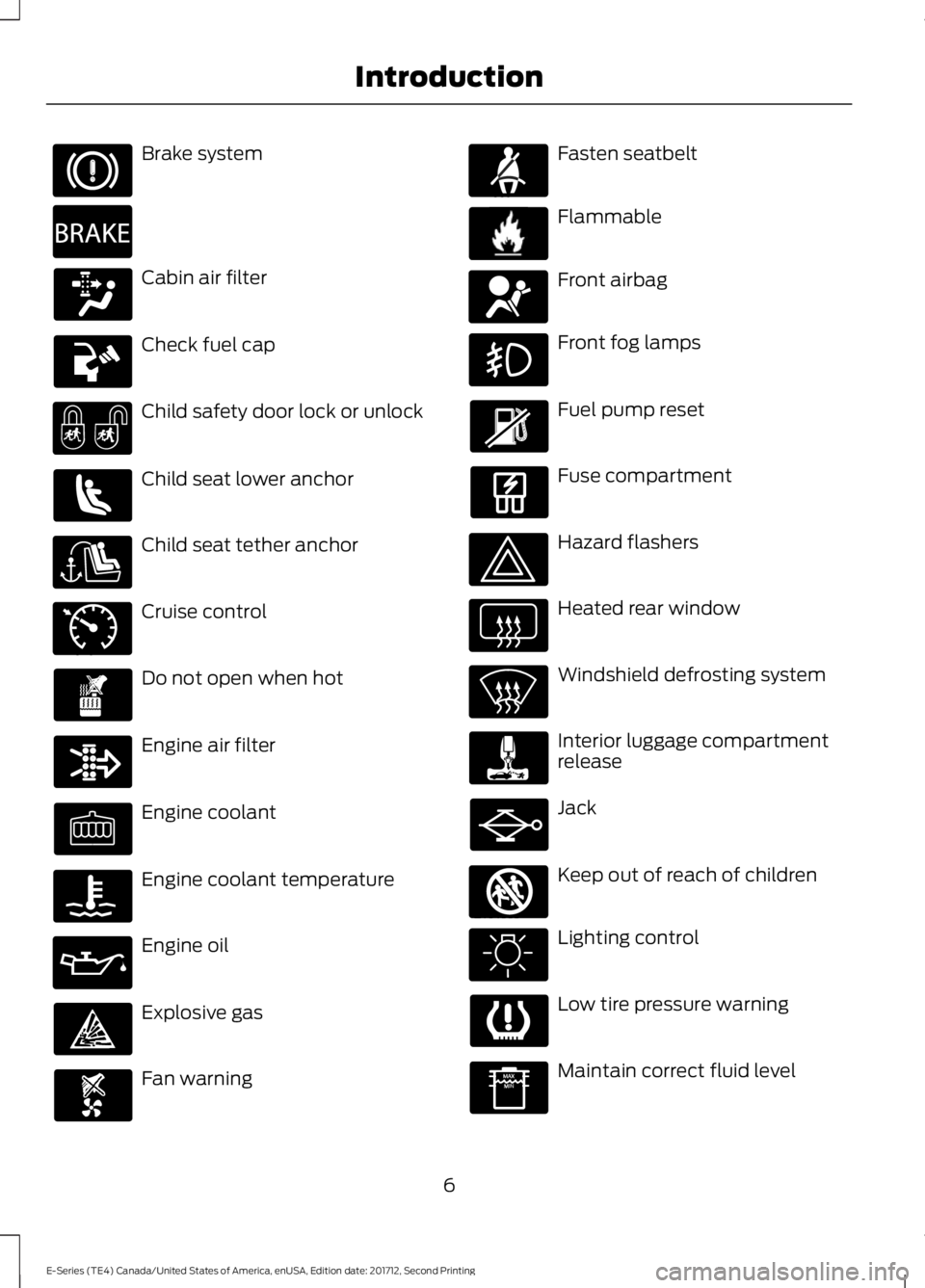
Brake system
Cabin air filter
Check fuel cap
Child safety door lock or unlock
Child seat lower anchor
Child seat tether anchor
Cruise control
Do not open when hot
Engine air filter
Engine coolant
Engine coolant temperature
Engine oil
Explosive gas
Fan warning
Fasten seatbelt
Flammable
Front airbag
Front fog lamps
Fuel pump reset
Fuse compartment
Hazard flashers
Heated rear window
Windshield defrosting system
Interior luggage compartmentrelease
Jack
Keep out of reach of children
Lighting control
Low tire pressure warning
Maintain correct fluid level
6
E-Series (TE4) Canada/United States of America, enUSA, Edition date: 201712, Second Printing
Introduction E270480 E71340 E71880 E231160 E67017 E161353
Page 55 of 323
•It may take a short time for the needleto reach F after leaving the gas station.This is normal and depends upon theslope of the pavement at the gasstation.
•The fuel amount dispensed into thetank is a little less or more than thegauge indicated. This is normal anddepends upon the slope of thepavement at the gas station.
•If the gas station nozzle shuts offbefore the tank is full, try a differentgas pump nozzle.
•There is a small reserve left in the tankwhen the fuel gauge reaches empty.
Low Fuel Reminder
A low fuel level reminder displays andsounds when the distance to emptyreaches 50 mi (80 km), 25 mi (40 km),10 mi (20 km) and 0 mi (0 km).
Engine Coolant TemperatureGauge
Indicates engine coolant temperature. Atnormal operating temperature, the levelindicator will be in the normal range. If theengine coolant temperature exceeds thenormal range, stop the vehicle as soon assafely possible, switch off the engine andlet the engine cool.
WARNING
Never remove the coolant reservoircap when the engine is running orhot.
Battery Voltage Gauge
Indicates the battery voltage when theignition is in the on position. If the pointermoves and stays outside the normaloperating range, have an authorized dealercheck the vehicle’s electrical system assoon as possible.
Information Display
Odometer
Located in the bottom of the informationdisplay, the gauge registers the distanceyour vehicle travels.
Trip Computer
See Information Displays (page 56).
Vehicle Settings and Personalization
See Information Displays (page 56).
Engine Oil Pressure Gauge
Indicates the engine oil pressure. Theneedle should stay in the normal operatingrange. If the needle falls below the normalrange, stop the vehicle and switch off theengine. Check the engine oil level and addoil if needed. If the oil level is correct, havean authorized dealer check the system.
WARNING LAMPS AND
INDICATORS
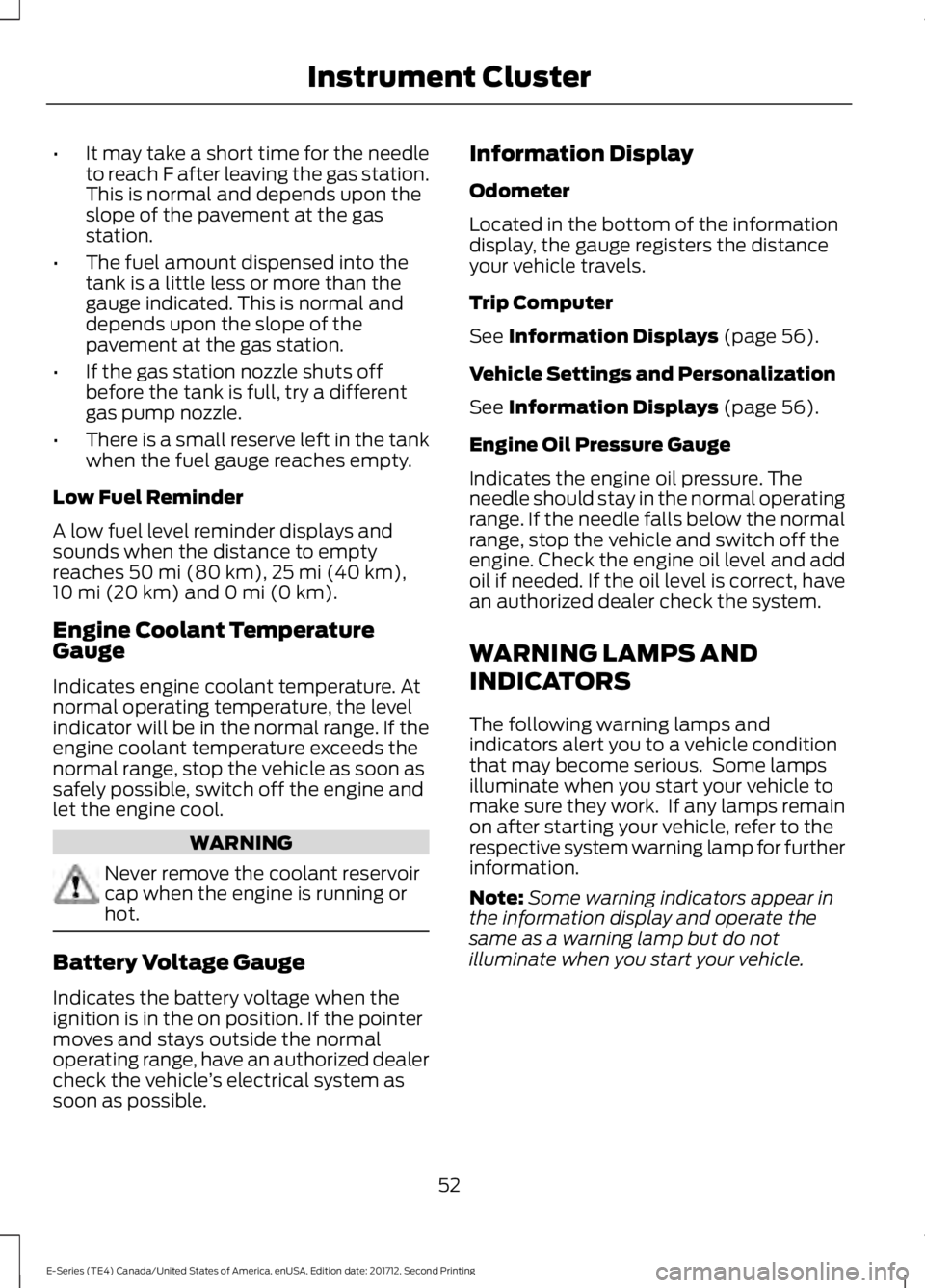
The following warning lamps andindicators alert you to a vehicle conditionthat may become serious. Some lampsilluminate when you start your vehicle tomake sure they work. If any lamps remainon after starting your vehicle, refer to therespective system warning lamp for furtherinformation.
Note:Some warning indicators appear inthe information display and operate thesame as a warning lamp but do notilluminate when you start your vehicle.
52
E-Series (TE4) Canada/United States of America, enUSA, Edition date: 201712, Second Printing
Instrument Cluster
Page 57 of 323
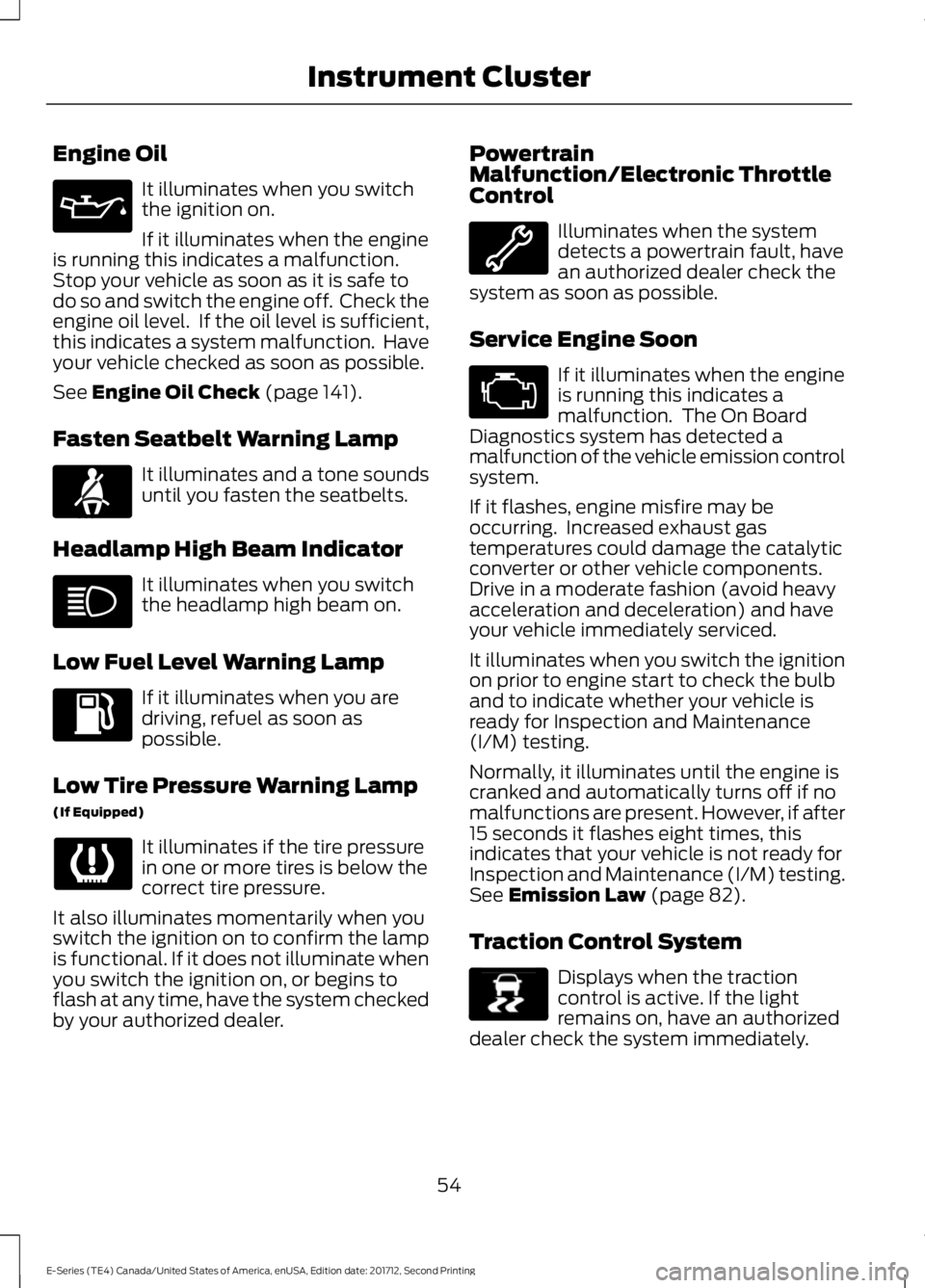
Engine Oil
It illuminates when you switchthe ignition on.
If it illuminates when the engineis running this indicates a malfunction.Stop your vehicle as soon as it is safe todo so and switch the engine off. Check theengine oil level. If the oil level is sufficient,this indicates a system malfunction. Haveyour vehicle checked as soon as possible.
See Engine Oil Check (page 141).
Fasten Seatbelt Warning Lamp
It illuminates and a tone soundsuntil you fasten the seatbelts.
Headlamp High Beam Indicator
It illuminates when you switchthe headlamp high beam on.
Low Fuel Level Warning Lamp
If it illuminates when you aredriving, refuel as soon aspossible.
Low Tire Pressure Warning Lamp
(If Equipped)
It illuminates if the tire pressurein one or more tires is below thecorrect tire pressure.
It also illuminates momentarily when youswitch the ignition on to confirm the lampis functional. If it does not illuminate whenyou switch the ignition on, or begins toflash at any time, have the system checkedby your authorized dealer.
PowertrainMalfunction/Electronic ThrottleControl
Illuminates when the systemdetects a powertrain fault, havean authorized dealer check thesystem as soon as possible.
Service Engine Soon
If it illuminates when the engineis running this indicates amalfunction. The On BoardDiagnostics system has detected amalfunction of the vehicle emission controlsystem.
If it flashes, engine misfire may beoccurring. Increased exhaust gastemperatures could damage the catalyticconverter or other vehicle components.Drive in a moderate fashion (avoid heavyacceleration and deceleration) and haveyour vehicle immediately serviced.
It illuminates when you switch the ignitionon prior to engine start to check the bulband to indicate whether your vehicle isready for Inspection and Maintenance(I/M) testing.
Normally, it illuminates until the engine iscranked and automatically turns off if nomalfunctions are present. However, if after15 seconds it flashes eight times, thisindicates that your vehicle is not ready forInspection and Maintenance (I/M) testing.See Emission Law (page 82).
Traction Control System
Displays when the tractioncontrol is active. If the lightremains on, have an authorizeddealer check the system immediately.
54
E-Series (TE4) Canada/United States of America, enUSA, Edition date: 201712, Second Printing
Instrument Cluster E71880 E138639
Page 145 of 323
Only use oils certified for gasoline enginesby the American Petroleum Institute (API).An oil with this trademark symbolconforms to the current engine andemission system protection standards andfuel economy requirements of theInternational Lubricants SpecificationAdvisory Committee (ILSAC).
To top up the engine oil level do thefollowing:
1. Clean the area surrounding the engineoil filler cap before you remove it.
2. Remove the engine oil filler cap. SeeUnder Hood Overview (page 139).Turn it counterclockwise and removeit.
3. Add engine oil that meets Fordspecifications. See Capacities andSpecifications (page 199). You mayhave to use a funnel to pour the engineoil into the opening.
4. Recheck the oil level.
5. If the oil level is correct, replace thedipstick and make sure it is fully seated.
6. Replace the engine oil filler cap. Turnit clockwise until you feel a strongresistance.
Note: Do not add oil further than themaximum mark. Oil levels above themaximum mark may cause engine damage.
Note:Make sure you install the oil filler capcorrectly.
Note:Soak up any spillage with anabsorbent cloth immediately.
OIL CHANGE INDICATOR
RESET (If Equipped)
Resetting the Oil Life MonitoringSystem
Only reset the oil life monitoring systemafter changing the engine oil and oil filter.
To reset the oil life monitoring system dothe following:
1.Switch the ignition on. Do not start theengine.
2. Fully press the accelerator and brakepedals at the same time.
3.Keep the accelerator and brake pedalsfully pressed.
4. After three seconds, a messagedisplays confirming the reset procedureis in progress.
5. After 25 seconds, a message displaysconfirming the reset procedure iscomplete.
6. Release the accelerator and brakepedals.
7. Switch the ignition off.
ENGINE COOLANT CHECK
WARNINGS
Never remove the coolant reservoircap when the engine is running orhot.
Do not put coolant in the windshieldwasher reservoir. If sprayed on thewindshield, coolant could make itdifficult to see through the windshield.
To reduce the risk of personal injury,make sure the engine is cool beforeunscrewing the coolant pressurerelief cap. The cooling system is underpressure. Steam and hot liquid can comeout forcefully when you loosen the capslightly.
Do not add coolant further than theMAX mark.
When the engine is cold, check theconcentration and level of the coolant atthe intervals listed in the scheduledmaintenance information. See ScheduledMaintenance (page 270).
142
E-Series (TE4) Canada/United States of America, enUSA, Edition date: 201712, Second Printing
Maintenance
Page 164 of 323
WAXING
Regular waxing is necessary to protect yourcar's paint from the elements. Werecommend that you wash and wax thepainted surface once or twice a year.
When washing and waxing, park yourvehicle in a shaded area out of directsunlight. Always wash your vehicle beforeapplying wax.
•Use a quality wax that does not containabrasives.
•Follow the manufacturer’s instructionsto apply and remove the wax.
•Apply a small amount of wax in aback-and-forth motion, not in circles.
•Do not allow wax to come in contactwith any non-body (low-gloss black)colored trim. The wax will discolor orstain the parts over time.
•Roof racks.
•Bumpers.
•Grained door handles.
•Side moldings.
•Mirror housings.
•Windshield cowl area.
•Do not apply wax to glass areas.
•After waxing, your car's paint shouldfeel smooth, and be free of streaks andsmudges.
CLEANING THE ENGINE
Engines are more efficient when they areclean because grease and dirt buildup keepthe engine warmer than normal.
When washing:
•Take care when using a power washerto clean the engine. The high-pressurefluid could penetrate the sealed partsand cause damage.
•Do not spray a hot engine with coldwater to avoid cracking the engineblock or other engine components.
•Spray Motorcraft Engine Shampoo andDegreaser on all parts that requirecleaning and pressure rinse clean. InCanada, use Motorcraft EngineShampoo.
•Never wash or rinse the engine while itis hot or running; water in the runningengine may cause internal damage.
•Never wash or rinse any ignition coil,spark plug wire or spark plug well, orthe area in and around these locations.
•Cover the battery, power distributionbox, and air filter assembly to preventwater damage when cleaning theengine.
CLEANING THE WINDOWS AND
WIPER BLADES
Car wash chemicals and environmentalfallout can result in windshield and wiperblade contamination. Dirty windshield andwipers will result in poor windshield wiperoperation. Keep the windshield and wiperblades clean to maintain windshield wiperperformance.
161
E-Series (TE4) Canada/United States of America, enUSA, Edition date: 201712, Second Printing
Vehicle Care
Page 168 of 323
Note:It is necessary to reset memoryfeatures if battery cables are disconnected.
Brakes
•Make sure the brakes and parking brakerelease fully.
Tires
•Maintain recommended air pressure.
Miscellaneous
•Make sure all linkages, cables, leversand pins under your vehicle are coveredwith grease to prevent rust.
•Move vehicles at least 25 ft (7.5 m)every 15 days to lubricate working partsand prevent corrosion.
Removing Vehicle From Storage
When your vehicle is ready to come out ofstorage, do the following:
•Wash your vehicle to remove any dirtor grease film build-up on windowsurfaces.
•Check windshield wipers for anydeterioration.
•Check under the hood for any foreignmaterial that may have collectedduring storage such as mice or squirrelnests.
•Check the exhaust for any foreignmaterial that may have collectedduring storage.
•Check tire pressures and set tireinflation per the Tire Label.
•Check brake pedal operation. Driveyour vehicle 15 ft (4.5 m) back andforth to remove rust build-up.
•Check fluid levels (including coolant,oil and gas) to make sure there are noleaks, and fluids are at recommendedlevels.
•If you remove the battery, clean thebattery cable ends and check fordamage.
Contact an authorized dealer if you haveany concerns or issues.
165
E-Series (TE4) Canada/United States of America, enUSA, Edition date: 201712, Second Printing
Vehicle Care
Page 206 of 323
Note:Ford recommends using DOT 4 LowViscosity (LV) High Performance Brake Fluidor equivalent meeting WSS-M6C65-A2. Useof any fluid other than the recommendedfluid may cause degraded brakeperformance and not meet the Fordperformance standards. Keep brake fluidclean and dry. Contamination with dirt,water, petroleum products or othermaterials may result in brake systemdamage and possible failure.
Note: Automatic transmissions that requireMERCON® LV transmission fluid shouldonly use MERCON® LV transmission fluid.The use of any other fluid may causetransmission damage.
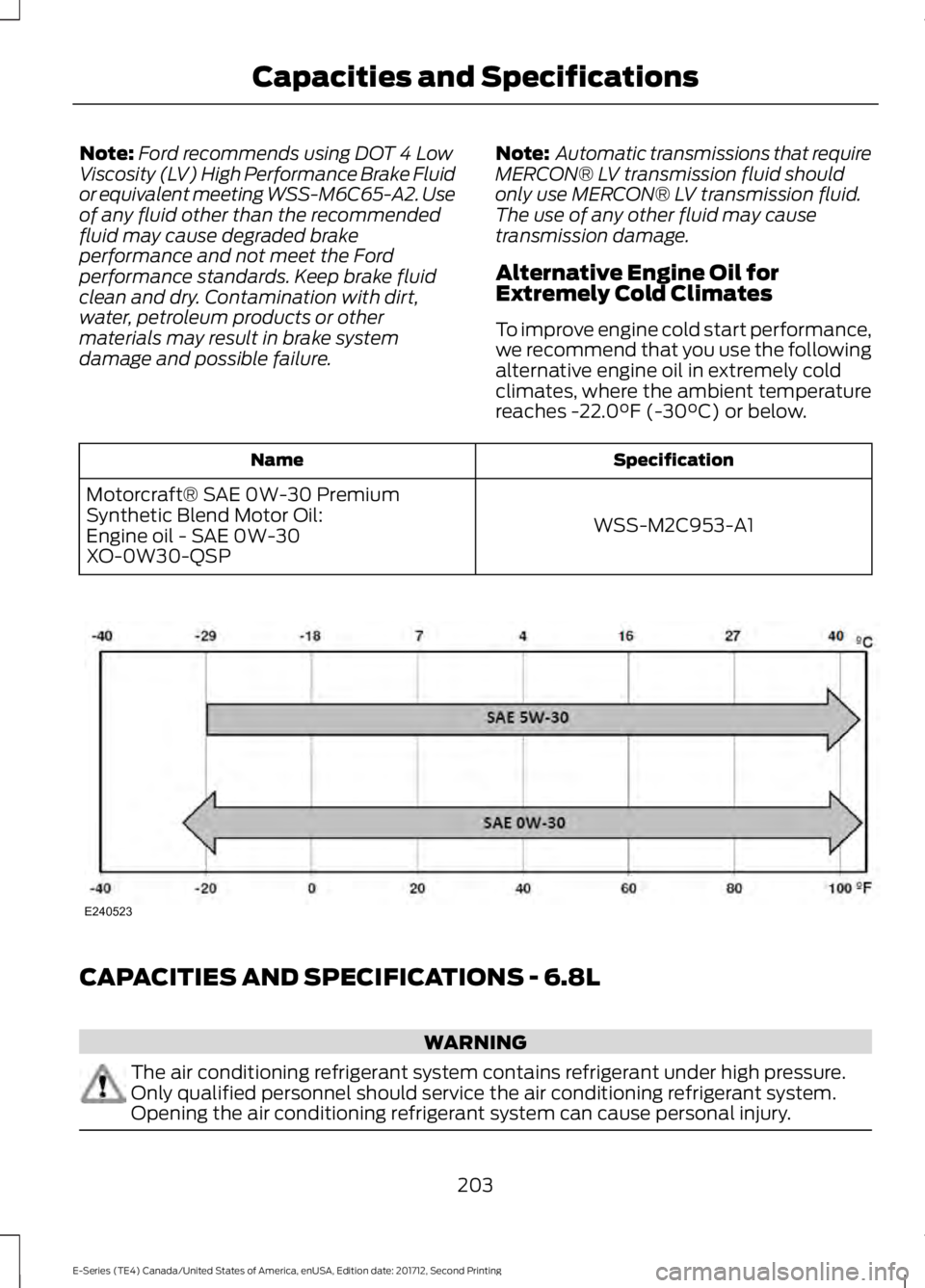
Alternative Engine Oil forExtremely Cold Climates
To improve engine cold start performance,we recommend that you use the followingalternative engine oil in extremely coldclimates, where the ambient temperaturereaches -22.0°F (-30°C) or below.
SpecificationName
WSS-M2C953-A1
Motorcraft® SAE 0W-30 PremiumSynthetic Blend Motor Oil:Engine oil - SAE 0W-30XO-0W30-QSP
CAPACITIES AND SPECIFICATIONS - 6.8L
WARNING
The air conditioning refrigerant system contains refrigerant under high pressure.Only qualified personnel should service the air conditioning refrigerant system.Opening the air conditioning refrigerant system can cause personal injury.
203
E-Series (TE4) Canada/United States of America, enUSA, Edition date: 201712, Second Printing
Capacities and SpecificationsE240523
Page 274 of 323
Ford Motor Company has recommendedmaintenance intervals for various partsand component systems based uponengineering testing. Ford Motor Companyrelies upon this testing to determine themost appropriate mileage for replacementof oils and fluids to protect your vehicle atthe lowest overall cost to you andrecommends against maintenanceschedules that deviate from the scheduledmaintenance information.
We strongly recommend the use of onlygenuine Ford, Motorcraft orFord-authorized re-manufacturedreplacement parts engineered for yourvehicle.
Additives and Chemicals
This owner's manual and the FordWorkshop Manual list the recommendedadditives and chemicals for your vehicle.We do not recommend using chemicals oradditives not approved by us as part ofyour vehicle’s normal maintenance. Pleaseconsult your warranty information.
Oils, Fluids and Flushing
In many cases, fluid discoloration is anormal operating characteristic and, byitself, does not necessarily indicate aconcern or that the fluid needs to bechanged. However, a qualified expert, suchas the factory-trained technicians at yourdealership, should inspect discolored fluidsthat also show signs of overheating orforeign material contaminationimmediately.
Make sure to change your vehicle’s oils andfluids at the specified intervals or inconjunction with a repair. Flushing is aviable way to change fluid for many vehiclesub-systems during scheduledmaintenance. It is critical that systems areflushed only with new fluid that is the sameas that required to fill and operate thesystem or using a Ford-approved flushingchemical.
Owner Checks and Services
Make sure you perform the following basicmaintenance checks and inspections everymonth or at six-month intervals.
Check every month
Engine oil level.
Function of all interior and exterior lights.
Tires (including spare) for wear and proper pressure.
Windshield washer fluid level.
Check every six months
Battery connections. Clean if necessary.
Body and door drain holes for obstructions. Clean if necessary.
Cooling system fluid level and coolant strength.
Door weatherstrips for wear. Lubricate if necessary.
271
E-Series (TE4) Canada/United States of America, enUSA, Edition date: 201712, Second Printing
Scheduled Maintenance
Page 275 of 323
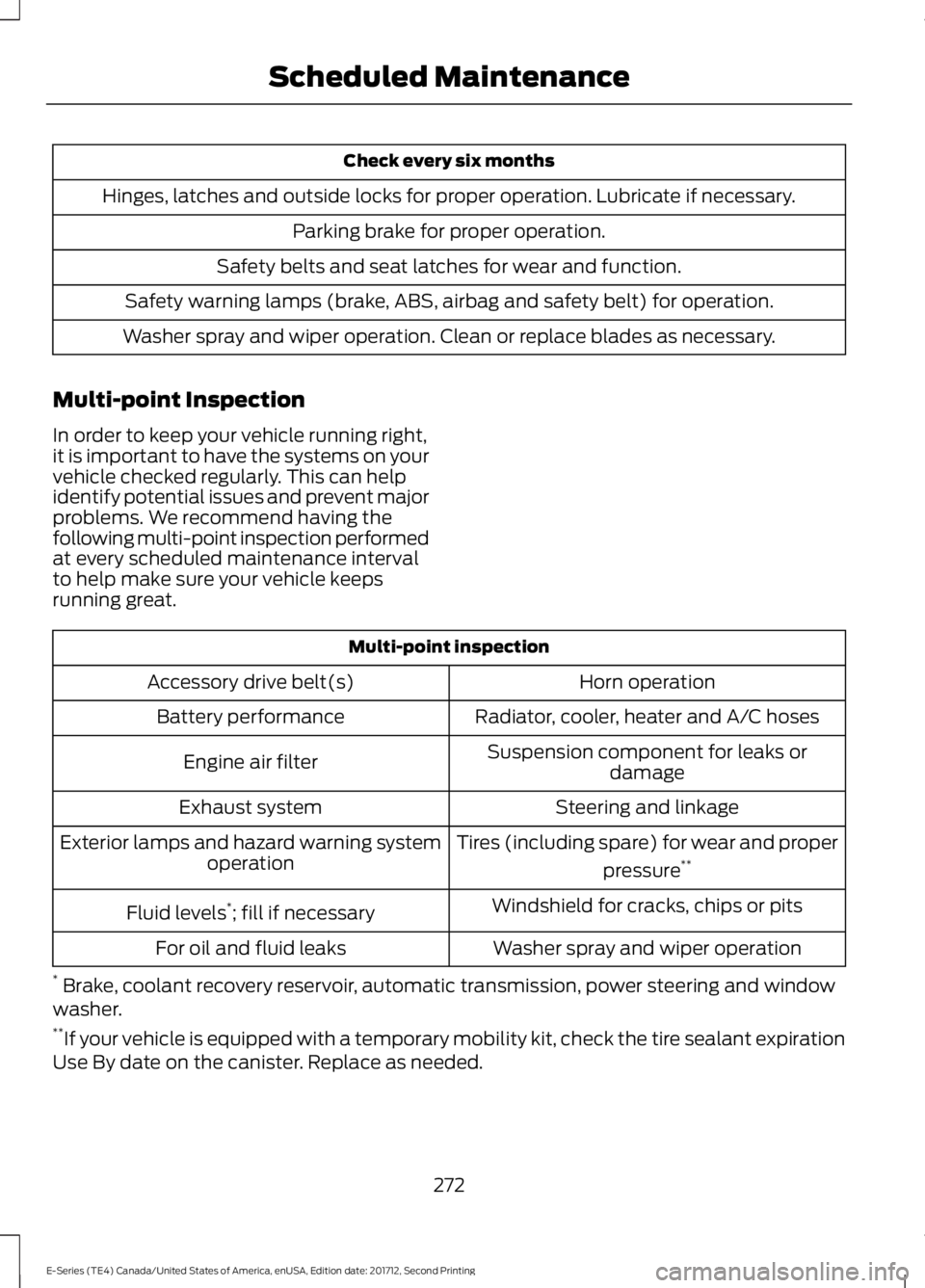
Check every six months
Hinges, latches and outside locks for proper operation. Lubricate if necessary.
Parking brake for proper operation.
Safety belts and seat latches for wear and function.
Safety warning lamps (brake, ABS, airbag and safety belt) for operation.
Washer spray and wiper operation. Clean or replace blades as necessary.
Multi-point Inspection
In order to keep your vehicle running right,it is important to have the systems on yourvehicle checked regularly. This can helpidentify potential issues and prevent majorproblems. We recommend having thefollowing multi-point inspection performedat every scheduled maintenance intervalto help make sure your vehicle keepsrunning great.
Multi-point inspection
Horn operationAccessory drive belt(s)
Radiator, cooler, heater and A/C hosesBattery performance
Suspension component for leaks ordamageEngine air filter
Steering and linkageExhaust system
Tires (including spare) for wear and proper
pressure**Exterior lamps and hazard warning systemoperation
Windshield for cracks, chips or pitsFluid levels*; fill if necessary
Washer spray and wiper operationFor oil and fluid leaks
* Brake, coolant recovery reservoir, automatic transmission, power steering and windowwasher.**If your vehicle is equipped with a temporary mobility kit, check the tire sealant expirationUse By date on the canister. Replace as needed.
272
E-Series (TE4) Canada/United States of America, enUSA, Edition date: 201712, Second Printing
Scheduled Maintenance
Page 322 of 323
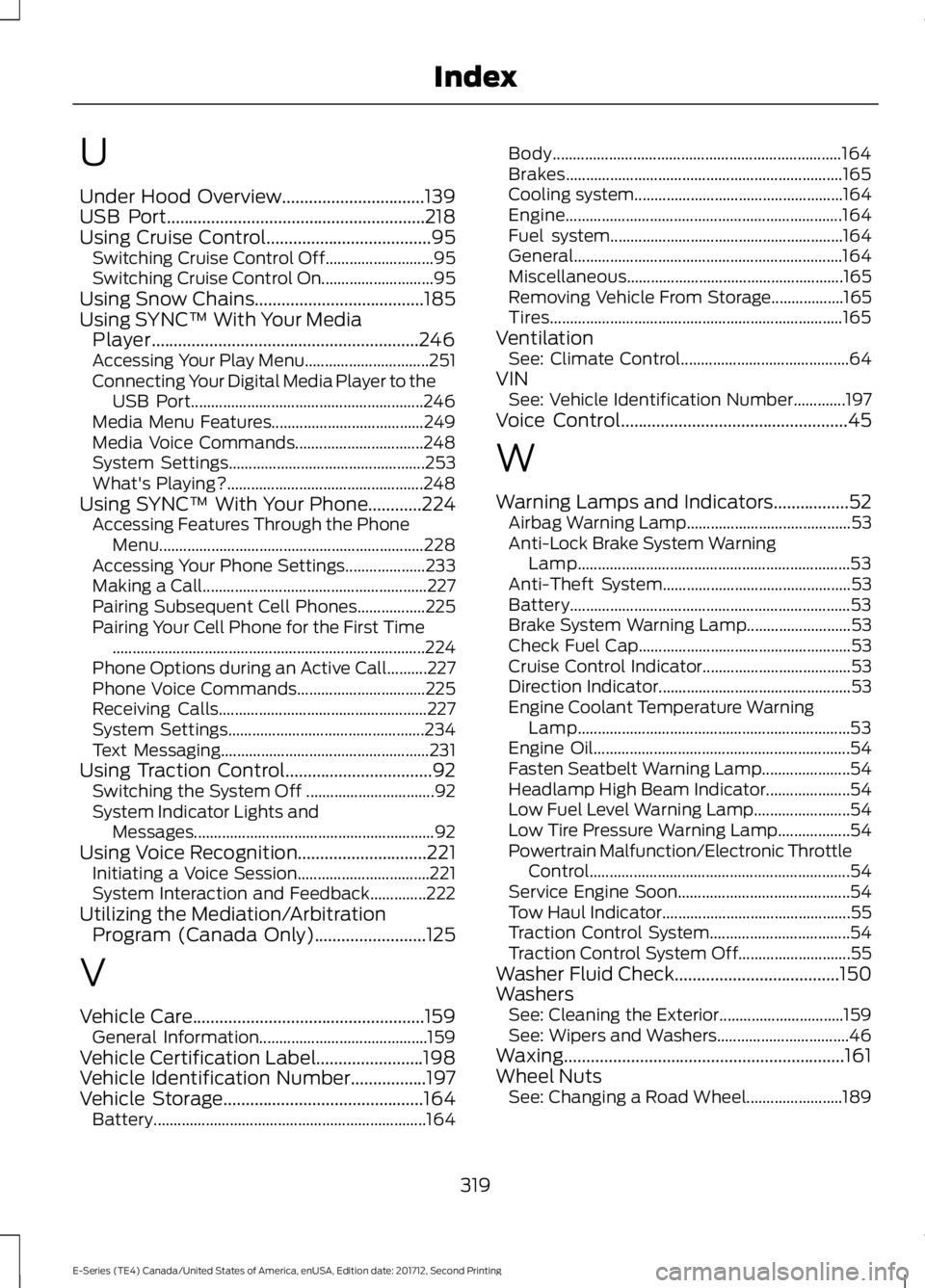
U
Under Hood Overview................................139USB Port..........................................................218Using Cruise Control.....................................95Switching Cruise Control Off...........................95Switching Cruise Control On............................95Using Snow Chains......................................185Using SYNC™ With Your MediaPlayer............................................................246Accessing Your Play Menu...............................251Connecting Your Digital Media Player to theUSB Port..........................................................246Media Menu Features......................................249Media Voice Commands................................248System Settings.................................................253What's Playing?.................................................248Using SYNC™ With Your Phone............224Accessing Features Through the PhoneMenu..................................................................228Accessing Your Phone Settings....................233Making a Call........................................................227Pairing Subsequent Cell Phones.................225Pairing Your Cell Phone for the First Time..............................................................................224Phone Options during an Active Call..........227Phone Voice Commands................................225Receiving Calls....................................................227System Settings.................................................234Text Messaging....................................................231Using Traction Control.................................92Switching the System Off ................................92System Indicator Lights andMessages............................................................92Using Voice Recognition.............................221Initiating a Voice Session.................................221System Interaction and Feedback..............222Utilizing the Mediation/ArbitrationProgram (Canada Only).........................125
V
Vehicle Care....................................................159General Information..........................................159Vehicle Certification Label........................198Vehicle Identification Number.................197Vehicle Storage.............................................164Battery....................................................................164
Body........................................................................164Brakes.....................................................................165Cooling system....................................................164Engine.....................................................................164Fuel system..........................................................164General...................................................................164Miscellaneous......................................................165Removing Vehicle From Storage..................165Tires.........................................................................165VentilationSee: Climate Control..........................................64VINSee: Vehicle Identification Number.............197Voice Control...................................................45
W
Warning Lamps and Indicators.................52Airbag Warning Lamp.........................................53Anti-Lock Brake System WarningLamp....................................................................53Anti-Theft System...............................................53Battery......................................................................53Brake System Warning Lamp..........................53Check Fuel Cap.....................................................53Cruise Control Indicator.....................................53Direction Indicator................................................53Engine Coolant Temperature WarningLamp....................................................................53Engine Oil................................................................54Fasten Seatbelt Warning Lamp......................54Headlamp High Beam Indicator.....................54Low Fuel Level Warning Lamp........................54Low Tire Pressure Warning Lamp..................54Powertrain Malfunction/Electronic ThrottleControl.................................................................54Service Engine Soon...........................................54Tow Haul Indicator...............................................55Traction Control System...................................54Traction Control System Off............................55Washer Fluid Check.....................................150WashersSee: Cleaning the Exterior...............................159See: Wipers and Washers.................................46Waxing...............................................................161Wheel NutsSee: Changing a Road Wheel........................189
319
E-Series (TE4) Canada/United States of America, enUSA, Edition date: 201712, Second Printing
Index