steering FORD E SERIES 2018 Owner's Guide
[x] Cancel search | Manufacturer: FORD, Model Year: 2018, Model line: E SERIES, Model: FORD E SERIES 2018Pages: 323, PDF Size: 7.09 MB
Page 224 of 323
System data cannot be accessed withoutspecial equipment and access to thevehicle's SYNC module. Ford MotorCompany and Ford of Canada will notaccess the system data for any purposeother than as described absent consent, acourt order, or where required by lawenforcement, other governmentauthorities, or other third parties actingwith lawful authority. Other parties mayseek to access the informationindependently of Ford Motor Company andFord of Canada. For further privacyinformation, see the sections on 911 Assist,Vehicle Health Report, and Traffic,Directions and Information.
USING VOICE RECOGNITION
This system helps you control manyfeatures using voice commands. Thisallows you to keep your hands on thewheel and focus on what is in front of you.
Helpful Hints
•Make sure the interior of your vehicle isas quiet as possible. Wind noise fromopen windows and road vibrations mayprevent the system from correctlyrecognizing spoken commands.
•After pressing the voice button, waituntil after the tone sounds andListening appears before saying acommand. Any command spokenbefore this does not register with thesystem.
•Speak naturally, without long pausesbetween words.
•At any time, you can interrupt thesystem while it is speaking by pressingthe voice button.
Initiating a Voice Session
Initiate a voice session bypressing the voice button on thesteering wheel controls. SeeVoice Control (page 45).
When prompted you can say any of the following:
If you want the system to carry out the followingVoice command
Stream audio from your phone.Bluetooth Audio
Cancel the requested action.Cancel
Access mobile applications.mobile (apps | applica-tions)
Make calls.Phone
Access the device connected to your USB port.USB [1]
Run a vehicle health report.Vehicle Health (Report)
221
E-Series (TE4) Canada/United States of America, enUSA, Edition date: 201712, Second Printing
SYNC™ (If Equipped)E142599
Page 225 of 323
If you want the system to carry out the followingVoice command
Adjust the level of voice interaction and feedback.Voice Settings | VoicePreferences
Hear a list of voice commands available in the current mode.Help
You can say any of the voice commands that appear within open and close brackets thatare separated by |. For example, where (cancel | stop | exit) appears you say; cancel orstop or exit.
You must say any of the voice commands that appear outside of open and close brackets.For example, where mobile (apps | applications) appears, you must say mobile followedby either apps or applications.
You do not need to say words that appear within square brackets. For example, for where(USB [stick] | iPOD | MP3 [player]) appears, you can say USB or USB stick.
Note:SYNC Services and Vehicle health report are only available in the United States ofAmerica.
System Interaction and Feedback
The system provides feedback throughaudible tones, prompts, questions andspoken confirmations depending on thesituation and the chosen level ofinteraction (voice settings). You cancustomize the voice recognition system toprovide more or less instruction andfeedback.
The default setting is to a higher level ofinteraction in order to help you learn to usethe system. You can change these settingsat any time.
Adjusting the Interaction Level
Initiate a voice session bypressing the voice button on thesteering wheel controls. SeeVoice Control (page 45).
When prompted say the following:
If you want the system to carry out the followingVoice command
Voice Settings | Voice Preferences
Followed by either of the following:
Provide more detailed interaction and guidance.Interaction ModeStandard
Provide less audible interaction and more tone prompts.Interaction ModeAdvanced
The system defaults to the standard interaction mode.
222
E-Series (TE4) Canada/United States of America, enUSA, Edition date: 201712, Second Printing
SYNC™ (If Equipped)E142599
Page 241 of 323
Switching 911 Assist On or Off
Press the phone button to enter the phone menu and scroll to:
Action and DescriptionMessage
Press the OK button to confirm and enter the 911 Assist menu.911 Assist
Press the OK button when the desired option appears in theradio display.On
Off
Off selections include:
Action and DescriptionMessage
Provides a display and voice reminder at phone connectionat vehicle start.Off with reminder:
Provides a display reminder only without a voice reminder atphone connection.Off without reminder:
To make sure that 911 Assist workscorrectly:
•SYNC must be powered and workingproperly at the time of the incident andthroughout feature activation and use.
•The 911 Assist feature must be set onbefore the incident.
•You must pair and connect aBluetooth-enabled and compatiblecell phone to SYNC.
•A connected Bluetooth-enabled phonemust have the ability to make andmaintain an outgoing call at the timeof the incident.
•A connected Bluetooth-enabled phonemust have adequate network coverage,battery power and signal strength.
•The vehicle must have battery powerand be located in the U.S., Canada orin a territory in which 911 is theemergency number.
In the Event of a Crash
Not all crashes will deploy an airbag oractivate the fuel pump shut-off (thetriggers for 911 Assist). If a connected cellphone sustains damage or loses itsconnection to SYNC during a crash, SYNCwill search for and try to connect to apreviously paired cell phone; SYNC willthen attempt to call the emergencyservices.
Before making the call:
•SYNC provides a short window of time(about 10 seconds) to cancel the call.If you fail to cancel the call, SYNCattempts to dial 911.
•SYNC says the following, or a similarmessage: "SYNC will attempt to call911, to cancel the call, press Cancel onyour screen or press and hold thephone button on your steering wheel."
238
E-Series (TE4) Canada/United States of America, enUSA, Edition date: 201712, Second Printing
SYNC™ (If Equipped)
Page 247 of 323
Action and DescriptionVoice command
The live operator can assist you by searching for businessesby name or by category, residential addresses by streetaddress or by name or specific street intersections.The system may prompt you to speak with an operator whenit has difficulty matching your voice request. Operator Assistis a feature of your SYNC Services subscription. For moreinformation on Operator Assist, visit www.SYNCMyRide.com/support.
If you miss a turn, SYNC automatically asks if you want theroute updated. Say yes when prompted and the system sendsa new route to your vehicle.
Yes *
* During an active route.
Disconnecting from SYNC Services
To disconnect from SYNC services, say:
Action and DescriptionVoice command
From the SYNC Services main menu, or press and hold thephone button on the steering wheel.Goodbye
SYNC Services quick tips
SYNC Services quick tips
You can personalize your Services feature to provide quickeraccess to your most used or favorite information. You cansave address points, for example work or home. You can alsosave favorite information like sports teams or a newscategory. You can learn more about personalization by loggingonto www.SYNCMyRide.com.
Personalizing
Press the voice button at any time while connected to SYNCServices to interrupt a voice prompt or an audio clip and sayyour voice command.
Push to interrupt
Your subscription is associated with your Bluetooth-enabledcellular phone number, not your VIN (Vehicle IdentificationNumber). You can pair and connect your phone to any vehicleequipped with SYNC Services and continue enjoying yourpersonalized services.
Portable
244
E-Series (TE4) Canada/United States of America, enUSA, Edition date: 201712, Second Printing
SYNC™ (If Equipped)
Page 248 of 323
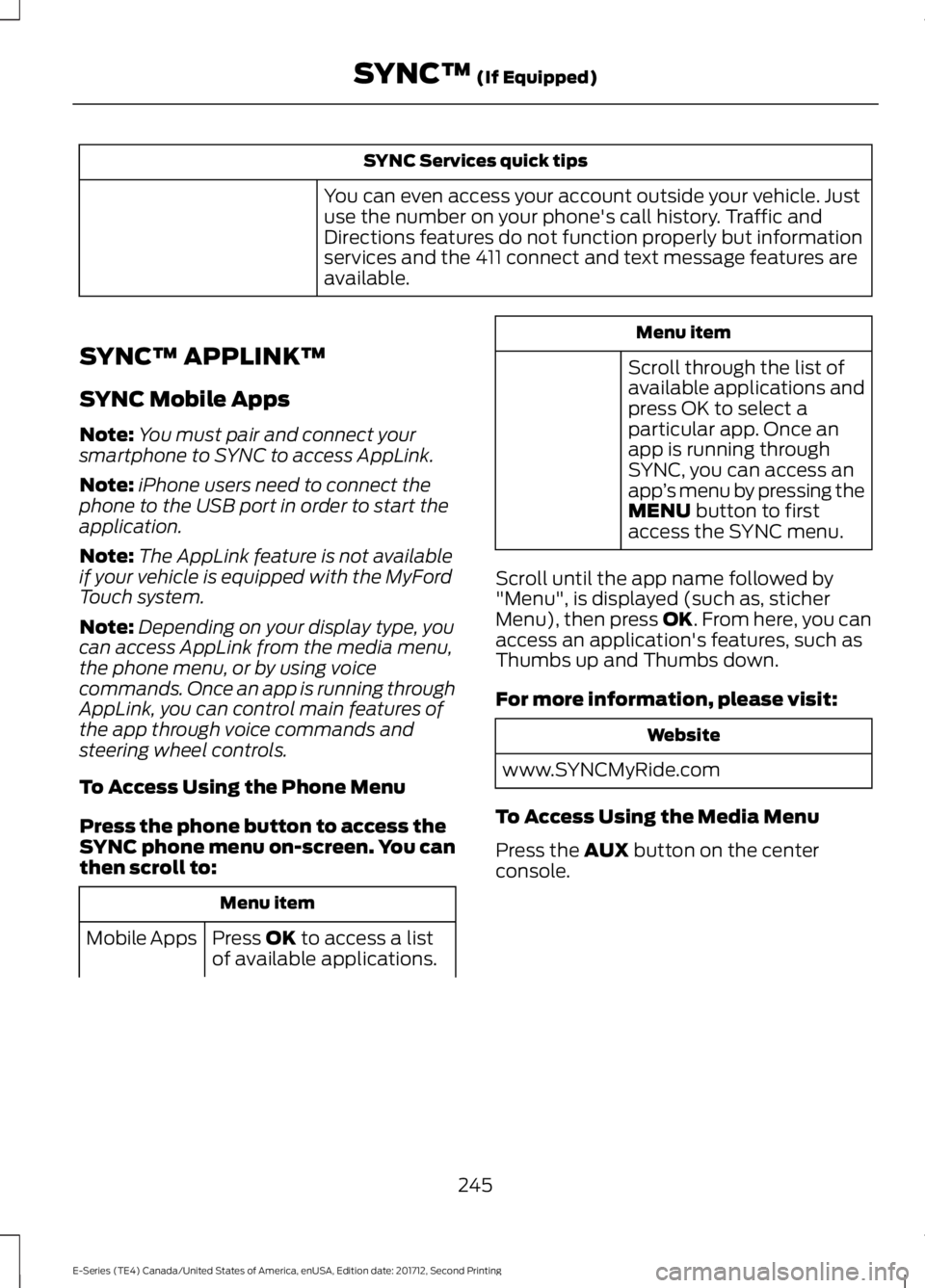
SYNC Services quick tips
You can even access your account outside your vehicle. Justuse the number on your phone's call history. Traffic andDirections features do not function properly but informationservices and the 411 connect and text message features areavailable.
SYNC™ APPLINK™
SYNC Mobile Apps
Note:You must pair and connect yoursmartphone to SYNC to access AppLink.
Note:iPhone users need to connect thephone to the USB port in order to start theapplication.
Note:The AppLink feature is not availableif your vehicle is equipped with the MyFordTouch system.
Note:Depending on your display type, youcan access AppLink from the media menu,the phone menu, or by using voicecommands. Once an app is running throughAppLink, you can control main features ofthe app through voice commands andsteering wheel controls.
To Access Using the Phone Menu
Press the phone button to access theSYNC phone menu on-screen. You canthen scroll to:
Menu item
Press OK to access a listof available applications.Mobile Apps
Menu item
Scroll through the list ofavailable applications andpress OK to select aparticular app. Once anapp is running throughSYNC, you can access anapp’s menu by pressing theMENU button to firstaccess the SYNC menu.
Scroll until the app name followed by"Menu", is displayed (such as, sticherMenu), then press OK. From here, you canaccess an application's features, such asThumbs up and Thumbs down.
For more information, please visit:
Website
www.SYNCMyRide.com
To Access Using the Media Menu
Press the AUX button on the centerconsole.
245
E-Series (TE4) Canada/United States of America, enUSA, Edition date: 201712, Second Printing
SYNC™ (If Equipped)
Page 275 of 323
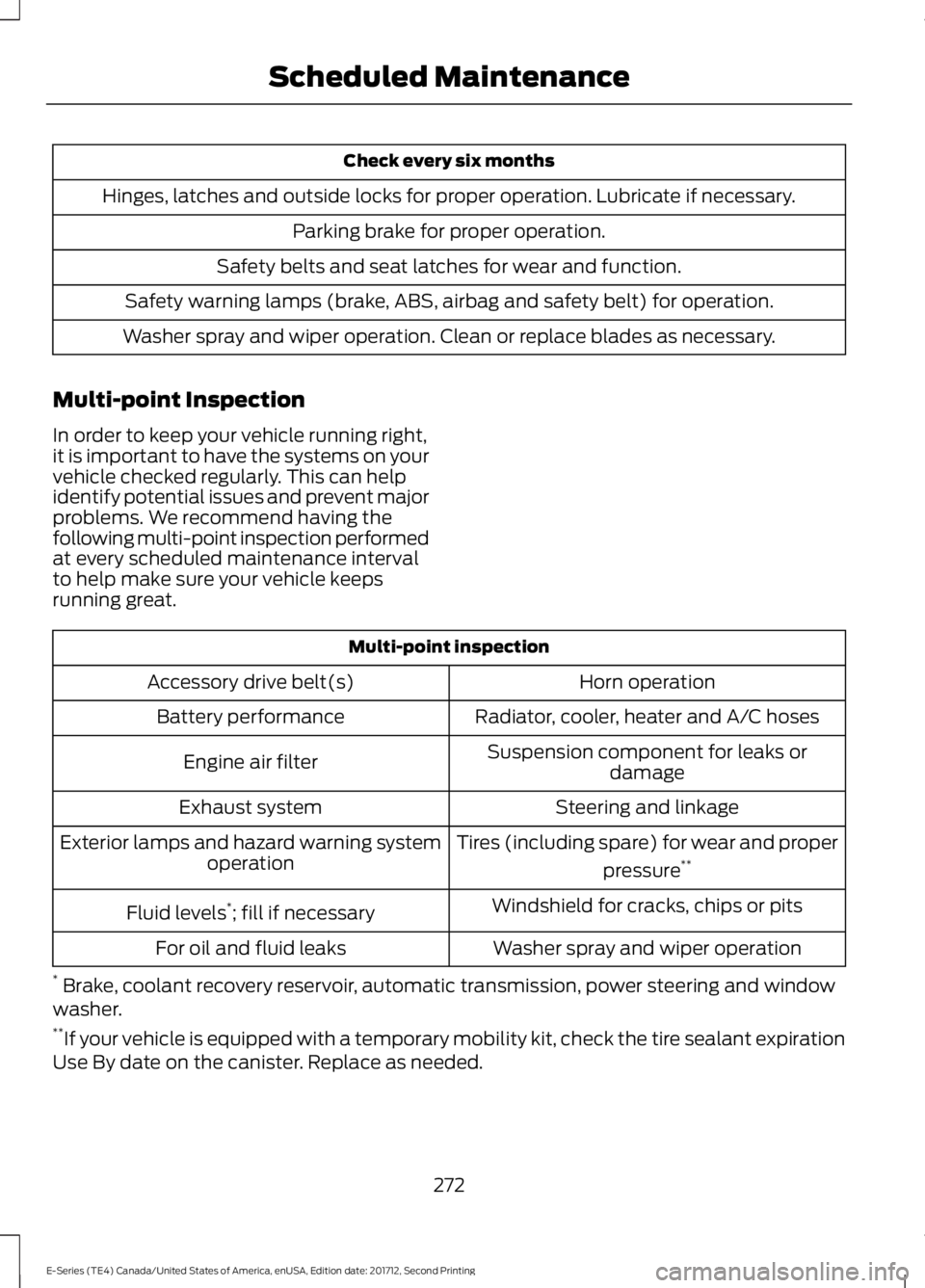
Check every six months
Hinges, latches and outside locks for proper operation. Lubricate if necessary.
Parking brake for proper operation.
Safety belts and seat latches for wear and function.
Safety warning lamps (brake, ABS, airbag and safety belt) for operation.
Washer spray and wiper operation. Clean or replace blades as necessary.
Multi-point Inspection
In order to keep your vehicle running right,it is important to have the systems on yourvehicle checked regularly. This can helpidentify potential issues and prevent majorproblems. We recommend having thefollowing multi-point inspection performedat every scheduled maintenance intervalto help make sure your vehicle keepsrunning great.
Multi-point inspection
Horn operationAccessory drive belt(s)
Radiator, cooler, heater and A/C hosesBattery performance
Suspension component for leaks ordamageEngine air filter
Steering and linkageExhaust system
Tires (including spare) for wear and proper
pressure**Exterior lamps and hazard warning systemoperation
Windshield for cracks, chips or pitsFluid levels*; fill if necessary
Washer spray and wiper operationFor oil and fluid leaks
* Brake, coolant recovery reservoir, automatic transmission, power steering and windowwasher.**If your vehicle is equipped with a temporary mobility kit, check the tire sealant expirationUse By date on the canister. Replace as needed.
272
E-Series (TE4) Canada/United States of America, enUSA, Edition date: 201712, Second Printing
Scheduled Maintenance
Page 276 of 323
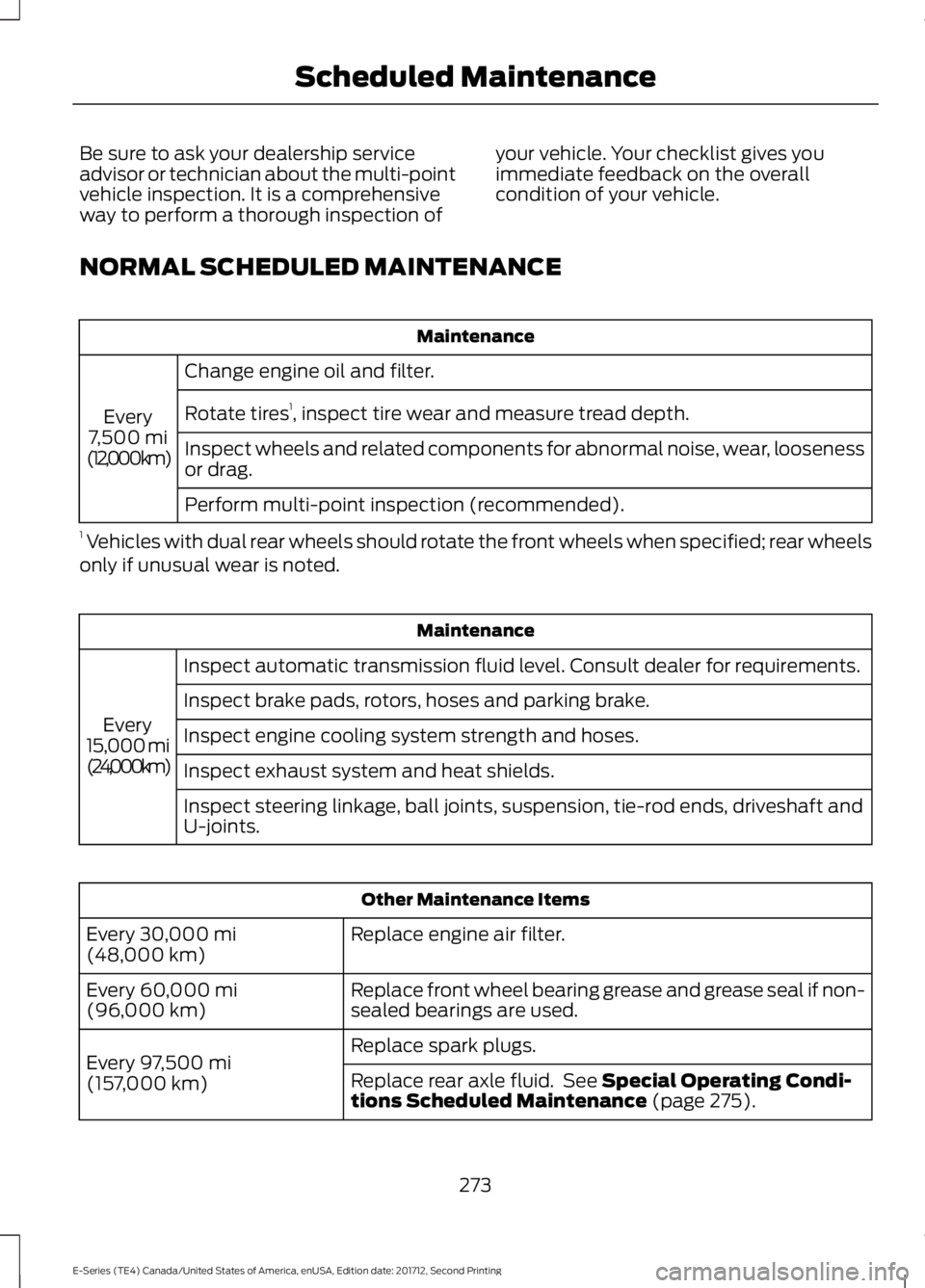
Be sure to ask your dealership serviceadvisor or technician about the multi-pointvehicle inspection. It is a comprehensiveway to perform a thorough inspection of
your vehicle. Your checklist gives youimmediate feedback on the overallcondition of your vehicle.
NORMAL SCHEDULED MAINTENANCE
Maintenance
Change engine oil and filter.
Every7,500 mi(12,000 km)
Rotate tires1, inspect tire wear and measure tread depth.
Inspect wheels and related components for abnormal noise, wear, loosenessor drag.
Perform multi-point inspection (recommended).
1 Vehicles with dual rear wheels should rotate the front wheels when specified; rear wheelsonly if unusual wear is noted.
Maintenance
Inspect automatic transmission fluid level. Consult dealer for requirements.
Every15,000 mi(24,000 km)
Inspect brake pads, rotors, hoses and parking brake.
Inspect engine cooling system strength and hoses.
Inspect exhaust system and heat shields.
Inspect steering linkage, ball joints, suspension, tie-rod ends, driveshaft andU-joints.
Other Maintenance Items
Replace engine air filter.Every 30,000 mi(48,000 km)
Replace front wheel bearing grease and grease seal if non-sealed bearings are used.Every 60,000 mi(96,000 km)
Replace spark plugs.Every 97,500 mi(157,000 km)Replace rear axle fluid. See Special Operating Condi-tions Scheduled Maintenance (page 275).
273
E-Series (TE4) Canada/United States of America, enUSA, Edition date: 201712, Second Printing
Scheduled Maintenance
Page 316 of 323
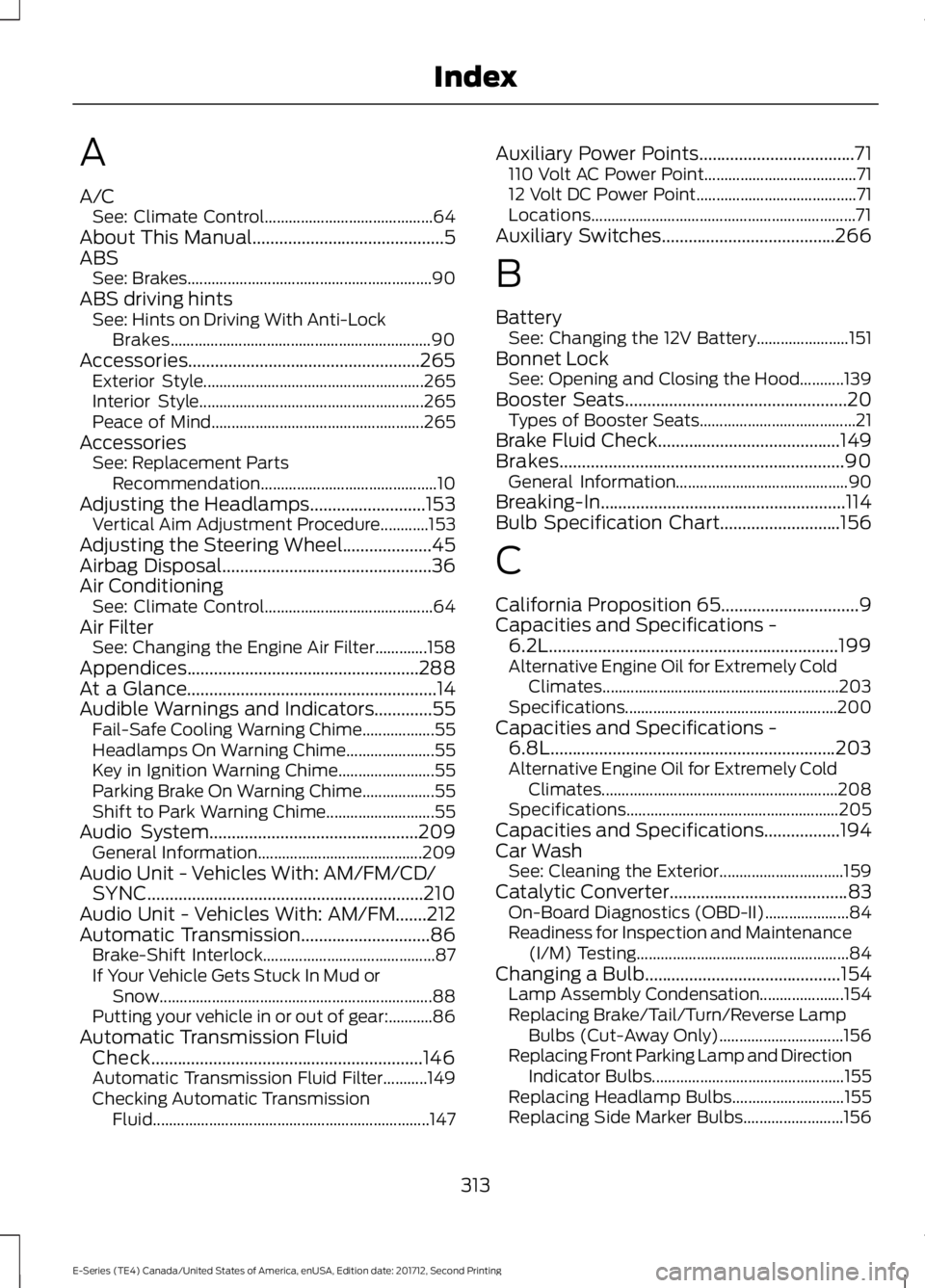
A
A/CSee: Climate Control..........................................64About This Manual...........................................5ABSSee: Brakes.............................................................90ABS driving hintsSee: Hints on Driving With Anti-LockBrakes.................................................................90Accessories....................................................265Exterior Style.......................................................265Interior Style........................................................265Peace of Mind.....................................................265AccessoriesSee: Replacement PartsRecommendation............................................10Adjusting the Headlamps..........................153Vertical Aim Adjustment Procedure............153Adjusting the Steering Wheel....................45Airbag Disposal...............................................36Air ConditioningSee: Climate Control..........................................64Air FilterSee: Changing the Engine Air Filter.............158Appendices....................................................288At a Glance........................................................14Audible Warnings and Indicators.............55Fail-Safe Cooling Warning Chime..................55Headlamps On Warning Chime......................55Key in Ignition Warning Chime........................55Parking Brake On Warning Chime..................55Shift to Park Warning Chime...........................55Audio System...............................................209General Information.........................................209Audio Unit - Vehicles With: AM/FM/CD/SYNC..............................................................210Audio Unit - Vehicles With: AM/FM.......212Automatic Transmission.............................86Brake-Shift Interlock...........................................87If Your Vehicle Gets Stuck In Mud orSnow....................................................................88Putting your vehicle in or out of gear:...........86Automatic Transmission FluidCheck.............................................................146Automatic Transmission Fluid Filter...........149Checking Automatic TransmissionFluid.....................................................................147
Auxiliary Power Points...................................71110 Volt AC Power Point......................................7112 Volt DC Power Point........................................71Locations..................................................................71Auxiliary Switches.......................................266
B
BatterySee: Changing the 12V Battery.......................151Bonnet LockSee: Opening and Closing the Hood...........139Booster Seats..................................................20Types of Booster Seats.......................................21Brake Fluid Check.........................................149Brakes................................................................90General Information...........................................90Breaking-In.......................................................114Bulb Specification Chart...........................156
C
California Proposition 65...............................9Capacities and Specifications -6.2L.................................................................199Alternative Engine Oil for Extremely ColdClimates...........................................................203Specifications.....................................................200Capacities and Specifications -6.8L................................................................203Alternative Engine Oil for Extremely ColdClimates...........................................................208Specifications.....................................................205Capacities and Specifications.................194Car WashSee: Cleaning the Exterior...............................159Catalytic Converter........................................83On-Board Diagnostics (OBD-II).....................84Readiness for Inspection and Maintenance(I/M) Testing.....................................................84Changing a Bulb............................................154Lamp Assembly Condensation.....................154Replacing Brake/Tail/Turn/Reverse LampBulbs (Cut-Away Only)...............................156Replacing Front Parking Lamp and DirectionIndicator Bulbs................................................155Replacing Headlamp Bulbs............................155Replacing Side Marker Bulbs.........................156
313
E-Series (TE4) Canada/United States of America, enUSA, Edition date: 201712, Second Printing
Index
Page 320 of 323
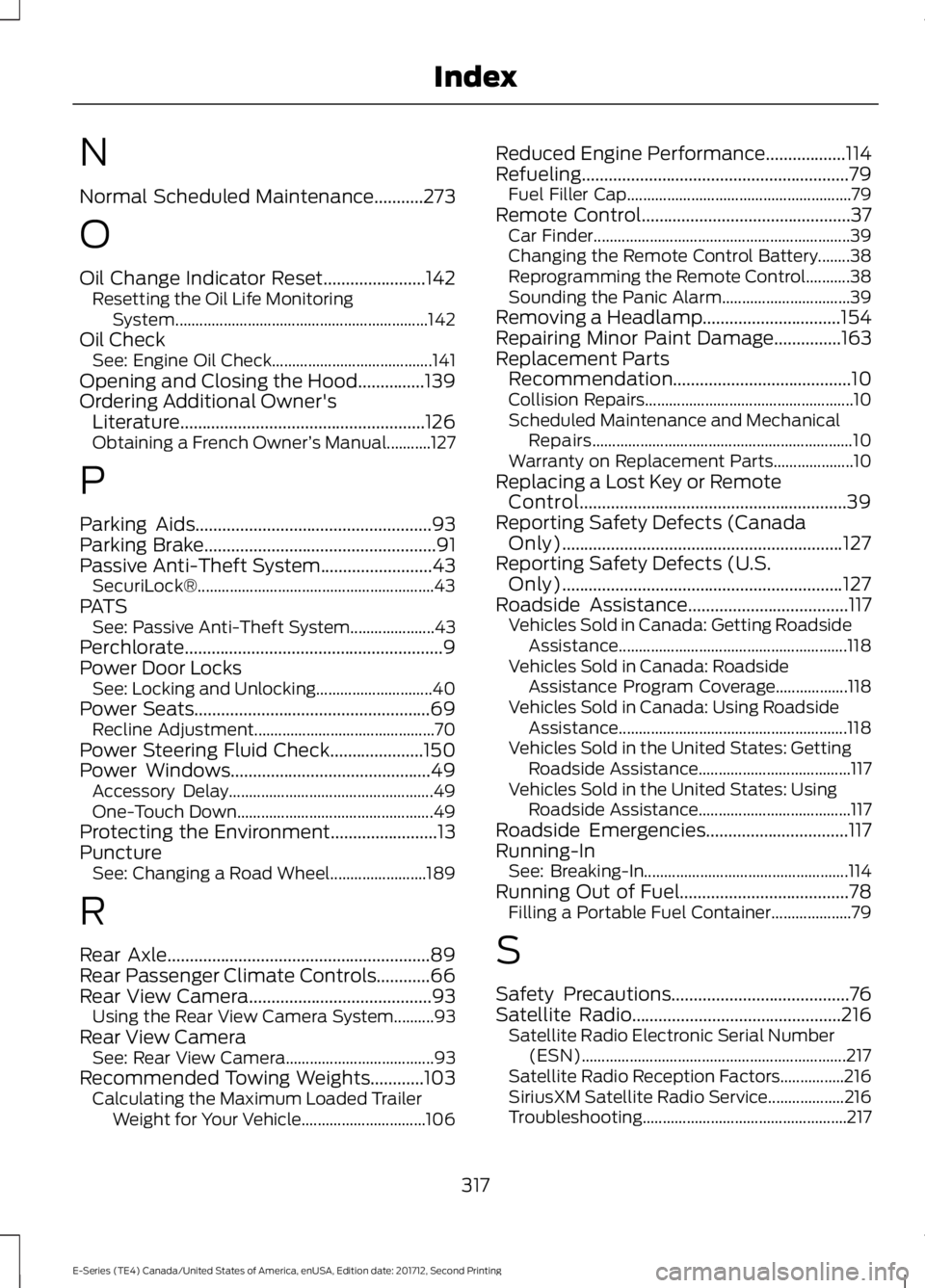
N
Normal Scheduled Maintenance...........273
O
Oil Change Indicator Reset.......................142Resetting the Oil Life MonitoringSystem...............................................................142Oil CheckSee: Engine Oil Check........................................141Opening and Closing the Hood...............139Ordering Additional Owner'sLiterature.......................................................126Obtaining a French Owner’s Manual...........127
P
Parking Aids.....................................................93Parking Brake....................................................91Passive Anti-Theft System.........................43SecuriLock®...........................................................43PATSSee: Passive Anti-Theft System.....................43Perchlorate..........................................................9Power Door LocksSee: Locking and Unlocking.............................40Power Seats.....................................................69Recline Adjustment.............................................70Power Steering Fluid Check.....................150Power Windows.............................................49Accessory Delay...................................................49One-Touch Down.................................................49Protecting the Environment........................13PunctureSee: Changing a Road Wheel........................189
R
Rear Axle...........................................................89Rear Passenger Climate Controls............66Rear View Camera.........................................93Using the Rear View Camera System..........93Rear View CameraSee: Rear View Camera.....................................93Recommended Towing Weights............103Calculating the Maximum Loaded TrailerWeight for Your Vehicle...............................106
Reduced Engine Performance..................114Refueling............................................................79Fuel Filler Cap........................................................79Remote Control...............................................37Car Finder................................................................39Changing the Remote Control Battery........38Reprogramming the Remote Control...........38Sounding the Panic Alarm................................39Removing a Headlamp...............................154Repairing Minor Paint Damage...............163Replacement PartsRecommendation........................................10Collision Repairs....................................................10Scheduled Maintenance and MechanicalRepairs.................................................................10Warranty on Replacement Parts....................10Replacing a Lost Key or RemoteControl............................................................39Reporting Safety Defects (CanadaOnly)...............................................................127Reporting Safety Defects (U.S.Only)...............................................................127Roadside Assistance....................................117Vehicles Sold in Canada: Getting RoadsideAssistance.........................................................118Vehicles Sold in Canada: RoadsideAssistance Program Coverage..................118Vehicles Sold in Canada: Using RoadsideAssistance.........................................................118Vehicles Sold in the United States: GettingRoadside Assistance......................................117Vehicles Sold in the United States: UsingRoadside Assistance......................................117Roadside Emergencies................................117Running-InSee: Breaking-In...................................................114Running Out of Fuel......................................78Filling a Portable Fuel Container....................79
S
Safety Precautions........................................76Satellite Radio...............................................216Satellite Radio Electronic Serial Number(ESN)..................................................................217Satellite Radio Reception Factors................216SiriusXM Satellite Radio Service...................216Troubleshooting...................................................217
317
E-Series (TE4) Canada/United States of America, enUSA, Edition date: 201712, Second Printing
Index
Page 321 of 323
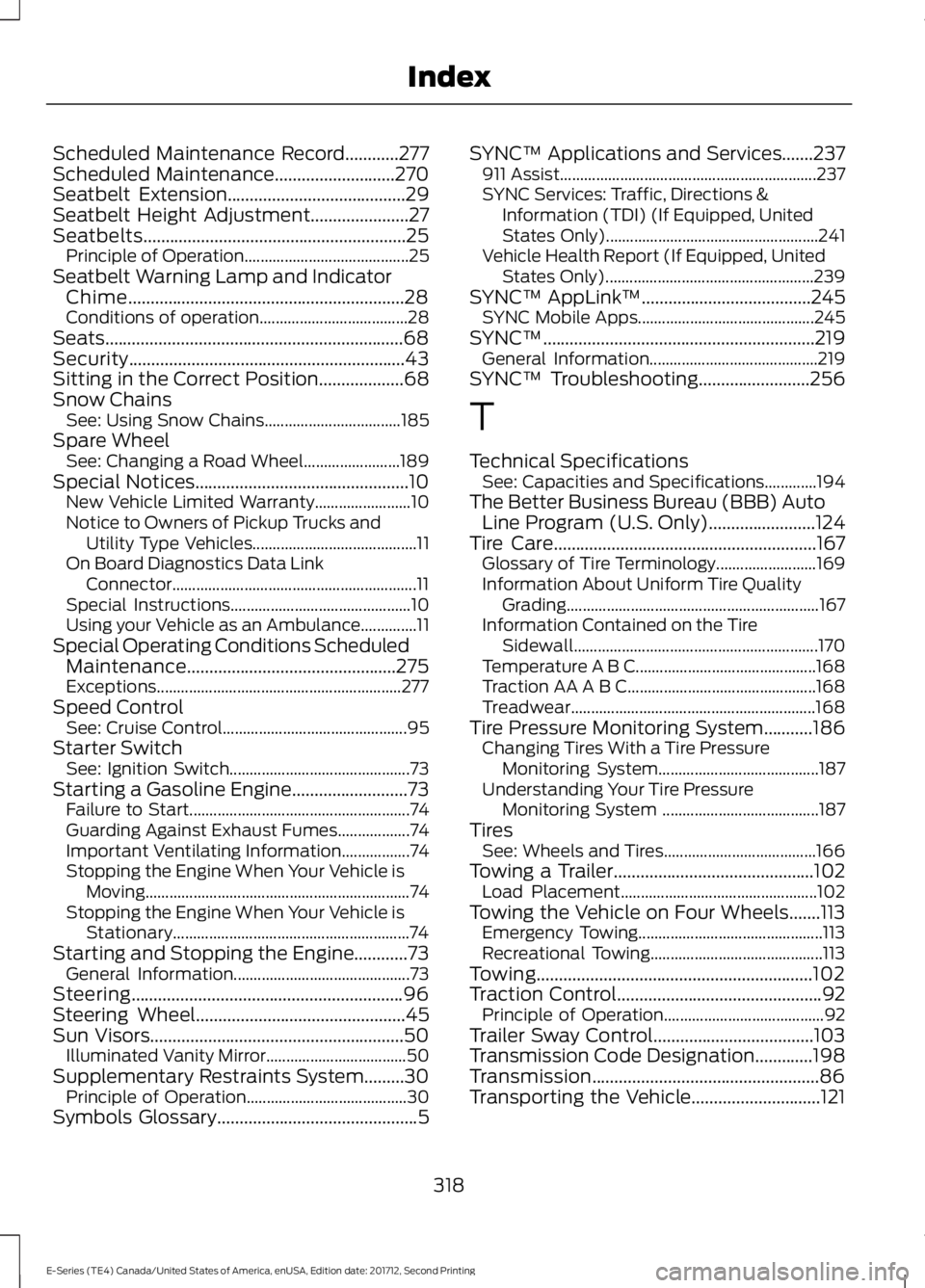
Scheduled Maintenance Record............277Scheduled Maintenance...........................270Seatbelt Extension........................................29Seatbelt Height Adjustment......................27Seatbelts...........................................................25Principle of Operation.........................................25Seatbelt Warning Lamp and IndicatorChime..............................................................28Conditions of operation.....................................28Seats...................................................................68Security..............................................................43Sitting in the Correct Position...................68Snow ChainsSee: Using Snow Chains..................................185Spare WheelSee: Changing a Road Wheel........................189Special Notices................................................10New Vehicle Limited Warranty........................10Notice to Owners of Pickup Trucks andUtility Type Vehicles.........................................11On Board Diagnostics Data LinkConnector.............................................................11Special Instructions.............................................10Using your Vehicle as an Ambulance..............11Special Operating Conditions ScheduledMaintenance...............................................275Exceptions.............................................................277Speed ControlSee: Cruise Control..............................................95Starter SwitchSee: Ignition Switch.............................................73Starting a Gasoline Engine..........................73Failure to Start.......................................................74Guarding Against Exhaust Fumes..................74Important Ventilating Information.................74Stopping the Engine When Your Vehicle isMoving..................................................................74Stopping the Engine When Your Vehicle isStationary...........................................................74Starting and Stopping the Engine............73General Information............................................73Steering.............................................................96Steering Wheel...............................................45Sun Visors.........................................................50Illuminated Vanity Mirror...................................50Supplementary Restraints System.........30Principle of Operation........................................30Symbols Glossary.............................................5
SYNC™ Applications and Services.......237911 Assist................................................................237SYNC Services: Traffic, Directions &Information (TDI) (If Equipped, UnitedStates Only).....................................................241Vehicle Health Report (If Equipped, UnitedStates Only)....................................................239SYNC™ AppLink™......................................245SYNC Mobile Apps............................................245SYNC™.............................................................219General Information..........................................219SYNC™ Troubleshooting.........................256
T
Technical SpecificationsSee: Capacities and Specifications.............194The Better Business Bureau (BBB) AutoLine Program (U.S. Only)........................124Tire Care...........................................................167Glossary of Tire Terminology.........................169Information About Uniform Tire QualityGrading...............................................................167Information Contained on the TireSidewall.............................................................170Temperature A B C.............................................168Traction AA A B C...............................................168Treadwear.............................................................168Tire Pressure Monitoring System...........186Changing Tires With a Tire PressureMonitoring System........................................187Understanding Your Tire PressureMonitoring System .......................................187TiresSee: Wheels and Tires......................................166Towing a Trailer.............................................102Load Placement.................................................102Towing the Vehicle on Four Wheels.......113Emergency Towing..............................................113Recreational Towing...........................................113Towing..............................................................102Traction Control..............................................92Principle of Operation........................................92Trailer Sway Control....................................103Transmission Code Designation.............198Transmission...................................................86Transporting the Vehicle.............................121
318
E-Series (TE4) Canada/United States of America, enUSA, Edition date: 201712, Second Printing
Index