lock FORD E SERIES 2018 Workshop Manual
[x] Cancel search | Manufacturer: FORD, Model Year: 2018, Model line: E SERIES, Model: FORD E SERIES 2018Pages: 323, PDF Size: 7.09 MB
Page 194 of 323
WARNINGS
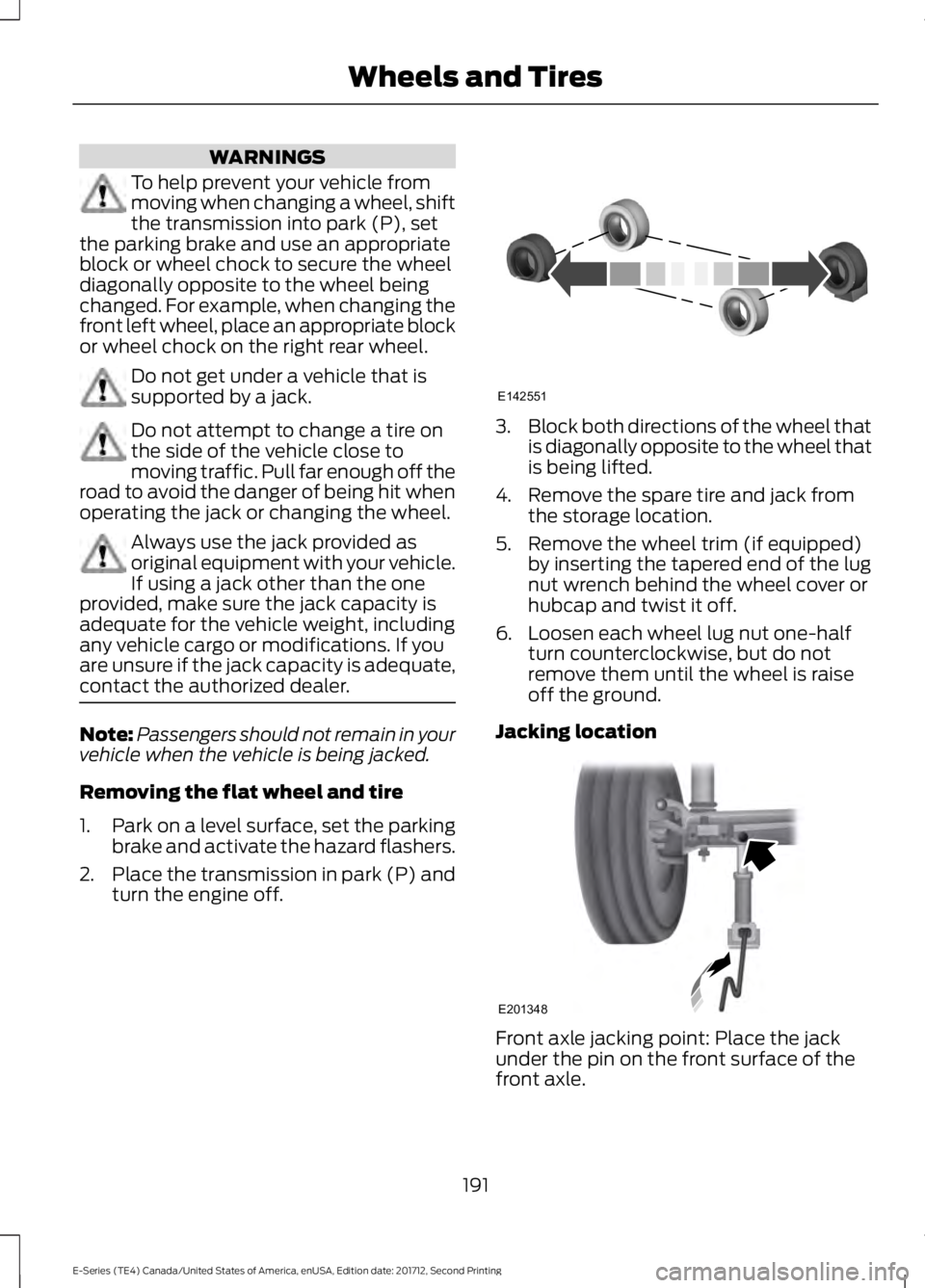
To help prevent your vehicle frommoving when changing a wheel, shiftthe transmission into park (P), setthe parking brake and use an appropriateblock or wheel chock to secure the wheeldiagonally opposite to the wheel beingchanged. For example, when changing thefront left wheel, place an appropriate blockor wheel chock on the right rear wheel.
Do not get under a vehicle that issupported by a jack.
Do not attempt to change a tire onthe side of the vehicle close tomoving traffic. Pull far enough off theroad to avoid the danger of being hit whenoperating the jack or changing the wheel.
Always use the jack provided asoriginal equipment with your vehicle.If using a jack other than the oneprovided, make sure the jack capacity isadequate for the vehicle weight, includingany vehicle cargo or modifications. If youare unsure if the jack capacity is adequate,contact the authorized dealer.
Note:Passengers should not remain in yourvehicle when the vehicle is being jacked.
Removing the flat wheel and tire
1.Park on a level surface, set the parkingbrake and activate the hazard flashers.
2.Place the transmission in park (P) andturn the engine off.
3.Block both directions of the wheel thatis diagonally opposite to the wheel thatis being lifted.
4. Remove the spare tire and jack fromthe storage location.
5. Remove the wheel trim (if equipped)by inserting the tapered end of the lugnut wrench behind the wheel cover orhubcap and twist it off.
6. Loosen each wheel lug nut one-halfturn counterclockwise, but do notremove them until the wheel is raiseoff the ground.
Jacking location
Front axle jacking point: Place the jackunder the pin on the front surface of thefront axle.
191
E-Series (TE4) Canada/United States of America, enUSA, Edition date: 201712, Second Printing
Wheels and TiresE142551 E201348
Page 195 of 323
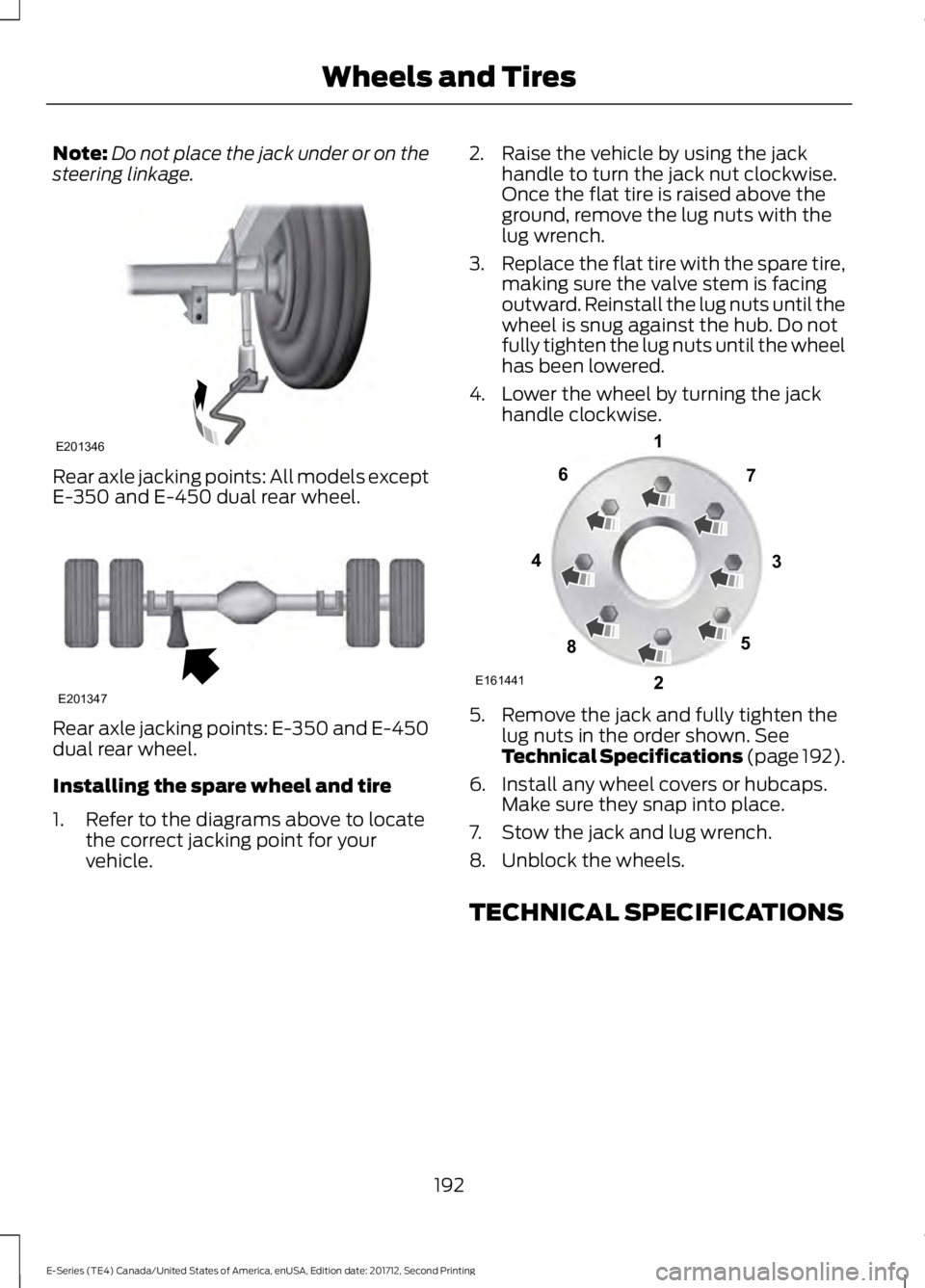
Note:Do not place the jack under or on thesteering linkage.
Rear axle jacking points: All models exceptE-350 and E-450 dual rear wheel.
Rear axle jacking points: E-350 and E-450dual rear wheel.
Installing the spare wheel and tire
1. Refer to the diagrams above to locatethe correct jacking point for yourvehicle.
2. Raise the vehicle by using the jackhandle to turn the jack nut clockwise.Once the flat tire is raised above theground, remove the lug nuts with thelug wrench.
3.Replace the flat tire with the spare tire,making sure the valve stem is facingoutward. Reinstall the lug nuts until thewheel is snug against the hub. Do notfully tighten the lug nuts until the wheelhas been lowered.
4. Lower the wheel by turning the jackhandle clockwise.
5. Remove the jack and fully tighten thelug nuts in the order shown. SeeTechnical Specifications (page 192).
6. Install any wheel covers or hubcaps.Make sure they snap into place.
7. Stow the jack and lug wrench.
8. Unblock the wheels.
TECHNICAL SPECIFICATIONS
192
E-Series (TE4) Canada/United States of America, enUSA, Edition date: 201712, Second Printing
Wheels and TiresE201346 E201347 E161441
13
4
27
6
5
8
Page 205 of 323
SpecificationName
YN-12-D
ESB-M1C93-BMulti-purpose grease:Motorcraft® Multi-Purpose Grease SprayXL-5-A
-Lock cylinders (U.S.):Penetrating and Lock LubricantXL-1
-Lock cylinders (Canada):Penetrating FluidCXC-51-A
-Lock cylinders (Mexico):Penetrating and Lock LubricantMXL-1
ESR-M13P4-ADoor weatherstrips:Silicone Spray LubricantXL-6
If you use oil and fluids that do not meetthe defined specification and viscositygrade, this may lead to:
•Component damage which is notcovered by the vehicle warranty.
•Longer engine cranking periods.
•Increased emission levels.
•Reduced engine performance.
•Reduced fuel economy.
•Degraded brake performance.
We recommend Motorcraft® motor oil foryour vehicle. If Motorcraft® oil is notavailable, use motor oils of therecommended viscosity grade that meetAPI SN requirements and display the APICertification Mark for gasoline engines. Donot use oil labeled with API SN servicecategory unless the label also displays theAPI certification mark.
An oil that displays this symbol conformsto current engine, emission system andfuel economy performance standards ofILSAC.
Do not use supplemental engine oiladditives because they are unnecessaryand could lead to engine damage that maynot be covered by your vehicle warranty.
202
E-Series (TE4) Canada/United States of America, enUSA, Edition date: 201712, Second Printing
Capacities and SpecificationsE142732
Page 209 of 323
SpecificationName
GL-5Motorcraft® SAE 75W-90 Synthetic Axle LubricantXY-75W90-QLS
ES-PM-M2013Dana Limited Slip axle fluid (Canada):GL-5Motorcraft® SAE 75W-90 Synthetic Axle LubricantCXY-75W90-LS12
WSP-M2C197-ADana conventional axle fluid (U.S. and Mexico):Motorcraft® SAE 80W-90 Premium Rear Axle LubricantXY-80W90-QL
WSP-M2C197-ADana conventional axle fluid (Canada):Motorcraft® SAE 80W-90 Premium Rear Axle LubricantCXY-80W90-1L
WSS-M14P19-AWindshield washer fluid (U.S. and Mexico):Motorcraft® Premium Windshield Wash Concentratewith BitterantZC-32-B2
WSS-M14P19-AWindshield washer fluid (Canada):Motorcraft® Premium Quality Windshield Washer FluidCXC-37-(A, B, D, F)
WSH-M17B19-AA/C refrigerant (U.S.):Motorcraft® R-134a RefrigerantYN-19
WSH-M17B19-AA/C refrigerant (Canada):Motorcraft® R-134a RefrigerantCYN-16-R
WSH-M17B19-AA/C refrigerant (Mexico):Motorcraft® R-134a RefrigerantMYN-19
WSH-M1C231-BA/C refrigerant compressor oil:Motorcraft® PAG Refrigerant Compressor OilYN-12-D
ESB-M1C93-BMulti-purpose grease:Motorcraft® Multi-Purpose Grease SprayXL-5-A
-Lock cylinders (U.S.):Penetrating and Lock LubricantXL-1
206
E-Series (TE4) Canada/United States of America, enUSA, Edition date: 201712, Second Printing
Capacities and Specifications
Page 210 of 323
SpecificationName
-Lock cylinders (Canada):Penetrating FluidCXC-51-A
-Lock cylinders (Mexico):Penetrating and Lock LubricantMXL-1
ESR-M13P4-ADoor weatherstrips:Silicone Spray LubricantXL-6
If you use oil and fluids that do not meetthe defined specification and viscositygrade, this may lead to:
•Component damage which is notcovered by the vehicle warranty.
•Longer engine cranking periods.
•Increased emission levels.
•Reduced engine performance.
•Reduced fuel economy.
•Degraded brake performance.
We recommend Motorcraft® motor oil foryour vehicle. If Motorcraft® oil is notavailable, use motor oils of therecommended viscosity grade that meetAPI SN requirements and display the APICertification Mark for gasoline engines. Donot use oil labeled with API SN servicecategory unless the label also displays theAPI certification mark.
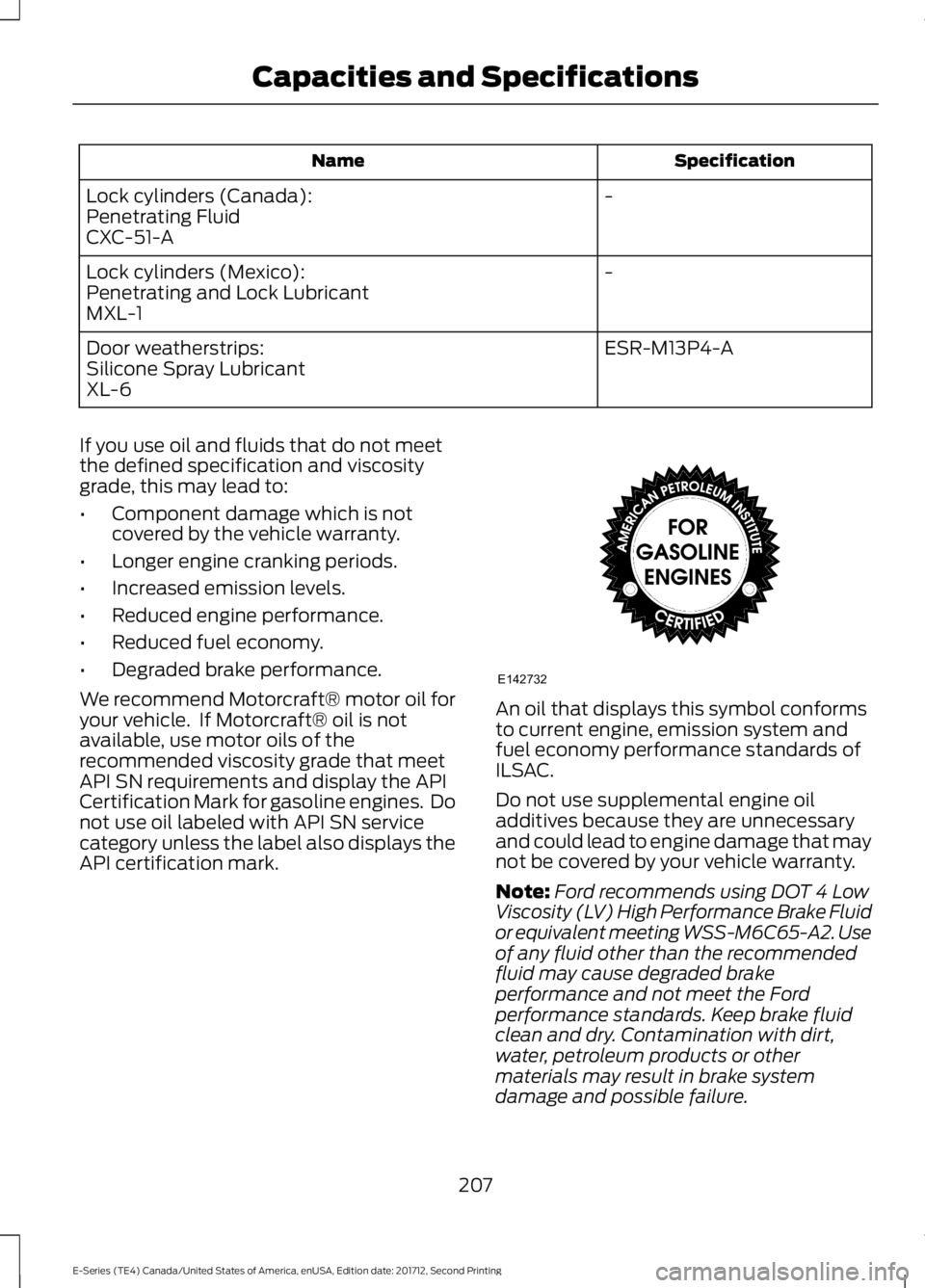
An oil that displays this symbol conformsto current engine, emission system andfuel economy performance standards ofILSAC.
Do not use supplemental engine oiladditives because they are unnecessaryand could lead to engine damage that maynot be covered by your vehicle warranty.
Note:Ford recommends using DOT 4 LowViscosity (LV) High Performance Brake Fluidor equivalent meeting WSS-M6C65-A2. Useof any fluid other than the recommendedfluid may cause degraded brakeperformance and not meet the Fordperformance standards. Keep brake fluidclean and dry. Contamination with dirt,water, petroleum products or othermaterials may result in brake systemdamage and possible failure.
207
E-Series (TE4) Canada/United States of America, enUSA, Edition date: 201712, Second Printing
Capacities and SpecificationsE142732
Page 214 of 323
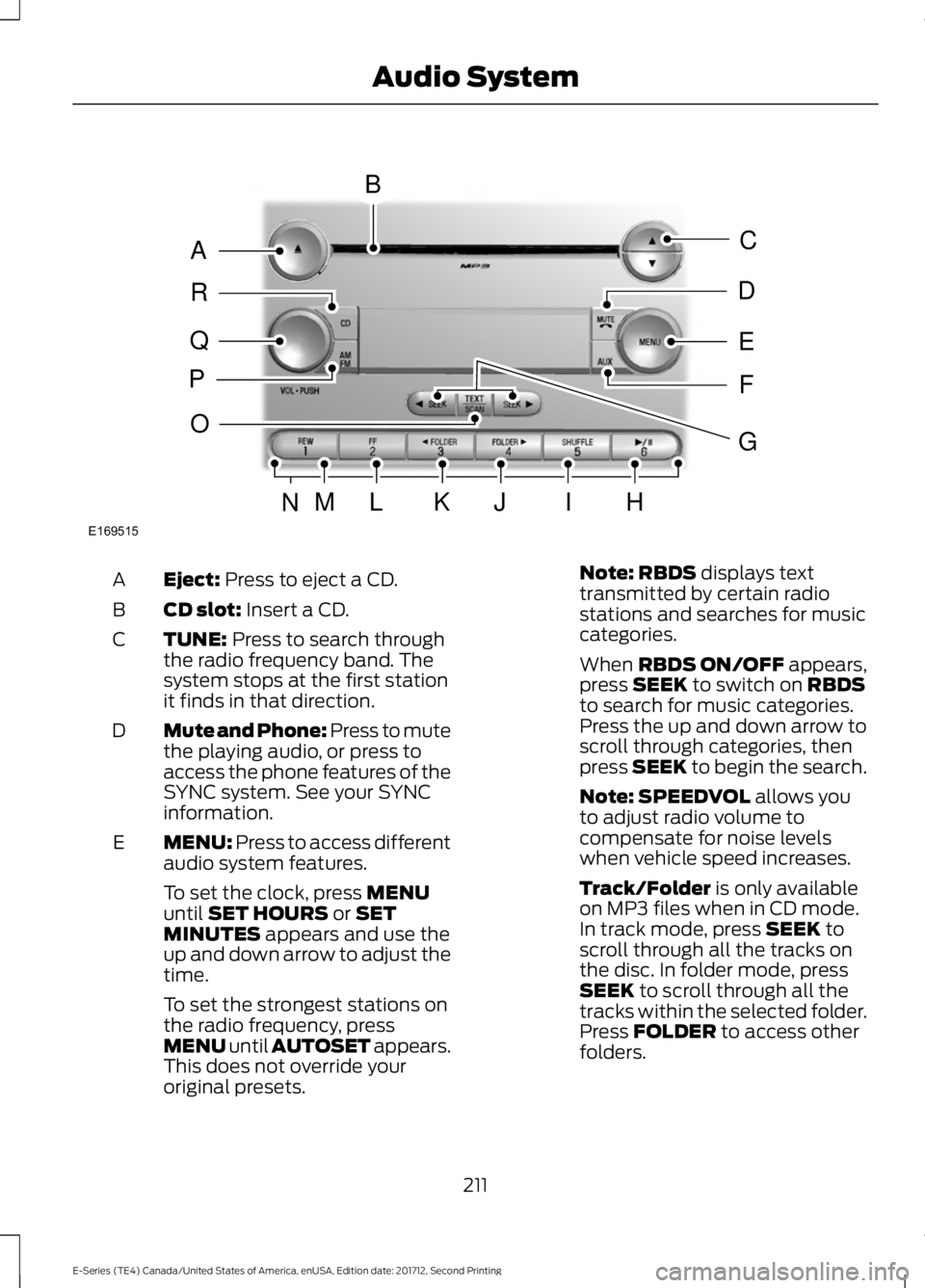
Eject: Press to eject a CD.A
CD slot: Insert a CD.B
TUNE: Press to search throughthe radio frequency band. Thesystem stops at the first stationit finds in that direction.
C
Mute and Phone: Press to mutethe playing audio, or press toaccess the phone features of theSYNC system. See your SYNCinformation.
D
MENU: Press to access differentaudio system features.E
To set the clock, press MENUuntil SET HOURS or SETMINUTES appears and use theup and down arrow to adjust thetime.
To set the strongest stations onthe radio frequency, pressMENU until AUTOSET appears.This does not override youroriginal presets.
Note: RBDS displays texttransmitted by certain radiostations and searches for musiccategories.
When RBDS ON/OFF appears,press SEEK to switch on RBDSto search for music categories.Press the up and down arrow toscroll through categories, thenpress SEEK to begin the search.
Note: SPEEDVOL allows youto adjust radio volume tocompensate for noise levelswhen vehicle speed increases.
Track/Folder is only availableon MP3 files when in CD mode.In track mode, press SEEK toscroll through all the tracks onthe disc. In folder mode, pressSEEK to scroll through all thetracks within the selected folder.Press FOLDER to access otherfolders.
211
E-Series (TE4) Canada/United States of America, enUSA, Edition date: 201712, Second Printing
Audio SystemE169515
B
A
Q
R
P
C
E
D
F
O
MLKJIHN
G
Page 216 of 323
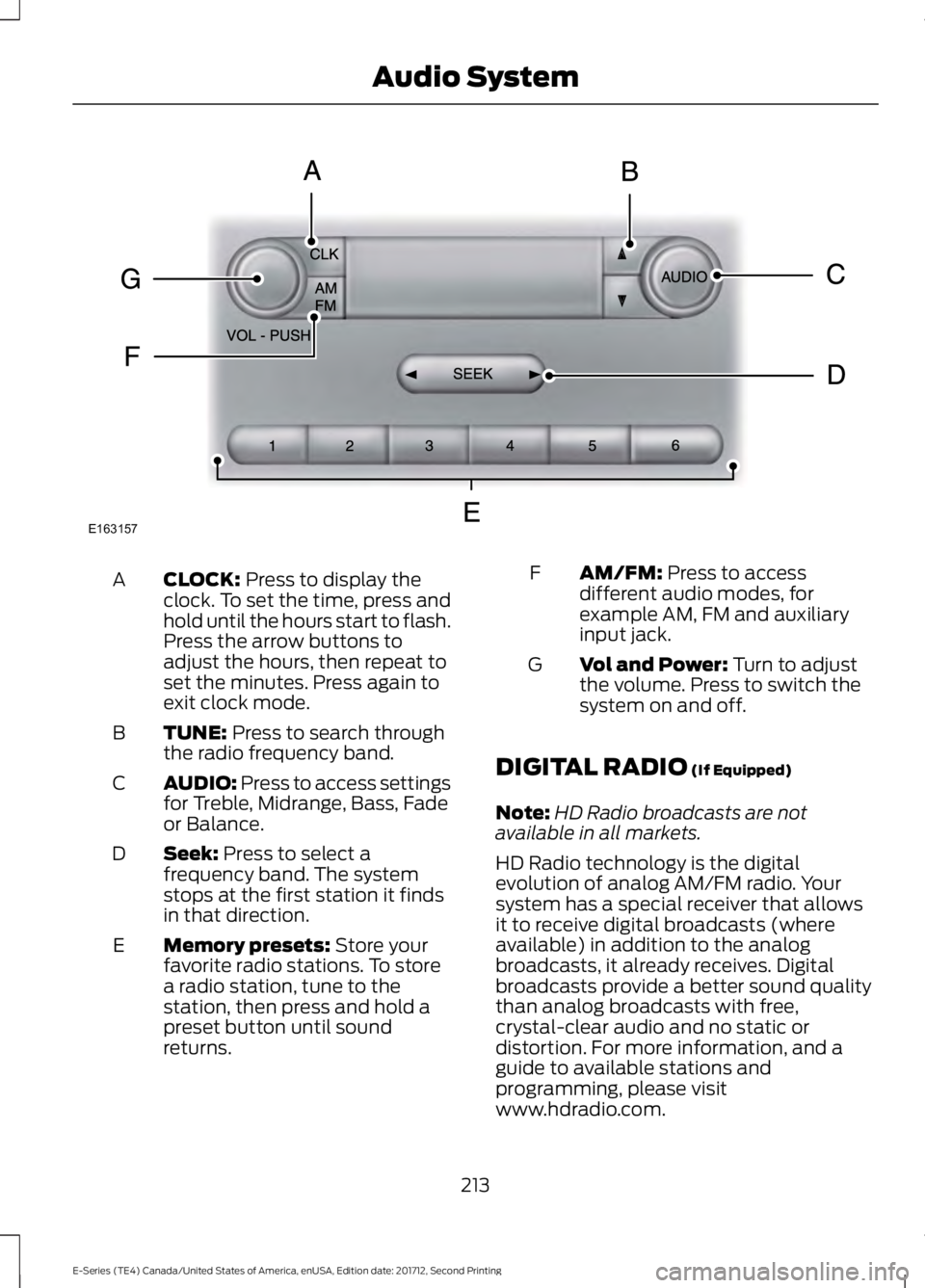
CLOCK: Press to display theclock. To set the time, press andhold until the hours start to flash.Press the arrow buttons toadjust the hours, then repeat toset the minutes. Press again toexit clock mode.
A
TUNE: Press to search throughthe radio frequency band.B
AUDIO: Press to access settingsfor Treble, Midrange, Bass, Fadeor Balance.
C
Seek: Press to select afrequency band. The systemstops at the first station it findsin that direction.
D
Memory presets: Store yourfavorite radio stations. To storea radio station, tune to thestation, then press and hold apreset button until soundreturns.
E
AM/FM: Press to accessdifferent audio modes, forexample AM, FM and auxiliaryinput jack.
F
Vol and Power: Turn to adjustthe volume. Press to switch thesystem on and off.
G
DIGITAL RADIO (If Equipped)
Note:HD Radio broadcasts are notavailable in all markets.
HD Radio technology is the digitalevolution of analog AM/FM radio. Yoursystem has a special receiver that allowsit to receive digital broadcasts (whereavailable) in addition to the analogbroadcasts, it already receives. Digitalbroadcasts provide a better sound qualitythan analog broadcasts with free,crystal-clear audio and no static ordistortion. For more information, and aguide to available stations andprogramming, please visitwww.hdradio.com.
213
E-Series (TE4) Canada/United States of America, enUSA, Edition date: 201712, Second Printing
Audio SystemE163157
Page 220 of 323
SiriusXM satellite radio is asubscription-based satellite radio servicethat broadcasts a variety of music, sports,news, weather, traffic and entertainmentprogramming. Your factory-installedSiriusXM satellite radio system includeshardware and a limited subscription term,which begins on the date of sale or leaseof your vehicle. See an authorized dealerfor availability.
For more information on extendedsubscription terms (a service fee isrequired), the online media player and acomplete list of SiriusXM satellite radiochannels, and other features, please visitwww.siriusxm.com in the United States,www.siriusxm.ca in Canada, or callSiriusXM at 1-888-539-7474.
Satellite Radio Electronic SerialNumber (ESN)
You need your ESN to activate, modify ortrack your satellite radio account. When insatellite radio mode, tune to channel 0.
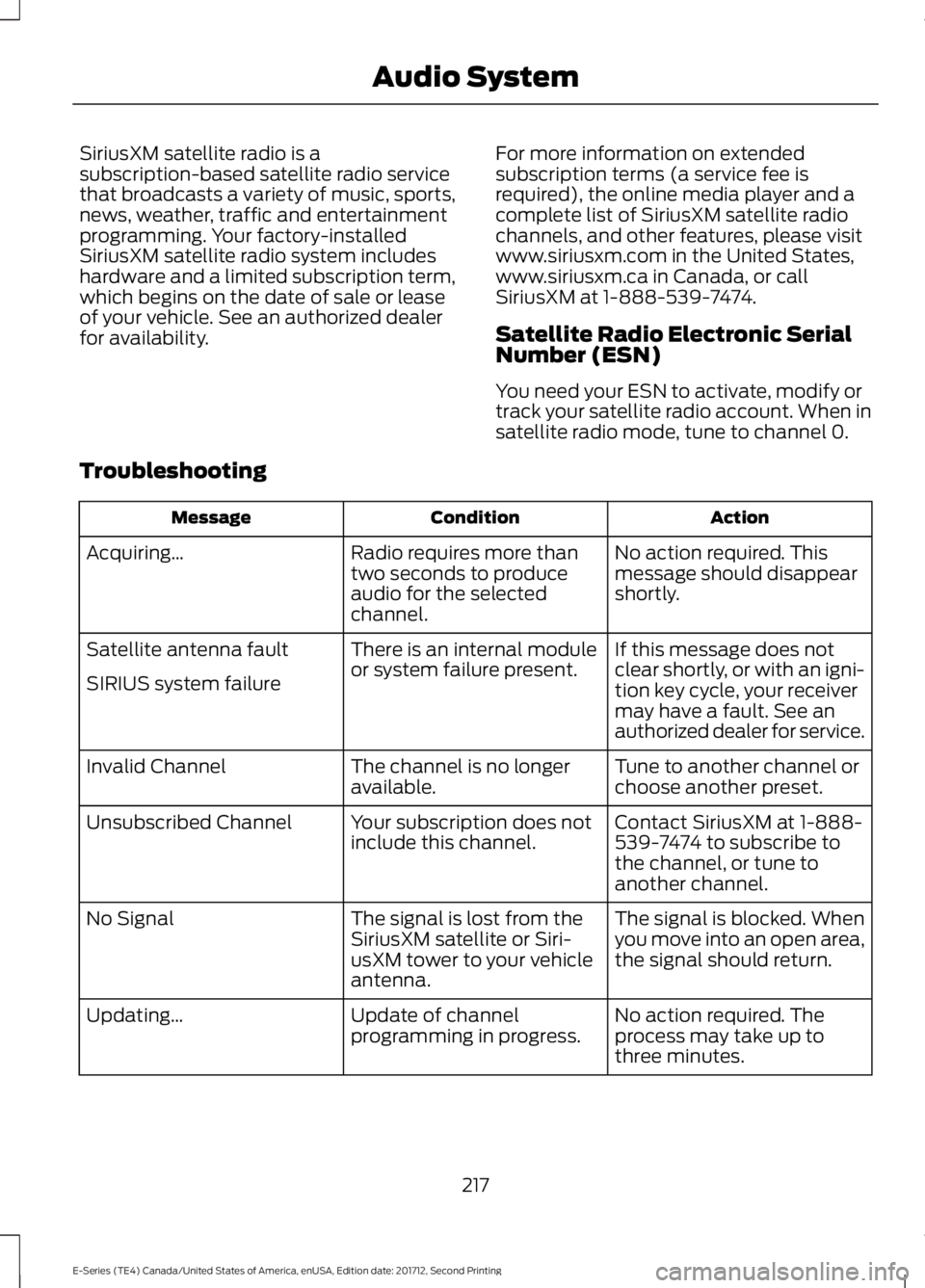
Troubleshooting
ActionConditionMessage
No action required. Thismessage should disappearshortly.
Radio requires more thantwo seconds to produceaudio for the selectedchannel.
Acquiring…
If this message does notclear shortly, or with an igni-tion key cycle, your receivermay have a fault. See anauthorized dealer for service.
There is an internal moduleor system failure present.Satellite antenna fault
SIRIUS system failure
Tune to another channel orchoose another preset.The channel is no longeravailable.Invalid Channel
Contact SiriusXM at 1-888-539-7474 to subscribe tothe channel, or tune toanother channel.
Your subscription does notinclude this channel.Unsubscribed Channel
The signal is blocked. Whenyou move into an open area,the signal should return.
The signal is lost from theSiriusXM satellite or Siri-usXM tower to your vehicleantenna.
No Signal
No action required. Theprocess may take up tothree minutes.
Update of channelprogramming in progress.Updating…
217
E-Series (TE4) Canada/United States of America, enUSA, Edition date: 201712, Second Printing
Audio System
Page 221 of 323
ActionConditionMessage
Contact SiriusXM at 1-888-539-7474 to resolvesubscription issues.
Your satellite service is nolonger available.Questions? Call
1-888-539-7474
Use the channel guide toturn off the Lock or Skipfunction on that station.
All the channels in theselected category are eitherskipped or locked.
None found
Check Channel Guide
No action required.SiriusXM has updated thechannels available for yourvehicle.
Subscription Updated
USB PORT (If Equipped)
WARNING
Driving while distracted can result inloss of vehicle control, crash andinjury. We strongly recommend thatyou use extreme caution when using anydevice that may take your focus off theroad. Your primary responsibility is the safeoperation of your vehicle. We recommendagainst the use of any hand-held devicewhile driving and encourage the use ofvoice-operated systems when possible.Make sure you are aware of all applicablelocal laws that may affect the use ofelectronic devices while driving.
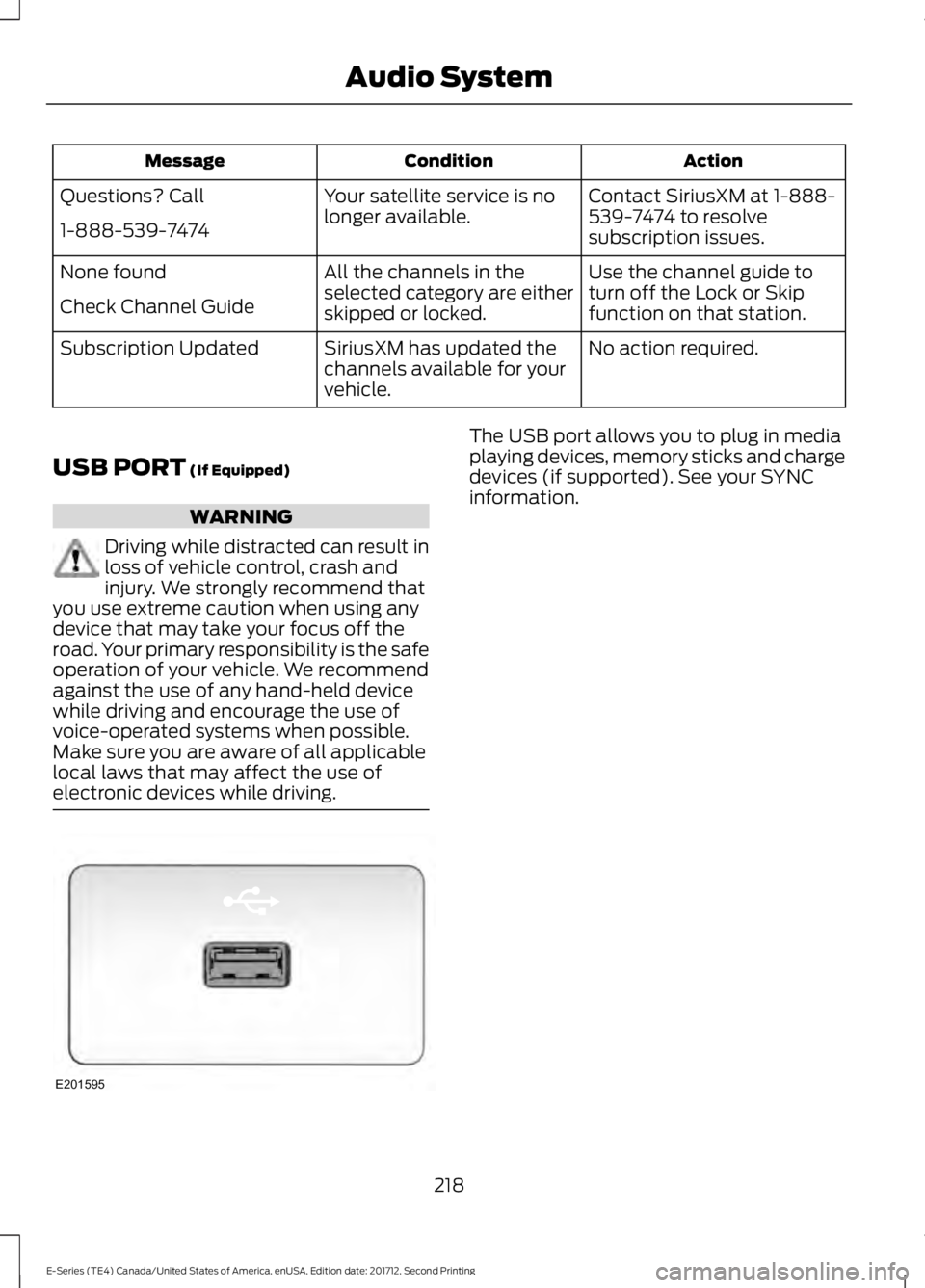
The USB port allows you to plug in mediaplaying devices, memory sticks and chargedevices (if supported). See your SYNCinformation.
218
E-Series (TE4) Canada/United States of America, enUSA, Edition date: 201712, Second Printing
Audio SystemE201595
Page 242 of 323
If you do not cancel the call, and SYNCmakes a successful call, a pre-recordedmessage plays for the 911 operator, andthen the occupant(s) in your vehicle is ableto talk with the operator. Be prepared toprovide your name, phone number andlocation immediately, because not all 911systems are capable of receiving thisinformation electronically.
911 Assist May Not Work If
•Your cellular phone or 911 Assisthardware sustains damage in a crash.
•The vehicle's battery or the SYNCsystem has no power.
•The phone(s) thrown from your vehicleare the ones paired and connected tothe system.
911 Assist Privacy Notice
When you turn on 911 Assist, it maydisclose to emergency services that yourvehicle has been in a crash involving thedeployment of an airbag or activation ofthe fuel pump shut-off. Certain versions orupdates to 911 Assist may also be capableof electronically or verbally disclosing to911 operators your vehicle location or otherdetails about your vehicle or crash to assist911 operators to provide the mostappropriate emergency services. If you donot want to disclose this information, donot turn the feature on.
Vehicle Health Report (IfEquipped, United States Only)
WARNING
Always follow scheduledmaintenance instructions, regularlyinspect your vehicle, and seek repairfor any damage or problem you suspect.Vehicle Health Report supplements, butcannot replace, normal maintenance andvehicle inspection. Vehicle Health Reportonly monitors certain systemselectronically monitored by your vehicleand will not monitor or report the statusof any other system, (such as brake liningwear). Failure to perform scheduledmaintenance and regularly inspect yourvehicle may result in vehicle damage andserious injury.
Note:This feature is only available in theUnited States.
Note:Your Vehicle Health Report featurerequires activation before use. Visitwww.SYNCMyRide.com to register. Thereis no fee or subscription associated withVehicle Health Report, but you must registerto use this feature.
Note:This feature may not functionproperly if you have enabled caller IDblocking on your cellular phone. Beforerunning a report, review the Vehicle HealthReport Privacy Notice.
Note:In order to allow a break-in period foryour vehicle, you may not be able to createa Vehicle Health Report until your vehicleodometer has reached 200 miles.
Note:Cellular phone and SMS charges mayapply when making a report.
239
E-Series (TE4) Canada/United States of America, enUSA, Edition date: 201712, Second Printing
SYNC™ (If Equipped)