fuel pressure FORD E SERIES 2018 Owners Manual
[x] Cancel search | Manufacturer: FORD, Model Year: 2018, Model line: E SERIES, Model: FORD E SERIES 2018Pages: 323, PDF Size: 7.09 MB
Page 6 of 323
Economical Driving......................................114
Driving Through Water................................115
Floor Mats........................................................115
Roadside Emergencies
Roadside Assistance...................................117
Hazard Flashers............................................118
Fuel Shutoff....................................................118
Jump Starting the Vehicle.........................119
Transporting the Vehicle............................121
Customer Assistance
Getting the Services You Need...............122
In California (U.S. Only).............................123
The Better Business Bureau (BBB) AutoLine Program (U.S. Only)......................124
Utilizing the Mediation/ArbitrationProgram (Canada Only).......................125
Getting Assistance Outside the U.S. andCanada........................................................125
Ordering Additional Owner's Literature.........................................................................126
Reporting Safety Defects (U.S. Only)..........................................................................127
Reporting Safety Defects (Canada Only)..........................................................................127
Fuses
Fuse Specification Chart..........................129
Changing a Fuse...........................................137
Maintenance
General Information...................................139
Opening and Closing the Hood..............139
Under Hood Overview...............................139
Engine Oil Dipstick.......................................141
Engine Oil Check...........................................141
Oil Change Indicator Reset......................142
Engine Coolant Check...............................142
Automatic Transmission Fluid Check.........................................................................146
Brake Fluid Check........................................149
Power Steering Fluid Check....................150
Washer Fluid Check....................................150
Changing the 12V Battery..........................151
Checking the Wiper Blades......................152
Changing the Wiper Blades.....................152
Adjusting the Headlamps.........................153
Removing a Headlamp..............................154
Changing a Bulb...........................................154
Bulb Specification Chart..........................156
Changing the Engine Air Filter................158
Vehicle Care
General Information...................................159
Cleaning Products.......................................159
Cleaning the Exterior..................................159
Waxing..............................................................161
Cleaning the Engine.....................................161
Cleaning the Windows and Wiper Blades..........................................................................161
Cleaning the Interior...................................162
Cleaning the Instrument Panel andInstrument Cluster Lens.......................162
Repairing Minor Paint Damage..............163
Cleaning the Wheels..................................163
Vehicle Storage............................................164
Wheels and Tires
General Information...................................166
Tire Care..........................................................167
Using Snow Chains.....................................185
Tire Pressure Monitoring System..........186
Changing a Road Wheel...........................189
Technical Specifications...........................192
Capacities and Specifications
Engine Specifications - 6.2L...................194
Engine Specifications - 6.8L...................194
Motorcraft Parts - 6.2L..............................195
3
E-Series (TE4) Canada/United States of America, enUSA, Edition date: 201712, Second Printing
Table of Contents
Page 9 of 323
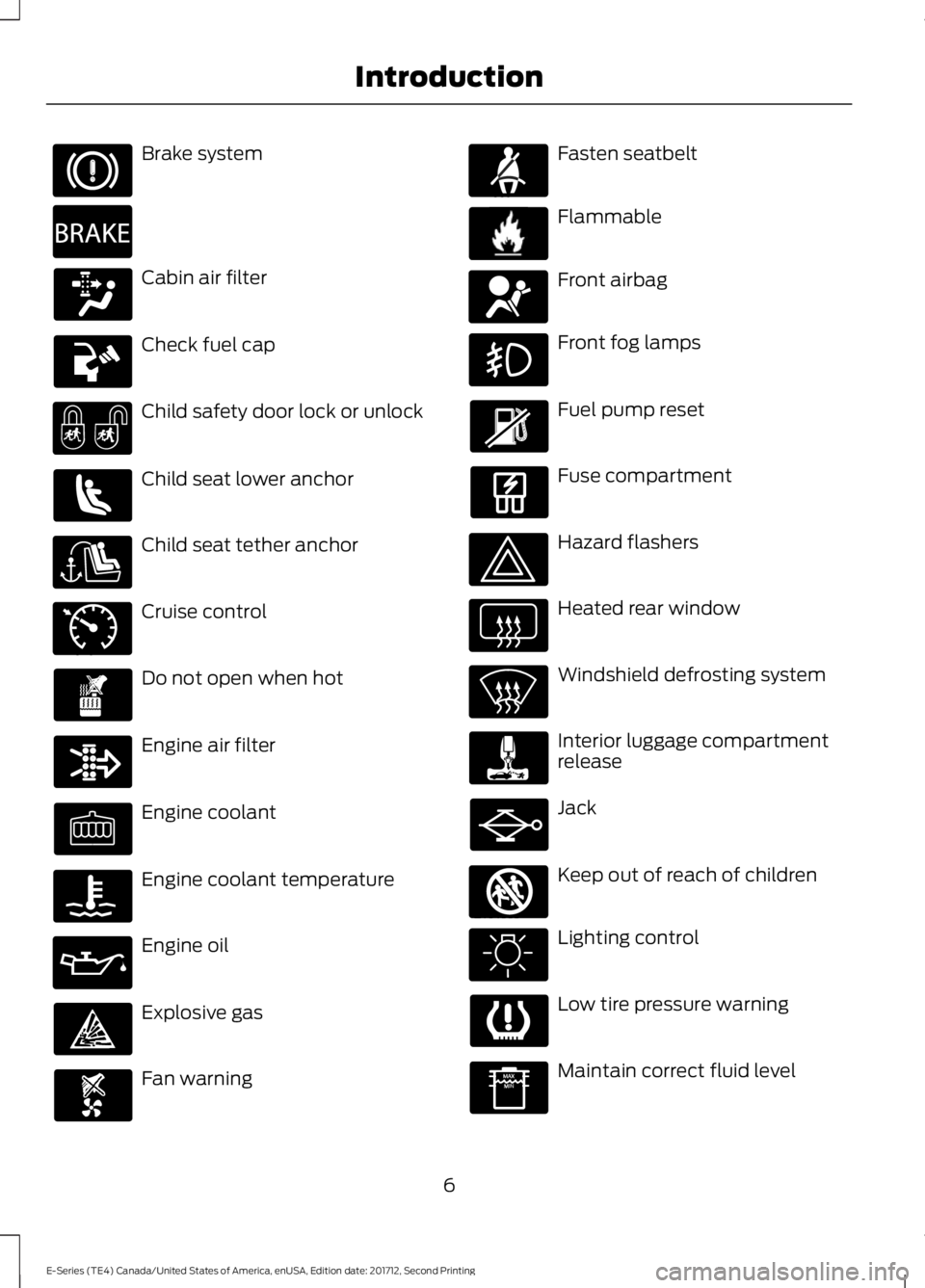
Brake system
Cabin air filter
Check fuel cap
Child safety door lock or unlock
Child seat lower anchor
Child seat tether anchor
Cruise control
Do not open when hot
Engine air filter
Engine coolant
Engine coolant temperature
Engine oil
Explosive gas
Fan warning
Fasten seatbelt
Flammable
Front airbag
Front fog lamps
Fuel pump reset
Fuse compartment
Hazard flashers
Heated rear window
Windshield defrosting system
Interior luggage compartmentrelease
Jack
Keep out of reach of children
Lighting control
Low tire pressure warning
Maintain correct fluid level
6
E-Series (TE4) Canada/United States of America, enUSA, Edition date: 201712, Second Printing
Introduction E270480 E71340 E71880 E231160 E67017 E161353
Page 54 of 323
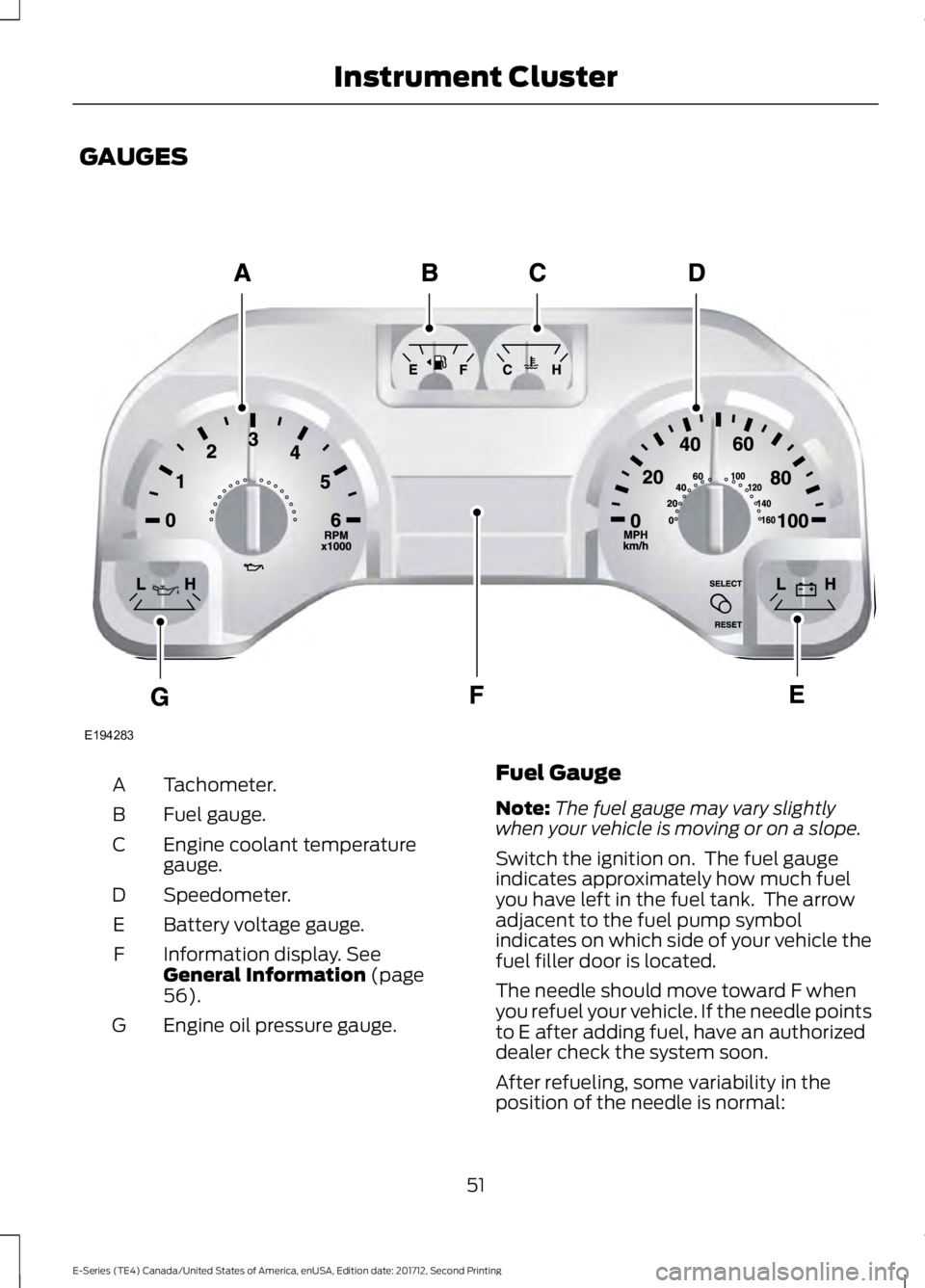
GAUGES
Tachometer.A
Fuel gauge.B
Engine coolant temperaturegauge.C
Speedometer.D
Battery voltage gauge.E
Information display. SeeGeneral Information (page56).
F
Engine oil pressure gauge.G
Fuel Gauge
Note:The fuel gauge may vary slightlywhen your vehicle is moving or on a slope.
Switch the ignition on. The fuel gaugeindicates approximately how much fuelyou have left in the fuel tank. The arrowadjacent to the fuel pump symbolindicates on which side of your vehicle thefuel filler door is located.
The needle should move toward F whenyou refuel your vehicle. If the needle pointsto E after adding fuel, have an authorizeddealer check the system soon.
After refueling, some variability in theposition of the needle is normal:
51
E-Series (TE4) Canada/United States of America, enUSA, Edition date: 201712, Second Printing
Instrument ClusterE194283
Page 55 of 323
•It may take a short time for the needleto reach F after leaving the gas station.This is normal and depends upon theslope of the pavement at the gasstation.
•The fuel amount dispensed into thetank is a little less or more than thegauge indicated. This is normal anddepends upon the slope of thepavement at the gas station.
•If the gas station nozzle shuts offbefore the tank is full, try a differentgas pump nozzle.
•There is a small reserve left in the tankwhen the fuel gauge reaches empty.
Low Fuel Reminder
A low fuel level reminder displays andsounds when the distance to emptyreaches 50 mi (80 km), 25 mi (40 km),10 mi (20 km) and 0 mi (0 km).
Engine Coolant TemperatureGauge
Indicates engine coolant temperature. Atnormal operating temperature, the levelindicator will be in the normal range. If theengine coolant temperature exceeds thenormal range, stop the vehicle as soon assafely possible, switch off the engine andlet the engine cool.
WARNING
Never remove the coolant reservoircap when the engine is running orhot.
Battery Voltage Gauge
Indicates the battery voltage when theignition is in the on position. If the pointermoves and stays outside the normaloperating range, have an authorized dealercheck the vehicle’s electrical system assoon as possible.
Information Display
Odometer
Located in the bottom of the informationdisplay, the gauge registers the distanceyour vehicle travels.
Trip Computer
See Information Displays (page 56).
Vehicle Settings and Personalization
See Information Displays (page 56).
Engine Oil Pressure Gauge
Indicates the engine oil pressure. Theneedle should stay in the normal operatingrange. If the needle falls below the normalrange, stop the vehicle and switch off theengine. Check the engine oil level and addoil if needed. If the oil level is correct, havean authorized dealer check the system.
WARNING LAMPS AND
INDICATORS
The following warning lamps andindicators alert you to a vehicle conditionthat may become serious. Some lampsilluminate when you start your vehicle tomake sure they work. If any lamps remainon after starting your vehicle, refer to therespective system warning lamp for furtherinformation.
Note:Some warning indicators appear inthe information display and operate thesame as a warning lamp but do notilluminate when you start your vehicle.
52
E-Series (TE4) Canada/United States of America, enUSA, Edition date: 201712, Second Printing
Instrument Cluster
Page 57 of 323
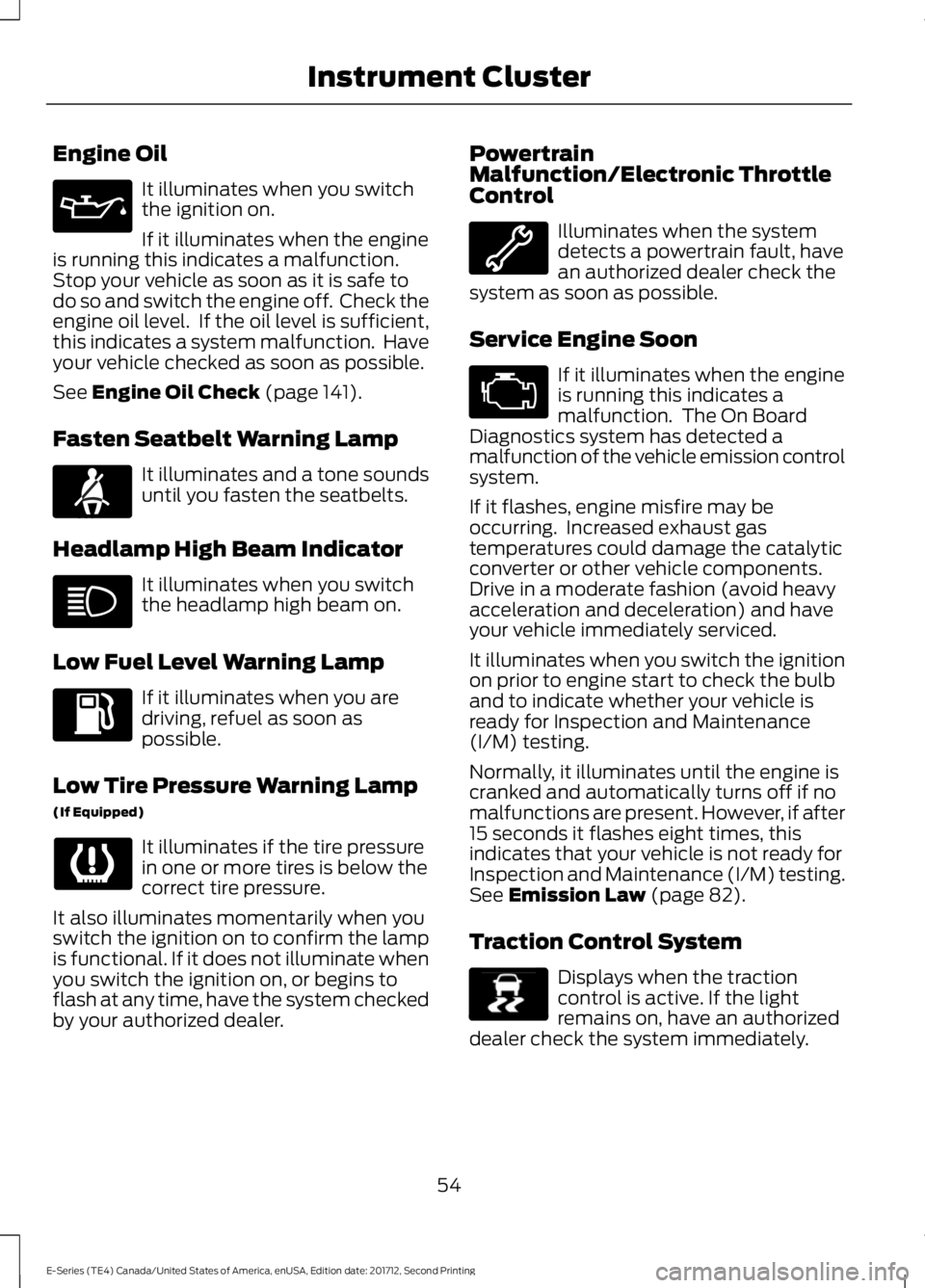
Engine Oil
It illuminates when you switchthe ignition on.
If it illuminates when the engineis running this indicates a malfunction.Stop your vehicle as soon as it is safe todo so and switch the engine off. Check theengine oil level. If the oil level is sufficient,this indicates a system malfunction. Haveyour vehicle checked as soon as possible.
See Engine Oil Check (page 141).
Fasten Seatbelt Warning Lamp
It illuminates and a tone soundsuntil you fasten the seatbelts.
Headlamp High Beam Indicator
It illuminates when you switchthe headlamp high beam on.
Low Fuel Level Warning Lamp
If it illuminates when you aredriving, refuel as soon aspossible.
Low Tire Pressure Warning Lamp
(If Equipped)
It illuminates if the tire pressurein one or more tires is below thecorrect tire pressure.
It also illuminates momentarily when youswitch the ignition on to confirm the lampis functional. If it does not illuminate whenyou switch the ignition on, or begins toflash at any time, have the system checkedby your authorized dealer.
PowertrainMalfunction/Electronic ThrottleControl
Illuminates when the systemdetects a powertrain fault, havean authorized dealer check thesystem as soon as possible.
Service Engine Soon
If it illuminates when the engineis running this indicates amalfunction. The On BoardDiagnostics system has detected amalfunction of the vehicle emission controlsystem.
If it flashes, engine misfire may beoccurring. Increased exhaust gastemperatures could damage the catalyticconverter or other vehicle components.Drive in a moderate fashion (avoid heavyacceleration and deceleration) and haveyour vehicle immediately serviced.
It illuminates when you switch the ignitionon prior to engine start to check the bulband to indicate whether your vehicle isready for Inspection and Maintenance(I/M) testing.
Normally, it illuminates until the engine iscranked and automatically turns off if nomalfunctions are present. However, if after15 seconds it flashes eight times, thisindicates that your vehicle is not ready forInspection and Maintenance (I/M) testing.See Emission Law (page 82).
Traction Control System
Displays when the tractioncontrol is active. If the lightremains on, have an authorizeddealer check the system immediately.
54
E-Series (TE4) Canada/United States of America, enUSA, Edition date: 201712, Second Printing
Instrument Cluster E71880 E138639
Page 79 of 323
SAFETY PRECAUTIONS
WARNINGS
Do not overfill the fuel tank. Thepressure in an overfilled tank maycause leakage and lead to fuel sprayand fire.
The fuel system may be underpressure. If you hear a hissing soundnear the fuel filler inlet, do not refueluntil the sound stops. Otherwise, fuel mayspray out, which could cause seriouspersonal injury.
Fuels can cause serious injury ordeath if misused or mishandled.
Fuel may contain benzene, which isa cancer-causing agent.
When refueling always shut theengine off and never allow sparks oropen flames near the fuel tank fillervalve. Never smoke or use a cell phonewhile refueling. Fuel vapor is extremelyhazardous under certain conditions. Avoidinhaling excess fumes.
Follow these guidelines when refueling:
•Extinguish all smoking materials andany open flames before refueling yourvehicle.
•Always switch the engine off beforerefueling.
•Automotive fuels can be harmful orfatal if swallowed. Fuel is highly toxicand if swallowed can cause death orpermanent injury. If fuel is swallowedimmediately call a physician, even if nosymptoms are immediately apparent.The toxic effects of fuel may not beapparent for hours.
•Avoid inhaling fuel vapors. Inhaling fuelvapor can lead to eye and respiratorytract irritation. In severe cases,excessive or prolonged breathing offuel vapor can cause serious illness andpermanent injury.
•Avoid getting fuel in your eyes. If yousplash fuel in your eyes, immediatelyremove contact lenses (if worn), flushwith water for 15 minutes and seekmedical attention. Failure to seekproper medical attention could lead topermanent injury.
•Fuels can be harmful if absorbedthrough the skin. If you splash fuel onyour skin, clothing or both, promptlyremove contaminated clothing andthoroughly wash your skin with soapand water. Repeated or prolonged skincontact causes skin irritation.
•Be particularly careful if you are takingAntabuse or other forms of Disulfiramfor the treatment of alcoholism.Breathing fuel vapors could cause anadverse reaction, serious personalinjury or sickness. Immediately call aphysician if you experience any adversereactions.
FUEL QUALITY - E85
Choosing the Right Fuel - Flex FuelVehicles
Flex fuel vehicles have one of the followingidentifiers:
•Yellow fuel filler cap.
•Yellow bezel around the fuel filler inlet.
•Yellow fuel filler housing.
•Yellow E85 label on the fuel tank fillerdoor.
76
E-Series (TE4) Canada/United States of America, enUSA, Edition date: 201712, Second Printing
Fuel and Refueling
Page 82 of 323
Filling a Portable Fuel Container
WARNING
Flow of fuel through a fuel pumpnozzle can produce static electricity.This can cause a fire if you are fillingan ungrounded fuel container.
Use the following guidelines to avoidelectrostatic charge build-up, which canproduce a spark, when filling anungrounded fuel container:
•Only use an approved fuel container totransfer fuel to your vehicle. Place thecontainer on the ground when filling.
•Do not fill a fuel container while it isinside your vehicle (including the cargoarea).
•Keep the fuel pump nozzle in contactwith the fuel container while filling.
•Do not use a device that holds the fuelpump nozzle lever in the fill position.
REFUELING
WARNINGS
Fuel vapor burns violently and a fuelfire can cause severe injuries.
Read and follow all the instructionson the pump island.
Turn off your engine when you arerefueling.
Do not smoke if you are near fuel orrefueling your vehicle.
Keep sparks, flames and smokingmaterials away from fuel.
Stay outside your vehicle and do notleave the fuel pump unattendedwhen refueling your vehicle. This isagainst the law in some places.
WARNINGS
Keep children away from the fuelpump; never let children pump fuel.
Do not use personal electronicdevices while refueling.
Wait at least 10 seconds beforeremoving the fuel pump nozzle toallow any residual fuel to drain intothe fuel tank.
Stop refueling after the fuel pumpnozzle automatically shuts off for thesecond time. Failure to follow thiswill fill the expansion space in the fuel tankand could lead to fuel overflowing.
Do not remove the fuel pump nozzlefrom its fully inserted position whenrefueling.
Use the following guidelines to avoidelectrostatic charge build-up when fillingan ungrounded fuel container:
•Place approved fuel container on theground.
•Do not fill a fuel container while it is inthe vehicle (including the cargo area).
•Keep the fuel pump nozzle in contactwith the fuel container while filling.
•Do not use a device that would holdthe fuel pump handle in the fill position.
Fuel Filler Cap
WARNINGS
The fuel system may be underpressure. If you hear a hissing soundnear the fuel filler door, do not refueluntil the sound stops. Otherwise, fuel mayspray out, which could cause seriouspersonal injury.
79
E-Series (TE4) Canada/United States of America, enUSA, Edition date: 201712, Second Printing
Fuel and Refueling
Page 83 of 323
WARNINGS
If you do not use the proper fuel fillercap, excessive pressure or vacuumin the fuel tank may damage the fuelsystem or cause the fuel cap to disengagein a collision, which may result in possiblepersonal injury.
Note:If you must replace the fuel filler cap,replace it with a fuel filler cap that isdesigned for your vehicle. The customerwarranty may be void for any damage to thefuel tank or fuel system if the correctgenuine Ford, Motorcraft or other certifiedfuel filler cap is not used.
Your fuel tank filler cap has an indexeddesign with a 1/4th turn on and off feature.When fueling your vehicle:
1. Put your vehicle in park (P).
2. Switch the engine off.
3. Carefully turn the filler capcounterclockwise until it spins off.
4. Pull to remove the cap from the fuelfiller pipe.
5.To install the cap, align the tabs on thecap with the notches on the filler pipe.
6. Turn the filler cap clockwise 1/4 of aturn clockwise until it clicks at leastonce.
If the Check Fuel Cap light or a Check FuelCap message appears in the instrumentcluster and stays on after you start theengine, you may not have installed the fuelfiller properly.
If the fuel cap light remains on, at the nextopportunity, safely pull off of the road,remove the fuel filler cap, align the capproperly and reinstall it. The check fuel caplight or Check fuel cap message may notreset immediately. It may take severaldriving cycles for the indicators to turn off.A driving cycle consists of an enginestart-up (after four or more hours with theengine off) followed by normal city andhighway driving.
FUEL CONSUMPTION
The advertised capacity is the maximumamount of fuel that you can add to the fueltank after running out of fuel. Included inthe advertised capacity is an emptyreserve. The empty reserve is anunspecified amount of fuel that remainsin the fuel tank when the fuel gaugeindicates empty.
Note:The amount of fuel in the emptyreserve varies and should not be relied uponto increase driving range.
Fuel Economy
Your vehicle calculates fuel economyfigures through the trip computer averagefuel function. See General Information(page 56).
The first 1,000 mi (1,500 km) of driving isthe break-in period of the engine. A moreaccurate measurement is obtained after2,000 mi (3,000 km).
Impacting Fuel Economy
•Incorrect tire inflation pressures. SeeTechnical Specifications (page 192).
•Fully loading your vehicle.
•Carrying unnecessary weight.
80
E-Series (TE4) Canada/United States of America, enUSA, Edition date: 201712, Second Printing
Fuel and Refueling
Page 145 of 323
Only use oils certified for gasoline enginesby the American Petroleum Institute (API).An oil with this trademark symbolconforms to the current engine andemission system protection standards andfuel economy requirements of theInternational Lubricants SpecificationAdvisory Committee (ILSAC).
To top up the engine oil level do thefollowing:
1. Clean the area surrounding the engineoil filler cap before you remove it.
2. Remove the engine oil filler cap. SeeUnder Hood Overview (page 139).Turn it counterclockwise and removeit.
3. Add engine oil that meets Fordspecifications. See Capacities andSpecifications (page 199). You mayhave to use a funnel to pour the engineoil into the opening.
4. Recheck the oil level.
5. If the oil level is correct, replace thedipstick and make sure it is fully seated.
6. Replace the engine oil filler cap. Turnit clockwise until you feel a strongresistance.
Note: Do not add oil further than themaximum mark. Oil levels above themaximum mark may cause engine damage.
Note:Make sure you install the oil filler capcorrectly.
Note:Soak up any spillage with anabsorbent cloth immediately.
OIL CHANGE INDICATOR
RESET (If Equipped)
Resetting the Oil Life MonitoringSystem
Only reset the oil life monitoring systemafter changing the engine oil and oil filter.
To reset the oil life monitoring system dothe following:
1.Switch the ignition on. Do not start theengine.
2. Fully press the accelerator and brakepedals at the same time.
3.Keep the accelerator and brake pedalsfully pressed.
4. After three seconds, a messagedisplays confirming the reset procedureis in progress.
5. After 25 seconds, a message displaysconfirming the reset procedure iscomplete.
6. Release the accelerator and brakepedals.
7. Switch the ignition off.
ENGINE COOLANT CHECK
WARNINGS
Never remove the coolant reservoircap when the engine is running orhot.
Do not put coolant in the windshieldwasher reservoir. If sprayed on thewindshield, coolant could make itdifficult to see through the windshield.
To reduce the risk of personal injury,make sure the engine is cool beforeunscrewing the coolant pressurerelief cap. The cooling system is underpressure. Steam and hot liquid can comeout forcefully when you loosen the capslightly.
Do not add coolant further than theMAX mark.
When the engine is cold, check theconcentration and level of the coolant atthe intervals listed in the scheduledmaintenance information. See ScheduledMaintenance (page 270).
142
E-Series (TE4) Canada/United States of America, enUSA, Edition date: 201712, Second Printing
Maintenance
Page 154 of 323
CHANGING THE 12V BATTERY
WARNINGS
This vehicle may be fitted with morethan one battery, removal of cablefrom only one battery does notdisconnect the vehicle electrical system.Be sure to disconnect cables from allbatteries when disconnecting power.Failure to do so may cause seriouspersonal injury or property damage.
Batteries normally produce explosivegases which can cause personalinjury. Therefore, do not allowflames, sparks or lighted substances tocome near the battery. When working nearthe battery, always shield your face andprotect your eyes. Always provide properventilation.
When lifting a plastic-cased battery,excessive pressure on the end wallscould cause acid to flow through thevent caps, resulting in personal injuryand/or damage to the vehicle or battery.Lift the battery with a battery carrier orwith your hands on opposite corners.
Keep batteries out of reach ofchildren. Batteries contain sulfuricacid. Avoid contact with skin, eyes orclothing. Shield your eyes when workingnear the battery to protect against possiblesplashing of acid solution. In case of acidcontact with skin or eyes, flushimmediately with water for a minimum of15 minutes and get prompt medicalattention. If acid is swallowed, call aphysician immediately.
Battery posts, terminals and relatedaccessories contain lead and leadcompounds. Wash hands afterhandling.
Note:If your vehicle battery has a cover,make sure it is reinstalled after the batteryhas been cleaned or replaced.
Note:Electrical or electronic accessoriesor components added to the vehicle by thedealer or the owner may adversely affectbattery performance and durability.
Your vehicle is fitted with a Motorcraft®maintenance-free battery which normallydoes not require additional water duringits life of service.
For longer, trouble-free operation, keep thetop of the battery clean and dry. Also,make certain the battery cables are alwaystightly fastened to the battery terminals.
If you see any corrosion on the battery orterminals, remove the cables from theterminals and clean with a wire brush. Youcan neutralize the acid with a solution ofbaking soda and water.
Always dispose of automotive batteries ina responsible manner. Follow your localauthorized standards for disposal. Call yourlocal authorized recycling center to findout more about recycling automotivebatteries.
Reconnecting the Battery
Because your vehicle’s engine iselectronically controlled by a computer,some control conditions are maintainedby power from the battery. When thebattery is disconnected or a new batteryis installed, the engine must relearn its idleand fuel trim strategy for optimumdriveability and performance. Flexible fuelvehicles (FFV) must also relearn theethanol content of the fuel for optimumdriveability and performance.
To begin this process.
1.Switch off all accessories and start theengine.
2. Run the engine until it reaches normaloperating temperature.
3.Allow the engine to idle for at least oneminute.
151
E-Series (TE4) Canada/United States of America, enUSA, Edition date: 201712, Second Printing
Maintenance