USB port FORD E SERIES 2019 User Guide
[x] Cancel search | Manufacturer: FORD, Model Year: 2019, Model line: E SERIES, Model: FORD E SERIES 2019Pages: 329, PDF Size: 2.92 MB
Page 260 of 329
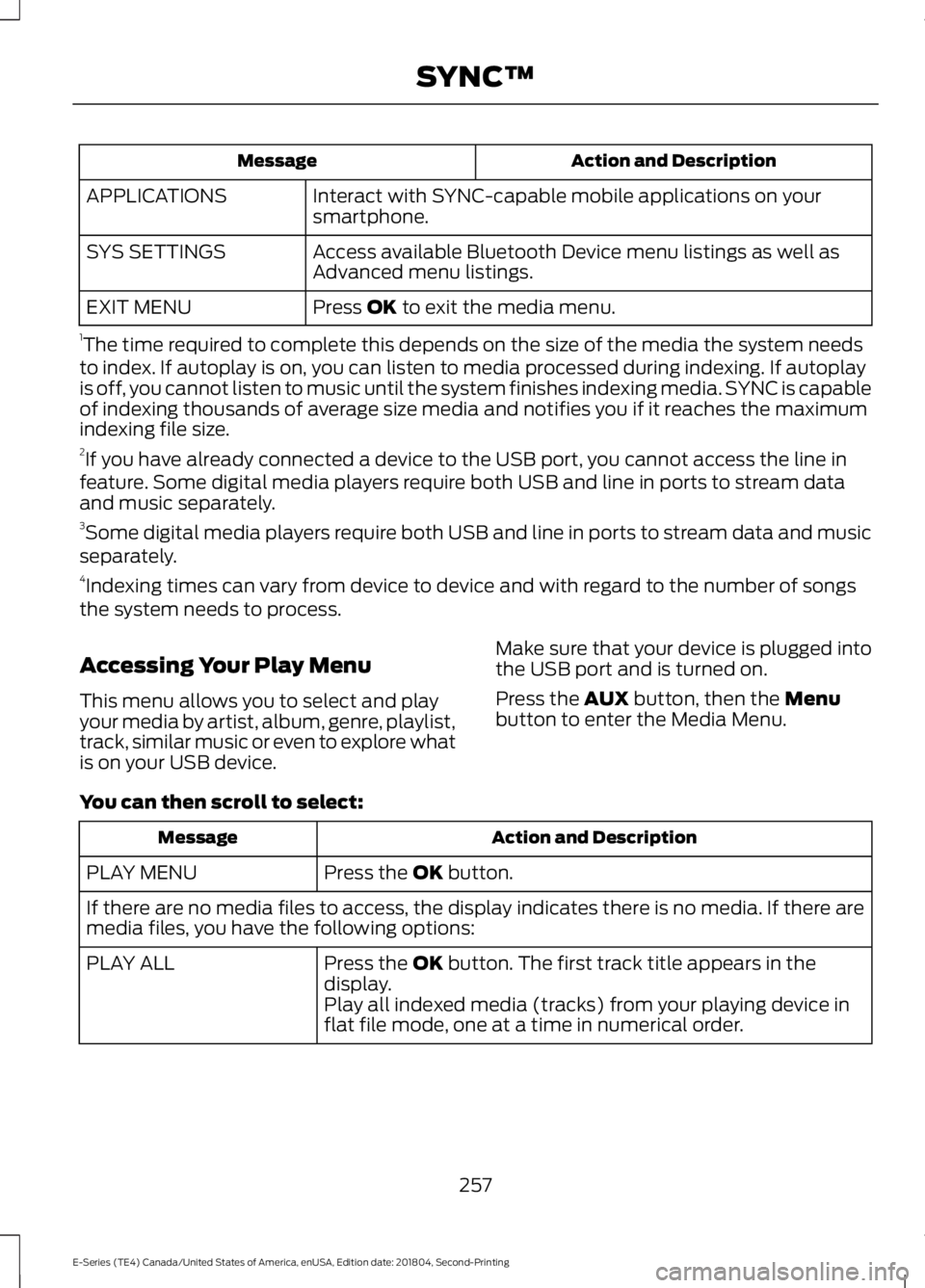
Action and DescriptionMessage
Interact with SYNC-capable mobile applications on yoursmartphone.APPLICATIONS
Access available Bluetooth Device menu listings as well asAdvanced menu listings.SYS SETTINGS
Press OK to exit the media menu.EXIT MENU
1The time required to complete this depends on the size of the media the system needsto index. If autoplay is on, you can listen to media processed during indexing. If autoplayis off, you cannot listen to music until the system finishes indexing media. SYNC is capableof indexing thousands of average size media and notifies you if it reaches the maximumindexing file size.2If you have already connected a device to the USB port, you cannot access the line infeature. Some digital media players require both USB and line in ports to stream dataand music separately.3Some digital media players require both USB and line in ports to stream data and musicseparately.4Indexing times can vary from device to device and with regard to the number of songsthe system needs to process.
Accessing Your Play Menu
This menu allows you to select and playyour media by artist, album, genre, playlist,track, similar music or even to explore whatis on your USB device.
Make sure that your device is plugged intothe USB port and is turned on.
Press the AUX button, then the Menubutton to enter the Media Menu.
You can then scroll to select:
Action and DescriptionMessage
Press the OK button.PLAY MENU
If there are no media files to access, the display indicates there is no media. If there aremedia files, you have the following options:
Press the OK button. The first track title appears in thedisplay.PLAY ALL
Play all indexed media (tracks) from your playing device inflat file mode, one at a time in numerical order.
257
E-Series (TE4) Canada/United States of America, enUSA, Edition date: 201804, Second-Printing
SYNC™
Page 262 of 329
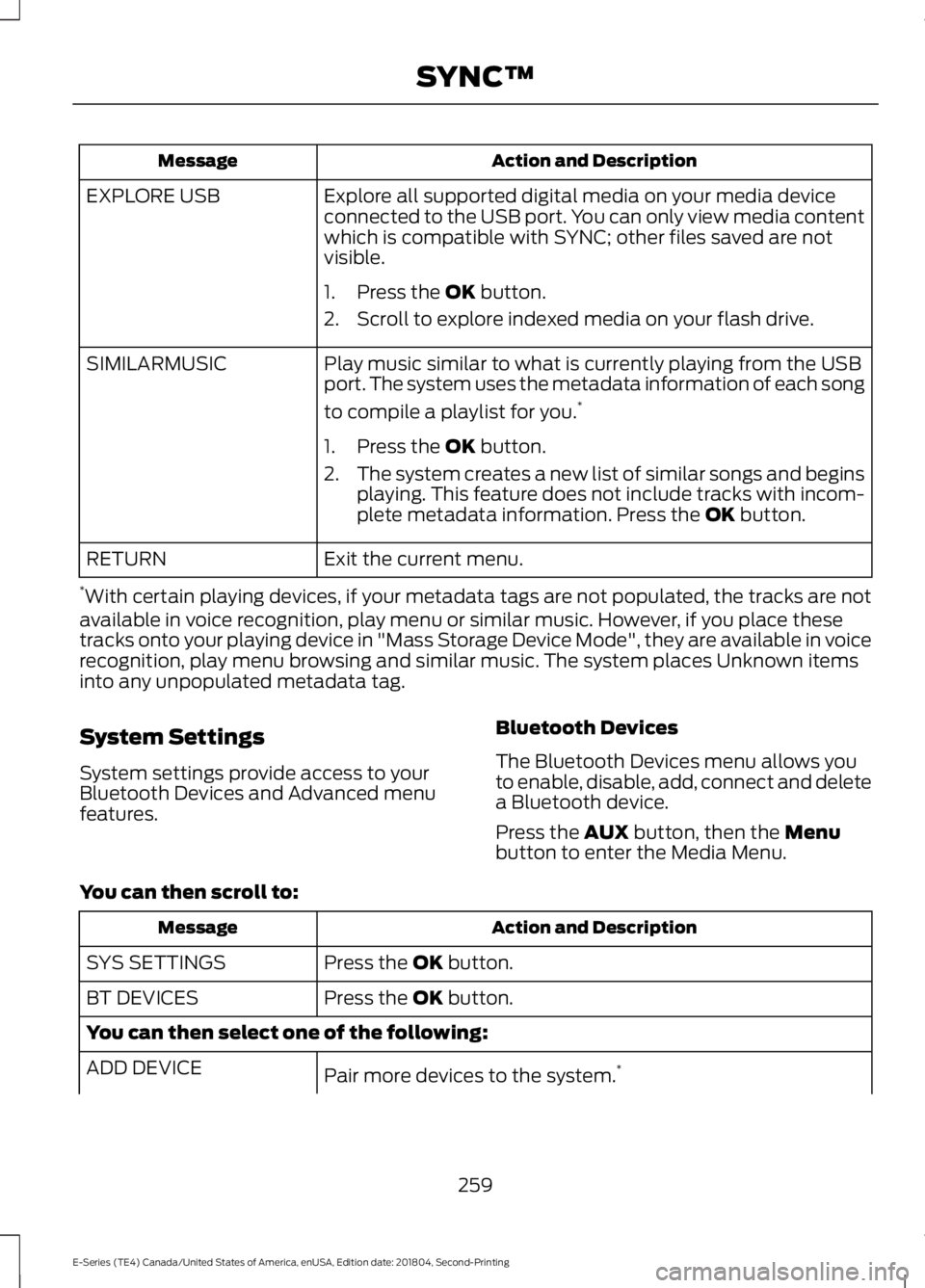
Action and DescriptionMessage
Explore all supported digital media on your media deviceconnected to the USB port. You can only view media contentwhich is compatible with SYNC; other files saved are notvisible.
EXPLORE USB
1. Press the OK button.
2. Scroll to explore indexed media on your flash drive.
Play music similar to what is currently playing from the USBport. The system uses the metadata information of each song
to compile a playlist for you.*
SIMILARMUSIC
1. Press the OK button.
2.The system creates a new list of similar songs and beginsplaying. This feature does not include tracks with incom-plete metadata information. Press the OK button.
Exit the current menu.RETURN
*With certain playing devices, if your metadata tags are not populated, the tracks are notavailable in voice recognition, play menu or similar music. However, if you place thesetracks onto your playing device in "Mass Storage Device Mode", they are available in voicerecognition, play menu browsing and similar music. The system places Unknown itemsinto any unpopulated metadata tag.
System Settings
System settings provide access to yourBluetooth Devices and Advanced menufeatures.
Bluetooth Devices
The Bluetooth Devices menu allows youto enable, disable, add, connect and deletea Bluetooth device.
Press the AUX button, then the Menubutton to enter the Media Menu.
You can then scroll to:
Action and DescriptionMessage
Press the OK button.SYS SETTINGS
Press the OK button.BT DEVICES
You can then select one of the following:
Pair more devices to the system.*ADD DEVICE
259
E-Series (TE4) Canada/United States of America, enUSA, Edition date: 201804, Second-Printing
SYNC™
Page 264 of 329
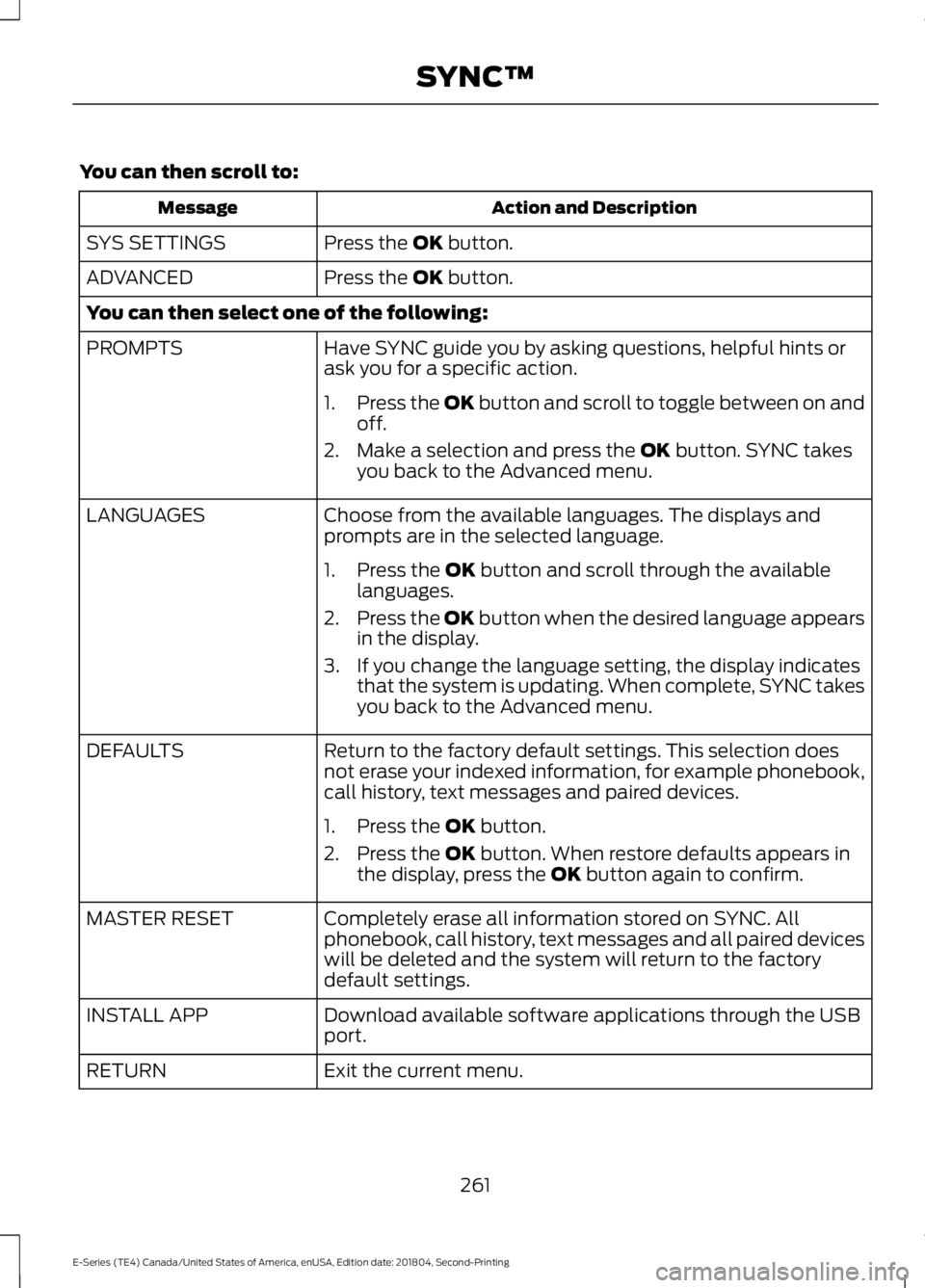
You can then scroll to:
Action and DescriptionMessage
Press the OK button.SYS SETTINGS
Press the OK button.ADVANCED
You can then select one of the following:
Have SYNC guide you by asking questions, helpful hints orask you for a specific action.PROMPTS
1.Press the OK button and scroll to toggle between on andoff.
2. Make a selection and press the OK button. SYNC takesyou back to the Advanced menu.
Choose from the available languages. The displays andprompts are in the selected language.LANGUAGES
1. Press the OK button and scroll through the availablelanguages.
2.Press the OK button when the desired language appearsin the display.
3. If you change the language setting, the display indicatesthat the system is updating. When complete, SYNC takesyou back to the Advanced menu.
Return to the factory default settings. This selection doesnot erase your indexed information, for example phonebook,call history, text messages and paired devices.
DEFAULTS
1. Press the OK button.
2. Press the OK button. When restore defaults appears inthe display, press the OK button again to confirm.
Completely erase all information stored on SYNC. Allphonebook, call history, text messages and all paired deviceswill be deleted and the system will return to the factorydefault settings.
MASTER RESET
Download available software applications through the USBport.INSTALL APP
Exit the current menu.RETURN
261
E-Series (TE4) Canada/United States of America, enUSA, Edition date: 201804, Second-Printing
SYNC™
Page 267 of 329
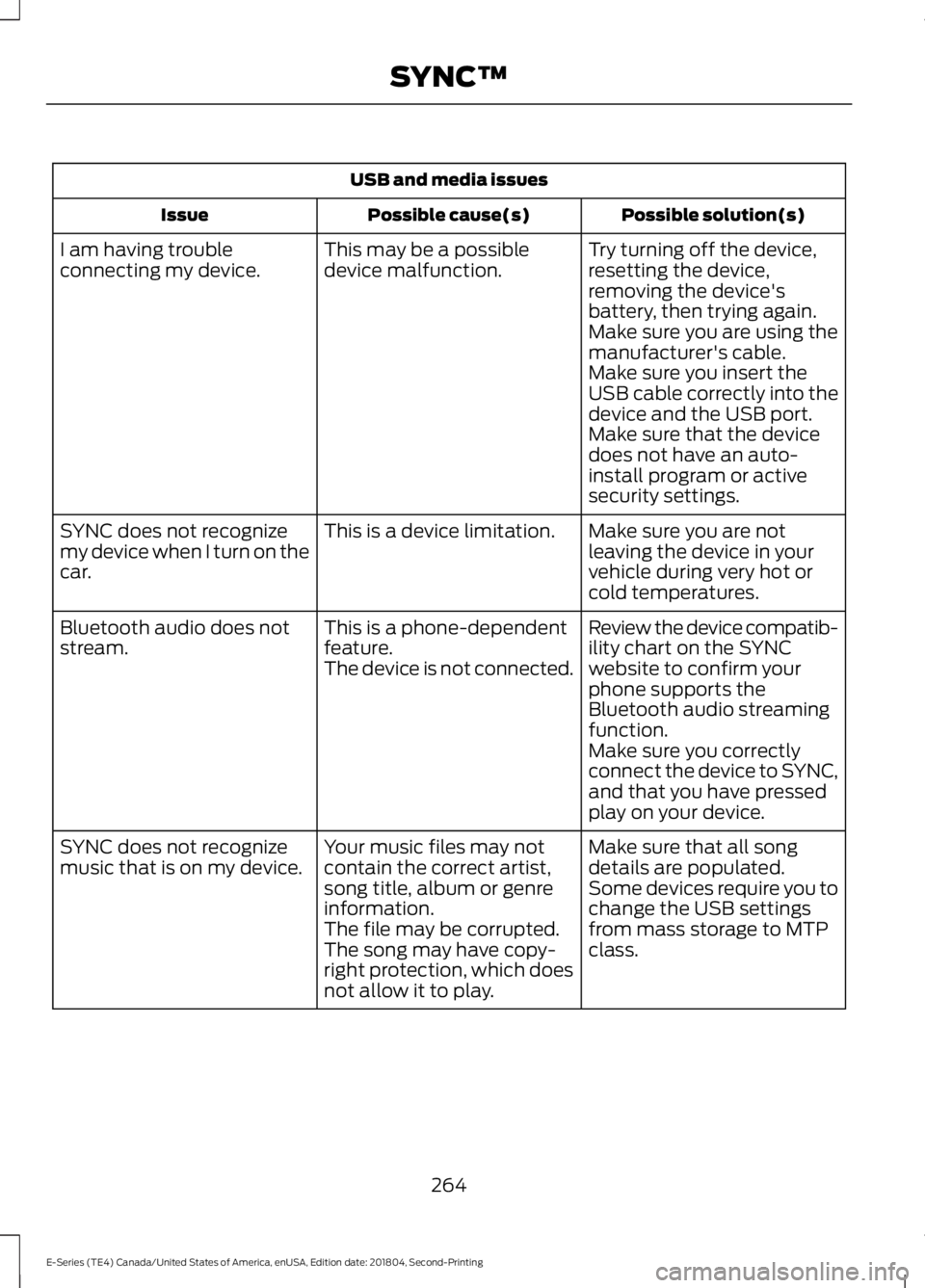
USB and media issues
Possible solution(s)Possible cause(s)Issue
Try turning off the device,resetting the device,removing the device'sbattery, then trying again.
This may be a possibledevice malfunction.I am having troubleconnecting my device.
Make sure you are using themanufacturer's cable.Make sure you insert theUSB cable correctly into thedevice and the USB port.Make sure that the devicedoes not have an auto-install program or activesecurity settings.
Make sure you are notleaving the device in yourvehicle during very hot orcold temperatures.
This is a device limitation.SYNC does not recognizemy device when I turn on thecar.
Review the device compatib-ility chart on the SYNCwebsite to confirm yourphone supports theBluetooth audio streamingfunction.
This is a phone-dependentfeature.The device is not connected.
Bluetooth audio does notstream.
Make sure you correctlyconnect the device to SYNC,and that you have pressedplay on your device.
Make sure that all songdetails are populated.Your music files may notcontain the correct artist,song title, album or genreinformation.
SYNC does not recognizemusic that is on my device.Some devices require you tochange the USB settingsfrom mass storage to MTPclass.The file may be corrupted.The song may have copy-right protection, which doesnot allow it to play.
264
E-Series (TE4) Canada/United States of America, enUSA, Edition date: 201804, Second-Printing
SYNC™
Page 271 of 329
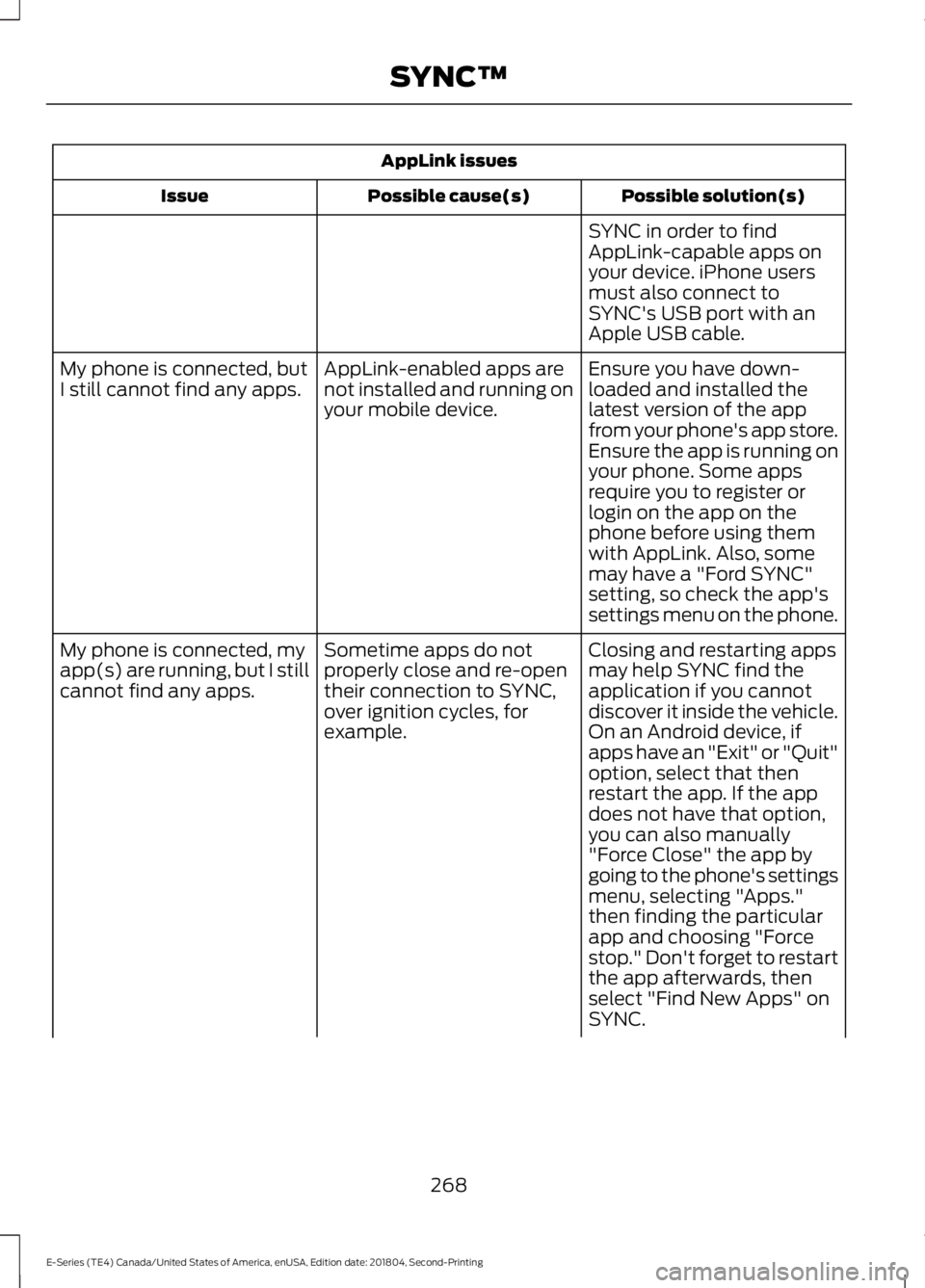
AppLink issues
Possible solution(s)Possible cause(s)Issue
SYNC in order to findAppLink-capable apps onyour device. iPhone usersmust also connect toSYNC's USB port with anApple USB cable.
Ensure you have down-loaded and installed thelatest version of the appfrom your phone's app store.Ensure the app is running onyour phone. Some apps
AppLink-enabled apps arenot installed and running onyour mobile device.
My phone is connected, butI still cannot find any apps.
require you to register orlogin on the app on thephone before using themwith AppLink. Also, somemay have a "Ford SYNC"setting, so check the app'ssettings menu on the phone.
Closing and restarting appsmay help SYNC find theapplication if you cannotdiscover it inside the vehicle.On an Android device, ifapps have an "Exit" or "Quit"
Sometime apps do notproperly close and re-opentheir connection to SYNC,over ignition cycles, forexample.
My phone is connected, myapp(s) are running, but I stillcannot find any apps.
option, select that thenrestart the app. If the appdoes not have that option,you can also manually"Force Close" the app bygoing to the phone's settingsmenu, selecting "Apps."then finding the particularapp and choosing "Forcestop." Don't forget to restartthe app afterwards, thenselect "Find New Apps" onSYNC.
268
E-Series (TE4) Canada/United States of America, enUSA, Edition date: 201804, Second-Printing
SYNC™
Page 273 of 329
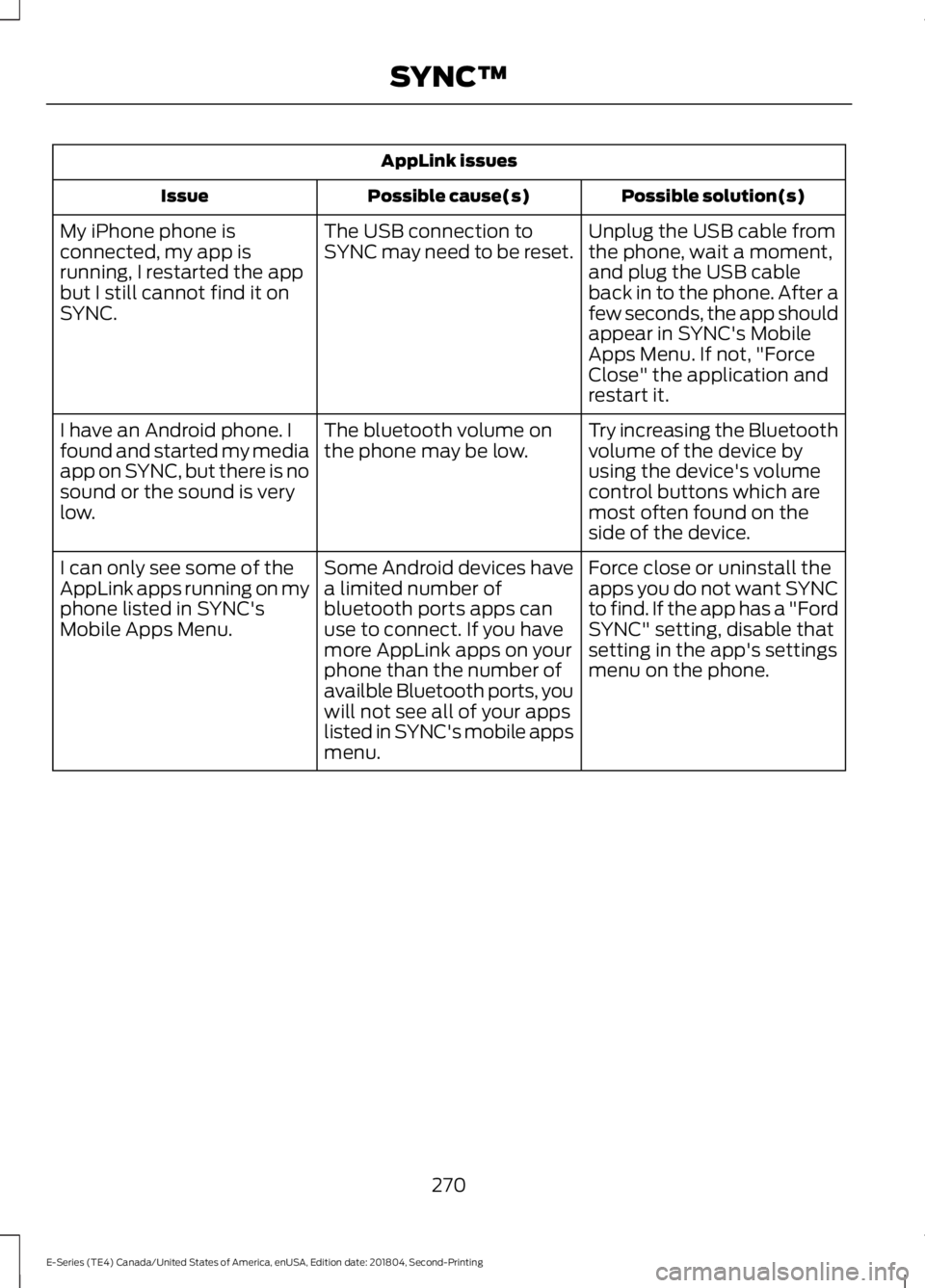
AppLink issues
Possible solution(s)Possible cause(s)Issue
Unplug the USB cable fromthe phone, wait a moment,and plug the USB cableback in to the phone. After afew seconds, the app shouldappear in SYNC's MobileApps Menu. If not, "ForceClose" the application andrestart it.
The USB connection toSYNC may need to be reset.My iPhone phone isconnected, my app isrunning, I restarted the appbut I still cannot find it onSYNC.
Try increasing the Bluetoothvolume of the device byusing the device's volumecontrol buttons which aremost often found on theside of the device.
The bluetooth volume onthe phone may be low.I have an Android phone. Ifound and started my mediaapp on SYNC, but there is nosound or the sound is verylow.
Force close or uninstall theapps you do not want SYNCto find. If the app has a "FordSYNC" setting, disable thatsetting in the app's settingsmenu on the phone.
Some Android devices havea limited number ofbluetooth ports apps canuse to connect. If you havemore AppLink apps on yourphone than the number ofavailble Bluetooth ports, youwill not see all of your appslisted in SYNC's mobile appsmenu.
I can only see some of theAppLink apps running on myphone listed in SYNC'sMobile Apps Menu.
270
E-Series (TE4) Canada/United States of America, enUSA, Edition date: 201804, Second-Printing
SYNC™
Page 328 of 329
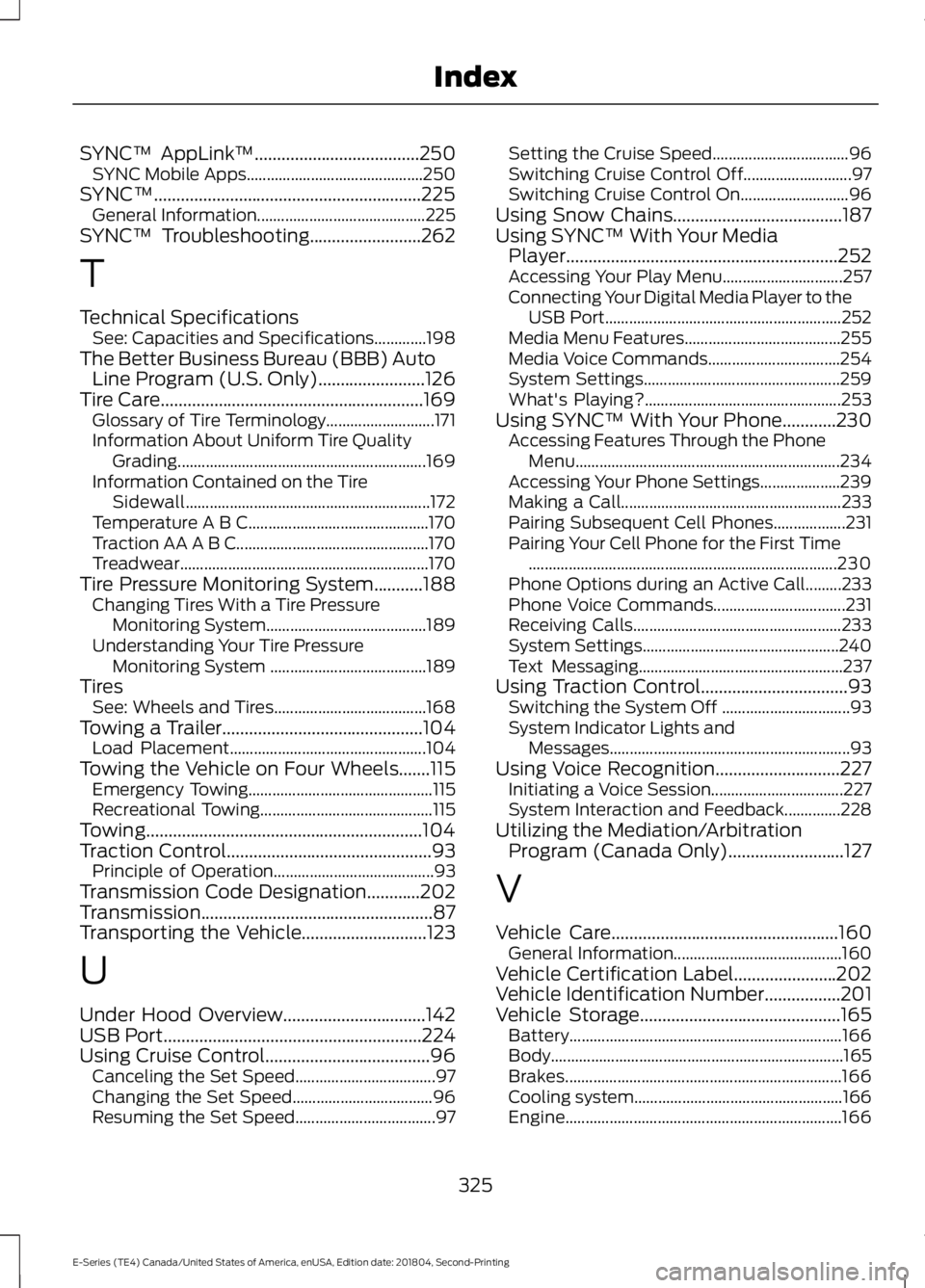
SYNC™ AppLink™.....................................250SYNC Mobile Apps............................................250SYNC™............................................................225General Information..........................................225SYNC™ Troubleshooting.........................262
T
Technical SpecificationsSee: Capacities and Specifications.............198The Better Business Bureau (BBB) AutoLine Program (U.S. Only)........................126Tire Care...........................................................169Glossary of Tire Terminology...........................171Information About Uniform Tire QualityGrading..............................................................169Information Contained on the TireSidewall.............................................................172Temperature A B C.............................................170Traction AA A B C................................................170Treadwear..............................................................170Tire Pressure Monitoring System...........188Changing Tires With a Tire PressureMonitoring System........................................189Understanding Your Tire PressureMonitoring System .......................................189TiresSee: Wheels and Tires......................................168Towing a Trailer.............................................104Load Placement.................................................104Towing the Vehicle on Four Wheels.......115Emergency Towing..............................................115Recreational Towing...........................................115Towing..............................................................104Traction Control..............................................93Principle of Operation........................................93Transmission Code Designation............202Transmission....................................................87Transporting the Vehicle............................123
U
Under Hood Overview................................142USB Port..........................................................224Using Cruise Control.....................................96Canceling the Set Speed...................................97Changing the Set Speed...................................96Resuming the Set Speed...................................97
Setting the Cruise Speed..................................96Switching Cruise Control Off...........................97Switching Cruise Control On...........................96Using Snow Chains......................................187Using SYNC™ With Your MediaPlayer.............................................................252Accessing Your Play Menu..............................257Connecting Your Digital Media Player to theUSB Port...........................................................252Media Menu Features.......................................255Media Voice Commands.................................254System Settings.................................................259What's Playing?.................................................253Using SYNC™ With Your Phone............230Accessing Features Through the PhoneMenu..................................................................234Accessing Your Phone Settings....................239Making a Call.......................................................233Pairing Subsequent Cell Phones..................231Pairing Your Cell Phone for the First Time.............................................................................230Phone Options during an Active Call.........233Phone Voice Commands.................................231Receiving Calls....................................................233System Settings.................................................240Text Messaging...................................................237Using Traction Control.................................93Switching the System Off ................................93System Indicator Lights andMessages............................................................93Using Voice Recognition............................227Initiating a Voice Session.................................227System Interaction and Feedback..............228Utilizing the Mediation/ArbitrationProgram (Canada Only)..........................127
V
Vehicle Care...................................................160General Information..........................................160Vehicle Certification Label.......................202Vehicle Identification Number.................201Vehicle Storage.............................................165Battery....................................................................166Body.........................................................................165Brakes.....................................................................166Cooling system....................................................166Engine.....................................................................166
325
E-Series (TE4) Canada/United States of America, enUSA, Edition date: 201804, Second-Printing
Index