ignition FORD E SERIES 2019 User Guide
[x] Cancel search | Manufacturer: FORD, Model Year: 2019, Model line: E SERIES, Model: FORD E SERIES 2019Pages: 329, PDF Size: 2.92 MB
Page 48 of 329
PASSIVE ANTI-THEFT
SYSTEM (IF EQUIPPED)
Note:The system is not compatible withnon-Ford aftermarket remote start systems.Use of these systems may result in vehiclestarting problems and a loss of securityprotection.
Note:Metallic objects, electronic devicesor a second coded key on the same keychain may cause vehicle starting problemsif they are too close to the key when startingthe engine. Prevent these objects fromtouching the coded key while starting theengine. Switch the ignition off, move allobjects on the key chain away from thecoded key and restart the engine if aproblem occurs.
Note:Do not leave a duplicate coded keyin the vehicle. Always take your keys andlock all doors when leaving the vehicle.
SecuriLock®
The system is an engine immobilizationsystem. It is designed to help prevent theengine from being started unless acorrectly coded key for your vehicle is used.Using an incorrectly coded key mayprevent the engine from starting. Amessage may appear in the informationdisplay.
If you are unable to start the engine with acorrectly coded key, a malfunction hashappened and a message may appear inthe information display.
Automatic Arming
The engine immobilization system armsimmediately after you switch the ignitionoff.
Automatic Disarming
Switching the ignition on with a correctlycoded key disarms the engineimmobilization system.
Replacement Keys
The integrated keyhead transmitterfunctions as a programmed ignition keythat operates all the locks and starts yourvehicle, as well as a remote control.
If your keys are lost or stolen and you donot have a spare correctly coded key, youwill need to have your vehicle towed to anauthorized dealer. You need to erase thecoded keys from your vehicle and programnew coded keys.
Store an extra correctly coded key awayfrom the vehicle in a safe place to helpprevent any inconveniences. See anauthorized dealer to purchase additionalspare or replacement keys.
Note:Your vehicle comes with twointegrated keyhead transmitters.
Programming a Spare IntegratedKeyhead Transmitter
You can program your own integratedkeyhead transmitter or standardSecuriLock coded keys to your vehicle. Thisprocedure will program both the engineimmobilizer keycode and the remote entryportion of the remote control to yourvehicle
Only use integrated keyhead transmittersor standard SecuriLock keys.
You must have two previouslyprogrammed correctly coded keys and thenew unprogrammed key readily accessible.See an authorized dealer to have the sparekey programmed if two previouslyprogrammed correctly coded keys are notavailable.
Read and understand the entire procedurebefore you begin.
45
E-Series (TE4) Canada/United States of America, enUSA, Edition date: 201804, Second-Printing
Security
Page 49 of 329
1.Insert the first previously programmedcorrectly coded key into the ignition.
2.Switch the ignition from off to on. Keepthe ignition on for at least threeseconds, but no more than 10 seconds.
3.Switch the ignition off and remove thefirst correctly coded key from theignition.
4. After three seconds but within 10seconds of switching the ignition off,insert the second previously correctlycoded key into the ignition.
5.Switch the ignition from off to on. Keepthe ignition on for at least threeseconds, but no more than 10 seconds.
6.Switch the ignition off and remove thesecond previously programmedcorrectly coded key from the ignition.
7. After three seconds but within 10seconds of switching the ignition offand removing the previouslyprogrammed correctly coded key,insert the new unprogrammed key intothe ignition.
8.Switch the ignition from off to on. Keepthe ignition on for at least six seconds.
9. Remove the newly programmedcorrectly coded key from the ignition.
If the key has been successfullyprogrammed it will start the engine andoperate the remote entry system (if thenew key is an integrated keyheadtransmitter).
If the key was not successfullyprogrammed, wait 10 seconds and repeatSteps 1 through 8. If you are stillunsuccessful, take your vehicle to anauthorized dealer.
Note:You can program a maximum of eightcoded keys to your vehicle. All eight can beintegrated keyhead transmitters.
46
E-Series (TE4) Canada/United States of America, enUSA, Edition date: 201804, Second-Printing
Security
Page 54 of 329
POWER WINDOWS (IF EQUIPPED)
WARNING: Do not leave childrenunattended in your vehicle and do notlet them play with the power windows.They may seriously injure themselves.
WARNING: When closing thepower windows, you should verify theyare free of obstructions and make surethat children and pets are not in theproximity of the window openings.
Note:You may hear a pulsing noise whenjust one of the windows is open. Lower theopposite window slightly to reduce thisnoise.
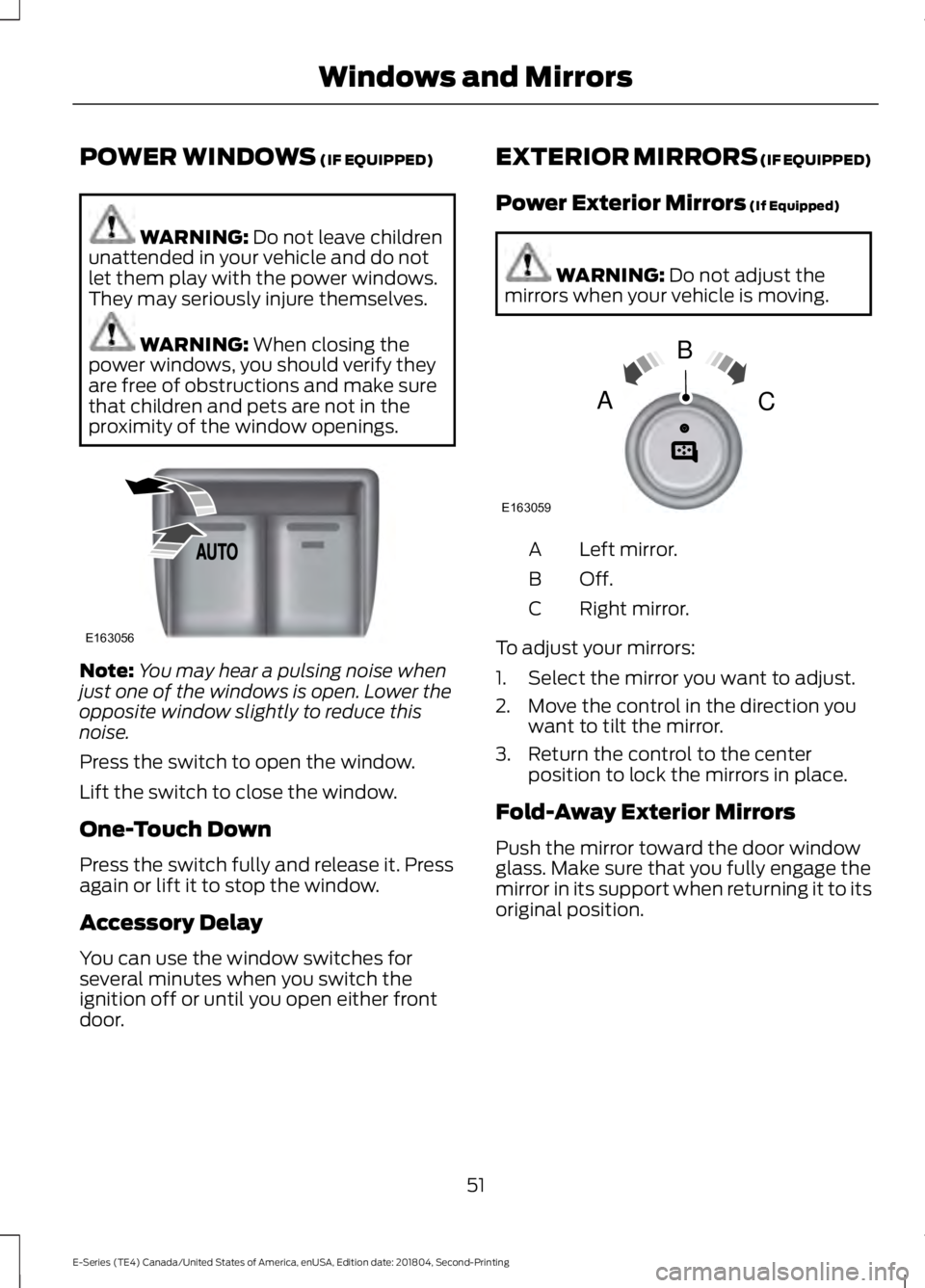
Press the switch to open the window.
Lift the switch to close the window.
One-Touch Down
Press the switch fully and release it. Pressagain or lift it to stop the window.
Accessory Delay
You can use the window switches forseveral minutes when you switch theignition off or until you open either frontdoor.
EXTERIOR MIRRORS (IF EQUIPPED)
Power Exterior Mirrors (If Equipped)
WARNING: Do not adjust themirrors when your vehicle is moving.
Left mirror.A
Off.B
Right mirror.C
To adjust your mirrors:
1. Select the mirror you want to adjust.
2. Move the control in the direction youwant to tilt the mirror.
3. Return the control to the centerposition to lock the mirrors in place.
Fold-Away Exterior Mirrors
Push the mirror toward the door windowglass. Make sure that you fully engage themirror in its support when returning it to itsoriginal position.
51
E-Series (TE4) Canada/United States of America, enUSA, Edition date: 201804, Second-Printing
Windows and MirrorsE163056 E163059
B
AC
Page 57 of 329
Low Fuel Reminder
A low fuel level reminder displays andsounds when the distance to emptyreaches 50 mi (80 km), 25 mi (40 km),10 mi (20 km) and 0 mi (0 km).
Note:The low fuel reminder can appear atdifferent fuel gauge positions depending onfuel economy conditions. This variation isnormal.
Engine Coolant TemperatureGauge
Indicates engine coolant temperature. Atnormal operating temperature, the levelindicator will be in the normal range. If theengine coolant temperature exceeds thenormal range, stop the vehicle as soon assafely possible, switch off the engine andlet the engine cool.
WARNING: Do not remove thecoolant reservoir cap when the coolingsystem is hot. Wait 10 minutes for thecooling system to cool down. Cover thecoolant reservoir cap with a thick clothto prevent the possibility of scalding andslowly remove the cap. Failure to followthis instruction could result in personalinjury.
Battery Voltage Gauge
Indicates the battery voltage when theignition is in the on position. If the pointermoves and stays outside the normaloperating range, have an authorized dealercheck the vehicle’s electrical system assoon as possible.
Information Display
Odometer
Located in the bottom of the informationdisplay, the gauge registers the distanceyour vehicle travels.
Trip Computer
See Information Displays (page 58).
Vehicle Settings and Personalization
See Information Displays (page 58).
Engine Oil Pressure Gauge
Indicates the engine oil pressure. Theneedle should stay in the normal operatingrange. If the needle falls below the normalrange, stop the vehicle and switch off theengine. Check the engine oil level and addoil if needed. If the oil level is correct, havean authorized dealer check the system.
WARNING LAMPS AND
INDICATORS
The following warning lamps andindicators alert you to a vehicle conditionthat may become serious. Some lampsilluminate when you start your vehicle tomake sure they work. If any lamps remainon after starting your vehicle, refer to therespective system warning lamp for furtherinformation.
Note:Some warning indicators appear inthe information display and operate thesame as a warning lamp but do notilluminate when you start your vehicle.
Airbag Warning Lamp
If it does not illuminate when youswitch the ignition on, continuesto flash or remains on when theengine is running, this indicates amalfunction. Have your vehicle checkedas soon as possible.
54
E-Series (TE4) Canada/United States of America, enUSA, Edition date: 201804, Second-Printing
Instrument ClusterE67017
Page 58 of 329
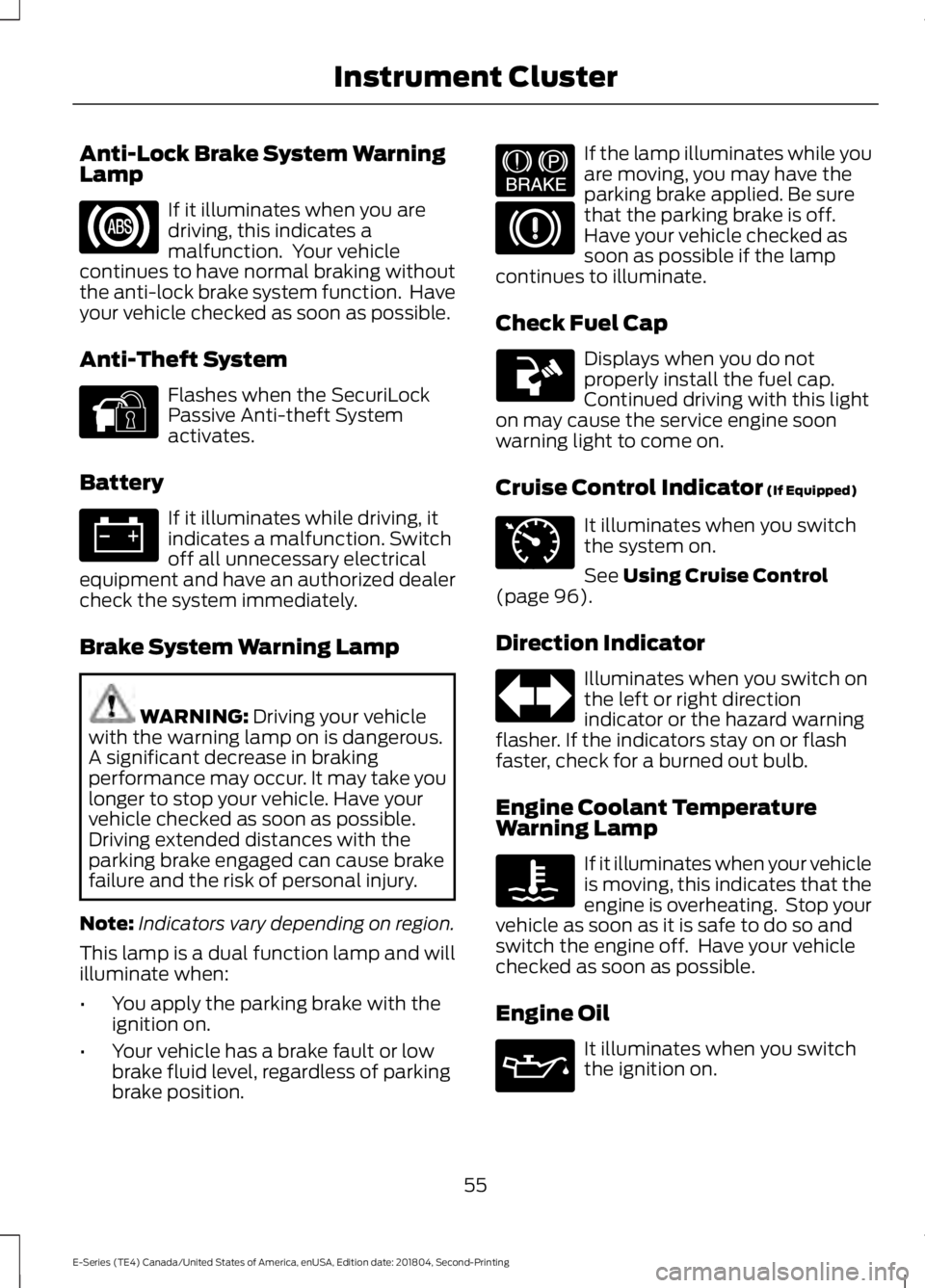
Anti-Lock Brake System WarningLamp
If it illuminates when you aredriving, this indicates amalfunction. Your vehiclecontinues to have normal braking withoutthe anti-lock brake system function. Haveyour vehicle checked as soon as possible.
Anti-Theft System
Flashes when the SecuriLockPassive Anti-theft Systemactivates.
Battery
If it illuminates while driving, itindicates a malfunction. Switchoff all unnecessary electricalequipment and have an authorized dealercheck the system immediately.
Brake System Warning Lamp
WARNING: Driving your vehiclewith the warning lamp on is dangerous.A significant decrease in brakingperformance may occur. It may take youlonger to stop your vehicle. Have yourvehicle checked as soon as possible.Driving extended distances with theparking brake engaged can cause brakefailure and the risk of personal injury.
Note:Indicators vary depending on region.
This lamp is a dual function lamp and willilluminate when:
•You apply the parking brake with theignition on.
•Your vehicle has a brake fault or lowbrake fluid level, regardless of parkingbrake position.
If the lamp illuminates while youare moving, you may have theparking brake applied. Be surethat the parking brake is off.Have your vehicle checked assoon as possible if the lampcontinues to illuminate.
Check Fuel Cap
Displays when you do notproperly install the fuel cap.Continued driving with this lighton may cause the service engine soonwarning light to come on.
Cruise Control Indicator (If Equipped)
It illuminates when you switchthe system on.
See Using Cruise Control(page 96).
Direction Indicator
Illuminates when you switch onthe left or right directionindicator or the hazard warningflasher. If the indicators stay on or flashfaster, check for a burned out bulb.
Engine Coolant TemperatureWarning Lamp
If it illuminates when your vehicleis moving, this indicates that theengine is overheating. Stop yourvehicle as soon as it is safe to do so andswitch the engine off. Have your vehiclechecked as soon as possible.
Engine Oil
It illuminates when you switchthe ignition on.
55
E-Series (TE4) Canada/United States of America, enUSA, Edition date: 201804, Second-Printing
Instrument Cluster E144845 E144522 E71340
Page 59 of 329
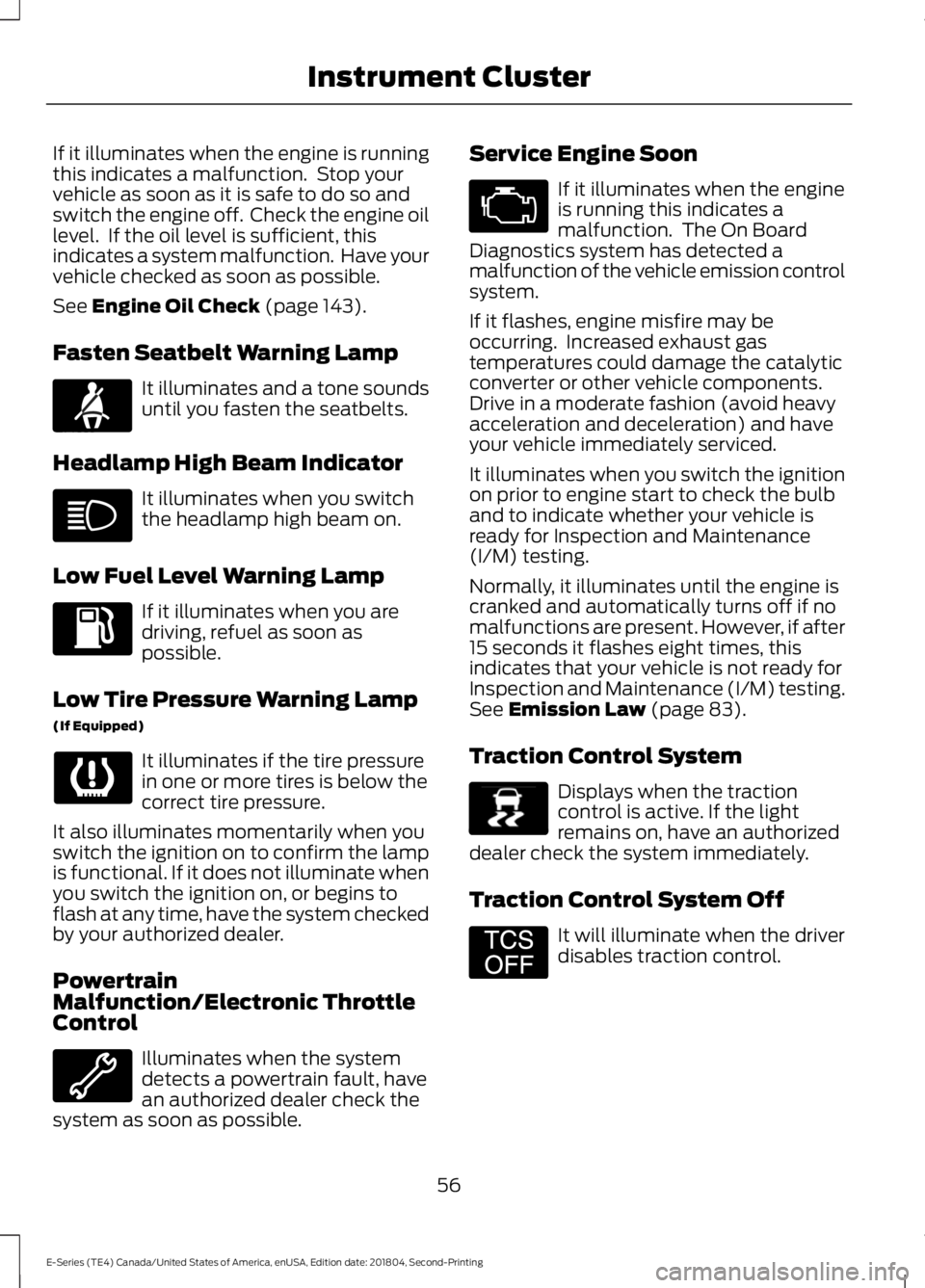
If it illuminates when the engine is runningthis indicates a malfunction. Stop yourvehicle as soon as it is safe to do so andswitch the engine off. Check the engine oillevel. If the oil level is sufficient, thisindicates a system malfunction. Have yourvehicle checked as soon as possible.
See Engine Oil Check (page 143).
Fasten Seatbelt Warning Lamp
It illuminates and a tone soundsuntil you fasten the seatbelts.
Headlamp High Beam Indicator
It illuminates when you switchthe headlamp high beam on.
Low Fuel Level Warning Lamp
If it illuminates when you aredriving, refuel as soon aspossible.
Low Tire Pressure Warning Lamp
(If Equipped)
It illuminates if the tire pressurein one or more tires is below thecorrect tire pressure.
It also illuminates momentarily when youswitch the ignition on to confirm the lampis functional. If it does not illuminate whenyou switch the ignition on, or begins toflash at any time, have the system checkedby your authorized dealer.
PowertrainMalfunction/Electronic ThrottleControl
Illuminates when the systemdetects a powertrain fault, havean authorized dealer check thesystem as soon as possible.
Service Engine Soon
If it illuminates when the engineis running this indicates amalfunction. The On BoardDiagnostics system has detected amalfunction of the vehicle emission controlsystem.
If it flashes, engine misfire may beoccurring. Increased exhaust gastemperatures could damage the catalyticconverter or other vehicle components.Drive in a moderate fashion (avoid heavyacceleration and deceleration) and haveyour vehicle immediately serviced.
It illuminates when you switch the ignitionon prior to engine start to check the bulband to indicate whether your vehicle isready for Inspection and Maintenance(I/M) testing.
Normally, it illuminates until the engine iscranked and automatically turns off if nomalfunctions are present. However, if after15 seconds it flashes eight times, thisindicates that your vehicle is not ready forInspection and Maintenance (I/M) testing.See Emission Law (page 83).
Traction Control System
Displays when the tractioncontrol is active. If the lightremains on, have an authorizeddealer check the system immediately.
Traction Control System Off
It will illuminate when the driverdisables traction control.
56
E-Series (TE4) Canada/United States of America, enUSA, Edition date: 201804, Second-Printing
Instrument ClusterE71880 E138639 E194301
Page 60 of 329
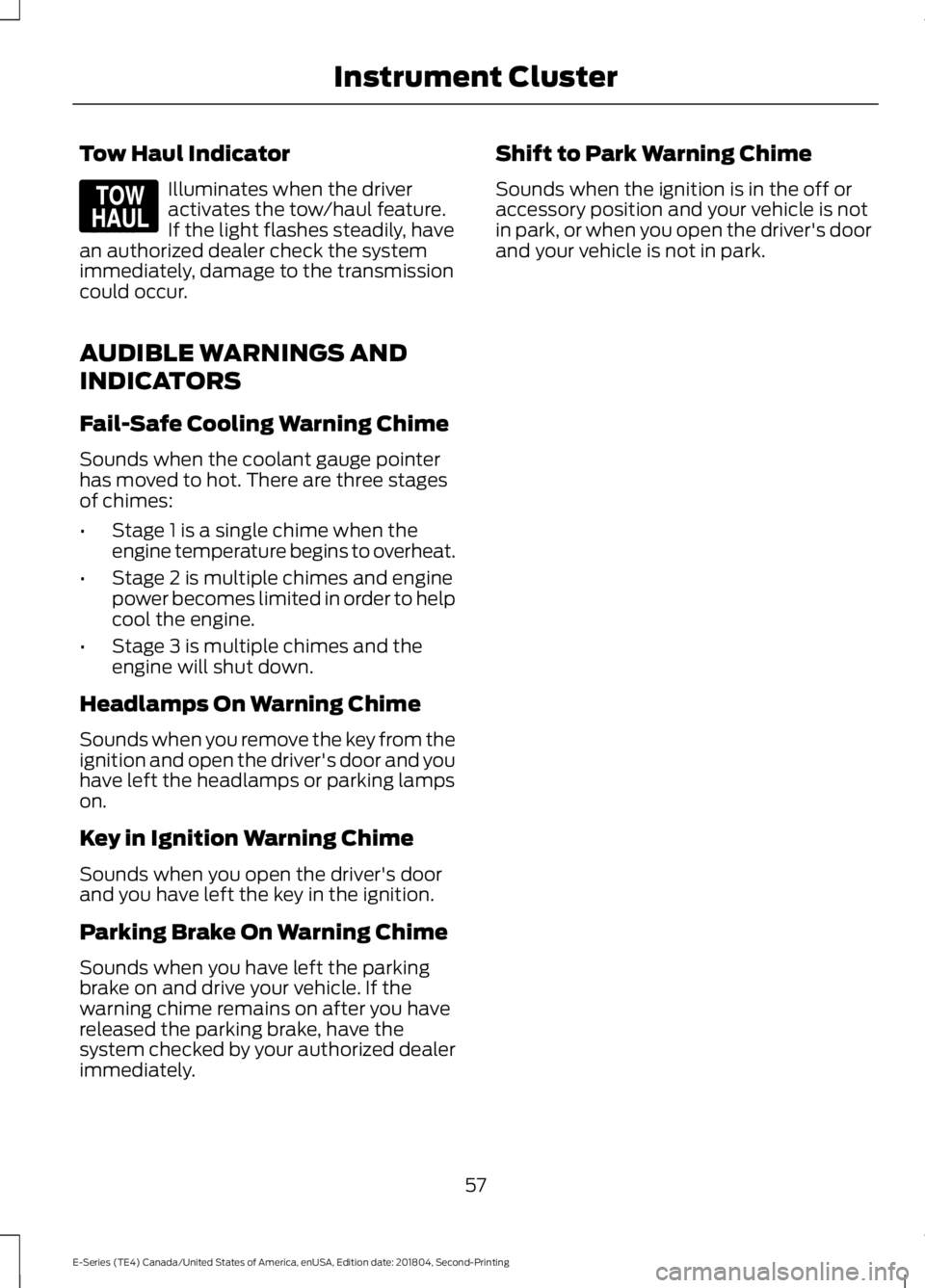
Tow Haul Indicator
Illuminates when the driveractivates the tow/haul feature.If the light flashes steadily, havean authorized dealer check the systemimmediately, damage to the transmissioncould occur.
AUDIBLE WARNINGS AND
INDICATORS
Fail-Safe Cooling Warning Chime
Sounds when the coolant gauge pointerhas moved to hot. There are three stagesof chimes:
•Stage 1 is a single chime when theengine temperature begins to overheat.
•Stage 2 is multiple chimes and enginepower becomes limited in order to helpcool the engine.
•Stage 3 is multiple chimes and theengine will shut down.
Headlamps On Warning Chime
Sounds when you remove the key from theignition and open the driver's door and youhave left the headlamps or parking lampson.
Key in Ignition Warning Chime
Sounds when you open the driver's doorand you have left the key in the ignition.
Parking Brake On Warning Chime
Sounds when you have left the parkingbrake on and drive your vehicle. If thewarning chime remains on after you havereleased the parking brake, have thesystem checked by your authorized dealerimmediately.
Shift to Park Warning Chime
Sounds when the ignition is in the off oraccessory position and your vehicle is notin park, or when you open the driver's doorand your vehicle is not in park.
57
E-Series (TE4) Canada/United States of America, enUSA, Edition date: 201804, Second-Printing
Instrument ClusterE161509
Page 62 of 329
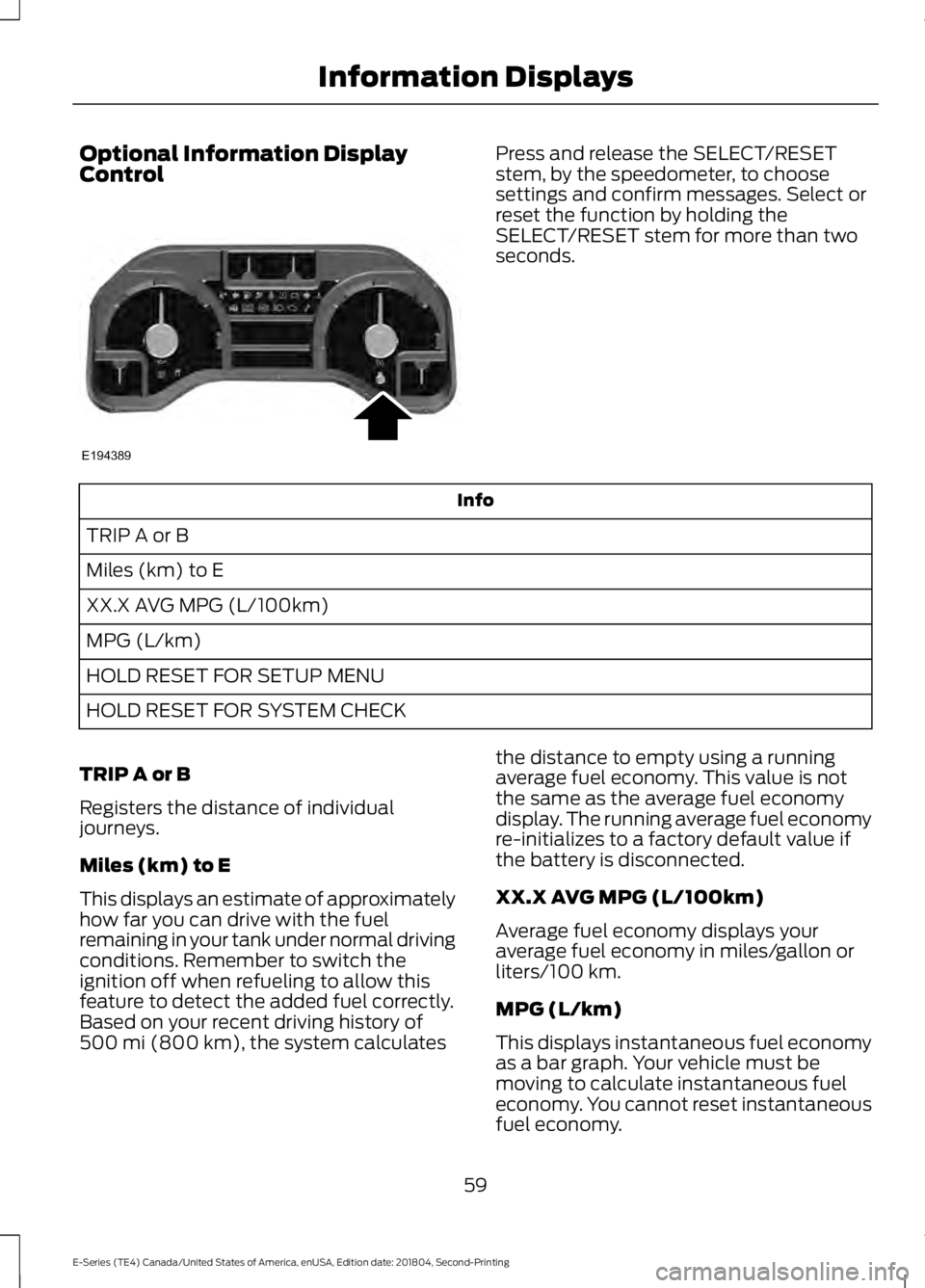
Optional Information DisplayControlPress and release the SELECT/RESETstem, by the speedometer, to choosesettings and confirm messages. Select orreset the function by holding theSELECT/RESET stem for more than twoseconds.
Info
TRIP A or B
Miles (km) to E
XX.X AVG MPG (L/100km)
MPG (L/km)
HOLD RESET FOR SETUP MENU
HOLD RESET FOR SYSTEM CHECK
TRIP A or B
Registers the distance of individualjourneys.
Miles (km) to E
This displays an estimate of approximatelyhow far you can drive with the fuelremaining in your tank under normal drivingconditions. Remember to switch theignition off when refueling to allow thisfeature to detect the added fuel correctly.Based on your recent driving history of500 mi (800 km), the system calculates
the distance to empty using a runningaverage fuel economy. This value is notthe same as the average fuel economydisplay. The running average fuel economyre-initializes to a factory default value ifthe battery is disconnected.
XX.X AVG MPG (L/100km)
Average fuel economy displays youraverage fuel economy in miles/gallon orliters/100 km.
MPG (L/km)
This displays instantaneous fuel economyas a bar graph. Your vehicle must bemoving to calculate instantaneous fueleconomy. You cannot reset instantaneousfuel economy.
59
E-Series (TE4) Canada/United States of America, enUSA, Edition date: 201804, Second-Printing
Information DisplaysE194389
Page 64 of 329

SYSTEM CHECK
CHARGING SYSTEM
BRAKE SYSTEM
TBC GAIN = XX.X or NOTRAILER (if equipped)
TBC GAIN = XX.X orOUTPUT = ////// (ifequipped)
XXX MILES TO E
OIL LIFE XXX% HOLD RESET = NEW
This displays the remaining oil life. An oilchange is required whenever indicated bythe message center and according to therecommended maintenance schedule.USE ONLY RECOMMENDED ENGINE OILS.
To reset the oil monitoring system to 100%after each oil change, perform thefollowing:
1. Press and release the SELECT/RESETstem to display OIL LIFE XXX% HOLDRESET = NEW.
2. Press and hold the SELECT/RESETstem for two seconds and release toreset the oil life to 100%.
Note:To change oil life 100% value (ifequipped):
3. Once OIL LIFE SET TO XXX%displays, release and press theSELECT/RESET stem to change the oillife start value. Each release and pressreduces the value by 10%.
UNITS ENG / METRIC
Displays the current units in English orMetric.
AUTOLOCK
This feature automatically locks all vehicledoors when you shift into any gear, puttingthe vehicle in motion.
AUTOUNLOCK
This feature automatically unlocks allvehicle doors when you open the driver'sdoor within 10 minutes of switching theignition off.
COMPASS
Displays the vehicle's heading direction.
Note:Driving near large buildings, bridges,power lines and powerful broadcastantennas may affect the compass reading.Magnetic or metallic objects placed in, onor near the vehicle may also affect compassaccuracy. If the compass appears to beinaccurate, a manual calibration may benecessary. Refer to Compass zoneadjustment.
61
E-Series (TE4) Canada/United States of America, enUSA, Edition date: 201804, Second-Printing
Information Displays
Page 68 of 329
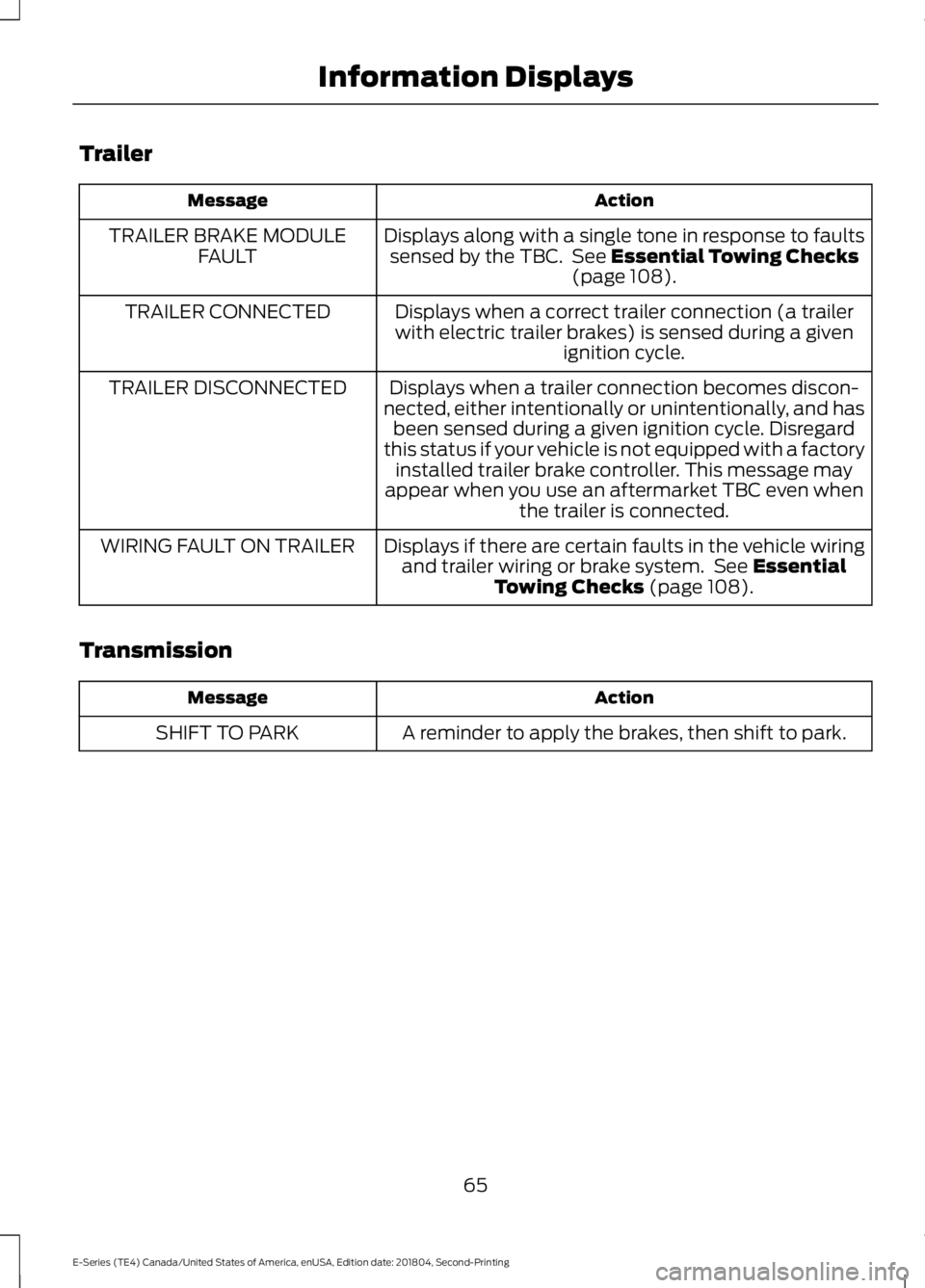
Trailer
ActionMessage
Displays along with a single tone in response to faultssensed by the TBC. See Essential Towing Checks(page 108).
TRAILER BRAKE MODULEFAULT
Displays when a correct trailer connection (a trailerwith electric trailer brakes) is sensed during a givenignition cycle.
TRAILER CONNECTED
Displays when a trailer connection becomes discon-nected, either intentionally or unintentionally, and hasbeen sensed during a given ignition cycle. Disregardthis status if your vehicle is not equipped with a factoryinstalled trailer brake controller. This message mayappear when you use an aftermarket TBC even whenthe trailer is connected.
TRAILER DISCONNECTED
Displays if there are certain faults in the vehicle wiringand trailer wiring or brake system. See EssentialTowing Checks (page 108).
WIRING FAULT ON TRAILER
Transmission
ActionMessage
A reminder to apply the brakes, then shift to park.SHIFT TO PARK
65
E-Series (TE4) Canada/United States of America, enUSA, Edition date: 201804, Second-Printing
Information Displays