ignition FORD E SERIES 2019 Owners Manual
[x] Cancel search | Manufacturer: FORD, Model Year: 2019, Model line: E SERIES, Model: FORD E SERIES 2019Pages: 329, PDF Size: 2.92 MB
Page 5 of 329
Information Displays
General Information.....................................58
Information Messages................................63
Climate Control
Manual Climate Control.............................66
Hints on Controlling the Interior Climate...........................................................................67
Rear Passenger Climate Controls...........68
Seats
Sitting in the Correct Position..................69
Head Restraints.............................................69
Manual Seats..................................................70
Power Seats......................................................71
Auxiliary Power Points
Auxiliary Power Points.................................72
Starting and Stopping theEngine
General Information.....................................74
Ignition Switch................................................74
Starting a Gasoline Engine........................74
Engine Block Heater.....................................76
Fuel and Refueling
Safety Precautions........................................77
Fuel Quality - E85..........................................77
Fuel Quality - Gasoline................................79
Running Out of Fuel.....................................79
Refueling..........................................................80
Fuel Consumption.........................................81
Engine Emission Control
Emission Law..................................................83
Catalytic Converter......................................84
Transmission
Automatic Transmission............................87
Rear Axle
Limited Slip Differential.............................90
Brakes
General Information......................................91
Hints on Driving With Anti-Lock Brakes...........................................................................91
Parking Brake..................................................92
Traction Control
Principle of Operation.................................93
Using Traction Control................................93
Parking Aids
Rear View Camera........................................94
Cruise Control
Principle of Operation.................................96
Using Cruise Control....................................96
Driving Aids
Steering............................................................98
Load Carrying
Load Limit........................................................99
Towing
Towing a Trailer............................................104
Recommended Towing Weights...........105
Essential Towing Checks.........................108
Towing the Vehicle on Four Wheels......115
Driving Hints
Breaking-In......................................................116
Reduced Engine Performance.................116
Economical Driving......................................116
2
E-Series (TE4) Canada/United States of America, enUSA, Edition date: 201804, Second-Printing
Table of Contents
Page 19 of 329
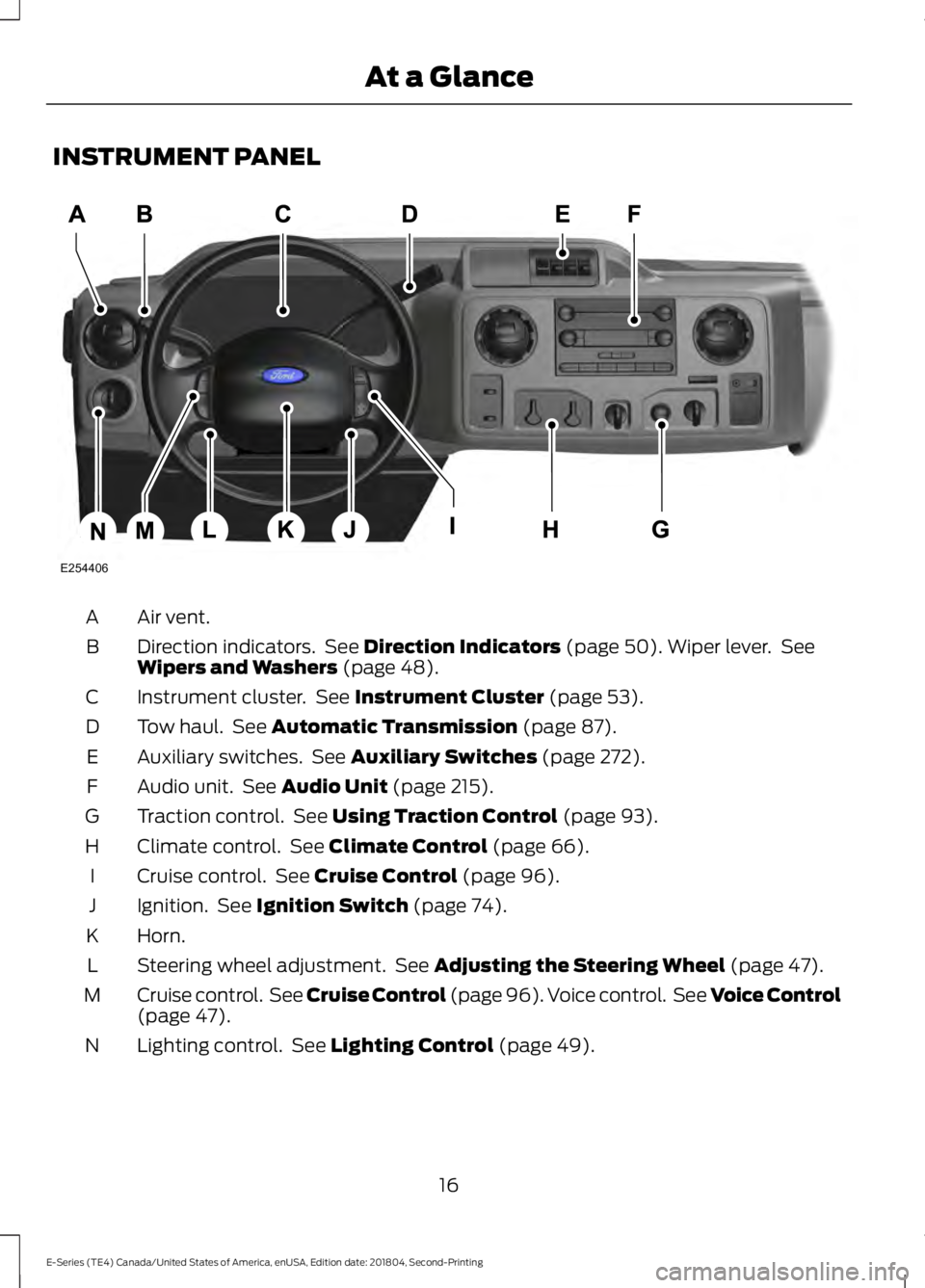
INSTRUMENT PANEL
Air vent.A
Direction indicators. See Direction Indicators (page 50). Wiper lever. SeeWipers and Washers (page 48).B
Instrument cluster. See Instrument Cluster (page 53).C
Tow haul. See Automatic Transmission (page 87).D
Auxiliary switches. See Auxiliary Switches (page 272).E
Audio unit. See Audio Unit (page 215).F
Traction control. See Using Traction Control (page 93).G
Climate control. See Climate Control (page 66).H
Cruise control. See Cruise Control (page 96).I
Ignition. See Ignition Switch (page 74).J
Horn.K
Steering wheel adjustment. See Adjusting the Steering Wheel (page 47).L
Cruise control. See Cruise Control (page 96). Voice control. See Voice Control(page 47).M
Lighting control. See Lighting Control (page 49).N
16
E-Series (TE4) Canada/United States of America, enUSA, Edition date: 201804, Second-Printing
At a GlanceE254406
Page 33 of 329
How to Disengage the AutomaticLocking Mode
Unbuckle the combination lap andshoulder belt and allow it to retractcompletely to disengage the automaticlocking mode and activate the vehiclesensitive (emergency) locking mode.
SEATBELT HEIGHT
ADJUSTMENT
WARNING: Position the safety beltheight adjuster so that the belt restsacross the middle of your shoulder.Failure to adjust the safety belt properlycould reduce the effectiveness of thesafety belt and increase the risk of injuryin a crash.
Adjust the height of the shoulder belt sothe belt rests across the middle of yourshoulder.
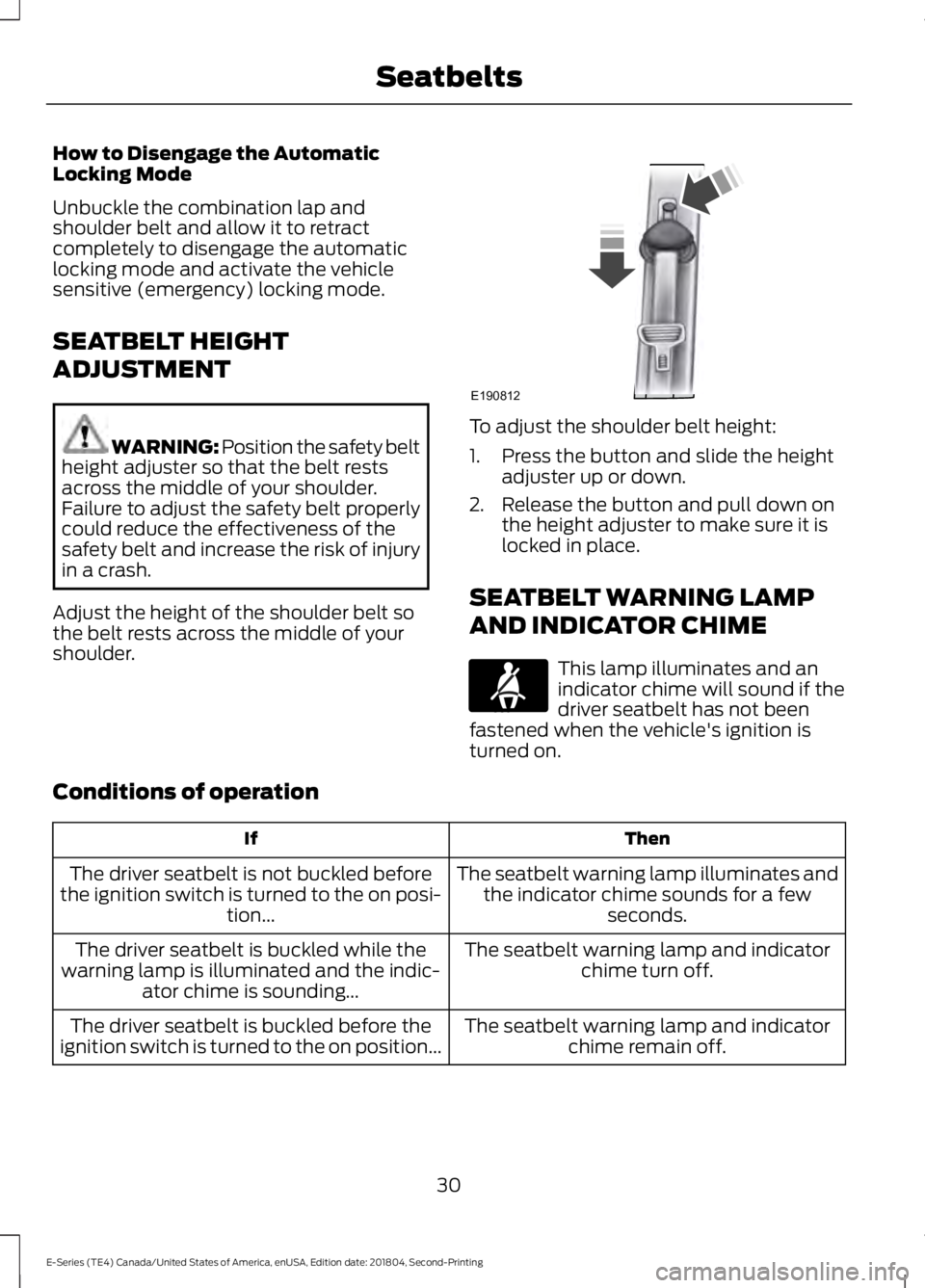
To adjust the shoulder belt height:
1. Press the button and slide the heightadjuster up or down.
2. Release the button and pull down onthe height adjuster to make sure it islocked in place.
SEATBELT WARNING LAMP
AND INDICATOR CHIME
This lamp illuminates and anindicator chime will sound if thedriver seatbelt has not beenfastened when the vehicle's ignition isturned on.
Conditions of operation
ThenIf
The seatbelt warning lamp illuminates andthe indicator chime sounds for a fewseconds.
The driver seatbelt is not buckled beforethe ignition switch is turned to the on posi-tion...
The seatbelt warning lamp and indicatorchime turn off.The driver seatbelt is buckled while thewarning lamp is illuminated and the indic-ator chime is sounding...
The seatbelt warning lamp and indicatorchime remain off.The driver seatbelt is buckled before theignition switch is turned to the on position...
30
E-Series (TE4) Canada/United States of America, enUSA, Edition date: 201804, Second-Printing
SeatbeltsE190812 E71880
Page 36 of 329
properly restrained or are otherwise out ofposition at the time of airbag deployment.Thus, it is extremely important thatoccupants be properly restrained as faraway from the airbag module as possiblewhile maintaining vehicle control.
Routine maintenance of the airbags is notrequired.
DRIVER AND PASSENGER
AIRBAGS
WARNING: Do not place your armson the airbag cover or through thesteering wheel. Failure to follow thisinstruction could result in personal injury.
WARNING: Do not place arearward facing child restraint in front ofan active airbag. Failure to follow thisinstruction could result in personal injuryor death.
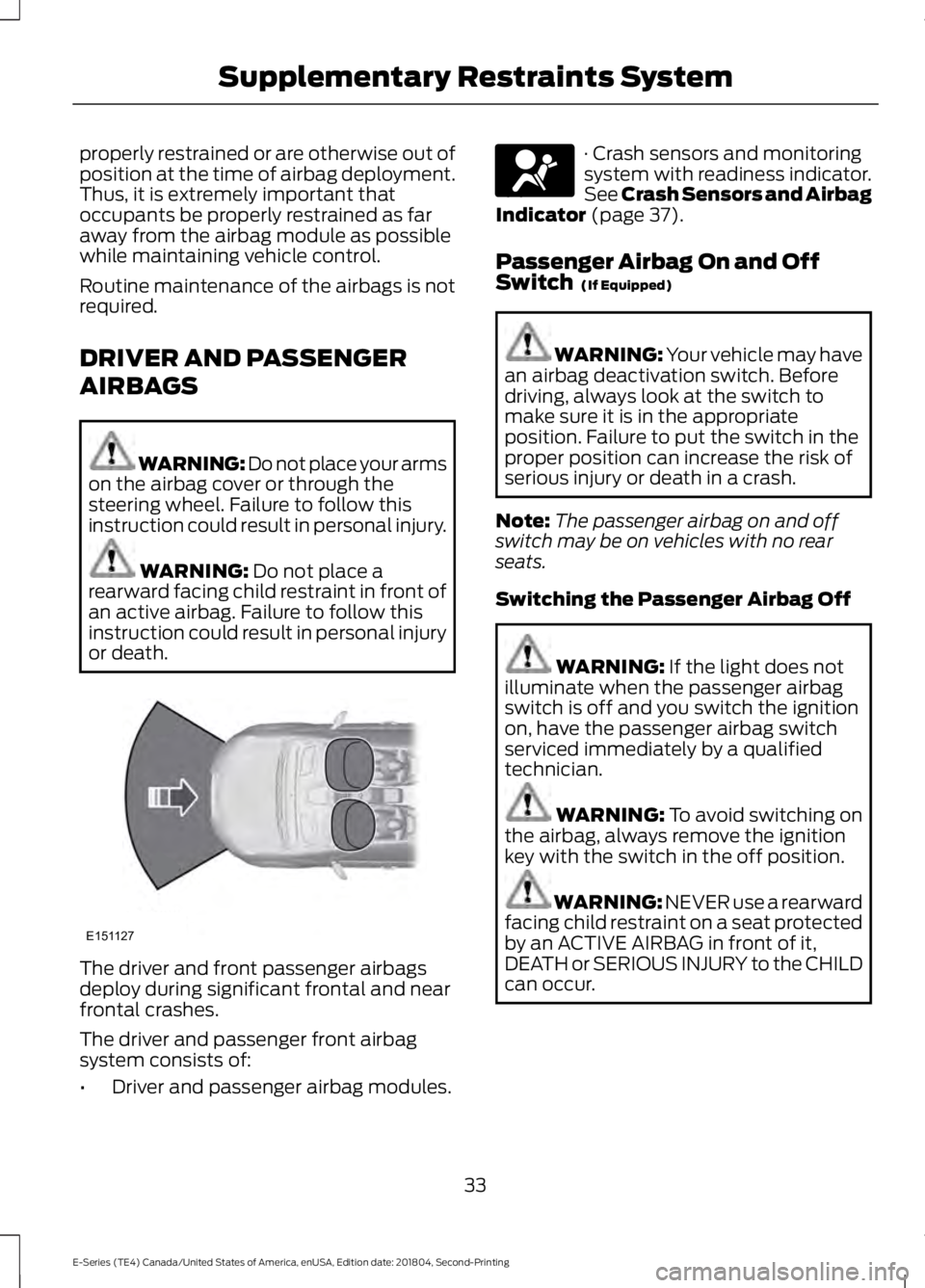
The driver and front passenger airbagsdeploy during significant frontal and nearfrontal crashes.
The driver and passenger front airbagsystem consists of:
•Driver and passenger airbag modules.
· Crash sensors and monitoringsystem with readiness indicator.See Crash Sensors and AirbagIndicator (page 37).
Passenger Airbag On and OffSwitch (If Equipped)
WARNING: Your vehicle may havean airbag deactivation switch. Beforedriving, always look at the switch tomake sure it is in the appropriateposition. Failure to put the switch in theproper position can increase the risk ofserious injury or death in a crash.
Note:The passenger airbag on and offswitch may be on vehicles with no rearseats.
Switching the Passenger Airbag Off
WARNING: If the light does notilluminate when the passenger airbagswitch is off and you switch the ignitionon, have the passenger airbag switchserviced immediately by a qualifiedtechnician.
WARNING: To avoid switching onthe airbag, always remove the ignitionkey with the switch in the off position.
WARNING: NEVER use a rearwardfacing child restraint on a seat protectedby an ACTIVE AIRBAG in front of it,DEATH or SERIOUS INJURY to the CHILDcan occur.
33
E-Series (TE4) Canada/United States of America, enUSA, Edition date: 201804, Second-Printing
Supplementary Restraints SystemE151127 E67017
Page 37 of 329
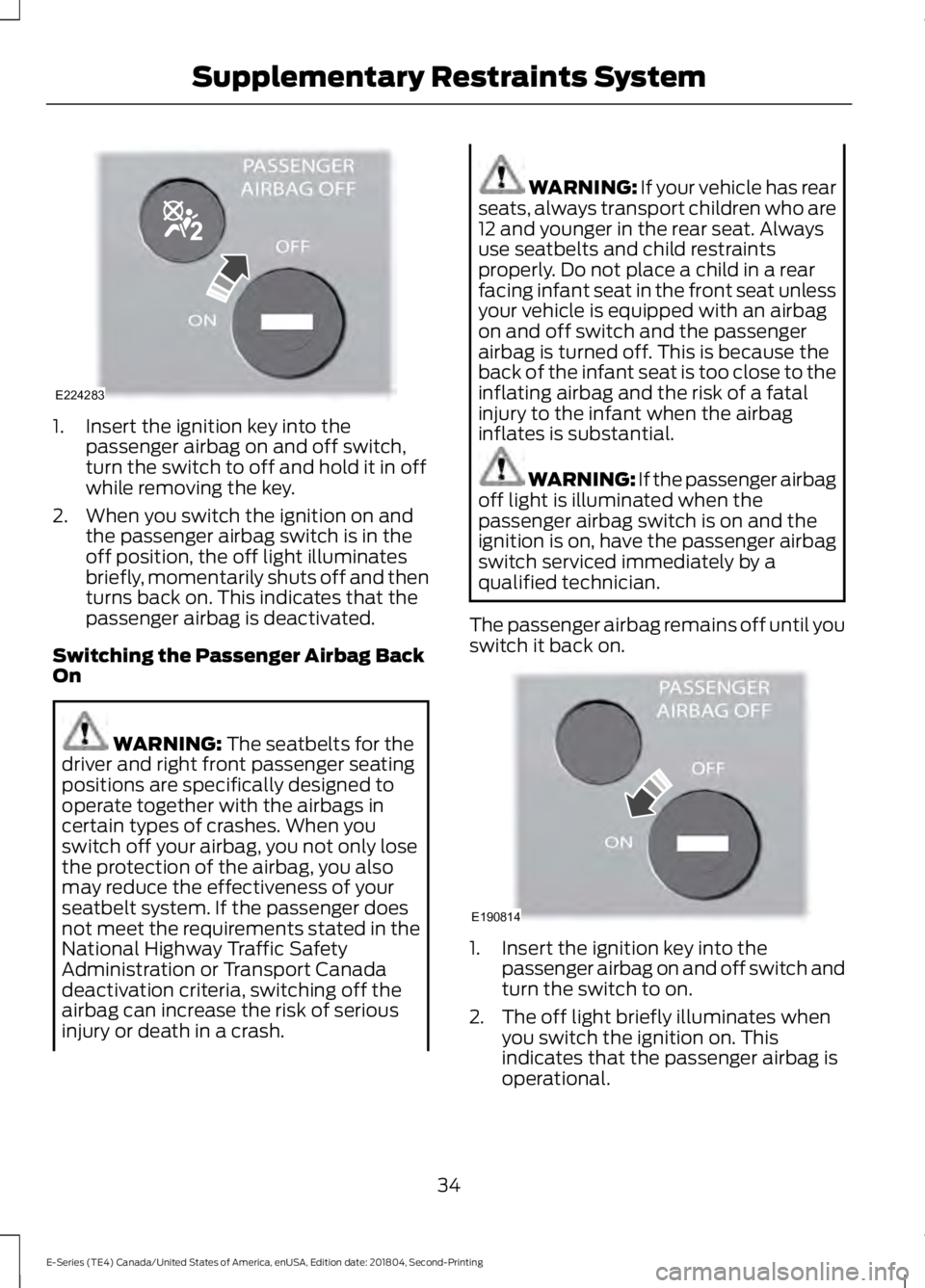
1. Insert the ignition key into thepassenger airbag on and off switch,turn the switch to off and hold it in offwhile removing the key.
2. When you switch the ignition on andthe passenger airbag switch is in theoff position, the off light illuminatesbriefly, momentarily shuts off and thenturns back on. This indicates that thepassenger airbag is deactivated.
Switching the Passenger Airbag BackOn
WARNING: The seatbelts for thedriver and right front passenger seatingpositions are specifically designed tooperate together with the airbags incertain types of crashes. When youswitch off your airbag, you not only losethe protection of the airbag, you alsomay reduce the effectiveness of yourseatbelt system. If the passenger doesnot meet the requirements stated in theNational Highway Traffic SafetyAdministration or Transport Canadadeactivation criteria, switching off theairbag can increase the risk of seriousinjury or death in a crash.
WARNING: If your vehicle has rearseats, always transport children who are12 and younger in the rear seat. Alwaysuse seatbelts and child restraintsproperly. Do not place a child in a rearfacing infant seat in the front seat unlessyour vehicle is equipped with an airbagon and off switch and the passengerairbag is turned off. This is because theback of the infant seat is too close to theinflating airbag and the risk of a fatalinjury to the infant when the airbaginflates is substantial.
WARNING: If the passenger airbagoff light is illuminated when thepassenger airbag switch is on and theignition is on, have the passenger airbagswitch serviced immediately by aqualified technician.
The passenger airbag remains off until youswitch it back on.
1. Insert the ignition key into thepassenger airbag on and off switch andturn the switch to on.
2. The off light briefly illuminates whenyou switch the ignition on. Thisindicates that the passenger airbag isoperational.
34
E-Series (TE4) Canada/United States of America, enUSA, Edition date: 201804, Second-Printing
Supplementary Restraints SystemE224283 E190814
Page 41 of 329
The restraints control module alsomonitors the readiness of the above safetydevices plus the crash sensors. Thereadiness of the safety system is indicatedby a warning indicator light in theinstrument cluster or by a backup tone ifthe warning light is not working. SeeInstrument Cluster (page 53). Routinemaintenance of the airbag is not required.
A difficulty with the system is indicated byone or more of the following:
The readiness light will notilluminate immediately after theignition is turned on.
•The readiness light will either flash orstay lit.
•A series of five beeps will be heard. Thetone pattern will repeat periodicallyuntil the problem, the light or both arerepaired.
If any of these things happen, evenintermittently, have the supplementalrestraint system serviced at an authorizeddealer immediately. Unless serviced, thesystem may not function properly in theevent of a crash.
The safety belt pretensioners and theairbag supplemental restraint system aredesigned to activate when the vehiclesustains frontal deceleration sufficient tocause the restraints control module todeploy a safety device.
The fact that the safety belt pretensionersor airbags did not activate in a crash doesnot mean that something is wrong with thesystem. Rather, it means the restraintscontrol module determined the accidentconditions (such as crash severity, beltusage) were not appropriate to activatethese safety devices.
•The design of the front airbags is toactivate only in frontal and near-frontalcrashes (not rollovers, side impacts orrear impacts) unless the crash causessufficient frontal deceleration.
•The design of the safety beltpretensioners is to activate in frontalor near-frontal crashes and may deployin rollovers if the vehicle is equippedwith roll stability control.
AIRBAG DISPOSAL
Contact your authorized dealer as soon aspossible. Airbags must be disposed of byqualified personnel.
38
E-Series (TE4) Canada/United States of America, enUSA, Edition date: 201804, Second-Printing
Supplementary Restraints SystemE67017
Page 43 of 329
Reprogramming the RemoteControl
You must have all remote controls readilyaccessible before beginning thisprocedure. Any remote control that is notpresent during the programming procedurewill no longer operate your vehicle.
Note:You can program a maximum of fourcoded keys to your vehicle.
Note:Do not apply the brake pedal duringthis procedure.
1. Switch the ignition from off to on 8times within 10 seconds, finishing in theon position. The doors lock then unlockto confirm that programming hasstarted.
2.Press any button on the remote controlthat you want to program within 20seconds. The doors lock then unlockto confirm that programming wassuccessful.
3. Repeat step 2 to program eachadditional remote control.
4.After you have programmed all remotecontrols, switch the ignition off.
5. The doors lock then unlock to confirmthat programming is complete.
Changing the Remote ControlBattery
The remote control uses one coin-typethree-volt lithium battery CR2032 orequivalent.
Make sure that you dispose ofold batteries in anenvironmentally friendly way.Seek advice from your local authorityabout recycling old batteries.
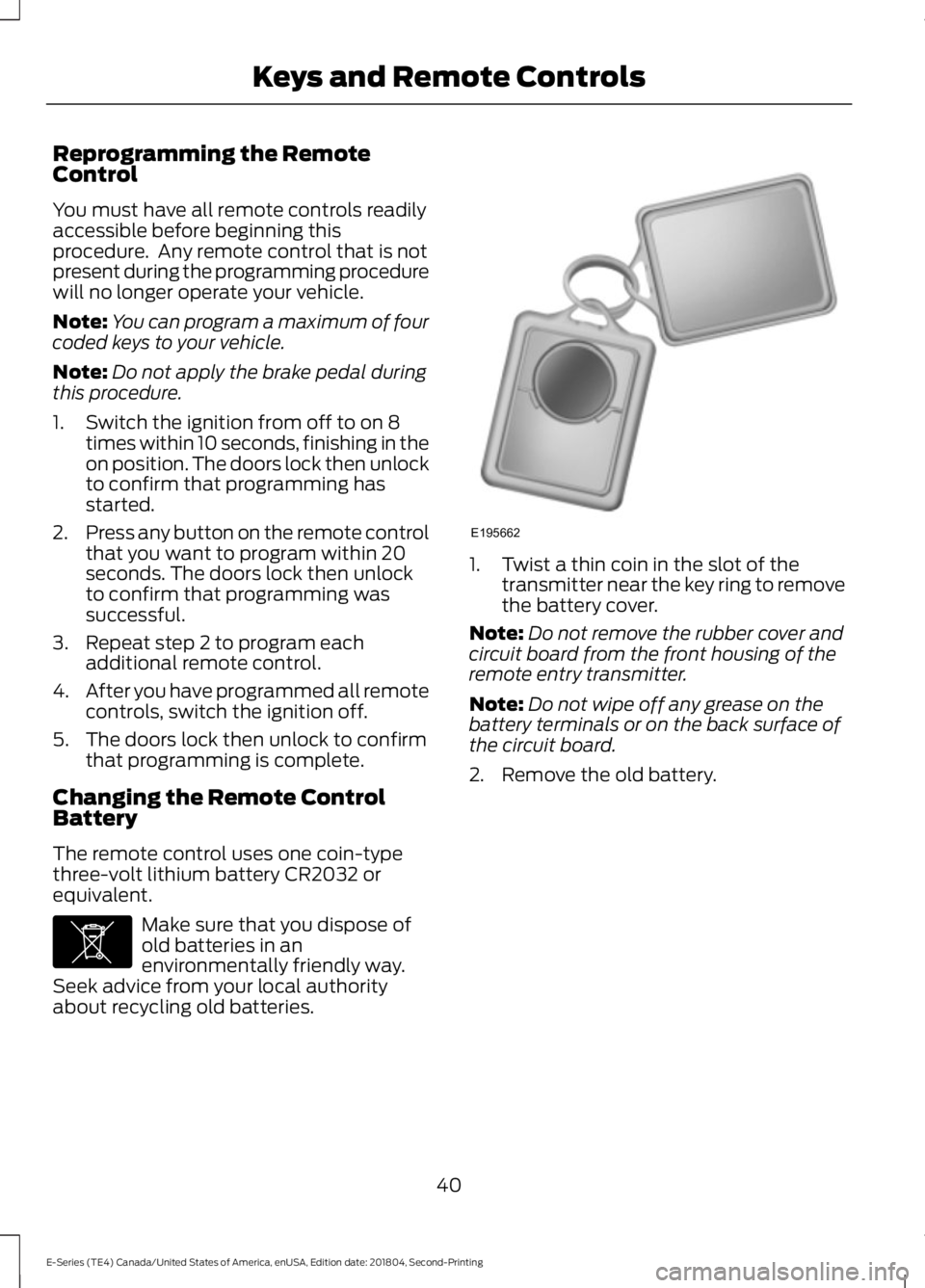
1. Twist a thin coin in the slot of thetransmitter near the key ring to removethe battery cover.
Note:Do not remove the rubber cover andcircuit board from the front housing of theremote entry transmitter.
Note:Do not wipe off any grease on thebattery terminals or on the back surface ofthe circuit board.
2. Remove the old battery.
40
E-Series (TE4) Canada/United States of America, enUSA, Edition date: 201804, Second-Printing
Keys and Remote ControlsE107998 E195662
Page 44 of 329
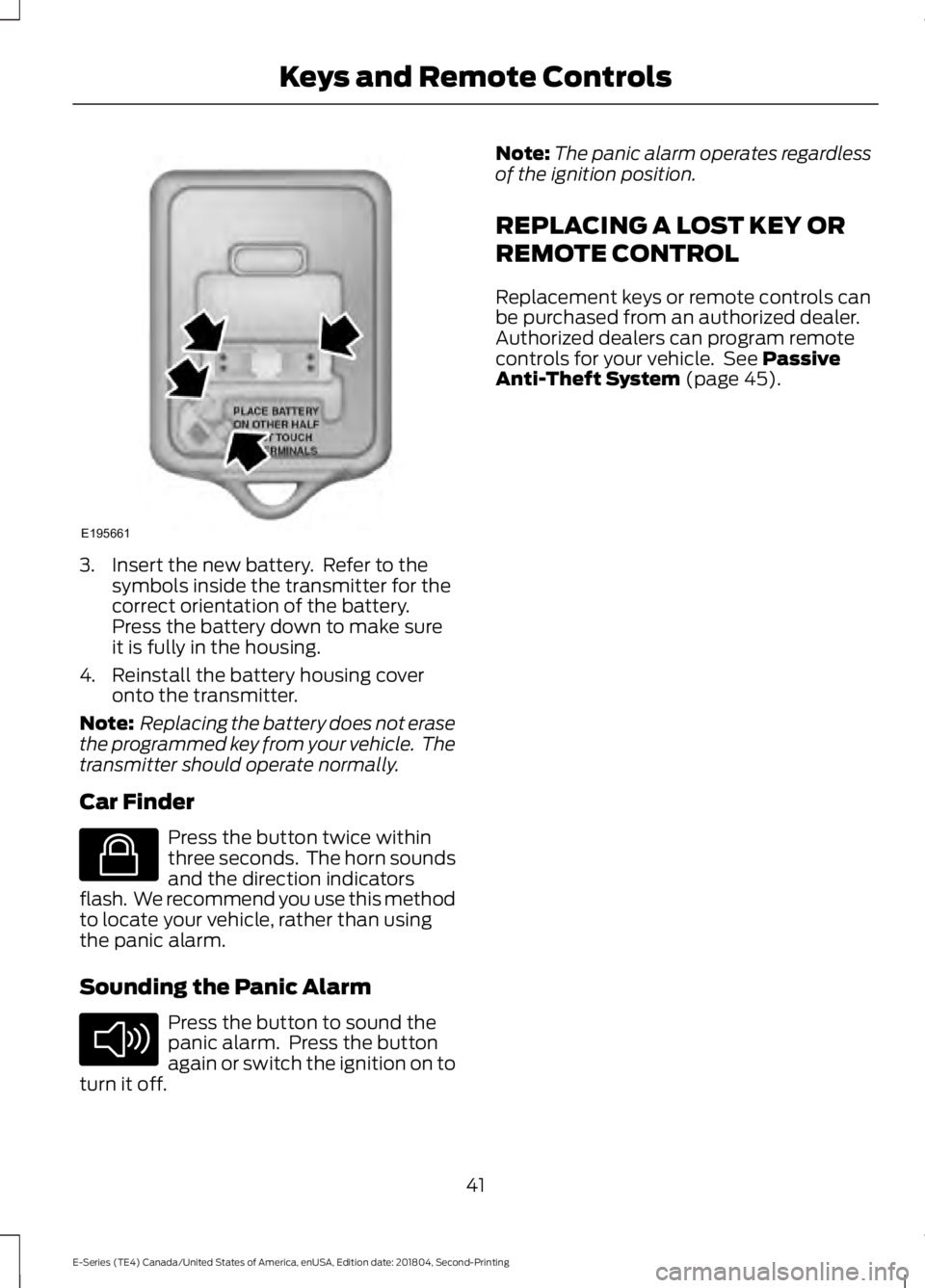
3. Insert the new battery. Refer to thesymbols inside the transmitter for thecorrect orientation of the battery.Press the battery down to make sureit is fully in the housing.
4. Reinstall the battery housing coveronto the transmitter.
Note: Replacing the battery does not erasethe programmed key from your vehicle. Thetransmitter should operate normally.
Car Finder
Press the button twice withinthree seconds. The horn soundsand the direction indicatorsflash. We recommend you use this methodto locate your vehicle, rather than usingthe panic alarm.
Sounding the Panic Alarm
Press the button to sound thepanic alarm. Press the buttonagain or switch the ignition on toturn it off.
Note:The panic alarm operates regardlessof the ignition position.
REPLACING A LOST KEY OR
REMOTE CONTROL
Replacement keys or remote controls canbe purchased from an authorized dealer.Authorized dealers can program remotecontrols for your vehicle. See PassiveAnti-Theft System (page 45).
41
E-Series (TE4) Canada/United States of America, enUSA, Edition date: 201804, Second-Printing
Keys and Remote ControlsE195661 E138623 E138624
Page 45 of 329
LOCKING AND UNLOCKING
You can use the power door lock controlor the remote control to lock and unlockyour vehicle.
Power Door Locks (If Equipped)
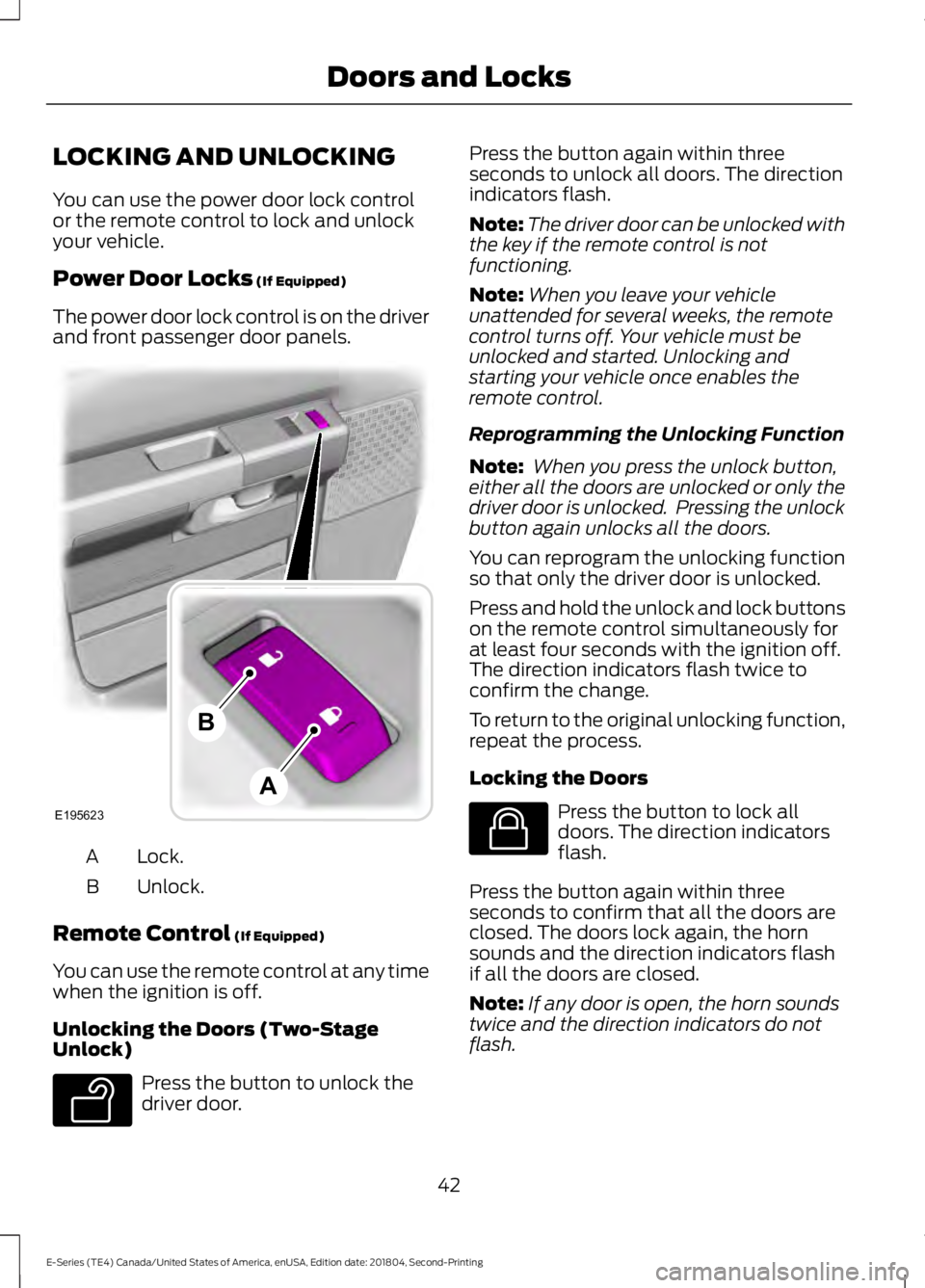
The power door lock control is on the driverand front passenger door panels.
Lock.A
Unlock.B
Remote Control (If Equipped)
You can use the remote control at any timewhen the ignition is off.
Unlocking the Doors (Two-StageUnlock)
Press the button to unlock thedriver door.
Press the button again within threeseconds to unlock all doors. The directionindicators flash.
Note:The driver door can be unlocked withthe key if the remote control is notfunctioning.
Note:When you leave your vehicleunattended for several weeks, the remotecontrol turns off. Your vehicle must beunlocked and started. Unlocking andstarting your vehicle once enables theremote control.
Reprogramming the Unlocking Function
Note: When you press the unlock button,either all the doors are unlocked or only thedriver door is unlocked. Pressing the unlockbutton again unlocks all the doors.
You can reprogram the unlocking functionso that only the driver door is unlocked.
Press and hold the unlock and lock buttonson the remote control simultaneously forat least four seconds with the ignition off.The direction indicators flash twice toconfirm the change.
To return to the original unlocking function,repeat the process.
Locking the Doors
Press the button to lock alldoors. The direction indicatorsflash.
Press the button again within threeseconds to confirm that all the doors areclosed. The doors lock again, the hornsounds and the direction indicators flashif all the doors are closed.
Note:If any door is open, the horn soundstwice and the direction indicators do notflash.
42
E-Series (TE4) Canada/United States of America, enUSA, Edition date: 201804, Second-Printing
Doors and LocksE195623
A
B E138629 E138623
Page 46 of 329
Autolock Feature
The autolock feature locks all the doorswhen:
•All doors are closed.
•The ignition is on.
•You shift into any gear putting yourvehicle in motion.
•The ignition is on, all the doors areclosed and your vehicle has been inmotion at a speed greater than 12 mph(20 km/h).
Autounlock Feature
The autounlock feature unlocks all thedoors when:
•Your vehicle comes to a stop and youswitch the ignition off or to accessory.
•You open the driver door within 10minutes of switching the ignition off orto accessory.
Note:If you electronically lock your vehicleafter you switch the ignition off with thedriver door closed, the doors do notautounlock.
Enabling or Disabling Autolock andAutounlock
You can enable or disable the autolock andautounlock features independently of eachother.
To enable or disable autolock, do thefollowing:
1. Switch the ignition on.
2. Press the power door unlock controlthree times.
3. Switch the ignition off.
4. Press the power door unlock controlthree times.
5.Switch the ignition on. The horn soundsindicating your vehicle is inprogramming mode.
6. Press the power door unlock controland within five seconds, press thepower door lock control. The hornsounds once if disabled or twice ifenabled.
7.Switch the ignition off. The horn soundsindicating programming is complete.
Note:You can also switch this feature onor off using the information display. SeeInformation Displays (page 58).
To enable or disable autounlock, do thefollowing:
1. Switch the ignition on.
2. Press the power door unlock controlthree times.
3. Switch the ignition off.
4. Press the power door unlock controlthree times.
5.Switch the ignition on. The horn soundsindicating your vehicle is inprogramming mode.
6. Press the power door lock control andwithin five seconds, press the powerdoor unlock control. The horn soundsonce if disabled or twice if enabled.
7.Switch the ignition off. The horn soundsindicating programming is complete.
Note:You can also switch this feature onor off using the information display. SeeInformation Displays (page 58).
Illuminated Entry
The interior lamps and some exteriorlamps illuminate when you unlock thedoors with the remote control.
The lamps turn off if:
•The ignition is on.
•You press the remote control lockbutton.
•25 seconds have elapsed.
43
E-Series (TE4) Canada/United States of America, enUSA, Edition date: 201804, Second-Printing
Doors and Locks