reset FORD E SERIES 2019 Owner's Manual
[x] Cancel search | Manufacturer: FORD, Model Year: 2019, Model line: E SERIES, Model: FORD E SERIES 2019Pages: 329, PDF Size: 2.92 MB
Page 195 of 329
3. Cycle the ignition to the on positionwith the engine off.
4. Turn the hazard flashers on then offthree times. You must accomplish thiswithin 10 seconds. If you successfullyenter the reset mode, the horn soundsonce, the system indicator flashes anda message shows in the informationdisplay. If this does not occur, pleasetry again starting at step 2. If afterrepeated attempts to enter the resetmode, the horn does not sound, thesystem indicator does not flash and nomessage shows in the informationdisplay, have the system checked assoon as possible.
5. Train the tire pressure monitoringsystem sensors in the tires using thefollowing system reset sequencestarting with the left front tire in thefollowing clockwise order: Left front -driver side front tire, Right front -passenger side front tire, Right rear -passenger side rear tire, Left rear -driver side rear tire.
6. Remove the valve cap from the valvestem on the left front tire. Decrease theair pressure until the horn sounds.
Note:The single horn tone confirms thatthe sensor identification code has beenlearned by the module for this position. Ifyou hear a double horn, the reset procedurewas unsuccessful, and you must repeat it.
7. Remove the valve cap from the valvestem on the right front tire. Decreasethe air pressure until the horn sounds.
8. Remove the valve cap from the valvestem on the right rear tire. Decrease theair pressure until the horn sounds.
9. Remove the valve cap from the valvestem on the left rear tire. Decrease theair pressure until the horn sounds.Training is complete after the hornsounds for the last tire trained, driverside rear tire, the system indicatorstops flashing, and a message showsin the information display.
10. Turn the ignition off. If you hear twoshort tones, the reset procedure wasunsuccessful and you must repeat it.If you hear two short beeps when theignition is off after repeating theprocedure, have the system checkedas soon as possible
11.Set all four tires to the recommendedair pressure as indicated on theSafety Compliance CertificationLabel, affixed to either the door hingepillar, door-latch post, or the dooredge that meets the door-latch post,next to the driver seating position orTire Label located on the B-Pillar orthe edge of the driver door.
CHANGING A ROAD WHEEL
WARNING: To determine therequired pressure(s) for your vehicle, seethe Safety Compliance CertificationLabel (on the door hinge pillar,door-latch post or the door edge thatmeets the door-latch post, next to thedriver seat) or the Tire Label on theB-Pillar or the edge of the driver door.
Note:You should only use tire sealants inroadside emergencies as they may causedamage to the tire pressure monitoringsystem sensor.
192
E-Series (TE4) Canada/United States of America, enUSA, Edition date: 201804, Second-Printing
Wheels and Tires
Page 219 of 329
Accessing the Sound Settings
Press and release to accesssettings for Treble, Midrange,Bass, Fade and Balance.
Adjusting the Volume
Turn to adjust the volume.
Changing Radio Stations
In radio mode, press and release eitherbutton to search through the radiofrequency band.
Selecting the Audio Modes
Press and release to accessdifferent audio modes, forexample AM, FM and auxiliaryinput jack.
Setting the Memory Presets
To store a radio station, tune to the station,then press and hold a numbered presetbutton until sound returns.
Switching the Audio Unit On andOff
Press and release the volume dial.
Using Seek, Fast Forward andReverse
Press and release to select afrequency band. The systemstops at the first station it findsin that direction.
AUDIO UNIT - VEHICLES WITH:
AM/FM/CD/SYNC
WARNING: Driving whiledistracted can result in loss of vehiclecontrol, crash and injury. We stronglyrecommend that you use extremecaution when using any device that maytake your focus off the road. Yourprimary responsibility is the safeoperation of your vehicle. Werecommend against the use of anyhand-held device while driving andencourage the use of voice-operatedsystems when possible. Make sure youare aware of all applicable local lawsthat may affect the use of electronicdevices while driving.
Accessing the Auxiliary MediaSources
Press and release to access orswitch between media devices.
216
E-Series (TE4) Canada/United States of America, enUSA, Edition date: 201804, Second-Printing
Audio SystemE266185 E265290 E265304 E266187 E266186 E265934 E265273 E265277
Page 220 of 329
Accessing CD or MP3 Mode
Press and release the button.
Accessing the Folders
Press and release the buttons toaccess the next and previousfolders on an MP3 disc.
Accessing the Menu
Press and release to accessdifferent audio system features.
•To set the clock, press MENU until SETHOURS or SET MINUTES appearsand use the up and down arrow toadjust the time.
•To set the strongest stations on theradio frequency, press MENU untilAUTOSET appears. This does notoverride your original presets.
•RBDS displays text transmitted bycertain radio stations and searchesfor music categories.
•When RBDS ON/OFF appears, pressSEEK to switch on RBDS to search formusic categories. Press the up anddown arrow to scroll throughcategories, then press SEEK to beginthe search.
•SPEEDVOL allows you to adjustradio volume to compensate fornoise levels when vehicle speedincreases.
•Track/Folder is only available on MP3files when in CD mode. In track mode,press SEEK to scroll through all thetracks on the disc. In folder mode, pressSEEK to scroll through all the trackswithin the selected folder. PressFOLDER to access other folders.
•COMPRESS is only available in CDand MP3 modes. Switching oncompression brings the soft andloud passages together for a moreconsistent listening level.
•To switch compression on and off,press SEEK and the up and downarrow.
Accessing the Phone Features
Press and release to access thephone features of the SYNCsystem.
Adjusting the Volume
Turn to adjust the volume.
217
E-Series (TE4) Canada/United States of America, enUSA, Edition date: 201804, Second-Printing
Audio SystemE265039 E265913 E265038 E265290 E265304
Page 221 of 329
Changing Radio Stations
In radio mode, press and release eitherbutton to search through the radiofrequency band.
In satellite radio mode, press and releaseto find the previous or next availablesatellite radio station.
Ejecting the CD
Press and release to eject a CD.
Fast Forwarding the Media
Press and release to fast forwarda CD track or MP3 file.
Rewinding the Media
Press and release to rewind a CDtrack or MP3 file.
Inserting a CD
Insert a CD into the CD slot.
Muting the Audio
Press and release to mute theplaying audio.
Playing or Pausing Media
Press and release to either playor pause the audio.
Scanning the Audio
In radio, CD and MP3 modes, press andhold to hear a brief sampling of radiostations, CD tracks or MP3 files. In CD andMP3 modes, press and release to displaytrack title, artist name and disc title. In textmode, the display may require additionaltext to show. When the < / > indicator ison, press TEXT and then press SEEK toview the additional display text.
Selecting a Frequency Band
Press and release to select afrequency band.
Setting the Memory Presets
To store a radio station, tune to the station,then press and hold a numbered presetbutton until sound returns.
Switching the Audio Unit On andOff
Press and release the volume dial.
Switching Shuffle Mode On andOff
Press and release the button toplay music on the selected CDor MP3 folder in random order.
218
E-Series (TE4) Canada/United States of America, enUSA, Edition date: 201804, Second-Printing
Audio SystemE266187 E266186 E265032 E265914 E265915 E265043 E265911 E265910 E265934 E265912
Page 222 of 329
Using Seek, Fast Forward andReverse
In radio mode, select a frequency band andpress and release either button. Thesystem stops at the first station it finds inthat direction.
In CD mode, press and release to selectthe next or previous track. Press and holdto move quickly forward or backwardthrough the current track.
In satellite radio mode, press and releaseto select the next or previous satellite radiostation. If you select a specific category(such as jazz, rock or news), press to findthe next or previous station in the categoryyou select.
DIGITAL RADIO (IF EQUIPPED)
Note:HD Radio broadcasts are notavailable in all markets.
HD Radio technology is the digitalevolution of analog AM/FM radio. Yoursystem has a special receiver that allowsit to receive digital broadcasts (whereavailable) in addition to the analogbroadcasts, it already receives. Digitalbroadcasts provide a better sound qualitythan analog broadcasts with free,crystal-clear audio and no static ordistortion. For more information, and aguide to available stations andprogramming, please visitwww.hdradio.com.
When HD Radio is on and you tune to astation broadcasting HD Radio technology,you may notice the HD Radio logo on yourscreen. When this logo is available, youmay also see Title and Artist fieldson-screen.
The multicast indicator appears in FMmode (only) if the current station isbroadcasting multiple digital broadcasts.The highlighted numbers signify availabledigital channels where new or differentcontent is available. HD1 signifies the mainprogramming status and is available inanalog and digital broadcasts. Othermulticast stations (HD2 through HD7) areonly available digitally.
When HD Radio broadcasts are active, youcan access the following functions:
•Scan allows you to hear a briefsampling of all available stations. Thisfeature still works when HD Radioreception is on, although it does notscan for HD2-HD7 channels. You maysee the HD logo appear if the stationhas a digital broadcast.
•Memory presets allow you to save anactive channel as a memory preset.Touch and hold a memory preset slotuntil the sound returns. There is a briefmute while the radio saves the station.Sound returns when finished. Whenswitching to an HD2 or HD3 memorypreset, the sound mutes before thedigital audio plays, because the systemhas to reacquire the digital signal.
Note:As with any saved radio station, youcannot access a station you save if yourvehicle is outside the station’s receptionarea.
219
E-Series (TE4) Canada/United States of America, enUSA, Edition date: 201804, Second-Printing
Audio SystemE265273
Page 224 of 329
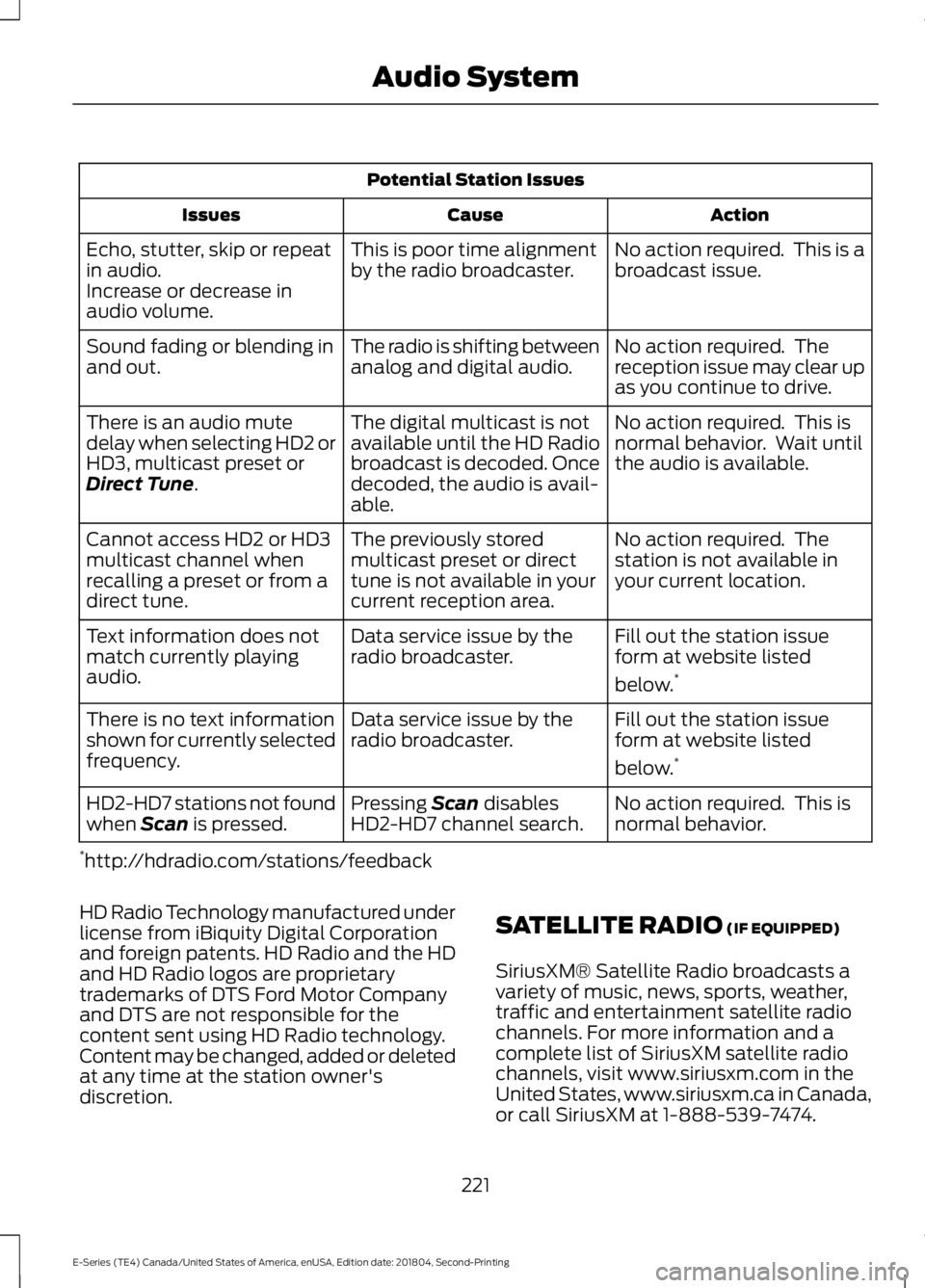
Potential Station Issues
ActionCauseIssues
No action required. This is abroadcast issue.This is poor time alignmentby the radio broadcaster.Echo, stutter, skip or repeatin audio.Increase or decrease inaudio volume.
No action required. Thereception issue may clear upas you continue to drive.
The radio is shifting betweenanalog and digital audio.Sound fading or blending inand out.
No action required. This isnormal behavior. Wait untilthe audio is available.
The digital multicast is notavailable until the HD Radiobroadcast is decoded. Oncedecoded, the audio is avail-able.
There is an audio mutedelay when selecting HD2 orHD3, multicast preset orDirect Tune.
No action required. Thestation is not available inyour current location.
The previously storedmulticast preset or directtune is not available in yourcurrent reception area.
Cannot access HD2 or HD3multicast channel whenrecalling a preset or from adirect tune.
Fill out the station issueform at website listed
below.*
Data service issue by theradio broadcaster.Text information does notmatch currently playingaudio.
Fill out the station issueform at website listed
below.*
Data service issue by theradio broadcaster.There is no text informationshown for currently selectedfrequency.
No action required. This isnormal behavior.Pressing Scan disablesHD2-HD7 channel search.HD2-HD7 stations not foundwhen Scan is pressed.
*http://hdradio.com/stations/feedback
HD Radio Technology manufactured underlicense from iBiquity Digital Corporationand foreign patents. HD Radio and the HDand HD Radio logos are proprietarytrademarks of DTS Ford Motor Companyand DTS are not responsible for thecontent sent using HD Radio technology.Content may be changed, added or deletedat any time at the station owner'sdiscretion.
SATELLITE RADIO (IF EQUIPPED)
SiriusXM® Satellite Radio broadcasts avariety of music, news, sports, weather,traffic and entertainment satellite radiochannels. For more information and acomplete list of SiriusXM satellite radiochannels, visit www.siriusxm.com in theUnited States, www.siriusxm.ca in Canada,or call SiriusXM at 1-888-539-7474.
221
E-Series (TE4) Canada/United States of America, enUSA, Edition date: 201804, Second-Printing
Audio System
Page 226 of 329
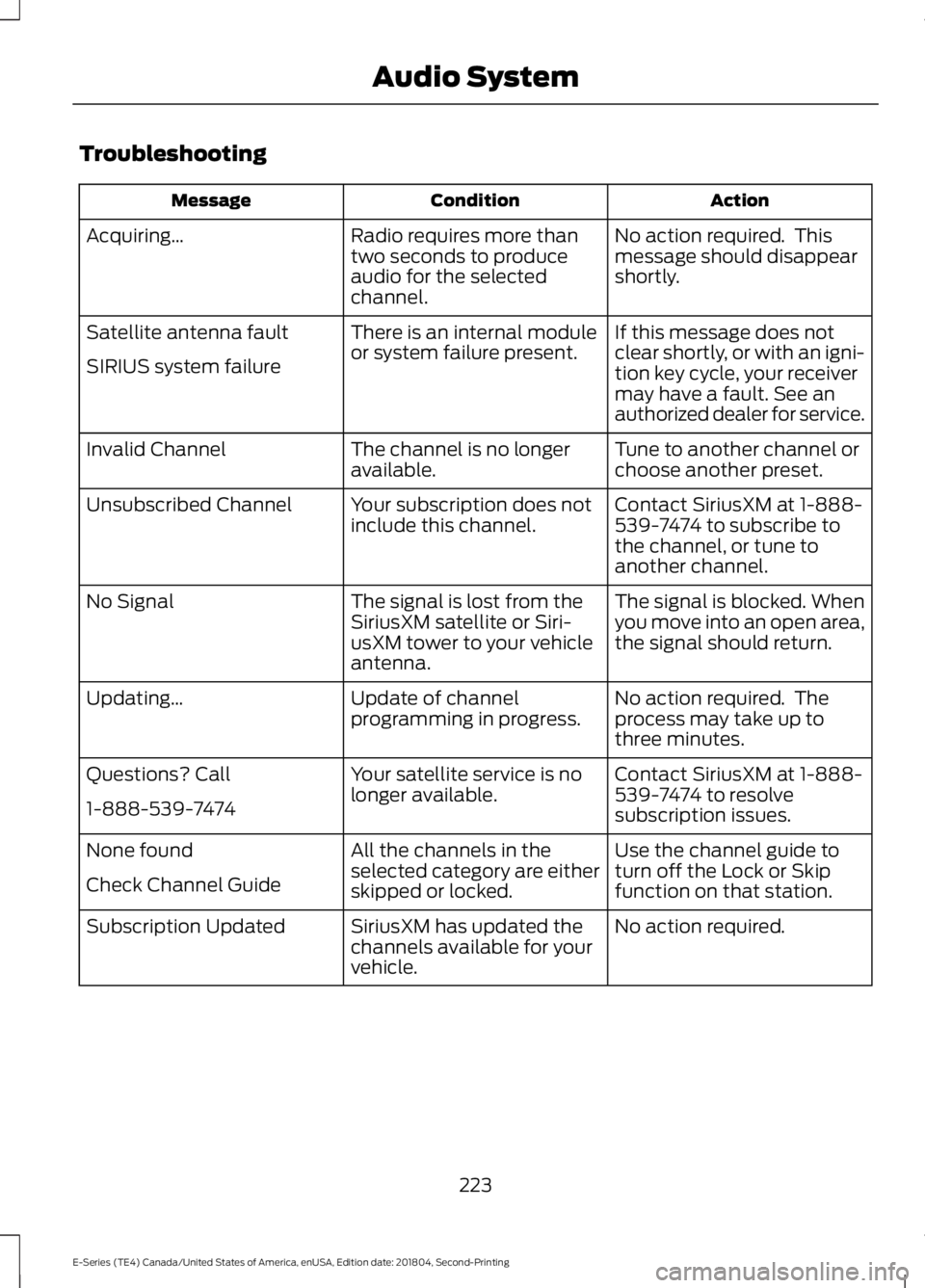
Troubleshooting
ActionConditionMessage
No action required. Thismessage should disappearshortly.
Radio requires more thantwo seconds to produceaudio for the selectedchannel.
Acquiring…
If this message does notclear shortly, or with an igni-tion key cycle, your receivermay have a fault. See anauthorized dealer for service.
There is an internal moduleor system failure present.Satellite antenna fault
SIRIUS system failure
Tune to another channel orchoose another preset.The channel is no longeravailable.Invalid Channel
Contact SiriusXM at 1-888-539-7474 to subscribe tothe channel, or tune toanother channel.
Your subscription does notinclude this channel.Unsubscribed Channel
The signal is blocked. Whenyou move into an open area,the signal should return.
The signal is lost from theSiriusXM satellite or Siri-usXM tower to your vehicleantenna.
No Signal
No action required. Theprocess may take up tothree minutes.
Update of channelprogramming in progress.Updating…
Contact SiriusXM at 1-888-539-7474 to resolvesubscription issues.
Your satellite service is nolonger available.Questions? Call
1-888-539-7474
Use the channel guide toturn off the Lock or Skipfunction on that station.
All the channels in theselected category are eitherskipped or locked.
None found
Check Channel Guide
No action required.SiriusXM has updated thechannels available for yourvehicle.
Subscription Updated
223
E-Series (TE4) Canada/United States of America, enUSA, Edition date: 201804, Second-Printing
Audio System
Page 230 of 329
The cellular profile, media device index,and development log will remain in thevehicle unless you delete them and aregenerally accessible only in the vehiclewhen the cellular phone or media playeris connected. If you no longer plan to usethe system or the vehicle, we recommendyou perform a Master Reset to erase allstored information.
System data cannot be accessed withoutspecial equipment and access to thevehicle's SYNC module. Ford MotorCompany and Ford of Canada will notaccess the system data for any purposeother than as described absent consent, acourt order, or where required by lawenforcement, other governmentauthorities, or other third parties actingwith lawful authority. Other parties mayseek to access the informationindependently of Ford Motor Company andFord of Canada. For further privacyinformation, see the sections on 911 Assist,Vehicle Health Report, and Traffic,Directions and Information.
USING VOICE RECOGNITION
This system helps you control manyfeatures using voice commands. Thisallows you to keep your hands on thewheel and focus on what is in front of you.
Helpful Hints
•Make sure the interior of your vehicle isas quiet as possible. Wind noise fromopen windows and road vibrations mayprevent the system from correctlyrecognizing spoken commands.
•After pressing the voice button, waituntil after the tone sounds andListening appears before saying acommand. Any command spokenbefore this does not register with thesystem.
•Speak naturally, without long pausesbetween words.
•At any time, you can interrupt thesystem while it is speaking by pressingthe voice button.
Initiating a Voice Session
Initiate a voice session bypressing the voice button on thesteering wheel controls. SeeVoice Control (page 47).
When prompted you can say any of the following:
If you want the system to carry out the followingVoice command
Stream audio from your phone.Bluetooth Audio
Cancel the requested action.Cancel
Access mobile applications.mobile (apps | applica-tions)
Make calls.Phone
Access the device connected to your USB port.USB [1]
Run a vehicle health report.Vehicle Health (Report)
227
E-Series (TE4) Canada/United States of America, enUSA, Edition date: 201804, Second-Printing
SYNC™E142599
Page 244 of 329
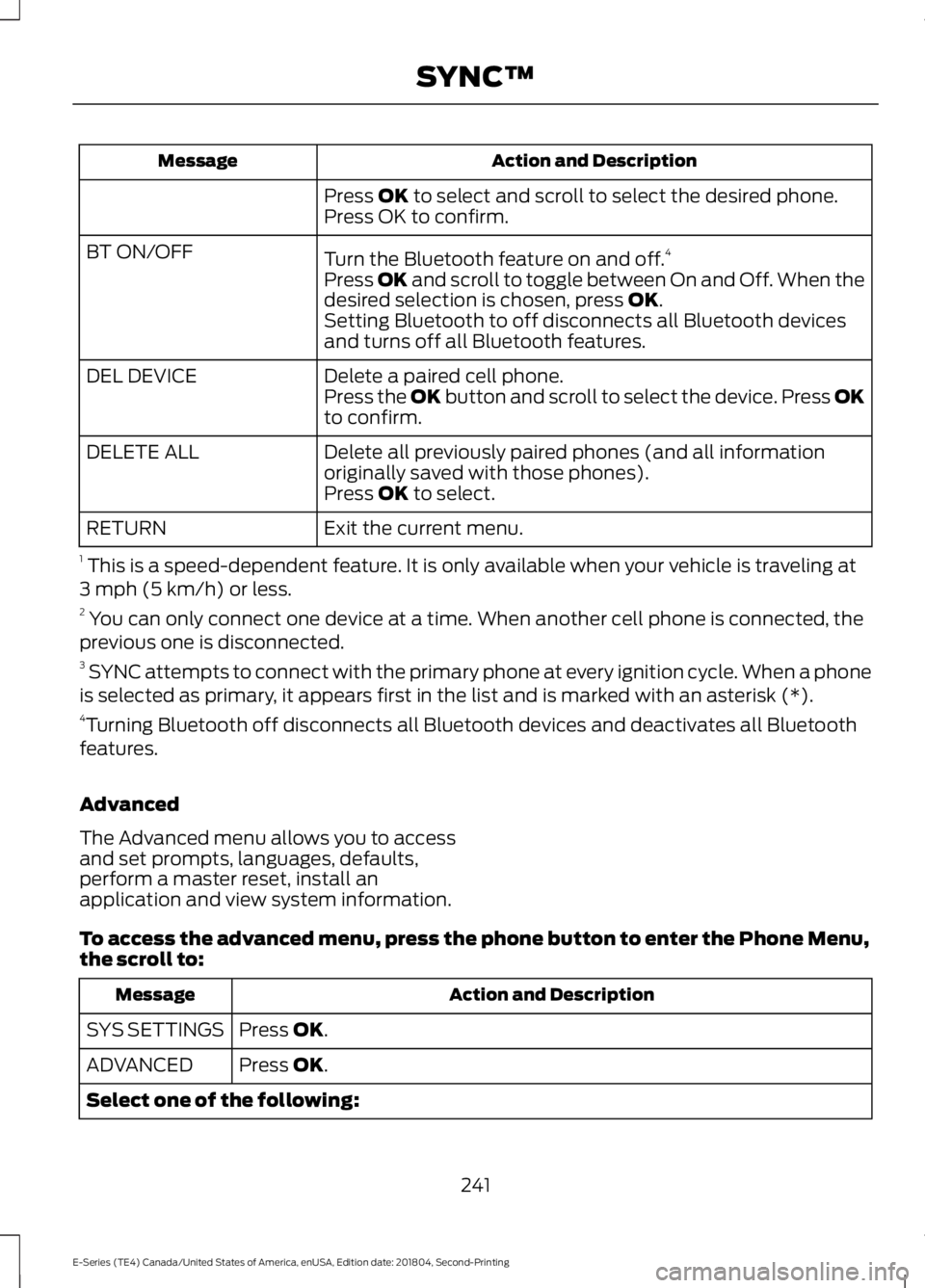
Action and DescriptionMessage
Press OK to select and scroll to select the desired phone.Press OK to confirm.
Turn the Bluetooth feature on and off.4BT ON/OFF
Press OK and scroll to toggle between On and Off. When thedesired selection is chosen, press OK.Setting Bluetooth to off disconnects all Bluetooth devicesand turns off all Bluetooth features.
Delete a paired cell phone.DEL DEVICEPress the OK button and scroll to select the device. Press OKto confirm.
Delete all previously paired phones (and all informationoriginally saved with those phones).DELETE ALL
Press OK to select.
Exit the current menu.RETURN
1 This is a speed-dependent feature. It is only available when your vehicle is traveling at3 mph (5 km/h) or less.2 You can only connect one device at a time. When another cell phone is connected, theprevious one is disconnected.3 SYNC attempts to connect with the primary phone at every ignition cycle. When a phoneis selected as primary, it appears first in the list and is marked with an asterisk (*).4Turning Bluetooth off disconnects all Bluetooth devices and deactivates all Bluetoothfeatures.
Advanced
The Advanced menu allows you to accessand set prompts, languages, defaults,perform a master reset, install anapplication and view system information.
To access the advanced menu, press the phone button to enter the Phone Menu,the scroll to:
Action and DescriptionMessage
Press OK.SYS SETTINGS
Press OK.ADVANCED
Select one of the following:
241
E-Series (TE4) Canada/United States of America, enUSA, Edition date: 201804, Second-Printing
SYNC™
Page 245 of 329
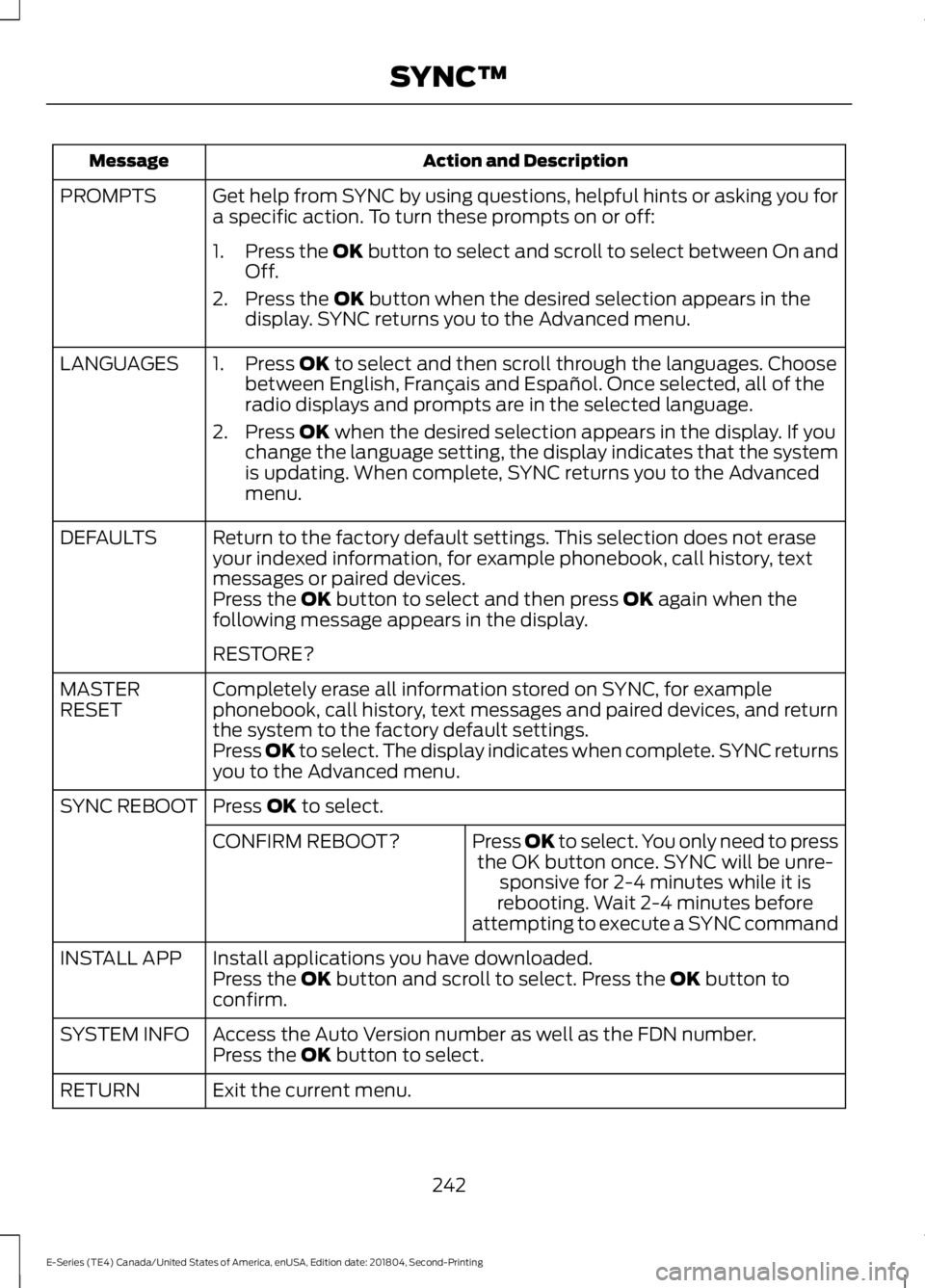
Action and DescriptionMessage
Get help from SYNC by using questions, helpful hints or asking you fora specific action. To turn these prompts on or off:PROMPTS
1.Press the OK button to select and scroll to select between On andOff.
2. Press the OK button when the desired selection appears in thedisplay. SYNC returns you to the Advanced menu.
1. Press OK to select and then scroll through the languages. Choosebetween English, Français and Español. Once selected, all of theradio displays and prompts are in the selected language.
2. Press OK when the desired selection appears in the display. If youchange the language setting, the display indicates that the systemis updating. When complete, SYNC returns you to the Advancedmenu.
LANGUAGES
Return to the factory default settings. This selection does not eraseyour indexed information, for example phonebook, call history, textmessages or paired devices.
DEFAULTS
Press the OK button to select and then press OK again when thefollowing message appears in the display.
RESTORE?
Completely erase all information stored on SYNC, for examplephonebook, call history, text messages and paired devices, and returnthe system to the factory default settings.
MASTERRESET
Press OK to select. The display indicates when complete. SYNC returnsyou to the Advanced menu.
Press OK to select.SYNC REBOOT
Press OK to select. You only need to pressthe OK button once. SYNC will be unre-sponsive for 2-4 minutes while it isrebooting. Wait 2-4 minutes beforeattempting to execute a SYNC command
CONFIRM REBOOT?
Install applications you have downloaded.INSTALL APPPress the OK button and scroll to select. Press the OK button toconfirm.
Access the Auto Version number as well as the FDN number.SYSTEM INFOPress the OK button to select.
Exit the current menu.RETURN
242
E-Series (TE4) Canada/United States of America, enUSA, Edition date: 201804, Second-Printing
SYNC™