load FORD E SERIES 2019 Workshop Manual
[x] Cancel search | Manufacturer: FORD, Model Year: 2019, Model line: E SERIES, Model: FORD E SERIES 2019Pages: 329, PDF Size: 2.92 MB
Page 245 of 329
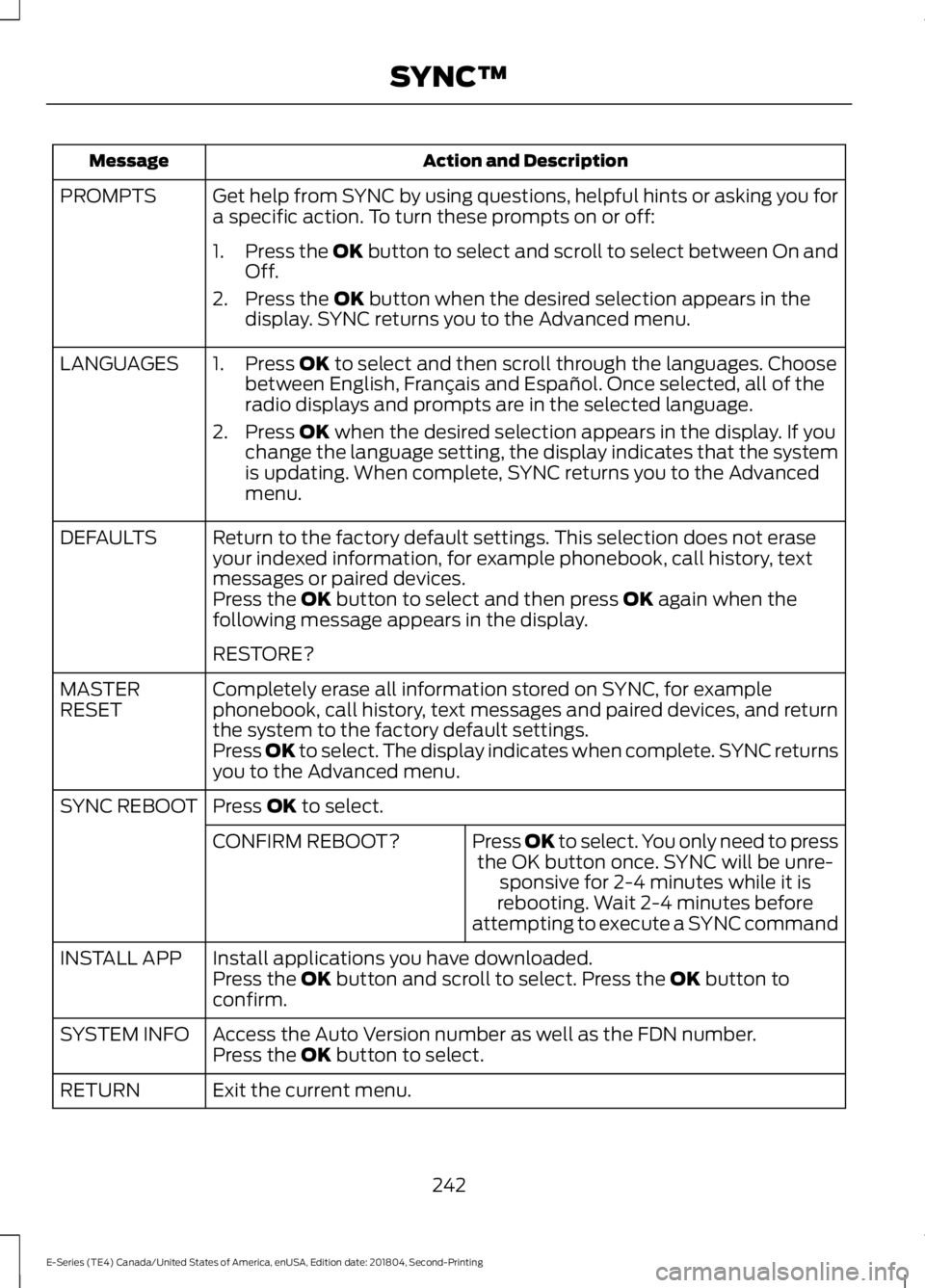
Action and DescriptionMessage
Get help from SYNC by using questions, helpful hints or asking you fora specific action. To turn these prompts on or off:PROMPTS
1.Press the OK button to select and scroll to select between On andOff.
2. Press the OK button when the desired selection appears in thedisplay. SYNC returns you to the Advanced menu.
1. Press OK to select and then scroll through the languages. Choosebetween English, Français and Español. Once selected, all of theradio displays and prompts are in the selected language.
2. Press OK when the desired selection appears in the display. If youchange the language setting, the display indicates that the systemis updating. When complete, SYNC returns you to the Advancedmenu.
LANGUAGES
Return to the factory default settings. This selection does not eraseyour indexed information, for example phonebook, call history, textmessages or paired devices.
DEFAULTS
Press the OK button to select and then press OK again when thefollowing message appears in the display.
RESTORE?
Completely erase all information stored on SYNC, for examplephonebook, call history, text messages and paired devices, and returnthe system to the factory default settings.
MASTERRESET
Press OK to select. The display indicates when complete. SYNC returnsyou to the Advanced menu.
Press OK to select.SYNC REBOOT
Press OK to select. You only need to pressthe OK button once. SYNC will be unre-sponsive for 2-4 minutes while it isrebooting. Wait 2-4 minutes beforeattempting to execute a SYNC command
CONFIRM REBOOT?
Install applications you have downloaded.INSTALL APPPress the OK button and scroll to select. Press the OK button toconfirm.
Access the Auto Version number as well as the FDN number.SYSTEM INFOPress the OK button to select.
Exit the current menu.RETURN
242
E-Series (TE4) Canada/United States of America, enUSA, Edition date: 201804, Second-Printing
SYNC™
Page 252 of 329
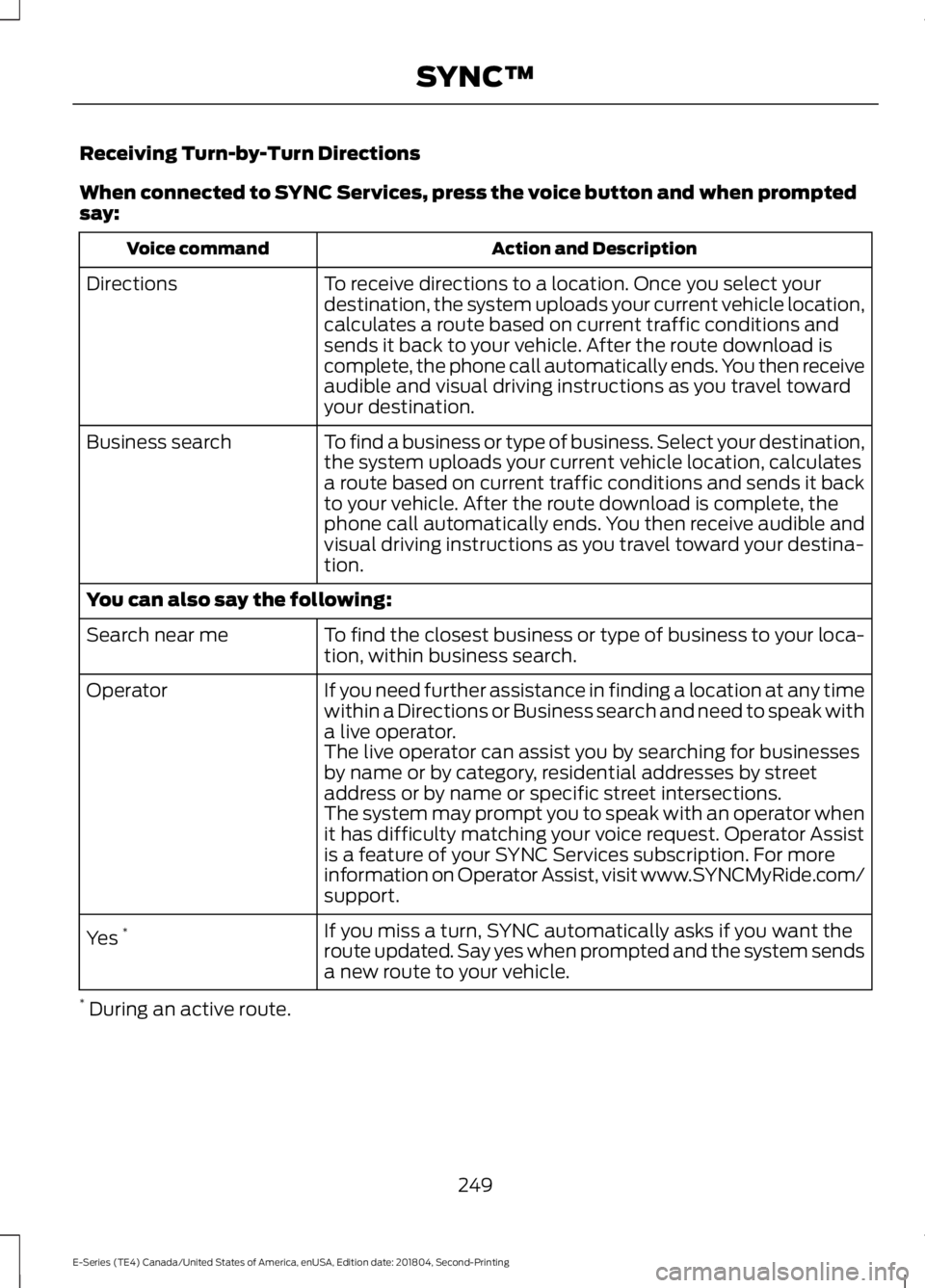
Receiving Turn-by-Turn Directions
When connected to SYNC Services, press the voice button and when promptedsay:
Action and DescriptionVoice command
To receive directions to a location. Once you select yourdestination, the system uploads your current vehicle location,calculates a route based on current traffic conditions andsends it back to your vehicle. After the route download iscomplete, the phone call automatically ends. You then receiveaudible and visual driving instructions as you travel towardyour destination.
Directions
To find a business or type of business. Select your destination,the system uploads your current vehicle location, calculatesa route based on current traffic conditions and sends it backto your vehicle. After the route download is complete, thephone call automatically ends. You then receive audible andvisual driving instructions as you travel toward your destina-tion.
Business search
You can also say the following:
To find the closest business or type of business to your loca-tion, within business search.Search near me
If you need further assistance in finding a location at any timewithin a Directions or Business search and need to speak witha live operator.
Operator
The live operator can assist you by searching for businessesby name or by category, residential addresses by streetaddress or by name or specific street intersections.The system may prompt you to speak with an operator whenit has difficulty matching your voice request. Operator Assistis a feature of your SYNC Services subscription. For moreinformation on Operator Assist, visit www.SYNCMyRide.com/support.
If you miss a turn, SYNC automatically asks if you want theroute updated. Say yes when prompted and the system sendsa new route to your vehicle.
Yes *
* During an active route.
249
E-Series (TE4) Canada/United States of America, enUSA, Edition date: 201804, Second-Printing
SYNC™
Page 264 of 329
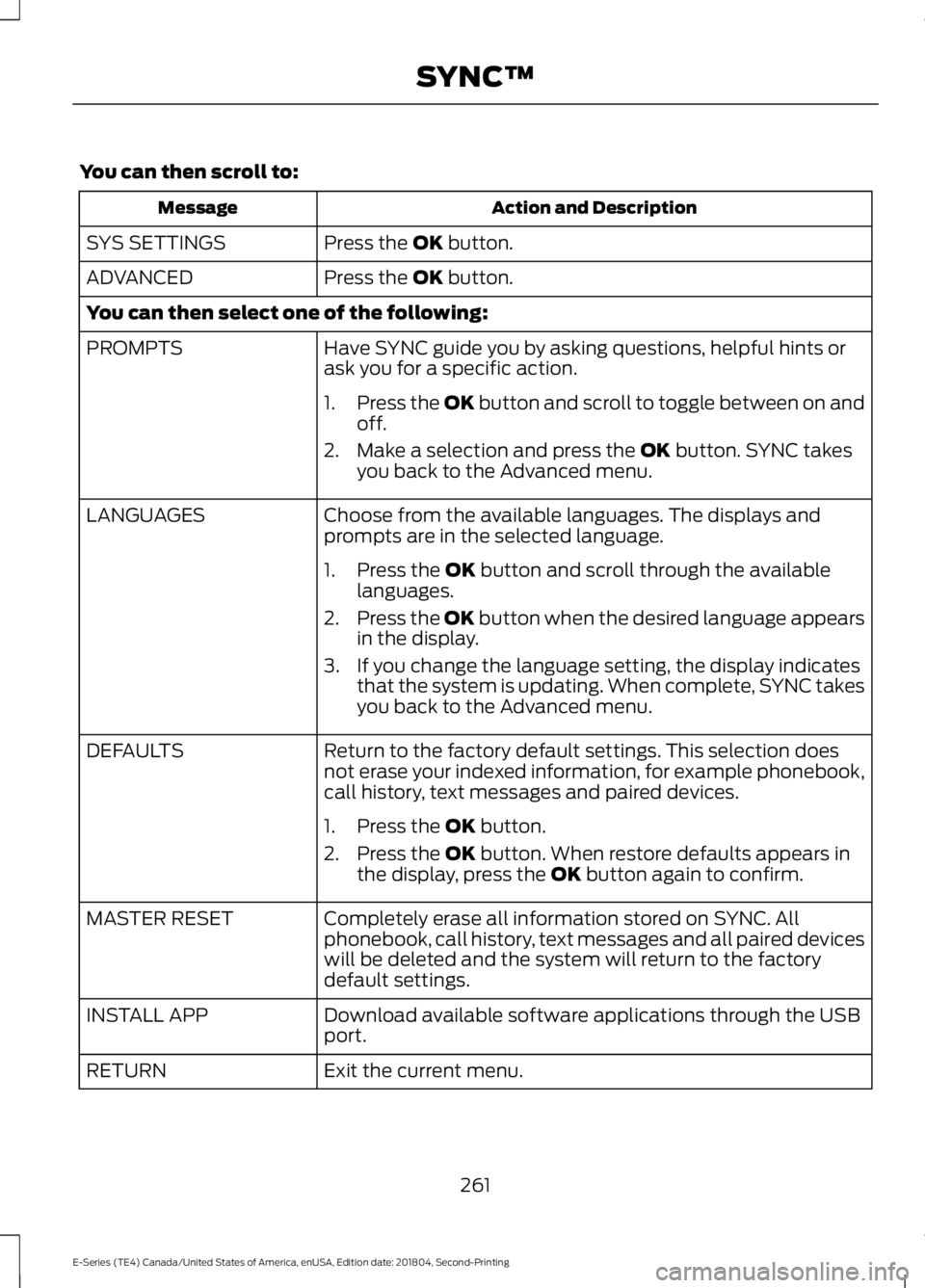
You can then scroll to:
Action and DescriptionMessage
Press the OK button.SYS SETTINGS
Press the OK button.ADVANCED
You can then select one of the following:
Have SYNC guide you by asking questions, helpful hints orask you for a specific action.PROMPTS
1.Press the OK button and scroll to toggle between on andoff.
2. Make a selection and press the OK button. SYNC takesyou back to the Advanced menu.
Choose from the available languages. The displays andprompts are in the selected language.LANGUAGES
1. Press the OK button and scroll through the availablelanguages.
2.Press the OK button when the desired language appearsin the display.
3. If you change the language setting, the display indicatesthat the system is updating. When complete, SYNC takesyou back to the Advanced menu.
Return to the factory default settings. This selection doesnot erase your indexed information, for example phonebook,call history, text messages and paired devices.
DEFAULTS
1. Press the OK button.
2. Press the OK button. When restore defaults appears inthe display, press the OK button again to confirm.
Completely erase all information stored on SYNC. Allphonebook, call history, text messages and all paired deviceswill be deleted and the system will return to the factorydefault settings.
MASTER RESET
Download available software applications through the USBport.INSTALL APP
Exit the current menu.RETURN
261
E-Series (TE4) Canada/United States of America, enUSA, Edition date: 201804, Second-Printing
SYNC™
Page 265 of 329
SYNC™ TROUBLESHOOTING
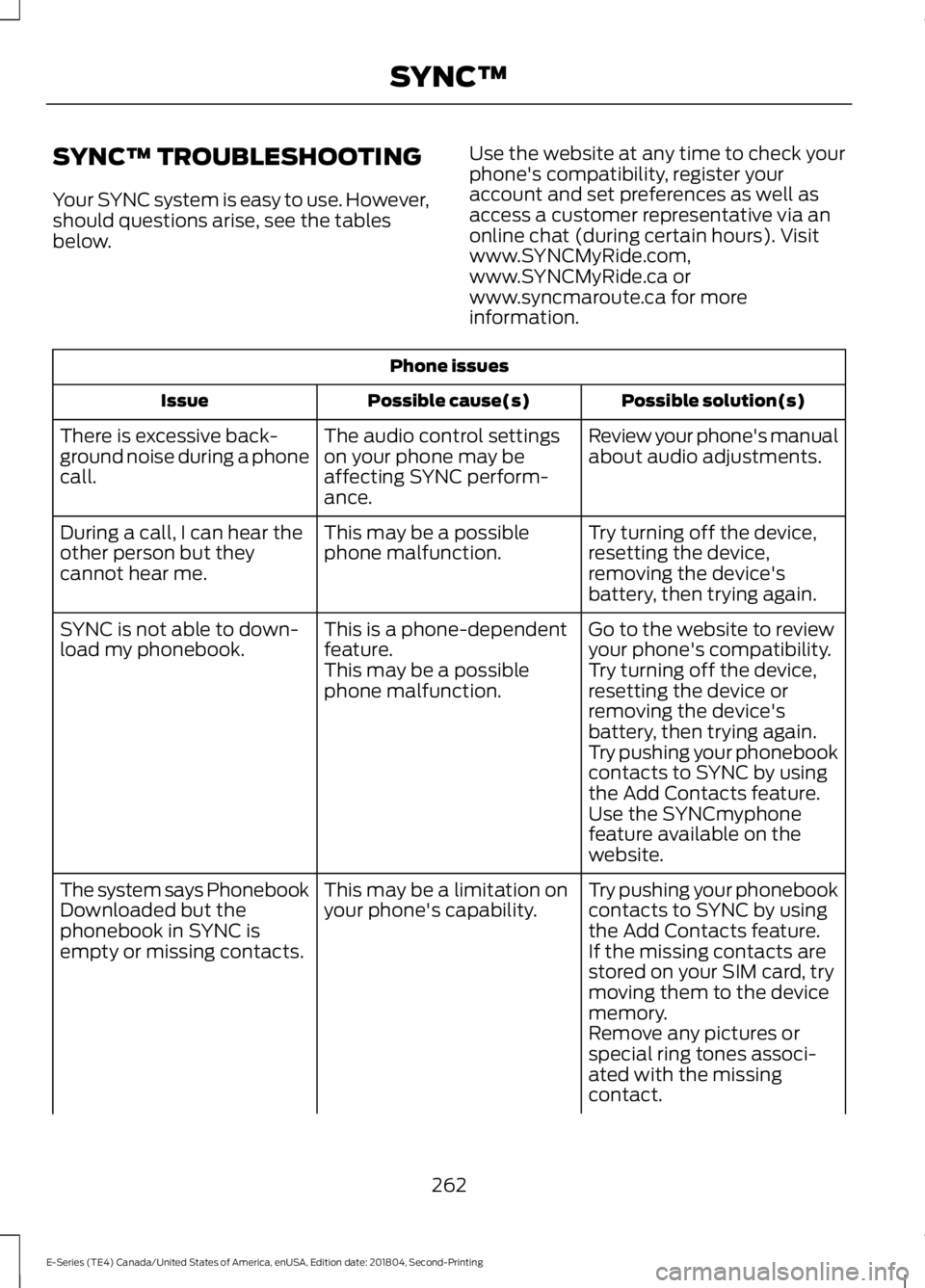
Your SYNC system is easy to use. However,should questions arise, see the tablesbelow.
Use the website at any time to check yourphone's compatibility, register youraccount and set preferences as well asaccess a customer representative via anonline chat (during certain hours). Visitwww.SYNCMyRide.com,www.SYNCMyRide.ca orwww.syncmaroute.ca for moreinformation.
Phone issues
Possible solution(s)Possible cause(s)Issue
Review your phone's manualabout audio adjustments.The audio control settingson your phone may beaffecting SYNC perform-ance.
There is excessive back-ground noise during a phonecall.
Try turning off the device,resetting the device,removing the device'sbattery, then trying again.
This may be a possiblephone malfunction.During a call, I can hear theother person but theycannot hear me.
Go to the website to reviewyour phone's compatibility.This is a phone-dependentfeature.SYNC is not able to down-load my phonebook.Try turning off the device,resetting the device orremoving the device'sbattery, then trying again.
This may be a possiblephone malfunction.
Try pushing your phonebookcontacts to SYNC by usingthe Add Contacts feature.Use the SYNCmyphonefeature available on thewebsite.
Try pushing your phonebookcontacts to SYNC by usingthe Add Contacts feature.
This may be a limitation onyour phone's capability.The system says PhonebookDownloaded but thephonebook in SYNC isempty or missing contacts.If the missing contacts arestored on your SIM card, trymoving them to the devicememory.Remove any pictures orspecial ring tones associ-ated with the missingcontact.
262
E-Series (TE4) Canada/United States of America, enUSA, Edition date: 201804, Second-Printing
SYNC™
Page 266 of 329
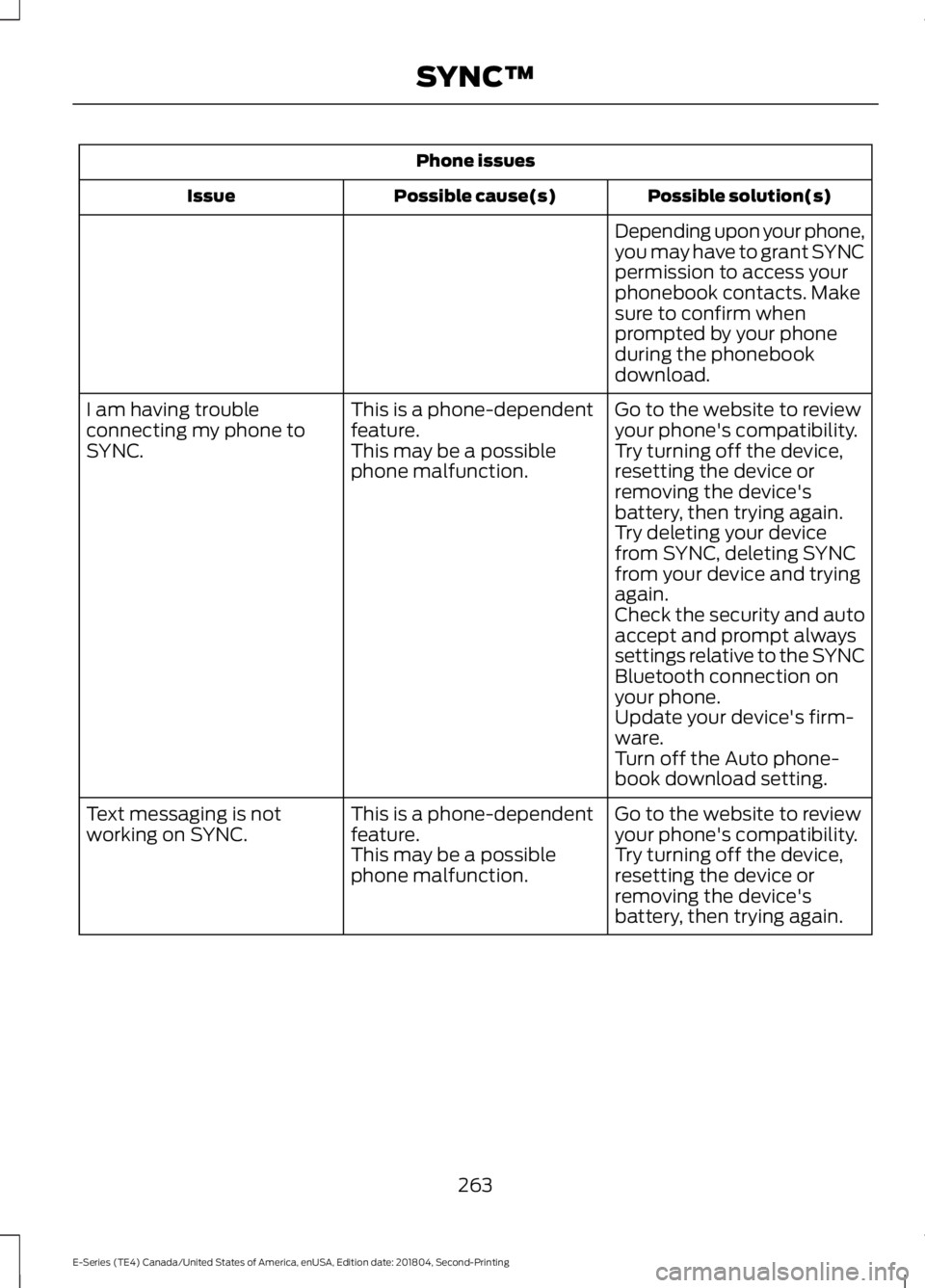
Phone issues
Possible solution(s)Possible cause(s)Issue
Depending upon your phone,you may have to grant SYNCpermission to access yourphonebook contacts. Makesure to confirm whenprompted by your phoneduring the phonebookdownload.
Go to the website to reviewyour phone's compatibility.This is a phone-dependentfeature.I am having troubleconnecting my phone toSYNC.Try turning off the device,resetting the device orremoving the device'sbattery, then trying again.
This may be a possiblephone malfunction.
Try deleting your devicefrom SYNC, deleting SYNCfrom your device and tryingagain.Check the security and autoaccept and prompt alwayssettings relative to the SYNCBluetooth connection onyour phone.Update your device's firm-ware.Turn off the Auto phone-book download setting.
Go to the website to reviewyour phone's compatibility.This is a phone-dependentfeature.Text messaging is notworking on SYNC.Try turning off the device,resetting the device orremoving the device'sbattery, then trying again.
This may be a possiblephone malfunction.
263
E-Series (TE4) Canada/United States of America, enUSA, Edition date: 201804, Second-Printing
SYNC™
Page 268 of 329
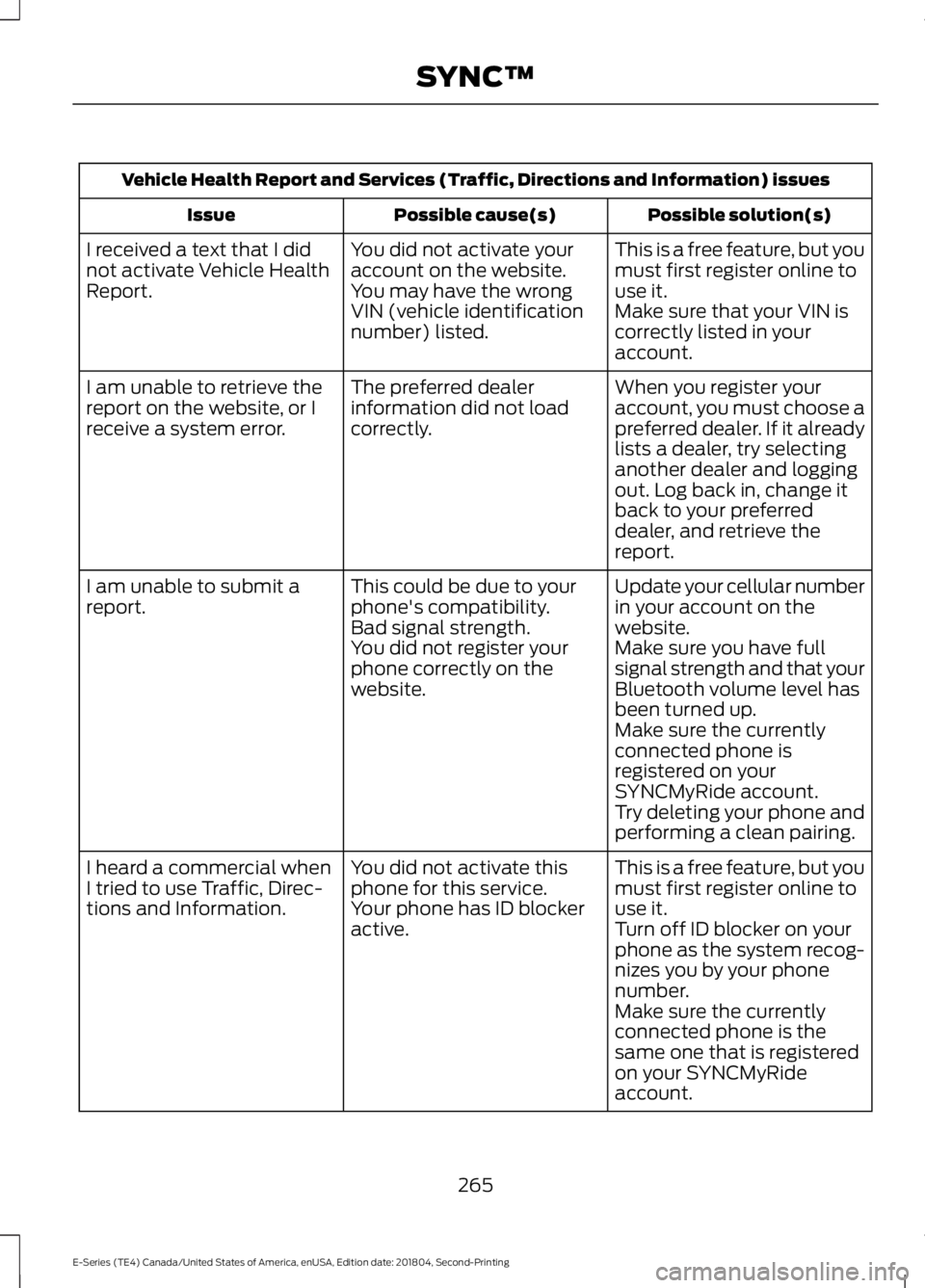
Vehicle Health Report and Services (Traffic, Directions and Information) issues
Possible solution(s)Possible cause(s)Issue
This is a free feature, but youmust first register online touse it.
You did not activate youraccount on the website.You may have the wrongVIN (vehicle identificationnumber) listed.
I received a text that I didnot activate Vehicle HealthReport.Make sure that your VIN iscorrectly listed in youraccount.
When you register youraccount, you must choose apreferred dealer. If it alreadylists a dealer, try selectinganother dealer and loggingout. Log back in, change itback to your preferreddealer, and retrieve thereport.
The preferred dealerinformation did not loadcorrectly.
I am unable to retrieve thereport on the website, or Ireceive a system error.
Update your cellular numberin your account on thewebsite.
This could be due to yourphone's compatibility.Bad signal strength.
I am unable to submit areport.
Make sure you have fullsignal strength and that yourBluetooth volume level hasbeen turned up.
You did not register yourphone correctly on thewebsite.
Make sure the currentlyconnected phone isregistered on yourSYNCMyRide account.Try deleting your phone andperforming a clean pairing.
This is a free feature, but youmust first register online touse it.
You did not activate thisphone for this service.Your phone has ID blockeractive.
I heard a commercial whenI tried to use Traffic, Direc-tions and Information.Turn off ID blocker on yourphone as the system recog-nizes you by your phonenumber.Make sure the currentlyconnected phone is thesame one that is registeredon your SYNCMyRideaccount.
265
E-Series (TE4) Canada/United States of America, enUSA, Edition date: 201804, Second-Printing
SYNC™
Page 271 of 329
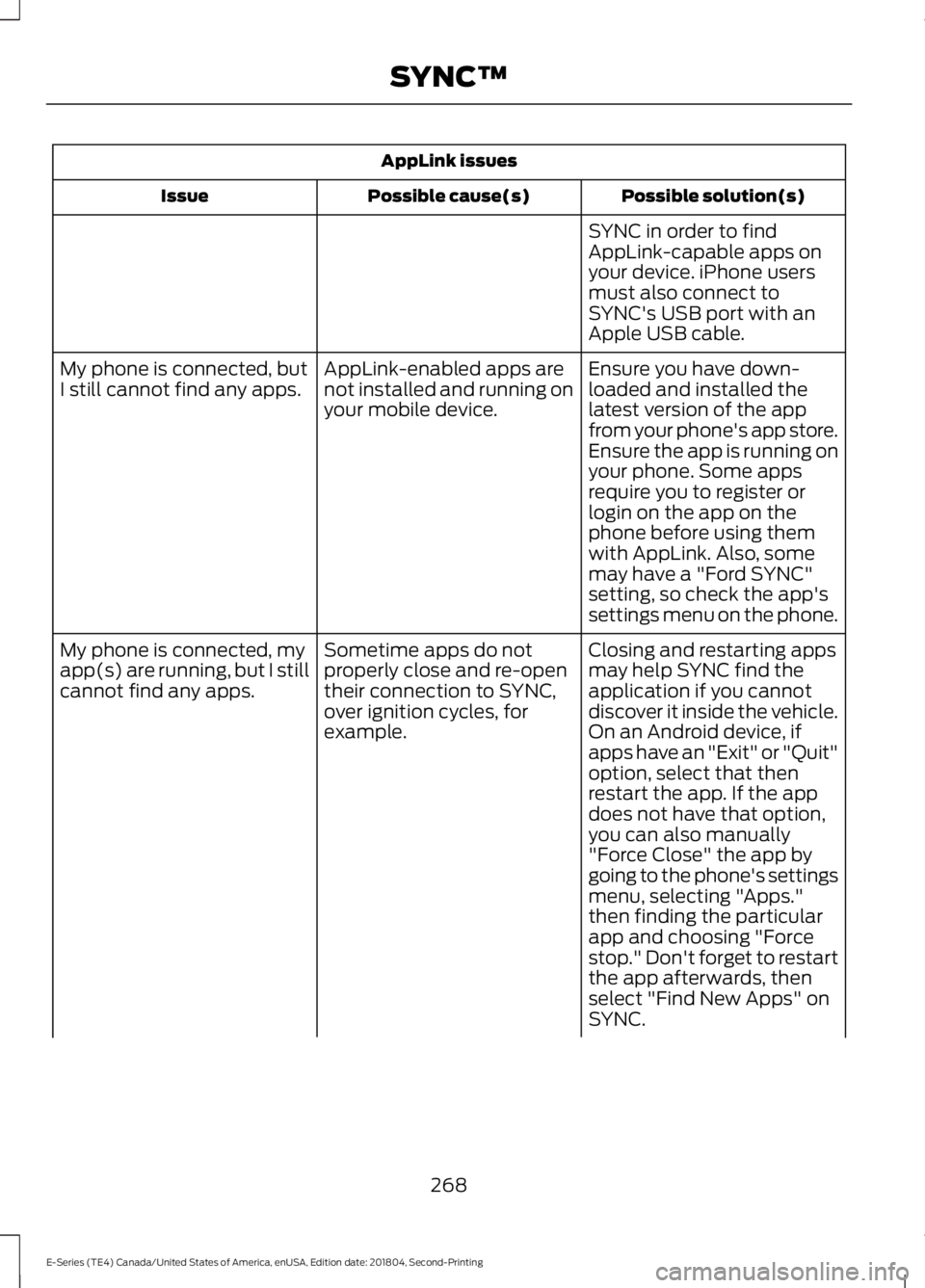
AppLink issues
Possible solution(s)Possible cause(s)Issue
SYNC in order to findAppLink-capable apps onyour device. iPhone usersmust also connect toSYNC's USB port with anApple USB cable.
Ensure you have down-loaded and installed thelatest version of the appfrom your phone's app store.Ensure the app is running onyour phone. Some apps
AppLink-enabled apps arenot installed and running onyour mobile device.
My phone is connected, butI still cannot find any apps.
require you to register orlogin on the app on thephone before using themwith AppLink. Also, somemay have a "Ford SYNC"setting, so check the app'ssettings menu on the phone.
Closing and restarting appsmay help SYNC find theapplication if you cannotdiscover it inside the vehicle.On an Android device, ifapps have an "Exit" or "Quit"
Sometime apps do notproperly close and re-opentheir connection to SYNC,over ignition cycles, forexample.
My phone is connected, myapp(s) are running, but I stillcannot find any apps.
option, select that thenrestart the app. If the appdoes not have that option,you can also manually"Force Close" the app bygoing to the phone's settingsmenu, selecting "Apps."then finding the particularapp and choosing "Forcestop." Don't forget to restartthe app afterwards, thenselect "Find New Apps" onSYNC.
268
E-Series (TE4) Canada/United States of America, enUSA, Edition date: 201804, Second-Printing
SYNC™
Page 301 of 329
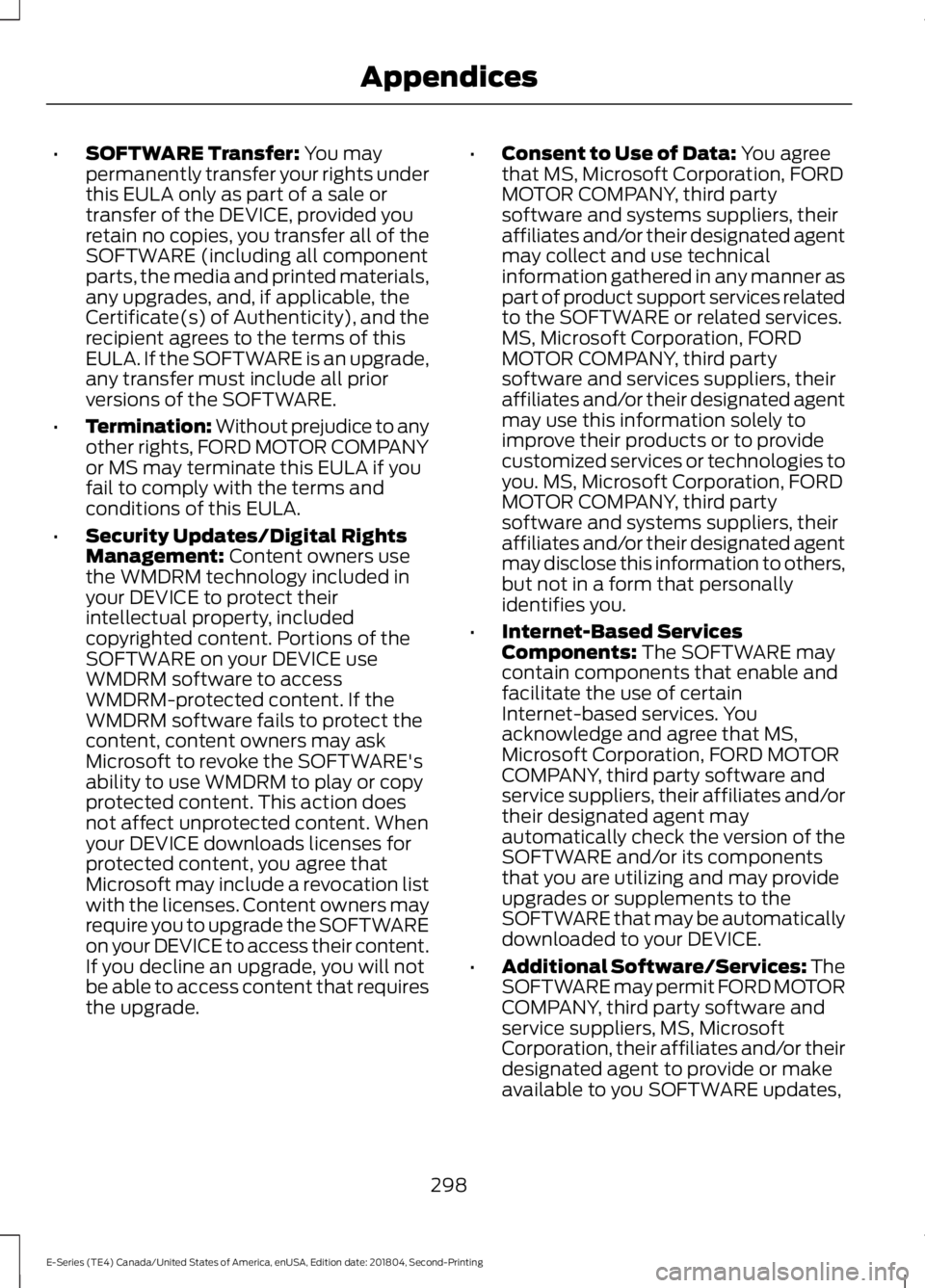
•SOFTWARE Transfer: You maypermanently transfer your rights underthis EULA only as part of a sale ortransfer of the DEVICE, provided youretain no copies, you transfer all of theSOFTWARE (including all componentparts, the media and printed materials,any upgrades, and, if applicable, theCertificate(s) of Authenticity), and therecipient agrees to the terms of thisEULA. If the SOFTWARE is an upgrade,any transfer must include all priorversions of the SOFTWARE.
•Termination: Without prejudice to anyother rights, FORD MOTOR COMPANYor MS may terminate this EULA if youfail to comply with the terms andconditions of this EULA.
•Security Updates/Digital RightsManagement: Content owners usethe WMDRM technology included inyour DEVICE to protect theirintellectual property, includedcopyrighted content. Portions of theSOFTWARE on your DEVICE useWMDRM software to accessWMDRM-protected content. If theWMDRM software fails to protect thecontent, content owners may askMicrosoft to revoke the SOFTWARE'sability to use WMDRM to play or copyprotected content. This action doesnot affect unprotected content. Whenyour DEVICE downloads licenses forprotected content, you agree thatMicrosoft may include a revocation listwith the licenses. Content owners mayrequire you to upgrade the SOFTWAREon your DEVICE to access their content.If you decline an upgrade, you will notbe able to access content that requiresthe upgrade.
•Consent to Use of Data: You agreethat MS, Microsoft Corporation, FORDMOTOR COMPANY, third partysoftware and systems suppliers, theiraffiliates and/or their designated agentmay collect and use technicalinformation gathered in any manner aspart of product support services relatedto the SOFTWARE or related services.MS, Microsoft Corporation, FORDMOTOR COMPANY, third partysoftware and services suppliers, theiraffiliates and/or their designated agentmay use this information solely toimprove their products or to providecustomized services or technologies toyou. MS, Microsoft Corporation, FORDMOTOR COMPANY, third partysoftware and systems suppliers, theiraffiliates and/or their designated agentmay disclose this information to others,but not in a form that personallyidentifies you.
•Internet-Based ServicesComponents: The SOFTWARE maycontain components that enable andfacilitate the use of certainInternet-based services. Youacknowledge and agree that MS,Microsoft Corporation, FORD MOTORCOMPANY, third party software andservice suppliers, their affiliates and/ortheir designated agent mayautomatically check the version of theSOFTWARE and/or its componentsthat you are utilizing and may provideupgrades or supplements to theSOFTWARE that may be automaticallydownloaded to your DEVICE.
•Additional Software/Services: TheSOFTWARE may permit FORD MOTORCOMPANY, third party software andservice suppliers, MS, MicrosoftCorporation, their affiliates and/or theirdesignated agent to provide or makeavailable to you SOFTWARE updates,
298
E-Series (TE4) Canada/United States of America, enUSA, Edition date: 201804, Second-Printing
Appendices
Page 302 of 329
supplements, add-on components, orInternet-based services componentsof the SOFTWARE after the date youobtain your initial copy of theSOFTWARE ("SupplementalComponents").
If FORD MOTOR COMPANY or third partysoftware and services suppliers provide ormake available to you SupplementalComponents and no other EULA terms areprovided along with the SupplementalComponents, then the terms of this EULAshall apply.
If MS, Microsoft Corporation, their affiliatesand/or their designated agent makeavailable Supplemental Components, andno other EULA terms are provided, thenthe terms of this EULA shall apply, exceptthat the MS, Microsoft Corporation oraffiliate entity providing the SupplementalComponent(s) shall be the licensor of theSupplemental Component(s).
FORD MOTOR COMPANY, MS, MicrosoftCorporation, their affiliates and/or theirdesignated agent reserve the right todiscontinue without liability anyInternet-based services provided to you ormade available to you through the use ofthe SOFTWARE.
•Links to Third Party Sites: The MSSOFTWARE may provide you with theability to link to third party sites throughthe use of the SOFTWARE. The thirdparty sites are not under the control ofMS, Microsoft Corporation, theiraffiliates and/or their designatedagent. Neither MS nor MicrosoftCorporation nor their affiliates nor theirdesignated agent are responsible for(i) the contents of any third party sites,any links contained in third party sites,or any changes or updates to thirdparty sites, or (ii) webcasting or anyother form of transmission receivedfrom any third party sites. If theSOFTWARE provides links to thirdparty sites, those links are provided toyou only as a convenience, and theinclusion of any link does not imply anendorsement of the third party site byMS, Microsoft Corporation, theiraffiliates and/or their designatedagent.
•Obligation to Drive Responsibly:You recognize your obligation to driveresponsibly and keep attention on theroad. You will read and abide with theDEVICE operating instructionsparticularly as they pertain to safetyand assumes any risk associated withthe use of the DEVICE.
UPGRADES AND RECOVERY MEDIA:If the SOFTWARE is provided by FORDMOTOR COMPANY separate from theDEVICE on media such as a ROM chip, CDROM disk(s) or via web download or othermeans, and is labeled "For UpgradePurposes Only" or "For Recovery PurposesOnly" you may install one (1) copy of suchSOFTWARE onto the DEVICE as areplacement copy for the existingSOFTWARE, and use it in accordance withthis EULA, including any additional EULAterms accompanying the upgradeSOFTWARE.
299
E-Series (TE4) Canada/United States of America, enUSA, Edition date: 201804, Second-Printing
Appendices
Page 309 of 329
Notices by posting them on Telenav’sWebsite or by downloading such Noticesto your wireless device. If you desire towithdraw your consent to receive Noticeselectronically, you must discontinue youruse of the Telenav Software.
8.4
Telenav’s or your failure to requireperformance of any provision shall notaffect that party’s right to requireperformance at any time thereafter, norshall a waiver of any breach or default ofthis Agreement constitute a waiver of anysubsequent breach or default or a waiverof the provision itself.
8.5
If any provision herein is heldunenforceable, then such provision will bemodified to reflect the intention of theparties, and the remaining provisions ofthis Agreement will remain in full force andeffect.
8.6
The headings in this Agreement are forconvenience of reference only, will not bedeemed to be a part of this Agreement,and will not be referred to in connectionwith the construction or interpretation ofthis Agreement. As used in this Agreement,the words “include” and “including,” andvariations thereof, will not be deemed tobe terms of limitation, but rather will bedeemed to be followed by the words“without limitation.”
9. Other Vendors Terms and Conditions
The Telenav Software utilizes map andother data licensed to Telenav by thirdparty vendors for the benefit of you andother end users. This Agreement includesend-user terms applicable to thesecompanies (included at the end of this
Agreement), and thus your use of theTelenav Software is also subject to suchterms. You agree to comply with thefollowing additional terms and conditions,which are applicable to Telenav’s thirdparty vendor licensors:
9.1 End User Terms Required by HERENorth America, LLC
The data (“Data”) is provided for yourpersonal, internal use only and not forresale. It is protected by copyright, and issubject to the following terms andconditions which are agreed to by you, onthe one hand, and Telenav (“Telenav”) andits licensors (including their licensors andsuppliers) on the other hand.
© 2013 HERE. All rights reserved.
The Data for areas of Canada includesinformation taken with permission fromCanadian authorities, including: © HerMajesty the Queen in Right of Canada, ©Queen's Printer for Ontario, © Canada PostCorporation, GeoBase®, © Department ofNatural Resources Canada.
HERE holds a non-exclusive license fromthe United States Postal Service® topublish and sell ZIP+4® information.
©United States Postal Service® 2014.Prices are not established, controlled orapproved by the United States PostalService®. The following trademarks andregistrations are owned by the USPS:United States Postal Service, USPS, andZIP+4.
The Data for Mexico includes certain datafrom Instituto Nacional de Estadística yGeografía.
TERMS AND CONDITIONS
306
E-Series (TE4) Canada/United States of America, enUSA, Edition date: 201804, Second-Printing
Appendices