instrument panel FORD E SERIES 2019 Owners Manual
[x] Cancel search | Manufacturer: FORD, Model Year: 2019, Model line: E SERIES, Model: FORD E SERIES 2019Pages: 329, PDF Size: 2.92 MB
Page 4 of 329
Introduction
About This Manual..........................................5
Symbols Glossary............................................5
Data Recording..................................................7
Perchlorate........................................................11
Ford Credit.........................................................11
Replacement Parts Recommendation............................................................................12
Special Notices...............................................12
Mobile Communications Equipment...........................................................................14
Environment
Protecting the Environment.......................15
At a Glance
Instrument Panel...........................................16
Child Safety
General Information......................................17
Installing Child Restraints...........................18
Booster Seats..................................................22
Child Restraint Positioning........................25
Seatbelts
Principle of Operation..................................27
Fastening the Seatbelts.............................28
Seatbelt Height Adjustment....................30
Seatbelt Warning Lamp and IndicatorChime............................................................30
Child Restraint and SeatbeltMaintenance................................................31
Seatbelt Extension........................................31
Supplementary RestraintsSystem
Principle of Operation..................................32
Driver and Passenger Airbags...................33
Crash Sensors and Airbag Indicator.......37
Airbag Disposal..............................................38
Keys and Remote Controls
General Information on RadioFrequencies.................................................39
Remote Control.............................................39
Replacing a Lost Key or Remote Control...........................................................................41
Doors and Locks
Locking and Unlocking................................42
Security
Passive Anti-Theft System........................45
Steering Wheel
Adjusting the Steering Wheel...................47
Voice Control...................................................47
Cruise Control.................................................47
Wipers and Washers
Windshield Wipers.......................................48
Windshield Washers....................................48
Lighting
General Information....................................49
Lighting Control.............................................49
Instrument Lighting Dimmer....................50
Daytime Running Lamps...........................50
Direction Indicators......................................50
Windows and Mirrors
Power Windows..............................................51
Exterior Mirrors................................................51
Interior Mirror...................................................52
Sun Visors........................................................52
Instrument Cluster
Gauges..............................................................53
Warning Lamps and Indicators................54
Audible Warnings and Indicators.............57
1
E-Series (TE4) Canada/United States of America, enUSA, Edition date: 201804, Second-Printing
Table of Contents
Page 6 of 329
Driving Through Water................................117
Floor Mats........................................................117
Roadside Emergencies
Roadside Assistance...................................119
Hazard Flashers...........................................120
Fuel Shutoff...................................................120
Jump Starting the Vehicle.........................121
Transporting the Vehicle...........................123
Customer Assistance
Getting the Services You Need...............124
In California (U.S. Only).............................125
The Better Business Bureau (BBB) AutoLine Program (U.S. Only).....................126
Utilizing the Mediation/ArbitrationProgram (Canada Only)........................127
Getting Assistance Outside the U.S. andCanada.........................................................127
Ordering Additional Owner's Literature.........................................................................129
Reporting Safety Defects (U.S. Only).........................................................................129
Reporting Safety Defects (Canada Only).........................................................................129
Fuses
Fuse Specification Chart............................131
Changing a Fuse..........................................139
Maintenance
General Information....................................141
Opening and Closing the Hood...............141
Under Hood Overview...............................142
Engine Oil Dipstick......................................143
Engine Oil Check..........................................143
Oil Change Indicator Reset......................144
Engine Coolant Check...............................144
Automatic Transmission Fluid Check.........................................................................149
Brake Fluid Check........................................152
Power Steering Fluid Check.....................152
Washer Fluid Check....................................153
Changing the 12V Battery.........................153
Checking the Wiper Blades......................155
Changing the Wiper Blades.....................155
Adjusting the Headlamps........................156
Removing a Headlamp..............................157
Changing a Bulb...........................................157
Changing the Engine Air Filter................159
Vehicle Care
General Information...................................160
Cleaning Products......................................160
Cleaning the Exterior.................................160
Waxing.............................................................162
Cleaning the Engine....................................162
Cleaning the Windows and Wiper Blades.........................................................................162
Cleaning the Interior...................................163
Cleaning the Instrument Panel andInstrument Cluster Lens.......................163
Cleaning Leather Seats.............................164
Repairing Minor Paint Damage..............165
Cleaning the Wheels..................................165
Vehicle Storage............................................165
Wheels and Tires
General Information...................................168
Tire Care..........................................................169
Using Snow Chains.....................................187
Tire Pressure Monitoring System..........188
Changing a Road Wheel...........................192
Technical Specifications..........................196
Capacities and Specifications
Engine Specifications - 6.2L...................198
Engine Specifications - 6.8L...................198
Motorcraft Parts - 6.2L..............................199
Motorcraft Parts - 6.8L............................200
3
E-Series (TE4) Canada/United States of America, enUSA, Edition date: 201804, Second-Printing
Table of Contents
Page 19 of 329
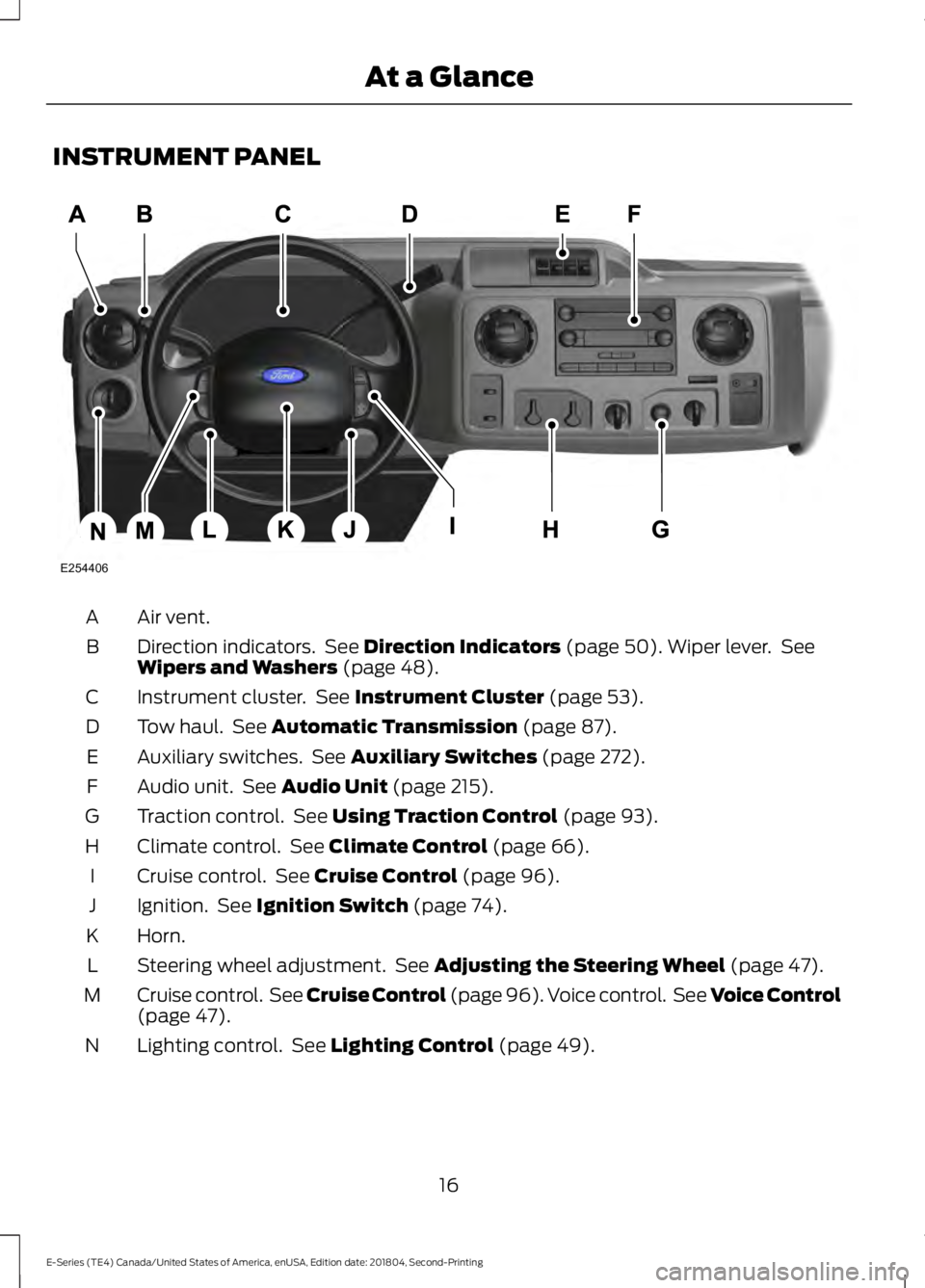
INSTRUMENT PANEL
Air vent.A
Direction indicators. See Direction Indicators (page 50). Wiper lever. SeeWipers and Washers (page 48).B
Instrument cluster. See Instrument Cluster (page 53).C
Tow haul. See Automatic Transmission (page 87).D
Auxiliary switches. See Auxiliary Switches (page 272).E
Audio unit. See Audio Unit (page 215).F
Traction control. See Using Traction Control (page 93).G
Climate control. See Climate Control (page 66).H
Cruise control. See Cruise Control (page 96).I
Ignition. See Ignition Switch (page 74).J
Horn.K
Steering wheel adjustment. See Adjusting the Steering Wheel (page 47).L
Cruise control. See Cruise Control (page 96). Voice control. See Voice Control(page 47).M
Lighting control. See Lighting Control (page 49).N
16
E-Series (TE4) Canada/United States of America, enUSA, Edition date: 201804, Second-Printing
At a GlanceE254406
Page 52 of 329
GENERAL INFORMATION
Condensation in the Exterior FrontLamps and Rear Lamps
Exterior front lamps and rear lamps havevents to accommodate normal changesin air pressure.
Condensation can be a natural by-productof this design. When moist air enters thelamp assembly through the vents, there isa possibility that condensation can occurwhen the temperature is cold. Whennormal condensation occurs, a fine mistcan form on the interior of the lens. Thefine mist eventually clears and exitsthrough the vents during normal operation.
Clearing time may take as long as 48 hoursunder dry weather conditions.
Examples of acceptable condensation are:
•The presence of a fine mist (no streaks,drip marks or large droplets).
•A fine mist covers less than 50% of thelens.
Examples of unacceptable condensationare:
•A water puddle inside the lamp.
•Streaks, drip marks or large dropletspresent on the interior of the lens.
If you see any unacceptable condensation,have your vehicle checked by an authorizeddealer.
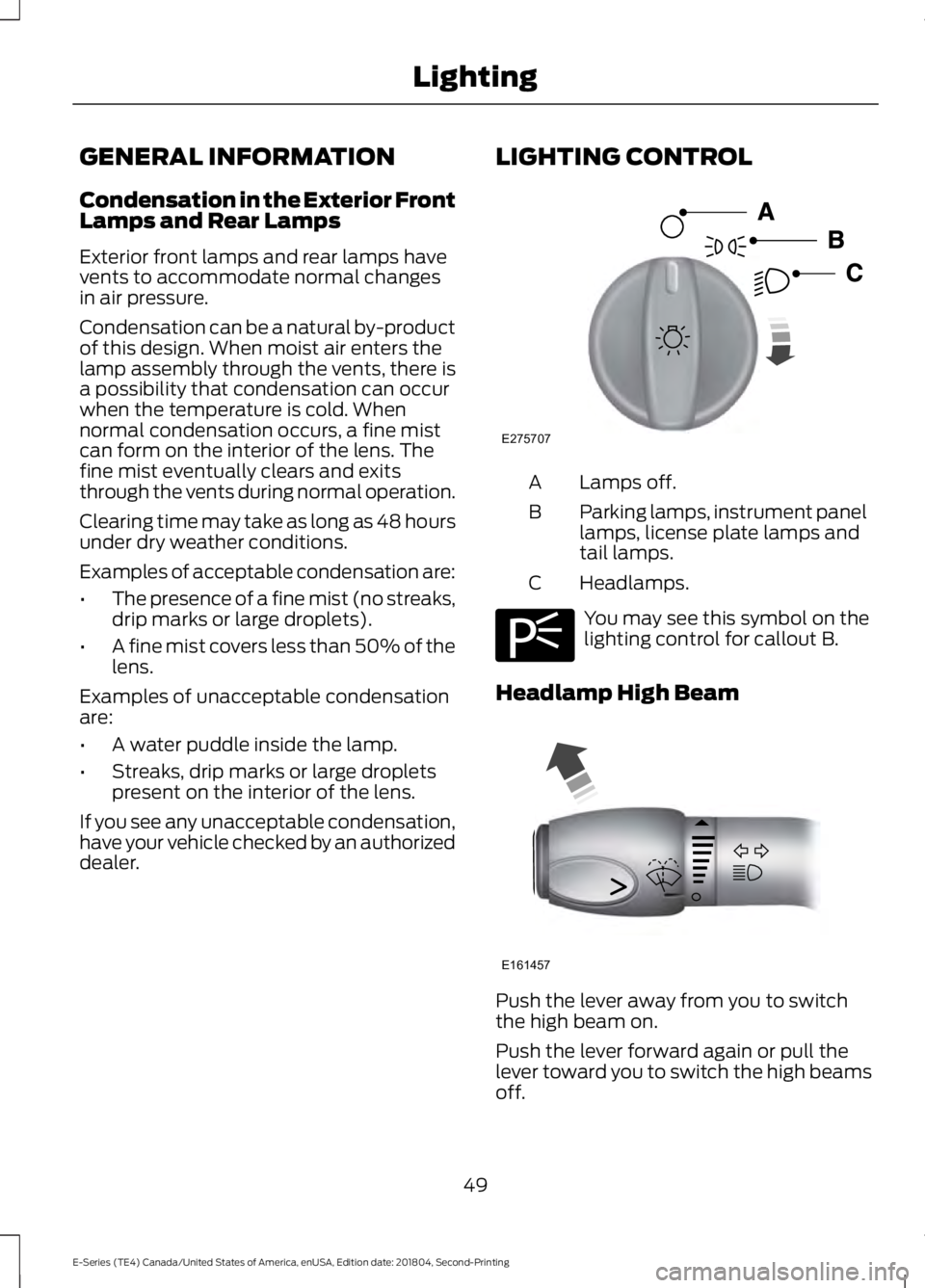
LIGHTING CONTROL
Lamps off.A
Parking lamps, instrument panellamps, license plate lamps andtail lamps.
B
Headlamps.C
You may see this symbol on thelighting control for callout B.
Headlamp High Beam
Push the lever away from you to switchthe high beam on.
Push the lever forward again or pull thelever toward you to switch the high beamsoff.
49
E-Series (TE4) Canada/United States of America, enUSA, Edition date: 201804, Second-Printing
LightingE275707 E275706 E161457
Page 53 of 329
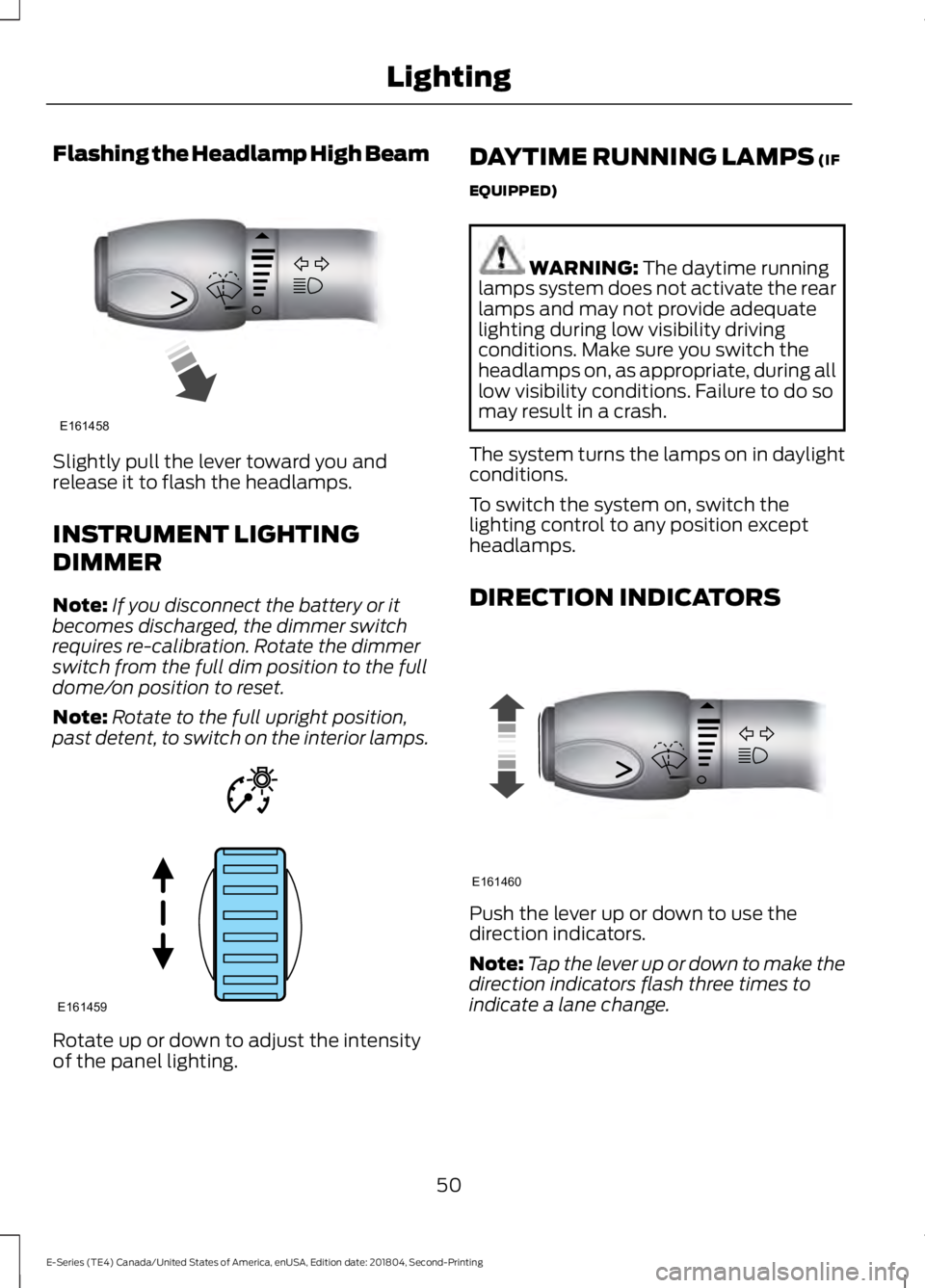
Flashing the Headlamp High Beam
Slightly pull the lever toward you andrelease it to flash the headlamps.
INSTRUMENT LIGHTING
DIMMER
Note:If you disconnect the battery or itbecomes discharged, the dimmer switchrequires re-calibration. Rotate the dimmerswitch from the full dim position to the fulldome/on position to reset.
Note:Rotate to the full upright position,past detent, to switch on the interior lamps.
Rotate up or down to adjust the intensityof the panel lighting.
DAYTIME RUNNING LAMPS (IF
EQUIPPED)
WARNING: The daytime runninglamps system does not activate the rearlamps and may not provide adequatelighting during low visibility drivingconditions. Make sure you switch theheadlamps on, as appropriate, during alllow visibility conditions. Failure to do somay result in a crash.
The system turns the lamps on in daylightconditions.
To switch the system on, switch thelighting control to any position exceptheadlamps.
DIRECTION INDICATORS
Push the lever up or down to use thedirection indicators.
Note:Tap the lever up or down to make thedirection indicators flash three times toindicate a lane change.
50
E-Series (TE4) Canada/United States of America, enUSA, Edition date: 201804, Second-Printing
LightingE161458 E161459 E161460
Page 69 of 329
MANUAL CLIMATE CONTROL
Heater Only System (If Equipped)
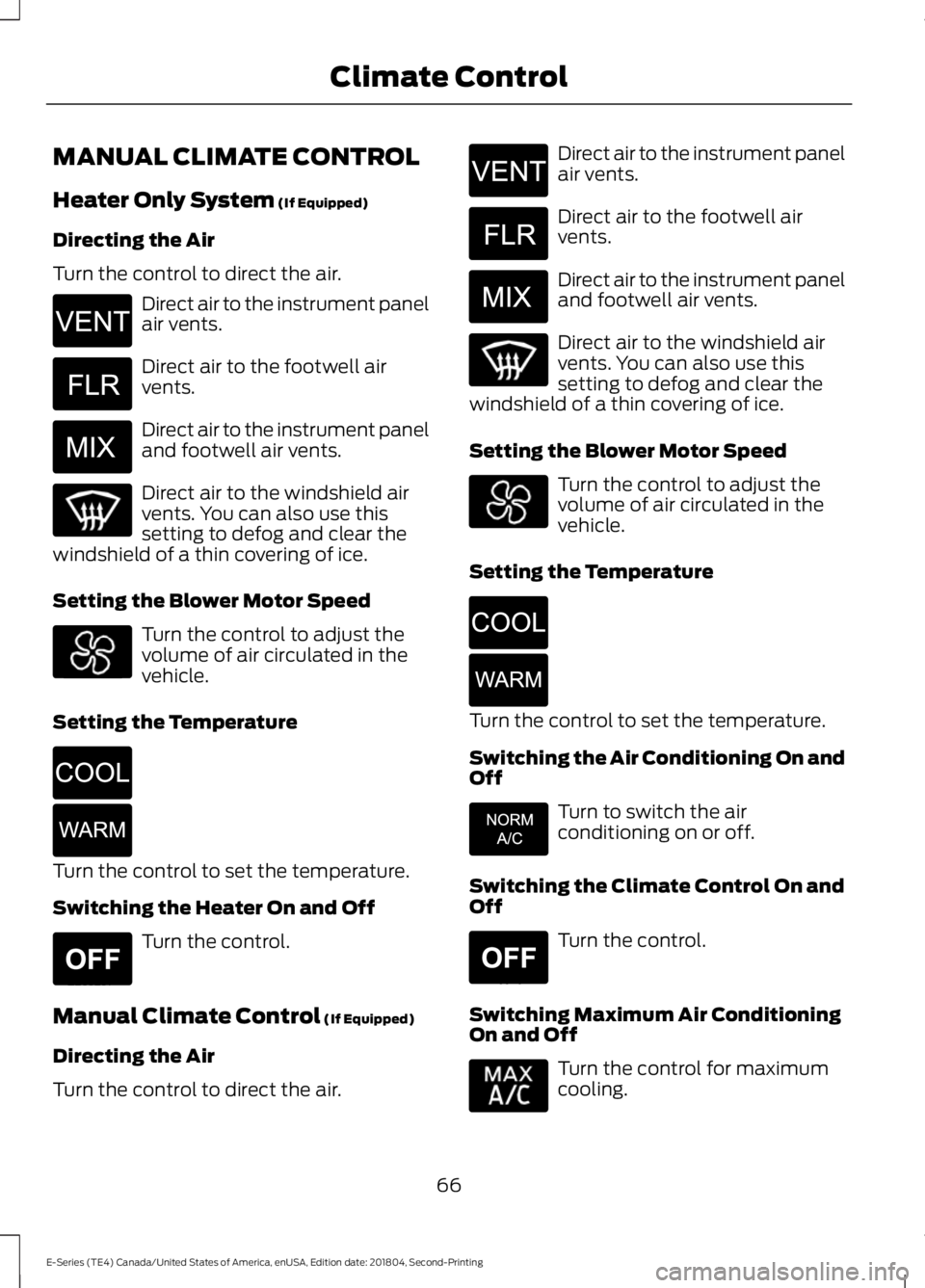
Directing the Air
Turn the control to direct the air.
Direct air to the instrument panelair vents.
Direct air to the footwell airvents.
Direct air to the instrument paneland footwell air vents.
Direct air to the windshield airvents. You can also use thissetting to defog and clear thewindshield of a thin covering of ice.
Setting the Blower Motor Speed
Turn the control to adjust thevolume of air circulated in thevehicle.
Setting the Temperature
Turn the control to set the temperature.
Switching the Heater On and Off
Turn the control.
Manual Climate Control (If Equipped)
Directing the Air
Turn the control to direct the air.
Direct air to the instrument panelair vents.
Direct air to the footwell airvents.
Direct air to the instrument paneland footwell air vents.
Direct air to the windshield airvents. You can also use thissetting to defog and clear thewindshield of a thin covering of ice.
Setting the Blower Motor Speed
Turn the control to adjust thevolume of air circulated in thevehicle.
Setting the Temperature
Turn the control to set the temperature.
Switching the Air Conditioning On andOff
Turn to switch the airconditioning on or off.
Switching the Climate Control On andOff
Turn the control.
Switching Maximum Air ConditioningOn and Off
Turn the control for maximumcooling.
66
E-Series (TE4) Canada/United States of America, enUSA, Edition date: 201804, Second-Printing
Climate ControlE266044 E266043 E266042 E266045 E266046 E265297 E266044 E266043 E266042 E266045 E266046 E266041 E265297
Page 70 of 329
Recirculated air flows through theinstrument panel vents and air conditioningturns on.
HINTS ON CONTROLLING THE
INTERIOR CLIMATE
General Hints
Note:Prolonged use of recirculated air maycause the windows to fog up.
Note:You may feel a small amount of airfrom the footwell air vents regardless of theair distribution setting.
Note:To reduce humidity build-up insideyour vehicle, do not drive with the systemswitched off or with recirculated air alwaysswitched on.
Note:To reduce fogging of the windshieldduring humid weather, adjust the airdistribution control to the windshield airvents position.
Note:Do not place objects under the frontseats as this may interfere with the airflowto the rear seats.
Note:Remove any snow, ice or leaves fromthe air intake area at the base of thewindshield.
Note:To improve the time to reach acomfortable temperature in hot weather,drive with the windows open until you feelcold air through the air vents.
Quickly Heating the Interior
1. Adjust the fan speed to the highestspeed setting.
2. Adjust the temperature control to thefull heat setting.
3. Direct air to the footwell air vents.
Recommended Settings forHeating
1. Adjust the fan speed to the centersetting.
2. Adjust the temperature control to themidway point of the hot settings.
3. Direct air to the footwell air vents.
Quickly Cooling the Interior
1. Turn to MAX A/C.
2. Drive with the windows open until youfeel cold air through the air vents.
Recommended Settings forCooling
1. Adjust the fan speed to the centersetting.
2. Adjust the temperature control to themidway point of the cold settings.
3. Direct air to the instrument panel airvents.
Vehicle Stationary for ExtendedPeriods During Extreme HighAmbient Temperatures
1. Apply the parking brake.
2. Place your vehicle in park (P) orneutral.
3. Turn to MAX A/C.
4. Adjust the fan speed to the lowestspeed setting.
Defogging the Side Windows inCold Weather
1. Direct air to the instrument panel andwindshield vents.
2. Turn to NORM A/C.
3. Adjust the temperature control to thedesired setting.
4. Adjust the fan speed to the highestsetting.
67
E-Series (TE4) Canada/United States of America, enUSA, Edition date: 201804, Second-Printing
Climate Control
Page 71 of 329
5. Direct air toward the side windows.
6. Close the instrument panel vents.
REAR PASSENGER CLIMATE
CONTROLS (IF EQUIPPED)
Setting the Blower Motor Speed
Turn the control to adjust thevolume of air circulated in thevehicle.
Switching the Rear ClimateControl On and Off
Turn the control.
68
E-Series (TE4) Canada/United States of America, enUSA, Edition date: 201804, Second-Printing
Climate Control E265297
Page 75 of 329
12 Volt DC Power Point
WARNING: Do not plug optionalelectrical accessories into the cigarlighter socket. Incorrect use of the cigarlighter can cause damage not coveredby the vehicle warranty, and can resultin fire or serious injury.
Note:When you switch the ignition on, youcan use the socket to power 12 voltappliances with a maximum current ratingof 15 amps.
If the power supply does not work after youswitch the ignition off, switch the ignitionon.Note:Do not hang any accessory from theaccessory plug.
Note:Do not use the power point over thevehicle capacity of 12 volt DC 180 watts ora fuse may blow.
Note:Always keep the power point capsclosed when not in use.
Do not insert objects other than anaccessory plug into the power point. Thisdamages the power point and may blowthe fuse.
Run the vehicle for full capacity use of thepower point.
To prevent the battery from running out ofcharge:
•Do not use the power point longer thannecessary when the vehicle is notrunning.
•Do not leave devices plugged inovernight or when you park your vehiclefor extended periods.
Locations
Power points may be in the followinglocations:
•On the instrument panel.
•Inside the glove box.
•Behind the driver's seat, upper trimpanel.
110 Volt AC Power Point (If Equipped)
WARNING: Do not keep electricaldevices plugged in the power pointwhenever the device is not in use. Do notuse any extension cord with the 110 voltAC power point, since it will defeat thesafety protection design. Doing so maycause the power point to overload dueto powering multiple devices that canreach beyond the 150 watt load limit andcould result in fire or serious injury.
Note:The power point turns off when youswitch the ignition off, or when the batteryvoltage drops below 11 volts.
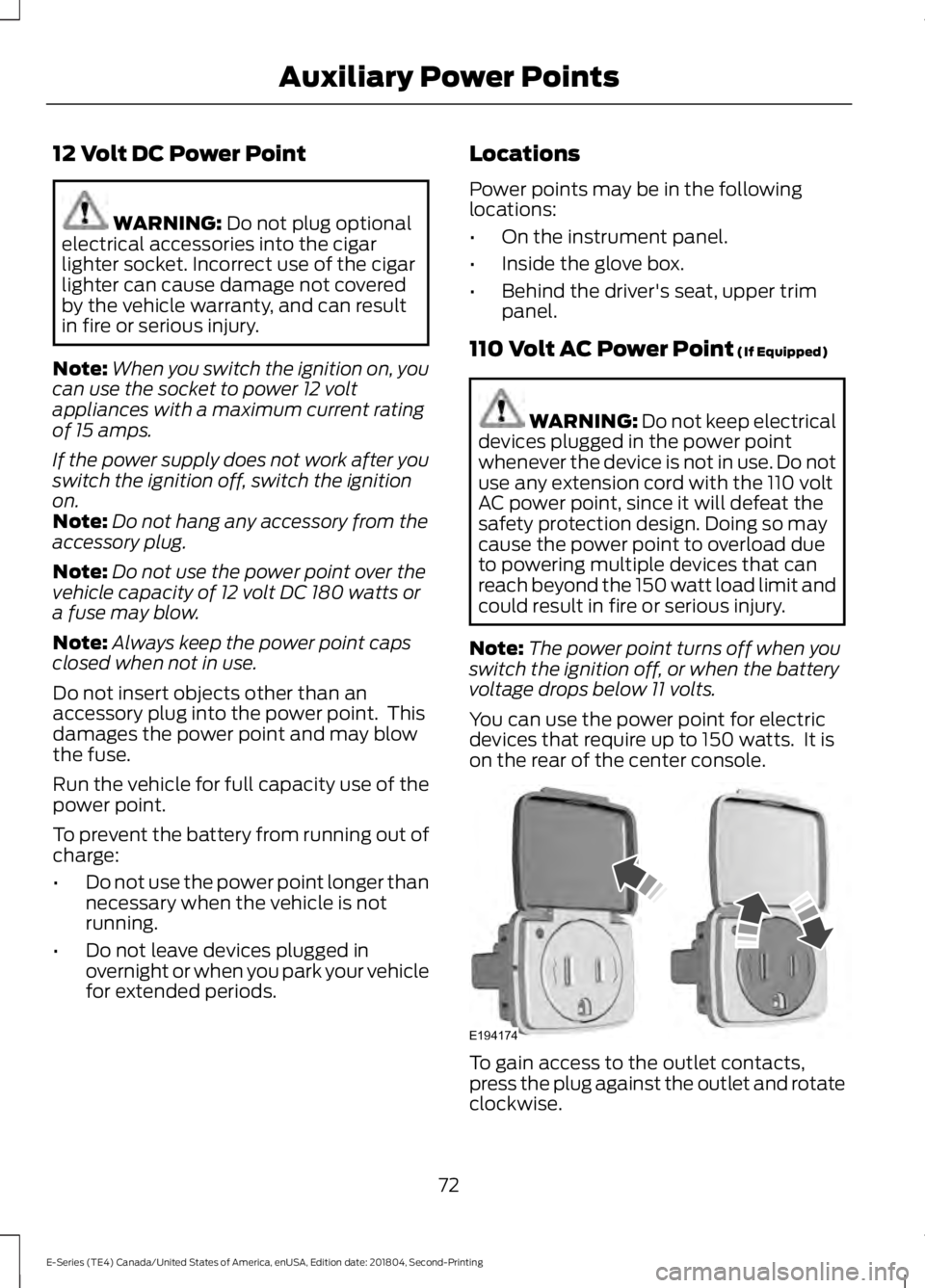
You can use the power point for electricdevices that require up to 150 watts. It ison the rear of the center console.
To gain access to the outlet contacts,press the plug against the outlet and rotateclockwise.
72
E-Series (TE4) Canada/United States of America, enUSA, Edition date: 201804, Second-Printing
Auxiliary Power PointsE194174
Page 91 of 329
Tow/Haul Mode
To activate tow/haul, press thebutton on the gearshift lever.The TOW HAUL indicator lightilluminates in the instrument cluster.
The tow/haul feature:
•Delays upshifts to reduce the frequencyof transmission shifting.
•Provides engine braking in all forwardgears, which slows your vehicle andassists you in controlling your vehiclewhen descending a slope.
•Depending on driving conditions andload conditions, may downshift thetransmission, slow your vehicle andcontrol your vehicle speed whendescending a hill, without pressing theaccelerator pedal. The amount ofdownshift braking provided will varybased upon the amount you press thebrake pedal.
The tow/haul feature improvestransmission operation when towing atrailer or a heavy load. All transmissiongear ranges are available when usingtow/haul.
To deactivate the tow/haul feature andreturn to normal driving mode, press thebutton on the gearshift lever again. TheTOW HAUL light deactivates. Tow/haulalso deactivates when you power downyour vehicle.
WARNING: Do not use tow/haulwhen the road surface is slippery. Failureto follow this instruction could result inthe loss of control of your vehicle.
Brake-Shift Interlock
WARNING: When doing thisprocedure, you need to take thetransmission out of park (P) whichmeans your vehicle can roll freely. Toavoid unwanted vehicle movement,always fully apply the parking brake priorto doing this procedure. Use wheelschocks if appropriate.
WARNING: If the parking brake isfully released, but the brake warninglamp remains illuminated, the brakesmay not be working properly. Have yourvehicle checked as soon as possible.
Note:Do not drive your vehicle until youverify that the brake lamps are working.
Your vehicle has a brake-shift interlockfeature that prevents the gearshift leverfrom moving from park (P) when theignition is in the 3 (on) position and thebrake pedal is not pressed.
If you cannot move the gearshift lever outof park (P) position with the ignition in the4 (on) position and the brake pedalpressed, a malfunction may have occurred.It is possible that a fuse has blown or yourvehicle’s brake lamps are not operatingproperly. See Fuse Specification Chart(page 131).
If the fuse is not blown and the brakelamps are working properly, the followingprocedure allows you to move the gearshiftlever from park (P):
1. Apply the parking brake and turn theignition on.
2.Use a screwdriver to remove the lowertrim panel under the steering column.Make sure not to disturb the wires onthe electrical connector.
88
E-Series (TE4) Canada/United States of America, enUSA, Edition date: 201804, Second-Printing
TransmissionE161509