lane FORD E SERIES 2019 Owners Manual
[x] Cancel search | Manufacturer: FORD, Model Year: 2019, Model line: E SERIES, Model: FORD E SERIES 2019Pages: 329, PDF Size: 2.92 MB
Page 53 of 329
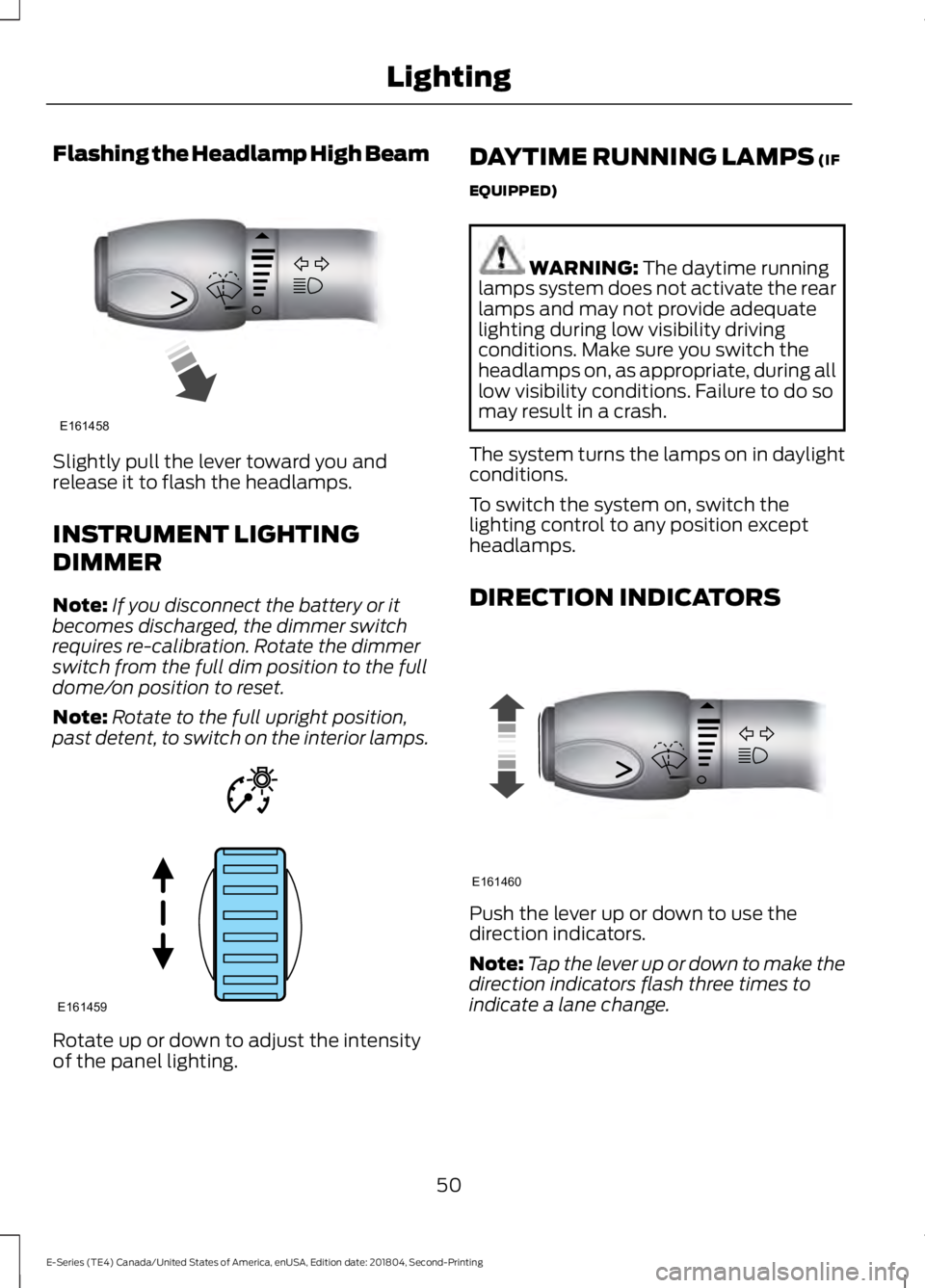
Flashing the Headlamp High Beam
Slightly pull the lever toward you andrelease it to flash the headlamps.
INSTRUMENT LIGHTING
DIMMER
Note:If you disconnect the battery or itbecomes discharged, the dimmer switchrequires re-calibration. Rotate the dimmerswitch from the full dim position to the fulldome/on position to reset.
Note:Rotate to the full upright position,past detent, to switch on the interior lamps.
Rotate up or down to adjust the intensityof the panel lighting.
DAYTIME RUNNING LAMPS (IF
EQUIPPED)
WARNING: The daytime runninglamps system does not activate the rearlamps and may not provide adequatelighting during low visibility drivingconditions. Make sure you switch theheadlamps on, as appropriate, during alllow visibility conditions. Failure to do somay result in a crash.
The system turns the lamps on in daylightconditions.
To switch the system on, switch thelighting control to any position exceptheadlamps.
DIRECTION INDICATORS
Push the lever up or down to use thedirection indicators.
Note:Tap the lever up or down to make thedirection indicators flash three times toindicate a lane change.
50
E-Series (TE4) Canada/United States of America, enUSA, Edition date: 201804, Second-Printing
LightingE161458 E161459 E161460
Page 169 of 329
•Cover interior trim to prevent fading.
•Keep all rubber parts free from oil andsolvents.
Engine
•Change the engine oil and filter prior tostorage because used engine oilcontains contaminates which maycause engine damage.
•Start the engine every 15 days for aminimum of 15 minutes. Run at fast idlewith the climate controls set to defrostuntil the engine reaches normaloperating temperature.
•With your foot on the brake, shiftthrough all the gears while the engineis running.
•We recommend that you change theengine oil before you use your vehicleagain.
Fuel system
•Fill the fuel tank with high-quality fueluntil the first automatic shutoff of thefuel pump nozzle.
Cooling system
•Protect against freezing temperatures.
•When removing your vehicle fromstorage, check coolant fluid level.Confirm that there are no coolingsystem leaks and that fluid is at therecommended level.
Battery
•Check and recharge as necessary. Keepconnections clean.
•If storing your vehicle for more than 30days without recharging the battery,we recommend that you disconnectthe battery cables to maintain batterycharge for quick starting.
Note:It is necessary to reset memoryfeatures if battery cables are disconnected.
Brakes
•Make sure the brakes and parking brakerelease fully.
Tires
•Maintain recommended air pressure.
Miscellaneous
•Make sure all linkages, cables, leversand pins under your vehicle are coveredwith grease to prevent rust.
•Move vehicles at least 25 ft (7.5 m)every 15 days to lubricate working partsand prevent corrosion.
Removing Vehicle From Storage
When your vehicle is ready to come out ofstorage, do the following:
•Wash your vehicle to remove any dirtor grease film build-up on windowsurfaces.
•Check windshield wipers for anydeterioration.
•Check under the hood for any foreignmaterial that may have collectedduring storage such as mice or squirrelnests.
•Check the exhaust for any foreignmaterial that may have collectedduring storage.
•Check tire pressures and set tireinflation per the Tire Label.
•Check brake pedal operation. Driveyour vehicle 15 ft (4.5 m) back andforth to remove rust build-up.
166
E-Series (TE4) Canada/United States of America, enUSA, Edition date: 201804, Second-Printing
Vehicle Care
Page 308 of 329
THE TELENAV SOFTWARE. SOMESTATES AND/OR JURISDICTIONS DO NOTALLOW THE EXCLUSION OR LIMITATIONOF INCIDENTAL OR CONSEQUENTIALDAMAGES, SO THE ABOVE LIMITATIONSOR EXCLUSIONS MAY NOT APPLY TOYOU.
6. Arbitration and Governing Law
You agree that any dispute, claim orcontroversy arising out of or relating to thisAgreement or the Telenav Software shallbe settled by independent arbitrationinvolving a neutral arbitrator andadministered by the American ArbitrationAssociation in the County of Santa Clara,California. The arbitrator shall apply theCommercial Arbitration Rules of theAmerican Arbitration Association, and thejudgment upon the award rendered by thearbitrator may be entered by any courthaving jurisdiction. Note that there is nojudge or jury in an arbitration proceedingand the decision of the arbitrator shall bebinding upon both parties. You expresslyagree to waive your right to a jury trial.
This Agreement and performancehereunder will be governed by andconstrued in accordance with the laws ofthe State of California, without givingeffect to its conflict of laws provisions. Tothe extent judicial action is necessary inconnection with the binding arbitration,both Telenav and you agree to submit tothe exclusive jurisdiction of the courts ofthe County of Santa Clara, California. TheUnited Nations Convention on Contractsfor the International Sale of Goods shallnot apply.
7. Assignment
You may not resell, assign, or transfer thisAgreement or any of your rights orobligations, except in totality, in connectionwith your permanent transfer of theTelenav Software, and expresslyconditioned upon the new user of the
Telenav Software agreeing to be bound bythe terms and conditions of thisAgreement. Any such sale, assignment ortransfer that is not expressly permittedunder this paragraph will result inimmediate termination of this Agreement,without liability to Telenav, in which caseyou and all other parties shall immediatelycease all use of the Telenav Software.Notwithstanding the foregoing, Telenavmay assign this Agreement to any otherparty at any time without notice, providedthe assignee remains bound by thisAgreement.
8. Miscellaneous
8.1
This Agreement constitutes the entireagreement between Telenav and you withrespect to the subject matter hereof.
8.2
Except for the limited licenses expresslygranted in this Agreement, Telenav retainsall right, title and interest in and to theTelenav Software, including withoutlimitation all related intellectual propertyrights. No licenses or other rights which arenot expressly granted in this Agreementare intended to, or shall be, granted orconferred by implication, statute,inducement, estoppel or otherwise, andTelenav and its suppliers and licensorshereby reserve all of their respective rightsother than the licenses explicitly grantedin this Agreement.
8.3
By using the Telenav Software, youconsent to receive from Telenav allcommunications, including notices,agreements, legally required disclosuresor other information in connection with theTelenav Software (collectively,“Notices”)electronically. Telenav may provide such
305
E-Series (TE4) Canada/United States of America, enUSA, Edition date: 201804, Second-Printing
Appendices
Page 329 of 329

Fuel system..........................................................166General...................................................................165Miscellaneous......................................................166Removing Vehicle From Storage..................166Tires.........................................................................166VentilationSee: Climate Control..........................................66VINSee: Vehicle Identification Number.............201Voice Control....................................................47
W
Warning Lamps and Indicators.................54Airbag Warning Lamp.........................................54Anti-Lock Brake System WarningLamp....................................................................55Anti-Theft System...............................................55Battery......................................................................55Brake System Warning Lamp..........................55Check Fuel Cap.....................................................55Cruise Control Indicator.....................................55Direction Indicator................................................55Engine Coolant Temperature WarningLamp....................................................................55Engine Oil................................................................55Fasten Seatbelt Warning Lamp.....................56Headlamp High Beam Indicator.....................56Low Fuel Level Warning Lamp........................56Low Tire Pressure Warning Lamp..................56Powertrain Malfunction/Electronic ThrottleControl................................................................56Service Engine Soon...........................................56Tow Haul Indicator...............................................57Traction Control System...................................56Traction Control System Off............................56Washer Fluid Check.....................................153WashersSee: Cleaning the Exterior...............................160See: Wipers and Washers.................................48Waxing..............................................................162Wheel NutsSee: Changing a Road Wheel........................192Wheels and Tires..........................................168General Information..........................................168Technical Specifications.................................196Windows and Mirrors.....................................51Windshield Washers.....................................48
Windshield Wipers........................................48Wiper BladesSee: Checking the Wiper Blades...................155Wipers and Washers.....................................48
326
E-Series (TE4) Canada/United States of America, enUSA, Edition date: 201804, Second-Printing
Index